

Având la dispoziție atât de multe software-uri diferite de gestionare a propunerilor, este dificil să îți dai seama care este potrivit pentru tine. Știi că vrei să automatizezi și să gestionezi procesul de creare și trimitere a propunerilor de afaceri, dar trebuie să afli care instrument este cel mai potrivit. Te pot ajuta! În această postare îți voi face alegerea mai ușoară, împărtășind experiența mea personală în utilizarea a zeci de instrumente diferite de gestionare a propunerilor cu diverse echipe și conturi, precum și alegerile mele pentru cele mai bune software-uri de gestionare a propunerilor.
Why Trust Our Software Recommendations
6,700+
Reviews
20
Industry experts
16+
Evaluation factors
14
Years
Our reviews reflect our independent judgment—not a sales pitch. Learn how we stay transparent.
For this guide, we evaluated tools using hands-on testing and independent research, scoring tools using our selection criteria.
Our reviews reflect our human editorial judgment, not a sales pitch.
Tabel comparativ al software-urilor de gestionare a propunerilor
Acest tabel comparativ sintetizează detaliile privind prețurile pentru selecția mea de top de software-uri de gestionare a propunerilor:
Sorted by: Default
| Tool | Starting Price | Website | |
|---|---|---|---|
Best for AI-driven proposal drafting | 5.0 out of 5 | Pricing upon request Free demo available | Website |
Best for proposal progress tracking | 4.6 out of 5 | Pricing upon request Free demo available | Website |
Best for CPQ & CRM integration | 4.8 out of 5 | $39/user/month Free demo available | Website |
Best for AI-driven RFP response automation | 5.0 out of 5 | $899/month 30-day money-back guarantee | Website |
Best for dynamic pricing and bundles | 4.7 out of 5 | Pricing upon request Free demo available | Website |
Best for customizable proposal templates | 4.6 out of 5 | $8/month Free trial available | Website |
Best for turning proposals into signable order forms | 4.9 out of 5 | $350/month Free plan + free demo available | Website |
Best for collaboration | 4.7 out of 5 | $19/user/month 14-day free trial | Website |
Best for proposal design | 4.6 out of 5 | $19/user/month 14-day free trial + free demo available | Website |
Best for web-based proposals | 4.5 out of 5 | $49/user/month 14-day free trial + free demo available | Website |


Recenzii ale celor mai bune software-uri de gestionare a propunerilor
Iată scurte rezumate ale fiecărui software de gestionare a propunerilor disponibil, pentru a te ajuta să închei mai multe contracte.
 Best for AI-driven proposal drafting
- Free demo available
- Pricing upon request
Visit WebsiteCustomer Rating:5/5
Inventive AI offers an intuitive interface for generating RFP responses efficiently. Inventive AI is an AI-powered proposal management platform that helps businesses create accurate, compliant, and compelling responses to Requests for Proposals (RFPs), Requests for Information (RFIs), and security questionnaires. It leverages automation and intelligent knowledge management to speed up proposal creation and improve win rates.
Why I Picked Inventive AI: I picked Inventive AI because of its ability to generate automated, compliant first drafts of proposals, saving significant time while allowing teams to focus on crafting persuasive and competitive responses. Its AI agents offer tailored guidance to help clarify requirements, identify competitive advantages, and refine proposal strategy.
I also found its centralized knowledge hub particularly useful. By storing approved responses and historical RFP data in one place, it ensures everyone works with the latest and most accurate information. The built-in collaboration tools make it easier to assign tasks, manage permissions, and keep the entire proposal process aligned.
Inventive AI Standout Features and Integrations
Features include an AI content manager that flags outdated or conflicting content to ensure proposals remain accurate and relevant, an AI agents hub that provides competitive insights and brainstorming assistance, and compliance tracking tools that show the origin of generated responses and identify inconsistencies for improved transparency and accuracy.
Integrations include: Jira, Notion, Confluence, Google Drive, Slack, Salesforce, HubSpot, SharePoint, Microsoft Teams, Trello, Asana, and Monday.com.
Pros and Cons
Pros:
- AI-powered suggestions improve draft quality
- Centralizes RFP knowledge for better team collaboration
- Automates response generation, improving proposal turnaround times
Cons:
- No free trial; demo-only access
- AI effectiveness depends on data quality
Learn more about Inventive AI: Best for proposal progress tracking
- Free demo available
- Pricing upon request
Visit WebsiteCustomer Rating:4.6/5
Add company details, such as logos, colors, and digital assets, to keep proposals on brand. HoneyBook helps businesses understand the status of every proposal they send so they can effectively follow up with potential customers. It enables revenue teams to know every proposal stage so they can confidently move to the next stage of the sales cycle or move on to the next deal.
Why I picked HoneyBook: The platform provides everything you need to create the right proposals and send them to potential customers. But the reason I added HoneyBook to this list is its ability to track your proposals’ progress until they’re accepted or rejected. You can track potential customers throughout your sales cycle and see where they are in your proposal pipeline.
HoneyBook Standout Features and Integrations
Features include ways to collect payments from customers after agreeing to your proposals. HoneyBook can handle payments, so you don’t have to hassle anyone for money. You can simply use the platform’s integrated payment feature and immediately start collecting payments.
Integrations include connections to over 60 third-party platforms to increase productivity, such as Basecamp, ClickUp, Freshbooks, Google Analytics, HubSpot CRM, Mailchimp, Salesforce, Stripe, Twilio, Wrike, and other software options. If you have a paid Zapier account, you can create custom integrations with your current systems.
Pros and Cons
Pros:
- Very low pricing.
- Easy to use.
- Simple navigation.
Cons:
- Not many customization capabilities.
- Only provides simple automation.
Learn more about Loopio: Best for CPQ & CRM integration
- Free demo available
- From $39/user/month
Visit WebsiteCustomer Rating:4.8/5
With iQuoteXpress, users can track the status of proposals, measure sales performance, and generate reports to analyze business activities. iQuoteXpress is a sales proposal automation solution designed to assist businesses in managing their quote and proposal processes.
Why I picked iQuoteXpress: This Configure, Price, Quote (CPQ) tool allows users to configure products or services, set pricing, and generate quotes. This feature supports complex pricing structures and discounting rules, enabling sales teams to create accurate and consistent quotes and proposals.
Moreover, iQuoteXpress can also integrate with Customer Relationship Management (CRM) systems, allowing for the synchronization of data between the CPQ tool and the CRM, facilitating the management of customer interactions and data.
iQuoteXpress Standout Features and Integrations
Features include proposal templates, product and pricing configuration, contact management, proposal tracking, and reporting, and integrations with eCommerce platforms.
Integrations include DocuSign, HubSpot CRM, Zoho CRM, QuickBooks Online Advanced, Zoho Books, and Salesforce Sales Cloud.
Pros and Cons
Pros:
- Allows full customization of proposal documents
- Outstanding customer service
- User-friendly interface
Cons:
- Steep initial learning curve
- Limitations in creating custom configuration tools
Learn more about iQuoteXpress: Best for AI-driven RFP response automation
- 30-day money-back guarantee
- From $899/month (billed annually)
Visit WebsiteCustomer Rating:5/5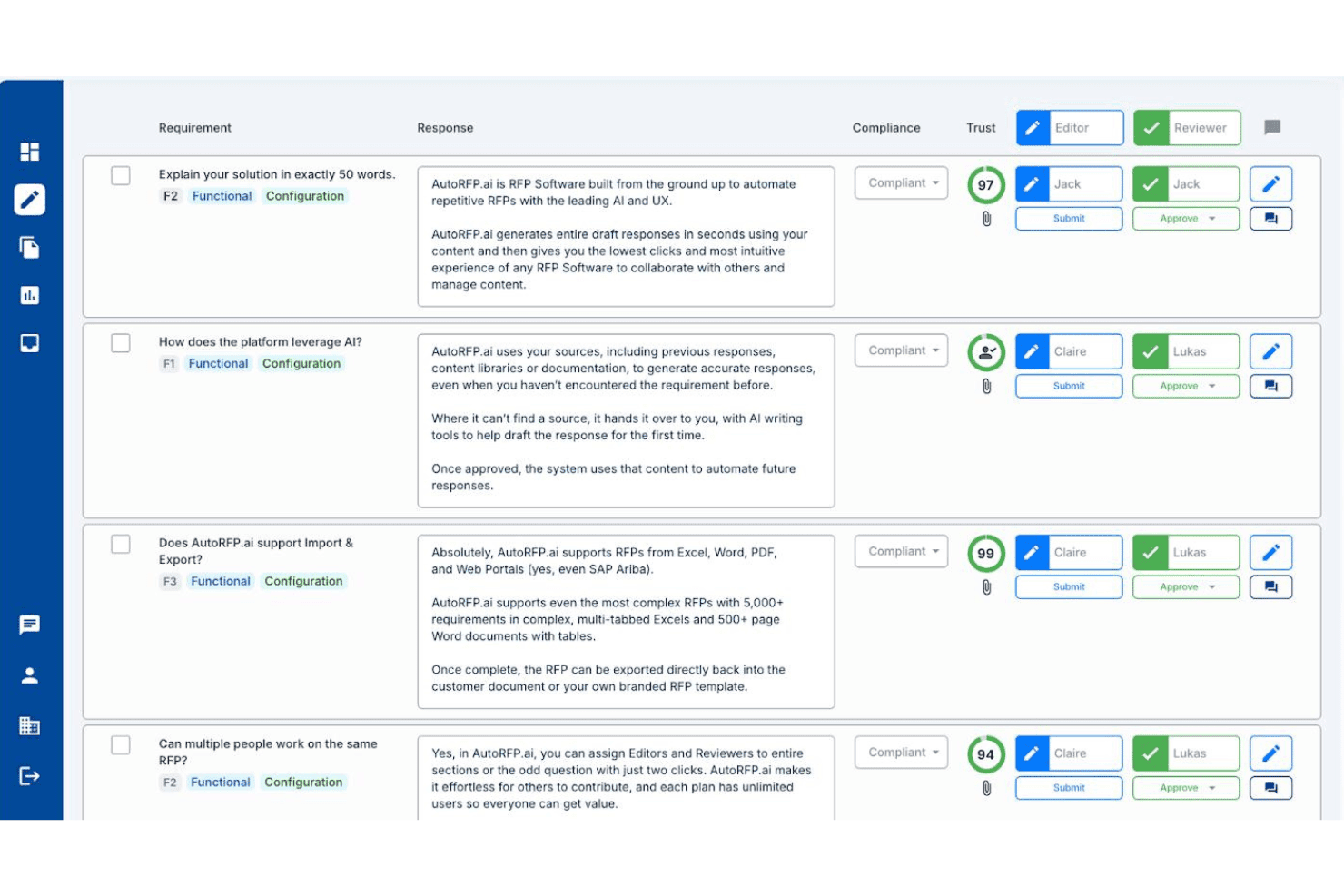
AutoRFP.ai lets teams assign editors and reviewers to RFP responses with AI trust scores. AutoRFP.ai is an AI-native RFP response platform that automates the drafting, review, and submission of RFPs, DDQs, security questionnaires, and tenders using a self-building knowledge base, multi-step approval workflows, and deep CRM and content source integrations.
Who Is AutoRFP.ai Best For?
AutoRFP.ai is built for bid managers and proposal teams handling high volumes of inbound RFPs, DDQs, and security questionnaires who need to cut response time without hiring more staff.
Why I Picked AutoRFP.ai
AutoRFP.ai earns its spot on my shortlist because it's built specifically for AI-driven RFP response automation in a way that generic proposal tools simply aren't. I'm particularly drawn to its self-building knowledge base, which ingests past responses and auto-updates without anyone manually curating a content library. The Trust Scores on every AI-generated draft are what really set it apart: each answer shows a confidence percentage and an exact source citation, so reviewers know precisely what they're approving rather than guessing at AI output.
AutoRFP.ai Key Features
- Self-building knowledge base: Automatically ingests and tags approved responses from 15+ connected sources, including SharePoint, Confluence, and Google Drive, without manual curation.
- Multi-step approval workflows: Routes responses through sequential reviewer and editor assignments by section or question, with a full audit trail on every action.
- Browser extension for procurement portals: Lets users respond directly inside SAP Ariba, Workday Strategic Sourcing, Coupa, and Jaggaer without switching between platforms.
- Go/no-go analysis: Scans incoming RFPs and generates a structured bid/no-bid recommendation automatically before your team commits any time to a response.
AutoRFP.ai Integrations
AutoRFP.ai lists 18+ integrations, including native Salesforce sync and connections to HubSpot, Microsoft Dynamics 365, DealCloud, SharePoint, Confluence, Google Drive, Highspot, Seismic, Slack, and Microsoft Teams. It also offers an open API and webhooks for custom integrations.
Pros and Cons
Pros:
- Unlimited team collaboration on every project
- Produces high-confidence draft responses quickly
- AI auto-builds and updates content library
Cons:
- Not designed for outbound sales proposals
- No built-in pricing or quoting engine
Learn more about AutoRFP.ai: Best for dynamic pricing and bundles
- Free demo available
- Pricing upon request
Visit WebsiteCustomer Rating:4.7/5
DealHub AI lets you manage, track, and update sales proposals from a centralized dashboard. DealHub AI is a cloud-based quote-to-revenue platform that helps sales teams manage the entire deal process—from proposal to signature—in one unified workspace.
Why I picked DealHub AI: It combines proposal generation, pricing logic, approvals, and contract workflows so teams can move faster and stay aligned. With built-in CPQ, reps can create accurate quotes using guided configuration, smart pricing rules, and dynamic bundles—no spreadsheets required. Adaptive pricing and usage-based models are supported out of the box, helping teams respond to change with confidence. Proposal content also stays consistent and compliant thanks to approval workflows and brand controls, making it easy for reps to deliver professional, tailored proposals at scale.
DealHub AI Standout Features and Integrations
Features include contract lifecycle management (CLM), covering everything from contract creation to negotiation and approval. Teams can collaborate in real time using the integrated Digital DealRoom, which centralizes buyer and internal communication, tracks engagement, and keeps deals on course.
Integrations include Salesforce, Microsoft Dynamics 365, HubSpot, Freshworks, DocuSign, Gong, and Slack.
Pros and Cons
Pros:
- Built-in CPQ features
- Accurate pricing through predefined rules
- Digital DealRoom enhances collaboration with customers
Cons:
- Learning curve for new users
- API integration is a paid add-on
Learn more about DealHub AI: Best for customizable proposal templates
- Free trial available
- From $8/month (billed annually)
Visit WebsiteCustomer Rating:4.6/5
SignNow provides an organized document management interface, allowing users to upload, sign, send, and track proposals and contracts efficiently. SignNow is an electronic signature solution that helps businesses sign, send, and manage documents securely on any device. It offers features like document templates, team collaboration, and mobile applications to enhance your document workflows.
Why I picked SignNow: You can create reusable templates for your most-used documents, ensuring consistency and saving time when preparing proposals. Additionally, SignNow allows you to add fillable fields to your documents, such as text boxes, checkboxes, and radio buttons, making it easy for recipients to complete and sign proposals accurately. Another valuable feature is SignNow's team collaboration capabilities. You can create teams within the platform to securely collaborate on documents and templates, ensuring that all team members are on the same page during the proposal creation process.
SignNow Standout Features and Integrations
Features include document editing, bulk sending, signing links, kiosk mode, in-person signing, document history tracking, role-based signing, conditional fields, data validation, attachment requests, custom branding, and audit trails.
Integrations include Microsoft 365, Google Workspace, Salesforce, NetSuite, SharePoint, Dynamics, Gmail, Excel, and Autodesk.
Pros and Cons
Pros:
- Unlimited users on all plans
- Good audit trail and document history features
- Mobile app available
Cons:
- Can be difficult to update documents once uploaded
- May not be ideal for large-scale operations
Learn more about SignNow: 7Best for turning proposals into signable order forms
Dock
- Free plan + free demo available
- From $350/month (billed annually)
Visit WebsiteCustomer Rating:4.9/5
Dock lets you create proposals and price quotes from standardized templates for a more consistent customer-facing experience. Dock is a platform designed to help sales teams improve their processes, from lead capture to onboarding and more. It offers a centralized space for collaboration and client-facing documents, like proposals, quotes, and contracts.
Why I picked Dock: Dock's proposal management system is easy to use with pre-built templates. These templates include everything from proposals and price quotes to order forms, contracts, and other important documents. The platform also helps standardize sales processes by allowing teams to easily turn proposals or quotes into signable order forms. Furthermore, Dock offers order form tracking features that provide insight into document statuses, whether they're viewed, signed, or still require approval.
Dock Standout Features and Integrations
Features include digital sales rooms, customizable client portals, buyer signals, engagement analytics, dynamic action plans for onboarding, custom branding, secure digital signatures, and numerous templates for different sales functions.
Integrations include HubSpot, Salesforce, Slack, Zoom, Airtable, Pandadoc, Typeform, and more.
Pros and Cons
Pros:
- Digital sales rooms with personalized client portals
- Document status visibility
- Many templates to help create consistent experiences
Cons:
- Order form features are an additional add-on
- HubSpot and Salesforce integration limited to higher-tier plans
Learn more about Dock:

Pre-designed templates include proposals, contracts, quotes, online brochures, and statements of work. Better Proposals helps revenue teams get paid faster and maintain a high-quality product through its collaboration capabilities.
Why I picked Better Proposals: Collaboration is essential when working with proposals, so I added Better Proposals to this article because of its teamwork capabilities. With Better Proposals, you can get the entire team on the same page thanks to its tools that simplify the proposal process. These tools include pipeline visibility that allows everyone to see what the rest of the team is working on at any moment and improve efficiency.
Better Proposals Standout Features and Integrations
Features include tools to help your teams convert more deals and increase the number of paying clients. For example, Better Proposals provides artificial intelligence and automatic recommendations to identify what’s working in your industry.
Integrations include native integrations, such as ActiveCampaign, Asana, Freshsales, HubSpot CRM, Insightly, PayPal, Pipedrive, Salesforce, Stripe, Zoho, and other software options. If you have a paid Zapier account, you can create custom integrations with thousands of apps to automate your processes.
Pros and Cons
Pros:
- Creates professional proposals.
- Excellent customer support.
- Simplifies sales processes.
Cons:
- Can’t print proposals.
- Has some bugs.
Learn more about Better Proposals: Best for proposal design
- 14-day free trial + free demo available
- From $19/user/month (billed annually)
Visit WebsiteCustomer Rating:4.6/5
Add different sections to proposals through the drag-and-drop interface. Proposify provides extensive proposal design capabilities that allow revenue teams to customize every part and element of a proposal. The vendor also offers design and training services to help companies create eye-catching designs.
Why I picked Proposify: The platform is a proposal creation software that will help you simplify and enhance the process. Proposify provides an editor that provides hands-on proposal creation capabilities without having you rely on word processing tools. It uses a drag-and-drop interface that allows you to add and edit multiple sections on your proposal.
Proposify Standout Features and Integrations
Features are available from Proposify that will help you throughout the proposal process, including analytics and metrics that provide insights into your documents’ performance that help you better understand your sales process. You can also use the data to optimize sales documents by enhancing future proposals based on formats and layouts that worked for you in the past.
Integrations include native connections to platforms such as Basecamp, Freshbooks, HubSpot, Intercom, Olark, Pipedrive, QuickBooks, Salesforce, Stripe, Zoho, and other software options. You can also use a paid Zapier account to create integrations to third-party applications such as ActiveCampaign, Asana, Copper, Highrise, Mailchimp, Microsoft Teams, monday.com, Salesflare, Slack, Zendesk Sell, and other software options.
Pros and Cons
Pros:
- Customizable templates.
- Provides instant proposal data.
- Clean-looking proposals.
Cons:
- Occasional loading errors.
- Not user-friendly.
Learn more about Proposify: 10Best for web-based proposals
Qwilr
- 14-day free trial + free demo available
- From $49/user/month
Visit WebsiteCustomer Rating:4.5/5
Create stunning documents from the template library without relying on a programmer. Qwilr modernizes proposal processes by helping teams create interactive, web-based proposals.
Why I picked Qwilr: I went in a different direction when adding Qwilr to this list because the platform doesn’t create amazing PDF proposals. What Qwilr does is design proposals as interactive, mobile-responsive web pages. You can use various elements such as interactive pricing tables, multimedia files, brand colors, and other creative sections that act as one interactive web-based proposal.
Qwilr Standout Features and Integrations
Features include one-click automation that allows you to simplify proposal generation via templates. This will help your teams increase sales process speeds and move deals out the door without the need for creating personalized proposals by hand.
Integrations are available from Qwilr, such as HubSpot, Pipedrive, QuickBooks, Salesforce, Slack, Stripe, and Zoho CRM. You can also use a paid Zapier account to create custom integrations.
Pros and Cons
Pros:
- Easy to use.
- Allows users to easily reuse content.
- Creates consistent proposals.
Cons:
- Interface is clunky.
- API access is only in the highest tier.
Learn more about Qwilr:
Alte software-uri de gestionare a propunerilor
Iată câteva alte opțiuni pe care cred că merită să le verifici:
- 11ConcordBest all-in-one proposal lifecycle management tool
- 12QuoteWerksBest for proposal view tracking
- 13OmbudBest for response management
- 14ProposableBest for collecting e-signatures
- 15GuruBest for AI-driven proposal creation
- 16PandaDocBest for proposal templates
- 17ProsperoBest for small businesses
- 18RFPIOBest for proposal content suggestions
- 19HoneyBookBest for automating requests for proposal answers
- 20DocSendBest for securely sharing proposals.
- 21IgnitionBest for billing and payment collection through proposals.
- 22GetAcceptBest for digital sales rooms.
- 23RELAYTOBest for interactive proposals.
- 24QorusDocsBest for fast proposal creation.
- 25FastSpring Interactive QuotesBest for real-time proposal analytics.
- 26Zomentum GrowBest for SaaS companies.
Recenzii asociate ale software-urilor de gestionare a propunerilor
Dacă încă nu ai găsit aici ceea ce cauți, consultă aceste instrumente strâns legate de software-urile de gestionare a propunerilor, pe care le-am testat și evaluat.
- Software CRM
- Software de vânzări
- Software de gestionare a clienților potențiali
- Software de analiză a afacerilor
- Software de gestionare a contractelor
- Sistem de gestionare a veniturilor
How I Evaluate Proposal Management Software
I split my evaluation into baseline qualifiers—CRM-synced quoting, e-signature, and proposal tracking—and differentiators that reveal which tools are the right fit for RevOps teams.
Core Functionality (Table Stakes For This List)
When I'm selecting tools for my list, I rank each one on a scale from 0 (does not offer the functionality) to 5 (excels in this area) for each core functionality listed below. Then, I calculate the tool's total score into a percentage. Each tool needs to achieve a minimum total score of 65% to be considered for inclusion.
- Template & Content Library: I check whether reps can assemble proposals from pre-approved content blocks and branded templates rather than copying from old docs or starting from scratch every time.
- CRM Integration: Each tool's ability to pull contact, opportunity, and product data directly from CRMs like Salesforce or HubSpot—and sync proposal status back—is a key part of my evaluation.
- E-Signature & Approvals: I look for built-in e-signature alongside internal approval routing, so a deal desk analyst can enforce discount thresholds before a proposal ever reaches the buyer.
- Pricing & Quoting Engine: The tool should let reps configure product bundles, apply tiered pricing, and generate accurate totals inside the proposal without relying on a separate spreadsheet.
- Proposal Analytics & Tracking: I evaluate whether the platform shows section-level engagement data—like which pages a buyer spent the most time on—so sales and RevOps teams can prioritize follow-up.
- Collaboration & Redlining: Multi-user editing, commenting, and version control matter here, especially when legal, finance, and sales all need to weigh in before a proposal goes out.
Once I have a list of tools that meet this criteria, I consider what sets each platform apart.
Differentiating Factors (What Sets Vendors Apart)
Here's how I compare and contrast different vendors:
Standout Features
Conditional content rules are a big differentiator—I look for tools that automatically swap pricing, terms, or sections based on deal attributes like region or product line. Revenue intelligence dashboards also carry weight. When a platform aggregates win rates by template or tracks proposal velocity, RevOps leaders get data they can feed directly into pipeline forecasts. Guided selling workflows round this out by walking reps through structured questionnaires that assemble compliant proposals, reducing errors before deals ever hit the approval queue.
Beyond Features
Tech stack connectivity is one of the first things I evaluate. A proposal tool that syncs with your CPQ, billing, and ERP systems keeps the quote-to-cash workflow intact across teams. Pricing model matters just as much—I check whether per-seat or per-send pricing makes sense for your team's volume and growth trajectory. Security and compliance round out my evaluation. Tools handling sensitive deal data should carry SOC 2 Type II certification and support SSO/SAML, especially when finance and legal stakeholders are reviewing proposals alongside sales.
Cum să alegi software-ul de gestionare a propunerilor
Având la dispoziție atât de multe soluții software diferite pentru gestionarea propunerilor, poate fi dificil să decizi care instrument se potrivește cel mai bine nevoilor tale.
Atunci când faci lista scurtă, testezi și alegi software-ul de gestionare a propunerilor, ia în considerare următoarele:
- Ce problemă încerci să rezolvi - Începe prin a identifica lipsa unei funcții din software-ul de gestionare a propunerilor pe care încerci să o acoperi, pentru a clarifica funcțiile și capabilitățile pe care trebuie să le ofere instrumentul.
- Cine va trebui să îl folosească - Pentru a evalua costurile și cerințele, ia în considerare cine va utiliza software-ul și de câte licențe vei avea nevoie. Va trebui să evaluezi dacă accesul va fi necesar doar pentru liderii operațiunilor de venituri sau pentru întreaga organizație. După ce acest lucru este clar, merită să te gândești dacă acorzi prioritate ușurinței de utilizare pentru toți sau vitezei pentru utilizatorii avansați ai software-ului tău de gestionare a propunerilor.
- Cu ce alte instrumente trebuie să funcționeze - Clarifică ce instrumente înlocuiești, ce instrumente păstrezi și cu ce instrumente va trebui să se integreze, cum ar fi software-ul de contabilitate, CRM sau resurse umane. Va trebui să decizi dacă instrumentele trebuie să se integreze între ele sau dacă poți înlocui mai multe instrumente cu un singur software consolidat pentru propuneri.
- Ce rezultate sunt importante - Ia în considerare rezultatul pe care software-ul trebuie să îl ofere pentru a fi considerat un succes. Gândește-te la ce capabilitate vrei să obții sau la ce vrei să îmbunătățești și la modul în care vei măsura succesul. De exemplu, un rezultat ar putea fi posibilitatea de a obține o vizibilitate mai bună asupra performanței. Ai putea compara funcțiile software-urilor de gestionare a propunerilor până la epuizare, dar dacă nu te gândești la rezultatele pe care vrei să le obții, ai putea pierde mult timp valoros.
- Cum ar funcționa în cadrul organizației tale - Ia în considerare alegerea software-ului împreună cu fluxurile tale de lucru și metodologia de livrare. Evaluează ce funcționează bine și care sunt domeniile ce cauzează probleme și trebuie abordate. Nu uita că fiecare companie este diferită — nu presupune că, doar pentru că un instrument este popular, va funcționa și în organizația ta.
Tendințe în software-ul de gestionare a propunerilor pentru 2026
Analizând cele mai recente actualizări de produse, comunicate de presă și jurnale de lansări ale principalelor instrumente software de gestionare a propunerilor, putem identifica tendințe esențiale care reflectă evoluția tehnologiei în gestionarea operațiunilor de venituri:
- Capacități de integrare îmbunătățite:
- Accent sporit pe integrarea perfectă cu o gamă mai largă de platforme, în special cu sistemele CRM, indicând o tendință către o stivă tehnologică mai interconectată în operațiunile de venituri.
- Automatizare și personalizare bazate pe inteligență artificială:
- Progrese semnificative în utilizarea inteligenței artificiale pentru crearea și personalizarea automată a propunerilor, demonstrând o tendință către sisteme mai inteligente și mai receptive, care se adaptează nevoilor utilizatorilor și datelor despre clienți.
- Analiză și raportare avansate:
- Funcționalități analitice îmbunătățite, care oferă informații mai aprofundate despre interacțiunea cu propunerile și performanța acestora, evidențiind cererea pentru instrumente de luare a deciziilor bazate pe date în operațiunile de venituri.
- Funcționalități interactive și de colaborare:
- Funcționalități noi care promovează munca în echipă și interacțiunea cu clienții în cadrul procesului de elaborare a propunerilor, reflectând importanța colaborării în crearea unor propuneri convingătoare.
Aceste tendințe demonstrează o orientare clară către soluții mai integrate, mai inteligente și centrate pe utilizator în software-ul de gestionare a propunerilor, care răspund nevoilor sofisticate ale liderilor de astăzi din operațiunile de venituri.
Ce este software-ul de gestionare a propunerilor?
Software-ul de gestionare a propunerilor este un instrument utilizat de companii pentru a crea, gestiona și urmări propuneri de afaceri. Acesta simplifică procesul de creare a propunerilor prin funcții precum șabloane personalizabile, biblioteci de conținut, instrumente de colaborare și analize de urmărire. Software-ul facilitează organizarea documentelor legate de propuneri și se integrează cu diverse sisteme de afaceri pentru un flux de lucru eficient.
Printre beneficiile software-ului de gestionare a propunerilor se numără eficiența sporită în crearea și trimiterea propunerilor. Acesta îmbunătățește calitatea și consecvența propunerilor, sporind șansele de a obține noi contracte. Software-ul permite o colaborare mai bună între membrii echipei, asigurând că propunerile sunt complete și bine coordonate. În plus, acesta oferă informații valoroase despre modul în care clienții interacționează cu propunerile, contribuind la urmăriri prompte și la luarea unor decizii informate pentru propunerile viitoare.
Funcționalitățile software-ului de gestionare a propunerilor
Alegerea software-ului potrivit pentru gestionarea propunerilor este esențială pentru eficientizarea operațiunilor de venituri. Iată funcționalitățile esențiale pe care trebuie să le căutați:
- Integrarea cu sistemele CRM: Asigură un flux de date perfect și centralizează informațiile despre clienți, aspect esențial pentru crearea unor propuneri personalizate.
- Șabloane personalizabile: Facilitează consecvența mărcii și eficiența, permițând răspunsuri rapide la oportunități.
- Instrumente de colaborare: Permit membrilor echipei să lucreze împreună eficient, îmbunătățind calitatea și rapiditatea propunerilor.
- Automatizarea fluxului de lucru: Simplifică procesul de elaborare a propunerilor, reducând sarcinile manuale și accelerând ciclurile de aprobare.
- Biblioteca de conținut: Oferă acces rapid la conținut aprobat, îmbunătățind acuratețea și consecvența propunerilor.
- Funcționalitate de semnătură electronică: Permite încheierea mai rapidă a contractelor prin aprobări online sigure și legale.
- Analiză și raportare: Oferă informații despre performanța propunerilor, orientând deciziile strategice și optimizările.
- Acces mobil: Asigură posibilitatea ca membrii echipei să lucreze de oriunde, sporind productivitatea și promptitudinea.
- Funcționalități de securitate: Protejează informațiile sensibile, menținând încrederea clienților și conformitatea.
- Scalabilitate: Se adaptează creșterii companiei, susținând nevoile în evoluție ale operațiunilor de venituri.
Selectarea unei platforme cu aceste funcționalități poate îmbunătăți semnificativ eficiența, promptitudinea și succesul echipei dumneavoastră de venituri în obținerea de contracte.
Beneficiile software-ului de gestionare a propunerilor
Software-ul de gestionare a propunerilor simplifică crearea, livrarea și urmărirea propunerilor, oferind beneficii semnificative utilizatorilor și organizațiilor. Iată cinci beneficii principale oferite de aceste instrumente, care evidențiază valoarea lor pentru utilizatori și organizații:
- Eficiență sporită: Automatizează sarcinile de rutină, economisind timp și reducând erorile.
- Echipele pot produce mai multe propuneri într-un timp mai scurt, sporindu-și șansele de a obține contracte.
- Colaborare îmbunătățită: Facilitează munca în echipă la documentele de propunere.
- Contribuitorii pot lucra cu ușurință împreună, îmbunătățind calitatea și consecvența propunerilor.
- Urmărire mai bună: Oferă informații în timp real despre stadiul propunerilor.
- Utilizatorii obțin vizibilitate asupra procesului de revizuire, ceea ce ajută la îmbunătățirea strategiilor și a acțiunilor ulterioare.
- Consecvență și conformitate: Asigură respectarea identității vizuale a companiei și a standardelor legale în toate propunerile.
- Organizațiile mențin o imagine profesională și reduc riscurile de neconformitate.
- Informații bazate pe date: Oferă analize privind performanța propunerilor.
- Liderii pot lua decizii informate pentru a îmbunătăți propunerile și strategiile viitoare.
Costuri și prețuri pentru software-ul de gestionare a propunerilor
Atunci când selectați un plan pentru software-ul de gestionare a propunerilor, este important să înțelegeți nivelurile diferite de funcționalități și prețurile pentru a răspunde nevoilor organizației dumneavoastră. Iată o prezentare a opțiunilor de plan obișnuite pe care le puteți întâlni:
Tabel comparativ al planurilor pentru software-ul de gestionare a propunerilor
| Tipul planului | Preț mediu | Funcționalități comune |
|---|---|---|
| Tipul planuluiDe bază | Preț mediu$15 - $30/utilizator/lună | Funcționalități comuneAcces la șabloane, personalizare de bază, analize |
| Tipul planuluiProfesional | Preț mediu$50 - $75/utilizator/lună | Funcționalități comuneIntegrări avansate, instrumente îmbunătățite pentru colaborare, varietate mai mare de șabloane |
| Tipul planuluiÎntreprindere | Preț mediuPreț personalizat | Funcționalități comuneAcces la toate funcționalitățile, analize avansate, asistență dedicată |
| Tipul planuluiGratuit | Preț mediu$0 | Funcționalități comuneȘabloane limitate, funcționalități de bază, adesea cu limite de utilizare |
Fiecare plan oferă capacități diferite, adaptate diverselor dimensiuni și nevoi ale companiilor. Evaluarea cerințelor organizației dumneavoastră va contribui la determinarea celei mai rentabile și benefice opțiuni pentru îmbunătățirea proceselor de gestionare a propunerilor.
Întrebări frecvente despre software-ul de gestionare a propunerilor
După cum puteți vedea, software-ul de gestionare a propunerilor vă poate ajuta să încheiați mai multe afaceri. Cu toate acestea, este posibil să aveți și alte întrebări pentru a vă asigura că aceste instrumente sunt potrivite pentru organizația dumneavoastră. Iată câteva dintre întrebările frecvente pe care le pun oamenii atunci când caută instrumente noi de gestionare a propunerilor.
Există vreo diferență între software-ul de gestionare a propunerilor și software-ul pentru solicitări de propuneri?
Da, există o diferență între software-ul de gestionare a propunerilor și software-ul pentru solicitări de propuneri (RFP), deși termenii sunt adesea utilizați interschimbabil. Software-ul de gestionare a propunerilor este conceput pentru a ajuta organizațiile să creeze, să urmărească și să gestioneze propuneri trimise de acestea — de obicei ca răspuns la RFP-uri. Software-ul RFP, pe de altă parte, se concentrează adesea pe procesul de emitere și gestionare a propunerilor primite, în special pentru companiile care solicită oferte de la persoane calificate pentru un anumit serviciu sau o anumită competență. Unele platforme combină ambele funcționalități, însă este util să înțelegeți dacă un instrument este orientat mai mult către cei care emit solicitările sau către cei care răspund la acestea.
Cine utilizează software-ul de gestionare a propunerilor?
Oricine trimite în mod regulat propuneri sau răspunde la solicitări de propuneri poate utiliza software de gestionare a propunerilor. Acesta este utilizat în toate industriile, de la agenții de contabilitate până la designul experienței utilizatorului (UX). De asemenea, echipele de conducere a vânzărilor utilizează platforme pentru propuneri de vânzări pentru a ghida echipele de succes al clienților prin fluxul de lucru al propunerilor și procesul de aprobare a tranzacțiilor.
Cum se integrează software-ul de gestionare a propunerilor cu datele de vânzări?
Cel mai bun software pentru propuneri se integrează de obicei cu datele de vânzări pentru a oferi informații contextuale, a simplifica procesul de elaborare a propunerilor și a asigura alinierea conținutului cu interacțiunile și istoricul clienților. Această integrare permite realizarea unor propuneri mai precise și personalizate, bazate pe scenarii specifice de vânzări și pe nevoile clienților.
Pot instrumentele de gestionare a propunerilor să accepte conținut multimedia?
Da, multe instrumente de gestionare a propunerilor acceptă conținut multimedia, permițând utilizatorilor să creeze propuneri mai atractive și mai dinamice. Această funcționalitate permite includerea de videoclipuri, imagini și elemente interactive, sporind eficiența și atractivitatea propunerii.
Cum gestionează software-ul de gestionare a propunerilor controlul versiunilor și istoricul documentelor?
Software-ul de gestionare a propunerilor include adesea funcționalități solide pentru controlul versiunilor și istoricul documentelor, permițând echipelor să urmărească modificările, să revină la versiuni anterioare și să colaboreze eficient fără să piardă activități esențiale. Astfel, se asigură transparența și acuratețea pe parcursul întregului proces de elaborare a propunerii.
Software suplimentar pentru RevOps
De obicei, organizațiile implementează mai multe tipuri de software pe care echipele lor le utilizează pentru a-și atinge obiectivele. Iată câteva sugestii de alte tipuri de software pentru RevOps: