

As ferramentas de vendas com IA são plataformas de software que utilizam inteligência artificial para automatizar, analisar e otimizar os processos de vendas em todas as suas equipas de receitas. Se está à procura das melhores ferramentas de vendas com IA, é provável que pretenda melhorar a visibilidade do pipeline, reduzir as tarefas manuais e ajudar a sua equipa a concentrar-se em atividades de vendas de elevado valor. Muitas ferramentas incluem pontuação preditiva de leads, copilotos de IA para SDRs e funcionalidades que ajudam a identificar leads qualificados — para que a sua equipa possa agir mais rapidamente e fechar mais negócios. Com tantas opções disponíveis, é difícil saber quais as ferramentas que fornecem efetivamente dados fiáveis, informações acionáveis e melhorias reais nos fluxos de trabalho. Este guia ajudará a comparar rapidamente as principais ferramentas de vendas com IA, compreender as suas funcionalidades essenciais e escolher soluções adequadas às suas operações de vendas e objetivos de crescimento.
Why Trust Our Software Recommendations
6,700+
Reviews
20
Industry experts
16+
Evaluation factors
14
Years
Our reviews reflect our independent judgment—not a sales pitch. Learn how we stay transparent.
For this guide, we evaluated tools using hands-on testing and independent research, scoring tools using our selection criteria.
Our reviews reflect our human editorial judgment, not a sales pitch.
Tabela comparativa de ferramentas de vendas com IA
Esta tabela comparativa resume os detalhes de preços das minhas principais seleções de ferramentas de vendas com IA:
| Tool | Best For | Trial Info | Price | ||
|---|---|---|---|---|---|
| 1 | Best for field sales and territory management | Not available | Pricing upon request | Website | |
| 2 | Best for no-code agent customization | Not available | From $40/user/month | Website | |
| 3 | Best for AI-powered voice agents | Free plan + 14-day trial + free demo available | From $25/user/month (billed annually) | Website | |
| 4 | Best for sales conversation insights | Free demo available | Pricing upon request | Website | |
| 5 | Best for AI sales prospecting and enrichment | Free demo available | Pricing upon request | Website | |
| 6 | Best for digital sales rooms and tracking | Free demo + 14-day free trial available | From $25/user/month | Website | |
| 7 | Best for sales intelligence and contact data | Free trial available | Pricing upon request | Website | |
| 8 | Best for sales enablement and content management | Free demo available | Pricing upon request | Website | |
| 9 | Best for automated lead qualification | Free plan + free demo available | From $29/month | Website | |
| 10 | Best for AI meeting transcription | Free plan + free demo available | From $10/user/month (billed annually) | Website |


Avaliações de ferramentas de vendas com IA
Abaixo encontram-se os meus resumos detalhados das melhores ferramentas de vendas com IA que entraram na minha lista restrita. As minhas avaliações analisam detalhadamente as funcionalidades, capacidades e integrações de cada plataforma, para ajudar a encontrar a melhor opção para si.
 Best for field sales and territory management
- Not available
- Pricing upon request
Visit WebsiteCustomer Rating:4.3/5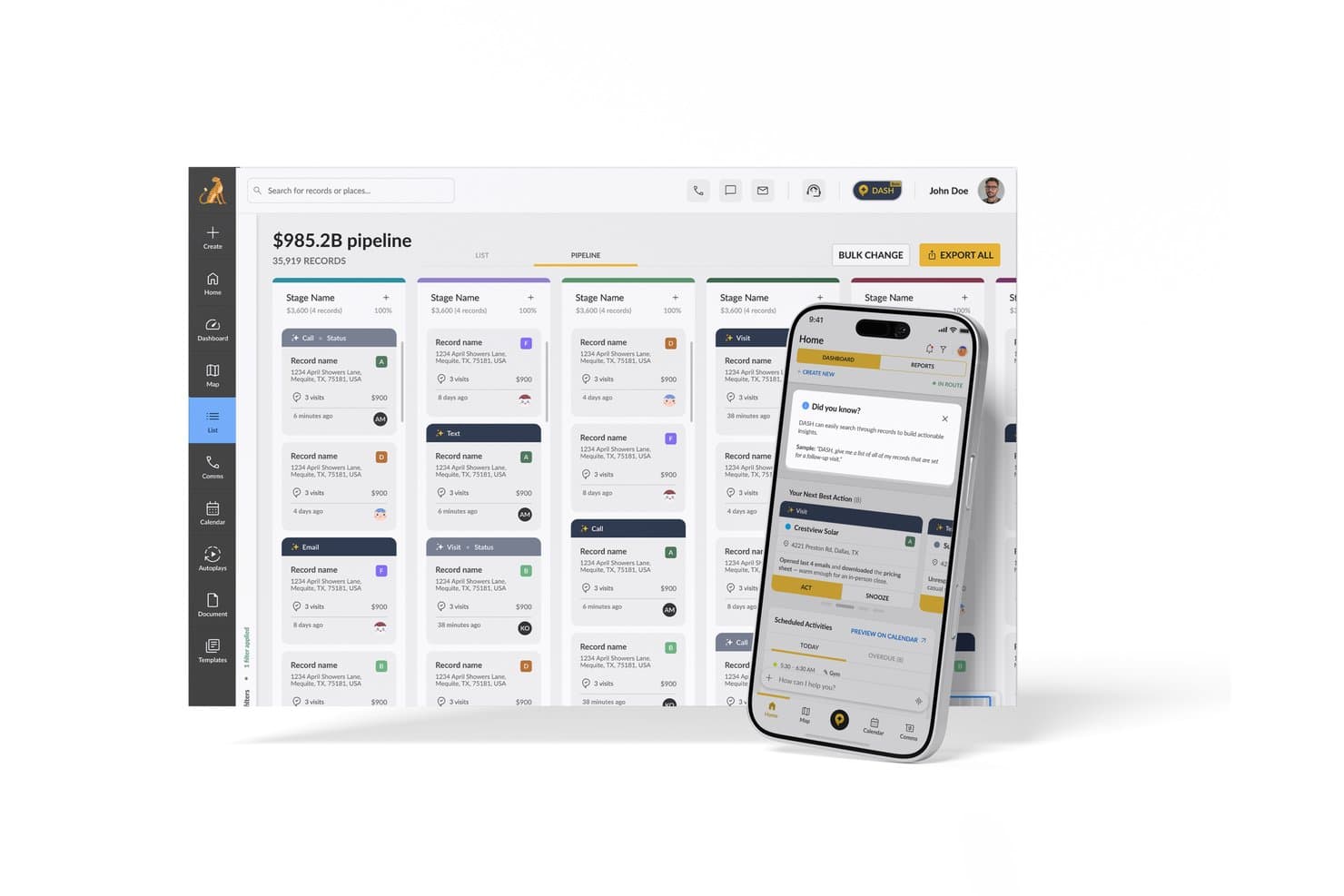
SPOTIO offers an AI-powered Next Best Action feature on its mobile app alongside a pipeline management dashboard for sales teams. SPOTIO is an AI-powered field sales platform that combines territory mapping, route optimization, lead management, and predictive next-best-action recommendations for outside sales teams.
Who Is SPOTIO Best For?
SPOTIO is a strong fit for outside sales teams in verticals like solar, roofing, telecom, and home services that rely on door-to-door or territory-based selling.
Why I Picked SPOTIO
SPOTIO earns its spot on my shortlist because no other tool in this category combines field sales territory management and AI-driven prioritization as tightly. I particularly like how the NBA (Next Best Action) engine scores every record with predictive Value Scores, refreshed intraday, so reps always know which door to knock on next. The DASH AI Co-Pilot is impressive too, letting reps capture visit notes by voice or photo on the spot, without stopping to type between appointments.
SPOTIO Key Features
- Mobile CRM with offline mode: Reps access records, capture activities, and update deals without an internet connection.
- Location-verified activity tracking: All visits and tasks are logged with GPS data to ensure field activities are accurately tracked.
- Territory management controls: Managers define, assign, and edit territories using custom geographic boundaries and layered permissions.
- Sales pipeline analytics dashboard: Users see real-time field sales metrics, rep performance trends, and conversion tracking in one interface.
SPOTIO Integrations
SPOTIO offers native integrations with Salesforce, Microsoft Dynamics 365, HubSpot, and more. An API is also available for custom integrations.
Pros and Cons
Pros:
- Voice-based note capture speeds up field workflows
- GPS-verified visit logging keeps field data accurate
- Intraday AI lead scoring for field reps
Cons:
- Limited conversation intelligence for inside sales teams
- AI features skew heavily toward field sales
Learn more about SPOTIO: Best for no-code agent customization
- Not available
- From $40/user/month
Visit WebsiteCustomer Rating:4.7/5
Creatio AI surfaces enrichment insights and next best offers in CRM. Creatio AI CRM is a CRM and workflow platform with no-code tools that combines AI agents, predictive lead and opportunity scoring, pipeline forecasting, automated CRM enrichment, and generative AI assistance across the full sales cycle.
Who Is Creatio AI CRM Best For?
Creatio AI CRM is a strong fit for sales operations teams and CROs who want to replace their CRM entirely with a no-code platform that runs autonomous AI agents across forecasting, enrichment, and pipeline management.
Why I Picked Creatio AI CRM
I've included Creatio AI CRM in my top picks because it's one of the few platforms built around autonomous AI agents rather than bolted-on AI features. The account research agent auto-fills records and maps stakeholders in seconds, and the forecast and pipeline agent flags stalled deals, summarizes risks, and runs automated weekly forecast reviews for CROs. What I really like is that you can build and customize AI agents without writing a single line of code.
Creatio AI CRM Key Features
- Predictive lead and opportunity scoring: ML-based scoring ranks leads and opportunities on a 1–100 scale, weighing customer data, service history, and past sales.
- Territory management agent: Automatically balances territories and surfaces untapped accounts to help reps and ops teams find whitespace.
- Quote generation agent: Suggests product bundles and pricing based on deal context, then drafts proposals without manual input.
- No-code and agent-driven customization: Build and customize sales workflows using no-code visual designers and AI coding agents.
Creatio AI CRM Integrations
Creatio AI CRM has documented integrations with Microsoft Teams, Outlook, Zoom, OpenAI, email, and calendars. It also supports APIs, Marketplace integrations, and Zapier.
Pros and Cons
Pros:
- Territory agents surface untapped accounts
- No-code models adapt scoring workflows
- Autonomous agents cover forecasting and enrichment
Cons:
- Reporting gaps limit RevOps visibility
- Conversation intelligence lacks sentiment and objections
Learn more about Creatio AI CRM: Best for AI-powered voice agents
- Free plan + 14-day trial + free demo available
- From $25/user/month (billed annually)
Visit WebsiteCustomer Rating:4.2/5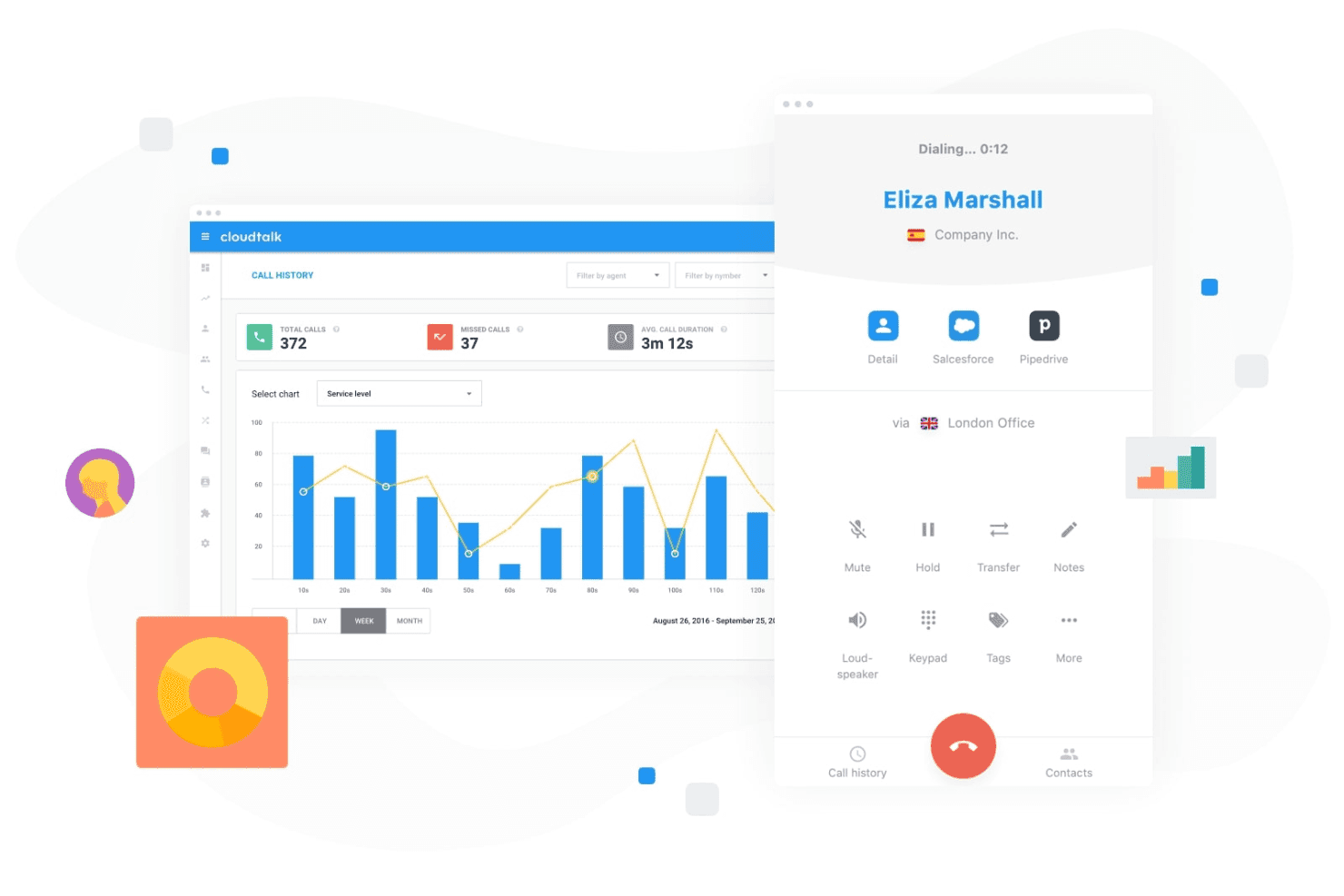
CloudTalk lets teams manage customer calls while tracking call activity and performance from a centralized dashboard. CloudTalk is an AI-powered calling platform that combines AI voice agents, conversation intelligence, and sales dialers with deep CRM integrations for sales and support teams.
Who Is CloudTalk Best For?
CloudTalk is a strong fit for SMB sales teams that run high call volumes and need AI-assisted calling built into their phone system.
Why I Picked CloudTalk
CloudTalk earns its spot on my shortlist because its AI Voice Agents handle routine outbound calls, like trial signup qualification and appointment scheduling, without a rep ever picking up the phone. I like that the AI Receptionist runs 24/7 in 60+ languages, covering after-hours gaps automatically. The Parallel Dialer, which dials up to 10 lines simultaneously and auto-drops voicemails, keeps live reps focused on actual conversations.
CloudTalk Key Features
- AI conversation intelligence: Automatically generates call summaries, transcripts, sentiment analysis, and talk/listen ratios.
- Smart sales dialer: Combines preview, power, and parallel dialing modes to streamline outbound calling efforts.
- Workflow automation: Automates call routing, IVRs, after-hours coverage, and repetitive communication tasks.
- Bi-directional CRM sync: Native integrations with Salesforce, HubSpot, and Pipedrive keep call records and notes synced automatically.
CloudTalk Integrations
CloudTalk offers native integrations with Salesforce, HubSpot, Pipedrive, Zendesk, Zoho CRM, Freshdesk, Intercom, and Slack. An API is available for custom integrations.
Pros and Cons
Pros:
- Real-time sentiment analysis flags coaching opportunities
- Parallel dialer dramatically increases daily call volume
- AI voice agents automate routine outbound calls
Cons:
- AI features limited to voice channel only
- No native pipeline or deal scoring
Learn more about CloudTalk: 4Best for sales conversation insights
Gong
- Free demo available
- Pricing upon request
Visit WebsiteCustomer Rating:4.7/5
Gong analyzes sales calls and emails to surface deal insights with AI. Gong uses AI to analyze sales conversations and deliver actionable insights for revenue teams. It’s designed for sales leaders and reps who want to understand deal risks, coach teams, and improve win rates using real customer interactions. If you need visibility into what’s actually happening in your pipeline, Gong helps you turn call data into strategic guidance.
Who Is Gong Best For?
Gong is a strong fit for mid-sized to enterprise sales teams that want AI-driven insights from customer conversations to improve coaching and deal execution.
Why I Picked Gong
I chose Gong for this list because its AI-driven revenue intelligence and conversation analytics set it apart from other sales tools. Gong automatically records and analyzes sales calls, emails, and meetings to surface deal risks and coaching opportunities that are easy to miss manually. I find its conversation analytics especially valuable for identifying patterns in winning deals and highlighting where reps may need support. For teams looking to use AI to turn real customer interactions into actionable insights, Gong delivers a focused and practical solution.
Gong Key Features
Some other features in Gong that are especially useful for sales teams include:
- Deal boards: Visualize and track the status of every deal in your pipeline with customizable boards.
- Smart trackers: Automatically monitor keywords, topics, and competitor mentions across all sales conversations.
- Call transcription: Generate searchable, AI-powered transcripts for every recorded call and meeting.
- Integration with CRM systems: Sync call data and insights directly with Salesforce, HubSpot, and other leading CRMs.
Gong Integrations
Integrations include Slack, HubSpot CRM, Chili Piper, Gainsight, G2, AWS, Snowflake, ZoomInfo, Zapier, Vidyard, Salesforce, Zoom, Rippling, and more.
Pros and Cons
Pros:
- Tracks competitor mentions in real time
- Conversation intelligence highlights coaching opportunities
- AI analyzes calls for deal risk signals
Cons:
- Can generate too many notifications for users
- Requires call recording consent for compliance
Learn more about Gong: Best for AI sales prospecting and enrichment
- Free demo available
- Pricing upon request
Visit WebsiteCustomer Rating:4.6/5
Cognism enriches leads with AI and compliant prospecting data. Cognism offers AI-driven prospecting for sales teams that need accurate, compliant contact data. It’s a strong fit for B2B organizations looking to automate lead generation and enrich their CRM with up-to-date information. If your team struggles with manual research or outdated lists, Cognism addresses these challenges with automated data sourcing, enrichment, and features like an AI assistant, buyer intent signals, and support for targeted outreach, such as cold email campaigns.
Who Is Cognism Best For?
Cognism is a good fit for B2B sales teams in regulated industries that require accurate, compliant contact data for outbound prospecting.
Why I Picked Cognism
I picked Cognism for this list because its AI-powered sales prospecting and lead enrichment capabilities address a core challenge for revenue teams: finding accurate, compliant contact data at scale. The platform uses AI to automatically source, verify, and enrich leads, reducing the time your team spends on manual research. I also appreciate that Cognism prioritizes data compliance, which is especially important for teams operating in regions with strict privacy regulations. Its enrichment features help keep your CRM data fresh, so your outreach efforts are always based on the most current information available.
Cognism Key Features
Some other features in Cognism that stand out for sales teams include:
- Chrome extension: Capture and enrich leads directly from LinkedIn and company websites without leaving your browser.
- Do-not-call and compliance screening: Automatically flags contacts against global do-not-call lists and compliance requirements.
- Intent data integration: Surfaces leads showing buying signals by integrating intent data into your prospecting workflow.
- Automated list building: Create targeted lead lists using advanced filters for industry, company size, location, and more.
Cognism Integrations
Integrations include Salesforce, HubSpot, Outreach, Salesloft, Microsoft Dynamics 365, Pipedrive, Bullhorn, Zapier, and more.
Pros and Cons
Pros:
- Intent data highlights prospects ready to buy
- Built-in compliance checks for GDPR and CCPA
- Accurate B2B contact data for global markets
Cons:
- No native email sequencing or outreach tools
- Occasional gaps in smaller market data coverage
Learn more about Cognism: Best for digital sales rooms and tracking
- Free demo + 14-day free trial available
- From $25/user/month
Visit WebsiteCustomer Rating:4.6/5
Tracks sales performance, deals, hit rates, and top reps metrics. Sales teams looking to modernize their deal management often turn to GetAccept. The platform combines digital sales rooms, document tracking, and e-signature in one workspace, making it especially useful for B2B sales cycles with multiple stakeholders. It’s a strong choice for teams that want to personalize buyer experiences and keep deals moving with real-time engagement insights.
Who Is GetAccept Best For?
GetAccept is well-suited for B2B sales teams at mid-sized companies that manage complex deals involving multiple stakeholders and documents.
Why I Picked GetAccept
What drew me to GetAccept is its focus on creating a digital sales room that brings together document tracking and e-signature in one place. For teams managing complex B2B deals, I find the ability to track buyer engagement with sales documents in real time especially valuable. The platform’s integrated e-signature simplifies closing, while its digital workspace helps sales reps personalize the buying experience and keep all stakeholders aligned. These features make GetAccept a strong fit for anyone searching for an AI sales tool that supports high-touch, multi-step deal cycles.
GetAccept Key Features
Some other features that make GetAccept useful for sales teams include:
- Automated reminders: Send scheduled notifications to prospects and internal team members to keep deals moving forward.
- Video messaging: Lets sales reps record and embed personalized videos directly into sales documents for a more engaging buyer experience.
- Contract templates: Provides customizable templates for frequently used agreements, reducing manual document creation time.
- Deal analytics dashboard: Offers real-time insights into document views, time spent, and stakeholder engagement across all active deals.
GetAccept Integrations
Integrations include Salesforce, HubSpot, Microsoft Dynamics, Pipedrive, SuperOffice, Lime CRM, UpSales, Gong, Slack, and more.
Pros and Cons
Pros:
- Automated reminders to reduce deal delays
- Built-in video messaging for personalized outreach
- Real-time document tracking for sales engagement
Cons:
- Occasional delays in document delivery notifications
- Limited AI-driven forecasting features
Learn more about GetAccept: Best for sales intelligence and contact data
- Free trial available
- Pricing upon request
Visit WebsiteCustomer Rating:4.4/5
ZoomInfo offers an AI sales tool with email automation and prospect engagement features. Sales teams looking for accurate B2B contact and company data often turn to ZoomInfo. The platform is designed for professionals who need to identify, research, and connect with decision-makers quickly. Its data-driven approach helps users build targeted prospect lists and improve outreach precision.
Who Is ZoomInfo Best For?
ZoomInfo is a strong fit for B2B sales and marketing teams at mid-sized to large enterprises that need accurate contact and company data for targeted outreach.
Why I Picked ZoomInfo
What sets ZoomInfo apart for me is its depth and accuracy of B2B contact and company data, which is essential for targeted sales outreach. The platform’s AI-driven search and filtering tools help users quickly identify the right decision-makers within specific industries or companies. I also value its real-time data enrichment, which keeps prospect information up to date and actionable for sales teams. For anyone searching for an AI sales tool that prioritizes data quality and precision targeting, ZoomInfo is a strong contender.
ZoomInfo Key Features
Some other features that make ZoomInfo valuable for sales teams include:
- Intent data tracking: Surfaces companies actively researching topics relevant to your solution so you can prioritize outreach.
- Automated workflows: Lets you trigger actions like list building, alerts, or CRM updates based on data changes or prospect activity.
- Engagement tracking: Monitors email opens, clicks, and responses to help you gauge prospect interest and refine messaging.
- Chrome extension: Allows users to access contact and company data directly from LinkedIn or company websites without leaving their browser.
ZoomInfo Integrations
Integrations include Salesforce, HubSpot, Microsoft Dynamics 365, Snowflake, Gmail, Zoom, Aircall, and more.
Pros and Cons
Pros:
- Real-time data enrichment for CRM records
- AI-powered intent data for prospecting
- Extensive B2B contact and company database
Cons:
- Limited support for international markets
- Occasional outdated or inaccurate contact data
Learn more about ZoomInfo: Best for sales enablement and content management
- Free demo available
- Pricing upon request
Visit WebsiteCustomer Rating:4.6/5
Highspot tracks content usage and sales engagement analytics. Sales enablement teams looking to unify content, training, and analytics often turn to Highspot. The platform is designed for organizations that want to equip their sales reps with the right materials and guidance at every stage of the buyer journey. Highspot stands out for its focus on surfacing relevant content and actionable insights directly within sellers’ workflows.
Who Is Highspot Best For?
Highspot is a strong fit for mid-sized to large sales and enablement teams in B2B industries that need centralized content management and guided selling.
Why I Picked Highspot
What stands out to me about Highspot is its focus on AI-powered sales enablement that brings content management and guided selling together. I picked Highspot because it uses AI to recommend the most relevant sales content and playbooks to reps based on deal stage and buyer engagement. The platform’s guided selling features help teams deliver consistent messaging and training, while analytics provide visibility into what content actually drives results. For anyone searching for an AI sales tool that connects enablement, content, and actionable insights, Highspot offers a unified approach.
Highspot Key Features
Some other features that make Highspot valuable for sales enablement teams include:
- Pitch tracking: Tracks when prospects open, view, and engage with shared sales content.
- Content governance: Lets admins control content access, versioning, and compliance across distributed teams.
- Training and onboarding modules: Provides built-in tools for delivering sales training, onboarding, and certification programs.
- CRM integration: Connects with platforms like Salesforce and Microsoft Dynamics to sync sales activities and content usage data.
Highspot Integrations
Integrations include Salesforce, Microsoft Dynamics 365, Microsoft Teams, Outlook, SharePoint, Slack, Google Workspace, Gmail, Salesloft, and more.
Pros and Cons
Pros:
- In-depth pitch engagement analytics available
- Guided selling playbooks for consistent messaging
- AI recommends content based on deal stage
Cons:
- Lacks native predictive forecasting features
- Limited workflow automation compared to peers
Learn more about Highspot: Best for automated lead qualification
- Free plan + free demo available
- From $29/month
Visit WebsiteCustomer Rating:4.7/5
Origami finds and scores leads with verified contact data for outreach. Origami offers an AI-powered sales agent designed to automate outbound prospecting for B2B teams. It’s a strong fit for sales professionals and revenue operations leaders who want to scale outreach without expanding headcount. By handling research, messaging, and follow-up, Origami helps teams focus on higher-value sales activities.
Who Is Origami Best For?
Origami is well-suited for B2B sales teams at growth-stage companies that want to automate and scale outbound prospecting.
Why I Picked Origami
What sets Origami apart for me is its focus on delivering an AI-powered sales agent that fully automates outbound prospecting. The platform handles everything from researching leads to crafting personalized outreach messages and following up, which is especially valuable for teams looking to scale without adding headcount. I like that Origami’s AI can adapt messaging based on prospect responses, making outreach feel more human and relevant. For anyone searching for an AI sales tool that goes beyond simple automation and actually manages the outbound process end-to-end, Origami is a strong contender.
Origami Key Features
Some other features that make Origami useful for sales teams include:
- Automated lead sourcing: The platform identifies and imports new leads based on your target criteria.
- Multi-channel outreach sequencing: Origami supports outreach across email, LinkedIn, and other channels in coordinated sequences.
- Conversation tracking dashboard: Users can monitor all ongoing prospect conversations and engagement in one place.
- Team collaboration tools: Multiple team members can share notes, assign leads, and coordinate outreach within the platform.
Origami Integrations
Native integrations are not currently listed.
Pros and Cons
Pros:
- AI-driven data collection and research
- Multi-channel outreach from one platform
- Fast lead list generation and enrichment
Cons:
- No built-in phone dialer functionality
- Some features are still maturing or in beta
Learn more about Origami: Best for AI meeting transcription
- Free plan + free demo available
- From $10/user/month (billed annually)
Visit WebsiteCustomer Rating:4.3/5
Fireflies.ai analyzes meeting conversations and tracks team performance metrics. Sales teams looking to capture, transcribe, and analyze calls may find Fireflies.ai especially useful. The platform uses AI to automate meeting notes and surface key insights from sales conversations. It’s a strong fit for revenue operations professionals who want searchable records and actionable data from every customer interaction.
Who Is Fireflies.ai Best For?
Fireflies.ai is a strong choice for sales and revenue teams that need automated call transcription and searchable meeting records.
Why I Picked Fireflies.ai
I picked Fireflies.ai because its AI meeting assistant directly addresses the challenge of capturing and organizing sales call data. The tool automatically records, transcribes, and summarizes sales meetings, making it easy to revisit key moments and action items. I also appreciate how Fireflies.ai lets you search across transcripts and highlight important topics, which helps sales teams quickly surface insights from their conversations. For anyone looking to automate sales call documentation and analysis, Fireflies.ai’s focus on accurate, searchable transcription stands out.
Fireflies.ai Key Features
Some other features that make Fireflies.ai valuable for sales teams include:
- AI-powered topic detection: Automatically identifies and tags key topics discussed during sales calls for easier review.
- Collaboration tools: Lets team members add comments, reactions, and highlights directly within call transcripts.
- CRM auto-logging: Syncs call notes and summaries to connected CRM platforms without manual entry.
- Custom vocabulary: Allows users to add industry-specific terms to improve transcription accuracy.
Fireflies.ai Integrations
Integrations include Salesforce, HubSpot, Slack, Google Meet, Microsoft Teams, Zoom, Dropbox, and more.
Pros and Cons
Pros:
- Automatic CRM note syncing after calls
- Searchable meeting records for quick reference
- Accurate AI transcription for sales calls
Cons:
- Custom vocabulary setup can be time-consuming
- No real-time coaching during live calls
Learn more about Fireflies.ai:
Outras ferramentas de vendas com IA
Eis algumas opções adicionais de ferramentas de vendas com IA que não entraram na minha lista restrita, mas que ainda vale a pena conhecer:
- 11OverloopBest for multichannel sales outreach
- 12PitchMonsterBest for AI-driven sales roleplays
- 13Persana AIBest for AI sales research and insights
- 14Agentforce SalesBest for AI-driven sales automation
- 15HeyReachBest for LinkedIn outreach automation
- 16SmartReach AIBest for AI email outreach
- 17OutreachBest for AI-driven sales engagement
- 18MindTickleBest for sales coaching and enablement
- 19monday CRMBest for customizable sales workflows
- 20CreatioBest for low-code sales automation
- 21HubSpot Sales HubBest for AI-powered sales productivity
- 22CloudApperBest for customizable AI sales automation
- 23FreshsalesBest for AI-driven sales CRM
- 24Microsoft Dynamics 365 SalesBest for enterprise sales automation
- 25Pipedrive Best for visual sales pipeline insights
- 26CrystalBest for personality-based sales insights
- 27ForecastioBest for AI sales forecasting insights
- 28Revenue GridBest for guided selling and revenue insights
How I Evaluate AI Sales Tools
Every tool here needs AI that actually changes how deals move and forecasts land—not just a label slapped onto legacy features. I evaluate in two layers: the core functionality a tool needs to make the list, and the differentiating factors that set vendors apart.
Core Functionality (Table Stakes For This List)
When I'm selecting tools for my list, I rank each one on a scale from 0 (does not offer the functionality) to 5 (excels in this area) for each core functionality listed below. Then, I calculate the tool's total score into a percentage. Each tool needs to achieve a minimum total score of 65% to be considered for inclusion.
- AI Lead & Opportunity Scoring: I look for ML-driven scoring that goes beyond static rules—tools should surface why a deal or lead scored the way it did, like flagging stalled engagement or missing stakeholders.
- Conversation Intelligence: Each tool should analyze calls and emails using NLP, pulling out signals like competitor mentions, objections, and sentiment shifts that reps can act on.
- AI Forecasting & Pipeline Analytics: I evaluate whether the tool generates its own forecast predictions and flags deal risks, rather than just rolling up rep-submitted numbers in a dashboard.
- Automated Activity Capture & CRM Enrichment: Tools should log emails, meetings, and contacts to the CRM without rep effort, and I check whether enrichment fills gaps like job titles or org charts.
- Generative AI Assistance: I look at how the tool uses GenAI in context—drafting follow-up emails after a recorded call, summarizing deal status, or personalizing outreach based on CRM data.
- Next-Best-Action Recommendations: The tool should prescribe specific actions tied to deal context, like recommending a multi-thread play when only one contact is engaged on a late-stage opportunity.
Once I have a list of tools that meet this criteria, I consider what sets each platform apart.
Differentiating Factors (What Sets Vendors Apart)
Here's how I compare and contrast different vendors:
Standout Features
Buyer intent signals are a big differentiator—I look for tools that layer third-party intent data into scoring models so reps focus on accounts actively researching solutions. AI sales coaching also stands out when it benchmarks reps against top performers and recommends specific improvements. I pay close attention to autonomous AI agents that handle multi-step tasks like prospect research and meeting prep without manual triggers.
Beyond Features
CRM integration depth matters a lot—I check whether a tool offers native, bi-directional sync with platforms like Salesforce or HubSpot, since broken sync creates pipeline blind spots fast. AI accuracy and explainability also weigh heavily; I look for vendors that show why a forecast or score landed where it did. Time-to-value is another key factor. Tools with pre-built models and dedicated onboarding get teams to insights in weeks, not quarters.
Como escolher ferramentas de vendas com IA
É fácil ficar preso a listas extensas de funcionalidades e estruturas de preços complexas. Para ajudar a manter o foco enquanto percorre o seu processo exclusivo de seleção de software, eis uma lista de fatores a ter em conta:
| Fator | O que considerar |
|---|---|
| FatorEscalabilidade | O que considerarA ferramenta irá acompanhar a sua equipa à medida que esta cresce? Verifique os limites de utilizadores, os limites de dados e os aumentos de preço para equipas maiores ou volumes superiores. |
| FatorIntegrações | O que considerarA ferramenta liga-se nativamente ao seu CRM, e-mail e plataformas de comunicação? Confirme a compatibilidade com o seu conjunto de ferramentas existente. |
| FatorPersonalização | O que considerarPode adaptar os fluxos de trabalho, os modelos de pontuação ou os painéis ao seu processo de vendas? Evite ferramentas rígidas que o obriguem a adaptar o seu processo. |
| FatorFacilidade de utilização | O que considerarCom que rapidez podem os representantes e gestores aprender a utilizar o sistema? Procure uma navegação clara, requisitos mínimos de formação e opiniões dos utilizadores sobre a adoção. |
| FatorImplementação e integração inicial | O que considerarQue recursos são necessários para começar a trabalhar? Avalie o apoio à migração, os materiais de formação e o tempo habitual até obter resultados para equipas semelhantes. |
| FatorCusto | O que considerarTodos os custos são transparentes, incluindo suplementos e taxas baseadas na utilização? Compare o custo total de propriedade, não apenas o preço anunciado. |
| FatorMedidas de segurança | O que considerarA ferramenta cumpre as suas normas de segurança de dados? Informe-se sobre encriptação, controlos de acesso e conformidade com regulamentos como o RGPD. |
| FatorDisponibilidade do suporte | O que considerarQue canais de suporte são disponibilizados e durante que horário? Considere se precisa de assistência 24 horas por dia, 7 dias por semana, ou de gestão de conta dedicada para a sua equipa. |
O que são ferramentas de vendas com IA?
As ferramentas de vendas com IA são plataformas de software que utilizam inteligência artificial para automatizar, otimizar e analisar os processos de vendas. Estas ferramentas ajudam os profissionais de vendas a atribuir prioridades aos potenciais clientes, recomendar os próximos passos, personalizar o contacto e obter informações a partir dos dados. Com funcionalidades avançadas de IA, como agentes de IA e recomendações ou conteúdos gerados por IA, as equipas podem melhorar o envolvimento dos clientes, aumentar as taxas de conversão e melhorar a precisão das previsões. Ao tirar partido da automatização, estas ferramentas ajudam as equipas a realizar mais em menos tempo, o que as torna especialmente valiosas para startups e empresas em crescimento que estão a construir a sua pilha tecnológica. Muitas plataformas oferecem capacidades completas que apoiam uma melhor tomada de decisões com informações de elevada qualidade ao longo de todo o ciclo de vendas.
Funcionalidades das ferramentas de vendas com IA
Ao selecionar ferramentas de vendas com IA, tenha em atenção as seguintes funcionalidades principais:
- Classificação de potenciais clientes: Utiliza algoritmos de IA para avaliar e classificar os potenciais clientes com base na probabilidade de conversão, ajudando as equipas de vendas a concentrarem-se nas oportunidades mais promissoras.
- Previsões preditivas: Analisa dados históricos de vendas e a atividade atual do pipeline para projetar os resultados futuros das vendas e identificar possíveis riscos ou lacunas.
- Contacto automatizado: Envia e-mails, mensagens ou acompanhamentos personalizados aos potenciais clientes nos momentos ideais, reduzindo o esforço manual e aumentando as taxas de envolvimento.
- Inteligência de conversação: Regista, transcreve e analisa chamadas ou reuniões de vendas para revelar informações, destacar temas importantes e sugerir melhorias aos representantes.
- Recomendações de conteúdos: Sugere materiais de apoio a vendas, estudos de caso ou apresentações relevantes com base na fase do negócio, na persona do comprador ou em interações anteriores.
- Orientação sobre a próxima melhor ação: Fornece indicações ou sugestões em tempo real aos representantes sobre os passos seguintes a dar no processo de vendas, com base na análise do progresso do negócio por parte da IA.
- Análise do pipeline: Disponibiliza painéis e relatórios que representam visualmente as fases dos negócios, as taxas de sucesso e os estrangulamentos, permitindo uma melhor gestão e previsão do pipeline.
- Integração com o CRM: Liga-se diretamente ao CRM existente para sincronizar dados, acompanhar atividades e garantir uma visão unificada das interações com os clientes.
- Acompanhamento da atividade de vendas: Monitoriza e-mails, chamadas, reuniões e outros pontos de contacto para fornecer uma visão completa da produtividade dos representantes e do envolvimento dos compradores.
- Módulos de formação e coaching: Disponibiliza conteúdos de formação baseados em IA, percursos de integração e feedback sobre o desempenho para ajudar os representantes a melhorar as competências e a atingir mais rapidamente o nível de produtividade pretendido.
Benefícios das ferramentas de vendas com IA
A implementação de ferramentas de vendas com IA proporciona vários benefícios à sua equipa e à sua empresa. Eis alguns dos que pode esperar:
- Melhor definição de prioridades dos potenciais clientes: A classificação de potenciais clientes baseada em IA ajuda a sua equipa a concentrar-se nos potenciais clientes com maior probabilidade de conversão, aumentando as taxas de sucesso e a eficiência das vendas.
- Ciclos de vendas mais rápidos: O contacto automatizado e a orientação sobre a próxima melhor ação de um assistente de vendas com IA podem reduzir as tarefas manuais e manter os negócios em andamento sem atrasos desnecessários.
- Previsões mais precisas: A análise preditiva e as informações do pipeline permitem um melhor planeamento das receitas e ajudam a identificar os riscos antes de afetarem os resultados.
- Envolvimento personalizado dos compradores: As recomendações de conteúdos e a inteligência de conversação permitem aos representantes adaptar a sua abordagem a cada potencial cliente, melhorando o envolvimento e a confiança.
- Melhoria do coaching e da integração: Os módulos de formação baseados em IA e o feedback sobre o desempenho aceleram o período de adaptação dos novos representantes e apoiam o desenvolvimento contínuo das competências.
- Dados e fluxos de trabalho unificados: A integração com o CRM e o acompanhamento da atividade de vendas garantem que todos os dados de vendas estão centralizados, facilitando a gestão e a análise do desempenho da equipa.
- Maior visibilidade para a liderança: Os painéis e as análises em tempo real fornecem aos líderes informações acionáveis sobre a saúde do pipeline, a produtividade dos representantes e a eficácia geral das vendas.
Custos e preços das ferramentas de vendas com IA
A seleção de ferramentas de vendas com IA exige uma compreensão dos vários modelos de preços e planos disponíveis. Os custos variam consoante as funcionalidades, o tamanho da equipa, os complementos e outros fatores. A tabela abaixo resume os planos comuns, os respetivos preços médios e as funcionalidades normalmente incluídas nas soluções de ferramentas de vendas com IA:
Tabela de comparação de planos para ferramentas de vendas com IA
| Tipo de plano | Preço médio | Funcionalidades comuns |
|---|---|---|
| Tipo de planoPlano gratuito | Preço médio$0 | Funcionalidades comunsAcompanhamento básico de potenciais clientes, recomendações de IA limitadas, integração de e-mail e relatórios simples. |
| Tipo de planoPlano pessoal | Preço médio$15-$40/utilizador/mês | Funcionalidades comunsClassificação de potenciais clientes, contacto automatizado, integração com CRM, acompanhamento da atividade e análise básica. |
| Tipo de planoPlano empresarial | Preço médio$40-$90/utilizador/mês | Funcionalidades comunsPrevisões preditivas, análise avançada, recomendações de conteúdos, automatização de fluxos de trabalho e colaboração em equipa. |
| Tipo de planoPlano empresarial de grande dimensão | Preço médio$90-$150/utilizador/mês | Funcionalidades comunsIntegrações personalizadas, inteligência de conversação, segurança avançada, suporte dedicado e funcionalidades de conformidade. |
Perguntas frequentes sobre ferramentas de vendas com IA
Aqui estão algumas respostas a perguntas comuns sobre ferramentas de vendas com IA:
Como é que as ferramentas de vendas com IA melhoram a produtividade das equipas de vendas?
As ferramentas de vendas com IA automatizam tarefas repetitivas, como a classificação de potenciais clientes, os acompanhamentos e a introdução de dados. Isto permite aos representantes concentrarem-se na criação de relações e na concretização de negócios, ao mesmo tempo que disponibiliza informações que os ajudam a dar prioridade aos seus esforços de forma mais eficaz.
As ferramentas de vendas com IA podem integrar-se com o meu CRM atual?
Sim, a maioria das ferramentas de vendas com IA disponibiliza integrações nativas com CRMs populares. Antes de escolher uma ferramenta, confirme se é compatível com o seu CRM e verifique se a integração sincroniza os dados em tempo real ou se requer atualizações manuais.
Que considerações de segurança dos dados devo ter em conta?
Procure ferramentas que disponibilizem encriptação, controlos de acesso e conformidade com normas como o RGPD. Pergunte aos fornecedores sobre as respetivas práticas de armazenamento de dados e sobre a forma como tratam informações sensíveis dos clientes, para garantir que os seus dados permanecem protegidos.
Quanto tempo demora a implementar uma ferramenta de vendas com IA?
O tempo de implementação varia consoante a ferramenta e a dimensão da equipa. Muitas plataformas disponibilizam recursos de integração, como visitas guiadas ao produto e modelos, mas configurações complexas ou integrações personalizadas podem demorar várias semanas. Inclua a formação e a migração de dados no seu plano de implementação.
As ferramentas de vendas com IA são adequadas para pequenas empresas?
Sim, muitas ferramentas de vendas com IA disponibilizam planos e funcionalidades concebidos para pequenas equipas. Procure soluções com preços flexíveis, configuração simples e requisitos informáticos mínimos, para garantir uma boa adequação à dimensão e aos recursos da sua empresa.