

Med så mange ulike programmer for tilbudshåndtering tilgjengelig er det vanskelig å finne ut hvilket som passer for deg. Du vet at du vil automatisere og administrere prosessen med å opprette og sende inn forretningstilbud, men må finne ut hvilket verktøy som er best. Jeg hjelper deg! I dette innlegget gjør jeg valget enklere ved å dele mine personlige erfaringer med bruk av dusinvis av ulike verktøy for tilbudshåndtering med forskjellige team og kontoer, samt mine anbefalinger av den beste programvaren for tilbudshåndtering.
Hvorfor du kan stole på våre programvareanbefalinger
6,700+
Reviews
20
Industry experts
16+
Evaluation factors
14
Years
Anmeldelsene våre bygger på vår uavhengige vurdering, ikke på salgsargumenter. Les hvordan vi sørger for åpenhet.
I denne guiden har vi vurdert verktøyene gjennom praktisk testing og uavhengig research og gitt dem poeng ut fra våre utvelgelseskriterier.
Anmeldelsene våre bygger på vår egen redaksjonelle vurdering. De er ikke et salgsargument.
Sammenligningstabell for programvare for tilbudshåndtering
Denne sammenligningstabellen oppsummerer prisdetaljene for mine beste utvalg av programvare for tilbudshåndtering:
| Tool | Best For | Trial Info | Price | ||
|---|---|---|---|---|---|
| 1 | Best for AI-driven proposal drafting | Free demo available | Pricing upon request | Website | |
| 2 | Best for proposal progress tracking | Free demo available | Pricing upon request | Website | |
| 3 | Best for CPQ & CRM integration | Free demo available | From $39/user/month | Website | |
| 4 | Best for AI-driven RFP response automation | 30-day money-back guarantee | From $899/month (billed annually) | Website | |
| 5 | Best for dynamic pricing and bundles | Free demo available | Pricing upon request | Website | |
| 6 | Best for customizable proposal templates | Free trial available | From $8/month (billed annually) | Website | |
| 7 | Best for turning proposals into signable order forms | Free plan + free demo available | From $350/month (billed annually) | Website | |
| 8 | Best for collaboration | 14-day free trial | From $19/user/month | Website | |
| 9 | Best for proposal design | 14-day free trial + free demo available | From $19/user/month (billed annually) | Website | |
| 10 | Best for web-based proposals | 14-day free trial | From $35/user/month (billed annually) | Website |


Anmeldelser av den beste programvaren for tilbudshåndtering
Her er korte sammendrag av hver tilgjengelige programvare for tilbudshåndtering, slik at du kan avslutte flere avtaler.
 Best for AI-driven proposal drafting
- Free demo available
- Pricing upon request
Visit WebsiteCustomer Rating:5/5
Inventive AI offers an intuitive interface for generating RFP responses efficiently. Inventive AI is an AI-powered proposal management platform that helps businesses create accurate, compliant, and compelling responses to Requests for Proposals (RFPs), Requests for Information (RFIs), and security questionnaires. It leverages automation and intelligent knowledge management to speed up proposal creation and improve win rates.
Why I Picked Inventive AI: I picked Inventive AI because of its ability to generate automated, compliant first drafts of proposals, saving significant time while allowing teams to focus on crafting persuasive and competitive responses. Its AI agents offer tailored guidance to help clarify requirements, identify competitive advantages, and refine proposal strategy.
I also found its centralized knowledge hub particularly useful. By storing approved responses and historical RFP data in one place, it ensures everyone works with the latest and most accurate information. The built-in collaboration tools make it easier to assign tasks, manage permissions, and keep the entire proposal process aligned.
Inventive AI Standout Features and Integrations
Features include an AI content manager that flags outdated or conflicting content to ensure proposals remain accurate and relevant, an AI agents hub that provides competitive insights and brainstorming assistance, and compliance tracking tools that show the origin of generated responses and identify inconsistencies for improved transparency and accuracy.
Integrations include: Jira, Notion, Confluence, Google Drive, Slack, Salesforce, HubSpot, SharePoint, Microsoft Teams, Trello, Asana, and Monday.com.
Pros and Cons
Pros:
- AI-powered suggestions improve draft quality
- Centralizes RFP knowledge for better team collaboration
- Automates response generation, improving proposal turnaround times
Cons:
- No free trial; demo-only access
- AI effectiveness depends on data quality
Learn more about Inventive AI: Best for proposal progress tracking
- Free demo available
- Pricing upon request
Visit WebsiteCustomer Rating:4.6/5
Add company details, such as logos, colors, and digital assets, to keep proposals on brand. HoneyBook helps businesses understand the status of every proposal they send so they can effectively follow up with potential customers. It enables revenue teams to know every proposal stage so they can confidently move to the next stage of the sales cycle or move on to the next deal.
Why I picked HoneyBook: The platform provides everything you need to create the right proposals and send them to potential customers. But the reason I added HoneyBook to this list is its ability to track your proposals’ progress until they’re accepted or rejected. You can track potential customers throughout your sales cycle and see where they are in your proposal pipeline.
HoneyBook Standout Features and Integrations
Features include ways to collect payments from customers after agreeing to your proposals. HoneyBook can handle payments, so you don’t have to hassle anyone for money. You can simply use the platform’s integrated payment feature and immediately start collecting payments.
Integrations include connections to over 60 third-party platforms to increase productivity, such as Basecamp, ClickUp, Freshbooks, Google Analytics, HubSpot CRM, Mailchimp, Salesforce, Stripe, Twilio, Wrike, and other software options. If you have a paid Zapier account, you can create custom integrations with your current systems.
Pros and Cons
Pros:
- Very low pricing.
- Easy to use.
- Simple navigation.
Cons:
- Not many customization capabilities.
- Only provides simple automation.
Learn more about Loopio: Best for CPQ & CRM integration
- Free demo available
- From $39/user/month
Visit WebsiteCustomer Rating:4.8/5
With iQuoteXpress, users can track the status of proposals, measure sales performance, and generate reports to analyze business activities. iQuoteXpress is a sales proposal automation solution designed to assist businesses in managing their quote and proposal processes.
Why I picked iQuoteXpress: This Configure, Price, Quote (CPQ) tool allows users to configure products or services, set pricing, and generate quotes. This feature supports complex pricing structures and discounting rules, enabling sales teams to create accurate and consistent quotes and proposals.
Moreover, iQuoteXpress can also integrate with Customer Relationship Management (CRM) systems, allowing for the synchronization of data between the CPQ tool and the CRM, facilitating the management of customer interactions and data.
iQuoteXpress Standout Features and Integrations
Features include proposal templates, product and pricing configuration, contact management, proposal tracking, and reporting, and integrations with eCommerce platforms.
Integrations include DocuSign, HubSpot CRM, Zoho CRM, QuickBooks Online Advanced, Zoho Books, and Salesforce Sales Cloud.
Pros and Cons
Pros:
- Allows full customization of proposal documents
- Outstanding customer service
- User-friendly interface
Cons:
- Steep initial learning curve
- Limitations in creating custom configuration tools
Learn more about iQuoteXpress: Best for AI-driven RFP response automation
- 30-day money-back guarantee
- From $899/month (billed annually)
Visit WebsiteCustomer Rating:5/5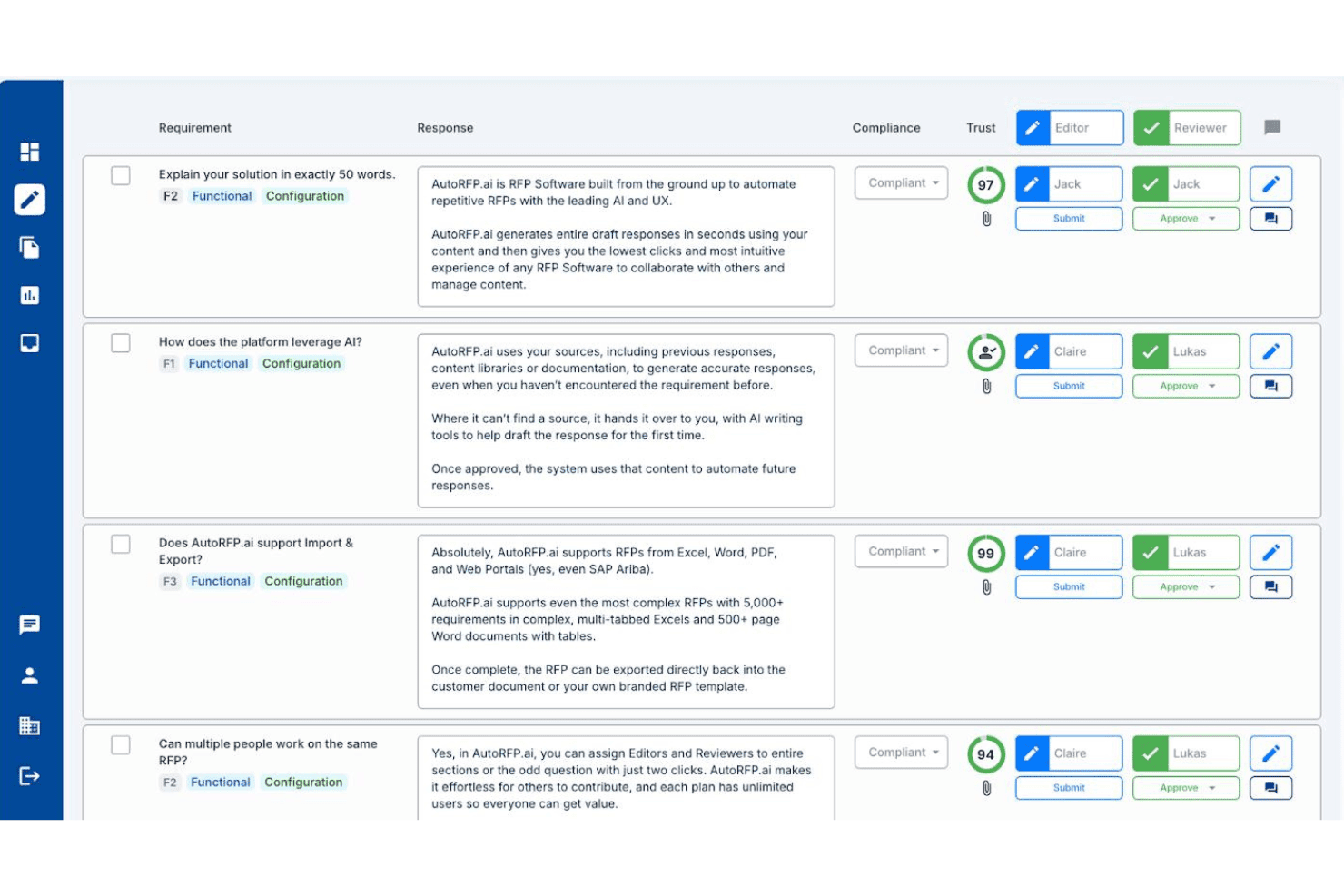
AutoRFP.ai lets teams assign editors and reviewers to RFP responses with AI trust scores. AutoRFP.ai is an AI-native RFP response platform that automates the drafting, review, and submission of RFPs, DDQs, security questionnaires, and tenders using a self-building knowledge base, multi-step approval workflows, and deep CRM and content source integrations.
Who Is AutoRFP.ai Best For?
AutoRFP.ai is built for bid managers and proposal teams handling high volumes of inbound RFPs, DDQs, and security questionnaires who need to cut response time without hiring more staff.
Why I Picked AutoRFP.ai
AutoRFP.ai earns its spot on my shortlist because it's built specifically for AI-driven RFP response automation in a way that generic proposal tools simply aren't. I'm particularly drawn to its self-building knowledge base, which ingests past responses and auto-updates without anyone manually curating a content library. The Trust Scores on every AI-generated draft are what really set it apart: each answer shows a confidence percentage and an exact source citation, so reviewers know precisely what they're approving rather than guessing at AI output.
AutoRFP.ai Key Features
- Self-building knowledge base: Automatically ingests and tags approved responses from 15+ connected sources, including SharePoint, Confluence, and Google Drive, without manual curation.
- Multi-step approval workflows: Routes responses through sequential reviewer and editor assignments by section or question, with a full audit trail on every action.
- Browser extension for procurement portals: Lets users respond directly inside SAP Ariba, Workday Strategic Sourcing, Coupa, and Jaggaer without switching between platforms.
- Go/no-go analysis: Scans incoming RFPs and generates a structured bid/no-bid recommendation automatically before your team commits any time to a response.
AutoRFP.ai Integrations
AutoRFP.ai lists 18+ integrations, including native Salesforce sync and connections to HubSpot, Microsoft Dynamics 365, DealCloud, SharePoint, Confluence, Google Drive, Highspot, Seismic, Slack, and Microsoft Teams. It also offers an open API and webhooks for custom integrations.
Pros and Cons
Pros:
- Unlimited team collaboration on every project
- Produces high-confidence draft responses quickly
- AI auto-builds and updates content library
Cons:
- Not designed for outbound sales proposals
- No built-in pricing or quoting engine
Learn more about AutoRFP.ai: Best for dynamic pricing and bundles
- Free demo available
- Pricing upon request
Visit WebsiteCustomer Rating:4.7/5
DealHub AI lets you manage, track, and update sales proposals from a centralized dashboard. DealHub AI is a cloud-based quote-to-revenue platform that helps sales teams manage the entire deal process—from proposal to signature—in one unified workspace.
Why I picked DealHub AI: It combines proposal generation, pricing logic, approvals, and contract workflows so teams can move faster and stay aligned. With built-in CPQ, reps can create accurate quotes using guided configuration, smart pricing rules, and dynamic bundles—no spreadsheets required. Adaptive pricing and usage-based models are supported out of the box, helping teams respond to change with confidence. Proposal content also stays consistent and compliant thanks to approval workflows and brand controls, making it easy for reps to deliver professional, tailored proposals at scale.
DealHub AI Standout Features and Integrations
Features include contract lifecycle management (CLM), covering everything from contract creation to negotiation and approval. Teams can collaborate in real time using the integrated Digital DealRoom, which centralizes buyer and internal communication, tracks engagement, and keeps deals on course.
Integrations include Salesforce, Microsoft Dynamics 365, HubSpot, Freshworks, DocuSign, Gong, and Slack.
Pros and Cons
Pros:
- Built-in CPQ features
- Accurate pricing through predefined rules
- Digital DealRoom enhances collaboration with customers
Cons:
- Learning curve for new users
- API integration is a paid add-on
Learn more about DealHub AI: Best for customizable proposal templates
- Free trial available
- From $8/month (billed annually)
Visit WebsiteCustomer Rating:4.6/5
SignNow provides an organized document management interface, allowing users to upload, sign, send, and track proposals and contracts efficiently. SignNow is an electronic signature solution that helps businesses sign, send, and manage documents securely on any device. It offers features like document templates, team collaboration, and mobile applications to enhance your document workflows.
Why I picked SignNow: You can create reusable templates for your most-used documents, ensuring consistency and saving time when preparing proposals. Additionally, SignNow allows you to add fillable fields to your documents, such as text boxes, checkboxes, and radio buttons, making it easy for recipients to complete and sign proposals accurately. Another valuable feature is SignNow's team collaboration capabilities. You can create teams within the platform to securely collaborate on documents and templates, ensuring that all team members are on the same page during the proposal creation process.
SignNow Standout Features and Integrations
Features include document editing, bulk sending, signing links, kiosk mode, in-person signing, document history tracking, role-based signing, conditional fields, data validation, attachment requests, custom branding, and audit trails.
Integrations include Microsoft 365, Google Workspace, Salesforce, NetSuite, SharePoint, Dynamics, Gmail, Excel, and Autodesk.
Pros and Cons
Pros:
- Unlimited users on all plans
- Good audit trail and document history features
- Mobile app available
Cons:
- Can be difficult to update documents once uploaded
- May not be ideal for large-scale operations
Learn more about SignNow: 7Best for turning proposals into signable order forms
Dock
- Free plan + free demo available
- From $350/month (billed annually)
Visit WebsiteCustomer Rating:4.9/5
Dock lets you create proposals and price quotes from standardized templates for a more consistent customer-facing experience. Dock is a platform designed to help sales teams improve their processes, from lead capture to onboarding and more. It offers a centralized space for collaboration and client-facing documents, like proposals, quotes, and contracts.
Why I picked Dock: Dock's proposal management system is easy to use with pre-built templates. These templates include everything from proposals and price quotes to order forms, contracts, and other important documents. The platform also helps standardize sales processes by allowing teams to easily turn proposals or quotes into signable order forms. Furthermore, Dock offers order form tracking features that provide insight into document statuses, whether they're viewed, signed, or still require approval.
Dock Standout Features and Integrations
Features include digital sales rooms, customizable client portals, buyer signals, engagement analytics, dynamic action plans for onboarding, custom branding, secure digital signatures, and numerous templates for different sales functions.
Integrations include HubSpot, Salesforce, Slack, Zoom, Airtable, Pandadoc, Typeform, and more.
Pros and Cons
Pros:
- Digital sales rooms with personalized client portals
- Document status visibility
- Many templates to help create consistent experiences
Cons:
- Order form features are an additional add-on
- HubSpot and Salesforce integration limited to higher-tier plans
Learn more about Dock:

Pre-designed templates include proposals, contracts, quotes, online brochures, and statements of work. Better Proposals helps revenue teams get paid faster and maintain a high-quality product through its collaboration capabilities.
Why I picked Better Proposals: Collaboration is essential when working with proposals, so I added Better Proposals to this article because of its teamwork capabilities. With Better Proposals, you can get the entire team on the same page thanks to its tools that simplify the proposal process. These tools include pipeline visibility that allows everyone to see what the rest of the team is working on at any moment and improve efficiency.
Better Proposals Standout Features and Integrations
Features include tools to help your teams convert more deals and increase the number of paying clients. For example, Better Proposals provides artificial intelligence and automatic recommendations to identify what’s working in your industry.
Integrations include native integrations, such as ActiveCampaign, Asana, Freshsales, HubSpot CRM, Insightly, PayPal, Pipedrive, Salesforce, Stripe, Zoho, and other software options. If you have a paid Zapier account, you can create custom integrations with thousands of apps to automate your processes.
Pros and Cons
Pros:
- Creates professional proposals.
- Excellent customer support.
- Simplifies sales processes.
Cons:
- Can’t print proposals.
- Has some bugs.
Learn more about Better Proposals: Best for proposal design
- 14-day free trial + free demo available
- From $19/user/month (billed annually)
Visit WebsiteCustomer Rating:4.6/5
Add different sections to proposals through the drag-and-drop interface. Proposify provides extensive proposal design capabilities that allow revenue teams to customize every part and element of a proposal. The vendor also offers design and training services to help companies create eye-catching designs.
Why I picked Proposify: The platform is a proposal creation software that will help you simplify and enhance the process. Proposify provides an editor that provides hands-on proposal creation capabilities without having you rely on word processing tools. It uses a drag-and-drop interface that allows you to add and edit multiple sections on your proposal.
Proposify Standout Features and Integrations
Features are available from Proposify that will help you throughout the proposal process, including analytics and metrics that provide insights into your documents’ performance that help you better understand your sales process. You can also use the data to optimize sales documents by enhancing future proposals based on formats and layouts that worked for you in the past.
Integrations include native connections to platforms such as Basecamp, Freshbooks, HubSpot, Intercom, Olark, Pipedrive, QuickBooks, Salesforce, Stripe, Zoho, and other software options. You can also use a paid Zapier account to create integrations to third-party applications such as ActiveCampaign, Asana, Copper, Highrise, Mailchimp, Microsoft Teams, monday.com, Salesflare, Slack, Zendesk Sell, and other software options.
Pros and Cons
Pros:
- Customizable templates.
- Provides instant proposal data.
- Clean-looking proposals.
Cons:
- Occasional loading errors.
- Not user-friendly.
Learn more about Proposify: 10Best for web-based proposals
Qwilr
- 14-day free trial
- From $35/user/month (billed annually)
Visit WebsiteCustomer Rating:4.5/5
Create stunning documents from the template library without relying on a programmer. Qwilr modernizes proposal processes by helping teams create interactive, web-based proposals.
Why I picked Qwilr: I went in a different direction when adding Qwilr to this list because the platform doesn’t create amazing PDF proposals. What Qwilr does is design proposals as interactive, mobile-responsive web pages. You can use various elements such as interactive pricing tables, multimedia files, brand colors, and other creative sections that act as one interactive web-based proposal.
Qwilr Standout Features and Integrations
Features include one-click automation that allows you to simplify proposal generation via templates. This will help your teams increase sales process speeds and move deals out the door without the need for creating personalized proposals by hand.
Integrations are available from Qwilr, such as HubSpot, Pipedrive, QuickBooks, Salesforce, Slack, Stripe, and Zoho CRM. You can also use a paid Zapier account to create custom integrations.
Pros and Cons
Pros:
- Easy to use.
- Allows users to easily reuse content.
- Creates consistent proposals.
Cons:
- Interface is clunky.
- API access is only in the highest tier.
Learn more about Qwilr:
Annen programvare for tilbudshåndtering
Her er noen andre alternativer som jeg synes er verdt å ta en titt på:
- 11ConcordBest all-in-one proposal lifecycle management tool
- 12QuoteWerksBest for proposal view tracking
- 13OmbudBest for response management
- 14ProposableBest for collecting e-signatures
- 15GuruBest for AI-driven proposal creation
- 16PandaDocBest for proposal templates
- 17ProsperoBest for small businesses
- 18RFPIOBest for proposal content suggestions
- 19HoneyBookBest for automating requests for proposal answers
- 20DocSendBest for securely sharing proposals.
- 21IgnitionBest for billing and payment collection through proposals.
- 22GetAcceptBest for digital sales rooms.
- 23RELAYTOBest for interactive proposals.
- 24QorusDocsBest for fast proposal creation.
- 25FastSpring Interactive QuotesBest for real-time proposal analytics.
- 26Zomentum GrowBest for SaaS companies.
Relaterte anmeldelser av programvare for tilbudshåndtering
Hvis du fortsatt ikke har funnet det du leter etter her, kan du se nærmere på disse verktøyene som er nært knyttet til programvare for tilbudshåndtering, og som vi har testet og evaluert.
- CRM-programvare
- Salgsprogramvare
- Programvare for kundeemnehåndtering
- Programvare for forretningsanalyse
- Programvare for kontraktshåndtering
- System for inntektsstyring
How I Evaluate Proposal Management Software
I split my evaluation into baseline qualifiers—CRM-synced quoting, e-signature, and proposal tracking—and differentiators that reveal which tools are the right fit for RevOps teams.
Core Functionality (Table Stakes For This List)
When I'm selecting tools for my list, I rank each one on a scale from 0 (does not offer the functionality) to 5 (excels in this area) for each core functionality listed below. Then, I calculate the tool's total score into a percentage. Each tool needs to achieve a minimum total score of 65% to be considered for inclusion.
- Template & Content Library: I check whether reps can assemble proposals from pre-approved content blocks and branded templates rather than copying from old docs or starting from scratch every time.
- CRM Integration: Each tool's ability to pull contact, opportunity, and product data directly from CRMs like Salesforce or HubSpot—and sync proposal status back—is a key part of my evaluation.
- E-Signature & Approvals: I look for built-in e-signature alongside internal approval routing, so a deal desk analyst can enforce discount thresholds before a proposal ever reaches the buyer.
- Pricing & Quoting Engine: The tool should let reps configure product bundles, apply tiered pricing, and generate accurate totals inside the proposal without relying on a separate spreadsheet.
- Proposal Analytics & Tracking: I evaluate whether the platform shows section-level engagement data—like which pages a buyer spent the most time on—so sales and RevOps teams can prioritize follow-up.
- Collaboration & Redlining: Multi-user editing, commenting, and version control matter here, especially when legal, finance, and sales all need to weigh in before a proposal goes out.
Once I have a list of tools that meet this criteria, I consider what sets each platform apart.
Differentiating Factors (What Sets Vendors Apart)
Here's how I compare and contrast different vendors:
Standout Features
Conditional content rules are a big differentiator—I look for tools that automatically swap pricing, terms, or sections based on deal attributes like region or product line. Revenue intelligence dashboards also carry weight. When a platform aggregates win rates by template or tracks proposal velocity, RevOps leaders get data they can feed directly into pipeline forecasts. Guided selling workflows round this out by walking reps through structured questionnaires that assemble compliant proposals, reducing errors before deals ever hit the approval queue.
Beyond Features
Tech stack connectivity is one of the first things I evaluate. A proposal tool that syncs with your CPQ, billing, and ERP systems keeps the quote-to-cash workflow intact across teams. Pricing model matters just as much—I check whether per-seat or per-send pricing makes sense for your team's volume and growth trajectory. Security and compliance round out my evaluation. Tools handling sensitive deal data should carry SOC 2 Type II certification and support SSO/SAML, especially when finance and legal stakeholders are reviewing proposals alongside sales.
Slik velger du programvare for tilbudshåndtering
Med så mange ulike løsninger for tilbudshåndtering tilgjengelig kan det være utfordrende å avgjøre hvilket verktøy som passer best for behovene dine.
Når du lager en kortliste, prøver ut og velger programvare for tilbudshåndtering, bør du vurdere følgende:
- Hvilket problem prøver du å løse – Start med å identifisere mangelen på funksjonalitet i programvaren for tilbudshåndtering som du prøver å dekke, for å tydeliggjøre hvilke funksjoner og hvilken funksjonalitet verktøyet må tilby.
- Hvem vil trenge å bruke det – For å vurdere kostnader og krav bør du tenke over hvem som skal bruke programvaren, og hvor mange lisenser du trenger. Du må vurdere om det bare er lederne for inntektsstyringen eller hele organisasjonen som trenger tilgang. Når dette er avklart, er det verdt å vurdere om du prioriterer brukervennlighet for alle eller hurtighet for de mest erfarne brukerne av programvaren for tilbudshåndtering.
- Hvilke andre verktøy det må fungere sammen med – Avklar hvilke verktøy du erstatter, hvilke verktøy som skal beholdes, og hvilke verktøy du må integrere med, for eksempel programvare for regnskap, CRM eller HR. Du må avgjøre om verktøyene må integreres med hverandre, eller om du kan erstatte flere verktøy med én samlet programvare for tilbudshåndtering.
- Hvilke resultater som er viktige – Tenk over hvilket resultat programvaren må levere for å bli ansett som vellykket. Vurder hvilken kapasitet du ønsker å oppnå eller hva du ønsker å forbedre, og hvordan du skal måle suksess. Et eksempel på et resultat kan være muligheten til å få bedre oversikt over ytelsen. Du kan sammenligne funksjoner i programvare for tilbudshåndtering til du blir blå i ansiktet, men hvis du ikke tenker på resultatene du ønsker å oppnå, kan du sløse bort mye verdifull tid.
- Hvordan det vil fungere i organisasjonen din – Vurder programvarevalget i sammenheng med arbeidsflytene og leveransemetodikken din. Evaluer hva som fungerer godt, og hvilke områder som skaper problemer og må håndteres. Husk at alle virksomheter er forskjellige – ikke anta at et verktøy vil fungere i organisasjonen din bare fordi det er populært.
Trender innen programvare for tilbudshåndtering for 2026
Ved å analysere de nyeste produktoppdateringene, pressemeldingene og lanseringsloggene fra ledende verktøy for programvare for tilbudshåndtering kan vi identifisere viktige trender som gjenspeiler det teknologiske landskapet i utvikling innen inntektsstyring:
- Forbedrede integrasjonsmuligheter:
- Større fokus på sømløs integrasjon med et bredere utvalg av plattformer, særlig CRM-systemer, noe som viser en trend mot en mer sammenkoblet teknologistakk innen inntektsstyring.
- AI-drevet automatisering og personalisering:
- Betydelige fremskritt innen bruk av AI til automatisert oppretting og tilpasning av tilbud, noe som viser en trend mot mer intelligente og responsive systemer som tilpasser seg brukernes behov og kundedata.
- Avansert analyse og rapportering:
- Forbedrede analysefunksjoner som gir dypere innsikt i engasjementet rundt og resultatene for tilbud, noe som fremhever etterspørselen etter verktøy for datadrevet beslutningstaking innen inntektsstyring.
- Interaktive funksjoner og samarbeidsfunksjoner:
- Ny funksjonalitet som fremmer teamarbeid og kundeinteraksjon i tilbudsprosessen, noe som gjenspeiler hvor viktig samarbeid er for å utforme overbevisende tilbud.
Disse trendene viser en tydelig utvikling mot mer integrerte, intelligente og brukersentrerte løsninger innen programvare for tilbudshåndtering, tilpasset de avanserte behovene til dagens ledere innen inntektsstyring.
Hva er programvare for tilbudshåndtering?
Programvare for tilbudshåndtering er et verktøy som virksomheter bruker til å opprette, administrere og spore forretningstilbud. Den effektiviserer prosessen med å opprette tilbud gjennom funksjoner som maler som kan tilpasses, innholdsbiblioteker, samarbeidsverktøy og analyse av sporing. Programvaren legger til rette for organisering av tilbudsrelaterte dokumenter og integreres med ulike forretningssystemer for en effektiv arbeidsflyt.
Fordelene med programvare for tilbudshåndtering omfatter økt effektivitet ved oppretting og innsending av tilbud. Den forbedrer tilbudenes kvalitet og ensartethet, noe som øker sjansene for å sikre nye kunder. Programvaren legger til rette for bedre samarbeid mellom teammedlemmer og sørger for at tilbudene er omfattende og godt koordinerte. I tillegg gir den verdifull innsikt i hvordan kunder samhandler med tilbud, noe som bidrar til oppfølging i rett tid og velinformerte beslutninger om fremtidige tilbud.
Funksjoner i programvare for tilbudshåndtering
Det er avgjørende å velge riktig programvare for tilbudshåndtering for å effektivisere inntektsstyringen. Her er viktige funksjoner du bør se etter:
- Integrasjon med CRM-systemer: Sikrer sømløs dataflyt og sentraliserer kundeinformasjon, noe som er avgjørende for å utarbeide skreddersydde tilbud.
- Tilpassbare maler: Legger til rette for en konsekvent merkevareprofil og effektivitet, slik at man raskt kan svare på muligheter.
- Samarbeidsverktøy: Gjør det mulig for teammedlemmer å arbeide effektivt sammen, noe som forbedrer kvaliteten og hastigheten på tilbudene.
- Automatisering av arbeidsflyt: Effektiviserer tilbudsprosessen, reduserer manuelle oppgaver og fremskynder godkjenningssyklusene.
- Innholdsbibliotek: Gir rask tilgang til godkjent innhold, noe som forbedrer nøyaktigheten og konsistensen i tilbudene.
- E-signaturfunksjon: Gjør det mulig å sluttføre avtaler raskere med sikre og juridisk bindende elektroniske signeringer.
- Analyse og rapportering: Gir innsikt i tilbudenes resultater og legger grunnlag for strategiske beslutninger og optimaliseringer.
- Mobiltilgang: Sikrer at teammedlemmer kan arbeide hvor som helst, noe som øker produktiviteten og responstiden.
- Sikkerhetsfunksjoner: Beskytter sensitiv informasjon og opprettholder kundetillit og samsvar med regelverk.
- Skalerbarhet: Tilpasser seg virksomhetens vekst og støtter skiftende behov innen inntektsdrift.
Ved å velge en plattform med disse funksjonene kan inntektsteamet forbedre effektiviteten, responstiden og resultatene sine betydelig når det gjelder å vinne nye kunder.
Fordeler med programvare for tilbudsadministrasjon
Programvare for tilbudsadministrasjon effektiviserer oppretting, levering og sporing av tilbud, og gir betydelige fordeler for brukere og organisasjoner. Her er fem primære fordeler som disse verktøyene gir, og som viser verdien deres for brukere og organisasjoner:
- Økt effektivitet: Automatiserer rutineoppgaver, sparer tid og reduserer feil.
- Team kan utarbeide flere tilbud raskere, noe som øker sjansene for å vinne nye kunder.
- Bedre samarbeid: Legger til rette for teamarbeid med tilbudsdokumenter.
- Bidragsytere kan enkelt arbeide sammen, noe som forbedrer kvaliteten og konsistensen i tilbudene.
- Bedre sporing: Gir sanntidsinnsikt i tilbudenes status.
- Brukere får oversikt over gjennomgangsprosessen, noe som gjør det enklere å forbedre strategier og oppfølging.
- Konsistens og samsvar: Sikrer at alle tilbud følger virksomhetens retningslinjer for merkevareprofil og juridiske standarder.
- Organisasjoner opprettholder et profesjonelt image og reduserer risikoen for manglende samsvar.
- Datadrevet innsikt: Gir analyser av tilbudenes resultater.
- Ledere kan ta informerte beslutninger for å forbedre fremtidige tilbud og strategier.
Kostnader og priser for programvare for tilbudsadministrasjon
Når du velger en plan for programvare for tilbudsadministrasjon, er det viktig å forstå de ulike funksjonsnivåene og prisene for å finne en løsning som dekker organisasjonens behov. Her er en oversikt over vanlige plantyper du kan møte:
Sammenligningstabell for planer for programvare for tilbudsadministrasjon
| Plantype | Gjennomsnittspris | Vanlige funksjoner |
|---|---|---|
| PlantypeGrunnleggende | Gjennomsnittspris$15 - $30/bruker/måned | Vanlige funksjonerTilgang til maler, grunnleggende tilpasning, analyser |
| PlantypeProfesjonell | Gjennomsnittspris$50 - $75/bruker/måned | Vanlige funksjonerAvanserte integrasjoner, forbedrede samarbeidsverktøy, større utvalg av maler |
| PlantypeVirksomhet | GjennomsnittsprisTilpasset pris | Vanlige funksjonerTilgang til alle funksjoner, avanserte analyser, dedikert kundestøtte |
| PlantypeGratis | Gjennomsnittspris$0 | Vanlige funksjonerBegrenset antall maler, grunnleggende funksjoner, ofte med bruksgrenser |
Hver plan tilbyr ulike funksjoner tilpasset virksomheter av forskjellig størrelse og med ulike behov. Ved å vurdere organisasjonens krav blir det enklere å finne det mest kostnadseffektive og nyttige alternativet for å forbedre prosessene for tilbudsadministrasjon.
Vanlige spørsmål om programvare for tilbudsadministrasjon
Som du kan se, kan programvare for tilbudsadministrasjon hjelpe deg med å inngå flere avtaler. Det kan imidlertid hende at du har flere spørsmål for å være sikker på at disse verktøyene passer for organisasjonen din. Her er noen av de vanligste spørsmålene folk stiller når de ser etter nye verktøy for tilbudsadministrasjon.
Er det forskjell mellom programvare for tilbudsadministrasjon og programvare for forespørsler om tilbud?
Ja, det er forskjell mellom programvare for tilbudsadministrasjon og programvare for forespørsler om tilbud (RFP), selv om begrepene ofte brukes om hverandre. Programvare for tilbudsadministrasjon er utviklet for å hjelpe organisasjoner med å opprette, følge opp og administrere utgående tilbud – vanligvis som svar på RFP-er. RFP-programvare fokuserer derimot ofte på prosessen med å sende ut og administrere innkommende tilbud, særlig for selskaper som ber kvalifiserte personer om forslag til en bestemt tjeneste eller ferdighet. Noen plattformer kombinerer begge funksjonene, men det er nyttig å forstå om et verktøy primært er rettet mot tilbydere eller mottakere.
Hvem bruker programvare for tilbudsadministrasjon?
Alle som jevnlig sender tilbud eller svarer på forespørsler om tilbud, kan bruke programvare for tilbudsadministrasjon. Dette omfatter alle bransjer, fra regnskapsbyråer til brukeropplevelsesdesign (UX). Salgsledere bruker også plattformer for salgstilbud til å veilede kundesuksessteam gjennom arbeidsflyten for tilbud og prosessen for godkjenning av avtaler.
Hvordan integreres programvare for tilbudsadministrasjon med salgsdata?
Den beste programvaren for tilbudsadministrasjon integreres vanligvis med salgsdata for å gi kontekstuell innsikt, effektivisere tilbudsprosessen og sikre at innholdet samsvarer med kundeinteraksjoner og historikk. Denne integrasjonen gjør det mulig å lage mer nøyaktige og personaliserte tilbud basert på spesifikke salgssituasjoner og kundebehov.
Kan verktøy for tilbudsadministrasjon støtte multimedieinnhold?
Ja, mange verktøy for tilbudsadministrasjon støtter multimedieinnhold, slik at brukerne kan lage mer engasjerende og dynamiske tilbud. Denne funksjonen gjør det mulig å inkludere videoer, bilder og interaktive elementer, noe som øker tilbudets effektivitet og appell.
Hvordan håndterer programvare for tilbudsadministrasjon versjonskontroll og dokumenthistorikk?
Programvare for tilbudsadministrasjon har ofte robuste funksjoner for versjonskontroll og dokumenthistorikk, slik at team kan spore endringer, gå tilbake til tidligere versjoner og samarbeide effektivt uten å miste viktig arbeid. Dette sikrer åpenhet og nøyaktighet gjennom hele utviklingsprosessen for tilbud.
Annen RevOps-programvare
Vanligvis vil organisasjoner implementere flere typer programvare som teamene kan bruke for å nå målene sine. Her er noen forslag til andre typer RevOps-programvare: