

AI-salgsverktøy er programvareplattformer som bruker kunstig intelligens til å automatisere, analysere og optimalisere salgsprosesser på tvers av inntektsteamene dine. Hvis du leter etter de beste AI-salgsverktøyene, ønsker du sannsynligvis å få bedre oversikt over salgspipelinen, redusere manuelle oppgaver og hjelpe teamet ditt med å fokusere på salgsaktiviteter med høy verdi. Mange verktøy inkluderer prediktiv poengsetting av potensielle kunder, AI-assistenter for SDR-er og funksjoner som hjelper med å identifisere kvalifiserte potensielle kunder – slik at teamet ditt kan handle raskere og inngå flere avtaler. Med så mange tilgjengelige alternativer er det vanskelig å vite hvilke verktøy som faktisk leverer pålitelige data, praktisk anvendelig innsikt og reelle forbedringer av arbeidsflyten. Denne veiledningen hjelper deg med å raskt sammenligne de beste AI-salgsverktøyene, forstå kjernefunksjonene deres og velge løsninger som passer til salgsdriften og vekstmålene dine.
Why Trust Our Software Recommendations
6,700+
Reviews
20
Industry experts
16+
Evaluation factors
14
Years
Our reviews reflect our independent judgment—not a sales pitch. Learn how we stay transparent.
For this guide, we evaluated tools using hands-on testing and independent research, scoring tools using our selection criteria.
Our reviews reflect our human editorial judgment, not a sales pitch.
Sammenligningstabell for AI-salgsverktøy
Denne sammenligningstabellen oppsummerer prisdetaljene for mine utvalgte AI-salgsverktøy:
| Tool | Best For | Trial Info | Price | ||
|---|---|---|---|---|---|
| 1 | Best for field sales and territory management | Not available | Pricing upon request | Website | |
| 2 | Best for no-code agentic CRM workflows | Free demo available | From $40/user/month (billed annually) | Website | |
| 3 | Best for AI-powered voice agents | 14-day free trial | From $25/user/month (billed annually) | Website | |
| 4 | Best for sales conversation insights | Free demo available | Pricing upon request | Website | |
| 5 | Best for AI sales prospecting and enrichment | Free demo available | Pricing upon request | Website | |
| 6 | Best for digital sales rooms and tracking | 14-day free trial | From $25/user/month | Website | |
| 7 | Best for sales intelligence and contact data | Free trial available | Pricing upon request | Website | |
| 8 | Best for sales enablement and content management | Free demo available | Pricing upon request | Website | |
| 9 | Best for AI meeting transcription | Free plan + free demo available | From $10/user/month (billed annually) | Website | |
| 10 | Best for automated lead qualification | Free plan + free demo available | From $29/month | Website |


Anmeldelser av AI-salgsverktøy
Nedenfor finner du mine detaljerte sammendrag av de beste AI-salgsverktøyene som kom med på kortlisten. Anmeldelsene mine gir en detaljert gjennomgang av funksjonene, mulighetene og integrasjonene til hver plattform, slik at du kan finne den beste løsningen for deg.
 Best for field sales and territory management
- Not available
- Pricing upon request
Visit WebsiteCustomer Rating:4.3/5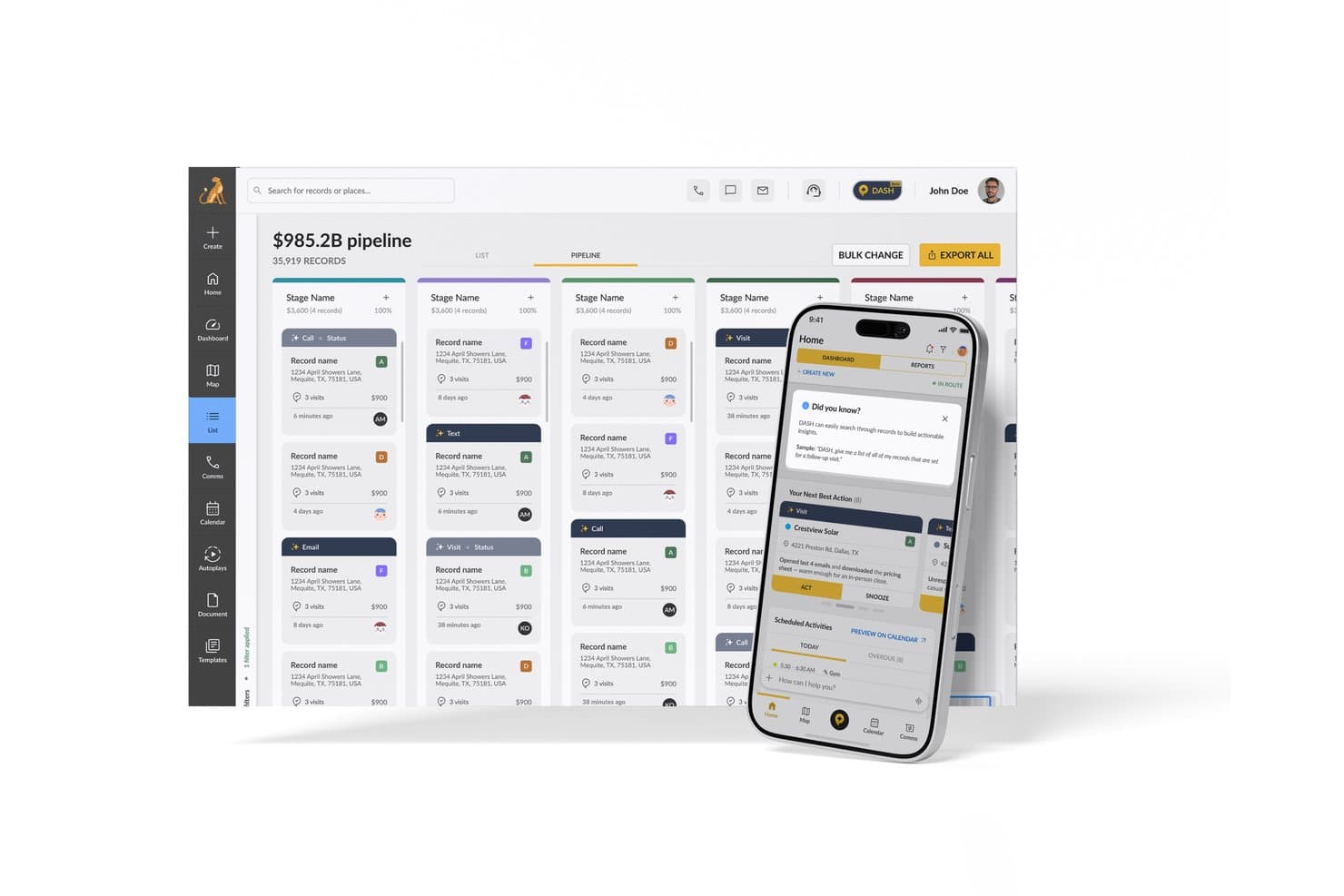
SPOTIO offers an AI-powered Next Best Action feature on its mobile app alongside a pipeline management dashboard for sales teams. SPOTIO is an AI-powered field sales platform that combines territory mapping, route optimization, lead management, and predictive next-best-action recommendations for outside sales teams.
Who Is SPOTIO Best For?
SPOTIO is a strong fit for outside sales teams in verticals like solar, roofing, telecom, and home services that rely on door-to-door or territory-based selling.
Why I Picked SPOTIO
SPOTIO earns its spot on my shortlist because no other tool in this category combines field sales territory management and AI-driven prioritization as tightly. I particularly like how the NBA (Next Best Action) engine scores every record with predictive Value Scores, refreshed intraday, so reps always know which door to knock on next. The DASH AI Co-Pilot is impressive too, letting reps capture visit notes by voice or photo on the spot, without stopping to type between appointments.
SPOTIO Key Features
- Mobile CRM with offline mode: Reps access records, capture activities, and update deals without an internet connection.
- Location-verified activity tracking: All visits and tasks are logged with GPS data to ensure field activities are accurately tracked.
- Territory management controls: Managers define, assign, and edit territories using custom geographic boundaries and layered permissions.
- Sales pipeline analytics dashboard: Users see real-time field sales metrics, rep performance trends, and conversion tracking in one interface.
SPOTIO Integrations
SPOTIO offers native integrations with Salesforce, Microsoft Dynamics 365, HubSpot, and more. An API is also available for custom integrations.
Pros and Cons
Pros:
- Voice-based note capture speeds up field workflows
- GPS-verified visit logging keeps field data accurate
- Intraday AI lead scoring for field reps
Cons:
- Limited conversation intelligence for inside sales teams
- AI features skew heavily toward field sales
Learn more about SPOTIO: Best for no-code agentic CRM workflows
- Free demo available
- From $40/user/month (billed annually)
Visit WebsiteCustomer Rating:4.7/5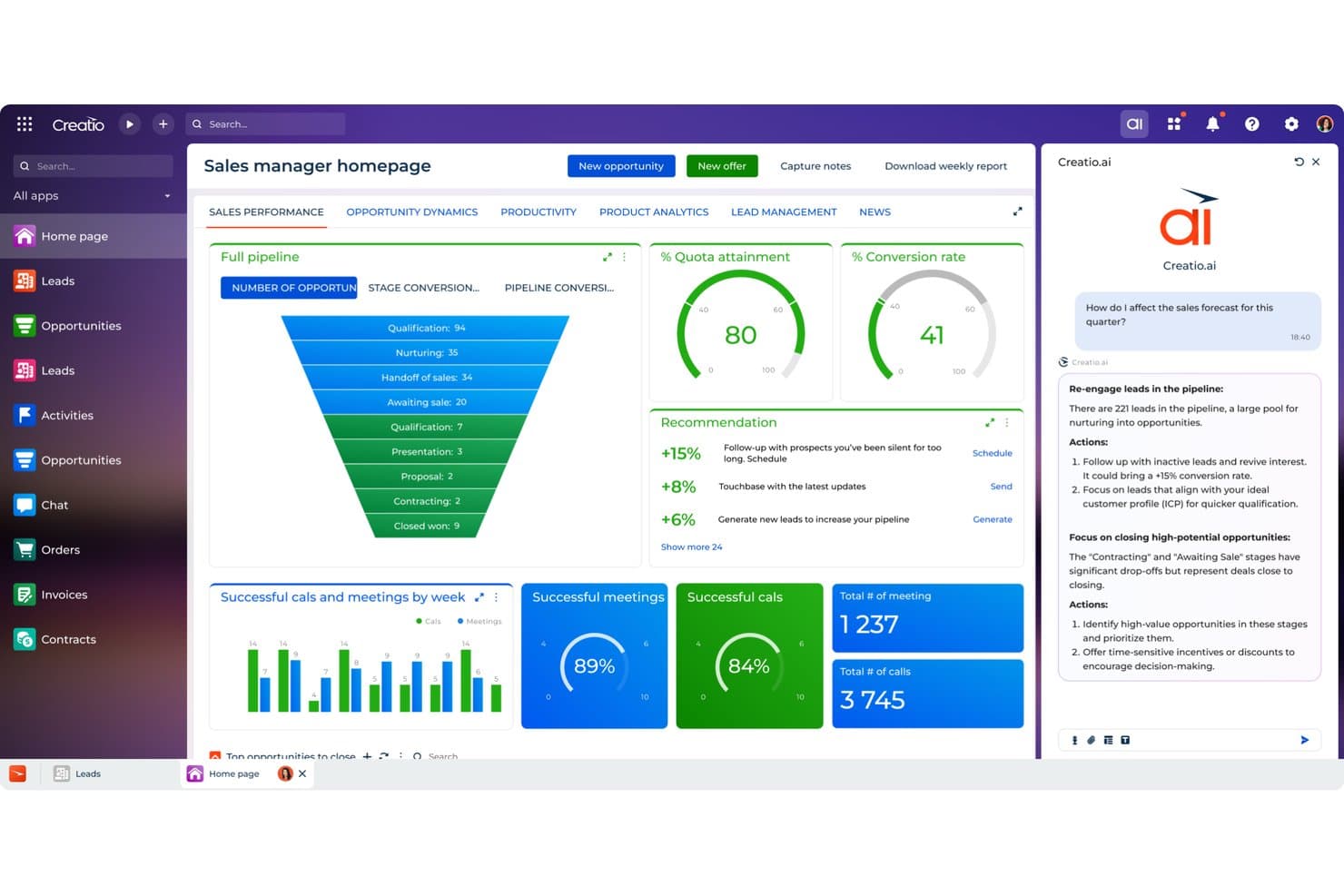
Creatio CRM uses AI to recommend sales actions and boost forecasts. Creatio CRM is a no-code CRM and workflow platform that combines AI agents, predictive lead and opportunity scoring, pipeline forecasting, automated CRM enrichment, and generative AI assistance across the full sales cycle.
Who Is Creatio CRM Best For?
Creatio CRM is a strong fit for sales operations teams and CROs who want to replace their CRM entirely with a no-code platform that runs autonomous AI agents across forecasting, enrichment, and pipeline management.
Why I Picked Creatio CRM
I've included Creatio CRM in my top picks because it's one of the few platforms built around autonomous AI agents rather than bolted-on AI features. The account research agent auto-fills records and maps stakeholders in seconds, and the forecast and pipeline agent flags stalled deals, summarizes risks, and runs automated weekly forecast reviews for CROs. What I really like is that you can build and extend these agents without writing a single line of code.
Creatio CRM Key Features
- Predictive lead and opportunity scoring: ML-based scoring ranks leads and opportunities on a 1–100 scale, weighing customer data, service history, and past sales.
- Territory management agent: Automatically balances territories and surfaces untapped accounts to help reps and ops teams find whitespace.
- Quote generation agent: Suggests product bundles and pricing based on deal context, then drafts proposals without manual input.
- No-code custom model building: Lets you create scoring, lookup, and numeric prediction models directly in the platform without writing any code.
Creatio CRM Integrations
Creatio CRM has documented integrations with Microsoft Teams, Outlook, Zoom, OpenAI, email, and calendars. It also supports APIs, Marketplace integrations, and Zapier.
Pros and Cons
Pros:
- Territory agents surface untapped accounts
- No-code models adapt scoring workflows
- Autonomous agents cover forecasting and enrichment
Cons:
- Reporting gaps limit RevOps visibility
- Conversation intelligence lacks sentiment and objections
Learn more about Creatio CRM: Best for AI-powered voice agents
- 14-day free trial
- From $25/user/month (billed annually)
Visit WebsiteCustomer Rating:4.4/5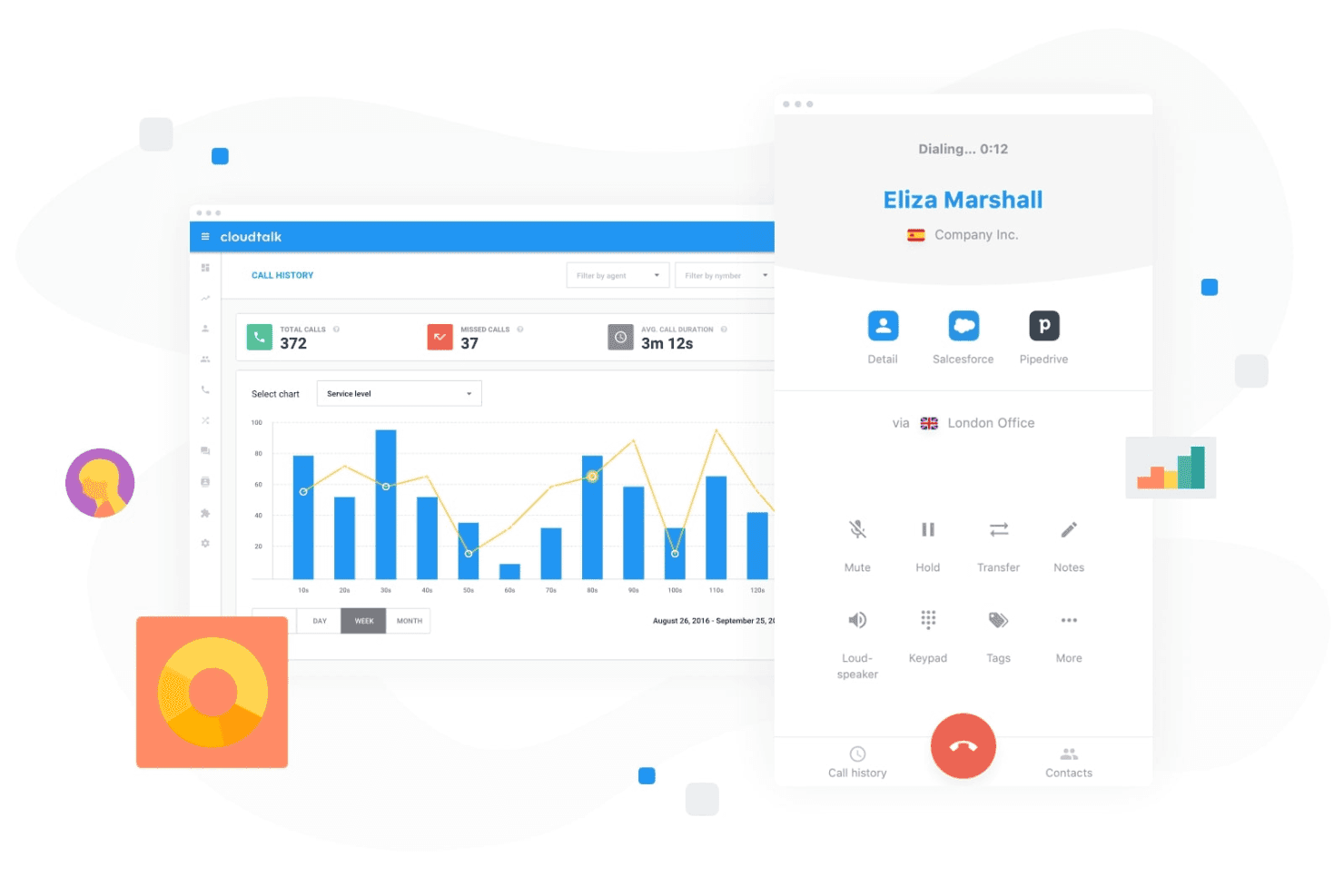
CloudTalk lets teams manage customer calls while tracking call activity and performance from a centralized dashboard. CloudTalk is an AI-powered calling platform that combines AI voice agents, conversation intelligence, and sales dialers with deep CRM integrations for sales and support teams.
Who Is CloudTalk Best For?
CloudTalk is a strong fit for SMB sales teams that run high call volumes and need AI-assisted calling built into their phone system.
Why I Picked CloudTalk
CloudTalk earns its spot on my shortlist because its AI Voice Agents handle routine outbound calls, like trial signup qualification and appointment scheduling, without a rep ever picking up the phone. I like that the AI Receptionist runs 24/7 in 60+ languages, covering after-hours gaps automatically. The Parallel Dialer, which dials up to 10 lines simultaneously and auto-drops voicemails, keeps live reps focused on actual conversations.
CloudTalk Key Features
- AI conversation intelligence: Automatically generates call summaries, transcripts, sentiment analysis, and talk/listen ratios.
- Smart sales dialer: Combines preview, power, and parallel dialing modes to streamline outbound calling efforts.
- Workflow automation: Automates call routing, IVRs, after-hours coverage, and repetitive communication tasks.
- Bi-directional CRM sync: Native integrations with Salesforce, HubSpot, and Pipedrive keep call records and notes synced automatically.
CloudTalk Integrations
CloudTalk offers native integrations with Salesforce, HubSpot, Pipedrive, Zendesk, Zoho CRM, Freshdesk, Intercom, and Slack. An API is available for custom integrations.
Pros and Cons
Pros:
- Real-time sentiment analysis flags coaching opportunities
- Parallel dialer dramatically increases daily call volume
- AI voice agents automate routine outbound calls
Cons:
- AI features limited to voice channel only
- No native pipeline or deal scoring
Learn more about CloudTalk: 4Best for sales conversation insights
Gong
- Free demo available
- Pricing upon request
Visit WebsiteCustomer Rating:4.7/5
Gong analyzes sales calls and emails to surface deal insights with AI. Gong uses AI to analyze sales conversations and deliver actionable insights for revenue teams. It’s designed for sales leaders and reps who want to understand deal risks, coach teams, and improve win rates using real customer interactions. If you need visibility into what’s actually happening in your pipeline, Gong helps you turn call data into strategic guidance.
Who Is Gong Best For?
Gong is a strong fit for mid-sized to enterprise sales teams that want AI-driven insights from customer conversations to improve coaching and deal execution.
Why I Picked Gong
I chose Gong for this list because its AI-driven revenue intelligence and conversation analytics set it apart from other sales tools. Gong automatically records and analyzes sales calls, emails, and meetings to surface deal risks and coaching opportunities that are easy to miss manually. I find its conversation analytics especially valuable for identifying patterns in winning deals and highlighting where reps may need support. For teams looking to use AI to turn real customer interactions into actionable insights, Gong delivers a focused and practical solution.
Gong Key Features
Some other features in Gong that are especially useful for sales teams include:
- Deal boards: Visualize and track the status of every deal in your pipeline with customizable boards.
- Smart trackers: Automatically monitor keywords, topics, and competitor mentions across all sales conversations.
- Call transcription: Generate searchable, AI-powered transcripts for every recorded call and meeting.
- Integration with CRM systems: Sync call data and insights directly with Salesforce, HubSpot, and other leading CRMs.
Gong Integrations
Integrations include Slack, HubSpot CRM, Chili Piper, Gainsight, G2, AWS, Snowflake, ZoomInfo, Zapier, Vidyard, Salesforce, Zoom, Rippling, and more.
Pros and Cons
Pros:
- Tracks competitor mentions in real time
- Conversation intelligence highlights coaching opportunities
- AI analyzes calls for deal risk signals
Cons:
- Can generate too many notifications for users
- Requires call recording consent for compliance
Learn more about Gong: Best for AI sales prospecting and enrichment
- Free demo available
- Pricing upon request
Visit WebsiteCustomer Rating:4.6/5
Cognism enriches leads with AI and compliant prospecting data. Cognism offers AI-driven prospecting for sales teams that need accurate, compliant contact data. It’s a strong fit for B2B organizations looking to automate lead generation and enrich their CRM with up-to-date information. If your team struggles with manual research or outdated lists, Cognism addresses these challenges with automated data sourcing, enrichment, and features like an AI assistant, buyer intent signals, and support for targeted outreach, such as cold email campaigns.
Who Is Cognism Best For?
Cognism is a good fit for B2B sales teams in regulated industries that require accurate, compliant contact data for outbound prospecting.
Why I Picked Cognism
I picked Cognism for this list because its AI-powered sales prospecting and lead enrichment capabilities address a core challenge for revenue teams: finding accurate, compliant contact data at scale. The platform uses AI to automatically source, verify, and enrich leads, reducing the time your team spends on manual research. I also appreciate that Cognism prioritizes data compliance, which is especially important for teams operating in regions with strict privacy regulations. Its enrichment features help keep your CRM data fresh, so your outreach efforts are always based on the most current information available.
Cognism Key Features
Some other features in Cognism that stand out for sales teams include:
- Chrome extension: Capture and enrich leads directly from LinkedIn and company websites without leaving your browser.
- Do-not-call and compliance screening: Automatically flags contacts against global do-not-call lists and compliance requirements.
- Intent data integration: Surfaces leads showing buying signals by integrating intent data into your prospecting workflow.
- Automated list building: Create targeted lead lists using advanced filters for industry, company size, location, and more.
Cognism Integrations
Integrations include Salesforce, HubSpot, Outreach, Salesloft, Microsoft Dynamics 365, Pipedrive, Bullhorn, Zapier, and more.
Pros and Cons
Pros:
- Intent data highlights prospects ready to buy
- Built-in compliance checks for GDPR and CCPA
- Accurate B2B contact data for global markets
Cons:
- No native email sequencing or outreach tools
- Occasional gaps in smaller market data coverage
Learn more about Cognism: Best for digital sales rooms and tracking
- 14-day free trial
- From $25/user/month
Visit WebsiteCustomer Rating:4.6/5
Tracks sales performance, deals, hit rates, and top reps metrics. Sales teams looking to modernize their deal management often turn to GetAccept. The platform combines digital sales rooms, document tracking, and e-signature in one workspace, making it especially useful for B2B sales cycles with multiple stakeholders. It’s a strong choice for teams that want to personalize buyer experiences and keep deals moving with real-time engagement insights.
Who Is GetAccept Best For?
GetAccept is well-suited for B2B sales teams at mid-sized companies that manage complex deals involving multiple stakeholders and documents.
Why I Picked GetAccept
What drew me to GetAccept is its focus on creating a digital sales room that brings together document tracking and e-signature in one place. For teams managing complex B2B deals, I find the ability to track buyer engagement with sales documents in real time especially valuable. The platform’s integrated e-signature simplifies closing, while its digital workspace helps sales reps personalize the buying experience and keep all stakeholders aligned. These features make GetAccept a strong fit for anyone searching for an AI sales tool that supports high-touch, multi-step deal cycles.
GetAccept Key Features
Some other features that make GetAccept useful for sales teams include:
- Automated reminders: Send scheduled notifications to prospects and internal team members to keep deals moving forward.
- Video messaging: Lets sales reps record and embed personalized videos directly into sales documents for a more engaging buyer experience.
- Contract templates: Provides customizable templates for frequently used agreements, reducing manual document creation time.
- Deal analytics dashboard: Offers real-time insights into document views, time spent, and stakeholder engagement across all active deals.
GetAccept Integrations
Integrations include Salesforce, HubSpot, Microsoft Dynamics, Pipedrive, SuperOffice, Lime CRM, UpSales, Gong, Slack, and more.
Pros and Cons
Pros:
- Automated reminders to reduce deal delays
- Built-in video messaging for personalized outreach
- Real-time document tracking for sales engagement
Cons:
- Occasional delays in document delivery notifications
- Limited AI-driven forecasting features
Learn more about GetAccept: Best for sales intelligence and contact data
- Free trial available
- Pricing upon request
Visit WebsiteCustomer Rating:4.4/5
ZoomInfo offers an AI sales tool with email automation and prospect engagement features. Sales teams looking for accurate B2B contact and company data often turn to ZoomInfo. The platform is designed for professionals who need to identify, research, and connect with decision-makers quickly. Its data-driven approach helps users build targeted prospect lists and improve outreach precision.
Who Is ZoomInfo Best For?
ZoomInfo is a strong fit for B2B sales and marketing teams at mid-sized to large enterprises that need accurate contact and company data for targeted outreach.
Why I Picked ZoomInfo
What sets ZoomInfo apart for me is its depth and accuracy of B2B contact and company data, which is essential for targeted sales outreach. The platform’s AI-driven search and filtering tools help users quickly identify the right decision-makers within specific industries or companies. I also value its real-time data enrichment, which keeps prospect information up to date and actionable for sales teams. For anyone searching for an AI sales tool that prioritizes data quality and precision targeting, ZoomInfo is a strong contender.
ZoomInfo Key Features
Some other features that make ZoomInfo valuable for sales teams include:
- Intent data tracking: Surfaces companies actively researching topics relevant to your solution so you can prioritize outreach.
- Automated workflows: Lets you trigger actions like list building, alerts, or CRM updates based on data changes or prospect activity.
- Engagement tracking: Monitors email opens, clicks, and responses to help you gauge prospect interest and refine messaging.
- Chrome extension: Allows users to access contact and company data directly from LinkedIn or company websites without leaving their browser.
ZoomInfo Integrations
Integrations include Salesforce, HubSpot, Microsoft Dynamics 365, Snowflake, Gmail, Zoom, Aircall, and more.
Pros and Cons
Pros:
- Real-time data enrichment for CRM records
- AI-powered intent data for prospecting
- Extensive B2B contact and company database
Cons:
- Limited support for international markets
- Occasional outdated or inaccurate contact data
Learn more about ZoomInfo: Best for sales enablement and content management
- Free demo available
- Pricing upon request
Visit WebsiteCustomer Rating:4.6/5
Highspot tracks content usage and sales engagement analytics. Sales enablement teams looking to unify content, training, and analytics often turn to Highspot. The platform is designed for organizations that want to equip their sales reps with the right materials and guidance at every stage of the buyer journey. Highspot stands out for its focus on surfacing relevant content and actionable insights directly within sellers’ workflows.
Who Is Highspot Best For?
Highspot is a strong fit for mid-sized to large sales and enablement teams in B2B industries that need centralized content management and guided selling.
Why I Picked Highspot
What stands out to me about Highspot is its focus on AI-powered sales enablement that brings content management and guided selling together. I picked Highspot because it uses AI to recommend the most relevant sales content and playbooks to reps based on deal stage and buyer engagement. The platform’s guided selling features help teams deliver consistent messaging and training, while analytics provide visibility into what content actually drives results. For anyone searching for an AI sales tool that connects enablement, content, and actionable insights, Highspot offers a unified approach.
Highspot Key Features
Some other features that make Highspot valuable for sales enablement teams include:
- Pitch tracking: Tracks when prospects open, view, and engage with shared sales content.
- Content governance: Lets admins control content access, versioning, and compliance across distributed teams.
- Training and onboarding modules: Provides built-in tools for delivering sales training, onboarding, and certification programs.
- CRM integration: Connects with platforms like Salesforce and Microsoft Dynamics to sync sales activities and content usage data.
Highspot Integrations
Integrations include Salesforce, Microsoft Dynamics 365, Microsoft Teams, Outlook, SharePoint, Slack, Google Workspace, Gmail, Salesloft, and more.
Pros and Cons
Pros:
- In-depth pitch engagement analytics available
- Guided selling playbooks for consistent messaging
- AI recommends content based on deal stage
Cons:
- Lacks native predictive forecasting features
- Limited workflow automation compared to peers
Learn more about Highspot: Best for AI meeting transcription
- Free plan + free demo available
- From $10/user/month (billed annually)
Visit WebsiteCustomer Rating:4.3/5
Fireflies.ai analyzes meeting conversations and tracks team performance metrics. Sales teams looking to capture, transcribe, and analyze calls may find Fireflies.ai especially useful. The platform uses AI to automate meeting notes and surface key insights from sales conversations. It’s a strong fit for revenue operations professionals who want searchable records and actionable data from every customer interaction.
Who Is Fireflies.ai Best For?
Fireflies.ai is a strong choice for sales and revenue teams that need automated call transcription and searchable meeting records.
Why I Picked Fireflies.ai
I picked Fireflies.ai because its AI meeting assistant directly addresses the challenge of capturing and organizing sales call data. The tool automatically records, transcribes, and summarizes sales meetings, making it easy to revisit key moments and action items. I also appreciate how Fireflies.ai lets you search across transcripts and highlight important topics, which helps sales teams quickly surface insights from their conversations. For anyone looking to automate sales call documentation and analysis, Fireflies.ai’s focus on accurate, searchable transcription stands out.
Fireflies.ai Key Features
Some other features that make Fireflies.ai valuable for sales teams include:
- AI-powered topic detection: Automatically identifies and tags key topics discussed during sales calls for easier review.
- Collaboration tools: Lets team members add comments, reactions, and highlights directly within call transcripts.
- CRM auto-logging: Syncs call notes and summaries to connected CRM platforms without manual entry.
- Custom vocabulary: Allows users to add industry-specific terms to improve transcription accuracy.
Fireflies.ai Integrations
Integrations include Salesforce, HubSpot, Slack, Google Meet, Microsoft Teams, Zoom, Dropbox, and more.
Pros and Cons
Pros:
- Automatic CRM note syncing after calls
- Searchable meeting records for quick reference
- Accurate AI transcription for sales calls
Cons:
- Custom vocabulary setup can be time-consuming
- No real-time coaching during live calls
Learn more about Fireflies.ai: 10Best for automated lead qualification
Origami
- Free plan + free demo available
- From $29/month
Visit WebsiteCustomer Rating:4.2/5
Origami finds and scores leads with verified contact data for outreach. Origami offers an AI-powered sales agent designed to automate outbound prospecting for B2B teams. It’s a strong fit for sales professionals and revenue operations leaders who want to scale outreach without expanding headcount. By handling research, messaging, and follow-up, Origami helps teams focus on higher-value sales activities.
Who Is Origami Best For?
Origami is well-suited for B2B sales teams at growth-stage companies that want to automate and scale outbound prospecting.
Why I Picked Origami
What sets Origami apart for me is its focus on delivering an AI-powered sales agent that fully automates outbound prospecting. The platform handles everything from researching leads to crafting personalized outreach messages and following up, which is especially valuable for teams looking to scale without adding headcount. I like that Origami’s AI can adapt messaging based on prospect responses, making outreach feel more human and relevant. For anyone searching for an AI sales tool that goes beyond simple automation and actually manages the outbound process end-to-end, Origami is a strong contender.
Origami Key Features
Some other features that make Origami useful for sales teams include:
- Automated lead sourcing: The platform identifies and imports new leads based on your target criteria.
- Multi-channel outreach sequencing: Origami supports outreach across email, LinkedIn, and other channels in coordinated sequences.
- Conversation tracking dashboard: Users can monitor all ongoing prospect conversations and engagement in one place.
- Team collaboration tools: Multiple team members can share notes, assign leads, and coordinate outreach within the platform.
Origami Integrations
Native integrations are not currently listed.
Pros and Cons
Pros:
- AI-driven data collection and research
- Multi-channel outreach from one platform
- Fast lead list generation and enrichment
Cons:
- No built-in phone dialer functionality
- Some features are still maturing or in beta
Learn more about Origami:
Andre AI-salgsverktøy
Her er noen flere AI-salgsverktøy som ikke kom med på kortlisten min, men som likevel er verdt å undersøke:
- 11OverloopBest for multichannel sales outreach
- 12PitchMonsterBest for AI-driven sales roleplays
- 13Persana AIBest for AI sales research and insights
- 14Agentforce SalesBest for AI-driven sales automation
- 15HeyReachBest for LinkedIn outreach automation
- 16SmartReach AIBest for AI email outreach
- 17OutreachBest for AI-driven sales engagement
- 18MindTickleBest for sales coaching and enablement
- 19monday CRMBest for customizable sales workflows
- 20CreatioBest for low-code sales automation
- 21HubSpot Sales HubBest for AI-powered sales productivity
- 22CloudApperBest for customizable AI sales automation
- 23FreshsalesBest for AI-driven sales CRM
- 24Microsoft Dynamics 365 SalesBest for enterprise sales automation
- 25Pipedrive Best for visual sales pipeline insights
- 26CrystalBest for personality-based sales insights
- 27ForecastioBest for AI sales forecasting insights
- 28Revenue GridBest for guided selling and revenue insights
How I Evaluate AI Sales Tools
Every tool here needs AI that actually changes how deals move and forecasts land—not just a label slapped onto legacy features. I evaluate in two layers: the core functionality a tool needs to make the list, and the differentiating factors that set vendors apart.
Core Functionality (Table Stakes For This List)
When I'm selecting tools for my list, I rank each one on a scale from 0 (does not offer the functionality) to 5 (excels in this area) for each core functionality listed below. Then, I calculate the tool's total score into a percentage. Each tool needs to achieve a minimum total score of 65% to be considered for inclusion.
- AI Lead & Opportunity Scoring: I look for ML-driven scoring that goes beyond static rules—tools should surface why a deal or lead scored the way it did, like flagging stalled engagement or missing stakeholders.
- Conversation Intelligence: Each tool should analyze calls and emails using NLP, pulling out signals like competitor mentions, objections, and sentiment shifts that reps can act on.
- AI Forecasting & Pipeline Analytics: I evaluate whether the tool generates its own forecast predictions and flags deal risks, rather than just rolling up rep-submitted numbers in a dashboard.
- Automated Activity Capture & CRM Enrichment: Tools should log emails, meetings, and contacts to the CRM without rep effort, and I check whether enrichment fills gaps like job titles or org charts.
- Generative AI Assistance: I look at how the tool uses GenAI in context—drafting follow-up emails after a recorded call, summarizing deal status, or personalizing outreach based on CRM data.
- Next-Best-Action Recommendations: The tool should prescribe specific actions tied to deal context, like recommending a multi-thread play when only one contact is engaged on a late-stage opportunity.
Once I have a list of tools that meet this criteria, I consider what sets each platform apart.
Differentiating Factors (What Sets Vendors Apart)
Here's how I compare and contrast different vendors:
Standout Features
Buyer intent signals are a big differentiator—I look for tools that layer third-party intent data into scoring models so reps focus on accounts actively researching solutions. AI sales coaching also stands out when it benchmarks reps against top performers and recommends specific improvements. I pay close attention to autonomous AI agents that handle multi-step tasks like prospect research and meeting prep without manual triggers.
Beyond Features
CRM integration depth matters a lot—I check whether a tool offers native, bi-directional sync with platforms like Salesforce or HubSpot, since broken sync creates pipeline blind spots fast. AI accuracy and explainability also weigh heavily; I look for vendors that show why a forecast or score landed where it did. Time-to-value is another key factor. Tools with pre-built models and dedicated onboarding get teams to insights in weeks, not quarters.
Slik velger du AI-salgsverktøy
Det er lett å gå seg vill i lange funksjonslister og komplekse prismodeller. For å hjelpe deg med å holde fokus mens du arbeider deg gjennom den unike prosessen din for valg av programvare, får du her en sjekkliste over faktorer du bør ha i bakhodet:
| Faktor | Hva du bør vurdere |
|---|---|
| FaktorSkalerbarhet | Hva du bør vurdereVil verktøyet støtte teamet ditt etter hvert som dere vokser? Sjekk brukerbegrensninger, datagrenser og prisøkninger for større team eller volumer. |
| FaktorIntegrasjoner | Hva du bør vurdereKan verktøyet kobles direkte til CRM-, e-post- og kommunikasjonsplattformene dine? Bekreft at det er kompatibelt med den eksisterende teknologistakken din. |
| FaktorTilpasningsmuligheter | Hva du bør vurdereKan du tilpasse arbeidsflyter, poengmodeller eller dashbord til salgsprosessen din? Unngå rigide verktøy som tvinger deg til å tilpasse prosessen din. |
| FaktorBrukervennlighet | Hva du bør vurdereHvor raskt kan selgere og ledere lære seg systemet? Se etter tydelig navigasjon, minimale opplæringskrav og tilbakemeldinger fra brukere om hvor godt løsningen tas i bruk. |
| FaktorImplementering og oppstart | Hva du bør vurdereHvilke ressurser trengs for å komme i gang? Vurder støtte ved datamigrering, opplæringsmateriell og vanlig tid til verdiskaping for tilsvarende team. |
| FaktorKostnad | Hva du bør vurdereEr alle kostnader tydelige, inkludert tilleggstjenester og bruksbaserte avgifter? Sammenlign de totale eierkostnadene, ikke bare oppgitt pris. |
| FaktorSikkerhetstiltak | Hva du bør vurdereOppfyller verktøyet datasikkerhetsstandardene dine? Spør om kryptering, tilgangskontroller og overholdelse av regelverk som GDPR. |
| FaktorTilgjengelig kundestøtte | Hva du bør vurdereHvilke supportkanaler tilbys, og når er de tilgjengelige? Vurder om du trenger hjelp døgnet rundt eller en dedikert kundeansvarlig for teamet ditt. |
Hva er AI-salgsverktøy?
AI-salgsverktøy er programvareplattformer som bruker kunstig intelligens til å automatisere, optimalisere og analysere salgsprosesser. Disse verktøyene hjelper selgere med å prioritere potensielle kunder, anbefale neste trinn, tilpasse kommunikasjon og hente innsikt fra data. Med avanserte AI-funksjoner som AI-agenter og AI-genererte anbefalinger eller AI-innhold kan team forbedre kundeengasjementet, øke konverteringsfrekvensen og forbedre prognosenøyaktigheten. Ved å utnytte automatisering hjelper disse verktøyene team med å oppnå mer på kortere tid, noe som gjør dem spesielt verdifulle for oppstartsbedrifter og virksomheter i vekst som bygger teknologistakken sin. Mange plattformer tilbyr alt-i-ett-funksjoner som støtter bedre beslutningstaking med innsikt av høy kvalitet gjennom hele salgssyklusen.
Funksjoner i AI-salgsverktøy
Når du velger AI-salgsverktøy, bør du se etter følgende viktige funksjoner:
- Poengsetting av potensielle kunder: Bruker AI-algoritmer til å evaluere og rangere potensielle kunder basert på sannsynligheten for at de konverterer, slik at salgsteam kan fokusere på de mest lovende mulighetene.
- Prediktiv prognostisering: Analyserer historiske salgsdata og gjeldende aktivitet i salgspipelinen for å beregne fremtidige salgsresultater og identifisere potensielle risikoer eller mangler.
- Automatisert kommunikasjon: Sender personlig tilpassede e-poster, meldinger eller oppfølginger til potensielle kunder på optimale tidspunkter, noe som reduserer manuelt arbeid og øker engasjementsgraden.
- Samtaleintelligens: Tar opp, transkriberer og analyserer salgssamtaler eller møter for å avdekke innsikt, fremheve viktige temaer og foreslå forbedringer for selgere.
- Innholdsanbefalinger: Foreslår relevant salgsmateriell, kundehistorier eller presentasjoner basert på avtalens stadium, kjøperpersona eller tidligere interaksjoner.
- Veiledning om beste neste handling: Gir selgere forslag eller instruksjoner i sanntid om hvilke trinn de bør ta videre i salgsprosessen, basert på AI-analyse av avtalens fremdrift.
- Analyse av salgspipelinen: Tilbyr dashbord og rapporter som visualiserer avtalenes stadier, vinningsgrad og flaskehalser, slik at det blir enklere å administrere og prognostisere salgspipelinen.
- CRM-integrasjon: Kobler seg direkte til det eksisterende CRM-systemet ditt for å synkronisere data, spore aktiviteter og sikre en samlet oversikt over kundeinteraksjoner.
- Sporing av salgsaktiviteter: Overvåker e-poster, samtaler, møter og andre kontaktpunkter for å gi et fullstendig bilde av selgernes produktivitet og kjøpernes engasjement.
- Moduler for opplæring og coaching: Leverer AI-drevet opplæringsinnhold, introduksjonsløp og tilbakemeldinger på prestasjoner for å hjelpe selgere med å forbedre ferdighetene sine og komme raskere i gang.
Fordeler med AI-salgsverktøy
Implementering av AI-salgsverktøy gir flere fordeler for teamet og virksomheten din. Her er noen av fordelene du kan se frem til:
- Bedre prioritering av potensielle kunder: AI-drevet poengsetting av potensielle kunder hjelper teamet med å fokusere på prospekter som mest sannsynlig konverterer, noe som øker vinningsgraden og salgseffektiviteten.
- Raskere salgssykluser: Automatisert kommunikasjon og veiledning om beste neste handling fra en AI-salgsassistent kan redusere manuelle oppgaver og holde avtalene i bevegelse uten unødvendige forsinkelser.
- Mer nøyaktig prognostisering: Prediktiv analyse og innsikt i salgspipelinen legger til rette for bedre inntektsplanlegging og bidrar til å identifisere risikoer før de påvirker resultatene.
- Personlig tilpasset kjøperengasjement: Innholdsanbefalinger og samtaleintelligens gjør det mulig for selgere å tilpasse tilnærmingen sin til hvert prospekt, noe som forbedrer engasjement og tillit.
- Bedre coaching og introduksjon: AI-drevne opplæringsmoduler og tilbakemeldinger på prestasjoner fremskynder tiden det tar for nye selgere å komme i gang og støtter kontinuerlig utvikling av ferdigheter.
- Samlede data og arbeidsflyter: CRM-integrasjon og sporing av salgsaktiviteter sikrer at alle salgsdata er samlet på ett sted, slik at det blir enklere å administrere og analysere teamets prestasjoner.
- Bedre oversikt for ledelsen: Dashbord og analyser i sanntid gir ledere handlingsrettet innsikt i salgspipelinens tilstand, selgernes produktivitet og den generelle salgseffektiviteten.
Kostnader og priser for AI-salgsverktøy
Når du velger AI-salgsverktøy, må du ha en forståelse av de ulike prismodellene og abonnementene som er tilgjengelige. Kostnadene varierer basert på funksjoner, teamstørrelse, tillegg og mer. Tabellen nedenfor oppsummerer vanlige abonnementer, gjennomsnittsprisene deres og typiske funksjoner som er inkludert i løsninger for AI-salgsverktøy:
Sammenligningstabell for abonnementer for AI-salgsverktøy
| Plantype | Gjennomsnittspris | Vanlige funksjoner |
|---|---|---|
| PlantypeGratisplan | Gjennomsnittspris$0 | Vanlige funksjonerGrunnleggende leadsporing, begrensede AI-anbefalinger, e-postintegrasjon og enkel rapportering. |
| PlantypePersonlig plan | Gjennomsnittspris$15-$40/bruker/måned | Vanlige funksjonerLeadrangering, automatisert oppfølging, CRM-integrasjon, aktivitetssporing og grunnleggende analyse. |
| PlantypeForretningsplan | Gjennomsnittspris$40-$90/bruker/måned | Vanlige funksjonerPrediktiv prognostisering, avansert analyse, innholdsanbefalinger, arbeidsflytautomatisering og teamsamarbeid. |
| PlantypePlan for store virksomheter | Gjennomsnittspris$90-$150/bruker/måned | Vanlige funksjonerTilpassede integrasjoner, samtaleanalyse, avansert sikkerhet, dedikert brukerstøtte og funksjoner for overholdelse av regelverk. |
Vanlige spørsmål om AI-verktøy for salg
Her er noen svar på vanlige spørsmål om AI-verktøy for salg:
Hvordan forbedrer AI-verktøy for salg produktiviteten i salgsteamet?
AI-verktøy for salg automatiserer repetitive oppgaver som leadrangering, oppfølging og dataregistrering. Dette frigjør tid for salgsrepresentanter, slik at de kan konsentrere seg om å bygge relasjoner og inngå avtaler, samtidig som verktøyene fremhever innsikt som hjelper dem med å prioritere innsatsen mer effektivt.
Kan AI-verktøy for salg integreres med CRM-systemet jeg allerede bruker?
Ja, de fleste AI-verktøy for salg tilbyr innebygde integrasjoner med populære CRM-systemer. Før du velger et verktøy, bør du bekrefte at det støtter CRM-systemet ditt, og undersøke om integrasjonen synkroniserer data i sanntid eller krever manuelle oppdateringer.
Hvilke hensyn til datasikkerhet bør jeg ta?
Se etter verktøy som tilbyr kryptering, tilgangskontroller og samsvar med standarder som GDPR. Spør leverandørene om rutinene deres for datalagring og hvordan de håndterer sensitiv kundeinformasjon, slik at du sikrer at dataene dine er beskyttet.
Hvor lang tid tar det å implementere et AI-verktøy for salg?
Implementeringstiden varierer avhengig av verktøyet og teamets størrelse. Mange plattformer tilbyr ressurser for innføring, som produktomvisninger og maler, men komplekse oppsett eller tilpassede integrasjoner kan ta flere uker. Planlegg opplæring og datamigrering som en del av utrullingen.
Passer AI-verktøy for salg for små bedrifter?
Ja, mange AI-verktøy for salg tilbyr abonnementer og funksjoner som er utviklet for små team. Se etter løsninger med fleksibel prising, enkelt oppsett og minimale IT-krav for å sikre at de passer til bedriftens størrelse og ressurser.