

I 10 migliori software per le vendite B2B recensiti per il 2026

Selezione dei migliori software di vendita B2B


Con così tanti software di vendita B2B diversi disponibili, capire quale sia quello giusto per te è difficile. Sai di voler supportare e semplificare il processo di vendita business-to-business della tua azienda, ma devi capire quale strumento sia il migliore. Ci penso io! In questo articolo ti aiuterò a rendere semplice la tua scelta, condividendo la mia esperienza personale nell'utilizzo di decine di strumenti di vendita B2B diversi con vari team e account, con la mia selezione dei migliori software di vendita B2B.
Perché fidarsi dei nostri consigli sui software
Le nostre recensioni riflettono il nostro giudizio indipendente, non un discorso di vendita. Scopri come manteniamo la trasparenza.
Per questa guida, abbiamo valutato gli strumenti attraverso test pratici e ricerche indipendenti, assegnando un punteggio agli strumenti in base ai nostri criteri di selezione.
Le nostre recensioni riflettono il nostro giudizio editoriale umano, non un discorso di vendita.
Riepilogo dei migliori software di vendita B2B
Questa tabella comparativa riassume i dettagli dei prezzi delle mie migliori selezioni di software di vendita B2B per aiutarti a trovare quello più adatto al tuo budget e alle esigenze della tua azienda.
| Tool | Best For | Trial Info | Price | ||
|---|---|---|---|---|---|
| 1 | Il migliore con un generatore automatizzato di flussi di lavoro di vendita | Prova gratuita di 14 giorni + piano gratuito + demo gratuita disponibile | A partire da 49/posto/mese (con fatturazione annuale) | Website | |
| 2 | Ideale per la mappatura dei territori e l'ottimizzazione dei percorsi | Demo gratuita disponibile | Prezzi su richiesta | Website | |
| 3 | Ideale per template di preventivo personalizzabili | Demo gratuita disponibile | Da $39/utente/mese | Website | |
| 4 | Ideale per suggerimenti di lead guidati dall'IA | Prova gratuita di 30 giorni + demo gratuita disponibile | A partire da $29/utente/mese (fatturazione annuale) | Website | |
| 5 | Ideale per l’ottimizzazione dei preventivi guidata da AI | Demo gratuita disponibile | Prezzo su richiesta | Website | |
| 6 | Ideale per approfondimenti conversazionali basati su IA | Prova gratuita di 14 giorni | Da $25/utente/mese (fatturazione annuale) | Website | |
| 7 | Ideale per il tracciamento degli ordini | Prova gratuita di 60 giorni disponibile | Prezzo su richiesta | Website | |
| 8 | Ideale per la pianificazione delle azioni nelle sale vendita digitali | Piano gratuito + demo gratuita disponibile | A partire da $350/mese (fatturati annualmente) | Website | |
| 9 | Ideale per la verifica e la qualificazione dei lead | Prova gratuita di 7 giorni | Da $74/mese | Website | |
| 10 | Ideale per le aziende che utilizzano Salesforce o Salesforce Industry Clouds | Demo gratuita disponibile | Prezzi su richiesta | Website |

Recensione dei migliori software di vendita B2B
Tenendo a mente queste informazioni, è il momento di passare ai riepiloghi dei miei strumenti per entrare più nel dettaglio e capire quale strumento di generazione di lead o acquisizione dati sia adatto al tuo caso d’uso. Scopri le funzionalità più interessanti e un’istantanea dell’interfaccia di ciascuno strumento per una breve panoramica.

Il migliore con un generatore automatizzato di flussi di lavoro di vendita
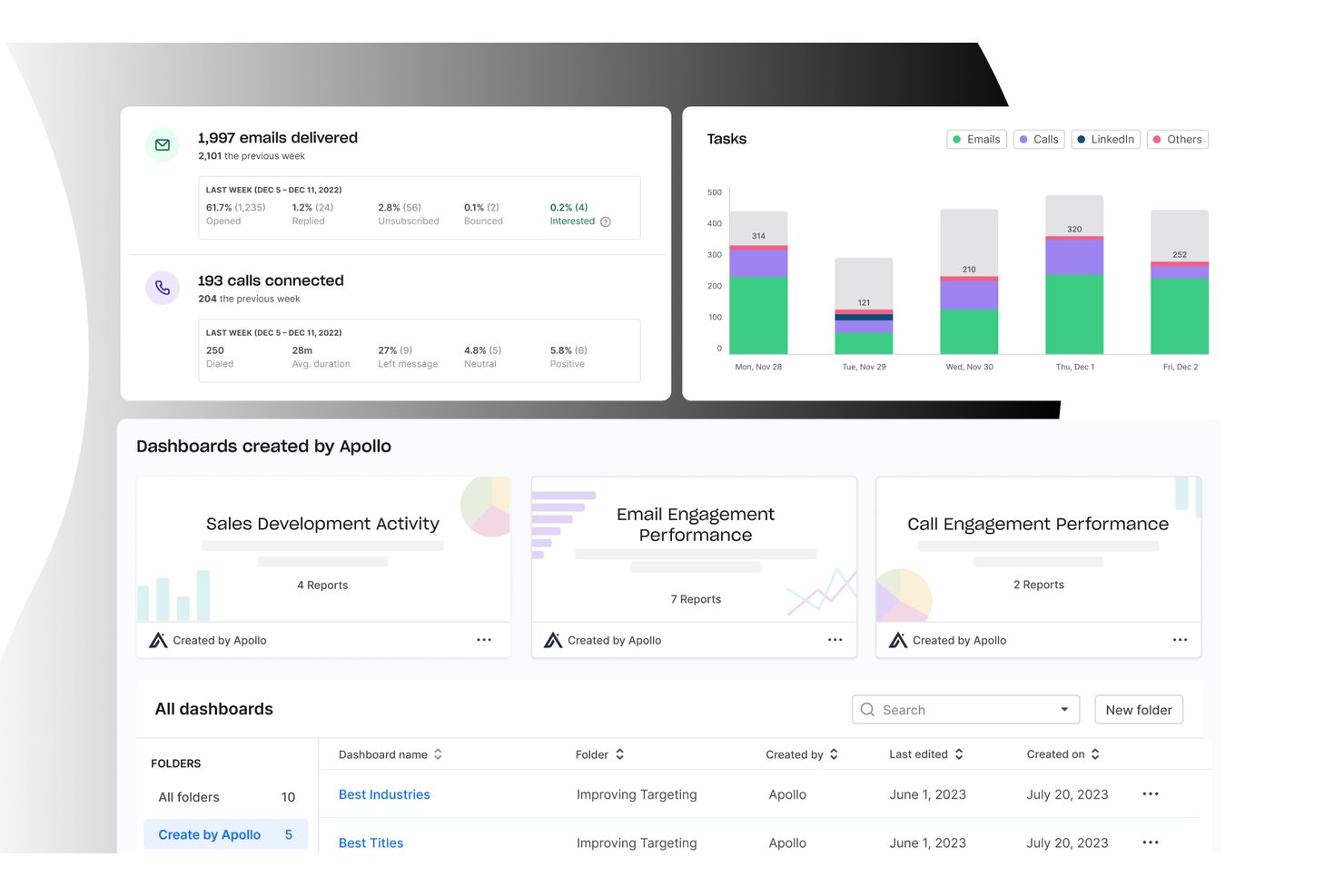
Apollo.io è una piattaforma di intelligence e coinvolgimento nelle vendite B2B che combina un database di oltre 210 milioni di contatti con sequenze multicanale, un dialer integrato, l'automazione dei flussi di lavoro e la gestione delle trattative in un unico spazio di lavoro.
Per chi è più adatto Apollo.io?
Apollo.io è una soluzione ideale per i team di vendita outbound delle PMI e delle aziende B2B del mid-market che devono unificare la ricerca di prospect, l'attività di outreach e la gestione della pipeline senza dover combinare più strumenti.
Perché ho scelto Apollo.io
Ho scelto Apollo.io come una delle soluzioni migliori perché il suo motore di automazione dei flussi di lavoro sostituisce realmente la necessità di utilizzare strumenti separati per le sequenze e l'instradamento. Mi piace il modo in cui gestisce automaticamente le sequenze multicanale tramite email, telefono e LinkedIn, con iscrizione basata su trigger e registrazione automatica nel CRM. La sua IA agentica può creare un elenco di prospect e redigere una sequenza completa di outreach a partire da un'unica richiesta in linguaggio naturale, riducendo di molte ore quello che un tempo era un processo di configurazione manuale.
Funzionalità principali di Apollo.io
- Intelligence sulle conversazioni: Registra e analizza le chiamate di vendita per evidenziare i momenti chiave utili alla formazione e i rischi per le trattative.
- Motore di arricchimento: Aggiunge automaticamente in tempo reale ai record del CRM i dati aziendali e dei contatti mancanti.
- Lead scoring: Utilizza l'IA per valutare e assegnare la priorità ai lead nelle attività di vendita outbound e inbound.
- Integrazione con più CRM: Sincronizza contatti, account e dati di coinvolgimento con Salesforce, HubSpot, Marketo e altri strumenti.
Integrazioni di Apollo.io
Apollo.io offre integrazioni native con Salesforce, HubSpot, Outreach, Airtable, Amplitude, Asana e Gmail, oltre a fornire un'API per le integrazioni personalizzate.
Pros and Cons
Pros:
- Database, dialer e sequenze in un unico strumento
- L'IA crea elenchi di prospect a partire da una richiesta
- L'iscrizione basata su trigger automatizza l'outreach multicanale
Cons:
- L'accuratezza dei dati sui contatti è discontinua al di fuori del Nord America
- Le analisi della pipeline non sono abbastanza approfondite per le previsioni dei ricavi

SPOTIO
Ideale per la mappatura dei territori e l'ottimizzazione dei percorsi
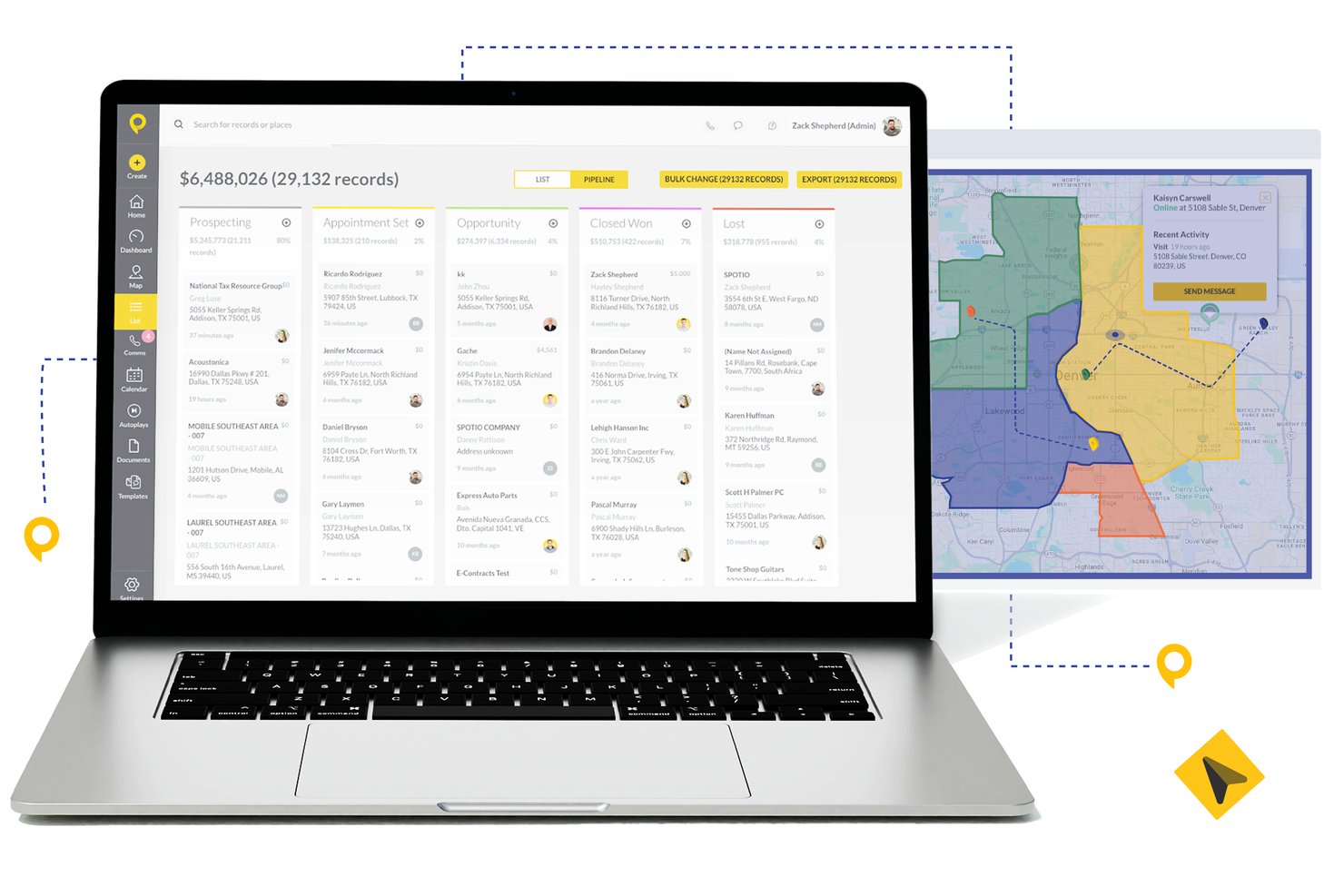
SPOTIO è una piattaforma di esecuzione per le vendite sul campo che combina la gestione dei territori, l'ottimizzazione dei percorsi, il tracciamento dei lead, la gestione della pipeline e il monitoraggio delle attività dei rappresentanti in un'unica soluzione mobile-first.
Per chi è ideale SPOTIO?
SPOTIO è particolarmente indicato per team di vendita esterni e porta a porta in settori come telecomunicazioni, energia solare, coperture e servizi commerciali che gestiscono ampi territori geografici.
Perché ho scelto SPOTIO
Ho scelto SPOTIO come uno dei migliori perché la sua mappatura dei territori va ben oltre il semplice disegno dei confini. Mi piace che sia possibile creare territori per codice postale, contea o forma personalizzata e sovrapporre più di 200 punti dati demografici per dare priorità alle aree di maggiore valore. Il motore di ottimizzazione dei percorsi poi sequenzia le tappe per ridurre i tempi di percorrenza e inserire più visite faccia a faccia nella giornata di ogni rappresentante, qualcosa che non ho visto eseguito con tanta precisione in altri strumenti di vendita sul campo concorrenti.
Caratteristiche principali di SPOTIO
- Comunicazioni multicanale: Chiama, invia email e SMS a potenziali clienti direttamente dalla piattaforma.
- Dashboard di tracciamento attività: Monitora in tempo reale le attività dei rappresentanti e i check-in con verifica di posizione.
- Integrazioni CRM native: Sincronizza account, contatti e dati delle trattative con Salesforce, HubSpot e Microsoft Dynamics 365.
- DASH AI co-pilot: Utilizza l'AI per raccogliere dati sul campo, redigere email e suggerire i prossimi passi durante le visite di vendita.
Integrazioni di SPOTIO
SPOTIO offre integrazioni native con Salesforce, HubSpot, Microsoft Dynamics 365, Zoho CRM e Pipedrive. Sono inoltre disponibili Zapier e un'API aperta per ulteriori collegamenti e integrazioni personalizzate.
Pros and Cons
Pros:
- Potente mappatura dei territori per team di vendita sul campo
- Tracciamento in tempo reale dell'attività dei rappresentanti e dei check-in
- Design mobile-first adatto ai rappresentanti sempre in movimento
Cons:
- Previsioni poco approfondite per team di vendita interni
- Approfondimento limitato nei report per pipeline B2B complesse

Ideale per template di preventivo personalizzabili
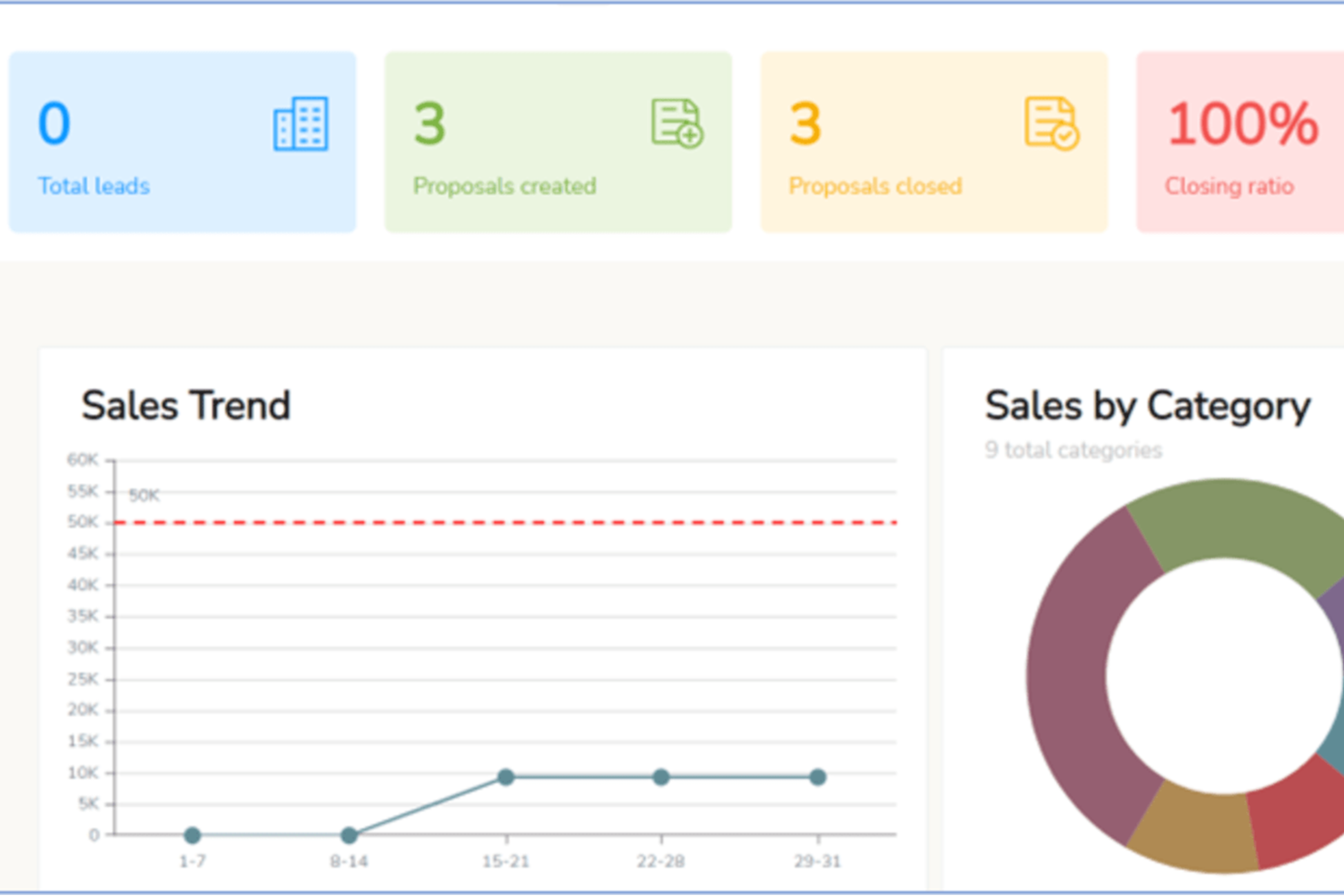
iQuoteXpress è una piattaforma di configure, price, quote (CPQ) che offre ai team di vendita B2B strumenti per la configurazione dei prodotti, la creazione di proposte brandizzate, il monitoraggio dei preventivi e la gestione dei prezzi in più valute.
Per chi è più adatto iQuoteXpress?
iQuoteXpress è ideale per i team di vendita B2B di settori ad alto contenuto di prodotti che devono generare preventivi accurati e professionali senza un lungo processo manuale.
Perché ho scelto iQuoteXpress
Ho incluso iQuoteXpress tra le mie migliori scelte perché il suo sistema di template per preventivi va ben oltre la semplice selezione di un layout. Gli amministratori definiscono le categorie di template per segmento, regione o linea di prodotto, e i rappresentanti trovano il template corretto caricato automaticamente, con loghi, font, colori e testo legale già preimpostati. Apprezzo anche la gestione dei T&C in un pannello dedicato: qualsiasi aggiornamento viene applicato istantaneamente al preventivo successivo generato senza bisogno di copiare e incollare. La funzione della libreria documenti permette di allegare copertine, schede tecniche e contratti con un solo clic, e iQuoteXpress raccoglie tutto in un unico pacchetto di proposta.
Caratteristiche principali di iQuoteXpress
- Gestione del catalogo prodotti: Crea e organizza un catalogo di prodotti e servizi ricercabile con prezzi, descrizioni e immagini che i rappresentanti possono inserire direttamente nei preventivi.
- Monitoraggio e analisi dei preventivi: Controlla lo stato dei preventivi, i tassi di apertura e i dati sulle vittorie/perdite da una dashboard centralizzata per identificare dove si bloccano le trattative.
- Gestione dei prezzi in più valute: Imposta e visualizza i prezzi in diverse valute per supportare le vendite su più mercati.
- Supporto alla firma elettronica: Raccogli le firme dei clienti direttamente nella piattaforma senza dover utilizzare uno strumento di firma separato.
Integrazioni iQuoteXpress
iQuoteXpress funziona come soluzione autonoma oppure si integra con piattaforme CRM ed ERP tramite connessioni pronte all’uso con single sign-on. Le integrazioni native includono Salesforce, Microsoft Dynamics 365, Zoho CRM, Zoho Books, Oracle e HubSpot CRM, oltre a QuickBooks Online Advanced e DocuSign. Si collega inoltre con Acumatica e Shopify per i flussi di lavoro ERP e ecommerce. È disponibile un’API REST per realizzare integrazioni personalizzate con applicazioni di terze parti.
Pros and Cons
Pros:
- Configuratori prodotto multilivello per preventivi complessi
- Riduce significativamente i tempi di onboarding dei nuovi rappresentanti
- I rappresentanti creano preventivi senza coinvolgimento dei manager
Cons:
- Nessuna app mobile per creare preventivi in mobilità
- La configurazione del configuratore richiede l’assistenza del fornitore

Ideale per suggerimenti di lead guidati dall'IA
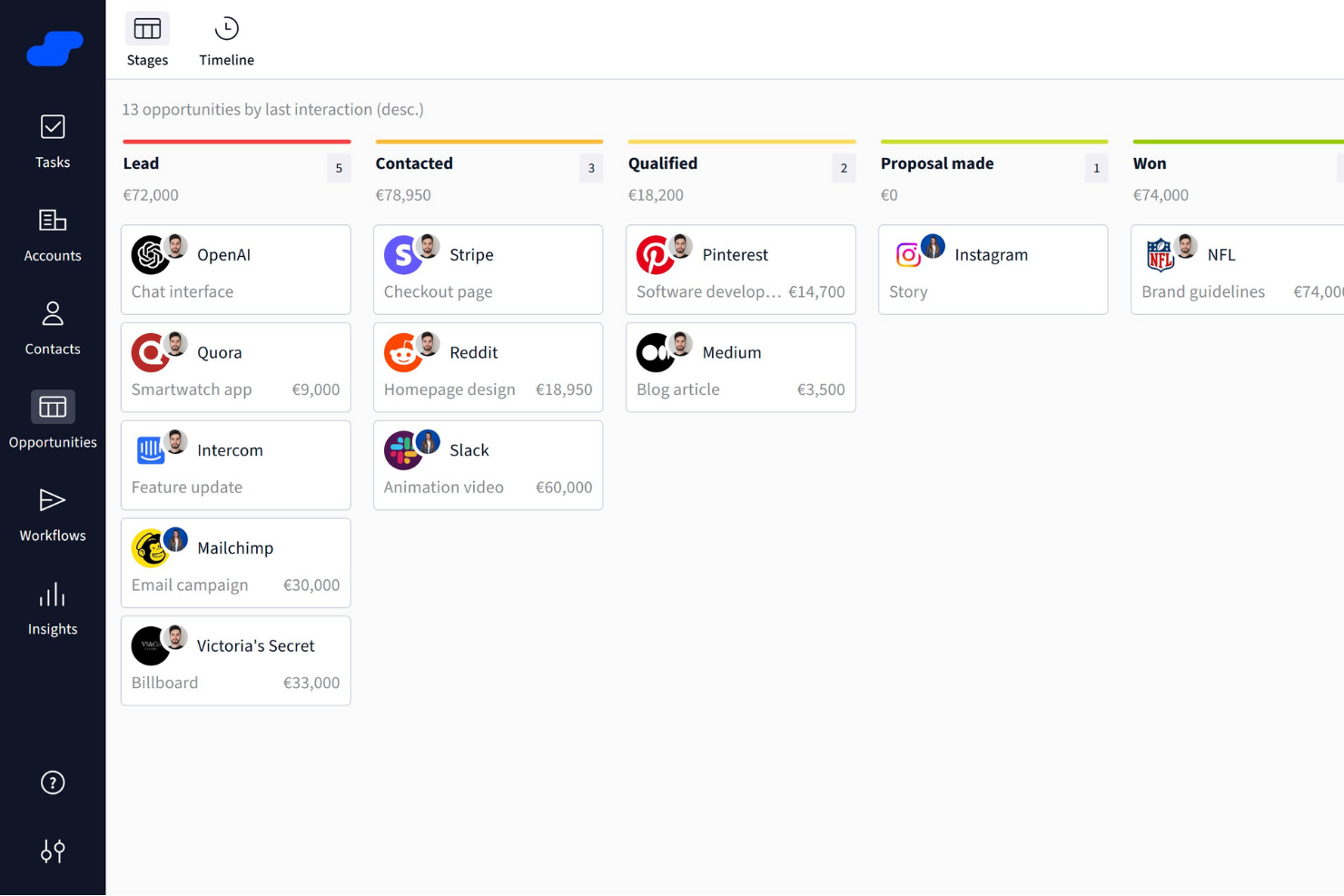
Salesflare è un CRM intelligente creato specificamente per le piccole e medie imprese B2B. Offre una serie di funzionalità che migliorano i processi di vendita, rendendo più facile la gestione dei lead e aumentando il successo delle vendite.
Perché ho scelto Salesflare: Ho scelto Salesflare come software di vendita B2B per il suo forte focus sull'intelligenza di vendita, offrendo funzionalità come approfondimenti sulle relazioni, suggerimenti di lead guidati dall'IA, integrazione con LinkedIn e un lead finder integrato per mantenere piena la pipeline. I suoi pipeline di vendita visivi, i promemoria automatici e gli strumenti di collaborazione semplificano il monitoraggio delle trattative, riducono il lavoro amministrativo e aiutano i team a concentrarsi sulla chiusura efficiente di più affari.
Caratteristiche e integrazioni di punta di Salesflare
Caratteristiche includono sequenze e-mail automatizzate che consentono un coinvolgimento personalizzato con i tuoi lead, rafforzando gli sforzi di costruzione delle relazioni. La piattaforma offre anche un lead finder che aiuta a snellire la generazione dei lead, assicurando che la pipeline di vendita rimanga solida. Inoltre, la funzionalità di intelligenza sulle relazioni di Salesflare migliora la collaborazione del team fornendo approfondimenti che aiutano a dare priorità ai lead e a migliorare il processo decisionale.
Integrazioni includono QuickBooks Online, Slack, KrispCall, Nectar Desk, Typeform, Facebook Lead Ads, Google Contacts, CalendarHero, Bit Integrations, Google Sheets, Intercom e MailChimp.
Pros and Cons
Pros:
- Contatti e utenti illimitati con filtri avanzati
- Funzionalità di automazione efficaci aumentano la produttività riducendo i compiti manuali
- Potenti capacità di integrazione con strumenti popolari come Outlook e LinkedIn
Cons:
- La configurazione iniziale dei flussi di lavoro automatizzati può risultare complessa per alcuni utenti
- Numero limitato di template e-mail disponibili

Ideale per l’ottimizzazione dei preventivi guidata da AI
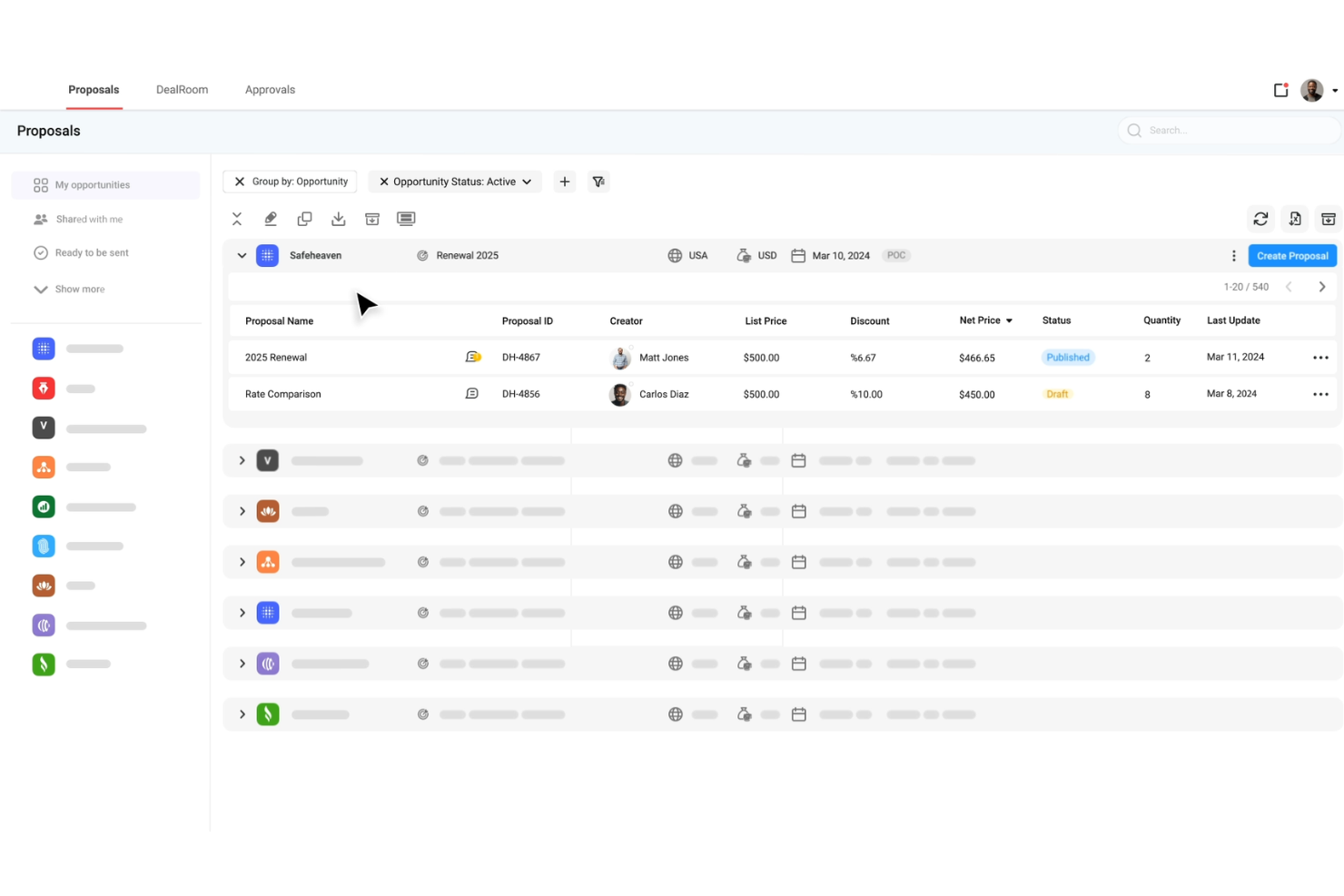
DealHub AI è una piattaforma quote-to-revenue progettata per team di vendita B2B, che combina CPQ, gestione del ciclo di vita dei contratti, fatturazione a sottoscrizione e deal room digitali in un unico sistema.
Perché ho scelto DealHub AI: Ho scelto DealHub AI per il modo in cui rende visibile il comportamento dell’acquirente e permette di agire di conseguenza. La funzione dealstream monitora il coinvolgimento dell’acquirente all’interno delle proposte e fa emergere segnali di intenzione, così il tuo team può effettuare il follow-up al momento giusto. Inoltre, gli agenti AI integrati forniscono suggerimenti su prezzi e combinazioni di prodotti basandosi sui successi passati, aiutando i commerciali a ottimizzare le offerte. I suoi modelli di prezzo adattivi supportano tariffe in base all’uso, a livelli e fisse, consentendo di gestire trattative complesse e prevenire errori di prezzo manuali.
Funzionalità principali e integrazioni di DealHub AI
Le funzionalità principali includono la digital sales room o dealroom, che centralizza tutte le risorse di vendita, i contenuti, le comunicazioni e le notifiche in tempo reale, permettendo a compratori e venditori di collaborare in uno spazio brandizzato unico. Sono presenti anche strumenti per la gestione dei contratti come la creazione dinamica dei contratti, librerie di clausole e workflow per la negoziazione che velocizzano le approvazioni.
Le integrazioni includono Salesforce, HubSpot, Microsoft Dynamics 365, Slack, Gong, DocuSign, Google, LinkedIn, Optimizely, Solarwinds, SalesLoft e Meta Platforms.
Pros and Cons
Pros:
- Accelera i cicli di vendita grazie alle digital sales room
- Gli agenti AI guidano i commerciali su prezzi e composizione dell’offerta
- Supporta la fatturazione a sottoscrizione e i rinnovi
Cons:
- Caricamento lento o ritardi con trattative di grandi dimensioni o pagine di proposta complesse
- La configurazione delle funzionalità avanzate richiede più tempo, impegno e supporto del previsto
New Product Updates from DealHub AI

DealHub AI Expands Bundle Attribute Automation
DealHub AI introduces Assignment Rules for child proposal attributes and numeric aggregation for bundles. These updates give admins more control over bundle attribute automation and configuration. For more information, visit DealHub’s official site.
 .
.
Ideale per approfondimenti conversazionali basati su IA
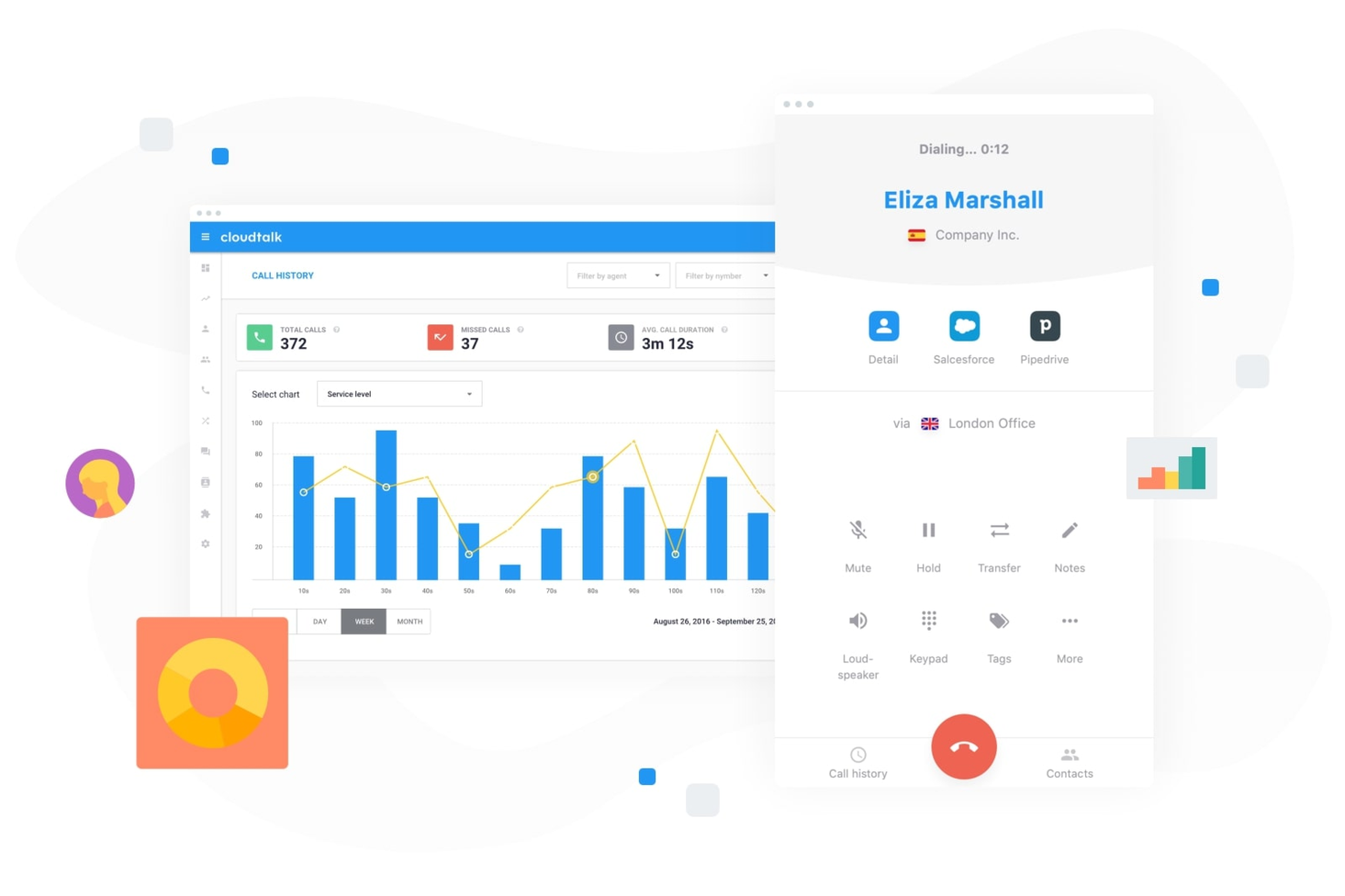
Per le aziende che desiderano potenziare le attività di vendita B2B, CloudTalk offre una soluzione dinamica di call center basata su cloud, pensata per soddisfare le esigenze dei team di vendita in diversi settori. Grazie a funzionalità progettate per semplificare la comunicazione e migliorare le prestazioni commerciali, CloudTalk si rivolge a professionisti delle vendite e organizzazioni che vogliono ottimizzare le interazioni con i clienti e ottenere risultati migliori. Che tu abbia bisogno di una gestione avanzata delle chiamate, di una copertura globale o di analisi approfondite, CloudTalk affronta le sfide legate alla gestione delle chiamate di vendita in modo efficiente ed efficace.
Perché ho scelto CloudTalk
Ho scelto CloudTalk per la sua capacità unica di migliorare le prestazioni di vendita attraverso l’intelligenza conversazionale guidata dall’IA. Questa funzione offre riepiloghi automatici delle chiamate, punteggi e analisi del sentiment, consentendo al tuo team di concentrarsi su interazioni significative. Inoltre, il suo compositore di chiamate commerciale con IA, che include opzioni come la composizione parallela e il rilascio di messaggi in segreteria, massimizza il potenziale di contatto del tuo team dando priorità alle conversazioni di maggiore valore. Queste funzionalità sono particolarmente utili per i team che intendono aumentare l’efficienza delle vendite e raggiungere risultati migliori.
Funzionalità principali di CloudTalk
Oltre agli strumenti basati su IA, ho trovato utili anche le seguenti funzionalità:
- Instradamento chiamate personalizzato: indirizza le chiamate ai membri giusti del team in base a criteri predefiniti, garantendo una gestione efficiente e la soddisfazione dei clienti.
- Risposta vocale interattiva (IVR): automatizza la gestione delle chiamate grazie a un sistema di menu che guida i chiamanti al reparto o servizio appropriato.
- Analisi in tempo reale: offre informazioni sulle prestazioni delle chiamate e sulla produttività del team, aiutandoti a prendere decisioni informate.
- Supporto globale SMS e WhatsApp: consente la comunicazione multicanale, permettendo al tuo team di raggiungere i clienti attraverso le piattaforme che preferiscono.
Integrazioni CloudTalk
Le integrazioni includono Salesforce, HubSpot, Zoho, Pipedrive, Zendesk, Shopify, Intercom, Freshdesk, Aircall e Microsoft Dynamics.
Pros and Cons
Pros:
- Strumenti di intelligenza conversazionale con IA
- Modalità multiple per l’outbound dialer
- Ampie opzioni di integrazione CRM
Cons:
- Problemi di stabilità con il dialer parallelo
- La disponibilità di numeri internazionali può essere incostante
Ideale per il tracciamento degli ordini
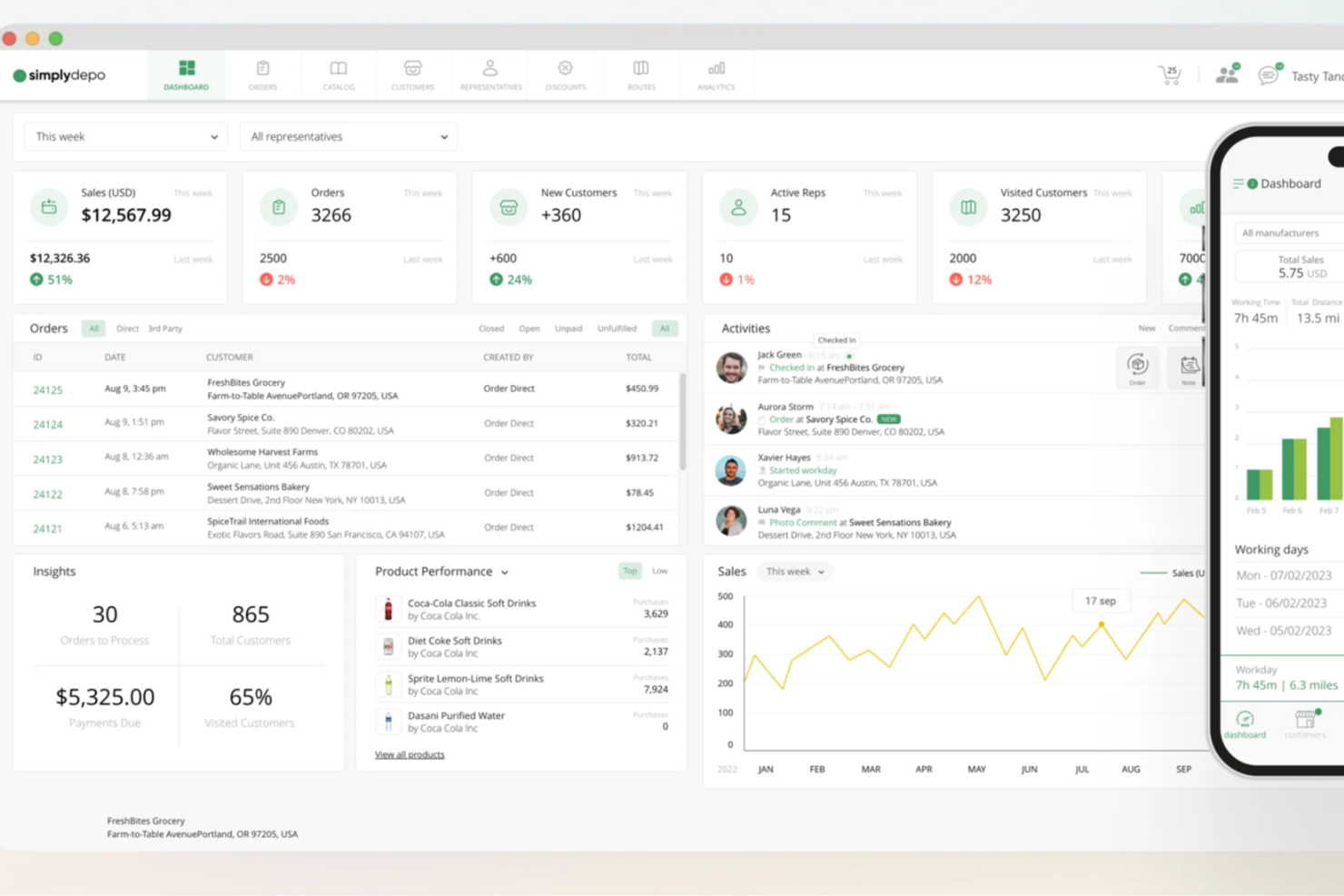
SimplyDepo offre una soluzione su misura per marchi, distributori e merchandiser che desiderano migliorare le proprie operazioni di vendita B2B. Progettato per startup e aziende in crescita, affronta le sfide relative all'esecuzione nel retail, alla gestione degli ordini e alla gestione delle relazioni con i clienti. Integrando funzionalità essenziali come la pianificazione dei percorsi e gli strumenti per le vendite sul campo, SimplyDepo mira a semplificare i processi e favorire la crescita.
Perché ho scelto SimplyDepo
Ho scelto SimplyDepo per il suo focus specializzato sull'aumento dell'efficienza delle vendite B2B attraverso la sua combinazione unica di strumenti per l'esecuzione nel retail e le vendite sul campo. Il suo sistema di gestione ordini B2B è particolarmente interessante per chi desidera semplificare i processi di vendita e migliorare le relazioni con i clienti. L'integrazione delle funzionalità CRM rafforza ulteriormente la sua posizione come soluzione completa per gestire le interazioni business-cliente e ottimizzare i percorsi di vendita.
Caratteristiche principali di SimplyDepo
Oltre ai punti di forza nella gestione ordini e CRM, ho trovato utili anche i seguenti aspetti:
- Pianificazione dei percorsi: Ottimizza i percorsi di consegna e vendita per aumentare l'efficienza e ridurre i costi operativi.
- App per agenti di vendita: Fornisci al tuo team di vendita un'app mobile per gestire attività e interazioni con i clienti ovunque si trovino.
- Gestione potenziali clienti: Monitora e gestisci i potenziali clienti per assicurarti che nessuna opportunità venga persa.
- Gestione delle attività: Organizza e dai priorità alle attività per mantenere il focus e la produttività della tua squadra.
Integrazioni di SimplyDepo
Le integrazioni includono Stripe, Twilio SendGrid, ShipStation e QuickBooks.
Pros and Cons
Pros:
- Sistema di gestione ordini B2B integrato
- CRM integrato per il monitoraggio degli account
- Pianificazione dei percorsi e mappatura delle aree
Cons:
- Personalizzazione limitata dei report avanzati
- Nessuna documentazione API trasparente

Dock
Ideale per la pianificazione delle azioni nelle sale vendita digitali
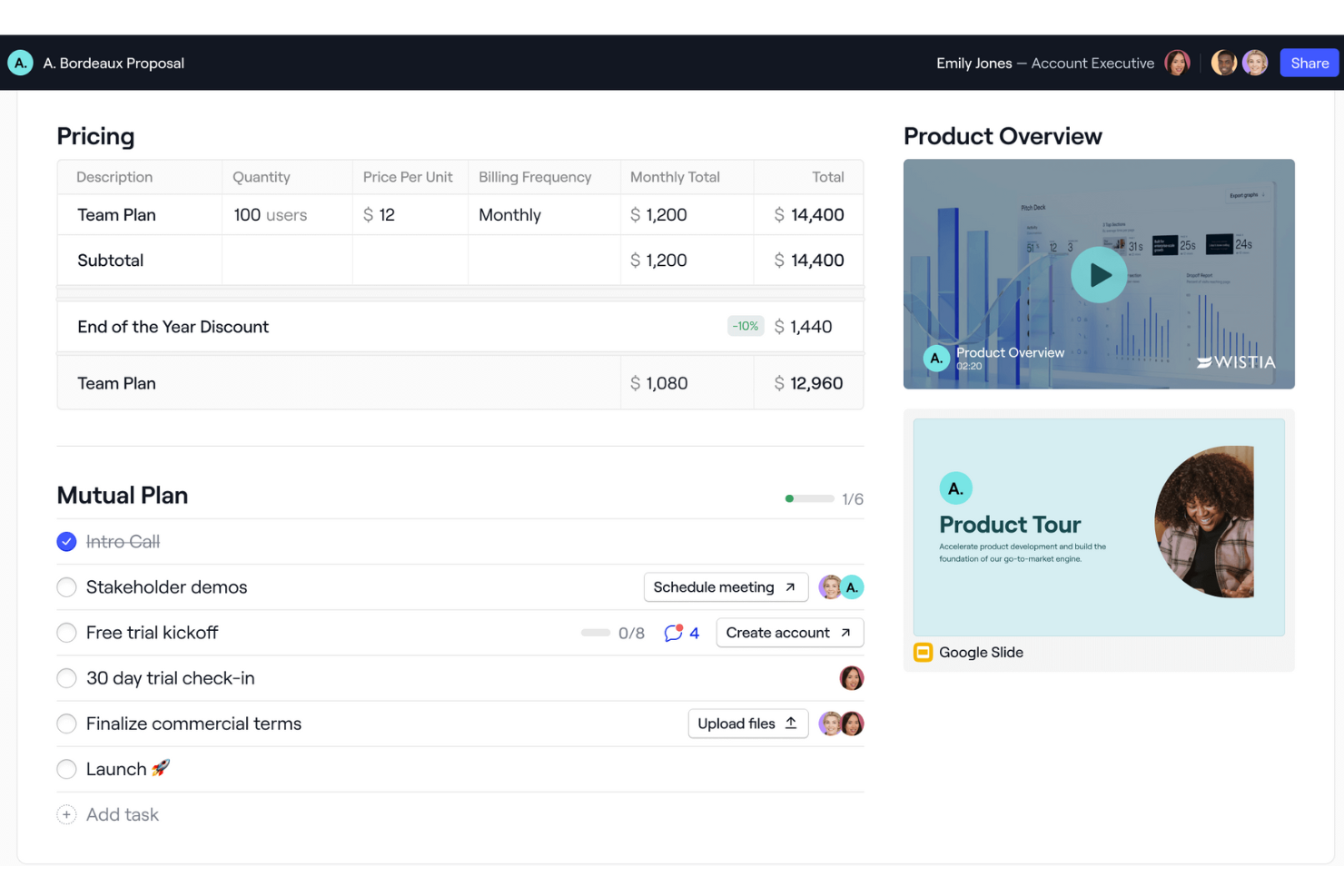
Dock è un software di vendita B2B che offre una piattaforma completa per la gestione delle vendite, l'onboarding e le interazioni con i clienti. Offre funzionalità come sale vendita digitali, portali di onboarding e spazi di lavoro orientati al cliente, che aiutano le aziende a organizzare e condividere contenuti con i clienti in un ambiente personalizzato con il proprio marchio.
Perché ho scelto Dock: Mi piace che Dock offra uno spazio centralizzato per i team di vendita dove gestire contenuti destinati ai clienti, fornendo allo stesso tempo strumenti e modelli per standardizzare i processi di vendita. La sua digital sales room spicca in particolare per caratteristiche come i piani d’azione condivisi, che guidano gli acquirenti attraverso le diverse fasi del processo. Inoltre, l’esperienza cliente incentrata sull’analisi di Dock monitora le interazioni e i progressi, consentendo ai team di vendita di raccogliere metriche e fare follow-up con i lead in modo efficace.
Funzionalità e integrazioni principali di Dock
Le funzionalità principali includono segnali di acquisto, piani d’azione dinamici, un editor di workspace flessibile, branding personalizzato, moduli di prezzi e ordini, condivisione sicura, raccolta di firme digitali e modelli personalizzabili.
Le integrazioni includono Airtable, Pandadoc, Typeform, HubSpot, Salesforce, Slack, Zoom e altri ancora.
Pros and Cons
Pros:
- Modelli per standardizzare i processi
- Piani d’azione condivisi
- Analisi sulle interazioni con i clienti
Cons:
- L’integrazione con HubSpot e Salesforce è disponibile solo nei piani superiori
- Curva di apprendimento per i nuovi utenti che vogliono sfruttare tutte le funzionalità

UpLead
Ideale per la verifica e la qualificazione dei lead
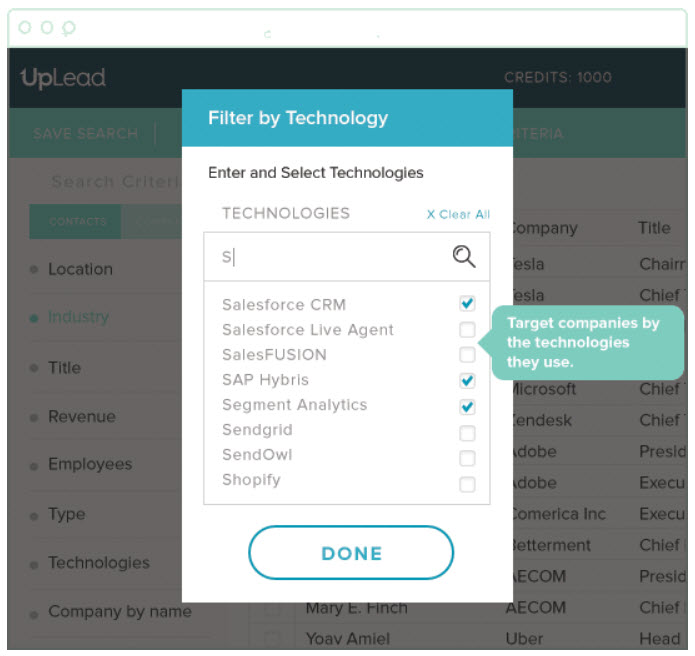
Questo software di generazione lead è stato sviluppato per aiutare PMI e grandi organizzazioni a gestire il loro flusso di lavoro di vendita attraverso account-based marketing, generazione di vendite mirate, verifica email in tempo reale e coinvolgimento delle opportunità. È possibile costruire liste B2B personalizzabili con criteri di qualificazione lead che eliminano acquirenti non idonei e contatti di bassa qualità.
Perché ho scelto UpLead: Ho scelto UpLead grazie ai loro strumenti completi di filtraggio dei lead. Non basta trovare lead di alta qualità, devono anche essere adatti al tuo prodotto o servizio. Usando il loro strumento di filtro, puoi selezionare i lead in base a tecnologia, numero di dipendenti, fatturato e oltre 50 altri filtri di ricerca.
Funzionalità e integrazioni principali di UpLead
Le funzionalità principali includono l'accesso a oltre 100 milioni di contatti con il 95% di accuratezza dei dati, l'arricchimento dei dati dei contatti chiave da liste disorganizzate, un'estensione Chrome per acquisire lead direttamente dal browser e uno strumento per la verifica delle email che aiuta a controllare la validità degli indirizzi.
Le integrazioni includono Close, Copper, Dynamics 365, Insightly, Mailshake, Nimble, Outreach, Pipedrive, Salesforce Sales Cloud e Zapier.
Pros and Cons
Pros:
- Basso tasso di rimbalzo email
- Può generare liste rapidamente
- Funzionalità di caricamento file CSV per CRM non integrati
Cons:
- Il prezzo non è tanto flessibile
- Copertura lead limitata
Groove
Ideale per le aziende che utilizzano Salesforce o Salesforce Industry Clouds
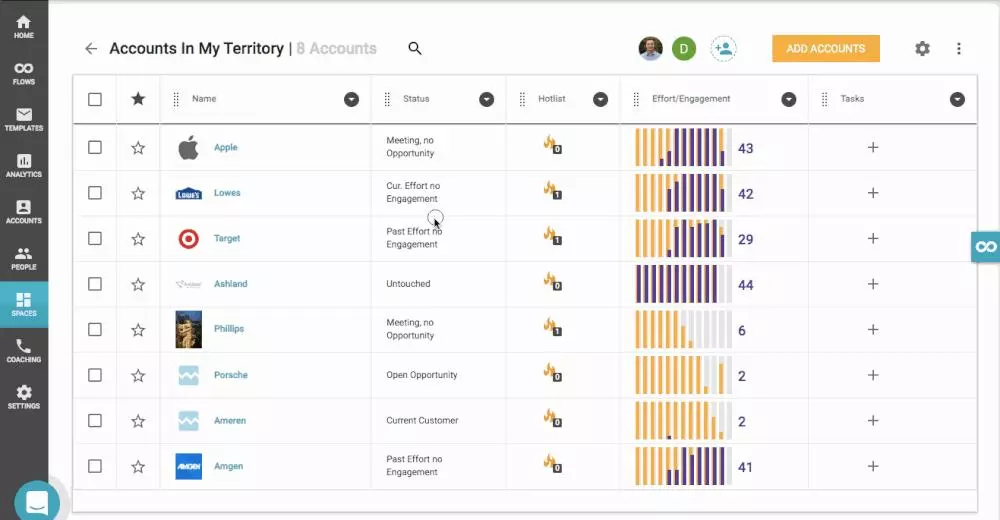
Questa piattaforma di produttività per le vendite è progettata per consentire ai responsabili commerciali di aumentare il fatturato per ogni rappresentante in tutta l'organizzazione, automatizzando le attività amministrative, facilitando l'aggiornamento e l'accesso a Salesforce e generando playbook ripetibili sfruttando l'IA per trasformare dati complessi in informazioni operative.
Perché ho scelto Groove: Ho scelto Groove per questa lista perché è l'unico leader di mercato attualmente nativo per Salesforce. Con Groove, non avrai problemi di latenza o sincronizzazione dei dati, avrai sicurezza e conformità leader del settore e funziona anche con le versioni più personalizzate di Salesforce.
Caratteristiche principali e integrazioni di Groove
Le caratteristiche principali includono automazione delle campagne tramite email, SMS e chiamate; visibilità sulle chiamate commerciali per migliorare il coaching; informazioni in tempo reale sulle attività di vendita; e specialisti dedicati per implementazione e onboarding.
Le integrazioni includono CloudTalk, Constant Contact, ExecVision, Gmail, Gong, LinkedIn Sales Navigator, Microsoft Outlook, Seismic, Spinify e Vidyard.
Pros and Cons
Pros:
- Interfaccia utente intuitiva
- Ottimo supporto clienti
- Solide roadmap di esecuzione
Cons:
- Funzionalità limitate di invio massivo di SMS
- Non ci sono abbastanza tutorial per l'integrazione con Zoom Phone, ecc.
Altre opzioni
Ho scelto alcuni altri strumenti che avevo preso in considerazione, ma che non sono entrati nella lista finale, per offrirti una selezione davvero completa di software di vendita B2B da esplorare.
- Cognism
Ideale per l’accesso illimitato alle informazioni, senza restrizioni di credito o limiti geografici
- Hunter
La migliore piattaforma tutto-in-uno per la gestione delle campagne email di outreach
- Pipedrive CRM
Ideale per pipeline di vendita personalizzate
- Lusha
Ideale per raggiungere i decision maker aziendali e chiudere accordi più rapidamente
- InSitu Sales
Il migliore con vendite sul campo integrate e ecommerce B2B
- Forecastio
Ideale per la previsione e la pianificazione delle vendite
- Leadinfo
Ideale per tracciare quali aziende stanno visitando il tuo sito web
- Enlyft
Ideale per scoprire quali tecnologie stanno già utilizzando i tuoi potenziali clienti
- BookYourData
Ideale per il prospecting B2B a consumo
- LeadIQ
Ideale per migliorare la ricerca di clienti per i team di vendita SaaS


Come Valuto il Software di Vendita B2B
Divido la mia valutazione in due livelli: criteri di base che uno strumento deve soddisfare—come la gestione della pipeline e la sincronizzazione con il CRM—e fattori differenzianti che separano le migliori opzioni per i team RevOps.
Funzionalità Principali (Requisiti Minimi per Questa Lista)
Quando seleziono gli strumenti per la mia lista, valuto ciascuno su una scala da 0 (non offre la funzionalità) a 5 (eccelle in quest'area) per ognuna delle funzionalità principali elencate di seguito. Poi calcolo il punteggio totale dello strumento in percentuale. Ogni strumento deve raggiungere un punteggio totale minimo del 65% per essere preso in considerazione.
- Gestione Pipeline & Deal: Valuto come uno strumento gestisce cicli di trattative a più fasi e con molti stakeholder—come pipeline separate per new business rispetto all'espansione e la mappatura degli stakeholder all'interno delle opportunità.
- Strumenti di Sales Engagement: Le sequenze multi-canale sono fondamentali qui, quindi cerco la possibilità di creare sequenze attraverso email, telefono e LinkedIn invece di semplici template email senza logiche di follow-up.
- Integrazione CRM o CRM Nativo: Che una piattaforma sia essa stessa un CRM o si sincronizzi con uno come Salesforce o HubSpot, verifico che il flusso dati sia bidirezionale per mantenere consistenti i record di account e trattative.
- Previsioni di Ricavo & Analisi: Guardo come uno strumento evidenzia la salute della pipeline e i risultati previsti—forecast ponderati, tracciamento della velocità delle trattative e report sulla conversione delle fasi sono tutti fattori considerati.
- Gestione Lead & Account: Le vendite B2B raramente coinvolgono un solo acquirente, quindi valuto il supporto per gerarchie di account, comitati di acquisto e instradamento strutturato dei lead tra territori o segmenti.
- Automazione del Flusso di Lavoro Commerciale: Attività ripetitive come registrazione delle attività, aggiornamento delle fasi delle trattative e assegnazione di compiti sottraggono tempo alla vendita, quindi verifico la presenza di trigger basati su regole che gestiscono queste attività automaticamente.
Una volta che ho una lista di strumenti che soddisfano questi criteri, considero cosa distingue ogni piattaforma.
Fattori Differenzianti (Cosa Distingue i Fornitori)
Ecco come metto a confronto i diversi fornitori:
Funzionalità Distintive
La conversation intelligence è un importante elemento di differenziazione—cerco strumenti che trascrivano e analizzino le chiamate di vendita per evidenziare rischi nelle trattative o menzioni di concorrenti senza revisione manuale. Il punteggio delle trattative con l'AI aggiunge un altro livello, aiutando i team RevOps a prioritizzare la pipeline in base alla probabilità di vittoria prevista piuttosto che all'intuito. Valuto inoltre le capacità di pianificazione territoriale e delle quote, soprattutto per le organizzazioni che gestiscono più segmenti dove una copertura bilanciata dei commerciali ha un impatto diretto sulla precisione della previsione.
Oltre le Funzionalità
La profondità dell'integrazione qui conta molto—verifico se una piattaforma si collega nativamente a CRM, strumenti di automazione marketing e sistemi BI così che i team RevOps non debbano costruire middleware personalizzati. Anche la scalabilità è importante, specialmente per le organizzazioni in crescita che hanno bisogno di aggiungere business unit o territori senza dover ricostruire i loro flussi di lavoro. Valuto anche la trasparenza dei prezzi, perché costi nascosti per moduli aggiuntivi come le previsioni o l'analisi possono far lievitare rapidamente il budget di RevOps.
Come scegliere un software di vendita B2B
È facile perdersi in lunghi elenchi di funzionalità e strutture tariffarie complesse. Per aiutarti a rimanere concentrato mentre affronti il tuo specifico processo di selezione del software, ecco una lista di fattori da tenere a mente:
| Fattore | Cosa considerare |
|---|---|
| Scalabilità | Il software può crescere insieme alla tua azienda? Cerca strumenti che supportino utenti aggiuntivi e un volume di dati maggiore senza cali nelle prestazioni. |
| Integrazioni | Si collega ai tuoi sistemi esistenti, come CRM, strumenti di posta elettronica e analisi? Assicurati della compatibilità per evitare silos di dati. |
| Personalizzazione | Puoi adattare lo strumento ai tuoi flussi di lavoro specifici? Verifica la disponibilità di opzioni per personalizzare campi, dashboard e report. |
| Facilità d'uso | Quanto è intuitiva l'interfaccia? Una curva di apprendimento ripida può rallentare l'adozione. Cerca una navigazione semplice e processi chiari. |
| Implementazione e onboarding | Quali risorse sono necessarie per iniziare? Considera il tempo e il supporto necessari per la configurazione e la formazione. |
| Costo | I prezzi sono chiari e rientrano nel budget? Confronta le strutture dei costi, comprese eventuali commissioni nascoste o tariffe aggiuntive per le funzionalità essenziali. |
| Misure di sicurezza | Lo strumento è conforme agli standard di sicurezza del settore? Cerca crittografia, protezione dei dati e aggiornamenti regolari della sicurezza per salvaguardare i tuoi dati. |
| Disponibilità dell'assistenza | Quali opzioni di supporto sono disponibili? Assicurati di poter ricevere assistenza tempestiva tramite canali come telefono, email o chat, soprattutto durante gli orari lavorativi più importanti. |
Che cos'è un software di vendita B2B?
Il software per le vendite B2B è uno strumento che aiuta le aziende a gestire e migliorare i propri processi di vendita con altre aziende. I professionisti delle vendite, i responsabili degli account e i team di sviluppo aziendale utilizzano generalmente questi strumenti per aumentare l'efficienza e concludere gli affari più rapidamente.
Funzionalità come la gestione dei lead, il monitoraggio delle vendite e la reportistica aiutano a organizzare le attività di vendita e a ottenere informazioni sui clienti. Nel complesso, questi strumenti offrono un modo strutturato per gestire le attività di vendita e favorire la crescita aziendale.
Funzionalità
Quando selezioni un software per le vendite B2B, presta attenzione alle seguenti funzionalità chiave:
- Gestione dei lead: aiuta a organizzare e monitorare i potenziali clienti, garantendo che nessuna opportunità venga trascurata.
- Monitoraggio della pipeline di vendita: offre una panoramica visiva delle fasi di vendita, aiutando i team a gestire e stabilire le priorità degli affari.
- Reportistica e analisi: fornisce informazioni sulle prestazioni di vendita, favorendo un processo decisionale basato sui dati.
- Dashboard personalizzabili: consente agli utenti di adattare le visualizzazioni alle proprie esigenze specifiche, migliorando l'usabilità.
- Funzionalità di integrazione: si connette agli strumenti esistenti, come CRM ed e-mail, garantendo un flusso di lavoro senza interruzioni.
- Accesso da dispositivi mobili: consente ai team di vendita di gestire le attività in movimento, aumentando la flessibilità.
- Attività automatizzate: riduce il lavoro manuale automatizzando le attività ripetitive e facendo risparmiare tempo e fatica.
- Misure di sicurezza: protegge i dati sensibili mediante la crittografia e la conformità agli standard del settore.
- Interfaccia intuitiva: garantisce facilità d'uso grazie a una navigazione intuitiva e a un design semplice.
- Informazioni sui clienti: fornisce informazioni dettagliate sul comportamento dei clienti, favorendo strategie di vendita personalizzate.
Vantaggi
L'implementazione di un software per le vendite B2B offre diversi vantaggi al tuo team e alla tua azienda. Eccone alcuni di cui potrai beneficiare:
- Organizzazione migliorata: le funzionalità di gestione dei lead aiutano a tenere traccia dei potenziali clienti, riducendo il caos.
- Maggiore efficienza: le attività automatizzate fanno risparmiare tempo gestendo il lavoro ripetitivo e permettendo al team di dedicarsi ad attività più strategiche.
- Migliore processo decisionale: la reportistica e le analisi forniscono informazioni sulle prestazioni di vendita, supportando scelte consapevoli.
- Maggiore flessibilità: l'accesso da dispositivi mobili consente al team di gestire le attività di vendita in movimento, senza essere vincolato a una scrivania.
- Relazioni più solide con i clienti: le informazioni sui clienti offrono dati dettagliati sul loro comportamento, aiutando ad adattare gli approcci di vendita.
- Flussi di lavoro semplificati: le funzionalità di integrazione garantiscono che il software funzioni senza problemi con gli strumenti esistenti, riducendo le interruzioni.
- Maggiore sicurezza dei dati: le misure di sicurezza proteggono le informazioni sensibili, offrendo tranquillità.
Costi e prezzi
La scelta di un software per le vendite B2B richiede la comprensione dei vari modelli e piani tariffari disponibili. I costi variano in base alle funzionalità, alle dimensioni del team, ai componenti aggiuntivi e ad altri fattori.
La tabella seguente riassume i piani più comuni, i relativi prezzi medi e le funzionalità generalmente incluse nelle soluzioni software per le vendite B2B:
Tabella comparativa dei piani per il software per le vendite B2B
| Tipo di piano | Prezzo medio | Funzionalità comuni |
|---|---|---|
| Piano gratuito | $0 | Gestione di base dei lead, reportistica limitata e integrazione e-mail. |
| Piano personale | $5-$25/utente/mese | Gestione avanzata dei lead, monitoraggio delle vendite e analisi di base. |
| Piano aziendale | $30-$60/utente/mese | Integrazione completa con CRM, dashboard personalizzabili e funzionalità di automazione. |
| Piano per grandi aziende | $70-$150/utente/mese | Sicurezza avanzata, integrazioni personalizzate e assistenza dedicata. |
Domande frequenti sul software di vendita B2B
Hai altre domande? Ecco le risposte ad alcune domande frequenti.
Qual è lo scopo principale del software di vendita B2B?
Lo scopo principale del software di vendita B2B è aiutare le aziende a gestire i propri processi di vendita in modo più efficiente. Organizza le informazioni sui clienti, monitora le attività di vendita e fornisce informazioni sulle prestazioni di vendita. Centralizzando i dati, il tuo team può accedere a tutto ciò di cui ha bisogno in un unico luogo, semplificando la gestione dei lead e la conclusione degli affari.
Come funziona il software B2B?
La maggior parte dei software elencati qui è collegata alla generazione di lead, quindi il metodo dipende dallo strumento. Alcuni di questi strumenti aiutano a raccogliere le informazioni dei visitatori del sito web, altri aggregano dati dai social media e da altri profili pubblici, mentre alcuni forniscono elenchi già pronti a una tariffa fissa.
La maggior parte delle opzioni offre inoltre una garanzia sull’accuratezza dei dati, che ti aiuta a verificare la validità dei numeri di telefono, degli indirizzi email e di altre informazioni disponibili pubblicamente prima di contattare nuovi contatti, così non perdi tempo con lead irraggiungibili.
Come faccio a sapere se il mio team è pronto per il software di vendita B2B?
Il tuo team è pronto per il software di vendita B2B se gestire manualmente un numero crescente di lead e trattative diventa complicato. Se i dati sono sparsi tra fogli di calcolo ed email, è il momento di centralizzarli.
Valuta se il tuo team sta affrontando difficoltà nel monitorare le attività di vendita o nel generare report. Cerca segnali di inefficienza o opportunità perse. Coinvolgi il tuo team nel processo decisionale per assicurarti che sia favorevole al cambiamento e pronto a sfruttare le funzionalità del software.
E adesso?
Se stai cercando un software di vendita B2B, contatta gratuitamente un consulente SoftwareSelect per ricevere consigli personalizzati.
Compili un modulo e fai una breve conversazione durante la quale il consulente approfondirà le tue esigenze specifiche. In seguito riceverai una selezione ristretta di software da esaminare. Ti assisterà inoltre durante l'intero processo di acquisto, comprese le negoziazioni sul prezzo.