

I 10 migliori software CRM semplici recensiti nel 2026

Elenco dei migliori software CRM semplici


A volte i migliori strumenti non sono i più sofisticati, ma quelli più semplici. Questo, però, non significa che trovare un software CRM semplice sia un compito facile. Con così tante opzioni disponibili, può essere difficile trovare la soluzione migliore per la propria azienda.
Grazie alla mia vasta esperienza nelle operazioni relative ai ricavi e nei software digitali, ho testato e confrontato diverse soluzioni CRM semplici per aiutare i team a orientarsi nella ricerca del software più adatto. Attraverso le mie recensioni approfondite, ti guiderò tra alcune delle migliori opzioni disponibili sul mercato, ciascuna progettata per semplificare la gestione delle relazioni con i clienti e favorire il successo dell'azienda.
Perché fidarsi dei nostri consigli sui software
Le nostre recensioni riflettono il nostro giudizio indipendente, non un discorso di vendita. Scopri come manteniamo la trasparenza.
Per questa guida, abbiamo valutato gli strumenti attraverso test pratici e ricerche indipendenti, assegnando un punteggio agli strumenti in base ai nostri criteri di selezione.
Le nostre recensioni riflettono il nostro giudizio editoriale umano, non un discorso di vendita.
Riepilogo dei migliori software CRM semplici
| Tool | Best For | Trial Info | Price | ||
|---|---|---|---|---|---|
| 1 | Ideale per l'arricchimento automatico dei contatti | Prova gratuita di 30 giorni + demo gratis disponibile | Da $29/utente/mese (fatturazione annuale) | Website | |
| 2 | Ideale per una configurazione flessibile | Prova gratuita di 14 giorni | A partire da $29/utente/mese (fatturato annualmente) | Website | |
| 3 | Ideale per il monitoraggio integrato degli ordini sul campo | Prova gratuita di 60 giorni disponibile | Prezzo su richiesta | Website | |
| 4 | Ideale per la vendita orientata all'azione | Prova gratuita di 21 giorni + demo gratuita disponibile | Da $9.95/utente/mese | Website | |
| 5 | Ideale per pipeline di vendita visive | Demo gratuita + prova gratuita di 14 giorni disponibile | Da $14/utente/mese (fatturazione annuale) | Website | |
| 6 | Ideale per la gestione delle relazioni | Prova gratuita di 14 giorni + demo gratuita disponibile | A partire da $49/utente/mese (fatturazione annuale) | Website | |
| 7 | Ideale per CRM aziendale personalizzabile | Prova gratuita di 30 giorni | Da $15/utente/mese (fatturato annualmente) | Website | |
| 8 | Ideale per un servizio personalizzato con una visione a 360 gradi del cliente | Prova gratuita di 30 giorni | Da $25/utente/mese (fatturazione annuale) | Website | |
| 9 | Ideale per CRM e gestione progetti | Prova gratuita di 14 giorni + demo gratuita disponibile | Da $29/utente/mese (fatturato annualmente) | Website | |
| 10 | Ideale per l'automazione CRM all-in-one | Piano gratuito disponibile | Da $8.99/utente/mese | Website |
Recensioni dei migliori software CRM semplici
Ecco le mie recensioni e i riepiloghi approfonditi degli strumenti CRM semplici. Di seguito analizzerò i pro e i contro, evidenzierò le funzionalità principali e suggerirò le situazioni migliori per ciascuno, rendendo facile trovare la soluzione perfetta per le tue esigenze.

Ideale per l'arricchimento automatico dei contatti
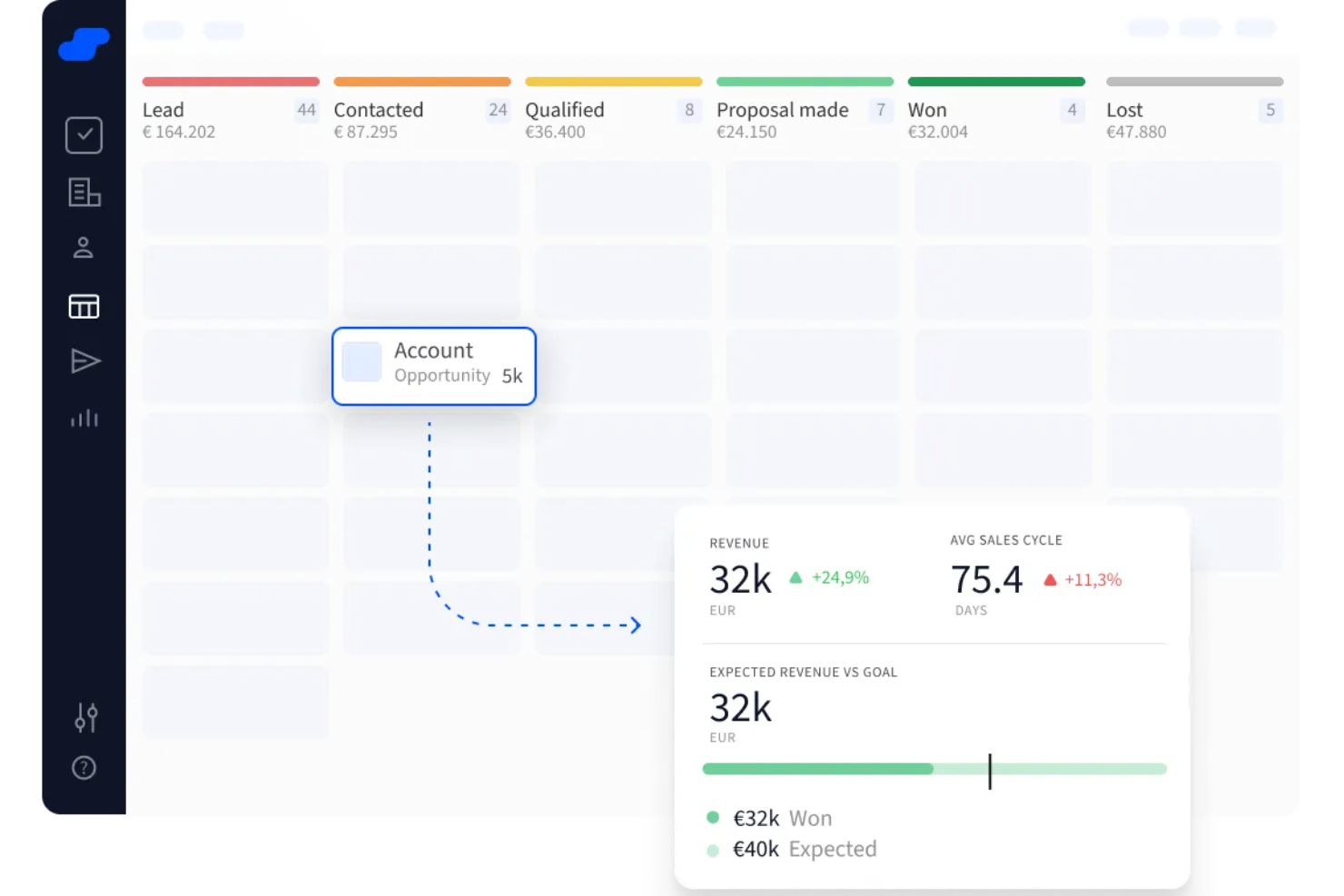
Salesflare è uno strumento CRM creato per piccoli e medi team B2B che aiuta a tenere traccia dei lead e delle relazioni con i clienti. Organizza automaticamente i dati di contatto e di interazione, così non devi inserirli manualmente.
Perché ho scelto Salesflare: Ho scelto Salesflare perché arricchisce per te i dati di contatti e aziende utilizzando attività email, appuntamenti in calendario e informazioni disponibili pubblicamente—quindi il tuo CRM si compila semi‑automaticamente e rimane aggiornato senza sforzo aggiuntivo. L'ho scelto anche perché include promemoria automatici per il follow‑up, valutazione dei lead e suggerimenti guidati dall'IA all'interno dello strumento. Ricevi notifiche quando è il momento di rispondere a un'email, contattare un lead o compiere il passo successivo—così nulla va perso.
Caratteristiche e integrazioni principali:
Caratteristiche includono l'intelligenza relazionale che mappa chi, all'interno del tuo team, conosce quali contatti e con quale grado di familiarità, aiutandoti così a trovare presentazioni calde e connessioni più solide. Include inoltre monitoraggio delle vendite e dashboard personalizzabili, così puoi analizzare il tuo pipeline, vedere quanto restano le trattative in ogni fase e individuare dove puoi far avanzare le cose.
Integrazioni includono Google Workspace, Intercom, MailChimp, QuickBooks Online, Slack, Stripe, Shopify e Calendly.
Pros and Cons
Pros:
- Ti ricorda follow-up e prossime azioni
- Automatizza l'inserimento dati dei contatti dalle interazioni email
- Pipeline visive mostrano esattamente dove si trovano i lead
Cons:
- Mancano flussi di lavoro altamente personalizzati per team complessi
- Opzioni limitate per la modifica in blocco dei record
Attio
Ideale per una configurazione flessibile
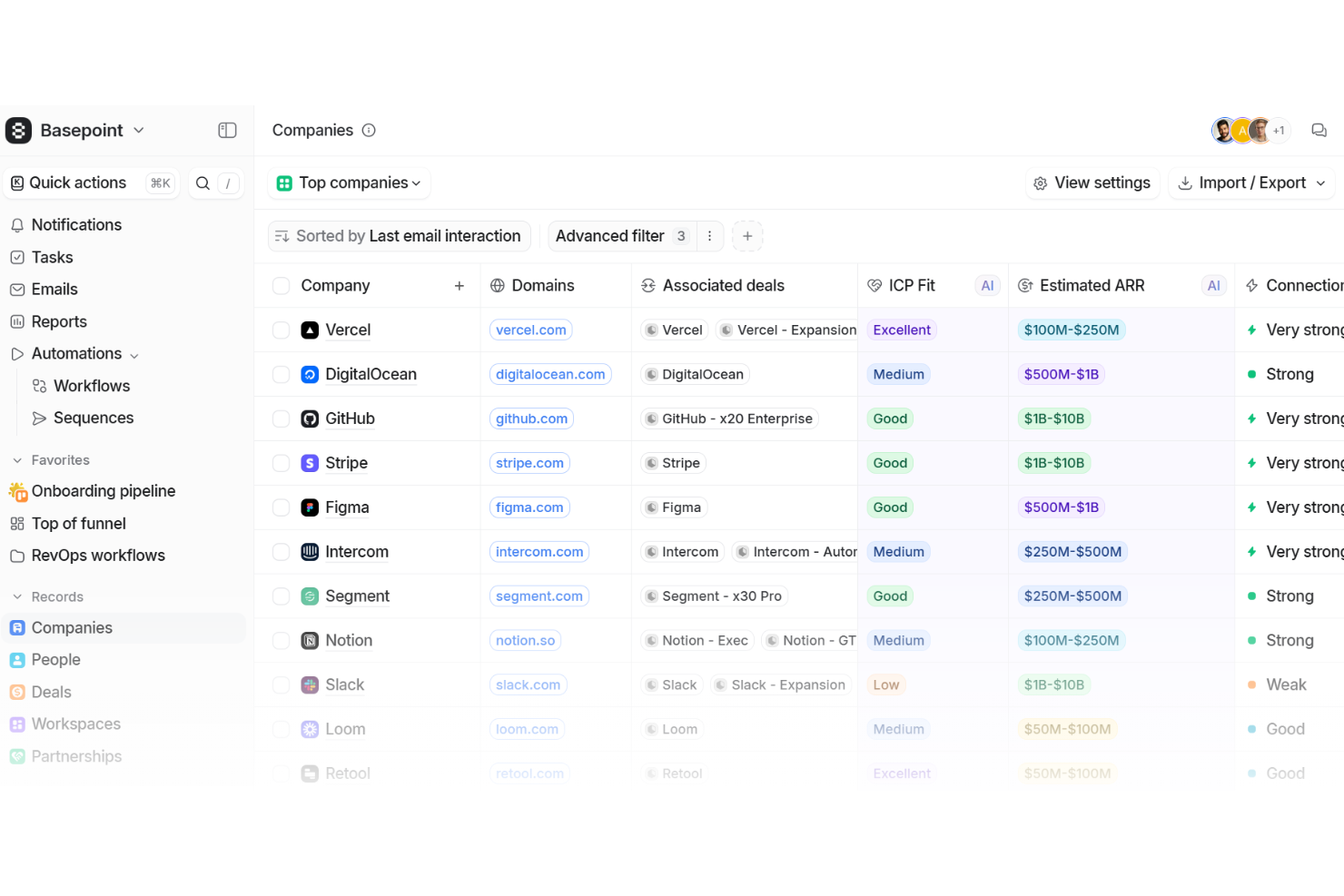
Attio è una piattaforma CRM progettata per offrire ai team un modo semplice per organizzare i dati dei clienti, le pipeline e la comunicazione. È costruita su una struttura flessibile che puoi modellare per adattarsi alla tua azienda.
Perché ho scelto Attio: Mi piace perché ti offre la flessibilità di modellare il sistema attorno alla tua attività invece di doverti adattare a strutture rigide. Il suo modello di dati adattivo ti permette di creare e personalizzare record come trattative, persone, aziende o persino oggetti unici come partnership, così il tuo CRM resta sempre rilevante a ciò che effettivamente monitori. Inoltre, il motore di automazione riduce il lavoro ripetitivo gestendo attività come l'instradamento dei lead o la configurazione delle fasi di onboarding. Questo mix di flessibilità e automazione mantiene il tuo CRM semplice ma sempre pronto a sostenere la crescita.
Funzionalità e integrazioni principali:
Le funzionalità includono strumenti di reportistica che ti permettono di creare dashboard per monitorare le performance attraverso le pipeline. Le sue funzioni di intelligenza artificiale supportano la ricerca di potenziali clienti, la valutazione delle opportunità e l'identificazione dei decisori chiave, così puoi agire più velocemente senza fare ricerche aggiuntive. La piattaforma collega anche dati di prodotto, informazioni di fatturazione e dettagli di supporto in una sola fonte, aiutandoti a mantenere i tuoi record puliti e coerenti.
Le integrazioni includono Vercel, DigitalOcean, GitHub, Stripe, Figma, Intercom, Segment, Notion, Slack, Loom, Retool e Customer.io.
Pros and Cons
Pros:
- Personalizzazione facile con modello di dati adattivo
- Automatizza attività ripetitive con i flussi di lavoro
- Strumenti di intelligenza artificiale per la ricerca di clienti e approfondimenti sulle trattative
Cons:
- Profondità limitata nei report avanzati
- Nessuna funzionalità di chiamata integrata
New Product Updates from Attio

Attio Improves Ask Attio With Suggested Actions and Consistent Chat
Attio adds suggested next actions, example prompts, a consistent chat panel, aligned shortcuts, and a minimize option to Ask Attio. These updates make the AI assistant easier to use across different pages. For more information, visit Attio’s official site.
 .
.
Ideale per il monitoraggio integrato degli ordini sul campo
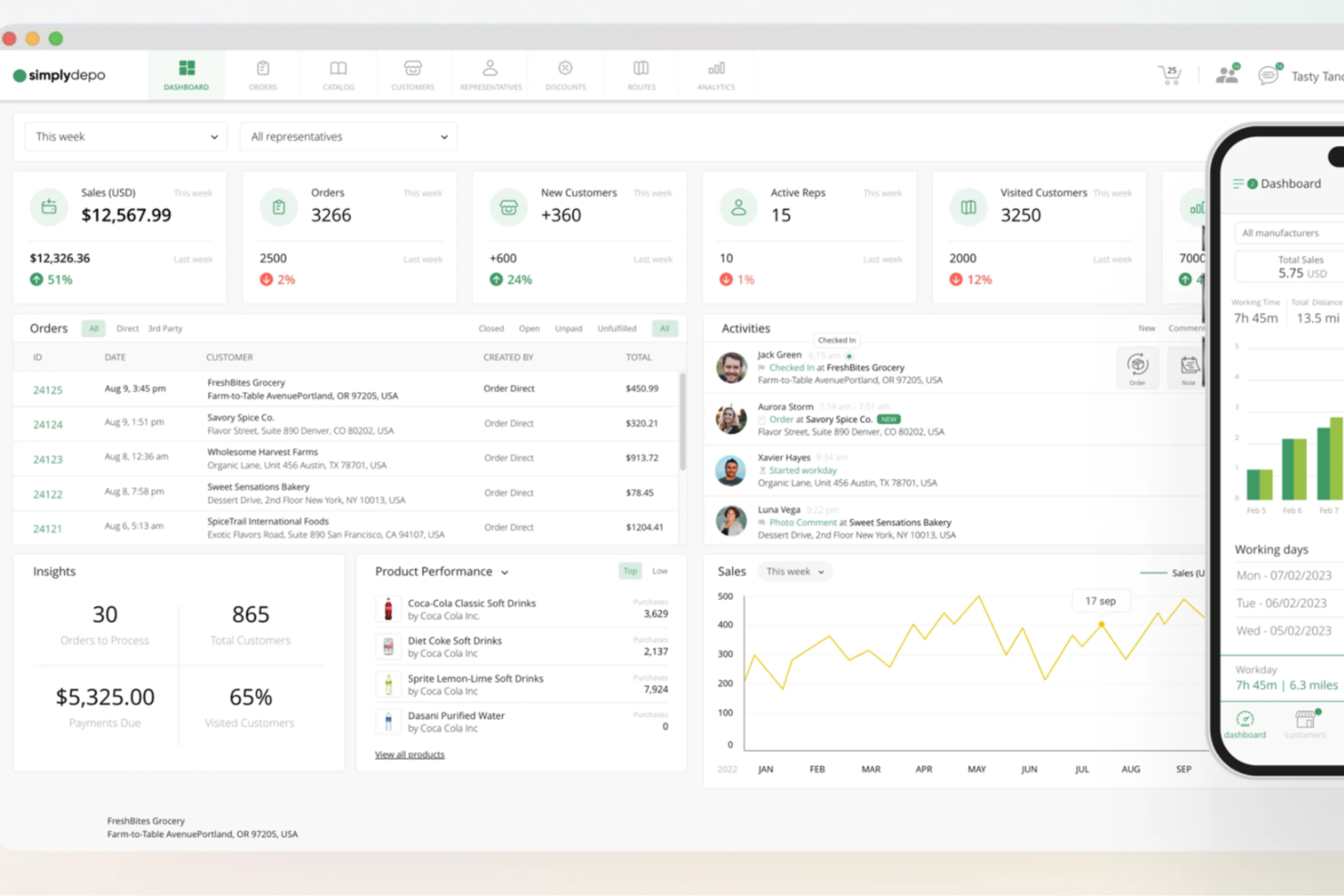
SimplyDepo è una soluzione versatile per distributori e team sul campo che desiderano migliorare le proprie operazioni con un CRM semplice. Progettato per centralizzare le relazioni con i clienti e semplificare i processi, è ideale per chi opera nei settori della distribuzione e del retail. Con SimplyDepo, puoi aspettarti miglioramenti nella gestione degli ordini e dei processi di vendita, affrontando le sfide che le aziende incontrano nel mantenere efficienza e soddisfazione del cliente.
Perché ho scelto SimplyDepo
Ho scelto SimplyDepo perché eccelle nel soddisfare le esigenze specifiche dei distributori grazie alle sue funzionalità CRM B2B. La capacità della piattaforma di facilitare gli ordini tramite app mobile e di gestire i territori è particolarmente vantaggiosa per i team in movimento. Inoltre, le sue capacità d'integrazione con sistemi popolari come QuickBooks e Salesforce lo rendono una scelta pratica per chi cerca un CRM semplice da inserire nei flussi di lavoro esistenti.
Caratteristiche principali di SimplyDepo
Oltre alle sue notevoli capacità CRM, ho trovato anche le seguenti funzionalità preziose per una soluzione CRM semplice:
- App per rappresentanti di vendita: Fornisce ai team sul campo strumenti per gestire ordini e interazioni con i clienti ovunque si trovino.
- Portale ordini: Consente una gestione e un monitoraggio efficienti degli ordini, riducendo i tempi di elaborazione.
- Contabilità delle rotte: Semplifica la contabilità delle attività e delle transazioni sul campo.
- Gestione dei territori: Permette una supervisione e organizzazione efficace dei territori di vendita per ottimizzare le prestazioni.
Integrazioni di SimplyDepo
Le integrazioni includono Stripe, Twilio SendGrid, ShipStation e QuickBooks.
Pros and Cons
Pros:
- Sistema di gestione degli ordini B2B incorporato
- CRM integrato per il monitoraggio dei clienti
- Pianificazione delle rotte e mappatura dei territori
Cons:
- Personalizzazione limitata dei report avanzati
- Nessuna documentazione API trasparente
Ideale per la vendita orientata all'azione
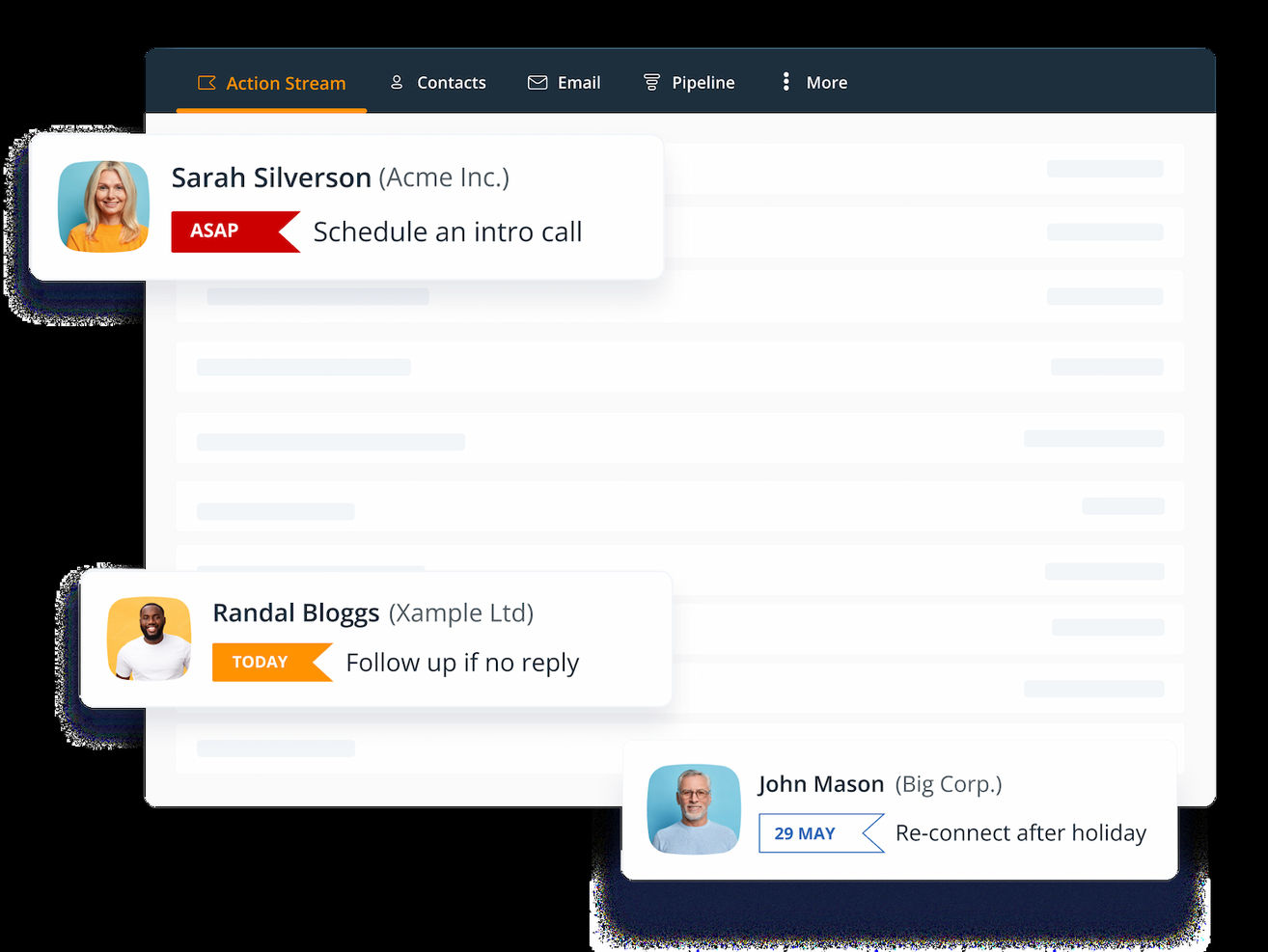
OnePageCRM semplifica le vendite in una serie di passaggi chiari e attuabili, rendendolo ideale per i team che desiderano un sistema incentrato sul portare a termine le attività. Invece di sopraffare gli utenti con funzionalità, trasforma lead e trattative in compiti prioritari.
Perché ho scelto OnePageCRM
Ho scelto OnePageCRM per il suo action stream, che mantiene il team focalizzato sui prossimi passi anziché sulla semplice registrazione passiva dei dati. È pensato per i venditori che danno il meglio quando ogni giornata inizia con un elenco di attività prioritarie. La gestione dei contatti e il monitoraggio delle trattative sono semplici, e l'app mobile assicura la possibilità di aggiornare le azioni ovunque ci si trovi.
Funzionalità principali di OnePageCRM
- Action stream: Trasforma ogni lead in un prossimo passo.
- Gestione contatti: Mantieni le informazioni dei clienti organizzate.
- Monitoraggio trattative: Monitora le opportunità man mano che avanzano.
- Accesso mobile: Gestisci attività e trattative anche in movimento.
- Promemoria di vendita: Mantieni costanza nel follow-up.
Integrazioni di OnePageCRM
Le integrazioni includono Google Workspace, Mailchimp, Xero, QuickBooks e Zapier.
Pros and Cons
Pros:
- Dà priorità alle azioni di vendita
- Interfaccia utente intuitiva
- App mobile avanzata
Cons:
- Nessuna funzionalità avanzata per i preventivi
- Opzioni di personalizzazione limitate

Ideale per pipeline di vendita visive

Pipedrive CRM è progettato per aiutarti a gestire il processo di vendita dall'inizio alla fine. Si basa sull'idea che le pipeline visive rendano il monitoraggio delle trattative facile e intuitivo. Puoi vedere le tue trattative a colpo d'occhio, spostarle tra le varie fasi e sapere esattamente su cosa concentrare la tua attenzione.
Perché ho scelto Pipedrive CRM: la funzione di gestione delle trattative ti permette di monitorare lead, potenziali clienti e trattative tramite una funzionalità drag-and-drop, così puoi spostarli facilmente da una fase all'altra. C'è anche lo strumento di pianificazione delle attività, che ti assicura di non perdere mai un follow-up permettendoti di assegnare compiti come chiamate o riunioni a trattative specifiche. Inoltre, grazie all'integrazione email di Pipedrive, puoi inviare, ricevere e monitorare tutte le comunicazioni con i clienti direttamente dal CRM.
Funzionalità e integrazioni principali:
Le funzionalità includono pipeline personalizzabili, chatbot per la generazione di lead, pianificatore di riunioni, app mobile, dashboard di reportistica, visualizzazione a cronologia, report di vendita, campi personalizzati, tracciamento delle email, impostazione e monitoraggio degli obiettivi, tracciamento delle chiamate e strumenti per la collaborazione di squadra.
Le integrazioni includono Surfe, Apollo.io, Microsoft Teams, Slack, Mailchimp, Google Meet, PandaDoc, DocuSign, QuickBooks, Stripe, Asana, Trello, OneClick e CloudTalk.
Pros and Cons
Pros:
- Pipeline drag-and-drop
- Fasi di vendita personalizzabili
- Automazione delle attività ripetitive
Cons:
- Manca l'automazione del marketing oltre alle email
- L'accesso a funzionalità avanzate e agli strumenti di generazione lead potrebbe comportare costi aggiuntivi
Streak
Ideale per la gestione delle relazioni
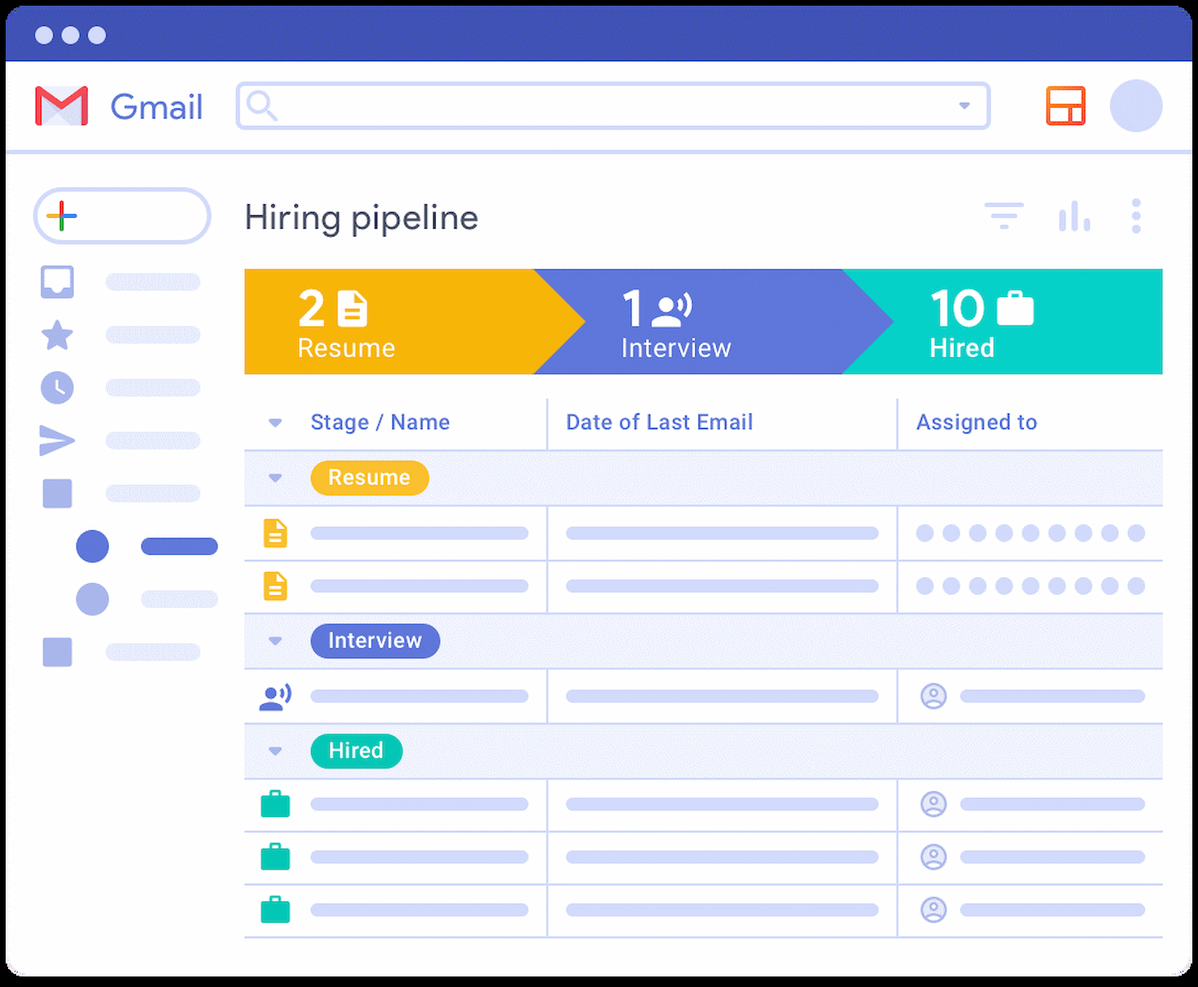
Streak è uno strumento di gestione delle relazioni con i clienti che si integra direttamente con Gmail, consentendo agli utenti di gestire le relazioni con i clienti direttamente dalla propria casella di posta. È la soluzione ideale per la gestione delle relazioni perché offre un'integrazione senza soluzione di continuità con Gmail, permettendo agli utenti di gestire i propri pipeline, tracciare le email e collaborare con il team senza uscire dalla casella di posta.
Perché ho scelto Streak: Streak si distingue per la sua profonda integrazione con Gmail, rendendolo una scelta ideale per gli utenti che preferiscono gestire le attività CRM all'interno dell'ambiente email. Semplifica il processo di monitoraggio e gestione delle interazioni con i clienti, assicurando che tutte le informazioni rilevanti siano facilmente accessibili direttamente dall'interfaccia della posta elettronica.
Funzionalità e integrazioni principali:
Le funzionalità includono tracciamento delle email, gestione dei pipeline, strumenti di collaborazione, acquisizione automatica dei dati da contatti ed email e notifiche sui progressi delle attività.
Le integrazioni comprendono Google Sheets, Google Chat, Google Drive, Google Calendar, Zapier, Slack, Mailchimp, Trello, Asana e Dropbox.
Pros and Cons
Pros:
- Integrato con Gmail
- Interfaccia intuitiva
- Pipeline personalizzabili
Cons:
- Funzionalità di reportistica di base
- Costo elevato per le funzionalità avanzate
Apptivo
Ideale per CRM aziendale personalizzabile
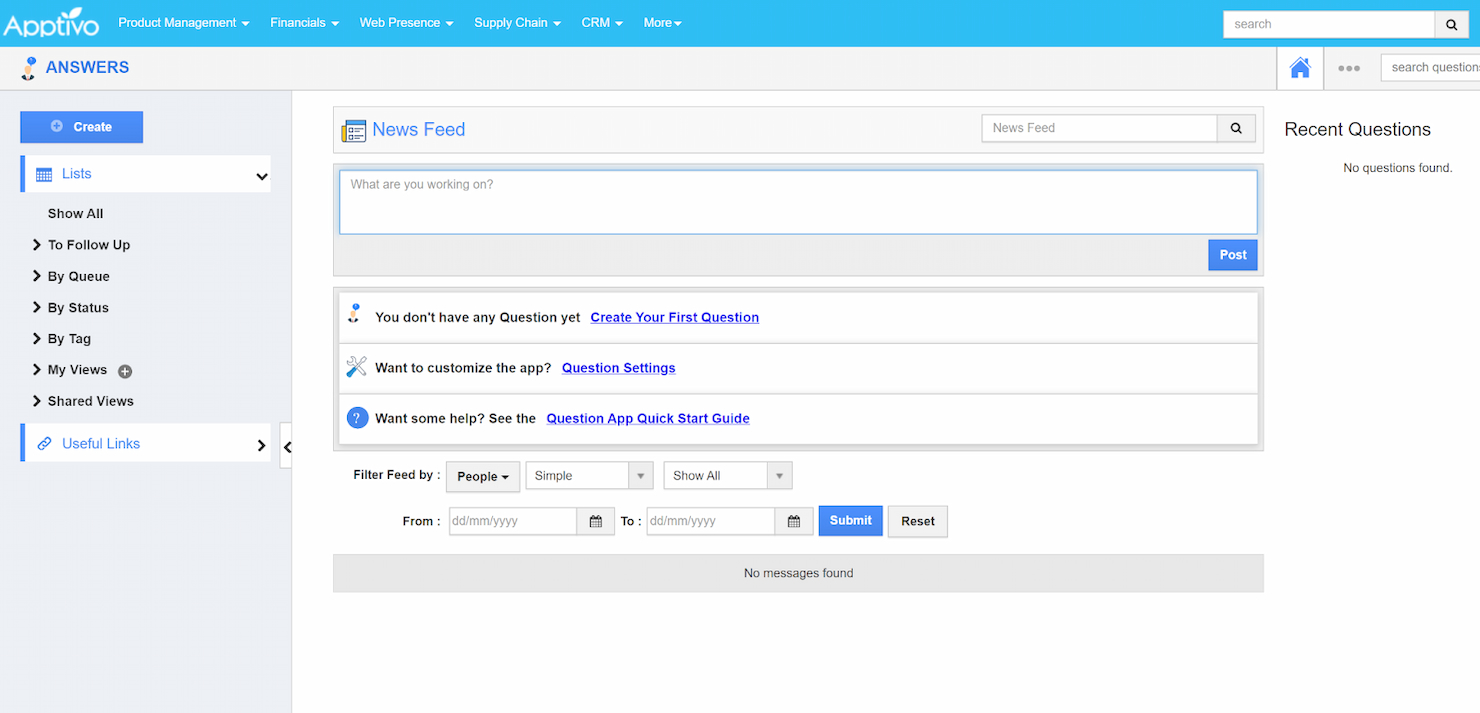
Apptivo è una piattaforma CRM avanzata progettata per aiutare le aziende a crescere offrendo una suite di applicazioni aziendali personalizzate per soddisfare esigenze end-to-end. È ideale come CRM aziendale personalizzabile perché offre una piattaforma unificata con ampie opzioni di personalizzazione, permettendo alle imprese di adattare il CRM ai propri processi e flussi di lavoro.
Perché ho scelto Apptivo: Apptivo offre una ricca suite di applicazioni integrate che rispondono a diverse esigenze aziendali, rendendolo una scelta versatile per le aziende che cercano una soluzione CRM personalizzabile. Le sue opzioni di personalizzazione senza codice, tra cui la funzionalità intuitiva di drag-and-drop per progettare campi, report, dashboard, viste personalizzate e layout, insieme alla capacità di adattarsi alle esigenze uniche di un'azienda, lo distinguono dagli altri strumenti CRM.
Funzionalità e integrazioni principali:
Le funzionalità includono gestione dei lead con assegnazioni a rotazione, gestione dei contatti con una vista a 360 gradi, monitoraggio delle opportunità, creazione di preventivi e fatture e automazione dei flussi di lavoro.
Le integrazioni includono QuickBooks, Xero, Authorize.net, PayPal, Stripe, Google Calendar, Google Tasks, Google Contacts, Google Forms, Microsoft Office 365, Asterisk, Fuze, WordPress, RingCentral, Nexmo, Dropbox, Google Drive, OneDrive, Sign.co, Google Maps e Slack.
Pros and Cons
Pros:
- Estese opzioni di personalizzazione
- Ampia gamma di integrazioni
- Interfaccia intuitiva
Cons:
- Configurazione iniziale complessa
- Integrazione e-mail limitata
Ideale per un servizio personalizzato con una visione a 360 gradi del cliente
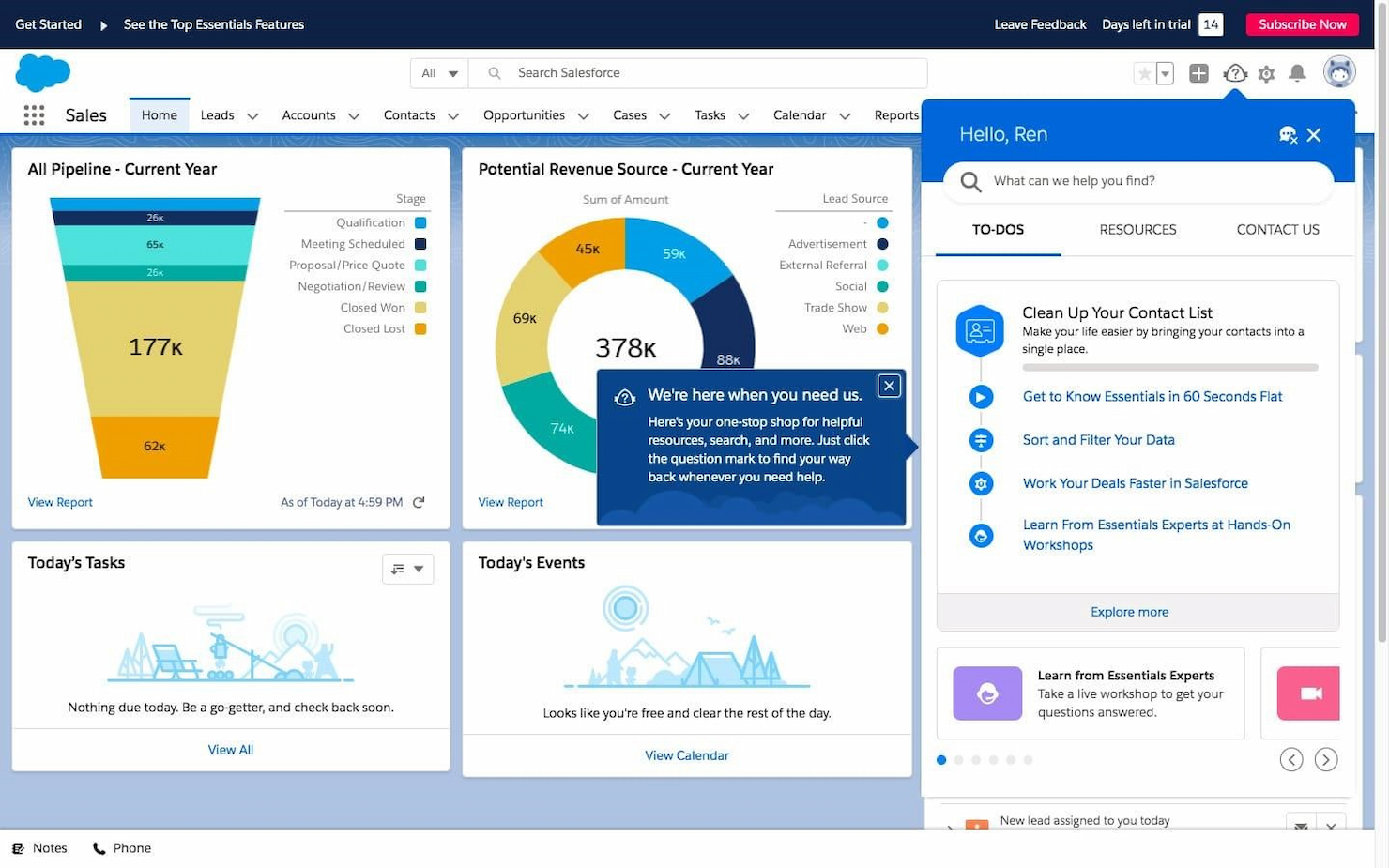
Salesforce è uno strumento CRM progettato per offrire assistenza clienti personalizzata a basso costo. È ideale per un servizio su misura perché fornisce una visione a 360 gradi di ogni cliente, permettendo alle aziende di offrire supporto personalizzato in modo efficiente.
Perché ho scelto Salesforce: Salesforce offre una visione avanzata delle interazioni con i clienti, fondamentale per un servizio personalizzato. La capacità dello strumento di integrare i dati dei clienti su vari canali lo rende unico rispetto ai semplici CRM. Inoltre, la visione unificata dei clienti aiuta le aziende a capire e soddisfare efficacemente le esigenze dei clienti, rendendolo una delle scelte migliori per i team che desiderano aumentare il coinvolgimento dei clienti.
Funzionalità principali & integrazioni:
Le funzionalità includono una semplice configurazione guidata, assistenza in tempo reale per una rapida implementazione, una visione a 360 gradi di ogni cliente, sicurezza a livello aziendale e accesso a una rete globale di esperti tramite la Salesforce Trailblazer Community.
Le integrazioni comprendono Gmail, Outlook, Slack, Mailchimp, QuickBooks, Zapier, Google Drive, Dropbox, LinkedIn e Facebook.
Pros and Cons
Pros:
- Visione unificata del cliente
- Sicurezza a livello aziendale
- Comunità globale di esperti
Cons:
- Curva di apprendimento ripida
- Necessari aggiornamenti frequenti

Ideale per CRM e gestione progetti
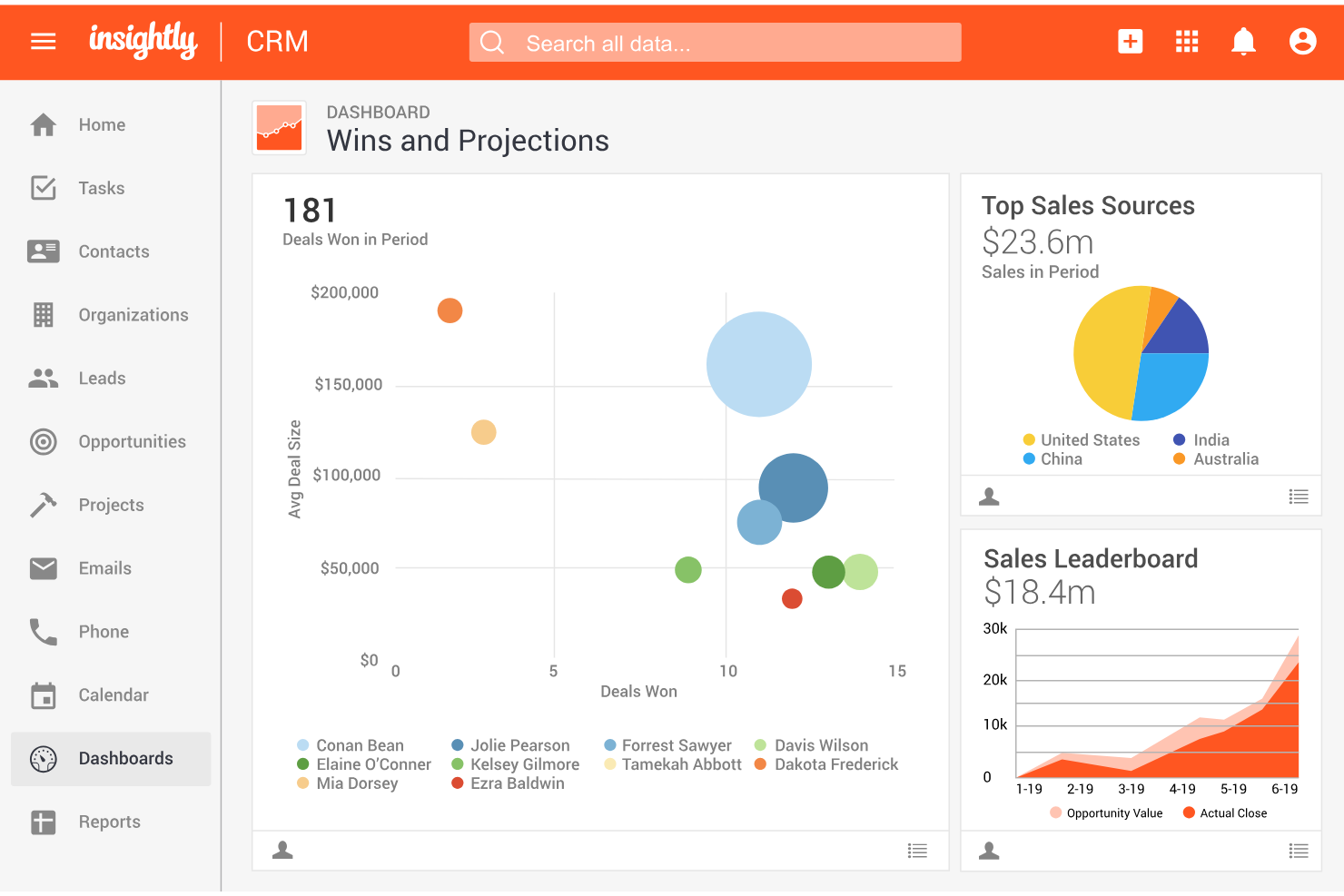
Insightly è uno strumento di customer relationship management (CRM) che semplifica la gestione delle vendite e dei progetti per piccole e medie imprese. Combina gestione dei contatti, monitoraggio delle vendite e dei progetti in un'unica piattaforma, aiutando i team a rimanere organizzati, automatizzare i flussi di lavoro e migliorare la visibilità lungo tutto il ciclo di vita del cliente.
Perché ho scelto Insightly: Ho scelto Insightly per la sua combinazione semplice ma efficace di funzionalità CRM e di gestione progetti—ideale per i team che vogliono gestire in un unico posto le relazioni con i clienti e l'esecuzione delle consegne. Con l'automazione dei flussi di lavoro e l'integrazione nativa delle email, Insightly aiuta a ridurre le attività manuali, velocizzare i follow-up e mantenere allineate vendite e operazioni senza aggiungere complessità inutile.
Funzionalità e integrazioni principali:
Le funzionalità includono gestione dei contatti, pipeline di vendita personalizzabili, monitoraggio dei progetti, automazione dei flussi di lavoro, reportistica e analisi, e comunicazioni email integrate. Queste capacità permettono un tracciamento più rapido delle trattative, una migliore coordinazione dei compiti e decisioni più informate.
Le integrazioni comprendono Google Workspace, Microsoft 365, QuickBooks Online, Slack, Mailchimp, Dropbox, Xero, Box e un'API aperta per connessioni personalizzate.
Pros and Cons
Pros:
- Offre forti capacità di project management con funzionalità CRM integrate.
- Si integra efficacemente con strumenti popolari come Mailchimp e Google Workspace.
- Offre pipeline visivamente accattivanti in stile kanban per monitorare compiti e trattative.
Cons:
- L'app mobile non offre funzionalità offline per gli utenti in mobilità.
- Alcuni utenti trovano l'interfaccia troppo rigida per personalizzazioni avanzate.

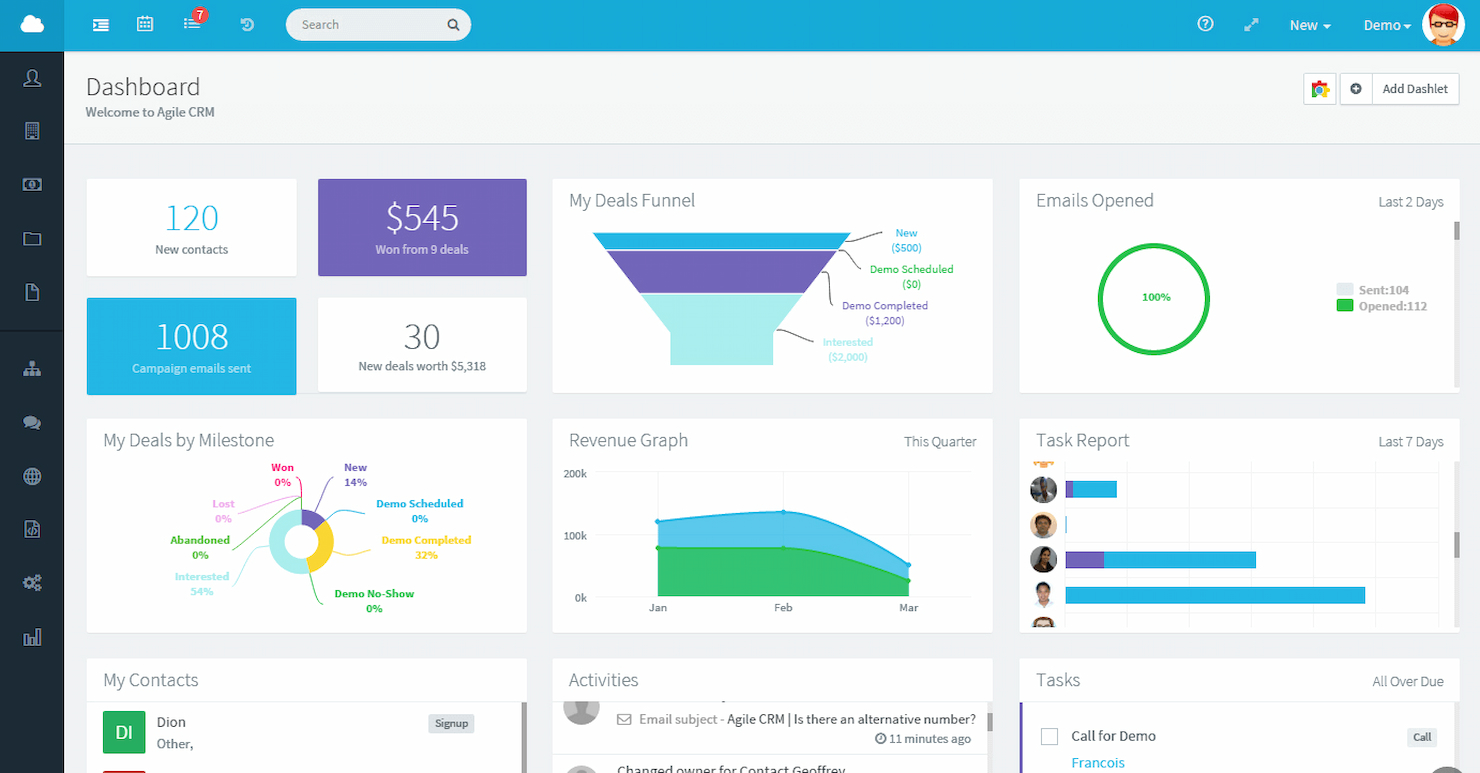
Agile CRM è una piattaforma avanzata che automatizza vendite, marketing e assistenza in un unico sistema. È la soluzione migliore per l'automazione CRM all-in-one grazie alla sua ampia gamma di funzionalità che supportano l'intero ciclo di vita del cliente.
Perché ho scelto Agile CRM: Agile CRM si distingue per la sua capacità di consolidare più funzionalità in un'unica piattaforma, differenziandosi da altri strumenti CRM che possono offrire soluzioni più frammentate. Fornisce un sistema unificato per la gestione delle relazioni con i clienti, ottimizzando i processi e automatizzando le attività di vendita, marketing e servizi al cliente, rendendolo ideale per i team che necessitano di un modello CRM più completo.
Funzionalità principali e integrazioni:
Le funzionalità includono gestione dei contatti, tracciamento delle trattative, telefonia, pianificazione appuntamenti, gestione dei progetti, gamification per le vendite, automazione, costruttori di landing page, integrazione con i social media, email marketing, mobile marketing, tracciamento email e analisi del feedback.
Le integrazioni includono Twitter, Facebook, Google Apps, Twilio, RingCentral e LinkedIn.
Pros and Cons
Pros:
- Personalizzazione della valutazione dei lead
- Suite social integrata
- Funzionalità di gamification per aumentare il coinvolgimento del team
Cons:
- Reportistica avanzata limitata
- Curva di apprendimento ripida
Altri software CRM semplici
Di seguito trovi un elenco di altri software CRM semplici che ho selezionato. Sebbene non siano entrati nella top 10, sono comunque validi e meritano ulteriori approfondimenti.
- Close
Ideale per l'integrazione dell'automazione delle vendite
- Capsule
Ideale per utenti Gmail e facilità d'uso
- Less Annoying CRM
Ideale per le piccole imprese che cercano una soluzione semplice
- Workbooks
Ideale per servizi di consulenza e processi
- Maximizer CRM
Ideale per consulenti finanziari che necessitano di conformità e monitoraggio dei clienti
- Creatio CRM
Ideale per i flussi di lavoro no-code
- Copper
Ideale per utenti di Google Workspace
- Zoho CRM
Ideale per strumenti di automazione
- Bigin by Zoho CRM
Ideale per l'integrazione con l'ecosistema Zoho


Recensioni correlate sui software CRM
Se non hai ancora trovato quello che cerchi, dai un'occhiata a questi strumenti strettamente correlati ai software CRM che abbiamo testato e valutato.
- Software per le vendite
- Software per la gestione dei lead
- Software di business intelligence
- Software per la gestione dei contratti
- Sistema di gestione dei ricavi
- Software CPQ
Come Valuto i CRM Semplici
Analizzo i CRM semplici su due livelli: gli elementi imprescindibili di cui un founder o un piccolo team RevOps ha bisogno per far avanzare le trattative e i fattori distintivi che differenziano una soluzione dall'altra.
Funzionalità di Base (Requisiti Fondamentali per Questa Lista)
Quando seleziono i tool per la mia lista, valuto ciascuno su una scala da 0 (non offre la funzionalità) a 5 (eccelle in quest'area) per ognuna delle funzionalità di base elencate di seguito. Calcolo poi il punteggio totale dello strumento in percentuale. Ogni software deve raggiungere un punteggio minimo totale del 65% per essere preso in considerazione.
- Gestione Contatti & Aziende: Verifico se i contatti sono collegati alle anagrafiche aziendali e mostrano la cronologia delle interazioni, così i commerciali possono aprire una scheda e vedere immediatamente tutti i punti di contatto.
- Pipeline di Vendita Visuale: Ogni software dovrebbe permettere di trascinare le trattative tra le fasi in una vista kanban o elenco, con la possibilità di rinominare le fasi per riflettere il tuo reale processo di vendita.
- Monitoraggio Attività & Task: Valuto come task, chiamate e meeting vengono riportati sulle schede opportunità e contatto: strumenti come Pipedrive e Freshsales lo gestiscono in modo diverso, quindi confronto il livello di dettaglio della registrazione dati.
- Integrazione Email: Qui cerco la sincronizzazione bidirezionale con Gmail o Outlook, così che email inviate e ricevute appaiano sulla timeline del contatto senza inserimento manuale.
- Reportistica Leggera: Il tuo team RevOps dovrebbe poter estrarre valori di pipeline, tassi di conversione e attività del team da dashboard preimpostate, senza bisogno di creare query da zero.
- Configurazione & Personalizzazione No-Code: Guardo se un amministratore non tecnico può aggiungere campi personalizzati, modificare le fasi della pipeline e impostare i permessi utenti direttamente dall'interfaccia grafica.
Quando ho una lista di strumenti che soddisfano questi criteri, considero cosa rende particolare ogni piattaforma.
Fattori Differenzianti (Cosa Distingue i Fornitori)
Ecco come confronto e metto a paragone i vari fornitori:
Funzionalità Distintive
Le sequenze di vendita integrate sono importanti perché permettono a un piccolo team di automatizzare le azioni di follow-up senza dover aggiungere uno strumento di engagement a parte. Valuto anche se un CRM prevede viste di previsione dei ricavi — anche una semplice suddivisione della pipeline ponderata può aiutare il responsabile RevOps a fornire una stima ai vertici durante le riunioni settimanali. L’inserimento dati assistito dall’AI è un altro fattore che considero: gli strumenti che arricchiscono automaticamente le schede contatto fanno risparmiare tempo ai commerciali che altrimenti dovrebbero passare da LinkedIn al CRM solo per aggiornare un titolo di lavoro.
Oltre le Funzionalità
Il time-to-value è cruciale — verifico se un team può essere operativo in un giorno, non in un trimestre. Un CRM che richiede settimane di setup assistito da consulenti va contro l’obiettivo della semplicità. La migrazione dati è altrettanto importante, soprattutto per i team che lasciano i fogli di calcolo: cerco strumenti di importazione CSV con mappatura dei campi, così non occorre reinserire manualmente centinaia di contatti. Infine, verifico l’integrazione nell’ecosistema: il supporto Zapier o Make, oltre ai connettori nativi con tool come Slack e Mailchimp, mantiene connesso uno stack RevOps snello.
Come scegliere un software CRM semplice
Mentre segui il tuo processo personalizzato di selezione del software, tieni a mente i seguenti punti:
- Interfaccia intuitiva: Un CRM dovrebbe essere intuitivo e facile da utilizzare, consentendo agli utenti di trovare le informazioni in modo rapido ed efficiente. Ad esempio, i team di vendita con competenze tecniche diverse trarranno vantaggio da un CRM semplice che riduce al minimo la curva di apprendimento e permette loro di concentrarsi sulle interazioni con i clienti invece di cercare di comprendere un software complesso.
- Capacità di personalizzazione: È importante adattare il CRM ai processi aziendali specifici. Ad esempio, una piccola impresa potrebbe aver bisogno di personalizzare i campi e i flussi di lavoro in base al proprio processo di vendita, assicurandosi che sia il CRM ad adattarsi alle sue attività e non il contrario.
- Integrazione con altri strumenti: Un CRM semplice dovrebbe connettersi facilmente agli strumenti aziendali esistenti, come piattaforme di posta elettronica, social media e software di contabilità. Questo è particolarmente importante per le aziende che si affidano a una suite di strumenti e hanno bisogno che il CRM collabori con essi per evitare silos di dati.
- Scalabilità: Man mano che un'azienda cresce, il suo CRM dovrebbe essere in grado di supportare nuovi utenti, una maggiore quantità di dati e funzionalità aggiuntive senza interruzioni significative. Le start-up e le piccole imprese, ad esempio, hanno bisogno di un CRM in grado di crescere insieme a loro senza rendere necessaria una completa sostituzione del software.
- Prezzi accessibili: Il costo è un fattore importante, soprattutto per le piccole imprese o le start-up con budget limitati. Un CRM semplice dovrebbe offrire prezzi trasparenti e privi di costi nascosti, consentendo alle aziende di prevedere le spese e investire in una soluzione che fornisca le funzionalità necessarie senza gravare eccessivamente sulle finanze.
La scelta del software CRM semplice ideale richiede una valutazione delle esigenze aziendali, del budget e delle funzionalità desiderate. Comprendendo questi fattori e analizzando attentamente le opzioni disponibili, è possibile trovare un CRM che semplifichi le interazioni con i clienti e migliori l'efficienza complessiva.
Tendenze dei software CRM semplici
Il panorama dei software CRM semplici è in continua evoluzione e le nuove tendenze stanno plasmando il modo in cui le aziende interagiscono con i clienti. Di seguito sono riportate alcune delle ultime tendenze che ho notato durante la ricerca sui software CRM semplici:
- Integrazione dell'IA per un'analisi dei dati più efficace: L'intelligenza artificiale viene integrata sempre più spesso nei sistemi CRM semplici. Questa tendenza consente di effettuare analisi dei dati più sofisticate e ottenere informazioni predittive, un aspetto importante perché aiuta le aziende ad anticipare con maggiore precisione le esigenze dei clienti.
- Crescente accessibilità dei CRM da dispositivi mobili: L'accessibilità del CRM da dispositivi mobili sta diventando un'aspettativa standard. Gli utenti richiedono l'accesso ai dati dei clienti anche in mobilità, migliorando così la reattività e il servizio clienti. Questa tendenza è fondamentale per le aziende che danno priorità all'agilità e al processo decisionale in tempo reale.
- Maggiore attenzione alle interfacce intuitive: Si presta sempre più attenzione allo sviluppo di interfacce intuitive per i software CRM. Semplificare l'esperienza utente favorisce l'adozione e riduce i tempi di formazione. Questo è importante per le aziende che desiderano aumentare l'efficienza e la facilità d'uso.
- Espansione delle opzioni CRM self-service: Le opzioni self-service all'interno delle piattaforme CRM sono in espansione. Ciò consente agli utenti di personalizzare e gestire la propria esperienza CRM senza il supporto specializzato del reparto IT. Si tratta di una tendenza interessante, poiché democratizza l'uso della tecnologia CRM tra aziende di varie dimensioni.
- Maggiore attenzione alla sicurezza e alla privacy: Le funzionalità di sicurezza e privacy stanno diventando più solide nei sistemi CRM semplici. Poiché le violazioni dei dati sono sempre più frequenti, questa tendenza è fondamentale per proteggere le informazioni sensibili dei clienti. Ciò sottolinea l'importanza della fiducia nelle relazioni tra aziende e clienti.
Rimanere aggiornati sulle tendenze dei software CRM semplici è essenziale per sfruttare appieno il potenziale di questi strumenti. Adottando le innovazioni e le funzionalità più recenti, le aziende possono migliorare le relazioni con i clienti, semplificare le attività operative e mantenere un vantaggio in un mercato competitivo.
Che cos'è un software CRM semplice?
Il software di gestione delle relazioni con i clienti (CRM) è uno strumento progettato per aiutare le aziende a gestire e analizzare le interazioni e i dati dei clienti durante tutto il ciclo di vita del cliente. Un CRM semplice offre tutte le stesse funzionalità di un CRM standard, ma in genere è più intuitivo e meno avanzato rispetto ad altri sistemi.
Funzionalità dei software CRM semplici
Quando scegli un software CRM semplice, presta attenzione alle seguenti funzionalità chiave:
- Gestione dei contatti: archivia, organizza e aggiorna le informazioni sui clienti e sui potenziali clienti in un'unica posizione centrale. Questa funzione ti aiuta ad accedere rapidamente ai dettagli rilevanti e a tenere traccia delle interazioni, semplificando la costruzione di relazioni più solide.
- Monitoraggio dei potenziali clienti: monitora i potenziali clienti mentre avanzano nella pipeline di vendita. Sapendo a che punto si trova ogni potenziale cliente, puoi gestire meglio i follow-up, individuare le opportunità ed evitare che qualcuno sfugga alla tua attenzione.
- Gestione di attività e calendario: imposta promemoria, pianifica riunioni e crea attività per te o per il tuo team. In questo modo tutti rimangono organizzati e nessuno dimentica una chiamata importante o una scadenza.
- Integrazione con le email: collega il tuo account email direttamente al CRM per inviare, ricevere e monitorare le email senza passare da una piattaforma all'altra. Questo ti consente di visualizzare tutta la cronologia delle comunicazioni nel giusto contesto, proprio dove serve.
- Visualizzazione della pipeline di vendita: visualizza le trattative a colpo d'occhio tramite una pipeline o una dashboard di facile comprensione. In questo modo è semplice monitorare i progressi, stabilire le priorità e individuare eventuali ostacoli nel processo di vendita.
- Report e analisi: genera report semplici e utili sulle vendite, sulle attività e sugli obiettivi. Questi report ti aiutano a capire cosa funziona (e cosa no), così puoi prendere decisioni aziendali più efficaci.
- Accessibilità da dispositivi mobili: accedi ai dati del CRM ovunque ti trovi, che tu sia a una riunione con un cliente o semplicemente a prendere un caffè. Una buona app mobile o un design reattivo garantisce che tu non perda mai un aggiornamento.
- Interfaccia intuitiva: naviga e utilizza il sistema facilmente, anche se non hai particolare dimestichezza con la tecnologia. Un layout pulito e intuitivo riduce i tempi di apprendimento e consente al tuo team di diventare rapidamente operativo.
Funzioni comuni dell'IA nei software CRM semplici
- Classificazione dei potenziali clienti basata sull'IA: assegna automaticamente la priorità ai potenziali clienti in base alla probabilità che effettuino una conversione, aiutando il tuo team a concentrarsi sulle opportunità più promettenti.
- Inserimento automatizzato dei dati: riduci il lavoro manuale lasciando che l'IA acquisisca e organizzi per te i dati dei contatti, gli appunti delle riunioni e le interazioni via email.
- Promemoria e follow-up intelligenti: ricevi suggerimenti proattivi su quando contattare i tuoi contatti o ricontattare i potenziali clienti, così non perdi mai un'opportunità importante.
- Analisi predittiva: utilizza l'IA per prevedere le tendenze delle vendite e il comportamento dei clienti, aiutandoti a prendere decisioni informate e a pianificare in anticipo.
- Suggerimenti per email e messaggi: ricevi suggerimenti generati dall'IA per le risposte alle email o per i messaggi di contatto, rendendo le comunicazioni più rapide ed efficaci.
- Analisi del sentiment: ottieni informazioni sullo stato d'animo e sul livello di soddisfazione dei clienti lasciando che l'IA analizzi messaggi e interazioni, così puoi affrontare i problemi prima che si aggravino.
Scegliere un software CRM semplice con queste funzioni aiuterà la tua azienda a mantenere solide relazioni con i clienti, lavorare in modo più efficiente e sfruttare al meglio gli strumenti basati sull'IA per rimanere competitiva. Ricorda: il CRM migliore è quello che si integra perfettamente con i processi aziendali e permette al tuo team di interagire efficacemente con i clienti.
Vantaggi di un software CRM semplice
Quando si valuta una soluzione CRM, la semplicità può essere un fattore decisivo per molte aziende. Un sistema CRM semplice offre numerosi vantaggi che possono aiutare utenti e organizzazioni a gestire le relazioni con i clienti in modo più efficace. Inoltre, offre questi ulteriori benefici:
- Facilità d'uso: i sistemi CRM semplici sono progettati pensando alla facilità d'uso. Ciò significa che gli utenti possono imparare rapidamente a navigare e utilizzare il software, favorendone un'adozione più rapida in tutta l'organizzazione.
- Relazioni migliori con i clienti: un software CRM semplice centralizza le informazioni sui clienti, facilitando la gestione delle interazioni e la costruzione di relazioni più solide. Questo può tradursi in una maggiore soddisfazione e fidelizzazione dei clienti.
- Maggiore efficienza: i CRM semplici offrono processi ottimizzati e un facile accesso alle informazioni, consentendo agli utenti di gestire più rapidamente le richieste e i problemi dei clienti e aumentando la produttività complessiva.
- Convenienza economica: le soluzioni CRM semplici sono spesso più convenienti rispetto alle alternative complesse, risultando ideali per le piccole e medie imprese con budget limitati.
- Migliore gestione dei dati: questi sistemi forniscono una piattaforma strutturata per archiviare e gestire i dati dei clienti, migliorando l'accuratezza e l'accessibilità delle informazioni all'interno dell'organizzazione.
Scegliere un CRM semplice può essere una decisione strategica per le aziende che desiderano migliorare la gestione delle relazioni con i clienti senza investire in una formazione approfondita o sostenere un investimento elevato. I vantaggi descritti sopra dimostrano come un approccio diretto al CRM possa offrire benefici significativi sia agli utenti sia alle organizzazioni.
Costi e prezzi dei software CRM semplici
Il software CRM semplice offre una gamma di piani adattati alle diverse esigenze aziendali, dalle startup alle imprese consolidate. Di seguito è riportata una panoramica dettagliata delle opzioni dei piani, dei relativi prezzi medi e delle funzionalità comuni incluse in ciascun piano.
Tabella comparativa dei piani per il software CRM semplice
| Piano | Prezzo medio | Funzionalità comuni |
| Gratuito | $0/mese | Gestione di base dei contatti e delle attività, report semplici, spazio di archiviazione limitato e assistenza via e-mail |
| Base | $10-$20/mese | Gestione dei contatti, report di base, gestione delle attività e del calendario e integrazione della posta elettronica |
| Standard | $30-$50/mese | Report avanzati, automazione dei flussi di lavoro, gestione dei potenziali clienti e accesso da dispositivi mobili |
| Premium | $60-$100/mese | Pannelli di controllo personalizzabili, accesso API, comunicazione multicanale e sicurezza avanzata |
| Aziendale | Prezzo personalizzato | Assistenza dedicata, analisi avanzate, personalizzazione completa e molteplici integrazioni |
Quando selezioni un piano, considera le dimensioni della tua azienda, la complessità delle tue esigenze CRM e il livello di personalizzazione e assistenza di cui hai bisogno. Il software CRM semplice offre soluzioni scalabili che possono crescere insieme alla tua azienda, assicurandoti di pagare solo per le funzionalità necessarie.
Domande frequenti sul CRM semplice
Ecco alcune domande frequenti che ricevo sul software CRM semplice.
HubSpot è gratuito?
HubSpot offre effettivamente una piattaforma CRM gratuita. Questa soluzione completa include funzionalità per le vendite, le campagne di marketing e il servizio clienti. È l’offerta di base dei prodotti a pagamento più avanzati e specializzati di HubSpot.
È difficile imparare a usare il software CRM?
La curva di apprendimento del software CRM varia. Sebbene qualsiasi nuovo software possa presentare delle difficoltà, i sistemi CRM come Freshsales sono progettati per essere facili da usare, con tutorial completi e spiegazioni chiare delle funzionalità. Gli utenti non devono essere particolarmente esperti di tecnologia; con un po’ di tempo, possono diventare competenti nell’utilizzo del software CRM.
Esiste un CRM davvero gratuito?
HubSpot offre un piano CRM davvero gratuito, senza limiti di tempo. Sebbene possa presentare alcune limitazioni, è un’opzione valida per i piccoli team con esigenze moderate, poiché offre gratuitamente le funzionalità CRM essenziali.
È possibile aggiungere funzionalità in futuro a un CRM di base man mano che l'azienda cresce?
La scalabilità è una caratteristica fondamentale delle migliori piattaforme CRM. Con l’espansione dell’azienda, è possibile integrare funzionalità aggiuntive per migliorare l’efficienza dei flussi di lavoro. I fornitori offrono diversi percorsi di aggiornamento: alcuni consentono di aggiungere singole funzionalità, mentre altri propongono l’aggiornamento a pacchetti completi. È importante scegliere un fornitore CRM che dia priorità alla facilità d’uso e alle interfacce personalizzabili, così da garantire che il sistema rimanga gestibile con la sua evoluzione.
Qual è il prossimo passo?
Per rimanere aggiornato su tutte le ultime novità dei nostri esperti in materia, non dimenticare di iscriverti alla nostra newsletter.