

Doğru satış yönetimi yazılımı, potansiyel müşterileri düzenlemenize, fırsatları takip etmenize ve satış sürecinizi otomatikleştirmenize yardımcı olur; böylece daha az uğraşla daha fazla satış gerçekleştirebilirsiniz.
Dikkatinizi çekmeye çalışan bu kadar çok seçenek varken en iyisini seçmek bunaltıcı olabilir. Bu araçlardan onlarcasını farklı ekipler ve müşterilerle test ettim; bu nedenle size en iyi seçimlerimi ve gerçekten işinize yarayan satış yönetimi yazılımını bulmanıza yardımcı olacak gerçek içgörülerimi sunabilirim.
Why Trust Our Software Recommendations
6,700+
Reviews
20
Industry experts
16+
Evaluation factors
14
Years
Our reviews reflect our independent judgment—not a sales pitch. Learn how we stay transparent.
For this guide, we evaluated tools using hands-on testing and independent research, scoring tools using our selection criteria.
Our reviews reflect our human editorial judgment, not a sales pitch.
Satış Yönetimi Yazılımları Karşılaştırma Tablosu
Bu karşılaştırma tablosu, en iyi satış yönetimi yazılımı seçimlerimin fiyatlandırma ayrıntılarını özetlemektedir.
Sorted by: Default
| Tool | Starting Price | Website | |
|---|---|---|---|
Best for customizable automations for your sales pipeline | 4.6 out of 5 | $12/user/month 14-day free trial + free demo available | Book Demo |
Best for enterprise functionality | 4.2 out of 5 | $25/user/month 30-day free trial | Website |
Best for no-code AI workflow automation | 4.7 out of 5 | $40/user/month Not available | Book Demo |
Best for small and medium B2B teams | 4.7 out of 5 | $39/user/month 30-day free trial + free demo available | Website |
Best for hybrid, small and medium businesses | 4.2 out of 5 | $14/user/month Free plan + 15-day free trial+ free demo available | Website |
Best for real-time sales guidance | 4.9 out of 5 | Pricing upon request Free demo available | Website |
Best for distributor focused CRM | 4.6 out of 5 | $69/rep/month Free trial available | Website |
Best for digital sales rooms | 4.9 out of 5 | $350/month Free plan + free demo available | Website |
Best for fast team-member onboarding | 5.0 out of 5 | $3.99/user/month Free plan available | Website |
Best sales management software for automation | 4.7 out of 5 | $23/user/month 15-day free trial | Website |


En İyi Satış Yönetimi Yazılımları İncelemeleri
İşte, her platformun en iyi kullanım alanını, bazı benzersiz özelliklerini, fiyat noktasını ve ekibiniz için hangisinin en uygun olduğunu analiz etmenize yardımcı olacak zayıf yönlerini görmenizi sağlayacak en iyi 10 satış yönetimi yazılımının kısa bir özeti.
 Best for customizable automations for your sales pipeline
- 14-day free trial + free demo available
- From $12/user/month (billed annually)
Visit WebsiteCustomer Rating:4.6/5
Monday Sales CRM distinguishes itself with its visually engaging and highly customizable workspaces. monday sales CRM gives teams a flexible workspace for managing leads, deals, and ongoing customer relationships without relying on developers. Its no-code environment lets you shape pipelines, views, and automations around the way your team actually works. It’s ideal for organizations that need structure but don’t want to be boxed into rigid CRM workflows.
Why I Picked monday sales CRM
I picked monday sales CRM because it offers a wide range of customization options that non-technical users can manage confidently. You can build and automate your entire sales cycle with drag-and-drop tools, making it easier for every team member to contribute. The platform also excels at visualizing data, giving you flexible dashboards and views to understand performance at a glance. Email tracking, contact management, and sync options help keep communication organized. Its user-friendly design makes building complex automations feel straightforward.
monday sales CRM Key Features
- Lead & contact management: Store and organize customer information in one place.
- Customizable pipelines: Adapt stages and workflows to your unique sales process.
- Sales automation: Trigger alerts, assignments, updates, and follow-ups automatically.
- Advanced reporting: Build dashboards to monitor performance and KPIs.
- Email sync & tracking: Keep outreach connected to your CRM records.
monday sales CRM Integrations
Integrations include Slack, Google Drive, Gmail, Google Calendar, Jira, GitHub, Trello, Dropbox, Typeform, and additional options through Zapier (paid plan).
Pros and Cons
Pros:
- Advanced reporting and analytics
- Robust integration capabilities
- High customizability & automation-friendly
Cons:
- Slight learning curve
- Limited native email marketing features
 Best for enterprise functionality
- 30-day free trial
- From $25/user/month
Visit WebsiteCustomer Rating:4.2/5
Salesforce CRM is built with plenty of different features and apps to help small to enterprise businesses close more deals For years, Salesforce has been one of the market leaders in sales management software. While Salesforce offers mid-to-high-tier pricing for enterprise teams, they’re one of the highest-quality platforms available for sales teams and sales managers.
Why I picked Salesforce CRM: While Salesforce can help sales teams from businesses of any size, the platform is especially favorable for enterprise teams. In my opinion, it’s one of the best CRM tools simply due to its wide range of features and apps. The ability to customize the platform for your needs is impressive.
Salesforce CRM Standout Features and Integrations:
Standout features include email marketing, audience discovery, contact management, marketing automation and workflows. My favorite feature is “Einstein,” their AI which gives tips and insights. Salesforce also features opportunity management, and the Salesforce mobile app.
Integrations include Slack, Outlook, ActiveCampaign, G Suite, Paperflite, Zoho Forms, DocuSign, MailChimp, Marketo, Clari, Calendly, Talkdesk, Quickbooks, Woopra, monday.com, Hubspot, LinkedIn, Dropbox, Gong, Zapier.
Pros and Cons
Pros:
- Easily monitor sales performance
- Great onboarding and training
- Plenty of integrations
- Impressive customization for enterprise sales teams.
- Multiple sales apps within the platform
- Wide range of integrations
Cons:
- Lower-tiered plans don’t have the best customer support
- Setup can take some time without the help of support
- Compared to other software, pricing is a bit high
Learn more about Salesforce CRM: Best for no-code AI workflow automation
- Not available
- From $40/user/month
Visit WebsiteCustomer Rating:4.7/5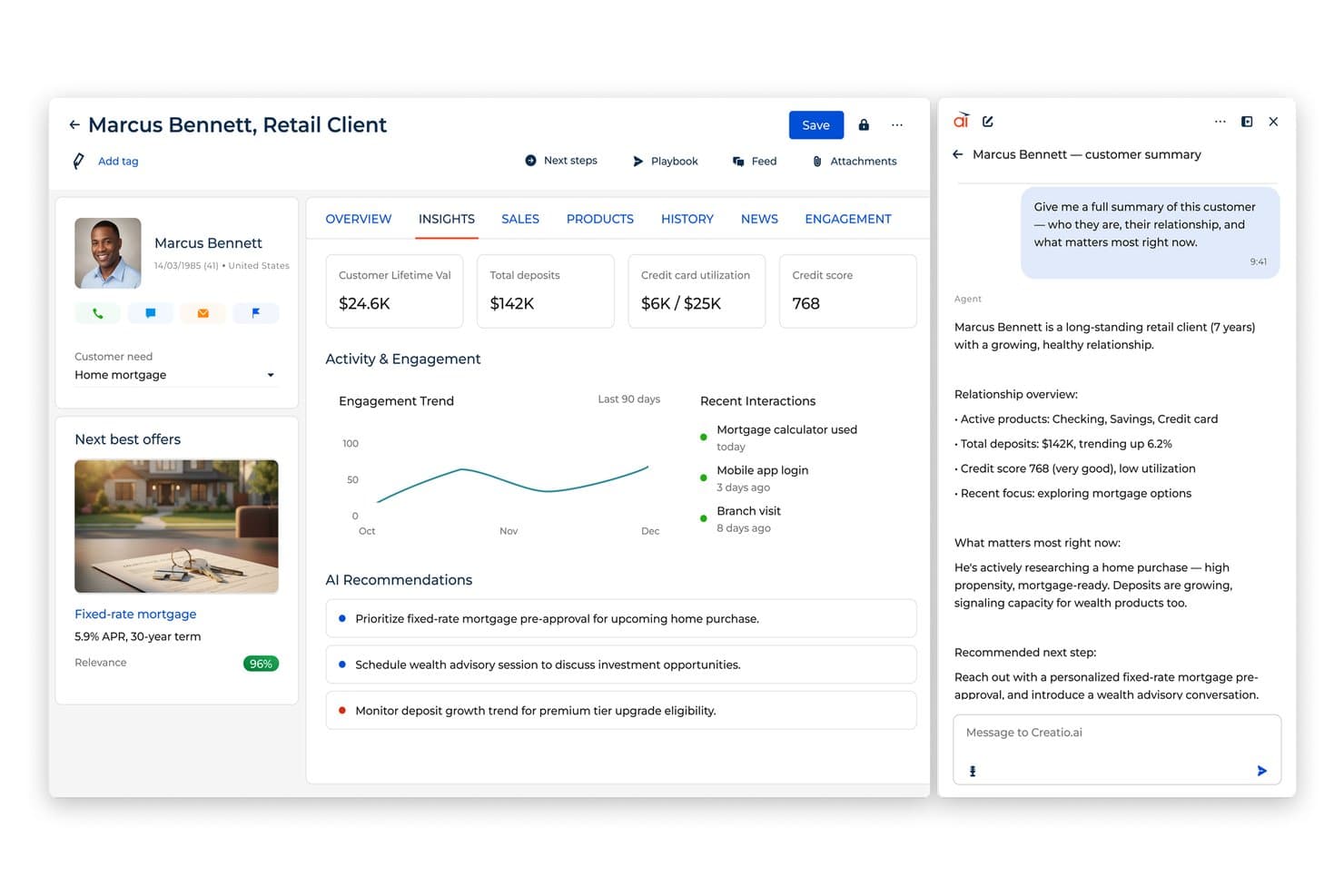
Creatio AI CRM summarizes client profiles and recommends next steps. Creatio AI CRM is an AI CRM and workflow automation platform that covers sales, marketing, and service, combining Customer 360 profiles, lead and opportunity management, AI agents, and no-code tools for building and customizing workflows.
Who Is Creatio AI CRM Best For?
Creatio AI CRM is a strong fit for sales ops and RevOps teams that need to build and automate complex, cross-functional workflows without relying on a development team.
Why I Picked Creatio AI CRM
I've included Creatio AI CRM in my top picks because its no-code workflow automation genuinely sets it apart for sales ops teams that need to build complex, cross-functional processes without writing a line of code. I particularly like how its Customer 360 profiles surface a full view of each account alongside embedded AI agents that surface next-best-action recommendations directly in the sales workflow. Its Forecasting and Revenue Intelligence capability adds another layer, giving sales leaders AI-driven pipeline visibility without custom reporting work.
Creatio AI CRM Key Features
- Lead and opportunity management: Tracks leads and deals through the sales pipeline with configurable stages built using no-code tools.
- Territory management: Assigns and manages sales territories across your team to support structured coverage and account ownership.
- Order and contract management: Handles orders and contracts directly within the platform, keeping deal-related documents tied to the relevant account.
- Omnichannel sales engagement: Supports sales interactions across multiple channels, connecting activity back to unified customer records.
Creatio AI CRM Integrations
Creatio AI CRM offers marketplace integrations with PandaDoc, Google Calendar, Microsoft Exchange, Apollo.io, and Microsoft Power BI Desktop. It also supports RESTful, OData, and business-process APIs, plus Zapier.
Pros and Cons
Pros:
- Embedded AI agents for next best action recommendations
- A scalable solution
- Extensive customization options
Cons:
- Data migration may be complex
- Customization can be time-consuming
Learn more about Creatio AI CRM: Best for small and medium B2B teams
- 30-day free trial + free demo available
- From $39/user/month
Visit WebsiteCustomer Rating:4.7/5
Salesflare shows leads, deal progress, and revenue stats in a drag-and-drop sales pipeline. Salesflare is a sales management software designed specifically for small and medium-sized B2B businesses. It automates the process of collecting and organizing contact information, helping sales teams focus on selling rather than data entry.
Why I Picked Salesflare: One major reason I picked Salesflare is its automated pipeline tracking. Salesflare automatically builds visual pipelines based on your sales stages and opportunities without requiring manual updates. As new interactions happen—emails sent, meetings scheduled, documents exchanged—the software updates your pipeline to reflect real-time activity. This helps you prioritize deals based on engagement levels and take action on stalled opportunities, making it easier to keep your funnel healthy without tedious updates.
Salesflare Standout Features & Integrations
Features include collaborative account timelines, where all team activities related to a lead are shown in one view, making handoffs and updates transparent. Salesflare also offers built-in task suggestions, which prompt your team with what to do next for each opportunity based on deal history and engagement.
Integrations include Google Workspace, Intercom, MailChimp, QuickBooks Online, Slack, Stripe, Shopify, and Calendly.
Pros and Cons
Pros:
- Automatically fills contact data from emails
- Follow-up reminders reduce lead drop-off
- Contact timelines show full communication history
Cons:
- Lacks highly tailored workflows for complex teams
- Limited options for bulk editing records
Learn more about Salesflare: Best for hybrid, small and medium businesses
- Free plan + 15-day free trial+ free demo available
- From $14/user/month (billed annually)
Visit WebsiteCustomer Rating:4.2/5
Zoho CRM allows you to implement an omnichannel sales strategy, segment your leads, track KPIs, and lean on predictive intelligence to improve customer loyalty. Zoho CRM is one of the leading customer relationship management (CRM) tools on the market. The sales management tool is best suited for small and medium-sized businesses that are hybrid or remote to improve sales activities, optimize performance, and increase leads and conversions.
Why I picked Zoho CRM: Zoho CRM allows teams in multiple locations (in the office or at home), to work together seamlessly, making it perfect for hybrid businesses. The tool offers a nifty gamification feature to stir up friendly competition between sales reps within your team, which is great for motivating sales.
Zoho CRM Standout Features and Integrations:
Features include Zia (an AI-powered assistant), a comprehensive reporting feature for pre-made sales reports, deal gamification and rewards for deals closed, simple customization as your business grows, custom dashboards, and multiple pipelines for different teams. These gamification and custom dashboard features help your salespeople stay on target and work more efficiently, even in a hybrid environment.
Integrations include over 300 third-party integrations such as Mailchimp, G Suite, Office 365, Slack, Google Workspace, Shopify, Facebook Ads, PandaDoc, Twilio, SMS-Magic, Zoom, Quickbooks, DocuSign, and Leadfeeder.
Pros and Cons
Pros:
- Mobile app to improve communication with customers
- Impressive security features
- 24/7 customer support
- Zia (AI) helps identify prospects your team can convert
- Great for hybrid and remote teams
Cons:
- Advanced features gated behind top-tier subscriptions
- Pricey compared to other tools
- Difficult platform to learn
 Best for real-time sales guidance
- Free demo available
- Pricing upon request
Visit WebsiteCustomer Rating:4.9/5
Attention uses AI to analyze sales conversations to help teams manage their interactions more effectively. Attention is an AI-powered platform designed to enhance the efficiency and effectiveness of sales teams. The tool provides real-time actionable intelligence during customer conversations, automating CRM data entry, and offering insights into customer objections and reasons for lost deals.
Why I Picked Attention: Attention stands out as a sales management software with its AI and automation capabilities. Utilizing advanced AI algorithms, Attention analyzes sales interactions and provides personalized suggestions and strategies to sales representatives during calls. This real-time guidance helps sales reps handle objections more effectively, follow the sales methodology, and ultimately close more deals. AI is also used to provide actionable insights to help sales teams adjust their strategies.
Attention Standout Features & Integrations
Features include insights from customer conversations, sales training, KPI tracking, automated CRM updates, follow-up email automation, cross-call insights, deal analysis, sales messaging, and custom triggers so that Attention's AI listens to what matters most to you.
Integrations include Zoom, Meets, Teams, Salesforce, HubSpot, Gmail, Outlook, Slack, and Zapier.
Pros and Cons
Pros:
- Real-time sales coaching on calls
- Personalized follow-up emails
- Actionable insights with AI
Cons:
- Some integrations may require additional assistance
- Reliance on AI may not suit all users
Learn more about Attention: Best for distributor focused CRM
- Free trial available
- From $69/rep/month (billed annually)
Visit WebsiteCustomer Rating:4.6/5
SimplyDepo dashboard displaying sales metrics, order activity, route performance, and field rep insights across desktop and mobile views. For businesses looking to elevate their sales operations, SimplyDepo stands out as a versatile solution tailored for brands, distributors, and merchandisers. It addresses the challenges of managing complex sales processes by providing tools for retail execution and B2B order management. Whether you're a startup or an established business, SimplyDepo offers a streamlined approach to enhancing efficiency and building stronger customer relationships.
Why I Picked SimplyDepo
I picked SimplyDepo for its targeted approach to solving key sales management challenges, particularly in retail execution and field sales empowerment. With features like route planning, SimplyDepo allows your team to optimize travel routes, saving time and reducing costs. Additionally, its CRM for distributors helps in maintaining and nurturing customer relationships, a crucial aspect of any successful sales strategy.
SimplyDepo Key Features
In addition to its standout features, SimplyDepo offers several other capabilities:
- Distribution Management: This feature helps you manage logistics and supply chain aspects seamlessly.
- Mobile Access: Allows your team to access the platform on-the-go, ensuring flexibility and real-time updates.
- Order Management: Facilitates efficient handling of orders from start to finish, minimizing errors.
- Reporting and Analytics: Provides insights into sales performance and helps in making data-driven decisions.
SimplyDepo Integrations
Integrations include Stripe, Twilio SendGrid, ShipStation, and QuickBooks.
Pros and Cons
Pros:
- Route planning and territory mapping
- Integrated CRM for account tracking
- Built-in B2B order management system
Cons:
- No transparent API documentation
- Limited advanced reporting customization
Learn more about SimplyDepo: 8Best for digital sales rooms
Dock
- Free plan + free demo available
- From $350/month (billed annually)
Visit WebsiteCustomer Rating:4.9/5
Dock's digital sales rooms provide a centralized place for teams to manage their sales processes and engage with customers. Dock offers a platform to help sales and revenue teams manage all aspects of the customer journey, from new lead nurturing to proposals, deals, and onboarding.
Why I picked Dock: As a sales management software, Dock stands out with its digital sales room feature. This is a centralized place for teams to manage all their sales content, educate new leads on their product, create and share proposals, quotes, agreements, and order forms, and provide a step-by-step onboarding experience. It also offers robust engagement analytics so you can target the best quality leads who are most likely to close on a deal.
Dock Standout Features and Integrations:
Standout features include buyer signals, dynamic action plans, custom branding, personalized client portals, templates for important documents, secure digital signatures, contract status tracking, and repeatable follow-up processes.
Integrations include HubSpot, Salesforce, Slack, Zoom, Airtable, Pandadoc, Typeform, and more.
Pros and Cons
Pros:
- Content management features
- Templates to standardize sales processes
- Personalized customer portals
Cons:
- Order form features are an add-on
- Salesforce and HubSpot integration only available on higher-tier plans
Learn more about Dock: Best for fast team-member onboarding
- Free plan available
- From $3.99/user/month (billed annually)
Visit WebsiteCustomer Rating:5/5
Plaky's dashboards are intuitive and new-user-friendly. Draftalizer link: https://draftalizer.com/app/drafts/96050?show_steps=true
For teams seeking a user-friendly tool to streamline their sales operations, Plaky is a compelling choice. It helps manage the entire sales process from lead generation to deal closure, making it ideal for small businesses and nonprofits. By centralizing communication and offering quick access to sales data, Plaky addresses the challenges of managing multiple sales tasks effectively.
Why I Picked Plaky
I appreciate Plaky for its customizable sales pipelines, which let you tailor stages and rules to fit your unique sales process. This personalization ensures that your team can manage leads and prospects more effectively. Additionally, Plaky's task management features, such as boards and progress tracking, keep your team organized and focused on closing deals. These specific functionalities make it a valuable tool for anyone seeking to improve their sales management.
Plaky Key Features
In addition to its customizable pipelines and task management capabilities, Plaky offers several other features that enhance its value for sales teams.
- Lead and Client Management: Plaky centralizes all your lead information, making it easier to track and nurture prospects.
- Automations: Reduce repetitive tasks with automation features, allowing your team to focus on strategic activities.
- Real-Time Collaboration: Keep your team connected with real-time updates and document sharing within tasks.
- Security Standards: Plaky adheres to international security standards to ensure your data is safe.
Plaky Integrations
Native integrations are not currently listed by Plaky.
Pros and Cons
Pros:
- Integrates with Clockify for time tracking, adding value for time management needs.
- User-friendly interface, making it accessible for small teams and individual users.
- Intuitive setup process allows for quick onboarding and minimal training time.
Cons:
- Does not support extensive integrations, which may hinder its appeal for users needing comprehensive connectivity.
- Lacks advanced workflow tools and automation options, limiting its use for complex projects.
Learn more about Plaky: Best sales management software for automation
- 15-day free trial
- From $23/user/month (billed annually)
Visit WebsiteCustomer Rating:4.7/5
Salesmate enables you to convert more leads into customers with automated emails, SMS messages, calls, and follow-ups. Salesmate is a powerful CRM tool that’s fueled by its automation features. With this sales management software, you can easily stay in touch with prospects, nurture leads, and close more deals thanks to its user-friendly platform.
Why I picked Salesmate: Salesmate gives sales managers an automated forecast summary they can use to identify top sales reps and track their team’s overall performance, which is super impressive, and makes it a standout choice for anyone wanting to use automations. You can set specific sales targets for your team right from the dashboard to help motivate reps and boost performance.
Salesmate Standout Features and Integrations:
Features include all of the standard features that make sales management software most effective, including automated emails, follow-ups, a sales motivator, notifications, lead scoring, call tracking, a softphone, task scheduling, task tracking, and pipeline management.
Integrations include Quickbooks Online, Zendesk Suite, Zapier, Slack, ActiveCampaign, WordPress, Microsoft Outlook, Mailchimp, and Docusign.
Pros and Cons
Pros:
- Great security
- User-friendly platform
- Automated follow-up emails
- Automated, personalized emails
- Auto-assign leads to reps
- Quick onboarding
Cons:
- Customer support isn’t the best compared to other tools
- No free plan
Learn more about Salesmate:
Diğer Satış Yönetimi Yazılımları
İşte bu Satış Yönetimi Yazılımları kısa listesine giremeyen ancak yine de değerlendirilmesi gereken birkaç dikkat çekici seçenek:
- 11GongBest for analyzing deals
- 12EngageBayBest for AI-powered sales CRM
- 13Pipedrive CRMBest for visual sales pipeline management
- 14SaleshandyBest for automating cold emailing
- 15Zendesk SellBest for closing deals through great customer service
- 16ChorusBest for enterprise teams to turn conversational data into sales insights
- 17Revenue GridBest AI-driven sales management software
- 18BoxxstepBest for managing accounts with multiple decision-makers
- 19CopperBest for Google Workspace integration
- 20FreshsalesBest software for AI-lead scoring
- 21Act!Best for simplicity and ease of use
- 22Microsoft Dynamics 365best for sales tracking analytics
- 23UpLeadBest for easy lead management
- 24Less Annoying CRMBest low-cost CRM for small businesses
- 25AmbitionBest for motivating sales reps
- 26ClariBest for identifying leaks in your sales pipeline
İlgili Satış Yönetimi Yazılımı İncelemeleri
Burada hâlâ aradığınızı bulamadıysanız, test edip değerlendirdiğimiz ve satış yönetimi yazılımıyla yakından ilgili olan bu araçlara göz atın.
- Satış Yazılımı
- Potansiyel Müşteri Yönetimi Yazılımı
- İş Zekâsı Yazılımı
- Sözleşme Yönetimi Yazılımı
- Gelir Yönetimi Sistemi
- CPQ Yazılımı
How I Evaluate Sales Management Software
I split my evaluation into two layers: baseline criteria every tool must hit—like pipeline tracking and forecasting—and the differentiators that separate a rep-facing tool from a true RevOps platform.
Core Functionality (Table Stakes For This List)
When I'm selecting tools for my list, I rank each one on a scale from 0 (does not offer the functionality) to 5 (excels in this area) for each core functionality listed below. Then, I calculate the tool's total score into a percentage. Each tool needs to achieve a minimum total score of 75% to be considered for inclusion.
- Pipeline Management: I evaluate whether deals can move through customizable stages with visual kanban views—and whether teams can run multiple pipelines for different sales motions or product lines.
- Sales Forecasting: Forecasting should go beyond summing open deals. I look for weighted projections by stage, rep-level rollups, and the ability to compare forecasts against actuals over time.
- Reporting & Dashboards: Each tool should let you build dashboards around the KPIs your team actually tracks—win rates, cycle length, quota attainment—with filters by rep, region, or time period.
- Contact & Account Management: I check for centralized records that link contacts to accounts with full activity timelines, so reps and managers see every touchpoint without toggling between systems.
- Sales Activity Tracking: The platform should capture calls, emails, and meetings tied to the right deal or contact record. Manual-only logging is a red flag—auto-capture matters at scale.
- Territory & Quota Management: I look for rule-based territory assignment (by geography, industry, or account size) paired with quota tracking that rolls up from reps to managers to leadership.
Once I have a list of tools that meet this criteria, I consider what sets each platform apart.
Differentiating Factors (What Sets Vendors Apart)
Here's how I compare and contrast different vendors:
Standout Features
AI deal intelligence is a major differentiator. I look for platforms that score deal health and flag at-risk opportunities early—before a manager spots the stall in a pipeline review. Conversation intelligence adds another dimension, giving RevOps teams call transcripts and sentiment data that reveal why deals stall, not just that they did. Guided selling playbooks also carry weight. Tools that surface methodology prompts like MEDDIC or SPICED at the right pipeline stage help enforce process consistency across reps.
Beyond Features
Integration depth matters just as much as the tool itself. I check whether a platform syncs bidirectionally with CRMs like Salesforce or HubSpot and connects to the broader RevOps stack—marketing automation, CPQ, billing. Scalability is another lens I evaluate through: a 15-person sales team and a 500-rep global org have very different needs around hierarchies, data limits, and territory structures. Pricing transparency also factors in. I look for clear per-seat costs and honest visibility into what's included vs. what requires an add-on.
Satış Yönetimi Yazılımı Nasıl Seçilir?
Bu kadar farklı satış yönetimi yazılımı mevcutken, hangi aracın ihtiyaçlarınıza en uygun olacağı konusunda karar vermek zor olabilir.
Satış yönetimi yazılımlarını kısa listenize alırken, denerken ve seçerken aşağıdakileri göz önünde bulundurun:
- Hangi sorunu çözmeye çalışıyorsunuz - Aradığınız özellikleri ve aracın sağlaması gereken işlevleri netleştirmek için, doldurmaya çalıştığınız satış yönetimi yazılımı özellik boşluğunu belirleyerek başlayın.
- Kimlerin kullanması gerekecek - Maliyeti ve gereksinimleri değerlendirmek için yazılımı kimlerin kullanacağını ve kaç lisansa ihtiyaç duyacağınızı göz önünde bulundurun. Erişimin yalnızca gelir operasyonları liderleri için mi yoksa tüm kuruluş için mi gerekli olacağını değerlendirmeniz gerekir. Bu netleştiğinde, herkes için kullanım kolaylığına mı yoksa satış yönetimi yazılımınızın ileri düzey kullanıcıları için hıza mı öncelik verdiğinizi düşünmeye değer.
- Hangi diğer araçlarla birlikte çalışması gerekiyor - Hangi araçları değiştirdiğinizi, hangi araçları kullanmaya devam edeceğinizi ve muhasebe, CRM veya İK yazılımı gibi hangi araçlarla entegrasyon sağlamanız gerektiğini netleştirin. Araçların birbiriyle entegre edilmesi gerekip gerekmediğine veya birden fazla aracı tek bir konsolide satış yönetimi yazılımıyla değiştirip değiştiremeyeceğinize karar vermeniz gerekir.
- Hangi sonuçlar önemli - Başarılı sayılabilmesi için yazılımın sağlaması gereken sonucu göz önünde bulundurun. Hangi yeteneği kazanmak veya neyi geliştirmek istediğinizi ve başarıyı nasıl ölçeceğinizi değerlendirin. Örneğin, bir sonuç performans hakkında daha fazla görünürlük elde etme becerisi olabilir. Satış yönetimi yazılımı özelliklerini gözünüz kararana kadar karşılaştırabilirsiniz; ancak elde etmek istediğiniz sonuçları düşünmüyorsanız değerli zamanınızın büyük bir bölümünü boşa harcıyor olabilirsiniz.
- Kuruluşunuz içinde nasıl çalışacağı - Yazılım seçimini iş akışlarınız ve teslimat metodolojinizle birlikte değerlendirin. Neyin iyi çalıştığını ve ele alınması gereken sorunlara yol açan alanları inceleyin. Her işletmenin farklı olduğunu unutmayın — bir aracın popüler olması, kuruluşunuzda işe yarayacağı anlamına gelmez.
2026 İçin Satış Yönetimi Yazılımındaki Trendler
Satış yönetimi yazılımı, teknolojideki ilerlemeler ve değişen iş gereksinimleri doğrultusunda önemli bir dönüşüm geçiriyor. Bu gelişmeler, kuruluşların satış süreçlerini yönetme, müşterilerle etkileşim kurma ve gelir artışını sağlama biçimlerini şekillendiriyor. Önde gelen satış yönetimi yazılımı sağlayıcılarının en son ürün güncellemeleri, basın bültenleri ve sürüm günlükleri incelendiğinde, bu teknolojinin gelecekteki yönünü ortaya koyan birkaç temel trend öne çıkıyor.
Entegrasyon ve Otomasyon
- Gelişmiş CRM Entegrasyonu: Satış yönetimi yazılımları, CRM sistemleriyle daha derin ve sorunsuz entegrasyon sunarak gerçek zamanlı veri alışverişine ve farklı platformlardaki müşteri etkileşimlerinin birleşik bir görünümüne olanak tanıyor.
- Gelişmiş Otomasyon Yetenekleri: Özellikle müşteri adayı yönetimi, görev atama ve takip planlama gibi satış süreçlerini kolaylaştırmak ve verimliliği artırmak açısından kritik alanlarda daha gelişmiş otomasyona doğru belirgin bir geçiş yaşanıyor.
Veriye Dayalı Karar Alma
- Öngörücü Analiz: Makine öğrenimi ve yapay zekâyı bünyesine katan satış yönetimi yazılımları, giderek daha fazla öngörücü içgörü sunarak satış ekiplerinin trendleri tahmin etmesini, fırsatları belirlemesini ve veriye dayalı kararlar almasını sağlıyor.
- Gerçek Zamanlı Raporlama: Gelişmiş gerçek zamanlı analiz ve raporlama özellikleri giderek daha yaygın hâle geliyor; böylece satış liderleri performansı izleyebiliyor, hedeflere yönelik ilerlemeyi takip edebiliyor ve stratejileri zamanında uyarlayabiliyor.
Kişiselleştirme ve Müşteri Etkileşimi
- Yapay Zekâ Destekli Kişiselleştirme: Yapay zekânın yenilikçi kullanımları, satış yönetimi araçlarının daha kişiselleştirilmiş müşteri etkileşimi stratejileri sunmasını; iletişim ve önerileri bireysel müşteri verilerine ve davranış kalıplarına göre uyarlamasını sağlıyor.
- Çok Kanallı Satış Stratejileri: Satış çalışmalarını birden çok kanalda yönetme ve senkronize etme yeteneği, tutarlı ve bütünleşik bir müşteri deneyimine duyulan ihtiyaca yanıt vererek standart bir özellik hâline geliyor.
Ortaya Çıkan ve Gerileyen Özellikler
- Veri Güvenliği için Blok Zinciri: Satış yönetimi yazılımında sıra dışı ancak ortaya çıkan bir özellik, özellikle B2B ortamlarında veri güvenliğini ve güvenilirliği artırmak için blok zinciri teknolojisinin kullanılmasıdır.
- Elle Veri Girişinin Azalması: Yazılımlar çeşitli kaynaklardan veri yakalama ve sentezleme konusunda daha yetkin hâle geldikçe, otomasyon ve entegrasyon yetenekleri elle veri girişi ihtiyacını azaltıyor.
Satış yönetimi yazılımı daha entegre, akıllı ve kullanıcı odaklı hâle geliyor; bu da sektörün daha stratejik, veriye dayalı ve kişiselleştirilmiş satış yaklaşımlarına yöneldiğini gösteriyor. Gelir operasyonları liderleri için bu trendleri anlamak, yalnızca mevcut ihtiyaçları karşılayan değil, aynı zamanda satış alanındaki gelecekteki zorluklara ve fırsatlara uyum sağlamaya hazır yazılımları seçmek açısından kritik önem taşıyor.
Satış Yönetimi Yazılımı Nedir?
Satış yönetimi yazılımı, satışları ve müşteri ilişkilerini yönetme biçiminizi düzenlemenize, izlemenize ve geliştirmenize yardımcı olan bir araçtır. Satış yöneticileri, satış temsilcileri ve işletme sahipleri bu yazılımı potansiyel müşterileri yönetmek, anlaşmaları takip etmek, takip işlemlerini otomatikleştirmek ve satışların nasıl ilerlediğini görmek için kullanır. Her şeyin tek bir yerde bulunması sayesinde ekibiniz, rutin işlere daha az, müşterilerle konuşmaya ve satışları sonuçlandırmaya daha fazla zaman ayırabilir.
Satış Yönetimi Yazılımının Özellikleri
Satış yönetimi yazılımı seçerken aşağıdaki temel özelliklere dikkat edin:
- Potansiyel müşteri yönetimi: Potansiyel müşterileri ilk temastan anlaşmanın sonuçlandırılmasına kadar verimli bir şekilde düzenleyin, takip edin ve geliştirin. Bu, hiçbir potansiyel müşterinin gözden kaçmasını önlemenize ve ekibinizin enerjisini nereye odaklaması gerektiğini her zaman bilmesine yardımcı olur.
- Satış hunisi takibi: Satış huninizi her aşamada görselleştirerek hangi anlaşmaların ilerlediğini ve hangilerinin tıkandığını kolayca görmenizi sağlar. Darboğazları hızlıca belirleyebilir ve satışların sorunsuz ilerlemesini sağlayacak kararlar alabilirsiniz.
- İletişim yönetimi: Müşterilerinizin ve potansiyel müşterilerinizin ayrıntılı kayıtlarını saklayın ve yönetin. Bu özellik, güncel bilgilere anında erişmenizi sağlayarak her etkileşimi daha kişisel ve verimli hâle getirir.
- Satış raporlama ve analizleri: Performans, gelir ve ekip verimliliği hakkında gerçek zamanlı verilere ve özelleştirilebilir raporlara erişin. Bu sayede eğilimleri fark etmek ve daha akıllı iş kararları almak için ihtiyaç duyduğunuz içgörülere sahip olursunuz.
- Görev ve etkinlik yönetimi: Ekibiniz için hatırlatıcılar ayarlayın, görevler atayın ve takip işlemlerini izleyin. Bu, herkesin günlük yapılacak işlerini takip etmesini sağlayarak kaçırılan fırsatları azaltır ve sorumluluk bilincini artırır.
- Hedef belirleme ve takip: Satış hedefleri belirleyin, ilerlemeyi izleyin ve ekibiniz kilometre taşlarına ulaştıkça başarıları kutlayın. Bu, motivasyonu yüksek tutar ve herkesin büyük resme odaklanmasına yardımcı olur.
- Entegrasyon olanakları: İş akışınızı kolaylaştırmak ve aynı verileri iki kez girmekten kaçınmak için e-posta, takvim uygulamaları veya pazarlama platformları gibi favori araçlarınıza bağlanın.
- İş birliği araçları: Güncellemeleri, notları ve dosyaları doğrudan yazılım içinde ekibinizle paylaşın. Bu, ekip çalışmasını sorunsuz hâle getirir; artık sayısız e-posta dizisinde veya grup sohbetinde arama yapmanız gerekmez.
Yaygın Satış Yönetimi Yazılımı AI Özellikleri
Yukarıda sıralanan standart satış yönetimi yazılımı özelliklerinin yanı sıra, bu çözümlerin birçoğu aşağıdaki özelliklerle AI kullanmaya başlıyor:
- Akıllı takip hatırlatıcıları: Akıllı hatırlatıcılar, potansiyel müşterilerle iletişime geçmek için en uygun zamanın ne zaman olduğunu bildirir. Böylece hafızanızı sürekli zorlamadan anlaşmaları ilerletme şansınızı artırırsınız.
- Tahmine dayalı potansiyel müşteri puanlama: AI, dönüşüm gerçekleştirme olasılığı en yüksek potansiyel müşterilere puan vermek ve önceliklendirmek için geçmiş satış verilerinizi analiz eder. Bu, çabalarınızı en fazla sonuç getirecek alanlara odaklamanıza yardımcı olur.
- Satış tahmini: Gelişmiş algoritmalar, doğru satış tahminleri oluşturmak için geçmiş performansınızı, mevcut satış huninizi ve dış eğilimleri inceler. Daha gerçekçi hedefler belirleyebilir ve geleceğe daha iyi hazırlanabilirsiniz.
- Otomatik veri girişi: AI, e-postalardan ve aramalardan veri çekerek iletişim bilgilerini otomatik olarak doldurur, kayıtları günceller ve etkileşimleri kaydeder. Daha az evrak işi, satışa daha fazla zaman ayırmak anlamına gelir.
- AI destekli koçluk önerileri: Yazılım, kişiselleştirilmiş koçluk ipuçları sunmak için arama dökümlerini ve satış etkinliklerini inceler; böylece ekibiniz becerilerini geliştirir ve daha fazla anlaşma sonuçlandırır.
- Müşteri duygu analizi: AI, ruh hâlini ve niyeti değerlendirmek için müşterilerle yapılan iletişimi analiz eder ve olası riskler veya fırsatlar büyümeden önce sizi uyarır.
Satış Yönetimi Yazılımının Faydaları
Satış yönetimi yazılımı, satış operasyonlarının çeşitli yönlerini optimize etmek üzere tasarlanmış bir özellikler bütünü sunarak hem kullanıcılara hem de kuruluşlara önemli faydalar sağlayabilir. Satış yönetimi yazılımını uygulamanın beş temel faydası şunlardır:
- Geliştirilmiş Satış Verimliliği: Rutin görevleri otomatikleştirir ve satış ekiplerine satış süreçlerini verimli bir şekilde yönetmeleri için araçlar sunar; böylece ekipler yüksek değerli faaliyetlere daha fazla zaman ayırabilir.
- Bu verimlilik artışı, daha fazla anlaşmanın sonuçlandırılmasını ve kuruluş için genel gelirin yükselmesini sağlar.
- Geliştirilmiş Veri Doğruluğu ve Erişilebilirliği: Satış verilerini merkezileştirir ve düzenler; verilerin doğru, güncel ve ihtiyaç duyan kişiler tarafından kolayca erişilebilir olmasını sağlar.
- Güvenilir verilere erişim, karar alma süreçlerini iyileştirir ve satış stratejilerinin gerçeklere dayalı bilgilere dayanmasını sağlar.
- Kolaylaştırılmış İletişim ve İş Birliği: Satış ekipleri içinde ve farklı departmanlar arasında daha iyi iletişim ve iş birliğini kolaylaştırarak herkesin satış hedefleriyle aynı doğrultuda olmasını sağlar.
- Geliştirilmiş iş birliği, daha uyumlu bir ekip ortamına katkıda bulunur; yanlış anlaşılmaları azaltır ve çabaları ortak hedefler doğrultusunda birleştirir.
- Veriye Dayalı Satış Tahmini: Doğru tahminler oluşturmak için geçmiş satış verilerinden yararlanır; kuruluşların stratejilerini planlamasına ve kaynaklarını etkili bir şekilde tahsis etmesine yardımcı olur.
- Doğru tahminler; daha iyi stratejik planlama, kaynak tahsisi ve beklenti belirleme olanağı sağlar. Bunların tümü uzun vadeli başarı için kritik öneme sahiptir.
- Kapsamlı Performans İçgörüleri: Ayrıntılı analiz ve raporlama olanakları sunarak satış faaliyetleri, ekip performansı ve pazar eğilimleri hakkında içgörüler sağlar.
- Bu içgörüler, satış yöneticilerinin güçlü ve fırsat sunan alanları belirlemesine, koçluk çalışmalarını uyarlamasına ve başarıyı ekip genelinde tanıyıp tekrarlamasına olanak tanır.
Satış Yönetimi Yazılımı Maliyetleri ve Fiyatlandırması
Doğru satış yönetimi yazılımını seçmek, satış süreçlerini optimize etmeyi ve genel gelir operasyonlarını geliştirmeyi hedefleyen kuruluşlar için kritik bir adımdır. Pazar, farklı büyüklükteki işletmelere ve onların benzersiz ihtiyaçlarına hitap etmek üzere çeşitli yazılım planları sunar. Bu nedenle alıcıların her planın özellikler ve sunduğu değer açısından neler sağladığını anlaması önemlidir.
Fiyatlandırma, ücretsiz satış yönetimi yazılımından kurumsal planlara kadar değişir. Satış yönetimi yazılımı için yaygın plan seçenekleri ve fiyatlandırmaları aşağıda açıklanmıştır:
Satış Yönetimi Yazılımı İçin Plan Karşılaştırma Tablosu
| Plan Türü | Ortalama Fiyat | Yaygın Olarak Sunulan Özellikler |
|---|---|---|
| Plan TürüTemel | Ortalama Fiyat$10 - $25 kullanıcı/ay | Yaygın Olarak Sunulan ÖzelliklerKişi yönetimi, anlaşma takibi, temel raporlama |
| Plan TürüProfesyonel | Ortalama Fiyat$25 - $75 kullanıcı/ay | Yaygın Olarak Sunulan ÖzelliklerGelişmiş analizler, özel raporlar, entegrasyon olanakları |
| Plan TürüKurumsal | Ortalama Fiyat$75 - $150+ kullanıcı/ay | Yaygın Olarak Sunulan ÖzelliklerÜst düzey destek, gelişmiş özelleştirme, API erişimi |
| Plan TürüÜcretsiz | Ortalama Fiyat$0 | Yaygın Olarak Sunulan ÖzelliklerSınırlı kişi sayısı, temel özellikler, topluluk desteği |
Satış yönetimi yazılımını değerlendirirken alıcılar işletmelerinin özel ihtiyaçlarını, satış ekiplerinin büyüklüğünü ve satış süreçlerinin karmaşıklığını değerlendirmelidir. Yalnızca mevcut gereksinimlere uyan değil, aynı zamanda büyüme ve ölçeklenme olanağı da sunan bir plan seçmek önemlidir. Doğru yazılım; özellikler, kullanılabilirlik ve maliyet etkinliği arasında iyi bir denge sağlamalı, böylece kuruluş için yatırımın somut bir geri dönüşünü güvence altına almalıdır.
Satış Yönetimi Yazılımı Hakkında Sıkça Sorulan Sorular
Ekibiniz bir satış yönetimi platformuyla çalışmayı düşünüyorsa, bir araç seçmeye hazır olmadan önce muhtemelen aklınızda birkaç soru vardır. Satış yönetimi yazılımı hakkında sıkça sorulan bazı sorulara göz atalım:
Ek Gelir Operasyonları Seçenekleri
İlginizi çekebilecek birkaç araç ve makale daha burada.
- En İyi Satış Yazılımı
- CPQ Yazılımı
- Teklif Yönetimi Yazılımı
- Satış Otomasyonu Yazılımı
- 2026 Yılının En İyi 10 Satış Otomasyonu Yazılımı
