

Çok sayıda farklı satış hızlandırma yazılımı bulunduğundan, hangisinin sizin için doğru olduğunu belirlemek zordur. Potansiyel müşterileri müşterilere dönüştürmek için gereken süreyi azaltmak istediğinizi biliyorsunuz, ancak hangi aracın en iyi olduğunu bulmanız gerekiyor. Size yardımcı olacağım!
Bu yazıda, çeşitli ekipler ve hesaplarla düzinelerce farklı satış hızlandırma aracı kullanırken edindiğim kişisel deneyimlerimi paylaşarak ve en iyi satış hızlandırma yazılımları arasından seçtiklerimi sunarak seçiminizi kolaylaştıracağım.
Why Trust Our Software Recommendations
6,700+
Reviews
20
Industry experts
16+
Evaluation factors
14
Years
Our reviews reflect our independent judgment—not a sales pitch. Learn how we stay transparent.
For this guide, we evaluated tools using hands-on testing and independent research, scoring tools using our selection criteria.
Our reviews reflect our human editorial judgment, not a sales pitch.
Satış Hızlandırma Yazılımları Karşılaştırma Tablosu
Bu karşılaştırma tablosu, en iyi satış hızlandırma yazılımı seçimlerimin fiyatlandırma ayrıntılarını özetlemektedir:
Score legend (out of 5)
- Excellent4.5–5
- Good4–4.4
- Average3–3.9
- Below average2–2.9
- Poor1–1.9
Sorted by: Default
| Tool | Starting Price | Website | |||||||
|---|---|---|---|---|---|---|---|---|---|
Best for accurate B2B contact data quality | 4.3 out of 5 | 4 | 5 | 5 | 5 | 4 | 3 | $49/user/month Free plan + 14-day trial + demo available | Book Demo |
Best for small and medium-sized businesses | 1.8 out of 5 | 1 | 1 | 3 | 2 | 3 | 1 | $39/user/month 30-day free trial + free demo available | Website |
Best for automated call summaries | 2.3 out of 5 | 4 | 2 | 3 | 1 | 3 | 1 | $25/user/month Free plan + 14-day trial + free demo available | Website |
Best for Clari-connected revenue execution | 4.0 out of 5 | 4 | 4 | 4 | 3 | 5 | 4 | $35/user/month Not available | Website |
Best for Salesforce-native real-time call coaching | 4.0 out of 5 | 3 | 4 | 5 | 3 | 5 | 4 | Pricing upon request Free demo available | Website |
Best for revenue intelligence | 4.7 out of 5 | 5 | 4 | 5 | 4 | 5 | 5 | Pricing upon request Free demo available | Website |
Best for training reps with live call coaching | 4.8 out of 5 | 5 | 5 | 5 | 5 | 5 | 4 | Pricing upon request Not available | Website |
Best sales execution tool | 4.8 out of 5 | 5 | 5 | 5 | 4 | 5 | 5 | Pricing upon request Free demo available | Website |
Best all-in-one CRM for multiple departments | 4.8 out of 5 | 5 | 5 | 5 | 4 | 5 | 5 | $25/user/month Free plan + 30-day free trial available | Website |
Best for enterprise revenue forecasting | 4.3 out of 5 | 4 | 5 | 5 | 3 | 5 | 4 | Pricing upon request Free demo available | Website |


En İyi Satış Hızlandırma Yazılımları İncelemesi
Aşağıda kısa listeme giren en iyi satış hızlandırma yazılımlarının ayrıntılı özetlerini bulabilirsiniz. İncelemelerim, sizin için en iyi seçeneği bulmanıza yardımcı olmak amacıyla her aracın temel özelliklerine, artılarına & eksilerine, entegrasyonlarına ve ideal kullanım alanlarına ayrıntılı bir bakış sunmaktadır.
 Best for accurate B2B contact data quality
- Free plan + 14-day trial + demo available
- From $49/user/month (billed annually)
Visit WebsiteCustomer Rating:4.5/5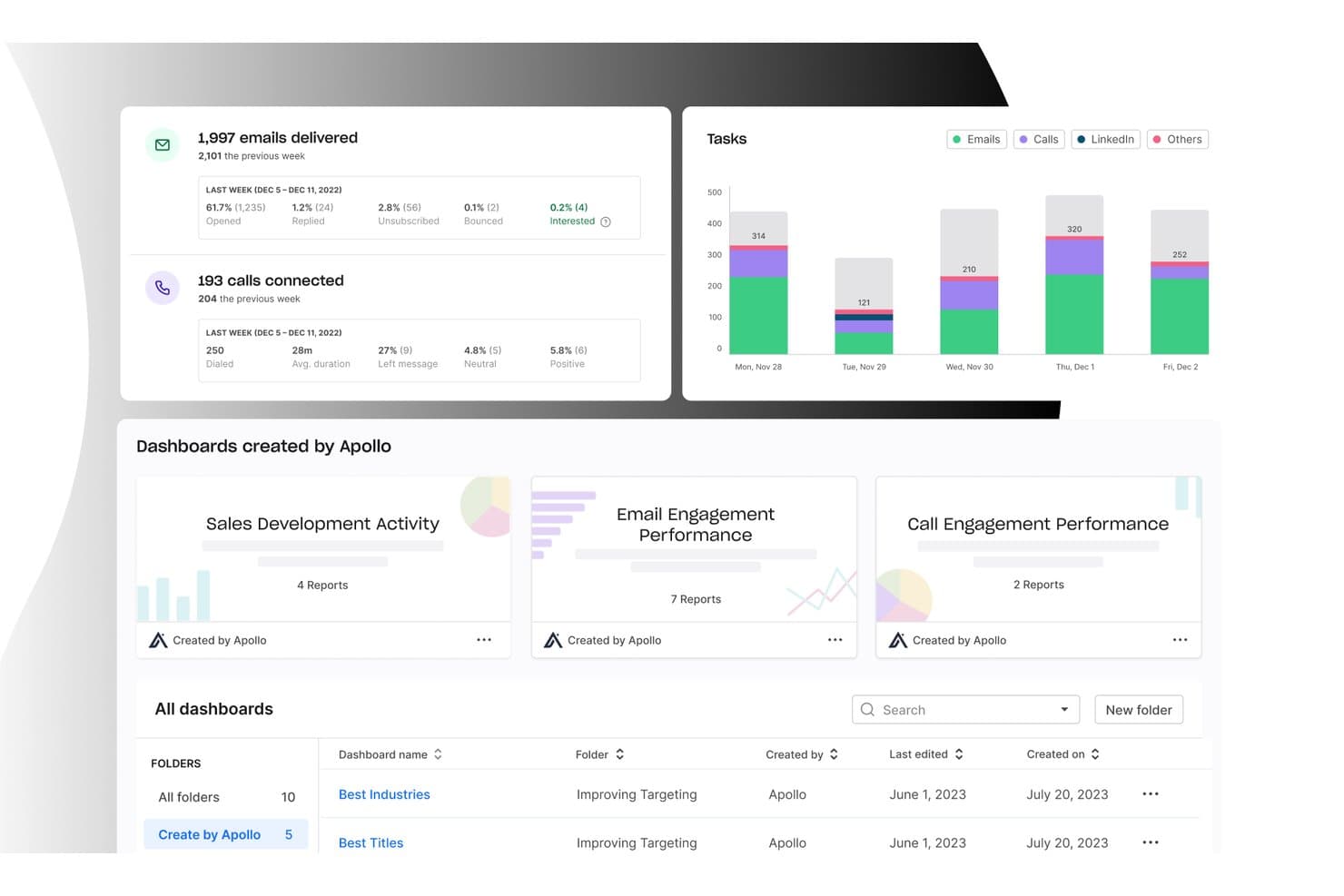
Apollo.io offers an analytics dashboard with email delivery stats, call connection metrics, task charts by day, and pre-built sales dashboards for tracking engagement performance. Apollo.io is an all-in-one GTM platform that combines a B2B contact database, sales engagement sequencing, workflow automation, dialer, deal management, and AI-powered lead scoring in a single tool.
Who Is Apollo.io Best For?
Apollo.io is a strong fit for SDR teams and outbound-focused sales organizations that want to consolidate prospecting, sequencing, and data enrichment without managing multiple tools.
Why I Picked Apollo.io
Apollo.io earns its spot as one of the best on my shortlist because of how its 7-step email verification process handles contact data quality at scale. When my team pulls a contact from the 210M+ database, the email is already validated before it hits our sequence, keeping bounce rates low without needing a separate verification tool. The AI-generated lead scoring on top means we're not just getting clean data, we're getting data prioritized by buying intent signals.
Apollo.io Key Features
- Sales engagement sequences: Build multi-channel cadences combining email, phone, and LinkedIn tasks with A/B testing and analytics.
- CRM integrations: Sync activities, contacts, and pipeline updates bi-directionally with Salesforce and HubSpot.
- Workflow automation: Automate repetitive sales tasks like lead routing, follow-ups, and data enrichment.
- Chrome extension: Source new leads directly from LinkedIn and add them to campaigns without switching tabs.
Apollo.io Integrations
Apollo.io offers native integrations with Salesforce, HubSpot, Outreach, Salesloft, Pipedrive, Zoho CRM, and Slack, and it connects with Zapier. An API is available for custom integrations.
Pros and Cons
Pros:
- AI lead scoring uses real intent signals
- Built-in multi-channel sequencing and A/B testing
- Large verified B2B contact database included
Cons:
- Reporting dashboards lack deep customization options
- Data accuracy drops outside North America
Learn more about Apollo.io: Best for small and medium-sized businesses
- 30-day free trial + free demo available
- From $39/user/month
Visit WebsiteCustomer Rating:4.7/5
The customer timelines view monitors everything needed to follow up with leads. Salesflare is an intelligent tool that helps small and medium-sized businesses sell more.
Why I picked Salesflare: If you’re operating a small or medium-sized B2B business, you can use Salesflare to help increase sales with less effort. It’s a smart platform that can automatically fill out your address book and keep records of all interactions your sales reps have with contacts. Salesflare will collect data from multiple sources, such as social media, emails, and company databases, and hand it to your teams via automated customer timelines that tell your reps everything they need to know.
Salesflare is a robust CRM for businesses that need a solution to build better relationships and increase sales. The workflow feature work in a Kanban card view with a drag-and-drop tool that allows you to move cards along your pipeline. This enables your teams to see where there are follow-up opportunities that have the possibility of converting to paid customers.
Salesflare Standout Features and Integrations
Features include document storage, lead scoring, email marketing, call logging, calendar and reminder systems, task management, audience segmentation, contact databases, customer pipelines, appointment management, and prospecting tools.
Integrations include ActiveCampaign, Asana, Calednly, ClickUp, Google Contacts, Google Sheets, Intercom, Mailchimp, Quickbooks Online, RingCentral, Slack, Todoist, Typeform, Unbounce, Zapier, and other software options.
Pros and Cons
Pros:
- It works on multiple devices.
- Simple to set up and use.
- It makes follow-ups nearly effortless.
Cons:
- Some features require third-party integrations to work.
- Not as many features as other options.
Learn more about Salesflare: Best for automated call summaries
- Free plan + 14-day trial + free demo available
- From $25/user/month (billed annually)
Visit WebsiteCustomer Rating:4.2/5
CloudTalk dashboard displaying call history, performance analytics, and sales activity metrics. CloudTalk is a cloud-based calling platform built for teams that rely on high-volume outreach and customer conversations. As sales acceleration software, it helps you manage inbound and outbound calls, automate dialing workflows, and analyze performance data from a single dashboard. It is particularly suited to sales and support teams that need structured call processes and visibility into rep performance.
Why I Picked CloudTalk
I picked CloudTalk because its AI Conversation Intelligence gives you automated call summaries and sentiment analysis, so you can quickly understand what happened on each call without reviewing full recordings. I also like its AI Dialer with power and parallel dialing modes, which can help you increase call volume while reducing manual tasks. If you are evaluating sales acceleration software, these features directly support faster outreach and more data-driven coaching for your team.
CloudTalk Key Features
In addition to its AI-driven capabilities, CloudTalk offers a range of features to support your sales acceleration needs:
- Real-Time Monitoring: Enables live call listening and performance analytics, helping you track and improve team efficiency.
- Number Management: Provides local numbers in over 160 countries, enhancing your global reach and caller recognition.
- Call Transcription: Offers multi-lingual transcripts for customer calls, allowing you to review and analyze interactions easily.
- Workflow Automation: Automates call processes and integrates seamlessly with your existing systems to save time and reduce manual tasks.
CloudTalk Integrations
Integrations include Salesforce, HubSpot, Pipedrive, Zoho CRM, Zendesk, Intercom, Freshdesk, Slack, Microsoft Teams, and Aircall.
Pros and Cons
Pros:
- Real-time call monitoring tools
- Power and parallel dialers
- AI-powered call summaries
Cons:
- Higher tiers unlock AI features
- Setup can take time
Learn more about CloudTalk: Best for Clari-connected revenue execution
- Not available
- From $35/user/month
Visit WebsiteCustomer Rating:4.7/5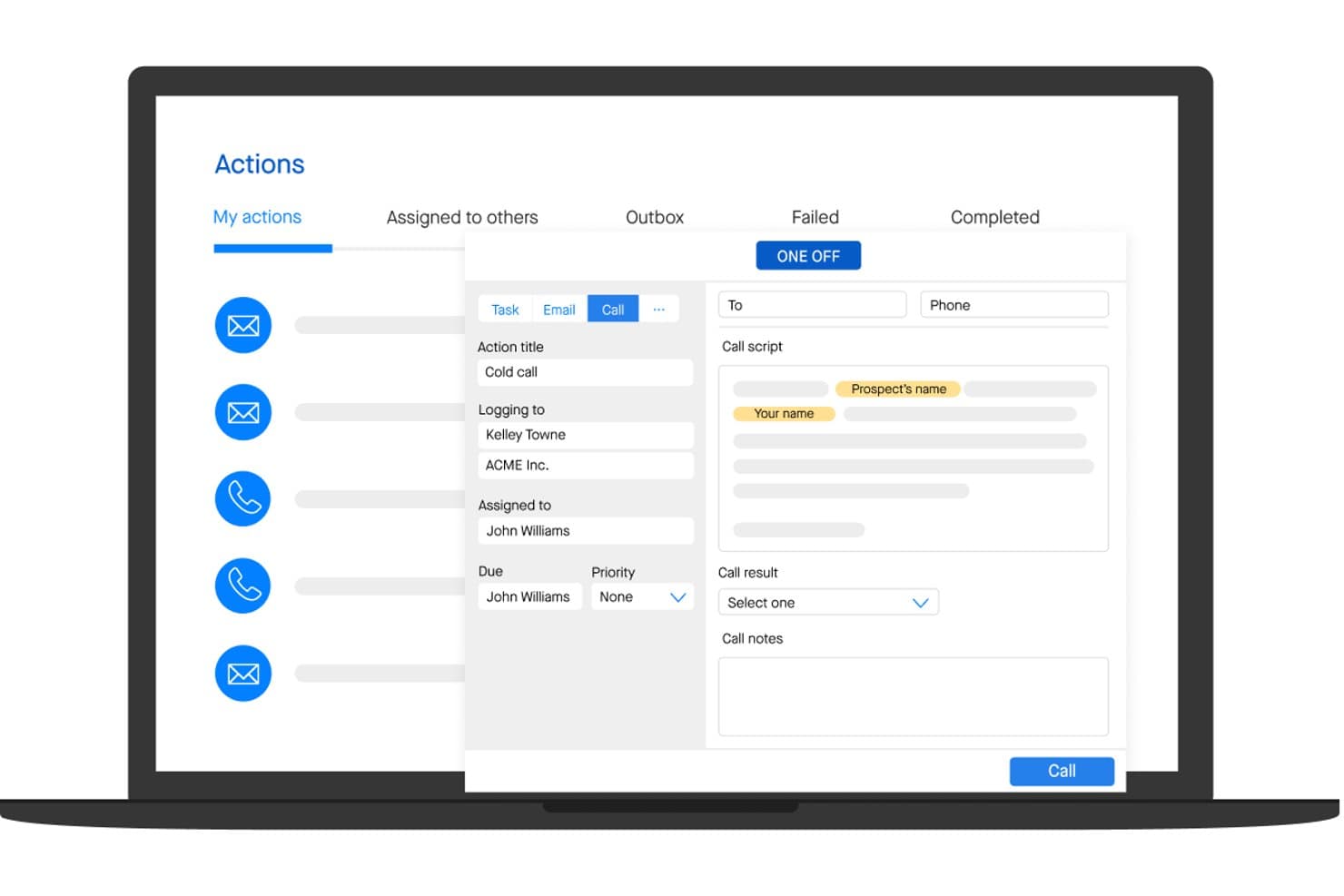
Groove lets users manage and log sales calls with scripts and notes. Groove is a Salesforce-native sales engagement platform that combines multi-channel cadences, automated activity capture, pipeline analytics, and AI-assisted outreach into a single revenue execution environment.
Who Is Groove Best For?
Groove is a strong fit for enterprise sales teams that run on Salesforce and want their engagement data feeding directly into Clari's revenue intelligence platform.
Why I Picked Groove
Groove earns its spot on my shortlist because it's built to feed directly into Clari's revenue intelligence engine, turning rep activity into forecast-grade pipeline data. I love how Groove Flows let reps run multi-channel cadences with AI-generated email content from within Gmail or Outlook, while every touch auto-logs to Salesforce in real time. Groove Spaces then surfaces an effort-vs-engagement score across accounts, so I can see exactly where attention is being paid and where deals are stalling.
Groove Key Features
- Groove OmniDialer: A built-in dialer with click-to-call, local presence numbers, voicemail drops by persona, and automatic call logging to Salesforce.
- Groove Spaces: A shared account workspace where SDRs, AEs, CSMs, and SEs can collaborate with shared activity history, tasks, and engagement scores.
- Groove Conversations: Native call recording and transcription that integrates with Clari Copilot for post-call AI summaries and in-call battlecards.
- Groove Scheduler: A meeting scheduling tool that supports custom meeting types and pulls custom Salesforce field data directly into the booking flow.
Groove Integrations
Groove is Salesforce-native and integrates with Gmail, Microsoft Outlook, ZoomInfo, LinkedIn Sales Navigator, Slack, Microsoft Teams, Zoom, Seismic, and Highspot. It connects with Clari products and offers a public API for custom integrations.
Pros and Cons
Pros:
- Automates sales activity capture reliably
- Multi-role sales collaboration workspace
- AI-generated emails and call summaries
Cons:
- Sequencing logic can feel restrictive
- No native buyer intent data included
Learn more about Groove: Best for Salesforce-native real-time call coaching
- Free demo available
- Pricing upon request
Visit WebsiteCustomer Rating:4.7/5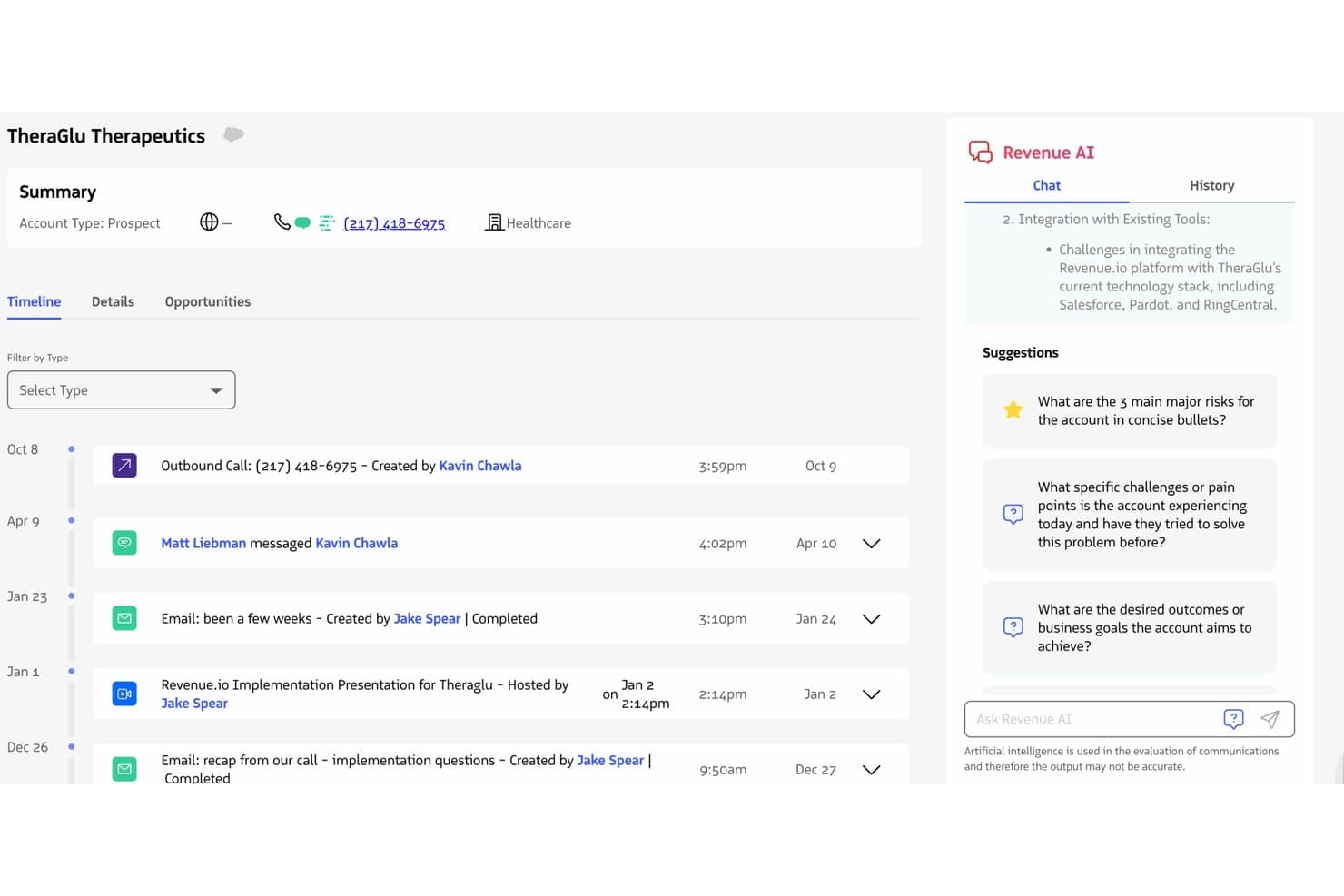
Revenue.io surfaces AI-driven account insights alongside a full activity timeline. Revenue.io is a Salesforce-native sales acceleration platform that combines a built-in dialer, multi-channel sales engagement cadences, real-time call coaching, conversation intelligence, and AI-driven pipeline analytics.
Who Is Revenue.io Best For?
Revenue.io is a strong fit for mid-market and enterprise sales teams running on Salesforce who rely heavily on phone-based or hybrid outreach.
Why I Picked Revenue.io
Revenue.io earns its spot on my shortlist because of Moments™, its real-time in-call coaching engine that surfaces battlecards, objection responses, and talk tracks the instant a competitor name or key topic is detected during a live call. I picked it specifically for Salesforce teams because it's built entirely inside Salesforce, so every call, SMS, and email auto-logs to the right record with zero sync lag. The AI Sales Roleplay feature also lets reps practice against simulated objections before going live, which I think meaningfully shortens ramp time.
Revenue.io Key Features
- Guided Selling cadences: Multi-channel outreach sequences across calls, email, and SMS that automatically enroll and remove prospects based on activity triggers and outcomes.
- Ask Revenue™ AI: A natural language query tool that lets reps and managers ask questions about deals, calls, and accounts directly within Salesforce.
- Local presence dialing: Outbound calls display a local number in 40+ countries, which the vendor reports lifts connect rates by 30–50%.
- AI Methodology Coaching: Real-time call scoring against established frameworks like MEDDIC, SPIN, and Challenger, surfaced during live conversations.
Revenue.io Integrations
Revenue.io runs natively in Salesforce and integrates with Zoom, Microsoft Teams, Google Meet, Gmail, Microsoft Outlook, Marketo, 6sense, ActiveCampaign, and Five9. Salesforce’s API and automation capabilities support custom integrations.
Pros and Cons
Pros:
- Multilingual conversation analysis for Teams and Zoom
- All activities auto-log directly in Salesforce
- Real-time in-call coaching for reps
Cons:
- No built-in buyer intent data
- Requires Salesforce as the CRM platform
Learn more about Revenue.io: 6Best for revenue intelligence
Gong
- Free demo available
- Pricing upon request
Visit WebsiteCustomer Rating:4.7/5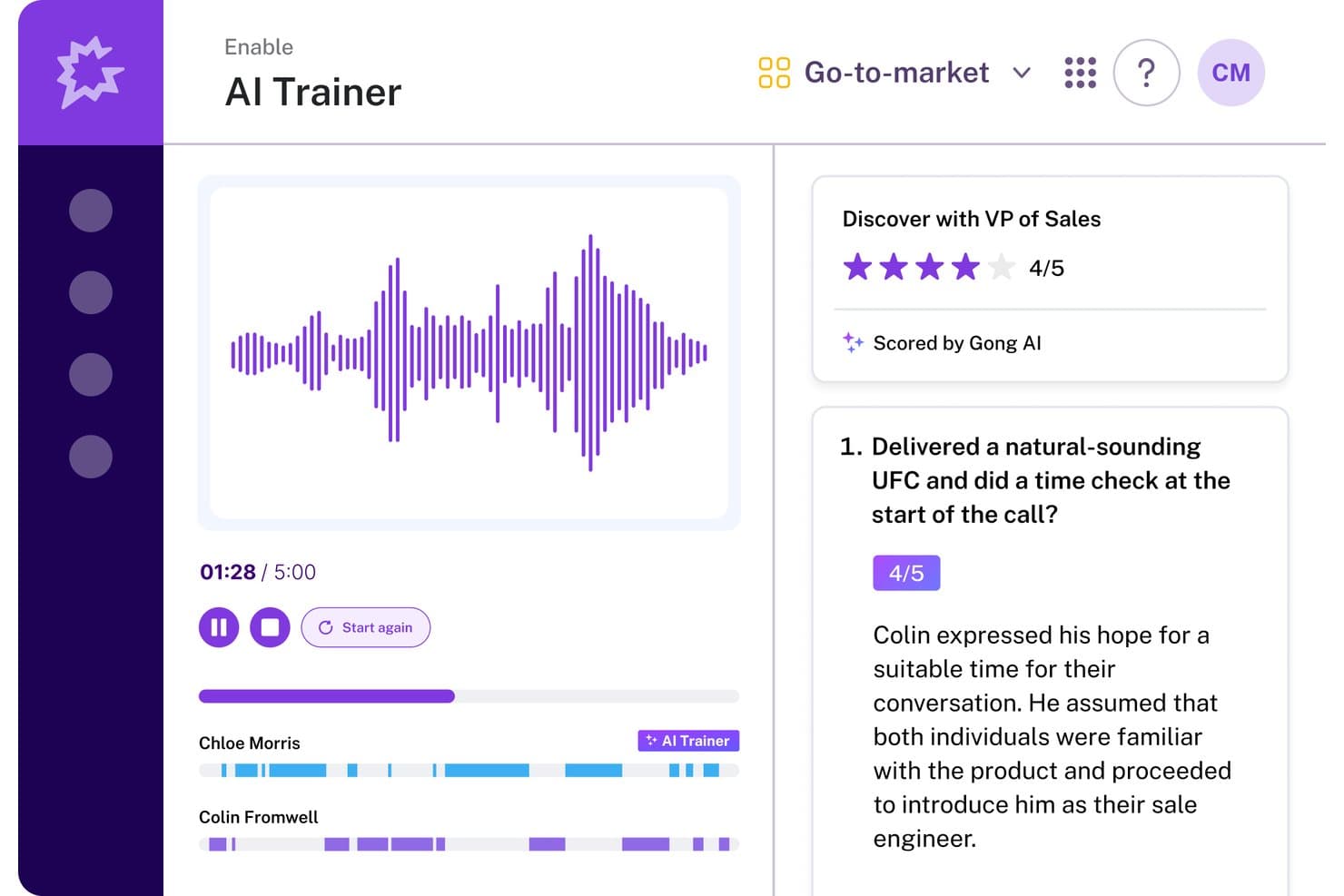
Gong's AI Trainer scores sales calls and gives reps actionable feedback. Gong is a revenue AI platform that combines conversation intelligence, sales engagement, enablement, and forecasting into a single operating system for revenue teams.
Who Is Gong Best For?
Gong is a strong fit for mid-market and enterprise revenue teams that want conversation intelligence and forecasting built into a single platform.
Why I Picked Gong
Gong earns its spot on my shortlist because its revenue intelligence capabilities go deeper than any other tool I've evaluated. I love how the AI Revenue Predictor pulls from 300+ signals across real customer conversations to generate forecasts, with customers like Upwork reporting 95%+ accuracy. The AI Deal Monitor actively flags risks like competitor mentions or stalled momentum before deals slip, which means I'm working from real interaction data rather than gut feel.
Gong Key Features
- AI Composer: Drafts personalized outreach emails by pulling context from past customer conversations to improve response rates.
- Gong Enable: A dedicated enablement module with learning paths, AI call scoring, coaching workflows, and AI-powered simulations for rep training.
- Engage Flows: Multi-channel sequences covering email, calls, LinkedIn, and tasks, with automation rules that auto-enroll contacts based on CRM events.
- Smart Trackers: User-trainable, context-aware topic trackers that detect patterns across recorded conversations to surface coaching and deal insights.
Gong Integrations
Gong offers native bi-directional integrations with Salesforce, HubSpot, and Microsoft Dynamics 365, plus 300+ marketplace integrations through Gong Collective, including Zoom, Slack, 6sense, G2, and Calendly. An open API, webhooks, and MCP support custom connections.
Pros and Cons
Pros:
- Automates CRM data entry for sales teams
- Conversation intelligence surfaces actionable coaching insights
- AI predicts deal outcomes with high accuracy
Cons:
- Requires a demo request for pricing details
- Sequence branching less advanced than key competitors
Learn more about Gong: Best for training reps with live call coaching
- Not available
- Pricing upon request
Visit WebsiteCustomer Rating:4.5/5
Implement a system where sellers and sales teams collaborate, execute, and serve customers. Salesloft provides tools businesses can use to help train new sales reps.
Why I picked Salesloft: If your team is growing, you can use Salesloft to help your team lead new hires by example. Salesloft provides features that allow the system to record conversations your top sales reps are having with prospects. You can use these recordings as a teachable moment for new hires to help them see what works when closing sales or enhance your current team’s close rates.
Salesloft is suitable for any sized business that needs a solution to optimize interactions. It’s a highly effective platform for enhancing the processes that lead to conversion across email, phone, and social media interactions. Salesloft will help accelerate your sales teams through its ability to build, share, and execute sales processes.
Salesloft Standout Features and Integrations
Features include call list management, lead distribution, data management, lead capture, lead scoring, data dashboards, call recording, contact management, performance management, collaboration tool, reporting and analytics, and lead management.
Integrations include Aircall, Chili Piper, Clari, DealSignal, Desktop.com, Gong, HubSpot CRM, Opensense, Outgrow, Salesforce, Shift, Slack, Sugar Sell, Wingman, Zoom, and other software options.
Pros and Cons
Pros:
- The platform is user-friendly.
- It’s easy to add contacts to cadences.
- It provides a live engagement feed.
Cons:
- There are automation limitations.
- The tool freezes when making extensive changes.
Learn more about Salesloft:

Use the actionable insights to understand the best times, sequences, and channels that reach leads and improve results. Outreach helps businesses enhance their sales execution by combining sales engagement, conversation intelligence, and revenue intelligence in one tool.
Why I picked Outreach: The platform is one of the largest sales execution tools that will help your company increase revenue, engage with customers, and increase your sales rep’s productivity. Outreach can help your sales reps engage with leads through personalized interactions throughout the sales cycle. The software’s deal health score feature will help your reps speed up sales with predictions and recommendations on how to keep things on track - helping them focus on the leads that are likely to close.
Outreach works well for sales management and leadership teams who are looking for tools that will help their teams close more deals. The platform’s capabilities will help them give their sales reps a way to personalize, prioritize, and analyze sales activities. Outreach can help your sales teams create pipelines and optimize sales workflows to ensure they can help the organization reach sales targets.
Outreach Standout Features and Integrations
Features include sentiment analysis, A/B testing, automated speech recognition, forecast simulation, deal health scores, deal management, sales rep coaching, conversation intelligence, mutual action plans, deal insights, and pipeline management.
Integrations include 6sense, Aircall, Alyce, Avoma, BigPicture, BombBomb, Chili Piper, Clari, Dark Sky, DataGrail, Dialpad, Gong, Highspot, HubSpot, RingCentral, Salesforce, and other software options.
Pros and Cons
Pros:
- The analytics provide beneficial insights.
- It simplifies and automates daily tasks.
- Top-notch support team.
Cons:
- Tracking which emails customers receive is complex.
- There’s a steep learning curve.
 Best all-in-one CRM for multiple departments
- Free plan + 30-day free trial available
- From $25/user/month

Analyze sales metrics for accurate forecasting and make effective data-driven decisions. Salesforce Sales Cloud provides a CRM tool that will help businesses improve interactions between customers and other operational departments.
Why I picked Salesforce Sales Cloud: The platform is a widely used CRM platform that allows you to store almost any piece of customer information you have in one place. Salesforce Sales Cloud enables you to track all customers across every stage of your sales cycle, from discovery to closing the deal. Multiple departments can use Salesforce Sales Cloud to forecast revenues and track leads, and collaborate through Salesforce’s other applications.
Salesforce Sales Cloud allows businesses of any size and operating in any industry to accelerate growth by using automation. You can accelerate sales growth through the platform’s Process Builder tool, which provides a simple point-and-click interface that will help you automate processes. Salesforce Sales Cloud can help you create the most complex sales processes that will guide your reps through qualification conversations and recommend when to move to the next steps of the sales cycle.
Salesforce Sales Cloud Standout Features and Integrations
Features include email marketing, lead scoring, audience segmentation, call logging, calendar and reminder tools, task management, contact history, lead management, sales pipeline management, lead nurturing, content management, and document management.
Integrations include 3CX, Bynder, CallTrackingMetrics, CloudTalk, DealRoom, Freshbooks, Freshservice, GetResponse, HoneyBook, monday.com, Outgrow, PandaDoc, Slack, Twilio, Wrike, and other software options.
Pros and Cons
Pros:
- Top-down pipeline monitoring capabilities.
- It creates excellent reports.
- It integrates with a significant number of applications.
Cons:
- There’s a steep learning curve.
- Users can feel lost with all the features available.
Learn more about Salesforce Sales Cloud:
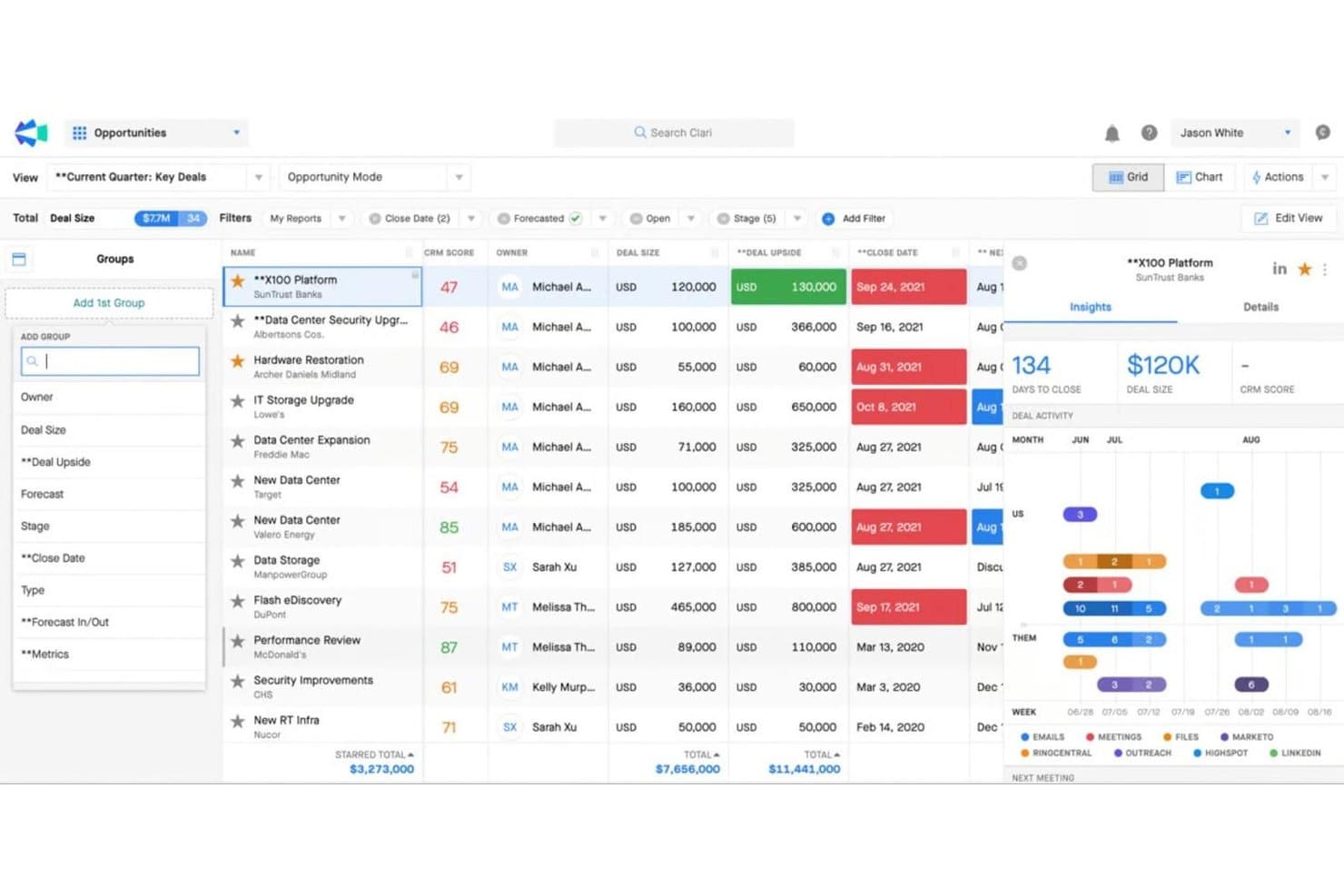
Clari surfaces deal insights and activity trends to prioritize key opportunities. Clari is a revenue intelligence platform that combines sales engagement cadences, pipeline inspection, conversation intelligence, AI-driven forecasting, and mutual action plans across one connected suite.
Who Is Clari Best For?
Clari is built for enterprise revenue teams—particularly RevOps managers and CROs—who need board-ready forecast accuracy across complex, multi-threaded sales cycles.
Why I Picked Clari
Clari earns its spot on my shortlist because no other platform comes close to its enterprise revenue forecasting depth. I'm particularly impressed by Clari Forecast, which rolls up projections from individual reps all the way to the C-suite with AI-driven scenario modeling that boards actually trust. Paired with Inspect's deal health scoring and real-time pipeline risk signals, my team can catch slipping deals before they fall out of the quarter entirely.
Clari Key Features
- Groove Flows: Multi-channel outreach sequences that automate email, phone, SMS, LinkedIn, and direct mail steps within a single cadence.
- Copilot Battlecards: Live in-call cue cards that surface automatically during sales conversations to help reps handle objections in real time.
- Capture: Automatic activity logging that syncs emails, calls, and calendar events directly to Salesforce without manual CRM entry.
- Revenue AI Agents: A library of AI agents that surface deal alerts, recommend next-best actions, and guide pipeline inspection workflows.
Clari Integrations
Clari offers a deep native Salesforce integration, plus integrations with HubSpot, Pipedrive, Gainsight, Slack, Zoom, Microsoft Teams, and LinkedIn Sales Navigator. Public REST APIs and custom data ingestion support connections with Snowflake, BigQuery, and Databricks.
Pros and Cons
Pros:
- Multichannel outreach in a single cadence
- Real-time conversation intelligence during live calls
- Forecasting accuracy trusted at board level
Cons:
- Requires strong Salesforce data hygiene
- No native buyer intent data included
Learn more about Clari:
Diğer Satış Hızlandırma Yazılımları
Kısa listeme giremeyen, ancak yine de göz atmaya değer bazı ek satış hızlandırma yazılımı seçenekleri şunlardır:
- 11PitchMonsterBest for accelerating rep onboarding
- 12MixmaxBest for Gmail-native sales acceleration
- 13KoncertBest for high-volume parallel dialing teams
- 14Zoho CRMBest AI sales assistant
- 15OutplayBest for AI-native multi-channel outreach at SMB scale
- 166senseBest for account-level buyer intent and AI outreach
- 17HubSpot Sales HubBest for intelligent lead routing and scoring
- 18Reply.ioBest for AI-driven multichannel outbound sequences
- 19ZoomInfo SalesOSBest for account and person-level intent data
How I Evaluate Sales Acceleration Software
I split my evaluation into two layers: baseline criteria every tool must meet—like CRM sync and multi-channel cadences—and the differentiators that separate the best options from the rest.
Core Functionality (Table Stakes For This List)
When I'm selecting tools for my list, I rank each one on a scale from 0 (does not offer the functionality) to 5 (excels in this area) for each core functionality listed below. Then, I calculate the tool's total score into a percentage. Each tool needs to achieve a minimum total score of 75% to be considered for inclusion.
- Multi-Channel Sales Cadences: I check whether the platform supports sequenced outreach across email, phone, LinkedIn, and SMS—and whether reps can build branching logic based on prospect behavior.
- CRM Integration & Data Sync: Real-time, bi-directional sync with CRMs like Salesforce and HubSpot matters here, especially for keeping activity logs and contact records accurate across systems.
- Sales Task Automation: I evaluate how well the tool automates repetitive work like lead routing, follow-up triggers, and data entry so reps spend more time in actual selling conversations.
- Pipeline & Activity Reporting: Good platforms let you track cadence performance, rep activity volume, and stage-by-stage conversion rates in dashboards your ops team can actually customize.
- Lead Prioritization & Scoring: I look for scoring models that combine engagement signals and firmographic data to help reps focus on accounts most likely to convert.
- Sales Content & Playbooks: I consider whether the tool offers a centralized library for templates, snippets, and guided playbooks that reps can access mid-cadence or during live conversations.
Once I have a list of tools that meet this criteria, I consider what sets each platform apart.
Differentiating Factors (What Sets Vendors Apart)
Here's how I compare and contrast different vendors:
Standout Features
Conversation intelligence is a major differentiator—platforms like Gong and Salesloft can record, transcribe, and analyze sales calls to flag objection patterns and coaching moments. I also evaluate whether a tool includes a built-in dialer with local presence, which saves reps from toggling between apps mid-cadence. AI email generation matters when it pulls from prospect data to draft contextual follow-ups rather than generic templates. Buyer intent data is worth checking too, especially for outbound teams prioritizing in-market accounts.
Beyond Features
I consider how well each tool fits a team's GTM motion—a platform built for high-velocity outbound SDR teams won't suit an enterprise AE org running multi-threaded deals. Tech stack compatibility matters just as much; I check for native connectors to tools like ZoomInfo, LinkedIn Sales Navigator, and data warehouses where your RevOps team consolidates reporting. Pricing structure is another factor I weigh, especially whether vendors offer modular add-ons for dialers or intent data so you can scale without paying for features your team doesn't need yet.
Satış Hızlandırma Yazılımı Nasıl Seçilir?
Uzun özellik listeleri ve karmaşık fiyatlandırma yapıları arasında kaybolmak kolaydır. Kendinize özgü yazılım seçim sürecinizi yürütürken odağınızı korumanıza yardımcı olmak için şu faktörleri göz önünde bulundurun:
| Faktör | Dikkat Edilmesi Gerekenler |
|---|---|
| FaktörÖlçeklenebilirlik | Dikkat Edilmesi GerekenlerYazılım ekibinizle birlikte büyüyebilir mi? Gelecekteki genişlemeyi göz önünde bulundurun. Performans sorunları yaşamadan artan veri hacmini ve kullanıcı sayısını yönetebilen çözümler arayın. |
| FaktörEntegrasyonlar | Dikkat Edilmesi GerekenlerMevcut araçlarınıza bağlanabiliyor mu? İş akışı verimliliğini korumak için CRM, e-posta ve diğer temel entegrasyonları kontrol edin. |
| FaktörÖzelleştirilebilirlik | Dikkat Edilmesi GerekenlerYazılımı süreçlerinize uyacak şekilde düzenleyebilir misiniz? Özel ihtiyaçlarınıza uygun olması için gösterge tabloları ve raporlar için özelleştirme seçenekleri sunduğundan emin olun. |
| FaktörKullanım Kolaylığı | Dikkat Edilmesi GerekenlerArayüz ekibiniz için sezgisel mi? Basit bir tasarım eğitim süresini azaltır ve benimsenme oranlarını artırır. Arayüzün kullanıcı dostu olup olmadığını test edin. |
| FaktörMaliyet | Dikkat Edilmesi GerekenlerFiyatlandırma bütçenize uygun mu? Planları karşılaştırın, gizli ücretlere dikkat edin ve ihtiyaç duyduğunuz özelliklerin fiyata dahil olduğundan emin olun. |
| FaktörGüvenlik Önlemleri | Dikkat Edilmesi GerekenlerVerilerinizi nasıl koruyor? Sektör standartlarına uyduğunu ve şifreleme, erişim denetimleri ile düzenli güvenlik güncellemeleri sunduğunu doğrulayın. |
| FaktörDestek Kullanılabilirliği | Dikkat Edilmesi GerekenlerDesteğe ne zaman ulaşabilirsiniz? Özellikle kritik zamanlarda, sağlayıcının canlı sohbet, e-posta veya telefon gibi çeşitli kanallar aracılığıyla güvenilir müşteri hizmeti sunduğundan emin olun. |
Satış Hızlandırma Yazılımı Nedir?
Satış hızlandırma yazılımı, satış ekiplerinin satış sürecini hızlandırmasına yardımcı olan bir araçtır. Otomatik potansiyel müşteri oluşturma, potansiyel müşteri puanlama, etkili iletişim araçları ve ayrıntılı analizler gibi çeşitli işlevleri tek bir platformda bir araya getirir.
Bu yazılım, tekrarlayan görevleri otomatikleştirerek ve satış temsilcilerine önemli veriler ile kaynaklar sunarak potansiyel müşterinin yakalanmasından anlaşmanın sonuçlandırılmasına kadar satış döngüsünü kolaylaştırır.
Satış Hızlandırma Yazılımının Özellikleri
Satış hızlandırma yazılımı seçerken aşağıdaki temel özelliklere dikkat edin:
- Potansiyel müşteri yönetimi: Potansiyel müşterileri satış hattınızda ilerlerken düzenleyin, önceliklendirin ve takip edin. İyi bir potansiyel müşteri yönetimi, en iyi adaylarınıza odaklanmanıza ve etkili bir şekilde takip yapmanıza yardımcı olur; böylece hiçbir şey ve hiç kimse gözden kaçmaz.
- Satış otomasyonu: Takip e-postaları gönderme veya arama planlama gibi tekrarlayan görevleri otomatikleştirin. Böylece idari işlerle boğuşmak yerine ilişkiler kurmaya ve anlaşmaları sonuçlandırmaya daha fazla zaman ayırabilirsiniz.
- Satış hattı görünürlüğü: Satış hattınızı başlangıçtan sonuçlandırmaya kadar net ve gerçek zamanlı olarak görüntüleyin. Daha iyi görünürlük sayesinde darboğazları fark edebilir, ilerlemeyi takip edebilir ve stratejinizi anında değiştirebilirsiniz.
- E-posta takibi ve şablonları: Potansiyel müşterilerin e-postalarınızı ne zaman açtığını veya bağlantılara ne zaman tıkladığını takip edin ve hızlı, tutarlı iletişim için hazır şablonları kullanın. Böylece neyin işe yaradığını bilir ve mesajlarınızı etkili tutabilirsiniz.
- Entegrasyon özellikleri: Mevcut CRM'nize, pazarlama platformlarınıza ve iletişim araçlarınıza sorunsuz bir şekilde bağlanın. Entegrasyon, satış verilerinizin sistemler arasında sorunsuzca akmasını sağlayarak sizi veri girişi zahmetinden kurtarır.
- Analizler ve raporlama: Satış faaliyetleriniz, satış hattınızın durumu ve temsilcilerinizin performansı hakkında panolara ve ayrıntılı raporlara erişin. Bu içgörüler, yalnızca tahminlere değil, gerçekten yaşananlara dayanarak daha doğru kararlar almanıza yardımcı olur.
- Arama işlevi: Giden aramaları doğrudan platformdan yapın, aramaları otomatik olarak kaydedin ve eğitim amacıyla görüşmeleri kaydedin. Bu özellik, hızlı ilerlemenizi sağlar ve size daha fazla koçluk fırsatı sunar.
- Belge yönetimi: Teklifler ve sözleşmeler gibi satış belgelerini depolayın, paylaşın ve takip edin. İhtiyacınız olan dosyalara her zaman kolayca erişebilir ve potansiyel müşterilerin materyallerinizi ne zaman incelediğini görebilirsiniz.
- Planlama araçları: Potansiyel müşterilerin, karşılıklı yazışmalara gerek kalmadan uygun zamanlarda takviminizden toplantı rezervasyonu yapmasını sağlayın. İletişimdeki boşlukları kapatır ve anlaşmalarınızdaki ivmeyi korursunuz.
Satış Hızlandırma Yazılımındaki Yaygın Yapay Zekâ Özellikleri
Yukarıda listelenen standart satış hızlandırma yazılımı özelliklerinin yanı sıra, bu çözümlerin çoğu aşağıdaki gibi özelliklerle yapay zekâyı da kullanmaya başlıyor:
- Tahmine dayalı potansiyel müşteri puanlama: Yapay zekâ, potansiyel müşterileri dönüşüm olasılıklarına göre sıralamak için geçmiş verileri ve mevcut etkileşimleri analiz eder; böylece iletişim çalışmalarınızda en önemli adaylara öncelik verebilirsiniz.
- Otomatik e-posta kişiselleştirme: Yapay zekâ, davranışlarından, tercihlerinden ve önceki görüşmelerinden yararlanarak her potansiyel müşteri için kişiselleştirilmiş e-posta içeriği oluşturur; bu da hazırlık süresinden büyük ölçüde tasarruf etmenizi ve etkileşimi artırmanızı sağlar.
- Satış tahmini: Yapay zekâ, gelecekteki satış sonuçlarını öngörmek için satış hattınızı, geçmiş eğilimleri ve devam eden faaliyetleri inceler; böylece gerçekçi hedefler belirlemenize ve olası sorunları erkenden fark etmenize yardımcı olur.
- Görüşme zekâsı: Yapay zekâ aramalarınızı dinler ve temel konuları, duygu değişimlerini ve itirazları belirlemek için görüşmeleri analiz eder; hedefe yönelik koçluk ipuçları ve sonraki adımlara ilişkin öneriler sunar.
- Müşteri kaybı tahmini: Yapay zekâ, satış sürecinizde anlaşmanın kaybedilebileceğine işaret eden erken uyarı işaretlerini fark eder; böylece kayıpları önlemek ve daha fazla müşteriyi elde tutmak için hızlıca harekete geçebilirsiniz.
Faydaları Satış Hızlandırma Yazılımının
Satış hızlandırma yazılımını uygulamak, ekibiniz ve işletmeniz için çeşitli faydalar sağlar. Yararlanmayı bekleyebileceğiniz birkaç fayda şunlardır:
- Verimlilik artışı: Otomatik e-posta kampanyaları ve müşteri adaylarına öncelik verme zaman kazandırarak ekibinizin anlaşmaları sonuçlandırmaya odaklanmasını sağlar.
- Daha iyi karar alma: Analiz ve raporlama içgörüler sunarak satış stratejileri hakkında bilinçli seçimler yapmanıza yardımcı olur.
- Geliştirilmiş iş birliği: CRM entegrasyonu herkesin aynı verilere erişmesini sağlayarak ekip çalışmasını ve tutarlılığı teşvik eder.
- Proaktif satış stratejileri: Yapay zekâ destekli içgörüler öngörücü analiz sunarak ekibinizin müşteri ihtiyaçlarını önceden tahmin etmesini sağlar.
- Erişimin genişletilmesi: Sosyal medya etkileşim araçları, çeşitli platformlarda potansiyel müşterilerle bağlantı kurmaya yardımcı olarak hedef kitlenizi genişletir.
- Özelleştirilmiş kullanıcı deneyimi: Özelleştirilebilir gösterge panelleri, kullanıcıların ilgili metriklere odaklanmasını sağlayarak iş akışlarını ve verimliliklerini geliştirir.
- Veri güvenliği: Güvenlik önlemleri hassas bilgileri koruyarak uyumluluğu sağlar ve müşterilerle güven oluşturur.
Satış Hızlandırma Yazılımının Maliyetleri ve Fiyatlandırması
Satış hızlandırma yazılımı seçimi, mevcut çeşitli fiyatlandırma modellerinin ve planların anlaşılmasını gerektirir. Maliyetler özelliklere, ekip büyüklüğüne, eklentilere ve diğer unsurlara göre değişir. Aşağıdaki tabloda satış hızlandırma yazılımı çözümlerinde yaygın planlar, bunların ortalama fiyatları ve genellikle içerdikleri özellikler özetlenmektedir:
Satış Hızlandırma Yazılımı İçin Plan Karşılaştırma Tablosu
| Plan Türü | Ortalama Fiyat | Yaygın Özellikler |
|---|---|---|
| Plan TürüÜcretsiz Plan | Ortalama Fiyat$0 | Yaygın ÖzelliklerTemel müşteri adayı yönetimi, sınırlı e-posta kampanyaları ve temel analizler. |
| Plan TürüBireysel Plan | Ortalama Fiyat$5-$25/kullanıcı/ay | Yaygın ÖzelliklerGelişmiş e-posta kampanyaları, CRM entegrasyonu ve temel raporlama araçları. |
| Plan Türüİşletme Planı | Ortalama Fiyat$30-$75/kullanıcı/ay | Yaygın ÖzelliklerKapsamlı analizler, yapay zekâ destekli içgörüler, sosyal medya araçları ve özelleştirilebilir gösterge panelleri. |
| Plan TürüKurumsal Plan | Ortalama Fiyat$100+/kullanıcı/ay | Yaygın ÖzelliklerTüm özelliklerden oluşan kapsamlı paket, gelişmiş güvenlik önlemleri, özel destek ve kapsamlı entegrasyonlar. |
Satış Hızlandırma Yazılımı SSS'leri
Yeni satış hızlandırma yazılımı ararken insanların sorduğu popüler sorulardan bazıları burada yer alıyor.
CRM ile satış hızlandırma yazılımı arasındaki fark nedir?
Satış hızlandırma yazılımı satış sürecini hızlandırmaya odaklanırken CRM sistemleri müşteri ilişkilerini yönetir. Potansiyel müşterileri önceliklendirmek veya otomatik e-postalar göndermek için satış hızlandırma araçlarını kullanabilirsiniz; CRM sistemleri ise müşteri verilerini depolar ve etkileşimleri takip eder. Her ikisi de genel satış verimliliğini artırmak için entegre edilebilir.
Satış hızlandırma yazılımını kimler kullanır?
Satış hızlandırma yazılımı aşağıdakiler de dahil olmak üzere birçok kullanıcıya fayda sağlayabilir:
\u003cul\u003e
\u003cli\u003e\u003cstrong\u003eSatış Temsilcileri:\u003c/strong\u003e Bu platformlar, satış temsilcilerinin tekrarlanan süreçleri otomatikleştirmesine ve daha etkili çalışmalarına yardımcı olan müşteri verilerine erişmesine olanak tanıyabilir.\u003c/li\u003e
\u003cli\u003e\u003cstrong\u003ePazarlama Ekipleri:\u003c/strong\u003e Pazarlama ekipleriniz, müşteri tercihlerini daha iyi anlamak ve özel mesajlarla potansiyel müşterileri hedeflemek için satış hızlandırma araçlarını kullanabilir.\u003c/li\u003e
\u003cli\u003e\u003cstrong\u003eYöneticiler:\u003c/strong\u003e Belirli süreçleri satış hızlandırma yazılımıyla otomatikleştirmek, yönetici ekiplerinin idari görevler için harcadığı zamanı azaltmasına ve önemli hedeflere odaklanmasına yardımcı olur.\u003c/li\u003e
\u003cli\u003e\u003cstrong\u003eMüşteri Hizmetleri Ekipleri:\u003c/strong\u003e Müşteri verilerine hızlı erişim, müşteri hizmetleri ekiplerinin müşterilere ilgili ayrıntılarla hızlı yanıt vermesine yardımcı olabilir.\u003c/li\u003e
\u003cli\u003e\u003cstrong\u003eVeri Analistleri:\u003c/strong\u003e Satış hızlandırma çözümleri, veri analistlerinin önemli miktarda veriyi hızlı ve doğru bir şekilde işlemesine ve eyleme geçirilebilir işletme performansı içgörüleri elde etmesine olanak tanır.\u003c/li\u003e
\u003cli\u003e\u003cstrong\u003eÜrün Yöneticileri:\u003c/strong\u003e Satış hızlandırma yazılımı, ürün yöneticilerinin ürün kullanım eğilimlerini belirlemesine ve gelir potansiyelini en üst düzeye çıkarmak için gerekli değişiklikleri yapmasına yardımcı olabilir.\u003c/li\u003e
\u003c/ul\u003e
Satış hızlandırma yazılımının farklı türleri nelerdir?
Adından da anlaşılacağı gibi satış hızlandırma yazılımının temel işlevi satış hızını artırmaktır. Şirketinizin satış hunisi verimliliğini artırmasına yardımcı olabilir. Satış süreçlerini geliştirmek için kullanabileceğiniz çeşitli satış hızlandırma platformu türleri bulunur. Bunlar arasında şunlar yer alır:
\u003cul\u003e
\u003cli\u003e\u003cstrong\u003eMüşteri İlişkileri Yönetimi (CRM):\u003c/strong\u003e Bu araçlar, işletmelerin iletişim bilgilerini etkili bir şekilde bir araya getirip yönetmesine yardımcı olabilir. CRM, iyileştirilmiş veri erişilebilirliği sayesinde satış ekiplerinin yüksek değerli potansiyel müşterileri belirlemesine, etkileşimleri yönetmesine ve kişiler için özelleştirilmiş deneyimler sunmasına yardımcı olabilir.\u003c/li\u003e
\u003cli\u003e
\u003cstrong\u003ePotansiyel Müşteri Araştırması ve Nitelendirme:\u003c/strong\u003e Satış görüşmelerinin \u003ca href=\u0022https://www.ackertinc.com/additional-resources/news-and-trends/the-four-most-frustrating-sales-acceleration-stats/\u0022\u003e%33’ünün\u003c/a\u003e zaman kaybı olabilmesinin nedeni, temsilcilerin dönüşüm sağlamayacak niteliksiz potansiyel müşterilerle görüşmesidir. Bu durum, satış ekipleri için potansiyel müşteri araştırması ve nitelendirme sistemlerine sahip olmayı zorunlu kılar.
\u003c/li\u003e
\u003cli\u003e\u003cstrong\u003eTekliften Tahsilata:\u003c/strong\u003e Bu, satış süreçlerini ve gelirleri yönetmenize, satış temsilcilerinin hızlı bir şekilde teklifler oluşturmasına ve siparişleri etkili biçimde yönetmesine yardımcı olabilir. Bu araçlar, hesap ve gelir takibini basitleştirerek satışları hızlandırabilir.\u003c/li\u003e
\u003cli\u003e\u003cstrong\u003eMüşteri Desteği:\u003c/strong\u003e Canlı sohbet ve bilet yönetimi araçları, satış hızlandırma stratejisinin temel platformlarıdır. Satış temsilcilerine müşterilerin ihtiyaçlarını belirleme ve ürünlerle hizmetler ile müşterilerin beklentileri arasındaki boşlukları kapatacak etkili çözümler sunma fırsatı verir.\u003c/li\u003e
\u003c/ul\u003e
Satış hızlandırma yazılımı mevcut araçlarımla entegre olabilir mi?
Evet, çoğu satış hızlandırma yazılımı CRM’ler, e-posta platformları ve sosyal medya gibi popüler araçlarla entegrasyonlar sunar. Sorunsuz veri akışı sağlamak için mevcut sistemlerinizle uyumluluğunu kontrol edin. Entegrasyon, iş akışı verimliliğinin korunmasına yardımcı olur ve manuel veri girişi ihtiyacını azaltır.
Ekibimin satış hızlandırma yazılımına ihtiyacı olup olmadığını nasıl anlarım?
Ekibiniz potansiyel müşterileri yönetmekte zorlanıyor, yanıt süreleri yavaş veya satış süreçleri verimsizse satış hızlandırma yazılımı yardımcı olabilir. Mevcut zorluklarınızı değerlendirin ve otomatik e-postalar veya potansiyel müşteri puanlama gibi özelliklerin bunları çözüp çözemeyeceğini düşünün. Deneme süresi de iş akışınız üzerindeki etkisini değerlendirmenize yardımcı olabilir.
Satış hızlandırma yazılımı küçük işletmeler için uygun mudur?
Evet, satış hızlandırma yazılımı görevleri otomatikleştirerek ve potansiyel müşteri yönetimini geliştirerek küçük işletmelere fayda sağlayabilir. Bütçenize uygun fiyatlandırma planlarına sahip, ölçeklenebilir seçenekleri tercih edin. Küçük ekipler, üretkenliği artırmak ve yüksek öncelikli satış faaliyetlerine odaklanmak için bu araçlardan yararlanabilir.