

Bu kadar çok farklı satış takip yazılımı varken hangisinin sizin için doğru olduğunu belirlemek zor olabilir. Satış verilerini daha verimli bir şekilde kaydetmek, analiz etmek ve raporlamak istediğinizi biliyorsunuz; ancak hangi aracın en iyi olduğunu belirlemeniz gerekiyor. Yardımcı olacağım! Bu yazıda, onlarca farklı satış takip aracını çeşitli ekipler ve projelerle kullanma konusundaki kişisel deneyimlerimi paylaşarak seçiminizi kolaylaştıracağım ve en iyi satış takip yazılımlarını listeleyeceğim.
Why Trust Our Software Recommendations
6,700+
Reviews
20
Industry experts
16+
Evaluation factors
14
Years
Our reviews reflect our independent judgment—not a sales pitch. Learn how we stay transparent.
For this guide, we evaluated tools using hands-on testing and independent research, scoring tools using our selection criteria.
Our reviews reflect our human editorial judgment, not a sales pitch.
Satış Takip Yazılımları Karşılaştırma Tablosu
Bu karşılaştırma tablosu, en iyi satış takip yazılımı seçimlerimin fiyatlandırma ayrıntılarını özetlemektedir.
Sorted by: Default
| Tool | Starting Price | Website | |
|---|---|---|---|
Best with advanced B2B data enrichment filters | 4.5 out of 5 | $49/user/month Free plan + 14-day trial + demo available | Book Demo |
Best for AI territory and route optimization | 4.3 out of 5 | Pricing upon request Not available | Website |
Best for customizable sales automation | 4.6 out of 5 | $12/user/month 14-day free trial + free demo available | Book Demo |
Best cloud-based 360 solution for data | 4.2 out of 5 | $25/user/month 30-day free trial | Website |
Best for small and medium-sized businesses selling B2B | 4.7 out of 5 | $39/user/month 30-day free trial + free demo available | Website |
Best for startups and small businesses | 4.7 out of 5 | $22/user/month Free plan + 14-day free trial available | Website |
Best for customer | 4.2 out of 5 | $14/user/month Free plan + 15-day free trial+ free demo available | Website |
Best for multi-channel prospecting | 4.4 out of 5 | $24.90/user/month 30-day free trial | Website |
Best for small and medium-sized Agile teams | Not rated | $8.99/user/month Free plan available | Website |
Best for small businesses | Not rated | $29/user/month 14-day free trial + demo available | Website |


En İyi Satış Takip Yazılımları İncelemeleri
Aşağıda, kısa listeme giren en iyi satış takip yazılımlarının ayrıntılı özetlerini bulabilirsiniz. İncelemelerim, sizin için en iyi aracı bulmanıza yardımcı olmak amacıyla her aracın temel özelliklerine, artılarına ve eksilerine, entegrasyonlarına ve ideal kullanım alanlarına ayrıntılı bir bakış sunmaktadır.
 Best with advanced B2B data enrichment filters
- Free plan + 14-day trial + demo available
- From $49/user/month (billed annually)
Visit WebsiteCustomer Rating:4.5/5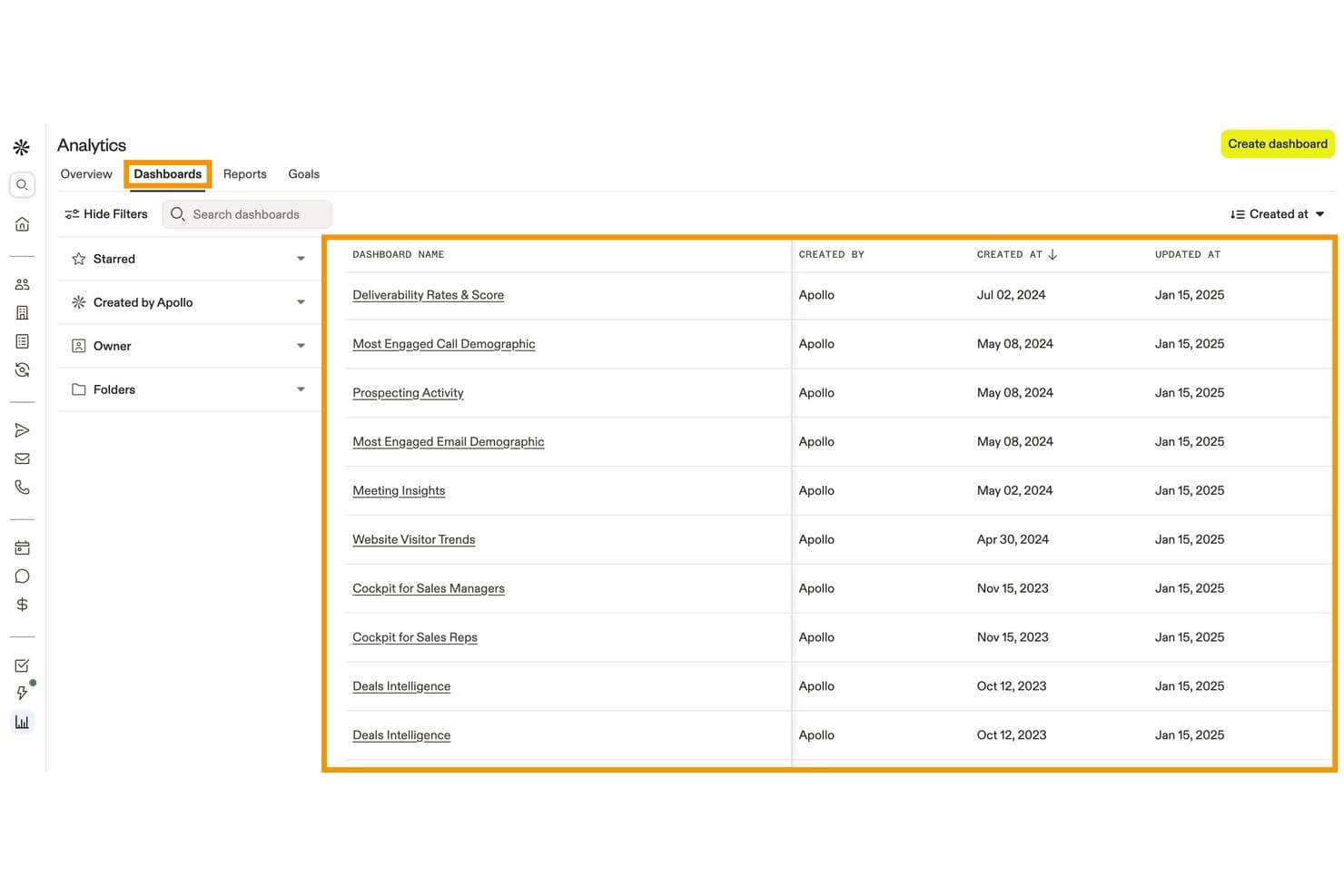
Apollo.io centralizes sales analytics dashboards for tracking team performance. Apollo.io is a sales tracking and engagement platform that combines pipeline management, AI-driven forecasting, automated activity logging, and performance dashboards with a built-in B2B contact database.
Who Is Apollo.io Best For?
Apollo.io suits revenue operations and sales teams that want to consolidate prospecting, outreach, and pipeline tracking into one platform instead of managing separate tools for each.
Why I Picked Apollo.io
Apollo.io earns its spot on my shortlist because its B2B database of 240M+ contacts isn't just for prospecting—it feeds directly into pipeline tracking through Waterfall Enrichment, keeping deal records clean and complete as leads move through stages. I especially like how AI-driven agents can research accounts and prioritize leads based on your ICP, so your pipeline reflects real buying signals rather than stale data. The Deal Insights layer then surfaces that enriched data in analytics, giving you a sharper view of which deals are worth pursuing.
Apollo.io Key Features
- Sales activity logging: Automatically records calls, emails, meetings, and AI transcripts.
- AI-hybrid forecasting: Supports commit, best-case, and worst-case revenue submissions.
- Custom dashboards: Builds reports around sales KPIs, sequence results, and rep performance.
- CRM integrations: Syncs data with Salesforce, HubSpot, Outreach, Salesloft, and 200+ tools.
Apollo.io Integrations
Apollo.io offers 200+ integrations through Apollo Anywhere and its integrations marketplace, including Salesforce, HubSpot, Outreach, Salesloft, Marketo, SendGrid, LinkedIn, Gmail, ChatGPT, and Claude. API access is available on Custom plans for custom integrations.
Pros and Cons
Pros:
- Calls, emails, and meetings log without manual entry
- AI forecasting predicts deal close probability accurately
- Built-in B2B database enriches pipeline records automatically
Cons:
- International contact data accuracy drops noticeably
- Quota and commission tracking are not built in
Learn more about Apollo.io: Best for AI territory and route optimization
- Not available
- Pricing upon request
Visit WebsiteCustomer Rating:4.3/5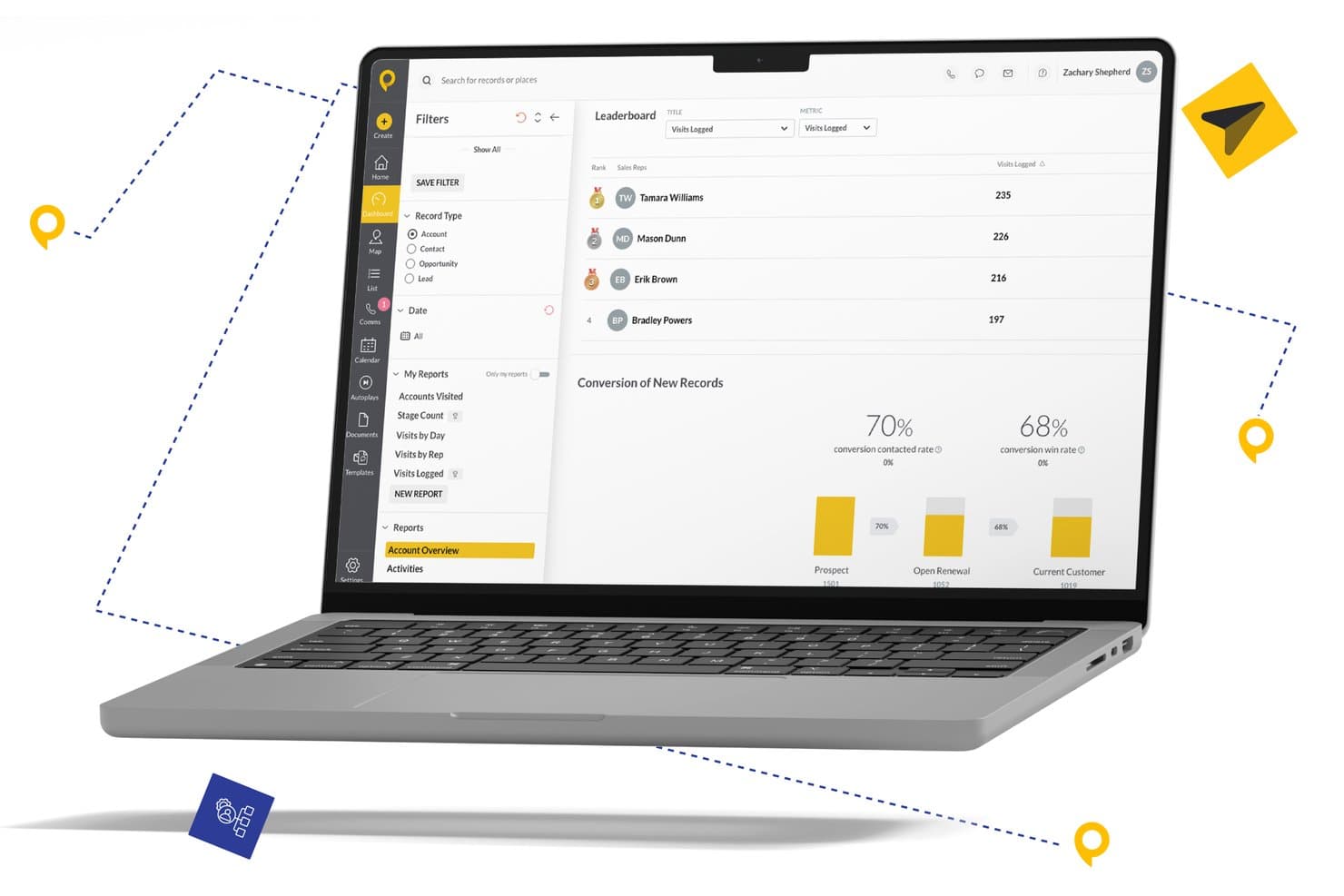
SPOTIO offers a sales leaderboard dashboard that tracks visits logged per rep alongside conversion rates for prospects, open renewals, and current customers. SPOTIO is a field sales tracking platform built for outside sales teams, combining territory management, route optimization, GPS-verified activity logging, and rep performance analytics in a single mobile-first workspace.
Who Is SPOTIO Best For?
SPOTIO is a strong fit for sales directors and ops managers leading field or door-to-door sales teams across industries like solar, roofing, telecom, and home services.
Why I Picked SPOTIO
SPOTIO earns its spot on my shortlist because its territory intelligence goes well beyond drawing map boundaries. I like that Next Best Action (NBA) scores leads by predicted value and tells reps exactly who to visit next, turning a daily route into a prioritized plan. DASH AI layers voice-captured activity logging and real-time coaching on top, so I can track both where reps are going and what they're doing when they get there.
SPOTIO Key Features
- Territory management mapping: Define, assign, and edit sales territories using zip codes, custom boundaries, or demographic overlays.
- Activity feed with GPS verification: Log and view sales activities geographically with automatic timestamping and location stamping.
- Customizable performance dashboards: Track rep productivity and territory results with adjustable filters and segmentation.
- Native CRM integrations: Sync data with platforms like Salesforce, HubSpot, or Microsoft Dynamics for real-time updates.
SPOTIO Integrations
SPOTIO offers native integrations with Salesforce, HubSpot, Microsoft Dynamics, SAP, and Oracle, and connects with Zapier. An API is available for custom integrations.
Pros and Cons
Pros:
- Real-time rep performance visibility on mobile
- AI-driven territory scoring and route planning
- GPS-verified activity logging for field reps
Cons:
- Reporting customization is fairly basic
- Limited forecasting depth for inside sales teams
Learn more about SPOTIO: Best for customizable sales automation
- 14-day free trial + free demo available
- From $12/user/month (billed annually)
Visit WebsiteCustomer Rating:4.6/5
Monday sales CRM centralizes customer data and sales processes for streamlined team collaboration. Monday sales CRM is a customer relationship management platform designed to centralize client communication and automate sales processes, providing a comprehensive overview of deals through customizable dashboards. Its unique selling point lies in its highly adaptable workflows, which enable users to modify the CRM system to align with their specific sales operations, leveraging flexible column types, detailed subitems, and robust sorting capabilities.
Why I picked Monday sales CRM: Monday.com excels in streamlining sales tracking through its intuitive interface and customizable dashboards, enabling teams to efficiently monitor deals, manage contacts, and follow up on leads with precision. Its automation features reduce manual tasks, allowing sales reps to focus on building relationships and closing deals.
The platform fosters collaboration across departments, ensuring all team members are aligned and informed. With real-time analytics, sales performance is transparent, aiding in strategic decision-making and driving sales growth. Monday.com is a robust tool that simplifies sales tracking while enhancing team productivity and customer engagement.
Monday sales CRM Standout Features and Integrations
Features include embedded analytics and customizable reporting features within the platform. This allows users to generate real-time insights about their sales activities, pipeline health, and performance metrics directly within their workflow. The ability to create and access these reports without needing specialized analytical tools or software is a unique feature that streamlines operations and decision-making processes.
Integrations include project management apps like Slack, Google Drive, Gmail, Google Calendar, Jira, GitHub, Trello, Dropbox, Typeform and many more, accessible through a paid plan with Zapier.
Pros and Cons
Pros:
- Integrated automation tools
- Enables cross-functional collaboration
- Known for its intuitive and visually appealing interface
- Highly customizable workflows and dashboards
Cons:
- Sales CRM dosen't have a free plan
- Vast array of features can be overwhelming for new users
 Best cloud-based 360 solution for data
- 30-day free trial
- From $25/user/month
Visit WebsiteCustomer Rating:4.2/5
The opportunities tab in Salesforce shows your sales funnel and deals in each pipeline stage Salesforce is the best cloud-based 360 solution because it provides options for businesses in any industry of any size. It's highly customizable. This does mean it can be a little more complex to set up and use, but it's ideal for businesses that need something tailor-made.
Why I picked Salesforce: Salesforce is an all-in-one solution that, to some people, is one of the tools that 'do too much,' but for others, it does everything they could wish for. I chose Salesforce because it helps teams run their business, collaborate in one central location, and is more than just sales tracking.
Although startups and small businesses may find the features overwhelming, the power behind Salesforce makes it a sales tracking tool for others to strive toward.
Salesforce Standout Features and Integrations:
Features include forecasting, one-click reporting, and sales management tools. With a data-rich dashboard and lead generation data mining, you can monitor your prospect's journey through the sales funnel and create premium user experiences.
Integrations include over 3,000 apps in the Salesforce AppExchange, including LinkedIn, Google Workspace, Asana, Microsoft 365, and WhatsApp. The Salesforce API allows you to create custom integrations.
Pros and Cons
Pros:
- Pipeline and forecast one-click reporting
- Email integration with Gmail or Outlook
- Customizable to suit any business
Cons:
- Steep learning curve
- No free plan
Learn more about Salesforce CRM: Best for small and medium-sized businesses selling B2B
- 30-day free trial + free demo available
- From $39/user/month
Visit WebsiteCustomer Rating:4.7/5
Salesflare's visual sales pipeline tracks opportunities by stage, value, and interaction history in a drag-and-drop interface. Salesflare is easy to use and can automate every part of your sales process. With a clean pipeline and organized CRM, it's simple yet powerful.
Why I picked Salesflare: I chose Salesflare because it can find any email address with a name and company, making outreach a breeze. Salesflare gathers information across all digital channels from one contact, automatically updating your CRM. Where time can often be tight, smaller teams will appreciate the automatic calendar and phone meeting logs.
Salesflare Standout Features and Integrations:
Features include powerful client data gathering, organized document and pipeline interface, and a mobile app that matches the power of the desktop version.
Integrations are limited natively to tools such as Gmail (Google Workspace), Outlook (Microsoft 365), and LinkedIn. Mailchimp, Slack, and thousands more are available using Zapier or Make.
Pros and Cons
Pros:
- Time-saving automation features
- Email address finder
- Full-feature mobile app
Cons:
- Reporting locked behind higher-tier plans
- Limited native integrations
Learn more about Salesflare: Best for startups and small businesses
- Free plan + 14-day free trial available
- From $22/user/month
Visit WebsiteCustomer Rating:4.7/5
A company page in Capsule provides a high-level overview and shows the latest activity with anyone associated with the company. Capsule prides itself on four core principles: simple, approachable, trusted, and playful. This approach is reflected in the platform's simplicity and is perfect for startups needing fuss-free solutions from reliable providers.
Why I picked Capsule: Capsule has a clean and modern interface, is simple to use, and has all the features needed from a sales tracking tool. It's not necessarily got anything special regarding functionality or features, but I think it’s executed beautifully. Everything is slick, playful, and approachable.
Capsule Standout Features and Integrations:
Features include visual pipeline management with opportunity filtering, PM capabilities with task automation, and comprehensive reporting options.
Integrations include Microsoft 365, Google Workspace, Xero, and Mailchimp. Zapier opens many more connection choices, and custom integrations can be created with the Capsule API.
Pros and Cons
Pros:
- Unlimited custom fields
- AI content assistance
- Multiple sales pipelines
Cons:
- Limited for large businesses
- Limited native integrations
Learn more about Capsule: Best for customer
- Free plan + 15-day free trial+ free demo available
- From $14/user/month (billed annually)
Visit WebsiteCustomer Rating:4.2/5
The Zoho CRM prediction view provides the expected revenue in your sales pipeline, including prediction scores–perfect for sales forecasting. Over 250,000 businesses already use Zoho’s product suite. Built for networking, you can capture leads anywhere–online or offline.
Why I picked Zoho CRM: I chose Zoho CRM because it makes connecting with people easy. With an omnichannel presence and powerful segmentation features, you can engage with your prospects at the right time and place.
With a comprehensive mobile app, the ability to scan business cards into your CRM, and connect your CRM contacts to your phone network, it’s easy to make sales on the go.
Zoho CRM Standout Features and Integrations:
Features include predictive intelligence, multiple pipelines, sales forecasting, and client portals. With the Zoho suite offering tools in marketing, accounting, HR, operations, and customer service, too, users can ensure customer loyalty with personalized experiences.
Integrations include over 800 native apps, with Mailchimp, WhatsApp, Outlook, Xero, and Google Adwords. You can make additional connections with Zapier and create custom integrations with the Zoho API.
Pros and Cons
Pros:
- Rich analytics and reporting dashboards
- Capture lead details anywhere
- Flexible contracts with no lock-in periods
Cons:
- Automation on premium plans only
- No integrations on free plan
 Best for multi-channel prospecting
- 30-day free trial
- From $24.90/user/month (billed annually)
Visit WebsiteCustomer Rating:4.4/5
Here’s a contact card in Nimble CRM—with a link to every social platform you can think of to communicate with prospects and clients. With powerful social listening and profile-matching features, Nimble CRM is ideal for multi-channel prospecting. Nimble CRM is customer-driven and focuses on the most efficient way to build relationships.
Why I picked Nimble CRM: I chose Nimble CRM because of its multi-channel data-gathering abilities. Integrating with Google Workspace and Microsoft 365, users can take their usual workflow to the next level. The Nimble Prospector extension allows users to collect insights on leads across any platform, and the social profile matching brings leads to you so you can focus on relationship building.
Nimble CRM Standout Features and Integrations:
Features include lead qualification flows, group messaging, custom deal dashboard reports, and sales forecasting.
Integrations include Google Workspace and Microsoft 365. Other integrations are available through the Nimble API.
Pros and Cons
Pros:
- Works within Google Workspace or Microsoft 365
- Social listening and profile matching
- Nimble Prospector browser extension for lead generation
Cons:
- Limited native integrations
- No free plan
Learn more about Nimble: Best for small and medium-sized Agile teams
- Free plan available
- From $8.99/user/month

Clean and simple—here's the main Agile CRM dashboard, which provides several reports in one view. The workflow automation and task management features make Agile CRM an excellent sales tracking solution for Agile teams. Team dashboards make stand-up meetings a breeze, while goal-setting features keep sprints on track.
Why I picked Agile CRM: Agile CRM offers a generous free plan with up to ten users. The lead, deal, and contact management dashboards stand out to me because they are simple, but sophisticated automations take them to the next level. Lead scoring and custom deal milestones are essential for sprint planning and ensuring the team hits smaller goals on the way to larger targets.
Agile CRM Standout Features and Integrations:
Features include custom data fields, appointment scheduling, post-call automations, call recordings, and automated voicemails. Making this a great tool for sales teams who work with prospects on the phone, too.
Integrations include 50 native integrations, with Facebook, Stripe, Quickbooks, and LinkedIn being popular. Zapier allows further connections, and the Agile CRM API is available for custom integrations.
Pros and Cons
Pros:
- Importing contacts is quick and easy
- Gamification option to improve efficiency
- Generous free plan
Cons:
- Limited customization options
- No tutorials for advanced features
Learn more about Agile CRM: Best for small businesses
- 14-day free trial + demo available
- From $29/user/month (billed annually)

The Insightly sales pipeline shows you how much potential revenue you have at each stage of your sales funnel. Insightly is best for small businesses because it's easy to use and understands small business owners' complex roles. It helps teams avoid working in silos and manage time to shorten sales cycles and close more deals.
Why I picked Insightly: I focused on how Insightly scales with businesses. As a sales tracking tool and CRM, its features are rich but also seen in other tools. What stands out is the personalization elements while retaining its simplicity. Adding client details that help to maintain meaningful relationships is why Insightly is ideal for small businesses.
Insightly Standout Features and Integrations:
Features include customizable templates and sales processes, and relationship linking. A unique feature I like is converting won opportunities into projects, with task management and a Kanban view available.
Integrations include Google, Microsoft 365, Quickbooks, and Xero. Using Zapier and AppConnect, there are over 2,000 integrations available.
Pros and Cons
Pros:
- Mobile business card scanning
- Native project management
- Built-in business intelligence dashboards
Cons:
- No phone support
- Automation on premium plans only
Learn more about Insightly:
Diğer Satış Takip Yazılımları
Kısa listeme giremeyen ancak yine de göz atmaya değer bazı ek satış takip yazılımı seçenekleri şunlardır:
- 11Creatio AI CRMBest for 360-degree customer views
- 12CopperBest for Google Workspace users
- 13FreshsalesBest for AI-powered engagement features
- 14PipedriveBest for visual pipeline management and integrated reporting dashboards
- 15SugarAIBest for advanced automation
- 16InsightSquaredBest for revenue forecasting and analytics
- 17MixmaxBest for prospecting in Gmail
- 18SalesmateBest for range of native integrations
- 19SpiroBest for manufacturers
- 20VtigerBest for small businesses that like to use a central dashboard
- 21SalesRabbitBest for outside sales teams, including field sales and door-to-door
- 22OnePageCRMBest for teams who like clean and simple workflows
- 23Close CRMBest for fast-scaling teams
- 24NutshellBest for a fuss-free sales process
- 25VanillaSoftBest for sales teams that nurture leads over the phone
- 26ApptivoBest for non-technical users
How I Evaluate Sales Tracking Software
I look at sales tracking tools in two layers: the must-haves like pipeline visibility and quota attainment, and the differentiators—like AI forecasting—that set the strongest options apart.
Core Functionality (Table Stakes For This List)
When I'm selecting tools for my list, I rank each one on a scale from 0 (does not offer the functionality) to 5 (excels in this area) for each core functionality listed below. Then, I calculate the tool's total score into a percentage. Each tool needs to achieve a minimum total score of 75% to be considered for inclusion.
- Pipeline Tracking: I evaluate how each tool visualizes deal stages—whether you can customize pipelines, filter by rep or region, and spot stalled deals before they quietly die.
- Sales Activity Logging: Each tool should capture calls, emails, and meetings tied to deals and contacts. I check whether logging is manual-only or syncs automatically from calendars and inboxes.
- Dashboards & Sales Reporting: I look at how easily you can build views around KPIs like win rate, conversion by stage, and rep productivity without relying on a BI tool or data team.
- Sales Forecasting: Forecasting should go beyond summing weighted pipeline values. I evaluate whether tools offer rollups by team, adjustable categories, and historical trend comparisons.
- Goal & Quota Management: I check whether you can set and track quotas at the rep, team, and period level—and whether reps and managers can see real-time attainment without pulling a separate report.
- CRM & Data Integrations: The tool needs to connect to your existing CRM and sales stack. I look at native integrations with platforms like Salesforce, HubSpot, and Pipedrive, plus open API access.
Once I have a list of tools that meet this criteria, I consider what sets each platform apart.
Differentiating Factors (What Sets Vendors Apart)
Here's how I compare and contrast different vendors:
Standout Features
AI-powered deal insights are a major differentiator—I look for tools that flag at-risk deals and recommend next steps based on historical win patterns, not just stage probability. Conversation intelligence adds another layer, tying call recordings and transcripts directly to deal outcomes so managers can coach reps with real data. I also evaluate revenue attribution tracking, which helps RevOps teams connect closed-won revenue back to specific campaigns and touchpoints across the buyer journey.
Beyond Features
Tech stack integration depth matters a lot here. I check whether a tool offers true bi-directional CRM sync or just surface-level data pushes—because one-way syncs create reporting headaches fast. Implementation and time-to-value also weigh heavily. A platform with guided onboarding and pipeline templates gets a sales team tracking deals in days, not months. Pricing transparency rounds out my evaluation; I look for clear per-user costs and visibility into what's gated behind higher tiers before a team commits.
Satış Takip Yazılımı Nasıl Seçilir?
Uzun özellik listeleri ve karmaşık fiyatlandırma yapılarına takılıp kalmak kolaydır. Kendinize özgü yazılım seçim sürecinizi yürütürken odağınızı korumanıza yardımcı olmak için göz önünde bulundurmanız gereken faktörleri içeren bir kontrol listesi hazırladım:
| Faktör | Nelere Dikkat Edilmeli? |
|---|---|
| FaktörÖlçeklenebilirlik | Nelere Dikkat Edilmeli?Yazılım işletmenizle birlikte büyüyebilir mi? Ekibiniz genişledikçe performans sorunları yaşamadan artan veri hacmini ve kullanıcı sayısını kaldırıp kaldıramayacağını değerlendirin. |
| FaktörEntegrasyonlar | Nelere Dikkat Edilmeli?Mevcut araçlarınızla bağlantı kurabiliyor mu? Sorunsuz iş akışı entegrasyonu sağlamak için mevcut CRM'niz, e-postanız ve iletişim platformlarınızla uyumluluğunu kontrol edin. |
| FaktörÖzelleştirilebilirlik | Nelere Dikkat Edilmeli?İhtiyaçlarınıza göre uyarlayabilir misiniz? Geliştirici desteğine ihtiyaç duymadan iş akışlarını, alanları ve raporları kendinize özgü süreçlere uygun şekilde ayarlama seçenekleri sunan araçları tercih edin. |
| FaktörKullanım kolaylığı | Nelere Dikkat Edilmeli?Ekibiniz için kullanıcı dostu mu? Arayüzü ve gezinmeyi değerlendirin. Basit araçlar eğitim süresini kısaltır ve benimsenme oranlarını artırır. |
| FaktörUygulama ve kullanıma alma | Nelere Dikkat Edilmeli?Ne kadar hızlı başlayabilirsiniz? Uzun süren bir uygulama sürecinden kaçınmak için mevcut eğitim kaynaklarını, desteği ve kurulum yardımını değerlendirin. |
| FaktörMaliyet | Nelere Dikkat Edilmeli?Bütçenize uygun mu? Kurulum ücretleri veya ek özellikler için ilave ücretler gibi gizli maliyetler de dahil olmak üzere fiyatlandırma planlarını karşılaştırın. Esnek faturalandırma seçenekleri arayın. |
| FaktörGüvenlik önlemleri | Nelere Dikkat Edilmeli?Verileriniz ve gizliliğiniz korunuyor mu? Şifreleme standartlarını, veri yedekleme politikalarını ve GDPR veya CCPA gibi ilgili düzenlemelere uyumu kontrol edin. |
2026 Yılında Satış Takip Yazılımı Trendleri
Satış takibi yazılımı, daha derin içgörüler ve daha verimli iş akışları sunmak için gelişmiş teknolojileri ve metodolojileri bünyesine katarak hızla gelişmeye devam ediyor. İşletmeler veri odaklı karar alma süreçlerine giderek daha fazla odaklandıkça, gelir operasyonlarını anlamada ve optimize etmede satış takibinin rolü de daha kritik hâle geliyor. Daha büyük kuruluşlar için kurumsal satış yazılımı, karmaşık satış süreçlerini yönetmek için gereken ölçeklenebilirliği ve gelişmiş özellikleri sunar. Aşağıda, satış takibi yazılımı ortamını şekillendiren temel trendler ve gelişmeler yer almaktadır:
Entegrasyon ve Otomasyon:
- Gelişmiş CRM Entegrasyonu: Satış takibi yazılımları, CRM platformlarıyla daha derin ve sorunsuz entegrasyon sunarak müşteri etkileşimlerinin ve satış faaliyetlerinin birleşik bir görünümünü sağlamaya giderek daha fazla odaklanıyor.
- Otomatik Veri Yakalama: Çeşitli kanallardaki satış etkileşimlerini otomatik olarak yakalama ve kaydetme becerisi gelişiyor; bu da manuel veri girişini azaltıyor ve veri doğruluğunu artırıyor.
Gelişmiş Analizler ve Yapay Zekâ:
- Tahmine Dayalı Analiz: Satış takibi araçları; satış trendlerini tahmin etmek, fırsatları belirlemek ve müşteri davranışlarını öngörmek için gelişmiş analizleri ve yapay zekâyı bünyesine katıyor; böylece proaktif karar alma mümkün hâle geliyor.
- Yapay Zekâ Destekli İçgörüler: Uygulanabilir içgörüler ve öneriler sunmak için yapay zekâ kullanımı giderek yaygınlaşıyor; bu da satış ekiplerinin çabalarına daha etkili şekilde öncelik vermesine yardımcı oluyor.
İş Birliği ve Mobilite:
- Gerçek Zamanlı İş Birliği Özellikleri: Konumlarından bağımsız olarak ekip üyeleri arasındaki gerçek zamanlı iş birliğini destekleyen özelliklere giderek daha fazla önem veriliyor; bu da ekip uyumunu ve yanıt verme hızını artırıyor.
- Mobil Optimizasyon: Satış ekipleri giderek daha mobil hâle gelirken satış takibi yazılımları, hareket hâlindeyken tam işlevsellik ve kritik verilere erişim sağlamak için güçlü mobil deneyimlere önem veriyor.
Gelişmekte Olan Teknolojiler:
- Veri Güvenliği için Blok Zinciri: Bazı satış takibi çözümleri, özellikle veri hassasiyetinin büyük önem taşıdığı sektörlerde veri güvenliğini ve güveni artırmak için blok zinciri teknolojisini kullanmaya başlıyor.
- IoT Entegrasyonu: Nesnelerin İnterneti (IoT) cihazlarıyla entegrasyon ortaya çıkmaya başlıyor; bu sayede daha otomatik veri toplama ve müşteri etkileşimlerini ve ürün performansını takip etmek için yenilikçi yöntemler mümkün oluyor.
Gelişen Özellikler:
- Manuel Veri Girişine Daha Az Odaklanma: Otomasyon ve entegrasyon becerileri geliştikçe manuel veri girişine duyulan ihtiyaç azalıyor; yazılımlar verileri otomatik olarak bir araya getirme ve sentezleme konusunda giderek daha yetkin hâle geliyor.
- Temel Raporlamaya Daha Az Önem Verme: Kullanıcılar daha dinamik, etkileşimli ve tahmine dayalı raporlama özellikleri beklediğinden, temel raporlama işlevleri giderek daha az tercih nedeni hâline geliyor.
Satış takibi yazılımı; yapay zekâ, analiz ve entegrasyon becerilerindeki gelişmelerin etkisiyle stratejik satış planlaması ve uygulamasının daha ayrılmaz bir parçası hâline geliyor. Gelir operasyonları liderleri için bu trendlerle uyumlu yazılımları seçmek, daha derin içgörülerin ortaya çıkarılması, verimliliğin artırılması ve gelişen iş ortamında rekabet gücünün korunması açısından kritik olacaktır.
Satış Takibi Yazılımı Nedir?
Satış takibi yazılımı, tüm satış faaliyetlerinizi tek bir yerde kaydetmenize, takip etmenize ve yönetmenize yardımcı olan bir araçtır. Satış yöneticileri ve satış temsilcileri bu aracı potansiyel müşterileri takip etmek, fırsatları izlemek ve ekibin performansına ilişkin gerçek zamanlı raporları görmek için kullanır. Bu yazılım gereksiz iş yükünü azaltır, nelerin işe yaradığını (ve nelerin yaramadığını) gösterir ve herkesin daha fazla satış kapatmaya odaklanmasını sağlar.
Özellikler
Satış takibi yazılımı seçerken aşağıdaki temel özelliklere dikkat edin:
- Potansiyel müşteri takibi: Potansiyel müşterileri izler ve potansiyel müşterileri satışa dönüştürmek için takip süreçlerini yönetmeye yardımcı olur.
- Satış tahmini: Geçmiş verilere dayanarak gelecekteki satışları tahmin eder ve planlama ile strateji oluşturmaya yardımcı olur.
- Raporlama özellikleri: İş kararlarına yön vermek için satış faaliyetleri ve performansı hakkında ayrıntılı raporlar oluşturur.
- Otomasyon: Veri girişi ve takipler gibi tekrarlayan görevleri otomatikleştirerek daha stratejik faaliyetler için zaman kazandırır.
- Özelleştirilebilir gösterge panelleri: Kullanıcıların veri görünümlerini kendi özel ihtiyaç ve tercihlerine göre uyarlamasına olanak tanır.
- İletişim yönetimi: Kolay erişim ve başvuru için müşteri bilgilerini ve etkileşim geçmişini düzenler.
- Mobil uygulama erişilebilirliği: Satış verilerine ve araçlarına hareket hâlindeyken erişim sağlayarak ofis dışında da üretkenliği güvence altına alır.
- Satış hattı yönetimi: Ekiplerin fırsatları ve aşamalar arasındaki ilerlemeyi takip etmesine yardımcı olmak için satış sürecini görselleştirir.
- Entegrasyon seçenekleri: Veri tutarlılığını ve iş akışı verimliliğini sağlamak için diğer araçlara ve platformlara bağlanır.
Faydalar
Satış takip yazılımını uygulamak, ekibiniz ve işletmeniz için çeşitli faydalar sağlar. Yararlanabileceğiniz birkaç fayda şunlardır:
- Geliştirilmiş verimlilik: Tekrarlayan görevlerin otomatikleştirilmesi zaman kazandırır ve ekibinizin anlaşmaları sonuçlandırmaya odaklanmasını sağlar.
- Daha iyi karar alma: Raporlama özellikleri satış performansı hakkında içgörüler sunarak bilinçli stratejik seçimler yapmanıza yardımcı olur.
- Gelişmiş iş birliği: Paylaşılan gösterge panelleri ve veriler, herkesin aynı bilgiye sahip olmasını ve ortak hedefler doğrultusunda çalışmasını sağlar.
- Artan satışlar: Potansiyel müşteri takibi ve satış hattı yönetimi, potansiyel satış fırsatlarını düzenli ve önceliklendirilmiş tutarak daha fazla anlaşma kapatmanıza yardımcı olur.
- Daha fazla esneklik: Mobil uygulama erişimi, ekibinizin yalnızca masalarında değil, her yerden etkili bir şekilde çalışmasına olanak tanır.
- Kolaylaştırılmış iletişim: İletişim yönetimi, tüm müşteri etkileşimlerini tek bir yerde tutarak güçlü ilişkileri sürdürmeyi kolaylaştırır.
- Ölçeklenebilirlik: İşletmeniz büyüdükçe yazılım, performanstan ödün vermeden artan veri ve kullanıcı ihtiyaçlarına uyum sağlayabilir.
Maliyetler & Fiyatlandırma
Satış takip yazılımı seçimi, mevcut çeşitli fiyatlandırma modellerinin ve planların anlaşılmasını gerektirir. Maliyetler özelliklere, ekip büyüklüğüne, eklentilere ve daha fazlasına göre değişir. Yalnızca temel özelliklere ihtiyaç duyan ekipler için ücretsiz satış takip yazılımı seçenekleri de mevcuttur. Aşağıdaki tablo, satış takip yazılımı çözümlerinde yaygın planları, ortalama fiyatlarını ve genellikle sunulan özellikleri özetlemektedir:
Satış Takip Yazılımı Plan Karşılaştırma Tablosu
| Plan Türü | Ortalama Fiyat | Yaygın Özellikler |
|---|---|---|
| Plan TürüÜcretsiz Plan | Ortalama Fiyat$0 | Yaygın ÖzelliklerTemel potansiyel müşteri takibi, basit iletişim yönetimi ve sınırlı raporlama. |
| Plan TürüKişisel Plan | Ortalama Fiyat$5-$25/kullanıcı/ay | Yaygın ÖzelliklerGelişmiş raporlama, e-posta entegrasyonu ve temel otomasyon. |
| Plan Türüİşletme Planı | Ortalama Fiyat$30-$60/kullanıcı/ay | Yaygın ÖzelliklerGelişmiş analizler, özelleştirilebilir gösterge panelleri ve iş akışı otomasyonu. |
| Plan TürüKurumsal Plan | Ortalama Fiyat$70-$150/kullanıcı/ay | Yaygın ÖzelliklerTam entegrasyon özellikleri, özel hesap yönetimi ve öncelikli destek. |
Satış Takip Yazılımı SSS
Satış takip yazılımı hakkında sık sorulan soruların bazı yanıtları:
Satış takip yazılımı türleri nelerdir?
Satış takip yazılımı, satış süreçlerini optimize etmeyi ve performansı artırmayı amaçlayan işletmeler için vazgeçilmez bir araçtır. Çeşitli satış takip yazılımı türleri, kuruluşların farklı ihtiyaçlarına, ölçeklerine ve hedeflerine hitap eder. Başlıca satış takip yazılımı türleri şunlardır:
\u003col\u003e
\u003cli\u003e\u003cstrong\u003eCRM tabanlı satış takibi:\u003c/strong\u003e Bu yazılım, satış takibini daha geniş kapsamlı bir Müşteri İlişkileri Yönetimi (CRM) sistemine entegre eder. Yalnızca satışları takip etmekle kalmaz, müşteri etkileşimlerini de yöneterek müşteri etkileşimi ve satış faaliyetlerine ilişkin kapsamlı bir görünüm sunar.\u003c/li\u003e
\u003cli\u003e\u003cstrong\u003ePotansiyel müşteri takip yazılımı:\u003c/strong\u003e Özellikle potansiyel satış fırsatlarını takip etmeye odaklanan bu yazılım, işletmelerin potansiyel müşteri kaynaklarını, etkileşimlerini ve satış hunisindeki ilerlemelerini izlemesine yardımcı olarak potansiyel müşterileri dönüştürme stratejilerini optimize eder.\u003c/li\u003e
\u003cli\u003e\u003cstrong\u003eSatış analizi yazılımı:\u003c/strong\u003e Veri analizini ön planda tutan bu yazılım türü; satış trendleri, performans ölçümleri ve tahminler hakkında derinlemesine içgörüler sunarak satış stratejilerini ve sonuçlarını iyileştirmek için veriye dayalı karar almayı mümkün kılar.\u003c/li\u003e
\u003cli\u003e\u003cstrong\u003eSatış hattı yönetimi yazılımı:\u003c/strong\u003e Bu tür, satış hattını yönetmeye ve görselleştirmeye odaklanır; satış ekiplerinin farklı aşamalardaki çeşitli anlaşmaların durumunu takip etmesine, darboğazları belirlemesine ve geliri etkili bir şekilde tahmin etmesine yardımcı olur.\u003c/li\u003e
\u003cli\u003e\u003cstrong\u003eSatış etkinliği takip yazılımı:\u003c/strong\u003e Satış ekiplerinin günlük faaliyetlerine odaklanan bu yazılım; aramaları, e-postaları, toplantıları ve satışla ilgili diğer görevleri takip ederek hesap verebilirliği güvence altına alır ve verimliliği en üst düzeye çıkarır.\u003c/li\u003e
\u003cli\u003e\u003cstrong\u003eSatış performansı yönetimi yazılımı:\u003c/strong\u003e Bu yazılım türü, satış ölçümlerini takip etmenin ötesinde satış ekibinin performansını değerlendirmeye, hedefler belirlemeye, geri bildirim sunmaya ve eğitim ile gelişimi desteklemeye odaklanır.\u003c/li\u003e
\u003cli\u003e\u003cstrong\u003eSaha satış takip yazılımı:\u003c/strong\u003e Hareket hâlindeki satış ekiplerine sahip işletmeler için tasarlanan bu mobil odaklı yazılım; konuma dayalı faaliyetleri, müşteri ziyaretlerini ve yüz yüze etkileşimleri takip ederek saha satış operasyonlarını optimize etmeye yardımcı olur.\u003c/li\u003e
\u003cli\u003e\u003cstrong\u003ePOS (Satış Noktası) satış takibi:\u003c/strong\u003e Özellikle perakende işletmeleri için kullanışlı olan bu yazılım, satış noktasındaki satış işlemlerini, envanter hareketlerini ve müşterilerin satın alma davranışlarını takip eder.\u003c/li\u003e
\u003cli\u003e\u003cstrong\u003eE-ticaret satış takibi:\u003c/strong\u003e Çevrim içi işletmelere yönelik bu yazılım, çevrim içi işlemleri, müşteri etkileşimlerini ve web analizlerini izlemek için e-ticaret platformlarıyla entegre olur ve dijital satış kanallarına özgü içgörüler sunar.\u003c/li\u003e
\u003c/ol\u003e
Her satış takip yazılımı türü farklı amaçlara hizmet eder ve kendine özgü avantajlar sunar. Bir satış takip çözümü seçerken işletmenizin özel ihtiyaçlarını, satış süreçlerini ve satış hedeflerinizi etkili bir şekilde gerçekleştirmek için gereken veri içgörülerini göz önünde bulundurmanız büyük önem taşır.
Satış performansını izlemek neden önemlidir?
Geçmiş performans ve beklenen gelirlerle birlikte satış huninize ilişkin net bir genel bakışa sahip olmak, işletmenizin büyüyüp büyümediğini ve hangi hızda büyüdüğünü bilmek için zorunludur. Satış performansı takibi, satış hattındaki fırsatların mevcut hedeflere ulaşıp ulaşmayacağı veya bu hedefleri aşıp aşmayacağı ve hangi alanlarda eksiklikler bulunduğu konusunda net beklentiler sağlar. Kazanma oranları ve yanıt süreleri gibi verileri takip etmek, satış ekiplerinizin verimliliğini izlemeye de yardımcı olur.
Satış takip yazılımını kullanmak için eğitim gerekli midir?
Evet, satış takip yazılımından en iyi şekilde yararlanmak için genellikle eğitim gerekir. Bazı araçların kullanımı sezgisel olsa da diğerleri daha kapsamlı eğitim oturumları gerektirebilir. Video eğitimleri, web seminerleri ve kullanıcı kılavuzları gibi eğitim kaynakları sunan sağlayıcıları tercih edin. Bu kaynaklar ekibinizin yazılımı hızlı bir şekilde öğrenmesine ve potansiyelinden en üst düzeyde yararlanmasına yardımcı olabilir.
Satış takip yazılımını kullanırken kaçınılması gereken yaygın hatalar nelerdir?
Yaygın hatalardan biri, çok fazla alan veya aşama kullanarak kurulumunuzu gereğinden fazla karmaşık hâle getirmektir. Bir diğer hata ise verileri düzenli olarak incelememektir; bu durum güncelliğini yitirmiş içgörülere yol açar. Yararlılığını korumak için sürecinizi basit tutun, ekibinizi iyi eğitin ve raporları sık sık kontrol edin.