

Highrise alternatifleri, Highrise artık yeni müşteri kabul etmediği için kişileri yönetmenize, görüşmeleri takip etmenize ve satış süreçlerini düzenlemenize yardımcı olan müşteri ilişkileri yönetimi (CRM) araçlarıdır. Ekibinizi düzenli tutan ve müşterilerinizle iletişiminizi sorunsuz sürdüren bir alternatife ihtiyacınız var.
En iyi Highrise alternatiflerini araştırıp test etmek için oldukça fazla zaman harcadım. Böylece iş akışınıza uyan ve işletmenizin büyümeye devam etmesine yardımcı olan bir CRM’i hızlıca bulabilirsiniz.
Highrise nedir?
Highrise, işletmelerin kişileri düzenlemesine, iletişimleri takip etmesine ve görevleri yönetmesine yardımcı olan bir müşteri ilişkileri yönetimi (CRM) aracıdır. Müşteri etkileşimlerini kolaylaştırması ve potansiyel müşterileri takip etmeyi kolaylaştırması sayesinde küçük işletmeler, serbest çalışanlar ve girişimciler arasında popüler olsa da bazı kullanıcılar daha gelişmiş özellikler, daha iyi entegrasyon seçenekleri veya ihtiyaçlarına uygun fiyatlandırma bulmak için Highrise alternatifleri arayabilir.
Why Trust Our Software Recommendations
6,700+
Reviews
20
Industry experts
16+
Evaluation factors
14
Years
Our reviews reflect our independent judgment—not a sales pitch. Learn how we stay transparent.
For this guide, we evaluated tools using hands-on testing and independent research, scoring tools using our selection criteria.
Our reviews reflect our human editorial judgment, not a sales pitch.
Highrise Alternatifleri Karşılaştırma Tablosu
Bu karşılaştırma tablosu, en iyi Highrise alternatif seçimlerimin fiyatlandırma ayrıntılarını özetlemektedir:
Score legend (out of 5)
- Excellent4.5–5
- Good4–4.4
- Average3–3.9
- Below average2–2.9
- Poor1–1.9
Sorted by: Default
| Tool | Starting Price | Website | |||||||
|---|---|---|---|---|---|---|---|---|---|
Best for automated lead tracking | 3.8 out of 5 | 3 | 4 | 5 | 3 | 4 | 4 | $39/user/month 30-day free trial + free demo available | Website |
Best for clientflow management for independents | 3.7 out of 5 | 3 | 4 | 4 | 3 | 3 | 5 | $29/month 30-day free trial | Website |
Best for uniting marketing, sales, and support | 3.8 out of 5 | 4 | 4 | 4 | 3 | 3 | 5 | Pricing upon request Free plan + free demo available | Website |
Best for seamless app integrations | 3.8 out of 5 | 3 | 4 | 4 | 4 | 4 | 4 | $29/user/month 14-day free trial | Website |
Best for inside sales lead management | 3.5 out of 5 | 3 | 4 | 4 | 3 | 3 | 4 | $25/user/month 14-day free trial | Website |
Best for Outlook integration | 4.0 out of 5 | 3 | 4 | 4 | 4 | 4 | 5 | $20/user/month Free plan available | Website |
Best for AI-powered sales automation | 3.7 out of 5 | 4 | 4 | 3 | 3 | 4 | 4 | $9/user/month 21-day free trial | Website |
Best for marketing automation | Not rated | 3 | Not rated | 4 | Not rated | 2 | 3 | $13/month Free plan available | Website |
Best for industry-specific solutions | 4.2 out of 5 | 4 | 4 | 5 | 4 | 4 | 4 | Pricing upon request Free demo available | Website |
Best for field team management | 2.7 out of 5 | 3 | 1 | 4 | 2 | 4 | 2 | Pricing upon request Free demo available | Website |


En İyi Highrise Alternatifleri İncelemeleri
Bu analizde her Highrise alternatifinin avantajlarını ve dezavantajlarını ele alacağım. Her incelemede, bilinçli bir karar vermenize yardımcı olmak için özellikler ve en uygun kullanım alanları açıklanacaktır.
 Best for automated lead tracking
- 30-day free trial + free demo available
- From $39/user/month
Visit WebsiteCustomer Rating:4.7/5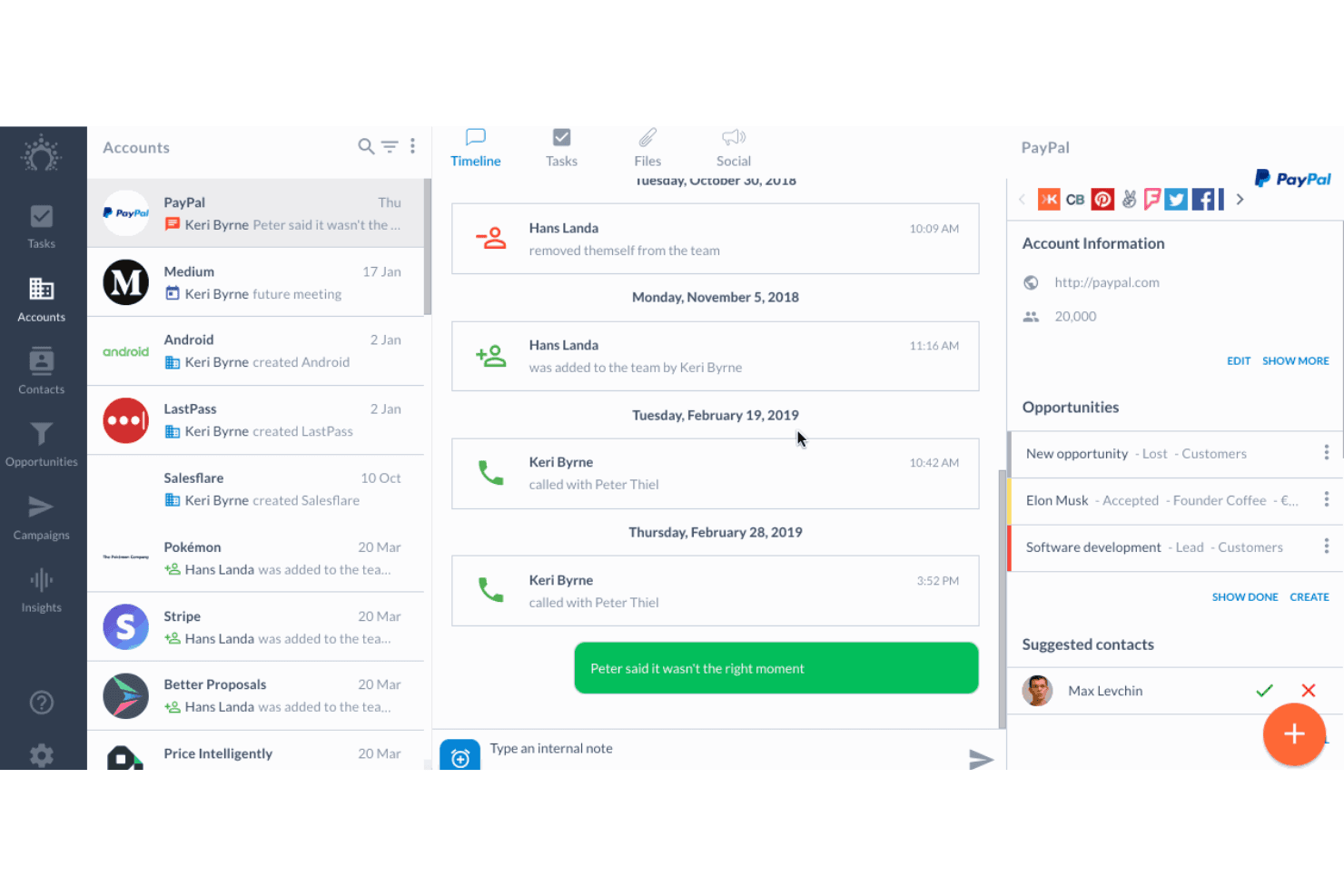
Salesflare tracks account timelines, calls, and opportunities in one view. Salesflare is a CRM for small B2B sales teams that brings customer records, conversations, and pipeline work together, helping reps cut manual admin and keep deal information organized.
Who Is Salesflare Best For?
Salesflare suits B2B sales reps who want lead activity and contact records tracked automatically instead of maintained through manual CRM updates.
Why I Picked Salesflare
I picked Salesflare as a Highrise alternative because it fits the “Best for automated lead tracking” brief. It pulls contact details from email, calendars, and LinkedIn, then logs interactions on contact records. I use email and link tracking to spot prospect engagement and decide who needs follow-up.
Salesflare Key Features
- Sales pipelines: Create multiple pipelines to organize deals by sales process.
- Tasks: Assign follow-ups and manage recurring tasks for deals.
- Custom fields: Add fields to capture information specific to your sales process.
- Insights dashboard: Build dashboards and reports to review sales data.
Salesflare Integrations
Salesflare lists native integrations with Gmail, Microsoft Outlook, Google Calendar, and Google Workspace. It also connects through Zapier and Make, and offers an API for custom integrations.
Pros and Cons
Pros:
- Visual pipelines clarify deal movement
- Tracks email engagement for timely follow-ups
- Automates contact and activity capture
Cons:
- Bulk editing options are narrow
- Advanced report customization remains limited
Learn more about Salesflare: Best for clientflow management for independents
- 30-day free trial
- From $29/month (billed annually)
Visit WebsiteCustomer Rating:4.6/5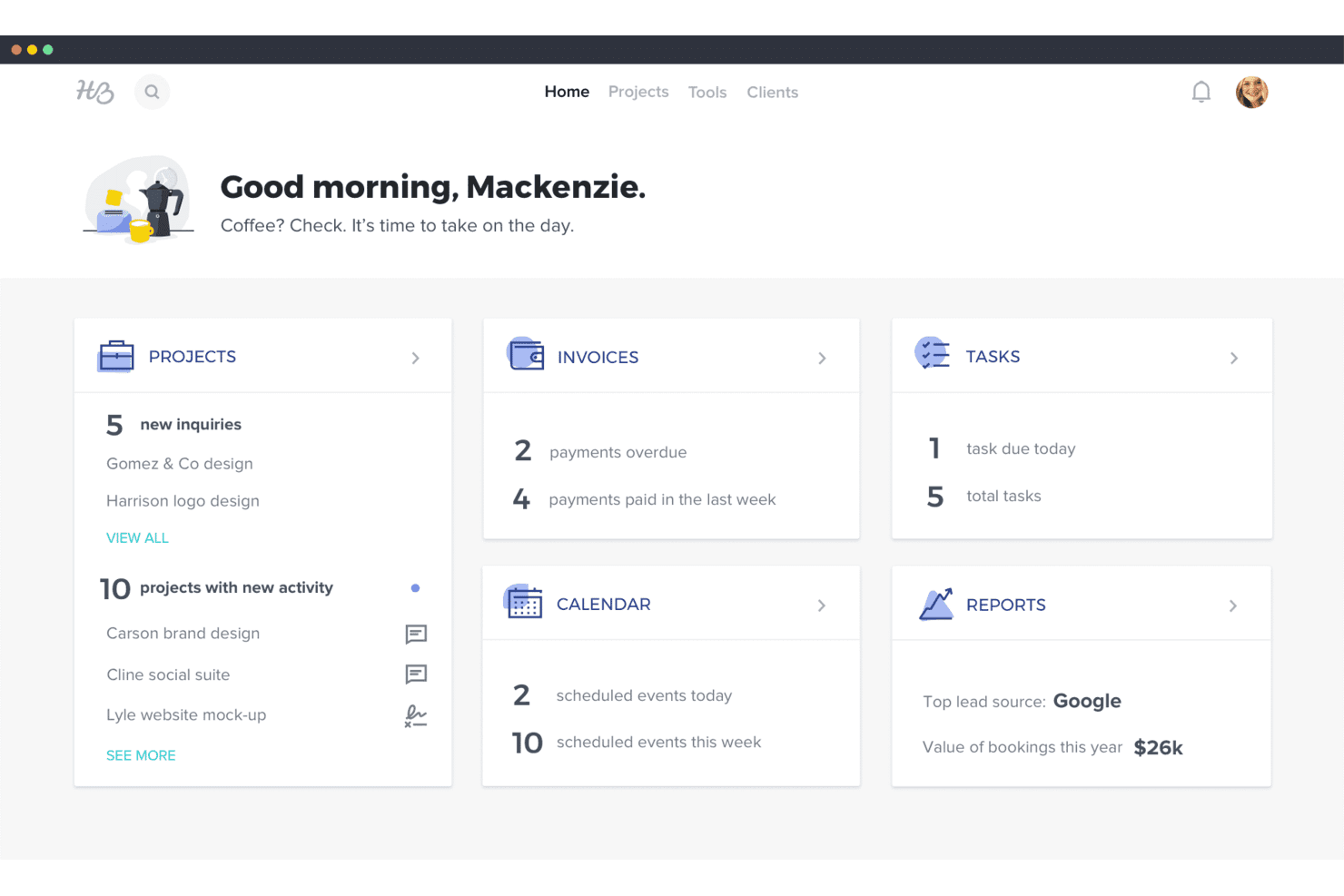
HoneyBook's dashboard gives users a snapshot of projects, invoices, tasks, and reports. HoneyBook is a CRM and business management platform for independent service providers, helping them organize client inquiries, proposals, contracts, and payments instead of juggling those tasks across separate tools.
Who Is HoneyBook Best For?
HoneyBook suits independent service professionals, such as photographers and event planners, who handle client bookings, contracts, and payments themselves.
Why I Picked HoneyBook
I picked HoneyBook as Best for clientflow management for independents because it connects client inquiries with proposals, contracts, and payments. I like that an independent consultant can move a new lead from inquiry to signed agreement and invoice in one client workflow, rather than tracking each step separately in a Highrise alternative.
HoneyBook Key Features
- Scheduler: Let clients book available meeting times from your calendar.
- Workflow automations: Trigger emails, follow-ups, and task reminders.
- Client portal: Give clients a dedicated space to view project details and messages.
- HoneyBook AI: Draft emails, summarize projects, and capture meeting notes.
HoneyBook Integrations
HoneyBook documents integrations with QuickBooks, Gmail, Calendly, Zoom, Google Calendar, Slack, Canva, and Meta Leads, and it also connects with Zapier.
Pros and Cons
Pros:
- Client portal centralizes project messages and files
- Templates automate proposals, contracts, and follow-ups
- Inquiry-to-payment workflows keep client work organized
Cons:
- Rigid templates restrict complex client processes
- Sales forecasting and pipeline reporting remain limited
Learn more about HoneyBook: Best for uniting marketing, sales, and support
- Free plan + free demo available
- Pricing upon request
Visit WebsiteCustomer Rating:4.6/5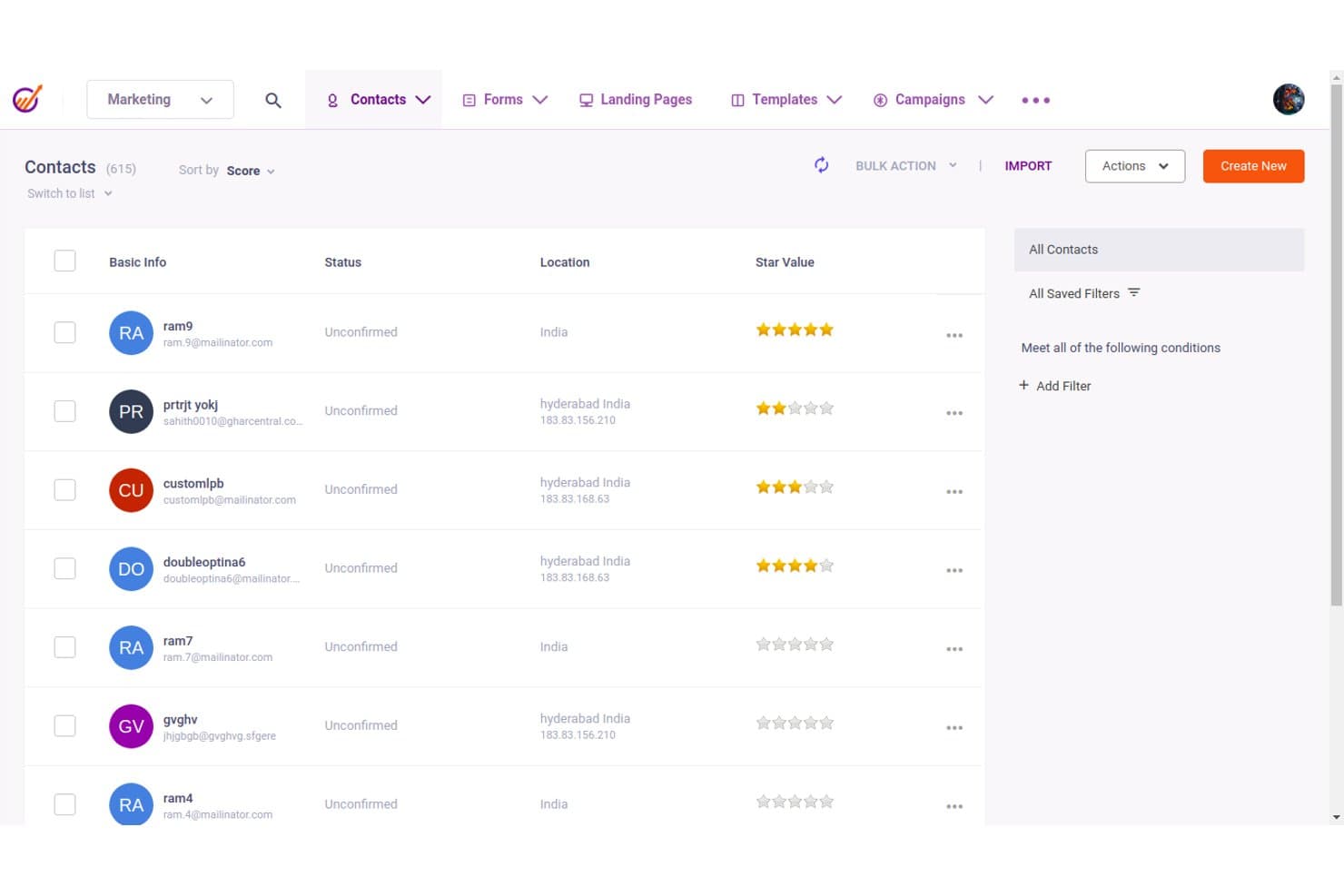
EngageBay lets users manage and filter contacts with scoring and location data. EngageBay is an all-in-one CRM for small and midsize businesses that need to manage contacts, sales pipelines, and marketing campaigns without scattering customer data across separate tools.
Who Is EngageBay Best For?
EngageBay suits small businesses that want one platform to coordinate lead generation, sales follow-up, and customer support.
Why I Picked EngageBay
I picked EngageBay as a Highrise alternative because it’s built for uniting marketing, sales, and support. I like that its sales CRM tracks contacts and deals alongside marketing automation and helpdesk ticketing, so a lead’s campaign activity and support requests can inform sales follow-up in the same platform.
EngageBay Key Features
- Lead scoring: Assign scores based on lead attributes and activity.
- Email tracking: See when prospects open and click tracked emails.
- Appointment scheduling: Let prospects book meetings through a scheduling link.
- Task management: Create and track individual tasks in a table view.
EngageBay Integrations
EngageBay lists integrations with Shopify, SendGrid, Mailgun, Mandrill, Xero, and Zapier. It also offers a REST API for custom integrations.
Pros and Cons
Pros:
- Responsive support helps resolve setup issues
- Email activity informs contact and deal follow-up
- Sales, marketing, and ticketing share one CRM
Cons:
- Campaign statistics can take time to update
- Basic reporting limits cross-team forecast analysis
Learn more about EngageBay: Best for seamless app integrations
- 14-day free trial
- From $29/user/month (billed annually)
Visit WebsiteCustomer Rating:4.2/5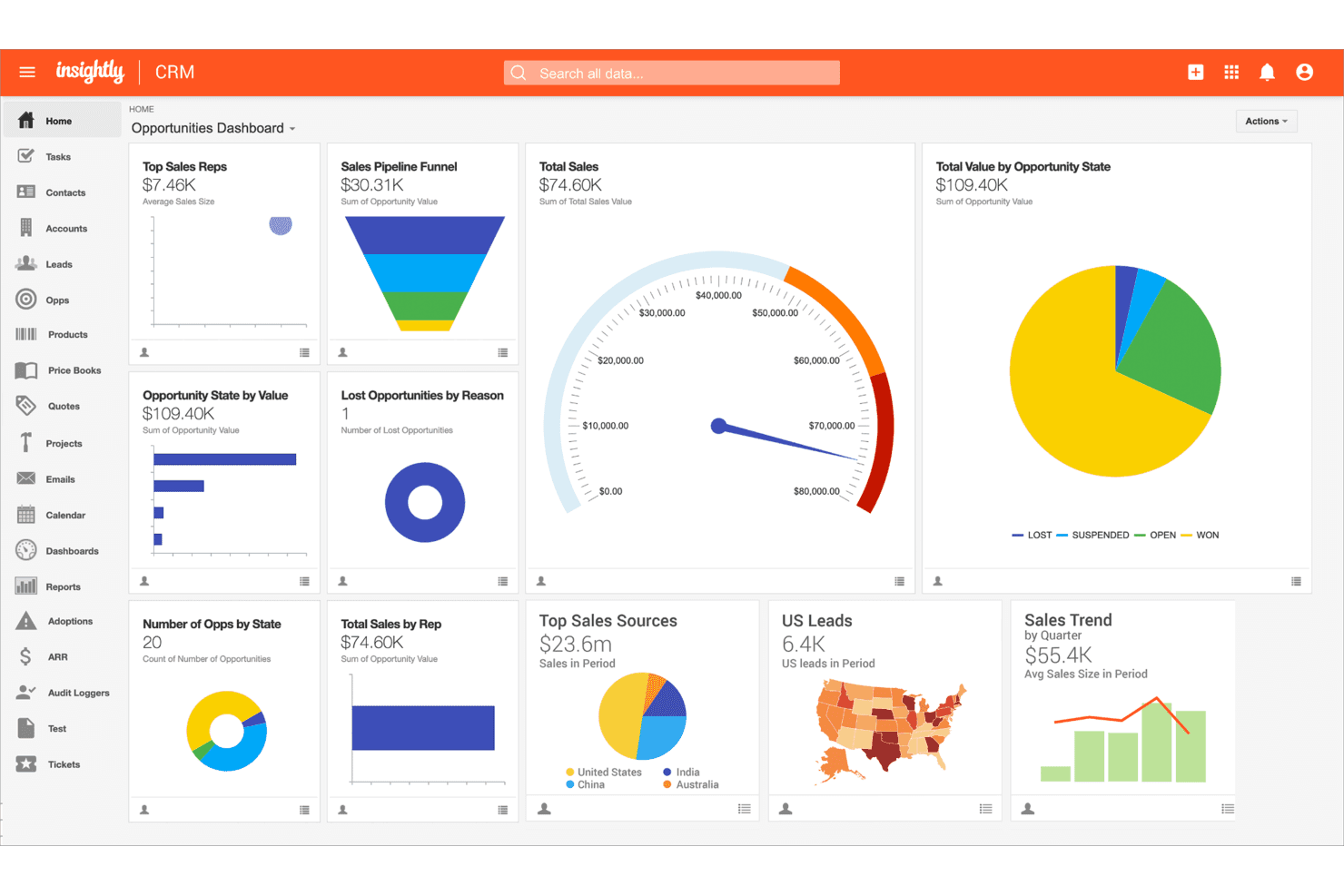
Insightly centralizes sales metrics in a customizable CRM dashboard. Insightly is a CRM for growing businesses that connects contact and opportunity management with project delivery, helping sales and operations teams carry customer context from the first deal through fulfillment.
Who Is Insightly Best For?
Insightly suits small and midsize revenue teams that want sales and delivery staff to work from the same customer records.
Why I Picked Insightly
I picked Insightly as a Highrise alternative because its “Best for seamless app integrations” focus is backed by AppConnect, which connects the CRM with hundreds of apps through no-code workflows. A rep can launch an integration from a CRM record to pass customer details to a finance or support app. I like that workflows use triggers and actions to carry information between systems.
Insightly Key Features
- Lead management: Capture lead details and convert qualified leads into opportunities.
- Sales pipelines: Track deals as they move through pipeline stages.
- Opportunity records: Manage deal details, including status and amount.
- CRM dashboards: View sales activity, performance metrics, and progress toward goals.
Insightly Integrations
Insightly AppConnect offers hundreds of prebuilt app connectors, including QuickBooks Online, Slack, Jira, Shopify, Xero, Gong, Asana, Calendly, and DocuSign, and Insightly connects with Zapier. It also offers a Web API for custom integrations.
Pros and Cons
Pros:
- Custom fields adapt records to team processes
- Multiple pipelines support distinct sales motions
- Linked project and opportunity records preserve context
Cons:
- Mobile screens crowd key customer details
- Reporting filters can return inconsistent results
 Best for inside sales lead management
- 14-day free trial
- From $25/user/month
Visit WebsiteCustomer Rating:4.1/5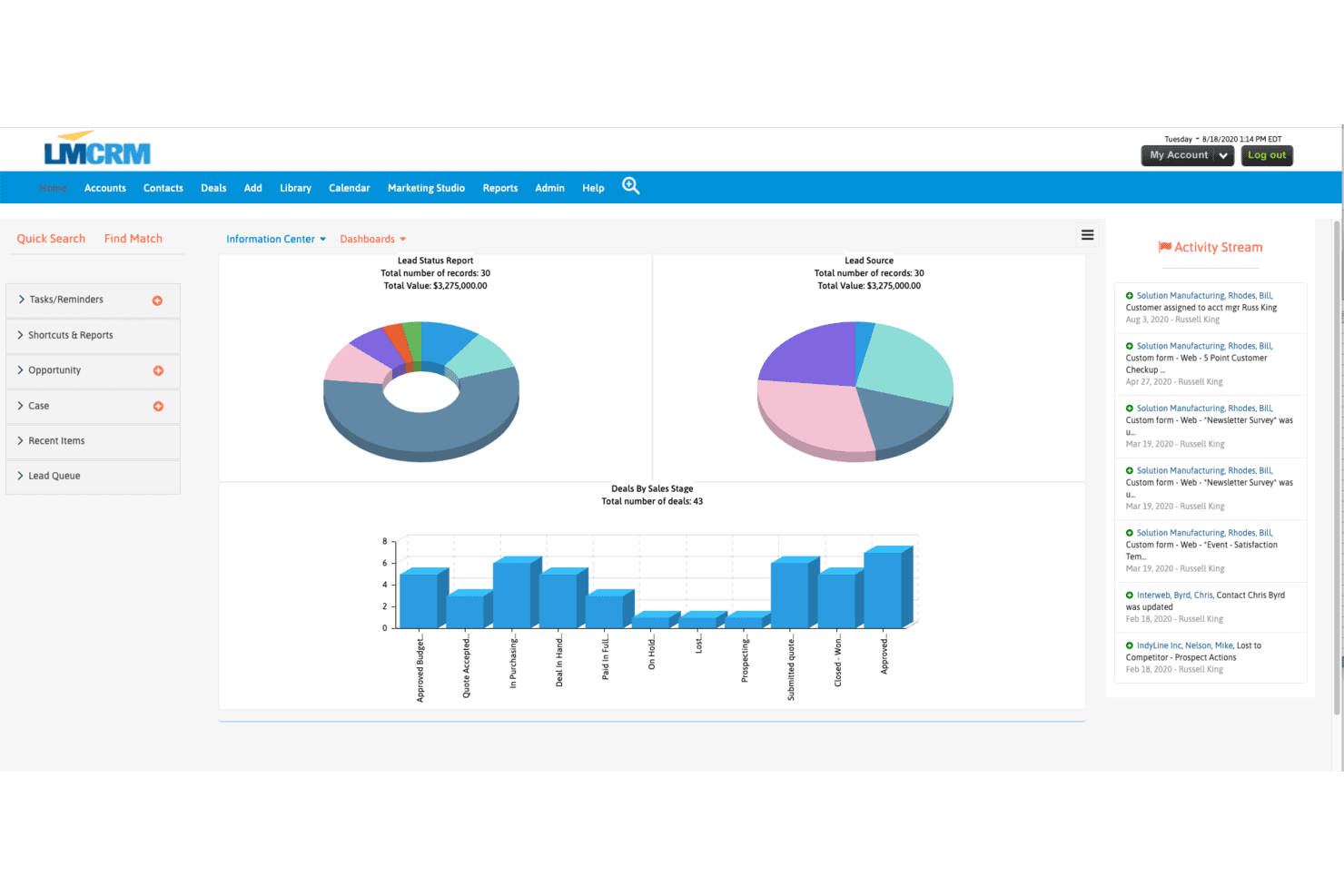
LeadMaster displays lead and deal analytics across visual dashboards. LeadMaster is a CRM platform for sales and marketing teams that organizes leads, tracks opportunities, and coordinates follow-up to improve pipeline visibility and reduce handoff gaps.
Who Is LeadMaster Best For?
LeadMaster suits sales and marketing teams that need to tailor lead management and follow-up workflows to their pipeline.
Why I Picked LeadMaster
I picked LeadMaster as one of the best Highrise alternatives because its customizable CRM solutions let me shape lead and follow-up workflows around our pipeline. I use lead organization and opportunity tracking to keep handoffs visible, then coordinate follow-up so prospects don’t slip between marketing and sales.
LeadMaster Key Features
- Email campaigns: Create campaigns with editable templates and staged email sequences.
- Email tracking: View email opens, clicks, and engagement reports.
- Email integration: Connect Outlook or Gmail to send, receive, and log emails in the CRM.
- Website visitor analytics: Track site visitors and add them as CRM leads without a form submission.
LeadMaster Integrations
LeadMaster documents integrations with Outlook, Gmail, WordPress, and QuickBooks, and lists Zapier as a beta integration. It also offers SOAP and REST APIs for custom integrations.
Pros and Cons
Pros:
- Layered lead records clarify team ownership
- Email-open tracking supports campaign follow-up
- Custom fields and workflows fit distinct pipelines
Cons:
- Setup choices can create duplicate data entry
- The interface can feel dated and sluggish
Learn more about LeadMaster:
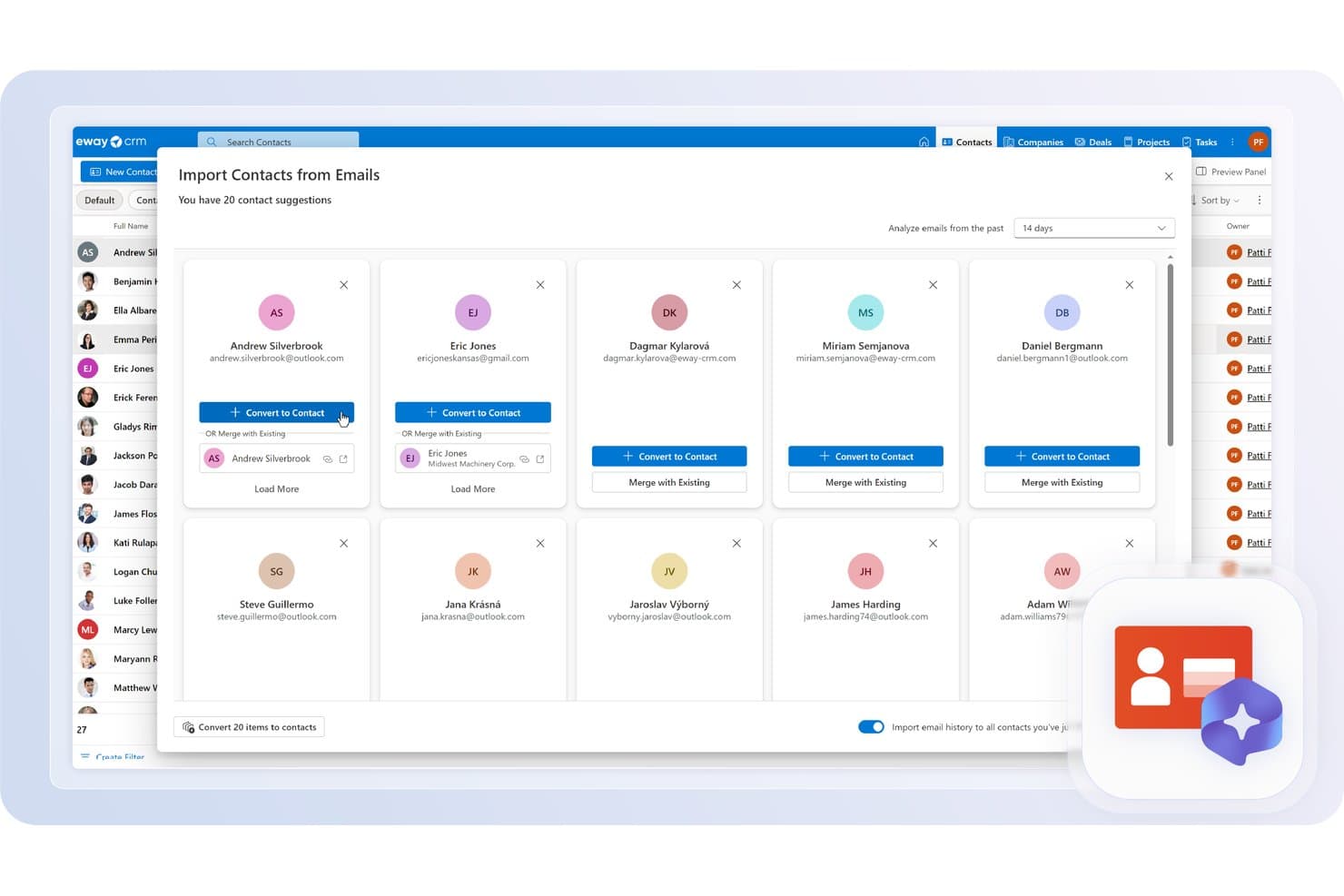
eWay-CRM automatically suggests contacts found in your emails to import. eWay-CRM is a CRM for small and midsize businesses that brings contact, sales, and project data together, helping teams replace scattered customer records with a shared view of accounts and deals.
Who Is eWay-CRM Best For?
eWay-CRM suits small and midsize businesses whose sales teams want to manage customer relationships from Outlook.
Why I Picked eWay-CRM
I picked eWay-CRM as a Best Highrise Alternatives choice because it’s Best for Outlook integration. Its Outlook add-in saves emails and links them to contacts, deals, or projects, keeping customer history attached to the right records. Calendar meetings also sync with eWay-CRM and connect to related contacts and deals.
eWay-CRM Key Features
- Deal management: Track sales opportunities and manage quotes, orders, and invoices.
- Task management: Create tasks, set reminders, and schedule recurring tasks.
- Workflow automation: Set rules and actions to automate CRM processes.
- Custom fields: Add fields to CRM records to capture business-specific data.
eWay-CRM Integrations
eWay-CRM is built into Outlook and integrates with Microsoft Teams, Power BI, SharePoint, QuickBooks, Mailchimp, Constant Contact, WordPress, Power Automate, and Zapier. It also offers an API for custom integrations.
Pros and Cons
Pros:
- Responsive support helps resolve setup issues
- Recurring tasks support consistent follow-up
- Quotes, orders, and invoices stay linked
Cons:
- Email campaign setup feels complicated
- Performance slowdowns can interrupt daily work
Learn more about eWay-CRM: Best for AI-powered sales automation
- 21-day free trial
- From $9/user/month (billed annually)
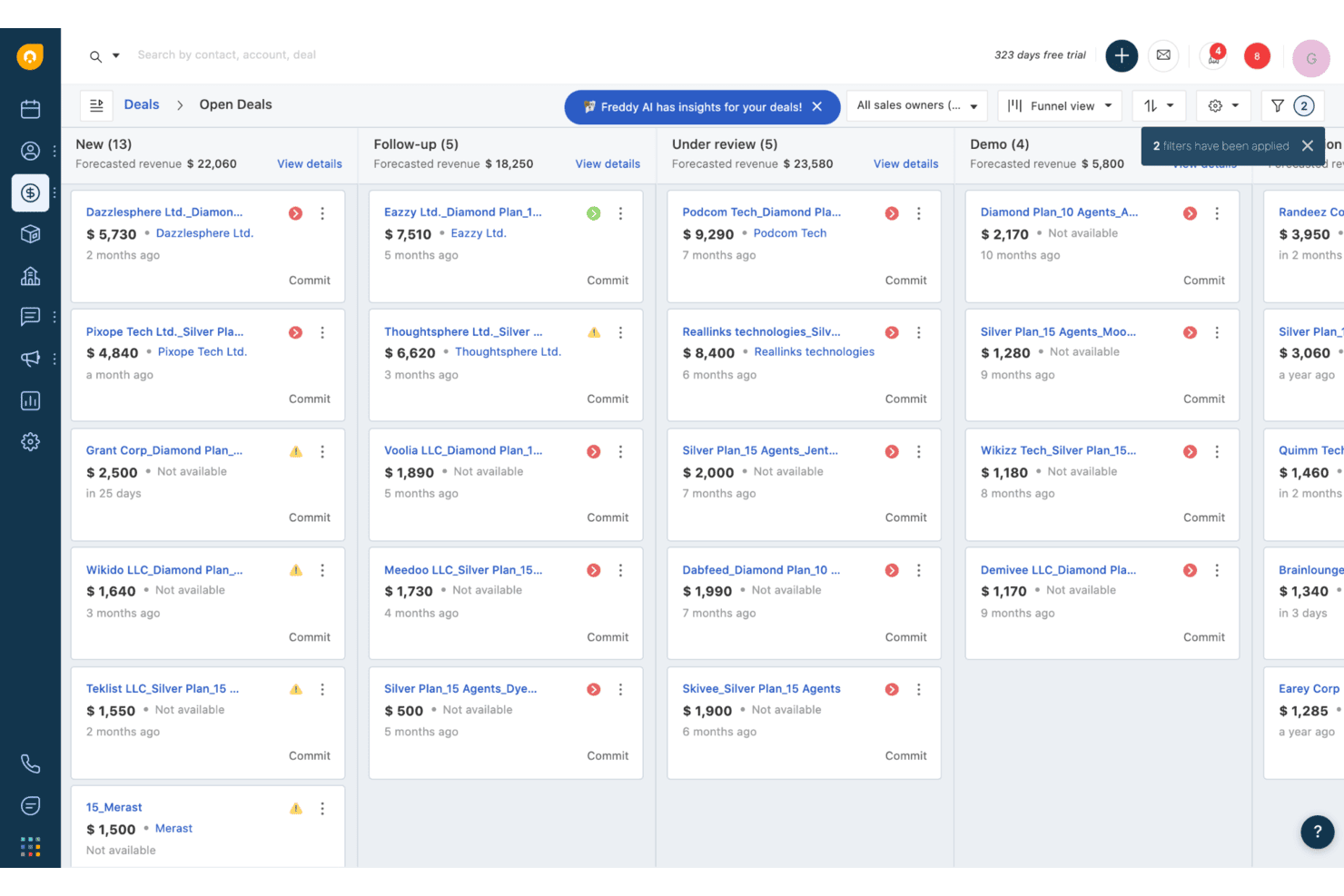
Freshsales organizes open deals by pipeline stage in a kanban view. Freshsales is a sales CRM for revenue teams that brings contact and deal information together, helping reps manage pipeline activity while giving sales leaders clearer visibility into follow-up and opportunities.
Who Is Freshsales Best For?
Freshsales suits sales teams looking to automate routine outreach, lead follow-up, and other sales workflows with AI.
Why I Picked Freshsales
I picked Freshsales as a Highrise alternative for Best for AI-powered sales automation. Freddy AI scores contacts and surfaces deal insights, helping reps prioritize promising leads and spot stalled opportunities. Sales sequences can automate personalized emails, calls, and SMS follow-ups, so reps can keep prospects moving without manually scheduling every touch.
Freshsales Key Features
- Custom lifecycle stages: Create contact stages that match your sales process.
- Task management: Create tasks, reminders, and appointments from the CRM.
- Multiple sales pipelines: Set up separate pipelines with their own deal stages.
- Product catalog: Add products to deals and calculate deal values.
Freshsales Integrations
Freshsales Marketplace integrations include Freshdesk, Mailchimp, Slack, HubSpot, Calendly, and PandaDoc; Zapier is also supported. Freshsales provides a REST API for custom integrations.
Pros and Cons
Pros:
- Shared customer history supports team handoffs
- Automated follow-ups reduce manual chasing
- AI lead scores help prioritize prospects
Cons:
- Support response times draw complaints
- Custom reporting options are limited
Learn more about Freshsales:
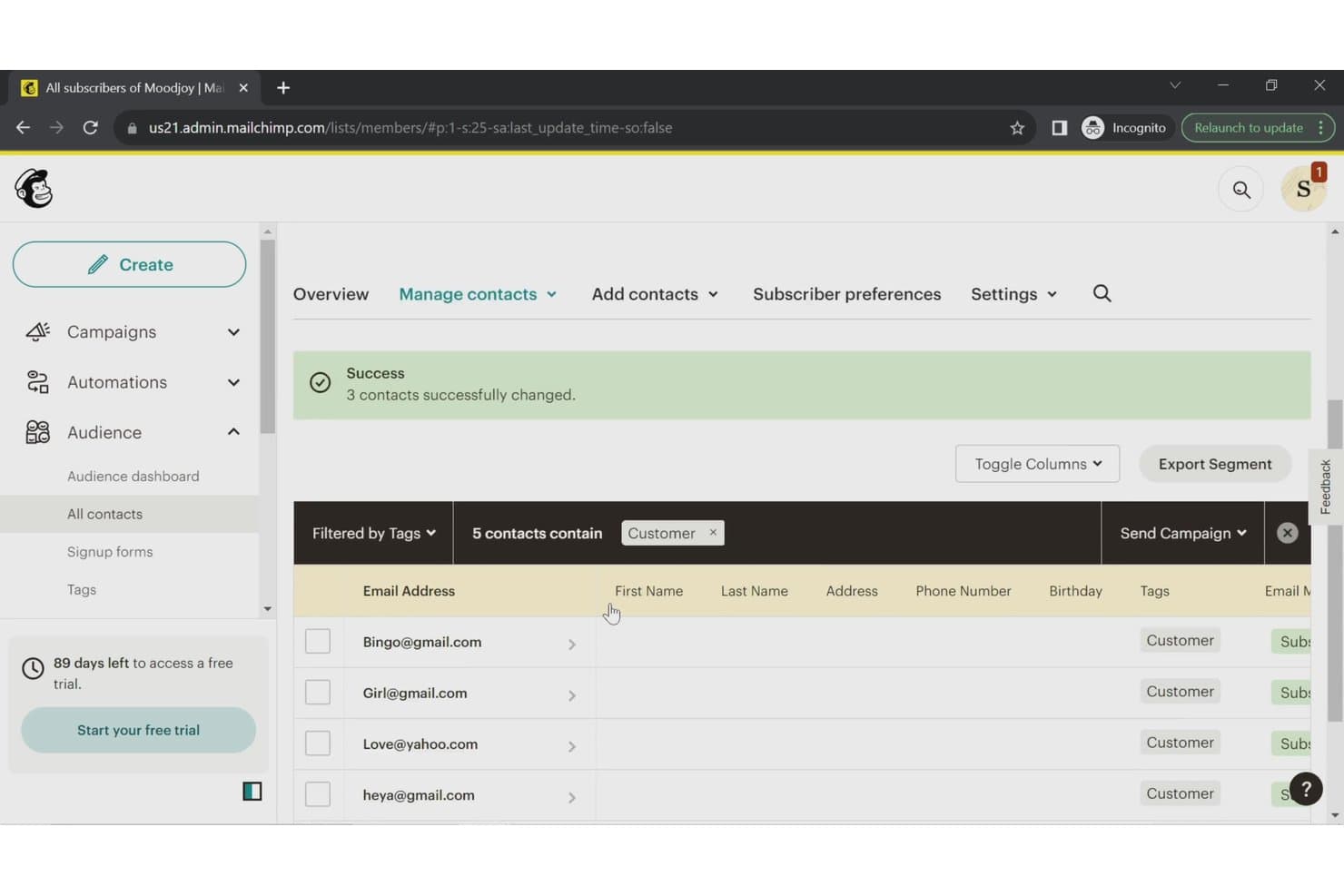
Mailchimp CRM lets users filter and manage contacts by tags. Mailchimp CRM helps small businesses and marketing teams organize customer contacts, track interactions, and coordinate outreach alongside their marketing activities.
Who Is Mailchimp CRM Best For?
Mailchimp CRM suits small businesses and marketing teams that want to automate email campaigns and manage customer outreach in one platform.
Why I Picked Mailchimp CRM
I picked Mailchimp CRM as a Highrise alternative because it earns the label “Best for marketing automation.” Its Customer Journey Builder can trigger email follow-ups when contacts sign up or meet specified conditions. I use tags and audience segments to group leads by source or engagement before tailoring those journeys.
Mailchimp CRM Key Features
- Contact profiles: View individual purchase history, campaign engagement, and subscription status.
- Contact ratings: See a one-to-five-star rating based on each contact’s email engagement.
- Mobile contact capture: Add and organize contacts in the mobile app wherever you meet them.
- Audience reports: Track audience growth, engagement, and revenue.
Mailchimp CRM Integrations
Mailchimp supports integrations with Salesforce, Google Analytics, Shopify, WooCommerce, Wix, and Canva, and connects with Zapier. It also offers an API for custom integrations.
Pros and Cons
Pros:
- Engagement reports clarify campaign performance
- Audience segments support targeted contact outreach
- Automated journeys trigger timely email follow-ups
Cons:
- No dedicated sales pipeline or deal tracking
- Automation workflows can be clunky to debug
Learn more about Mailchimp CRM:
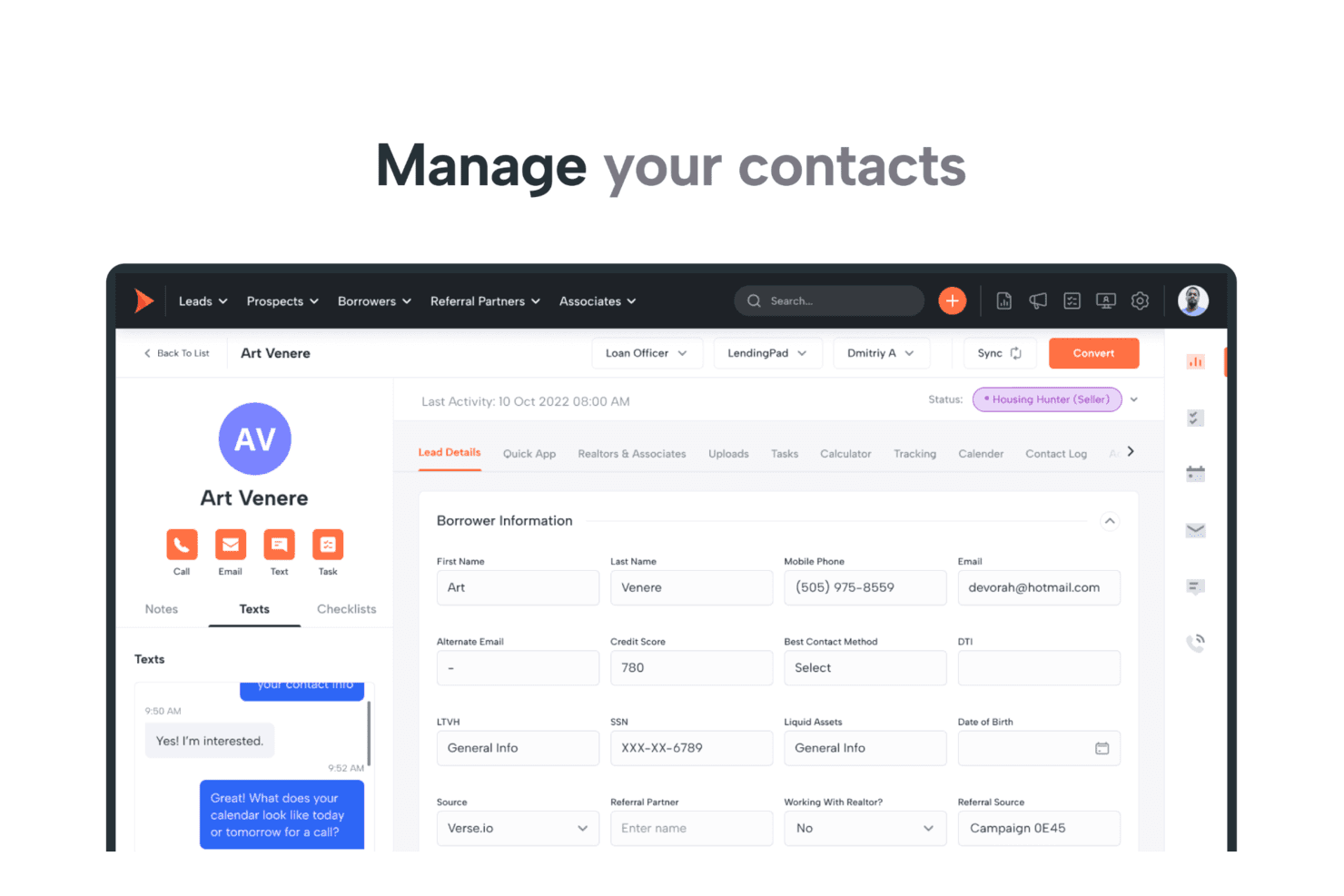
Shape centralizes borrower contact details and SMS conversations in one view. Shape is an all-in-one CRM for mortgage, insurance, solar, and education teams that brings lead management, customer communication, marketing, and workflows together to reduce tool sprawl and keep prospects moving.
Who Is Shape Best For?
Shape suits sales and operations teams in mortgage, insurance, solar, and education businesses that need CRM workflows tailored to their industry.
Why I Picked Shape
I picked Shape as a Highrise alternative for the “Best for industry-specific solutions” use case, particularly in mortgage, insurance, solar, and education. I like that teams can configure lead routing and pipelines for their sales process, then use customer portals to collect applications, documents, and e-signatures. A mortgage team can track a borrower from inquiry through paperwork in one CRM.
Shape Key Features
- CRM dialer: Place, record, and log calls from contact records.
- Email and SMS automation: Send trigger-based messages and drip campaigns.
- Custom reports: Build reports and dashboards for pipeline and revenue forecasting.
- Mobile app: Access contacts, tasks, calls, texts, and notifications on the go.
Shape Integrations
Shape documents integrations with Google Workspace/Gmail, Outlook, Mailchimp, QuickBooks Online, LendingTree, and Zapier. It also offers a documented open REST API, inbound and outbound webhooks, and direct lead-posting URLs.
Pros and Cons
Pros:
- Borrower portals gather documents and e-signatures
- Automated email and text follow-ups nurture leads
- Mortgage workflows track leads through closing
Cons:
- Custom field limits constrain CRM tailoring
- Reported bugs can disrupt daily workflows
Learn more about Shape:
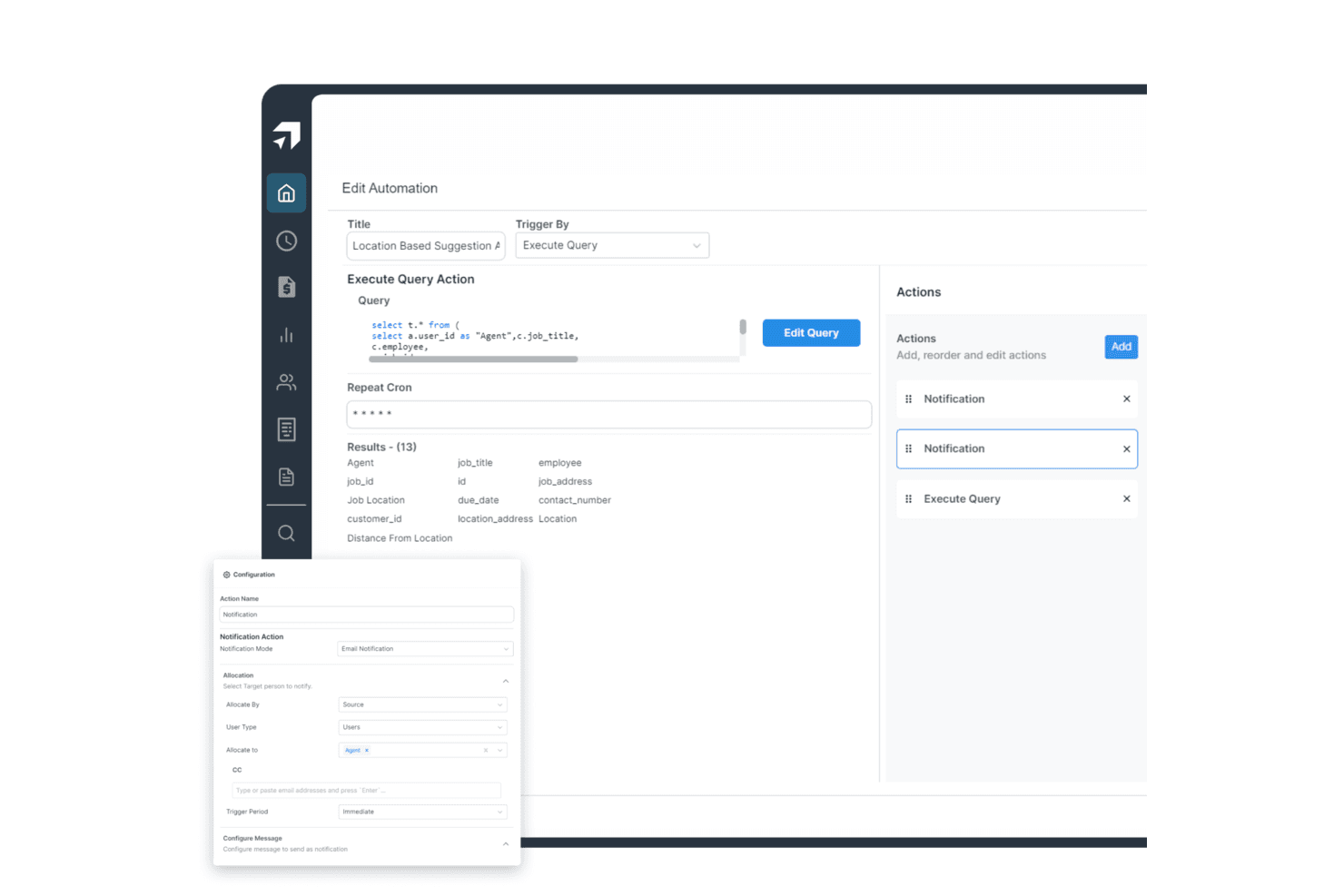
Salesproxy automates location-based job notifications to agents via email. Salesproxy is a CRM and sales management platform for businesses with field-based teams, helping reps organize leads, track customer interactions, and give managers clearer visibility into sales activity.
Who Is Salesproxy Best For?
Salesproxy fits businesses with mobile sales teams, especially managers coordinating reps who meet customers in person across a territory.
Why I Picked Salesproxy
I picked Salesproxy as a Highrise alternative and rate it Best for field team management. Dispatch can assign jobs by skills, territory, and SLA, while the mobile app supports offline updates from the field. Customer, site, and job records connect the initial call to invoicing.
Salesproxy Key Features
- Communications inbox: Brings calls, texts, and web chat together, matched to customer and job records.
- Quotes and estimates: Create quotes and estimates for customers.
- Customer portal: Give customers a portal to access information and links.
- Reports and dashboards: Build reports and dashboards from business data.
Salesproxy Integrations
Salesproxy documents a native, bidirectional HubSpot integration that syncs CRM records with field operations. It also offers a REST API with webhooks for custom integrations.
Pros and Cons
Pros:
- Tracks field attendance and team activity
- Mobile app reduces sales visit paperwork
- Real-time location tracking for field reps
Cons:
- Some reps cannot check in onsite
- Attendance dashboards can show inaccurate results
Learn more about Salesproxy:
Diğer Highrise Alternatifleri
Aşağıda kısa listeme aldığım ek Highrise alternatiflerinin bir listesi yer almaktadır. İlk 10’a girmemiş olsalar da hâlâ değerlidir ve daha fazla araştırmaya değerdir.
- 11CopperBest for Google Workspace integration
- 12ScoroBest for comprehensive work management
- 13KantataBest for professional services automation
- 14monday AI WorkspaceBest for project management integration
- 15MRPeasyBest for manufacturing resource planning
- 16Zoho CRMBest for customizable CRM solutions
- 17ConnecteamBest for managing remote teams
- 18PipedriveBest for visual sales pipeline management
- 19OdooBest for comprehensive business applications
- 20NutshellBest for small business sales automation
- 21ClickUpBest for task and project tracking
- 22OntraccrBest for construction project management
İlgili CRM İncelemeleri
Aradığınızı burada hâlâ bulamadıysanız, test edip değerlendirdiğimiz ve hepsi bir arada CRM’lerle yakından ilişkili olan şu araçlara göz atın.
- CRM Yazılımları
- Satış Yazılımları
- Potansiyel Müşteri Yönetimi Yazılımları
- İş Zekâsı Yazılımları
- Sözleşme Yönetimi Yazılımları
- Gelir Yönetimi Sistemi
How I Evaluate Highrise Alternatives
I split my evaluation into two layers: the core CRM table stakes a tool must nail—pipeline tracking, contact management, email sync—and the differentiators that separate a good fit from a great one.
Core Functionality (Table Stakes For This List)
When I'm selecting tools for my list, I rank each one on a scale from 0 (does not offer the functionality) to 5 (excels in this area) for each core functionality listed below. Then, I calculate the tool's total score into a percentage. Each tool needs to achieve a minimum total score of 75% to be considered for inclusion.
- Contact & Company Management: I check whether the CRM lets you link contacts to companies, log notes against records, and maintain a full interaction timeline per account.
- Pipeline & Deal Tracking: Visual deal boards with customizable stages matter here—I look at how each tool handles multiple pipelines, deal values, and stage progression.
- Task & Activity Management: Every CRM should tie tasks, calls, and meetings directly to contact and deal records so nothing falls through the cracks during handoffs.
- Email Integration & Tracking: I evaluate two-way sync with Gmail and Outlook, automatic email logging, and whether the tool tracks opens and clicks on sent messages.
- Reporting & Sales Analytics: Dashboards covering pipeline health, rep activity, and forecast accuracy are what I look for—prebuilt reports plus custom report builders are ideal.
- Workflow Automation & Integrations: I look at native integrations with tools like Mailchimp, Slack, and billing platforms, plus whether the CRM offers a workflow builder and open API.
Once I have a list of tools that meet this criteria, I consider what sets each platform apart.
Differentiating Factors (What Sets Vendors Apart)
Here's how I compare and contrast different vendors:
Standout Features
Sales sequences are a big differentiator—I look for multi-step cadences that combine emails, calls, and tasks into repeatable playbooks reps can actually follow. Revenue forecasting tools also matter, especially weighted pipeline models and quota tracking that give RevOps teams real visibility into what's likely to close. I also evaluate whether a CRM supports custom objects, since teams tracking renewals or partner deals need data models that go beyond standard contacts and companies.
Beyond Features
Migration path matters when you're leaving Highrise. I check whether a CRM offers native import tools that preserve contact history, notes, and custom fields—losing years of relationship data during a switch can set a team back months. Pricing transparency is another factor I evaluate closely, since many CRMs gate automation or reporting behind higher tiers. I also consider the integration ecosystem, looking at whether the platform connects to the marketing, billing, and support tools your RevOps stack already depends on.
Neden bir Highrise alternatifi aramalısınız?
Artık Highrise hesabı oluşturamayan işletmeler, alternatif bir çözüm araması gerekebilecek tek kullanıcı grubu değildir. Mevcut bir Highrise müşterisiyseniz aşağıdaki nedenlerle bir alternatif arayabilirsiniz:
- Maliyet: Highrise bütçeniz için fazla pahalı olabilir ve bu da daha uygun fiyatlı bir alternatif aramanıza yol açabilir. Uygun maliyetli bir çözüm bulmak, işlevsellikten ödün vermeden giderleri yönetmenize yardımcı olabilir.
- Özellikler: Highrise, iş operasyonlarınız için kritik olan belirli özelliklerden yoksun olabilir. Gerekli yeteneklere sahip bir alternatife yönelmek, benzersiz ihtiyaçlarınızı daha iyi karşılayabilir ve genel verimliliği artırabilir.
- Ölçeklenebilirlik: Highrise, büyüyen işletmenizle birlikte yeterince iyi ölçeklenemeyebilir ve genişleme potansiyelinizi sınırlayabilir. Daha ölçeklenebilir bir çözüm seçmek, yazılımınızın işletmenizle sorunsuz bir şekilde büyümesini sağlar.
- Kullanıcı Arayüzü: Highrise'ın arayüzü kullanıcı dostu olmayabilir ve bu da hayal kırıklığına ve verimsizliğe neden olabilir. Daha sezgisel bir tasarıma sahip bir alternatif seçmek, kullanıcı deneyimini ve üretkenliği geliştirebilir.
- Entegrasyon: Highrise, kullandığınız diğer araçlarla iyi bir şekilde entegre olmayabilir ve iş akışında aksamalara yol açabilir. Daha iyi entegrasyon özelliklerine sahip bir yazılım seçmek, operasyonları kolaylaştırabilir ve genel işlevselliği geliştirebilir.
Şirketler büyüyüp geliştikçe, kendi özel ihtiyaçları ve sektör gereksinimleriyle uyumlu bir CRM çözümü bulmak hayati önem kazanır. İhtiyaçlara uygun bir alternatif, verimliliği artırabilir, operasyonları kolaylaştırabilir ve uzun vadeli iş başarısını destekleyebilir.
Highrise Alternatiflerinin Temel Özellikleri
İyi bir uyum sağlamak için alternatif yazılımınızın Highrise'ın aşağıdaki temel özelliklerini kopyalayabilmesi veya geliştirebilmesi gerekir.
- Kişi Yönetimi: Bu özellik, düzenli ve kolayca erişilebilir müşteri bilgilerini korumak, verimli iletişim ve ilişki yönetimi sağlamak için önemlidir.
- Görev Yönetimi: Etkili görev yönetimi, ekiplerin sorumluluklarını takip etmelerine yardımcı olarak üretkenliği ve hesap verebilirliği artırır.
- Anlaşma Takibi: Bu özellik, satış çalışmalarının plan doğrultusunda ilerlemesini sağlamak, daha iyi tahminler yapabilmek ve strateji ayarlamaları gerçekleştirmek için hayati önem taşır.
- E-posta Entegrasyonu: Sorunsuz e-posta entegrasyonu iletişimi kolaylaştırır, platformlar arasında geçiş yapma ihtiyacını azaltır ve müşterilerle tutarlı etkileşimlerin sürdürülmesine yardımcı olur.
- Notlar ve Yorumlar: Etkileşimlerin ayrıntılı şekilde belgelenmesi, tüm ekip üyelerinin önemli bilgilere erişmesini sağlayarak iş birliğini ve müşteri hizmetlerini geliştirir.
- Özel Alanlar: Özel alanlar, benzersiz veri noktalarının kaydedilmesine olanak tanıyarak CRM'nin işletmenizin özel ihtiyaçlarına uyum sağlayabilmesini sağlar.
- Etiketler ve Filtreler: Etiketler ve filtreler aracılığıyla etkili bir düzenleme yapılması, kullanıcıların belirli bilgileri hızla bulmasına yardımcı olarak operasyonel verimliliği artırır.
- Raporlama ve Analiz: Ayrıntılı raporlama ve analiz, satış performansı hakkında değerli bilgiler sağlayarak eğilimlerin ve iyileştirme alanlarının belirlenmesine yardımcı olur.
- Grup Gelen Kutusu: Paylaşılan bir gelen kutusu, potansiyel müşterilerin zamanında ele alınmasını ve yönetilmesini sağlayarak yanıt sürelerini ve müşteri hizmetlerini iyileştirir.
- Yinelenen Hatırlatıcılar: Yinelenen hatırlatıcılar, potansiyel müşterileri geliştirmek ve müşteri ilişkilerini sürdürmek için gerekli olan düzenli ve zamanında takiplerin yapılmasını sağlar.
Highrise alternatifi ararken sezgisel kişi yönetimi, güçlü iletişim araçları ve sorunsuz entegrasyon özellikleri gibi temel unsurları göz önünde bulundurmak önemlidir. İşletmeler bu temel özelliklere odaklanarak üretkenliği artıran ve müşteri ilişkileri yönetimi ihtiyaçlarını etkili bir şekilde destekleyen bir çözüm bulabilir.