

Salesforce vs. HubSpot: Comparison and Expert Reviews for 2026

We review tools independently, and commissions help fund our testing. See our transparency policy, our methodology, or suggest a tool.
Salesforce gives you deep customization and enterprise-grade control, while HubSpot offers intuitive CRM software that’s easy to adopt and connects marketing, sales, and service in one place. If you’re weighing these two platforms, you’re likely balancing the need for advanced features and integrations against the desire for simplicity and fast team adoption.
Choosing the right CRM software shapes your data, processes, and how your teams work together—so it’s not a decision to take lightly. This article breaks down how Salesforce and HubSpot compare on features, pricing, and real-world usability, so you can confidently pick the best fit for your revenue engine.
Salesforce
4.4/5
- 30-day free trial
- From $25/user/month
HubSpot CRM


4.4/5
- Free plan available
- From $7/user/month
Why Trust Our Software Recommendations
6,700+
Reviews
20
Industry experts
16+
Evaluation factors
14
Years
Our reviews reflect our independent judgment—not a sales pitch. Learn how we stay transparent.
For this guide, we evaluated tools using hands-on testing and independent research, scoring tools using our selection criteria.
Our reviews reflect our human editorial judgment, not a sales pitch.
| Salesforce | HubSpot CRM | |
|---|---|---|
| Free Trial | 30-day free trial | Free plan available |
| Pricing | From $25/user/month | From $7/user/month |
Salesforce vs. HubSpot Pricing & Hidden Costs
Salesforce uses a tiered pricing model based on user licenses and feature sets, with costs increasing as you add advanced modules or customizations. Many teams find that integrations, add-ons, and required support packages can drive up the total investment. HubSpot offers a freemium model with core CRM platform features at no cost, but charges for advanced marketing, sales, and service tools. As your needs grow, bundled upgrades and usage-based limits can introduce extra costs.
To choose the right pricing model, map out your specific needs, expected user count, and growth plans for the next 12–24 months. Look beyond headline prices—factor in onboarding, integration, and support needs, as well as any limits on contacts, workflows, or reporting. Ask each vendor for a detailed quote based on your real use case, and review contract terms for flexibility as your business evolves.
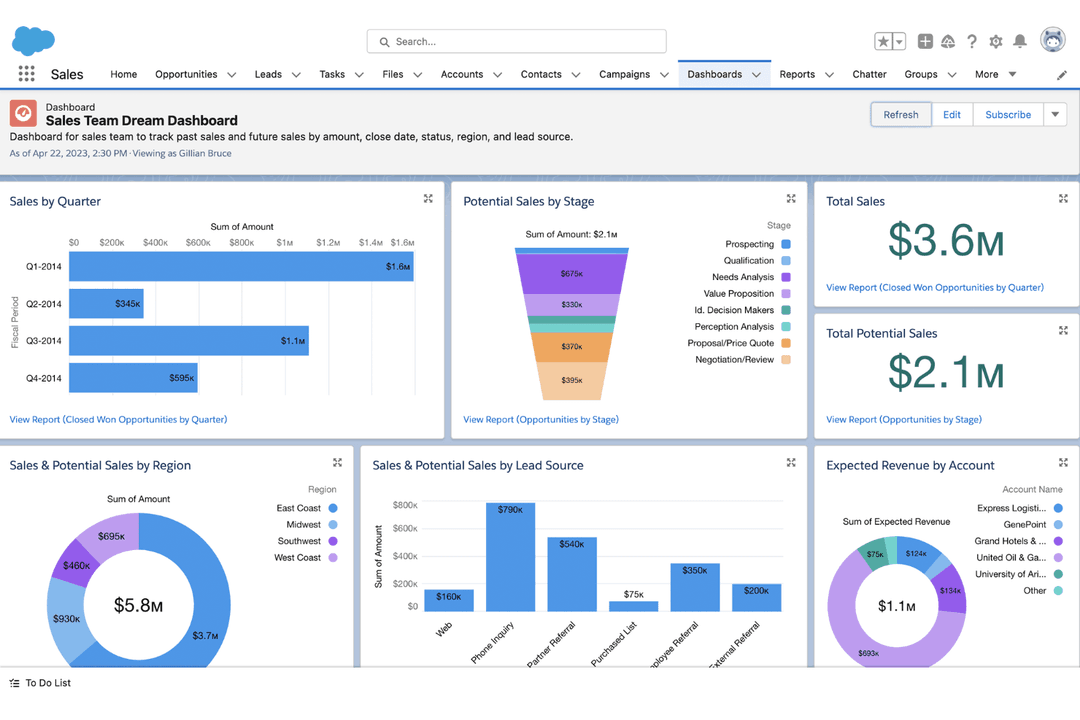
Salesforce’s customizable dashboards and advanced automation tools help users manage complex sales processes and tailor workflows to fit unique business needs. HubSpot’s unified contact management and built-in email marketing tracking functionality make it easy for users to organize lead scoring and keep daily outreach on track without extra setup.
| Salesforce | HubSpot CRM | |
|---|---|---|
| API | Yes | Yes |
| Contact Management | Yes | Yes |
| Contact Sharing | Yes | Yes |
| Customer Management | Yes | Yes |
| Data Export | Yes | Yes |
| Data Import | Yes | Yes |
| Email Integration | Yes | Yes |
| External Integrations | Yes | Yes |
| Google Apps Integration | Yes | Yes |
| Lead Management | Yes | Yes |
| Lead Scoring | Yes | Yes |
| Marketing Automation | Yes | Yes |
| Multi-User | Yes | Yes |
| Notifications | Yes | Yes |
| Integration | Salesforce | HubSpot |
| Slack | ✅ | ✅ |
| Microsoft Teams | ✅ | ✅ |
| QuickBooks | ✅ | ✅ |
| Mailchimp | ✅ | ✅ |
| Shopify | ✅ | ✅ |
| DocuSign | ✅ | ✅ |
| Tableau | ✅ | ❌ |
| ZoomInfo | ✅ | ✅ |
| Eventbrite | ✅ | ✅ |
| Facebook Ads | ✅ | ✅ |
| API | ✅ | ✅ |
| Zapier | ✅ | ✅ |
Both Salesforce and HubSpot offer integrations with many of the same popular tools, including communication platforms, marketing automation software, and e-commerce solutions. These ecosystems make it easy for users on either platform to connect their CRM with the broader tools they already rely on, supporting streamlined workflows across your sales team, marketing department, and operations. Both platforms also have an API and can connect to tools via Zapier, making custom integrations easier.
| Factor | Salesforce | HubSpot |
| Data Encryption | Encrypts data at rest and in transit using advanced encryption standards. | Uses TLS encryption for data in transit and AES-256 for data at rest. |
| Regulatory Compliance | Offers built-in support for GDPR, HIPAA, and SOC 2 compliance. | Provides GDPR tools and is certified for SOC 2 and ISO 27001. |
| Access Controls | Customizable user roles, profiles, and field-level security. | Role-based permissions and team management for user access. |
| Uptime Guarantee | 99.9% uptime SLA with real-time status monitoring. | 99.99% uptime SLA and public status updates. |
Both Salesforce and HubSpot offer strong security foundations, including encryption, role-based access, and support for standards like GDPR and SOC 2. However, Salesforce offers more granular compliance controls and advanced encryption, while HubSpot focuses on straightforward privacy tools and high reliability. Salesforce stands out for its enterprise-grade security features, while HubSpot’s strength is its transparent reliability and easy-to-use compliance settings.
| Factor | Salesforce | HubSpot |
| User Interface | Highly customizable but can feel complex and overwhelming for new users. | Clean, intuitive layout with simple navigation and clear labeling. |
| Onboarding | Requires guided setup and often professional training to get started. | Offers interactive tutorials and quick-start guides for fast adoption. |
| Customization | Deep customization options for workflow automation, fields, and dashboards. | Easy drag-and-drop customization for pipelines and properties. |
| Customer Support | Multiple support channels (phone, email, chat) plus extensive self-service resources; advanced support tiers are available but often require additional cost. | Knowledge base and community for all users, with fast, responsive chat, email, and phone support available on higher-tier plans. |
HubSpot is easier for most teams to pick up and use right away, while Salesforce’s flexibility comes with a steeper learning curve. HubSpot’s onboarding and interface are straightforward and user-friendly, and Salesforce’s strength is in its depth of customization for teams willing to invest the time.
Salesforce
- You can customize Salesforce Sales to fit your business needs perfectly.
- It offers robust reporting tools that give your team valuable insights.
- The automation features save your team time on repetitive tasks.
- Your team might find the interface complex to navigate initially.
- It can be overwhelming with the numerous features available.
- The frequent updates can disrupt your team's workflow.
HubSpot CRM
- Fast onboarding with helpful templates and guides.
- AI features for reporting, forecasting, and content generation.
- Built-in marketing automation and sales tools in one platform.
- Pricing increases quickly as you add premium features.
- Workflow automation can be restrictive for complex processes.
- Advanced reporting features require higher-tier plans.
Salesforce
- Financial ServicesSalesforce Sales provides tools to manage customer portfolios and track interactions, helping your team offer personalized financial advice.
- Healthcare ProvidersWith robust data management, Salesforce Sales helps your team maintain patient records and streamline appointment scheduling.
- Retail ChainsSalesforce’s automation tools enhance inventory management and customer service, ensuring your team meets customer demands efficiently.
- Large EnterprisesIts customization options allow your team to align Salesforce Sales with complex business processes and scale operations seamlessly.
- Sales TeamsSalesforce’s powerful CRM capabilities help your team manage leads and close deals more effectively.
- Marketing DepartmentsWith advanced analytics, Salesforce Sales enables your team to track campaign performance and optimize marketing strategies.
HubSpot CRM
- SaaS StartupsHubSpot’s automation and lead tracking help SaaS teams scale quickly.
- Marketing AgenciesThe platform’s campaign management and client reporting tools are built-in.
- B2B Sales TeamsPipeline management and deal tracking are easy to set up and use.
- Small BusinessesTemplates and guided onboarding reduce the need for technical resources.
- Customer Success TeamsShared inboxes and ticketing streamline support and follow-up.
- NonprofitsFree and low-cost plans offer core CRM features for limited budgets.
Who Should Use Salesforce, and Who Should Use HubSpot?
Salesforce is best for large or fast-growing organizations that need deep customization, complex workflows, and advanced reporting—especially in industries like finance, healthcare, or tech with strict compliance needs. HubSpot is a better fit for small businesses and midsize teams, startups, marketing teams, or companies that want an all-in-one CRM that’s easy to set up, simple to use, and tightly integrated with marketing automation. If your team values flexibility, scalability, and has resources for setup and training, Salesforce is the clear choice. If you want to get up and running quickly with a user-friendly platform, HubSpot is the way to go.
| Salesforce | HubSpot CRM | |
|---|---|---|
| Automation Features | Salesforce Advanced automation for sales, service, and custom business processes. | HubSpot CRM Simpler built-in automation for marketing, sales, and service tasks. |
| Customization Depth | Salesforce Highly customizable workflows, fields, and dashboards. | HubSpot CRM Limited customization, focused on simplicity and speed. |
| Pricing Model | Salesforce Tiered pricing with add-ons and per-user fees. | HubSpot CRM Free CRM core (freemium model)with paid upgrades for advanced features. |
| Reporting & Analytics | Salesforce Powerful, customizable reporting and analytics tools. | HubSpot CRM Pre-built reports with metrics visible using easy-to-use dashboards. |
| User Interface | Salesforce Complex interface with many options and settings. | HubSpot CRM Clean, intuitive interface designed for quick adoption. |
| Contact Management | Both offer centralized contact records, activity tracking, and segmentation, for more effective customer relationship management. |
|---|---|
| Integration Options | Each platform connects with hundreds of third-party tools, including Slack, QuickBooks, and Zapier, making it easy to sync data across your tech stack. |
| Mobile Access | Each offers mobile apps for iOS and Android, allowing users to update records and access CRM data on the go. |
| Pipeline Management | Both provide visual sales pipelines, drag-and-drop deal stages, and forecasting tools to help teams manage opportunities. |
| Security Standards | Both platforms use encryption, role-based permissions, and compliance certifications like SOC 2 to protect customer data and support regulatory requirements. |