

10 Best Intercom Alternatives in 2026

Best Intercom Alternatives Shortlist


The best Intercom alternatives combine multichannel messaging, CRM features, and automation to help your team manage customer relationships and marketing campaigns in one place. If you’re searching for Intercom alternatives, you’re likely looking for marketing CRM software that offers better ease of use, is more affordable, or is better suited to your team’s workflow.
With so many options out there, it’s tough to know which platforms actually deliver on unified customer data, campaign management, and integrations. This guide will help you compare top Intercom alternatives so you can find the right fit for your marketing and customer engagement goals.
What is Intercom?
Intercom is a marketing CRM platform that combines live chat, messaging, and customer data management to help businesses engage, support, and convert website visitors. It’s designed for teams who want to manage customer conversations, automate outreach, and track engagement across channels. Intercom is popular for its customizable chat widgets, automation tools, and various add-ons that connect with other marketing and sales platforms.
Best Intercom Alternatives Summary
This comparison chart summarizes pricing details for my top intercom alternative selections to help you find the best one for your budget and business needs.
| Tool | Best For | Trial Info | Price | ||
|---|---|---|---|---|---|
| 1 | Best for customizable chat widgets | 14-day free trial + free demo available | From $9.6/month | Website | |
| 2 | Best for multibrand support management | 14-day free trial + free demo available | From $26.1/user/month (billed annually) | Website | |
| 3 | Best with shared inbox collaboration | 14-day free trial + free plan available | From $45/month | Website | |
| 4 | Best for e-commerce platform integration | 30-day free trial + free demo available | From $40/month | Website | |
| 5 | Best for unified customer timelines | Free demo available | Pricing upon request | Website | |
| 6 | Best with integrated automation workflows | 14-day free trial + free plan + free demo available | From $20/month/seat | Website | |
| 7 | Best for Slack-based customer support | Free demo available | From $59/seat/month (billed annually) | Website | |
| 8 | Best for contextual customer support views | Free demo available | From $1/resolved ticket | Website | |
| 9 | Best for open-source customization | 15-day free trial + free plan available | From $19/agent/month (billed annually) | Website | |
| 10 | Best for multichannel ticket management | 30-day free trial available | From $15/user/month (billed annually) | Website |
Why Trust Our Software Reviews
We’ve been testing and reviewing RevOps software since 2022. As RevOps leaders ourselves, we know how critical and difficult it is to make the right decision when selecting software.
We invest in deep research to help our audience make better software purchasing decisions. We’ve tested more than 2,000 tools for different RevOps use cases and written over 1,000 comprehensive software reviews. Learn how we stay transparent & our software review methodology.
Best Intercom Alternatives Reviews
Below are my detailed summaries of the best Intercom alternatives that made it onto my shortlist. My reviews offer a detailed look at the features, integrations, and best use cases of each platform to help you find the best one for you.

Best for customizable chat widgets
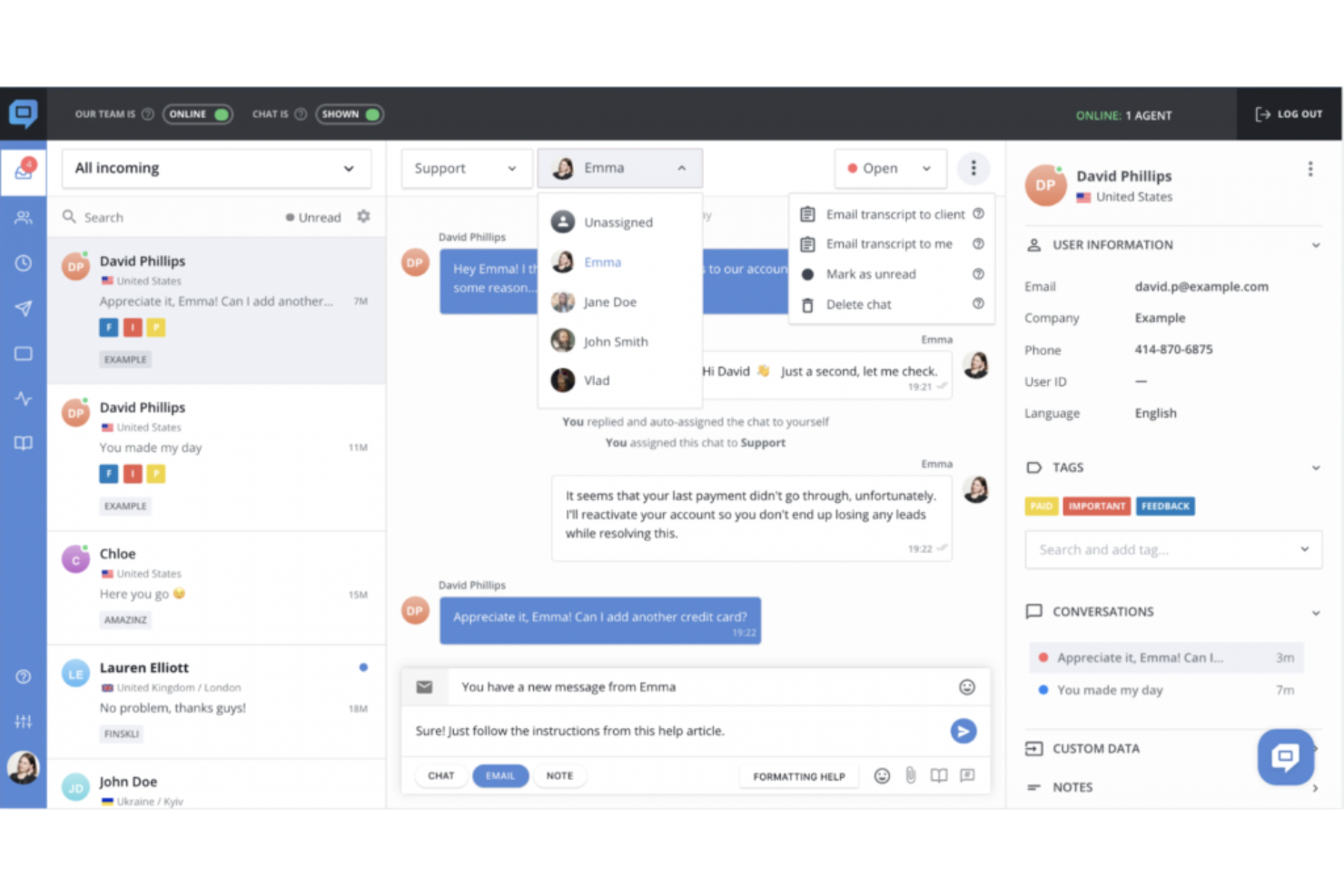
HelpCrunch is a help desk software designed for teams who want to manage chat, email, and knowledge base support in one place. It’s a strong fit for SaaS companies and e-commerce businesses looking to personalize customer engagement and simplify support workflows.
Who Is HelpCrunch Best For?
Customer support and marketing teams at SaaS startups and e-commerce businesses who want flexible chat widget options.
Why HelpCrunch Is a Good Intercom Alternative
I picked HelpCrunch largely because of how much control it gives you over the chat widget itself. You can adjust colors, button styles, and messenger channel links to match your brand without touching any code. I also like that the widget supports a built-in knowledge base, so customers can search for answers directly inside the chat before a conversation even starts. In practice, that means my team handles fewer repetitive questions while still keeping the experience on-brand. For teams switching from Intercom, the widget flexibility alone makes HelpCrunch worth a close look.
HelpCrunch Key Features
- Automated email campaigns: Send behavior-triggered email sequences to customers based on actions they take in your product or on your website.
- Website popups: Build and deploy targeted popups with exit-intent triggers, lead capture forms, and custom animations using a no-code editor.
- Multichannel shared inbox: Manage conversations from email, social media, and messengers in a single team inbox with assignment and routing rules.
- No-code chatbot builder: Create multi-step chatbot flows for lead qualification, FAQ responses, and conversation routing across multiple channels.
HelpCrunch Integrations
Integrations include Instagram, WhatsApp, Telegram, Viber, Discord, a REST API for custom integrations, and webhooks.
Pros and Cons
Pros:
- Provides unlimited popups on paid plans
- Knowledge base integrated into widget
- Includes native email marketing tools
Cons:
- Chatbot builder lacks advanced AI capabilities
- No in-app product tours or onboarding flows

Re:amaze
Best for multibrand support management
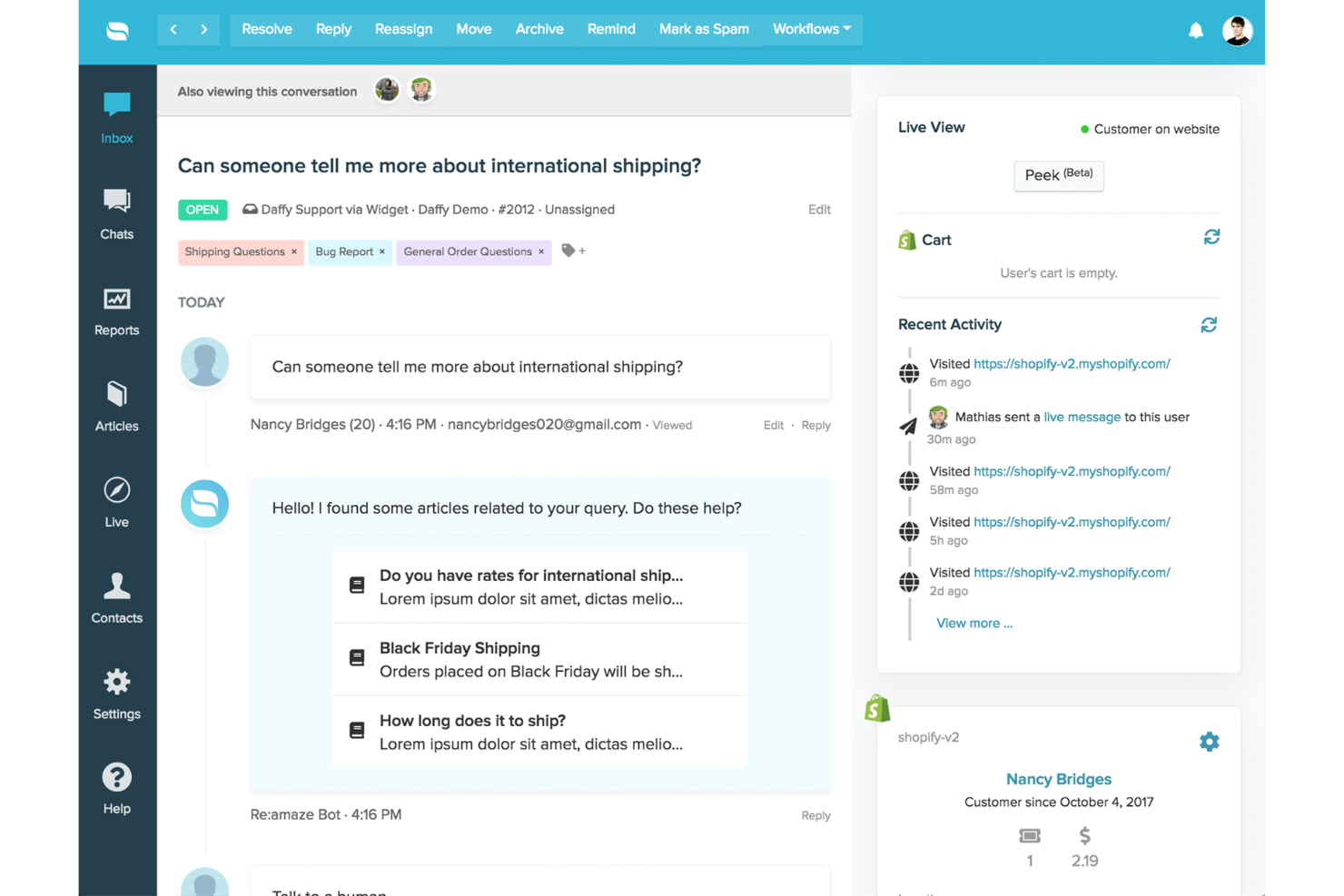
Re:amaze is a customer messaging and helpdesk platform designed for businesses that need to manage conversations across multiple channels and brands. If you’re looking for a marketing CRM that brings live chat, email, social, and SMS into a single dashboard, Re:amaze is worth a look.
Who Is Re:amaze Best For?
Support and marketing teams managing customer conversations across multiple brands or storefronts.
Why Re:amaze Is a Good Intercom Alternative
I picked Re:amaze specifically because of how it handles multibrand operations from a single account. Each brand gets its own chat widget configuration, email and social channels, FAQ site, and chatbot setup—so there's no bleed between brands. I appreciate that role permissions can be scoped per brand, which means I can give agents access only to the brands they support without any cross-brand visibility. For teams running multiple storefronts or business identities, that level of separation inside one dashboard is something Intercom doesn't natively offer at the same price point.
Re:amaze Key Features
- Cues: Send automated, trigger-based messages to website visitors to proactively start conversations.
- Peek co-browsing: View a customer's screen in real time to identify and resolve issues without switching tools.
- Office hours: Set team-wide schedules and individual agent shifts to manage response availability.
- Satisfaction surveys: Automatically send qualitative and quantitative surveys after conversations to measure team performance.
Re:amaze Integrations
Integrations include Shopify, Slack, Stripe, Facebook Messenger, Instagram, WhatsApp Business, Pipedrive, WooCommerce, Klaviyo, and Google Analytics.
Pros and Cons
Pros:
- Proactive messaging with customizable triggers
- Real-time co-browsing helps resolve issues faster
- Multibrand inboxes keep brands fully separated
Cons:
- Limited out-of-the-box CRM and sales tools
- Reporting lacks advanced analytics and exports
Crisp
Best with shared inbox collaboration
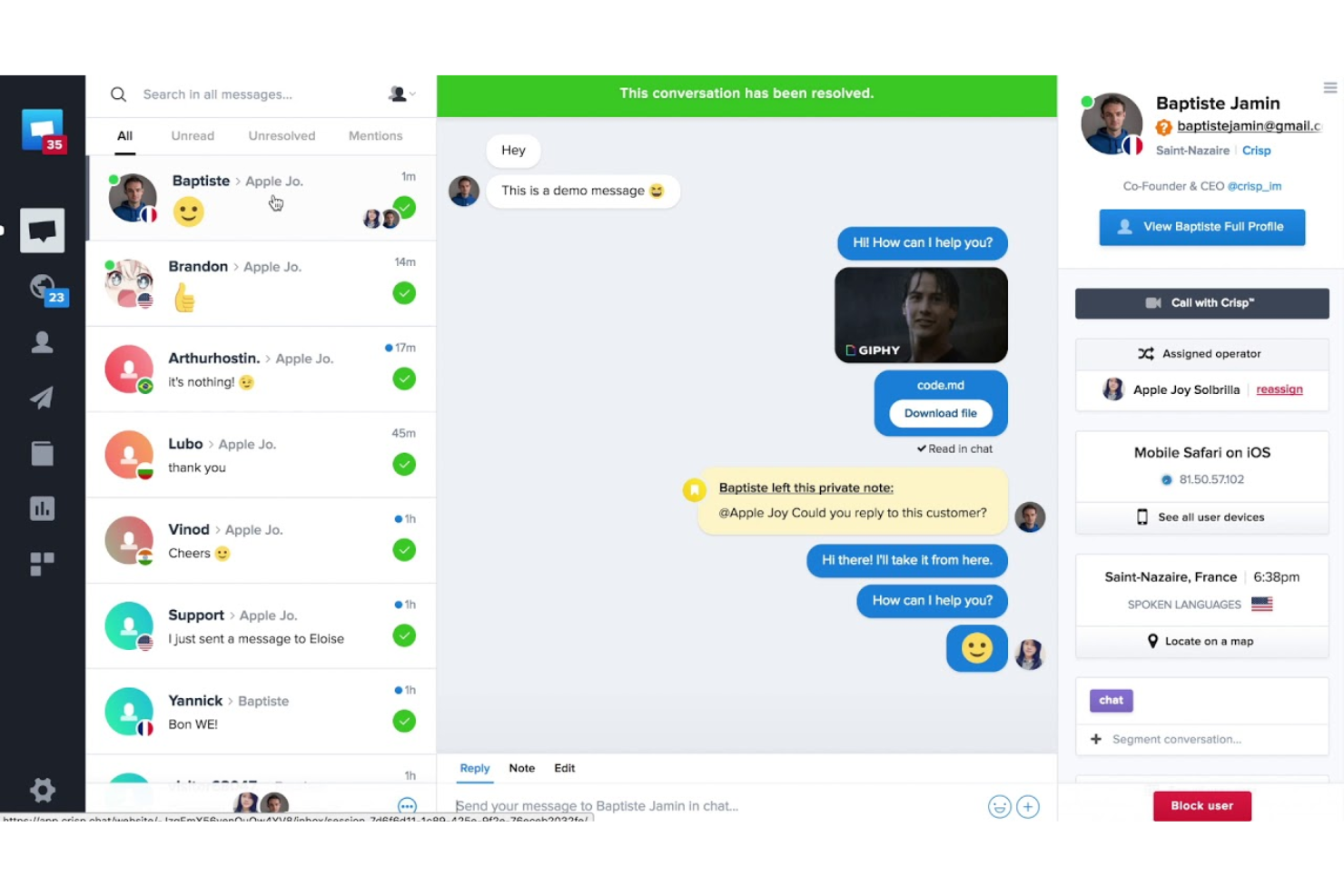
Crisp is a multichannel customer messaging platform designed for teams that want to centralize conversations across chat, email, and social channels. If you’re looking for a marketing CRM that brings sales, support, and automation together in one place, Crisp is built to help improve your team collaboration and respond faster.
Who Is Crisp Best For?
Small to midsize teams that need to manage customer conversations collaboratively across multiple channels.
Why Crisp Is a Good Intercom Alternative
I picked Crisp for its shared inbox collaboration tools, which go beyond basic message routing. The collision detection feature shows my team in real time when a teammate is already typing a reply, so we never send duplicate responses to the same customer. I also rely on private notes inside conversations, which let my team share context and strategy without the customer ever seeing it. For teams switching from Intercom who need tighter internal coordination across chat, email, and social channels, those two features alone make a real difference in how cleanly handoffs and escalations work.
Crisp Key Features
- Multichannel campaign builder: Build and send automated sequences across email, WhatsApp, and chat using a no-code drag-and-drop workflow editor.
- AI chatbot with custom LLM training: Train a chatbot on your knowledge base, website content, past conversations, and uploaded files to automate responses.
- Contact segmentation and filtering: Create targeted customer segments using custom filters based on behavior, profile data, and lifecycle events.
- CSAT surveys: Collect customer satisfaction scores directly within chat conversations or across other channels after interactions close.
Crisp Integrations
Integrations include Slack, HubSpot, Salesforce, Shopify, WordPress, Jira, Pipedrive, Mailchimp, Instagram, and WhatsApp.
Pros and Cons
Pros:
- Built-in AI chatbot with custom training
- Real-time reply collision detection
- Shared inbox supports chat, email, and social
Cons:
- Limited sequence and broadcast marketing tools
- AI features restricted on lower tiers
Gorgias
Best for e-commerce platform integration
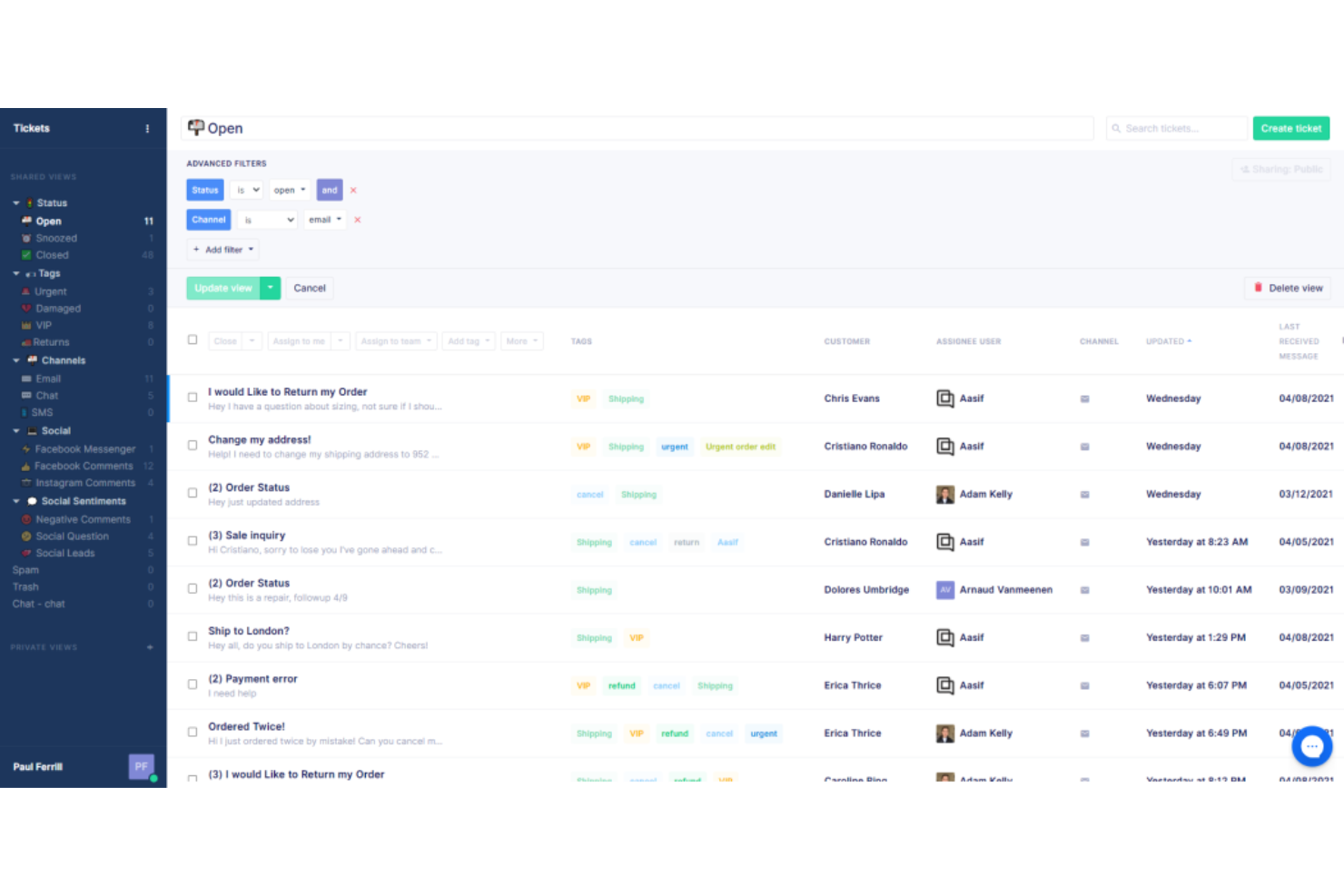
Gorgias is a customer service platform built for e-commerce brands that want to manage support, sales, and engagement from one place. If you’re running a Shopify, Magento, or BigCommerce store, Gorgias helps your team turn support tickets into revenue opportunities.
Who Is Gorgias Best For?
E-commerce support teams handling high ticket volumes across Shopify, Magento, or BigCommerce stores.
Why Gorgias Is a Good Intercom Alternative
I picked Gorgias specifically for how deeply it connects to e-commerce platforms like Shopify, Magento, and BigCommerce. From inside a single ticket, my team can view order history, edit orders, apply discounts, and trigger refunds—without ever switching tabs. I appreciate the AI Agent feature, which handles up to 60% of support inquiries automatically using store data to give accurate, brand-aligned responses. For teams that live inside Shopify all day, that level of native order management inside a helpdesk is something Intercom simply doesn't offer out of the box.
Gorgias Key Features
- Macros: Create canned responses that auto-fill customer data, apply labels, and trigger order updates across connected tools.
- Rules: Set up automated workflows to tag tickets, reply to reviews, or follow up with customers based on defined conditions.
- AutoQA: Use AI to score every agent interaction and give managers a real-time overview of conversation quality.
- Voice of Customer: Aggregate CX conversations and reviews into trends and product-level insights, down to the SKU.
Gorgias Integrations
Integrations include Shopify, Magento, BigCommerce, Facebook, Instagram, Klaviyo, Postscript, Aircall, Recharge, and Okendo.
Pros and Cons
Pros:
- Social media and SMS channels managed in one inbox
- AI Agent automates common inquiries
- Order actions available directly in support tickets
Cons:
- Limited CRM and sales pipeline features
- Fewer workflow automation options

Kustomer
Best for unified customer timelines
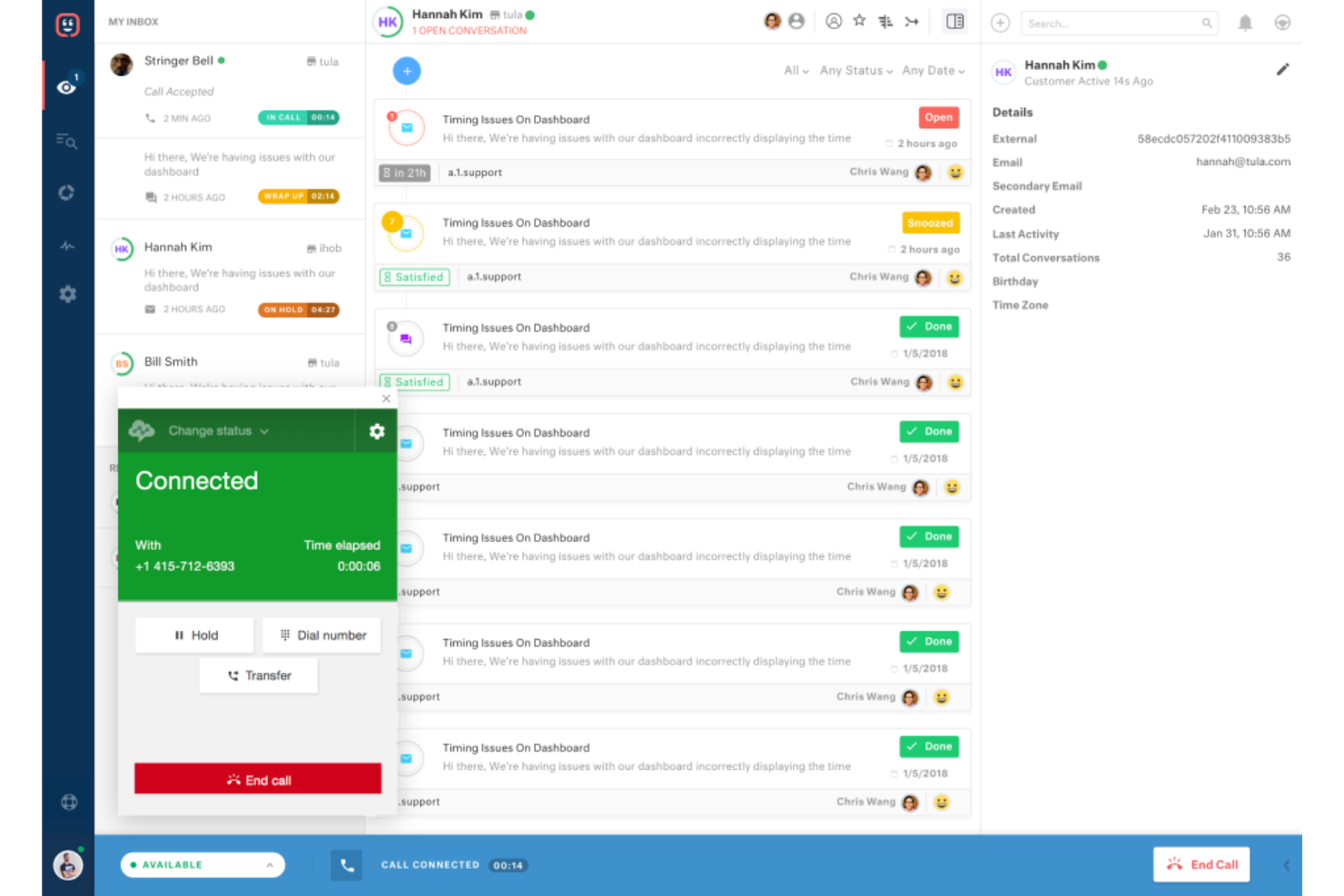
Kustomer is a customer service software built for teams who want a complete view of every customer interaction across channels. If you need to unify support, sales, and marketing conversations in one timeline, Kustomer helps your team deliver more personalized and efficient service.
Who Is Kustomer Best For?
Support and operations teams at mid-sized to large businesses that need a unified view of customer interactions.
Why Kustomer Is a Good Intercom Alternative
I picked Kustomer because its timeline feature gives my team a single, chronological view of every customer interaction—email, chat, SMS, purchase history, and more—all in one place. When a customer reaches out, I can see their full history without digging through separate tools or tabs. I also appreciate Kustomer's custom objects and attributes, which let my team track data points unique to our business, like subscription status or order details, directly on the customer profile. In practice, that means agents can have more informed, personalized conversations without ever leaving the platform.
Kustomer Key Features
- AI Agent builder: A low-code tool for creating AI agent teams that can handle customer requests, process refunds, update subscriptions, and cancel orders without human intervention.
- Omnichannel conversation threading: Keeps all customer interactions across voice, email, chat, SMS, and social in a single continuous thread so agents never lose context when channels switch.
- Workflow automation builder: A no-code builder that combines business rules with AI-driven logic to automate routing, escalations, and multi-step service workflows.
- Interactive Voice Response (IVR): A built-in voice channel feature with call recording, transcription, AI call summaries, and transfer capabilities for handling complex support calls.
Kustomer Integrations
Integrations include Shopify, TikTok Shop, Narvar, Attentive, Corso, Loris, parcelLab, Scorebuddy, AfterShip, and Guru.
Pros and Cons
Pros:
- Workflow automation builder is highly flexible
- Custom objects support unique business data
- Unified timeline shows all customer interactions
Cons:
- Limited prebuilt integrations with e-commerce tools
- No built-in outbound marketing automation

Best with integrated automation workflows
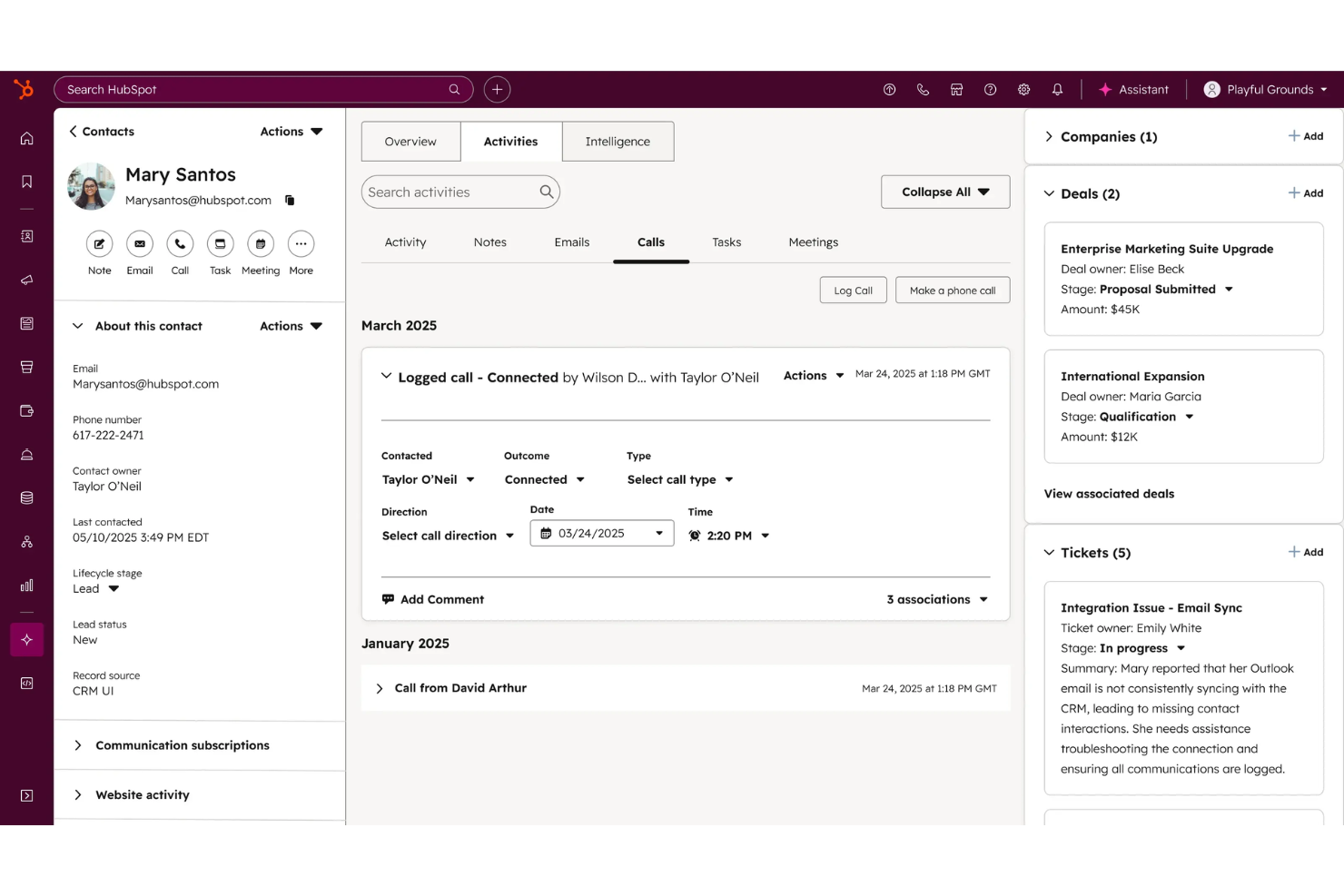
HubSpot Service Hub is a customer service platform built for businesses that want to connect support, sales, and marketing in one place. If you need a CRM that brings together ticketing, knowledge base, and customer feedback tools, this is a strong option for growing teams.
Who Is HubSpot Service Hub Best For?
Customer support and operations teams at scaling businesses that want to unify service and CRM data.
Why HubSpot Service Hub Is a Good Intercom Alternative
I picked HubSpot Service Hub because its automation workflows connect support tickets directly to CRM data, so my team can trigger follow-up tasks, escalations, or deal updates without switching tools. I especially like the ticket pipeline automation, which lets me set rules that move tickets through stages based on customer actions or rep activity. In practice, that means my team can run multi-step service workflows—like auto-assigning tickets by issue type and notifying account owners—without writing a single line of code. For teams already using HubSpot's CRM, the native connection between service and sales data is something I haven't found matched elsewhere.
HubSpot Service Hub Key Features
- Customer success workspace: A dedicated workspace for managing customer health scores, book of business, and rep activity prioritization.
- Feedback management: Customizable NPS, CSAT, and customer feedback surveys built directly into the platform.
- Conversation intelligence: AI-powered call analytics that surfaces insights from every customer interaction.
- Knowledge base: A self-service content tool that lets customers find answers without contacting support.
HubSpot Service Hub Integrations
Integrations include Gmail, Google Calendar, Outlook, Slack, Zoom, Microsoft Teams, WordPress, SurveyMonkey, Meta Ads, and Google Sheets.
Pros and Cons
Pros:
- Customer feedback tools are fully integrated
- Ticketing links directly to CRM records
- Built-in knowledge base supports self-service
Cons:
- Limited chat widget customization
- No in-app messaging for product onboarding

Pylon
Best for Slack-based customer support
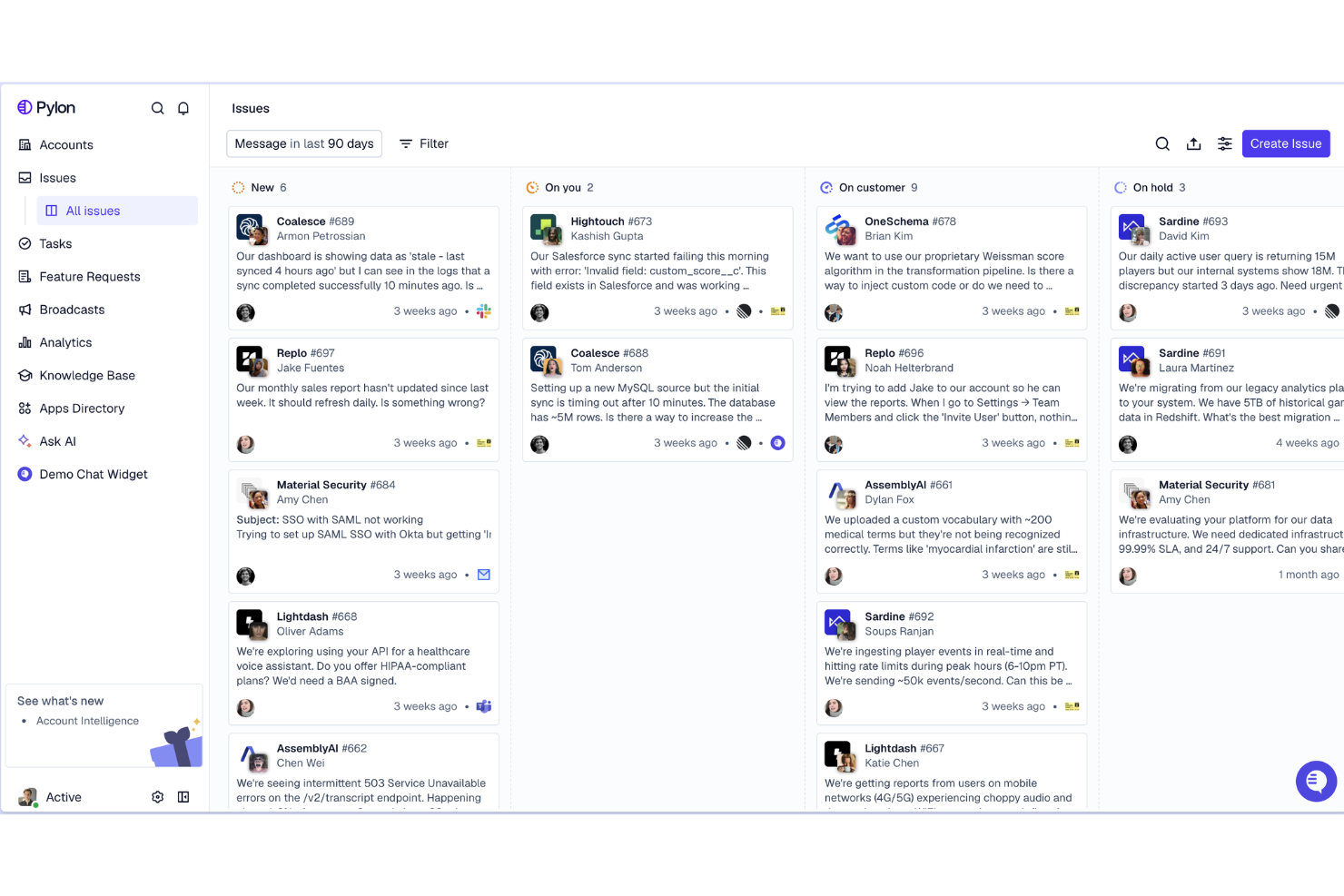
Pylon is a customer support platform built for teams that manage customer conversations directly in Slack. If your business relies on Slack for internal or customer-facing communication, Pylon helps you track, triage, and resolve support requests without leaving your workspace.
Who Is Pylon Best For?
Support and success teams at SaaS companies that use Slack as their primary customer communication channel.
Why Pylon Is a Good Intercom Alternative
I picked Pylon specifically for how it handles Slack Connect channels as a native support surface. My team can track and respond to customer conversations happening inside shared Slack channels without ever needing to be in the channel itself—Pylon pulls those threads into a unified inbox automatically. I also appreciate the Runbooks feature, which lets me define step-by-step resolution workflows that AI agents follow when handling tickets, so responses stay consistent even without a human in the loop. For B2B SaaS teams whose enterprise customers expect Slack-based support, that combination of channel tracking and AI-guided resolution is something Intercom can't replicate natively.
Pylon Key Features
- Omnichannel inbox: Manage conversations from Slack, Microsoft Teams, Discord, email, and in-app chat in a single queue.
- Account intelligence: Pull support, success, and sales data into a unified account view to flag at-risk or upsell-ready customers.
- AI knowledge gap detection: AI groups recurring topics and compares them against your existing knowledge base to surface missing articles.
- Customer portal: Give customers a dedicated space to submit and track tickets via a branded form outside of Slack.
Pylon Integrations
Integrations include Slack, Microsoft Teams, Discord, and API for custom integrations.
Pros and Cons
Pros:
- Account-level customer context in every ticket
- AI-powered runbooks for automated ticket handling
- Native Slack Connect channel support
Cons:
- Fewer integrations than Intercom
- No live chat widget for web or mobile
Kayako
Best for contextual customer support views
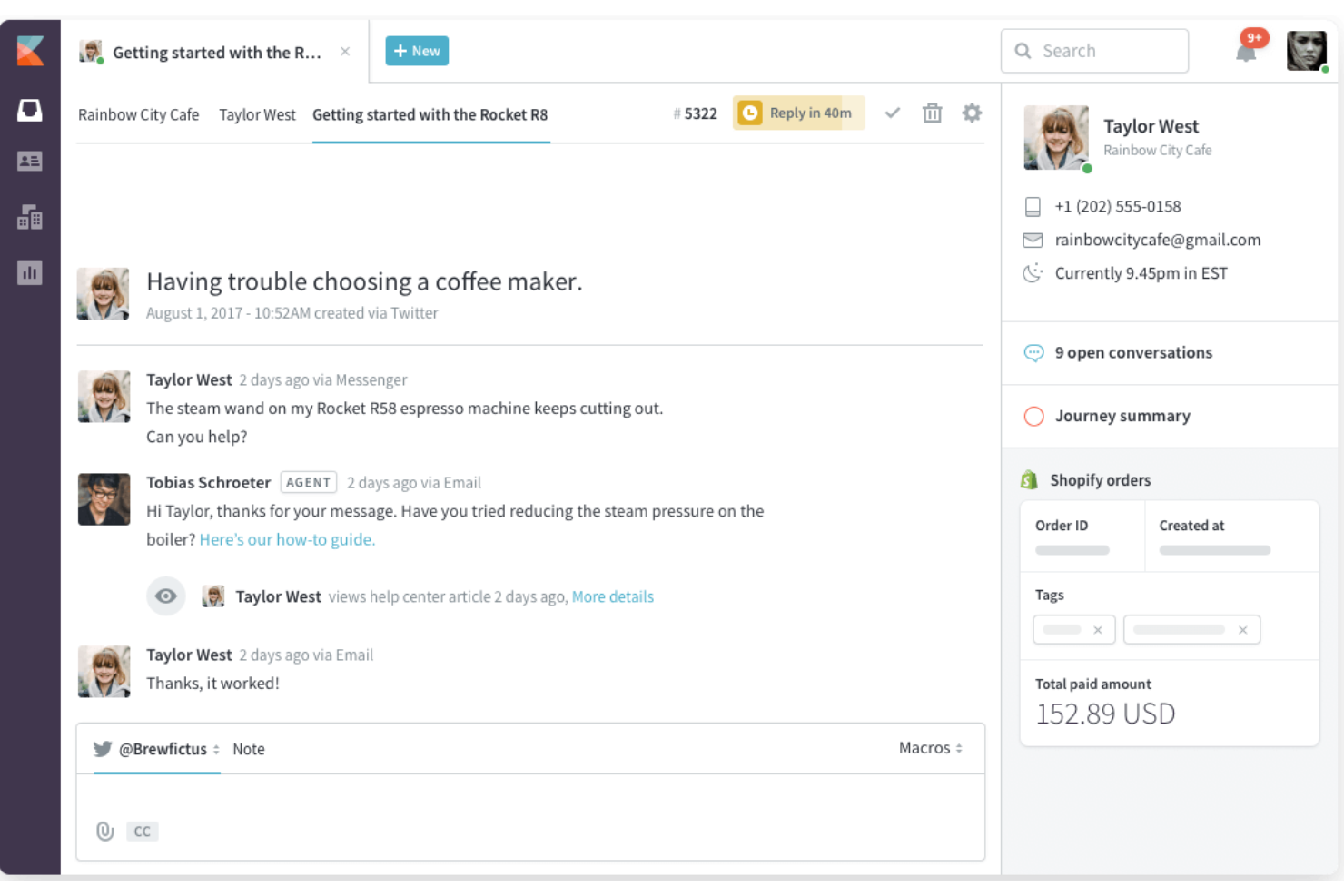
Kayako is an omnichannel support platform for customer service, designed for teams who want to see every customer’s journey in one place. If you’re looking for a marketing CRM that helps support agents deliver more personalized responses by surfacing past interactions and context, Kayako is worth considering.
Who Is Kayako Best For?
Support teams at SaaS companies who need a unified view of customer interactions.
Why Kayako Is a Good Intercom Alternative
I picked Kayako because of its SingleView feature, which surfaces a customer's full interaction history—every conversation, purchase, and page visit—right alongside the active ticket. That context means my team isn't asking customers to repeat themselves. I also like the conversation journey timeline, which maps out exactly how a customer moved through different touchpoints before reaching support. For teams switching from Intercom who want richer customer context built into every support interaction, Kayako delivers that without requiring extra configuration.
Kayako Key Features
- AI ticket routing: Automatically classifies and routes tickets by agent skills, workload, and language preferences.
- Automation builder: A visual flow builder that generates automation rules from plain-language descriptions and lets you test them against historical data.
- AI self-service portal: A help center with semantic search, smart widgets, and AI chatbots that resolve common questions without agent involvement.
- Churn and upsell predictions: AI flags at-risk accounts and expansion opportunities directly within the agent workspace.
Kayako Integrations
Integrations include Salesforce, Slack, Shopify, Magento, Jira, HubSpot, Mailchimp, Zapier, Trello, and Google Analytics.
Pros and Cons
Pros:
- SLA tracking and reporting for compliance
- Built-in live chat and email support
- SingleView shows full customer history instantly
Cons:
- Manual configuration for follow-up reminders
- Requires SQL for advanced reporting
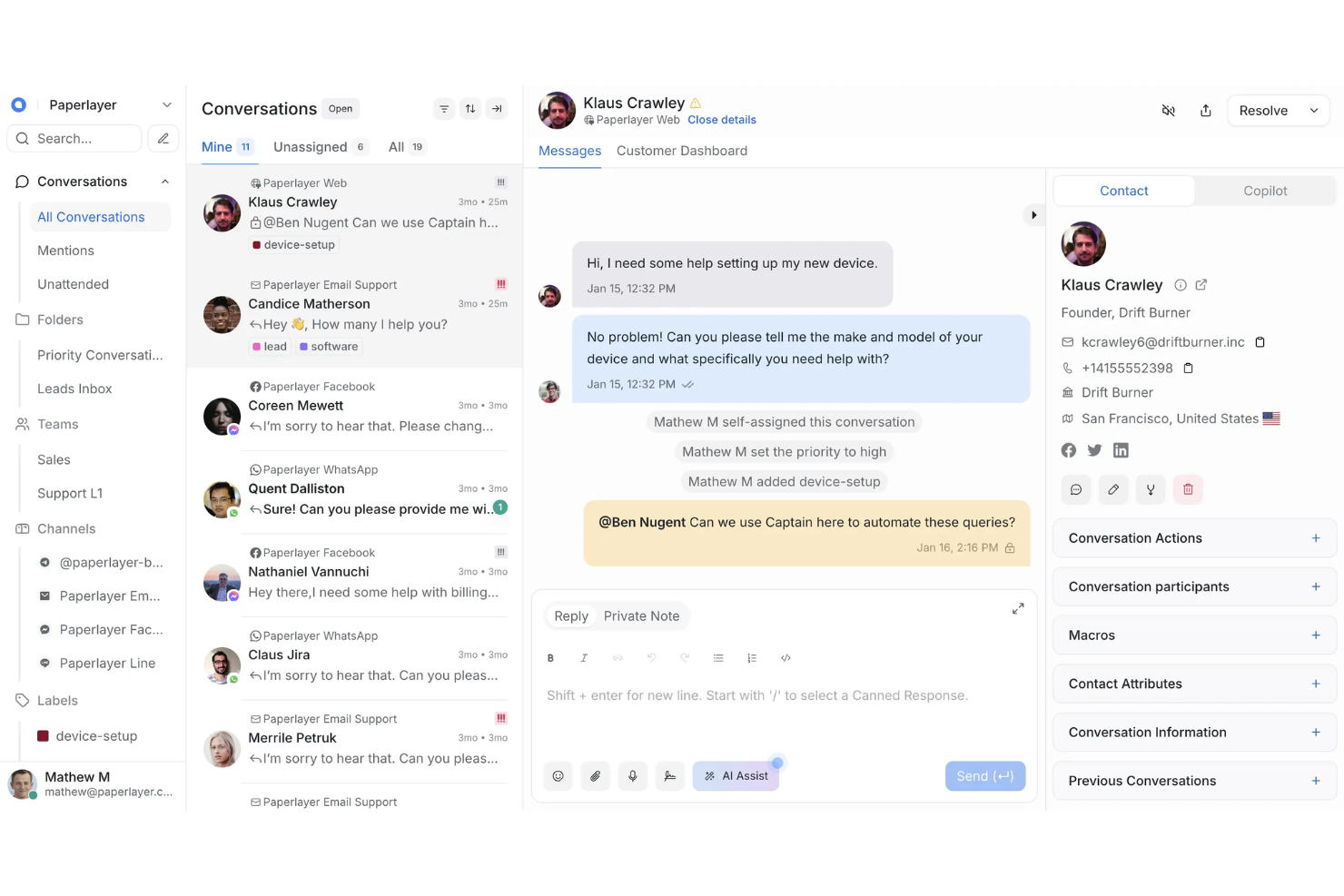
Chatwoot is an open-source customer engagement platform built for teams who want full control over their support workflows and data. If you need a marketing CRM that you can self-host, customize, and extend to fit unique business processes, Chatwoot is a strong contender.
Who Is Chatwoot Best For?
Teams with in-house developers who want to customize and self-host their customer engagement platform.
Why Chatwoot Is a Good Intercom Alternative
I picked Chatwoot specifically because it's open-source and self-hostable, which means my team owns the data and can modify the codebase to fit our exact workflows—something Intercom simply doesn't allow. I appreciate the custom attributes feature, which lets me add fields to contact profiles that map directly to our internal data model without workarounds. The REST API and webhook support also mean I can wire Chatwoot into our existing stack without being locked into a predefined integration list. For teams with compliance requirements or unique data residency needs, that level of control is hard to find in a commercial alternative.
Chatwoot Key Features
- Collision detection: Flags when multiple agents are viewing or replying to the same conversation to prevent duplicate responses.
- Contact segments: Filter and group contacts using custom criteria for targeted outreach or reporting.
- Campaigns: Send proactive outbound messages to website visitors or contacts based on defined triggers.
- CSAT reports: Collect and track customer satisfaction scores tied to individual conversations and agents.
Chatwoot Integrations
Integrations include Slack, WhatsApp Business API, Facebook Messenger, Instagram DMs, Telegram, LINE, TikTok, Google Translate, Dialogflow, and Linear.
Pros and Cons
Pros:
- Active developer community for support
- Unlimited agents on self-hosted version
- Fully open-source with self-hosting option
Cons:
- No native knowledge base or help center
- Fewer built-in automation tools than Intercom

LiveAgent
Best for multichannel ticket management
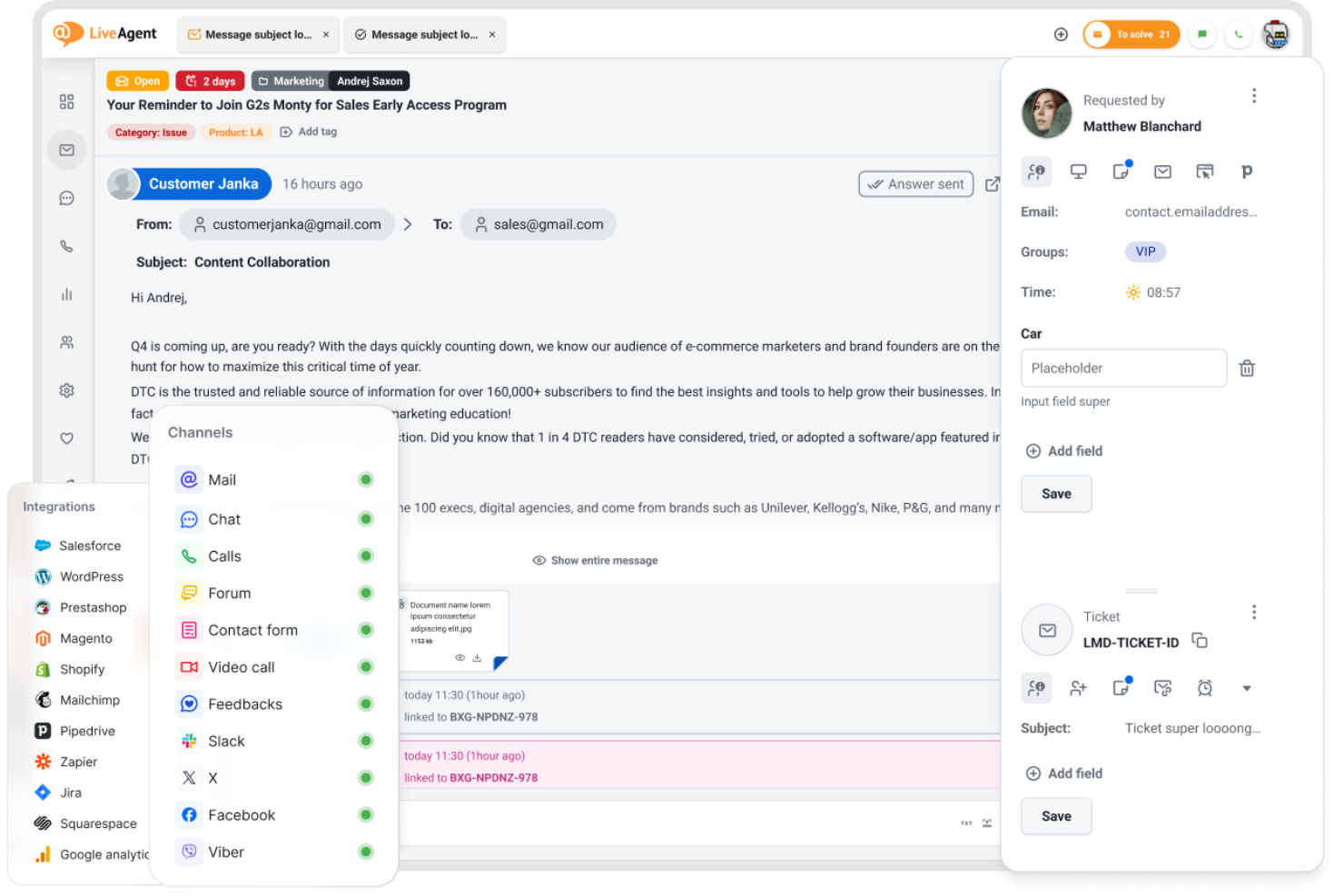
LiveAgent provides multichannel support, bringing together email, chat, social, and call support into a single dashboard for teams who need to manage high volumes of customer conversations. If you’re looking for a marketing CRM that prioritizes fast ticket resolution and omnichannel communication, this platform is worth a look.
Who Is LiveAgent Best For?
Customer support teams at midsize businesses that need to manage tickets across multiple channels.
Why LiveAgent Is a Good Intercom Alternative
I picked LiveAgent specifically because of how it handles ticket management across channels without forcing you to switch between tools. The hybrid ticket stream is what sets it apart—every conversation, whether it starts as a live chat, email, or social message, gets converted into a ticket and tracked in one place. I also like the automated ticket distribution feature, which routes incoming tickets to agents based on rules you define, so nothing sits unassigned during busy periods. For teams moving away from Intercom who need tighter control over ticket workflows and SLA compliance, LiveAgent gives you that structure to improve customer experience.
LiveAgent Key Features
- SLA compliance tracking: Monitor and report on SLA fulfillment and missed deadlines across tickets, with exportable logs.
- Canned messages (macros): Create and store pre-written responses to answer frequently asked questions across any channel.
- IVR (interactive voice response): Build customizable call routing menus to direct inbound calls to the right department or agent.
- Agent gamification: Motivate support teams with levels, badges, and leaderboards tied to ticket resolution activity.
LiveAgent Integrations
Integrations include Slack, Shopify, Mailchimp, Facebook, Twitter, WhatsApp, Viber, Jira, Magento, and Salesforce.
Pros and Cons
Pros:
- Canned responses for faster ticket replies
- Agent gamification boosts team engagement
- Built-in call center with IVR options
Cons:
- Limited chatbot and automation capabilities
- Outdated interface compared to Intercom
Other Intercom Alternatives
Here are some additional Intercom alternatives that didn’t make it onto my shortlist, but are still worth checking out:
- Tidio
With AI-powered live chat
- Freshdesk
For omnichannel customer conversations
- Help Scout
For personalized customer inboxes
- Drift
For real-time conversational marketing
- Pipedrive
With sales pipeline integration
- Capacity
For AI-driven knowledge automation
- Jira Service Management
For connecting support with dev teams
- Zoho Desk
For context-aware ticket routing
- Front
With collaborative email and messaging
- Zendesk
For scalable support tools


How I Evaluate Intercom Alternatives
I look at two layers: the baseline any Intercom replacement must hit—live chat, AI bots, CRM sync, lead routing—and the differentiators like attribution and RevOps stack depth.
Core Functionality (Table Stakes For This List)
When I'm selecting tools for my list, I rank each one on a scale from 0 (does not offer the functionality) to 5 (excels in this area) for each core functionality listed below. Then, I calculate the tool's total score into a percentage. Each tool needs to achieve a minimum total score of 65% to be considered for inclusion.
- Live Chat & Messaging: I evaluate whether a tool supports real-time web chat, in-app messaging, and additional channels like email and social—so your team can engage prospects wherever they start a conversation.
- AI Chatbots & Automation: The best alternatives let you build AI bots that qualify leads with custom questions, resolve common issues, and trigger handoffs—not just serve canned replies.
- CRM & Revenue Tool Integrations: I check for native sync with CRMs like Salesforce and HubSpot, looking at field mapping depth and whether conversation data flows into deal records without manual entry.
- Lead Routing & Qualification: Strong tools route conversations based on account ownership, lead score, or territory rules—so a qualified enterprise prospect reaches the right AE instead of sitting in a general queue.
- Shared Team Inbox & Ticketing: I look at how well sales, support, and CS teams can collaborate in one inbox with ticket assignment, SLAs, tagging, and internal notes to prevent dropped handoffs.
- Reporting & Conversation Analytics: Dashboards should go beyond response time and volume to show conversion rates, pipeline influence, and rep performance tied to messaging activity.
Once I have a list of tools that meet this criteria, I consider what sets each platform apart.
Differentiating Factors (What Sets Vendors Apart)
Here's how I compare and contrast different vendors:
Standout Features
Revenue attribution reporting is a big differentiator—I look for platforms that tie messaging touchpoints to pipeline generation and closed-won deals, not just ticket metrics. Account-based visitor identification also matters because it lets your team personalize chat outreach the moment a target account hits your site. I evaluate meeting and calendar automation too; tools that let qualified leads book directly with the right rep from a chat window cut out the back-and-forth that kills conversion rates.
Beyond Features
Pricing model matters a lot here—some vendors charge per seat, others per conversation or contact volume, and the wrong fit can blow up your budget as your GTM team scales. I also evaluate how deeply a tool connects with the broader revenue tech stack, especially orchestration platforms like Outreach, Salesloft, and Gong. Implementation speed is another factor I weigh; migrating conversation histories, workflows, and bot configs from Intercom can take weeks if the vendor lacks dedicated migration support.
Why Look For an Intercom Alternative?
While Intercom is a good choice of marketing CRM software, there are a number of reasons why some users seek out alternative solutions. You might be looking for an Intercom alternative because…
- You need more affordable pricing for growing teams
- You want deeper customization of chat widgets and inboxes
- You require more advanced shared inbox collaboration features
- You need better integration with your existing tech stack
- You want more transparent or flexible billing options
If any of these sound like you, you’ve come to the right place. My list contains several marketing CRM software options and help desk solutions that are better suited for teams facing these challenges with Intercom and looking for alternative solutions.
Intercom Key Features
Here are some of the key features of Intercom, to help you contrast and compare what alternative solutions offer:
- Live chat: Intercom’s live chat widget lets you engage website visitors and customers in real time, answer questions, and route conversations to the right team members.
- Automated messaging: Set up targeted, behavior-based messages that trigger automatically to onboard users, nurture leads, or provide support at key moments.
- Shared inbox: Manage all customer conversations from email, chat, and social channels in a single collaborative inbox, making it easy for teams to assign, tag, and resolve issues together.
- Custom bots: Build and deploy chatbots that can answer common questions, qualify leads, and collect information before routing to a human agent.
- Product tours: Create interactive, step-by-step guides that walk users through your product’s features and workflows directly inside your app.
- Help center: Publish and organize self-serve articles, FAQs, and documentation so customers can find answers without contacting support.
- Customer data platform: Store and segment customer data, track user behavior, and personalize communications based on real-time activity and profile information.
- App integrations: Connect Intercom with tools like Salesforce, HubSpot, Slack, and Shopify to sync data and automate workflows across your stack.
- Reporting and analytics: Access dashboards and reports that track conversation volume, response times, customer satisfaction, and team performance.
- Mobile SDKs: Integrate Intercom’s chat and messaging features directly into your mobile apps for support and engagement on iOS and Android.