
Keap Review 2026: Pros, Cons, Features and Pricing Explained
Keap is a CRM software built for managing customers, sales, and marketing automation. Learn how its features help businesses organize leads, automate workflows, and improve customer relationships.

We review tools independently, and commissions help fund our testing. See our transparency policy, our methodology, or suggest a tool.
Keap is a CRM software built for small businesses that need contact management, email marketing, and sales pipeline tracking in one place. I'd lean toward it over something like HubSpot if your team is small and you want native marketing automation without paying for a platform sized for enterprise use cases you'll never touch.
Keap Evaluation Summary

4.2/5
- From $299/month (billed annually)
- 14-day free trial
Why Trust Our Software Recommendations
6,700+
Reviews
20
Industry experts
16+
Evaluation factors
14
Years
Our reviews reflect our independent judgment—not a sales pitch. Learn how we stay transparent.
For this guide, we evaluated tools using hands-on testing and independent research, scoring tools using our selection criteria.
Our reviews reflect our human editorial judgment, not a sales pitch.
Keap Overview
When judging Keap, I think its automation tools and simple interface set it apart for small teams without IT support. The pricing, though higher than some alternatives, includes robust onboarding and responsive support, which makes a difference for new users. Its integrations are solid, but you’ll want to confirm your key apps are supported.
If you’re choosing a CRM to automate follow-up, manage a growing pipeline, and avoid technical headaches, Keap is a strong contender, especially for solo operators or small businesses who value speed over endless customization.
Pros
- Built-in appointment scheduling and invoicing for complete client management.
- Powerful workflow automation for sales and marketing follow-up.
- Robust support and free coaching for onboarding and troubleshooting.
Cons
- Reporting features are basic for advanced pipeline analysis.
- Email template designer can feel restrictive and outdated.
- Mobile app has limited functionality for managing pipeline on the go.
Is Keap Right For Your Needs?
Who Would be a Good Fit for Keap?
Keap is best suited for small businesses that need an all-in-one system for handling sales, marketing automation, and client management. Service-based companies, solo entrepreneurs, and teams that prioritize quick onboarding and high-touch customer support will appreciate Keap’s workflow automations and strong lead management. Its built-in invoicing and appointment features are valuable for professionals seeking to reduce reliance on disconnected tools.
- Small Service FirmsKeap streamlines booking, invoicing, and follow-up for firms that handle lots of appointments.
- Solo EntrepreneursEntrepreneurs can automate email, sales, and payment tasks to save time and avoid manual work.
- Sales-Driven TeamsKeap’s pipelines and task assignments let sales teams track deals and automate next steps.
- Marketing AgenciesAgencies use the campaign builder to automate multi-step client nurture sequences and track engagement.
- Health and WellnessPractitioners manage client records, send reminders, and accept payments without extra tools or systems.
- Coaches and ConsultantsScheduling, contracts, and follow-up automations help solo coaches keep client management in one system.
Who Would be a Bad Fit for Keap?
Keap isn’t ideal for large enterprises or teams that require highly customizable reporting, advanced territory management, or extensive integrations out of the box. Product-based companies that need complex inventory management, as well as organizations with rigid workflows or heavy field service needs, may find Keap too limited. If your department already uses highly integrated systems or needs broad international support, Keap’s offering will feel lacking.
- Large EnterprisesKeap lacks the advanced customization and scalability that larger organizations need for workflow and reporting.
- E-Commerce GiantsProduct and inventory management is limited, making Keap a poor fit for high-volume, product-centric businesses.
- Field Service TeamsThere’s no native field dispatch or mobile job tracking, so teams in field operations will feel restricted.
- Manufacturing CompaniesManufacturing firms need inventory, supply chain, and production tools Keap doesn’t provide.
- International TeamsSupport for multiple currencies, languages, and global workflows is basic compared to alternatives.
- IT DepartmentsIT teams looking for advanced automation, development controls, or deep platform integrations will find Keap’s limits frustrating.
How We Test & Score Tools
We’ve spent years building, refining, and improving our software testing and scoring system. The rubric is designed to capture the nuances of software selection and what makes a tool effective, focusing on critical aspects of the decision-making process.
Below, you can see exactly how our testing and scoring works across seven criteria. It allows us to provide an unbiased evaluation of the software based on core functionality, standout features, ease of use, onboarding, customer support, integrations, customer reviews, and value for money.
Core Functionality (25% of final scoring)
The starting point of our evaluation is always the core functionality of the tool. Does it have the basic features and functions that a user would expect to see? Are any of those core features locked to higher-tiered pricing plans? At its core, we expect a tool to stand up against the baseline capabilities of its competitors.
Standout Features (25% of final scoring)
Next, we evaluate uncommon standout features that go above and beyond the core functionality typically found in tools of its kind. A high score reflects specialized or unique features that make the product faster, more efficient, or offer additional value to the user.
We also evaluate how easy it is to integrate with other tools typically found in the tech stack to expand the functionality and utility of the software. Tools offering plentiful native integrations, 3rd party connections, and API access to build custom integrations score best.
Ease of Use (10% of final scoring)
We consider how quick and easy it is to execute the tasks defined in the core functionality using the tool. High scoring software is well designed, intuitive to use, offers mobile apps, provides templates, and makes relatively complex tasks seem simple.
Onboarding (10% of final scoring)
We know how important rapid team adoption is for a new platform, so we evaluate how easy it is to learn and use a tool with minimal training. We evaluate how quickly a team member can get set up and start using the tool with no experience. High scoring solutions indicate little or no support is required.
Customer Support (10% of final scoring)
We review how quick and easy it is to get unstuck and find help by phone, live chat, or knowledge base. Tools and companies that provide real-time support score best, while chatbots score worst.
Customer Reviews (10% of final scoring)
Beyond our own testing and evaluation, we consider the net promoter score from current and past customers. We review their likelihood, given the option, to choose the tool again for the core functionality. A high scoring software reflects a high net promoter score from current or past customers.
Value for Money (10% of final scoring)
Lastly, in consideration of all the other criteria, we review the average price of entry level plans against the core features and consider the value of the other evaluation criteria. Software that delivers more, for less, will score higher.
Core Features
Contact Management
Store, organize, and tag all your leads and clients in one searchable database. Quickly access interaction history and apply custom tags for smarter segmentation.
Automated Sales Pipelines
Visually track deals with customizable pipeline stages and automate task assignments. Drag-and-drop cards make it easy to update deal progress and trigger follow-ups.
Built-In Email Marketing
Send broadcast emails, create campaigns, and track engagement directly from Keap. Prebuilt templates help your team launch branded emails without extra tools.
Task and Appointment Scheduling
Automate appointment booking with calendar integrations, reminders, and follow-up messages. Clients book themselves and Keap adds tasks to your dashboard.
Invoicing and Payments
Create and send invoices, accept payments, and track outstanding balances from within Keap. Built-in payments speed up cash flow without needing separate billing software.
Automated Workflows
Design workflows that trigger emails, reminders, and tasks based on user actions. Keap’s automation builder makes it simple to nurture leads and clients with minimal manual input.

Ease of Use
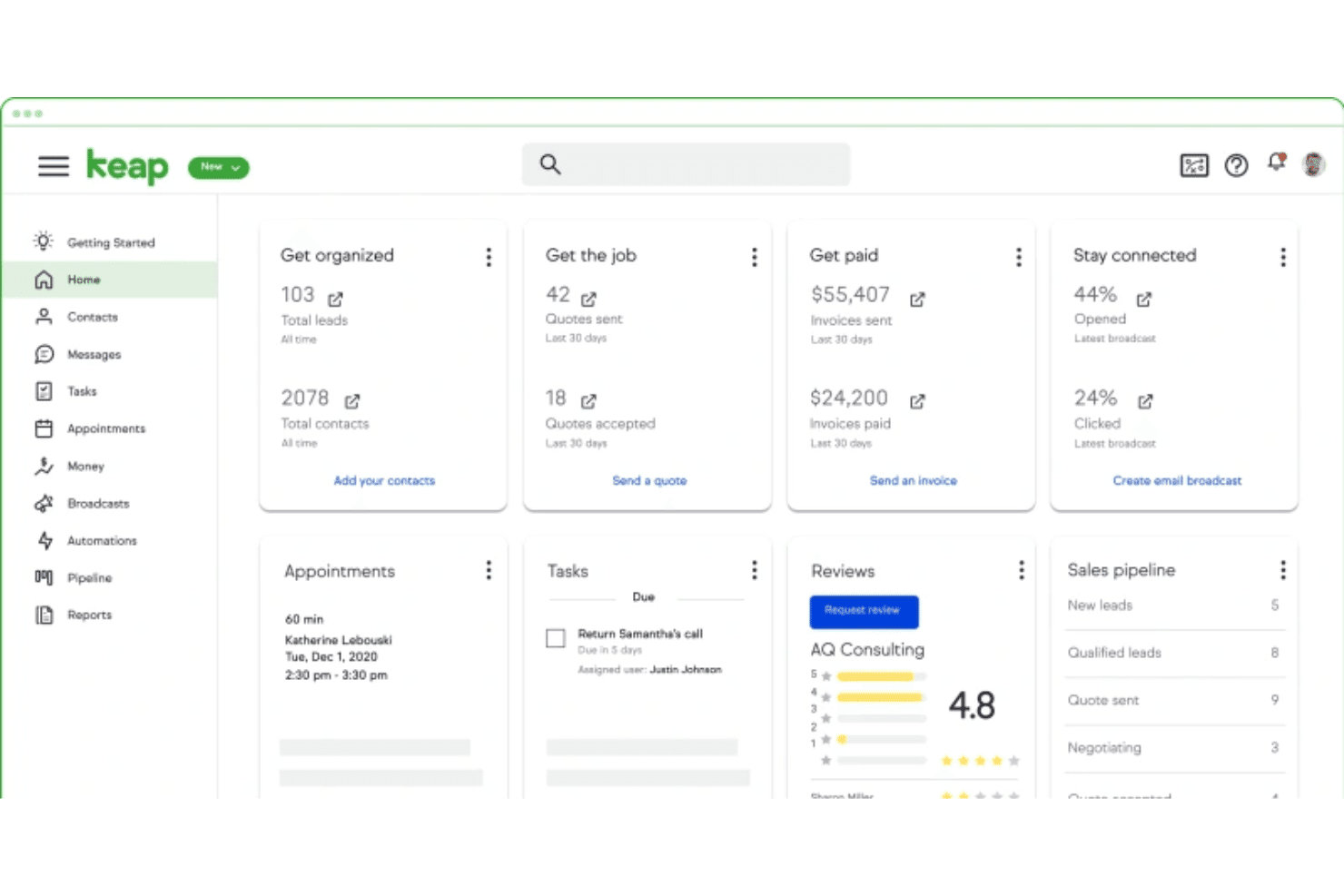
Keap stands out for its clean interface and guided setup that helps non-technical users get started fast. Drag-and-drop pipelines, easy appointment scheduling, and in-app tutorials make organizing contacts and automating tasks straightforward. Many users say onboarding support is a real differentiator, making day-to-day use less intimidating and more productive.
Integrations
Keap integrates with tools like QuickBooks, Gmail, Outlook, PayPal, and other business apps, with additional connections available through Zapier for platforms such as Shopify, Xero, BigCommerce, and more.
Keap also offers an open API, allowing businesses to build custom integrations and extend functionality.

Keap Specs
- A/B Testing: Yes
- Analytics: Yes
- API: Yes
- Audience Targeting: Yes
- Automated Conversion: Yes
- Batch Permissions & Access: No
- Behavioral Tracking: Yes
- Brand Management: No
- Campaign Management: Yes
- Contact Management: Yes
- Contact Sharing: Yes
- Conversion Tracking: Yes
- CRM Integration: Yes
- Customer Management: Yes
- Dashboards: Yes
- Data Export: Yes
- Data Import: Yes
- Email Integration: Yes
- External Integrations: Yes
- Keyword Tracking: No
- Landing Pages: Yes
- Lead Management: Yes
- Lead Scoring: Yes
- Link Tracking: Yes
- Marketing Automation: Yes
- Multi-User: Yes
- Notifications: Yes
- Password & Access Management: Yes
- Social-Media Integration: No


