

How to Choose Sales Software: 9 Criteria to Look For

Essential tools streamline workflows and drive predictable revenue by aligning with business goals.
Pricing, functionality, and integrations guide CROs in choosing sales software that maximizes ROI.
Provides a framework for sales leaders to assess software options based on specific business needs.
Ensures new software works seamlessly with existing tools to prevent data silos.
Comprehensive support and training ensures quick adoption and effective use by end users.
Sales software is a set of tools that help manage pipelines, automate sales processes, and analyze performance. It provides CROs the visibility and control needed to drive predictable revenue growth. Clear criteria help cut through vendor noise, focus on tools that streamline workflows, and ensure every investment aligns with business goals.
Sales software evaluation criteria are the key factors—pricing, functionality, integrations, scalability, and user experience—that CROs use to assess tools. These factors matter because a proper framework ensures the software aligns with business needs and maximizes ROI.
This guide is designed for sales leaders and stakeholders who aim to make informed decisions. When you start evaluating options, focus on the sales software evaluation criteria that align with your goals.

9 Things to Look for When Evaluating Sales Software
Choose sales software effectively by examining these key factors to ensure the tool meets your team’s needs. Here’s what you should consider:
1. Plan Flexibility

Plan flexibility enables you to upgrade or downgrade your SaaS software easily. This matters because your organization's needs can change quickly. Look for software vendors that offer month-to-month plans or allow easy transitions between tiers. During a demo, ask how changes in your plan affect pricing models and features.
2. Data Access and Reporting

Data access and reporting provide insights into your sales performance. You'll want software that offers robust reporting tools and easy data exports. Verify if you can customize reports to align with your specific metrics. Request a demo of the reporting tools to determine if they meet your team's needs.
3. Integration with Your Tech Stack
Integration ensures that your new software works seamlessly with existing tools, such as CRM or email. It's vital to avoid data silos and duplicated efforts. Before buying, list your current tools and ask vendors how their software integrates with each. Test integrations during a trial to confirm they work smoothly.
4. Onboarding and Support
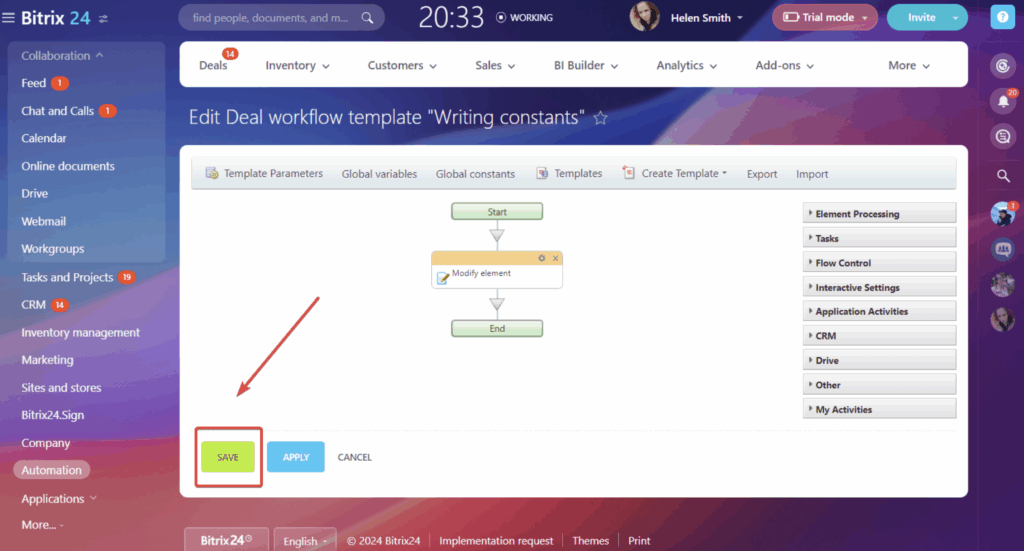
Onboarding and support determine how quickly your end users can start using the software effectively. Look for vendors that offer comprehensive training, tutorials, and 24/7 support. During your evaluation, inquire about the onboarding process and support response times. A quick setup can save you time and frustration.
5. Role-Based Permissions
Role-based permissions enable you to control who has access to specific data. This is important for security, compliance, and workflow automation. Select software that allows you to customize permissions based on particular roles. Test this feature by setting up a few user roles during a demo to ensure it meets your security needs.
6. Industry-Specific Compliance
Industry-specific compliance ensures your software meets regulatory standards. This is crucial for avoiding fines and legal issues. Verify if the software is compliant with standards such as GDPR or HIPAA, as applicable. Ask about built-in data security features to ensure compliance.
7. Customization Options
Customization options allow you to tailor the software to your team's workflow. This matters because a one-size-fits-all approach rarely works. Customization ensures the software fits your workflow. Look for tools that let you adjust fields, workflows, and dashboards. During a demo, try customizing a few elements to see how intuitive it is.
8. Automation Features
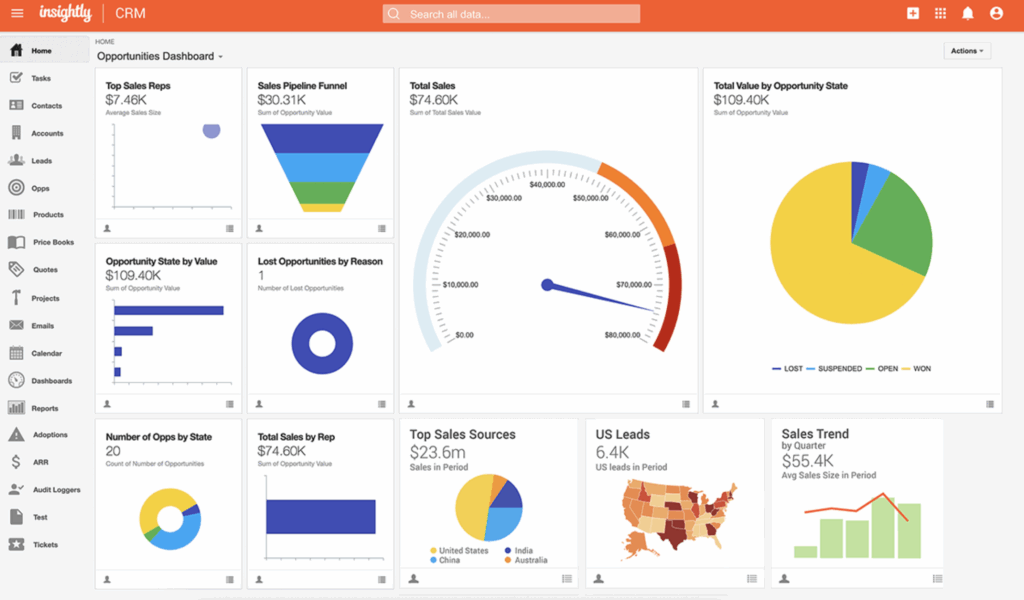
Automation features help streamline repetitive tasks, saving your team time. Seek tools that can optimize workflows, such as follow-up reminders or lead scoring. Inquire about the types of automation available and test them during a trial.
9. Mobile or Multi-Location Support
Mobile or multi-location support ensures your team can access the software anywhere. This is essential for remote or field teams. Check if the software has a mobile app and whether its usability matches the desktop version. Test the user interface for speed and user-friendly design.
How to Choose Sales Software: A 5-Step Framework
Selecting the right sales software can make a big difference in how effectively your team operates. It's about aligning the software's capabilities with your team's specific needs and goals. Here's a step-by-step guide to help you through the process:
Step 1: Identify Your Needs
Start by defining your team’s specific needs before evaluating sales software options. Here's how to get started:
Gather Input from Stakeholders
Involve key stakeholders like sales managers, IT, and finance in the decision-making process. Hold meetings or send surveys to collect their input. This helps ensure that the software will meet business needs and that the evaluation criteria aligns with ROI.
List and Prioritize Pain Points
Identify and prioritize the main pain points in your current system. Focus on issues that slow down your team or create frustration. Make a list and rank them so you know what to address first when evaluating software options.
Align with Internal Policies
Ensure the software aligns with your internal policies, security protocols, and regulatory goals. Check if there are any vendor preferences or compliance requirements that must be met. This helps you avoid potential conflicts and ensures smooth implementation.
Differentiate Must-Have vs. Nice-to-Have Features
Decide which features are essential and which are just nice to have. Must-have features should directly address your top pain points. Create a checklist that distinguishes between these two categories to guide your evaluation process.
Ask These Questions:
- What complaints or blockers come up most often?
- What needs aren’t being met today?
- What features would solve your top 3 pain points?
- What ROI are you expecting from this investment?
- How does the software align with our compliance requirements?
Step 2: Research Sales Software Vendors
Research and compare vendors to find the best fit for your team’s needs. Here's how to proceed:
Conduct High-Level Vendor Scans
Start with review sites, rankings, and case studies to get a quick overview of potential vendors. Look for patterns in customer feedback and note which vendors consistently rank well. This helps you narrow down your options efficiently.
Compare Tools Based on Needs
Evaluate tools based on your business size, existing integrations, and whether outsourcing or an in-house model is better. Smaller teams might want simple, user-friendly tools, while larger ones may need robust features. Ensure the tool fits seamlessly into your current tech stack.
Identify Key Differentiators
Look for unique selling points like implementation support, user experience, or flexibility for niche use cases. Some vendors offer extensive training or specialized features that might be perfect for your needs. Make a list of these differentiators to help guide your decision.
Document Findings
Create a shortlist of detailed notes on each vendor, including pros, cons, and standout features. This documentation will be invaluable when you’re ready to make a decision. Use spreadsheets to compare vendors side-by-side.
Ask These Questions:
- What does each tool do best?
- Does it fit your team size, budget, and stack?
- What support and documentation are available?
- How does it handle niche requirements?
- Are there case studies relevant to your industry?
Top Sales Software Evaluations to Consider
Here’s my list of the top 10 sales software evaluation options available, to help you get started in your search:
Clicks on the links below may earn a commission, which supports our independent testing and review of software and services. Learn more about how we stay transparent.


Step 3: Make a Sales Software Evaluation Criteria Shortlist and Reach Out
Narrow down your vendor options and start engaging with potential partners. Here's how to proceed:
Shortlist 2-4 Vendors
Based on your research, select 2-4 vendors that align best with your team's needs. Focus on those that meet your must-have features and have positive user feedback. This shortlist will help you concentrate your efforts on the most promising options.
Send an RFI or RFP
Consider sending a Request for Information (RFI) or a sales software evaluation criteria RFP to gather detailed information from vendors. This step is useful for understanding their offerings, pricing, and capabilities. An RFP allows you to compare vendors on a level playing field.
Book Demos and Ask Questions
Book demos and ask about functionality, pricing, and integration capabilities. Prepare focused questions about specific features, user experience, and support. This is your chance to evaluate the software's fit with your team’s workflow.
Use Consistent Evaluation Criteria
Apply consistent evaluation criteria across all vendors to ensure a fair comparison. Create a checklist or scoring system based on your priorities. This method helps you objectively assess each option’s strengths and weaknesses.
Ask These Questions:
- Can you walk me through a real customer story like ours?
- What support or onboarding resources do you offer?
- What features require an upgrade?
- How does your software integrate with our existing tools?
- What’s the typical implementation timeline?
Step 4: Build the Business Case
Turn your vendor research into a compelling business case that your leadership team will understand and support. Here's how to proceed:
Summarize Pain Points and Outcomes
Clearly outline the pain points your team faces and the expected outcomes from implementing new software. Highlight how the software addresses specific issues such as inefficiencies or data management problems. Use bullet points for clarity and focus on tangible benefits.
Present Cost Estimates and Timelines
Gather basic cost estimates and implementation timelines from vendors. Present this information clearly, showing how each option fits within budget constraints. Link to sales software evaluation pricing details if needed, and provide a timeline that outlines key phases of implementation.
Articulate ROI and Risks
Explain the expected ROI and efficiency gains from adopting the software. Discuss the financial and operational risks of maintaining the status quo. Use examples to illustrate potential cost savings or productivity improvements, making a strong case for change.
Ask These Questions:
- What business problem will this solve?
- What are the risks of doing nothing?
- What are the financial and operational upsides?
- How will this software align with our strategic goals?
- What metrics will we use to measure success?
Step 5: Implement Your Sales Software Criteria and Onboard Your Users
Plan a smooth onboarding process once you've selected a vendor. Here's how to proceed:
Communicate the Rollout Plan
Ensure smooth onboarding with a clear roadmap. Train end users using vendor webinars or tutorials, and create feedback loops to improve adoption. Share timelines, key milestones, and what each team member needs to do. Use emails, meetings, or intranet posts to ensure everyone understands the process and their role.
Assign Internal Owners
Designate internal owners and points of contact for the new software. These individuals will manage the implementation, answer questions, and liaise with the vendor. Choose people who are familiar with the software and can provide support to their peers.
Ensure Consistent Training
Make sure your teams complete training and adopt the tool consistently. Use vendor-provided resources like webinars or tutorials, and set deadlines for completing training. Monitor progress and offer additional help if needed to ensure everyone is comfortable using the tool.
Create Feedback Loops
Establish feedback loops during the rollout to gather input from users. Encourage teams to share their experiences and any challenges they face. Use vendor resources for troubleshooting and make adjustments based on the feedback you receive.
Ask These Questions:
- What’s the change management plan?
- Who’s responsible for roll-out?
- How will you track early success?
- What resources are available for training?
- How will feedback be collected and acted upon?
What’s Next:
If you're in the process of evaluating sales software criteria, connect with a SoftwareSelect advisor for free recommendations.
They’ll help you build a software evaluation checklist, compare SaaS options, and support you through the entire evaluation process, from demos to upgrades.

