

Com tantos softwares de vendas internas diferentes disponíveis, é difícil perceber qual é o mais adequado para si. Sabe que quer otimizar e simplificar o seu processo de vendas à distância, mas precisa de descobrir qual é a melhor ferramenta.
Eu ajudo! Nesta publicação, vou facilitar a sua escolha, partilhando as minhas experiências pessoais na utilização de dezenas de ferramentas de vendas internas diferentes com várias equipas e contas, juntamente com as minhas escolhas do melhor software de vendas internas.
Why Trust Our Software Recommendations
6,700+
Reviews
20
Industry experts
16+
Evaluation factors
14
Years
Our reviews reflect our independent judgment—not a sales pitch. Learn how we stay transparent.
For this guide, we evaluated tools using hands-on testing and independent research, scoring tools using our selection criteria.
Our reviews reflect our human editorial judgment, not a sales pitch.
Tabela comparativa de software de vendas internas
A tabela abaixo compara os detalhes de preços das minhas principais escolhas de software de vendas internas.
| Tool | Best For | Trial Info | Price | ||
|---|---|---|---|---|---|
| 1 | Best for meeting scheduling and lead routing | Free plan + 14-day free trial + free demo available | From $49/user/month (billed annually) | Website | |
| 2 | Best for having the largest integration ecosystem on the market | Free demo available | Pricing upon request | Website | |
| 3 | Best for reducing missed opportunities by prioritizing high-value activities | Free 14-day trial | From $89/user/month (billed annually) | Website | |
| 4 | Best for creating and closing the sales pipeline | Free demo available | Pricing upon request | Website | |
| 5 | Best for closing and managing mortgage deals | Free demo available | From $60/month | Website | |
| 6 | Best ISO 27701-certified sales intelligence solution | Free plan available | From $37.45/month (billed annually) | Website | |
| 7 | Best lead database with over 200 million contacts | Free plan + 14-day free trial + free demo available | From $49/user/month (billed annually) | Website | |
| 8 | Best for help desk and customer support solutions | 14-day free trial + free demo available | From $25/seat/month (billed annually) | Website | |
| 9 | Best as a single, unified platform for executives and salespeople | Free demo available | Pricing upon request | Website | |
| 10 | Best for all-in-one solutions with sales CRM, project management, and invoicing capabilities | Free trial available | From $15/user/month (billed annually) | Website |


Avaliações do melhor software de vendas internas
Abaixo encontrará os meus resumos detalhados do melhor software de vendas internas que integrou a minha seleção. As minhas avaliações apresentam uma análise detalhada das principais funcionalidades, vantagens e desvantagens, integrações e casos de utilização ideais de cada ferramenta, para o ajudar a encontrar a melhor opção para si.
 Best for meeting scheduling and lead routing
- Free plan + 14-day free trial + free demo available
- From $49/user/month (billed annually)
Visit WebsiteCustomer Rating:4.5/5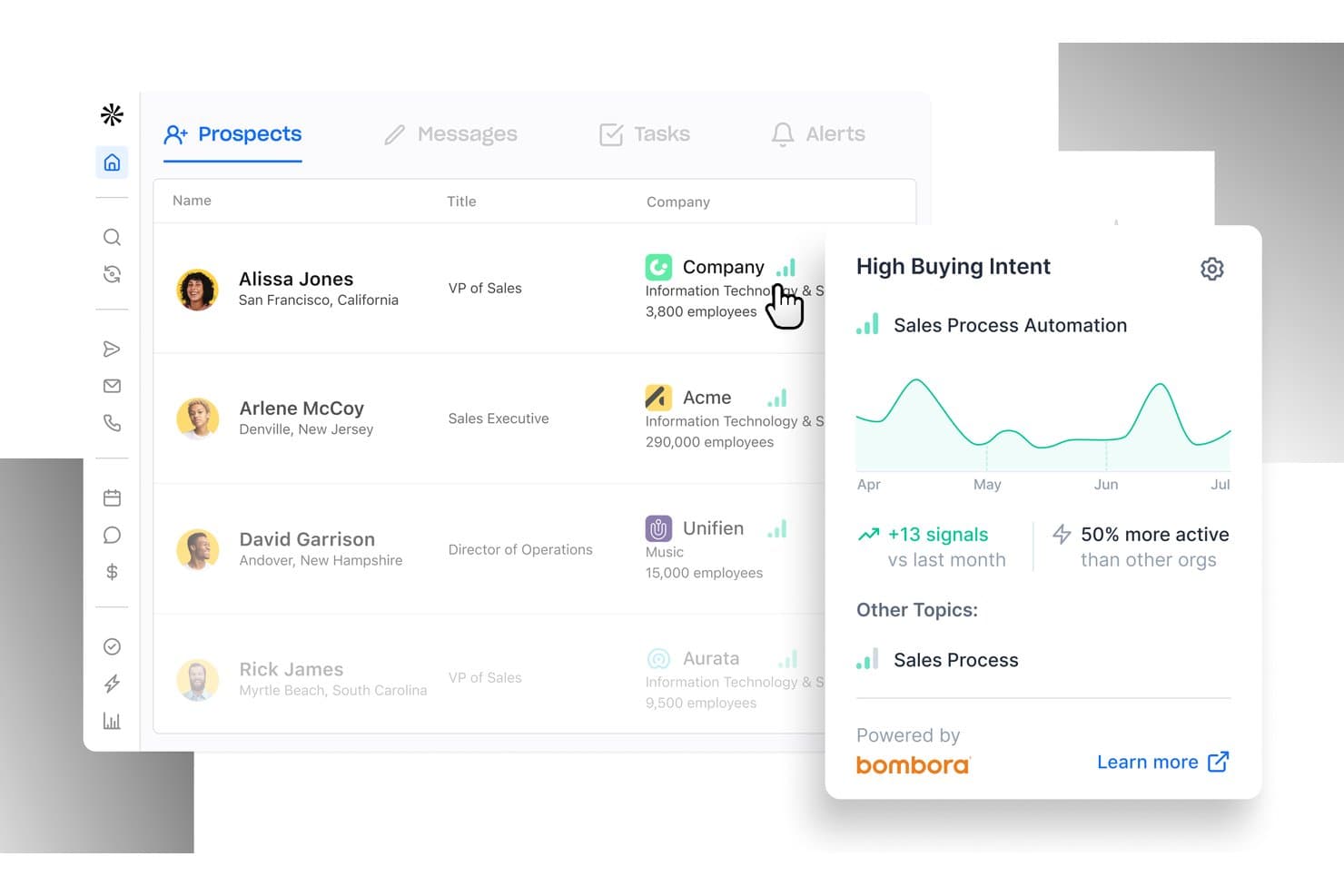
Apollo.io offers a Prospects dashboard with buying intent signals powered by Bombora, showing sales activity trends and engagement data for inside sales teams. Apollo.io is an AI-powered sales intelligence and engagement platform that combines a 210M+ contact B2B database, multi-channel outreach sequences, a built-in power dialer, and automated lead routing in a single workspace.
Who Is Apollo.io Best For?
Apollo.io suits SDR teams and inside sales managers at SMB and mid-market B2B companies that run high-volume outbound prospecting.
Why I Picked Apollo.io
Apollo.io earns its spot on my shortlist because of how tightly its meeting scheduler connects to the rest of the outreach workflow. When a prospect clicks a booking link from an Apollo sequence, the platform automatically advances the deal stage in HubSpot or Salesforce and queues a follow-up task for the rep. I also like the Inbound Lead Router, which scores and assigns incoming leads based on real-time buying signals before a rep ever picks up the phone.
Apollo.io Key Features
- AI email personalization: Automatically generate tailored outreach messages and subject lines based on prospect data and engagement history.
- Local presence dialing: Dynamically match outbound caller ID to the prospect’s area code to boost pickup rates.
- Sales playbooks and scripts: Surface dynamic call scripts and objection-handling guides within the dialer during live conversations.
- Buyer intent signals: Track web and behavioral intent data to trigger timely prospect engagement and cadence enrollment.
Apollo.io Integrations
Apollo.io offers native integrations with Salesforce, HubSpot, Outreach, Salesloft, Pipedrive, Zoho CRM, and Slack, and it connects with Zapier. An API is available for custom integrations.
Pros and Cons
Pros:
- Native power dialer with voicemail drop included
- AI-driven email personalization scales outbound cadences
- Built-in prospecting database removes separate data subscriptions
Cons:
- Analytics reporting less advanced than dedicated competitors
- Contact data accuracy inconsistent outside North America
Learn more about Apollo.io: 2Best for having the largest integration ecosystem on the market
Gong
- Free demo available
- Pricing upon request
Visit WebsiteCustomer Rating:4.7/5
Gong.io allows you to search, filter, and set up alerts for all your phone calls. As a revenue intelligence platform, Gong.io captures all customer interactions from every channel to deliver insights that are designed to help your sales representatives close more deals. With customer data from every call, email, and SMS, Gong runs all essential touchpoints through their AI revenue engine to provide strategy that improves productivity and deals.
Why I picked Gong.io: The main reason Gong caught my eye was their integration capabilities. With one of the most comprehensive integration solutions, Gong can automatically capture and update all data across your entire tech stack to improve visibility across every team and every deal. You can also connect Gong to your power dialer and collect call recordings, customer information, and phone numbers.
Gong.io Standout Features and Integrations
Standout features include a custom coaching program based on your data with actionable guidance for the team and Smart Trackers that can train Gong’s AI to pick up on essential concepts across all customer interactions.
Integrations include Apollo.io, Chili Piper, Conquer, Gainsight, Highspot, HubSpot CRM, Klue, Lessonly, Salesforce, Slack, and Zoom. Gong has over 100 native integrations with more coming soon.
Pros and Cons
Pros:
- Massive selection of integrations
- Quick to learn how to use
- Very easy to implement
Cons:
- Limited training from the Gong team
- There are occasional transcription errors
Learn more about Gong: Best for reducing missed opportunities by prioritizing high-value activities
- Free 14-day trial
- From $89/user/month (billed annually)
Visit WebsiteCustomer Rating:4.6/5
Mixmax offers over 30 types of customizable reports to help you track the most valuable interactions. As a general sales productivity app, Mixmax prioritizes email communication and workflow automation with email tracking, templates, CRM sync, nurture sequences, and one-click scheduling. This platform is an online solution that provides more flexibility for email communication with leads.
Why I picked Mixmax: This solution is on my list because of the way it measures revenue generating activities. The interactive reports and dashboards help you track which social media and other communications are getting the most engagement and push these tactics through to the rest of your team to enhance lead generation and increase conversion rates.
Mixmax Standout Features and Integrations
Standout features include sales engagement tracking with actionable insights that help you develop a better-performing sales playbook and one-click meeting scheduling with automated reminders to ensure better attendance.
Integrations include Box, Dropbox, Giphy, Github, Gong, Google Calendar, Markdown, Salesforce, Slack, Twitter, and Zoom.
Pros and Cons
Pros:
- Intuitive navigation and clean interface
- Easy to learn and use
- Combines scheduling, analytics, and email tracking
Cons:
- Meeting planning with outside platforms is clunky
- Video conferencing links are not auto-generated
Learn more about Mixmax: Best for creating and closing the sales pipeline
- Free demo available
- Pricing upon request
Visit WebsiteCustomer Rating:4.3/5
Outreach offers a conversation intelligence solution that can take notes, summarize meetings, and flag action items. As a comprehensive sales management platform, Outreach strives to integrate conversational intelligence, sales engagement, and revenue intelligence all in one place. This platform was designed as a single source of truth for all sales activities. Sales reps should be able to find everything they need here, including engagement tools, mutual action plans, coaching, deal insights, and sales forecasting.
Why I picked Outreach: This platform caught my eye because of a feature called Mutual Action Plans. With this tool, Outreach aims to build buyer trust and de-risk your deals. Salespeople can use it to digitally collaborate with all stakeholders, allowing any sales plan to evolve with everyone’s needs. This space also acts as a central repository for a deal, so even if stakeholders or team members change, they can still get up to speed right away.
Outreach Standout Features and Integrations
Standout features include an inside sales team dashboard that shows active opportunities and allows the rep to edit close dates, deal values, next steps, and sales stages for every open opportunity and an engagement timeline that shows buyer and seller activities, including meetings, emails, and calls.
Integrations include Constant Contact, Copper, Gmail, HubSpot, Linkedin Sales Navigator, Mailchimp, Microsoft 365, Okta, Rippling, Robly, and Salesforce. All integrations are bi-directional.
Pros and Cons
Pros:
- Comprehensive array of tools and features
- Global capabilities with time zone and language options
- Intuitive user interface for easy navigation
Cons:
- Steep learning curve if you’re not tech-savvy
- Complexity of the tool can be difficult to navigate
 Best for closing and managing mortgage deals
- Free demo available
- From $60/month
Visit WebsiteCustomer Rating:4.3/5
Velocify offers a variety of sales software, like Pulse, which can dial contacts from the app. As a cloud-based CRM application that incorporates email marketing, telecommunications, sales management, scheduling, and customer management, Velocify offers a massive array of tools in one platform. Currently, Velocify has Pulse® for Salesforce integration, LeadManager Enterprise™ for outreach management, and Dial-IQ® as your outbound sales dialer.
Why I picked Velocify: I added this platform to my list of inside sales software because they bill themselves as a solution for today’s modern mortgage market. They offer their software as part of the ICE Mortgage Technology® Platform to enhance your sales automation, keep your team organized, and prioritize the activities that help your sales reps close more deals.
Velocify Standout Features and Integrations
Standout features include broker and seller portals that allow you to collaborate with wholesale customers, automated underwriting solutions with Fannie Mae and Freddie Mac, and an online customer portal that allows them to fill out an application, engage with their loan officer, and e-sign documents.
Integrations include Adobe Commerce, Constant Contact, Eventbrite, Gong, GoTo Webinar, HubSpot, iContact, Keap, Mailchimp, and Marketo Engage.
Pros and Cons
Pros:
- User-friendly learning process and intuitive navigation
- Competitive pricing when compared to similar software
- Comprehensive customization options for every need
Cons:
- Takes a lot of effort to custom configure the software
- Dialer option has a lag when used remotely
Learn more about Velocify: Best ISO 27701-certified sales intelligence solution
- Free plan available
- From $37.45/month (billed annually)
Visit WebsiteCustomer Rating:4.2/5
Lusha helps you build targeted lists with laser-focused filters that ensure a good buyer match. This web-based sales solution is designed to help your organization prospect, qualify, and reach leads with dynamic, accurate data. As the only ISO-certified sales intelligence platform, Lusha empowers your team to tap into their prospecting tools to build and update contact lists with bulk enrichment through custom filters, alerts, and rules.
Why I picked Lusha: What made this platform stand out to me is its prospecting capabilities. Using the contact searching and data verification tools, you can get a list of up to 1,000 leads that connect you directly with decision-makers.
Lusha Standout Features and Integrations
Standout features include intent reports that identify a company’s willingness and readiness to buy your product, job change filters and alerts so you can reach out to warm leads who already know your product, and data enrichment that includes company name, location, industry, size, and technology.
Integrations include Bullhorn, Gmail, HubSpot, Microsoft Dynamics, Outlook, Outreach, Pipedrive, Salesforce, SalesLoft, Zapier, and Zoho.
Pros and Cons
Pros:
- Chrome extension for instant contact information
- User-friendly and intuitive navigation
- Up-to-date contact information and enrichment
Cons:
- Limited tutorials and support
- Credit-based app use
Learn more about Lusha: Best lead database with over 200 million contacts
- Free plan + 14-day free trial + free demo available
- From $49/user/month (billed annually)

The Apollo contact and account stages overview with Salesforce integration. This platform is an all-in-one sales intelligence solution that provides you with the tools you need to find new leads and engage new prospects. With a database of over 200 million contacts and 30 million companies, all you need to do to find new leads is build your ideal buyer profile and apply those filters to search the database.
Why I picked Apollo: I like the Apollo platform because you get more than just a lead generation database. This solution takes sales a step farther with a massive template library that allows you to automate and streamline outreach while customizing emails for more personalized connections.
Apollo Standout Features and Integrations
Standout features include a pre-built suite of reports and dashboards that showcase granular insights about message effectiveness and team productivity, as well as automated CRM enrichment that ensures accurate data across your entire tech stack.
Integrations include Gmail, HubSpot, LinkedIn for Business, Marketo Engage, Microsoft Outlook, Salesforce, SalesLoft, SendGrid, and Zapier.
Pros and Cons
Pros:
- Zapier integration provides access to other apps
- Once trained, the app is easy to use
- Massive existing lead database
Cons:
- Training can take extra time
- Implementation can be challenging
Learn more about Apollo: Best for help desk and customer support solutions
- 14-day free trial + free demo available
- From $25/seat/month (billed annually)

Front provides help desk capabilities with the familiarity of an email inbox setup. If you’re looking for an inside sales software to support customers and provide help desk solutions to your team, Front is the platform designed to enable sales, support, and account management teams that deliver service at scale. With this software, your team can streamline customer communication, as it combines the efficiency of a help desk with the visual and navigational elements of email.
Why I picked Front: While Front may seem like an after-sales software that’s focused on customer nurturing, it actually also provides an inbound sales solution with centralized, multi-channel communication and automated routing that ensures leads and prospects can connect with the right people.
Front Standout Features and Integrations
Standout features include collaboration functionalities that allow you to quickly loop in team members or bosses for faster solutions and approvals, as well as customer history and data pulled from bi-directional integrations with your CRM.
Integrations include Asana, DropBox Business, Gmail, HubSpot, Microsoft 365, Salesforce, Slack, Trello, WhatsApp, Zapier, and Zoom Meetings.
Pros and Cons
Pros:
- Versatile pricing for small businesses and enterprise needs
- Intuitive navigation for basic features and functionality
- Easy to learn due to the familiar visuals of an email inbox
Cons:
- Limited keyword search functionality
- Complex features have a steeper learning curve
Learn more about Front: Best as a single, unified platform for executives and salespeople
- Free demo available
- Pricing upon request

Clari Copilot provides detailed, real-time insight into the progress of every active deal. This web-based inside sales software solution can help empower your revenue team to close more deals through conversation intelligence that provides reps and executives the information they need to spot revenue leaks, improve predictability, and align buyers and sellers. The Copilot product, specifically, powers workflows with generative AI and provides proactive, actionable alerts.
Why I picked Clari Copilot: This solution stood out to me because it highlighted the need to unite execs and reps in one place. Their platform provides sales leaders with real-time pipeline status and executives with reporting tools for the board of directors.
Clari Copilot Standout Features and Integrations
Standout features include real-time monologue and battlecards alerts that help sales reps navigate objections from prospects and enterprise grade security that’s SOC 2 Type 2 certified.
Integrations include BlueJeans Meetings, Freshsales, Google Meet, HubSpot CRM, Microsoft Teams, Outreach, Pipedrive, Salesforce Sales Cloud, Slack, and Zoom Meetings.
Pros and Cons
Pros:
- Visual tool for better understanding data
- Intuitive navigation and learning experience
- Highly collaborative tool for top-down execution
Cons:
- Data updates can lag
- Limited information in error messages
Learn more about Clari: 10Best for all-in-one solutions with sales CRM, project management, and invoicing capabilities
Apptivo
- Free trial available
- From $15/user/month (billed annually)

Apptivo offers project visualization with Gantt charts. As a sales and marketing tool, Apptivo strives to provide everything you need from a sales engagement platform, including lead management, contact management, campaign management, marketing automation, and an opportunity pipeline with intuitive dashboards.
Why I picked Apptivo: One unique feature that put Apptivo on my radar is the help desk. While many other platforms offer tons of management tools, Apptivo is one of the only ones concerned with customer relationship management from this angle. With these help desk features, you can continue nurturing customer relationships even after you close deals.
Apptivo Standout Features and Integrations
Standout features include CRM tools to track the complete sales process from initial sales call to deal close and expense logging and reporting that are accessible through a mobile app.
Integrations include Dropbox Business, Gmail, Google Drive, Microsoft 365, OneDrive, PayPal, Slack, Stripe, WordPress, and Xero.
Pros and Cons
Pros:
- Outstanding customer service
- Highly customizable during the implementation stage
- Very affordable solution for companies of all sizes
Cons:
- Some API integrations require more work on the back end
- Some limited functionality in the mobile app
Learn more about Apptivo:
Outro software de vendas internas
Eis algumas opções adicionais de software de vendas internas que não entraram na minha seleção, mas que ainda vale a pena conhecer:
- 11Kixie PowercallBest for advanced sales dialing and outreach
- 12ExecVisionBest conversation intelligence platform with a proprietary AI-powered engine
- 13NumerikBest for providing salespeople with more targeted direction
- 14Creatio AI CRMBest for no-code workflow automation
- 15Really Simple SystemsBest CRM-focused sales software for small teams
- 16LeadSquaredBest software for lead management and sales tracking features
- 17SalesloftBest sales software with AI-driven predictability insights
- 18Bitrix24Best for custom workspaces with replacements for other SaaS solutions
- 19FreshsalesBest all-in-one option with CRM, outreach, and lead management features
- 20PipedriveBest sales software for small companies with pipeline-focused initiatives
- 21DialedInBest inside sales software for call center-focused solutions
- 22Salesforce Sales CloudBest sales software driven by AI and GPT features
How I Evaluate Inside Sales Software
I evaluate inside sales software across two layers: the baseline a tool must hit—like native dialing and CRM sync—and the differentiators that make one platform better for your team.
Core Functionality (Table Stakes For This List)
When I'm selecting tools for my list, I rank each one on a scale from 0 (does not offer the functionality) to 5 (excels in this area) for each core functionality listed below. Then, I calculate the tool's total score into a percentage. Each tool needs to achieve a minimum total score of 65% to be considered for inclusion.
- Multi-Channel Outreach: I check whether reps can run phone, email, and SMS or social touches from a single workflow instead of toggling between disconnected tools.
- Built-In Sales Dialer: Power or parallel dialing matters here—I look for native dialers with voicemail drop, call recording, and dispositions baked in.
- Sales Cadence Automation: Each tool should let you build multi-step sequences with scheduled triggers, branching logic, and A/B testing across channels.
- CRM Integration: I evaluate bi-directional sync with CRMs like Salesforce and HubSpot, checking that activities, contacts, and opportunities flow both ways in real time.
- Lead Management & Routing: The platform should route inbound and outbound leads to the right rep using rules based on territory, scoring, or round-robin assignment.
- Sales Activity Analytics: I look for dashboards that track rep-level metrics like calls made, connect rates, and cadence conversion so managers can spot gaps fast.
Once I have a list of tools that meet this criteria, I consider what sets each platform apart.
Differentiating Factors (What Sets Vendors Apart)
Here's how I compare and contrast different vendors:
Standout Features
Conversation intelligence is a major differentiator—I look for tools that transcribe calls, flag objection patterns, and surface coaching moments so managers can ramp new reps faster. Local presence dialing also moves the needle because matching caller ID to a prospect's area code lifts connect rates on outbound calls. I evaluate whether a platform offers buyer intent signals, like website visit tracking or third-party intent data, that automatically enroll high-priority prospects into cadences before a competitor reaches them.
Beyond Features
Compliance is a factor I check early. Outbound dialing platforms need to handle DNC list scrubbing and consent management, especially as call regulations tighten across regions. I also evaluate how well a tool fits into an existing RevOps stack—connectors to platforms like LinkedIn Sales Navigator, ZoomInfo, or Gong matter when your reps rely on those daily. Pricing transparency rounds out my evaluation; I look for clear per-seat or usage-based models so RevOps leaders can forecast costs as the team scales.
Como escolher software de vendas internas
É fácil ficar perdido entre longas listas de funcionalidades e estruturas de preços complexas. Para o ajudar a manter-se focado enquanto analisa o seu processo único de seleção de software, apresentamos uma lista de verificação dos fatores a ter em conta:
| Fator | O que considerar |
|---|---|
| FatorEscalabilidade | O que considerarAté que ponto o software crescerá com a sua equipa? Considere se consegue suportar um aumento do número de utilizadores ou de dados sem problemas de desempenho. |
| FatorIntegrações | O que considerarEstabelece ligação com as suas ferramentas existentes, como plataformas de CRM ou de email? Verifique se permite um acesso fácil à API ou se dispõe de integrações pré-criadas para poupar tempo. |
| FatorPersonalização | O que considerarPode adaptá-lo aos seus processos de vendas específicos? Procure opções que lhe permitam ajustar os fluxos de trabalho e os campos de dados às suas necessidades. |
| FatorFacilidade de utilização | O que considerarA interface é fácil de utilizar pela sua equipa? Um design simples e intuitivo reduz o tempo de formação e acelera a adoção. |
| FatorImplementação e integração inicial | O que considerarQuanto tempo demora a configuração? Avalie os recursos disponibilizados para a integração inicial, como tutoriais e apoio, para garantir uma transição tranquila. |
| FatorCusto | O que considerarOs planos de preços são claros e estão dentro do seu orçamento? Considere o custo total de propriedade, incluindo eventuais taxas ocultas ou complementos. |
| FatorMedidas de segurança | O que considerarCumpre as suas normas de segurança? Procure encriptação, funcionalidades de privacidade de dados e conformidade com regulamentos como o RGPD. |
| FatorDisponibilidade do apoio | O que considerarQuando pode contactar o apoio se surgirem problemas? Certifique-se de que existe apoio adequado durante o seu horário de funcionamento, seja por chat, telefone ou email. |
Tendências do software de vendas internas para 2026
O software de vendas internas continua a evoluir rapidamente, refletindo tendências mais amplas na tecnologia de vendas e a crescente sofisticação das operações de receita. Estes avanços são impulsionados pela procura de maior eficiência, conhecimentos mais profundos e uma abordagem de vendas mais personalizada. A análise de atualizações recentes de produtos, comunicados de imprensa e registos de lançamentos revela várias tendências fundamentais que estão a moldar o futuro do software de vendas internas.
Funcionalidades e tecnologias em evolução
- Integração de IA e aprendizagem automática: As funcionalidades de IA estão a ser cada vez mais integradas para fornecer análises preditivas, pontuação de leads e conhecimentos automatizados sobre as interações com os clientes, ajudando as equipas de vendas a dar prioridade aos seus esforços de forma mais eficaz.
- Automatização melhorada: As funcionalidades de automatização estão a expandir-se para além da simples automatização de tarefas, abrangendo aspetos mais avançados do processo de vendas, como o contacto inicial automatizado e os acompanhamentos baseados no comportamento dos clientes ou em métricas de envolvimento.
- Maior foco na análise de dados: Existe uma tendência clara para capacidades de análise de dados mais sofisticadas, permitindo que as equipas de vendas utilizem os dados para o planeamento estratégico, o acompanhamento do desempenho e a tomada de decisões em tempo real.
Funcionalidades mais importantes e procuradas
- Integração com CRM: A integração perfeita com sistemas de CRM continua a ser crucial, uma vez que garante às equipas de vendas acesso a dados abrangentes dos clientes, permitindo interações e estratégias mais informadas.
- Ferramentas de colaboração: As funcionalidades que melhoram a colaboração entre os membros das equipas de vendas, mesmo em ambientes remotos ou híbridos, são cada vez mais importantes, facilitando a partilha de conhecimentos e estratégias.
Funcionalidades novas e invulgares
- Análise de voz e sentimentos: Algumas das funcionalidades mais inovadoras incluem a capacidade de analisar os tons de voz e os sentimentos presentes nas chamadas de vendas, proporcionando aos representantes de vendas conhecimentos mais profundos sobre as emoções e reações dos clientes.
Funcionalidades a perder relevância
- Relatórios padrão: As funcionalidades básicas de criação de relatórios estão a ser menos valorizadas, à medida que os utilizadores procuram análises mais avançadas que ofereçam conhecimentos mais profundos e informação útil para a tomada de decisões.
- Soluções rígidas e universais: O interesse por soluções de software inflexíveis está a diminuir, uma vez que as empresas procuram cada vez mais ferramentas personalizáveis e escaláveis, capazes de se adaptarem às suas necessidades em evolução.
Para os líderes das operações de receita, acompanhar estas tendências é importante para selecionar software que não só responda às necessidades atuais, mas que também esteja preparado para se adaptar aos futuros contextos de vendas. Assim, dar prioridade a software com capacidades avançadas de análise, integração de IA e personalização será fundamental para impulsionar o sucesso das vendas no mercado digital em evolução.
O que é o software de vendas internas?
O software de vendas internas é uma ferramenta que ajuda as equipas de vendas a estabelecer contacto com os clientes sem se reunirem presencialmente. Permite gerir leads, acompanhar os funis de vendas, fazer chamadas, enviar mensagens de correio eletrónico e automatizar tarefas de rotina — tudo a partir do computador. Os representantes de vendas, gestores e qualquer pessoa responsável por vendas à distância utilizam-no para se manterem organizados, acompanharem os potenciais clientes e fecharem negócios mais rapidamente, quer estejam no escritório ou a trabalhar a partir de casa.
Funcionalidades
Ao selecionar software de vendas internas, tenha em atenção as seguintes funcionalidades fundamentais:
- Acompanhamento de leads: Ajuda a monitorizar e gerir potenciais clientes ao longo do funil de vendas.
- Gestão de contactos: Organiza e armazena informações de contacto para facilitar o acesso e a comunicação.
- Previsão de vendas: Fornece informações e previsões para ajudar a planear futuras atividades e objetivos de vendas.
- Integração de correio eletrónico: Liga-se a plataformas de correio eletrónico para simplificar a comunicação e os acompanhamentos.
- Relatórios e análises: Oferece conhecimentos baseados em dados para avaliar o desempenho e as estratégias de vendas.
- Conhecimentos baseados em IA: Utiliza inteligência artificial para fornecer recomendações e otimizar os esforços de vendas.
- Painéis personalizáveis: Permite adaptar a interface para apresentar métricas e dados relevantes.
- Disponibilidade de aplicação móvel: Permite realizar atividades de vendas e efetuar atualizações em qualquer lugar, garantindo flexibilidade.
- Ativadores automatizados de fluxos de trabalho: Poupa tempo ao automatizar tarefas e processos repetitivos.
- Medidas de segurança: Protege os dados sensíveis dos clientes e cumpre os regulamentos de privacidade.
Benefícios
A implementação de software de vendas internas proporciona vários benefícios para a sua equipa e para a sua empresa. Eis alguns dos benefícios que pode esperar:
- Maior eficiência: Os fluxos de trabalho automatizados reduzem as tarefas manuais, libertando tempo para atividades mais estratégicas.
- Melhor organização: A gestão centralizada de contactos mantém todas as informações dos clientes num único local, para um acesso fácil.
- Comunicação otimizada: A integração de e-mail garante acompanhamentos atempados e interações consistentes com potenciais clientes.
- Decisões baseadas em dados: Os relatórios e as análises fornecem informações para desenvolver estratégias de vendas fundamentadas e efetuar ajustes.
- Maior flexibilidade: A disponibilidade de uma aplicação móvel permite às equipas de vendas trabalhar e atualizar informações a partir de qualquer lugar.
- Previsões precisas: A previsão de vendas ajuda a definir objetivos realistas e a antecipar tendências do mercado.
- Gestão segura de dados: As medidas de segurança protegem as informações dos clientes e garantem a conformidade com os regulamentos.
Custos e preços
A seleção de software de vendas internas exige uma compreensão dos vários modelos de preços e planos disponíveis. Os custos variam consoante as funcionalidades, o tamanho da equipa, os complementos e outros fatores. A tabela abaixo resume os planos comuns, os respetivos preços médios e as funcionalidades normalmente incluídas nas soluções de software de vendas internas:
Tabela de comparação de planos de software de vendas internas
| Tipo de plano | Preço médio | Funcionalidades comuns |
|---|---|---|
| Tipo de planoPlano gratuito | Preço médio$0 | Funcionalidades comunsGestão básica de contactos, acompanhamento de potenciais clientes e integração de e-mail. |
| Tipo de planoPlano pessoal | Preço médio$5-$25/utilizador/mês | Funcionalidades comunsGestão avançada de contactos, análises básicas e opções de personalização limitadas. |
| Tipo de planoPlano empresarial | Preço médio$30-$60/utilizador/mês | Funcionalidades comunsAnálises completas, painéis personalizados, acesso a aplicações móveis e fluxos de trabalho automatizados. |
| Tipo de planoPlano empresarial de grande dimensão | Preço médio$70+/utilizador/mês | Funcionalidades comunsFuncionalidades de segurança avançadas, personalização completa, suporte prioritário e ferramentas abrangentes de elaboração de relatórios. |
Perguntas frequentes sobre software de vendas internas
Eis algumas respostas a perguntas comuns sobre software de vendas internas:
Quais são os tipos de software de vendas internas?
Existem vários tipos de software de vendas internas, cada um concebido para diferentes aspetos do processo de vendas. Compreender estes tipos pode ajudar as organizações a escolher as ferramentas certas para melhorar as suas operações de vendas:
- Software de CRM (Gestão de Relações com Clientes):
- Centraliza os dados e as interações com os clientes, fornecendo às equipas de vendas informações detalhadas sobre os comportamentos e as preferências dos clientes. Este tipo de software é essencial para gerir potenciais clientes, oportunidades e contas de clientes.
- Plataformas de envolvimento de vendas:
- Estas plataformas automatizam e otimizam as interações com os clientes através de vários canais, incluindo e-mail, telefone e redes sociais. Fornecem funcionalidades como modelos de e-mail, guiões de chamadas e acompanhamento de atividades para melhorar a eficiência do envolvimento.
- Software de marcação automática:
- Concebido especificamente para efetuar e gerir chamadas, o software de marcação automática pode automatizar os processos de marcação, gravar chamadas e fornecer análises sobre os resultados das chamadas, ajudando as equipas de vendas a maximizar o contacto telefónico. Existem vários tipos de software de marcação automática disponíveis, incluindo ferramentas de marcação para vendas e software de marcação automática.
- Ferramentas de automatização de vendas:
- Estas ferramentas automatizam tarefas repetitivas no processo de vendas, como acompanhamentos, agendamento e atualização dos registos de vendas, permitindo aos representantes de vendas concentrarem-se mais na venda e menos nas tarefas administrativas.
- Software de acompanhamento de e-mails:
- Este software fornece informações sobre a forma como os destinatários interagem com os e-mails enviados, disponibilizando métricas como taxas de abertura, taxas de cliques e taxas de resposta, que podem orientar as estratégias de acompanhamento e a otimização de conteúdos.
- Análise de vendas e gestão do desempenho:
- Estas ferramentas disponibilizam funcionalidades detalhadas de análise e elaboração de relatórios que ajudam os gestores de vendas a acompanhar o desempenho, identificar tendências e tomar decisões baseadas em dados para melhorar as estratégias e os resultados de vendas.
- Software de formação e integração de equipas de vendas:
- Concebidas para acelerar a formação e o período de adaptação de novos representantes de vendas, estas ferramentas fornecem conteúdos educativos, simulações e acompanhamento do progresso para melhorar as competências de vendas e o conhecimento dos produtos.
- Software de gestão de propostas e orçamentos:
- Estas ferramentas simplificam a criação, o envio e o acompanhamento de propostas de vendas e orçamentos, garantindo precisão e consistência e permitindo, ao mesmo tempo, reduzir os tempos de resposta para fechar negócios mais rapidamente.
Ao selecionarem a combinação adequada de software de vendas internas, as organizações podem otimizar os seus processos de vendas, melhorar a produtividade dos representantes, reforçar o envolvimento dos clientes e, em última análise, alcançar um desempenho de vendas superior.
Quão seguros estão os meus dados com software de vendas internas?
Os fornecedores de software de vendas internas implementam normalmente medidas de segurança, como encriptação e protocolos de privacidade de dados, para proteger as suas informações. É essencial verificar se o software cumpre os regulamentos relevantes, como o RGPD, para garantir a segurança dos dados. Reveja sempre as políticas de segurança do fornecedor e considere medidas de proteção adicionais, como a autenticação de dois fatores, para reforçar a proteção.
Como é que o software de vendas internas acelera os ciclos de negócio?
Procure acompanhamentos automatizados, acionadores de tarefas e alertas de negócios. Estas funcionalidades ajudam a sua equipa a fechar negócios mais rapidamente, com menos trabalho manual.
Que métricas devemos acompanhar no software de vendas internas?
Acompanhe o tempo de resposta aos potenciais clientes, a velocidade dos negócios e o volume de atividades. Estes indicadores mostram se o software melhora o fluxo de trabalho da sua equipa.