

O software de vendas no terreno ajuda a gerir as atividades da sua equipa de vendas, acompanhar o desempenho e simplificar as operações enquanto os seus representantes estão no terreno. Escolher a ferramenta certa garante que conclui mais negócios, mantém a sua equipa organizada e poupa horas de trabalho manual.
Depois de testar dezenas de plataformas em cenários de vendas reais, vou guiá-lo pelas melhores opções de software de vendas no terreno, para que possa encontrar a que melhor se adapta às suas necessidades.
Why Trust Our Software Recommendations
6,700+
Reviews
20
Industry experts
16+
Evaluation factors
14
Years
Our reviews reflect our independent judgment—not a sales pitch. Learn how we stay transparent.
For this guide, we evaluated tools using hands-on testing and independent research, scoring tools using our selection criteria.
Our reviews reflect our human editorial judgment, not a sales pitch.
Tabela comparativa de software de vendas no terreno
\u003cspan style=\u0022font-weight: 400\u0022\u003eEsta tabela comparativa resume os detalhes de preços das minhas principais seleções de software de vendas no terreno.\u003c/span\u003e
| Tool | Best For | Trial Info | Price | ||
|---|---|---|---|---|---|
| 1 | Best with hierarchical territory management | Not available | Pricing upon request | Website | |
| 2 | Best for enterprise mobile accessibility | Not available | From $40/user/month | Website | |
| 3 | Best for offline B2B order capture | Free trial available | From $69/rep/month (billed annually) | Website | |
| 4 | Best field time tracking application | 14-day free trial + free demo available | From $40/month | Website | |
| 5 | Best field service software for contractors | Free demo available | Pricing upon request | Website | |
| 6 | Best route planner for field sales | Free demo + 14-day free trial available | From $58/user/month (billed annually) | Website | |
| 7 | Best for commercial service contractors | Free demo available | Pricing upon request | Website | |
| 8 | Best for managing execution in the field | Free demo available | Pricing upon request | Website | |
| 9 | Best for highly configurable setups | 15-day free trial with no credit card required | Pricing upon request | Website | |
| 10 | Best for managing field technicians | Free demo available | Pricing upon request | Website |


Avaliações do melhor software de vendas no terreno
Segue-se uma breve descrição de cada software de vendas no terreno, destacando o melhor caso de utilização de cada ferramenta, algumas funcionalidades relevantes e os preços.
 Best with hierarchical territory management
- Not available
- Pricing upon request
Visit WebsiteCustomer Rating:4.3/5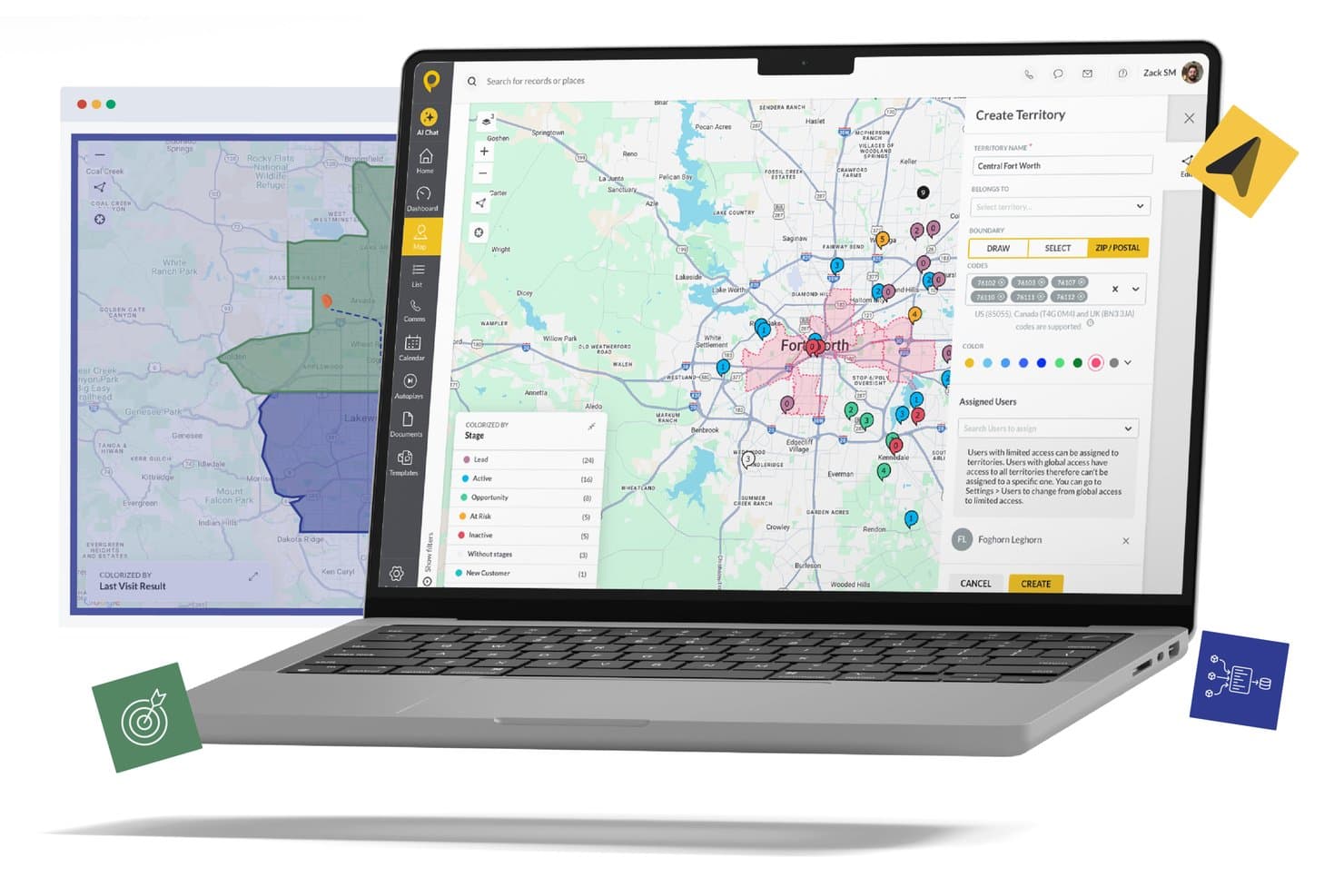
SPOTIO offers territory management tools that let field sales teams create, define, and assign geographic territories using ZIP codes and map boundaries. SPOTIO is a mobile-first field sales platform that combines territory management, route optimization, lead tracking, GPS-verified visit logging, and CRM integration for outside sales teams.
Who Is SPOTIO Best For?
SPOTIO is a strong fit for mid-sized to enterprise outside sales teams in industries like solar, roofing, telecom, and medical devices running 5 or more field reps.
Why I Picked SPOTIO
SPOTIO earns its spot on my shortlist because of how deeply it handles territory structure. I can define territories by zip code, county, or custom boundaries, then layer in hierarchies and permissions so each manager only sees and owns what's theirs. In practice, that means a regional director running 12 reps across three markets can segment coverage cleanly without overlap or confusion. The colorization and filtering tools make it easy to spot coverage gaps at a glance.
SPOTIO Key Features
- Mobile field app: Lets reps access schedules, log visits, and capture data offline from iOS or Android devices.
- Route planning and optimization: Automatically generates multi-stop routes based on location, priority, and schedule.
- Sales activity tracking: Captures GPS-verified check-ins and time-on-site for every field visit.
- CRM integration: Syncs account, contact, and activity data bidirectionally with Salesforce, HubSpot, and Microsoft Dynamics.
SPOTIO Integrations
SPOTIO offers native integrations with Salesforce, HubSpot, Microsoft Dynamics 365, NetSuite, and Pipedrive, and connects with Zapier. An open API is available for custom integrations.
Pros and Cons
Pros:
- GPS visit verification with geofenced check-ins
- Offline mobile app works in low-connectivity areas
- Granular hierarchical territory controls for managers
Cons:
- Limited forecasting depth for inside sales teams
- Reporting customization is limited at lower tiers
Learn more about SPOTIO: Best for enterprise mobile accessibility
- Not available
- From $40/user/month
Visit WebsiteCustomer Rating:4.7/5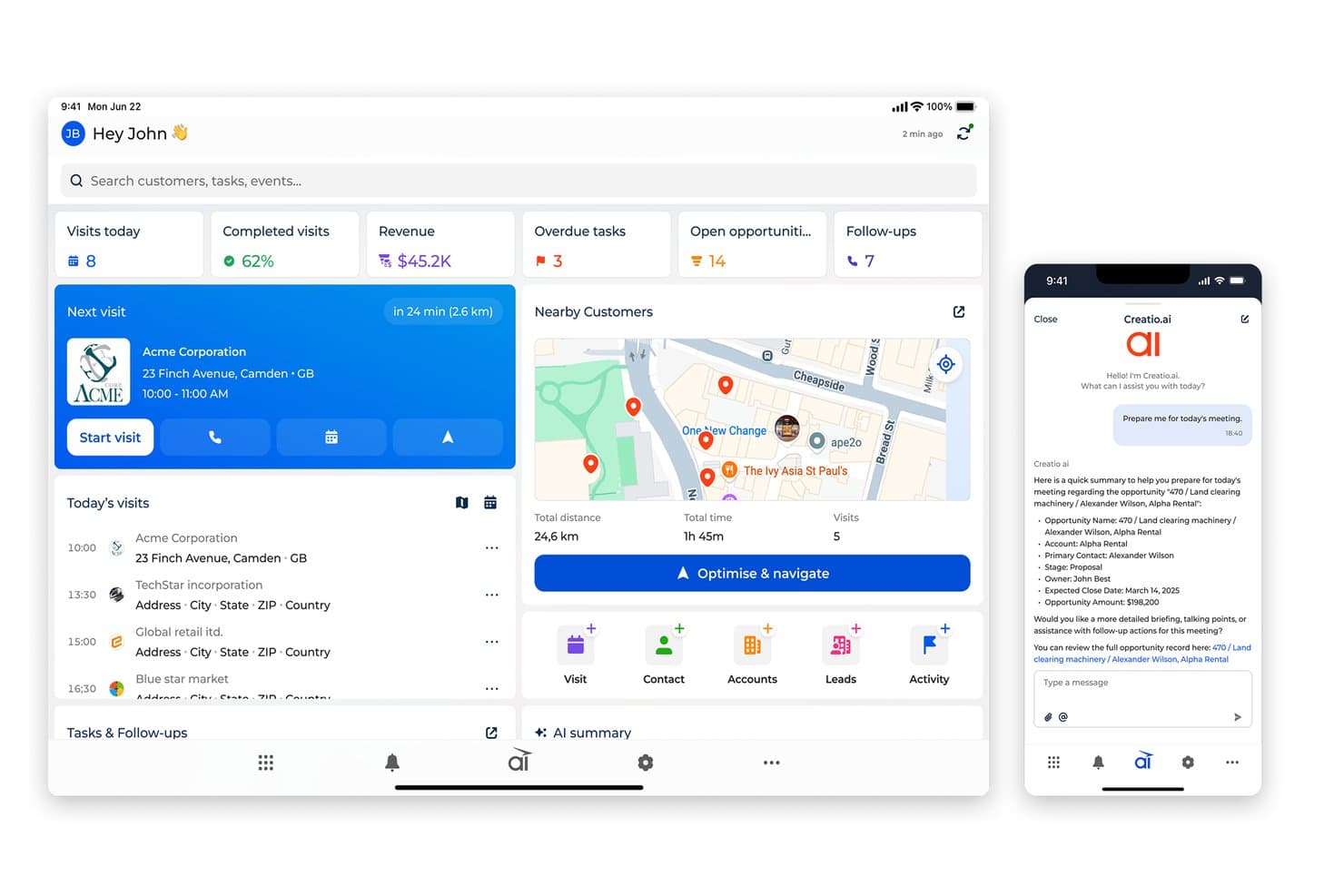
Creatio AI CRM gives field reps an AI-powered daily visit dashboard for field Service Workflows. Creatio AI CRM is an AI-native, no-code CRM platform designed to automate and streamline customer relationship management processes across various business functions. It offers a unified workspace that integrates marketing, sales, and customer service functionalities, supported by CRM AI agents.
One of the most notable features is its centralized management system, which allows for the scheduling of visits and tracking of locations via geo-tags. This feature is particularly beneficial for sales representatives who need to manage their time and routes efficiently.
Another significant feature of Creatio AI CRM is its mobile app, which enables sales representatives to manage visits, record meeting details, conduct presentations, monitor inventory, and place orders directly from their mobile devices. This mobile functionality is crucial for field sales teams who often work in environments where access to a desktop computer is not feasible.
Pros and Cons
Pros:
- Built-in CRM AI agents
- Unified marketing, sales, and service workspace
- AI-native, no-code workflow automation
Cons:
- Best suited to field sales teams
- Steep learning curve
Learn more about Creatio AI CRM: Best for offline B2B order capture
- Free trial available
- From $69/rep/month (billed annually)
Visit WebsiteCustomer Rating:4.6/5
SimplyDepo dashboard displaying sales metrics, order activity, route performance, and field rep insights across desktop and mobile views. For businesses navigating the complexities of field sales, SimplyDepo offers a tailored solution that enhances your team's efficiency and customer relationships. Whether you're a distributor, brand, or part of a retail execution team, SimplyDepo addresses the challenges of managing mobile sales, streamlining operations, and optimizing daily tasks. Its comprehensive suite of features ensures that you can focus on growth and customer satisfaction without getting bogged down by order processing or route planning inefficiencies.
Why I Picked SimplyDepo
I picked SimplyDepo for its unique ability to empower field sales operations through its dedicated sales rep app and route accounting capabilities. The sales rep app is a crucial tool for capturing orders and managing customer interactions in real time, even when offline, ensuring that your team never misses a sales opportunity. Additionally, the route accounting feature helps optimize sales routes and improve territory coverage, minimizing travel time and maximizing sales potential. These features directly address the operational challenges faced by field sales teams, making SimplyDepo an ideal choice for those seeking to enhance productivity and customer engagement.
SimplyDepo Key Features
In addition to its standout features, SimplyDepo offers several other capabilities that can benefit your team:
- B2B CRM: This feature helps you manage and nurture customer relationships by keeping all customer data and interactions in one centralized platform.
- Order Portal: Provides a dedicated space for managing orders, allowing for streamlined processing and reduced errors in order entry.
- Distribution Management: Allows you to oversee and manage distribution channels effectively, ensuring that products reach their destinations promptly.
- Retail Execution: Supports your team in executing retail strategies in the field, from monitoring shelf placements to managing promotional activities.
SimplyDepo Integrations
Integrations include Stripe, Twilio SendGrid, ShipStation, and QuickBooks.
Pros and Cons
Pros:
- Route planning and territory mapping
- Integrated CRM for account tracking
- Built-in B2B order management system
Cons:
- No transparent API documentation
- Limited advanced reporting customization
Learn more about SimplyDepo: Best field time tracking application
- 14-day free trial + free demo available
- From $40/month
Visit WebsiteCustomer Rating:4.7/5
ClockShark plots jobs and billable hours in an integrated field service planning platform. ClockShark is a field timesheet app that streamlines the process of finishing jobs and getting paid. Beyond creating timesheets, the solution comes equipped with tools to manage payroll, generate organized reports, simplify scheduling, and provide detailed job costing.
There is a variety of integrations available with ClockShark to automate admin work like entering payroll and job costing. This includes platforms such as QuickBooks, Sage 100 Contractor, Xero, ADP, Paychex and more.
The Basic plan starts at $3/mo per user (plus $20/mo base fee), the Standard plan costs $6/mo per user (plus $30/mo base fee), the Pro plan is priced at $8/mo per user (plus $50/mo base fee), and the Enterprise plan requires a quote. There is also a free 14-day trial option available.
Learn more about ClockShark: Best field service software for contractors
- Free demo available
- Pricing upon request
Visit WebsiteCustomer Rating:4.6/5
FieldPulse lets you schedule your day, including toggles to mark new, in progress, and complete jobs. FieldPulse is a contractor service solution that provides automation and sales tools that helps to boost sales, increase margins, exceed customer expectations and stimulate growth.
The solutions Sales Suite is an easy to use platform that helps to speed up sales processes, build trust with clients, and price work effectively.
There is a 7-day free trial available with no credit card required. The paid plans start at $59 for the base price and $30 per user thereafter.
Learn more about FieldPulse: Best route planner for field sales
- Free demo + 14-day free trial available
- From $58/user/month (billed annually)
Visit WebsiteCustomer Rating:4.6/5
Badger Maps lets you plan and track your service calls on a local map. Badger Maps is a powerful route planner and scheduling solution for field sales. Users can easily create routes by simply circling a set of points and the software will automatically provide a fully-optimized route. Furthermore, the system facilitates detailed, custom check-in reports, the ability to reassign accounts instantly, and follow-up reminders.
It’s also possible to integrate Badger Maps with your CRM for 2-way sync. Even if you have a custom setup, their team can arrange nightly ftp sync with your IT team.
The Business plan starts at $49 per user/month and the Enterprise plan starts at $95 per user/month (both when billed annually). There is also a 7-day free trial available for the Business plan with no credit card required.
Learn more about Badger Maps: Best for commercial service contractors
- Free demo available
- Pricing upon request
Visit WebsiteCustomer Rating:4.6/5
ServiceTrade helps you keep a database of customers and jobs and plot where key contacts are located on a map. ServiceTrade is a powerful customer service application for commercial service contractors. The solution helps companies to increase technician productivity by generating efficient routes and providing real-time updates to customers. It is accessible on all mobile devices making it easy to schedule and prioritize overdue work, job status, repair opportunities, and quote status.
The Select plan is priced at $79 per user a month and starts at 5 technicians, the Premium plan costs $119 user a month and is best for 10-20 techs, whilst the Enterprise plan comes at $159 user a month and is best for 20+ techs. Office users are free, so the pricing is solely based on technicians.
Learn more about ServiceTrade: Best for managing execution in the field
- Free demo available
- Pricing upon request
Visit WebsiteCustomer Rating:4.4/5
Repsly helps you schedule and execute jobs, as well as track billable hours. Repsly is a retail execution software that delivers real-time insights into sales performance. The solution facilitates smarter merchandising and promotion through its retail insights dashboards, as well as field team management and in-store execution features.
Repsly comes with a variety of integration possibilities with large CRM, ERP, BI, and HR platforms to connect with your workflows for updating customer data, tracking orders, and more.
To get a pricing quote you will need to contact Repsly’s sales team, who also offer the ability to schedule a demo.
Learn more about Repsly: Best for highly configurable setups
- 15-day free trial with no credit card required
- Pricing upon request
Visit WebsiteCustomer Rating:4.2/5
Odoo Field Service lets you plot out your services projects and tasks using a drag-and-drop calendar interface. Odoo Field Service is a powerful and mobile tool that enables users to schedule appointments, assign tasks to employees, plan routes, track working time, sell products, design custom worksheets, invoice for services, eSign reports, and provide quotations.
The solution streamlines field connectivity and can be accessed from any internet-connected device, simply through a web browser and not requiring any downloads.
The Odoo Field Service solution is fully integrated with other Odoo Apps, meaning you can sync field sales information with various operational platforms.
It comes with a 15-day free trial with no credit card required to try it out. For full pricing, you will need to get a quote.
Learn more about Odoo Field Service: Best for managing field technicians
- Free demo available
- Pricing upon request
Visit WebsiteCustomer Rating:4.1/5
FieldEdge helps you craft branded invoices for jobs completed. FieldEdge is a field service app that helps users to complete more jobs faster, streamline operations, and increase profitability. The solution is commonly used by HVAC, plumbing, electrician, locksmith, and appliance repair industries.
There is also the ability to integrate with QuickBooks and see all of your financial reflected in real-time to ensure there is no mismatched data.
For pricing you will need to request a quote. There is also the ability to request a demo.
Learn more about FieldEdge:
Outro software de vendas no terreno
\u003cspan style=\u0022font-weight: 400\u0022\u003eEis algumas opções adicionais de software de vendas no terreno que não entraram na minha seleção, mas que ainda vale a pena conhecer:\u003c/span\u003e
- 11InSitu SalesBest for real-time inventory and mobile invoicing
- 12JobberBest service scheduling software
- 13Housecall ProBest for home service businesses
How I Evaluate Field Sales Software
I evaluate field sales tools across two layers: core table stakes—route optimization, GPS visit tracking, CRM sync—and the differentiators that actually determine the right fit for a specific team.
Core Functionality (Table Stakes For This List)
When I'm selecting tools for my list, I rank each one on a scale from 0 (does not offer the functionality) to 5 (excels in this area) for each core functionality listed below. Then, I calculate the tool's total score into a percentage. Each tool needs to achieve a minimum total score of 65% to be considered for inclusion.
- Mobile Field App: I check whether reps can pull up account details, log visits, and capture signatures on a native app—especially offline, since rural routes and large warehouse sites regularly kill connectivity.
- Territory Management: Map-based territory assignment matters here, so I look for tools that let ops teams segment accounts by geography, rep capacity, or customer tier and rebalance without rebuilding from scratch.
- Route Planning & Optimization: A rep with eight stops across a metro area needs smart sequencing, so I evaluate whether the tool generates optimized routes based on location, priority, and estimated travel time.
- Visit Tracking & Check-Ins: GPS-verified check-ins give RevOps real proof of field activity. I look at whether the tool captures timestamps, geofenced entries, and time-on-site data tied back to each account.
- CRM Integration: Bidirectional sync with major CRMs like Salesforce, HubSpot, or Dynamics is what I evaluate here—field data should flow into the pipeline without manual re-entry from reps or ops.
- Field Activity Reporting: I look for dashboards that surface visit frequency, territory coverage, and pipeline contribution so managers and RevOps leads can tie field effort directly to revenue outcomes.
Once I have a list of tools that meet this criteria, I consider what sets each platform apart.
Differentiating Factors (What Sets Vendors Apart)
Here's how I compare and contrast different vendors:
Standout Features
Lead generation mapping is a big differentiator—I look for tools that surface nearby untapped accounts on a map so reps can fill gaps between scheduled visits instead of driving past opportunities. In-field order management also matters when reps need to build quotes and capture orders at the point of sale without switching apps. Voice-to-CRM logging is worth evaluating too, since reps driving between stops can dictate notes hands-free and have structured data sync back automatically.
Beyond Features
Mobile reliability and offline performance are top of mind for me, since field reps spend entire days on the road and a tool that drains battery or crashes without signal is a liability. I also evaluate tech stack integrations beyond CRM—connections to ERP or inventory systems give reps real-time pricing and stock data at the point of sale. Pricing model flexibility matters too, especially for teams that scale up with seasonal or contractor reps and need licensing that adjusts without locking into rigid enterprise minimums.
Como escolher o software de vendas no terreno certo para a sua empresa
É fácil ficar atolado em listas extensas de funcionalidades e estruturas de preços complexas. Para o ajudar a manter o foco enquanto percorre o seu processo específico de seleção de software, segue-se uma lista de verificação dos fatores a ter em conta:
| Fator | O que considerar |
|---|---|
| FatorEscalabilidade | O que considerarO software consegue acompanhar o crescimento da sua empresa? Verifique se suporta mais utilizadores ou funcionalidades à medida que a sua equipa cresce. |
| FatorIntegrações | O que considerarIntegra-se com as suas ferramentas existentes? Procure compatibilidade com o seu CRM, e-mail e outros sistemas que já utiliza. |
| FatorPersonalização | O que considerarPode adaptá-lo aos seus fluxos de trabalho? Certifique-se de que pode ajustar definições, campos e relatórios para corresponder aos processos da sua equipa. |
| FatorFacilidade de utilização | O que considerarÉ fácil de utilizar? Escolha um software com uma interface simples e uma navegação intuitiva para garantir uma rápida adoção pela sua equipa. |
| FatorImplementação e integração inicial | O que considerarQuanto tempo demora a configuração? Considere o tempo e os recursos necessários para começar a trabalhar, incluindo formação e suporte. |
| FatorCusto | O que considerarEstá dentro do seu orçamento? Compare os planos de preços e esteja atento a taxas ocultas ou custos de funcionalidades adicionais. |
| FatorMedidas de segurança | O que considerarComo protege os seus dados? Verifique a encriptação, a autenticação e a conformidade com os regulamentos de proteção de dados. |
O que é o software de vendas no terreno?
O software de vendas no terreno é uma ferramenta que ajuda os representantes de vendas a trabalharem de forma eficiente enquanto estão fora a reunir-se com clientes. É utilizado sobretudo por equipas de vendas que passam a maior parte do tempo na estrada, e não no escritório. Com funcionalidades como planeamento de rotas, processamento de encomendas e informações dos clientes em tempo real, este software permite que os representantes passem menos tempo com tarefas administrativas e mais tempo a estabelecer ligações com os clientes. Torna possível gerir horários, atualizar registos e tratar de tarefas de vendas a partir de qualquer lugar, para que se possa concentrar nas vendas — sem ficar sobrecarregado pelo trabalho administrativo.
Funcionalidades do software de vendas no terreno
Ao selecionar um software de vendas no terreno, esteja atento às seguintes funcionalidades essenciais:
- Acessibilidade móvel: Aceda a todas as ferramentas e dados de vendas essenciais através do seu telemóvel ou tablet. Isto permite-lhe consultar informações dos clientes, atualizar notas ou registar atividades diretamente no terreno — sem mais mensagens frenéticas para o escritório ou lembretes rabiscados em recibos.
- Gestão de territórios: Organize e atribua áreas geográficas aos seus representantes de vendas de forma eficiente. Com a gestão de territórios, pode garantir que cada área recebe a atenção necessária, ajudando a evitar sobreposições e oportunidades perdidas.
- Otimização de rotas: Aproveite ao máximo o seu tempo na estrada com agendamento e mapas inteligentes. Esta funcionalidade determina a forma mais eficiente de visitar todos os seus clientes, poupando horas que preferiria não passar preso no trânsito ou a atravessar a cidade de um lado para o outro.
- Acompanhamento de contactos e oportunidades: Acompanhe cada venda potencial à medida que avança no seu funil de vendas. Obtém uma visão clara de quem está no radar e de quais os negócios que estão a ganhar força — sem necessidade de notas autocolantes.
- Relatórios em tempo real: Gere instantaneamente relatórios atualizados sobre o desempenho das vendas, despesas e registos de atividades. Isto significa que pode mostrar ao seu gestor exatamente o que está a acontecer no terreno — sem esperar pelas folhas de cálculo do final da semana.
- Integração com CRM: Sincronize os dados de potenciais clientes e clientes entre o seu software de vendas no terreno e o seu CRM principal. Tudo se mantém automaticamente atualizado, para que possa agir com base nas informações mais recentes sem os problemas da introdução duplicada de dados.
- Gestão de encomendas: Crie, ajuste e submeta encomendas diretamente enquanto está reunido com os clientes. Não terá de esperar até regressar à sua secretária, o que significa clientes mais satisfeitos e menos vendas perdidas.
- Funcionalidade offline: Trabalhe sem ligação à Internet e sincronize os seus dados assim que voltar a estar online. Desta forma, mantém-se produtivo mesmo quando está a vender num café rural ou no armazém de um cliente com uma ligação Wi-Fi instável.
- Gestão de tarefas e calendário: Defina lembretes, planeie reuniões e acompanhe todas as suas tarefas diárias num único lugar. Pode manter-se organizado (e evitar perder aquela importante chamada de acompanhamento porque se esqueceu em que nota autocolante a escreveu).
Funcionalidades comuns de IA dos softwares de vendas no terreno
Para além das funcionalidades padrão do software de vendas no terreno acima mencionadas, muitas destas soluções estão a incorporar IA com funcionalidades como:
- Análise preditiva: Utilize a IA para prever quais os contactos com maior probabilidade de conversão com base em dados históricos e padrões de comportamento. Isto ajuda-o a dedicar o seu tempo às oportunidades mais importantes.
- Introdução automática de dados: A IA capta e sincroniza notas, registos de chamadas e detalhes de reuniões, para que não tenha de os introduzir manualmente mais tarde. Isto significa menos trabalho administrativo e mais vendas efetivas.
- Agendamento inteligente: A IA analisa tempos de deslocação, históricos de marcações e disponibilidade dos clientes para sugerir os horários ideais para as reuniões. Acabou-se o jogo de encaixe com o calendário — apenas dias inteligentes e eficientes.
- Informações para orientação de vendas: Obtenha sugestões personalizadas e feedback prático gerados por IA com base nas suas chamadas de vendas, correios eletrónicos e progresso das oportunidades. É como ter um treinador-assistente a acompanhá-lo, sem as conversas motivacionais constrangedoras.
- Classificação dinâmica de contactos: A IA avalia os contactos em tempo real, ajustando a sua prioridade com base na evolução dos sinais dos clientes e dos comportamentos de vendas. Sabe sempre quais os potenciais clientes que merecem a sua atenção neste momento.
Benefícios do software de vendas no terreno
A implementação de um software de vendas no terreno proporciona vários benefícios à sua equipa e à sua empresa. Eis alguns dos que pode esperar:
- Maior eficiência: Automatiza tarefas rotineiras, como o agendamento e o planeamento de rotas, libertando mais tempo para as vendas.
- Melhores relações com os clientes: Centraliza as interações com os clientes, facilitando o acompanhamento e a gestão das comunicações.
- Melhor desempenho de vendas: Oferece informações através do acompanhamento e dos relatórios das atividades de vendas, ajudando a identificar áreas de melhoria.
- Maior mobilidade: Proporciona acesso móvel, permitindo que os representantes de vendas trabalhem eficazmente a partir de qualquer lugar.
- Tomada de decisões informada: A sincronização de dados em tempo real garante que todos têm as informações mais recentes para tomar decisões fundamentadas.
- Gestão eficaz de territórios: Ajuda a equilibrar as cargas de trabalho e a maximizar a cobertura com ferramentas de gestão de territórios.
Custos e preços do software de vendas no terreno
A seleção de software de vendas no terreno exige uma compreensão dos vários modelos de preços e planos disponíveis. Os custos variam consoante as funcionalidades, o tamanho da equipa, os complementos e outros fatores. A tabela abaixo resume os planos mais comuns, os respetivos preços médios e as funcionalidades normalmente incluídas nas soluções de software de vendas no terreno:
Tabela de comparação de planos de software de vendas no terreno
| Tipo de plano | Preço médio | Funcionalidades comuns |
|---|---|---|
| Tipo de planoPlano gratuito | Preço médio$0 | Funcionalidades comunsGestão básica das interações com clientes, acompanhamento limitado da atividade de vendas e acesso móvel. |
| Tipo de planoPlano pessoal | Preço médio$5-$25/utilizador/mês | Funcionalidades comunsAgendamento melhorado, capacidades básicas de integração e painéis personalizáveis. |
| Tipo de planoPlano empresarial | Preço médio$30-$60/utilizador/mês | Funcionalidades comunsRelatórios avançados, otimização de rotas e sincronização de dados em tempo real. |
| Tipo de planoPlano corporativo | Preço médio$70-$120/utilizador/mês | Funcionalidades comunsGestão abrangente de territórios, integração completa com CRM e medidas de segurança avançadas. |
Perguntas frequentes sobre software de vendas no terreno
Eis algumas respostas a perguntas frequentes sobre software de vendas no terreno:
Como posso saber se a minha equipa precisa de software de vendas no terreno?
Se a sua equipa passa uma parte significativa do tempo no terreno e tem dificuldades em gerir marcações, acompanhar atividades de vendas e aceder a dados em mobilidade, o software de vendas no terreno pode ser benéfico. Ajuda a organizar estas tarefas e garante que todos têm acesso às informações mais recentes, o que pode contribuir para uma maior produtividade e melhores resultados de vendas.
O software de vendas no terreno pode integrar-se com o meu CRM atual?
Sim, a maioria das soluções de software de vendas no terreno oferece capacidades de integração com sistemas CRM populares. Verifique se o software é compatível com o seu CRM específico para garantir um fluxo de dados contínuo. A integração pode ajudar a sua equipa a evitar a introdução manual de dados e a manter todas as informações dos clientes atualizadas em todas as plataformas.
É necessário receber formação para utilizar software de vendas no terreno?
Sim, normalmente é necessária alguma formação, mas muitas soluções foram concebidas para serem fáceis de utilizar. Procure software com recursos abrangentes de integração, como vídeos de formação, visitas guiadas interativas e seminários online. Estes recursos podem ajudar a sua equipa a aprender rapidamente a utilizar o sistema de forma eficaz.
Como posso avaliar a segurança do software de vendas no terreno?
Avalie as funcionalidades de segurança do software verificando a existência de encriptação de dados, protocolos de autenticação e conformidade com regulamentos de proteção de dados, como o RGPD. Pergunte ao fornecedor quais são as suas medidas de segurança e analise quaisquer certificações ou auditorias concluídas para garantir que os seus dados permanecem seguros.
O software de vendas no terreno pode funcionar offline?
Sim, a maioria das ferramentas modernas de vendas no terreno inclui funcionalidades offline, permitindo aos representantes registar atividades e atualizar dados mesmo sem acesso à Internet, sincronizando-os automaticamente quando a ligação for restabelecida.
O software de vendas no terreno é fácil de utilizar em dispositivos móveis?
Sim, a maioria das soluções foi concebida prioritariamente para dispositivos móveis ou inclui aplicações dedicadas que permitem aos representantes no terreno registar dados, aceder aos detalhes dos clientes e gerir tarefas diretamente a partir dos seus smartphones ou tablets.
