As alternativas ao HubSpot ajudam-no a encontrar as ferramentas certas para melhorar o atendimento ao cliente, impulsionar as vendas e fortalecer os relacionamentos, sem a complexidade de escolher entre dezenas de opções. A escolha certa pode simplificar os seus processos, adaptar-se ao seu fluxo de trabalho e apoiar o seu crescimento — independentemente da dimensão da sua equipa.
Testei pessoalmente várias alternativas ao HubSpot com diferentes equipas e projetos. Neste artigo, analiso as melhores opções para o ajudar a escolher com confiança aquela que melhor se adapta às suas necessidades.
Why Trust Our Software Recommendations
6,700+
Reviews
20
Industry experts
16+
Evaluation factors
14
Years
Our reviews reflect our independent judgment—not a sales pitch. Learn how we stay transparent.
For this guide, we evaluated tools using hands-on testing and independent research, scoring tools using our selection criteria.
Our reviews reflect our human editorial judgment, not a sales pitch.
Tabela de comparação das alternativas ao HubSpot
| Tool | Best For | Trial Info | Price | ||
|---|---|---|---|---|---|
| 1 | Best for customizable workflows | 14-day free trial + free demo available | From $12/user/month (billed annually) | Website | |
| 2 | Best for no-code CRM customization | Not available | From $40/user/month | Website | |
| 3 | Best alternative for CRM flexibility | Free plan + 14-day trial + demo available | From $44/user/month | Website | |
| 4 | Best alternative for large sales teams | 30-day free trial | From $25/user/month | Website | |
| 5 | Best for automated CRM data updates | 30-day free trial + free demo available | From $39/user/month | Website | |
| 6 | Best for managing contacts and sales | Free plan + 14-day trial available | From $22/user/month | Website | |
| 7 | Best alternative for small businesses | Free plan + 15-day free trial+ free demo available | From $14/user/month (billed annually) | Website | |
| 8 | Best for affordable all-in-one CRM and marketing | Free plan + free demo available | From $11.04/user/month (billed annually) | Website | |
| 9 | Best alternative for visual sales management | 14-day free trial | From $14/user/month (billed annually) | Website | |
| 10 | Best alternative for agencies | Free demo available | Pricing upon request | Website |


Avaliações das melhores alternativas ao HubSpot
Eis uma visão geral de cada alternativa ao HubSpot. Explico como se comparam com o HubSpot, as vantagens de migrar para cada ferramenta, quanto custam e como se integram na sua atual estrutura tecnológica.
 Best for customizable workflows
- 14-day free trial + free demo available
- From $12/user/month (billed annually)
Visit WebsiteCustomer Rating:4.6/5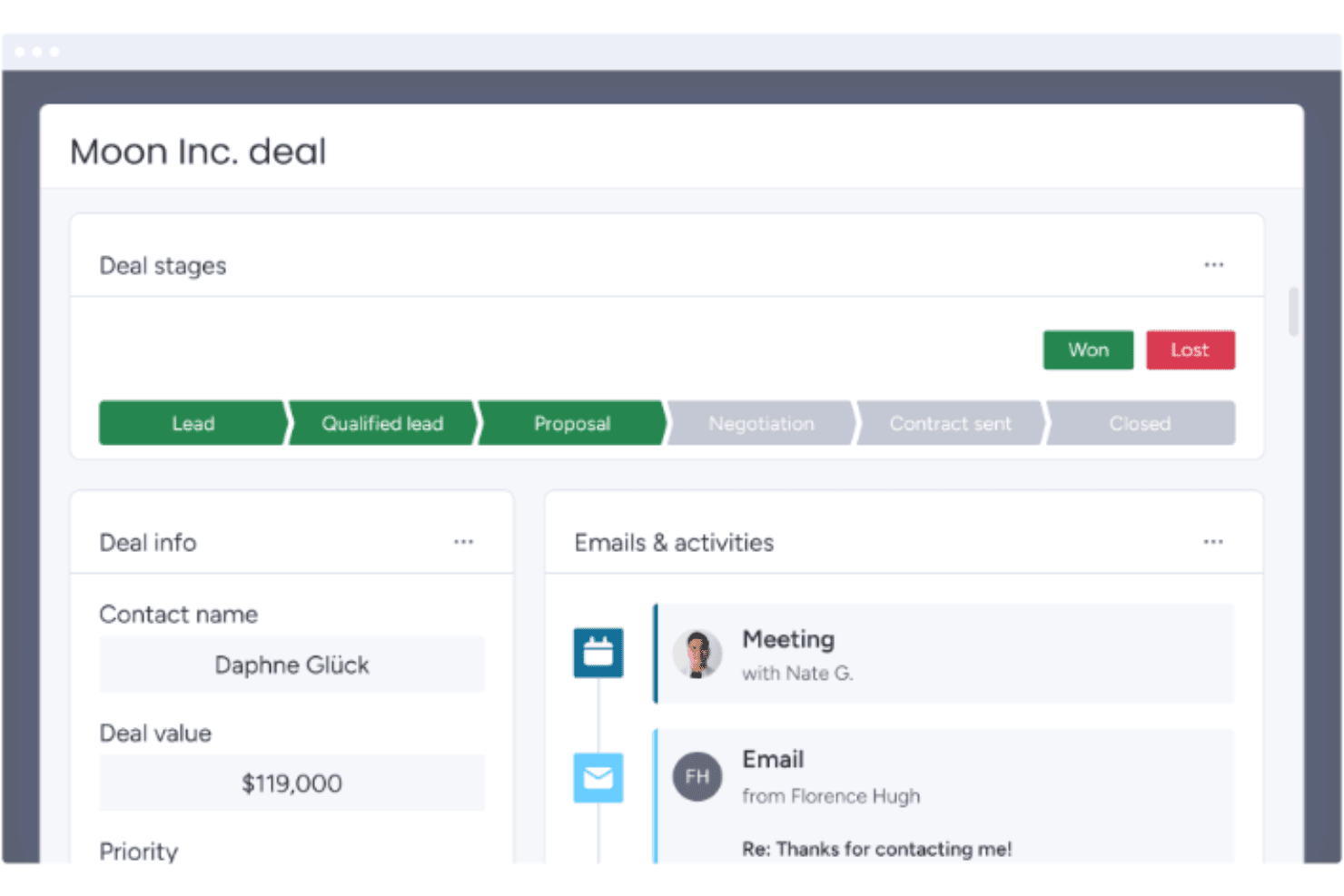
monday CRM tracks deal stages and activity history in one view. monday CRM is a no-code CRM platform that covers lead management, contact and deal tracking, sales pipeline automation, email sequences, and customizable reporting dashboards.
Who Is monday CRM Best For?
monday CRM is a strong fit for sales operations teams that need a flexible, no-code pipeline they can configure and iterate on without engineering support.
Why I Picked monday CRM
monday CRM earns its spot on my shortlist because its no-code pipeline customization is genuinely practical for teams migrating away from HubSpot. I can reshape deal stages, add custom fields, and spin up new pipelines without touching a single line of code. The built-in Sequences let me build multi-step outreach with conditional removal triggers, and AI-powered data fields auto-fill record details like sentiment and next steps across the board.
monday CRM Key Features
- Lead sourcing agent: An AI agent that automatically finds, enriches, and scores new leads against your target profile.
- Quotes and invoices: Generate customizable quotes and invoices directly from deal records, with support for discounts, taxes, and PDF downloads.
- Mobile CRM with smart call: Make and receive customer calls from the iOS or Android app, with calls automatically recorded, transcribed, and logged to contact records.
- Cross-board dashboards: Aggregate deal, pipeline, and team performance data from multiple boards into a single real-time dashboard with advanced filter conditions.
monday CRM Integrations
monday CRM lists 200+ integrations on its features page and 500+ integrations and apps on its integrations page, including Slack, Microsoft Teams, Zoom, Gmail, LinkedIn, QuickBooks, Stripe, DocuSign, and Google Drive. Its open GraphQL API and SDK support custom integrations.
Pros and Cons
Pros:
- Sequences automate conditional sales follow-up
- Cross-board dashboards clarify funnel performance
- Adaptable pipelines need no developer support
Cons:
- Gmail activity logging can prove inconsistent
- Marketing automation trails dedicated CRM suites
 Best for no-code CRM customization
- Not available
- From $40/user/month
Visit WebsiteCustomer Rating:4.7/5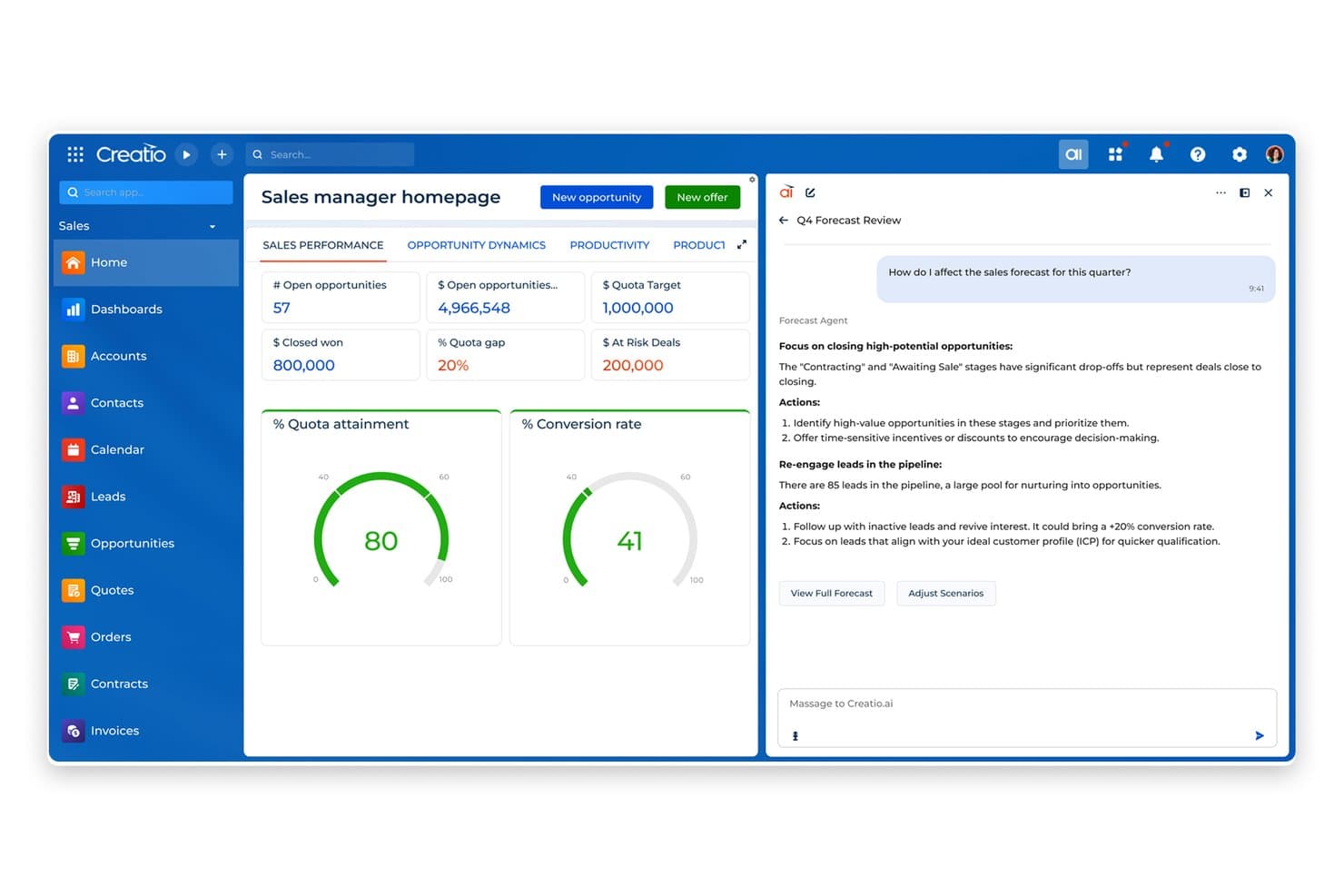
Creatio AI CRM helps sales teams track performance and prioritize deals using AI agent insights. Creatio AI CRM is an AI-native CRM and workflow platform that unifies marketing, sales, and service functions with AI-powered automation, configurable pipelines, campaign management, and cross-team reporting.
Who Is Creatio AI CRM Best For?
Creatio AI CRM is a strong fit for mid-market sales ops teams that need deep workflow customization without relying on developers for every change.
Why I Picked Creatio AI CRM
I've included Creatio AI CRM in my top picks because it combines no-code customization with AI coding agents to accelerate CRM and workflow development. Sales ops teams can reconfigure pipelines, opportunity stages, and workflow logic directly in the UI, without filing a ticket with a developer. I also like that configurable dashboards pull together sales, marketing, and service data in one view, so cross-team visibility is built into how the platform works, not bolted on afterward.
Creatio AI CRM Key Features
- AI-powered lead scoring: Automatically ranks leads using AI to help sales teams prioritize outreach based on conversion likelihood.
- Territory management: Organizes sales territories and supports account, lead, and opportunity assignments across territory levels.
- Omnichannel campaign management: Plans and runs campaigns across multiple channels, with lead-source tracking using UTM codes and referrers.
- Granular access permissions: Controls read, edit, and delete access at the object, record, and column level for individual users or roles.
- AI agents: Ready-to-use CRM AI agents and AI agent builder.
Creatio AI CRM Integrations
Creatio AI CRM has marketplace integrations for Google Calendar, Microsoft Exchange, Microsoft Power BI Desktop, Apollo.io, PandaDoc, and Zapier. It also supports Open API, REST, OData 3 and 4, custom RESTful web services, and webhooks for custom integrations.
Pros and Cons
Pros:
- Sequences coordinate email, calls, and sales tasks
- Shared records connect sales, marketing, and service
- No-code pipeline changes avoid developer tickets
Cons:
- New users face dense configuration choices
- Email tools lack a landing-page builder
Learn more about Creatio AI CRM: Best alternative for CRM flexibility
- Free plan + 14-day trial + demo available
- From $44/user/month
Visit WebsiteCustomer Rating:4.5/5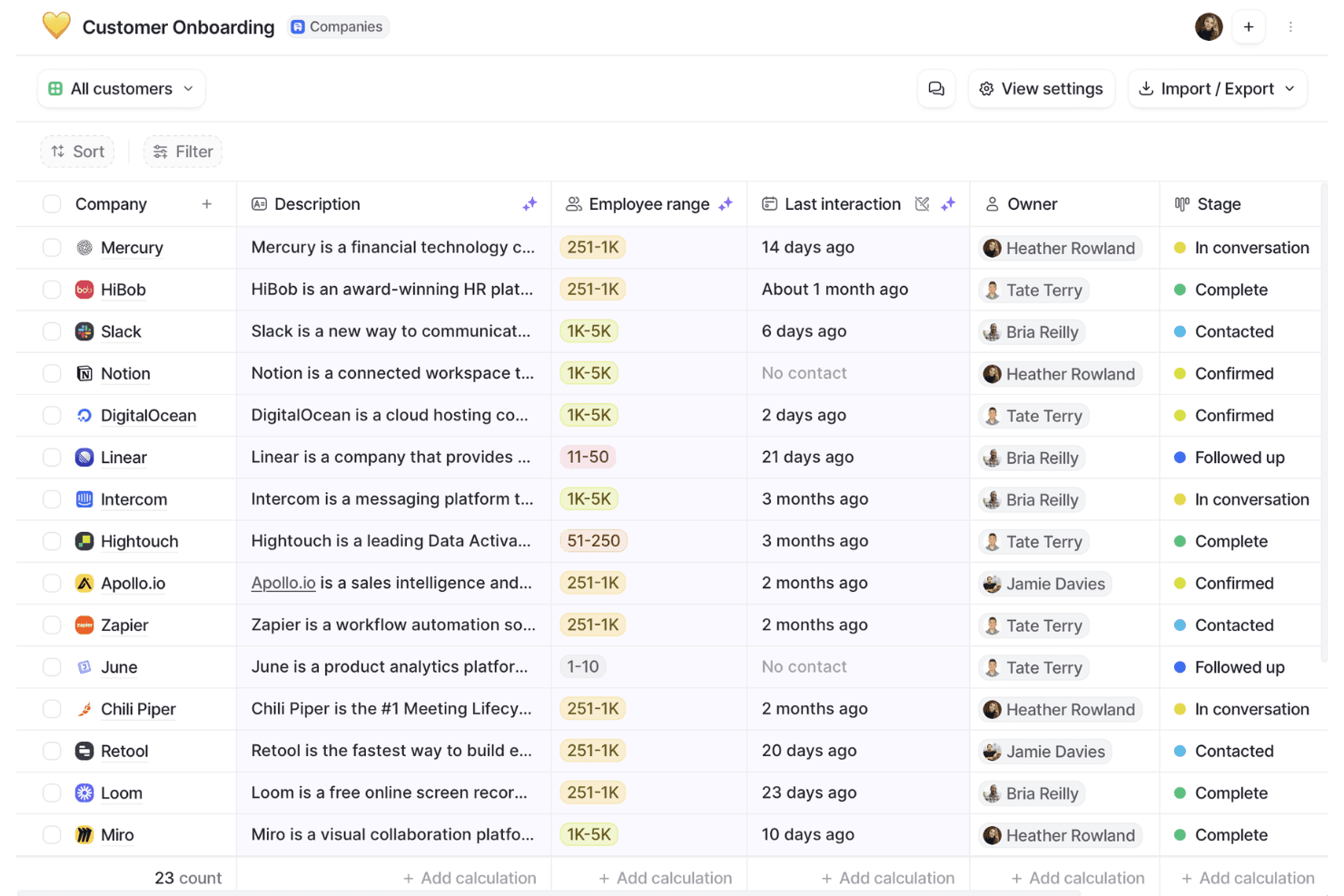
Attio organizes customer onboarding pipelines with stage tracking. Attio is a CRM platform built around a flexible, customizable data model that supports contact and company management, configurable sales pipelines, workflow automation, AI-powered enrichment, and a developer-friendly API.
Who Is Attio Best For?
Attio is a strong fit for sales-led teams that need a CRM they can shape to their own data model, not one they have to conform to.
Why I Picked Attio
Attio earns its spot on my shortlist because its custom objects and bidirectional relationships let you build a data model that mirrors how your team actually sells, rather than forcing your process into a rigid structure. I love that you can define your own objects, set formula-based lead scoring from your own signals, and configure weighted pipeline views by stage probability, all without touching code. Where HubSpot locks you into its schema, Attio hands you the architecture.
Attio Key Features
- Workflow automation: Triggers actions from record events, attribute changes, schedules, or webhooks, with conditional paths and steps for updating records, routing leads, or enrolling contacts in sequences.
- AI-powered data enrichment: Automatically enriches company and person records with details like employee counts, funding, ARR, social profiles, and location without manual input.
- Configurable access permissions: Controls visibility and editing rights at the workspace level, with advanced permissions available on Pro and Enterprise for more granular team management.
- SQL access to workspace data: Lets developers query CRM records directly using SQL for custom reporting and data workflows outside the native interface.
Attio Integrations
Attio offers native integrations with Gmail, Outlook, Slack, Google Sheets, Hightouch, Apollo, Mailchimp, Typeform, and Zapier, plus marketplace integrations. It also supports a REST API, webhooks, App SDK, MCP, and SQL access.
Pros and Cons
Pros:
- Shared account context supports customer-success handoffs
- Formula scoring supports weighted pipeline visibility
- Flexible objects model complex revenue relationships
Cons:
- Reports omit sequences, meetings, and emails
- No native email marketing campaign engine
Learn more about Attio: Best alternative for large sales teams
- 30-day free trial
- From $25/user/month
Visit WebsiteCustomer Rating:4.2/5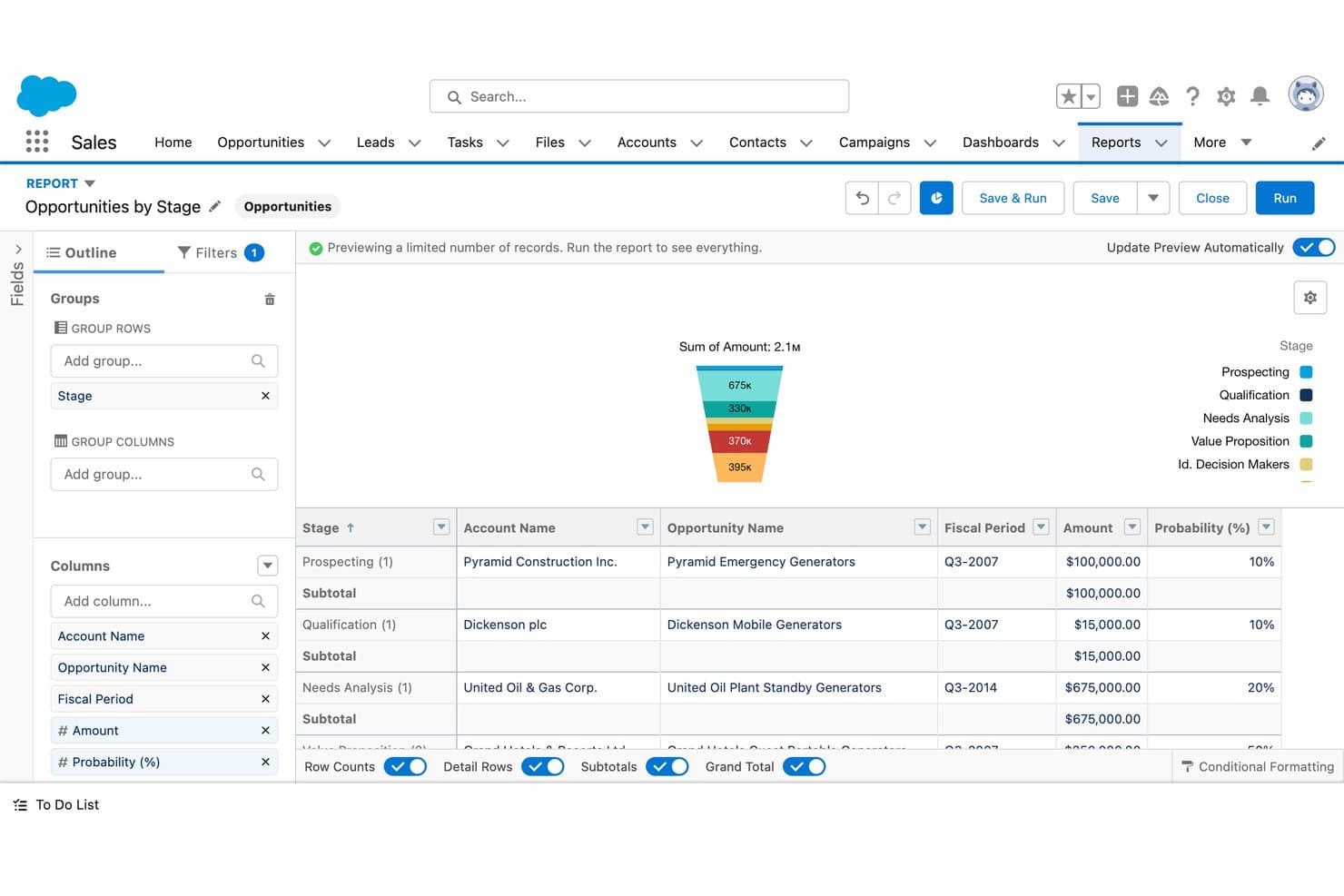
Salesforce CRM visualizes sales pipeline stages with a funnel chart. Salesforce CRM is a sales-focused CRM platform that covers contact and account management, pipeline tracking, sales forecasting, workflow automation, and AI-assisted deal insights across the full sales cycle.
Who Is Salesforce CRM Best For?
Salesforce CRM is a strong fit for large sales teams that need deep pipeline visibility, AI-assisted forecasting, and a customizable CRM they can scale over time.
Why I Picked Salesforce CRM
Salesforce CRM earns its spot on my shortlist because it's the go-to option for large sales teams that need serious pipeline depth and AI-assisted forecasting that HubSpot simply can't match at scale. I love how Pipeline Inspection gives sales ops leaders a consolidated, real-time view of every deal, with AI-driven deal insights surfaced directly alongside opportunity records. Agentforce can also auto-update opportunity records from sales conversations and generate tailored quotes using business and finance rules, cutting the manual work that slows big teams down.
Salesforce CRM Key Features
- Sales cadences: Build step-by-step outreach sequences combining email, phone, and social tasks to guide reps through a structured prospecting process.
- Territory management: Assign and manage account coverage across territories to align rep workload with sales goals.
- Contract approval workflows: Automate multi-step contract approvals directly within the platform, connected to opportunity records.
- Partner portal: Give channel partners a branded portal with access to seller tools, pipeline visibility, and AI-assisted product recommendations.
Salesforce CRM Integrations
Salesforce CRM offers marketplace integrations with Claude, Google Drive, and Slack through AgentExchange. It also supports REST, GraphQL, SOAP, platform events, and change data capture APIs for custom integrations.
Pros and Cons
Pros:
- Custom reports clarify sales performance trends
- Shared pipeline views support deal forecasting
- Centralized account histories reduce spreadsheet handoffs
Cons:
- HubSpot migrations require careful history mapping
- Marketing journeys need additional capabilities
Learn more about Salesforce CRM: Best for automated CRM data updates
- 30-day free trial + free demo available
- From $39/user/month
Visit WebsiteCustomer Rating:4.7/5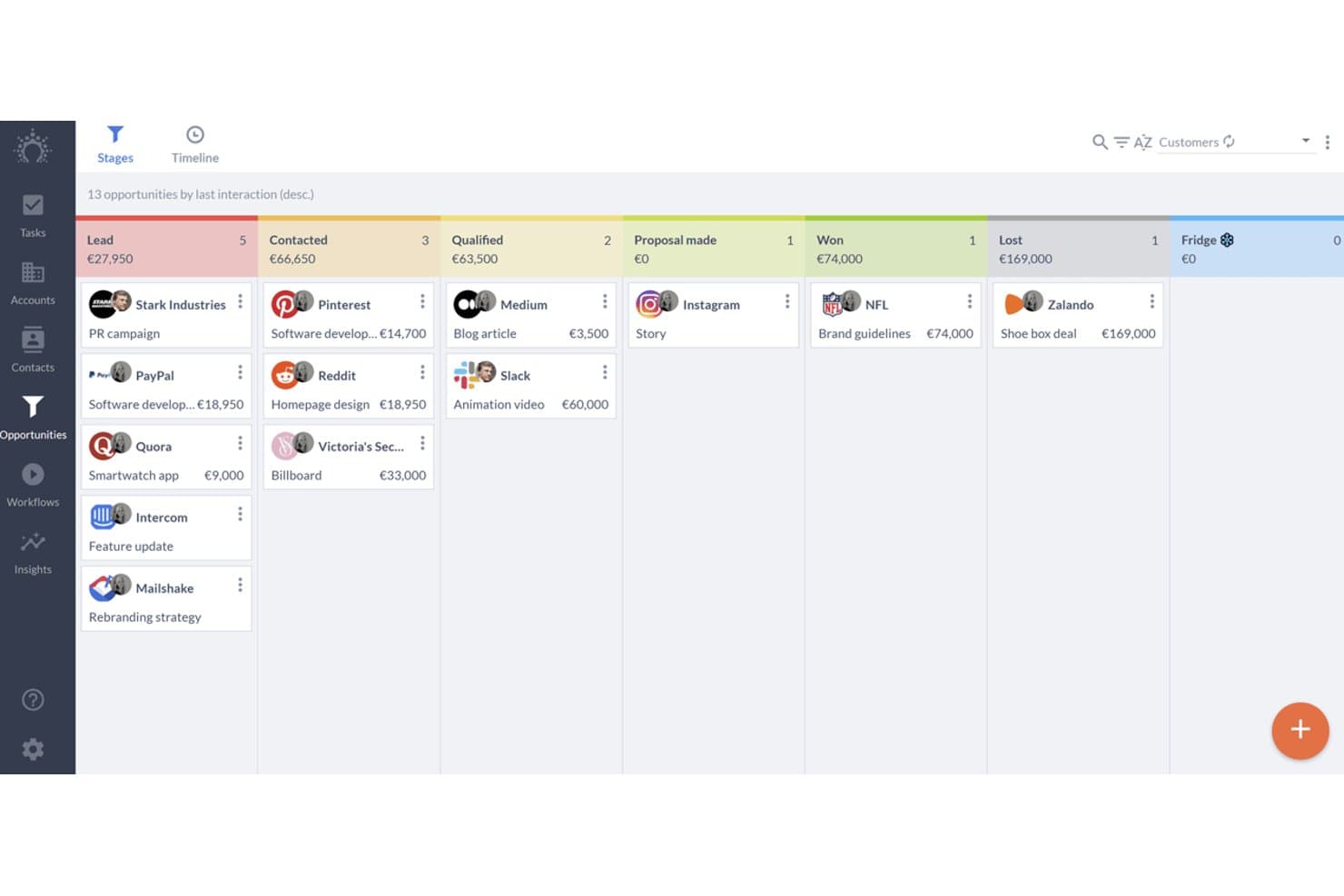
Salesflare organizes sales deals across pipeline stages visually. Salesflare is a sales-focused CRM for B2B teams that combines automated contact and company data capture, visual pipeline management, email integration, and sales engagement sequences.
Who Is Salesflare Best For?
Salesflare fits small and mid-sized B2B sales teams that want their CRM to handle data entry automatically, so reps can focus on selling instead of logging.
Why I Picked Salesflare
I picked Salesflare as one of the best because it's the only CRM on this list that pulls contact and company data directly from your emails, calendar, and phone logs without any manual input. If your reps are losing time updating records instead of selling, Salesflare's automatic activity capture fixes that at the source. I also like how its AI assistant can summarize a contact's full timeline and surface next steps, so you stay on top of deals without digging through notes.
Salesflare Key Features
- Multiple sales pipelines: Create and customize separate pipelines with editable stages to manage different products, regions, or sales motions simultaneously.
- Role-based user permissions: Assign admins, managers, team members, or viewers with data scopes covering own, group, or team-wide records.
- Lead finder and email finder: Search for leads by industry, geography, or role directly from the CRM and retrieve verified business email addresses.
- Relationship intelligence: Maps your team's contact network and tracks relationship strength, interaction frequency, and recency across accounts.
Salesflare Integrations
Salesflare offers native integrations with Google Workspace, Microsoft 365, LinkedIn, Better Proposals, Landigi, StoryChief, and Leadworx. It also provides an API and integrations through Zapier and Make.
Pros and Cons
Pros:
- Email sequences support sales-led nurturing
- Visual pipelines keep follow-ups visible
- Automatic activity capture reduces CRM data entry
Cons:
- CSV imports can frustrate data migration
- Marketing automation trails broader HubSpot suite
Learn more about Salesflare: Best for managing contacts and sales
- Free plan + 14-day trial available
- From $22/user/month
Visit WebsiteCustomer Rating:4.7/5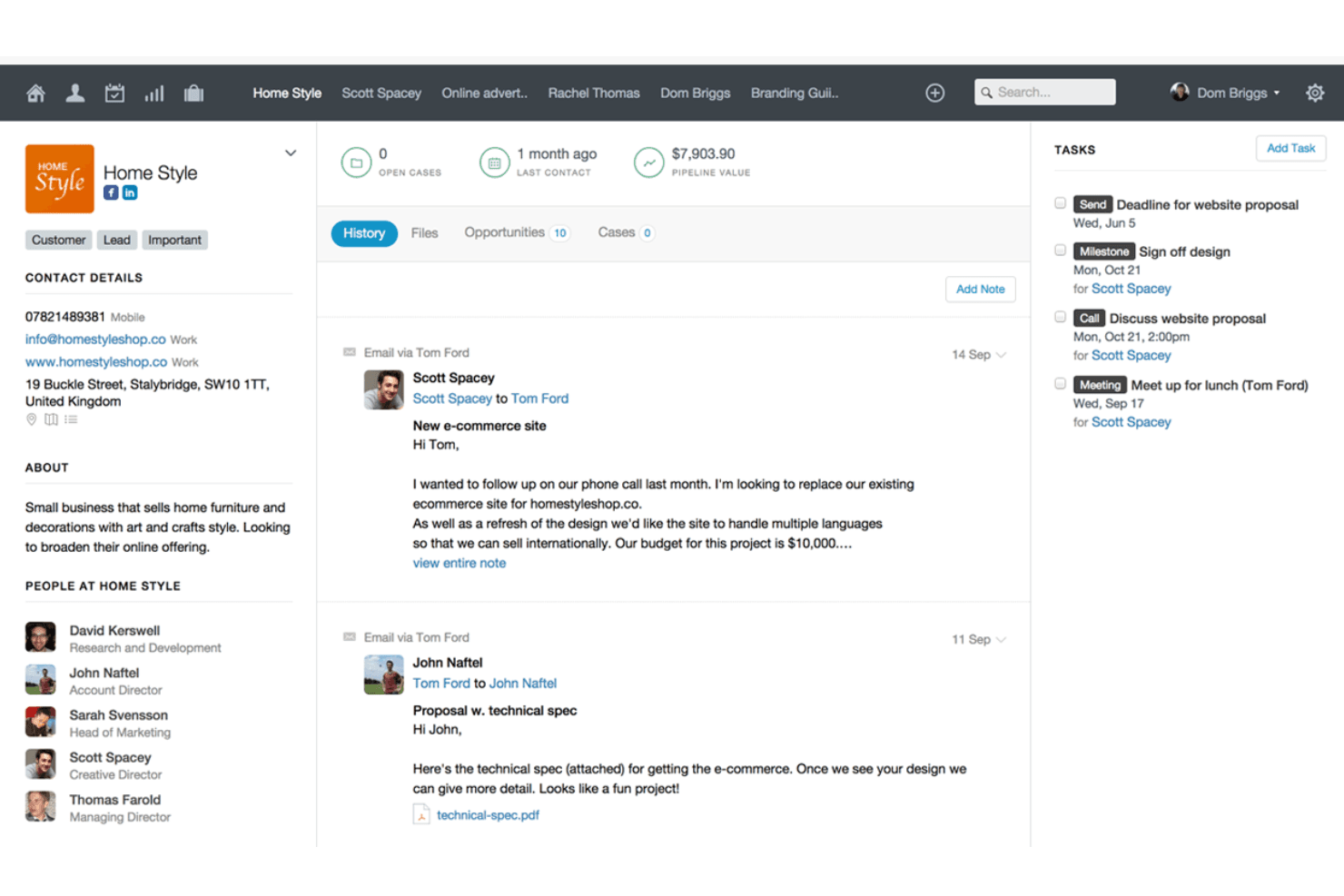
Capsule centralizes client history, tasks, and contact details in one view. Capsule CRM is a contact and sales management platform that brings together pipeline tracking, task management, project boards, reporting dashboards, and a broad integration marketplace in one CRM built for small and mid-sized teams.
Who Is Capsule Best For?
Capsule is a strong fit for small and mid-sized sales teams that want a clean, affordable CRM without the overhead of a larger platform.
Why I Picked Capsule
I picked Capsule as one of the best because its contact and pipeline management is genuinely tight: every interaction, note, and opportunity links back to a single contact record, so nothing falls through the cracks. I especially like the AI Meeting Prep feature, which pulls together recent history, risks, and open opportunities before a call without you having to dig through records manually. The customizable multi-pipeline setup also lets sales teams run separate processes for different products or markets in parallel.
Capsule Key Features
- Workflow automations: Triggers sequences of tasks, email notifications, or stage changes across pipeline and project boards on Growth and higher plans.
- Reporting dashboards: Displays task, pipeline, conversion, project, and contact views with filters by date, user, team, and custom fields.
- Email sync: Automatically logs emails against selected Capsule contacts, keeping communication history tied directly to contact records.
- Website form lead capture: Captures incoming leads through a form on your website and routes them into Capsule as new contacts.
Capsule Integrations
Capsule lists 100+ integrations, including native Transpond and Gmail connections plus marketplace integrations for Xero, Google Calendar, Mailchimp, Zendesk, and QuickBooks Online. It also offers a REST API, REST hooks, and Zapier.
Pros and Cons
Pros:
- Simple CRM keeps sales work focused
- Visual pipelines clarify deal stages and forecasts
- Contact history and follow-ups stay connected
Cons:
- Reporting depth may limit complex analysis
- Email nurturing depends on separate marketing capabilities
Learn more about Capsule: Best alternative for small businesses
- Free plan + 15-day free trial+ free demo available
- From $14/user/month (billed annually)
Visit WebsiteCustomer Rating:4.2/5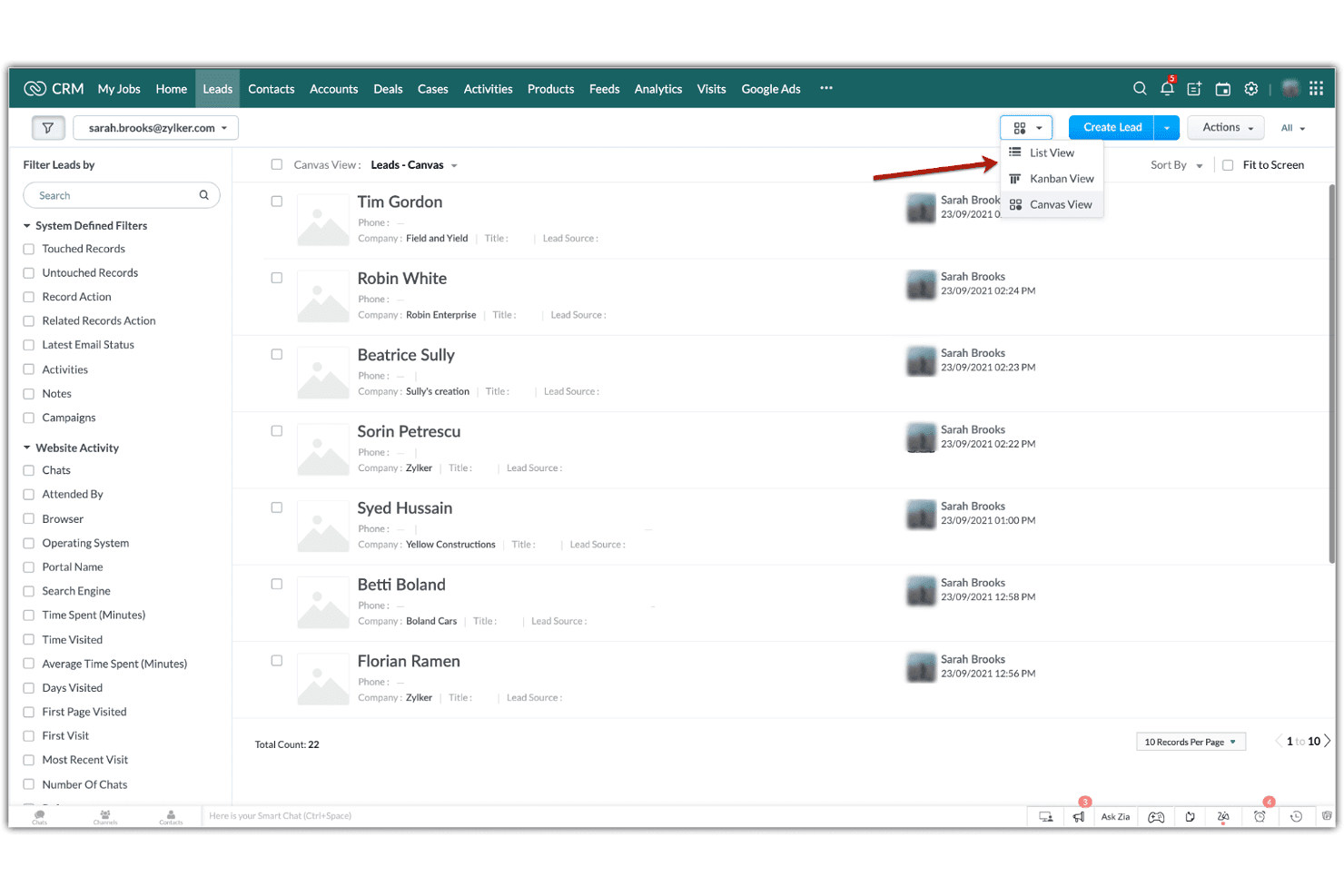
Zoho CRM lets users switch between List, Kanban, and Canvas views for leads. Zoho CRM is a customer relationship management platform that combines contact and lead management, multi-pipeline sales tracking, workflow automation, cadence-based follow-up sequences, and reporting dashboards.
Who Is Zoho CRM Best For?
Zoho CRM is a strong fit for small businesses that need a capable, affordable CRM without committing to HubSpot's pricing.
Why I Picked Zoho CRM
Zoho CRM earns its spot on my shortlist because it gives small businesses a genuinely capable CRM without locking you into HubSpot's pricing model. I particularly like Cadences, which let you build branching follow-up sequences across email, calls, tasks, and WhatsApp based on how a prospect actually responds. Multi-pipeline management is solid too, letting small teams track separate sales motions with customizable stages and probabilities without upgrading to an enterprise tier.
Zoho CRM Key Features
- Zia AI assistant: Zia delivers lead scoring, churn predictions, anomaly alerts, and next-best-action recommendations directly within your CRM records.
- Blueprint process management: Blueprint guides sales reps through structured, step-by-step sales processes with conditional rules and required fields at each stage.
- Canvas no-code layout builder: Canvas lets you redesign CRM pages, fields, and layouts visually without writing any code.
- Role-based record permissions: Assign Read Only, Read/Write, or Full Access at the role level, with higher hierarchy roles automatically accessing records from users below them.
Zoho CRM Integrations
Zoho CRM offers 1,100+ ready-to-use app integrations, including Gmail, Outlook, Slack, Zoom, Microsoft Teams, Google Ads, and QuickBooks. REST, Bulk, Notification, COQL, and GraphQL APIs support custom integrations.
Pros and Cons
Pros:
- Shared dashboards support sales performance visibility
- Multiple pipelines track distinct sales motions
- Branching Cadences adapt follow-ups to prospect responses
Cons:
- Cadence changes can require cloning sequences
- Newsletter design may need separate campaign tools
 Best for affordable all-in-one CRM and marketing
- Free plan + free demo available
- From $11.04/user/month (billed annually)
Visit WebsiteCustomer Rating:4.6/5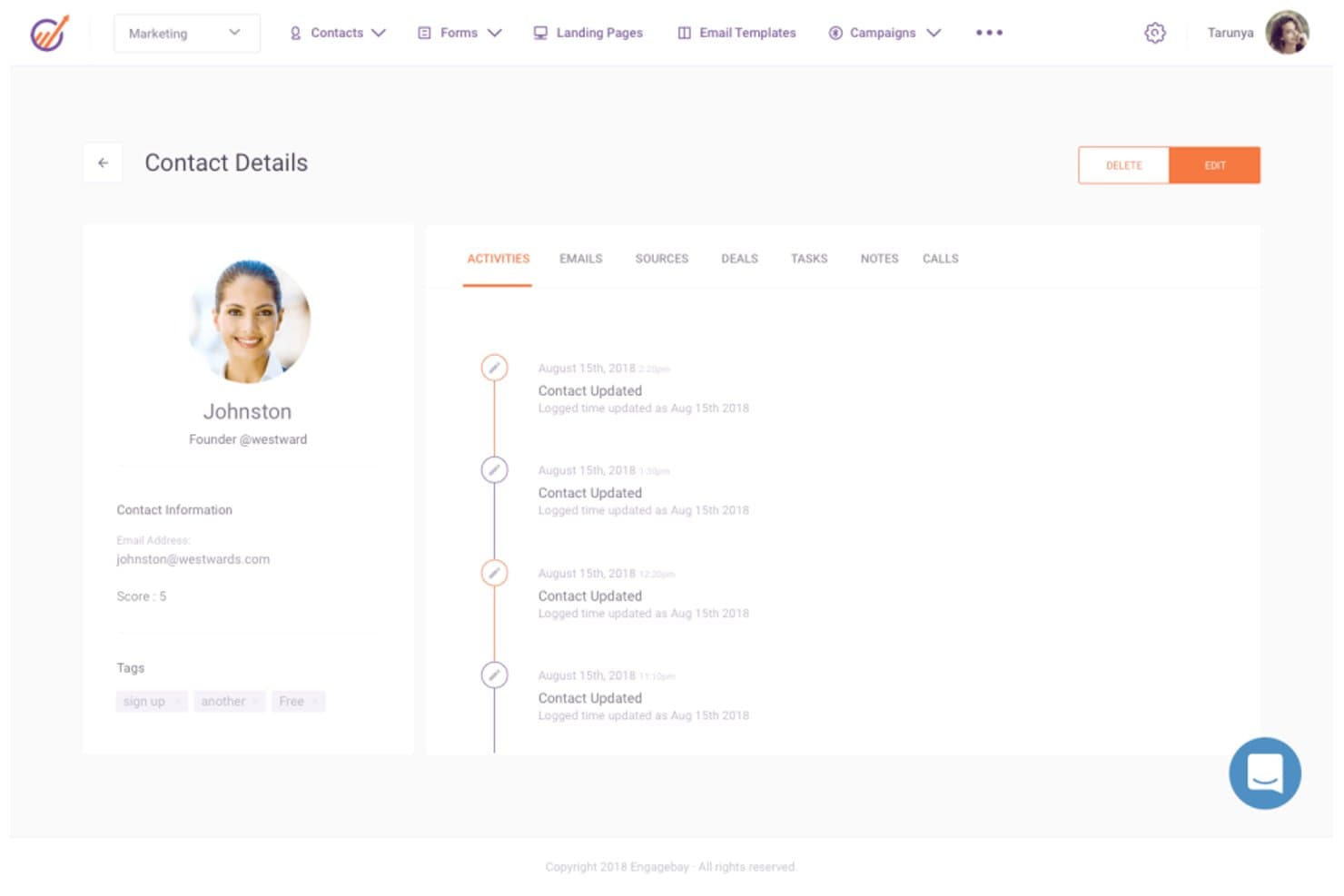
EngageBay displays a full contact activity timeline and details. EngageBay is an all-in-one CRM platform that combines contact management, email marketing, sales pipeline tracking, marketing automation, and customer support tools in a single suite.
Who Is EngageBay Best For?
EngageBay is a strong fit for small businesses and early-stage teams that need CRM, marketing, and support tools in one place without paying HubSpot-level prices.
Why I Picked EngageBay
I picked EngageBay as one of the best because it bundles CRM, email marketing, sales pipeline tracking, and help desk tools into a single platform at a fraction of what HubSpot costs. I particularly like how the Deals module lets you build custom tracks and milestones, move deals through stages by drag and drop, and tie each deal to contacts, proposals, and documents without switching tools. Email sequences are also genuinely useful, with per-email control over timing, sending days, and timezone, plus built-in open and click reporting.
EngageBay Key Features
- Predictive lead scoring: Automatically adds or deducts points from contact records based on configurable criteria, helping you prioritize the most sales-ready leads.
- HubSpot, Salesforce, and Pipedrive sync: Pulls contacts, companies, tracks, and deals from your existing CRM directly into EngageBay so you're not starting from scratch.
- Ticket management and service automation: Lets support teams log, track, and automate customer tickets within the same platform your sales and marketing teams already use.
- Team goal tracking: Sets deal- or revenue-based goals per team member across monthly, quarterly, or annual periods, with measurements like Deals Created and Call Logs built in.
EngageBay Integrations
EngageBay lists 250+ integrations, including HubSpot, Salesforce, Pipedrive, Shopify, Stripe, QuickBooks, Twilio, and Zapier. It also provides a REST API and MCP server for custom integrations.
Pros and Cons
Pros:
- Email sequences offer per-message timing controls
- Configurable deal stages support practical pipeline tracking
- Shared records connect sales, marketing, and support
Cons:
- Reporting lacks multi-touch attribution depth
- Workflows require manual execution
Learn more about EngageBay: Best alternative for visual sales management
- 14-day free trial
- From $14/user/month (billed annually)
Visit WebsiteCustomer Rating:4.5/5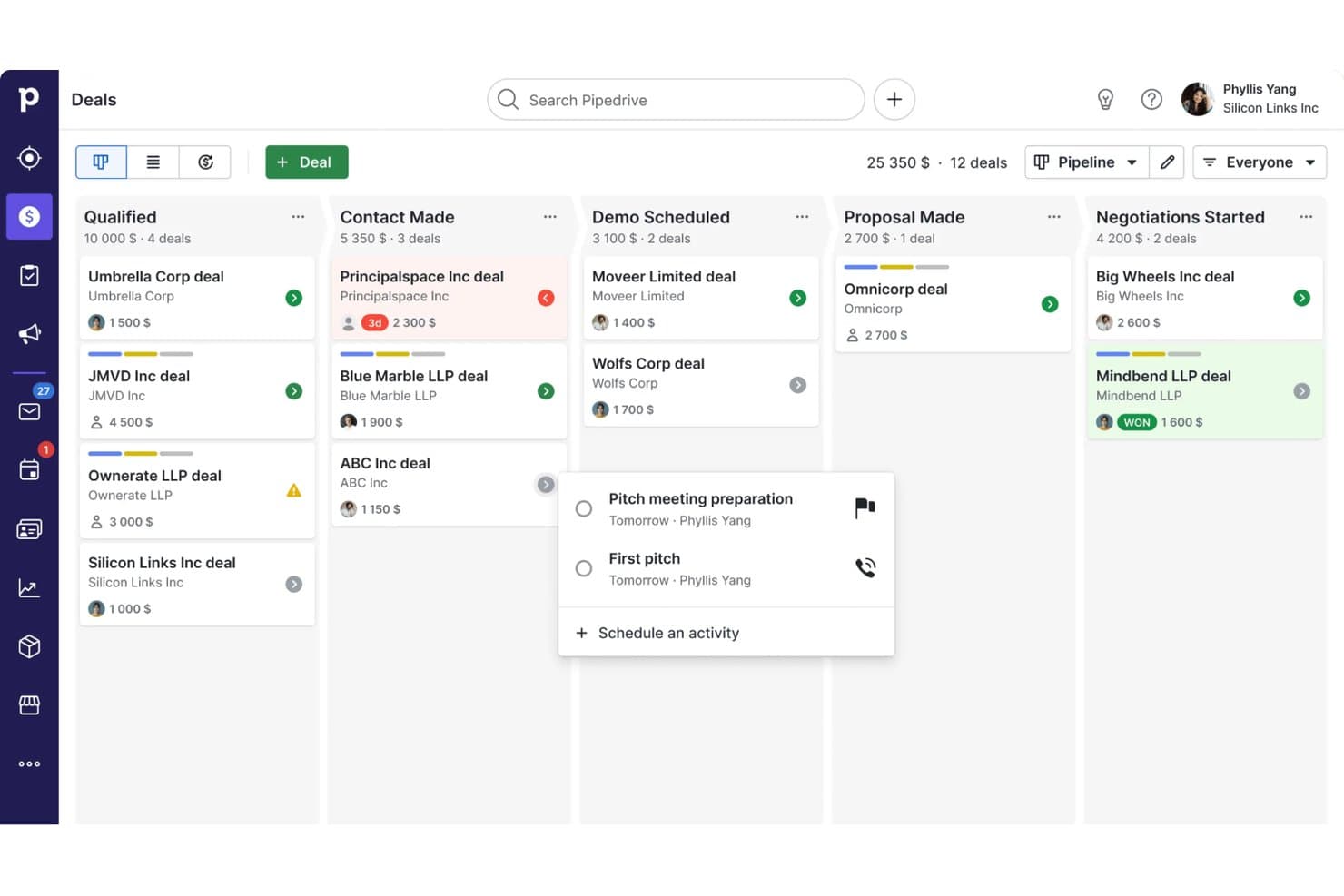
Pipedrive CRM organizes deals across pipeline stages visually. Pipedrive is a sales CRM that combines visual pipeline management, contact and deal tracking, workflow automation, email sequencing, and reporting across the full sales cycle.
Who Is Pipedrive Best For?
Pipedrive is a strong fit for sales-led teams and small businesses that want a clear, visual way to manage their pipeline without the complexity of a full marketing platform.
Why I Picked Pipedrive
Pipedrive earns its spot on my shortlist because its visual pipeline management is genuinely one of the clearest deal-tracking experiences I've used. I love how you can build multiple drag-and-drop pipelines, each with stages tailored to a distinct sales process, and track deal value, win probability, and expected close date at a glance. Pipedrive's Insights layer ties directly into that pipeline view, letting my team assemble live dashboards from deal, activity, and forecast reports and share them with stakeholders in real time.
Pipedrive Key Features
- Contact and deal management: View and manage contacts, organizations, and linked deals in one place, with a full interaction timeline per contact.
- Workflow automation: Set triggers and actions to automatically move deals through pipeline stages and handle repetitive sales tasks.
- Email sequencing: Build lead- or deal-based sequences combining automated emails and follow-up activities on Growth and higher plans.
- Goals and performance tracking: Set team or individual goals based on deal value, activity counts, or forecast revenue, then monitor progress from the Insights dashboard.
Pipedrive Integrations
Pipedrive offers a marketplace with more than 500 integrations and apps, including native integrations with Microsoft Teams, Google Meet, QuickBooks, and DocuSign, plus marketplace integrations for PandaDoc. It also provides REST API, webhooks, OpenAPI 3 specifications, JavaScript and PHP client libraries, and Zapier.
Pros and Cons
Pros:
- Sequences connect deal follow-ups with email
- Shared dashboards expose activity and forecast gaps
- Drag-and-drop pipelines map distinct sales processes
Cons:
- No unified service module or health scoring
- Campaigns and nurture require separate add-ons
Learn more about Pipedrive CRM: Best alternative for agencies
- Free demo available
- Pricing upon request
Visit WebsiteCustomer Rating:4.5/5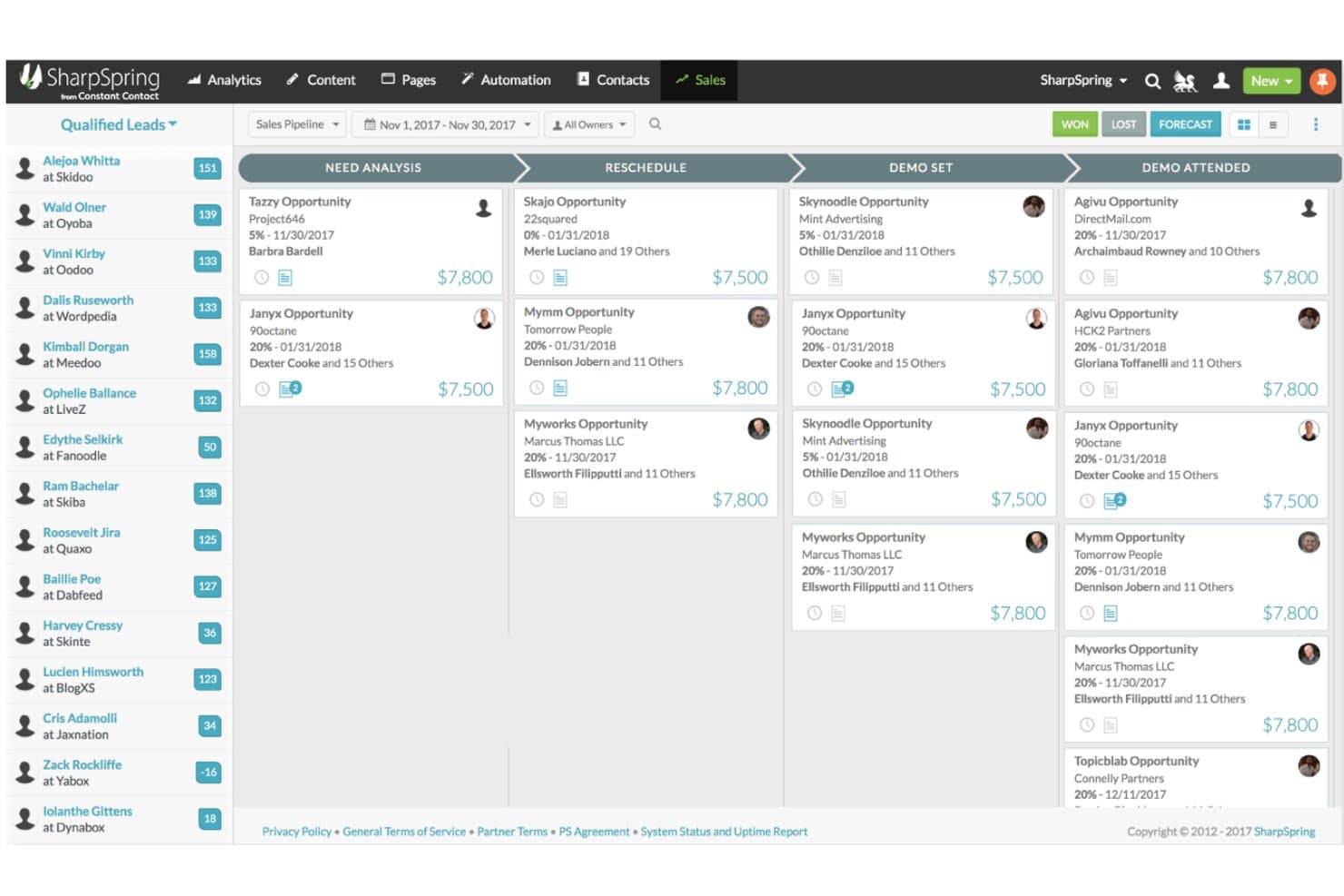
SharpSpring organizes deals visually across pipeline stages. SharpSpring, now rebranded as Lead Gen & CRM by Constant Contact, is a unified marketing automation and CRM platform that combines lead generation, lead scoring, email and social marketing, customizable sales pipelines, and multi-touch attribution reporting.
Who Is SharpSpring Best For?
SharpSpring is a strong fit for marketing agencies that manage campaigns and CRM workflows across multiple clients from a single platform.
Why I Picked SharpSpring
I've included SharpSpring in my top picks because it's one of the few platforms built with agencies in mind from the ground up. The multi-touch campaign attribution reporting connects marketing spend directly to pipeline and revenue, which is exactly what agency teams need to prove ROI across client accounts. Paired with automated lead scoring and customizable pipeline stages, it lets you run distinct workflows for multiple clients without jumping between tools.
SharpSpring Key Features
- Lead scoring: Automatically scores leads based on activity and engagement so your sales team knows which contacts to prioritize.
- Life of the Account timeline: Displays a single contact's full interaction history across emails, website visits, opportunities, and content in one view.
- Customizable pipeline stages: Lets you build and modify pipeline stages to match your team's actual sales process.
- Campaign attribution reporting: Connects marketing activity to pipeline and revenue using multi-touch attribution models.
SharpSpring Integrations
Native integrations are not clearly documented. SharpSpring supports custom integrations through its Open API, with a default allowance of 50,000 requests per day and a maximum rate of 10 queries per second.
Pros and Cons
Pros:
- Lead scoring helps prioritize sales follow-up
- Agency workflows combine marketing and CRM
- Multi-touch attribution connects campaigns to revenue
Cons:
- No customer success health scoring documented
- Workflow builder bugs disrupt automation setup
Learn more about SharpSpring:
Outras alternativas ao HubSpot
Eis algumas outras alternativas ao HubSpot que pode considerar e que não entraram na minha lista das 12 melhores, mas que continuam a ser ferramentas úteis.
- 11ActiveCampaignBest value HubSpot alternative
- 12DripBest alternative for e-commerce brands
- 13OntraportBest alternative for beginners
- 14MarketoBest alternative for marketers
- 15BrevoBest alternative for customer relationship teams
- 16NutshellBest alternative for better support
- 17FreshsalesBest for combining sales and marketing
- 18Campaign MonitorBest alternative for email marketing
- 19Mailchimp Best for pre-built customer journeys
- 20OrttoBest alternative for in-app messaging
- 21EloquaBest for enterprises
- 22PardotBest for Salesforce users
- 23Act-OnBest alternative for lead scoring
- 24OmnisendBest alternative for SMS messaging
- 25WishpondBest for creating landing pages
- 26InsightlyBest alternative for integrations
- 27Keap Max ClassicBest for CRM for automated follow-ups
Avaliações relacionadas de alternativas ao HubSpot
Se ainda não encontrou aqui o que procura, consulte estas ferramentas que testámos e avaliámos.
- Software de CRM
- Software de vendas
- Software de gestão de potenciais clientes
- Software de inteligência empresarial
- Software de gestão de contratos
- Sistema de gestão de receitas
How I Evaluate HubSpot Alternatives
I look at two layers: whether a tool can handle pipeline management, marketing automation, and revenue reporting at HubSpot's level, and what sets it apart for RevOps teams at scale.
Core Functionality (Table Stakes For This List)
When I'm selecting tools for my list, I rank each one on a scale from 0 (does not offer the functionality) to 5 (excels in this area) for each core functionality listed below. Then, I calculate the tool's total score into a percentage. Each tool needs to achieve a minimum total score of 75% to be considered for inclusion.
- Integrated CRM Platform: I check whether the CRM unifies contacts, companies, deals, and activity history across sales, marketing, and service in one shared data model.
- Marketing Automation: Email campaigns, lead nurturing workflows, segmentation, and behavior-based triggers all factor in here—especially how well they support full-funnel demand gen.
- Sales Pipeline Management: I evaluate deal tracking, stage management, and sales engagement tools like sequences and task queues that keep reps moving deals forward.
- Revenue Reporting & Analytics: Forecasting, pipeline dashboards, and cross-functional reporting matter here—I look at how easily RevOps teams can build custom views without SQL.
- Workflow Automation: Multi-step, cross-object automations are what I look for—things like auto-routing leads by territory or triggering handoff tasks between sales and CS teams.
- Third-Party Integrations: The native integration marketplace and API quality both count, particularly connections to tools RevOps teams rely on like Slack, Snowflake, and Gong.
Once I have a list of tools that meet this criteria, I consider what sets each platform apart.
Differentiating Factors (What Sets Vendors Apart)
Here's how I compare and contrast different vendors:
Standout Features
Revenue attribution modeling is a big differentiator—I evaluate whether a platform can trace closed deals back to specific campaigns and touchpoints across the funnel. Custom objects and data modeling also matter when your business tracks non-standard processes like partner referrals or product usage milestones alongside deals. AI-powered insights round things out; platforms like Salesforce and Zoho now offer predictive deal scoring and next-best-action suggestions that help RevOps teams prioritize pipeline with less guesswork.
Beyond Features
Pricing structure matters a lot when you're leaving HubSpot—I evaluate whether a platform's model scales predictably as your database and team grow, since unexpected cost jumps are a common migration trigger. Implementation and migration support is just as important; I check for dedicated data migration tools and onboarding resources that reduce the risk of losing historical pipeline data during the switch. I also consider team size and business fit, because a platform built for enterprise B2B sales cycles won't serve a lean mid-market RevOps team well, and vice versa.
Por que motivo procurar uma alternativa ao HubSpot?
O HubSpot é uma plataforma abrangente de marketing de entrada, vendas e atendimento ao cliente, conhecida pelo seu extenso conjunto de ferramentas destinadas a ajudar as empresas a atrair, envolver e fidelizar clientes. Apesar das suas funcionalidades abrangentes e popularidade, determinados fatores podem levar os utilizadores a considerar alternativas ao HubSpot. O custo é um fator significativo; as funcionalidades avançadas do HubSpot, embora robustas, podem ser dispendiosas, sobretudo para pequenas empresas ou empresas em fase de arranque com orçamentos limitados. Além disso, a sua vasta gama de funcionalidades pode ser por vezes demasiado complexa, especialmente para utilizadores que procuram uma interface mais simples e otimizada. A personalização e a flexibilidade são outras áreas em que os utilizadores podem considerar que o HubSpot fica aquém, uma vez que as empresas com necessidades específicas ou próprias de determinados setores podem precisar de soluções mais adaptadas.
Explorar alternativas ao HubSpot pode trazer várias vantagens. O software alternativo oferece frequentemente soluções económicas sem comprometer as funcionalidades essenciais, tornando-o adequado para empresas atentas às limitações orçamentais. Estas alternativas podem proporcionar uma experiência mais intuitiva, com uma curva de aprendizagem mais simples, ideal para equipas que procuram simplicidade e eficiência. A personalização e a flexibilidade são frequentemente características fundamentais do software alternativo, respondendo às necessidades específicas de diferentes setores e permitindo às empresas adaptar o software aos seus requisitos únicos. Além disso, capacidades de integração melhoradas garantem uma compatibilidade perfeita com os sistemas empresariais existentes, aumentando a eficiência dos fluxos de trabalho.
Como escolher alternativas ao HubSpot
Com tantas soluções diferentes de <Termo de foco> disponíveis, pode ser difícil decidir qual é a ferramenta que melhor se adapta às suas necessidades.
Enquanto elabora a lista final, testa e seleciona <Termo principal>, considere o seguinte:
- Que problema está a tentar resolver - Comece por identificar a lacuna nas funcionalidades do HubSpot que está a tentar colmatar, para esclarecer as funcionalidades e capacidades que a ferramenta precisa de disponibilizar.
- Quem terá de utilizar a ferramenta - Para avaliar os custos e os requisitos, considere quem irá utilizar o software e de quantas licenças irá precisar. Terá de avaliar se apenas os responsáveis pelas operações de receita ou toda a organização precisarão de acesso. Quando isso estiver claro, vale a pena considerar se está a dar prioridade à facilidade de utilização para todos ou à rapidez para os utilizadores avançados da sua alternativa ao HubSpot.
- Com que outras ferramentas precisa de funcionar - Esclareça que ferramentas está a substituir, que ferramentas vão permanecer e com que ferramentas terá de integrar, como software de contabilidade, CRM ou recursos humanos. Terá de decidir se as ferramentas terão de ser integradas entre si ou se pode substituir várias ferramentas por uma única alternativa consolidada ao HubSpot.
- Que resultados são importantes - Considere o resultado que o software precisa de produzir para ser considerado um sucesso. Considere que capacidade pretende obter ou o que pretende melhorar, e como irá medir o sucesso. Por exemplo, um resultado pode ser a capacidade de obter maior visibilidade sobre o desempenho. Poderia comparar as funcionalidades das alternativas ao HubSpot até mais não, mas, se não estiver a pensar nos resultados que pretende alcançar, poderá estar a desperdiçar muito tempo valioso.
- Como funcionaria dentro da sua organização - Considere a seleção do software em conjunto com os seus fluxos de trabalho e a sua metodologia de prestação. Avalie o que está a funcionar bem e as áreas que estão a causar problemas e precisam de ser resolvidas. Lembre-se de que cada empresa é diferente — não parta do princípio de que, por uma ferramenta ser popular, funcionará na sua organização.
Tendências nas alternativas ao HubSpot para 2025
As organizações procuram cada vez mais soluções de CRM que ofereçam mais do que funcionalidades básicas, dando ênfase a experiências personalizadas, capacidades de integração e análises avançadas para impulsionar eficientemente as suas operações de receita. Segue-se uma visão geral das tendências atuais:
Tendências emergentes nas alternativas ao HubSpot:
- Integração avançada de IA e aprendizagem automática:
- Muitas alternativas ao HubSpot estão a incorporar informações baseadas em IA e automatização nas suas plataformas, permitindo às empresas aperfeiçoar as suas estratégias de marketing, personalizar as interações com os clientes e simplificar os processos de vendas.
- Expansão dos ecossistemas de integração:
- À medida que as empresas utilizam um número crescente de ferramentas, as alternativas ao HubSpot estão a alargar as suas capacidades de integração, facilitando o fluxo contínuo de dados e a interoperabilidade entre diferentes funções empresariais.
Funcionalidades em rápida evolução:
- Análise preditiva:
- As ferramentas estão a incorporar cada vez mais análises preditivas para prever tendências de vendas, comportamentos dos clientes e dinâmicas de mercado, permitindo às empresas tomar decisões proativas.
- Capacidades avançadas de automatização:
- A automatização está a expandir-se para além das sequências de e-mails e dos fluxos de trabalho simples, abrangendo agora processos mais complexos para aumentar a eficiência nos departamentos de marketing, vendas e serviços.
Funcionalidades inovadoras e pouco comuns:
- Blockchain para segurança e transparência dos dados:
- Algumas alternativas estão a explorar a tecnologia blockchain para reforçar a segurança dos dados e disponibilizar registos de auditoria transparentes, sendo apelativas para setores com requisitos rigorosos de conformidade de dados.
- Integração de IoT:
- A integração de dados da Internet das Coisas (IoT) fornece informações em tempo real e desencadeia ações automatizadas com base nos dados dos dispositivos, oferecendo novas possibilidades de interação com os clientes e recolha de dados.
Funcionalidades em declínio:
- Complexidade excessiva sem valor:
- As soluções demasiado complexas sem proporcionarem um valor correspondente estão a perder popularidade, uma vez que os utilizadores preferem plataformas que equilibrem funcionalidade e facilidade de utilização.
- Capacidades móveis limitadas:
- À medida que o trabalho remoto e o acesso em mobilidade se tornam padrão, as soluções de CRM com funcionalidades móveis limitadas estão a registar uma redução da procura.
Estas tendências destacam a natureza dinâmica do mercado de CRM, com as alternativas ao HubSpot a ultrapassarem os limites do que é possível para responder às necessidades em evolução das empresas modernas. Para as organizações que avaliam estas ferramentas, compreender estas tendências pode orientar decisões informadas que estejam alinhadas com os objetivos estratégicos e as necessidades operacionais, garantindo que escolhem uma plataforma capaz de impulsionar eficazmente as suas operações de receita.
Funcionalidades das alternativas ao HubSpot
Ao selecionar alternativas ao HubSpot, tenha em atenção as seguintes funcionalidades essenciais:
- Gestão de contactos: esta funcionalidade permite-lhe organizar, acompanhar e atualizar todas as interações que tem com potenciais clientes e clientes. Pode consultar rapidamente históricos, adicionar notas e gerir comunicações — tudo num único local centralizado — para nunca perder o controlo de uma relação.
- Acompanhamento do pipeline de vendas: proporciona-lhe uma visualização clara do seu processo de vendas, ajudando-o a perceber em que ponto estão os negócios, o que está a avançar e o que precisa de atenção. Torna as previsões de vendas e os acompanhamentos muito menos dependentes de suposições.
- Automação de marketing: com a automação de marketing, configura fluxos de trabalho que acionam emails, campanhas, lembretes ou ações com base no comportamento ou no momento em que o cliente se encontra. Isto mantém a sua comunicação consistente e liberta tempo para um trabalho mais estratégico.
- Relatórios e análise: estas ferramentas ajudam-no a analisar dados sobre o desempenho das vendas, o envolvimento dos clientes e os resultados das campanhas. Terá painéis e relatórios que transformam toda essa informação em conhecimentos práticos — pense nisto como o GPS da sua empresa para tomar decisões mais inteligentes.
- Capacidades de integração: as funcionalidades de integração robustas permitem-lhe ligar o seu CRM às outras aplicações e programas que já utiliza — como ferramentas de email, calendários ou contabilidade — para que tudo funcione em conjunto de forma integrada. Deixa de ser necessário alternar entre sistemas desligados.
- Opções de personalização: permitem-lhe adaptar a plataforma aos seus fluxos de trabalho e à sua terminologia específicos, quer precise de campos personalizados, painéis ou etapas de vendas. Uma configuração personalizada significa que passa menos tempo a adaptar o seu trabalho ao programa.
- Gestão de tarefas e atividades: pode agendar chamadas, compromissos e acompanhamentos, atribuindo tarefas a si próprio ou aos membros da equipa. Os lembretes atempados evitam que as tarefas sejam esquecidas — já não precisa de depender da memória ou de notas autocolantes.
- Classificação de potenciais clientes: esta funcionalidade ajuda-o a dar prioridade aos potenciais clientes com maior probabilidade de comprar, acompanhando o seu envolvimento e atribuindo pontuações. Sabe exatamente onde concentrar os seus esforços para obter o maior impacto.
- Acesso móvel: com o acesso móvel, pode consultar, atualizar e gerir o seu CRM em qualquer lugar — no escritório de um cliente, durante uma viagem ou a partir do sofá. O seu trabalho não está preso a uma secretária, pelo que pode manter-se produtivo onde quer que esteja.
Funcionalidades comuns de IA das alternativas ao HubSpot
Para além das funcionalidades padrão das alternativas ao HubSpot acima mencionadas, muitas destas soluções estão a incorporar IA com funcionalidades como:
- Automação inteligente de fluxos de trabalho: a IA identifica tarefas repetitivas e configura automações inteligentes para simplificar as suas operações diárias. Isto mantém a sua equipa concentrada em atividades de elevado impacto, em vez de tarefas administrativas rotineiras.
- Análise preditiva: a IA analisa os seus dados históricos para prever tendências futuras de vendas e comportamentos dos potenciais clientes. Ao identificar padrões que poderá não detetar, ajuda-o a planear antecipadamente e a concentrar a sua energia onde é mais provável que produza resultados.
- Classificação de potenciais clientes com IA: em vez de classificar manualmente os potenciais clientes, a IA analisa sinais de comportamento e envolvimento para identificar automaticamente aqueles com maior probabilidade de conversão. Elimina as suposições — e grande parte do trabalho pesado — da gestão de potenciais clientes.
- Recomendações automatizadas de conteúdos: a IA analisa o comportamento dos utilizadores e sugere os conteúdos ou as mensagens adequados para cada contacto. Isto significa que envia emails, ofertas e acompanhamentos mais relevantes, melhorando as taxas de abertura e de conversão sem investigação adicional.
- Chatbots conversacionais: os chatbots alimentados por IA tratam de pedidos de informação no site, qualificam potenciais clientes e marcam reuniões 24 horas por dia. Fornecem respostas rápidas e cordiais aos visitantes do site mesmo quando não está a trabalhar, garantindo que nunca perde uma oportunidade potencial.
Vantagens das alternativas ao HubSpot
Ao explorar alternativas ao HubSpot, as empresas procuram soluções que melhorem a sua eficiência operacional, estejam alinhadas com as suas necessidades específicas e ofereçam vantagens convincentes em relação aos sistemas atuais. Eis cinco vantagens principais de optar por uma alternativa ao HubSpot:
- Relação custo-benefício: Maximiza o ROI com preços competitivos.
- Os utilizadores podem tirar partido das funcionalidades essenciais de CRM a um custo mais acessível, garantindo uma melhor afetação do orçamento e uma otimização dos recursos.
- Personalização: Adapta o software aos processos empresariais únicos.
- As organizações podem modificar funcionalidades, fluxos de trabalho e interfaces para os alinhar estreitamente com os seus requisitos operacionais específicos, aumentando a produtividade e a adoção pelos utilizadores.
- Conjunto de funcionalidades direcionado: Disponibiliza ferramentas especializadas relevantes para setores ou dimensões empresariais específicos.
- As empresas beneficiam de funcionalidades diretamente alinhadas com as suas operações principais, evitando a desorganização causada por funcionalidades desnecessárias.
- Suporte melhorado: Disponibiliza um serviço de apoio ao cliente dedicado e ágil.
- O acesso a um suporte superior garante que quaisquer problemas são resolvidos rapidamente, minimizando o tempo de inatividade e aumentando a satisfação dos utilizadores.
- Capacidades de integração: Liga-se facilmente a outras ferramentas empresariais essenciais.
- Facilita a integração com outro software, melhorando o fluxo e a acessibilidade dos dados entre departamentos, o que é crucial para uma tomada de decisões informada e para a execução de estratégias.
Custos e preços das alternativas ao HubSpot
Ao selecionar uma alternativa ao HubSpot, os compradores de software devem considerar uma variedade de opções de planos para encontrar a que melhor se adapta às necessidades e ao orçamento da sua empresa. As estruturas de preços e as funcionalidades incluídas podem variar significativamente entre diferentes plataformas de CRM, tornando essencial compreender o que cada plano oferece. Apresentamos abaixo uma visão geral das opções de planos típicas das alternativas ao HubSpot, indicando o preço médio e as principais funcionalidades incluídas em cada uma.
Tabela de comparação de planos para alternativas ao HubSpot
| Tipo de plano | Preço médio | Funcionalidades normalmente incluídas |
|---|---|---|
| Tipo de planoBásico | Preço médio$10 - $25/utilizador/mês | Funcionalidades normalmente incluídasGestão de contactos, integração de e-mail, relatórios básicos |
| Tipo de planoProfissional | Preço médio$50 - $100/utilizador/mês | Funcionalidades normalmente incluídasAutomatização, relatórios avançados, opções de personalização |
| Tipo de planoEmpresarial | Preço médio$100+/utilizador/mês | Funcionalidades normalmente incluídasSegurança avançada, suporte dedicado, escalabilidade |
| Tipo de planoOpção gratuita | Preço médio$0 | Funcionalidades normalmente incluídasGestão limitada de contactos, integração básica de e-mail |
Ao considerar estes planos, os compradores devem avaliar de que forma cada um se alinha com as suas necessidades atuais e expectativas de crescimento futuro. A escolha certa deve disponibilizar as funcionalidades necessárias para apoiar operações de receitas eficazes, sem incluir funcionalidades supérfluas que acrescentem complexidade e custos. Procure uma solução que ofereça flexibilidade, acompanhe o crescimento da sua empresa e proporcione um valor claro em relação ao seu preço.
Perguntas frequentes sobre alternativas ao HubSpot
Ainda não tem a certeza de qual é a melhor alternativa ao HubSpot? Estas perguntas frequentes irão ajudá-lo na sua pesquisa.