

Med så mange ulike alternativer til Salesforce tilgjengelig er det vanskelig å finne ut hvilket som passer for deg. Du vet at du vil ha et alternativ til Salesforce som hjelper deg med å effektivisere forretningsprosesser, forbedre kunderelasjoner og øke salgsveksten, men du må finne ut hvilket verktøy som er best. Jeg hjelper deg! I dette innlegget skal jeg gjøre valget enklere ved å dele mine personlige erfaringer med å bruke dusinvis av ulike alternativer til Salesforce med forskjellige team og prosjekter, samt mine anbefalinger av de beste alternativene til Salesforce.
Why Trust Our Software Recommendations
6,700+
Reviews
20
Industry experts
16+
Evaluation factors
14
Years
Our reviews reflect our independent judgment—not a sales pitch. Learn how we stay transparent.
For this guide, we evaluated tools using hands-on testing and independent research, scoring tools using our selection criteria.
Our reviews reflect our human editorial judgment, not a sales pitch.
Sammenligningstabell over alternativer til Salesforce
| Tool | Best For | Trial Info | Price | ||
|---|---|---|---|---|---|
| 1 | Best for organizing prospect data | 30-day free trial | From $39/user/month | Website | |
| 2 | Best for customizable no-code sales tools | Free demo available | From $40/user/month (billed annually) | Website | |
| 3 | Best for flexible CRM workflows and pipelines | Free plan available; 14-day free trial | From $35/user/month (billed annually) | Website | |
| 4 | Best for customizable sales automation | 14-day free trial; Free demo available | From $18/user/month | Website | |
| 5 | Best for team organization and quick CRM adoption | Free plan available; 14-day free trial | From $18/user/month (billed annually) | Website | |
| 6 | Best for predictive intelligence | Free plan available | Pricing upon request | Website | |
| 7 | Best for collaboration in large organizations | Free trial available | From $65/user/month (billed annually) | Website | |
| 8 | Best for project management | Free plan available | From $7/user/month (billed annually) | Website | |
| 9 | Best for beginners | 14-day free trial | From $100/user/month | Website | |
| 10 | Best for visual pipeline management | 14-day free trial | From $14/user/month (billed annually) | Website |


Vurderinger av de beste alternativene til Salesforce
Jeg har dokumentert undersøkelsene mine nedenfor og samlet noen av de beste plattformene du bør vurdere når du begynner å migrere til (eller sette opp) et nytt CRM.
Selv om det ville vært umulig å dekke alle tilgjengelige CRM-systemer, har jeg forsøkt å fokusere på de viktigste alternativene til Salesforce som kan dekke behovene til nesten alle virksomheter og bruksområder.
 Best for organizing prospect data
- 30-day free trial
- From $39/user/month
Visit WebsiteCustomer Rating:4.7/5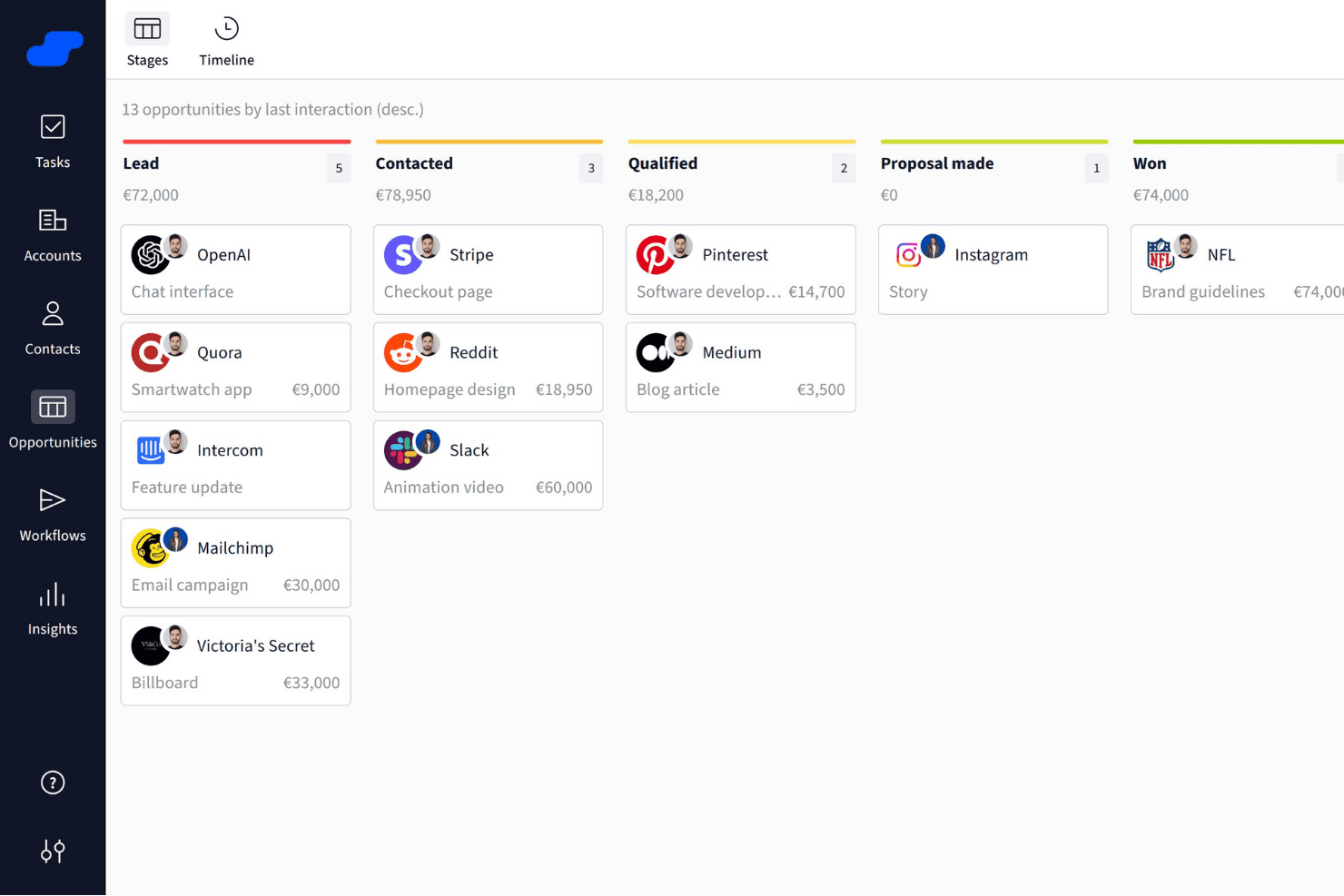
Salesflare organizes sales opportunities into visual pipeline stages. Salesflare is a B2B CRM that automatically captures contact and activity data from your email and calendar, and organizes it across visual pipelines, customizable fields, and AI-assisted follow-up tools.
Who Is Salesflare Best For?
Salesflare is a strong fit for small B2B sales teams that want a CRM to organize prospect data without spending time on manual data entry or admin setup.
Why I Picked Salesflare
I picked Salesflare as one of the best because of how it handles prospect data organization without demanding manual input from your team. It automatically pulls contact details from email signatures and captures activity from your inbox and calendar, so account records stay current without anyone having to update them. I especially like the relationship intelligence feature, which shows who on your team already has a connection at a target account and how strong that relationship is.
Salesflare Key Features
- Email and calendar data capture: Salesflare automatically pulls contact details, emails, and meetings from your connected inbox and calendar into CRM records.
- Multi-step email sequences: You can build automated, personalized follow-up email flows that continue until a contact replies or meets a configured exit condition.
- Lead scoring: Salesflare scores leads based on live interaction patterns and triggers notifications when the timing looks right to reach out.
- Custom fields for accounts, contacts, and opportunities: You can create fields across multiple types—dropdown, date, linked records, tags, and more—to structure your data the way your team works.
Salesflare Integrations
Salesflare offers native integrations with LinkedIn, Gmail, Outlook, Google Calendar, Microsoft 365, Zoho Mail, and Microsoft Exchange. Its directory lists 11,304 apps across native and Make connections, and it provides a REST API plus Zapier.
Pros and Cons
Pros:
- Flexible pipelines support distinct sales motions
- Relationship maps reveal warm account connections
- Automatic capture reduces stale prospect records
Cons:
- CRM migration needs manual spreadsheet cleanup
- Reporting depth trails broader CRM suites
Learn more about Salesflare: Best for customizable no-code sales tools
- Free demo available
- From $40/user/month (billed annually)
Visit WebsiteCustomer Rating:4.7/5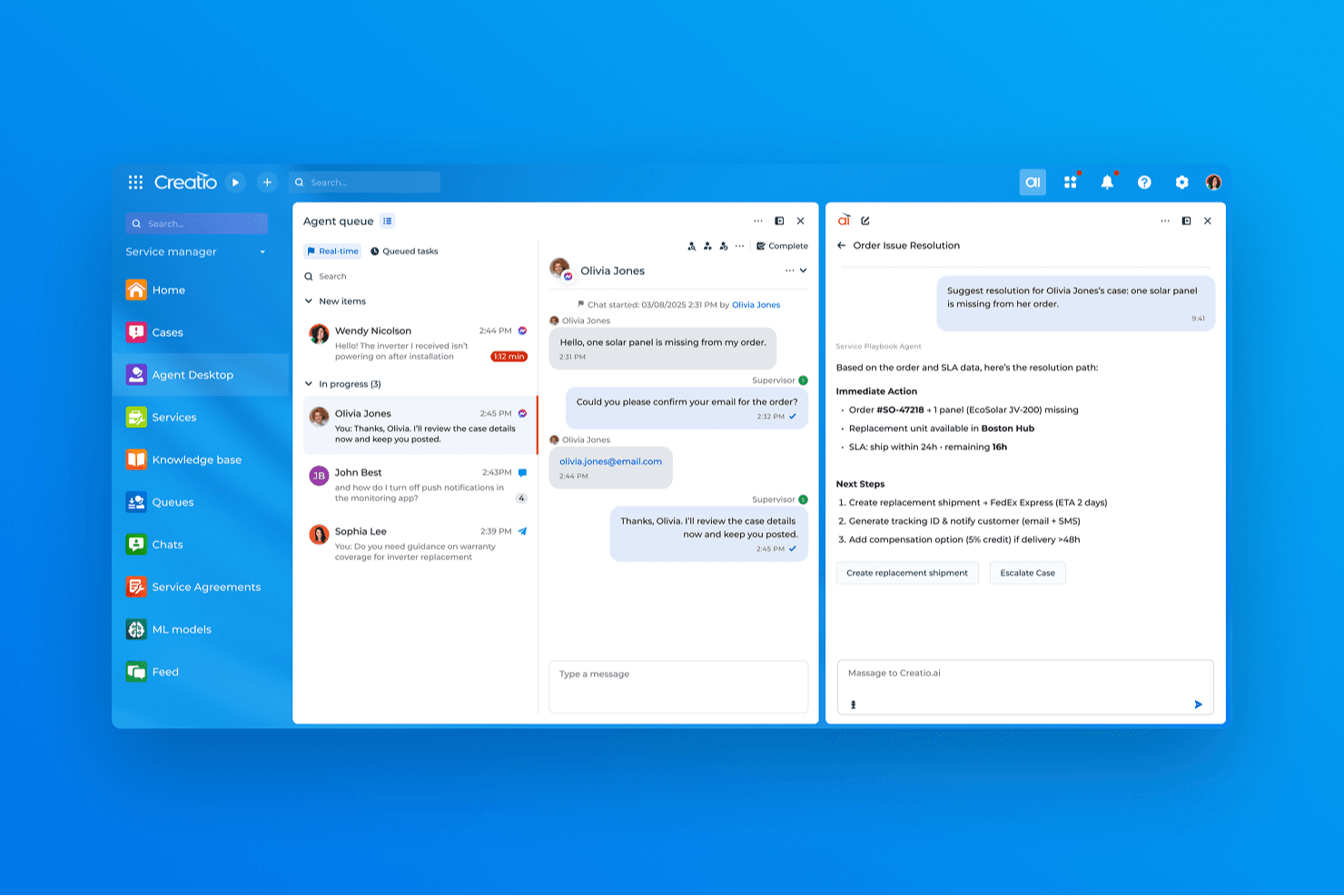
Creatio CRM uses AI to suggest real-time resolutions for customer service cases. Creatio AI CRM is a no-code CRM and workflow automation platform that covers sales, marketing, and service with tools for lead and opportunity management, process design, customizable pipelines, and a unified customer data view.
Who Is Creatio CRM Best For?
Creatio CRM is a strong fit for small and midsize businesses that want to build and adapt their own CRM workflows without leaning on developers for every change.
Why I Picked Creatio CRM
I picked Creatio CRM as one of the best because its no-code process designer lets you build and modify CRM workflows, pipeline stages, and automation rules without filing a ticket to your dev team. I especially like the BPMN-based process builder: you can set up multi-step sequences that trigger on record changes, schedules, or system signals, then adjust them as your sales motion evolves. The Freedom UI tools let you reshape objects, fields, and page layouts just as quickly.
Creatio CRM Key Features
- Unified customer data view: Displays real-time customer interactions across products and channels in a single record.
- BPMN-enabled process designer: Lets you build multi-step automated processes triggered by record changes, schedules, or system signals without writing code.
- AI agent builder: Provides prebuilt CRM agents and no-code tools to create custom agents that automate tasks like account research and quote generation.
- Marketplace add-ons: Offers 400+ connectors and templates—including Zapier, PandaDoc, and Power BI—to extend platform functionality.
Creatio CRM Integrations
Creatio offers native integrations with Google Calendar and Microsoft Exchange, plus 400+ Marketplace applications and add-ons, including Microsoft Power BI Desktop, PandaDoc, Apollo.io, and Zapier. Its REST, OData, SOAP, OAuth, and web-service APIs support custom integrations.
Pros and Cons
Pros:
- Shared customer records unite sales, marketing, and service
- BPMN automations connect sales and service steps
- No-code workflows adapt as sales processes change
Cons:
- No dedicated Salesforce migration path is documented
- Feature breadth can overwhelm new users
Learn more about Creatio CRM: Best for flexible CRM workflows and pipelines
- Free plan available; 14-day free trial
- From $35/user/month (billed annually)
Visit WebsiteCustomer Rating:4.5/5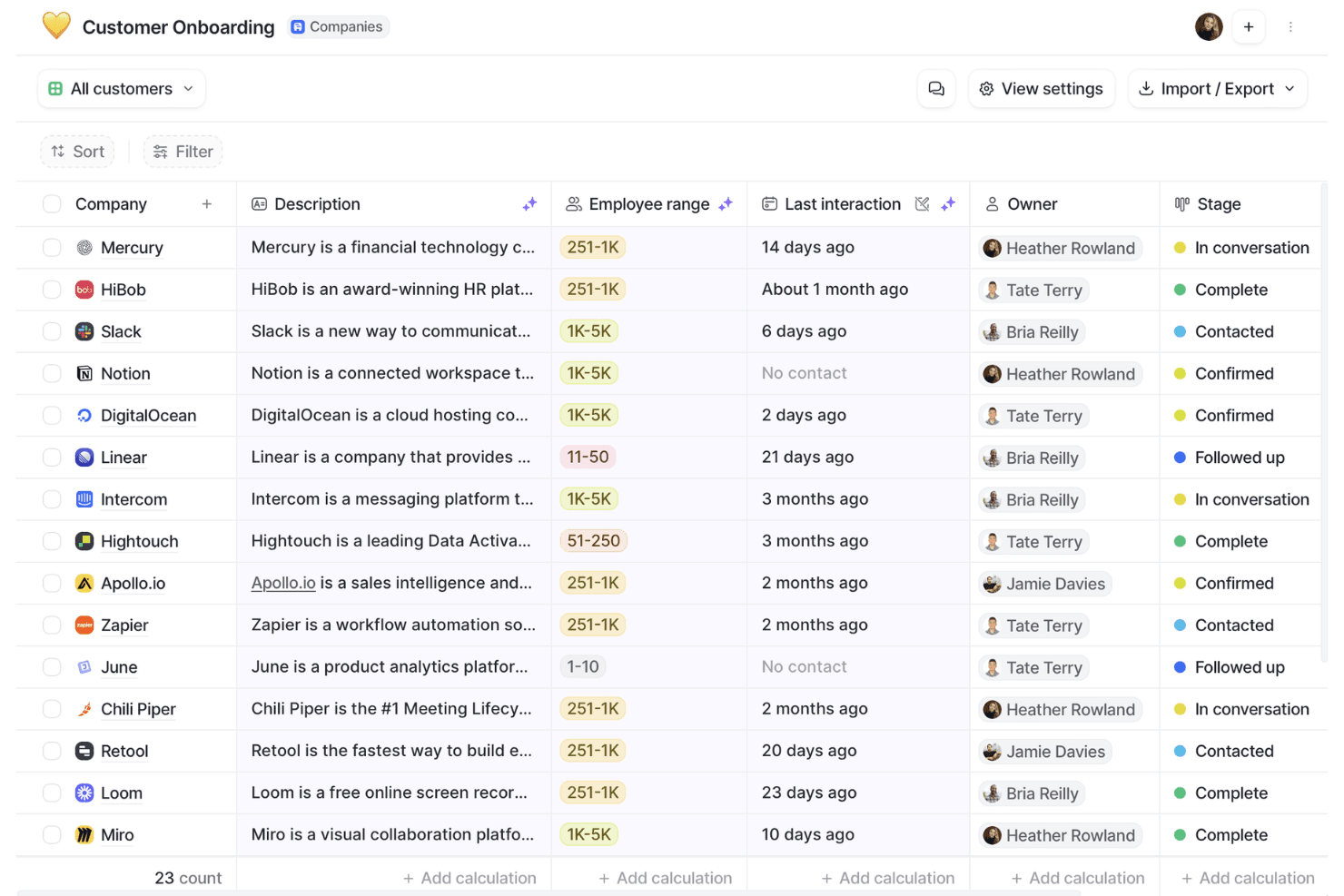
Attio organizes customer onboarding pipelines with stages and owner tracking. Attio is a CRM platform built around a flexible, object-based data model that supports contact management, deal pipelines, workflow automation, email and calendar sync, and reporting.
Who Is Attio Best For?
Attio is a strong fit for early-stage and scaling B2B teams—particularly founders, sales ops managers, and CRM admins—who want to build a CRM around their own data model rather than conform to a rigid, out-of-the-box structure.
Why I Picked Attio
I picked Attio as one of the best because its object-based data model genuinely changes how you build a CRM, letting you define custom objects, relationships, and attributes around your actual business rather than forcing your process into a preset structure. I love that you can link People, Companies, and Deals to custom objects with one-to-many or many-to-many relationships, then build multi-step, branching workflows that trigger across those records automatically.
Attio Key Features
- Ask Attio: A natural-language AI interface that lets you search, summarize, and take actions across your CRM records directly from the workspace.
- Call Intelligence: Automatically records, transcribes, and summarizes calls, then attaches the results to the relevant CRM records.
- Communication intelligence: Surfaces relationship data derived from synced email and calendar activity, including first and last interactions and connection strength scores.
- CSV import with field mapping: Lets you map, preview, and validate data before importing records, with real-time progress tracking and error visibility.
Attio Integrations
Attio offers native integrations with Gmail, Outlook, Google Calendar, Slack, Mailchimp, Segment, Stripe, Google Sheets, Notion, and Typeform. It also supports marketplace integrations, Zapier, REST API, webhooks, an App SDK, MCP, and SQL queries for custom connectivity.
Pros and Cons
Pros:
- Reviewers praise clear pipeline tracking
- Branching workflows reduce routine deal upkeep
- Custom objects fit nonstandard sales processes
Cons:
- Custom data models require upfront design
- Forecasting and cross-object reporting remain limited
Learn more about Attio: Best for customizable sales automation
- 14-day free trial; Free demo available
- From $18/user/month
Visit WebsiteCustomer Rating:4.6/5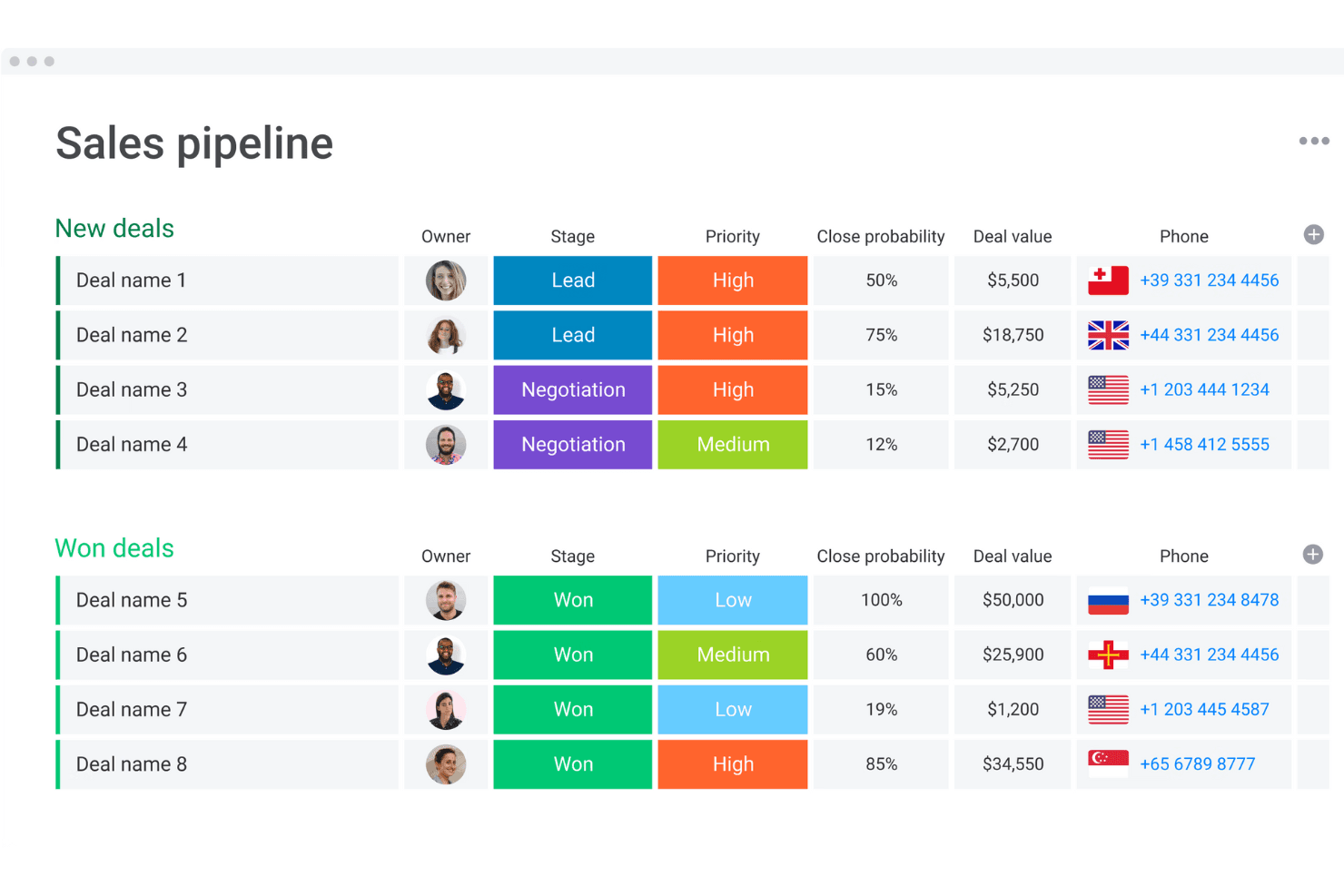
monday CRM organizes deals by stage, priority, and value in one view. monday CRM is a no-code sales CRM built on monday.com's work management platform that combines pipeline management, workflow automation, AI-powered deal insights, and built-in communication tracking across the full sales cycle.
Who Is monday CRM Best For?
monday CRM is a strong fit for small to mid-sized sales teams that want to build and automate their sales processes without waiting on developers or dedicated admins.
Why I Picked monday CRM
I picked monday CRM as one of the best because its no-code workflow builder lets sales teams build and automate complex, multi-branch sales processes without touching a line of code. I love that the Pipeline Health Agent actively analyzes stage distribution, deal velocity, and pipeline gaps, then drafts rep nudges for manager review. That kind of built-in automation intelligence is what makes it a credible Salesforce alternative for teams that want customizable sales motion without the admin overhead.
monday CRM Key Features
- Lead sourcing agent: An AI agent that finds, enriches, and scores leads against your target profile on a daily basis.
- Smart Call: A mobile CRM feature that records, transcribes, and summarizes customer calls, then logs them directly to the deal record.
- Quotes and invoices: Generate quotes, send invoices, and collect signatures directly from within a deal record.
- AI Notetaker: Joins Zoom, Microsoft Teams, or Google Meet calls to transcribe meetings, identify speakers, and generate action items synced to contact timelines.
monday CRM Integrations
monday CRM lists 200+ integrations, including Salesforce, Slack, Microsoft Teams, Zoom, Gmail, LinkedIn, Meta Ads, QuickBooks, Stripe, and DocuSign. It also offers a GraphQL API, SDK, and open API for custom connections.
Pros and Cons
Pros:
- Shared dashboards improve pipeline visibility
- Automated reminders reduce manual follow-up
- Custom pipelines adapt to distinct sales motions
Cons:
- Flexible setup can overwhelm smaller teams
- Forecasting depth trails enterprise CRM systems
 Best for team organization and quick CRM adoption
- Free plan available; 14-day free trial
- From $18/user/month (billed annually)
Visit WebsiteCustomer Rating:4.7/5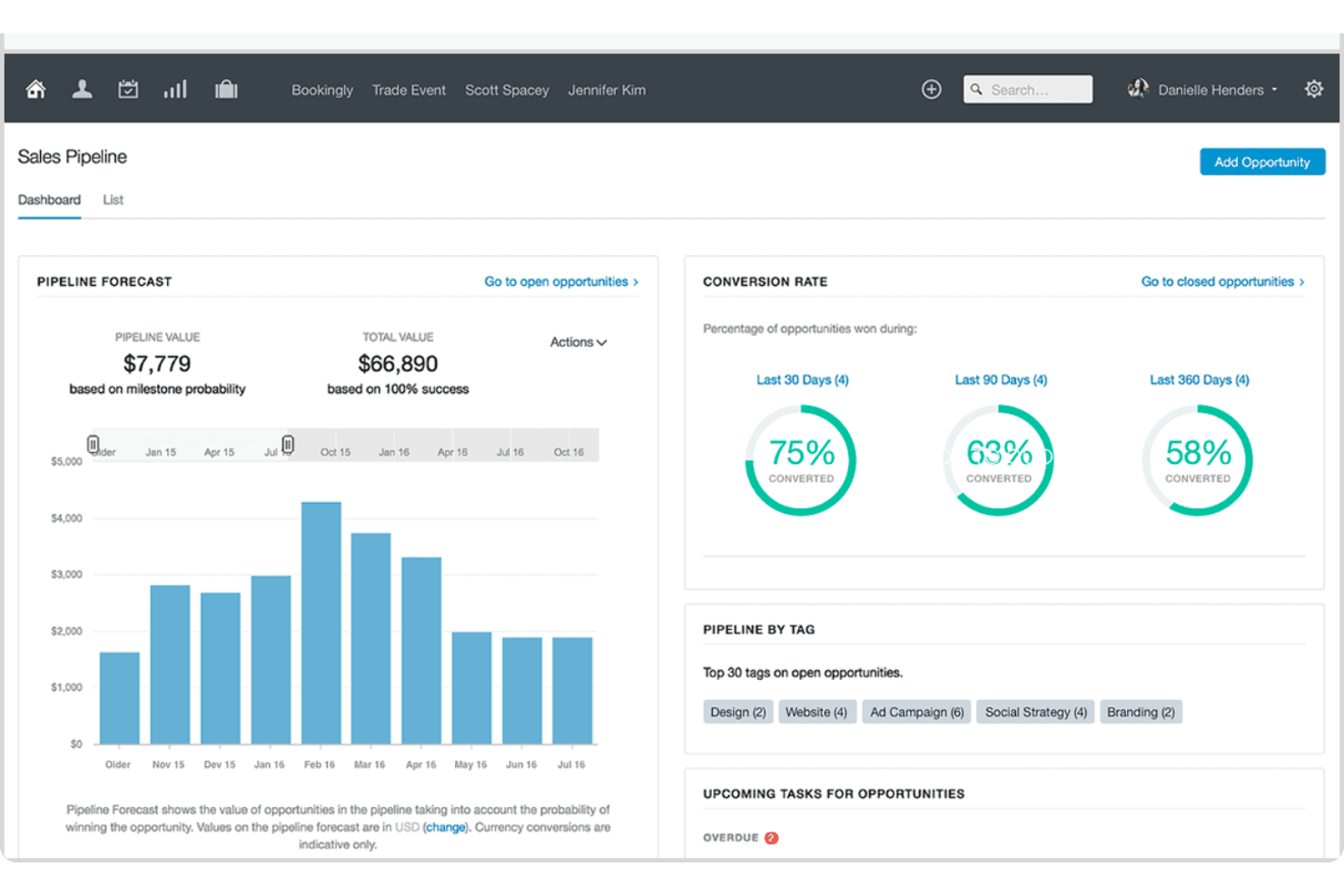
Capsule visualizes sales pipeline forecasts and conversion rates in one dashboard. Capsule CRM is a contact and pipeline management platform that brings together sales opportunities, contact records, task tracking, project management, and email tools in a single, lightweight CRM.
Who Is Capsule Best For?
Capsule is a strong fit for small business owners and growing teams who want a clean, low-friction CRM they can start using without a lengthy setup or dedicated admin.
Why I Picked Capsule
I've included Capsule in my top picks because it's the CRM I'd hand to a team that needs to get up and running fast, without a drawn-out configuration project. Its Tracks feature lets you build reusable, sequential task lists for repeatable processes like onboarding or handoffs, so deals move forward without anyone manually managing the queue. The AI Pipeline Generator can scaffold an entire pipeline from a plain-language description of your sales process, which means setup that used to take days takes minutes.
Capsule Key Features
- Workflow automation: Trigger actions automatically when an opportunity hits a milestone or changes status, including assigning team members, sending emails, or creating linked projects.
- Multiple sales pipelines: Set up separate pipelines for different products, markets, or sales processes, each with its own configurable stages.
- Contact DataTags: Apply tags that prompt for related custom-field values, letting your team capture structured context on contacts without free-text guesswork.
- Reporting dashboards: Access prebuilt dashboards for pipeline, conversion, tasks, and projects, with filters for user, team, tag, and custom fields.
Capsule Integrations
Capsule lists 100+ marketplace integrations on its homepage and 60+ in its pricing FAQ, including Gmail, Google Calendar, Microsoft Outlook, Mailchimp, Transpond, Xero, QuickBooks Online, and Zapier. It also offers a REST API and REST Hooks for custom integrations.
Pros and Cons
Pros:
- Contacts, deals, tasks, and projects stay connected
- Import previews help catch mapping errors
- Quick adoption without extensive training
Cons:
- No custom objects or record types
- Dashboard analysis offers limited drill-down
Learn more about Capsule: Best for predictive intelligence
- Free plan available
- Pricing upon request
Visit WebsiteCustomer Rating:4.2/5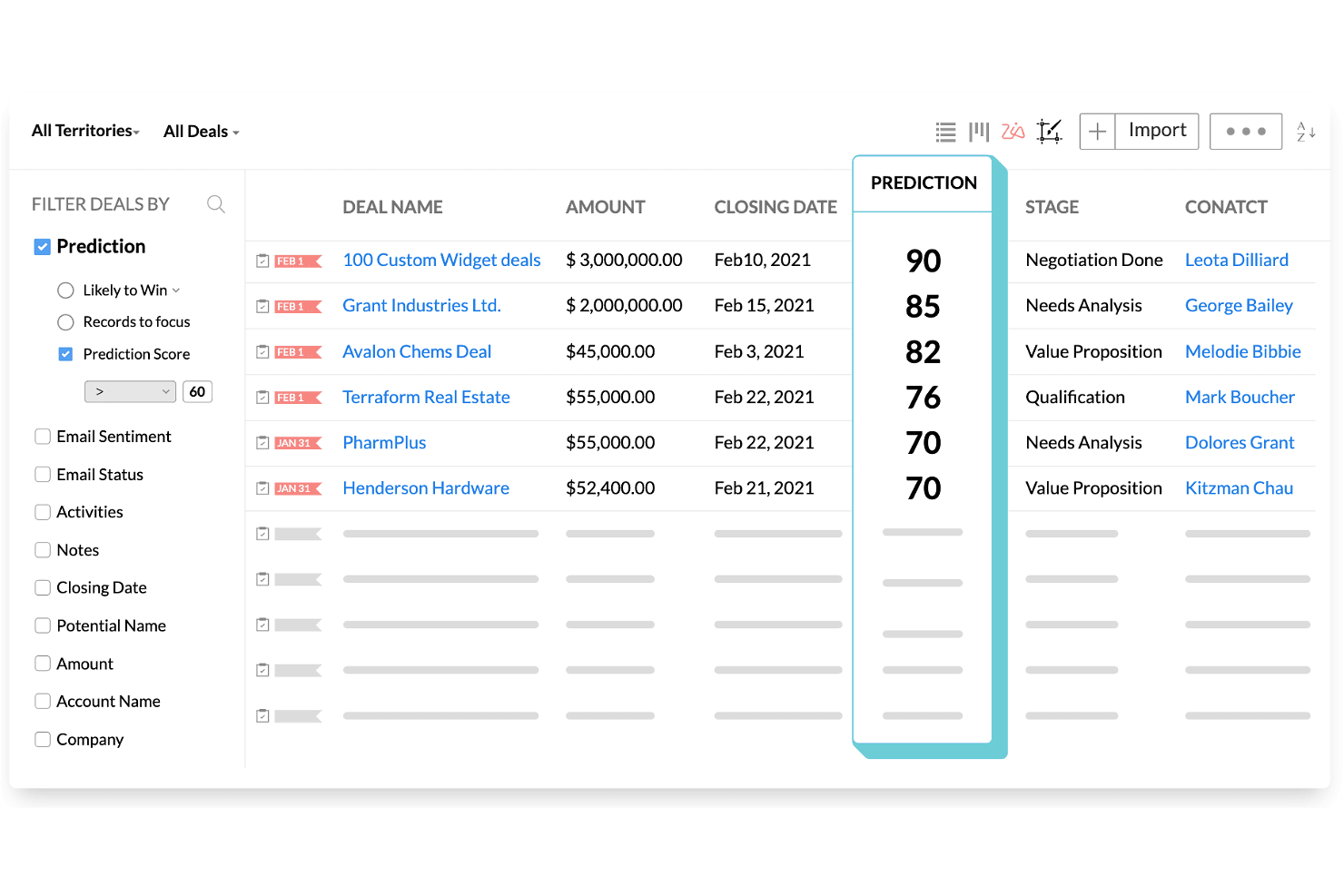
Zoho CRM ranks deals by AI prediction scores to prioritize sales efforts. Zoho CRM is a sales and marketing platform that combines pipeline management, workflow automation, AI-powered forecasting via its Zia engine, built-in CPQ, and multi-channel customer engagement across email, phone, social, SMS, and WhatsApp.
Who Is Zoho CRM Best For?
Zoho CRM is a strong fit for sales operations managers and small-to-midsize teams that need AI-driven forecasting and pipeline visibility without Salesforce's price tag.
Why I Picked Zoho CRM
I've included Zoho CRM in my top picks because its Zia AI engine does something I haven't seen matched at this price point: it actively forecasts revenue, flags anomalies in pipeline targets, and scores individual deals by close likelihood so you can act before a quarter slips. I also like that Zia surfaces the optimal time and channel to contact each prospect, cutting the guesswork out of outreach cadences. For teams migrating off Salesforce, the dedicated migration wizard maps CSV exports directly to Zoho modules and fields, with a post-import accuracy check built in.
Zoho CRM Key Features
- Blueprint process management: Define structured, step-by-step sales processes that guide reps through required actions before moving a deal to the next stage.
- Multi-channel customer engagement: Reach contacts through email, phone, SMS, WhatsApp, and social media from a single platform without switching tools.
- Canvas no-code layout editor: Redesign CRM module layouts, pages, and fields visually without writing any code.
- Territory management: Organize accounts and deals by geographic or business-defined territories to align sales coverage across teams.
Zoho CRM Integrations
Zoho CRM lists 1,100+ ready-to-use app integrations, including Gmail, Outlook, Slack, Zoom, Microsoft Teams, Google Ads, and QuickBooks. Its REST API supports custom integrations.
Pros and Cons
Pros:
- Blueprint standardizes stage-by-stage sales execution
- Salesforce migration includes field mapping and validation
- Zia forecasts revenue and flags pipeline anomalies
Cons:
- Advanced workflows require careful administrator configuration
- Interface menus can overwhelm new users
 Best for collaboration in large organizations
- Free trial available
- From $65/user/month (billed annually)
Visit WebsiteCustomer Rating:4.6/5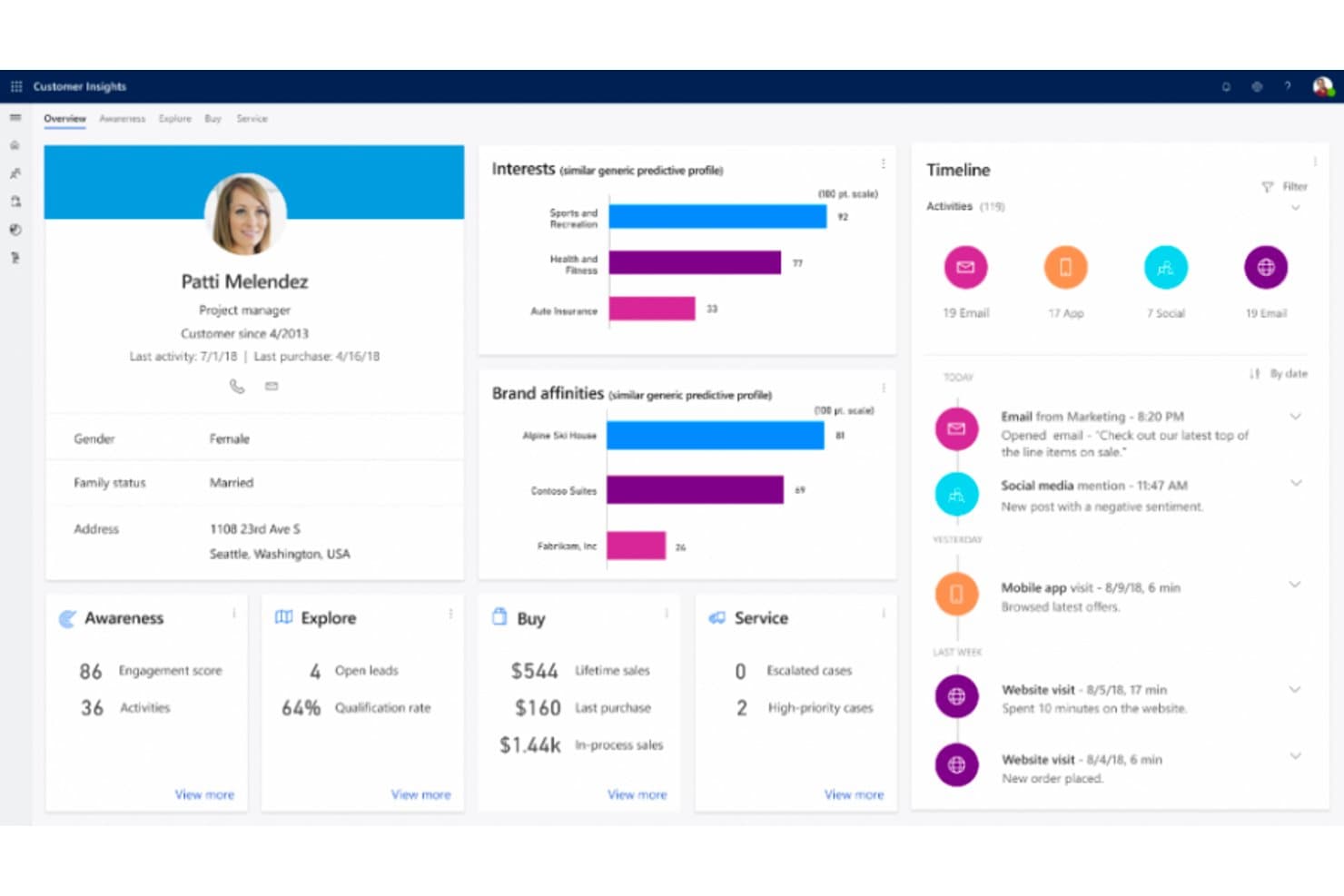
Microsoft Dynamics 365 unifies customer data into a single 360-degree profile view. Microsoft Dynamics 365 Sales is a CRM platform built by Microsoft that covers lead and opportunity management, sales process automation, forecasting, AI-powered deal insights, and conversation intelligence, with deep native integration across the Microsoft 365 ecosystem.
Who Is Microsoft Dynamics 365 Best For?
Dynamics 365 Sales is a strong fit for large organizations already running on Microsoft 365, where deep native integration across Teams, Outlook, and Power BI drives real collaboration across sales teams.
Why I Picked Microsoft Dynamics 365
Microsoft Dynamics 365 Sales earns its spot on my shortlist because large sales organizations running on Microsoft 365 get a level of native collaboration that's genuinely hard to replicate elsewhere. I'm talking about shared deal rooms in Teams, Copilot-generated opportunity summaries surfaced directly in Outlook, and conversation intelligence that flags competitor mentions and coaching moments from recorded calls. The Sales Qualification Agent can autonomously research and prioritize incoming leads, which takes real volume off your team's plate.
Microsoft Dynamics 365 Key Features
- Predictive lead scoring: AI models trained on historical outcomes rank and prioritize incoming leads so sellers focus on the highest-value opportunities first.
- Assignment rules with round-robin routing: Automatically distributes new leads and opportunities to sellers, teams, or queues based on configurable conditions.
- Quote-to-invoice transaction management: Tracks deals from draft quote through accepted order to issued invoice, with data carried forward from the opportunity record.
- Power BI analytics integration: Connects Dynamics 365 Sales data to Power BI for advanced reporting and custom dashboard creation beyond the native reporting layer.
Microsoft Dynamics 365 Integrations
Microsoft Dynamics 365 offers native integrations across the Microsoft ecosystem, including Microsoft 365, Outlook, Teams, and Power BI. It also supports marketplace integrations such as DocuSign for Dynamics and custom connections through the Dataverse Web API.
Pros and Cons
Pros:
- Opportunity-to-invoice tracking preserves deal context
- Automated lead routing reduces manual triage
- Forecasts connect pipeline activity to revenue
Cons:
- File-based migration lacks Salesforce-specific tooling
- Advanced configuration can require technical help
Learn more about Microsoft Dynamics 365: Best for project management
- Free plan available
- From $7/user/month (billed annually)
Visit WebsiteCustomer Rating:4.6/5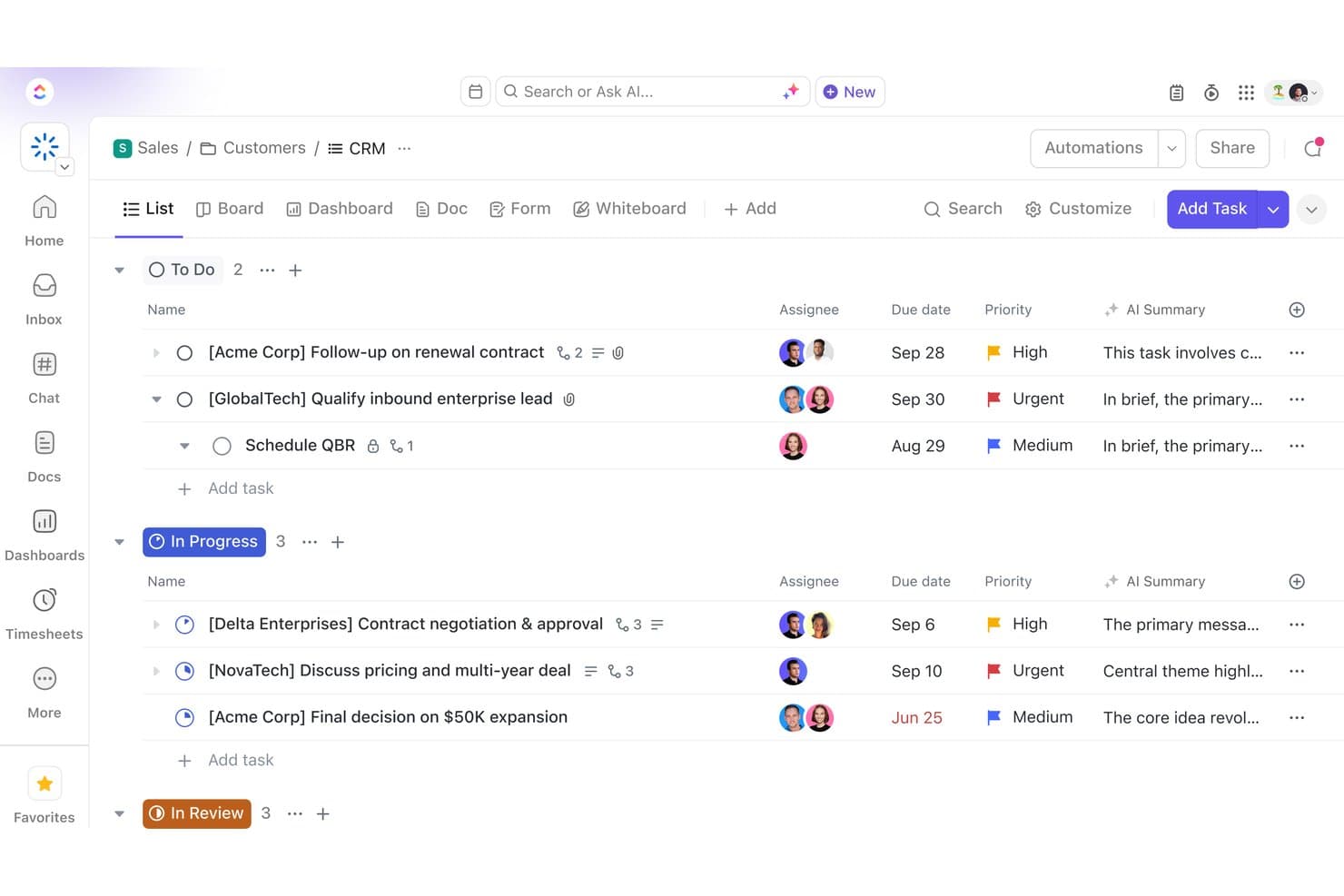
ClickUp organizes sales deals by status in a CRM list view. ClickUp is a work management platform that centralizes tasks, projects, docs, and team communication, with customizable pipelines, automation, and dashboards that can be adapted for light CRM and deal tracking.
Who Is ClickUp Best For?
ClickUp suits teams that already manage work in the platform and want to layer in lightweight deal tracking without adopting a separate CRM tool.
Why I Picked ClickUp
I've included ClickUp in my top picks because it's the only tool on this list built primarily for project management that can double as a lightweight deal-tracking layer. Teams already running work in ClickUp can build out custom pipeline stages using task types and Custom Fields like deal size, stage, and close date, without spinning up a separate tool. The HubSpot integration also lets you sync live deal and contact data directly into your ClickUp Workspace, keeping project tasks and sales context in one place.
ClickUp Key Features
- Custom Fields: Add deal size, close date, contact type, and other structured data fields directly to tasks to mirror a basic CRM record layout.
- AI Notetaker: Automatically transcribes and summarizes Zoom, Google Meet, and Microsoft Teams meetings, generating action items as ClickUp tasks.
- Workflow automations: Trigger status changes, task assignments, and notifications based on defined conditions to reduce manual pipeline updates.
- Dashboard cards: Build reporting views with charts, tables, and workload data, filterable by owner, status, date, or custom field.
ClickUp Integrations
ClickUp offers 50+ native integrations, including HubSpot, Salesforce, Slack, Microsoft Teams, Google Drive, Outlook, Google Calendar, and Zoom. It also supports Zapier, a public API, webhooks, MCP, and OAuth for custom integrations.
Pros and Cons
Pros:
- Custom fields adapt lightweight sales workflows
- Dashboards help monitor pipeline targets
- Connects deal tracking with delivery work
Cons:
- Salesforce migration needs task-based workarounds
- Contacts lack durable account relationships
Learn more about ClickUp:
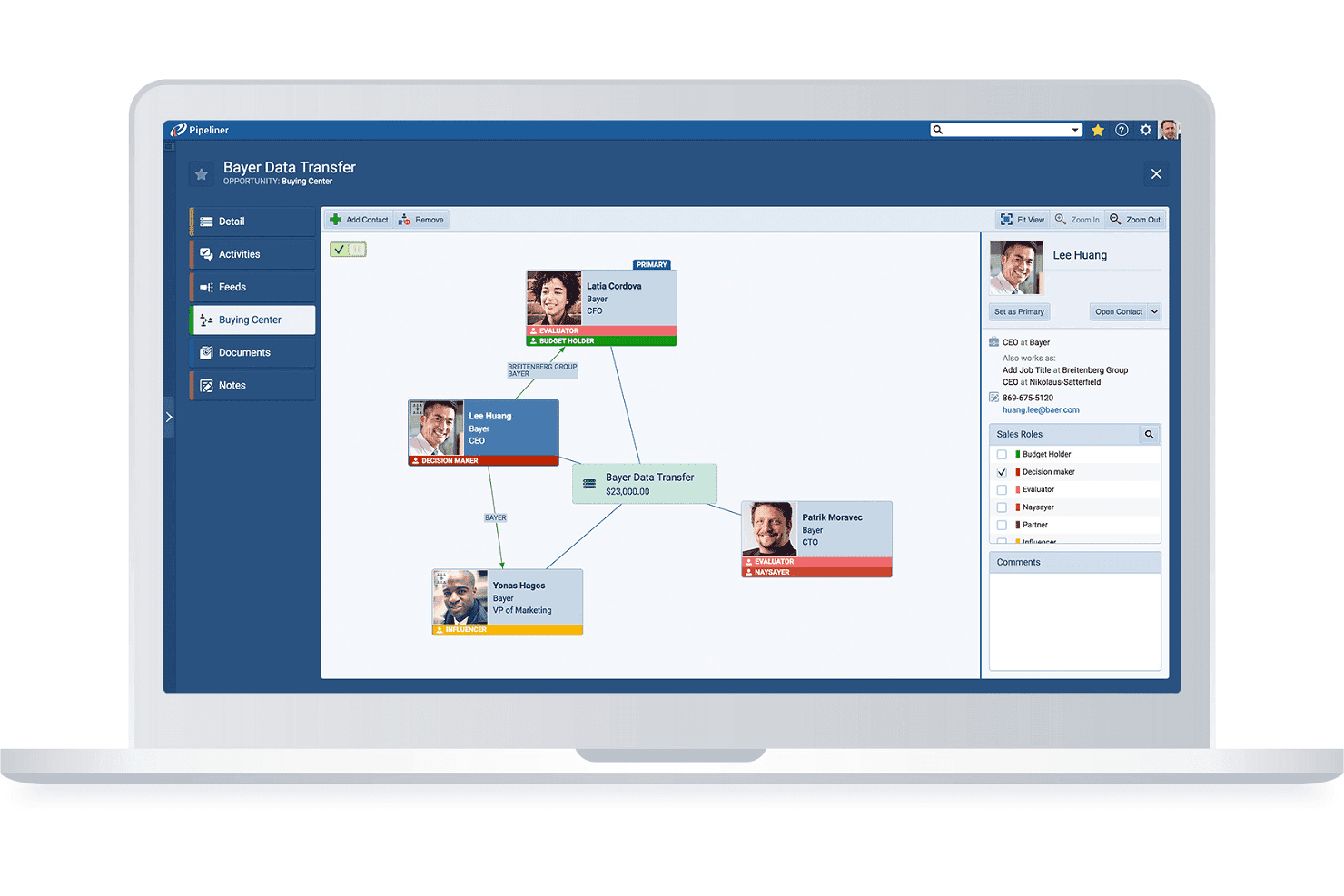
Pipeliner maps stakeholder roles and relationships within a deal's buying center. Coevera is a visual-pipeline B2B CRM that combines deal and account management, no-code workflow automation, AI-assisted sales insights, and a 200+ app integration marketplace.
Who Is Coevera Best For?
Coevera suits B2B sales teams moving away from Salesforce who want a visually intuitive CRM they can configure and manage without relying on developers or dedicated admins.
Why I Picked Coevera
Coevera earns its spot on my shortlist because it's genuinely one of the least intimidating CRMs to pick up if you're switching away from Salesforce for the first time. I love how the visual pipeline lets you drag opportunities through custom stages and flip between Kanban, bubble, chart, and map views without touching a single setting file. The no-code Automatizer builder means you can set up conditional, multi-step workflows, like auto-assigning follow-up tasks when a deal hits a specific stage, without writing a line of code or calling a developer.
Coevera Key Features
- Voyager AI sales intelligence: Get AI-generated opportunity summaries, call summaries, and email drafts directly within your CRM records.
- Import2 migration app: Migrate data from Salesforce, Microsoft Dynamics, Zoho, and other CRMs point-and-click, without building CSV files.
- Account relationship mapping: Visualize org charts, buying-center structures, and multi-stakeholder relationships across enterprise accounts.
- Automatizer workflow builder: Create multi-step, conditional automations using a visual trigger-and-action interface that requires no coding.
Coevera Integrations
Coevera lists 232 marketplace apps, with native integrations including Microsoft 365, Google Workspace, HubSpot, Zoom, and Power BI. It supports REST, GraphQL, webhooks, and MCP APIs for custom integrations.
Pros and Cons
Pros:
- Built-in reports surface pipeline movement
- Configurable fields match distinct sales workflows
- Visual pipelines clarify deal progress
Cons:
- Annual contracts limit seat reductions and refunds
- Small teams report costly, difficult implementations
Learn more about Coevera: Best for visual pipeline management
- 14-day free trial
- From $14/user/month (billed annually)
Visit WebsiteCustomer Rating:4.5/5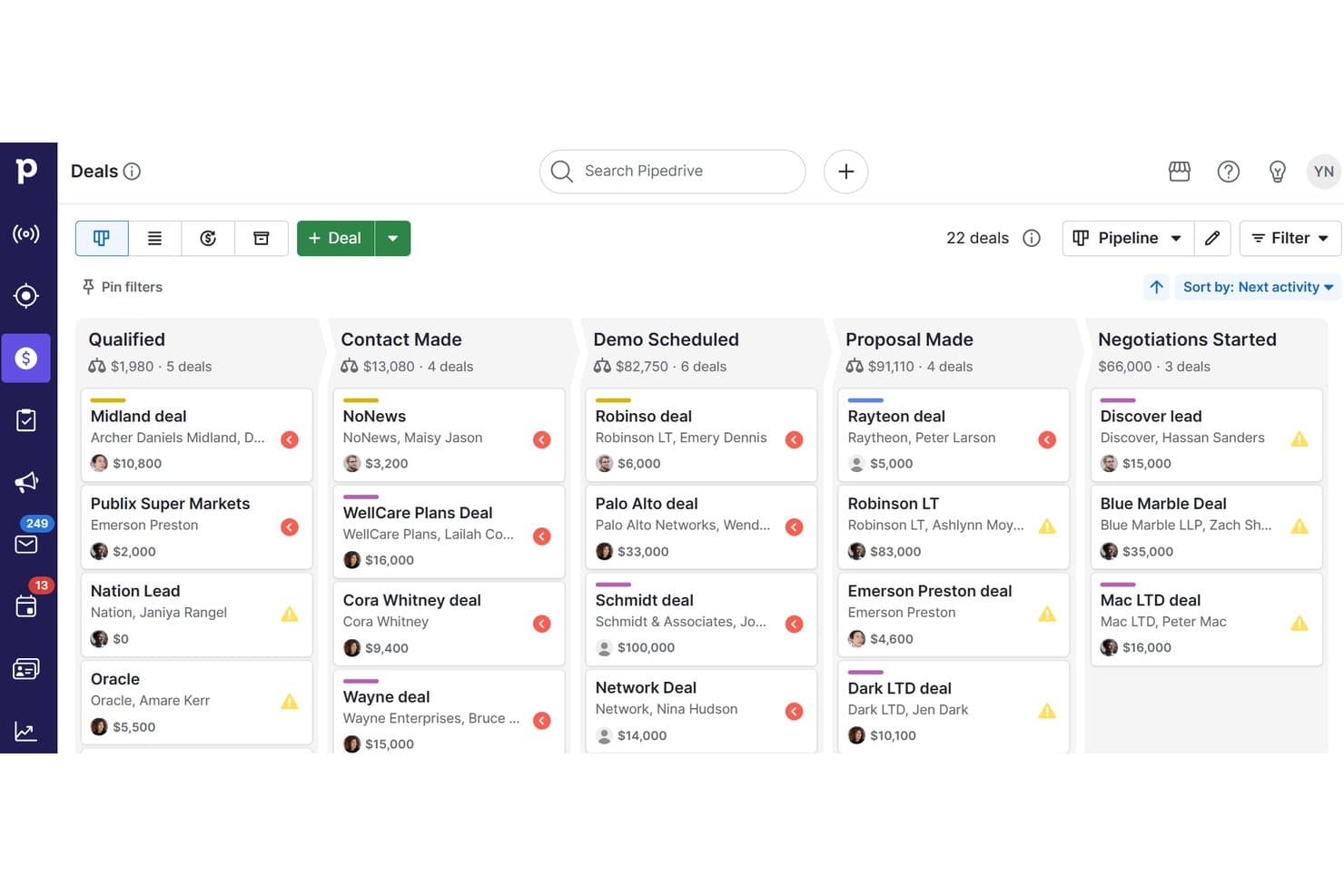
Pipedrive CRM organizes deals across pipeline stages visually. Pipedrive CRM is a sales-focused CRM platform that combines visual pipeline management, contact and lead tracking, workflow automation, email sync, campaign tools, and AI-powered reporting in one system.
Who Is Pipedrive CRM Best For?
Pipedrive CRM is a strong fit for small to mid-sized sales teams that want a visual, intuitive way to manage deals without the complexity of enterprise CRM platforms.
Why I Picked Pipedrive CRM
I picked Pipedrive CRM as one of the best because its visual pipeline management genuinely simplifies how sales teams track deals without the configuration overhead Salesforce demands. I love how colored deal cards flag at-risk opportunities before they go cold, and how pipeline stages can be customized per team without any technical expertise. Pipedrive's Nova AI also adds pre-call briefs and meeting transcripts across all plans, so reps stay prepared without switching tools.
Pipedrive CRM Key Features
- Nova meeting intelligence: Generates pre-call briefs from deal history, records and transcribes calls, and prepares CRM-ready recaps across all plans.
- Email nurturing sequences: Builds automated, personalized email and follow-up sequences to move leads through the pipeline without manual effort.
- Import2 CRM migration: Migrates data from Salesforce, HubSpot, Zoho CRM, Microsoft Dynamics and other systems, with field mapping, deduplication and history transfer.
- Workflow trigger-action automation: Configures event-based triggers and actions to automate repetitive tasks like contact updates, follow-up creation and email sending.
Pipedrive CRM Integrations
Pipedrive CRM offers native integrations with Microsoft Teams, Google Meet, WhatsApp Business, QuickBooks, DocuSign, and Gmail, plus marketplace integrations with PandaDoc, JustCall, Surfe, and Zapier. Its open API and webhooks support custom integrations.
Pros and Cons
Pros:
- Salesforce migration includes field mapping and history
- Automated reminders reduce missed follow-ups
- Visual deal cards flag at-risk opportunities
Cons:
- Shared ownership and territory workflows remain limited
- Reporting dashboards constrain detailed analysis
Learn more about Pipedrive CRM:
Andre alternativer til Salesforce
Det finnes mange flere CRM-systemer på markedet som ikke kom med blant de 10 beste, men som fortsatt kan være verdifulle verktøy. Følgende alternativer til Salesforce er verdt å se nærmere på for å finne ut om de passer til behovene dine:
- 11Zendesk SellBest for service-driven organizations
- 12FreshsalesBest for automated outreach
- 13SugarAIBest for complex sales organizations
- 14CopperBest for companies using G Suite
- 15AcceloBest for service-based businesses
- 16InsightlyBest for early-stage startups
- 17ScoroBest for medium-sized businesses
Relaterte vurderinger
Hvis du fortsatt ikke har funnet det du leter etter her, kan du se nærmere på disse verktøyene som vi har testet og evaluert.
- CRM-programvare
- Salgsprogramvare
- Programvare for kundeemnehåndtering
- Programvare for forretningsanalyse
- Programvare for kontraktsadministrasjon
- System for inntektsstyring
How I Evaluate Salesforce Alternatives
I split my evaluation into two layers: the baseline CRM capabilities a RevOps team needs to track pipeline and forecast revenue, and the differentiators that determine whether a platform truly fits.
Core Functionality (Table Stakes For This List)
When I'm selecting tools for my list, I rank each one on a scale from 0 (does not offer the functionality) to 5 (excels in this area) for each core functionality listed below. Then, I calculate the tool's total score into a percentage. Each tool needs to achieve a minimum total score of 75% to be considered for inclusion.
- Contact & Account Management: I check whether contacts, accounts, and deals are linked with full activity history, not siloed in separate lists with no relationship context.
- Pipeline & Opportunity Tracking: Each tool should let you build multiple pipelines with custom stages, so your inbound and outbound motions aren't forced into one view.
- Sales Workflow Automation: I evaluate whether the platform can auto-route leads by territory, trigger follow-up tasks on stage changes, and run multi-step sequences.
- Reporting & Forecasting: Dashboards need to support custom metrics like weighted pipeline by rep or segment, not just pre-built charts you can't modify.
- Native & Third-Party Integrations: I look at how well the CRM connects with tools like HubSpot Marketing Hub, Marketo, Intercom, or Stripe via native connectors and open API.
- Custom Objects & Data Models: Your RevOps team should be able to create custom objects and fields that mirror your revenue process without developer support.
Once I have a list of tools that meet this criteria, I consider what sets each platform apart.
Differentiating Factors (What Sets Vendors Apart)
Here's how I compare and contrast different vendors:
Standout Features
AI-powered deal scoring is a big differentiator. I look at whether a platform can flag at-risk deals and suggest next steps without relying on a third-party tool. Revenue intelligence features like automatic call logging and activity capture also matter, since they reduce the data entry burden that tanks CRM adoption. Beyond insights, I evaluate whether the CRM includes native sales engagement sequences. When reps can run multi-channel outreach directly from the pipeline view, you cut out a standalone tool and keep all activity data in one place.
Beyond Features
Total cost of ownership is one of the first things I evaluate. Many Salesforce alternatives include automation and reporting at their base tier, while Salesforce gates them behind add-ons. Time to value matters just as much. I look at whether a RevOps team can self-implement the platform in weeks rather than months, without hiring certified consultants. Segment fit also plays a role. A 15-person sales team and a 500-rep enterprise org have very different needs, so I consider whether the platform scales to match the buyer's actual stage of growth.
Hvorfor se etter et alternativ til Salesforce?
Salesforce er en anerkjent programvare for kunderelasjonshåndtering (CRM) som tilbyr en rekke verktøy for salgsstyring, kundeservice, markedsføringsautomatisering og analyse. Den omfattende pakken er utformet for å dekke et bredt spekter av forretningsbehov, og gjør det enklere å håndtere kundeinteraksjoner og effektivisere ulike forretningsprosesser. Til tross for de omfattende funksjonene kan noen brukere likevel være på utkikk etter alternativer til Salesforce. Dette kan skyldes faktorer som prisen, som kan være uoverkommelig for mindre virksomheter eller oppstartsbedrifter. I tillegg kan kompleksiteten og omfanget av funksjonene i Salesforce virke overveldende for enkelte brukere, særlig de som har enklere behov eller begrenset teknisk kompetanse. Salesforce sin alt-i-ett-tilnærming er kanskje ikke i tråd med de spesifikke kravene til enkelte virksomheter, spesielt de som ser etter mer bransjespesifikk funksjonalitet.
Alternativ programvare til Salesforce kan ha flere fordeler. Mange alternativer tilbyr mer kostnadseffektive løsninger med fleksible prisplaner, noe som gjør dem tilgjengelige for et bredere spekter av virksomheter, særlig mindre virksomheter eller virksomheter som nettopp har startet. Disse alternativene gir ofte en mer brukervennlig opplevelse med et enklere grensesnitt og mer oversiktlig funksjonalitet, noe som er ideelt for virksomheter som prioriterer brukervennlighet og rask implementering. Tilpasning er en annen betydelig fordel, ettersom noen Salesforce-alternativer er mer tilpasningsdyktige til de spesifikke behovene og arbeidsflytene i ulike bransjer, og tilbyr skreddersydde løsninger som samsvarer bedre med bestemte forretningsmodeller. Mindre eller mer nisjepregede CRM-plattformer kan også tilby mer personlig kundestøtte, slik at virksomheter får dedikert hjelp som er tilpasset deres unike utfordringer. Disse fordelene gjør Salesforce-alternativer til et attraktivt valg for selskaper som søker CRM-løsninger som i større grad samsvarer med budsjettet, kravene til kompleksitet og de spesifikke forretningsbehovene deres.
Slik velger du Salesforce-alternativer
Med så mange ulike Salesforce-alternativer tilgjengelig kan det være utfordrende å avgjøre hvilket verktøy som passer best til behovene dine.
Når du lager en kortliste, tester og velger Salesforce-alternativer, bør du vurdere følgende:
- Hvilket problem prøver du å løse – Begynn med å identifisere funksjonsmangelen i Salesforce som du prøver å dekke, for å tydeliggjøre hvilke funksjoner og hvilken funksjonalitet verktøyet må tilby.
- Hvem vil trenge å bruke det – For å vurdere kostnader og krav bør du tenke over hvem som skal bruke programvaren, og hvor mange lisenser du trenger. Du må vurdere om det bare er lederne for inntektsdriften eller hele organisasjonen som trenger tilgang. Når dette er avklart, bør du vurdere om du prioriterer brukervennlighet for alle eller hurtighet for avanserte brukere av Salesforce-alternativet.
- Hvilke andre verktøy må det fungere sammen med – Avklar hvilke verktøy du erstatter, hvilke verktøy som skal beholdes, og hvilke verktøy det må integreres med, for eksempel programvare for regnskap, CRM eller HR. Du må avgjøre om verktøyene må integreres med hverandre, eller om du kan erstatte flere verktøy med ett samlet Salesforce-alternativ.
- Hvilke resultater er viktige – Tenk over hvilket resultat programvaren må levere for å regnes som vellykket. Vurder hvilken kapasitet du ønsker å oppnå eller hva du ønsker å forbedre, og hvordan du skal måle suksess. Et eksempel på et resultat kan være muligheten til å få bedre innsikt i ytelsen. Du kan sammenligne funksjonene i Salesforce-alternativer til du blir blå i ansiktet, men hvis du ikke tenker på hvilke resultater du ønsker å oppnå, kan du kaste bort mye verdifull tid.
- Hvordan det vil fungere i organisasjonen din – Vurder programvarevalget sammen med arbeidsflytene og leveringsmetodikken din. Evaluer hva som fungerer godt, og hvilke områder som skaper problemer og må håndteres. Husk at alle virksomheter er forskjellige – ikke anta at et verktøy vil fungere i organisasjonen din bare fordi det er populært.
Trender innen Salesforce-alternativer
Salesforce-alternativer innoverer aggressivt for å sikre seg markedsandeler ved å tilby unik funksjonalitet, håndtere spesifikke utfordringer og skape verdi for virksomheter som søker CRM-funksjonalitet utover det Salesforce tilbyr. Her er en oversikt over de aktuelle trendene basert på nylige programvareoppdateringer, pressemeldinger og lanseringslogger:
Fremvoksende trender innen Salesforce-alternativer:
- Større vekt på kunstig intelligens og maskinlæring:
- Mange Salesforce-alternativer integrerer kunstig intelligens for å tilby prediktiv analyse, intelligent automatisering og forbedrede beslutningsmuligheter, i tråd med virksomhetenes behov for å utnytte data til strategiske fordeler.
- Forbedrede integrasjonsmuligheter:
- Ettersom behovet for sammenkoblede forretningsverktøy øker, utvider Salesforce-alternativene integrasjonsøkosystemene sine og legger til rette for sømløse arbeidsflyter på tvers av ulike applikasjoner og plattformer.
Nye og uvanlige funksjoner:
- Blokkjedeintegrasjon:
- Noen Salesforce-alternativer utforsker blokkjedeteknologi for å tilby transparent, sikker og desentralisert datahåndtering, en nyskapende tilnærming innen CRM-området.
- Tilkobling til tingenes internett:
- Ved å integrere data fra tingenes internett i CRM-systemer gjør disse alternativene det mulig for virksomheter å utnytte sanntidsdata fra tilkoblede enheter, noe som gir bedre kundeinnsikt og driftseffektivitet.
Mest etterspurte funksjoner:
- Omfattende analyse og rapportering:
- Bedrifter etterspør avanserte analyse- og rapporteringsverktøy i CRM-systemene sine for å få dypere innsikt i salgspipelineene, kundeatferden og markedstrendene.
- Mobil tilgjengelighet:
- Ettersom arbeidsstyrken blir mer mobil, fortsetter etterspørselen etter robuste mobile CRM-applikasjoner å øke. Dette gjør det mulig for salgsteam å få tilgang til viktig informasjon og utføre oppgaver på farten.
Funksjoner som er på vei ut:
- Overdrevent kompleks tilpasning:
- Det skjer en dreining bort fra overdrevent komplekse tilpasningsmuligheter som krever betydelig involvering fra IT-avdelingen, ettersom bedrifter foretrekker enklere og mer brukervennlig tilpasning.
- Isolerte systemer:
- Frittstående CRM-løsninger som ikke integreres godt med andre forretningssystemer, blir mindre populære ettersom bedrifter ønsker mer integrerte og helhetlige programvareøkosystemer.
Alternativer til Salesforce gir bedrifter innsikten, effektiviteten og fleksibiliteten de trenger for å lykkes med å håndtere inntektsoperasjonene sine. Når du vurderer disse alternativene, bør du fokusere på hvordan de videreutviklede funksjonene samsvarer med de strategiske behovene dine, slik at løsningen du velger, skaper verdi og støtter virksomhetens mål.
Funksjoner i alternativer til Salesforce
Når du ser etter alternativer til Salesforce for å håndtere inntektsoperasjoner, er det avgjørende å identifisere funksjoner som samsvarer med virksomhetens behov, øker teamets effektivitet og gir innsikt som kan forbedre salgsprosessene. Hvert CRM-system har sitt eget sett med funksjoner, men enkelte nøkkelfunksjoner er avgjørende for å støtte inntektsoperasjoner på en effektiv måte. Her er de viktigste funksjonene du bør se etter:
- Omfattende kontaktadministrasjon: Sentraliserer all kundeinformasjon.
- Gir en samlet oversikt over kundeinteraksjoner, noe som forbedrer relasjonshåndteringen og personlig tilpasning av salgsarbeidet.
- Robust håndtering av salgspipeline: Visualiserer stadiene i salgsprosessen.
- Hjelper team med å følge fremdriften, identifisere flaskehalser og fokusere på avtaler som mest sannsynlig blir avsluttet, noe som direkte påvirker inntektene.
- Detaljert analyse og rapportering: Leverer innsikt som kan omsettes til handling.
- Gir datadrevet veiledning for strategiske beslutninger og bidrar til å optimalisere salgsstrategier og inntektsresultater.
- Effektiv håndtering av potensielle kunder: Effektiviserer innsamling og oppfølging av potensielle kunder.
- Sikrer at potensielle kunder blir fulgt opp effektivt og ført videre gjennom salgstrakten, noe som øker konverteringsratene.
- Oppfølging av oppgaver og aktiviteter: Organiserer oppfølging og ansvarsområder.
- Holder salgsteamene ansvarlige og sikrer at muligheter følges opp i tide, noe som bidrar til inntektsgenerering.
- E-postintegrasjon og -sporing: Sentraliserer kommunikasjonen.
- Gjør det mulig å kommunisere sømløst med potensielle og eksisterende kunder, samtidig som all kommunikasjon loggføres for fremtidig referanse.
- Tilpasning og skalerbarhet: Tilpasser seg virksomhetens vekst og endringer.
- Sikrer at CRM-systemet kan utvikle seg sammen med virksomheten, støtte nye prosesser og utvidede salgsteam uten å miste effektivitet.
- Brukervennlig grensesnitt: Fremmer bruk og reduserer opplæringstiden.
- Et enkelt og intuitivt grensesnitt sikrer at teammedlemmene kan bruke CRM-systemet effektivt og utnytte det fulle potensialet.
- Mobil tilgang: Tilrettelegger for bruk på farten.
- Gir salgsteam mulighet til å få tilgang til viktig informasjon og utføre oppgaver hvor som helst, noe som øker produktiviteten og reaksjonsevnen.
- Integrasjonsmuligheter: Kobler sammen andre forretningsverktøy.
- Gir en mer strømlinjeformet arbeidsflyt ved å integrere ulike applikasjoner, sikre datakonsistens og redusere manuell dataregistrering.
Ved valg av et Salesforce-alternativ for håndtering av inntektsoperasjoner bør du fokusere på løsninger som tilbyr disse kritiske funksjonene for å støtte salgsprosessene dine på en helhetlig måte. Disse funksjonalitetene legger ikke bare til rette for mer strategiske og informerte beslutninger, men forbedrer også den daglige effektiviteten og ytelsen til salgsteamene dine, noe som til syvende og sist gir bedre inntektsresultater.
Fordeler med Salesforce-alternativer
Å utforske Salesforce-alternativer kan gi tydelige fordeler, spesielt for virksomheter med unike behov eller budsjettbegrensninger. Disse alternativene tilbyr ofte viktige CRM-funksjoner som er tilpasset ulike bransjekrav, virksomhetsstørrelser eller spesifikke brukerpreferanser, og som forbedrer den generelle effektiviteten og ytelsen til inntektsoperasjonene. Her er fem primære fordeler ved å vurdere Salesforce-alternativer:
- Kostnadseffektivitet: Reduserer driftskostnadene.
- Ved å velge en rimeligere CRM-løsning kan virksomheter fordele ressursene sine til andre områder, optimalisere de samlede investeringene og redusere kostnadene.
- Tilpasning og fleksibilitet: Tilpasses spesifikke forretningsbehov.
- Salesforce-alternativer tilbyr ofte større fleksibilitet når det gjelder tilpasning, slik at virksomheter kan tilpasse CRM-systemet til sine unike prosesser og arbeidsflyter og dermed forbedre driftseffektiviteten.
- Forenklet brukeropplevelse: Gjør systemet enklere å bruke.
- Alternativer kan tilby mer intuitive grensesnitt og strømlinjeformet funksjonalitet, noe som reduserer læringskurven og øker brukeradopsjonen.
- Spesialiserte funksjoner: Dekker spesifikke bransjekrav.
- Noen Salesforce-alternativer fokuserer på bestemte sektorer eller virksomhetsstørrelser og tilbyr spesialiserte funksjoner som er mer relevante og nyttige for disse målgruppene.
- Personlig kundestøtte: Tilbyr dedikert hjelp.
- Mindre CRM-leverandører kan noen ganger tilby mer personlig støtte, slik at brukerne får rask og effektiv hjelp og programvarens verdi for organisasjonen maksimeres.
Kostnader og priser for Salesforce-alternativer
Ved å utforske Salesforce-alternativer får du tilgang til en rekke CRM-løsninger som dekker ulike forretningsbehov og budsjetter. Disse alternativene har ofte ulike prismodeller og abonnementer, som hver er utformet for å passe forskjellige virksomhetsstørrelser, bransjer og driftskompleksitet. Her er en generell oversikt over de typiske abonnementsalternativene og prisene for Salesforce-alternativer:
Sammenligningstabell for abonnementer for Salesforce-alternativer
| Abonnementstype | Gjennomsnittspris | Vanlige inkluderte funksjoner |
|---|---|---|
| AbonnementstypeGrunnleggende | Gjennomsnittspris$0 - $25/ bruker/måned | Vanlige inkluderte funksjonerKontaktadministrasjon, oppfølging av oppgaver, grunnleggende rapportering, kundeemneadministrasjon |
| AbonnementstypeMellomnivå | Gjennomsnittspris$25 - $65/ bruker/måned | Vanlige inkluderte funksjonerSalgsprognoser, tilpassede rapporter, avanserte integrasjoner, automatiseringsfunksjoner |
| AbonnementstypeAvansert | Gjennomsnittspris$65+/ bruker/måned | Vanlige inkluderte funksjonerKI-funksjoner, avansert analyse, økt tilpasning, førsteklasses kundestøtte |
| AbonnementstypeGratisalternativ | Gjennomsnittspris$0 | Vanlige inkluderte funksjonerBegrenset antall kontakter, grunnleggende funksjoner, brukerstøtte fra fellesskapet |
Når du vurderer Salesforce-alternativer, bør du ta hensyn til virksomhetens spesifikke behov, omfanget av driften og mulighetene for vekst. Det er avgjørende å velge et abonnement som samsvarer med de nåværende kravene dine, samtidig som det gir rom for utvidelse. Sørg for at det valgte CRM-systemet ikke bare passer budsjettet ditt, men også tilbyr de nødvendige funksjonene for å drive virksomhetens inntektsoperasjoner effektivt.
Vanlige spørsmål om Salesforce-alternativer
Vurderer du fortsatt Salesforce-alternativer? Her er noen av de vanligste spørsmålene folk stiller før de bytter.