

Highrise-alternativer er verktøy for kunderelasjonshåndtering (CRM) som hjelper deg med å administrere kontakter, følge opp samtaler og organisere salgspipelines nå som Highrise ikke lenger tar imot nye kunder. Du trenger en erstatning som holder teamet ditt organisert og kundekommunikasjonen sømløs.
Jeg har brukt mye tid på å undersøke og teste de beste Highrise-alternativene, slik at du raskt kan finne et CRM-verktøy som passer arbeidsflyten din og hjelper virksomheten din med å fortsette å vokse.
Hva er Highrise?
Highrise er et verktøy for kunderelasjonshåndtering (CRM) som hjelper virksomheter med å organisere kontakter, følge opp kommunikasjon og administrere oppgaver. Selv om det er populært blant små bedrifter, frilansere og gründere fordi det effektiviserer kundeinteraksjoner og gjør det enklere å følge opp potensielle kunder, kan enkelte brukere se etter Highrise-alternativer for å få mer avanserte funksjoner, bedre integrasjonsmuligheter eller priser som passer behovene deres.
Hvorfor du kan stole på våre programvareanbefalinger
6,700+
Reviews
20
Industry experts
16+
Evaluation factors
14
Years
Anmeldelsene våre bygger på vår uavhengige vurdering, ikke på salgsargumenter. Les hvordan vi sørger for åpenhet.
I denne guiden har vi vurdert verktøyene gjennom praktisk testing og uavhengig research og gitt dem poeng ut fra våre utvelgelseskriterier.
Anmeldelsene våre bygger på vår egen redaksjonelle vurdering. De er ikke et salgsargument.
Sammenligningstabell for Highrise-alternativer
Denne sammenligningstabellen oppsummerer prisdetaljene for mine beste utvalgte Highrise-alternativer:
| Tool | Best For | Trial Info | Price | ||
|---|---|---|---|---|---|
| 1 | Best for automated lead tracking | 30-day free trial | From $39/user/month | Website | |
| 2 | Best for clientflow management for independents | 30-day free trial | From $29/month (billed annually) | Website | |
| 3 | Best for uniting marketing, sales, and support | Free plan available | From $14.99/user/month | Website | |
| 4 | Best for seamless app integrations | 14-day free trial | From $29/user/month (billed annually) | Website | |
| 5 | Best for inside sales lead management | 14-day free trial | From $25/user/month | Website | |
| 6 | Best for Outlook integration | Free plan available | From $20/user/month | Website | |
| 7 | Best for AI-powered sales automation | 21-day free trial | From $9/user/month (billed annually) | Website | |
| 8 | Best for marketing automation | Free plan available | From $13/month | Website | |
| 9 | Best for industry-specific solutions | Free demo available | Pricing upon request | Website | |
| 10 | Best for field team management | Free demo available | Pricing upon request | Website |


Anmeldelser av de beste Highrise-alternativene
I denne analysen går jeg gjennom fordeler og ulemper ved hvert Highrise-alternativ. Hver anmeldelse beskriver funksjoner og de beste bruksområdene, slik at du kan ta en informert beslutning.
 Best for automated lead tracking
- 30-day free trial
- From $39/user/month
Visit WebsiteCustomer Rating:4.7/5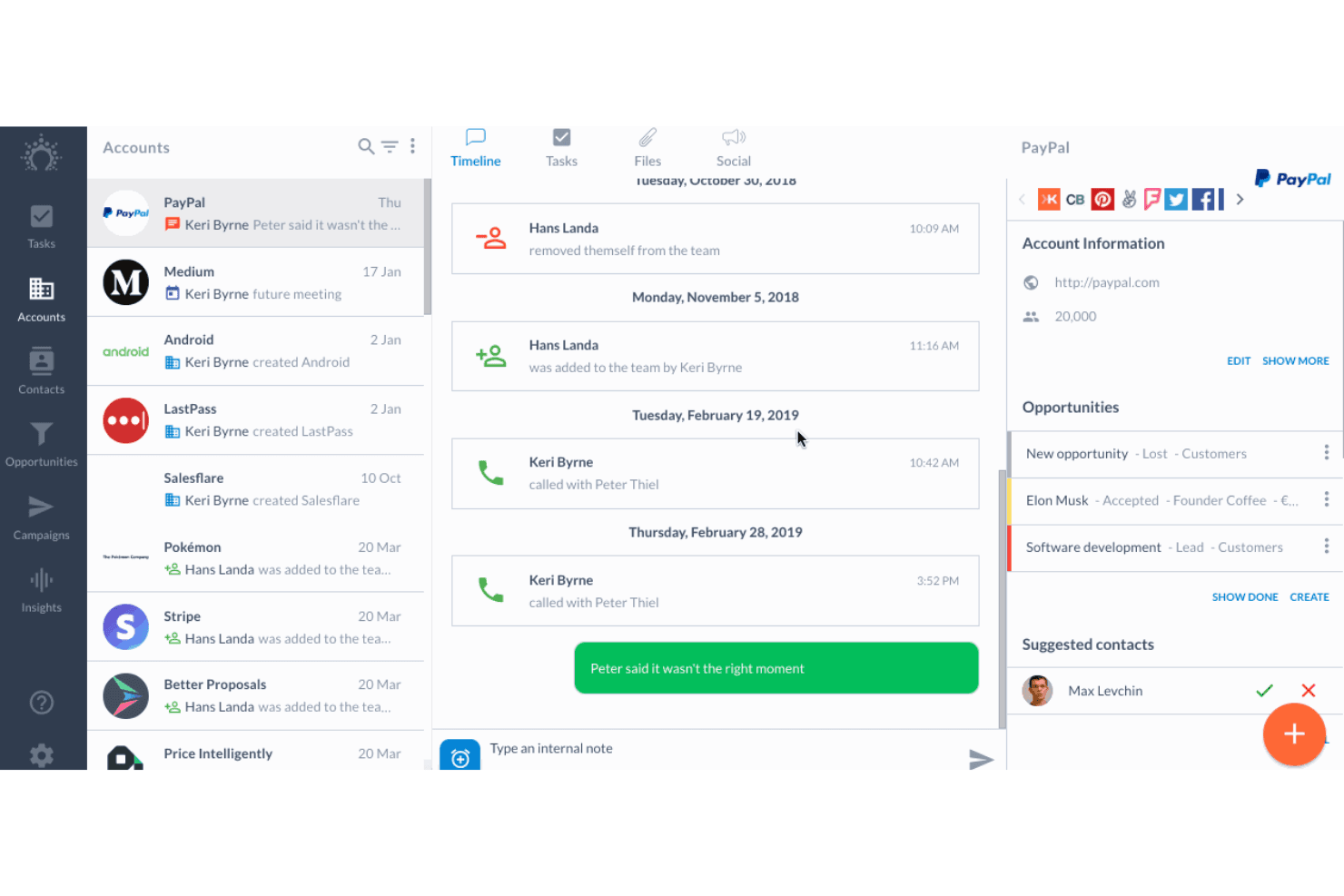
Salesflare tracks account timelines, calls, and opportunities in one view. Salesflare is a CRM for small B2B sales teams that brings customer records, conversations, and pipeline work together, helping reps cut manual admin and keep deal information organized.
Who Is Salesflare Best For?
Salesflare suits B2B sales reps who want lead activity and contact records tracked automatically instead of maintained through manual CRM updates.
Why I Picked Salesflare
I picked Salesflare as a Highrise alternative because it fits the “Best for automated lead tracking” brief. It pulls contact details from email, calendars, and LinkedIn, then logs interactions on contact records. I use email and link tracking to spot prospect engagement and decide who needs follow-up.
Salesflare Key Features
- Sales pipelines: Create multiple pipelines to organize deals by sales process.
- Tasks: Assign follow-ups and manage recurring tasks for deals.
- Custom fields: Add fields to capture information specific to your sales process.
- Insights dashboard: Build dashboards and reports to review sales data.
Salesflare Integrations
Salesflare lists native integrations with Gmail, Microsoft Outlook, Google Calendar, and Google Workspace. It also connects through Zapier and Make, and offers an API for custom integrations.
Pros and Cons
Pros:
- Visual pipelines clarify deal movement
- Tracks email engagement for timely follow-ups
- Automates contact and activity capture
Cons:
- Bulk editing options are narrow
- Advanced report customization remains limited
Learn more about Salesflare: Best for clientflow management for independents
- 30-day free trial
- From $29/month (billed annually)
Visit WebsiteCustomer Rating:4.6/5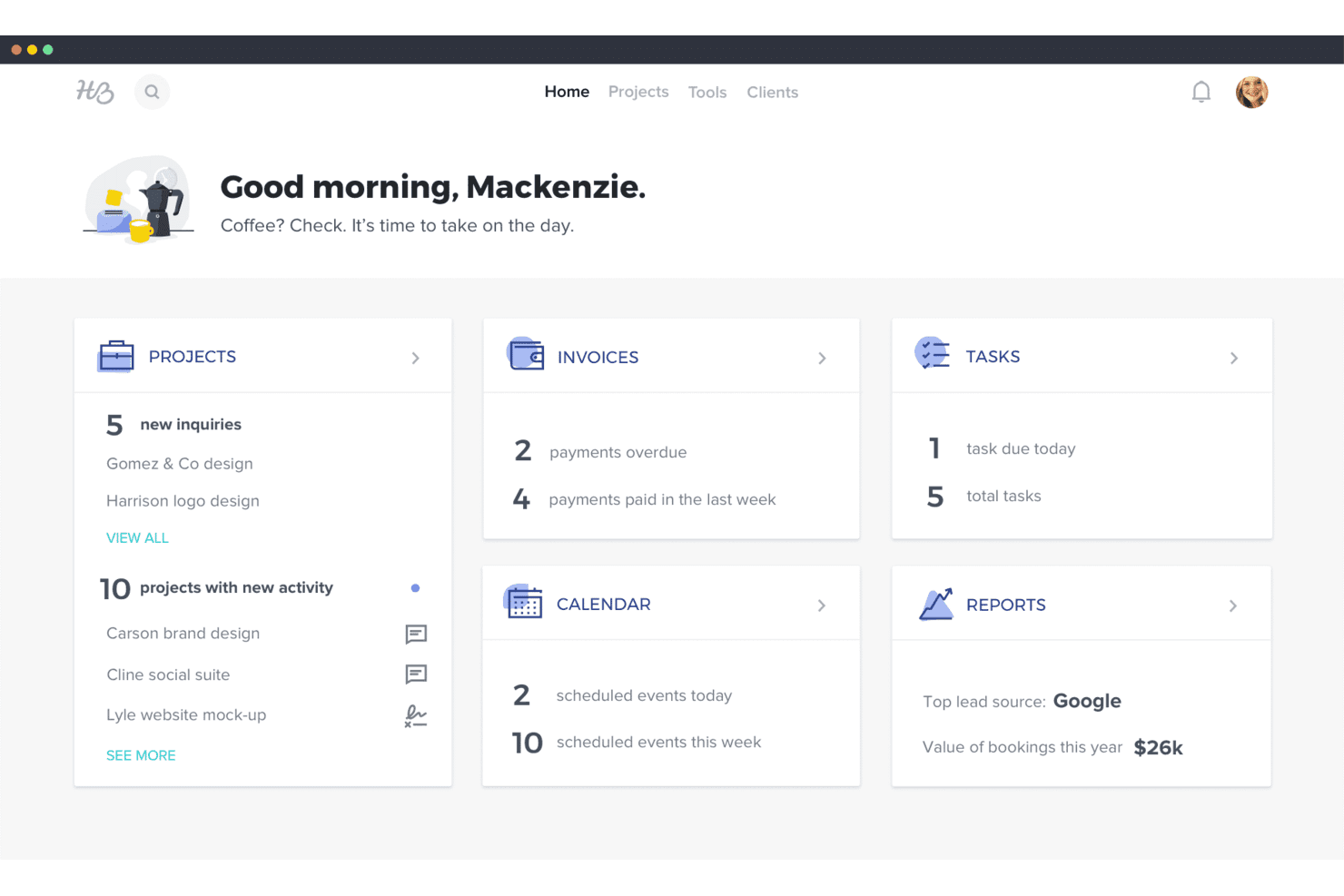
HoneyBook's dashboard gives users a snapshot of projects, invoices, tasks, and reports. HoneyBook is a CRM and business management platform for independent service providers, helping them organize client inquiries, proposals, contracts, and payments instead of juggling those tasks across separate tools.
Who Is HoneyBook Best For?
HoneyBook suits independent service professionals, such as photographers and event planners, who handle client bookings, contracts, and payments themselves.
Why I Picked HoneyBook
I picked HoneyBook as Best for clientflow management for independents because it connects client inquiries with proposals, contracts, and payments. I like that an independent consultant can move a new lead from inquiry to signed agreement and invoice in one client workflow, rather than tracking each step separately in a Highrise alternative.
HoneyBook Key Features
- Scheduler: Let clients book available meeting times from your calendar.
- Workflow automations: Trigger emails, follow-ups, and task reminders.
- Client portal: Give clients a dedicated space to view project details and messages.
- HoneyBook AI: Draft emails, summarize projects, and capture meeting notes.
HoneyBook Integrations
HoneyBook documents integrations with QuickBooks, Gmail, Calendly, Zoom, Google Calendar, Slack, Canva, and Meta Leads, and it also connects with Zapier.
Pros and Cons
Pros:
- Client portal centralizes project messages and files
- Templates automate proposals, contracts, and follow-ups
- Inquiry-to-payment workflows keep client work organized
Cons:
- Rigid templates restrict complex client processes
- Sales forecasting and pipeline reporting remain limited
Learn more about HoneyBook: Best for uniting marketing, sales, and support
- Free plan available
- From $14.99/user/month
Visit WebsiteCustomer Rating:4.6/5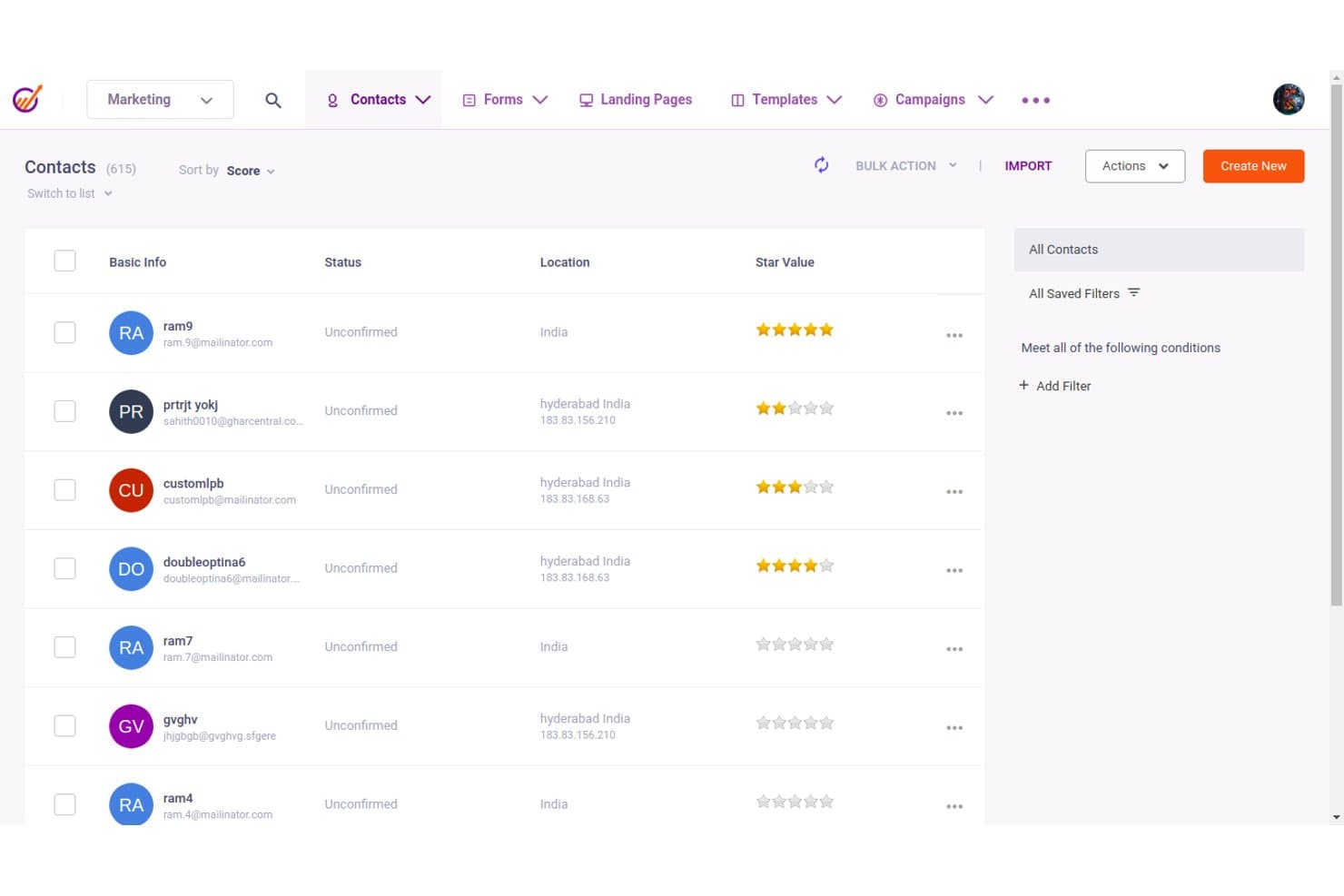
EngageBay lets users manage and filter contacts with scoring and location data. EngageBay is an all-in-one CRM for small and midsize businesses that need to manage contacts, sales pipelines, and marketing campaigns without scattering customer data across separate tools.
Who Is EngageBay Best For?
EngageBay suits small businesses that want one platform to coordinate lead generation, sales follow-up, and customer support.
Why I Picked EngageBay
I picked EngageBay as a Highrise alternative because it’s built for uniting marketing, sales, and support. I like that its sales CRM tracks contacts and deals alongside marketing automation and helpdesk ticketing, so a lead’s campaign activity and support requests can inform sales follow-up in the same platform.
EngageBay Key Features
- Lead scoring: Assign scores based on lead attributes and activity.
- Email tracking: See when prospects open and click tracked emails.
- Appointment scheduling: Let prospects book meetings through a scheduling link.
- Task management: Create and track individual tasks in a table view.
EngageBay Integrations
EngageBay lists integrations with Shopify, SendGrid, Mailgun, Mandrill, Xero, and Zapier. It also offers a REST API for custom integrations.
Pros and Cons
Pros:
- Responsive support helps resolve setup issues
- Email activity informs contact and deal follow-up
- Sales, marketing, and ticketing share one CRM
Cons:
- Campaign statistics can take time to update
- Basic reporting limits cross-team forecast analysis
Learn more about EngageBay: Best for seamless app integrations
- 14-day free trial
- From $29/user/month (billed annually)
Visit WebsiteCustomer Rating:4.2/5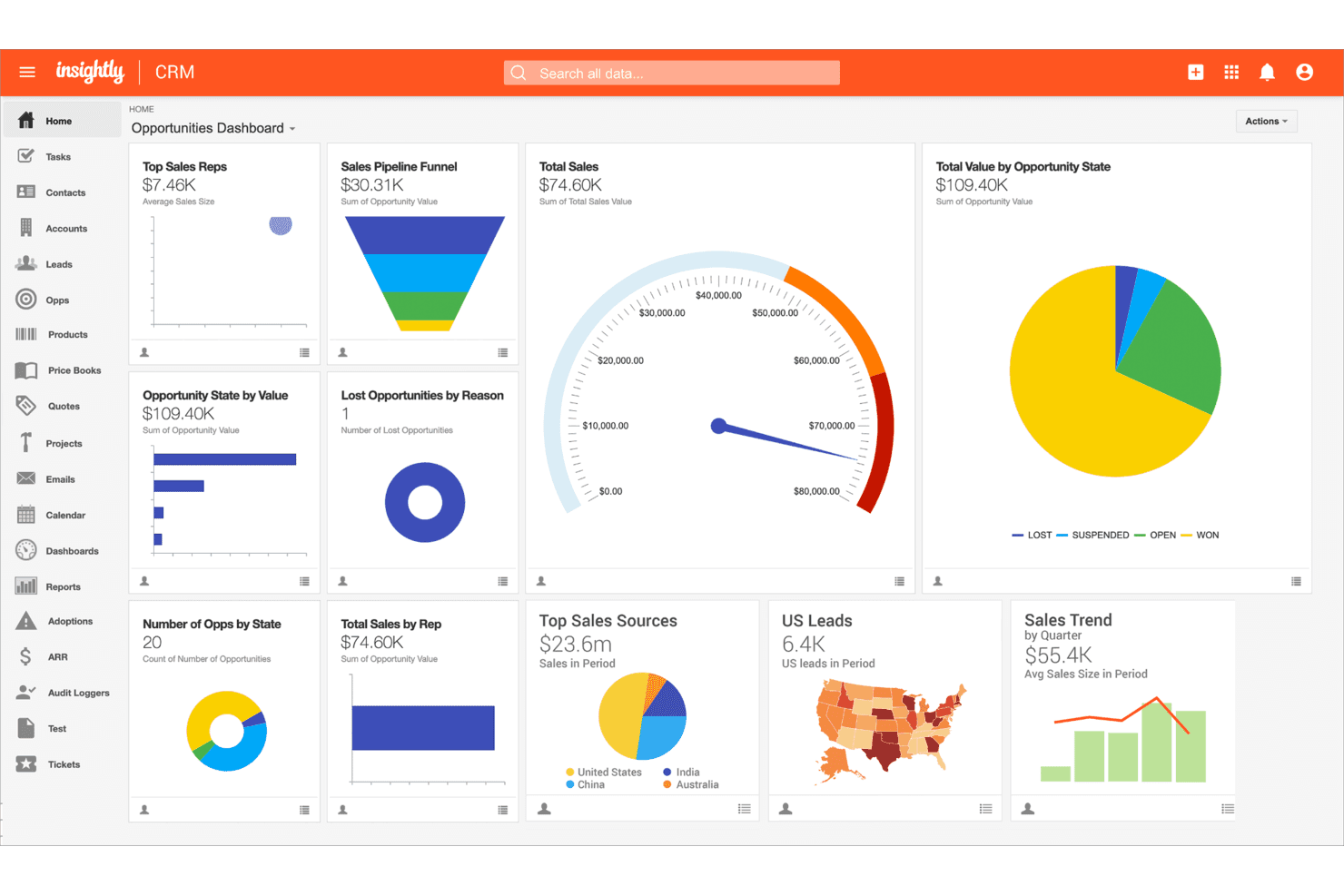
Insightly centralizes sales metrics in a customizable CRM dashboard. Insightly is a CRM for growing businesses that connects contact and opportunity management with project delivery, helping sales and operations teams carry customer context from the first deal through fulfillment.
Who Is Insightly Best For?
Insightly suits small and midsize revenue teams that want sales and delivery staff to work from the same customer records.
Why I Picked Insightly
I picked Insightly as a Highrise alternative because its “Best for seamless app integrations” focus is backed by AppConnect, which connects the CRM with hundreds of apps through no-code workflows. A rep can launch an integration from a CRM record to pass customer details to a finance or support app. I like that workflows use triggers and actions to carry information between systems.
Insightly Key Features
- Lead management: Capture lead details and convert qualified leads into opportunities.
- Sales pipelines: Track deals as they move through pipeline stages.
- Opportunity records: Manage deal details, including status and amount.
- CRM dashboards: View sales activity, performance metrics, and progress toward goals.
Insightly Integrations
Insightly AppConnect offers hundreds of prebuilt app connectors, including QuickBooks Online, Slack, Jira, Shopify, Xero, Gong, Asana, Calendly, and DocuSign, and Insightly connects with Zapier. It also offers a Web API for custom integrations.
Pros and Cons
Pros:
- Custom fields adapt records to team processes
- Multiple pipelines support distinct sales motions
- Linked project and opportunity records preserve context
Cons:
- Mobile screens crowd key customer details
- Reporting filters can return inconsistent results
 Best for inside sales lead management
- 14-day free trial
- From $25/user/month
Visit WebsiteCustomer Rating:4.1/5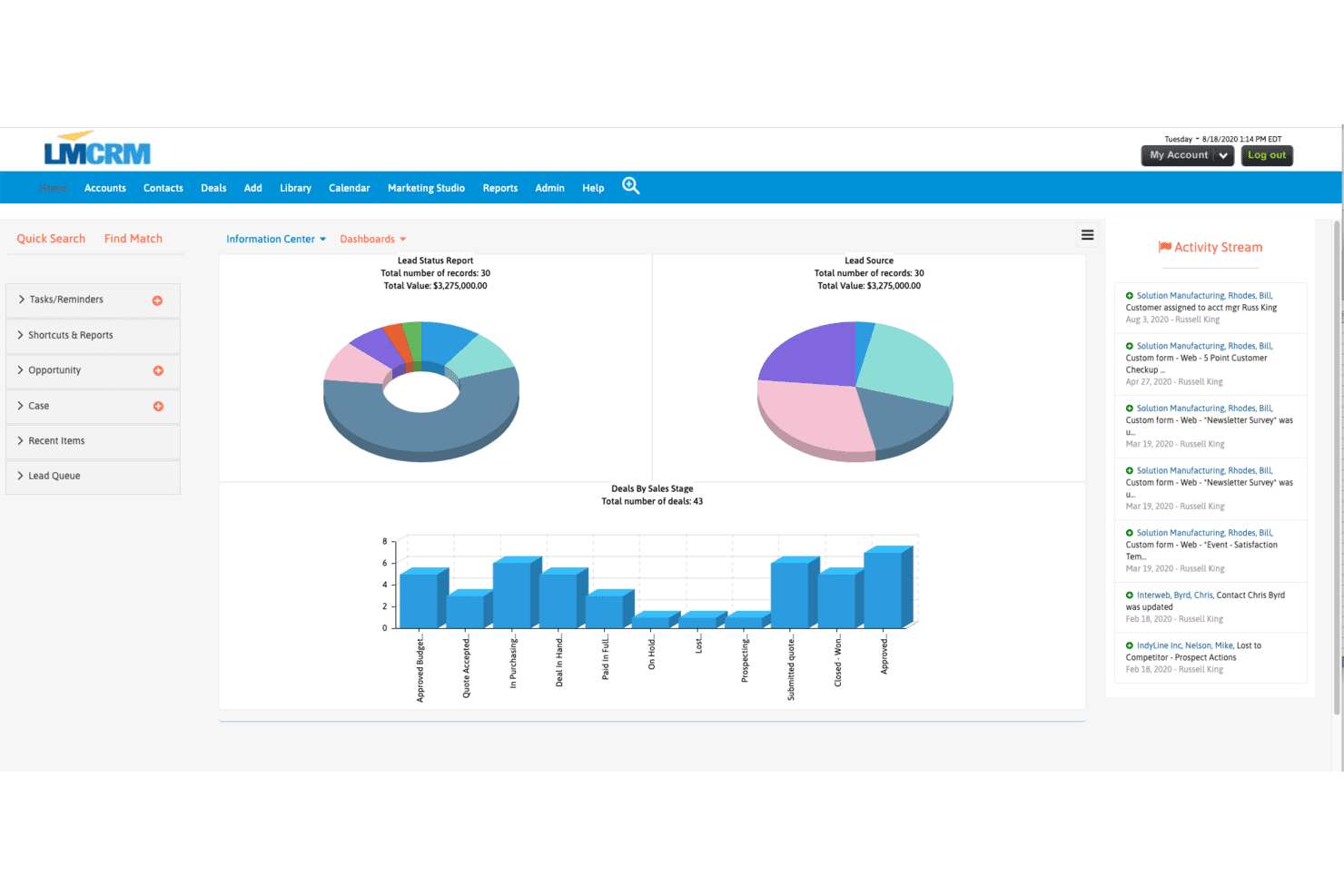
LeadMaster displays lead and deal analytics across visual dashboards. LeadMaster is a CRM platform for sales and marketing teams that organizes leads, tracks opportunities, and coordinates follow-up to improve pipeline visibility and reduce handoff gaps.
Who Is LeadMaster Best For?
LeadMaster suits sales and marketing teams that need to tailor lead management and follow-up workflows to their pipeline.
Why I Picked LeadMaster
I picked LeadMaster as one of the best Highrise alternatives because its customizable CRM solutions let me shape lead and follow-up workflows around our pipeline. I use lead organization and opportunity tracking to keep handoffs visible, then coordinate follow-up so prospects don’t slip between marketing and sales.
LeadMaster Key Features
- Email campaigns: Create campaigns with editable templates and staged email sequences.
- Email tracking: View email opens, clicks, and engagement reports.
- Email integration: Connect Outlook or Gmail to send, receive, and log emails in the CRM.
- Website visitor analytics: Track site visitors and add them as CRM leads without a form submission.
LeadMaster Integrations
LeadMaster documents integrations with Outlook, Gmail, WordPress, and QuickBooks, and lists Zapier as a beta integration. It also offers SOAP and REST APIs for custom integrations.
Pros and Cons
Pros:
- Layered lead records clarify team ownership
- Email-open tracking supports campaign follow-up
- Custom fields and workflows fit distinct pipelines
Cons:
- Setup choices can create duplicate data entry
- The interface can feel dated and sluggish
Learn more about LeadMaster:
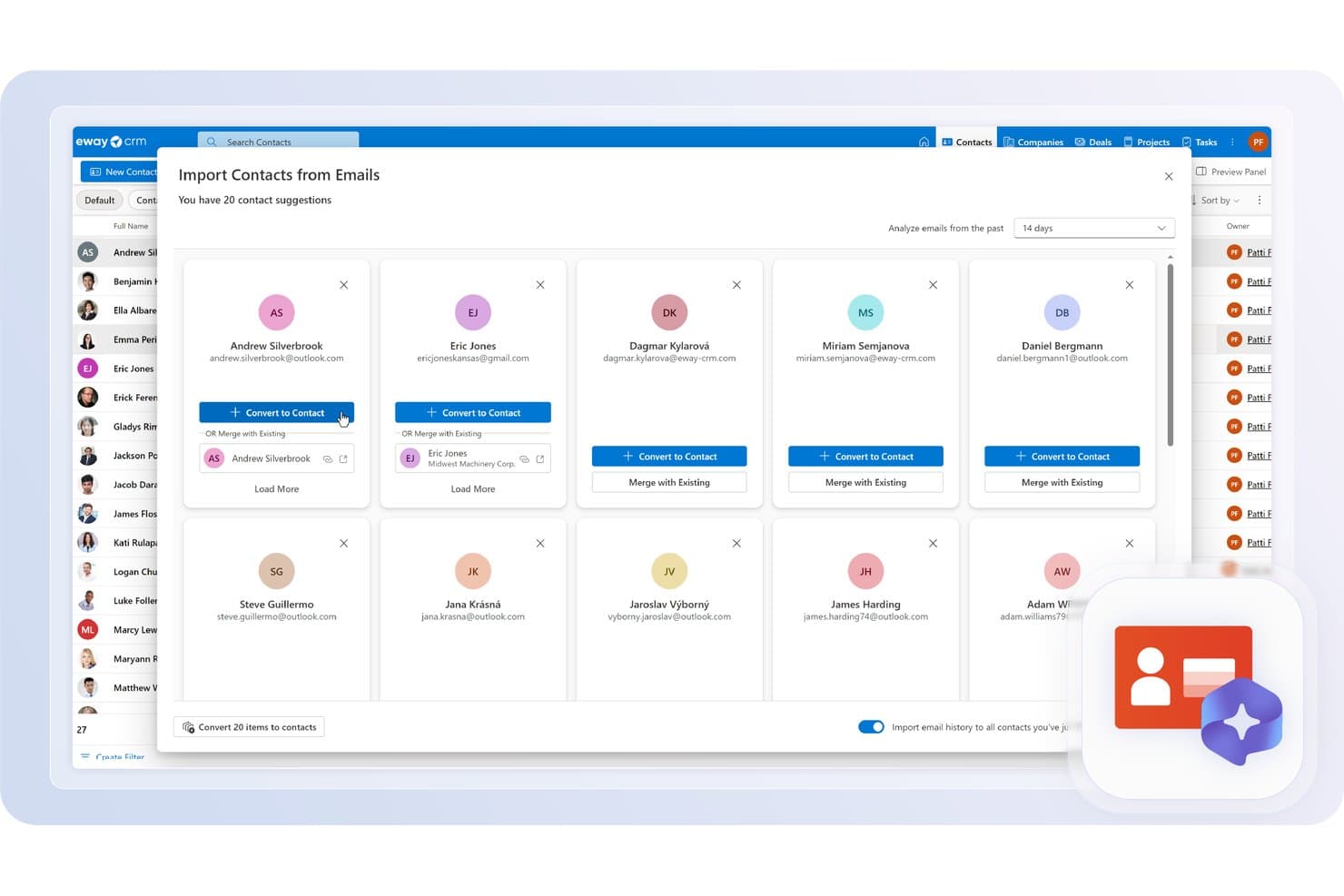
eWay-CRM automatically suggests contacts found in your emails to import. eWay-CRM is a CRM for small and midsize businesses that brings contact, sales, and project data together, helping teams replace scattered customer records with a shared view of accounts and deals.
Who Is eWay-CRM Best For?
eWay-CRM suits small and midsize businesses whose sales teams want to manage customer relationships from Outlook.
Why I Picked eWay-CRM
I picked eWay-CRM as a Best Highrise Alternatives choice because it’s Best for Outlook integration. Its Outlook add-in saves emails and links them to contacts, deals, or projects, keeping customer history attached to the right records. Calendar meetings also sync with eWay-CRM and connect to related contacts and deals.
eWay-CRM Key Features
- Deal management: Track sales opportunities and manage quotes, orders, and invoices.
- Task management: Create tasks, set reminders, and schedule recurring tasks.
- Workflow automation: Set rules and actions to automate CRM processes.
- Custom fields: Add fields to CRM records to capture business-specific data.
eWay-CRM Integrations
eWay-CRM is built into Outlook and integrates with Microsoft Teams, Power BI, SharePoint, QuickBooks, Mailchimp, Constant Contact, WordPress, Power Automate, and Zapier. It also offers an API for custom integrations.
Pros and Cons
Pros:
- Responsive support helps resolve setup issues
- Recurring tasks support consistent follow-up
- Quotes, orders, and invoices stay linked
Cons:
- Email campaign setup feels complicated
- Performance slowdowns can interrupt daily work
Learn more about eWay-CRM: Best for AI-powered sales automation
- 21-day free trial
- From $9/user/month (billed annually)
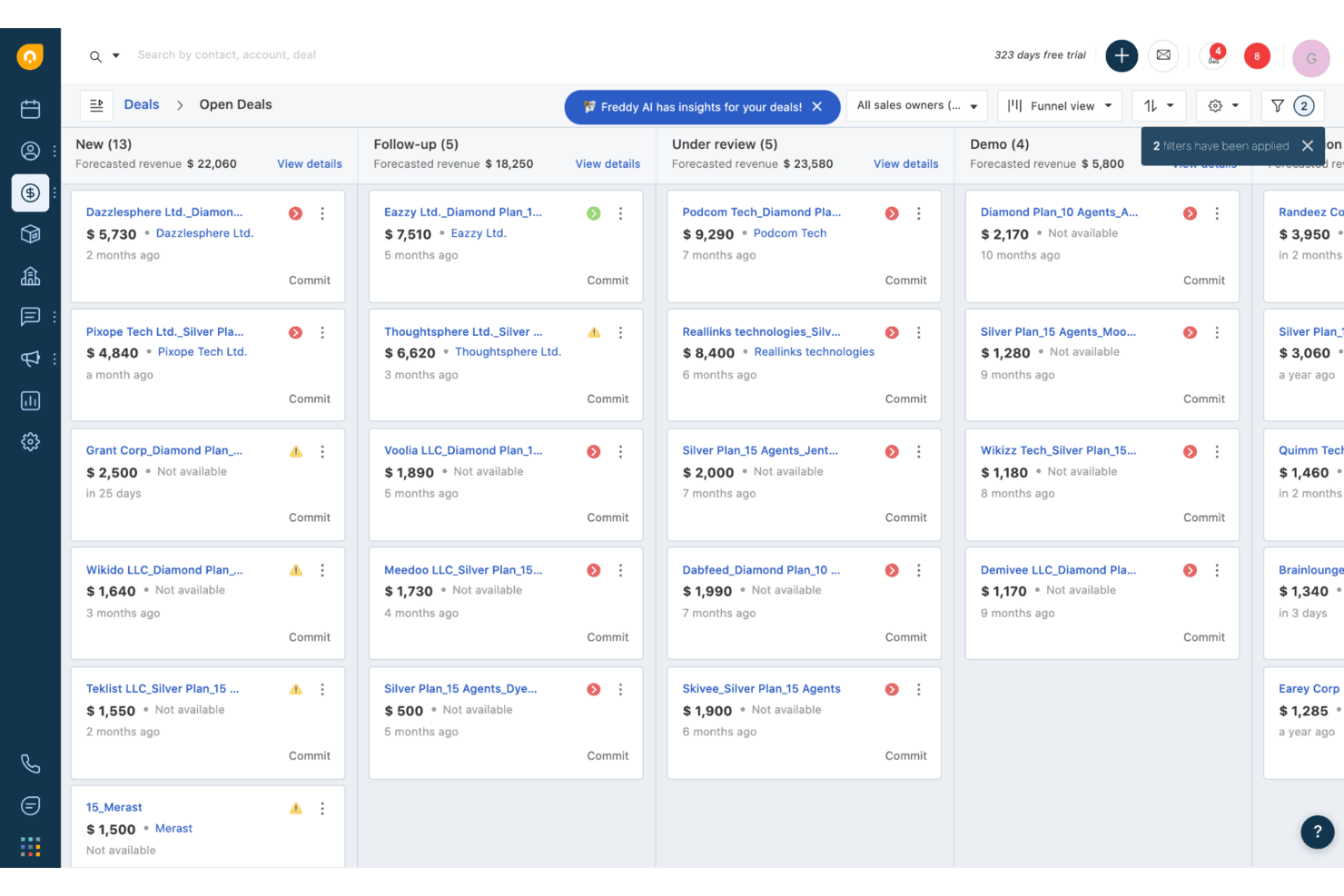
Freshsales organizes open deals by pipeline stage in a kanban view. Freshsales is a sales CRM for revenue teams that brings contact and deal information together, helping reps manage pipeline activity while giving sales leaders clearer visibility into follow-up and opportunities.
Who Is Freshsales Best For?
Freshsales suits sales teams looking to automate routine outreach, lead follow-up, and other sales workflows with AI.
Why I Picked Freshsales
I picked Freshsales as a Highrise alternative for Best for AI-powered sales automation. Freddy AI scores contacts and surfaces deal insights, helping reps prioritize promising leads and spot stalled opportunities. Sales sequences can automate personalized emails, calls, and SMS follow-ups, so reps can keep prospects moving without manually scheduling every touch.
Freshsales Key Features
- Custom lifecycle stages: Create contact stages that match your sales process.
- Task management: Create tasks, reminders, and appointments from the CRM.
- Multiple sales pipelines: Set up separate pipelines with their own deal stages.
- Product catalog: Add products to deals and calculate deal values.
Freshsales Integrations
Freshsales Marketplace integrations include Freshdesk, Mailchimp, Slack, HubSpot, Calendly, and PandaDoc; Zapier is also supported. Freshsales provides a REST API for custom integrations.
Pros and Cons
Pros:
- Shared customer history supports team handoffs
- Automated follow-ups reduce manual chasing
- AI lead scores help prioritize prospects
Cons:
- Support response times draw complaints
- Custom reporting options are limited
Learn more about Freshsales:
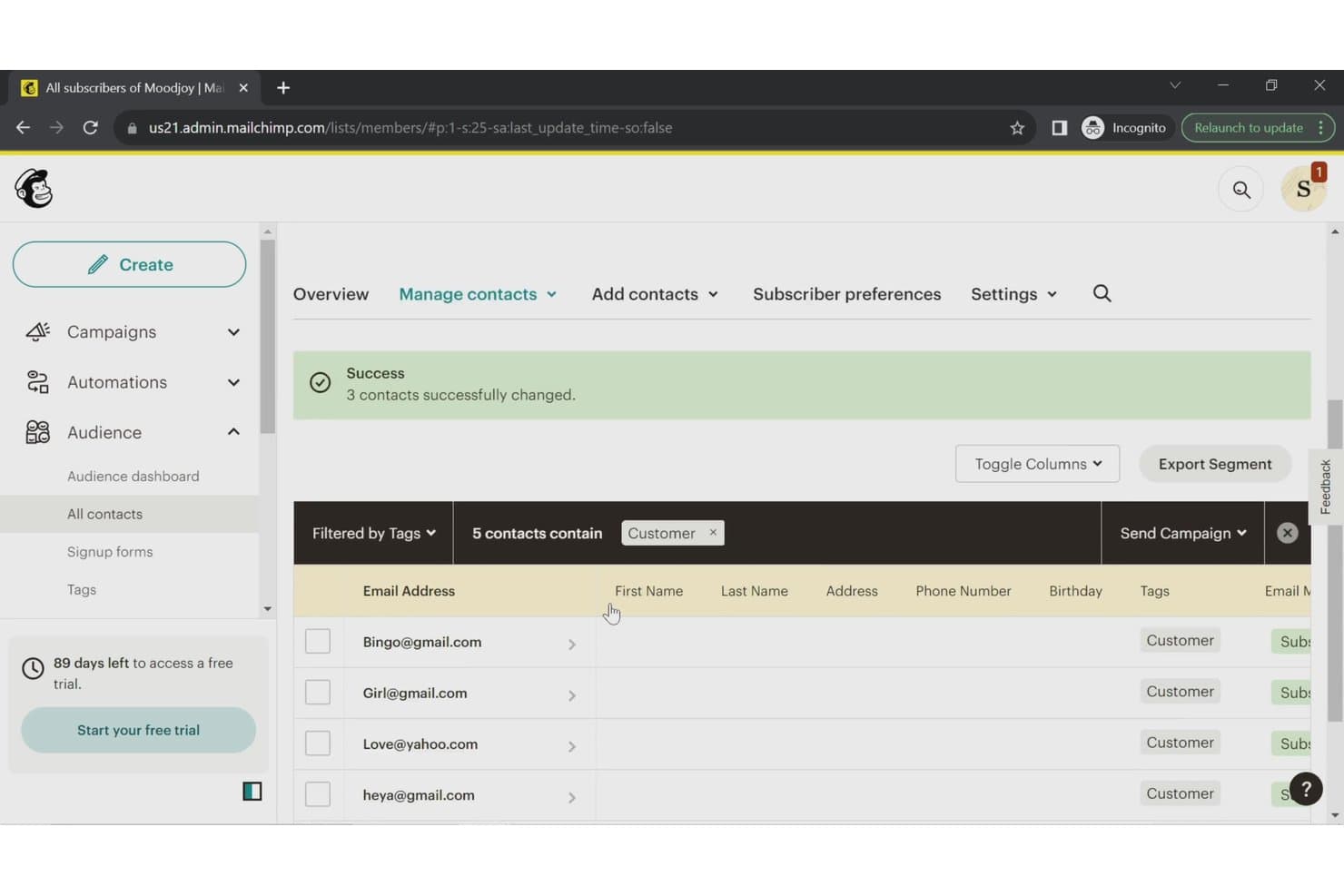
Mailchimp CRM lets users filter and manage contacts by tags. Mailchimp CRM helps small businesses and marketing teams organize customer contacts, track interactions, and coordinate outreach alongside their marketing activities.
Who Is Mailchimp CRM Best For?
Mailchimp CRM suits small businesses and marketing teams that want to automate email campaigns and manage customer outreach in one platform.
Why I Picked Mailchimp CRM
I picked Mailchimp CRM as a Highrise alternative because it earns the label “Best for marketing automation.” Its Customer Journey Builder can trigger email follow-ups when contacts sign up or meet specified conditions. I use tags and audience segments to group leads by source or engagement before tailoring those journeys.
Mailchimp CRM Key Features
- Contact profiles: View individual purchase history, campaign engagement, and subscription status.
- Contact ratings: See a one-to-five-star rating based on each contact’s email engagement.
- Mobile contact capture: Add and organize contacts in the mobile app wherever you meet them.
- Audience reports: Track audience growth, engagement, and revenue.
Mailchimp CRM Integrations
Mailchimp supports integrations with Salesforce, Google Analytics, Shopify, WooCommerce, Wix, and Canva, and connects with Zapier. It also offers an API for custom integrations.
Pros and Cons
Pros:
- Engagement reports clarify campaign performance
- Audience segments support targeted contact outreach
- Automated journeys trigger timely email follow-ups
Cons:
- No dedicated sales pipeline or deal tracking
- Automation workflows can be clunky to debug
Learn more about Mailchimp CRM:
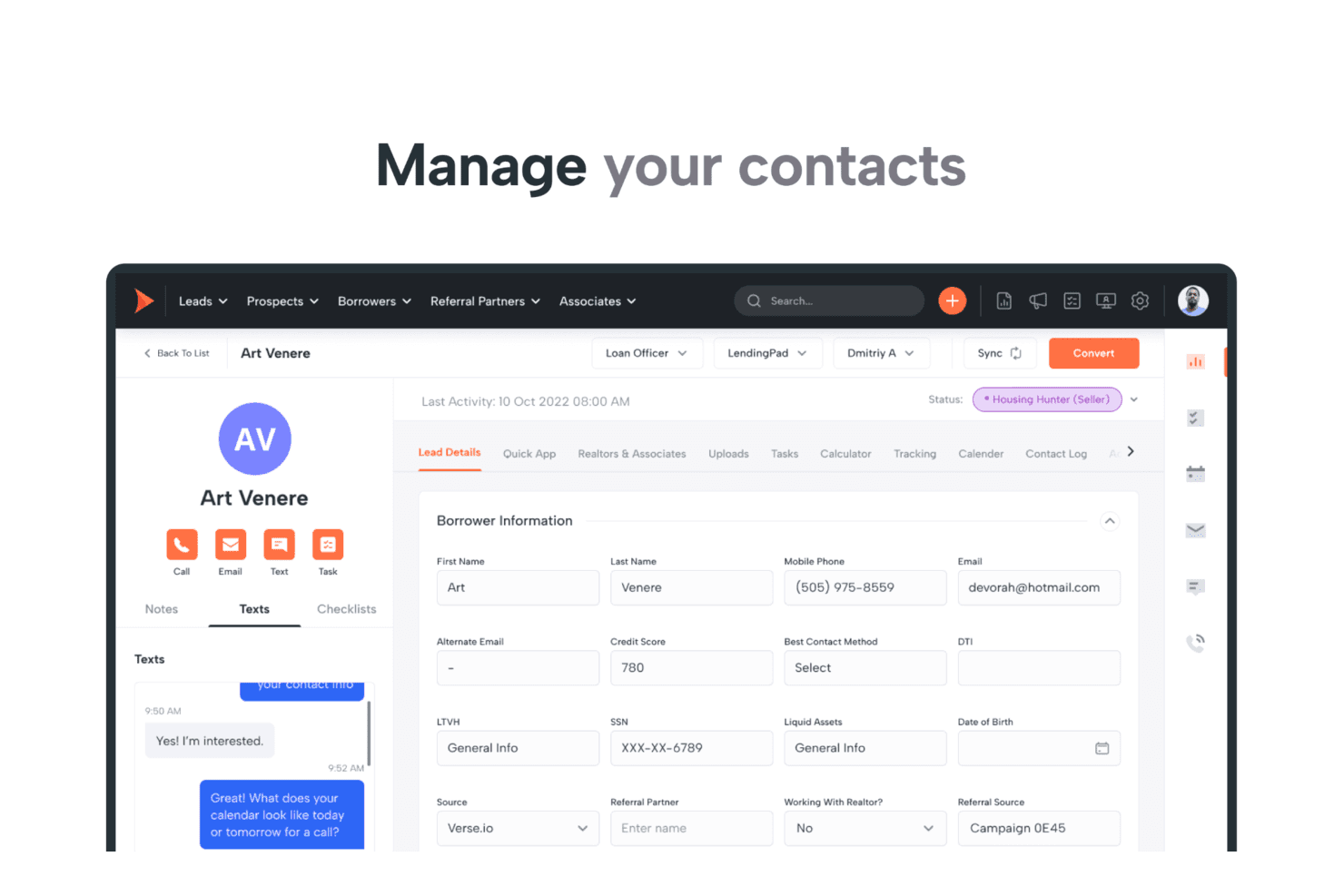
Shape centralizes borrower contact details and SMS conversations in one view. Shape is an all-in-one CRM for mortgage, insurance, solar, and education teams that brings lead management, customer communication, marketing, and workflows together to reduce tool sprawl and keep prospects moving.
Who Is Shape Best For?
Shape suits sales and operations teams in mortgage, insurance, solar, and education businesses that need CRM workflows tailored to their industry.
Why I Picked Shape
I picked Shape as a Highrise alternative for the “Best for industry-specific solutions” use case, particularly in mortgage, insurance, solar, and education. I like that teams can configure lead routing and pipelines for their sales process, then use customer portals to collect applications, documents, and e-signatures. A mortgage team can track a borrower from inquiry through paperwork in one CRM.
Shape Key Features
- CRM dialer: Place, record, and log calls from contact records.
- Email and SMS automation: Send trigger-based messages and drip campaigns.
- Custom reports: Build reports and dashboards for pipeline and revenue forecasting.
- Mobile app: Access contacts, tasks, calls, texts, and notifications on the go.
Shape Integrations
Shape documents integrations with Google Workspace/Gmail, Outlook, Mailchimp, QuickBooks Online, LendingTree, and Zapier. It also offers a documented open REST API, inbound and outbound webhooks, and direct lead-posting URLs.
Pros and Cons
Pros:
- Borrower portals gather documents and e-signatures
- Automated email and text follow-ups nurture leads
- Mortgage workflows track leads through closing
Cons:
- Custom field limits constrain CRM tailoring
- Reported bugs can disrupt daily workflows
Learn more about Shape:
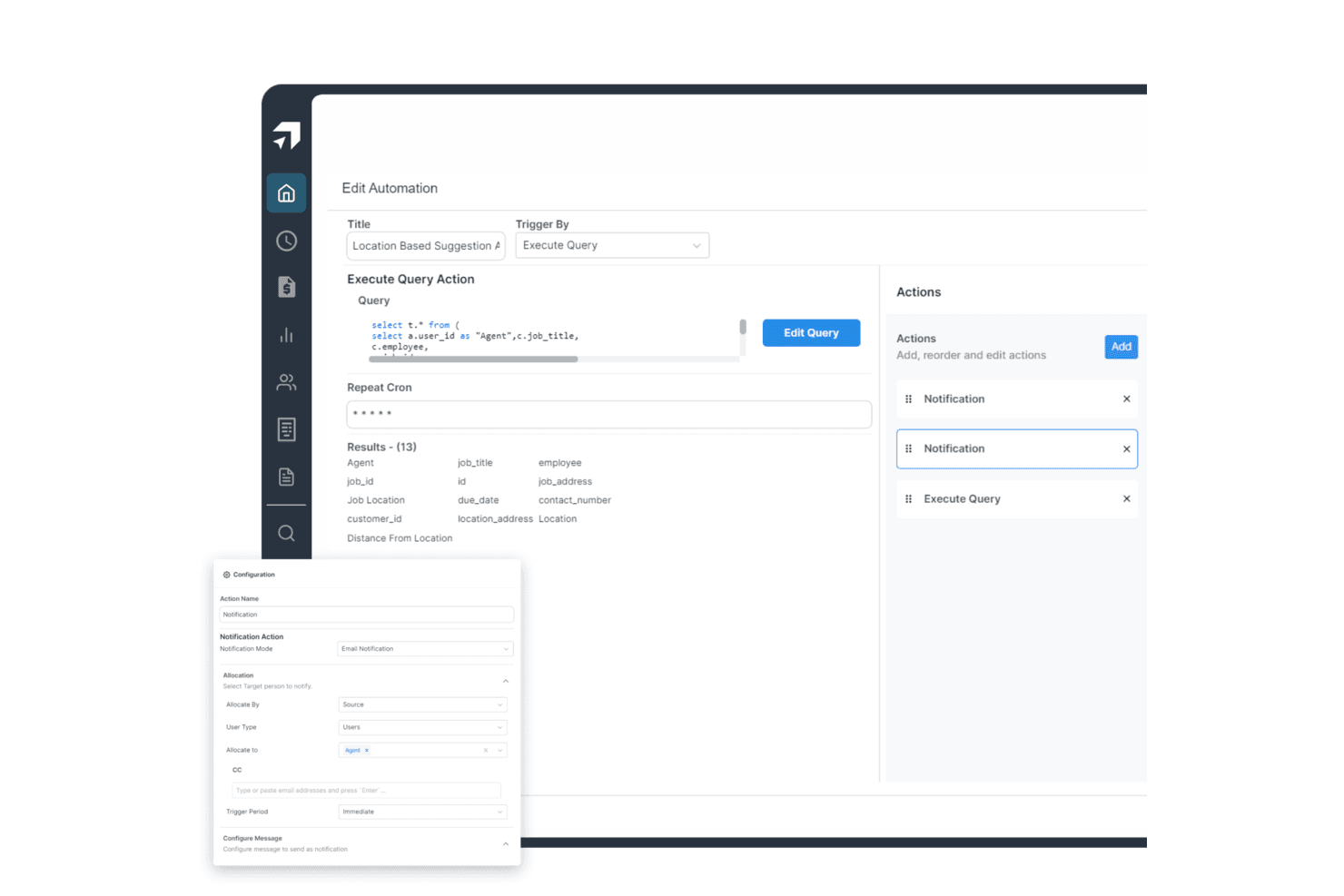
Salesproxy automates location-based job notifications to agents via email. Salesproxy is a CRM and sales management platform for businesses with field-based teams, helping reps organize leads, track customer interactions, and give managers clearer visibility into sales activity.
Who Is Salesproxy Best For?
Salesproxy fits businesses with mobile sales teams, especially managers coordinating reps who meet customers in person across a territory.
Why I Picked Salesproxy
I picked Salesproxy as a Highrise alternative and rate it Best for field team management. Dispatch can assign jobs by skills, territory, and SLA, while the mobile app supports offline updates from the field. Customer, site, and job records connect the initial call to invoicing.
Salesproxy Key Features
- Communications inbox: Brings calls, texts, and web chat together, matched to customer and job records.
- Quotes and estimates: Create quotes and estimates for customers.
- Customer portal: Give customers a portal to access information and links.
- Reports and dashboards: Build reports and dashboards from business data.
Salesproxy Integrations
Salesproxy documents a native, bidirectional HubSpot integration that syncs CRM records with field operations. It also offers a REST API with webhooks for custom integrations.
Pros and Cons
Pros:
- Tracks field attendance and team activity
- Mobile app reduces sales visit paperwork
- Real-time location tracking for field reps
Cons:
- Some reps cannot check in onsite
- Attendance dashboards can show inaccurate results
Learn more about Salesproxy:
Andre Highrise-alternativer
Nedenfor finner du en liste over flere Highrise-alternativer som jeg valgte ut. Selv om de ikke kom med blant de ti beste, er de fortsatt verdifulle og verdt å undersøke nærmere.
- 11CopperBest for Google Workspace integration
- 12ScoroBest for comprehensive work management
- 13KantataBest for professional services automation
- 14monday AI WorkspaceBest for project management integration
- 15MRPeasyBest for manufacturing resource planning
- 16Zoho CRMBest for customizable CRM solutions
- 17ConnecteamBest for managing remote teams
- 18PipedriveBest for visual sales pipeline management
- 19OdooBest for comprehensive business applications
- 20NutshellBest for small business sales automation
- 21ClickUpBest for task and project tracking
- 22OntraccrBest for construction project management
Relaterte CRM-anmeldelser
Hvis du fortsatt ikke har funnet det du leter etter her, kan du se nærmere på disse verktøyene som er nært beslektet med alt-i-ett-CRM-verktøyene vi har testet og vurdert.
- CRM-programvare
- Salgsprogramvare
- Programvare for håndtering av potensielle kunder
- Programvare for forretningsintelligens
- Programvare for kontraktshåndtering
- System for inntektsstyring
How I Evaluate Highrise Alternatives
I split my evaluation into two layers: the core CRM table stakes a tool must nail—pipeline tracking, contact management, email sync—and the differentiators that separate a good fit from a great one.
Core Functionality (Table Stakes For This List)
When I'm selecting tools for my list, I rank each one on a scale from 0 (does not offer the functionality) to 5 (excels in this area) for each core functionality listed below. Then, I calculate the tool's total score into a percentage. Each tool needs to achieve a minimum total score of 75% to be considered for inclusion.
- Contact & Company Management: I check whether the CRM lets you link contacts to companies, log notes against records, and maintain a full interaction timeline per account.
- Pipeline & Deal Tracking: Visual deal boards with customizable stages matter here—I look at how each tool handles multiple pipelines, deal values, and stage progression.
- Task & Activity Management: Every CRM should tie tasks, calls, and meetings directly to contact and deal records so nothing falls through the cracks during handoffs.
- Email Integration & Tracking: I evaluate two-way sync with Gmail and Outlook, automatic email logging, and whether the tool tracks opens and clicks on sent messages.
- Reporting & Sales Analytics: Dashboards covering pipeline health, rep activity, and forecast accuracy are what I look for—prebuilt reports plus custom report builders are ideal.
- Workflow Automation & Integrations: I look at native integrations with tools like Mailchimp, Slack, and billing platforms, plus whether the CRM offers a workflow builder and open API.
Once I have a list of tools that meet this criteria, I consider what sets each platform apart.
Differentiating Factors (What Sets Vendors Apart)
Here's how I compare and contrast different vendors:
Standout Features
Sales sequences are a big differentiator—I look for multi-step cadences that combine emails, calls, and tasks into repeatable playbooks reps can actually follow. Revenue forecasting tools also matter, especially weighted pipeline models and quota tracking that give RevOps teams real visibility into what's likely to close. I also evaluate whether a CRM supports custom objects, since teams tracking renewals or partner deals need data models that go beyond standard contacts and companies.
Beyond Features
Migration path matters when you're leaving Highrise. I check whether a CRM offers native import tools that preserve contact history, notes, and custom fields—losing years of relationship data during a switch can set a team back months. Pricing transparency is another factor I evaluate closely, since many CRMs gate automation or reporting behind higher tiers. I also consider the integration ecosystem, looking at whether the platform connects to the marketing, billing, and support tools your RevOps stack already depends on.
Hvorfor se etter et Highrise-alternativ?
Virksomheter som ikke lenger kan opprette en Highrise-konto, er ikke de eneste brukerne som kan ha behov for å finne en alternativ løsning. Hvis du er en nåværende Highrise-kunde, kan du være interessert i et alternativ av følgende grunner:
- Kostnad: Highrise kan være for dyrt for budsjettet ditt, noe som kan føre til at du ser etter et rimeligere alternativ. En kostnadseffektiv løsning kan bidra til å kontrollere utgiftene uten at det går på bekostning av funksjonaliteten.
- Funksjoner: Highrise kan mangle bestemte funksjoner som er avgjørende for virksomhetens drift. Ved å velge et alternativ med de nødvendige funksjonene kan du bedre ivareta virksomhetens unike behov og forbedre den samlede effektiviteten.
- Skalerbarhet: Highrise kan ha begrenset skalerbarhet i takt med at virksomheten vokser, noe som begrenser mulighetene for ekspansjon. Ved å velge en mer skalerbar løsning sikrer du at programvaren kan vokse sømløst sammen med virksomheten.
- Brukergrensesnitt: Grensesnittet til Highrise er kanskje ikke brukervennlig, noe som kan føre til frustrasjon og ineffektivitet. Ved å velge et alternativ med et mer intuitivt design kan du forbedre brukeropplevelsen og produktiviteten.
- Integrasjon: Highrise kan ha begrenset integrasjon med andre verktøy du bruker, noe som kan føre til avbrudd i arbeidsflyten. Ved å velge programvare med bedre integrasjonsmuligheter kan du effektivisere driften og forbedre den samlede funksjonaliteten.
Etter hvert som virksomheter vokser og utvikler seg, blir det avgjørende å finne en CRM-løsning som er tilpasset deres spesifikke behov og bransjekrav. Et godt egnet alternativ kan øke effektiviteten, effektivisere driften og støtte virksomhetens langsiktige suksess.
Viktige funksjoner i alternativer til Highrise
Her er noen viktige funksjoner i Highrise som den alternative programvaren bør kunne gjenskape eller forbedre for å være et godt valg.
- Kontaktadministrasjon: Dette er viktig for å holde kundeinformasjonen organisert og lett tilgjengelig, slik at kommunikasjon og relasjonsstyring kan gjennomføres effektivt.
- Oppgavehåndtering: Effektiv oppgavehåndtering hjelper team med å holde oversikt over ansvarsområdene sine, noe som øker produktiviteten og ansvarligheten.
- Avtalesporing: Denne funksjonen er avgjørende for å holde salgsarbeidet på rett spor, og gir bedre grunnlag for prognoser og justeringer av strategien.
- E-postintegrasjon: Sømløs e-postintegrasjon effektiviserer kommunikasjonen, reduserer behovet for å bytte mellom plattformer og bidrar til å opprettholde konsekvent kontakt med kundene.
- Notater og kommentarer: Detaljert dokumentasjon av interaksjoner sikrer at alle teammedlemmer har tilgang til viktig informasjon, noe som forbedrer samarbeidet og kundeservicen.
- Tilpassede felt: Tilpassede felt gjør det mulig å registrere unike datapunkter og sikrer at CRM-systemet kan tilpasses virksomhetens spesifikke behov.
- Tagger og filtre: Effektiv organisering ved hjelp av tagger og filtre gjør det lettere for brukerne å finne spesifikk informasjon raskt, noe som øker driftseffektiviteten.
- Rapportering og analyse: Grundig rapportering og analyse gir verdifull innsikt i salgsresultatene og bidrar til å identifisere trender og forbedringsområder.
- Felles innboks: En delt innboks sikrer at potensielle kunder blir fulgt opp og håndtert raskt, noe som forbedrer responstiden og kundeservicen.
- Gjentakende påminnelser: Gjentakende påminnelser bidrar til regelmessig og rettidig oppfølging, noe som er avgjørende for å utvikle potensielle kunder og opprettholde kunderelasjoner.
Når du ser etter et alternativ til Highrise, er det viktig å vurdere viktige funksjoner som intuitiv kontaktadministrasjon, gode kommunikasjonsverktøy og sømløse integrasjonsmuligheter. Ved å fokusere på disse grunnleggende funksjonene kan virksomheter finne en løsning som øker produktiviteten og effektivt støtter behovene deres innen håndtering av kunderelasjoner.