

Le migliori alternative a Smartsheet per i software CRM di marketing combinano un monitoraggio flessibile dei progetti, flussi di lavoro personalizzabili e solidi strumenti di collaborazione. Se stai cercando alternative a Smartsheet, probabilmente cerchi piattaforme che uniscano funzionalità CRM e caratteristiche di gestione dei progetti. Questi strumenti aiutano il tuo team di marketing a gestire le campagne, monitorare i lead e centralizzare i dati dei clienti, supportando al contempo la pianificazione dei progetti e il monitoraggio delle attività tra i team. Scegliere l'alternativa giusta può significare una migliore integrazione con gli strumenti esistenti, un'automazione più intuitiva e un'esperienza più fluida per l'intero team responsabile dei ricavi. In questa guida troverai opzioni adatte a diverse esigenze di marketing, così potrai scegliere con sicurezza il CRM che corrisponde ai tuoi obiettivi e processi.
Che cos'è Smartsheet?
Smartsheet è una soluzione di gestione dei progetti basata sul cloud per la collaborazione e l'automazione dei flussi di lavoro. Consente ai team di organizzare le attività, monitorare i progressi e gestire il lavoro attraverso un'interfaccia flessibile in stile foglio di calcolo. Grazie alle funzionalità avanzate, agli strumenti di collaborazione e al supporto per i flussi di lavoro agili, Smartsheet aiuta i team a coordinare i progetti e ad automatizzare le attività ripetitive. Include anche funzionalità come il monitoraggio dei fogli presenze, oltre a opzioni per una versione gratuita e piani a pagamento scalabili.
Perché fidarsi dei nostri consigli sui software
6,700+
Reviews
20
Industry experts
16+
Evaluation factors
14
Years
Le nostre recensioni riflettono il nostro giudizio indipendente, non un discorso di vendita. Scopri come manteniamo la trasparenza.
Per questa guida, abbiamo valutato gli strumenti attraverso test pratici e ricerche indipendenti, assegnando un punteggio agli strumenti in base ai nostri criteri di selezione.
Le nostre recensioni riflettono il nostro giudizio editoriale umano, non un discorso di vendita.
Tabella comparativa delle alternative a Smartsheet
Questa tabella comparativa mette in evidenza i dettagli sui prezzi delle mie migliori alternative a Smartsheet.
| Tool | Best For | Trial Info | Price | ||
|---|---|---|---|---|---|
| 1 | Ideale per le operazioni dei flussi di lavoro di marketing e creativi | Demo gratuita disponibile | Prezzi disponibili su richiesta | Website | |
| 2 | Ideale per gestione documenti, attività e conoscenza | Piano gratuito disponibile | Da $10/utente/mese (fatturato annualmente) | Website | |
| 3 | Ideale per strumenti di foglio di calcolo con integrazioni API | Piano gratuito disponibile | A partire da $5/utente/mese (con fatturazione annuale) | Website | |
| 4 | Ideale per la gestione dati ibrida foglio di calcolo-database | Piano gratuito + demo gratuita disponibile | Da $20/utente/mese (fatturazione annuale) | Website | |
| 5 | Ideale per database no-code open-source | Prova gratuita + piano gratuito disponibili | Da $10/utente/mese (fatturazione annuale) | Website | |
| 6 | Ideale per CRM con tracciamento della pipeline | Demo gratuita disponibile | Da $45/postazione/mese (fatturazione annuale) | Website | |
| 7 | Ideale per la gestione del lavoro tutto-in-uno | Piano gratuito + demo gratuita disponibile | Da $7/utente/mese (fatturazione annuale) | Website | |
| 8 | Ideale per il monitoraggio strutturato di attività e progetti | Piano gratuito disponibile | Da $10.99/utente/mese (fatturato annualmente) | Website | |
| 9 | Ideale per la gestione visuale dei flussi di lavoro | Piano gratuito disponibile | A partire da $9/utente/mese (fatturazione annuale) | Website | |
| 10 | Ideale per collaborazione avanzata sui progetti | Prova gratuita 14 giorni + piano free disponibile | Da $10/utente/mese (fatturazione annuale) | Website |


Recensioni delle migliori alternative a Smartsheet
Di seguito sono riportati i miei riepiloghi dettagliati delle migliori alternative a Smartsheet incluse nel mio elenco. Le mie recensioni offrono uno sguardo approfondito alle funzionalità, alle integrazioni e ai casi d’uso migliori di ciascuna piattaforma, per aiutarti a trovare quella più adatta a te.
 Ideale per le operazioni dei flussi di lavoro di marketing e creativi
- Demo gratuita disponibile
- Prezzi disponibili su richiesta
Visit WebsiteCustomer Rating:4.6/5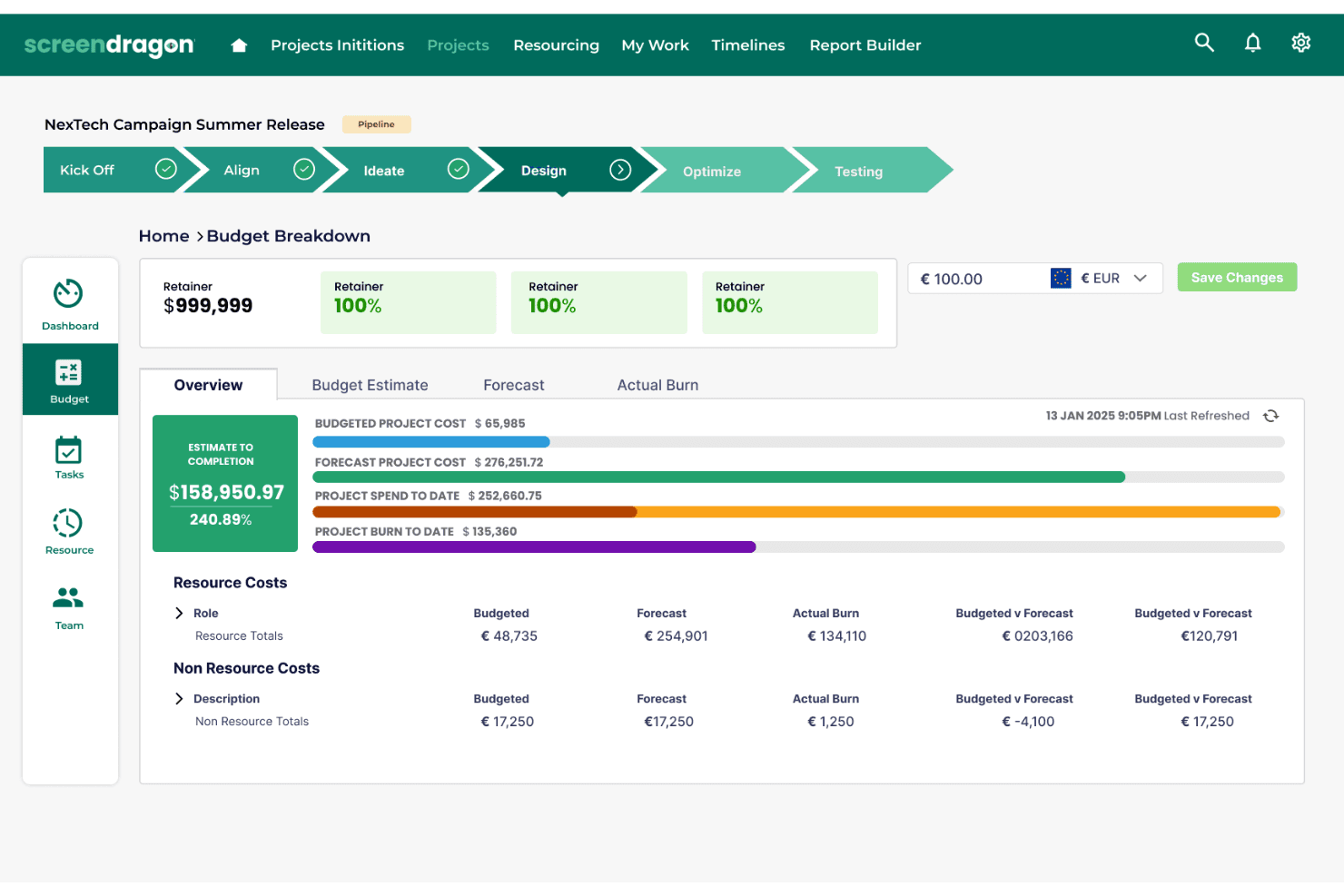
Screendragon monitora i budget dei progetti con suddivisioni e previsioni dei costi. Screendragon offre una piattaforma di gestione dei flussi di lavoro che aiuta i team di marketing, creativi e delle agenzie a gestire progetti complessi, centralizzare le approvazioni e automatizzare l'instradamento delle attività per campagne, risorse e operazioni del marchio.
A chi è più adatto Screendragon?
Screendragon è adatto ai team di marketing, creativi e delle agenzie che devono gestire campagne complesse, approvazioni e flussi di lavoro delle risorse in un unico luogo.
Perché Screendragon è una buona alternativa a Smartsheet
Ho scelto Screendragon come una delle migliori alternative perché posso gestire flussi di lavoro di marketing complessi, centralizzare le approvazioni e automatizzare l'instradamento delle attività per campagne e risorse creative. Il mio team gestisce grandi progetti interfunzionali in un unico luogo, mantenendo le operazioni del marchio e le approvazioni delle risorse semplificate e sotto controllo.
Caratteristiche principali di Screendragon
- Dashboard per la gestione delle risorse: Monitora la disponibilità del team, controlla i carichi di lavoro e assegna visivamente le risorse tra i progetti.
- Strumenti per il monitoraggio del budget: Imposta i budget, confronta la spesa pianificata con quella effettiva e gestisci le approvazioni dei costi in un'unica dashboard.
- Libreria di risorse digitali: Archivia, organizza e accedi rapidamente alle risorse dei progetti, ai file e ai materiali delle campagne da un hub centralizzato.
- Tempistiche di progetto integrate: Crea diagrammi di Gantt, imposta le dipendenze e visualizza le tappe principali per ogni fase del progetto.
Integrazioni di Screendragon
- Le integrazioni non sono elencate da Screendragon.
Pros and Cons
Pros:
- Gestisce flussi di lavoro complessi per campagne e risorse
- Centralizza i processi di approvazione multilivello
- Offre una libreria di risorse digitali integrata
Cons:
- Le integrazioni native non sono documentate chiaramente
- L'interfaccia potrebbe sembrare datata rispetto a quella dei concorrenti
Learn more about Screendragon: Ideale per gestione documenti, attività e conoscenza
- Piano gratuito disponibile
- Da $10/utente/mese (fatturato annualmente)
Visit WebsiteCustomer Rating:4.6/5
Notion unisce documenti, database e monitoraggio progetti in un unico spazio di lavoro per gestire la conoscenza, i flussi di lavoro e la collaborazione del team. Notion è una piattaforma di workspace flessibile che consente ai team marketing di unire database CRM, monitoraggio dei progetti e documentazione delle campagne in un unico luogo. Se desideri centralizzare i flussi di lavoro di marketing e personalizzare ogni dettaglio, Notion offre un approccio modulare che si adatta ai tuoi processi.
Per chi è ideale Notion?
Team di marketing e operations in startup o agenzie che desiderano unificare CRM, gestione progetti e documentazione in uno spazio di lavoro personalizzabile.
Perché Notion è una valida alternativa a Smartsheet
Ho scelto Notion perché consente al mio team di creare un database CRM completamente personalizzato utilizzando database collegati e viste filtrate, senza essere vincolati a un modello rigido. Mi piace come le proprietà di relazione e rollup di Notion permettono di collegare i record dei contatti ai pipeline delle trattative e alle pagine delle campagne in un unico spazio di lavoro. Il mio team utilizza i modelli di database di Notion per avviare nuovi tracker di campagne che ereditano automaticamente la nostra struttura CRM esistente. In pratica, significa che gestiamo contatti, attività e brief dei contenuti in un unico luogo, invece di passare da uno strumento all'altro.
Funzionalità principali di Notion
- Vista timeline: Visualizza le pianificazioni dei progetti e le dipendenze su una timeline trascinabile per monitorare le scadenze e risolvere i blocchi.
- Blocchi sincronizzati: Scrivi il contenuto una sola volta e verrà aggiornato automaticamente in tutte le pagine dove appare nel tuo spazio di lavoro.
- Moduli: Raccogli input strutturati dal tuo team o da contatti esterni, quindi attiva attività e inserimenti nei database direttamente dalle risposte.
- AI Autofill: Compila automaticamente i campi dei database come aggiornamenti di stato, user story e risultati chiave in tutti i record dei progetti.
Integrazioni di Notion
Le integrazioni includono Salesforce, Microsoft Teams, Asana, GitHub, Google Drive, Make, Trello, Jira, Slack, Figma, Webex e altri.
Pros and Cons
Pros:
- Database modulari supportano strutture CRM personalizzate
- Collaborazione in tempo reale con permessi granulati
- I database collegati connettono progetti, contatti e attività
Cons:
- L'importazione di fogli di calcolo di grandi dimensioni può essere lenta
- I permessi possono diventare complessi in workspace di grandi dimensioni
Learn more about Notion: Ideale per strumenti di foglio di calcolo con integrazioni API
- Piano gratuito disponibile
- A partire da $5/utente/mese (con fatturazione annuale)
Visit WebsiteCustomer Rating:4.7/5
Stackby combina la semplicità dei fogli di calcolo con la potenza dei database, consentendo ai team di gestire pipeline, monitorare trattative e visualizzare i dati con integrazioni integrate. Stackby è una piattaforma di database in stile foglio di calcolo progettata per professionisti del marketing e agenzie che desiderano organizzare campagne, contatti e flussi di lavoro in modo altamente personalizzabile. Se hai bisogno di combinare le familiari visualizzazioni dei fogli di calcolo con la potenza dei database per gestire lead e progetti di marketing, Stackby è progettato per offrire flessibilità.
Per chi è più adatto Stackby?
Team di marketing e agenzie che desiderano personalizzare il monitoraggio delle campagne e automatizzare i flussi di lavoro utilizzando database in stile foglio di calcolo.
Perché Stackby è una buona alternativa a Smartsheet
Ho scelto Stackby perché la sua funzionalità di colonna API consente al mio team di acquisire dati in tempo reale da strumenti come YouTube, Clearbit o Mailchimp direttamente in una tabella in stile foglio di calcolo, senza bisogno di inserire manualmente i dati. Mi piace il fatto che ogni colonna possa essere collegata a un'API esterna, così i dati sulle prestazioni delle nostre campagne si aggiornano automaticamente nella stessa visualizzazione in cui gestiamo le attività. Il mio team utilizza anche le visualizzazioni modulo di Stackby per acquisire lead e inserirli direttamente nelle nostre tabelle di monitoraggio. In pratica, gestiamo contatti, dati delle campagne e flussi di lavoro tutto in un unico posto, senza dover collegare strumenti separati.
Funzionalità principali di Stackby
- Molteplici tipi di visualizzazione: Passa dalle visualizzazioni griglia, kanban, calendario, galleria e cronologia per visualizzare i dati delle campagne e dei contatti in layout diversi.
- Generatore avanzato di moduli: Crea moduli con logica condizionale e oltre 30 tipi di campo per acquisire lead e inserire le risposte direttamente nelle tue tabelle.
- Report e dashboard: Crea dashboard in tempo reale utilizzando grafici, tabelle pivot e riquadri riepilogativi tramite il Marketplace delle app di Stackby.
- Agenti dei campi basati sull'IA: Aggiungi modelli di IA direttamente nelle colonne delle tabelle utilizzando le tue chiavi API OpenAI, Gemini o Anthropic per generare contenuti o analizzare dati.
Integrazioni di Stackby
Le integrazioni includono Slack, Clearbit, YouTube, Mailchimp, Intercom, Facebook Ads, Google Analytics, Shopify, Microsoft Teams, Airtable e altro.
Pros and Cons
Pros:
- Le colonne API acquisiscono dati in tempo reale nelle tabelle
- Molteplici tipi di visualizzazione per la gestione delle campagne
- Agenti dei campi basati sull'IA per la generazione di contenuti
Cons:
- Nessun generatore di automazioni dei flussi di lavoro integrato
- Accesso offline limitato per il lavoro da remoto
Learn more about Stackby: Ideale per la gestione dati ibrida foglio di calcolo-database
- Piano gratuito + demo gratuita disponibile
- Da $20/utente/mese (fatturazione annuale)
Visit WebsiteCustomer Rating:4.6/5
Airtable trasforma i fogli di calcolo in database, consentendo ai team di monitorare progetti, campagne e flussi di lavoro con visualizzazioni e campi personalizzabili. Airtable è un software di gestione progetti flessibile pensato per i team marketing che desiderano organizzare campagne, gestire contatti e monitorare progetti attraverso un'interfaccia in stile foglio di calcolo. Se cerchi un CRM che si adatti ai tuoi flussi di lavoro e favorisca la collaborazione su contenuti, eventi o attività di lead management, Airtable merita sicuramente attenzione.
Per chi è più adatto Airtable?
Team marketing di startup e agenzie che desiderano un CRM personalizzabile per la gestione di campagne e progetti.
Perché Airtable è una valida alternativa a Smartsheet
Ho scelto Airtable perché colma il divario tra un foglio di calcolo e un database relazionale in modo che Smartsheet non fa. Il mio team usa i record collegati di Airtable per connettere contatti, campagne e trattative in un'unica base, così che nulla resti isolato. Apprezzo anche le visualizzazioni a galleria e kanban, che ci consentono di passare da una pipeline visuale a una tabella dati strutturata a seconda delle necessità. In pratica, il mio team riesce a gestire il tracciamento dei lead e la pianificazione delle campagne nello stesso ambiente senza dover utilizzare diversi strumenti.
Funzionalità principali di Airtable
- Automazione dei flussi di lavoro: Imposta automazioni basate su trigger per inviare notifiche, aggiornare record o creare attività senza intervento manuale.
- Editor di interfacce: Crea dashboard personalizzate e moduli di inserimento dati sopra le tue basi esistenti tramite un editor drag-and-drop.
- Agenti AI nei campi: Esegui attività AI su larga scala sui tuoi dati, come analizzare il feedback delle campagne o ricercare contatti, direttamente all'interno di una base.
- Template CRM predefiniti: Inizia con una struttura CRM già pronta e personalizza campi, visualizzazioni e flussi di lavoro in base al tuo processo di vendita.
Integrazioni Airtable
Le integrazioni includono Gong, Jira, Azure DevOps e altro ancora.
Pros and Cons
Pros:
- I database relazionali supportano dati marketing complessi
- Gli agenti AI automatizzano le analisi delle campagne
- I template predefiniti velocizzano la configurazione del CRM
Cons:
- Funzionalità Gantt e timeline limitate
- Nessun strumento di gestione risorse integrato
 Ideale per database no-code open-source
- Prova gratuita + piano gratuito disponibili
- Da $10/utente/mese (fatturazione annuale)
Visit WebsiteCustomer Rating:4.7/5
Baserow è un database open-source no-code che consente ai team di creare flussi di lavoro personalizzati e gestire dati strutturati senza complessità tecniche. Baserow è una piattaforma di database no-code per team che vogliono creare soluzioni CRM personalizzate senza barriere tecniche. Se hai bisogno di controllo totale sui dati di marketing e collaborazione flessibile, Baserow offre la semplicità di un foglio di calcolo con la potenza di un database.
Per Chi È Ideale Baserow?
Team di marketing e operations presso startup o agenzie che vogliono database CRM open-source e personalizzabili.
Perché Baserow È una Buona Alternativa a Smartsheet
Ho scelto Baserow perché consente al mio team di ospitare autonomamente l'intera piattaforma, il che significa che i dati di marketing non passano mai da server di terze parti. Mi piace come le autorizzazioni a livello di riga di Baserow ci permettano di controllare esattamente chi può visualizzare o modificare determinati record di contatti. Il mio team utilizza le viste personalizzate di Baserow—comprese la vista gallery, kanban e modulo—per gestire le pipeline delle campagne senza dover ricostruire la struttura dei dati. In pratica, significa avere un database CRM completamente personalizzabile, di cui abbiamo la piena proprietà e controllo end-to-end.
Funzionalità Principali di Baserow
- Builder di automazioni no-code: Crea flussi di lavoro basati su trigger utilizzando una logica visiva con rami, condizioni e cicli per automatizzare attività ripetitive sui dati.
- Application builder: Componi pagine personalizzate e dashboard sopra le tabelle del tuo database senza scrivere codice.
- Architettura API-first: Ogni funzione di Baserow è accessibile via API, rendendo semplice collegare strumenti esterni e creare integrazioni personalizzate.
- Assistente Kuma AI: Descrivi il tuo processo di gestione dati in linguaggio naturale e lascia che Kuma generi la struttura e i campi del database per te.
Integrazioni di Baserow
Le integrazioni includono n8n, Make, Zapier, Webhook, Anthropic, Pipedream, Lindy, Jira Issues e altro ancora.
Pros and Cons
Pros:
- Open-source con pieno supporto all'auto-ospitalità
- Collaborazione in tempo reale con permessi dettagliati
- Progettazione visuale dello schema del database inclusa
Cons:
- Funzionalità di reportistica e analisi limitate
- Nessun builder di automazioni integrato
Learn more about Baserow: Ideale per CRM con tracciamento della pipeline
- Demo gratuita disponibile
- Da $45/postazione/mese (fatturazione annuale)
Visit WebsiteCustomer Rating:4.4/5
HubSpot CRM offre ai team una panoramica unificata di contatti, trattative e attività, con automazione integrata, report e approfondimenti sui clienti. HubSpot CRM è una piattaforma unificata pensata per team di marketing, vendita e assistenza che desiderano gestire le relazioni con i clienti e le campagne in un unico luogo. Se hai bisogno di un CRM per il marketing che colleghi la gestione dei contatti, l’email e l’automazione con i report, HubSpot CRM unisce tutto per garantire maggiore visibilità e collaborazione.
A chi si rivolge HubSpot CRM?
Team di marketing e vendite di piccole e medie imprese che desiderano una piattaforma unificata per gestire relazioni con i clienti e campagne.
Perché HubSpot CRM è una valida alternativa a Smartsheet
Ho scelto HubSpot CRM perché collega dati di marketing, vendite e assistenza in un unico posto senza bisogno di strumenti separati per ogni funzione. Il mio team utilizza la timeline dei contatti di HubSpot CRM per vedere tutte le email, le riunioni e le interazioni delle trattative in un’unica vista, rendendo molto più lineare il passaggio tra marketing e vendite. Mi piace anche come il costruttore di email marketing si integri direttamente con le liste di contatti e le fasi del ciclo di vita, così possiamo attivare campagne in base a dove si trova qualcuno nella pipeline. In pratica, il mio team può gestire invii mirati senza mai uscire dal CRM.
Funzionalità principali di HubSpot CRM
- Gestione della pipeline delle trattative: Tieni traccia e gestisci le trattative aperte su fasi personalizzabili della pipeline con una visualizzazione a bacheca.
- Dashboard dei report: Crea una dashboard condivisa che raccoglie dati di marketing, vendite e assistenza in una sola visuale centralizzata.
- Moduli di acquisizione lead: Crea moduli personalizzati per convertire i visitatori del sito in contatti direttamente all’interno del CRM.
- Pianificazione delle riunioni: Condividi un link di prenotazione che si sincronizza con il tuo calendario, così i potenziali clienti possono fissare un appuntamento senza scambi di email.
Integrazioni di HubSpot CRM
Le integrazioni includono Gmail, Outlook, Mailchimp, Shopify, Slack, Google Ads, Intercom, Asana, Microsoft Dynamics 365 e altro ancora.
Pros and Cons
Pros:
- Automazione di marketing integrata per la coltivazione dei lead
- Pipeline di vendita visuale con fasi drag-and-drop
- Strumenti nativi per il tracciamento email e la pianificazione degli appuntamenti
Cons:
- Report personalizzati disponibili solo nei piani superiori
- Nessuna visualizzazione Gantt per la gestione progetti
Learn more about HubSpot CRM: Ideale per la gestione del lavoro tutto-in-uno
- Piano gratuito + demo gratuita disponibile
- Da $7/utente/mese (fatturazione annuale)

ClickUp centralizza attività, tempistiche e flussi di lavoro del team con viste flessibili, monitoraggio in tempo reale dello stato e una panoramica dettagliata dei progetti. ClickUp è una piattaforma flessibile che riunisce attività, documenti e funzionalità CRM per i team di marketing che desiderano gestire campagne e pipeline in un unico posto. Se hai bisogno di flussi di lavoro personalizzabili e di un monitoraggio dettagliato sia per i progetti che per i lead, ClickUp è progettato per gestire operazioni di marketing complesse.
Per chi è ideale ClickUp?
Team marketing e operations di startup e aziende in crescita che vogliono uno spazio di lavoro unificato per attività, documenti e CRM.
Perché ClickUp è una valida alternativa a Smartsheet
Ho scelto ClickUp perché sostituisce diversi strumenti combinando la gestione delle attività, i documenti e il CRM in un unico workspace. Mi piace come i campi e le visualizzazioni personalizzate di ClickUp permettano al mio team di monitorare i lead insieme alle attività delle campagne senza cambiare piattaforma. Il mio team utilizza la funzione Docs per creare brief di campagna e procedure operative direttamente nello stesso spazio in cui gestiamo l'esecuzione. In pratica, questo significa che i nostri flussi di lavoro marketing e operation restano collegati dalla pianificazione fino alla pipeline.
Funzionalità principali di ClickUp
- Vista diagramma di Gantt: Visualizza le tempistiche dei progetti e gestisci le dipendenze tra le attività tramite un layout di diagramma Gantt drag-and-drop.
- Lavagne interattive: Fai brainstorming e pianifica strategie di campagna su una tela visiva collegata direttamente alle attività.
- Automazioni: Imposta regole basate su trigger per aggiornare automaticamente stati, assegnatari o priorità delle attività senza interventi manuali.
- Obiettivi: Definisci gli obiettivi strategici e monitora i progressi automaticamente tramite attività e traguardi collegati.
Integrazioni ClickUp
Le integrazioni includono Slack, GitHub, HubSpot, Google Drive, Outlook, Figma, Zoom, Microsoft Teams, Dropbox e altri.
Pros and Cons
Pros:
- Dashboard personalizzabili per il monitoraggio di campagne e pipeline
- Monitoraggio del tempo integrato per i progetti marketing
- Struttura gerarchica che supporta la pianificazione di campagne complesse
Cons:
- La vista Gantt non offre opzioni avanzate di dipendenza
- Nessuna modifica dei dati in stile foglio di calcolo integrata
Learn more about ClickUp: Ideale per il monitoraggio strutturato di attività e progetti
- Piano gratuito disponibile
- Da $10.99/utente/mese (fatturato annualmente)

Asana aiuta i team a pianificare, monitorare ed eseguire progetti tramite flussi di lavoro strutturati, dipendenze tra attività e informazioni sulle prestazioni. Asana è una piattaforma di gestione dei progetti pensata per i team di marketing che devono coordinare campagne, contenuti e attività creative tra vari reparti. Se cerchi un’alternativa a Smartsheet che ti permetta di visualizzare facilmente i progetti, assegnare attività e automatizzare i processi di routine, Asana ti offre uno spazio di lavoro flessibile per mantenere tutto organizzato.
Per chi è ideale Asana?
Team di marketing in aziende in crescita che hanno bisogno di un sistema flessibile per gestire progetti interfunzionali e flussi di lavoro di campagne.
Perché Asana è una valida alternativa a Smartsheet
Ho scelto Asana perché i suoi layout di progetto multi-vista—lista, bacheca, cronologia e calendario—consentono al mio team di passare da una visualizzazione all'altra senza duplicare il lavoro. Apprezzo come lo strumento di creazione dei flussi di lavoro di Asana ci permette di automatizzare l’assegnazione delle attività, i cambi di stato e i promemoria delle scadenze in base ai trigger che definiamo. Il mio team usa la vista portfolio multi-progetto di Asana per monitorare tutte le campagne attive in un unico posto, così nulla sfugge anche quando più team lavorano in parallelo. In pratica, significa che spendiamo meno tempo in riunioni di aggiornamento e più tempo a far progredire il lavoro.
Funzionalità principali di Asana
- Campi personalizzati: Aggiungi etichette dati personalizzate alle attività—come stato della campagna, priorità o budget—per poi ordinarle e filtrarle tra i vari progetti.
- Moduli: Standardizza le richieste di lavoro in entrata così che il tuo team abbia tutte le informazioni necessarie prima ancora di iniziare un’attività.
- Vista carico di lavoro: Visualizza il carico di attività di ogni membro del team in un’unica schermata per individuare rapidamente chi ha troppi compiti e riassegnare il lavoro.
- Obiettivi: Collega attività e progetti direttamente agli obiettivi aziendali per monitorare i progressi in tempo reale.
Integrazioni di Asana
Le integrazioni includono Slack, Google Drive, Microsoft Teams, Salesforce, Zoom, Dropbox, Gmail, Jira, HubSpot e altro ancora.
Pros and Cons
Pros:
- Sistema di revisione integrato per valutare risorse creative
- Tipi di elementi personalizzati per i flussi di lavoro di marketing
- Dashboard in tempo reale per il monitoraggio delle campagne
Cons:
- Nessun sistema di rilevamento del tempo integrato: sono necessari strumenti esterni
- La proprietà delle attività è limitata a un solo assegnatario per attività
Learn more about Asana: Ideale per la gestione visuale dei flussi di lavoro
- Piano gratuito disponibile
- A partire da $9/utente/mese (fatturazione annuale)
Visit WebsiteCustomer Rating:4.6/5
monday.com offre ai team uno spazio di lavoro visuale per gestire progetti, automatizzare processi e monitorare i progressi tra bacheche e timeline. monday.com è una piattaforma di gestione del lavoro flessibile che aiuta i team di marketing a organizzare campagne, monitorare lead e collaborare su diversi progetti. Se desideri un CRM che unisca flussi di lavoro visivi a bacheche personalizzabili, monday.com è un'ottima opzione per gestire pipeline di marketing e attività del team.
Per chi è più indicato monday.com?
I team di vendita e marketing di aziende di medie dimensioni che cercano un CRM visuale e personalizzabile per gestire campagne e pipeline.
Perché monday.com è una valida alternativa a Smartsheet
Ho scelto monday.com perché combina gestione progetti e CRM su un'unica piattaforma, eliminando la necessità di passare da uno strumento all'altro per gestire campagne e monitorare lead. Mi piace il fatto che monday.com CRM permetta al mio team di creare pipeline personalizzate con colonne di stato codificate a colori, così possiamo vedere subito a che punto è ogni trattativa o campagna. Il mio team utilizza anche la visualizzazione del carico di lavoro per bilanciare le attività tra i membri durante i periodi di intensa campagna. In pratica, ciò significa che gestiamo sia la parte operativa del marketing sia la pipeline di vendita senza mai uscire dalla piattaforma.
Funzionalità principali di monday.com
- Punteggio lead: Assegna automaticamente un punteggio ai lead in base a criteri personalizzati, così da poter dare priorità alle attività nella pipeline.
- Sequenze email: Invia sequenze di email personalizzate ed email di massa direttamente da monday CRM, con tracciamento delle aperture incluso.
- Vista contatto a 360°: Registra tutte le attività, comunicazioni e dettagli degli account in un'unica scheda per una visibilità completa sul cliente.
- Compositore email con intelligenza artificiale: Genera e riformula email utilizzando l'intelligenza artificiale direttamente nel CRM, con suggerimenti intelligenti di template integrati.
Integrazioni di monday.com
Le integrazioni includono Salesforce, QuickBooks, HubSpot, Zendesk, GitHub, Slack, Gmail, Google Calendar, Outlook e molte altre.
Pros and Cons
Pros:
- Le automazioni visive semplificano le attività di marketing ripetitive
- I template delle bacheche velocizzano l'avvio delle campagne
- CRM e gestione progetti in un unico spazio di lavoro
Cons:
- Nessuna modifica o archiviazione documenti integrata
- Non sono disponibili permessi a livello di campo
Learn more about monday AI Workspace: 10Ideale per collaborazione avanzata sui progetti
Wrike
- Prova gratuita 14 giorni + piano free disponibile
- Da $10/utente/mese (fatturazione annuale)
Visit WebsiteCustomer Rating:4.3/5
Wrike offre gestione avanzata dei progetti con dashboard in tempo reale, monitoraggio del carico di lavoro e strumenti collaborativi per flussi di lavoro complessi di squadra. Wrike è una piattaforma di gestione progetti pensata per i team marketing e operativi che devono coordinare campagne complesse e monitorare le consegne tra più stakeholder. Se cerchi un'alternativa a Smartsheet che unisca gestione delle attività, revisione e collaborazione in tempo reale, Wrike ti offre uno spazio di lavoro centralizzato per mantenere i progetti sempre in movimento.
Per chi è Wrike?
Project manager di marketing in aziende di medie/grandi dimensioni che coordinano campagne trasversali e processi di approvazione.
Perché Wrike è una valida alternativa a Smartsheet
Ho scelto Wrike perché il suo generatore di flussi di lavoro personalizzati consente al mio team di definire esattamente come le attività proseguono nelle fasi di revisione, approvazione e lancio—senza costringerci a uno schema predefinito. Mi piace come i moduli di richiesta di Wrike smistino automaticamente le nuove attività ai componenti giusti del team e avviino flussi già configurati non appena viene inviato un modulo. Il mio team usa i diagrammi di Gantt interattivi di Wrike per tracciare le dipendenze tra campagne e modificare le scadenze in tempo reale quando cambiano le priorità. In pratica, significa meno tempo speso a inseguire aggiornamenti sullo stato e più tempo per eseguire le attività.
Funzionalità principali di Wrike
- Revisione: Rivedi e annota immagini, video e documenti direttamente all'interno delle attività senza scaricare file.
- Dashboard: Crea dashboard personalizzate con widget in tempo reale per tenere traccia dello stato delle attività, del carico di lavoro e dell'avanzamento dei progetti.
- Tipi di elementi personalizzati: Crea elementi di lavoro su misura—come brief, campagne o ticket—con campi, flussi di lavoro e visualizzazioni proprie.
- Kanban board: Visualizza l'avanzamento delle attività su colonne personalizzabili per gestire backlog di sprint e fasi di campagna.
Integrazioni Wrike
Le integrazioni includono Salesforce, Microsoft Teams, Google Drive, Adobe Creative Cloud, QuickBooks, Tableau, Power BI, Zoom, Miro e altri.
Pros and Cons
Pros:
- Revisione integrata per la valutazione di materiali creativi
- Tipi di elementi personalizzati per flussi marketing
- Dashboard in tempo reale per monitoraggio campagne
Cons:
- Nessun strumento integrato per email marketing
- Manipolazione dati in stile foglio di calcolo limitata
Learn more about Wrike:
Altre alternative a Smartsheet
Ecco alcune alternative aggiuntive a Smartsheet che non sono state incluse nel mio elenco, ma che vale comunque la pena valutare:
- 11Zoho CRMIdeale per CRM con automazione dei flussi di lavoro
- 12InsightlyIdeale per CRM con gestione dei progetti
- 13Bitrix24Ideale per CRM tutto-in-uno e collaborazione
- 14ActiveCampaignIdeale per l'automazione del marketing e la gestione delle relazioni con i clienti (CRM)
Come valuto le alternative a Smartsheet
Valuto ogni strumento in due fasi: i requisiti di base che deve soddisfare per essere preso in considerazione e i fattori distintivi importanti per i team RevOps che gestiscono pipeline, previsioni e operazioni GTM.
Funzionalità fondamentali (requisiti imprescindibili per questo elenco)
Quando seleziono gli strumenti da inserire nel mio elenco, assegno a ciascuno un punteggio su una scala da 0 (non offre la funzionalità) a 5 (eccelle in quest'area) per ogni funzionalità fondamentale indicata di seguito. Poi converto il punteggio totale dello strumento in una percentuale. Ogni strumento deve raggiungere un punteggio totale minimo del 65% per essere preso in considerazione.
- Interfaccia a griglia simile a un foglio di calcolo: verifico se la griglia supporta un numero sufficiente di tipi di colonne e formule per flussi di lavoro RevOps come il monitoraggio della pipeline ponderata o i riepiloghi delle quote.
- Automazione dei flussi di lavoro: il generatore di automazioni di ogni strumento dovrebbe gestire sequenze in più fasi, come l'instradamento delle approvazioni del desk delle trattative o l'aggiornamento delle fasi delle previsioni quando si verifica un determinato evento.
- Visualizzazioni multiple dei progetti: cerco almeno quattro tipi di visualizzazione, in modo che i team possano passare da un diagramma di Gantt per le tempistiche di lancio a una bacheca Kanban per monitorare le fasi dei passaggi di consegne.
- Report e dashboard: le dashboard dovrebbero consentire di creare visualizzazioni filtrate dei KPI relativi ai ricavi, come la pipeline per fase, rappresentante o area geografica, senza esportare i dati in uno strumento di BI.
- Integrazioni con lo stack GTM: valuto i connettori CRM nativi, in particolare la profondità della sincronizzazione con Salesforce e HubSpot, oltre all'accesso API per il collegamento a strumenti come Marketo o Looker.
- Collaborazione e autorizzazioni: in questo caso è importante l'accesso basato sui ruoli. I team RevOps condividono i fogli con rappresentanti che dovrebbero poter visualizzare i propri account, ma non i modelli di compensazione o i piani territoriali.
Dopo aver creato un elenco di strumenti che soddisfano questi criteri, valuto ciò che distingue ogni piattaforma.
Fattori distintivi (ciò che differenzia i fornitori)
Ecco come confronto i diversi fornitori:
Funzionalità di spicco
Le formule e i riepiloghi tra fogli sono un elemento importante. Consentono ai team RevOps di raccogliere i dati relativi a quote e territori da più fogli in un'unica visualizzazione di portafoglio, senza doverli consolidare manualmente. Cerco anche strumenti per la creazione di app senza codice, che permettono di trasformare un monitoraggio della pipeline in uno strumento self-service realmente utilizzato dai rappresentanti. Anche gli insight basati sull'intelligenza artificiale sono sempre più utili, soprattutto per evidenziare anomalie nei dati delle previsioni o generare automaticamente riepiloghi dello stato per le revisioni della leadership.
Oltre le funzionalità
La struttura dei prezzi è molto importante per i team RevOps. Valuto se una piattaforma applica un costo per editor o per utente, poiché le organizzazioni GTM hanno spesso decine di stakeholder con accesso in sola visualizzazione che esaminano le dashboard. Anche la sicurezza e la conformità hanno un peso rilevante. Il supporto per SOC 2 Type II e SSO/SAML rappresenta un'aspettativa di base quando la piattaforma ospita dati relativi alla pipeline e alla retribuzione. Infine, considero il tempo necessario per ottenere valore verificando la disponibilità di modelli RevOps predefiniti, come strumenti di monitoraggio della pipeline o strutture per QBR, che consentano ai team di diventare operativi in pochi giorni anziché in settimane.
Perché cercare un'alternativa a Smartsheet?
Sebbene Smartsheet sia una buona scelta tra i software CRM di marketing, esistono diversi motivi per cui alcuni utenti cercano soluzioni alternative. Potresti cercare un'alternativa a Smartsheet perché…
- Hai bisogno di automazione integrata per vendite e marketing
- Vuoi funzionalità CRM e della pipeline più avanzate
- Richiedi strumenti di comunicazione multicanale più completi
- Hai bisogno di moduli personalizzabili per flussi di lavoro specifici
- Vuoi informazioni dettagliate e valutazione dei lead basate sull'intelligenza artificiale
- Hai bisogno di una migliore integrazione con strumenti specifici del settore
Se ti riconosci in una di queste situazioni, sei nel posto giusto. Il mio elenco contiene diverse opzioni di software CRM di marketing più adatte ai team che affrontano queste difficoltà con Smartsheet e cercano soluzioni alternative.
Funzionalità principali di Smartsheet
Ecco alcune delle funzionalità principali di Smartsheet, utili per confrontare le alternative e valutare ciò che offrono:
- Vista griglia: Organizza e monitora i dati in un'interfaccia utente familiare in stile foglio di calcolo, intuitiva e facile da adottare per i piccoli team con una curva di apprendimento minima.
- Diagrammi di Gantt: Visualizza tempistiche e dipendenze per progetti complessi, supportando la pianificazione e una definizione chiara della roadmap.
- Flussi di lavoro automatizzati: Automatizza le attività ripetitive e migliora la gestione del carico di lavoro con flussi di lavoro basati su regole e componenti aggiuntivi opzionali.
- Strumenti di collaborazione: Favorisci il lavoro di squadra con aggiornamenti in tempo reale, commenti e condivisione di file tra i team.
- Dashboard: Crea dashboard personalizzate per monitorare i progressi con un'interfaccia intuitiva e una visibilità centralizzata.
- Moduli: Raccogli i dati in modo efficiente integrandoti con il tuo ecosistema più ampio di strumenti.
- Gestione delle risorse: Gestisci la capacità e l'allocazione del team per una migliore gestione del carico di lavoro tra i progetti.
- Allegati ai documenti: Mantieni i file organizzati e accessibili con funzionalità integrate di condivisione dei file.
- Registro delle attività: Monitora le modifiche e mantieni la trasparenza per i team e per i casi d'uso dei servizi professionali.
- Connettori per le integrazioni: Collegati a strumenti come Zoho Projects e altri per ampliare il flusso di lavoro tra i sistemi ed esplorare le alternative migliori.