

10 mejores alternativas a Intercom en 2026

Selección de las mejores alternativas a Intercom


Las mejores alternativas a Intercom combinan mensajería multicanal, funciones de CRM y automatización para ayudar a tu equipo a gestionar las relaciones con los clientes y las campañas de marketing desde un solo lugar. Si buscas alternativas a Intercom, probablemente estés buscando un software de CRM de marketing que ofrezca una mayor facilidad de uso, sea más asequible o se adapte mejor al flujo de trabajo de tu equipo.
Con tantas opciones disponibles, es difícil saber qué plataformas ofrecen realmente datos de clientes unificados, gestión de campañas e integraciones. Esta guía te ayudará a comparar las principales alternativas a Intercom para que encuentres la opción adecuada para tus objetivos de marketing y participación de los clientes.
¿Qué es Intercom?
Intercom es una plataforma de CRM de marketing que combina el chat en directo, la mensajería y la gestión de datos de clientes para ayudar a las empresas a interactuar con los visitantes de sus sitios web, ofrecerles asistencia y convertirlos. Está diseñada para equipos que quieren gestionar las conversaciones con los clientes, automatizar el contacto y realizar un seguimiento de la participación en distintos canales. Intercom es popular por sus widgets de chat personalizables, sus herramientas de automatización y sus diversos complementos que se conectan con otras plataformas de marketing y ventas.
Tabla comparativa de alternativas a Intercom
Esta tabla comparativa resume los detalles de precios de mis principales alternativas seleccionadas a Intercom:
| Tool | Best For | Trial Info | Price | ||
|---|---|---|---|---|---|
| 1 | Mejor opción para widgets de chat personalizables | Prueba gratuita disponible | Desde $12/usuario/mes (facturación anual) | Website | |
| 2 | Ideal para la gestión de soporte multimarcas | Prueba gratuita disponible | Desde $29/usuario/mes (facturación anual) | Website | |
| 3 | Mejor para colaboración en bandeja de entrada compartida | Prueba gratis de 14 días + demo gratis + plan gratuito disponible | Desde $45/espacio de trabajo/mes | Website | |
| 4 | Mejor integración con plataformas de comercio electrónico | Prueba gratuita de 7 días + demo gratis disponible | Desde $10/mes | Website | |
| 5 | Ideal para líneas de tiempo unificadas del cliente | Demostración gratuita disponible | Precio disponible bajo solicitud | Website | |
| 6 | Lo mejor con flujos de trabajo automatizados integrados | Prueba gratis de 14 días + plan gratuito + demo gratuita disponible | Desde $20/mes/asiento | Website | |
| 7 | Óptimo para soporte al cliente basado en Slack | Demo gratuita disponible | Desde $59/usuario/mes (facturación anual) | Website | |
| 8 | Mejor para vistas contextuales de soporte al cliente | Demostración gratuita disponible | Desde $1/ticket resuelto | Website | |
| 9 | Ideal para la personalización de código abierto | Prueba gratuita de 15 días + plan gratuito disponible | Desde $19/agente/mes (facturado anualmente) | Website | |
| 10 | Ideal para la gestión de tickets multicanal | Prueba gratuita de 30 días + demo gratuita disponible | Desde $15/mes (facturado anualmente) | Website |
Por qué confiar en nuestras recomendaciones de software
Nuestras reseñas reflejan nuestro criterio independiente, no un discurso de ventas. Descubra cómo mantenemos la transparencia.
Para esta guía, evaluamos las herramientas mediante pruebas prácticas e investigación independiente, puntuando las herramientas según nuestros criterios de selección.
Nuestras reseñas reflejan nuestro criterio editorial humano, no un discurso de ventas.
Análisis de las mejores alternativas a Intercom
A continuación encontrarás mis resúmenes detallados de las mejores alternativas a Intercom que incluí en mi selección. Mis análisis ofrecen una visión detallada de las funciones, integraciones y casos de uso más adecuados de cada plataforma para ayudarte a encontrar la mejor opción para ti.

Mejor opción para widgets de chat personalizables
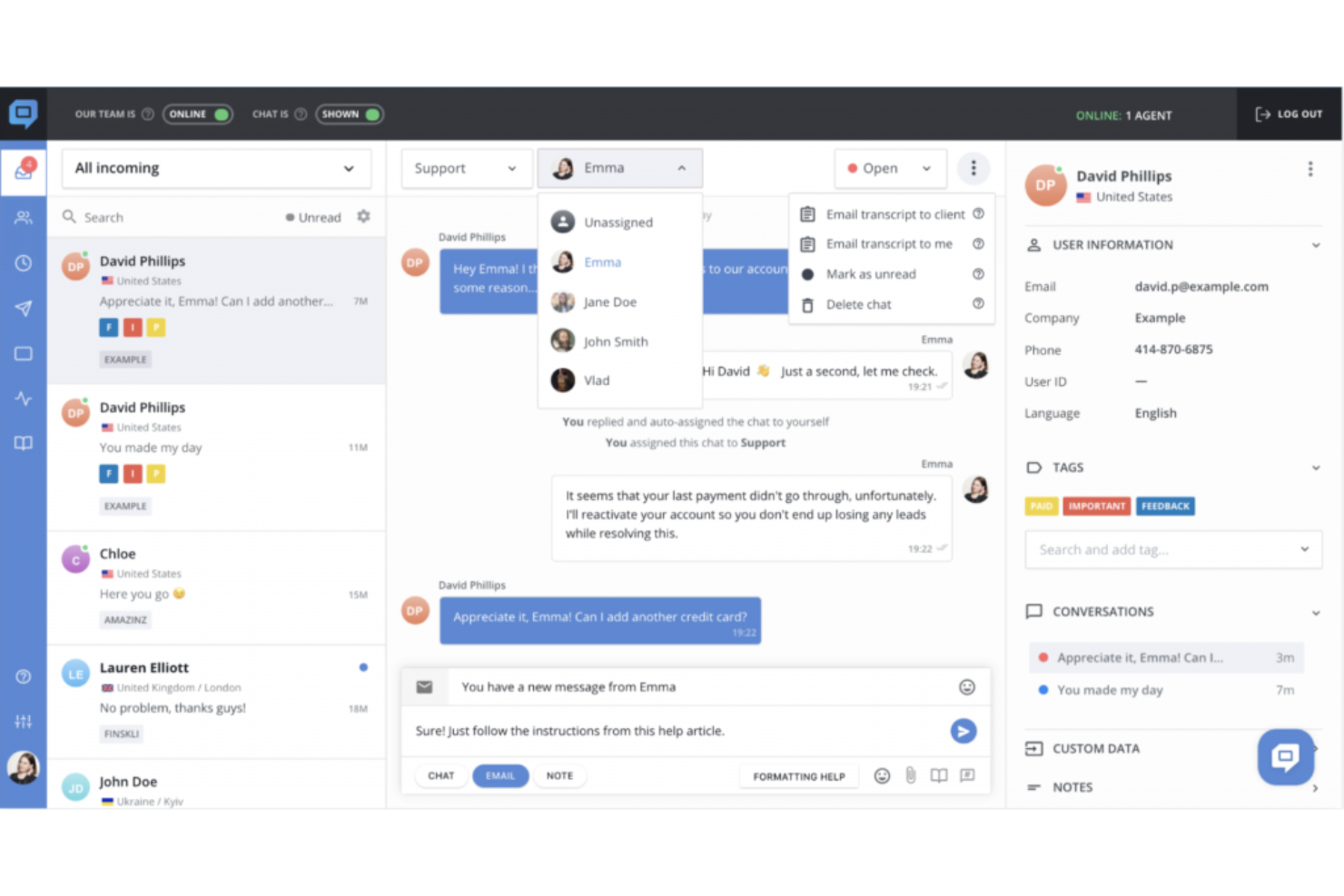
HelpCrunch es un software de mesa de ayuda diseñado para equipos que quieren gestionar el chat, correo electrónico y la base de conocimientos en un solo lugar. Es una excelente opción para empresas SaaS y negocios de comercio electrónico que buscan personalizar la interacción con sus clientes y simplificar los flujos de trabajo de soporte.
¿Para quién es mejor HelpCrunch?
Equipos de soporte al cliente y marketing en startups de SaaS y negocios de comercio electrónico que desean opciones flexibles de widgets de chat.
Por qué HelpCrunch es una buena alternativa a Intercom
Seleccioné HelpCrunch principalmente por la cantidad de control que ofrece sobre el propio widget de chat. Puedes ajustar colores, estilos de botones y enlaces a canales de mensajería para que coincidan con tu marca sin tener que modificar código. También me gusta que el widget integre una base de conocimientos, de modo que los clientes pueden buscar respuestas directamente en el chat antes incluso de iniciar una conversación. En la práctica, esto significa que mi equipo responde menos preguntas repetitivas y sigue manteniendo la experiencia alineada con la marca. Para equipos que migran desde Intercom, la flexibilidad del widget por sí sola hace que valga la pena considerar HelpCrunch.
Características clave de HelpCrunch
- Campañas automáticas de correo electrónico: Envía secuencias de correo electrónico activadas por el comportamiento de los clientes según las acciones que realicen en tu producto o sitio web.
- Popups en el sitio web: Crea y publica popups dirigidos con activadores de intención de salida, formularios de captura de prospectos y animaciones personalizadas usando un editor sin código.
- Bandeja de entrada compartida multicanal: Gestiona conversaciones de correo electrónico, redes sociales y mensajerías en una sola bandeja de entrada para el equipo, con reglas de asignación y enrutamiento.
- Constructor de chatbot sin código: Crea flujos de chatbot de varios pasos para calificación de prospectos, respuestas a preguntas frecuentes y enrutamiento de conversaciones a través de múltiples canales.
Integraciones de HelpCrunch
Las integraciones incluyen Instagram, WhatsApp, Telegram, Viber, Discord, una REST API para integraciones personalizadas y webhooks.
Pros and Cons
Pros:
- Incluye herramientas nativas de email marketing
- La base de conocimientos está integrada en el widget
- Ofrece popups ilimitados en planes de pago
Cons:
- No cuenta con tours de producto en la aplicación ni flujos de bienvenida
- El constructor de chatbot carece de capacidades avanzadas de IA

Re:amaze
Ideal para la gestión de soporte multimarcas
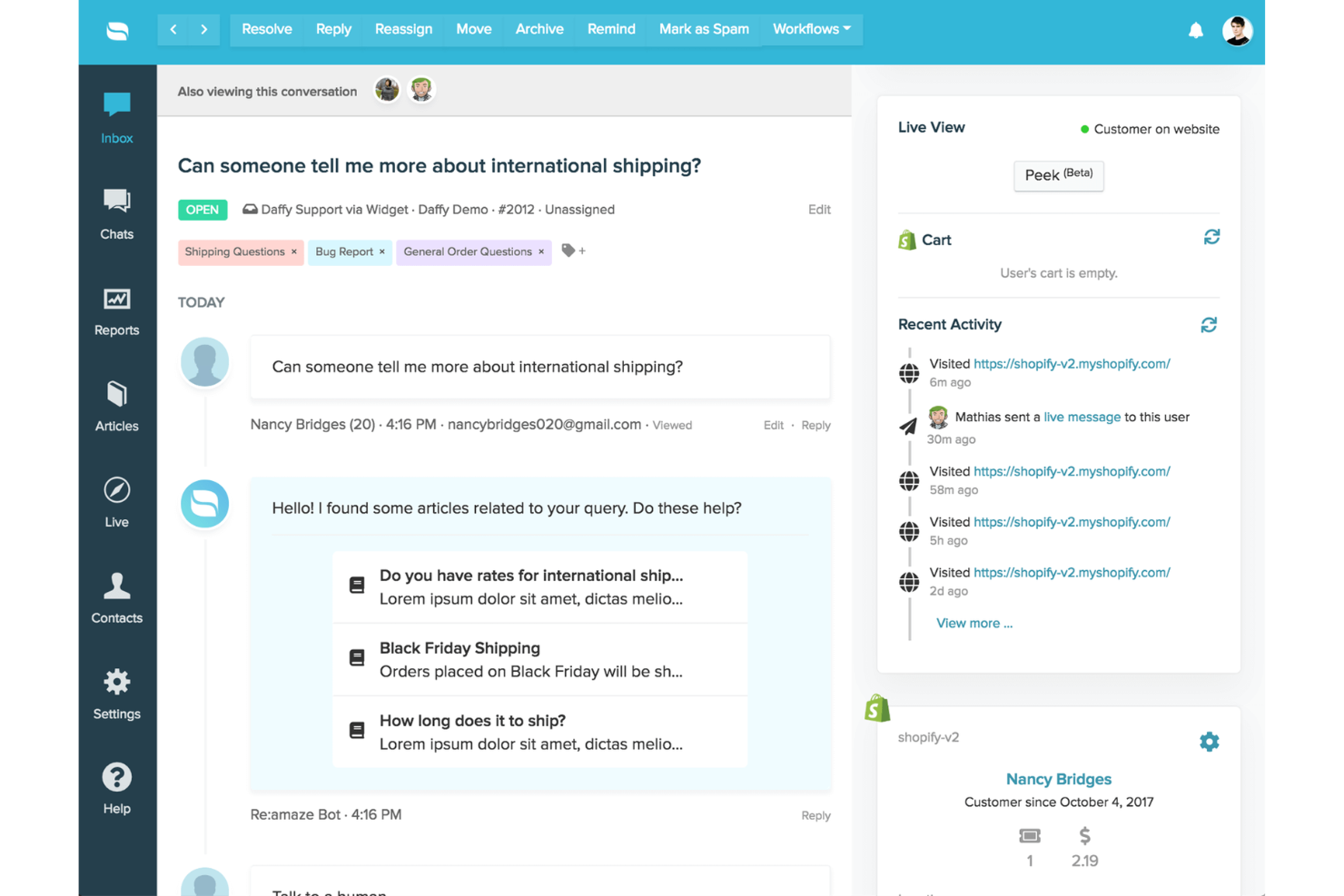
Re:amaze es una plataforma de mensajería para clientes y centro de ayuda diseñada para empresas que necesitan gestionar conversaciones a través de múltiples canales y marcas. Si buscas un CRM de marketing que integre chat en vivo, correo electrónico, redes sociales y SMS en un solo panel, vale la pena considerar Re:amaze.
¿Para Quién Es Mejor Re:amaze?
Equipos de soporte y marketing que gestionan conversaciones de clientes en varias marcas o tiendas.
Por Qué Re:amaze Es una Buena Alternativa a Intercom
Elegí Re:amaze específicamente por cómo gestiona operaciones multimarcas desde una sola cuenta. Cada marca tiene su propia configuración de widget de chat, canales de correo y redes sociales, sitio de preguntas frecuentes y configuración de chatbot, por lo que no hay cruce entre marcas. Me gusta que los permisos de roles se puedan delimitar por marca, lo que significa que puedo dar acceso a los agentes solo a las marcas que atienden, sin visibilidad entre marcas. Para equipos que gestionan múltiples tiendas o identidades comerciales, ese nivel de separación en un solo panel es algo que Intercom no ofrece de forma nativa al mismo precio.
Funciones Clave de Re:amaze
- Indicadores: Envía mensajes automáticos activados por reglas a los visitantes del sitio web para iniciar conversaciones proactivamente.
- Co-navegación Peek: Visualiza la pantalla del cliente en tiempo real para identificar y resolver problemas sin cambiar de herramienta.
- Horarios de oficina: Configura horarios de todo el equipo y turnos de agentes para gestionar la disponibilidad de respuesta.
- Encuestas de satisfacción: Envía automáticamente encuestas cualitativas y cuantitativas después de las conversaciones para medir el desempeño del equipo.
Integraciones de Re:amaze
Las integraciones incluyen Shopify, Slack, Stripe, Facebook Messenger, Instagram, WhatsApp Business, Pipedrive, WooCommerce, Klaviyo y Google Analytics.
Pros and Cons
Pros:
- Bandejas multimarcas mantienen las marcas totalmente separadas
- Co-navegación en tiempo real ayuda a resolver incidencias más rápido
- Mensajería proactiva con activadores personalizables
Cons:
- Los informes carecen de análisis avanzados y exportaciones
- Herramientas CRM y de ventas limitadas de serie
Crisp
Mejor para colaboración en bandeja de entrada compartida
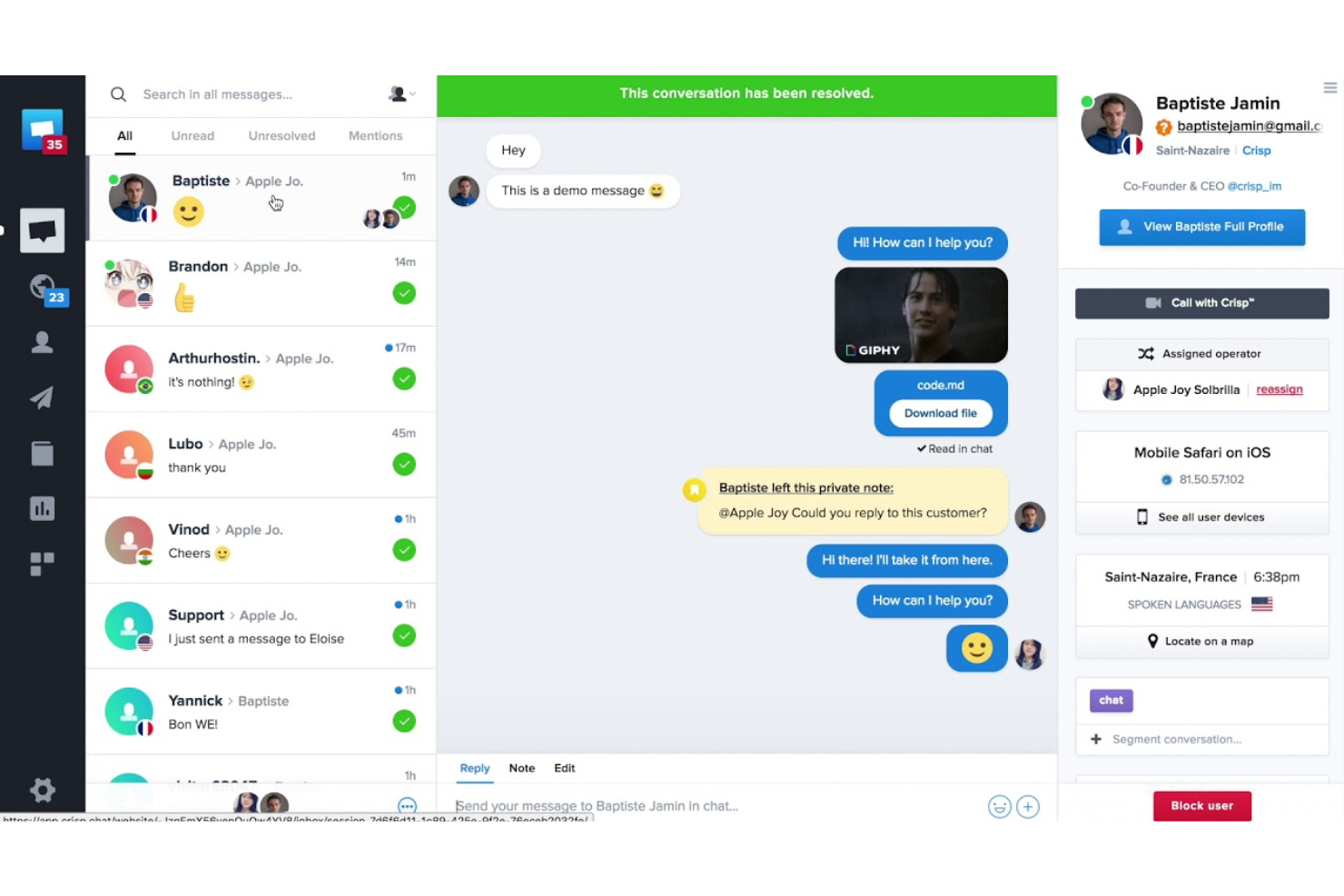
Crisp es una plataforma de mensajería multicanal para clientes, diseñada para equipos que buscan centralizar conversaciones a través de chat, correo electrónico y redes sociales. Si buscas un CRM de marketing que reúna ventas, soporte y automatización en un solo lugar, Crisp está hecho para ayudar a mejorar la colaboración en tu equipo y responder más rápido.
¿Para quién es mejor Crisp?
Equipos pequeños y medianos que necesitan gestionar conversaciones con clientes de manera colaborativa en múltiples canales.
Por qué Crisp es una buena alternativa a Intercom
Elegí Crisp por sus herramientas colaborativas de bandeja de entrada compartida, que van más allá del simple enrutamiento de mensajes. La función de detección de colisiones muestra a mi equipo en tiempo real cuando un compañero ya está escribiendo una respuesta, así nunca enviamos respuestas duplicadas al mismo cliente. También confío en las notas privadas dentro de las conversaciones, que permiten que mi equipo comparta contexto y estrategias sin que el cliente lo vea. Para los equipos que migran desde Intercom y necesitan una coordinación interna más estricta entre chat, correo y redes sociales, solo esas dos funciones marcan una gran diferencia en la fluidez de las transferencias y las escaladas.
Características clave de Crisp
- Constructor de campañas multicanal: Crea y envía secuencias automatizadas a través de correo electrónico, WhatsApp y chat utilizando un editor visual de flujo de trabajo sin código.
- Chatbot de IA con entrenamiento personalizado de LLM: Entrena un chatbot con tu base de conocimientos, el contenido de tu sitio web, conversaciones previas y archivos subidos para automatizar respuestas.
- Segmentación y filtrado de contactos: Crea segmentos de clientes personalizados usando filtros basados en comportamiento, datos de perfil y eventos de ciclo de vida.
- Encuestas CSAT: Recoge puntuaciones de satisfacción del cliente directamente en conversaciones de chat o en otros canales al finalizar las interacciones.
Integraciones de Crisp
Las integraciones incluyen Slack, HubSpot, Salesforce, Shopify, WordPress, Jira, Pipedrive, Mailchimp, Instagram y WhatsApp.
Pros and Cons
Pros:
- Bandeja de entrada compartida compatible con chat, correo y redes sociales
- Detección de colisión de respuestas en tiempo real
- Chatbot de IA integrado con entrenamiento personalizado
Cons:
- Funciones de IA restringidas en los planes inferiores
- Herramientas limitadas de marketing para secuencias y envíos masivos

Gorgias
Mejor integración con plataformas de comercio electrónico
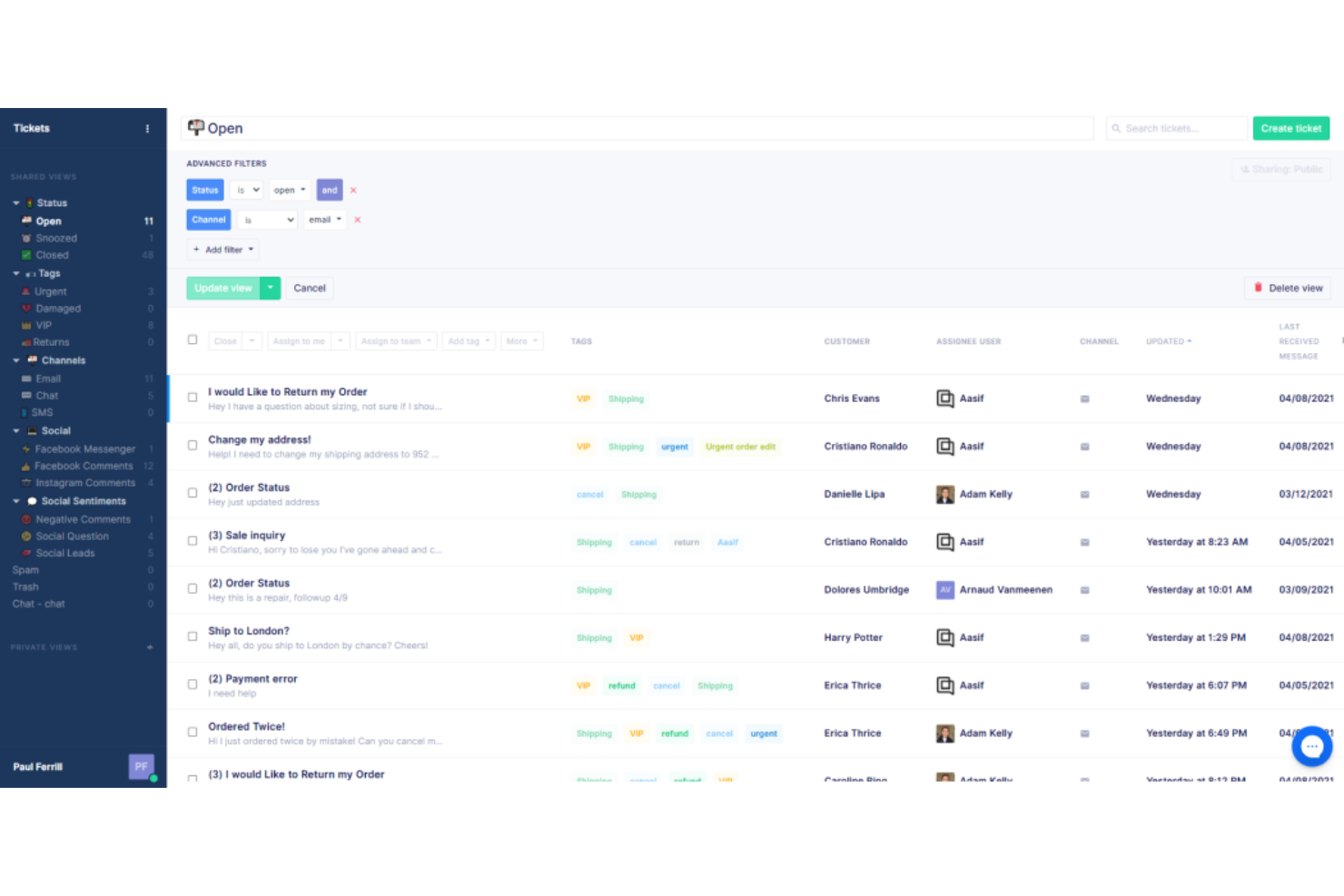
Gorgias es una plataforma de servicio al cliente diseñada para marcas de comercio electrónico que desean gestionar soporte, ventas y participación desde un solo lugar. Si tienes una tienda en Shopify, Magento o BigCommerce, Gorgias ayuda a tu equipo a convertir los tickets de soporte en oportunidades de ingresos.
¿Para quién es mejor Gorgias?
Equipos de soporte de comercio electrónico que gestionan grandes volúmenes de tickets en tiendas de Shopify, Magento o BigCommerce.
Por qué Gorgias es una buena alternativa a Intercom
Elegí Gorgias específicamente por la profundidad con la que se integra con plataformas de comercio electrónico como Shopify, Magento y BigCommerce. Desde un solo ticket, mi equipo puede ver el historial de pedidos, editar pedidos, aplicar descuentos y procesar reembolsos—sin cambiar de pestaña. Aprecio la función de Agente de IA, que resuelve automáticamente hasta el 60% de las consultas de soporte utilizando los datos de la tienda para ofrecer respuestas precisas y alineadas con la marca. Para los equipos que trabajan todo el día en Shopify, ese nivel de gestión nativa de pedidos desde el helpdesk es algo que Intercom simplemente no ofrece de serie.
Funciones clave de Gorgias
- Macros: Crea respuestas predefinidas que rellenan automáticamente datos del cliente, aplican etiquetas y actualizan pedidos en las herramientas conectadas.
- Reglas: Configura flujos de trabajo automatizados para etiquetar tickets, responder a reseñas o hacer seguimiento a clientes según condiciones definidas.
- AutoQA: Utiliza IA para puntuar cada interacción de los agentes y brinda a los gerentes una vista en tiempo real sobre la calidad de las conversaciones.
- Voz del cliente: Agrupa las conversaciones y valoraciones de experiencia del cliente en tendencias e insights a nivel de producto, hasta el SKU.
Integraciones de Gorgias
Entre las integraciones se incluyen Shopify, Magento, BigCommerce, Facebook, Instagram, Klaviyo, Postscript, Aircall, Recharge y Okendo.
Pros and Cons
Pros:
- Acciones de pedido disponibles directamente en los tickets de soporte
- El Agente de IA automatiza las consultas comunes
- Canales de redes sociales y SMS gestionados en una sola bandeja de entrada
Cons:
- Menos opciones de automatización de flujos de trabajo
- Funciones limitadas de CRM y gestión de ventas

Kustomer
Ideal para líneas de tiempo unificadas del cliente
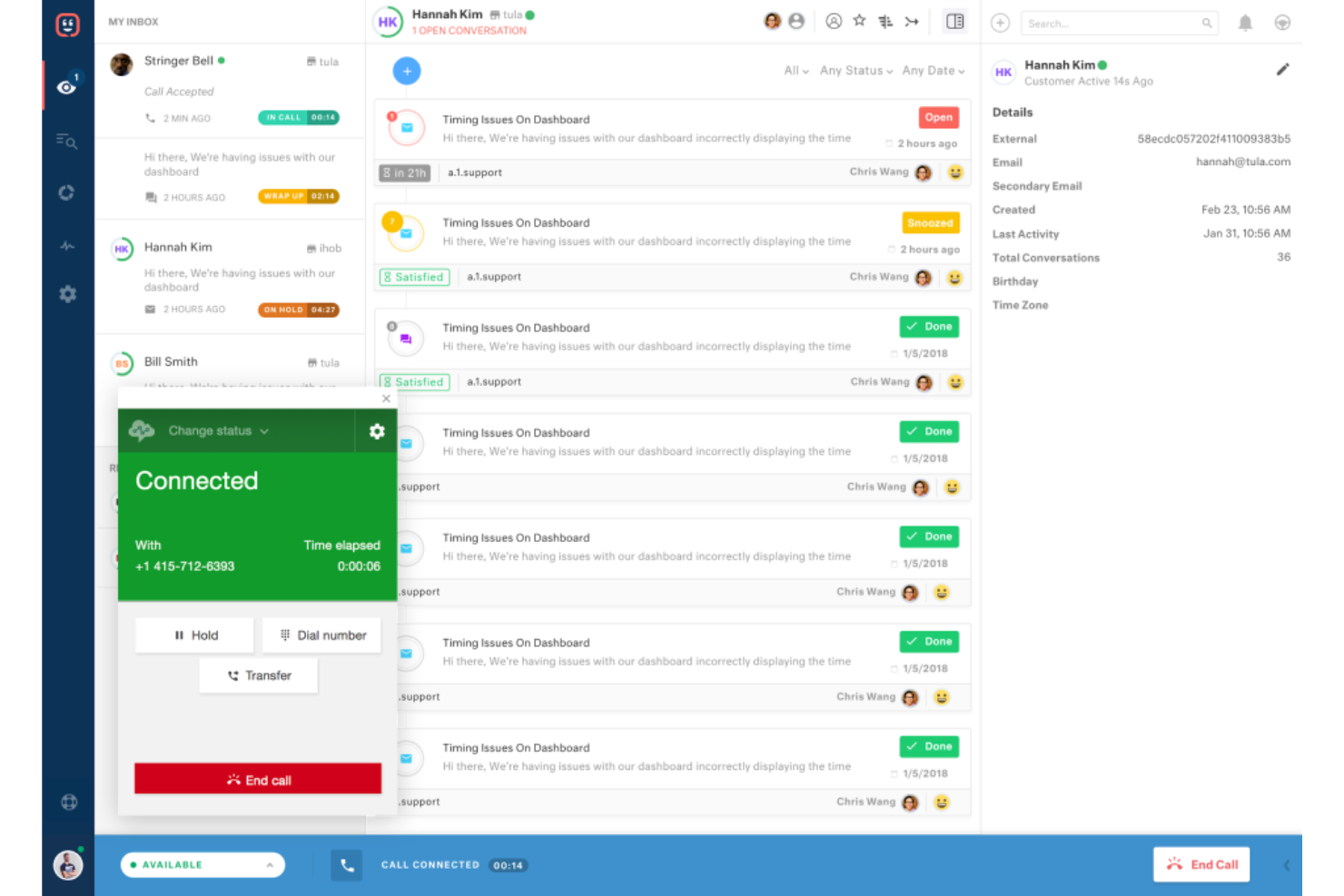
Kustomer es un software de atención al cliente diseñado para equipos que desean una vista completa de cada interacción con el cliente a través de todos los canales. Si necesitas unificar conversaciones de soporte, ventas y marketing en una sola línea de tiempo, Kustomer ayuda a tu equipo a ofrecer un servicio más personalizado y eficiente.
¿Para quién es mejor Kustomer?
Equipos de soporte y operaciones en empresas medianas y grandes que necesitan una visión unificada de las interacciones con los clientes.
Por qué Kustomer es una buena alternativa a Intercom
He elegido Kustomer porque su función de línea de tiempo proporciona a mi equipo una vista única y cronológica de cada interacción con el cliente—correo electrónico, chat, SMS, historial de compras y más—todo en un mismo lugar. Cuando un cliente se pone en contacto, puedo ver todo su historial sin tener que buscar en distintas herramientas o pestañas. También valoro los objetos personalizados y atributos de Kustomer, que permiten a mi equipo realizar un seguimiento de datos únicos para nuestro negocio, como el estado de la suscripción o detalles de pedidos, directamente en el perfil del cliente. En la práctica, esto significa que los agentes pueden mantener conversaciones más informadas y personalizadas sin salir nunca de la plataforma.
Características clave de Kustomer
- Constructor de agentes de IA: Una herramienta de bajo código para crear equipos de agentes de IA que pueden manejar solicitudes de clientes, procesar reembolsos, actualizar suscripciones y cancelar pedidos sin intervención humana.
- Enhebrado de conversaciones omnicanal: Mantiene todas las interacciones de clientes por voz, correo electrónico, chat, SMS y redes sociales en un solo hilo continuo, para que los agentes nunca pierdan el contexto aunque cambie el canal.
- Constructor de automatización de flujos de trabajo: Un generador sin código que combina reglas de negocio con lógica impulsada por IA para automatizar la asignación, escalados y flujos de servicio de varios pasos.
- Respuesta de Voz Interactiva (IVR): Un canal de voz integrado con grabación de llamadas, transcripción, resúmenes de llamadas generados por IA y capacidad de transferencias para gestionar llamadas de soporte complejas.
Integraciones de Kustomer
Las integraciones incluyen Shopify, TikTok Shop, Narvar, Attentive, Corso, Loris, parcelLab, Scorebuddy, AfterShip y Guru.
Pros and Cons
Pros:
- La línea de tiempo unificada muestra todas las interacciones con clientes
- Los objetos personalizados admiten datos únicos del negocio
- El generador de automatización de flujos de trabajo es altamente flexible
Cons:
- No incluye automatización integrada de marketing outbound
- Pocas integraciones preconfiguradas con herramientas de comercio electrónico

Lo mejor con flujos de trabajo automatizados integrados
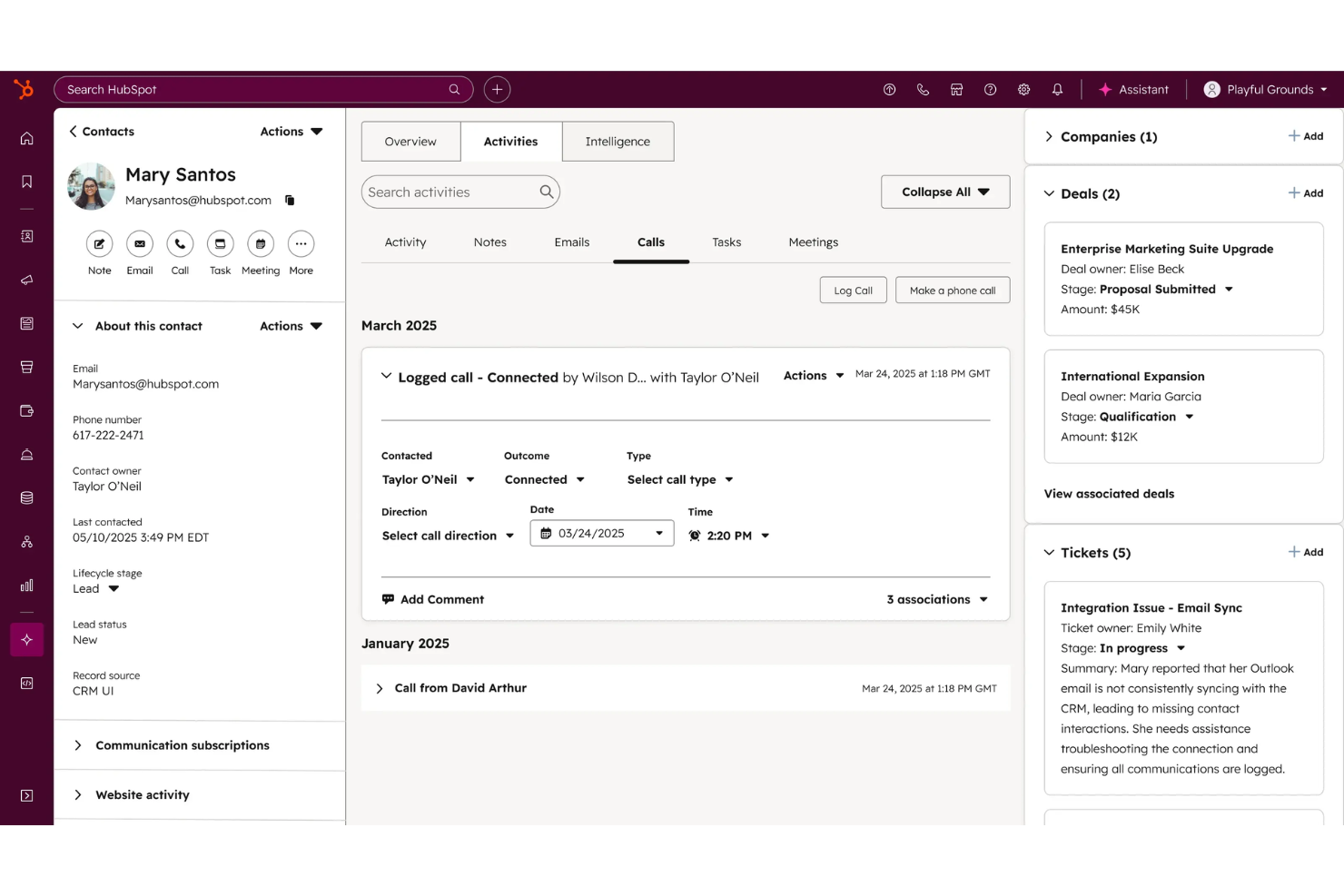
HubSpot Service Hub es una plataforma de atención al cliente diseñada para empresas que desean conectar soporte, ventas y marketing en un solo lugar. Si necesitas un CRM que reúna herramientas de gestión de tickets, base de conocimiento y retroalimentación de clientes, esta es una excelente opción para equipos en crecimiento.
¿Para quién es mejor HubSpot Service Hub?
Equipos de soporte al cliente y operaciones en empresas en expansión que buscan unificar el servicio y los datos de CRM.
Por qué HubSpot Service Hub es una buena alternativa a Intercom
Elegí HubSpot Service Hub porque sus flujos de trabajo automatizados conectan los tickets de soporte directamente con los datos del CRM, para que mi equipo pueda activar tareas de seguimiento, escalados o actualizaciones de negocios sin cambiar de herramienta. Me gusta especialmente la automatización del pipeline de tickets, que me permite establecer reglas que mueven los tickets entre etapas según las acciones del cliente o la actividad del representante. En la práctica, eso significa que mi equipo puede ejecutar flujos de trabajo de servicio de varios pasos—como asignar tickets automáticamente por tipo de problema y notificar a los responsables de cuenta—sin escribir ni una sola línea de código. Para equipos que ya usan el CRM de HubSpot, la conexión nativa entre los datos de servicio y ventas es algo que no he encontrado en otras plataformas.
Características clave de HubSpot Service Hub
- Espacio de trabajo de éxito del cliente: Un espacio dedicado para gestionar los indicadores de salud del cliente, la cartera de negocios y la priorización de la actividad de los representantes.
- Gestión de retroalimentación: Encuestas personalizables de NPS, CSAT y retroalimentación de clientes integradas directamente en la plataforma.
- Inteligencia de conversaciones: Análisis de llamadas potenciados por IA que proporcionan información relevante de cada interacción con el cliente.
- Base de conocimiento: Una herramienta de autoservicio que permite a los clientes encontrar respuestas sin contactar al soporte.
Integraciones de HubSpot Service Hub
Las integraciones incluyen Gmail, Google Calendar, Outlook, Slack, Zoom, Microsoft Teams, WordPress, SurveyMonkey, Meta Ads y Google Sheets.
Pros and Cons
Pros:
- Base de conocimientos incorporada que fomenta el autoservicio
- La gestión de tickets se vincula directamente a los registros de CRM
- Herramientas de retroalimentación del cliente totalmente integradas
Cons:
- Sin mensajería in-app para onboarding de producto
- Personalización limitada del widget de chat

Pylon
Óptimo para soporte al cliente basado en Slack
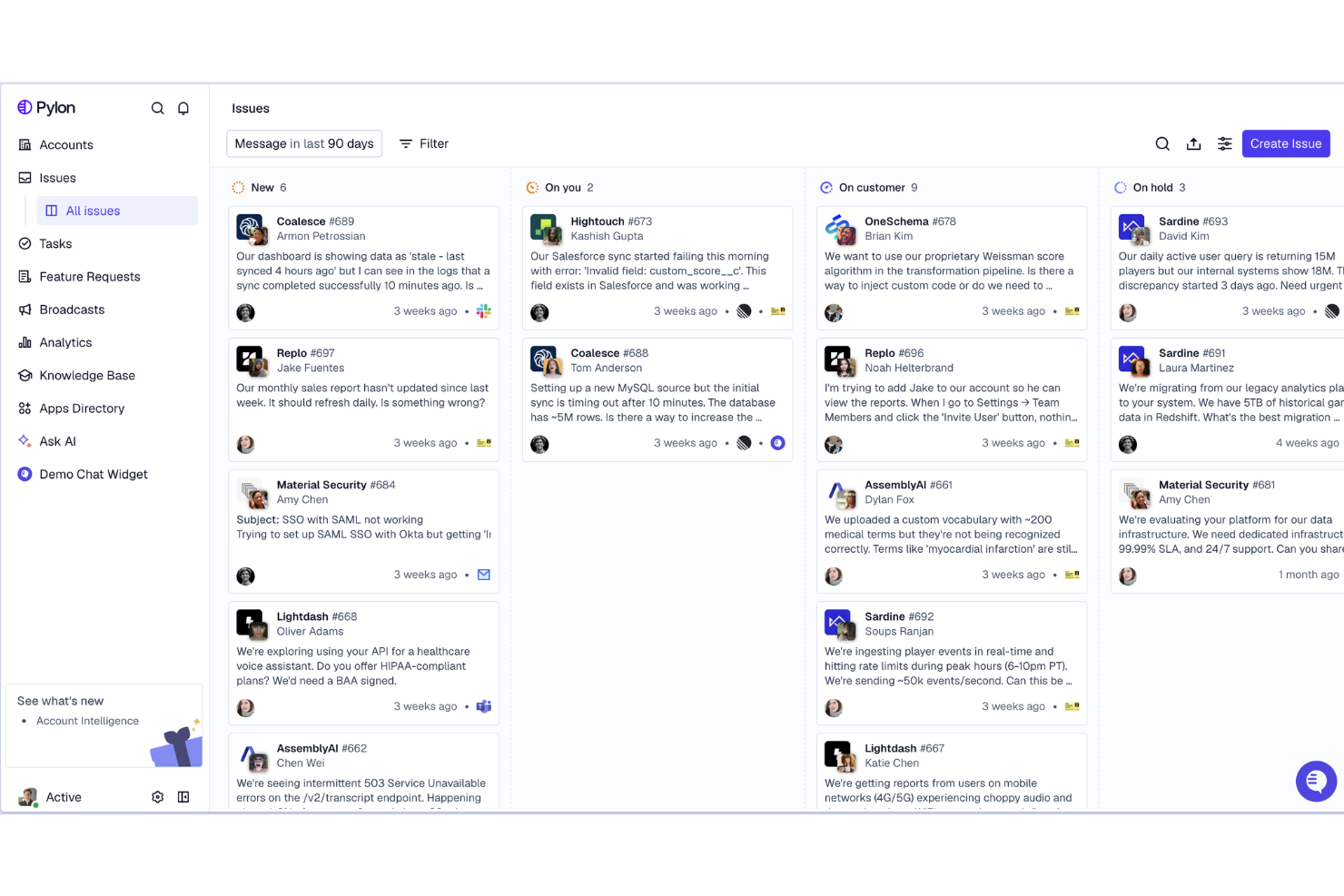
Pylon es una plataforma de soporte al cliente creada para equipos que gestionan conversaciones con clientes directamente en Slack. Si tu empresa depende de Slack para la comunicación interna o con clientes, Pylon te ayuda a rastrear, clasificar y resolver solicitudes de soporte sin salir de tu espacio de trabajo.
¿Para quién es mejor Pylon?
Equipos de soporte y éxito en empresas SaaS que utilizan Slack como su principal canal de comunicación con clientes.
Por qué Pylon es una buena alternativa a Intercom
Elegí Pylon específicamente por la forma en que gestiona los canales de Slack Connect como una plataforma de soporte nativa. Mi equipo puede rastrear y responder a conversaciones con clientes en canales compartidos de Slack sin necesidad de estar dentro del canal—Pylon extrae esos hilos automáticamente a una bandeja de entrada unificada. También me gusta la función Runbooks, que permite definir flujos de resolución paso a paso que los agentes de IA siguen al gestionar tickets, asegurando respuestas consistentes incluso sin intervención humana. Para equipos SaaS B2B, cuyos clientes empresariales esperan soporte vía Slack, esa combinación de seguimiento de canales y resolución guiada por IA es algo que Intercom no puede replicar de forma nativa.
Funciones clave de Pylon
- Bandeja de entrada omnicanal: Gestiona conversaciones de Slack, Microsoft Teams, Discord, correo electrónico y chat dentro de la aplicación en una sola cola.
- Inteligencia de cuentas: Integra datos de soporte, éxito y ventas en una vista unificada de cada cuenta para identificar clientes en riesgo o listos para upsell.
- Detección de brechas de conocimiento por IA: La IA agrupa temas recurrentes y los compara con tu base de conocimientos para destacar artículos faltantes.
- Portal de clientes: Ofrece a los clientes un espacio dedicado para enviar y rastrear tickets mediante un formulario personalizado fuera de Slack.
Integraciones de Pylon
Las integraciones incluyen Slack, Microsoft Teams, Discord y API para integraciones personalizadas.
Pros and Cons
Pros:
- Soporte nativo para canales Slack Connect
- Runbooks con IA para la gestión automática de tickets
- Contexto del cliente a nivel de cuenta en cada ticket
Cons:
- No dispone de widget de chat en vivo para la web o móvil
- Menos integraciones que Intercom
Kayako
Mejor para vistas contextuales de soporte al cliente
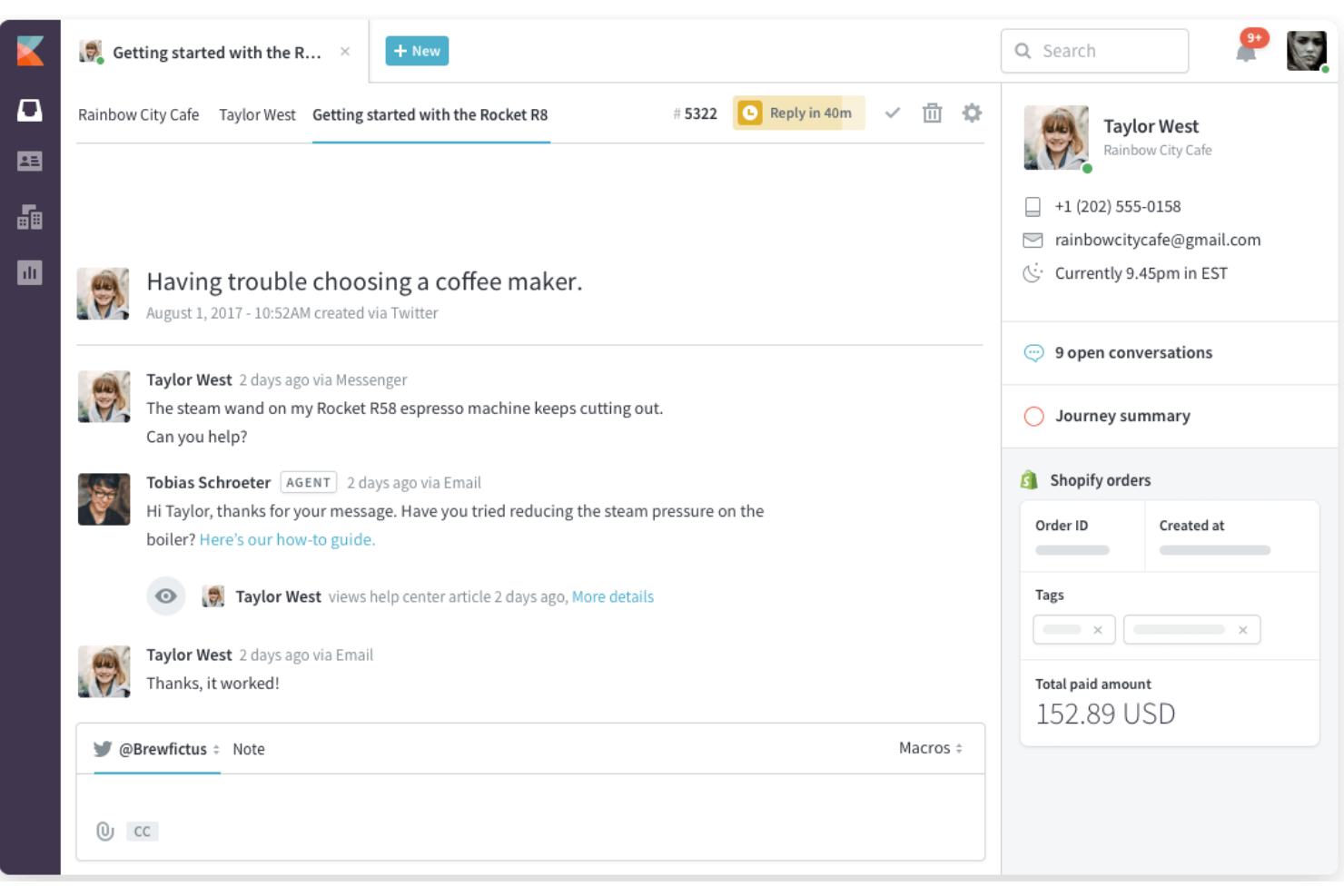
Kayako es una plataforma de soporte omnicanal para servicio al cliente, diseñada para equipos que desean ver todo el recorrido del cliente en un solo lugar. Si buscas un CRM de marketing que ayude a los agentes de soporte a ofrecer respuestas más personalizadas al mostrar interacciones y contexto previos, Kayako es una opción a considerar.
¿Para quién es mejor Kayako?
Equipos de soporte en empresas SaaS que necesitan una vista unificada de las interacciones con los clientes.
Por qué Kayako es una buena alternativa a Intercom
Elegí Kayako por su función SingleView, que muestra el historial completo de interacciones de un cliente—cada conversación, compra y visita a la página—directamente al lado del ticket activo. Ese contexto significa que mi equipo no le pide a los clientes que repitan la misma información. También me gusta la línea de tiempo del recorrido de la conversación, que muestra exactamente cómo un cliente pasó por distintos puntos de contacto antes de llegar al soporte. Para equipos que cambian de Intercom y quieren un contexto más enriquecido en cada interacción de soporte, Kayako lo proporciona sin requerir configuraciones adicionales.
Características clave de Kayako
- Enrutamiento de tickets por IA: Clasifica y dirige automáticamente los tickets según habilidades del agente, carga de trabajo y preferencias de idioma.
- Constructor de automatizaciones: Un generador visual de flujos que crea reglas de automatización a partir de descripciones en lenguaje natural y te permite probarlas con datos históricos.
- Portal de autoservicio con IA: Un centro de ayuda con búsqueda semántica, widgets inteligentes y chatbots de IA que resuelven preguntas frecuentes sin intervención de agentes.
- Predicciones de abandono y ventas adicionales: La IA detecta cuentas en riesgo y oportunidades de ampliación directamente en el espacio de trabajo del agente.
Integraciones de Kayako
Las integraciones incluyen Salesforce, Slack, Shopify, Magento, Jira, HubSpot, Mailchimp, Zapier, Trello y Google Analytics.
Pros and Cons
Pros:
- SingleView muestra el historial completo del cliente al instante
- Soporte integrado por chat en vivo y correo electrónico
- Seguimiento y reporte de SLA para cumplimiento
Cons:
- Requiere SQL para reportes avanzados
- Configuración manual para recordatorios de seguimiento
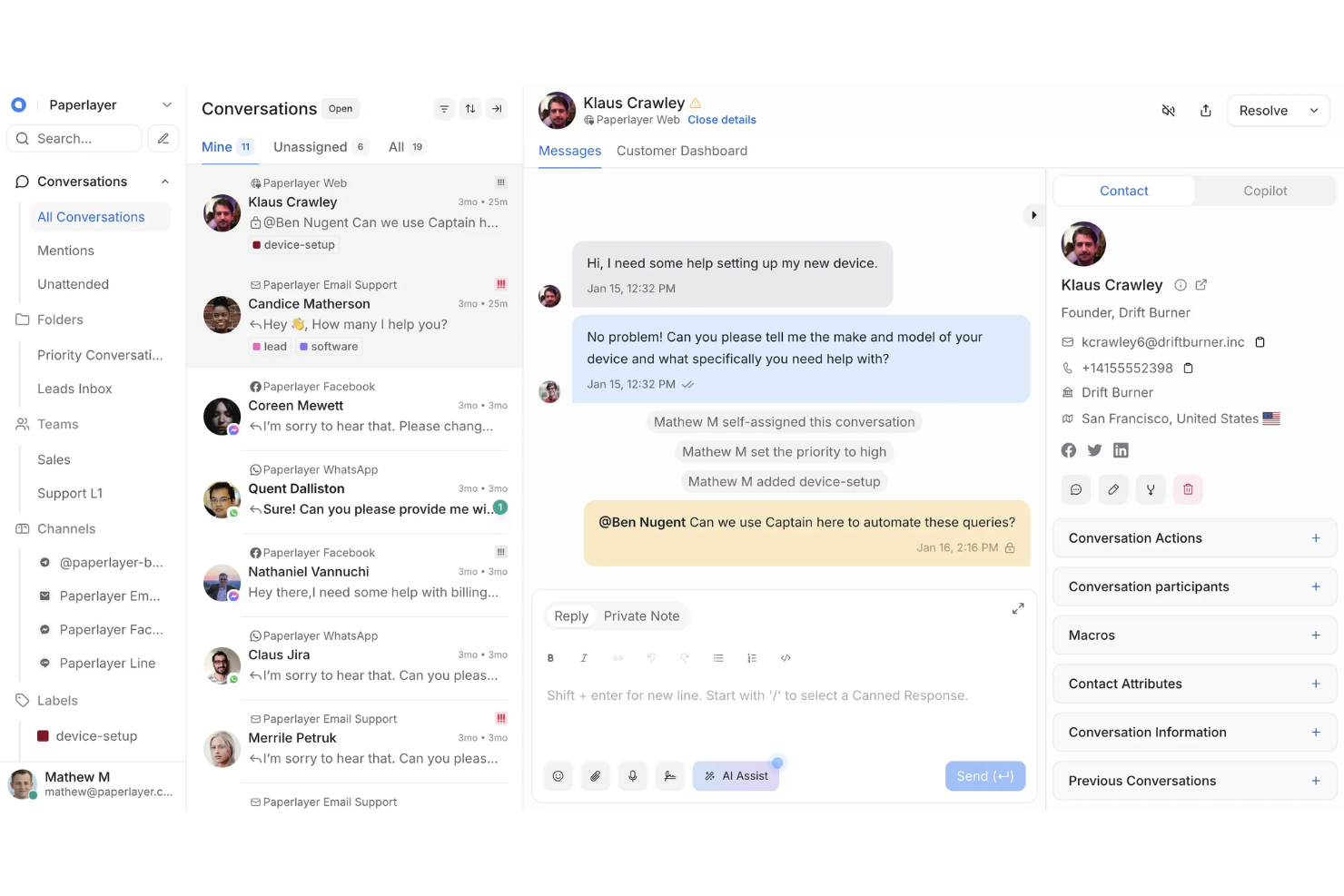
Chatwoot es una plataforma de participación del cliente de código abierto creada para equipos que desean tener un control total sobre sus flujos de trabajo y datos de soporte. Si necesitas un CRM de marketing que puedas alojar por tu cuenta, personalizar y ampliar para adaptarlo a procesos empresariales únicos, Chatwoot es una opción muy sólida.
¿Para quién es más adecuado Chatwoot?
Equipos con desarrolladores internos que desean personalizar y alojar por su cuenta su plataforma de participación del cliente.
Por qué Chatwoot es una buena alternativa a Intercom
Elegí Chatwoot específicamente porque es de código abierto y se puede alojar por cuenta propia, lo que significa que mi equipo es propietario de los datos y puede modificar el código base para adaptarlo a nuestros flujos de trabajo exactos, algo que Intercom simplemente no permite. Aprecio la función de atributos personalizados, que me permite añadir campos a los perfiles de contacto que se corresponden directamente con nuestro modelo de datos interno sin soluciones alternativas. La API REST y la compatibilidad con notificaciones de webhook también significan que puedo integrar Chatwoot en nuestra infraestructura existente sin quedar limitado a una lista de integraciones predefinida. Para los equipos con requisitos de cumplimiento o necesidades específicas de residencia de datos, ese nivel de control es difícil de encontrar en una alternativa comercial.
Características principales de Chatwoot
- Detección de colisiones: Indica cuándo varios agentes están viendo o respondiendo a la misma conversación para evitar respuestas duplicadas.
- Segmentos de contactos: Filtra y agrupa contactos mediante criterios personalizados para realizar comunicaciones dirigidas o generar informes.
- Campañas: Envía mensajes salientes proactivos a visitantes del sitio web o contactos en función de activadores definidos.
- Informes de CSAT: Recopila y supervisa las puntuaciones de satisfacción del cliente asociadas a conversaciones y agentes individuales.
Integraciones de Chatwoot
Las integraciones incluyen Slack, WhatsApp Business API, Facebook Messenger, mensajes directos de Instagram, Telegram, LINE, TikTok, Google Translate, Dialogflow y Linear.
Pros and Cons
Pros:
- Completamente de código abierto con opción de alojamiento propio
- Agentes ilimitados en la versión alojada por cuenta propia
- Comunidad activa de desarrolladores para obtener soporte
Cons:
- Menos herramientas de automatización integradas que Intercom
- No incluye una base de conocimientos ni un centro de ayuda nativos

LiveAgent
Ideal para la gestión de tickets multicanal
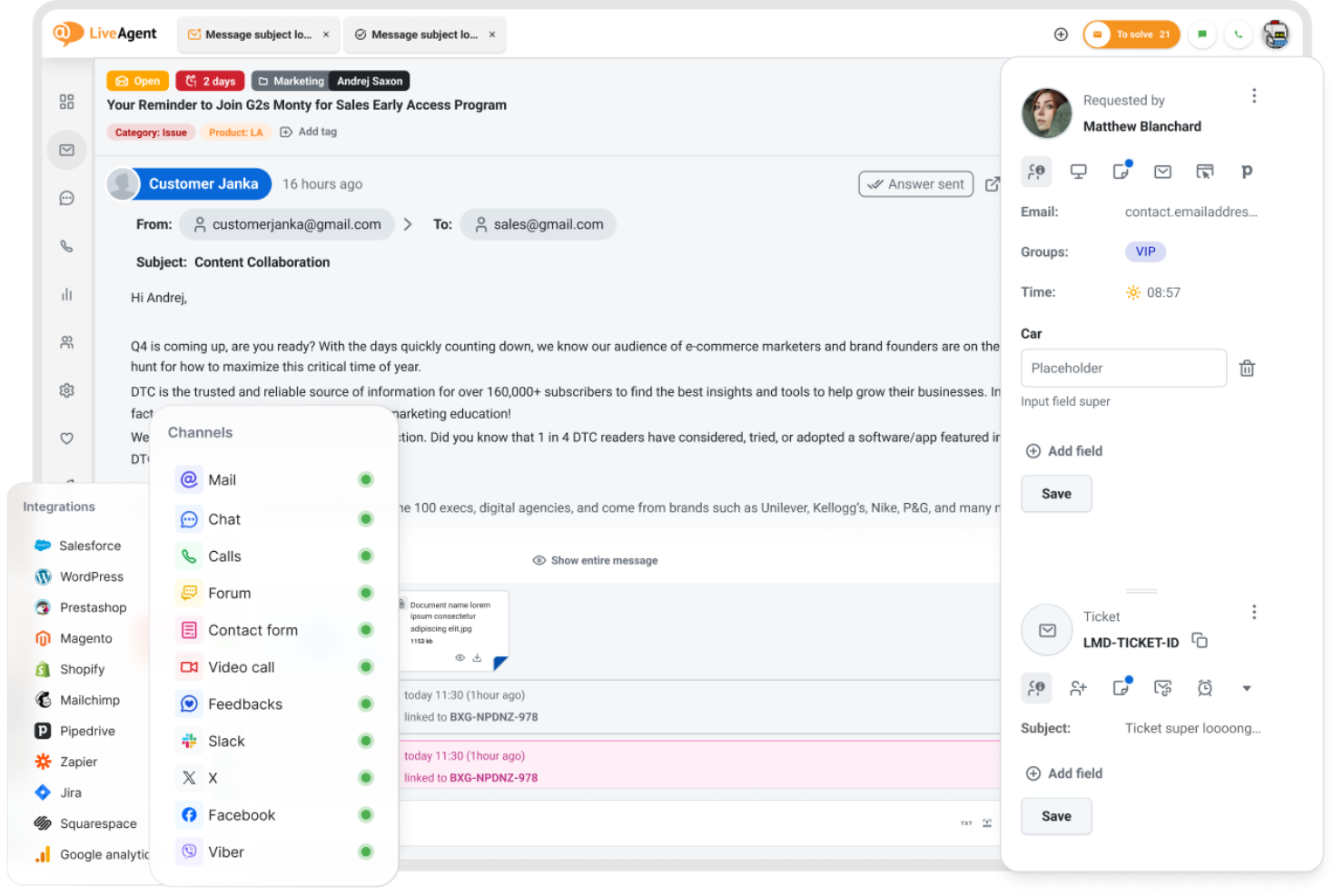
LiveAgent ofrece soporte multicanal, reuniendo correo electrónico, chat, redes sociales y llamadas en un solo panel para equipos que necesitan gestionar grandes volúmenes de conversaciones con clientes. Si buscas un CRM de marketing que priorice la resolución rápida de tickets y la comunicación omnicanal, esta plataforma vale la pena.
¿Para quién es ideal LiveAgent?
Equipos de atención al cliente de empresas medianas que necesitan gestionar tickets en múltiples canales.
Por qué LiveAgent es una buena alternativa a Intercom
Elegí LiveAgent específicamente por su modo de gestionar tickets entre canales sin obligarte a cambiar entre varias herramientas. Su flujo híbrido de tickets es lo que lo distingue: cada conversación, ya sea un chat en vivo, correo electrónico o mensaje en redes sociales, se convierte en un ticket y se rastrea en un solo lugar. También me gusta la función de distribución automática de tickets, que dirige los tickets entrantes a los agentes según reglas que defines, para que nada quede sin asignar en los periodos de mayor actividad. Para equipos que cambian de Intercom y necesitan mayor control sobre flujos de trabajo y cumplimiento de SLA, LiveAgent brinda esa estructura para mejorar la experiencia del cliente.
Características clave de LiveAgent
- Seguimiento de cumplimiento de SLA: Supervisa e informa sobre el cumplimiento de SLA y plazos incumplidos en los tickets, con registros exportables.
- Respuestas predefinidas (macros): Crea y almacena respuestas prediseñadas para responder preguntas frecuentes en cualquier canal.
- IVR (respuesta de voz interactiva): Crea menús de enrutamiento de llamadas personalizables para dirigir las llamadas entrantes al departamento o agente correcto.
- Gamificación para agentes: Motiva a los equipos de soporte con niveles, insignias y clasificaciones vinculadas a la resolución de tickets.
Integraciones de LiveAgent
Las integraciones incluyen Slack, Shopify, Mailchimp, Facebook, Twitter, WhatsApp, Viber, Jira, Magento y Salesforce.
Pros and Cons
Pros:
- Centro de llamadas integrado con opciones de IVR
- La gamificación de agentes aumenta la motivación del equipo
- Respuestas predefinidas para agilizar la atención de tickets
Cons:
- Interfaz desactualizada comparada con Intercom
- Capacidades limitadas de chatbot y automatización
Otras alternativas a Intercom
Estas son algunas alternativas adicionales a Intercom que no incluí en mi selección, pero que merece la pena conocer:
- Tidio
El mejor con chat en vivo potenciado por IA
- Freshdesk
Mejor para conversaciones omnicanal con clientes
- Jira Service Management
La mejor opción para conectar el soporte con los equipos de desarrollo


¿Cómo evalúo alternativas a Intercom?
Analizo dos niveles: los requisitos básicos que cualquier reemplazo de Intercom debe cumplir—chat en vivo, bots de IA, sincronización con CRM y enrutamiento de leads—y los diferenciadores como atribución y profundidad en la pila de RevOps.
Funcionalidad básica (Condiciones imprescindibles para esta lista)
Al seleccionar herramientas para mi lista, califico cada una en una escala del 0 (no ofrece la funcionalidad) al 5 (destaca en esta área) para cada funcionalidad clave que detallo abajo. Luego, calculo el puntaje total de la herramienta y lo convierto en porcentaje. Cada herramienta debe alcanzar un puntaje total mínimo del 65% para ser considerada.
- Chat en vivo y mensajería: Evalúo si la herramienta soporta chat en la web en tiempo real, mensajería dentro de la app y canales adicionales como correo electrónico y redes sociales, para que tu equipo pueda interactuar con prospectos donde sea que inicien una conversación.
- Bots de IA y automatización: Las mejores alternativas permiten crear bots con IA que califiquen leads con preguntas personalizadas, resuelvan problemas comunes y gestionen traspasos, no solo respuestas enlatadas.
- Integraciones con CRM y herramientas de ingresos: Compruebo la sincronización nativa con CRMs como Salesforce y HubSpot, observando la profundidad en el mapeo de campos y si los datos de conversación fluyen a los registros de oportunidades sin registro manual.
- Enrutamiento y calificación de leads: Las herramientas robustas enrutan las conversaciones según propiedad de cuenta, puntuación de leads o reglas territoriales, para que un prospecto calificado llegue al ejecutivo de cuentas correcto y no quede en una cola general.
- Bandeja compartida de equipo y gestión de tickets: Analizo cómo los equipos de ventas, soporte y éxito del cliente pueden colaborar en una sola bandeja con asignación de tickets, SLAs, etiquetado y notas internas para evitar que se pierdan los traspasos.
- Informes y análisis de conversación: Los tableros deben ir más allá del tiempo de respuesta y volumen, mostrando tasas de conversión, influencia en el pipeline y rendimiento de los representantes vinculado a la actividad de mensajería.
Una vez tengo una lista de herramientas que cumplen estos criterios, considero qué distingue a cada plataforma.
Factores diferenciadores (Qué distingue a los proveedores)
Así comparo y contrasto entre diferentes proveedores:
Funciones destacadas
El reporte de atribución de ingresos es un gran diferenciador—busco plataformas que conecten los puntos de contacto de mensajería con generación de pipeline y negocios ganados, no solo métricas de tickets. Es relevante la identificación de visitantes basada en cuentas, porque permite personalizar el chat al instante cuando una cuenta objetivo visita tu sitio. También evalúo la automatización de reuniones y calendarios; herramientas que permitan a leads calificados reservar directamente con el representante adecuado desde la ventana de chat eliminan idas y vueltas que afectan la conversión.
Más allá de las funciones
El modelo de precios es clave: algunos proveedores cobran por usuario, otros por conversación o volumen de contactos, y una mala elección puede disparar tu presupuesto a medida que escala el equipo GTM. También evalúo cuán profundamente la herramienta se conecta con el ecosistema de tecnología de ingresos, especialmente plataformas de orquestación como Outreach, Salesloft y Gong. La velocidad de implementación es otro factor a considerar; migrar historiales de conversación, flujos de trabajo y configuraciones de bots desde Intercom puede tomar semanas si el proveedor no ofrece apoyo dedicado para la migración.
¿Por qué buscar una alternativa a Intercom?
Aunque Intercom es una buena opción de software de CRM de marketing, hay varios motivos por los que algunos usuarios buscan soluciones alternativas. Es posible que estés buscando una alternativa a Intercom porque…
- Necesitas precios más asequibles para equipos en crecimiento
- Quieres una personalización más avanzada de los widgets de chat y las bandejas de entrada
- Necesitas funciones más avanzadas de colaboración en bandejas de entrada compartidas
- Necesitas una mejor integración con tu conjunto de herramientas tecnológicas actual
- Quieres opciones de facturación más transparentes o flexibles
Si alguno de estos puntos te resulta familiar, has llegado al lugar adecuado. Mi lista incluye varias opciones de software de CRM de marketing y soluciones de asistencia técnica que se adaptan mejor a los equipos que se enfrentan a estos desafíos con Intercom y buscan soluciones alternativas.
Funciones principales de Intercom
Estas son algunas de las funciones principales de Intercom, que te ayudarán a contrastar y comparar lo que ofrecen las soluciones alternativas:
- Chat en directo: El widget de chat en directo de Intercom te permite interactuar con los visitantes y clientes del sitio web en tiempo real, responder preguntas y dirigir las conversaciones a los miembros adecuados del equipo.
- Mensajería automatizada: Configura mensajes segmentados y basados en el comportamiento que se activen automáticamente para incorporar a los usuarios, fomentar los contactos comerciales o proporcionar asistencia en momentos clave.
- Bandeja de entrada compartida: Gestiona todas las conversaciones con los clientes procedentes del correo electrónico, el chat y los canales sociales en una única bandeja de entrada colaborativa, lo que facilita que los equipos asignen, etiqueten y resuelvan problemas conjuntamente.
- Robots personalizados: Crea e implementa chatbots capaces de responder preguntas frecuentes, cualificar contactos comerciales y recopilar información antes de dirigirlos a un agente humano.
- Visitas guiadas del producto: Crea guías interactivas paso a paso que muestran a los usuarios las funciones y los flujos de trabajo de tu producto directamente dentro de tu aplicación.
- Centro de ayuda: Publica y organiza artículos de autoservicio, preguntas frecuentes y documentación para que los clientes encuentren respuestas sin ponerse en contacto con el servicio de asistencia.
- Plataforma de datos de clientes: Almacena y segmenta los datos de los clientes, realiza un seguimiento del comportamiento de los usuarios y personaliza las comunicaciones según la actividad y la información del perfil en tiempo real.
- Integraciones con aplicaciones: Conecta Intercom con herramientas como Salesforce, HubSpot, Slack y Shopify para sincronizar datos y automatizar flujos de trabajo en todo tu conjunto de herramientas.
- Informes y análisis: Accede a paneles e informes que realizan un seguimiento del volumen de conversaciones, los tiempos de respuesta, la satisfacción de los clientes y el rendimiento del equipo.
- SDK para móviles: Integra las funciones de chat y mensajería de Intercom directamente en tus aplicaciones móviles para ofrecer asistencia e interacción en iOS y Android.