

Bir avukat olarak, zamanınızı alan başka birçok etkinlik ve görev varken müşteri ilişkilerini etkili bir şekilde yönetmek ve süreçleri kolaylaştırmak zor olabilir. Hukuk büroları için güvenilir bir CRM yazılımı bulmak, davalarınızı takip etmenize ve operasyonları otomatikleştirmenize yardımcı olabilir; ancak piyasada bu kadar çok seçenek varken nereden başlayacağınızı bilmek daha da göz korkutucu olabilir.
Avukatların araştırmalarına başlamalarına yardımcı olmak için dijital yazılım alanındaki deneyimimi kullanarak piyasadaki önde gelen çözümlerden birkaçını test edip inceledim. İster küçük bir hukuk bürosu ister büyük bir birleşme söz konusu olsun, kapsamlı incelemelerimin sizi bir sonraki CRM yazılımınızı bulmaya yönlendireceğinden ve genel üretkenliği ve ilişki süreçlerini etkili bir şekilde iyileştireceğinden eminim.
Why Trust Our Software Recommendations
6,700+
Reviews
20
Industry experts
16+
Evaluation factors
14
Years
Our reviews reflect our independent judgment—not a sales pitch. Learn how we stay transparent.
For this guide, we evaluated tools using hands-on testing and independent research, scoring tools using our selection criteria.
Our reviews reflect our human editorial judgment, not a sales pitch.
Karşılaştırma Tablosu: Hukuk Büroları için CRM Yazılımları
Score legend (out of 5)
- Excellent4.5–5
- Good4–4.4
- Average3–3.9
- Below average2–2.9
- Poor1–1.9
Sorted by: Default
| Tool | Starting Price | Website | |||||||||||||
|---|---|---|---|---|---|---|---|---|---|---|---|---|---|---|---|
Best for practice management-native CRM | Not rated | 4 | 3 | 2 | 2 | 3 | 3 | Not rated | Not rated | Not rated | Not rated | Not rated | Not rated | $59/user/month Free demo + 7-day free trial available | Website |
Best for AI-powered sales insights | Not rated | Not rated | Not rated | Not rated | Not rated | Not rated | Not rated | 3 | 2 | 3 | 1 | 1 | 3 | $9/user/month 21-day free trial + demo available | Website |
Best for client intake automation | Not rated | Not rated | Not rated | Not rated | Not rated | Not rated | Not rated | 5 | 5 | 5 | 4 | 5 | 4 | Pricing upon request Free demo available | Website |
Best for workflow development | Not rated | Not rated | Not rated | Not rated | Not rated | Not rated | Not rated | 5 | 5 | 5 | 4 | 5 | 4 | Pricing upon request Free demo available | Website |
Best for visual sales pipeline development | Not rated | Not rated | Not rated | Not rated | Not rated | Not rated | Not rated | 4 | 2 | 3 | 1 | 1 | 3 | $14/user/month 14-day free trial | Website |
Best for advanced practice management | Not rated | Not rated | Not rated | Not rated | Not rated | Not rated | Not rated | 4 | 2 | 4 | 3 | 5 | 4 | $59/user/month 10-day free trial + free demo available | Website |
Best for AI-driven sales tools | Not rated | Not rated | Not rated | Not rated | Not rated | Not rated | Not rated | 2 | 5 | 3 | 1 | 1 | 5 | $325/user/month 30-day free trial + free demo available | Website |
Best for marketing processes | Not rated | Not rated | Not rated | Not rated | Not rated | Not rated | Not rated | 5 | 4 | 5 | 2 | 2 | 3 | Pricing upon request Free demo available | Website |
Best for relationship management | Not rated | Not rated | Not rated | Not rated | Not rated | Not rated | Not rated | 1 | 4 | 2 | 2 | 2 | 4 | Pricing upon request Free demo available | Website |
Best for integrated legal accounting | Not rated | Not rated | Not rated | Not rated | Not rated | Not rated | Not rated | 5 | 1 | 4 | 5 | 4 | 2 | $49/user/month 10-day free trial | Website |


Hukuk Büroları için En İyi CRM Yazılımları İncelemeleri
Bu kapsamlı analiz, hukuk büroları için özel olarak tasarlanmış çeşitli CRM yazılımlarına genel bir bakış sunar. Yazılımların artılarını ve eksilerini, özelliklerini ve en uygun kullanım alanlarını ele alır. Yazılımların artılarını ve eksilerini, özelliklerini ve en uygun kullanım alanlarını ele alır.
 Best for practice management-native CRM
- Free demo + 7-day free trial available
- From $59/user/month
Visit WebsiteCustomer Rating:4.3/5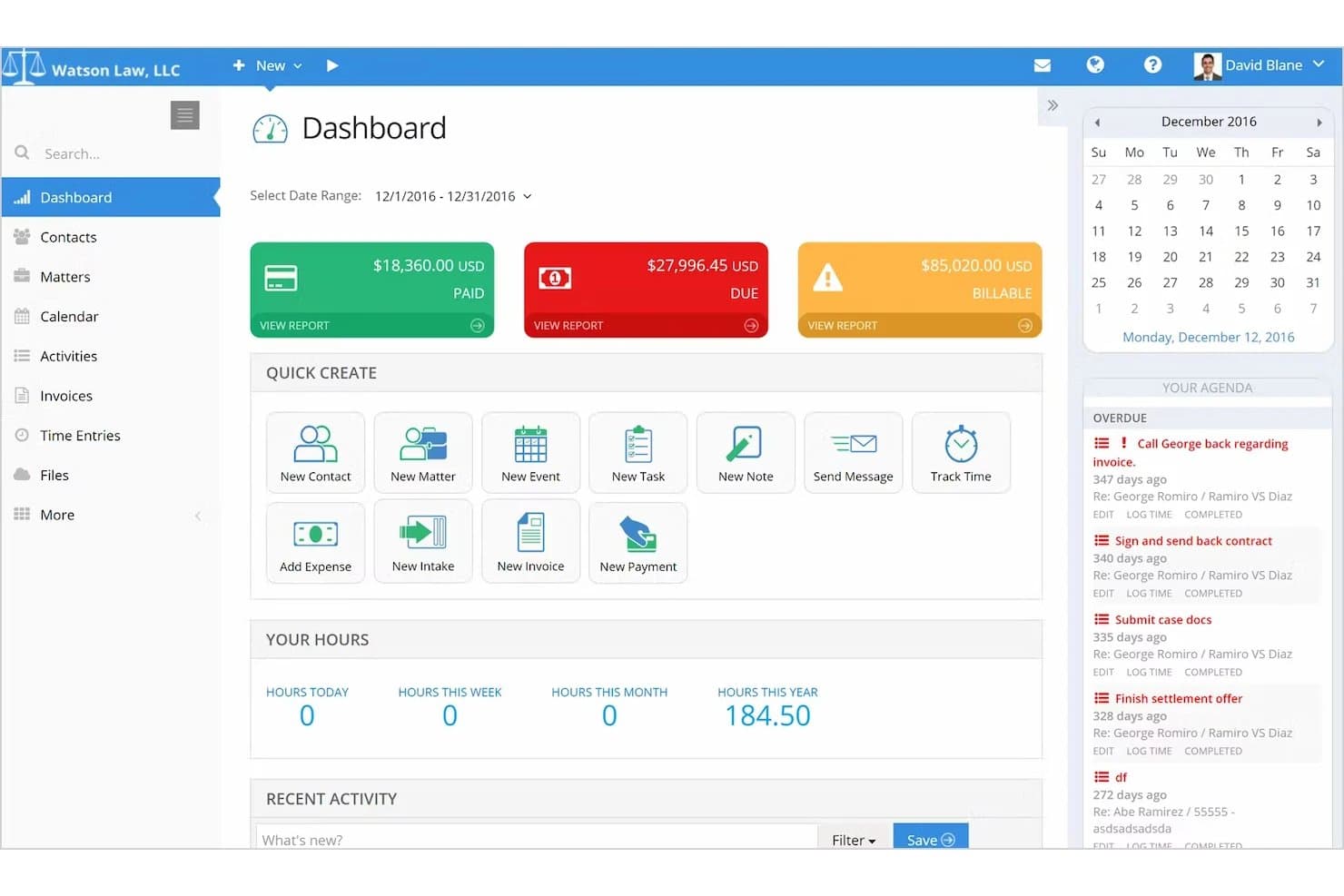
PracticePanther covers legal matters, client intake, billing, documents, and client portals. PracticePanther is a legal practice management platform that combines CRM, client intake, matter tracking, billing, document management, and trust accounting in a single system built specifically for law firms.
Who Is PracticePanther Best For?
PracticePanther is a strong fit for small to mid-sized law firms that want CRM, billing, and matter management in one place rather than stitching together separate tools.
Why I Picked PracticePanther
I picked PracticePanther as one of the best because it treats CRM as a native layer inside a full practice management system rather than a bolt-on. Client intake forms populate contact records automatically, case-stage tracking shows where each prospect sits in the workflow, and the Originating Attorney Report ties collected revenue back to the attorney who brought in the matter—all without leaving the platform. I think that kind of built-in visibility is genuinely hard to replicate when you're stitching a standalone CRM onto separate billing software.
PracticePanther Key Features
- Conflict check search: Searches across contacts, matters, notes, tasks, events, and custom fields to surface potential conflicts before taking on a new client.
- Client portal: Gives clients a dedicated space to view documents, send messages, check invoice balances, and make payments online.
- Two-way business texting: Sends and receives client texts from a business number, with all messages stored alongside related case information.
- Trust account ledger and reconciliation: Tracks trust-account payments and generates three-way reconciliation reports to support compliance.
PracticePanther Integrations
PracticePanther offers marketplace integrations with Lawmatics, QuickBooks Online, Mailchimp, LawToolBox, Docketwise, Google Calendar, Microsoft Exchange, Google Drive, OneDrive, Box, and Dropbox. It also provides an OAuth 2 API with OData query endpoints for custom integrations and supports Zapier.
Pros and Cons
Pros:
- Attorney revenue reports link originations to collections
- Matter workflows organize tasks and deadlines
- Client and matter records stay together
Cons:
- Manual conflict searches; no documented ethical walls
- Business development reporting offers limited customization
Learn more about PracticePanther: Best for AI-powered sales insights
- 21-day free trial + demo available
- From $9/user/month (billed annually)
Visit WebsiteCustomer Rating:4.6/5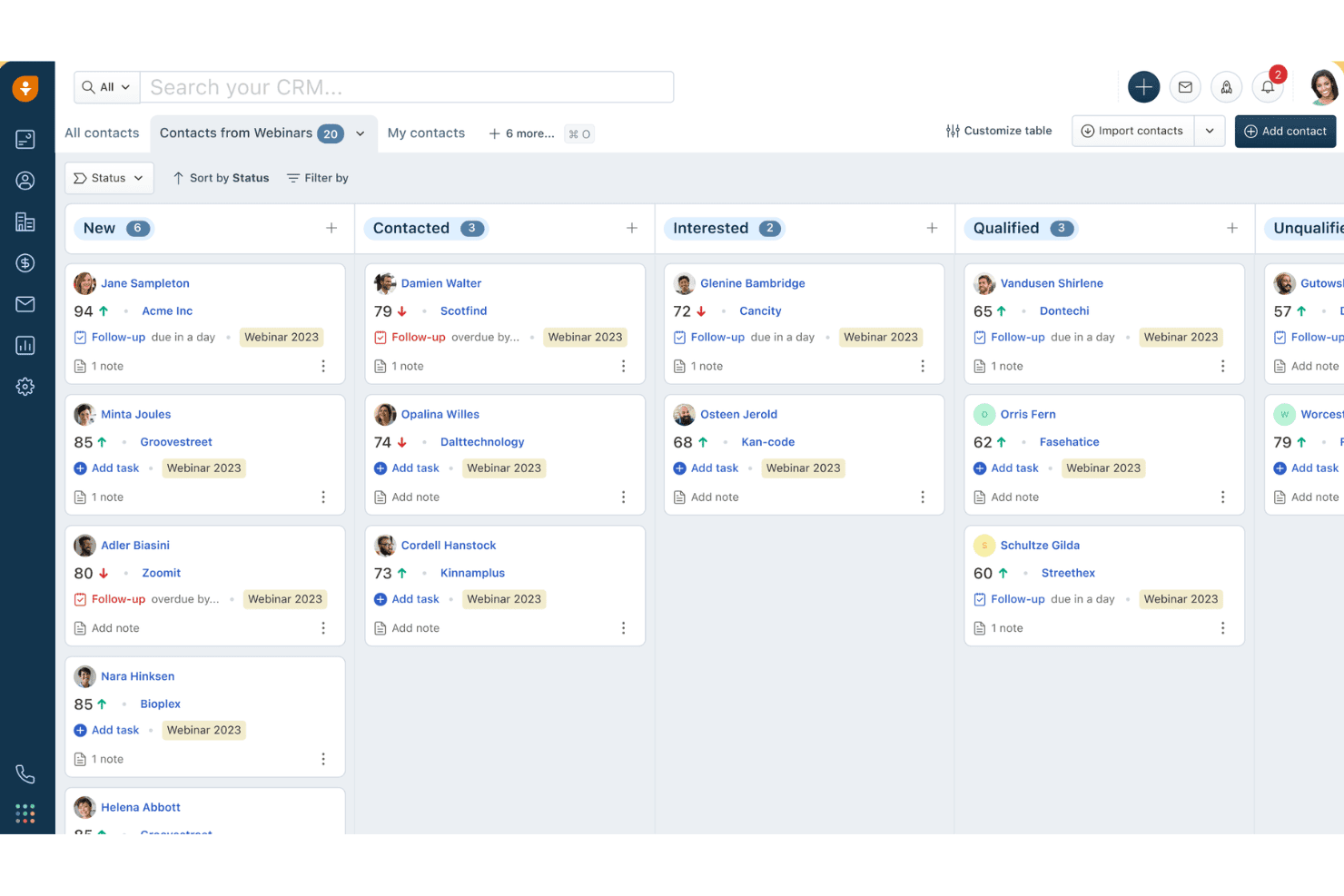
Freshsales organizes webinar contacts by status in a kanban board view. Freshsales is a sales CRM platform that offers AI-powered lead scoring, multi-channel communication, pipeline management, workflow automation, and built-in marketing tools that law firms can configure for client intake and business development.
Who Is Freshsales Best For?
Freshsales fits law firms that prioritize AI-driven lead prioritization and marketing automation over legal-native features like conflict checks or matter management.
Why I Picked Freshsales
Freshsales earns its spot on my shortlist because Freddy AI does something most legal CRMs can't: it scores incoming leads based on real behavioral signals like email opens and site visits, so your intake team knows exactly which prospects to call first. I also like that Freddy flags stalled deals and drafts personalized follow-up emails automatically, which keeps BD pipelines moving without manual oversight. Pair that with a 24/7 AI chatbot for after-hours lead capture, and you've got a genuinely intelligent intake qualification layer.
Freshsales Key Features
- Custom lifecycle stages: Configure contact stages to mirror your firm's intake pipeline steps, from initial inquiry through to retained client.
- Marketing journey builder: Build automated drip campaigns with conditional logic across email and SMS to nurture prospects and past clients.
- Built-in VoIP dialer: Make and receive calls directly in the CRM with click-to-call, call logging, and call recording included natively.
- Attribution reporting: Trace which channels and campaigns generated leads and closed business using built-in source-to-revenue attribution reports.
Freshsales Integrations
Freshsales offers native integrations across Google Workspace, Microsoft 365, Slack, Zoom, QuickBooks, WhatsApp Business, and Apple Business Chat. Marketplace integrations include PandaDoc, DocuSign, and Calendly; API access and webhooks support custom connections to legal practice management systems.
Pros and Cons
Pros:
- Multi-channel outreach via chat, SMS, WhatsApp
- Built-in marketing automation for client nurture
- AI scores leads and flags deal risks
Cons:
- Lacks conflict check and legal templates
- No native matter management workflow support
 Best for client intake automation
- Free demo available
- Pricing upon request
Visit WebsiteCustomer Rating:4.7/5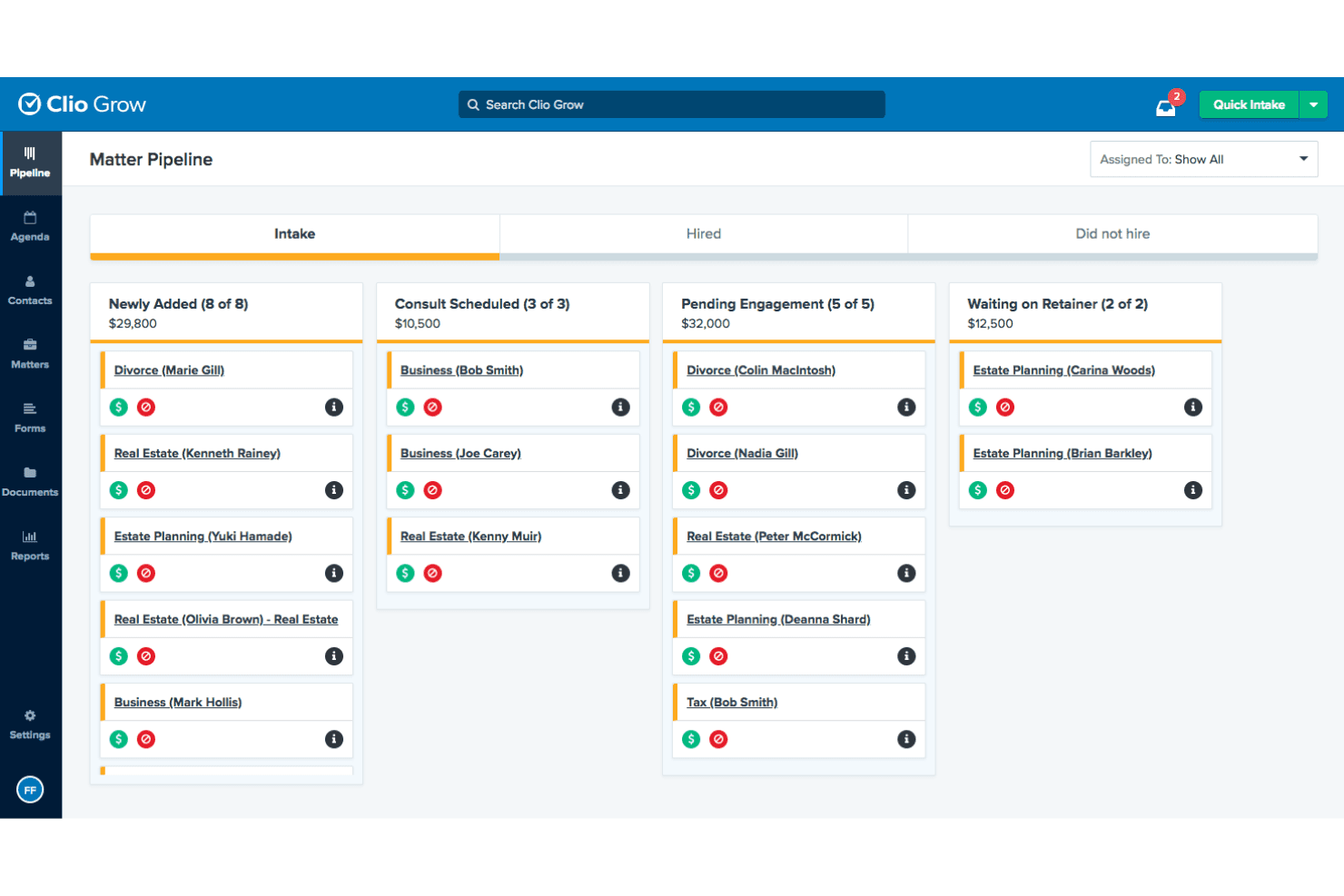
Clio Grow's Matter Pipeline tracks leads across intake stages. Clio Grow is a legal-specific CRM built for law firms that combines a Kanban intake pipeline, customizable intake forms, conflict-of-interest checking, referral source tracking, and automated client follow-up workflows.
Who Is Clio Grow Best For?
Clio Grow is a strong fit for small to mid-sized law firms that need a structured, legal-specific intake pipeline rather than a general-purpose CRM.
Why I Picked Clio Grow
Clio Grow earns its spot on my shortlist because no other tool I've reviewed handles legal client intake with this level of purpose-built specificity. I'm particularly drawn to its Kanban Matter Pipeline, where staff can move prospective clients through fully customizable intake stages, from first contact through signed retainer, without ever leaving the platform. The native conflict-of-interest search runs directly within the intake workflow, so coordinators catch issues before they become liability problems. Add Clio Grow AI's after-hours lead screening and booking, and the intake process essentially runs itself.
Clio Grow Key Features
- Referral source tracking: A dedicated Referral Report captures each referring contact's total matters referred, hired counts, average value, and conversion rates.
- Lead source revenue reporting: The Lead Source Revenue Report combines pipeline estimates and actual collected revenue by marketing channel, including Google LSA spend and ROI.
- Native two-way SMS messaging: Firms can send intake forms, agreements, and appointment reminders via text and receive replies through a firm-assigned toll-free number.
- CallRail integration: Inbound calls are tracked, recorded, and matched to existing Clio Grow contacts for accurate phone-based lead-source attribution.
Clio Grow Integrations
Native integrations include Clio Manage, Dropbox Sign, CallRail, and Google Local Services Ads; Clio Grow also supports Ruby Receptionists, QuickBooks, Xero, Google Drive, Dropbox, Gmail, Outlook, and Zapier, plus an API for custom integrations.
Pros and Cons
Pros:
- Matter and referral tracking purpose-built for law firms
- AI assistant screens and books leads after hours
- Built-in conflict checking at intake
Cons:
- Advanced revenue forecasting features are missing
- No dedicated mobile app for intake
Learn more about Clio Grow: Best for workflow development
- Free demo available
- Pricing upon request
Visit WebsiteCustomer Rating:4.6/5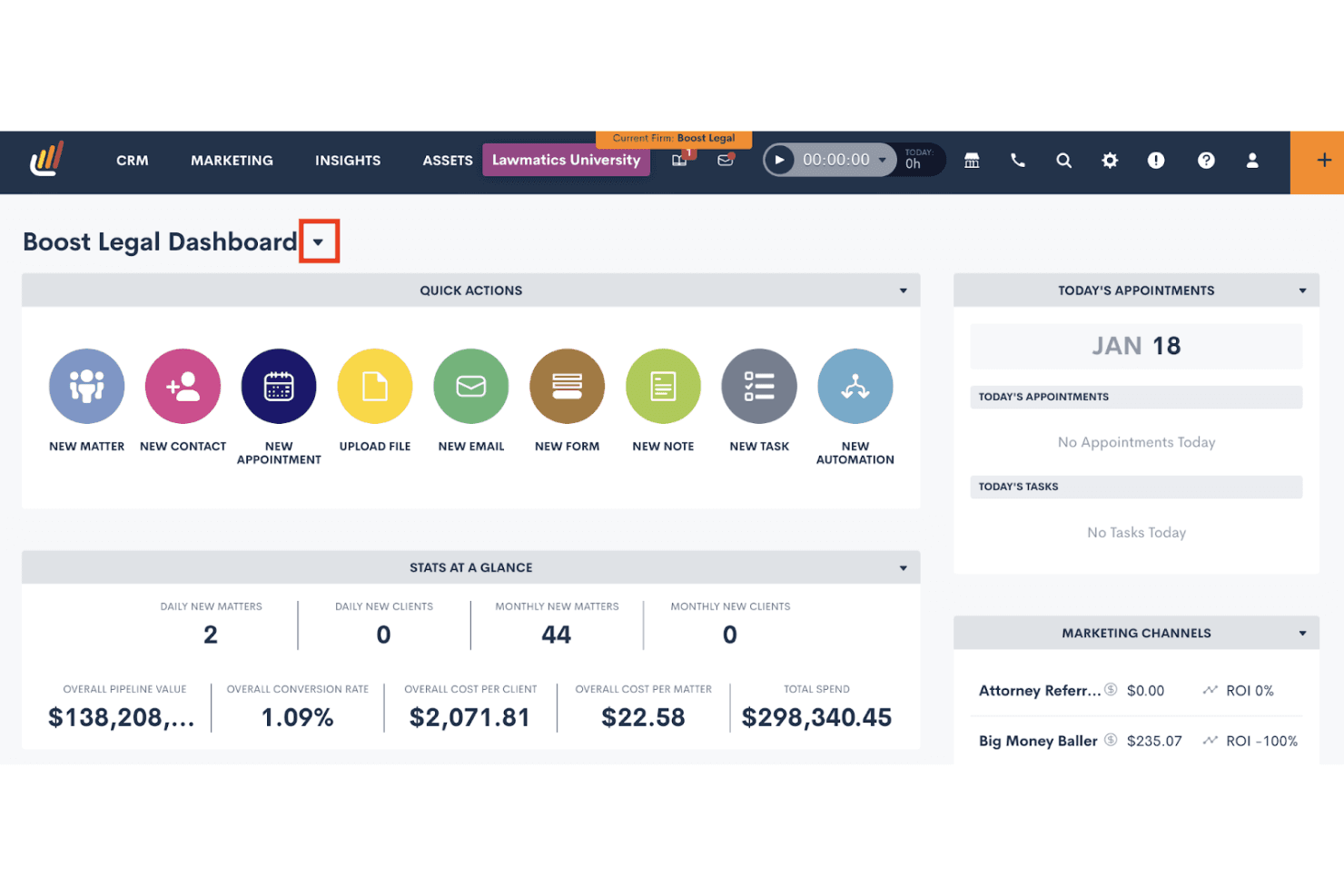
Lawmatics centralizes client intake, tasks, and marketing ROI in one dashboard. Lawmatics is a legal-specific CRM built for law firms that combines client intake management, workflow automation, conflict checking, referral source tracking, pipeline reporting, and marketing campaign tools.
Who Is Lawmatics Best For?
Lawmatics is a strong fit for mid-size law firms that want to automate intake-to-onboarding workflows across multiple practice areas without building everything from scratch.
Why I Picked Lawmatics
Lawmatics earns its spot on my shortlist because its workflow automation engine is genuinely built for law firms, not retrofitted from a generic CRM. I love that you can build conditional, multi-step automations that fire the moment a lead submits an intake form, routing them through follow-ups, conflict checks, and e-signature requests without any manual handholding. Merlin Copilot lets you generate those automations using plain-language prompts, which cuts setup time considerably.
Lawmatics Key Features
- Referral source tracking: Pulls referrers directly from existing CRM contacts and logs each referrer's total matter count and hire count in one place.
- Native e-signature with deadline enforcement: Sends, tracks, and enforces signing deadlines on retainer agreements and intake documents without a third-party tool.
- Merlin Qualify AI lead scoring: Scores incoming leads against firm-defined criteria and triggers next steps—like scheduling or retainer sends—based on each score.
- Multi-channel lead capture: Captures leads from web forms, virtual receptionists, chatbots, and legal directories and routes them into the intake pipeline automatically.
Lawmatics Integrations
Lawmatics offers native integrations with Clio, 8am™ MyCase, PracticePanther, Filevine, Smokeball, LEAP, CARET Legal, CallRail, Google Calendar, and Microsoft Outlook. Its REST API, OAuth2, and webhooks support custom integrations.
Pros and Cons
Pros:
- Native e-signature and branded client portal included
- Customizable workflow automation for any practice area
- Built-in legal intake automation with Kanban pipeline
Cons:
- Specific report types missing for some firms
- No built-in post-case review requests
Learn more about Lawmatics: Best for visual sales pipeline development
- 14-day free trial
- From $14/user/month (billed annually)
Visit WebsiteCustomer Rating:4.4/5
Pipedrive organizes deals across pipeline stages in a kanban view. Pipedrive is a sales-focused CRM platform that offers visual pipeline management, lead capture tools, workflow automation, and email outreach for tracking prospective clients from first contact through intake and retainer signing.
Who Is Pipedrive Best For?
Pipedrive is a strong fit for small and boutique law firms that already use a separate practice management system and need a dedicated tool for tracking prospective clients through a visual intake pipeline.
Why I Picked Pipedrive
Pipedrive earns its spot on my shortlist because its visual Kanban pipeline makes it genuinely easy to see where every prospective client sits, from first contact through retainer signing, without digging through records. I like how intake stages are fully customizable, so you can map your exact process: consultation booked, conflict check pending, retainer sent. The LeadBooster add-on adds a 24/7 chatbot and embeddable web forms that capture leads directly into that pipeline automatically.
Pipedrive Key Features
- Campaigns add-on: A built-in email marketing tool for sending segmented nurture campaigns to prospects and past clients directly from CRM contact data.
- DocuSign integration: Lets you generate, auto-fill, and send retainer agreements or engagement letters from within a deal record and track signature status.
- Meeting Scheduler: A self-booking tool that lets prospects schedule consultations directly on an attorney's calendar without back-and-forth emails.
- Leads Inbox: A staging area for unqualified leads where you can assign warm, hot, or cold labels and schedule follow-up activities before moving contacts into your main pipeline.
Pipedrive Integrations
Pipedrive offers Marketplace integrations with DocuSign, PandaDoc, and QuickBooks, plus native Google Workspace and Microsoft Outlook/Teams connectivity. Its API supports custom links to practice management systems, and it also integrates with Clio through Zapier.
Pros and Cons
Pros:
- AI-driven email and reporting features
- Deep intake workflow customization options
- Visual Kanban pipeline for intake tracking
Cons:
- Lacks matter-centric legal data structure
- No native legal conflict check capability
Learn more about Pipedrive: Best for advanced practice management
- 10-day free trial + free demo available
- From $59/user/month (billed annually)
Visit WebsiteCustomer Rating:4.4/5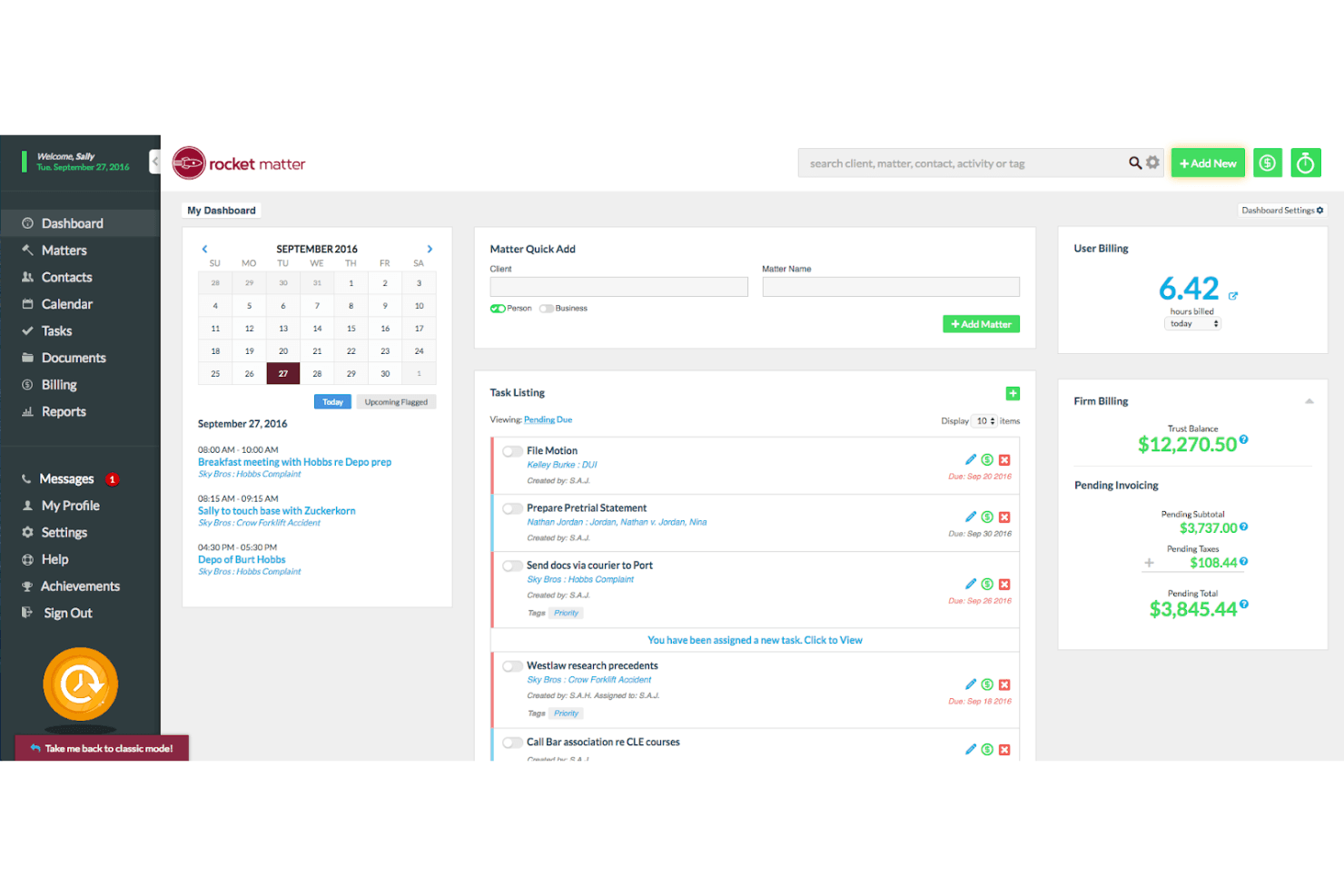
Rocket Matter centralizes billing, tasks, and scheduling in one dashboard. Rocket Matter is a legal practice management platform that combines matter-centric contact management, client intake workflows, billing, trust accounting, document automation, and a CRM add-on for lead pipeline tracking and marketing campaigns.
Who Is Rocket Matter Best For?
Rocket Matter is a strong fit for mid-sized law firms that want billing, trust accounting, matter management, and client intake under one roof.
Why I Picked Rocket Matter
Rocket Matter earns its spot on my shortlist because its matter-centric architecture goes deeper than most practice management platforms. I particularly like how every contact, document, billing record, and calendar event ties directly to a matter, which keeps multi-attorney firms from losing context across a busy caseload. The built-in Data Views Workbench lets me build custom revenue and realization-rate reports by attorney or practice area without exporting to a spreadsheet. Pair that with native AI-assisted document drafting and automated SMS campaigns, and you get a genuinely advanced practice management setup.
Rocket Matter Key Features
- Conflict check tool: Search by name across matters, contacts, clients, and custom fields to identify potential conflicts before opening a new matter.
- Trust accounting: Manage multiple trust accounts per client with built-in bar compliance safeguards and bank statement reconciliation.
- Automated SMS campaigns: Send text message campaigns to multiple contacts at once directly from the desktop, including payment reminders and overdue retainer alerts.
- Client portal: Share documents, deliver invoices, collect e-signatures, and exchange messages with clients through a built-in secure portal.
Rocket Matter Integrations
Rocket Matter offers native integrations with QuickBooks Online, Microsoft Outlook, Microsoft OneDrive, Google Calendar, Dropbox, Box, and NetDocuments. It also supports Kenect and Zapier integrations.
Pros and Cons
Pros:
- Client portal with secure document sharing
- Automated intake forms with conditional logic
- Native conflict check on all plans
Cons:
- No dedicated referral source tracking
- CRM features only available as add-on
Learn more about Rocket Matter: Best for AI-driven sales tools
- 30-day free trial + free demo available
- From $325/user/month (billed annually)
Visit WebsiteCustomer Rating:4.3/5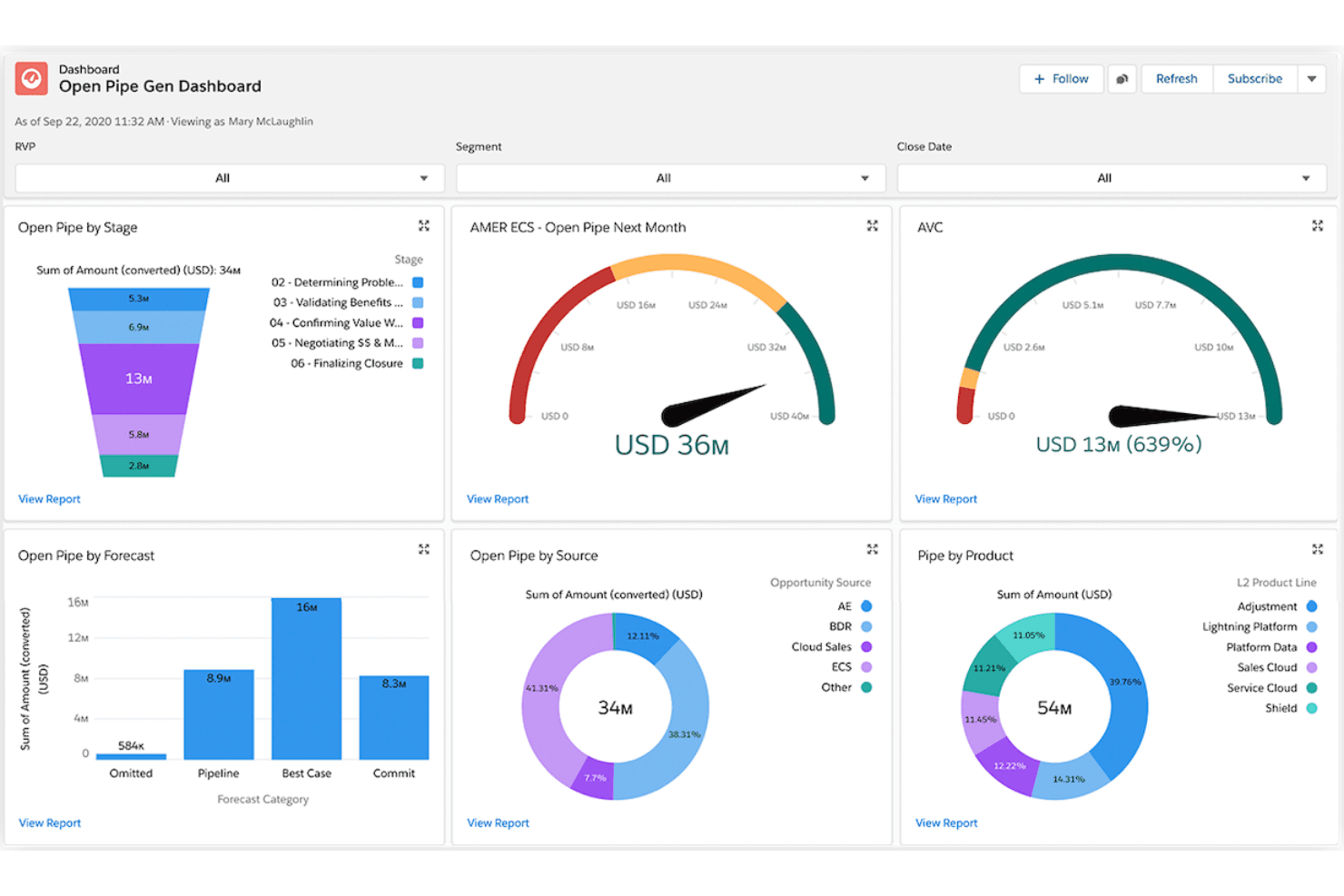
Salesforce tracks open pipeline by stage, source, and product in one view. Salesforce Financial Services Cloud is an enterprise CRM platform built on Sales Cloud that delivers referral tracking, AI-driven pipeline forecasting, client relationship mapping, and marketing automation for law firms focused on business development.
Who Is Salesforce Financial Services Cloud Best For?
Salesforce Financial Services Cloud is a strong fit for mid-to-large law firms with dedicated revenue operations or business development teams that prioritize AI-driven pipeline forecasting, referral tracking, and client relationship management over turnkey legal intake tools.
Why I Picked Salesforce Financial Services Cloud
I've included Salesforce Financial Services Cloud in my top picks because its AI suite is genuinely unmatched for law firm business development. Einstein forecasting gives BD teams attorney- and practice-area-level pipeline visibility, while Agentforce can handle intake routing and prospect follow-up autonomously. Referral tracking is also a first-class feature here: firms can log referral sources, monitor conversion rates, and attribute revenue back to originating partners with precision.
Salesforce Financial Services Cloud Key Features
- Agentforce AI agents: Autonomous AI agents that screen intake inquiries, route prospects to the right attorney, and update records without manual input.
- Flow Builder automation: A no-code workflow builder that automates task assignment, follow-up sequences, and document delivery via DocuSign integration.
- Client portal via Experience Cloud: A branded, secure self-service portal where clients can share documents, check status updates, and complete onboarding steps.
- Tableau analytics integration: Native Tableau connectivity that lets BD teams build custom revenue forecasts and matter-value dashboards beyond standard reporting.
Salesforce Financial Services Cloud Integrations
Salesforce Financial Services Cloud supports native integrations with DocuSign, Tableau, and Slack, plus integration with Salesforce Marketing Cloud. AppExchange marketplace integrations, MuleSoft, and APIs support custom connectivity; legal platforms such as Clio and PracticePanther require third-party connections.
Pros and Cons
Pros:
- Tableau dashboards enable attorney-level pipeline reporting
- Native referral tracking links revenue to sources
- AI agents automate referral and intake workflows
Cons:
- Matter management requires extensive customization work
- No built-in legal intake or conflict checks
Learn more about Salesforce Financial Services Cloud: Best for marketing processes
- Free demo available
- Pricing upon request
Visit WebsiteCustomer Rating:4.6/5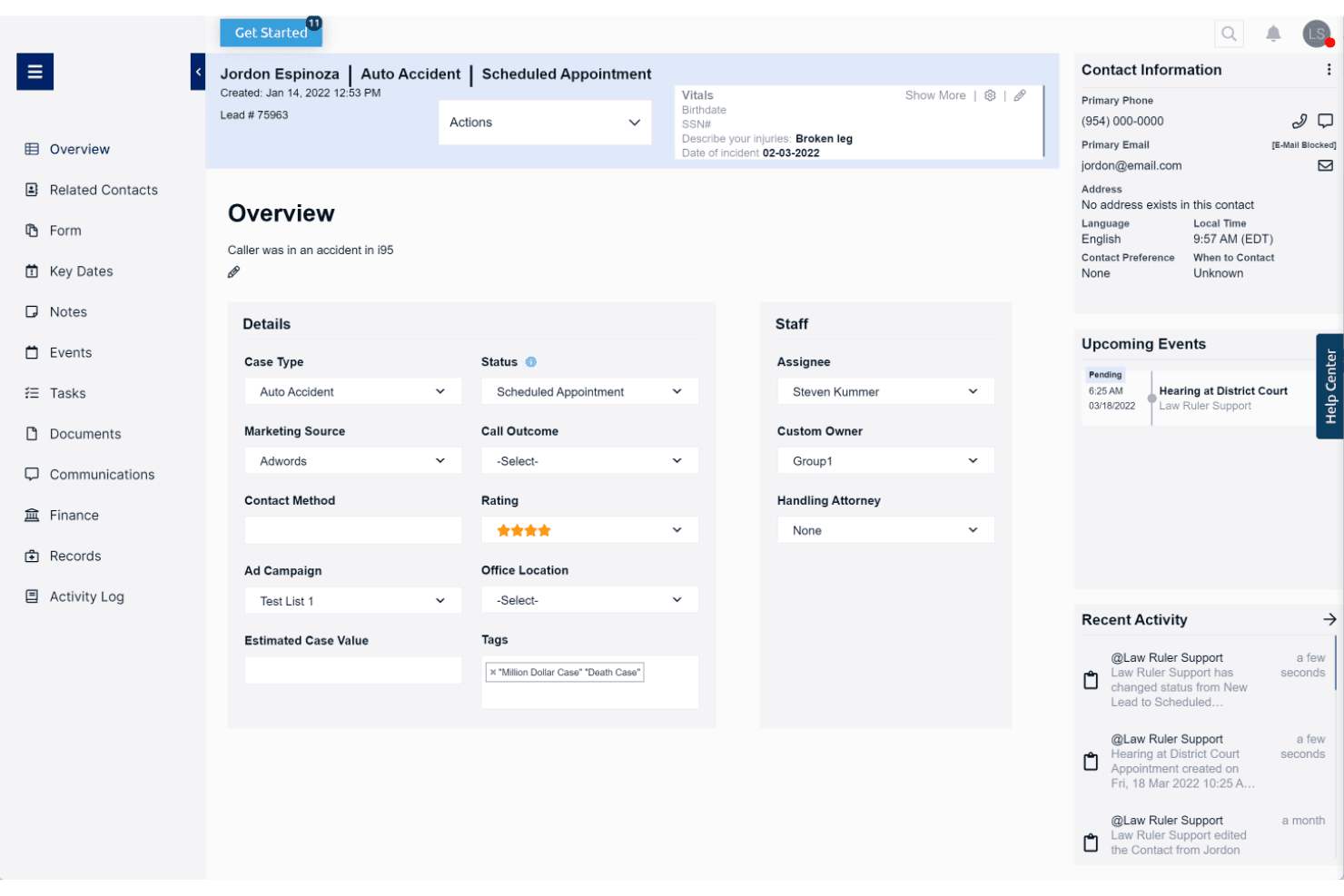
Law Ruler centralizes lead details, case status, and upcoming events in one view. Law Ruler is a legal CRM and client intake platform built exclusively for law firms, combining Smart Forms, multi-channel marketing automation, a built-in softphone dialer, pipeline tracking, and AI-assisted email tools.
Who Is Law Ruler Best For?
Law Ruler is a strong fit for high-volume B2C law firms—think personal injury, mass tort, or criminal defense—that need to run multi-channel marketing campaigns alongside client intake.
Why I Picked Law Ruler
Law Ruler earns its spot on my shortlist because its marketing automation goes deeper than any other legal CRM I've reviewed. I'm particularly impressed by its multi-channel campaign engine: automated email drip sequences, two-way SMS, and pre-recorded voice call campaigns all run in parallel from a single platform. Its Local Presence Dialing matches your outbound caller ID to the lead's area code, which meaningfully improves pickup rates for personal injury and mass tort intake teams chasing high volumes of inbound leads.
Law Ruler Key Features
- Smart Forms: Branching, logic-based intake forms that automatically qualify or disqualify leads based on respondent answers before staff get involved.
- Built-in softphone dialer: A click-to-call dialer with call recording, inbound/outbound call tracking, and call monitoring for managers to listen in on live calls.
- AI Email Assistant: A ChatGPT-powered tool included on all paid plans that drafts marketing emails, client replies, and intake templates with tone and length adjustments.
- Custom report builder: A no-code report builder that lets firms track pipeline health, staff productivity, and conversion rates, with scheduled recurring delivery.
Law Ruler Integrations
Law Ruler offers documented integrations with Clio Manage, Rocket Matter, TimeSolv, CosmoLex, Dropbox Sign, CallRail, LawPay, and Smith.AI. Every paid plan includes API access, and Zapier is also supported.
Pros and Cons
Pros:
- Customizable intake forms with lead qualification
- Built-in softphone with local presence dialing
- Multichannel intake automation with email, SMS, voice
Cons:
- Lacks built-in appointment scheduling tool
- No native conflict-of-interest screening workflow
Learn more about Law Ruler:
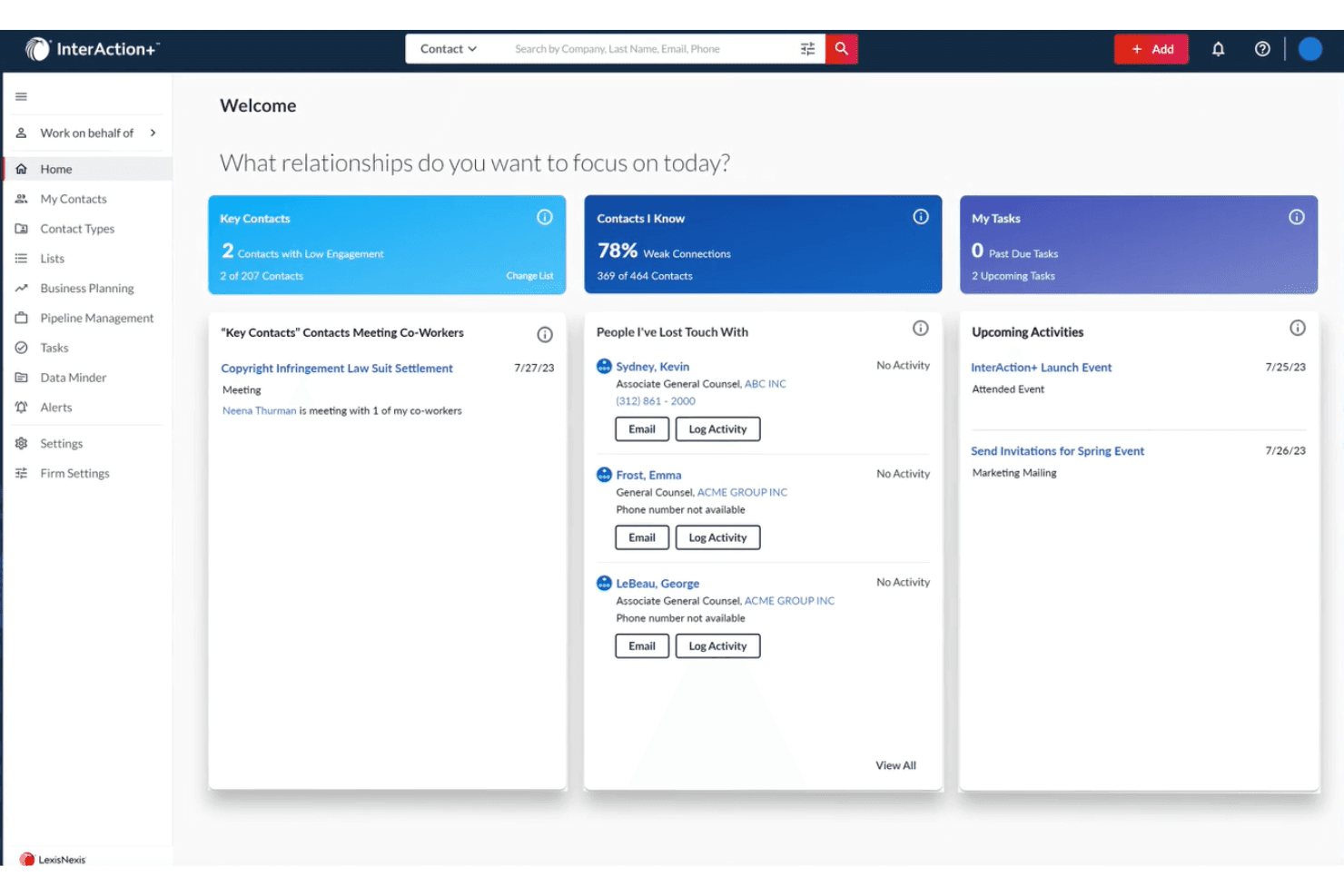
InterAction+ helps users prioritize relationships and track key contacts daily. InterAction+ is a legal-specific CRM built by LexisNexis that combines relationship intelligence, business development pipeline tracking, AI-driven client scoring, and BD reporting across clients, referral sources, and practice areas.
Who Is InterAction+ Best For?
InterAction+ is a strong fit for mid-to-large law firms where business development directors and BD teams own client relationship strategy across multiple practice areas.
Why I Picked InterAction+
InterAction+ earns its spot on my shortlist because no other legal CRM matches its depth of relationship intelligence. I'm particularly impressed by the AI-powered Relationship Score, which continuously evaluates client engagement health and flags at-risk relationships before they slip. Pair that with Key Client Radar for a firm-wide view of your most important accounts, and BD teams have a real edge in protecting and growing revenue across practice areas.
InterAction+ Key Features
- Daily Digest: A configurable daily email that surfaces prioritized BD tasks and relationship follow-ups without disrupting your workflow.
- LexisNexis Context integration: Embeds litigation event analytics by firm, practice area, and jurisdiction directly into client and prospect records.
- Revenue reporting by practice area: Tracks pipeline progress, client acquisition rates, and marketing ROI broken down by client and practice area.
- Microsoft 365 embedding: Surfaces client relationship data inside Outlook, Excel, and Word so attorneys can act on CRM insights without switching tools.
InterAction+ Integrations
InterAction+ has native integrations across the Microsoft ecosystem, including Microsoft 365 and Power Automate, plus LexisNexis Context. Its Cloud API supports custom connections, while specific practice management integrations aren't publicly named.
Pros and Cons
Pros:
- Deep legal industry adoption and trust
- AI-powered client relationship health scoring
- Exclusive LexisNexis litigation analytics integration
Cons:
- No automated conflict check engine
- No legal-specific client intake forms
Learn more about InterAction+:
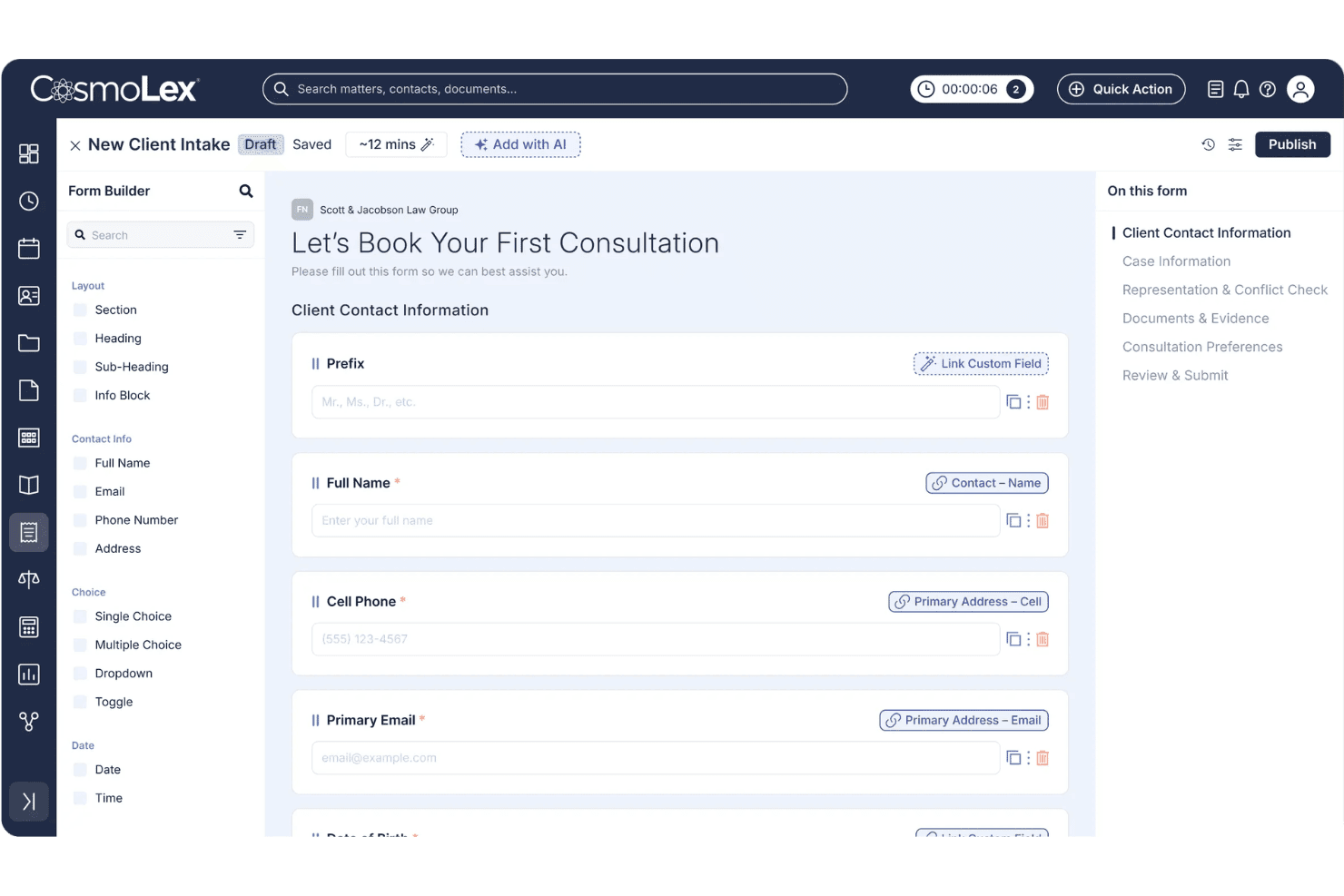
CosmoLex lets users build custom client intake forms with mapped fields. CosmoLex CRM is an all-in-one legal practice management platform that combines CRM, client intake, conflict checking, trust accounting, billing, and matter management in a single system.
Who Is CosmoLex CRM Best For?
CosmoLex CRM is a strong fit for small to mid-sized law firms that want client intake, conflict checking, billing, and trust accounting managed in one platform.
Why I Picked CosmoLex CRM
CosmoLex CRM earns its spot on my shortlist because it's the only legal CRM I've found that bakes trust accounting and IOLTA compliance directly into the same platform as client intake and matter management. I like that conflict checks run against live matter data and auto-generate timestamped audit records, so there's no separate log to maintain. The 2025 AI Intake feature also stands out: it builds intake forms from a plain-English prompt or an existing PDF, then maps submissions directly to contact records without any duplicate entry.
CosmoLex CRM Key Features
- Email and SMS drip campaigns: Automated multi-step nurture sequences triggered by prospect behavior or form submissions, personalized with client and intake data.
- Secure client portal: A branded, two-way portal where clients can share documents, view invoices, make payments, and exchange messages linked to their matter.
- Law Firm Insights dashboard: Configurable reporting with pre-built templates covering matter activity, financial productivity, and trust accounting compliance.
- Practice area–specific intake forms: Intake forms can be configured and branded separately by practice area to qualify prospects before their consultation.
CosmoLex CRM Integrations
CosmoLex CRM has native integrations with Microsoft 365, QuickBooks Online, Google Calendar, Google Drive, OneDrive, Dropbox, Box, and NetDocuments. It also supports Zapier.
Pros and Cons
Pros:
- Secure client portal with two-way messaging
- Native AI tools for legal intake automation
- Integrated trust accounting and practice management
Cons:
- CRM pipeline analytics are limited
- No referral source tracking module
Learn more about CosmoLex CRM:
Hukuk Büroları için Diğer CRM Yazılımları
Aşağıda kısa listeme aldığım hukuk büroları için ek CRM yazılımlarının bir listesi yer alıyor. İlk 10’a girememiş olsalar da yine de değerliler ve daha fazla araştırmaya değerler.
- 11Creatio AI CRMBest for no-code CRM workflow automation
- 12MyCaseBest for all-in-one case management
- 13CopperBest for Google Workspace ontegration
- 14Zoho CRMBest for customizable CRM solutions
- 15RingCentralBest for communication tools
- 16SugarAIBest for customization options
- 17monday AI WorkspaceBest for project management integration
- 18FilevineBest for document automation
- 19ActionstepBest for mid-sized law firms
- 20CobblestoneBest for contract management
İlgili CRM İncelemeleri
Burada hâlâ aradığınızı bulamadıysanız, test edip değerlendirdiğimiz ve hepsi bir arada CRM'lerle yakından ilişkili bu araçlara göz atın.
- CRM Yazılımı
- Satış Yazılımı
- Potansiyel Müşteri Yönetimi Yazılımı
- İş Zekâsı Yazılımı
- Sözleşme Yönetimi Yazılımı
- Gelir Yönetimi Sistemi
- CPQ Yazılımı
How I Evaluate CRM Software for Law Firms
I split my evaluation into two layers: the baseline every legal CRM must hit—intake management, conflict checks, matter records—and the differentiators that set the best options apart.
Core Functionality (Table Stakes For This List)
When I'm selecting tools for my list, I rank each one on a scale from 0 (does not offer the functionality) to 5 (excels in this area) for each core functionality listed below. Then, I calculate the tool's total score into a percentage. Each tool needs to achieve a minimum total score of 55% to be considered for inclusion.
- Legal Intake Management: I check whether the CRM offers structured intake forms and pipeline stages built for converting leads into retained clients, not just generic sales funnels.
- Conflict Check Support: Before a firm can engage a prospect, conflicts need to be screened. I look for native conflict searches or direct integrations with practice management tools.
- Matter-Centric Contact Model: A legal CRM should organize data around matters and parties—clients, opposing counsel, referral sources—rather than forcing firms into a standard deals-and-accounts structure.
- Legal Workflow Automation: I evaluate whether the platform automates intake-specific steps like sending engagement letters, triggering e-signature requests, or assigning onboarding tasks to paralegals.
- Referral Source Tracking: Referral relationships drive most law firm growth. I look for the ability to attribute new matters and revenue back to the originating source or attorney.
- Revenue & Pipeline Reporting: I check for reporting that breaks down pipeline value, conversion rates, and forecasts by attorney, practice area, or matter type—not just generic sales dashboards.
Once I have a list of tools that meet this criteria, I consider what sets each platform apart.
Differentiating Factors (What Sets Vendors Apart)
Here's how I compare and contrast different vendors:
Standout Features
Speed to lead matters in legal intake, so I look for built-in SMS messaging that lets intake teams send appointment reminders and follow-up nudges without leaving the CRM. Call tracking with source attribution is another differentiator—it connects inbound calls to specific campaigns or directories, giving RevOps teams real data on which channels drive retained matters. I also evaluate whether a platform offers an AI intake assistant that can qualify leads after hours and route urgent consultations to the right attorney.
Beyond Features
Integration with the firm's existing legal tech stack is one of the first things I check—whether the CRM connects to practice management tools like Clio or MyCase determines how smoothly intake data flows into active matters. Practice area fit also matters. A personal injury firm processing hundreds of leads monthly needs a very different setup than a boutique corporate practice managing a handful of relationships. I also evaluate how pricing scales as firms grow, since add-ons for SMS, storage, or extra users can quietly inflate the total cost of ownership.
Hukuk Büroları için CRM Yazılımı Nasıl Seçilir?
Kendinize özgü yazılım seçim sürecinizi yürütürken aşağıdaki noktaları göz önünde bulundurun:
- Kullanım Kolaylığı ve Erişilebilirlik: Seçtiğiniz CRM sistemi kullanıcı dostu olmalı, her yerden erişilebilmeli ve hızlı ve güvenli bir şekilde kullanılabilmelidir. Bulut tabanlı bir CRM, avukatların ve personelin müşteri bilgilerine erişmesine ve görevleri uzaktan yönetmesine olanak tanıyarak ofiste, mahkemede veya evde verimli bir şekilde çalışabilmelerini sağlar.
- Mevcut Araçlarla Entegrasyon: Bir CRM yazılımı ararken diğer araçlar ve sistemlerle sorunsuz bir şekilde entegre olabilen seçenekleri değerlendirin. Buna e-posta istemcileri, belge yönetimi yazılımları, takvim araçları ve iş akışlarını kolaylaştırmaya yardımcı olan diğer hukuk bürosu yönetim yazılımları dahildir.
- Otomasyon Yetenekleri: Otomasyon, randevu hatırlatıcıları, son tarih takibi ve belge oluşturma gibi tekrarlayan görevleri kolaylaştırdığı için CRM yazılımının değerli bir özelliğidir. Bu, avukatların düzenli kalmasına yardımcı olur, insan hatasını azaltır ve verimliliği artırır.
- Özelleştirme ve Ölçeklenebilirlik: Yeni bir CRM satın alırken, çözümünüzü özel ihtiyaçlarınıza göre uyarlayabilmeniz için özelleştirilebilir bir yazılım tercih ettiğinizden emin olun. Ayrıca yazılımınız işletmenizle birlikte ölçeklenebilmeli ve artan veri, kullanıcı ve müşteri etkileşimi hacmini karşılayabilmelidir.
- Güvenlik ve Uyumluluk: Hukuki çalışmaların hassas niteliği göz önüne alındığında CRM yazılımınız, gizli müşteri bilgilerini korumak için güçlü güvenlik özellikleri sunmalıdır. Buna şifreleme, iki faktörlü kimlik doğrulama ve yetkilendirilmiş IP adresleri dahildir. Ayrıca yazılım, sektör standartlarına ve düzenlemelere uygun olmalıdır.
Hukuk Büroları için CRM Yazılımındaki Trendler
Hukuk bürolarına yönelik CRM yazılımlarında fark ettiğim bazı trendleri ve bunların gelecek için ne anlama gelebileceğini burada bulabilirsiniz. En önemli içgörüleri ortaya çıkarmak için sayısız ürün güncellemesini, basın bültenini ve sürüm kaydını inceledim.
- Yapay Zekâ Destekli Müşteri İçgörüleri: Yapay zekâ, müşteri verilerini analiz etmek ve eyleme geçirilebilir içgörüler sunmak için kullanılıyor. Bu, daha kişiselleştirilmiş müşteri etkileşimlerine yol açarak hukuk bürolarının müşteri ihtiyaçlarını daha iyi anlamasına ve hizmet sunumunu iyileştirmesine yardımcı olabilir.
- Hukuki Araştırma Araçlarıyla Entegrasyon: CRM yazılımları artık hukuki araştırma araçlarıyla entegre oluyor. Bu, avukatların içtihatlara ve kanun maddelerine doğrudan CRM'leri üzerinden erişmesine olanak tanıyarak zaman kazandırıyor ve hukuki araştırmaların doğruluğunu artırıyor.
- Mobil Erişilebilirlik: Mobil uyumlu CRM çözümleri vazgeçilmez hâle geliyor. Avukatlar artık hareket hâlindeyken müşteri bilgilerine ve dava ayrıntılarına erişebiliyor; bu da üretkenliği ve müşteri hizmetlerini geliştiriyor.
- Gelişmiş Veri Güvenliği: Hukuk büroları hassas bilgilerle çalışır; bu da güçlü güvenlik önlemlerini önemli kılar. Bunun sonucunda CRM yazılımlarında veri güvenliği özelliklerine öncelik veriliyor ve müşteri gizliliğinin korunmasına yardımcı olmak için güvenlik protokolleri geliştiriliyor.
- Rutin Görevlerin Otomasyonu: Otomasyon; planlama, faturalandırma ve belge yönetimi dâhil olmak üzere rutin idari görevleri yerine getirmek için kullanılıyor. Bu özellikler, avukatların daha karmaşık hukuki çalışmalara odaklanabilmesi için zaman kazandırmaya yardımcı olur.
Hukuk büroları müşteri ilişkileri yönetimine giderek daha fazla öncelik verdikçe, hukuk profesyonellerine özel CRM yazılımları sektörün benzersiz ihtiyaçlarını karşılayacak şekilde gelişiyor. Bu ilerlemeler yalnızca müşteri etkileşimlerini kolaylaştırmakla kalmıyor, aynı zamanda büronun genel verimliliğini ve hizmet sunumunu da iyileştiriyor.
Hukuk Büroları için CRM Yazılımı Nedir?
Hukuk büroları için CRM yazılımı, hukuk uygulamalarının müşteri ilişkilerini ve iş geliştirme işlevlerini yönetmesine yardımcı olan bir araçtır. Avukatlar, idari personel ve büro sahipleri tarafından müşteri kabulünü, planlamayı, takip işlemlerini ve gelir takibini kolaylaştırmak için kullanılır.
Hukuk büroları için CRM yazılımının temel bileşenleri arasında müşteri kabul araçları, dava yönetimi özellikleri, belge yönetimi, üst düzey veri güvenliği ve pazarlama otomasyonu bulunur.
Hukuk Büroları için CRM Yazılımının Özellikleri
Hukuk büroları için doğru CRM yazılımını seçmek, operasyonları kolaylaştırmak, müşteri ilişkilerini geliştirmek ve genel verimliliği artırmak açısından önemlidir. Aşağıda, yeni bir CRM yazılımı ararken göz önünde bulundurulması gereken en önemli özellikleri sıralayacağım.
- Otomatik E-posta ve Metin Pazarlaması: Hukuk bürolarının potansiyel müvekkillere hızlı bir şekilde yanıt vermesini ve otomatik mesajlar aracılığıyla mevcut müvekkillerle etkileşimi sürdürmesini sağlar. Potansiyel müşteri oluşturma ve müvekkil elde tutma açısından çok önemlidir.
- Tek Tıklamayla E-İmza: Müvekkil imzalarının alınmasını kolaylaştırarak zaman kazandırır ve belgelerin hızlı bir şekilde imzalanmasını sağlar. Bu özellik, davaların verimli bir şekilde ilerletilmesi için hayati önem taşır.
- Metin ve Video Mesajlaşması: Hukuk bürolarının müvekkillerle tercih ettikleri kanallar üzerinden iletişim kurmasını sağlayarak etkileşimi ve güveni artırır.
- Kontrol Paneli Analizleri: Dava ilerlemesi, potansiyel müşteri etkileşimi ve pazarlama yatırım getirisi gibi temel ölçümlerin merkezi bir görünümünü sunar. Bu özellik, büroların veriye dayalı kararlar almasına ve performansı takip etmesine yardımcı olur.
- Pazarlama Görevi Yönetimi: Otomatik iş akışları ve dahili uyarılar oluşturarak karmaşık pazarlama kampanyalarının ve hukuki görevlerin yönetilmesine yardımcı olur. Bu, son teslim tarihlerine uyulmasını ve görevlerin verimli bir şekilde tamamlanmasını sağlar.
- Yazılım Desteği: Hukuk bürolarının yeni CRM yazılımına sorunsuz bir şekilde geçiş yapmasına yardımcı olmak için güçlü destek ve eğitim sunar; böylece hayal kırıklığını azaltır ve başarılı uygulama olasılığını artırır.
- Potansiyel Müşteri Yönetimi: Potansiyel müvekkillerin takibini ve geliştirilmesini kolaylaştırarak hiçbir potansiyel müşterinin gözden kaçırılmamasını sağlar. Pazarlama araçlarıyla entegrasyon, potansiyel müşteri oluşturma çalışmalarını daha da geliştirebilir.
- İletişim Yönetimi: İletişim bilgileri, dava geçmişi ve iletişim kayıtları da dâhil olmak üzere müvekkillere ilişkin ayrıntılı kayıtları tutar. Bu özellik, kişiselleştirilmiş müvekkil hizmeti sunmak için hayati önem taşır.
- Zaman Takibi ve Faturalandırma: Faturalandırılabilir saatleri kaydeder ve CRM sistemi içinde faturalar oluşturur; böylece faturalandırma sürecini kolaylaştırır ve ödemelerin doğru şekilde takip edilmesini sağlar.
- Belge Yönetimi: Hukuki belgeleri güvenli bir şekilde saklar ve düzenler; ekip üyelerinin belgelere kolayca erişmesine ve belgeleri paylaşmasına olanak tanır. Bu özellik, düzenli ve verimli dava yönetiminin sürdürülmesi açısından önemlidir.
Bu özellikleri CRM yazılımınıza dâhil etmek, hukuk büronuzun müvekkil ilişkilerini yönetme ve operasyonlarını kolaylaştırma becerisini önemli ölçüde geliştirebilir ve nihayetinde kârlılığı artırabilir.
Hukuk Büroları için CRM Yazılımının Faydaları
CRM yazılımı, hukuk bürolarına müvekkil ilişkilerini yönetme, iletişimi geliştirme ve verimliliği artırma konusunda kolaylaştırılmış bir yaklaşım sunar. Bu avantajların yanı sıra hukuk büroları için CRM yazılımı şu ek faydaları da sağlar:
- Merkezi Müvekkil Bilgileri: CRM yazılımı, tüm müvekkil verilerini kolayca erişilebilen tek bir platformda birleştirerek hukuk bürolarının etkileşimi takip etmesini, potansiyel müşterileri yönetmesini ve her aşamada kişiselleştirilmiş hizmet sunmasını sağlar.
- Geliştirilmiş Müvekkil Etkileşimi: Kişiselleştirilmiş iletişim, özel olarak uyarlanmış öneriler ve proaktif erişim sağlayan CRM yazılımı, hukuk bürolarının müvekkillerle anlamlı ilişkiler kurmasına yardımcı olur ve müvekkil sonuçlarını iyileştirir.
- Kolaylaştırılmış İletişim: Doğru CRM yazılımı, müvekkil etkileşimlerini ve iletişimini takip etmek için araçlar sunarak iletişim geçmişinin tek bir alanda kaydedilmesini sağlar. Müvekkil etkileşimlerinin bu merkezi görünümü, hukuk bürolarının güven oluşturmasına, müvekkil ihtiyaçlarını öngörmesine ve müvekkil memnuniyetini artırmasına yardımcı olur.
- Geliştirilmiş Verimlilik ve Üretkenlik: Hukuki CRM yazılımı, müvekkil kabulü, randevu planlama ve belge yönetimi gibi rutin görevleri otomatikleştirerek hukuk bürolarının daha kritik görevlere odaklanmasını sağlar. Bu otomasyon, idari yükleri azaltır ve ekip üyelerinin aynı bilgiler doğrultusunda hareket etmesini sağlar.
- Veri Güvenliği ve Uyumluluk: Güçlü bir hukuk bürosu CRM'si, hassas müvekkil bilgilerini korumak için şifreleme ve erişim denetimleri gibi özelliklere öncelik verir. GDPR veya HIPAA gibi sektör düzenlemelerine uyum da önemlidir; bu, hukuk bürolarının CRM içinde yapılan değişikliklerin ve gerçekleştirilen işlemlerin açık bir kaydını tutmasını sağlar.
CRM yazılımı, geliştirilmiş müvekkil yönetimi, kolaylaştırılmış iletişim ve artırılmış iş akışı verimliliği dâhil olmak üzere hukuk bürolarına çok sayıda fayda sunar. Hukuk büroları bir CRM sistemi uygulayarak müvekkil ilişkilerini daha iyi yönetebilir, verimliliği artırabilir ve müvekkillerine daha iyi hizmet sunabilir.
Hukuk Büroları için CRM Yazılımı Maliyetleri ve Fiyatlandırması
Hukuk büroları için CRM yazılımının maliyetini ve fiyatlandırmasını değerlendirirken özellikleri ve faydaları bütçeniz ve özel ihtiyaçlarınızla karşılaştırmak önemlidir. Bazı CRM sistemleri daha yüksek bir fiyat karşılığında güçlü yetenekler sunarken diğerleri daha uygun bir ücretle temel araçlar sağlar.
Bu bölüm, hukuk büroları için ortalama CRM yazılımı planları ve maliyetlerine ilişkin bir tahmin sunmaktadır. Veriler çeşitli kaynaklara dayanmaktadır ve yaygın fiyatlandırma kademeleri ile özellikleri yansıtmaktadır.
Hukuk Büroları için CRM Yazılımı Plan Karşılaştırma Tablosu
| Plan Türü | Ortalama Fiyat | Yaygın Özellikler |
| Ücretsiz Plan | $0 | Temel kişi yönetimi, sınırlı kullanıcı sayısı, temel raporlama ve e-posta entegrasyonu |
| Kişisel Plan | $12 - $39/kullanıcı/ay | Gelişmiş kişi yönetimi, e-posta pazarlaması, temel otomasyon ve sınırlı entegrasyonlar |
| İşletme Planı | $40 - $129/kullanıcı/ay | Gelişmiş otomasyon, belge yönetimi, zaman takibi, faturalandırma ve diğer araçlarla entegrasyonlar |
| Kurumsal Plan | Özel fiyatlandırma | Tam özelleştirme, gelişmiş analizler, özel destek, gelişmiş güvenlik ve sınırsız entegrasyonlar |
Hukuk büroları için CRM yazılımlarının fiyatlandırma planları, maliyetleri ve özelliklerinin dökümü.
Sonuç olarak, doğru CRM'i seçmek; maliyet etkinliğini, müvekkil ilişkilerini geliştirme ve büro operasyonlarını kolaylaştırma becerisiyle dengelemeyi gerektirir. Satın almadan önce, yatırımınız için en iyi değeri sunan çözümü seçtiğinizden emin olmak amacıyla büronuzun ihtiyaçlarını mevcut seçeneklerle dikkatlice değerlendirin.
Hukuk Büroları için CRM Yazılımı SSS
Hukuk büroları için CRM yazılımları hakkında bana yöneltilen bazı yaygın sorular aşağıda yer almaktadır.
CRM yazılımı hukuk büroları için veri güvenliğini ve uyumluluğu nasıl geliştirir?
CRM yazılımı, hassas müvekkil bilgileri üzerinde daha iyi kontrol ve izleme sağlayarak veri güvenliğini ve uyumluluğu geliştirir. Hukuki CRM’ler, veri ihlali riskini azaltmak ve yasal düzenlemelere uyumu sağlamak üzere tasarlanmıştır. Banka düzeyinde güvenlik, güvenli belge depolama ve erişim kontrolleri gibi özellikler müvekkil verilerinin korunmasına yardımcı olur.
CRM yazılımı hukuk büroları için müvekkil iletişimini nasıl geliştirebilir?
CRM yazılımı, etkileşim için birden fazla kanal sağlayarak ve zamanında geri dönüş yapılmasını güvence altına alarak müvekkil iletişimini geliştirir. Dahili kısa mesajlaşma, e-posta şablonları ve müvekkil portalları gibi özellikler tutarlı ve verimli iletişimi kolaylaştırır. Bu açık iletişim kanalı, daha güçlü müvekkil ilişkileri kurulmasına yardımcı olur ve müvekkil memnuniyetini artırır.
Bir hukuk bürosunda CRM yazılımı uygulamanın zorlukları nelerdir?
Bir hukuk bürosunda CRM yazılımının uygulanması; ilk kurulum, veri aktarımı ve kullanıcıların sistemi benimsemesi gibi zorlukları beraberinde getirebilir. Birçok CRM çözümü kullanıcı dostu olacak şekilde tasarlanmış olsa da ilk kurulum, sistemin büronun özel ihtiyaçlarına göre yapılandırılması için zaman ve çaba gerektirebilir.
Mevcut sistemlerden yeni CRM’e veri aktarımı da karmaşık olabilir ve dikkatli bir planlama gerektirebilir. Ayrıca tüm personelin yeterli eğitimi almasını ve yeni sistemi kullanırken kendini rahat hissetmesini sağlamak, başarılı bir uygulama için büyük önem taşır.
CRM yazılımı faturalandırma ve fatura düzenleme süreçlerine yardımcı olabilir mi?
Evet, CRM yazılımı faturalandırılabilir saatleri takip ederek, faturalar oluşturarak ve ödemeleri yöneterek faturalandırma ve fatura düzenleme süreçlerini kolaylaştırabilir. Otomatik faturalandırma süreçleri hataları azaltır ve faturaların zamanında düzenlenmesini sağlar; böylece doğru mali kayıtların tutulmasına ve nakit akışının iyileştirilmesine yardımcı olur.