HubSpot alternatifleri, düzinelerce seçenek arasından seçim yapmanın karmaşıklığıyla uğraşmadan müşteri hizmetlerini geliştirmek, satışları artırmak ve ilişkileri güçlendirmek için doğru araçları bulmanıza yardımcı olur. Doğru seçim süreçlerinizi kolaylaştırabilir, iş akışınıza uyum sağlayabilir ve ekibinizin büyüklüğü ne olursa olsun büyümenizi destekleyebilir.
Farklı ekipler ve projelerle çeşitli HubSpot alternatiflerini bizzat test ettim. Bu makalede, size en uygun seçeneği güvenle belirleyebilmeniz için en iyi alternatifleri ayrıntılı olarak inceleyeceğim.
Why Trust Our Software Recommendations
6,700+
Reviews
20
Industry experts
16+
Evaluation factors
14
Years
Our reviews reflect our independent judgment—not a sales pitch. Learn how we stay transparent.
For this guide, we evaluated tools using hands-on testing and independent research, scoring tools using our selection criteria.
Our reviews reflect our human editorial judgment, not a sales pitch.
HubSpot Alternatifleri Karşılaştırma Tablosu
Score legend (out of 5)
- Excellent4.5–5
- Good4–4.4
- Average3–3.9
- Below average2–2.9
- Poor1–1.9
Sorted by: Default
| Tool | Starting Price | Website | |||||||
|---|---|---|---|---|---|---|---|---|---|
Best for customizable workflows | 3.7 out of 5 | 3 | 4 | 4 | 3 | 4 | 4 | $12/user/month 14-day free trial + free demo available | Book Demo |
Best for no-code CRM customization | 3.7 out of 5 | 4 | 4 | 4 | 3 | 3 | 4 | $40/user/month Not available | Book Demo |
Best alternative for CRM flexibility | 3.7 out of 5 | 2 | 5 | 4 | 2 | 5 | 4 | $44/user/month Free plan + 14-day trial + demo available | Website |
Best alternative for large sales teams | 3.7 out of 5 | 2 | 5 | 4 | 3 | 4 | 4 | $25/user/month 30-day free trial | Website |
Best for automated CRM data updates | 3.2 out of 5 | 3 | 4 | 4 | 2 | 3 | 3 | $39/user/month 30-day free trial + free demo available | Website |
Best for managing contacts and sales | 3.3 out of 5 | 2 | 4 | 4 | 2 | 4 | 4 | $22/user/month Free plan + 14-day free trial available | Website |
Best alternative for small businesses | 3.8 out of 5 | 4 | 4 | 4 | 3 | 4 | 4 | $14/user/month Free plan + 15-day free trial+ free demo available | Website |
Best for affordable all-in-one CRM and marketing | 3.5 out of 5 | 3 | 4 | 4 | 3 | 4 | 3 | Pricing upon request Free plan + free demo available | Website |
Best alternative for visual sales management | 3.3 out of 5 | 2 | 3 | 4 | 3 | 4 | 4 | $14/user/month 14-day free trial | Website |
Best alternative for agencies | 3.0 out of 5 | 3 | 3 | 3 | 3 | 3 | 3 | Pricing upon request Free demo available | Website |


En İyi HubSpot Alternatifleri İncelemeleri
Her bir HubSpot alternatifine genel bir bakış. HubSpot ile nasıl karşılaştırıldıklarını, her bir araca geçişin avantajlarını, maliyetlerini ve mevcut teknoloji yığınınıza nasıl entegre olduklarını açıklıyorum.
 Best for customizable workflows
- 14-day free trial + free demo available
- From $12/user/month (billed annually)
Visit WebsiteCustomer Rating:4.6/5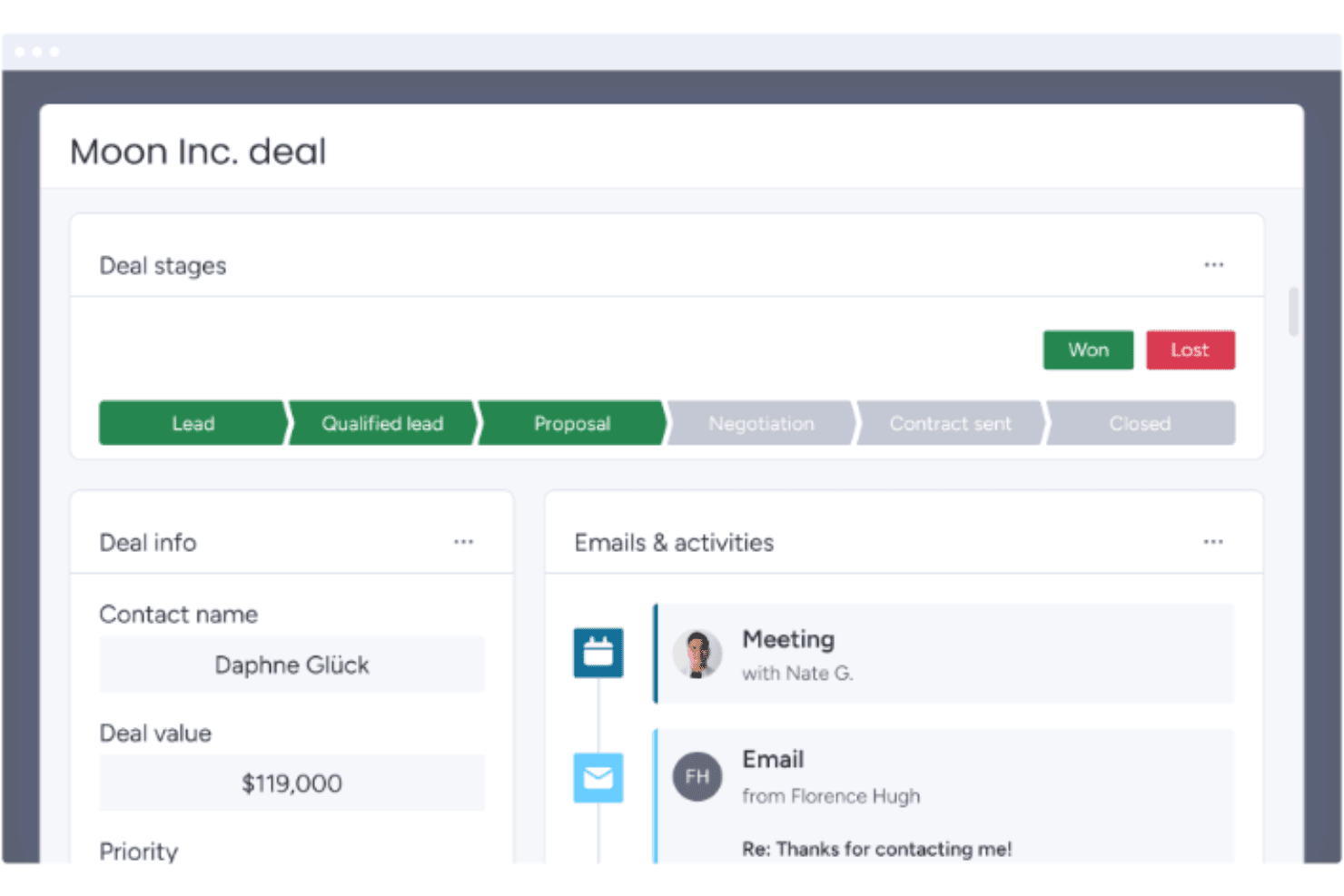
monday CRM tracks deal stages and activity history in one view. monday CRM is a no-code CRM platform that covers lead management, contact and deal tracking, sales pipeline automation, email sequences, and customizable reporting dashboards.
Who Is monday CRM Best For?
monday CRM is a strong fit for sales operations teams that need a flexible, no-code pipeline they can configure and iterate on without engineering support.
Why I Picked monday CRM
monday CRM earns its spot on my shortlist because its no-code pipeline customization is genuinely practical for teams migrating away from HubSpot. I can reshape deal stages, add custom fields, and spin up new pipelines without touching a single line of code. The built-in Sequences let me build multi-step outreach with conditional removal triggers, and AI-powered data fields auto-fill record details like sentiment and next steps across the board.
monday CRM Key Features
- Lead sourcing agent: An AI agent that automatically finds, enriches, and scores new leads against your target profile.
- Quotes and invoices: Generate customizable quotes and invoices directly from deal records, with support for discounts, taxes, and PDF downloads.
- Mobile CRM with smart call: Make and receive customer calls from the iOS or Android app, with calls automatically recorded, transcribed, and logged to contact records.
- Cross-board dashboards: Aggregate deal, pipeline, and team performance data from multiple boards into a single real-time dashboard with advanced filter conditions.
monday CRM Integrations
monday CRM lists 200+ integrations on its features page and 500+ integrations and apps on its integrations page, including Slack, Microsoft Teams, Zoom, Gmail, LinkedIn, QuickBooks, Stripe, DocuSign, and Google Drive. Its open GraphQL API and SDK support custom integrations.
Pros and Cons
Pros:
- Sequences automate conditional sales follow-up
- Cross-board dashboards clarify funnel performance
- Adaptable pipelines need no developer support
Cons:
- Gmail activity logging can prove inconsistent
- Marketing automation trails dedicated CRM suites
 Best for no-code CRM customization
- Not available
- From $40/user/month
Visit WebsiteCustomer Rating:4.7/5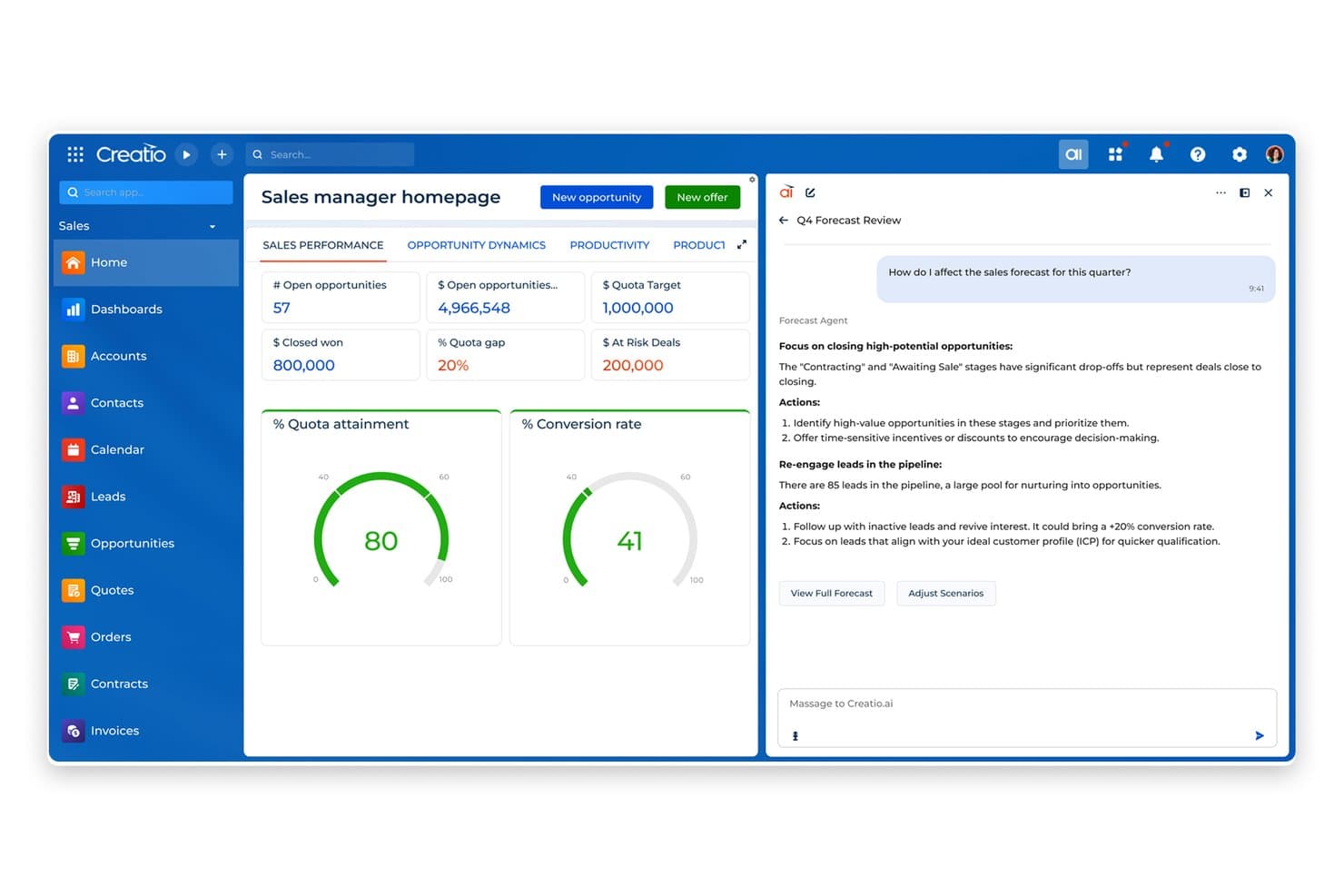
Creatio AI CRM helps sales teams track performance and prioritize deals using AI agent insights. Creatio AI CRM is an AI-native CRM and workflow platform that unifies marketing, sales, and service functions with AI-powered automation, configurable pipelines, campaign management, and cross-team reporting.
Who Is Creatio AI CRM Best For?
Creatio AI CRM is a strong fit for mid-market sales ops teams that need deep workflow customization without relying on developers for every change.
Why I Picked Creatio AI CRM
I've included Creatio AI CRM in my top picks because it combines no-code customization with AI coding agents to accelerate CRM and workflow development. Sales ops teams can reconfigure pipelines, opportunity stages, and workflow logic directly in the UI, without filing a ticket with a developer. I also like that configurable dashboards pull together sales, marketing, and service data in one view, so cross-team visibility is built into how the platform works, not bolted on afterward.
Creatio AI CRM Key Features
- AI-powered lead scoring: Automatically ranks leads using AI to help sales teams prioritize outreach based on conversion likelihood.
- Territory management: Organizes sales territories and supports account, lead, and opportunity assignments across territory levels.
- Omnichannel campaign management: Plans and runs campaigns across multiple channels, with lead-source tracking using UTM codes and referrers.
- Granular access permissions: Controls read, edit, and delete access at the object, record, and column level for individual users or roles.
- AI agents: Ready-to-use CRM AI agents and AI agent builder.
Creatio AI CRM Integrations
Creatio AI CRM has marketplace integrations for Google Calendar, Microsoft Exchange, Microsoft Power BI Desktop, Apollo.io, PandaDoc, and Zapier. It also supports Open API, REST, OData 3 and 4, custom RESTful web services, and webhooks for custom integrations.
Pros and Cons
Pros:
- Sequences coordinate email, calls, and sales tasks
- Shared records connect sales, marketing, and service
- No-code pipeline changes avoid developer tickets
Cons:
- New users face dense configuration choices
- Email tools lack a landing-page builder
Learn more about Creatio AI CRM: Best alternative for CRM flexibility
- Free plan + 14-day trial + demo available
- From $44/user/month
Visit WebsiteCustomer Rating:4.5/5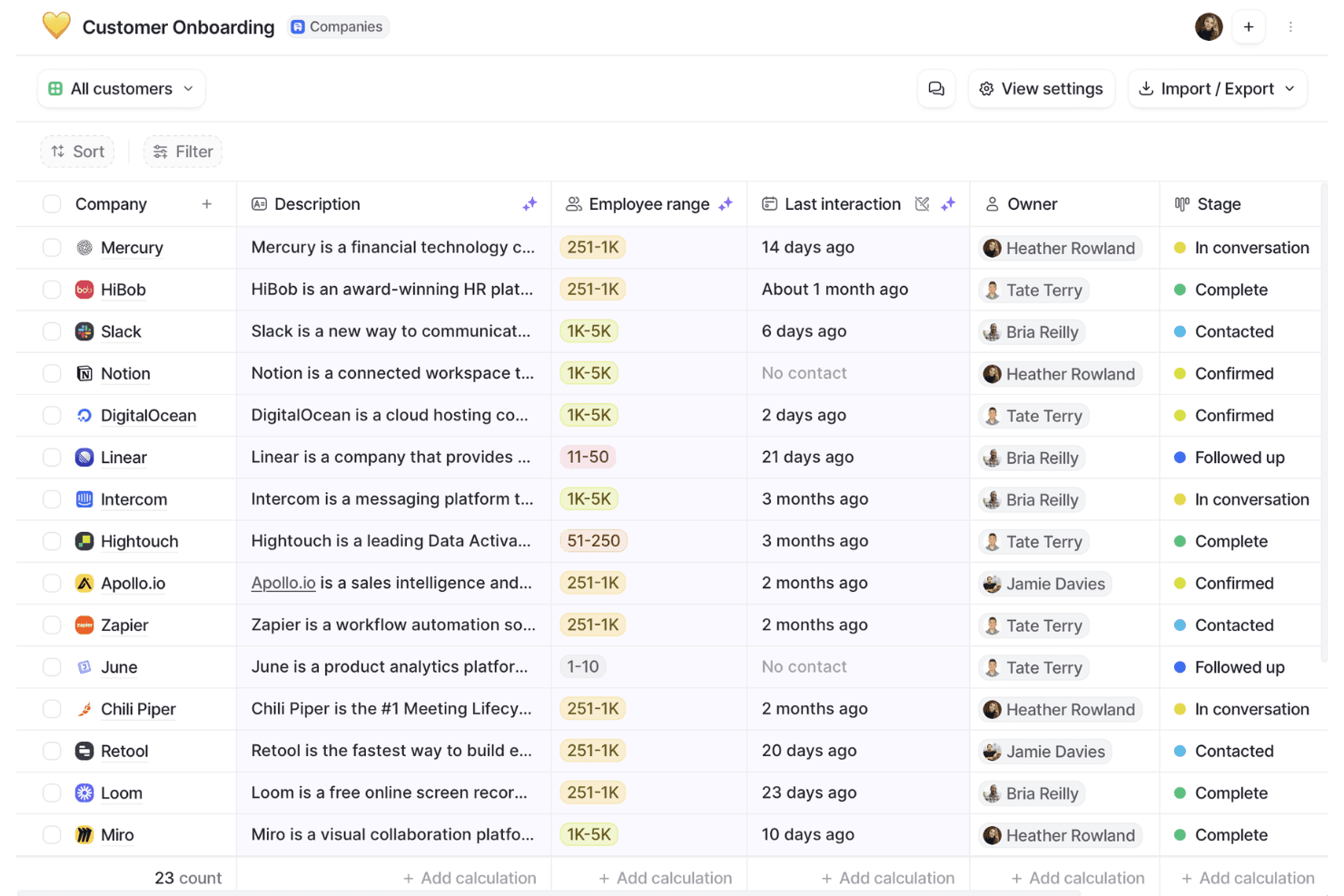
Attio organizes customer onboarding pipelines with stage tracking. Attio is a CRM platform built around a flexible, customizable data model that supports contact and company management, configurable sales pipelines, workflow automation, AI-powered enrichment, and a developer-friendly API.
Who Is Attio Best For?
Attio is a strong fit for sales-led teams that need a CRM they can shape to their own data model, not one they have to conform to.
Why I Picked Attio
Attio earns its spot on my shortlist because its custom objects and bidirectional relationships let you build a data model that mirrors how your team actually sells, rather than forcing your process into a rigid structure. I love that you can define your own objects, set formula-based lead scoring from your own signals, and configure weighted pipeline views by stage probability, all without touching code. Where HubSpot locks you into its schema, Attio hands you the architecture.
Attio Key Features
- Workflow automation: Triggers actions from record events, attribute changes, schedules, or webhooks, with conditional paths and steps for updating records, routing leads, or enrolling contacts in sequences.
- AI-powered data enrichment: Automatically enriches company and person records with details like employee counts, funding, ARR, social profiles, and location without manual input.
- Configurable access permissions: Controls visibility and editing rights at the workspace level, with advanced permissions available on Pro and Enterprise for more granular team management.
- SQL access to workspace data: Lets developers query CRM records directly using SQL for custom reporting and data workflows outside the native interface.
Attio Integrations
Attio offers native integrations with Gmail, Outlook, Slack, Google Sheets, Hightouch, Apollo, Mailchimp, Typeform, and Zapier, plus marketplace integrations. It also supports a REST API, webhooks, App SDK, MCP, and SQL access.
Pros and Cons
Pros:
- Shared account context supports customer-success handoffs
- Formula scoring supports weighted pipeline visibility
- Flexible objects model complex revenue relationships
Cons:
- Reports omit sequences, meetings, and emails
- No native email marketing campaign engine
Learn more about Attio: Best alternative for large sales teams
- 30-day free trial
- From $25/user/month
Visit WebsiteCustomer Rating:4.2/5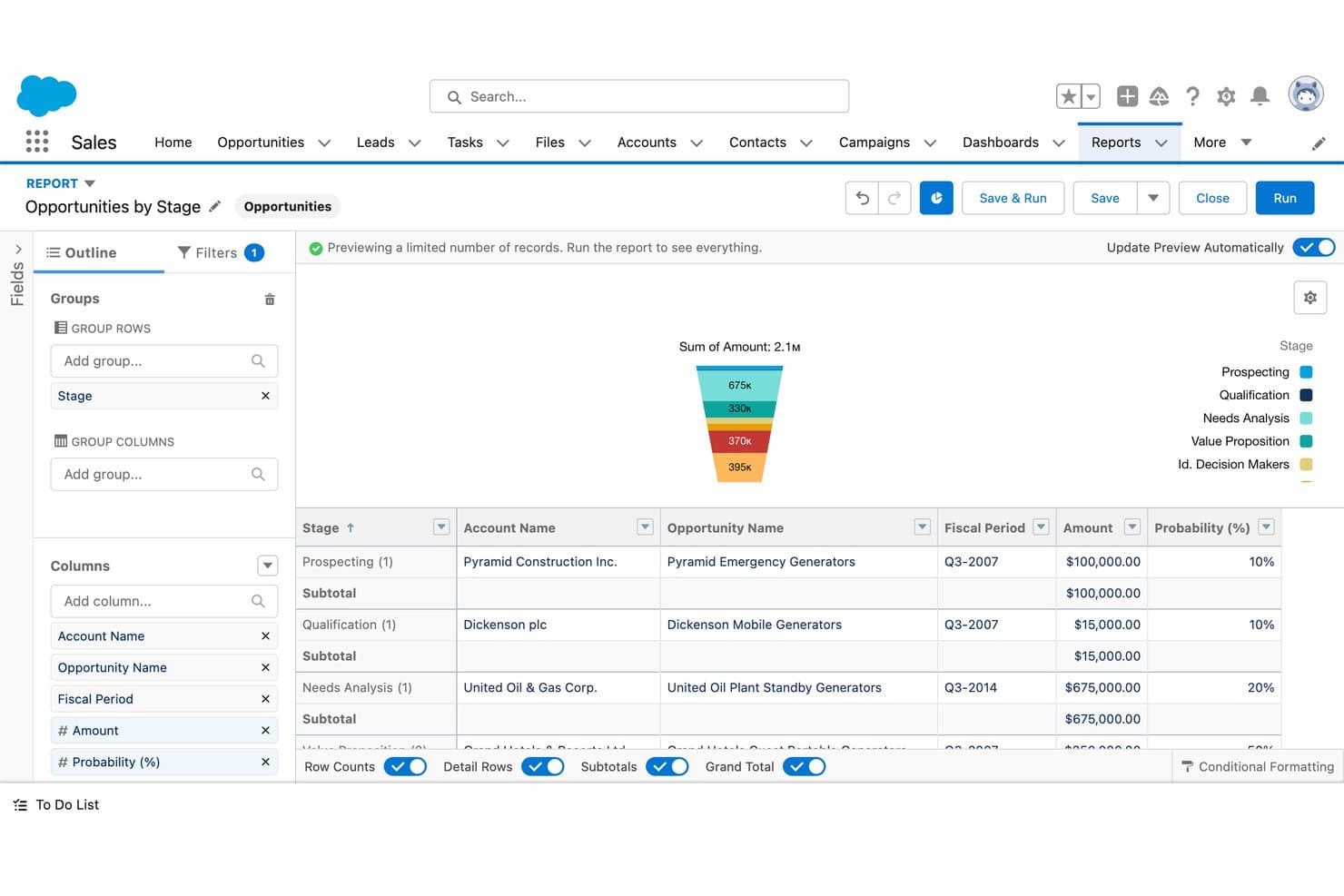
Salesforce CRM visualizes sales pipeline stages with a funnel chart. Salesforce CRM is a sales-focused CRM platform that covers contact and account management, pipeline tracking, sales forecasting, workflow automation, and AI-assisted deal insights across the full sales cycle.
Who Is Salesforce CRM Best For?
Salesforce CRM is a strong fit for large sales teams that need deep pipeline visibility, AI-assisted forecasting, and a customizable CRM they can scale over time.
Why I Picked Salesforce CRM
Salesforce CRM earns its spot on my shortlist because it's the go-to option for large sales teams that need serious pipeline depth and AI-assisted forecasting that HubSpot simply can't match at scale. I love how Pipeline Inspection gives sales ops leaders a consolidated, real-time view of every deal, with AI-driven deal insights surfaced directly alongside opportunity records. Agentforce can also auto-update opportunity records from sales conversations and generate tailored quotes using business and finance rules, cutting the manual work that slows big teams down.
Salesforce CRM Key Features
- Sales cadences: Build step-by-step outreach sequences combining email, phone, and social tasks to guide reps through a structured prospecting process.
- Territory management: Assign and manage account coverage across territories to align rep workload with sales goals.
- Contract approval workflows: Automate multi-step contract approvals directly within the platform, connected to opportunity records.
- Partner portal: Give channel partners a branded portal with access to seller tools, pipeline visibility, and AI-assisted product recommendations.
Salesforce CRM Integrations
Salesforce CRM offers marketplace integrations with Claude, Google Drive, and Slack through AgentExchange. It also supports REST, GraphQL, SOAP, platform events, and change data capture APIs for custom integrations.
Pros and Cons
Pros:
- Custom reports clarify sales performance trends
- Shared pipeline views support deal forecasting
- Centralized account histories reduce spreadsheet handoffs
Cons:
- HubSpot migrations require careful history mapping
- Marketing journeys need additional capabilities
Learn more about Salesforce CRM: Best for automated CRM data updates
- 30-day free trial + free demo available
- From $39/user/month
Visit WebsiteCustomer Rating:4.7/5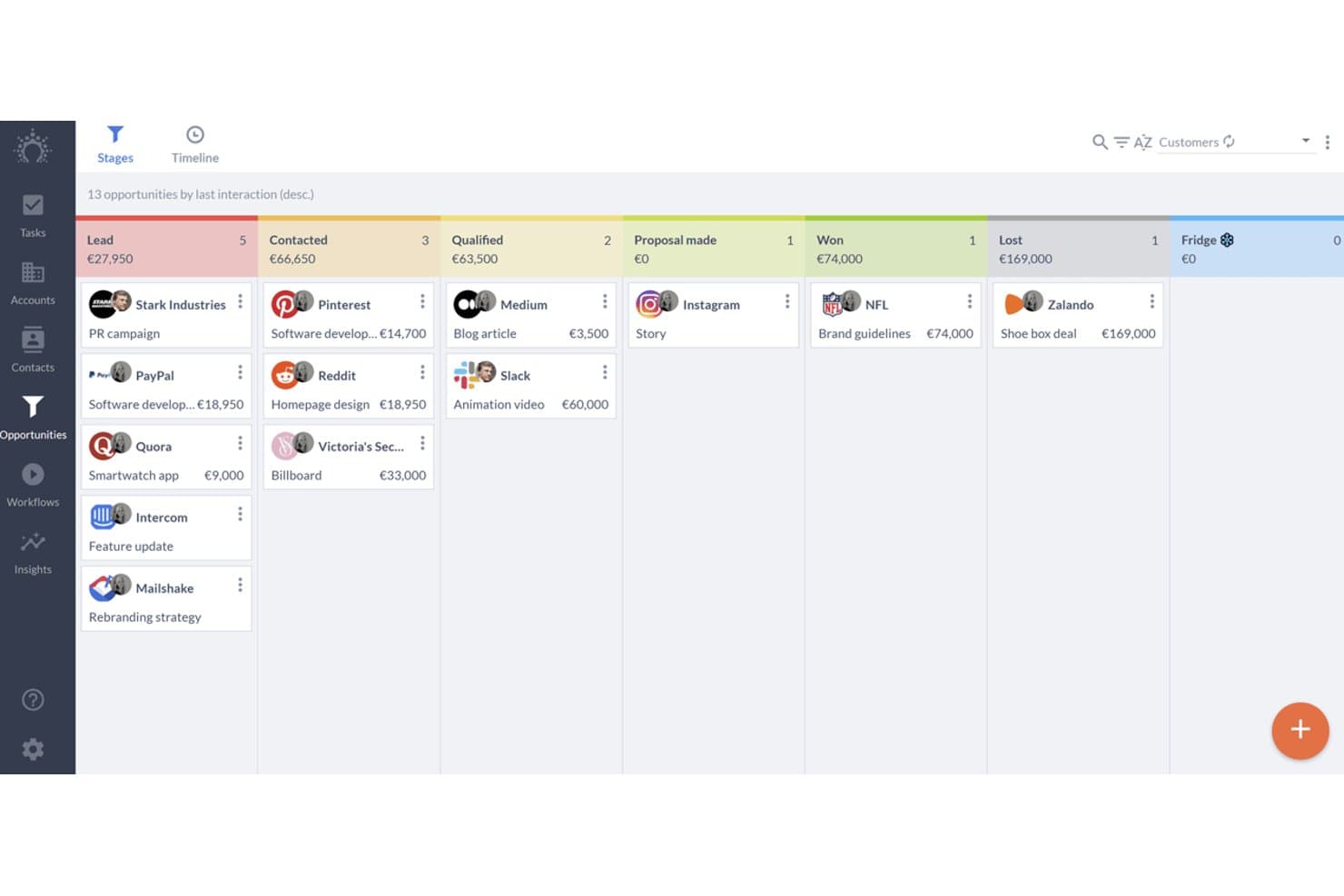
Salesflare organizes sales deals across pipeline stages visually. Salesflare is a sales-focused CRM for B2B teams that combines automated contact and company data capture, visual pipeline management, email integration, and sales engagement sequences.
Who Is Salesflare Best For?
Salesflare fits small and mid-sized B2B sales teams that want their CRM to handle data entry automatically, so reps can focus on selling instead of logging.
Why I Picked Salesflare
I picked Salesflare as one of the best because it's the only CRM on this list that pulls contact and company data directly from your emails, calendar, and phone logs without any manual input. If your reps are losing time updating records instead of selling, Salesflare's automatic activity capture fixes that at the source. I also like how its AI assistant can summarize a contact's full timeline and surface next steps, so you stay on top of deals without digging through notes.
Salesflare Key Features
- Multiple sales pipelines: Create and customize separate pipelines with editable stages to manage different products, regions, or sales motions simultaneously.
- Role-based user permissions: Assign admins, managers, team members, or viewers with data scopes covering own, group, or team-wide records.
- Lead finder and email finder: Search for leads by industry, geography, or role directly from the CRM and retrieve verified business email addresses.
- Relationship intelligence: Maps your team's contact network and tracks relationship strength, interaction frequency, and recency across accounts.
Salesflare Integrations
Salesflare offers native integrations with Google Workspace, Microsoft 365, LinkedIn, Better Proposals, Landigi, StoryChief, and Leadworx. It also provides an API and integrations through Zapier and Make.
Pros and Cons
Pros:
- Email sequences support sales-led nurturing
- Visual pipelines keep follow-ups visible
- Automatic activity capture reduces CRM data entry
Cons:
- CSV imports can frustrate data migration
- Marketing automation trails broader HubSpot suite
Learn more about Salesflare: Best for managing contacts and sales
- Free plan + 14-day free trial available
- From $22/user/month
Visit WebsiteCustomer Rating:4.7/5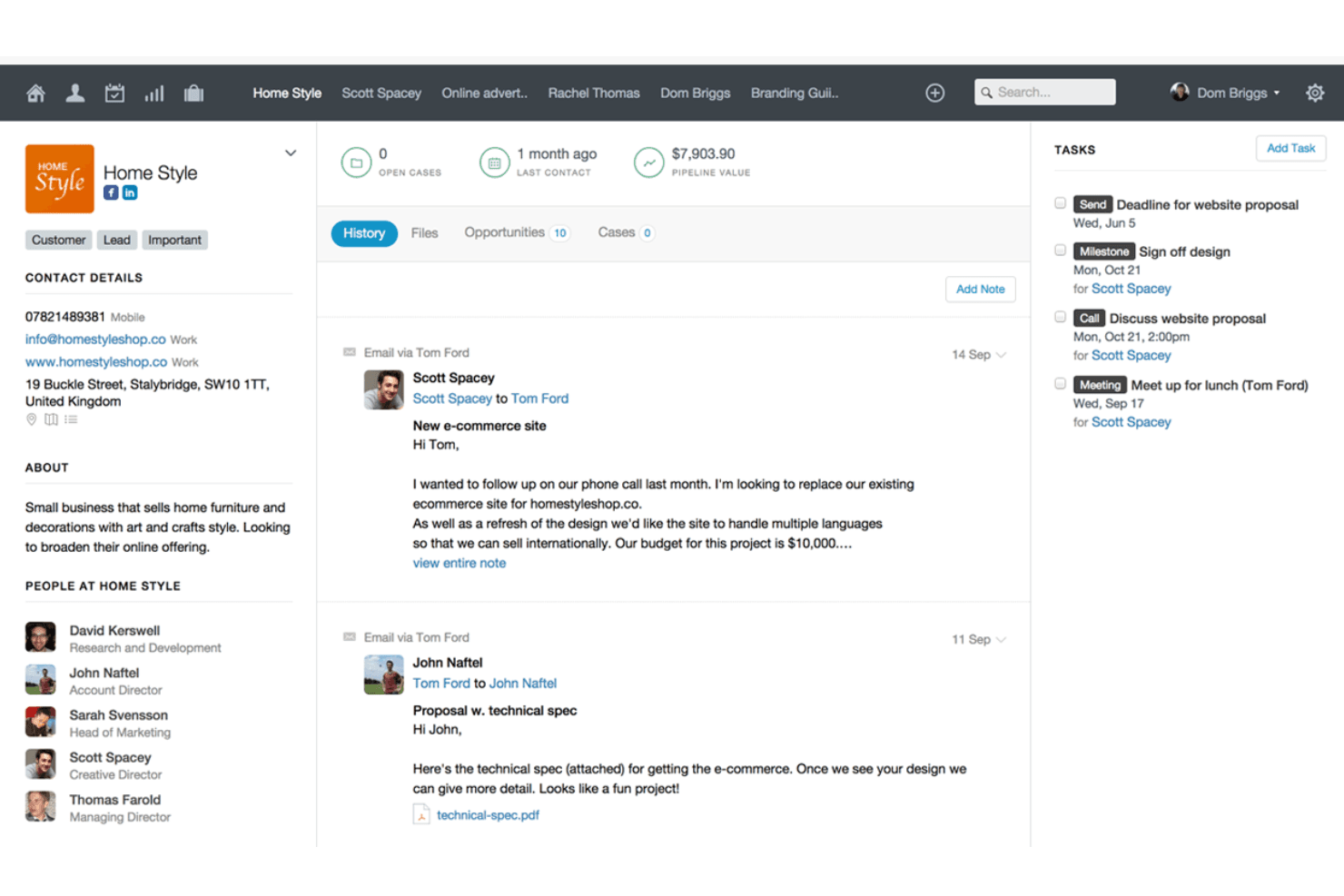
Capsule centralizes client history, tasks, and contact details in one view. Capsule CRM is a contact and sales management platform that brings together pipeline tracking, task management, project boards, reporting dashboards, and a broad integration marketplace in one CRM built for small and mid-sized teams.
Who Is Capsule Best For?
Capsule is a strong fit for small and mid-sized sales teams that want a clean, affordable CRM without the overhead of a larger platform.
Why I Picked Capsule
I picked Capsule as one of the best because its contact and pipeline management is genuinely tight: every interaction, note, and opportunity links back to a single contact record, so nothing falls through the cracks. I especially like the AI Meeting Prep feature, which pulls together recent history, risks, and open opportunities before a call without you having to dig through records manually. The customizable multi-pipeline setup also lets sales teams run separate processes for different products or markets in parallel.
Capsule Key Features
- Workflow automations: Triggers sequences of tasks, email notifications, or stage changes across pipeline and project boards on Growth and higher plans.
- Reporting dashboards: Displays task, pipeline, conversion, project, and contact views with filters by date, user, team, and custom fields.
- Email sync: Automatically logs emails against selected Capsule contacts, keeping communication history tied directly to contact records.
- Website form lead capture: Captures incoming leads through a form on your website and routes them into Capsule as new contacts.
Capsule Integrations
Capsule lists 100+ integrations, including native Transpond and Gmail connections plus marketplace integrations for Xero, Google Calendar, Mailchimp, Zendesk, and QuickBooks Online. It also offers a REST API, REST hooks, and Zapier.
Pros and Cons
Pros:
- Simple CRM keeps sales work focused
- Visual pipelines clarify deal stages and forecasts
- Contact history and follow-ups stay connected
Cons:
- Reporting depth may limit complex analysis
- Email nurturing depends on separate marketing capabilities
Learn more about Capsule: Best alternative for small businesses
- Free plan + 15-day free trial+ free demo available
- From $14/user/month (billed annually)
Visit WebsiteCustomer Rating:4.2/5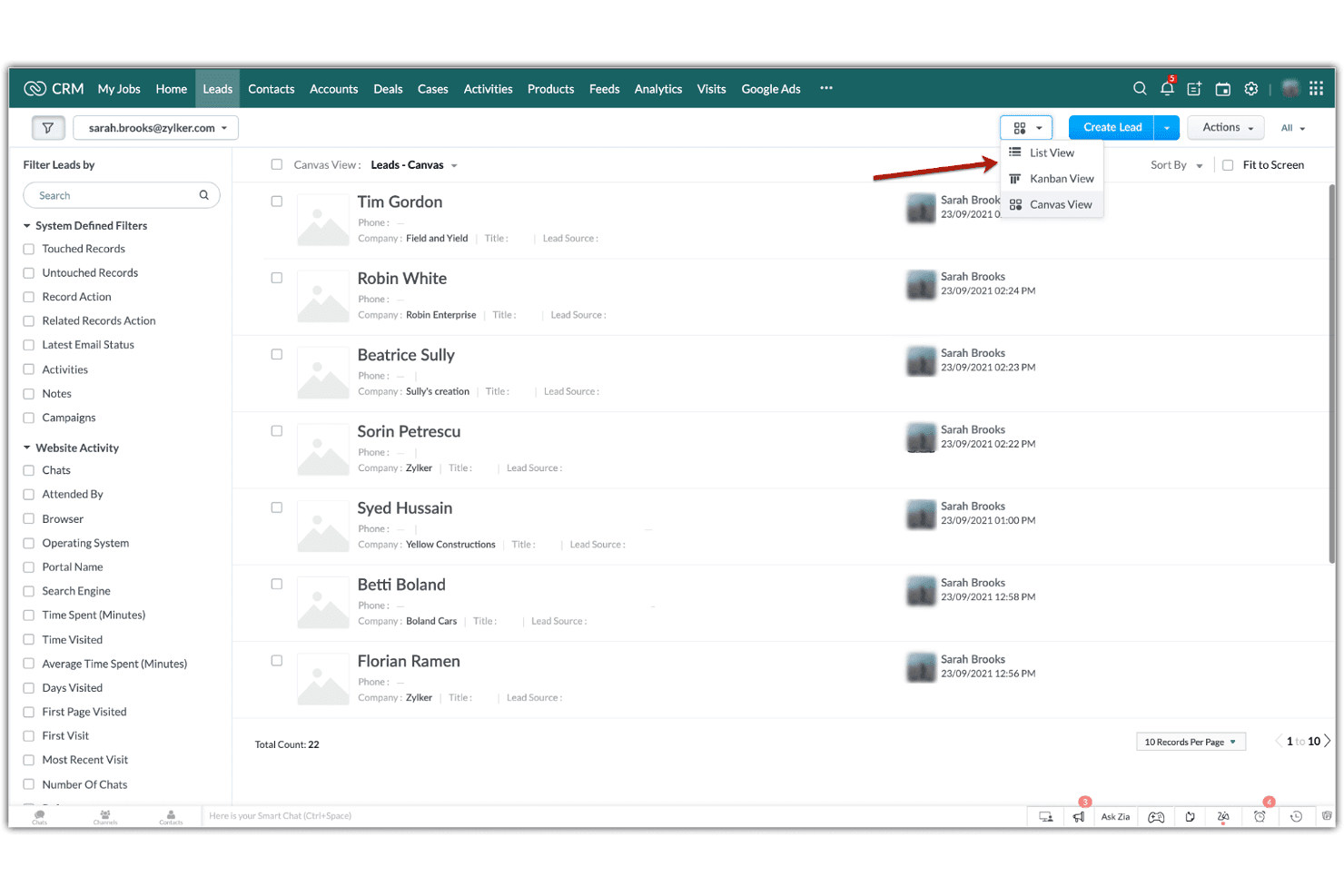
Zoho CRM lets users switch between List, Kanban, and Canvas views for leads. Zoho CRM is a customer relationship management platform that combines contact and lead management, multi-pipeline sales tracking, workflow automation, cadence-based follow-up sequences, and reporting dashboards.
Who Is Zoho CRM Best For?
Zoho CRM is a strong fit for small businesses that need a capable, affordable CRM without committing to HubSpot's pricing.
Why I Picked Zoho CRM
Zoho CRM earns its spot on my shortlist because it gives small businesses a genuinely capable CRM without locking you into HubSpot's pricing model. I particularly like Cadences, which let you build branching follow-up sequences across email, calls, tasks, and WhatsApp based on how a prospect actually responds. Multi-pipeline management is solid too, letting small teams track separate sales motions with customizable stages and probabilities without upgrading to an enterprise tier.
Zoho CRM Key Features
- Zia AI assistant: Zia delivers lead scoring, churn predictions, anomaly alerts, and next-best-action recommendations directly within your CRM records.
- Blueprint process management: Blueprint guides sales reps through structured, step-by-step sales processes with conditional rules and required fields at each stage.
- Canvas no-code layout builder: Canvas lets you redesign CRM pages, fields, and layouts visually without writing any code.
- Role-based record permissions: Assign Read Only, Read/Write, or Full Access at the role level, with higher hierarchy roles automatically accessing records from users below them.
Zoho CRM Integrations
Zoho CRM offers 1,100+ ready-to-use app integrations, including Gmail, Outlook, Slack, Zoom, Microsoft Teams, Google Ads, and QuickBooks. REST, Bulk, Notification, COQL, and GraphQL APIs support custom integrations.
Pros and Cons
Pros:
- Shared dashboards support sales performance visibility
- Multiple pipelines track distinct sales motions
- Branching Cadences adapt follow-ups to prospect responses
Cons:
- Cadence changes can require cloning sequences
- Newsletter design may need separate campaign tools
 Best for affordable all-in-one CRM and marketing
- Free plan + free demo available
- Pricing upon request
Visit WebsiteCustomer Rating:4.6/5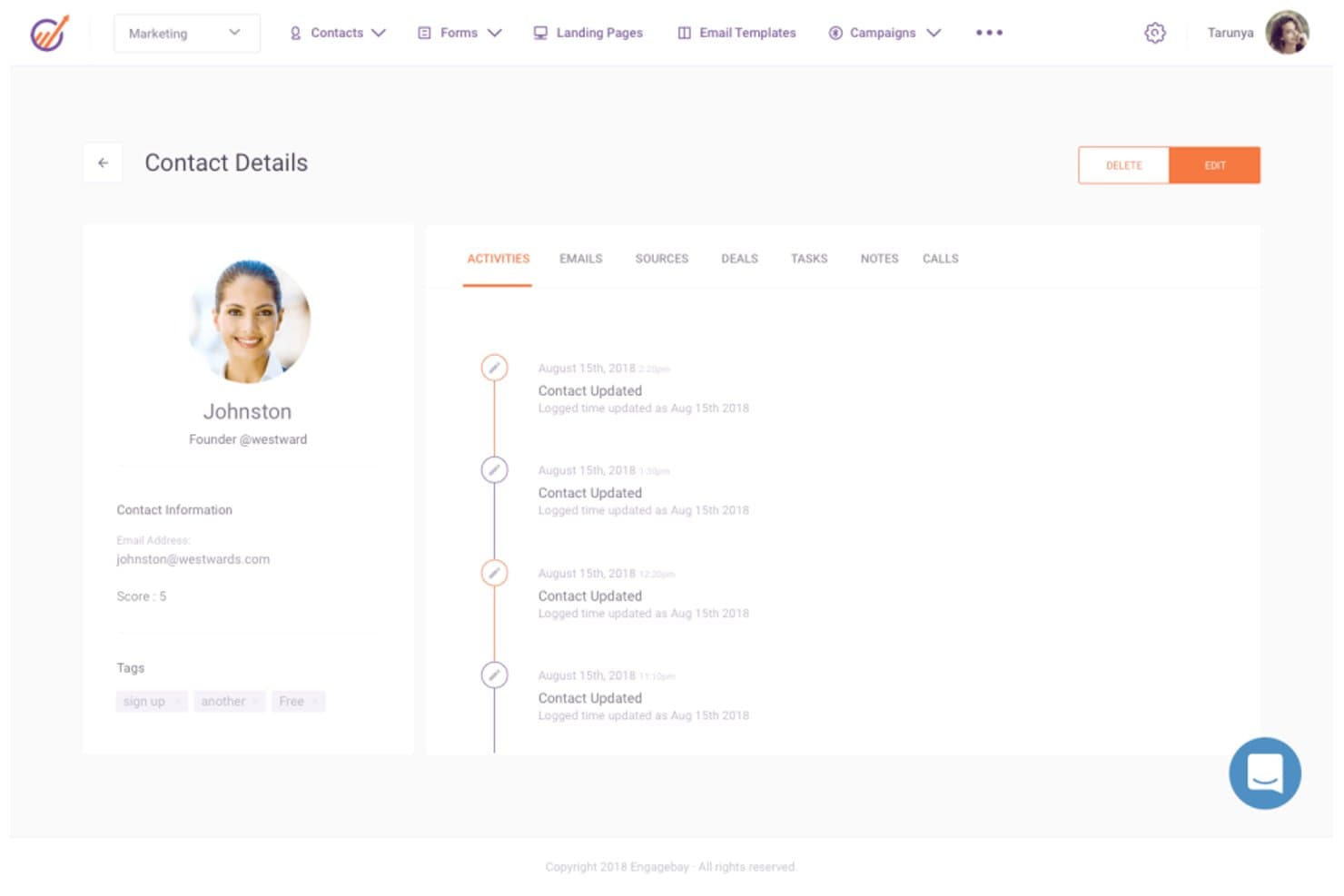
EngageBay displays a full contact activity timeline and details. EngageBay is an all-in-one CRM platform that combines contact management, email marketing, sales pipeline tracking, marketing automation, and customer support tools in a single suite.
Who Is EngageBay Best For?
EngageBay is a strong fit for small businesses and early-stage teams that need CRM, marketing, and support tools in one place without paying HubSpot-level prices.
Why I Picked EngageBay
I picked EngageBay as one of the best because it bundles CRM, email marketing, sales pipeline tracking, and help desk tools into a single platform at a fraction of what HubSpot costs. I particularly like how the Deals module lets you build custom tracks and milestones, move deals through stages by drag and drop, and tie each deal to contacts, proposals, and documents without switching tools. Email sequences are also genuinely useful, with per-email control over timing, sending days, and timezone, plus built-in open and click reporting.
EngageBay Key Features
- Predictive lead scoring: Automatically adds or deducts points from contact records based on configurable criteria, helping you prioritize the most sales-ready leads.
- HubSpot, Salesforce, and Pipedrive sync: Pulls contacts, companies, tracks, and deals from your existing CRM directly into EngageBay so you're not starting from scratch.
- Ticket management and service automation: Lets support teams log, track, and automate customer tickets within the same platform your sales and marketing teams already use.
- Team goal tracking: Sets deal- or revenue-based goals per team member across monthly, quarterly, or annual periods, with measurements like Deals Created and Call Logs built in.
EngageBay Integrations
EngageBay lists 250+ integrations, including HubSpot, Salesforce, Pipedrive, Shopify, Stripe, QuickBooks, Twilio, and Zapier. It also provides a REST API and MCP server for custom integrations.
Pros and Cons
Pros:
- Email sequences offer per-message timing controls
- Configurable deal stages support practical pipeline tracking
- Shared records connect sales, marketing, and support
Cons:
- Reporting lacks multi-touch attribution depth
- Workflows require manual execution
Learn more about EngageBay: Best alternative for visual sales management
- 14-day free trial
- From $14/user/month (billed annually)
Visit WebsiteCustomer Rating:4.5/5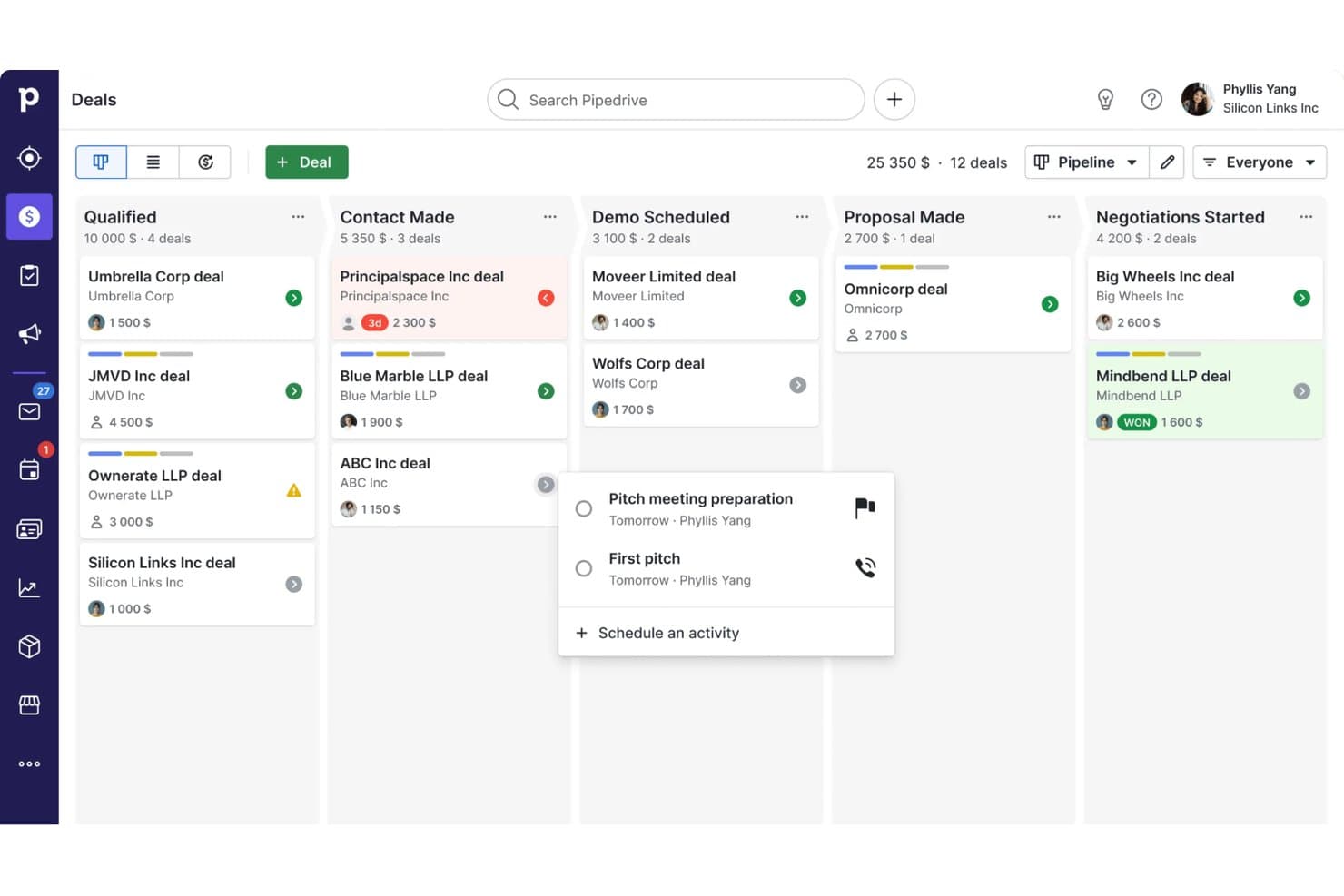
Pipedrive CRM organizes deals across pipeline stages visually. Pipedrive is a sales CRM that combines visual pipeline management, contact and deal tracking, workflow automation, email sequencing, and reporting across the full sales cycle.
Who Is Pipedrive Best For?
Pipedrive is a strong fit for sales-led teams and small businesses that want a clear, visual way to manage their pipeline without the complexity of a full marketing platform.
Why I Picked Pipedrive
Pipedrive earns its spot on my shortlist because its visual pipeline management is genuinely one of the clearest deal-tracking experiences I've used. I love how you can build multiple drag-and-drop pipelines, each with stages tailored to a distinct sales process, and track deal value, win probability, and expected close date at a glance. Pipedrive's Insights layer ties directly into that pipeline view, letting my team assemble live dashboards from deal, activity, and forecast reports and share them with stakeholders in real time.
Pipedrive Key Features
- Contact and deal management: View and manage contacts, organizations, and linked deals in one place, with a full interaction timeline per contact.
- Workflow automation: Set triggers and actions to automatically move deals through pipeline stages and handle repetitive sales tasks.
- Email sequencing: Build lead- or deal-based sequences combining automated emails and follow-up activities on Growth and higher plans.
- Goals and performance tracking: Set team or individual goals based on deal value, activity counts, or forecast revenue, then monitor progress from the Insights dashboard.
Pipedrive Integrations
Pipedrive offers a marketplace with more than 500 integrations and apps, including native integrations with Microsoft Teams, Google Meet, QuickBooks, and DocuSign, plus marketplace integrations for PandaDoc. It also provides REST API, webhooks, OpenAPI 3 specifications, JavaScript and PHP client libraries, and Zapier.
Pros and Cons
Pros:
- Sequences connect deal follow-ups with email
- Shared dashboards expose activity and forecast gaps
- Drag-and-drop pipelines map distinct sales processes
Cons:
- No unified service module or health scoring
- Campaigns and nurture require separate add-ons
Learn more about Pipedrive CRM: Best alternative for agencies
- Free demo available
- Pricing upon request
Visit WebsiteCustomer Rating:4.5/5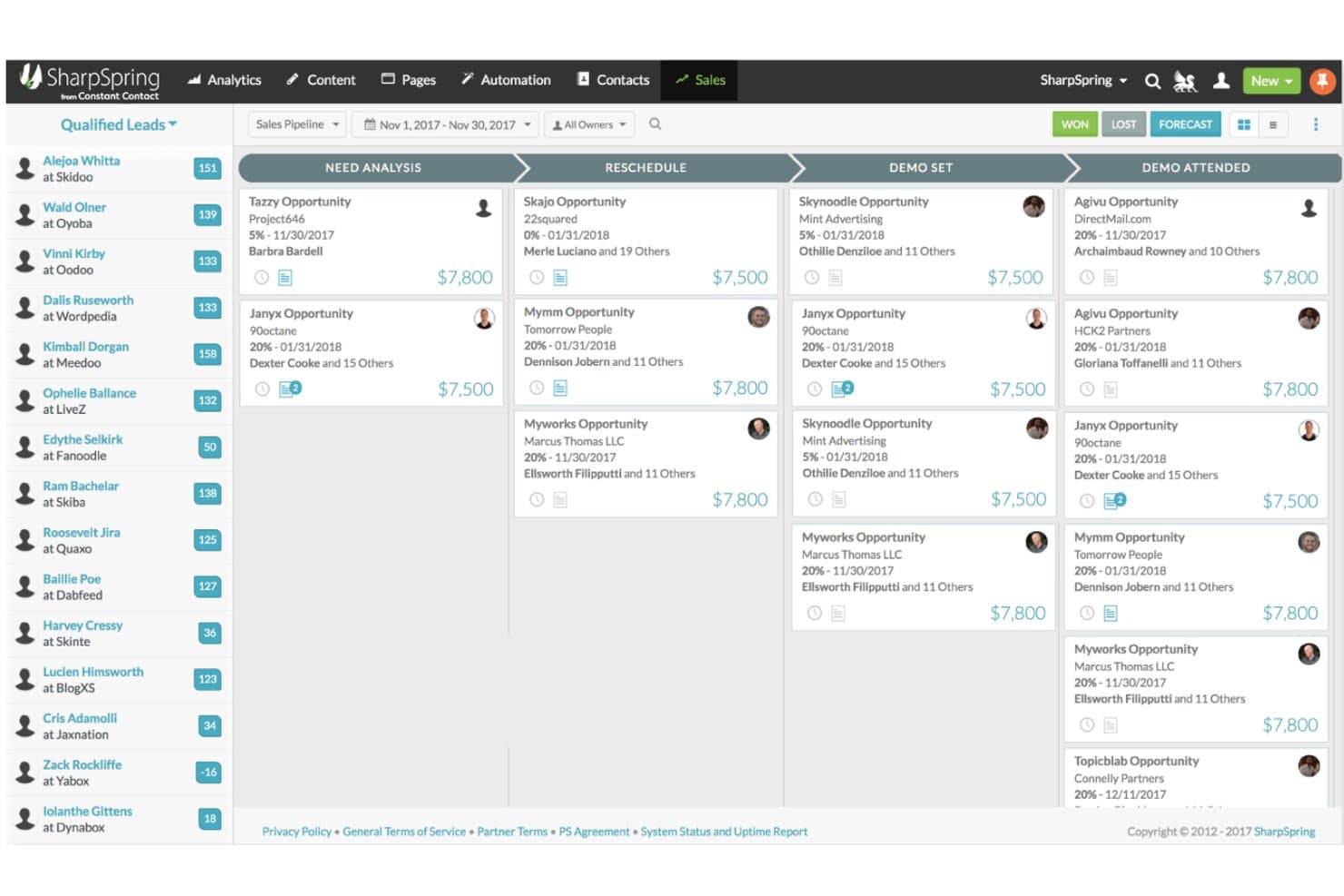
SharpSpring organizes deals visually across pipeline stages. SharpSpring, now rebranded as Lead Gen & CRM by Constant Contact, is a unified marketing automation and CRM platform that combines lead generation, lead scoring, email and social marketing, customizable sales pipelines, and multi-touch attribution reporting.
Who Is SharpSpring Best For?
SharpSpring is a strong fit for marketing agencies that manage campaigns and CRM workflows across multiple clients from a single platform.
Why I Picked SharpSpring
I've included SharpSpring in my top picks because it's one of the few platforms built with agencies in mind from the ground up. The multi-touch campaign attribution reporting connects marketing spend directly to pipeline and revenue, which is exactly what agency teams need to prove ROI across client accounts. Paired with automated lead scoring and customizable pipeline stages, it lets you run distinct workflows for multiple clients without jumping between tools.
SharpSpring Key Features
- Lead scoring: Automatically scores leads based on activity and engagement so your sales team knows which contacts to prioritize.
- Life of the Account timeline: Displays a single contact's full interaction history across emails, website visits, opportunities, and content in one view.
- Customizable pipeline stages: Lets you build and modify pipeline stages to match your team's actual sales process.
- Campaign attribution reporting: Connects marketing activity to pipeline and revenue using multi-touch attribution models.
SharpSpring Integrations
Native integrations are not clearly documented. SharpSpring supports custom integrations through its Open API, with a default allowance of 50,000 requests per day and a maximum rate of 10 queries per second.
Pros and Cons
Pros:
- Lead scoring helps prioritize sales follow-up
- Agency workflows combine marketing and CRM
- Multi-touch attribution connects campaigns to revenue
Cons:
- No customer success health scoring documented
- Workflow builder bugs disrupt automation setup
Learn more about SharpSpring:
HubSpot'a Diğer Alternatifler
İşte değerlendirebileceğiniz diğer bazı HubSpot alternatifleri. En iyi 12 listeme giremediler, ancak yine de faydalı araçlar olabilirler.
- 11ActiveCampaignBest value HubSpot alternative
- 12DripBest alternative for e-commerce brands
- 13OntraportBest alternative for beginners
- 14MarketoBest alternative for marketers
- 15BrevoBest alternative for customer relationship teams
- 16NutshellBest alternative for better support
- 17FreshsalesBest for combining sales and marketing
- 18Campaign MonitorBest alternative for email marketing
- 19Mailchimp Best for pre-built customer journeys
- 20OrttoBest alternative for in-app messaging
- 21EloquaBest for enterprises
- 22PardotBest for Salesforce users
- 23Act-OnBest alternative for lead scoring
- 24OmnisendBest alternative for SMS messaging
- 25WishpondBest for creating landing pages
- 26InsightlyBest alternative for integrations
- 27Keap Max ClassicBest for CRM for automated follow-ups
İlgili HubSpot Alternatifi İncelemeleri
Aradığınızı hâlâ burada bulamadıysanız test edip değerlendirdiğimiz şu araçlara göz atın.
- CRM Yazılımı
- Satış Yazılımı
- Potansiyel Müşteri Yönetimi Yazılımı
- İş Zekâsı Yazılımı
- Sözleşme Yönetimi Yazılımı
- Gelir Yönetimi Sistemi
How I Evaluate HubSpot Alternatives
I look at two layers: whether a tool can handle pipeline management, marketing automation, and revenue reporting at HubSpot's level, and what sets it apart for RevOps teams at scale.
Core Functionality (Table Stakes For This List)
When I'm selecting tools for my list, I rank each one on a scale from 0 (does not offer the functionality) to 5 (excels in this area) for each core functionality listed below. Then, I calculate the tool's total score into a percentage. Each tool needs to achieve a minimum total score of 75% to be considered for inclusion.
- Integrated CRM Platform: I check whether the CRM unifies contacts, companies, deals, and activity history across sales, marketing, and service in one shared data model.
- Marketing Automation: Email campaigns, lead nurturing workflows, segmentation, and behavior-based triggers all factor in here—especially how well they support full-funnel demand gen.
- Sales Pipeline Management: I evaluate deal tracking, stage management, and sales engagement tools like sequences and task queues that keep reps moving deals forward.
- Revenue Reporting & Analytics: Forecasting, pipeline dashboards, and cross-functional reporting matter here—I look at how easily RevOps teams can build custom views without SQL.
- Workflow Automation: Multi-step, cross-object automations are what I look for—things like auto-routing leads by territory or triggering handoff tasks between sales and CS teams.
- Third-Party Integrations: The native integration marketplace and API quality both count, particularly connections to tools RevOps teams rely on like Slack, Snowflake, and Gong.
Once I have a list of tools that meet this criteria, I consider what sets each platform apart.
Differentiating Factors (What Sets Vendors Apart)
Here's how I compare and contrast different vendors:
Standout Features
Revenue attribution modeling is a big differentiator—I evaluate whether a platform can trace closed deals back to specific campaigns and touchpoints across the funnel. Custom objects and data modeling also matter when your business tracks non-standard processes like partner referrals or product usage milestones alongside deals. AI-powered insights round things out; platforms like Salesforce and Zoho now offer predictive deal scoring and next-best-action suggestions that help RevOps teams prioritize pipeline with less guesswork.
Beyond Features
Pricing structure matters a lot when you're leaving HubSpot—I evaluate whether a platform's model scales predictably as your database and team grow, since unexpected cost jumps are a common migration trigger. Implementation and migration support is just as important; I check for dedicated data migration tools and onboarding resources that reduce the risk of losing historical pipeline data during the switch. I also consider team size and business fit, because a platform built for enterprise B2B sales cycles won't serve a lean mid-market RevOps team well, and vice versa.
Neden Bir HubSpot Alternatifi Aramalısınız?
HubSpot, işletmelerin müşterileri çekmesine, onlarla etkileşim kurmasına ve müşterileri elde tutmasına yardımcı olmayı amaçlayan kapsamlı araç paketiyle tanınan, kapsamlı bir inbound pazarlama, satış ve müşteri hizmetleri platformudur. Geniş işlevlerine ve popülerliğine rağmen bazı etkenler kullanıcıları HubSpot'a alternatifler aramaya yöneltebilir. Maliyet önemli bir etkendir; HubSpot'un gelişmiş özellikleri güçlü olsa da özellikle bütçeleri sınırlı olan küçük işletmeler veya yeni girişimler için pahalı olabilir. Ayrıca kapsamlı özellik yelpazesi, özellikle daha basit ve daha sade bir arayüz arayan kullanıcılar için bazen bunaltıcı olabilir. İşletmelerin kendine özgü veya belirli sektör ihtiyaçları daha özel çözümler gerektirebileceğinden, özelleştirme ve esneklik de kullanıcıların HubSpot'u yetersiz bulabileceği diğer alanlardır.
HubSpot alternatiflerini incelemek çeşitli avantajlar sağlayabilir. Alternatif yazılımlar genellikle temel işlevlerden ödün vermeden uygun maliyetli çözümler sunar; bu da onları bütçe kısıtlarını dikkate alan işletmeler için uygun hâle getirir. Bu alternatifler, öğrenme süreci daha kolay ve daha kullanıcı dostu bir deneyim sunabilir; bu da sadelik ve verimlilik arayan ekipler için idealdir. Özelleştirme ve esneklik, alternatif yazılımların genellikle temel özelliklerindendir; farklı sektörlerin özel ihtiyaçlarını karşılar ve işletmelerin yazılımı kendilerine özgü gereksinimlere göre uyarlamasına olanak tanır. Ayrıca gelişmiş entegrasyon özellikleri mevcut iş sistemleriyle sorunsuz uyumluluk sağlayarak iş akışı verimliliğini artırır.
HubSpot Alternatifleri Nasıl Seçilir?
Çok sayıda farklı <odak terim> çözümü mevcut olduğundan, ihtiyaçlarınıza en uygun aracın hangisi olacağına karar vermek zor olabilir.
Kısa listenizi oluştururken, deneme sürecinden geçirirken ve <Odak Terim> seçerken aşağıdakileri göz önünde bulundurun:
- Hangi sorunu çözmeye çalışıyorsunuz - İhtiyaç duyulan özellikleri ve işlevleri netleştirmek için öncelikle gidermeye çalıştığınız HubSpot özellik açığını belirleyin.
- Kimlerin kullanması gerekecek - Maliyeti ve gereksinimleri değerlendirmek için yazılımı kimlerin kullanacağını ve kaç lisansa ihtiyaç duyacağınızı göz önünde bulundurun. Erişimin yalnızca gelir operasyonları liderleri için mi yoksa tüm kuruluş için mi gerekli olacağını değerlendirmeniz gerekir. Bu netleştiğinde, herkes için kullanım kolaylığına mı yoksa HubSpot alternatifinizin ileri düzey kullanıcıları için hıza mı öncelik verdiğinizi düşünmeye değer.
- Hangi diğer araçlarla birlikte çalışması gerekiyor - Hangi araçları değiştirdiğinizi, hangi araçları kullanmaya devam edeceğinizi ve muhasebe, CRM veya İK yazılımları gibi hangi araçlarla entegrasyon kurmanız gerektiğini netleştirin. Araçların birbiriyle entegre olması mı gerekeceğine yoksa birden fazla aracı tek bir konsolide HubSpot alternatifiyle değiştirip değiştiremeyeceğinize karar vermeniz gerekir.
- Hangi sonuçlar önemli - Yazılımın başarılı kabul edilmesi için sunması gereken sonucu göz önünde bulundurun. Hangi yetkinliği kazanmak veya neyi geliştirmek istediğinizi ve başarıyı nasıl ölçeceğinizi düşünün. Örneğin, sonuçlardan biri performans hakkında daha fazla görünürlük elde etme becerisi olabilir. HubSpot alternatifi özelliklerini günlerce karşılaştırabilirsiniz; ancak elde etmek istediğiniz sonuçları düşünmüyorsanız, değerli zamanınızın büyük bir kısmını boşa harcıyor olabilirsiniz.
- Kuruluşunuz içinde nasıl çalışacağı - Yazılım seçimini iş akışlarınız ve uygulama metodolojinizle birlikte değerlendirin. Nelerin iyi çalıştığını ve ele alınması gereken sorunlara neden olan alanları değerlendirin. Her işletmenin farklı olduğunu unutmayın — bir aracın popüler olması, kuruluşunuzda işe yarayacağı anlamına gelmez.
2025'te HubSpot Alternatiflerindeki Trendler
Kuruluşlar, gelir operasyonlarını verimli bir şekilde yürütmek için yalnızca temel işlevler sunan değil; özelleştirilmiş deneyimleri, entegrasyon yeteneklerini ve gelişmiş analizleri de öne çıkaran CRM çözümlerini giderek daha fazla arıyor. Güncel trendlere genel bir bakış aşağıda yer alıyor:
HubSpot Alternatiflerinde Öne Çıkan Trendler:
- Gelişmiş Yapay Zekâ ve Makine Öğrenimi Entegrasyonu:
- Birçok HubSpot alternatifi, yapay zekâ destekli içgörüleri ve otomasyonu platformlarına yerleştirerek işletmelerin pazarlama stratejilerini geliştirmesini, müşteri etkileşimlerini kişiselleştirmesini ve satış süreçlerini kolaylaştırmasını sağlıyor.
- Genişleyen Entegrasyon Ekosistemleri:
- İşletmeler giderek daha geniş bir araç yelpazesi kullandıkça HubSpot alternatifleri entegrasyon yeteneklerini genişletiyor ve farklı işlevler arasında sorunsuz veri akışını ve birlikte çalışabilirliği kolaylaştırıyor.
Hızla Gelişen Özellikler:
- Öngörücü Analiz:
- Araçlar, satış trendlerini, müşteri davranışlarını ve pazar dinamiklerini öngörmek için giderek daha fazla öngörücü analiz kullanıyor ve işletmelerin proaktif kararlar almasını sağlıyor.
- Gelişmiş Otomasyon Yetenekleri:
- Otomasyon, e-posta dizilerinin ve basit iş akışlarının ötesine geçerek artık pazarlama, satış ve hizmet departmanları genelinde verimliliği artıran daha karmaşık süreçleri de kapsıyor.
Yeni ve Alışılmadık İşlevler:
- Veri Güvenliği ve Şeffaflık için Blok Zinciri:
- Bazı alternatifler, veri güvenliğini artırmak ve şeffaf denetim izleri sağlamak için blok zinciri teknolojisini araştırıyor. Bu yaklaşım, katı veri uyumluluğu gereksinimleri olan sektörlere hitap ediyor.
- Nesnelerin İnterneti Entegrasyonu:
- Nesnelerin İnterneti (IoT) verilerinin entegre edilmesi, gerçek zamanlı içgörüler sağlar ve cihaz verilerine dayalı otomatik eylemleri tetikler; böylece müşteri etkileşimi ve veri toplama için yeni olanaklar sunar.
Gerileyen Özellikler:
- Değer Sunmadan Aşırı Karmaşıklık:
- Karşılığında değer sunmadan aşırı karmaşık olan çözümler gözden düşüyor; çünkü kullanıcılar işlevsellik ile kullanılabilirlik arasında denge kuran platformları tercih ediyor.
- Sınırlı Mobil Yetenekler:
- Uzaktan çalışma ve hareket hâlindeyken erişim standart hâle geldikçe, mobil işlevleri sınırlı olan CRM çözümlerine yönelik talep azalıyor.
Bu trendler, modern işletmelerin gelişen ihtiyaçlarına yanıt vermek için mümkün olanın sınırlarını zorlayan HubSpot alternatifleriyle CRM pazarının dinamik yapısını ortaya koyuyor. Bu araçları değerlendiren kuruluşlar için bu trendleri anlamak, stratejik hedefler ve operasyonel ihtiyaçlarla uyumlu bilinçli kararlar almaya yardımcı olabilir ve gelir operasyonlarını etkili bir şekilde yönlendirebilecek bir platform seçmelerini sağlayabilir.
HubSpot Alternatiflerinin Özellikleri
HubSpot alternatiflerini seçerken aşağıdaki temel özelliklere dikkat edin:
- Kişi yönetimi: Bu özellik, potansiyel müşteriler ve müşterilerle yaptığınız her etkileşimi düzenlemenize, izlemenize ve güncellemenize olanak tanır. Geçmiş kayıtlarını hızla açabilir, notlar ekleyebilir ve iletişimleri tek bir merkezi noktadan yönetebilirsiniz; böylece hiçbir ilişkiyi gözden kaçırmazsınız.
- Satış hattı takibi: Bu özellik, satış sürecinizi net bir şekilde görselleştirerek anlaşmaların hangi aşamada olduğunu, nelerin ilerlediğini ve nelerin ilgilenilmesi gerektiğini görmenize yardımcı olur. Satış tahminlerini ve takip işlemlerini büyük ölçüde tahmine dayalı olmaktan çıkarır.
- Pazarlama otomasyonu: Pazarlama otomasyonuyla müşteri davranışına veya zamanlamaya göre e-postaları, kampanyaları, hatırlatıcıları ya da eylemleri tetikleyen iş akışları oluşturabilirsiniz. Bu, iletişim çalışmalarınızın tutarlı kalmasını sağlar ve zamanınızı daha stratejik işlere ayırmanıza olanak tanır.
- Raporlama ve analiz: Bu araçlar satış performansı, müşteri etkileşimi ve kampanya sonuçları hakkındaki verileri ayrıntılı olarak incelemenize yardımcı olur. Tüm bu bilgileri eyleme geçirilebilir içgörülere dönüştüren gösterge panoları ve raporlar elde edersiniz; bunu, işletmenizin daha akıllı kararlar almasını sağlayan GPS'i gibi düşünebilirsiniz.
- Entegrasyon özellikleri: Güçlü entegrasyon özellikleri, CRM'nizi e-posta, takvimler veya muhasebe araçları gibi hâlihazırda kullandığınız diğer uygulama ve yazılımlara bağlamanıza olanak tanır; böylece her şey sorunsuz bir şekilde birlikte çalışır. Artık bağlantısız sistemler arasında geçiş yapmak zorunda kalmazsınız.
- Özelleştirme seçenekleri: Bu özellik, özel alanlara, gösterge panolarına veya satış aşamalarına ihtiyacınız olsun ya da olmasın, platformu kendinize özgü iş akışlarınıza ve terminolojinize uyacak şekilde düzenlemenizi sağlar. Kişiselleştirilmiş bir kurulum, işinizi yazılıma uydurmak için daha az zaman harcamanız anlamına gelir.
- Görev ve etkinlik yönetimi: Aramaları, randevuları ve takip işlemlerini planlayabilir, görevleri kendinize veya ekip üyelerinize atayabilirsiniz. Zamanında gönderilen hatırlatıcılar işlerin gözden kaçmasını önler; artık hafızanıza veya yapışkan notlara güvenmek zorunda kalmazsınız.
- Potansiyel müşteri puanlama: Bu özellik, etkileşimleri izleyip puanlar atayarak hangi potansiyel müşterilerin satın alma olasılığının daha yüksek olduğunu önceliklendirmenize yardımcı olur. En büyük etkiyi yaratmak için çabalarınızı tam olarak nereye yönlendirmeniz gerektiğini bilirsiniz.
- Mobil erişim: Mobil erişim sayesinde CRM'nizi hareket hâlindeyken; müşteri ofisinde, seyahat sırasında veya kanepede otururken görüntüleyebilir, güncelleyebilir ve yönetebilirsiniz. İşiniz bir masaya bağlı değildir; böylece nerede olursanız olun üretken kalabilirsiniz.
HubSpot Alternatiflerinin Yaygın Yapay Zekâ Özellikleri
Yukarıda listelenen standart HubSpot alternatifi özelliklerinin ötesinde, bu çözümlerin çoğu aşağıdaki gibi özelliklerle yapay zekâyı da bünyesine katıyor:
- Akıllı iş akışı otomasyonu: Yapay zekâ, tekrarlanan görevleri belirler ve günlük operasyonlarınızı kolaylaştırmak için akıllı otomasyonlar oluşturur. Bu, ekibinizin rutin yönetim işleri yerine yüksek etkili faaliyetlere odaklanmasını sağlar.
- Tahmine dayalı analiz: Yapay zekâ, gelecekteki satış trendlerini ve potansiyel müşteri davranışlarını öngörmek için geçmiş verilerinizi inceler. Gözden kaçırabileceğiniz kalıpları belirleyerek önceden plan yapmanıza ve enerjinizi sonuç verme olasılığı en yüksek alanlara yönlendirmenize yardımcı olur.
- Yapay zekâ destekli potansiyel müşteri puanlama: Yapay zekâ, potansiyel müşterileri manuel olarak sıralamak yerine davranış ve etkileşim sinyallerini analiz ederek dönüşüm gerçekleştirme olasılığı en yüksek adayları otomatik olarak öne çıkarır. Potansiyel müşteri yönetimindeki tahmin işini ve zahmetli işlerin büyük bölümünü ortadan kaldırır.
- Otomatik içerik önerileri: Yapay zekâ, kullanıcı davranışlarını inceler ve her kişi için doğru içeriği veya mesajı önerir. Bu, ek araştırma yapmadan daha alakalı e-postalar, teklifler ve takip mesajları göndermenizi, açılma ve dönüşüm oranlarını artırmanızı sağlar.
- Sohbet tabanlı sohbet robotları: Yapay zekâ destekli sohbet robotları, web sitesi sorularını yanıtlar, potansiyel müşterileri niteler ve günün her saati toplantı planlar. Çalışma saatleriniz dışında bile site ziyaretçilerine hızlı ve samimi yanıtlar vermenizi sağlayarak olası bir fırsatı asla kaçırmamanıza yardımcı olur.
HubSpot Alternatiflerinin Faydaları
İşletmeler, HubSpot alternatiflerini incelerken operasyonel verimliliklerini artıran, özel ihtiyaçlarıyla uyumlu olan ve mevcut sistemlerine kıyasla cazip faydalar sunan çözümler arar. HubSpot alternatifi tercih etmenin başlıca beş faydası şunlardır:
- Maliyet Etkinliği: Rekabetçi fiyatlandırmayla yatırım getirisini en üst düzeye çıkarır.
- Kullanıcılar, temel CRM işlevlerinden daha uygun bir maliyetle yararlanabilir; böylece bütçenin daha iyi tahsis edilmesi ve kaynakların optimize edilmesi sağlanır.
- Özelleştirme: Yazılımı benzersiz iş süreçlerine uyarlar.
- Kuruluşlar, üretkenliği ve kullanıcı benimsemesini artırmak için özellikleri, iş akışlarını ve arayüzleri kendi operasyonel gereksinimleriyle yakından uyumlu olacak şekilde değiştirebilir.
- Odaklanmış Özellik Seti: Belirli sektörler veya işletme büyüklükleriyle ilgili uzmanlaşmış araçlar sunar.
- İşletmeler, gereksiz özelliklerin oluşturduğu karmaşadan kaçınarak temel operasyonlarıyla doğrudan uyumlu işlevlerden yararlanır.
- Gelişmiş Destek: Özel ve hızlı yanıt veren müşteri hizmetleri sunar.
- Üstün desteğe erişim, sorunların hızla ele alınmasını sağlayarak kesinti süresini en aza indirir ve kullanıcı memnuniyetini artırır.
- Entegrasyon Yetenekleri: Diğer temel işletme araçlarına sorunsuz şekilde bağlanır.
- Diğer yazılımlarla entegrasyonu kolaylaştırarak departmanlar arasındaki veri akışını ve erişilebilirliği artırır; bu da bilinçli karar alma ve stratejilerin uygulanması için kritik öneme sahiptir.
HubSpot Alternatifleri için Maliyetler ve Fiyatlandırma
Bir HubSpot alternatifi seçerken yazılım alıcıları, işletmelerinin ihtiyaçlarına ve bütçelerine en uygun seçeneği bulmak için çeşitli plan seçeneklerini değerlendirmelidir. Fiyatlandırma yapıları ve sunulan özellikler farklı CRM platformları arasında önemli ölçüde değişiklik gösterebilir; bu nedenle her planın neler sunduğunu anlamak çok önemlidir. Aşağıda, HubSpot alternatifleri için tipik plan seçeneklerine, ortalama fiyatlandırmaya ve her bir plana dahil olan temel özelliklere genel bir bakış sunulmaktadır.
HubSpot Alternatifleri için Plan Karşılaştırma Tablosu
| Plan Türü | Ortalama Fiyat | Yaygın Olarak Dahil Edilen Özellikler |
|---|---|---|
| Plan TürüTemel | Ortalama Fiyat$10 - $25/kullanıcı/ay | Yaygın Olarak Dahil Edilen Özelliklerİletişim Yönetimi, E-posta Entegrasyonu, Temel Raporlama |
| Plan TürüProfesyonel | Ortalama Fiyat$50 - $100/kullanıcı/ay | Yaygın Olarak Dahil Edilen ÖzelliklerOtomasyon, Gelişmiş Raporlama, Özelleştirme Seçenekleri |
| Plan TürüKurumsal | Ortalama Fiyat$100+/kullanıcı/ay | Yaygın Olarak Dahil Edilen ÖzelliklerGelişmiş Güvenlik, Özel Destek, Ölçeklenebilirlik |
| Plan TürüÜcretsiz Seçenek | Ortalama Fiyat$0 | Yaygın Olarak Dahil Edilen ÖzelliklerSınırlı İletişim Yönetimi, Temel E-posta Entegrasyonu |
Bu planları değerlendirirken alıcılar, her bir planın mevcut ihtiyaçları ve gelecekteki büyüme beklentileriyle ne ölçüde örtüştüğünü değerlendirmelidir. Doğru seçim, karmaşıklık ve maliyet ekleyen gereksiz özellikleri içermeden etkili gelir operasyonlarını desteklemek için gerekli işlevleri sunmalıdır. Esneklik sağlayan, işletmenizle birlikte ölçeklenebilen ve fiyatına kıyasla net bir değer sunan bir çözüm arayın.
HubSpot Alternatifleri Hakkında Sıkça Sorulan Sorular
Hâlâ en iyi HubSpot alternatifi konusunda kararsız mısınız? Bu sıkça sorulan sorular, arayışınızda size yardımcı olacaktır.