

Gelir operasyonlarının karmaşıklıklarını yönetmek göz korkutucu olabilir. Birçok kişi gibi siz de ekibinizin performansını engelleyen kopuk süreçler ve verimsizliklerle mücadele ediyor olabilirsiniz. Satış hunisi yazılımı, satış sürecinizi düzenleyip optimize ederek potansiyel müşterileri müşterilere dönüştürmenizi kolaylaştıran bir çözüm sunar.
Yazılımları bağımsız olarak test edip inceliyor ve size tarafsız bilgiler sunmayı amaçlıyorum. Gelir Operasyonları konusundaki uzmanlığım, iyi araştırılmış bir inceleme almanızı sağlıyor. Bu makalede, mevcut en iyi satış hunisi yazılımı seçeneklerini ele alacak ve özel ihtiyaçlarınızı karşılayabilecek özellikleri öne çıkaracağım.
Ekibinizin üretkenliğini artırabilecek ve satış hedeflerinize ulaşmanıza yardımcı olabilecek araçları keşfetmek için okumaya devam edin.
Why Trust Our Software Recommendations
6,700+
Reviews
20
Industry experts
16+
Evaluation factors
14
Years
Our reviews reflect our independent judgment—not a sales pitch. Learn how we stay transparent.
For this guide, we evaluated tools using hands-on testing and independent research, scoring tools using our selection criteria.
Our reviews reflect our human editorial judgment, not a sales pitch.
Satış Hunisi Yazılımları Karşılaştırma Tablosu
En iyi satış hunisi yazılımı seçimlerim için fiyatlandırma ayrıntılarını bu karşılaştırma tablosunda özetliyorum:
Sorted by: Default
| Tool | Starting Price | Website | |
|---|---|---|---|
Best for scalable B2B contact enrichment | 4.5 out of 5 | $49/user/month Free plan + 14-day trial + demo available | Book Demo |
Best for customizable dashboards | 4.6 out of 5 | $12/user/month 14-day free trial + free demo available | Book Demo |
Best AI-powered sales tool | 4.2 out of 5 | $25/user/month 30-day free trial | Website |
Best for no-code, end-to-end customization | 4.7 out of 5 | $40/user/month Not available | Book Demo |
Best for relationship-driven selling strategies | 4.7 out of 5 | $39/user/month 30-day free trial + free demo available | Website |
Best for lead scoring | 4.2 out of 5 | $14/user/month Free plan + 15-day free trial+ free demo available | Website |
Best landing page builder | 4.6 out of 5 | $81/month 14-day free trial available | Website |
Best for lead nurturing | 4.5 out of 5 | $39/month Free plan available | Website |
Best for coaching capabilities | 4.5 out of 5 | Pricing upon request Not available | Website |
Best for increasing conversions | 4.4 out of 5 | $99/month 14-day free trial + demo available | Website |


En İyi Satış Hunisi Yazılımları İncelemeleri
Burada şu anda piyasada bulunan en iyi satış hunisi yazılımlarını ele alacağım. Bu listeye her birini neden dahil ettiğimi açıklayacak, her platformun ekran görüntüsünü paylaşacak, her aracın fiyatlandırmasını listeleyecek ve her birinin artılarını ve eksilerini tartışacağım.
 Best for scalable B2B contact enrichment
- Free plan + 14-day trial + demo available
- From $49/user/month (billed annually)
Visit WebsiteCustomer Rating:4.5/5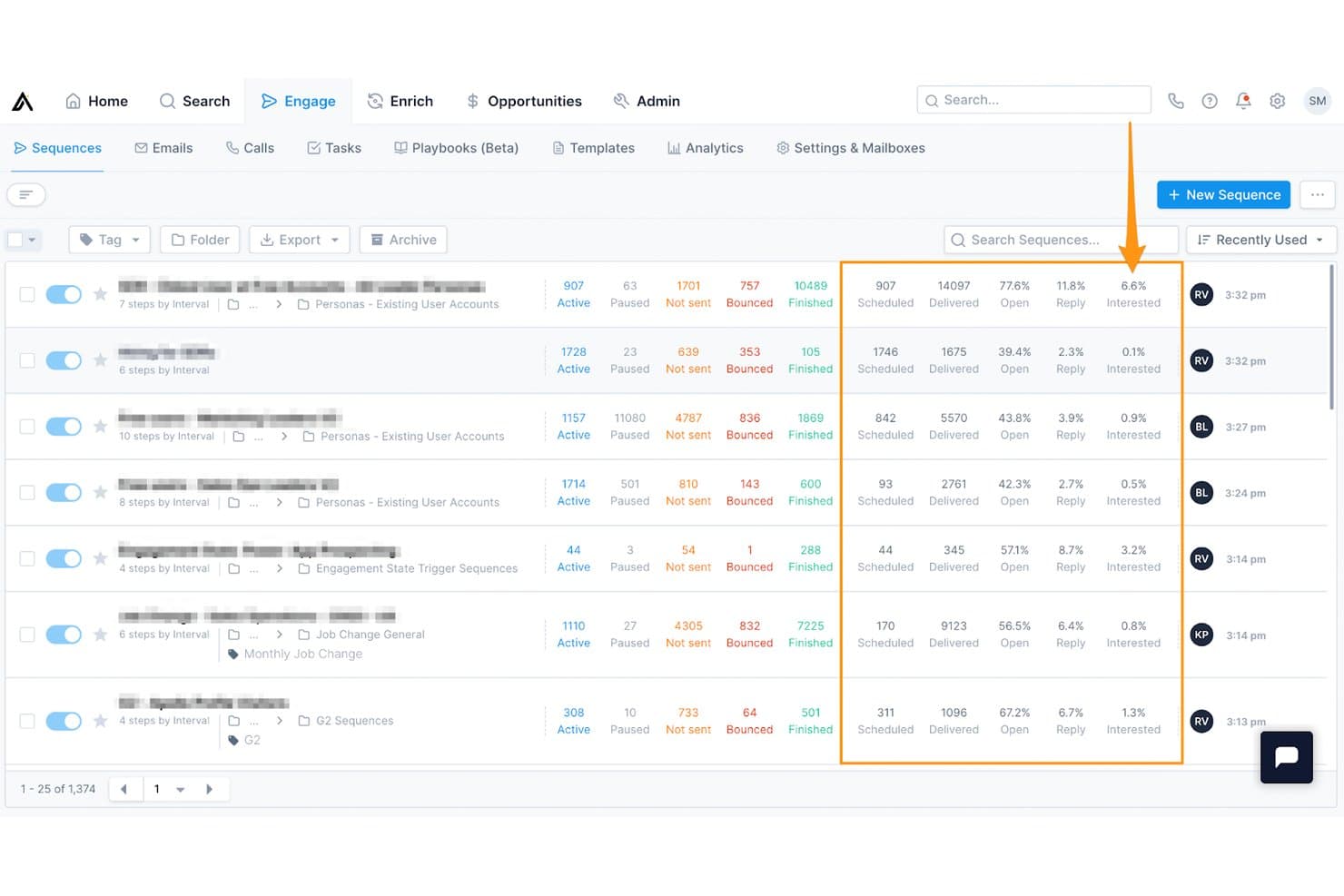
Apollo.io offers a Sequences dashboard with detailed funnel metrics including open rates, reply rates, and interested percentages to help monitor outbound sales performance. Apollo.io is a sales intelligence and engagement platform that combines a 210M+ contact database, outreach sequencing, lead scoring, and pipeline analytics to power outbound-driven sales funnels.
Who Is Apollo.io Best For?
Apollo.io suits SDR-heavy B2B sales teams at startups and SMBs that run outbound prospecting and need a single platform to find, enrich, and engage leads.
Why I Picked Apollo.io
I picked Apollo.io as one of the best because its contact enrichment capabilities genuinely power the top of the funnel at scale. I use Apollo's buying intent data to identify companies already researching relevant topics, then build targeted lists in seconds using AI prompts rather than manual filters. The Chrome extension pulls verified contact data directly from LinkedIn, so my team moves from prospecting to sequenced outreach without ever leaving the platform.
Apollo.io Key Features
- Custom sequence builder: Design automated multistep outreach flows for emails, calls, and tasks within one interface.
- Real-time Chrome extension: Instantly enrich and export leads from LinkedIn or web browsing directly into Apollo.
- Sales pipeline kanban view: Track deals and opportunities visually through stages with simple drag-and-drop updates.
- Integrated email and call tracking: Log all outbound interactions, including opens, clicks, call recordings, and engagement metrics.
Apollo.io Integrations
Apollo.io offers native integrations with Salesforce, HubSpot, Outreach, Airtable, Amplitude, Asana, and Gmail, and provides an API for custom integrations.
Pros and Cons
Pros:
- Outreach sequences automate full funnel follow-up
- Built-in intent data surfaces ready-to-buy accounts
- Large verified B2B database powers top-of-funnel
Cons:
- Reporting lacks deep stage conversion analytics
- Pipeline management is shallow vs. dedicated CRMs
Learn more about Apollo.io: Best for customizable dashboards
- 14-day free trial + free demo available
- From $12/user/month (billed annually)
Visit WebsiteCustomer Rating:4.6/5
Monitor every prospect in a centralized area with lead management tools. monday sales CRM helps increase visibility for revenue teams by providing customizable dashboard capabilities.
Why I picked monday sales CRM: When managing a sales funnel, having complete access to metrics such as sales figures, deal progress, and team performance is essential. With monday sales CRM, I noticed that you would receive a highly customizable data dashboard that allows you to focus on the metrics that matter to you. The dashboard can also help you track and manage sales activity, such as calls, meetings, notes, and more, so you always understand communication progress.
monday sales CRM Standout Features and Integrations
Features include the ability to manage team quota attainment and view the goals for specific members or your entire team. You can also use Monday sales CRM to capture leads by connecting the platform with your current systems, adding forms to your website, or adding the leads manually.
Integrations are available to help you place all of your team’s work in a centralized place, including Aircall, Copper, Dropbox, Google Drive, Mailchimp, Microsoft Teams, Pipedrive, Salesforce, Slack, Zendesk, and other software options. If you have a paid Zapier account, you can create custom connections with your tech stack. You can also use the vendor’s API.
Pros and Cons
Pros:
- Straightforward, organized layout.
- Expedites the entire sales funnel.
- Simple pipeline management capabilities.
Cons:
- Automations are complex to establish.
- Advanced features cost more.


Quickly get a complete picture of AI insights that track metrics that are relevant to your company. Salesforce CRM provides a sales AI tool that will help guide revenue teams throughout their sales funnels with conversational intelligence.
Why I picked Salesforce CRM: It’s always best for leads to move across your sales funnel as quickly as possible so they don’t decide to go with your competition. I added Salesforce CRM because the platform provides an AI called Einstein that will provide in-depth insights you can use to move deals forward to conversion. Every detail you receive from Einstein AI will provide you with the information you need to focus on the right lead at the right time.
Salesforce CRM Standout Features and Integrations
Features available from Salesforce CRM that will help you develop effective sales funnels include its pipeline and forecasting management capabilities. You can also use the data from the Einstein AI to build sales forecasts using relevant metrics, track real-time results, and quickly make adjustments. With these features, you will receive a complete overview of your sales funnel, which will guide your team to focus on the most promising deals.
Integrations are available when using the Salesforce CRM platform, including CloudTalk, GetResponse, HoneyBook, Improvdo, Mailchimp, Monday.com, Rambox, Slack, Twilio, Wrike, and other software options. You can also create custom integrations with a paid Zapier account or Salesforce CRM’s API.
Pros and Cons
Pros:
- Robust analytics and reporting.
- Quick setup.
- Comprehensive funnel management.
Cons:
- Kanban view shows small number of deals.
- Customization is challenging.
Learn more about Salesforce CRM: Best for no-code, end-to-end customization
- Not available
- From $40/user/month
Visit WebsiteCustomer Rating:4.7/5
Users can build different dashboards to show various stages of the sales funnel and associated metrics. CRM Creatio is a versatile customer relationship management tool with robust sales funnel capabilities, including lead management, marketing automation, and analytics.
Why I picked CRM Creatio: CRM Creatio uses a no-code platform that allows users of all levels of technical expertise to customize their tools and workflows. This includes end-to-end workflows and processes, such as lead capturing, sales performance planning, and omnichannel order processing, all of which can be customized without requiring specialized technical knowledge.
CRM Creatio Standout Features and Integrations
Features include workflow automation, customizable dashboards, real-time analytics, AI-assisted app development, contact and account management, lead and opportunity management, task management, and performance management.
Integrations include Accelo, Act!, ActiveCampaign, Acumatica, Adobe Analytics, Asana, Microsoft Exchange, Excel, Mailchimp, HubSpot Marketing Hub, Google Calendar, and Tableau.
Pros and Cons
Pros:
- Consolidated sales and customer information
- No-code platform
- Highly customizable workflows
Cons:
- Learning curve for new users
- Customization can be time-consuming
Learn more about Creatio AI CRM: Best for relationship-driven selling strategies
- 30-day free trial + free demo available
- From $39/user/month
Visit WebsiteCustomer Rating:4.7/5
Salesflare keeps your pipeline organized by automatically logging emails, calls, and tasks in one central timeline. Salesflare is a sales funnel software built to help small and medium-sized B2B businesses keep track of leads, nurture customer relationships, and close deals more effectively. It automates much of the work involved in capturing, updating, and following up on prospects so your team can stay focused on selling.
Why I picked Salesflare: I picked Salesflare as a good sales funnel software because its visual pipelines let you drag and drop leads through each stage, giving you a clear picture of progress and helping you act quickly on stuck deals. On top of that, its relationship intelligence shows who on your team is best connected to a lead, so you can approach prospects strategically and build stronger business relationships.
Salesflare Standout Features and Integrations
Features include automated email sequences that let you engage leads in a personal way at scale, ensuring no prospect slips through the cracks. The lead finder also gives you the ability to discover quality prospects without juggling separate tools or files.
Integrations include Better Proposals, Emailable, Leadinfo, StoryChief, Intercom, MailChimp, QuickBooks Online, Slack, Typeform, Google Contacts, Bubble, SyncPenguin, and Voxloud.
Pros and Cons
Pros:
- Automates data entry from emails and calendars
- Strong relationship intelligence for warm introductions
- Automated reminders help prevent missed follow-ups
Cons:
- Fewer third-party integrations than competitors
- May not suit very large enterprises
Learn more about Salesflare: Best for lead scoring
- Free plan + 15-day free trial+ free demo available
- From $14/user/month (billed annually)
Visit WebsiteCustomer Rating:4.2/5
Analyze data and identify trends and patterns by visualizing sales data on a simple dashboard. Zoho CRM helps revenue teams determine which leads should get the most attention. It uses scoring rules to help teams prioritize leads to quickly ensure conversions.
Why I picked Zoho CRM: I understand there are some revenue teams that don’t have complaints about the quality of leads they receive, but I wanted to add Zoho CRM for the other organizations that would benefit from lead scoring rules. Zoho CRM can set lead score rules based on demographics and behavior to rank them and show you which are more likely to close. However, what I believe is most beneficial is the negative scoring feature which takes points away if a lead behaves negatively towards your brand, so you can pass on them.
Zoho CRM Standout Features and Integrations
Features include Zoho CRM’s workflow automation capabilities that help your revenue teams be more productive by finishing their mundane tasks for them. You can establish workflow rules to help your teams get work completed by triggering specific actions when they meet your specified conditions.
Integrations include native connections that will help your teams spend less time managing multiple systems. Many integrations are available from Zoho CRM, such as ActiveCampaign, Dropbox, Front, GetResponse, GoTo Meeting, Mailchimp, Proposify, QuickBooks, RingCentral, Slack, and other software options. You can also use a paid Zapier account or Zoho CRM’s API to create custom integrations.
Pros and Cons
Pros:
- Cost-effective pricing structure.
- Highly scalable platform.
- Comprehensive Zoho application suite.
Cons:
- Unintuitive user interface.
- Steep learning curve.
 Best landing page builder
- 14-day free trial available
- From $81/month (billed annually)
Visit WebsiteCustomer Rating:4.6/5
Use the pre-design email and newsletter templates to get up and running fast. ClickFunnels helps businesses quickly create sales funnels with a drag-and-drop tool that allows teams to create completely customized landing pages.
Why I picked ClickFunnels: The platform is a simple drag-and-drop landing page builder that will help your business create high-converting landing pages without the use of any coding. You can customize ClickFunnels from start to finish and optimize every part of your sales funnel, such as the initial opt-in page to the upsell and thank you pages. ClickFunnels also provides A/B testing functionality that allows you to split-test your landing pages to identify which page converts more visitors into customers.
ClickFunnels Standout Features and Integrations
Features that make ClickFunnels an excellent choice include its extensive template library that will help you immediately build converting sales funnels. To get started, all you have to do is decide which sales funnel you want to build; the platform will help you decide and edit some text, place graphics, and get ready to sell.
Integrations include most of the top third-party applications that are common with revenue teams, such as ActiveCampaign, GetResponse, HoneyBook, Keap, Mailchimp, Salesforce, Shift, Stripe, Thryv, Twilio, and other software options. Those with paid Zapier accounts can create custom integrations with their current systems.
Pros and Cons
Pros:
- Excellent customer support.
- Simple user interface.
- Extensive training.
Cons:
- No free plan.
- Expensive pricing.
Learn more about ClickFunnels:

Scale outreach campaigns with custom-triggered email drip strategies that engage and convert leads. Snov.io provides various tools that help revenue teams close more deals after effectively nurturing leads throughout the sales funnel.
Why I picked Snov.io: Following up with leads throughout your sales cycle can significantly increase reply rates, which is the main reason I added Snov.io to this article. You can automate this process by using Snov.io to create automated follow-up sequences. Snov.io allows you to create perpetual drip campaigns that you launch once, and after adding leads, they go through your custom sales funnel that caters to your leads’ needs and behaviors. The platform uses precise warm-up strategies and AI-powered conversations that are lifelike and will increase engagement.
Snov.io Standout Features and Integrations
Features available from Snov.io include tools that will help you collect leads so they can go through your sales funnel. You can find leads individually or in bulk on LinkedIn, blogs, Google search results, blogs, and anywhere on the internet.
Integrations include over 5,000 native connections with popular systems that many revenue teams use, such as Airtable, Asana, HubSpot, Phantombuster, Pipedrive, Salesforce, Slack, Todoist, Trello, Zoho CRM, and other software options. You can also use the API from Snov.io or a paid Zapier account to create custom integrations with your current systems.
Pros and Cons
Pros:
- Excellent customer support team.
- User-friendly interface.
- Powerful email verification features.
Cons:
- Not many email templates available.
- Database has some outdated information.
Learn more about Snovio:

Use cadences to walk reps through multiple channel interactions to create dynamic, personalized customer experiences. SalesLoft is the one place revenue team leaders can get the coaching insights they need to help their reps close more deals after customers go through the business’s sales funnel.
Why I picked SalesLoft: It’s common for revenue team managers to not have the proper visibility into specific sales funnel stages where their reps need help. So, I added SalesLoft because the Coach to Close workflow within the platform can help your managers assist reps so they can close an extra one or two deals. The coaching tool shows your team leaders the conversion rates for every stage of your sales funnel, so they can identify deals that their reps are at risk of losing and coach them throughout each problem stage.
SalesLoft Standout Features and Integrations
Features are available that help SalesLoft stand out from the competition, including its forecasting tool that provides real-time sales funnel visibility that helps your teams understand deal health and immediately identify risks. The data it provides is collected from Cadence, Conversations, and your CRM, which will provide a complete pipeline health analysis.
Integrations include over 160 native connections to help you improve productivity, including Aircall, Chili Piper, Gong.io, HubSpot, LeadIQ, Microsoft Dynamics, Salesforce, Seismic Enablement Cloud, Slack, SugarCRM, and other software options. SalesLoft also provides an API that allows you to create custom integrations with your tech stack.
Pros and Cons
Pros:
- Excellent contact interaction management.
- New features are added regularly.
- Robust, user-friendly platform.
Cons:
- No phone dialer features.
- Freezes during extensive changes.
Learn more about Salesloft: Best for increasing conversions
- 14-day free trial + demo available
- From $99/month
Visit WebsiteCustomer Rating:4.4/5
Create engaging landing pages without any technical expertise. Instapage provides an advanced solution that helps businesses build effective landing pages that increase conversions and ROI.
Why I picked Instapage: The primary focus of Instapage is to help businesses increase sales conversions through their landing pages. To do this, Instapage provides sophisticated, conversion-focused landing page templates and advanced testing features. Instapage also helps you improve your landing page’s performance even more, thanks to its heatmaps and conversion analytics capabilities.
Instapage Standout Features and Integrations
Features that can help you build effective landing pages to start your sales funnel include Instapage’s AI content generation tool. The AI Content Generation tool allows you to create headline, page text, and CTA button variations from the builder. This will accelerate your landing page development by generating audience-focused content.
Integrations include over 120 connections, such as ActiveCampaign, CallRail, Google Analytics, Heap, HubSpot, Kissmetrics, LiveChat, Mailchimp, Salesforce, Zoho CRM, and other software options. You can also use a paid Zapier account to create custom integrations.
Pros and Cons
Pros:
- Excellent customer support.
- Simple landing page builder.
- Hosts unlimited domains
Cons:
- Mobile editor needs improvement.
- High price point.
Learn more about Instapage:
Diğer Satış Hunisi Yazılımları
Kısa listeme giremeyen ancak yine de göz atmaya değer bazı ek satış hunisi yazılımı seçeneklerini burada bulabilirsiniz:
- 11Zendesk SellBest for pipeline analysis
- 12OutreachBest for sales funnel inspection
- 13FreshsalesBest for sales pipeline visibility
- 14PipedriveBest sales funnel management tool
- 15GetResponseBest email marketing automation tool
- 16ActiveCampaignBest for automating conversations
- 17Systeme.ioBest all-in-one sales funnel software
- 18WishpondBest for large enterprises
- 19ConverKitBest for beginners
- 20Flodesk CheckoutBest for digital content creators
- 21OptimizePressBest for WordPress websites
How I Evaluate Sales Funnel Software
I look for two things in every tool: baseline funnel-stage visibility and conversion tracking that a RevOps team can actually build a forecast on, and differentiators that set the best options apart.
Core Functionality (Table Stakes For This List)
When I'm selecting tools for my list, I rank each one on a scale from 0 (does not offer the functionality) to 5 (excels in this area) for each core functionality listed below. Then, I calculate the tool's total score into a percentage. Each tool needs to achieve a minimum total score of 65% to be considered for inclusion.
- Funnel Stage Management: I check whether you can build multiple pipelines with custom stages that reflect real buyer journeys, like separating inbound demo requests from outbound prospecting.
- Pipeline Visualization & Analytics: A clear visual funnel or Kanban view with stage-level metrics matters here, especially the ability to drill into deal flow by rep, segment, or region.
- Lead Capture & Routing: I evaluate how leads enter the funnel and get assigned, looking for rule-based routing options like territory matching or round-robin across SDR teams.
- Conversion Tracking & Reporting: Stage-to-stage conversion rates and velocity metrics are what I look for, particularly the ability to spot where deals stall between, say, discovery and proposal.
- Revenue Forecasting: Each tool should generate pipeline-weighted forecasts that go beyond simple stage probability, ideally incorporating historical close rates and deal aging data.
- Workflow Automation: I look at what actions the tool can trigger automatically at each stage, such as creating follow-up tasks when a deal enters negotiation or notifying a CS lead at closed-won.
Once I have a list of tools that meet this criteria, I consider what sets each platform apart.
Differentiating Factors (What Sets Vendors Apart)
Here's how I compare and contrast different vendors:
Standout Features
AI-powered deal insights make a real difference when you're managing a pipeline with hundreds of open opportunities—I look for tools that flag at-risk deals and suggest next steps based on funnel behavior. Revenue attribution modeling is another factor I weigh, especially for teams that need to connect funnel conversions back to specific campaigns or channels. Buyer intent signals matter too; tools that pull in third-party intent data help prioritize accounts showing active buying behavior before they even hit a demo request form.
Beyond Features
Integrations matter a lot here—I check whether the tool connects natively to CRMs like Salesforce or HubSpot and supports bidirectional sync so funnel data stays consistent across your RevOps stack. Reporting flexibility is another area I evaluate closely, especially whether dashboards can serve sales, marketing, and leadership from a single source of truth during QBRs. I also consider scalability, like whether the platform supports multi-team pipelines with role-based permissions as your org grows from one region to several.
Satış Hunisi Yazılımı Nasıl Seçilir?
Uzun özellik listeleri ve karmaşık fiyatlandırma yapıları içinde kaybolmak kolaydır. Benzersiz yazılım seçim süreciniz üzerinde çalışırken odağınızı korumanıza yardımcı olmak için göz önünde bulundurmanız gereken faktörleri içeren bir kontrol listesi hazırladım:
| Faktör | Dikkat Edilmesi Gerekenler |
|---|---|
| FaktörÖlçeklenebilirlik | Dikkat Edilmesi GerekenlerYazılım işletmenizle birlikte büyüyecek mi? Ek maliyet olmadan daha fazla kullanıcıyı veya artan veri miktarını işleyip işleyemeyeceğini değerlendirin. Ani fiyat artışları olmadan büyümenize uyum sağlayan esnek planlar arayın. |
| FaktörEntegrasyonlar | Dikkat Edilmesi GerekenlerMevcut araçlarınıza bağlanabiliyor mu? CRM'niz, e-posta pazarlamanız ve diğer sistemlerinizle uyumluluğunu kontrol edin. Mevcut kurulumunuzla senkronizasyon sağlamak için kapsamlı geçici çözümler gerektiren araçlardan kaçının. |
| FaktörÖzelleştirilebilirlik | Dikkat Edilmesi GerekenlerSüreçlerinize uyacak şekilde uyarlayabiliyor musunuz? Satış kanallarını, alanları ve raporları değiştirmenize olanak tanıyan araçları arayın. Ekibinizin çalışma tarzına uymayan katı iş akışlarını dayatan çözümlerden kaçının. |
| FaktörKullanım kolaylığı | Dikkat Edilmesi GerekenlerEkibiniz için sezgisel mi? Arayüzü ve gezinmeyi test edin. Basit tasarım, eğitim süresini ve hataları azaltır. Başlamak için kapsamlı eğitim gerektiren karmaşık sistemlerden kaçının. |
| FaktörUygulama ve işe alıştırma | Dikkat Edilmesi GerekenlerNe kadar hızlı kullanmaya başlayabilirsiniz? Kurulum süresini ve sunulan desteği değerlendirin. Rehberli işe alıştırma ile eğitimler veya web seminerleri gibi kaynaklar sunan seçenekleri arayın. Uzun ve gereksiz yere uzayan uygulama aşamalarından kaçının. |
| FaktörMaliyet | Dikkat Edilmesi GerekenlerBütçenize uyuyor mu? Gizli ücretler ve gelecekteki fiyat artışları da dahil olmak üzere toplam sahip olma maliyetini karşılaştırın. Şeffaf fiyatlandırmaya ve açık koşullara sahip yazılımları seçin. |
| FaktörGüvenlik önlemleri | Dikkat Edilmesi GerekenlerVerileriniz korunuyor mu? Şifreleme standartlarını, veri yedekleme politikalarını ve GDPR gibi düzenlemelere uyumluluğu doğrulayın. Belirsiz güvenlik politikalarına veya geçmişte yaşanmış veri ihlallerine sahip araçlardan kaçının. |
| FaktörDestek erişilebilirliği | Dikkat Edilmesi GerekenlerGerektiğinde yardıma ne kadar kolay ulaşabilirsiniz? 7/24 destek, birden fazla iletişim yöntemi ve hızlı hizmet sunan seçenekleri arayın. Destek saatleri sınırlı veya yanıt süreleri uzun olan sağlayıcılardan kaçının. |
Eğilimler
Önde gelen araçların en son ürün güncellemeleri, basın bültenleri ve sürüm günlükleri, satış hunisi yazılımının geleceğini şekillendiren temel eğilimleri ortaya koyarak gelir operasyonlarını etkili bir şekilde yönetmek için vazgeçilmez hâle gelen işlevleri öne çıkarıyor. Aşağıda öne çıkan eğilimler ve bunların işletmeler açısından anlamları yer alıyor:
- Entegrasyon ve Otomasyon:
- Diğer satış ve pazarlama araçlarıyla gelişmiş entegrasyon özellikleri sunulması; böylece platformlar arasında kesintisiz veri akışı sağlanması ve manuel veri girişinin azaltılması.
- Potansiyel müşteri puanlama ve takip planlaması gibi rutin görevlerin satış hunisi içinde daha fazla otomatikleştirilmesi; bunun da satış ekiplerinin yüksek değerli faaliyetlere odaklanmasını sağlaması.
- Yapay Zekâ ve Makine Öğrenimi:
- Satış eğilimlerini tahmin etmek ve satış sürecindeki olası darboğazları belirlemek için öngörücü analizler sunan gelişmiş yapay zekâ algoritmaları.
- Potansiyel müşteri puanlama modellerini zaman içinde geliştirmek için makine öğreniminin kullanılması; böylece potansiyel müşteri nitelendirme ve önceliklendirme doğruluğunun artırılması.
- Veri Görselleştirme ve Analiz:
- Karmaşık verilerin yorumlanmasını ve eyleme dönüştürülebilir içgörüler elde edilmesini kolaylaştıran gelişmiş veri görselleştirme araçları.
- İşletmelerin satış hunisi performansını sürekli olarak izlemesine ve veriye dayalı kararları hızla almasına yardımcı olan gerçek zamanlı analiz özellikleri.
- Gerileyen Özellikler:
- Temel e-posta entegrasyonu ve bildirim özellikleri standart hâle geliyor ve artık farklılaştırıcı olarak görülmüyor.
- Uygulanması için önemli ölçüde zaman ve kaynak gerektiren aşırı karmaşık özelleştirme seçeneklerinin yerini, daha kullanıcı dostu ve uyarlanabilir çözümler alıyor.
Satış hunisi yazılımındaki mevcut eğilimler, satış süreçlerini en iyi hâle getirmede otomasyonun, entegrasyonun, yapay zekânın ve veriye dayalı karar almanın önemini vurguluyor. Bu araçlar daha gelişmiş hâle geldikçe işletmeler, gelir operasyonlarını verimli bir şekilde yönetmek, pazar değişikliklerine proaktif biçimde yanıt vermek ve sürdürülebilir büyüme sağlamak için daha donanımlı oluyor. Gelir operasyonları liderleri için bu eğilimlerle uyumlu yazılımları seçmek, rekabet gücünü korumak ve satış etkinliğini en üst düzeye çıkarmak açısından kritik önem taşıyacak.
Satış Hunisi Yazılımı Nedir?
Satış hunisi yazılımı, potansiyel müşterilerin ilk temastan satın alma aşamasına kadar nasıl ilerlediğini izleyen bir araçtır. Satış ve pazarlama ekipleri bu aracı potansiyel müşterileri yakalamak, takipleri düzenlemek ve insanların süreç boyunca hangi aşamalarda ayrıldığını görmek için kullanır. Yazılım, nelerin işe yaradığını belirlemenize, rutin görevleri otomatikleştirmenize ve daha az zahmetle daha fazla satış tamamlayabilmeniz için daha bilinçli kararlar almanıza yardımcı olur.
Özellikler
Satış hunisi yazılımı seçerken aşağıdaki temel özelliklere dikkat edin:
- Potansiyel müşteri yakalama: Potansiyel müşterilerden bilgi toplama sürecini otomatikleştirerek potansiyel müşterilerin yönetilmesini ve takip edilmesini kolaylaştırır.
- Satış işlem hattı yönetimi: Anlaşmaların çeşitli aşamalardaki ilerlemesini görselleştirmenize ve takip etmenize olanak tanıyarak eylemlere öncelik vermenize ve anlaşmaları verimli bir şekilde sonuçlandırmanıza yardımcı olur.
- Dönüşüm analitiği: Dönüşüm oranları ve müşteri davranışları hakkında içgörüler sağlayarak satış stratejilerinin geliştirilmesine yardımcı olur.
- Otomatik takipler: Potansiyel müşterilere zamanında ve kişiselleştirilmiş mesajlar göndererek manuel çaba gerektirmeden tutarlı iletişim sağlar.
- Raporlama ve analitik: Satış faaliyetleri ve sonuçları hakkında ayrıntılı raporlar sunarak verilere dayalı karar almayı mümkün kılar.
- Entegrasyon özellikleri: Sorunsuz veri akışı ve iş birliği sağlamak için CRM ve e-posta pazarlama platformları gibi mevcut araçlarla kusursuz şekilde bağlantı kurar.
- Özelleştirilebilir gösterge panelleri: Ekibiniz için en önemli metriklere odaklanmak üzere görünümleri ve raporları ihtiyaçlarınıza göre uyarlamanıza olanak tanır.
- Mobil erişilebilirlik: Satış hunisi verilerine hareket halindeyken erişim sağlayarak gerçek zamanlı güncellemelere ve işlemlere olanak tanır.
- Güvenlik önlemleri: Şifreleme ve düzenlemelere uyum yoluyla veri koruması sağlayarak hassas müşteri bilgilerini güvence altına alır.
- Kullanıcı dostu arayüz: Öğrenme süresini azaltan ve ekipler genelinde kullanıcıların benimsemesini artıran sezgisel bir tasarıma sahiptir.
Avantajlar
Satış hunisi yazılımını uygulamak, ekibiniz ve işletmeniz için çeşitli avantajlar sağlar. Yararlanabileceğiniz avantajlardan bazıları şunlardır:
- Geliştirilmiş potansiyel müşteri yönetimi: Potansiyel müşteri yakalama ve takibini otomatikleştirerek potansiyel müşterileri düzenlemeyi ve önceliklendirmeyi kolaylaştırır.
- Geliştirilmiş karar alma: Dönüşüm analitiği ve ayrıntılı raporlama sağlayarak ekiplerin gerçek verilere dayanarak bilinçli kararlar almasına olanak tanır.
- Artan verimlilik: Takipler ve diğer rutin görevleri otomatikleştirerek ekibinizin anlaşmaları sonuçlandırmaya odaklanması için zaman kazandırır.
- Daha iyi iş birliği: Entegrasyon özellikleri, araçlar arasında sorunsuz veri paylaşımına olanak tanıyarak ekip çalışmasını ve iletişimi geliştirir.
- Ölçeklenebilirlik: Esnek özellikler ve fiyatlandırma ile işletmenin büyümesine uyum sağlayarak yazılımın ihtiyaçlarınızla birlikte gelişmesini güvence altına alır.
- Daha fazla görünürlük: Satış işlem hattı yönetimi, her anlaşmanın durumuna ilişkin net bir görünüm sunarak ekiplerin çabalarını etkili bir şekilde odaklamasına yardımcı olur.
- Veri güvenliği: Güçlü güvenlik önlemleriyle müşteri bilgilerinin korunmasını sağlayarak müşterilerle güven oluşturur.
Maliyetler ve Fiyatlandırma
Satış hunisi yazılımı seçmek, mevcut çeşitli fiyatlandırma modellerinin ve planların anlaşılmasını gerektirir. Maliyetler özelliklere, ekip büyüklüğüne, eklentilere ve daha fazlasına göre değişir. Aşağıdaki tabloda satış hunisi yazılımı çözümlerinde yaygın olarak sunulan planlar, ortalama fiyatları ve tipik özellikleri özetlenmiştir:
Satış Hunisi Yazılımı için Plan Karşılaştırma Tablosu
| Plan Türü | Ortalama Fiyat | Yaygın Özellikler |
|---|---|---|
| Plan TürüÜcretsiz Plan | Ortalama Fiyat$0 | Yaygın ÖzelliklerTemel potansiyel müşteri yakalama, sınırlı raporlama ve basit işlem hattı yönetimi. |
| Plan TürüKişisel Plan | Ortalama Fiyat$10-$30/kullanıcı/ay | Yaygın ÖzelliklerGelişmiş analitik, özelleştirilebilir gösterge panelleri ve e-posta entegrasyonları. |
| Plan Türüİşletme Planı | Ortalama Fiyat$50-$100/kullanıcı/ay | Yaygın ÖzelliklerGelişmiş raporlama, çok kullanıcılı destek ve CRM entegrasyonları. |
| Plan TürüKurumsal Plan | Ortalama Fiyat$150+/kullanıcı/ay | Yaygın ÖzelliklerTam özelleştirme, özel destek ve kapsamlı güvenlik özellikleri. |
Satış Hunisi Yazılımı SSS
Satış hunisi yazılımı hakkında sık sorulan soruların bazı yanıtları:
Satış hunisi yazılımını kimler kullanır?
Çeşitli kuruluşlar ve sektörler, müşterilerinin satın alma deneyimi üzerinde tam kontrol sahibi olmak için satış hunilerini kullanır. Küçük işletmeler, kurumsal kuruluşlar ve aradaki tüm işletmeler, müşterilerinin ilişkiyi sürdürmesini sağlamak amacıyla satın alma deneyimi üzerinde belirli bir düzeyde kontrole ihtiyaç duydukları için satış hunisi yazılımını kullanır. Genellikle bu işletmeler, uzun veya karmaşık satın alma süreçlerinin müşterilerinin bir sonraki seferde rakipleri deneme olasılığını artırdığını bilir.
Satış hunisi yazılımı türleri nelerdir?
Satış hunisi yazılımı, satış ve pazarlama sürecinin farklı yönlerine hitap etmek üzere tasarlanmış çeşitli türlerde sunulur. Bu türleri anlamak, kuruluşların kendi özel ihtiyaçları ve hedefleriyle en iyi şekilde örtüşen yazılımı seçmesine yardımcı olabilir. Başlıca satış hunisi yazılımı türleri şunlardır:
- Potansiyel Müşteri Yakalama Yazılımı: Web formları, açılış sayfaları ve sosyal medya platformları gibi çeşitli kanallar aracılığıyla potansiyel müşterilerden bilgi toplamaya odaklanır. Bu yazılım, etkileşim kurulacak ve geliştirilecek geniş bir potansiyel müşteri tabanı oluşturarak satış hunisinin üst kısmını kurmak için gereklidir.
- E-posta Pazarlama Yazılımı: Hedefli e-posta kampanyaları aracılığıyla potansiyel müşterilerle etkileşim kurma konusunda uzmanlaşır. E-posta dizilerinin otomatikleştirilmesine, açılma ve tıklama oranlarının izlenmesine ve kişilerin etkileşimlerine göre segmentlere ayrılmasına olanak tanıyarak potansiyel müşterileri huninin daha aşağı aşamalarına yönlendirir.
- CRM Yazılımı: Kapsamı daha geniş olsa da CRM sistemleri genellikle satış hunisi yönetimi özelliklerini içerir ve müşteri etkileşimleri ile satış sürecindeki ilerlemeye ilişkin kapsamlı bir görünüm sunar. Bu sistemler, satış faaliyetlerini izlemeye, tahminlerde bulunmaya ve satış stratejilerini geliştirmek için müşteri verilerini analiz etmeye yardımcı olur.
- Pazarlama Otomasyonu Yazılımı: Tekrarlanan görevleri otomatikleştirir ve pazarlama iş akışlarını kolaylaştırarak potansiyel müşterilerin geliştirilmesini ve satış hunisinde ilerlemesini sağlar. Özellikleri arasında kampanya yönetimi, potansiyel müşteri puanlaması ve çok kanallı pazarlama koordinasyonu bulunur.
- Analiz ve Raporlama Yazılımı: Satış hunisinin çeşitli aşamalarının performansına ilişkin derinlemesine içgörüler sunar. İşletmelerin dönüşüm oranlarını anlamasına, darboğazları belirlemesine ve satış süreçlerini veriye dayalı bulgulara göre optimize etmesine yardımcı olur.
- Satış Süreci Yazılımı: Potansiyel müşterilerin satış sürecinde hangi aşamada olduğunu görsel olarak göstererek ekiplerin çabalarını önceliklendirmesine, geliri tahmin etmesine ve anlaşmaları daha verimli şekilde sonuçlandırmasına yardımcı olur.
- Hepsi Bir Arada Satış Hunisi Platformları: Yukarıdaki türlerin işlevlerini bir araya getirerek potansiyel müşteri yakalamadan satışın tamamlanmasına kadar tüm satış hunisini yönetmek için kapsamlı bir araç paketi sunar. Bu platformlar, satış hunisi yönetimine entegre bir yaklaşım arayan işletmeler için idealdir.
Kuruluşlar, benzersiz satış süreçlerine ve hedeflerine en uygun satış hunisi yazılımı türünü seçerek potansiyel müşterileri daha etkili bir şekilde çekebilir, onlarla etkileşim kurabilir ve dönüşüm sağlayabilir; böylece nihayetinde gelir artışını ve işletme başarısını destekleyebilir.
Satış hunisi yazılımı ile açılış sayfası oluşturucuları arasındaki fark nedir?
Satış hunisi yazılımı ve açılış sayfası oluşturucuları, pazarlama ve satış materyalleri oluşturmak için kullanabileceğiniz araçlardır. Satış hunisi platformları daha kapsamlıdır ve potansiyel müşterilerle ilk temastan son satışa kadar eksiksiz satış hunileri oluşturmanıza yardımcı olur. Buna karşılık açılış sayfası oluşturucuları, ilgi çekme sayfaları veya satış sayfaları gibi tekil sayfalar oluşturmaya odaklanır.