

Bu kadar çok farklı satış haritalama yazılımı varken hangisinin sizin için doğru olduğunu belirlemek zordur. Coğrafi içgörülerden yararlanarak satış operasyonlarınızın verimliliğini ve etkinliğini artırmak istediğinizi biliyorsunuz, ancak hangi aracın en iyi olduğunu belirlemeniz gerekiyor. Size yardımcı olabilirim! Bu yazıda, düzinelerce farklı satış haritalama aracını çeşitli ekipler ve hesaplarla kullanırken edindiğim kişisel deneyimlerimi paylaşarak en iyi satış haritalama yazılımı seçimlerimi sunacak ve seçiminizi kolaylaştıracağım.
Why Trust Our Software Recommendations
6,700+
Reviews
20
Industry experts
16+
Evaluation factors
14
Years
Our reviews reflect our independent judgment—not a sales pitch. Learn how we stay transparent.
For this guide, we evaluated tools using hands-on testing and independent research, scoring tools using our selection criteria.
Our reviews reflect our human editorial judgment, not a sales pitch.
Satış Haritalama Yazılımı Karşılaştırma Tablosu
Bu karşılaştırma tablosu, en iyi satış haritalama yazılımı seçimlerim için fiyatlandırma ayrıntılarını özetlemektedir:
Sorted by: Default
| Tool | Starting Price | Website | |
|---|---|---|---|
Best for compensation-linked territory planning | 4.3 out of 5 | Pricing upon request Free demo available | Website |
Best for visit prep & next-best-action guidance | 4.3 out of 5 | Pricing upon request Not available | Website |
Best for customizable automations for your sales pipeline | 4.6 out of 5 | $12/user/month 14-day free trial + free demo available | Book Demo |
Best for Google integration and global coverage | 4.7 out of 5 | $250 for a 45-day pass 10-day free trial available | Website |
Best for integrated field sales and B2B ordering | 4.4 out of 5 | $200/month 14-day free trial | Website |
Best for customizing the look of your maps for engaging visualizations | Not rated | $99/month Free trial available | Website |
Best for creating and publishing interactive maps | Not rated | $19.95/month Free plan available | Website |
Best for combining action-based dashboards, data storytelling, and automated analysis | Not rated | Pricing upon request 30-day free trial + free demo available | Website |
Best for all-in-one geo operations with dispatch and scheduling | Not rated | Custom pricing available Free plan available | Website |
Best for analyzing and understanding the impact of geography on your organization | Not rated | $695/year Free trial + free demo available | Website |


En İyi Satış Haritalama Yazılımı İncelemeleri
Aşağıda, kısa listeme giren en iyi satış haritalama yazılımlarının ayrıntılı özetlerini bulabilirsiniz. İncelemelerim, sizin için en iyisini bulmanıza yardımcı olmak amacıyla her aracın temel özelliklerine, avantajlarına \u0026 dezavantajlarına, entegrasyonlarına ve ideal kullanım alanlarına ayrıntılı bir bakış sunuyor.
 Best for compensation-linked territory planning
- Free demo available
- Pricing upon request
Visit WebsiteCustomer Rating:4.3/5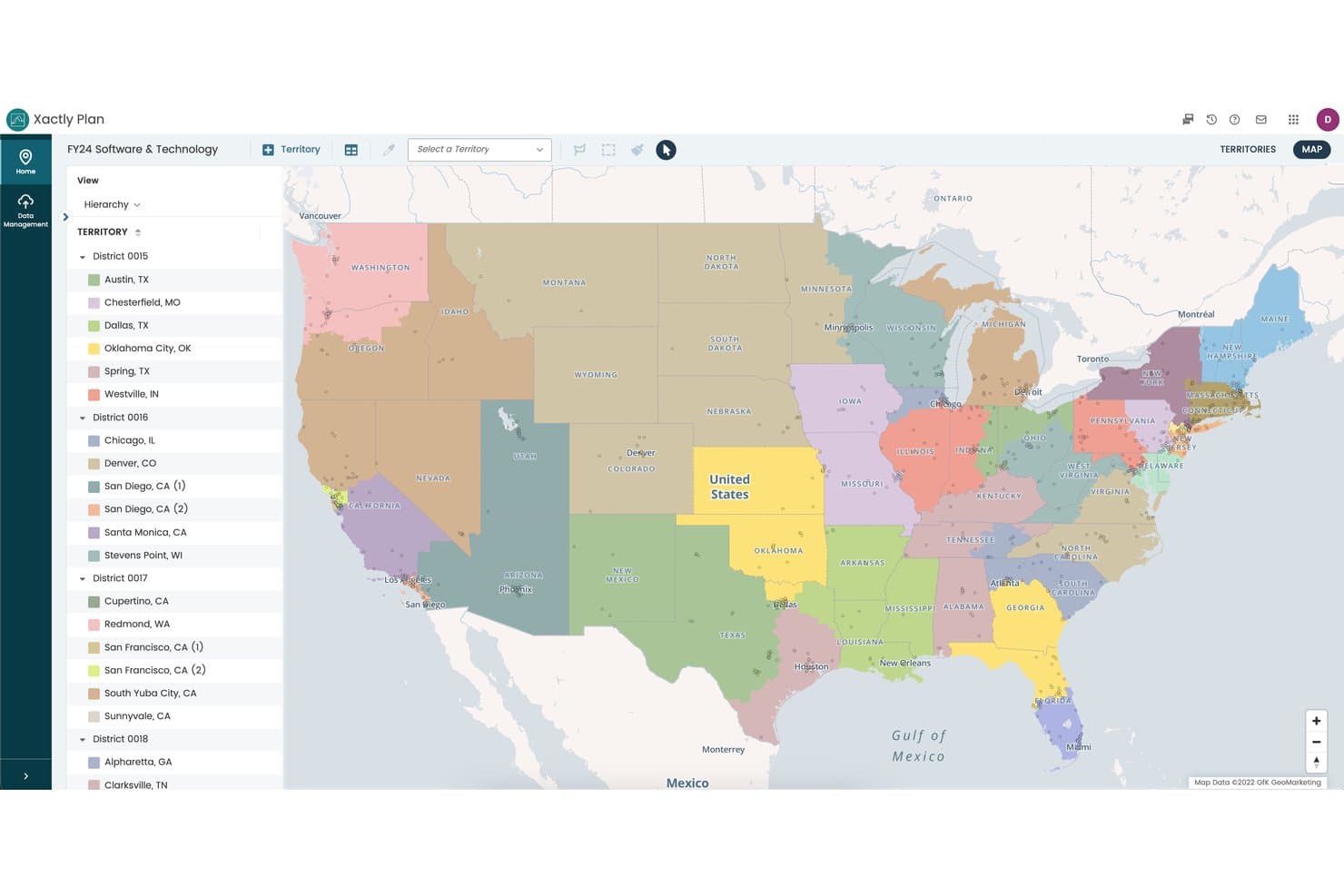
Xactly offers an interactive territory map view that allows sales teams to visualize and manage geographic sales districts. Xactly is a sales performance management platform that combines territory mapping, quota planning, and incentive compensation management into a single connected system for enterprise sales organizations.
Who Is Xactly Best For?
Xactly is a strong fit for enterprise revenue operations and sales planning teams that manage large, complex sales forces with layered compensation structures.
Why I Picked Xactly
Xactly earns its spot on my shortlist because no other sales mapping tool ties territory design directly to quota allocation and compensation in a single workflow. I particularly like the Alignment Report Card, which automatically grades territory balance against your objectives, so I can spot inequities before they become rep retention issues. The "what-if" scenario modeling in AlignStar lets my team test configurations and see the quota impact before any changes go live.
Xactly Key Features
- Interactive territory maps: Edit, split, and reassign sales territories visually with drag-and-drop tools.
- CRM integration: Sync account data and territory assignments directly with Salesforce, HubSpot, and Microsoft Dynamics.
- Multi-source data processing: Combine up to 10 data sources for territory design and account mapping.
- Alignment Report Card: Instantly benchmark territory performance using automated grading against your company's targets.
Xactly Integrations
Xactly offers native integrations with Salesforce, ServiceNow, Workday, and SAP. An API is available for custom integrations.
Pros and Cons
Pros:
- Automated territory balance grading built in
- Scenario modeling previews quota impact before changes
- Connects territory design directly to compensation planning
Cons:
- Implementation requires significant time and resources
- Lacks dedicated field rep route optimization
Learn more about Xactly: Best for visit prep & next-best-action guidance
- Not available
- Pricing upon request
Visit WebsiteCustomer Rating:4.3/5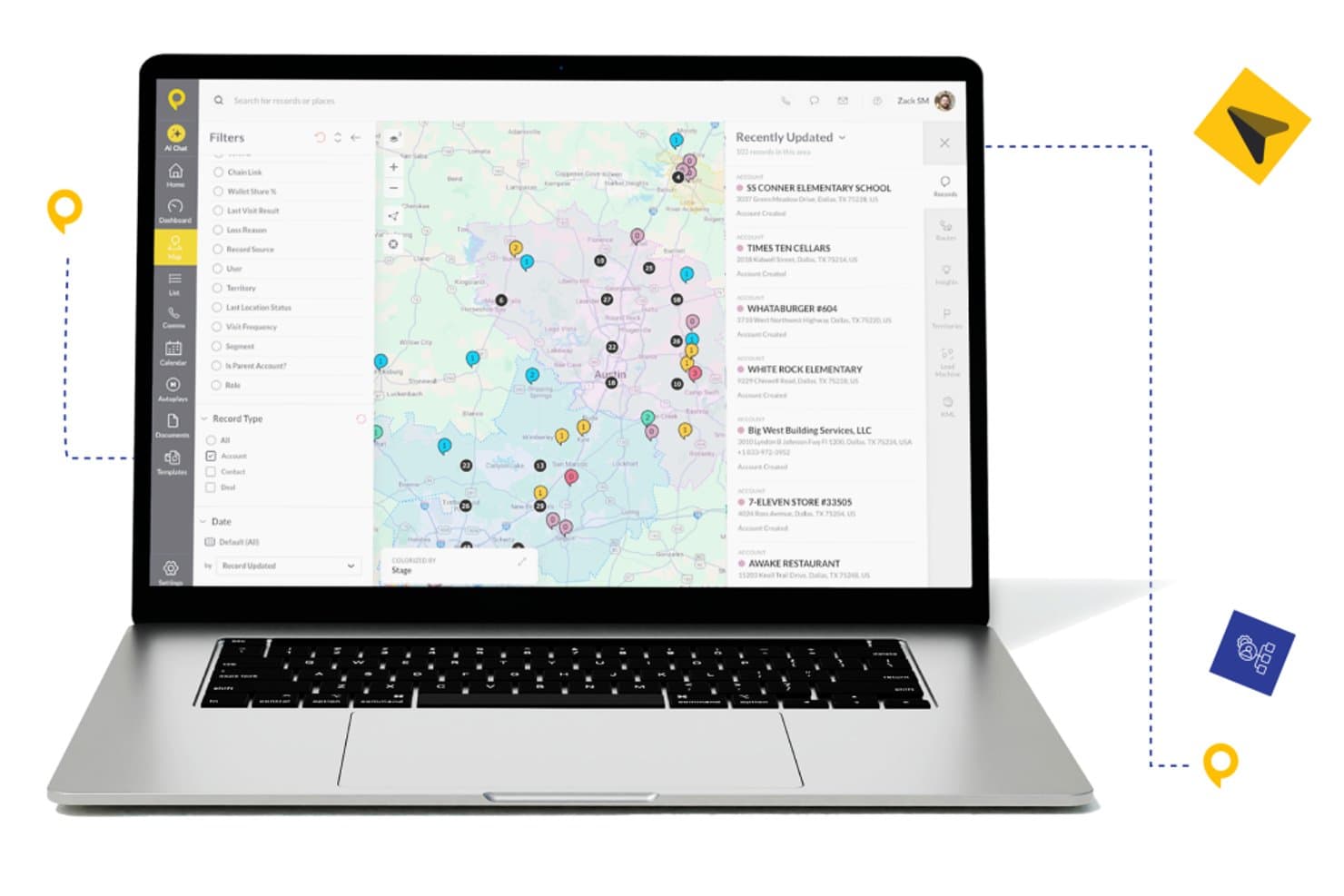
SPOTIO offers an interactive sales mapping view with color-coded account pins, territory filters, and a recently updated records panel for field sales teams. SPOTIO is a field sales mapping and execution platform that combines territory management, interactive account mapping, route optimization, and AI-powered visit guidance for outside sales teams.
Who Is SPOTIO Best For?
SPOTIO is a strong fit for B2C field sales teams in industries like solar, roofing, telecom, and home services that run door-to-door or territory-based outside sales operations.
Why I Picked SPOTIO
SPOTIO earns its spot on my shortlist because of how it layers AI directly into the field rep's workflow. The DASH AI co-pilot preps reps before each visit, surfacing account context so they walk in informed rather than guessing. I also like how the Next Best Action module uses predictive scoring to tell reps which accounts to prioritize next, turning territory maps from static visuals into active sales playbooks.
SPOTIO Key Features
- Territory creation and management: Build, edit, and assign sales territories using zip codes, counties, or custom-drawn boundaries on a map.
- Mobile field sales app: Access leads, manage appointments, and check in at locations from an iOS or Android device, even offline.
- Real-time CRM data synchronization: Bidirectional sync with Salesforce and integration with HubSpot, Dynamics, and custom systems through Zapier or API.
- Route planning and optimization: Generate multi-stop driving routes that minimize travel time and help field reps plan efficient schedules.
SPOTIO Integrations
SPOTIO offers native integration with Salesforce and supports integrations with HubSpot, Microsoft Dynamics, Zoho CRM, and over 5,000 apps via Zapier. An open API is available for custom integrations.
Pros and Cons
Pros:
- Next Best Action scoring prioritizes territory visits
- Mobile app supports offline field check-ins
- AI visit prep surfaces account context automatically
Cons:
- Built primarily for B2C door-to-door teams
- Territory scenario modeling is relatively limited
Learn more about SPOTIO: Best for customizable automations for your sales pipeline
- 14-day free trial + free demo available
- From $12/user/month (billed annually)
Visit WebsiteCustomer Rating:4.6/5
Monday Sales CRM distinguishes itself with its visually engaging and highly customizable workspaces. Monday sales CRM is a customer relationship management platform designed to manage sales pipelines and client communications effectively. It distinguishes itself with extensive customization options, including email integration, automations, and customizable dashboards, which offer a detailed view of sales operations, making it a preferred solution for businesses seeking tailored sales tracking capabilities.
Why I Picked monday sales CRM: monday.com's sales CRM tool includes AI-assisted email composition, which streamlines the process of writing emails with advanced HTML editing and customizable templates. It also offers the capability to send mass personalized emails, useful for large-scale communication efforts. The CRM features activity management to keep track of sales-related tasks, performance tracking to gauge sales success, and customizable dashboards for a visual representation of sales metrics. Additionally, it provides sales forecasting to anticipate future trends, centralizes data for easy access, and includes lead capturing from various sources.
monday sales CRM Standout Features & Integrations
Features include lead and contact management, customizable pipelines, sales automation, performance tracking, integration with various tools, advanced reporting and analytics, email tracking and synchronization, task and project management, mobile app support, and customizable templates and forms.
Integrations include Slack, Google Drive, Gmail, Google Calendar, Jira, GitHub, Trello, Dropbox, Typeform and many more, accessible through a paid plan with Zapier.
Pros and Cons
Pros:
- Advanced reporting and analytics
- Robust integration capabilities
- High customizability & automation-friendly
Cons:
- Slight learning curve
- Limited native email marketing features
 Best for Google integration and global coverage
- 10-day free trial available
- From $250 for a 45-day pass
Visit WebsiteCustomer Rating:4.7/5
Maptive can help you map anything, including the locations of Nobel Prize winners. As a cloud-based, web-accessible mapping solution, Maptive targets the creation of insightful, custom maps with beautiful visualization of data to enhance your Google Maps foundation. Build a variety of different map types for local or global needs, including territory maps, heat maps, sales density maps, and store locators so users can plan the optimal route between every location on their list.
Why I picked Maptive: This platform caught my eye because of their Google-centric functionality. Maptive specifically integrates with Google Maps to utilize additional data and features for more flexibility. You can access Google Places and Google Street View for street views, real-time traffic, updated geographic information, and satellite imagery.
Maptive Standout Features and Integrations
Standout features include fully customizable maps and location markers that are unique to your organizational needs, turn-by-turn navigation in-platform in Google Maps, and one-click interactive map sharing to provide access to everyone who needs it.
Integrations include Google Maps, Google Places, and Google Street View.
Pros and Cons
Pros:
- Mobile app for use on every device
- Fast load speeds for mapping and routing
- User-friendly visuals and navigation
Cons:
- Limited integration options — still in development
- Is a little bit more expensive than other solutions
Learn more about Maptive: Best for integrated field sales and B2B ordering
- 14-day free trial
- From $200/month
Visit WebsiteCustomer Rating:4.4/5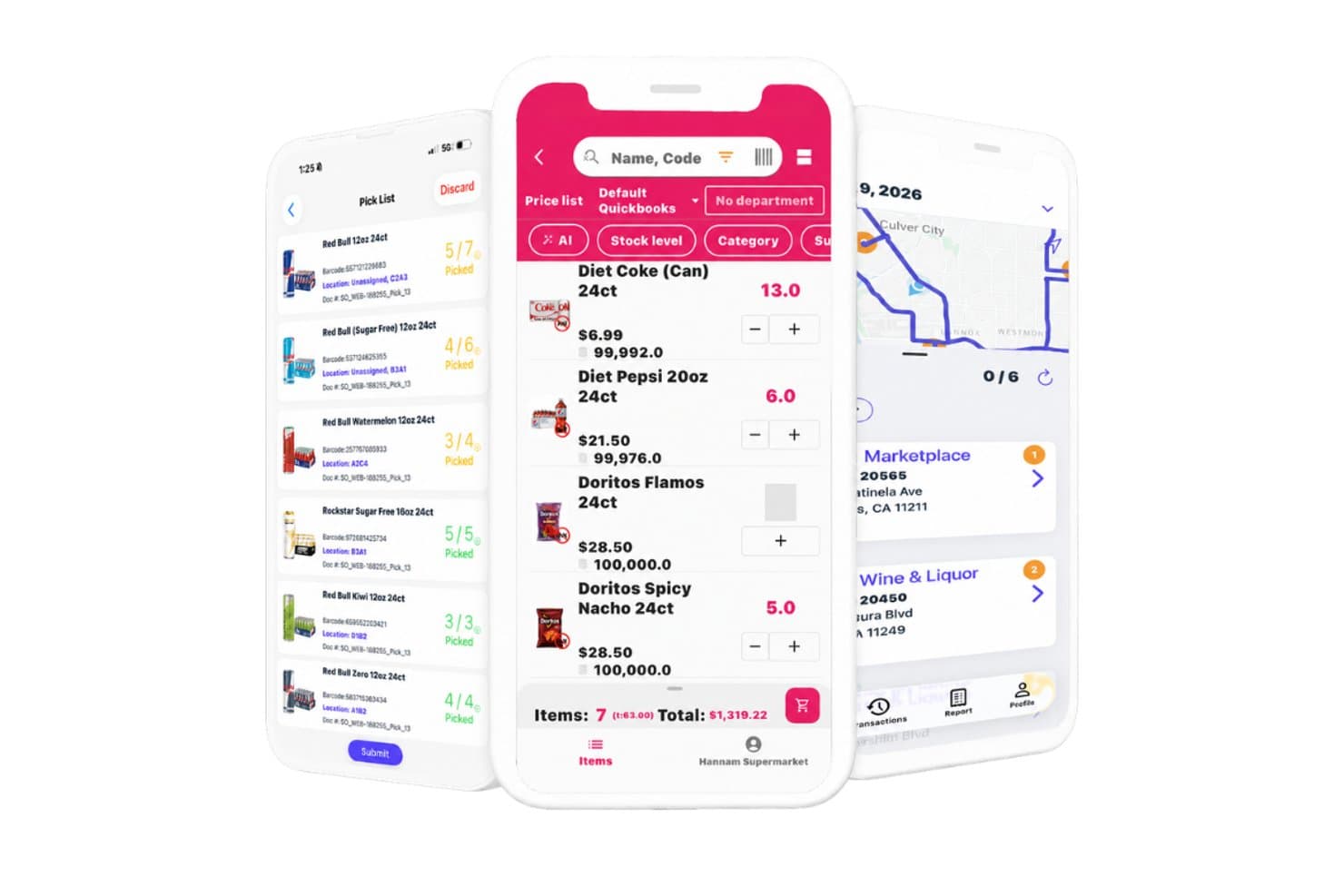
InSitu Sales offers a mobile app suite featuring pick list management, an order entry screen with product pricing, and a route mapping view for sales reps. InSitu Sales is a mobile field sales and B2B order management platform that combines route optimization, GPS tracking, territory-based account management, and real-time inventory visibility for wholesale distribution teams.
Who Is InSitu Sales Best For?
InSitu Sales is a strong fit for wholesale distributors and food & beverage companies whose outside reps manage accounts, take orders, and process payments in the field.
Why I Picked InSitu Sales
I picked InSitu Sales because it's one of the few tools that fully closes the loop between field routing and B2B order capture in one platform. When my reps are standing in front of a restaurant buyer, they can pull up real-time inventory levels, place the order on the spot, and process payment without switching apps. The DSD route optimization and dispatch app means the whole cycle, from stop planning to proof of delivery, lives in one place.
InSitu Sales Key Features
- Live GPS tracking: Lets managers monitor sales reps’ real-time locations and movements during field activities.
- Custom barcode scanning: Allows reps to scan products in the field for fast inventory checks and order creation.
- Customer-specific pricing lists: Supports the assignment of unique pricing and discounts per customer record.
- Proof of delivery and signature capture: Captures customer signatures and photo proof directly within the delivery workflow.
InSitu Sales Integrations
InSitu Sales offers native integrations with QuickBooks Online, QuickBooks Desktop, Oracle NetSuite, SAP Business One, Xero, Zoho, Odoo, Epicor, Siigo, and Fishbowl, and provides an API for custom integrations.
Pros and Cons
Pros:
- Supports customer-specific pricing structure
- Built-in order management and payments
- Real-time GPS tracking for field reps
Cons:
- Lacks multi-territory and coverage analytics
- No native CRM or salesforce integration
Learn more about InSitu Sales: Best for customizing the look of your maps for engaging visualizations
- Free trial available
- From $99/month

BatchGeo allows you to choose your preferred map style once all the data is in the system. This web-based tool is designed to allow the creation of custom maps from location data in just a few minutes through drag-and-drop uploads that accept spreadsheet and CSV file information. With BatchGeo, you can also visualize your data and gain new insights with advanced tools like batch processing that allows you to plot thousands of data points at the same time and geocoding that automatically matches addresses with longitude and latitude.
Why I picked BatchGeo: The feature that sets BatchGeo apart and assured it a spot on my list is the powerful customization options for your map style. Choose from street view, satellite, and terrain maps, along with unique colors, labels, and markers that ensure your maps are readable, informative, and engaging for your team.
BatchGeo Standout Features and Integrations
Standout features include Map Badges with a dynamic map thumbnail for your website, Map Grouping to break down data and spot trends, and map marker clustering to sum the value of potential leads, existing appointments, or current accounts.
Integrations include Google Docs, Google Maps, and Microsoft Excel.
Pros and Cons
Pros:
- Quick to set up and start mapping
- Easy to use with intuitive navigation
- Native mobile app for Apple devices
Cons:
- Editing maps is difficult and it’s easier to restart
- Free version has some limitations
Learn more about BatchGeo: Best for creating and publishing interactive maps
- Free plan available
- From $19.95/month

ZeeMaps provides step by step guidance for creating and publishing maps to your site. This platform is a geographic information system that’s designed to help you make and publish your maps across various websites, as well as capture information from spreadsheets, GeoRSS feeds, and location lists. You can use ZeeMaps to analyze spatial locations, show real-time traffic overlays, display visual information with 3D maps, and aggregate regional data in one place.
Why I picked ZeeMaps: This tool made my list because of how many customization options they offer in map creation. In addition to customizable marker icons that utilize your preferred images, you can also leverage searchable custom fields, hand-draw regions, and color regions based on zip code, county, city, or state information.
ZeeMaps Standout Features and Integrations
Standout features include private mapping through HIPAA-compliant infrastructure, multimedia capabilities that add videos and images to your markers, and multi-point route optimization for planning trips.
Integrations include Google Analytics 360, Google Sheets, and Microsoft Excel.
Pros and Cons
Pros:
- Great customer service
- Offers a lot of flexibility through customization
- Very easy to learn how to use
Cons:
- Design is a little outdated
- Some locations are not 100% accurate
Learn more about ZeeMaps: Best for combining action-based dashboards, data storytelling, and automated analysis
- 30-day free trial + free demo available
- Pricing upon request

Yellowfin has location intelligence capabilities to enhance your geospatial marketing campaigns. Unlike most other apps on my list, Yellowfin is a comprehensive Business Intelligence platform that delivers data, dashboards, and collaborative BI experiences. With advanced BI features that enable charts, tables, maps, and graphic components, like images and video, Yellowfin provides you with a no-code platform that strives to simplify analytics.
Why I picked Yellowfin: I chose this platform for my sales mapping list because it does offer location intelligence functionality to merge spatial and traditional business analytics for better decision-making. You can use the Google Maps API or Yellowfin’s built-in mapping capabilities to put your business on the map.
Yellowfin Standout Features and Integrations
Standout features include augmented dashboards to visualize and monitor essential data, Automated Business Monitoring with threshold alerts and signals, and data storytelling for presentations and reports.
Integrations include Dynamics 365, GitHub, Google Analytics 360, Google Sheets, Instagram, Meta for Business, Salesforce Sales Cloud, Tableau, Xero, and Zendesk Suite.
Pros and Cons
Pros:
- Effective online training tools
- No-code (SQL) interface and tools
- Easy to use and navigate
Cons:
- Some customizations require coding
- No cloud-based option available
Learn more about Yellowfin: Best for all-in-one geo operations with dispatch and scheduling
- Free plan available
- Custom pricing available

Mapline allows you to automatically optimize your routes based on customer locations. This web-based sales mapping and intelligence software is designed for individuals and businesses of every size, as it allows you to upload your data, visualize it on a map, and create reports and charts. Manage dispatch, scheduling, routing, and other operation essentials in one place to get analytics and insights that add real-world context to your data.
Why I picked Mapline: This software caught my eye because in addition to meeting your basic routing and mapping needs, Mapline also provides automated route optimization with their Dispatch feature. This essential function can route your salespeople based on visit urgency, location priority, vehicle availability, and various other custom factors.
Mapline Standout Features and Integrations
Standout features include mapping analytics with detailed maps through features like custom territories and heat mapping, GEO Dispatch to automate daily routing and optimize stops, and Geo Scheduling with appointment and recurring visit scheduling for deliveries or servicing.
Integrations include Mapline’s API that can help you integrate it into your tech stack to update data and configure your data visualizations.
Pros and Cons
Pros:
- Customization options for territory mapping
- Excel add-on to link maps and spreadsheets
- Outstanding customer support and guidance
Cons:
- No phone number for customer support — email only
- UK regions are inaccurate and require support to configure
Learn more about Mapline: Best for analyzing and understanding the impact of geography on your organization
- Free trial + free demo available
- From $695/year

You can leverage Maptitude tools to identify geo-demographic statistics for market research. Maptitude from Caliper provides businesses with a GIS solution with customer demographic data and maps that enable you to visualize data and explore geographic patterns. With data that relates to customer location, drive time, and sales opportunities, you can deploy field sales people more effectively.
Why I picked Maptitude: I like this platform because they have a spatial mapping tool that allows you to estimate the population of a specific area to build custom territories that will help you identify under and over-served areas, find valuable sites, and determine trade areas. You can visualize your data as charts, heat maps, and 3D prism maps.
Maptitude Standout Features and Integrations
Standout features include pin map creation by postal code, address, or coordinates, drive-time and distance ring estimator, distance measuring to find the most efficient routes.
Integrations include Google Maps, Microsoft Access, Microsoft Excel, and TransCAD.
Pros and Cons
Pros:
- Affordable for small businesses
- Knowledgeable and responsive customer service
- User-friendly interface and design
Cons:
- Advanced features require extra effort to learn
- Navigation could be a little more intuitive
Learn more about Maptitude:
Diğer Satış Haritalama Yazılımları
Kısa listeme giremeyen ancak yine de göz atmaya değer bazı ek satış haritalama yazılımı seçenekleri şunlardır:
- 11eSpatialBest for mapping the most efficient routes — even when things change
- 12GeopointeBest for mapping all your Salesforce data
- 13Ascent CloudBest for building, balancing, and optimizing your territories
- 14AlignMixBest for account-based or geographical realignment
- 15GeoMetrxBest for gathering census-based, site-specific data
- 16Badger MapsBest tool for sales rep route planning to automate and optimize routes
- 17AnaplanBest for unifying sales, finance, supply chain, and workforce management
- 18MapBusinessOnlineBest cloud-based solution for small and medium-sized businesses
- 19PipedriveBest for combining sales mapping with automation and lead management
- 20PortatourBest tool for automated route planning to visit more customers in one day
- 21CallproofBest outside sales-focused CRM tool with route planning and mapping
- 22Google MapsBest for getting detailed geospatial data with dynamic location info
How I Evaluate Sales Mapping Software
I split my evaluation into baseline criteria—territory design, CRM sync, geospatial mapping—and the differentiators, like scenario modeling and mobile access, that separate good tools from great ones.
Core Functionality (Table Stakes For This List)
When I'm selecting tools for my list, I rank each one on a scale from 0 (does not offer the functionality) to 5 (excels in this area) for each core functionality listed below. Then, I calculate the tool's total score into a percentage. Each tool needs to achieve a minimum total score of 65% to be considered for inclusion.
- Territory Design & Management: I evaluate whether I can draw, adjust, and balance territories on a map using attributes like ZIP code, revenue, or account count per rep.
- Geospatial Account Mapping: Every tool should let me plot accounts on an interactive map and layer data points like deal stage or account size onto those pins.
- CRM Data Integration: I check for bidirectional sync with CRMs like Salesforce or HubSpot so territory changes flow back into the system of record automatically.
- Route Planning & Optimization: Field teams need multi-stop routing that accounts for distance and time. I look at how each tool handles daily or weekly visit planning.
- Segmentation & Filtering: The map view should support filtering by CRM fields such as industry, annual revenue, or opportunity stage to isolate target accounts quickly.
- Territory Analytics & Reporting: I look for dashboards that show coverage gaps, account distribution, and rep workload so RevOps teams can back up territory decisions with data.
Once I have a list of tools that meet this criteria, I consider what sets each platform apart.
Differentiating Factors (What Sets Vendors Apart)
Here's how I compare and contrast different vendors:
Standout Features
Scenario modeling is a big differentiator. I look for tools that let me build side-by-side territory plans—say, splitting a high-density region two ways versus three—and compare projected workload and coverage before committing. Whitespace analysis matters just as much; the best tools surface untapped accounts by geography so your GTM team can prioritize expansion zones. A dedicated mobile app also makes a real difference for field-heavy teams, giving reps map access, check-ins, and route updates without needing to open a laptop between meetings.
Beyond Features
Integration depth matters a lot here. I check whether a tool connects to your broader stack—BI platforms, marketing automation, sales engagement—beyond just the CRM. Pricing structure is another factor I evaluate closely, especially how vendors license admin seats versus field rep seats, since mapping tools often serve very different user types. I also consider deployment scale. A tool built for a 10-rep team may fall apart when you're managing territories across hundreds of reps and multiple regions, so I look at how well each platform scales with organizational complexity.
Satış Haritalama Yazılımı Nasıl Seçilir?
Uzun özellik listeleri ve karmaşık fiyatlandırma yapıları arasında kaybolmak kolaydır. Kendinize özgü yazılım seçim sürecinizi yürütürken odaklanmanızı korumanıza yardımcı olmak için aklınızda bulundurmanız gereken faktörlerin kontrol listesi aşağıdadır:
| Faktör | Dikkate Alınması Gerekenler |
|---|---|
| FaktörÖlçeklenebilirlik | Dikkate Alınması GerekenlerYazılım işletmenizle birlikte büyüyecek mi? İşletmenizi genişlettikçe daha fazla veriyi ve kullanıcıyı işleyip işleyemeyeceğini kontrol edin. Farklı işletme boyutlarına uygun kademeli planlar veya özellikler arayın. |
| FaktörEntegrasyonlar | Dikkate Alınması GerekenlerMevcut araçlarınıza bağlanıyor mu? Veri silolarını önlemek ve iş akışı verimliliğini artırmak için yazılımın CRM'iniz, e-postanız ve diğer uygulamalarınızla entegre olduğundan emin olun. |
| FaktörÖzelleştirilebilirlik | Dikkate Alınması Gerekenlerİhtiyaçlarınıza göre uyarlayabilir misiniz? Haritaları, alanları ve raporları belirli iş akışlarınıza ve hedeflerinize uyacak şekilde değiştirmenize olanak tanıyan yazılımlar arayın. |
| FaktörKullanım kolaylığı | Dikkate Alınması GerekenlerEkibiniz için kullanımı kolay mı? Arayüzü ve gezinmeyi değerlendirin. Kullanımı zor bir araç, benimsenmeyi yavaşlatabilir ve üretkenliği azaltabilir. |
| FaktörUygulama ve kullanıma alma | Dikkate Alınması GerekenlerBaşlamak ne kadar sürüyor? Kurulum ve eğitim için gereken kaynakları göz önünde bulundurun. Rehberli kullanıma alma süreci, eğitimler veya özel destek ekipleri sunan araçları arayın. |
| FaktörMaliyet | Dikkate Alınması GerekenlerBütçenize uyuyor mu? Gizli ücretler veya gerekli eklentiler de dahil olmak üzere fiyatlandırma planlarını karşılaştırın. Yalnızca başlangıç fiyatını değil, zaman içindeki toplam sahip olma maliyetini de göz önünde bulundurun. |
| FaktörGüvenlik önlemleri | Dikkate Alınması GerekenlerVerileriniz ve gizliliğiniz korunuyor mu? Bilgilerinizin güvende olduğundan emin olmak için şifreleme, veri düzenlemelerine uygunluk ve kullanıcı izinlerini kontrol edin. |
| FaktörDestek erişilebilirliği | Dikkate Alınması GerekenlerNe tür bir yardım bekleyebilirsiniz? Sorunlar veya sorular ortaya çıktığında yardımcı olabilecek 7/24 destek, birden fazla iletişim seçeneği ve hızlı yanıt veren bir ekip arayın. |
Satış Haritalama Yazılımı Nedir?
Satış haritalama yazılımı, satış verilerinizi bir harita üzerinde görmenizi sağlayan; müşterilerinizin nerede olduğunu, bölgelerin nasıl bölündüğünü ve her alanın nasıl performans gösterdiğini ortaya koyan bir araçtır. Satış yöneticileri, bölge planlamacıları ve saha temsilcileri; satış rotalarını düzenlemek, bölgelerdeki iş yükünü dengelemek ve gizli pazar fırsatlarını belirlemek için bu aracı kullanır. Bu, zamandan tasarruf etmenizi, seyahatle ilgili zorlukları azaltmanızı ve satış çalışmalarınızı nereye odaklayacağınız konusunda daha akıllı kararlar almanızı sağlar.
Özellikler
Satış haritalama yazılımı seçerken aşağıdaki temel özelliklere dikkat edin:
- Coğrafi görselleştirme: Kullanıcıların satış bölgelerini ve müşteri konumlarını bir harita üzerinde görmesini sağlayarak pazar dağılımına ilişkin net bir genel bakış sunar.
- Bölge yönetimi: Dengeli iş yükleri ve verimli kaynak tahsisi sağlamak için satış bölgelerinin tanımlanmasına ve yönetilmesine yardımcı olur.
- Rota optimizasyonu: Satış ekipleri için en verimli seyahat güzergâhlarını planlayarak zamandan tasarruf sağlar ve seyahat maliyetlerini azaltır.
- Veri entegrasyonu: Müşteri bilgileri ve satış faaliyetlerine ilişkin kapsamlı bir görünüm sunmak için CRM ve diğer veri kaynaklarına bağlanır.
- Özelleştirilebilir haritalar: Kullanıcıların harita görünümlerini ve veri katmanlarını belirli iş ihtiyaçlarına ve hedeflerine uyacak şekilde düzenlemesine olanak tanır.
- Isı haritalama: Veri yoğunluğunu ve eğilimleri görselleştirerek fırsat veya endişe barındıran alanların belirlenmesine yardımcı olur.
- Gerçek zamanlı güncellemeler: Ekiplerin en güncel bilgilere erişmesini sağlayarak karar alma ve hızlı yanıt verme becerisini geliştirir.
- Demografik analiz: Demografik verileri satış haritalarının üzerine yerleştirerek pazar potansiyeline ilişkin içgörüler sunar.
- Etkileşimli paylaşım: Ekiplerin haritaları ve içgörüleri kolayca paylaşmasını sağlayarak iş birliğini ve bilinçli karar almayı teşvik eder.
- İş yükü dengeleme: Görevlerin ekip üyeleri arasında adil bir şekilde dağıtılmasını sağlayarak üretkenliği ve verimliliği en üst düzeye çıkarır.
Faydalar
Satış haritalama yazılımını uygulamak, ekibiniz ve işletmeniz için çeşitli faydalar sağlar. Yararlanabileceğiniz faydalardan bazıları şunlardır:
- Geliştirilmiş karar alma: Satış verilerini haritalar üzerinde görselleştirmek, bölgeler ve kaynaklar hakkında bilinçli kararlar almanıza yardımcı olur.
- Artan verimlilik: Rota optimizasyonu seyahat süresini ve maliyetlerini azaltarak ekibinizin satışa daha fazla odaklanmasını sağlar.
- Daha iyi kaynak tahsisi: Bölge yönetimi, dengeli iş yükleri sağlar ve ekibinizin üretkenliğini en üst düzeye çıkarır.
- Geliştirilmiş iş birliği: Haritaların ve verilerin etkileşimli olarak paylaşılması ekip çalışmasını ve bilinçli stratejileri destekler.
- Daha derin pazar içgörüleri: Demografik analiz, pazar potansiyelinin ve müşteri ihtiyaçlarının daha net anlaşılmasını sağlar.
- Gerçek zamanlı hızlı yanıt verme: Güncel bilgilere erişim, ekibinizin pazar değişikliklerine hızlı bir şekilde tepki vermesini sağlar.
- Adil iş yükü dağılımı: İş yükü dengeleme, görevlerin eşit şekilde atanmasını sağlayarak moral ve performansın yüksek tutulmasına yardımcı olur.
Maliyetler ve Fiyatlandırma
Satış haritalama yazılımı seçmek, mevcut çeşitli fiyatlandırma modellerinin ve planların anlaşılmasını gerektirir. Maliyetler özelliklere, ekip büyüklüğüne, eklentilere ve diğer unsurlara bağlı olarak değişir. Aşağıdaki tablo, satış haritalama yazılımı çözümlerinde yaygın olarak sunulan planları, ortalama fiyatlarını ve tipik özelliklerini özetlemektedir:
Satış Haritalama Yazılımı İçin Plan Karşılaştırma Tablosu
| Plan Türü | Ortalama Fiyat | Yaygın Özellikler |
|---|---|---|
| Plan TürüÜcretsiz Plan | Ortalama Fiyat$0 | Yaygın ÖzelliklerTemel haritalama, sınırlı veri noktaları ve temel görselleştirme araçları. |
| Plan TürüKişisel Plan | Ortalama Fiyat$10-$30/kullanıcı/ay | Yaygın ÖzelliklerÖzelleştirilebilir haritalar, rota optimizasyonu ve veri içe/dışa aktarma özellikleri. |
| Plan Türüİşletme Planı | Ortalama Fiyat$40-$70/kullanıcı/ay | Yaygın ÖzelliklerGelişmiş bölge yönetimi, demografik analiz ve entegrasyon seçenekleri. |
| Plan TürüKurumsal Plan | Ortalama Fiyat$80-$150/kullanıcı/ay | Yaygın ÖzelliklerGerçek zamanlı veri güncellemeleri, öncelikli destek ve kapsamlı özelleştirme seçenekleri. |
Satış Haritalama Yazılımı Hakkında SSS
Satış haritalama yazılımı hakkında sık sorulan bazı soruların yanıtları:
Satış haritası nasıl oluşturulur?
Her platform biraz farklı olsa da satış haritası oluştururken atmanız gereken birkaç standart adım vardır. Bunlar şunları içerir:
- Müşteri bilgilerini değerlendirmek (posta kodları, eyalet sınırları, mevcut müşteriler ve potansiyel müşteri demografik bilgileri)
- Müşterileri gruplandırmak ve satış personeliniz arasında eşit şekilde dağıtmak için müşteri segmentleri oluşturmak
- Satış hedeflerinizi dikkate alarak satış temsilcilerine bu hedeflere ulaşmaları için eşit fırsatlar sunduğunuzdan emin olmak
- Bir bölgedeki fırsatları ve tehditleri, ayrıca temsilcilerinizin güçlü ve zayıf yönlerini değerlendirmek için SWOT analizi kullanmak
- Her bölge veya alandaki mevcut hesapların sayısını belirlemek ve olası potansiyel müşteriler hakkında ayrıntıları bulmak
- Her bölgeyi, satış temsilcisinin deneyimine, becerilerine ve çeşitli iş hacimlerini yönetme kapasitesine göre atamak
Satış haritalama yazılımını kullanmak için hangi verilere ihtiyacım var?
Satış haritalama yazılımını kullanmak için adresler veya coğrafi koordinatlar gibi temel konum verilerine ihtiyacınız vardır. Bu veriler, müşteri konumlarını ve satış bölgelerini harita üzerinde işaretlemenizi sağlar. Satış geçmişi veya demografik veriler gibi ayrıntılı müşteri bilgilerine sahip olmak analizlerinizi geliştirebilir. Verilerinizi yazılıma aktarmadan önce temiz ve iyi düzenlenmiş olduğundan emin olun. Bu, doğru haritalama ve anlamlı içgörüler elde etmenize yardımcı olur.
Satış haritalama yazılımını nasıl kullanacağınızı öğrenmek zor mu?
Hayır, çoğu satış haritalama yazılımı sezgisel arayüzler ve faydalı eğitimlerle kullanıcı dostu olacak şekilde tasarlanmıştır. Bununla birlikte, öğrenme eğrisi aracın karmaşıklığına ve ekibinizin haritalama kavramlarına aşinalığına bağlı olarak değişebilir. Ekibinizin hızlı bir şekilde kullanmaya başlamasına yardımcı olmak için video eğitimleri veya etkileşimli kılavuzlar gibi eğitim kaynakları sunan yazılımları tercih edin.
Uzaktan veya hibrit çalışan temsilciler satış haritalama yazılımını etkili bir şekilde kullanabilir mi?
Evet — ekibiniz her zaman sahada olmasa bile görsel haritalar ve hesap kümeleri herkesin aynı anlayışta olmasına yardımcı olur. Uzaktan çalışan temsilcilerinizin coğrafi düzenleri görüntüleyebildiğinden ve bunlara erişebildiğinden emin olun; günlük olarak seyahat etmeseler bile. Böylece kapsama alanındaki uyumsuzlukları önler ve herkesin öncelikli hesapların nerede olduğunu görmesini sağlarsınız.
Ekipler haritalama araçlarını kullanıma sunarken hangi yaygın hataları yapar?
Sık yapılan hatalardan biri veri temizleme adımını atlamaktır: hatalı adresler, yinelenen kayıtlar veya eksik bölge etiketleri haritayı bozar. Bir diğer hata, ekip rollerini harita görselleriyle uyumlu hâle getirmemektir — temsilciler hangi hesaplardan sorumlu olduklarını net bir şekilde bilmiyorsa araç yardımcı olmaktan çok kafa karışıklığına neden olur. Ayrıca haritaları nasıl okuyup bunlara göre hareket edecekleri konusunda eğitim verilmemesi, benimseme oranının düşük olmasına yol açabilir.