

10 Best Open Source CRM Software Reviewed In 2026

Best Open Source CRM Software Shortlist


With so many different open source CRM software options available, figuring out which is right for you is tough. You want to manage customer relationships better, but need to figure out which tool is the best fit.
Using my extensive experience in digital software, I tested and reviewed several of the top open source CRM software on the market to help teams locate their ideal solution. From there, I compiled my insights into in-depth reviews, making sure that companies not only find a CRM software that meets their individual needs, but also drives operational success.
Why Trust Our Software Recommendations
Our reviews reflect our independent judgment—not a sales pitch. Learn how we stay transparent.
For this guide, we evaluated tools using hands-on testing and independent research, scoring tools using our selection criteria.
Our reviews reflect our human editorial judgment, not a sales pitch.
Best Open Source CRM Software Summary
| Tool | Best For | Trial Info | Price | ||
|---|---|---|---|---|---|
| 1 | Best for AI-powered CRM and GPT | 15-day free trial + free demo available | From $12/user/month (billed annually) | Website | |
| 2 | Best for extensive customization | Free-forever plan available | Free download available | Website | |
| 3 | Best for AI lead scoring and automation | Free trial + free plan available | From $25/user/month (billed annually) | Website | |
| 4 | Best for open source flexibility | 30-day free trial + free demo available | Pricing upon request | Website | |
| 5 | Best for open source email marketing | Free plan available | From $1/user/month (billed annually) | Website | |
| 6 | Best for marketing automation | Not available | Pricing upon request | Website | |
| 7 | Best for nonprofits and NGOs | Free plan available | From $15/month | Website | |
| 8 | Best for B2B customer insights | Not available | Pricing upon request | Website | |
| 9 | Best for free self-hosted CRM | Not available | Free download available | Website | |
| 10 | Best for enhanced productivity | Not available | Free download available | Website |
Best Open Source CRM Software Reviews
This section provides an in-depth analysis and overview of various open source CRM software. Below, I will walk through the pros and cons of each tool, their features, and their best use cases.

Vtiger
Best for AI-powered CRM and GPT
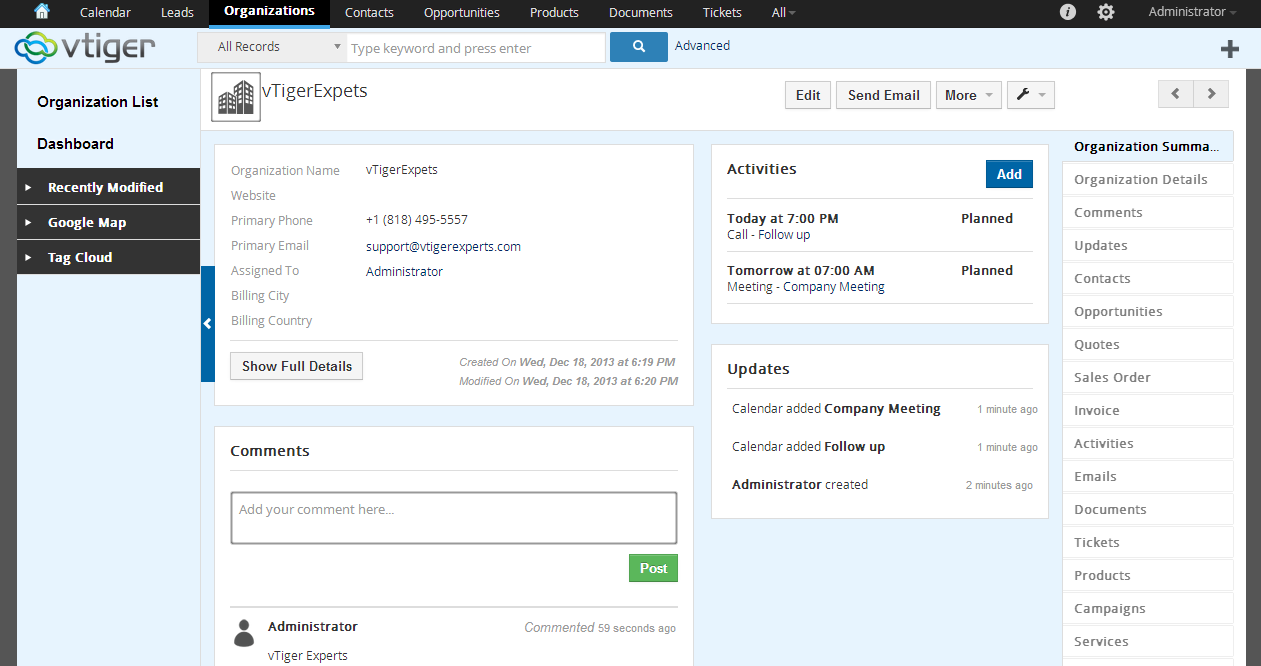
Vtiger is an open source CRM that combines contact management, sales pipeline tracking, marketing automation, and help desk tools into a single self-hosted or cloud-based platform.
Who Is Vtiger Best For?
Vtiger is a good fit for small to mid-sized businesses that want a self-hosted, customizable CRM without the cost of enterprise licensing.
Why I Picked Vtiger
Vtiger earns its spot on my shortlist because of Calculus AI, its built-in AI layer that's deeply integrated into everyday CRM workflows. I find the GPT integration genuinely useful: it drafts emails, suggests subject lines, and generates chat responses directly inside the CRM. The deal scoring feature uses historical data and engagement signals to predict win probability, so my team isn't guessing where to focus. Calculus AI's call quality analysis also flags issues like talk-to-listen ratio and negative sentiment in real time.
Vtiger Key Features
- Pipeline management: Track deals across customizable stages with drag-and-drop boards and real-time pipeline visibility.
- Workflow automation: Automate follow-up emails, lead assignments, and status updates using a visual rule builder.
- Help desk ticketing: Manage support cases, track ticket status, and route issues to the right agents from within the CRM.
- Inventory management: Create and manage product catalogs, quotes, invoices, and purchase orders inside the platform.
Pros and Cons
Pros:
- Low-code platform
- Extensive integrations
- Advanced AI features
Cons:
- Potential performance issues with larger data sets
- Limited mobile app functionality
Best for extensive customization
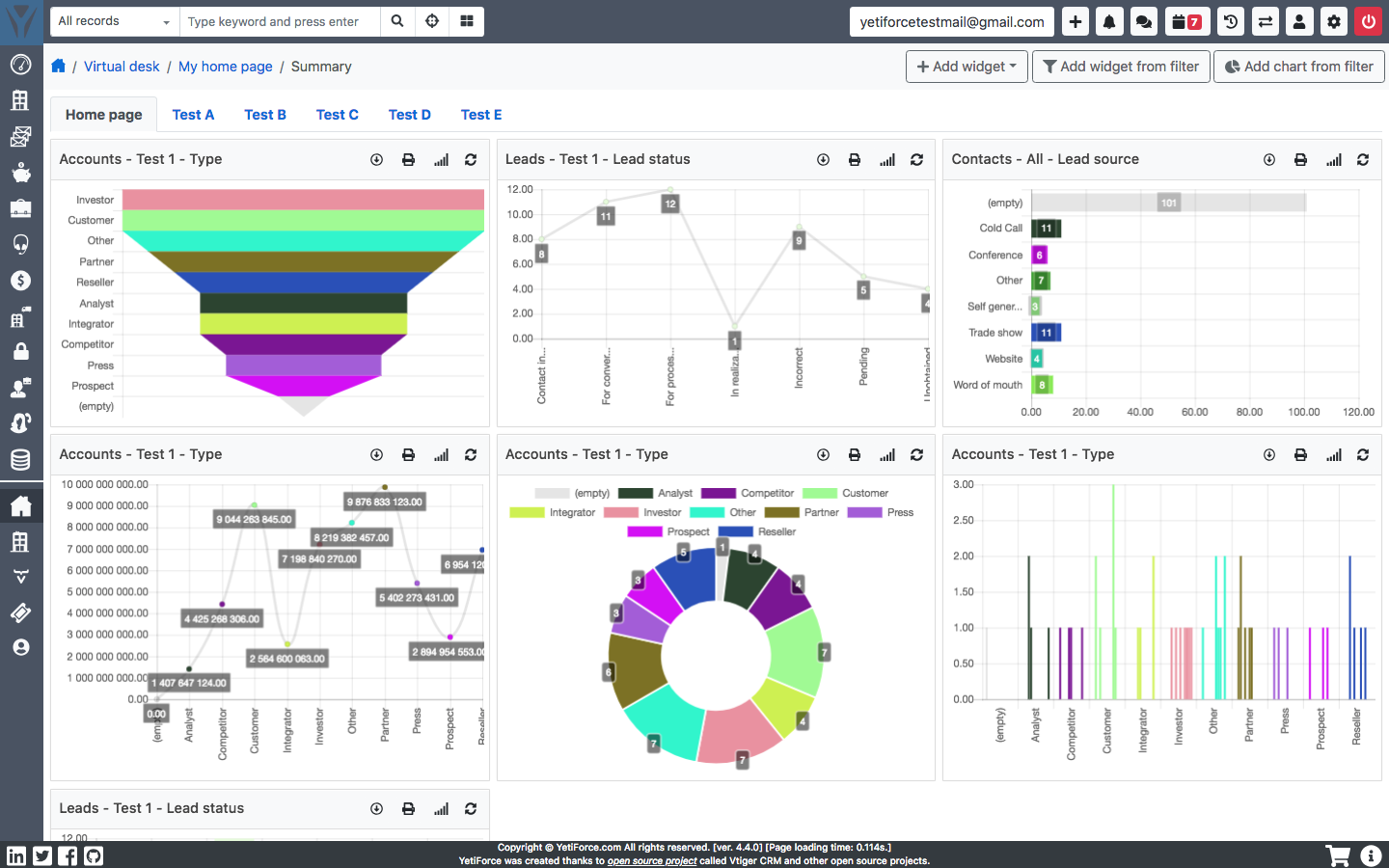
YetiForce is an open source CRM platform with 80+ modules spanning sales, marketing, support, project management, HR, logistics, and finance—all self-hosted and free to download.
Who Is YetiForce Best For?
YetiForce is a strong fit for mid-sized to large businesses with in-house developers who need a self-hosted CRM they can fully tailor to their workflows.
Why I Picked YetiForce
YetiForce earns its spot on my shortlist because no other open source CRM gives you this many levers to pull. It offers 90+ configuration panels where you can reshape fields, layouts, and workflows at the module level. I especially like that you can remap the entire UI per user role, so a sales rep and a support agent see a completely different system built around how they work.
YetiForce Key Features
- Sales pipeline management: Track leads and opportunities through configurable pipeline stages with visual deal views.
- Customer portal: Give clients direct access to their account data, tickets, and shared documents through a dedicated web portal.
- Built-in ticketing system: Log, assign, and track support requests within the same platform as your sales and contact records.
- Multi-language support: Run the CRM across international teams with support for 35 languages built in.
Pros and Cons
Pros:
- Strong support team
- Extensive module library
- Highly customizable
Cons:
- Requires technical expertise
- Limited documentation
Odoo CRM
Best for AI lead scoring and automation
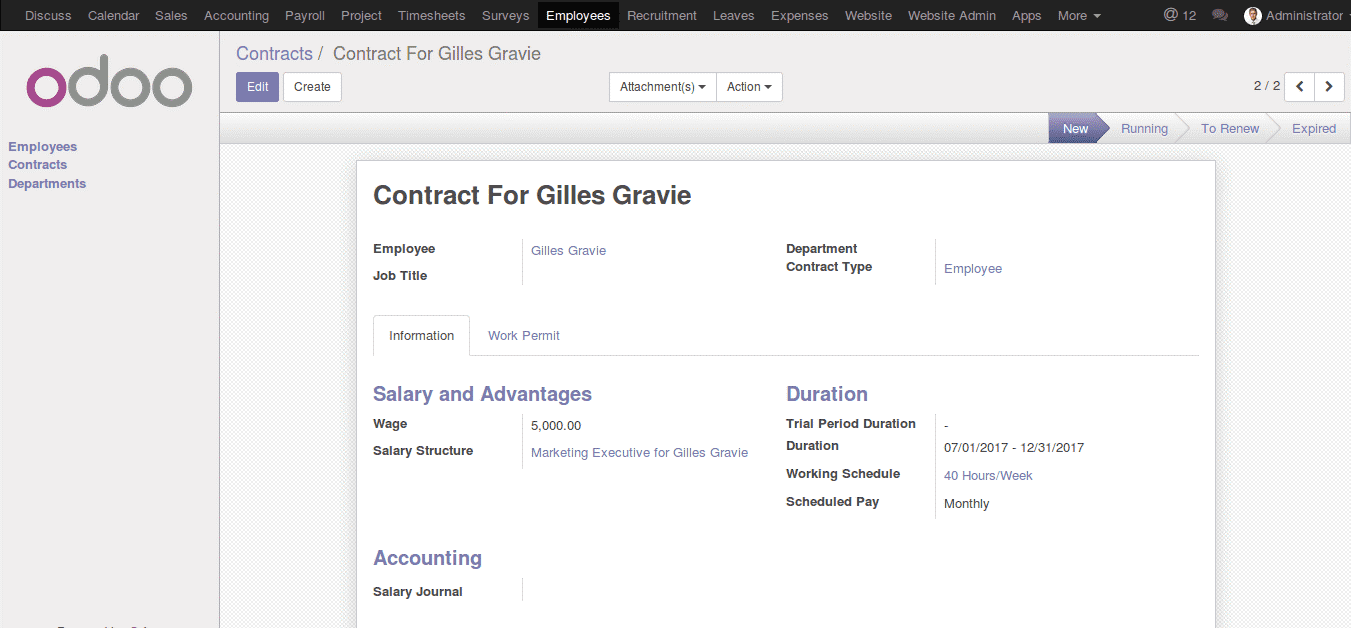
Odoo CRM is an open source, AI-native CRM built on the broader Odoo platform, combining pipeline management, lead scoring, activity automation, and reporting tools in a single interface.
Who Is Odoo CRM Best For?
Odoo CRM is a strong fit for small to mid-sized businesses that want a customizable, open source CRM they can expand with additional Odoo modules over time.
Why I Picked Odoo CRM
I've included Odoo CRM in my top picks because its AI-powered lead scoring is genuinely useful in day-to-day pipeline management. The model analyzes signals across your pipeline to rank leads by likelihood to convert, so my team isn't guessing which opportunities to prioritize. I also like that automation rules handle repetitive work like assigning leads to reps, scheduling follow-up activities, and sending emails based on stage changes—all configured without code directly inside the CRM.
Odoo CRM Key Features
- Kanban pipeline view: Visualize and manage deals across custom stages using a drag-and-drop board that updates in real time.
- Revenue forecasting: Track expected revenue against targets by rep, team, or time period directly from the pipeline view.
- Customer activity log: Log calls, meetings, emails, and notes against each contact or opportunity to keep a full interaction history.
- Custom dashboards and reports: Build and filter reports on pipeline health, win rates, and team performance using configurable reporting tools.
Pros and Cons
Pros:
- Real-time sales metrics
- Extensive automation
- AI lead scoring
Cons:
- Requires customization
- Higher starting price
SuiteCRM
Best for open source flexibility

SuiteCRM is a fully open source CRM platform that covers sales automation, marketing campaigns, customer service case management, workflow automation, and reporting—all available with access to the full source code and self-hosted deployment.
Who Is SuiteCRM Best For?
SuiteCRM is a strong fit for mid-sized businesses and IT-forward teams that want full control over their CRM environment without vendor lock-in or per-seat licensing costs.
Why I Picked SuiteCRM
SuiteCRM earns its spot on my shortlist because the open source model here isn't just a licensing choice—it's the entire architecture of the platform. I like that you get full access to the source code, which means your team can modify modules, build custom fields, and redesign layouts without hitting a vendor-imposed ceiling. The Configuration Studio lets you reshape the data model without writing a single line of code, and for deeper changes, the codebase is right there. I've found the module builder especially useful for creating entirely custom CRM objects that map to how a business actually operates.
SuiteCRM Key Features
- Workflow automation engine: Build condition-based workflows that trigger actions like email alerts, field updates, or task assignments across any CRM module.
- Campaign management: Create and track multi-channel marketing campaigns with target lists, campaign trackers, and response metrics built directly into the CRM.
- Case management: Log and manage customer support cases with status tracking, escalation rules, and a self-service portal for end users.
- Security Suite: Assign record-level and group-level access controls to manage who can view, edit, or delete data across teams.
Pros and Cons
Pros:
- Strong community support
- Extensive plugin support
- Highly customizable
Cons:
- Limited out-of-the-box features
- Complex setup
phpList
Best for open source email marketing

phpList is an open source email marketing platform built for bulk newsletter distribution, subscriber list management, list segmentation, and campaign performance tracking.
Who Is phpList Best For?
phpList is a good fit for developers, nonprofit organizations, and small teams who want full control over their email marketing infrastructure without relying on a third-party hosted service.
Why I Picked phpList
I've included phpList in my top picks because it's one of the few email marketing tools built entirely on open source code, giving your team the freedom to self-host, modify, and own the infrastructure outright. I particularly like the subscriber segmentation by custom attributes, which lets you send targeted campaigns without locking your contact data into a closed platform. The bounce automation and real-time campaign tracking also give you the operational visibility you'd expect from a paid tool.
phpList Key Features
- Drip campaign automation: Schedule sequences of emails to go out automatically based on subscriber signup date or custom triggers.
- Subscription page builder: Create and embed custom subscription forms to collect subscriber data directly into your list.
- Message queue management: Control the rate and volume of outgoing emails to stay within server limits and avoid delivery issues.
- Plugin architecture: Extend core functionality through a library of community-built plugins for additional sending options, integrations, and workflows.
Pros and Cons
Pros:
- Real-time data tracking
- Flexible pricing
- Superior deliverability
Cons:
- No built-in AI tools
- Requires technical setup
X2CRM
Best for marketing automation
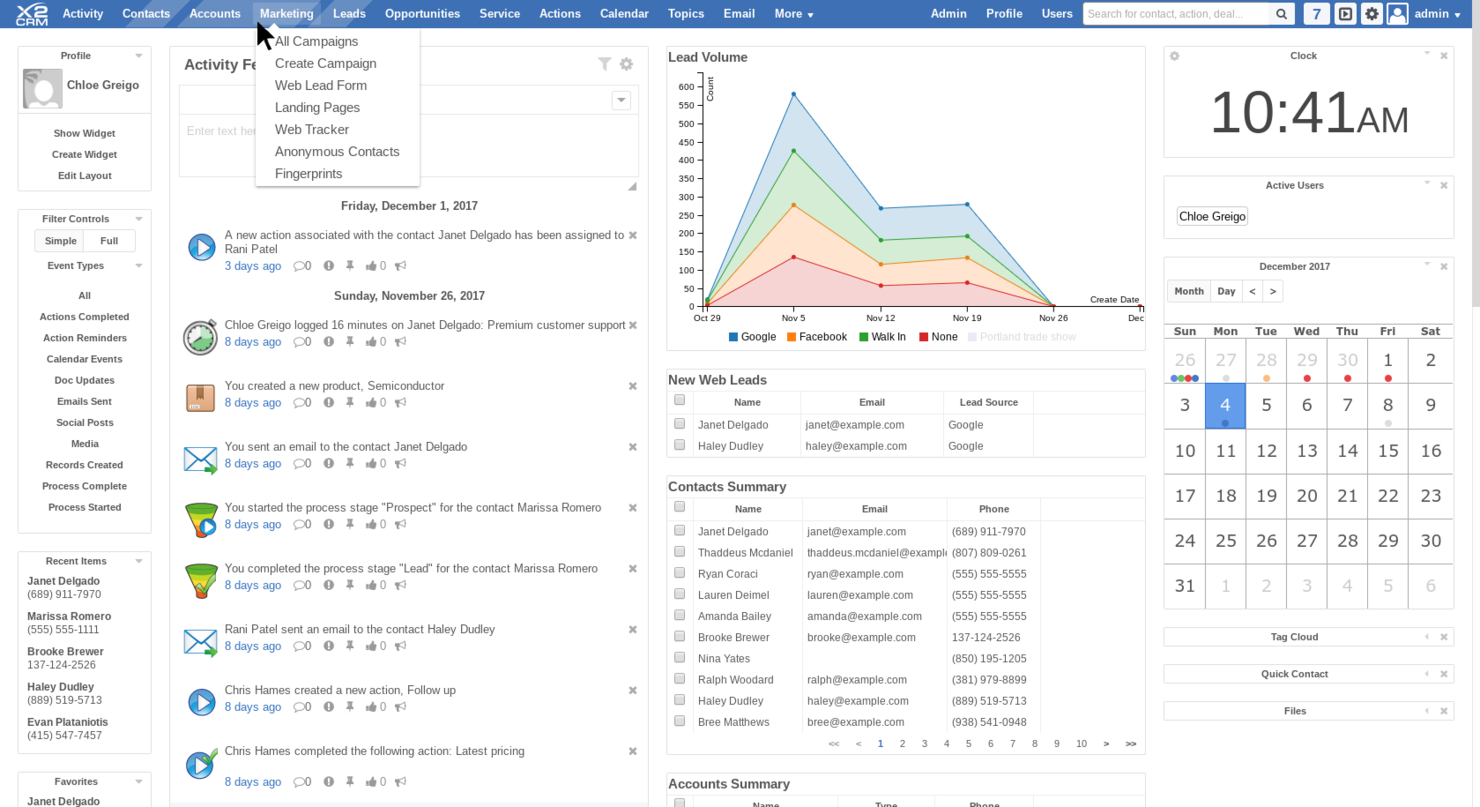
X2CRM is an open source CRM platform built on a single-database architecture, covering sales, marketing automation, customer service, project management, and HR through self-hosted or cloud deployment with a no-code custom module builder (X2Studio).
Who Is X2CRM Best For?
X2CRM is a good fit for small to mid-sized businesses that need a self-hosted CRM with built-in marketing and sales tools and the flexibility to customize it without a development team.
Why I Picked X2CRM
X2CRM is one of my top picks because its marketing automation module, X2Marketing, is built directly into the open source core—no third-party add-on required. I particularly like the visual drip campaign builder, which lets you map out multi-step email sequences that move leads through the funnel based on behavior triggers. The built-in A/B testing and webform lead capture tools mean my team can run and measure full campaigns without ever leaving the CRM.
X2CRM Key Features
- X2Studio module builder: Create custom CRM modules, fields, and layouts without writing code directly in the admin panel.
- Sales pipeline management: Track deals through configurable pipeline stages with drag-and-drop controls and opportunity records.
- Activity feed: Log calls, emails, tasks, and notes against any contact or account record in a unified, chronological timeline.
- Role-based access control: Assign user permissions at the module and field level to manage what each team member can view or edit.
Pros and Cons
Pros:
- Mobile accessibility
- Comprehensive marketing automation
- Open-source
Cons:
- Complex for beginners
- Limited third-party integrations

CiviCRM is an open source CRM built around contact management, membership, event management, donation tracking, and email marketing for mission-driven organizations.
Who Is CiviCRM Best For?
CiviCRM is a natural fit for nonprofits, NGOs, associations, and civic organizations that need a constituent management system built around their specific workflows.
Why I Picked CiviCRM
CiviCRM earns its spot on my shortlist because it's one of the few open source CRMs designed ground-up for nonprofits rather than adapted from a sales tool. I especially like how contribution management ties directly into constituent records, so a donor's full giving history is always visible alongside their contact details and event attendance. The membership management module handles online sign-up, renewals, and automated reminders without requiring a third-party tool.
CiviCRM Key Features
- Email marketing: Send bulk emails to segmented contact lists with A/B testing and delivery statistics built in.
- Event management: Create event pages, manage registrations, collect payments, and track attendance from one place.
- Case management: Build structured workflows for tracking ongoing interactions or services with individual constituents.
- Custom reporting: Access 40+ standard reports and configure custom reports using a drag-and-drop report builder.
Pros and Cons
Pros:
- Strong community support
- Extensive customization
- Tailored for non-profits
Cons:
- Requires technical expertise
- Limited commercial support

OroCRM is an open source, commerce-native CRM built for B2B companies that combines account management, pipeline tracking, workflow automation, and ecommerce data in a single platform.
Who Is OroCommerce CRM Best For?
OroCRM is a strong fit for mid-market and enterprise B2B companies that run complex sales cycles and need CRM functionality tightly connected to their ecommerce operations.
Why I Picked OroCommerce CRM
OroCRM earns its spot on my shortlist because of how deeply it surfaces B2B customer data in one place. The 360-degree account view pulls together every order, quote, email, and support interaction per customer, so I can see the full relationship history without jumping between tools. I also like the open source Community Edition, which lets my team customize exactly how that data is structured, segmented, and reported to fit our specific B2B sales model.
OroCommerce CRM Key Features
- Lead and opportunity management: Track leads through customizable sales pipelines with stage-based progression, probability scoring, and deal value tracking.
- Visual workflow builder: Design and automate multi-step sales and service processes using a drag-and-drop workflow editor without writing code.
- Customer segmentation: Create dynamic customer segments based on order history, account type, geography, or behavior for targeted outreach.
- Built-in reporting dashboards: Build custom reports and dashboard widgets to track sales performance, pipeline health, and account activity in real time.
Pros and Cons
Pros:
- AI and machine-learning integration
- Flexible deployment options
- Comprehensive customer insights
Cons:
- Requires technical expertise
- Complex setup
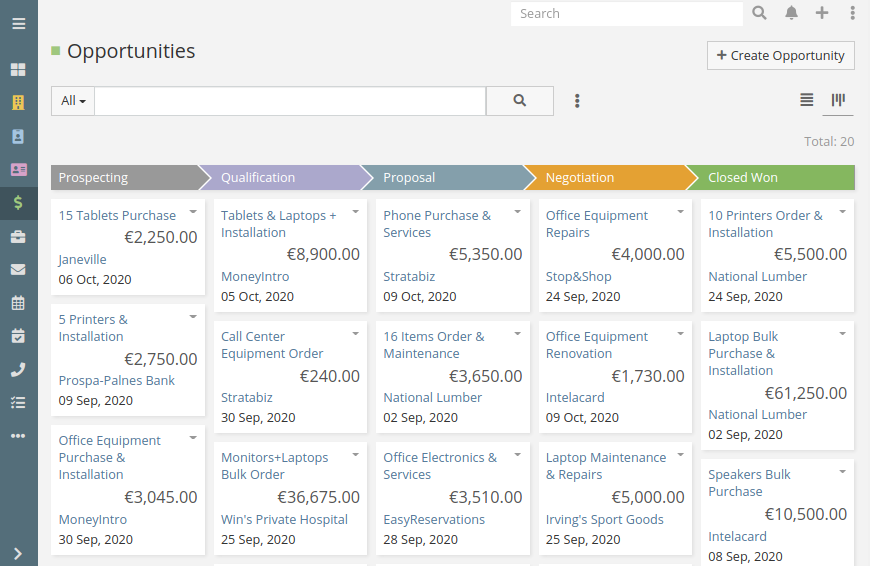
EspoCRM is an open source CRM with sales pipeline management, email marketing, customer support tools, and a BPM-based automation engine, available as a free self-hosted install or a paid cloud plan.
Who Is Espo CRM Best For?
EspoCRM is a strong fit for small to mid-sized businesses and technical teams that want full control over their CRM data and infrastructure through self-hosting.
Why I Picked Espo CRM
EspoCRM earns its spot on my shortlist because it's genuinely free to download, self-host, and run with no per-user fees attached. I love that the AGPLv3 license gives you full access to the source code, so your team can modify the platform to fit your exact processes. The Docker-based install spins up EspoCRM with NGINX and MySQL preconfigured in minutes, reducing much of the friction involved in self-hosting a CRM.
Espo CRM Key Features
- BPM workflow engine: Build multi-step automated processes using a visual BPMN 2.0 diagram editor with conditional logic and parallel flows.
- Entity Manager: Create custom entities, fields, and relationships directly in the admin panel without writing any code.
- Role-based access control: Set permissions at the team, role, and field level to control exactly who can view or edit specific CRM data.
- Mass email campaigns: Build and send targeted email campaigns with tracking, opt-out management, and campaign activity logs built in.
Pros and Cons
Pros:
- Multi-industry support
- Extensive customization
- Manages sales and purchasing processes
Cons:
- Limited native integrations
- Requires technical setup

Krayin is a free, self-hosted, open source CRM built on Laravel that covers lead management, contact management, sales pipeline tracking, activity management, and marketing automation.
Who Is Krayin Best For?
Krayin is a strong fit for small to mid-sized development teams that want a self-hosted CRM they can customize and deploy on their own infrastructure.
Why I Picked Krayin
Krayin earns its spot on my shortlist because its activities management system keeps sales work genuinely organized. You can log calls, schedule meetings, and attach notes directly to leads and contacts, so nothing gets missed between touchpoints. I also like the custom fields feature, which lets you model the CRM around how your team actually works rather than forcing your process into a rigid default structure. Add in the access control list for role-based permissions, and your team spends less time navigating irrelevant data.
Krayin Key Features
- Lead pipeline management: Visualize and move leads across configurable pipeline stages using a kanban-style board.
- Email templates: Create and reuse pre-built email templates directly from within the CRM for outreach and follow-ups.
- Contact and organization management: Store and link individual contacts to their parent organizations for full account-level visibility.
- Products catalog: Maintain a central list of products and prices to attach directly to leads and quotes.
Pros and Cons
Pros:
- Marketing management capabilities
- Built on Laravel
- Highly customizable
Cons:
- Requires technical knowledge
- Limited native integrations
Other Open Source CRM Software
Below is a list of additional open source CRM software that I shortlisted. While they didn’t make the top 10, they’re still valuable and worth further research.
- Axelor CRM
For low-code customization
- Twenty
For team collaboration and communication
- Creatio CRM
For 360-degree customer views
- Copper
For Google Workspace integration
- Bitrix24
For team collaboration tools
- Attio
For customizable workflows
- Pipeline
For sales pipeline management


Related CRM Reviews
If you still haven't found what you're looking for here, check out these tools closely related to all-in-one CRMs that we've tested and evaluated.
- CRM Software
- Sales Software
- Lead Management Software
- Business Intelligence Software
- Contract Management Software
- Revenue Management System
- CPQ Software
How I Evaluate Open Source CRM Software
I evaluate open source CRMs in two layers: the baseline each tool must hit to qualify, and the differentiators—like self-hosted pipeline management and API depth—that actually matter to RevOps teams.
Core Functionality (Table Stakes For This List)
When I'm selecting tools for my list, I rank each one on a scale from 0 (does not offer the functionality) to 5 (excels in this area) for each core functionality listed below. Then, I calculate the tool's total score into a percentage. Each tool needs to achieve a minimum total score of 65% to be considered for inclusion.
- Open Source Licensing: I check whether the source code is publicly available under a recognized license like MIT, AGPL, or Apache, and how clearly the vendor communicates usage rights.
- Self-Hosting Capability: Deployment options matter—I look for Docker images, Kubernetes support, and clear documentation that let RevOps teams run the CRM on their own infrastructure.
- Contact & Pipeline Management: Every tool should handle contacts, accounts, and deals with visual pipeline stages, similar to what you'd find in SuiteCRM or Twenty.
- Workflow & Automation Engine: I evaluate whether you can automate tasks like lead routing by territory or deal stage progression triggers without writing custom scripts from scratch.
- API & Integration Framework: REST or GraphQL APIs with webhook support are what I look for, along with the ability to connect to tools across your revenue stack like email platforms and data warehouses.
- Customization & Extensibility: The platform should let you add custom fields, objects, and modules to model your specific revenue process—without needing to fork the entire codebase.
Once I have a list of tools that meet this criteria, I consider what sets each platform apart.
Differentiating Factors (What Sets Vendors Apart)
Here's how I compare and contrast different vendors:
Standout Features
Revenue reporting dashboards are a big differentiator—I look for built-in pipeline velocity and forecasting views that save RevOps teams from exporting data into separate BI tools. Native email and calendar sync also matters because it captures GTM activity directly in the CRM without middleware. I also evaluate whether a platform bundles marketing, helpdesk, or billing modules, since tools like EspoCRM and SuiteCRM take different approaches to extending beyond core sales CRM into a broader revenue platform.
Beyond Features
Licensing terms deserve close attention—I evaluate whether a vendor uses AGPL, MIT, or an open-core model, since this shapes what your team can modify and deploy commercially. Community strength is another factor I weigh by checking GitHub activity and contributor counts, because a stagnant project means you're on your own for bug fixes. Migration tooling also matters. If your team is moving off Salesforce or HubSpot, I look for native import utilities and field mapping support that reduce the lift of getting historical pipeline and contact data into the new system.
How to Choose an Open Source CRM Software
As you work through your own unique software selection process, keep the following points in mind:
- Customization Capabilities: Open source CRM software often allows for extensive customization, which is valuable for businesses with unique workflows or industry-specific requirements. For example, a healthcare provider might need to integrate patient management features, while a retail business might focus on inventory and sales tracking.
- Cost Efficiency: One of the primary advantages of open source CRM is the potential for reduced costs. This is particularly relevant for startups or small businesses that need strong CRM functionalities without the high price tag of proprietary software.
- Community Support: Open source CRM solutions typically have active user communities that contribute to software improvements and provide support. This can be a significant advantage for companies that prefer collaborative problem-solving and continuous updates.
- Data Ownership: With open source CRM software, businesses have full control over their data, which is essential for industries with strict data privacy regulations, such as finance or healthcare. This ensures that sensitive customer information is managed in compliance with legal standards, reducing the risk of data breaches.
- Scalability: Open source CRM software can be scaled to meet the growing needs of a business. This is particularly important for companies anticipating rapid growth or seasonal fluctuations in customer interactions. For instance, a growing SaaS company can start with basic CRM features and gradually add more complex functionalities as their customer base expands.
Trends for Open Source CRM Software
Here are some trends I’ve noticed for open source CRM software, plus what they might mean for the future. I sourced countless product updates, press releases, and release logs to tease out the most important insights.
- AI-Powered Automation: AI is being integrated into open source CRM tools to automate repetitive tasks. This is important because it allows teams to focus on strategic activities, effectively reducing manual effort and increasing efficiency.
- Enhanced Data Privacy: Open source CRM platforms are prioritizing data privacy features. This is vital as data regulations become stricter and users gain more control over their data, ensuring compliance and trust.
- Customizable User Interfaces: Developers are focusing on creating highly customizable user interfaces. This allows businesses to tailor the CRM to their specific needs, ultimately enhancing user experience and adoption rates.
- Integration with IoT Devices: Open source CRMs are starting to integrate with IoT devices. This provides real-time data and insights from connected devices, which is significant for industries relying on IoT for operational efficiency.
- Community-Driven Development: The open source community is playing a larger role in CRM development. This leads to faster innovation and more diverse features, ensuring the software evolves to meet a wide range of user needs.
As more companies recognize the cost-effectiveness and collaborative benefits of open source platforms, the demand for strong, community-driven CRM systems continues to rise. By staying on top of these trends, companies can efficiently gain control over processes while maintaining a competitive advantage.
What is Open Source CRM Software?
An open source CRM software is a customer relationship management tool whose source code is freely available for anyone to view, modify, and distribute. Businesses, developers, and IT professionals commonly use it to manage customer interactions, sales processes, and data analytics.
The primary components of open source CRM software include contact management, sales automation, customer support, and reporting tools. These elements help users track customer interactions, automate sales tasks, provide customer service, and generate insights from data.
Features of Open Source CRM Software
When choosing open source CRM software, it's important to understand the key features that can help your business manage customer relationships effectively. Here are the most important features to look for:
- Customization: The ability to tailor the software to fit your specific business needs is important as it ensures that the CRM aligns with your processes and workflows.
- Integration: The software should integrate with other tools and systems you use. This allows for a unified approach to managing customer data and streamlines operations.
- Scalability: Scalability ensures that the software can handle an increasing amount of data and users. As your business grows, the CRM should be able to grow with you.
- User-Friendly Interface: A simple and intuitive interface is essential, as it makes it easier for your team to adopt and use the software effectively.
- Reporting and Analytics: The ability to generate detailed reports and analyze data is important. This feature helps you make informed decisions based on customer insights.
- Automation: Automating repetitive tasks saves time and reduces errors, helping your team focus on more strategic activities.
- Security: Protecting customer data is a top priority. A software with strong security features ensures that sensitive information is kept safe and locked behind several firewalls.
- Mobile Access: Accessing the CRM from mobile devices is important for teams on the go. With mobile access, your team can work from anywhere, increasing productivity and overall engagement.
- Community Support: Open source software often has a strong community of users and developers to help provide valuable resources and assistance when necessary.
- Cost-Effectiveness: Open source CRM software is usually more affordable than proprietary options, allowing you to allocate resources to other areas of your business.
Choosing the right open source CRM software with these features can significantly improve how you manage customer relationships and drive business success. By keeping these features in mind, you can find a solution that improves operations while boosting team collaboration, all within budget.
Benefits of Open Source CRM Software
Unlike proprietary CRM solutions, open source CRM software provides greater flexibility, cost savings, and customization options. But these aren’t the only perks you may experience. Here are some additional benefits you may receive when using an open source CRM software.
- Cost-Effective: Open source CRM software is typically free to use, which can significantly reduce the overall cost of ownership for businesses, especially small and medium-sized enterprises.
- Customizability: Users can modify the source code to tailor the CRM system to their specific needs, ensuring that the software aligns perfectly with their business processes and requirements.
- Community Support: Those with open source CRM software often gain access to an active communities of developers and users who contribute to the software's improvement and provide support. This makes it easier to troubleshoot issues and implement new features.
- Integration Capabilities: This type of software can be easily integrated with other business systems and applications, allowing for data flow and improved operational efficiency.
- Transparency and Security: With open source CRM, users have full visibility into the software's code, which enhances security by allowing for thorough code reviews and quick identification of vulnerabilities.
Open source CRM software provides a versatile and cost-effective solution for businesses looking to enhance their customer relationship management capabilities. By leveraging the benefits of customizability, community support, integration capabilities, and transparency, organizations can create a CRM system that is perfectly suited to their needs.
Costs & Pricing of Open Source CRM Software
Open source CRM software provides the flexibility to tailor the software to specific business needs without the high costs associated with proprietary software. While most open source CRMs are free to download, some providers do offer paid plans for added features and benefits.
Below, we explore various open source CRM options, their pricing plans, and the features they offer.
Plan Comparison Table for Open Source CRM Software
| Plan Type | Average Price | Common Features |
| Free Plan | $0 | Basic CRM functionalities, limited users, contact management, and email integration |
| Entry-Level | $10 - $25 per user/month | Enhanced contact management, basic automation, reporting, and analytics |
| Mid-Tier | $25 - $50 per user/month | Advanced automation, multiple pipelines, AI insights, and custom dashboards |
| High-Tier | $50 - $100+ per user/month | Full customization, advanced analytics, unlimited users, and premium support |
When choosing an open source CRM plan, consider the size of your business, the level of customization required, and your budget. In doing so, you can make sure you pick the right CRM for your business while keeping within your current finances.
Open Source CRM Software FAQs
Is open source CRM software secure?
The security of open source CRM software depends on several factors:
- Community and Developer Activity: Active communities and developers frequently update the software to patch vulnerabilities.
- Code Transparency: The open nature of the code allows for thorough inspection and identification of security issues.
- User Responsibility: Users must ensure they are using the latest versions and applying security patches promptly. Additionally, proper configuration and security practices are essential to maintain a secure environment.
Can open source CRM software be integrated with other business tools?
Yes, open source CRM software can often be integrated with other business tools. Many open source CRM solutions offer APIs and plugins that facilitate integration with various applications such as email marketing tools, accounting software, e-commerce platforms, and more. This flexibility allows businesses to create a cohesive ecosystem of tools that work together efficiently.
What kind of support is available for open source CRM software?
Support for open source CRM software typically comes from the following sources:
- Community Forums: Many open source CRM projects have active forums where users can ask questions and share solutions.
- Documentation: Comprehensive documentation is often available to help users understand and utilize the software.
- Professional Support: Some open source CRM providers offer paid support services for businesses that require more reliable and dedicated assistance.
- Third-Party Consultants: Businesses can also hire third-party consultants who specialize in open source CRM systems for implementation and support.
Is open source CRM software suitable for small businesses?
Yes, it’s often ideal for small businesses due to its low cost and flexibility. Small businesses can customize it to meet specific needs.
Can open source CRM software support large enterprises?
Yes, some open source CRM solutions are robust enough to support large enterprises. They offer scalability and advanced features to meet the needs of larger organizations.
What is the difference between open source CRM and proprietary CRM?
Open source CRM offers access to the source code and flexibility for customization, while proprietary CRM is closed-source and typically requires paid licenses. Proprietary CRMs often come with dedicated support and regular updates.
What’s Next?
Want to take your RevOps game to the next level? Subscribe to The CRO Club newsletter.