

Tired of seeing your marketing emails bounce or end up in the spam folder? You’re not the only one. Validating emails is crucial to improving your outreach, and we’re here to make it easier for you. In this guide, we’ll break down the top 20 email verification software, helping you find the perfect tool to optimize your email campaigns and increase engagement.
Why Trust Our Software Recommendations
6,700+
Reviews
20
Industry experts
16+
Evaluation factors
14
Years
Our reviews reflect our independent judgment—not a sales pitch. Learn how we stay transparent.
For this guide, we evaluated tools using hands-on testing and independent research, scoring tools using our selection criteria.
Our reviews reflect our human editorial judgment, not a sales pitch.
Best Email Verification Software Summary
This comparison chart summarizes pricing details for my top email verification software selections to help you find the best one for your budget and business needs.
| Tool | Best For | Trial Info | Price | ||
|---|---|---|---|---|---|
| 1 | Best for real-time, multi-step email verification | Free plan + 14-day free trial + free demo available | From $49/user/month (billed annually) | Website | |
| 2 | Best for real-time email verification | Free trial available | From $99/month | Website | |
| 3 | Best for high-volume bulk email verification | Free trial available | From $35/month for up to 5000 verifications | Website | |
| 4 | Best web-based email validation platform with a 99% accuracy rate | Free demo available | From $15/2,000 credits | Website | |
| 5 | Best for comprehensive marketing campaign management | 14-day free trial + free demo available | From $10.80/month | Website | |
| 6 | Best CRM with an emphasis on email verification | Free plan available | From $39/month | Website | |
| 7 | Best for precise email verification results | Free 100 verifications + free demo available | From $5/500 verifications | Website | |
| 8 | Best for cloud-based and on-premise email verification needs | 30-day free trial | From $39.95/month | Website | |
| 9 | Best for continuous protection of your domains | Free plan available | Pricing upon request | Website | |
| 10 | Best for B2B prospecting that connects you with decision makers | Free plan available | From $27/month (billed annually) | Website |


Best Email Verification Software Reviews
Below are my detailed summaries of the best email verification software that made it onto my shortlist. My reviews offer a detailed look at the key features, pros & cons, integrations, and ideal use cases of each tool to help you find the best one for you.
 Best for real-time, multi-step email verification
- Free plan + 14-day free trial + free demo available
- From $49/user/month (billed annually)
Visit WebsiteCustomer Rating:4.5/5This rating combines scores from multiple user review sites to reflect overall customer sentiment about the product.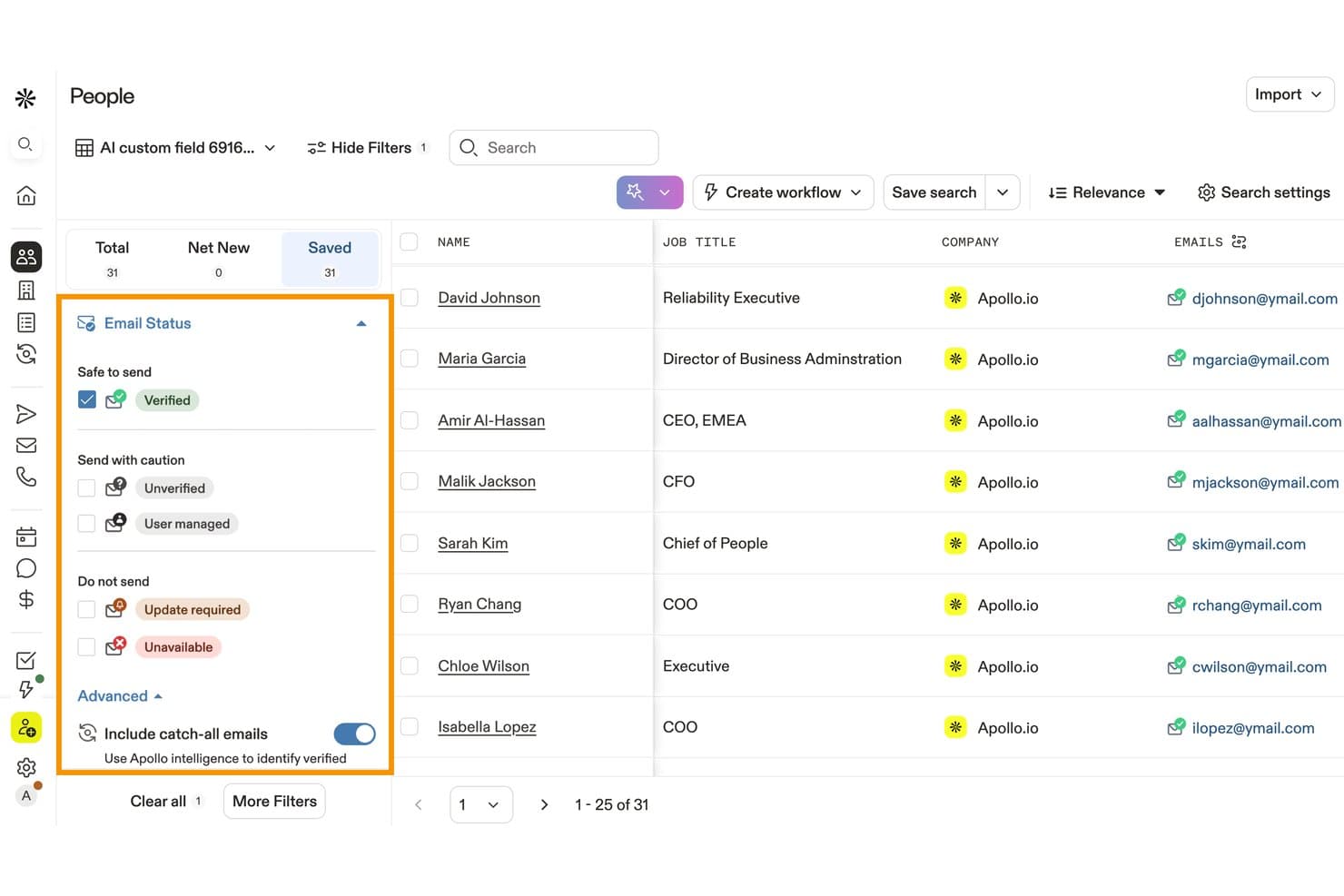
Apollo.io lets users filter contacts by verified email status. Apollo.io is a sales intelligence and engagement platform that includes a proprietary 7-step email verification engine, bulk list validation, catch-all domain detection, and CRM-connected data enrichment.
Who Is Apollo.io Best For?
Apollo.io is a strong fit for sales development teams that want prospecting, sequencing, and email verification in one platform rather than stitching together separate tools.
Why I Picked Apollo.io
Apollo.io earns its spot on my shortlist because its 7-step verification process goes well beyond SMTP tickling, using a contributor network to detect whether a catch-all email has sent real traffic recently. That distinction matters when you're validating large outbound lists where third-party tools would simply flag an entire domain as risky. I also like that bounces are detected and propagated network-wide automatically, with credits refunded, so my team isn't paying for bad data twice.
Apollo.io Key Features
- Bulk CSV verification: Upload and validate prospecting or CRM lists in batches.
- Risk classification: Flags disposable, role-based, catch-all, and invalid addresses.
- Real-time API verification: Verify individual addresses through Apollo’s REST API.
- CRM integrations: Sync verified contact data with Salesforce, HubSpot, and other platforms.
Apollo.io Integrations
Apollo offers native integrations with Salesforce, HubSpot, Pipedrive, Outreach, Salesloft, Marketo, SendGrid, and LinkedIn. It also connects with Zapier and provides a REST API for custom integrations.
Pros and Cons
Pros:
- 7-step verification goes beyond standard SMTP checks
- Bounces are detected and credits refunded automatically
- Verifies catch-all emails other tools flag as unverifiable
Cons:
- Credit system makes costs unpredictable at scale
- International data accuracy drops to 60–73%
Learn more about Apollo.io: Best for real-time email verification
- Free trial available
- From $99/month
Visit WebsiteCustomer Rating:4.9/5This rating combines scores from multiple user review sites to reflect overall customer sentiment about the product.
Findymail verifies individual or bulk email addresses to confirm validity before outreach. For professionals and teams seeking to enhance their email outreach and ensure high deliverability, Findymail offers a sophisticated solution tailored to meet these needs. This platform is particularly appealing to sales teams, marketers, and agencies who understand the critical importance of accurate email verification in maintaining a healthy sender reputation and minimizing bounce rates. By leveraging Findymail's advanced verification algorithms and user-friendly interface, you can optimize your email campaigns and focus on connecting with real prospects, reducing the time spent on managing invalid or risky contacts.
Why I Picked Findymail
I chose Findymail because it excels in providing high-accuracy email verification, a crucial aspect for anyone serious about email marketing. The software's advanced algorithms ensure that you are only communicating with valid email addresses, significantly reducing the risk of bounce rates. Additionally, Findymail's automated data exports and CRM enrichment features make it an invaluable tool for streamlining your workflow and enhancing your email deliverability. These capabilities are supported by responsive customer support, ensuring that you have assistance when needed.
Findymail Key Features
In addition to real-time email verification, Findymail offers:
- Bulk File Processing: This feature lets you process large batches of emails efficiently, saving you time and effort.
- Chrome Extension: Findymail provides a browser extension for real-time email verification, making it convenient to verify emails as you browse.
- Proprietary Verification Algorithm: Findymail verifies every email address in real time using multiple checks, including syntax validation, DNS records, SMTP server verification, catch-all detection, and disposable email filtering. Only deliverable, valid addresses make it through.
- Email and Phone Data Verification: Verify both B2B email addresses and phone numbers in one place, so your team is always reaching the right prospects with accurate contact details.
Findymail Integrations
Integrations include Google Sheets, Close CRM, Super Send, Instantly, Attio, Apollo, Zoho Forms, and Typeform. Additionally, an API is available for custom integrations.
Pros and Cons
Pros:
- Helpful support team resolves verification and enrichment issues quickly
- Strong B2B data coverage improves prospecting and lead enrichment results
- High email verification accuracy reduces bounce rates during outreach campaigns
Cons:
- Limited contact data beyond email compared to broader enrichment platforms
- Heavy reliance on LinkedIn for sourcing contact information
Learn more about Findymail: Best for high-volume bulk email verification
- Free trial available
- From $35/month for up to 5000 verifications
Visit WebsiteCustomer Rating:4.9/5This rating combines scores from multiple user review sites to reflect overall customer sentiment about the product.
Bouncer offers a clean user interface with simplified notes to estimate email deliverability. Bouncer is an easy to use application that allows you to drag and drop your email lists directly into the email checker for instant verification. You can add up to 250,000 addresses at once and the platform will determine safe addresses, disposable addresses, and accept all addresses.
Why I picked Bouncer: This email marketing tool made my list because of its free verification sampling feature. You can test the quality of your list without actually having to verify it, and without using any credits. Bouncer will let you know if your list will perform or if you need to buckle down and verify it to delete invalid email addresses.
Bouncer Standout Features and Integrations
Standout features include a bounce rate estimate that tells you what you can expect from every email list, including how many emails are deliverable, risky, or unknown, GDPR compliance for better data security, and an eight-tier validation process.
Integrations include Aweber, Constant Contact, Convertkit, GetResponse, HubSpot, Integrately, Klaviyo, LemList, Mailchimp, and Moosend.
Pros and Cons
Pros:
- Multiple verification tiers to catch invalid addresses
- Customizable dashboard options
- Very readable, user-friendly interface
Cons:
- Some verifications return an unknown result
- Previews of bounce expectations can be slow to load
Learn more about Bouncer: Best web-based email validation platform with a 99% accuracy rate
- Free demo available
- From $15/2,000 credits
Visit WebsiteCustomer Rating:4.7/5This rating combines scores from multiple user review sites to reflect overall customer sentiment about the product.
ZeroBounce offers a variety of integrations for simple import into their platform. This email verification service offers you a web-based platform that integrates with all your most important marketing and outreach tools for simplified import and export of email data. Their email validator automatically removes spam traps, bots, and spam complaints from your lists to reconnect with subscribers, reach new prospects, and improve click rates.
Why I picked ZeroBounce: I like the ZeroBounce platform for two reasons: they offer higher accuracy rates and faster verification speeds. While most of the best email verification tools boast a 95% accuracy rate, ZeroBounce delivers a 99% accuracy rate. They also ensure email scrubbing of about 100,000 addresses in 45 minutes on their platform and validation in about three seconds through their API.
ZeroBounce Standout Features and Integrations
Standout features include military-grade data encryption to keep email addresses and company information secure during verification, real-time email verification at the point of entry through their API, and 24/7 customer support through chat, phone, and email.
Integrations include ActiveCampaign, Asana, CapSumo, Constant Contact, Drip, easysendy, Gmail, JotForm, Make, and MassMailer. Native, third party, and Zapier integrations are available.
Pros and Cons
Pros:
- Very high accuracy in comparison to other tools
- Very good customer support
- Real-time email verification capabilities
Cons:
- Slightly outdated dashboard and navigation
- No subscription pricing structure option
Learn more about ZeroBounce: Best for comprehensive marketing campaign management
- 14-day free trial + free demo available
- From $10.80/month
Visit WebsiteCustomer Rating:4.7/5This rating combines scores from multiple user review sites to reflect overall customer sentiment about the product.
The MailerLite dashboard shows you everything you need to see for your marketing campaign. MailerLite is a comprehensive email marketing platform with a variety of tools to streamline your outreach. Their integrated MailerCheck feature is what you use to verify email addresses with syntax check and disposable email detection. You also get verification usage reports and a breakdown of bad email addresses.
Why I picked MailerLite: I chose the MailerLite platform because it offers a more holistic functionality for your email marketing campaigns than most of the email verification software on this list. In addition to email verification, you also get newsletter editing, email automation, and website building all in one place.
MailerLite Standout Features and Integrations
Standout features include automated transactional emails to confirm purchases and orders for customers, email marketing forms to drive new sign-ups and subscriptions, and a massive selection of email templates with forms for every occasion.
Integrations include BigCommerce, Facebook Audiences, JotForm Sign, MailerCheck, Make, Shopify, Stripe, WooCommerce, and WordPress. Integrations are also available through Zapier.
Pros and Cons
Pros:
- Easy to navigate and learn
- Comprehensive marketing platform with verification addon
- Free base plan available
Cons:
- Some integrations are still in testing
- Limited reporting capabilities for emails
Learn more about MailerLite: Best CRM with an emphasis on email verification
- Free plan available
- From $39/month
Visit WebsiteCustomer Rating:4.5/5This rating combines scores from multiple user review sites to reflect overall customer sentiment about the product.
Snov.io offers drip campaign flowcharts for simplified outreach. As an email-focused CRM platform, Snov.io offers efficient contact management and cold outreach with a number of email finding and verifying features. You can use Snov.io to find, track, and convert leads in one place with individual and bulk email verification that reduces your bounces and enhances deliverability.
Why I picked Snov.io: This platform made my list of top email verification tools because of its integration capacity. Currently, Snov.io offers over 5,000 integrations with your favorite tools and apps. You can round out nearly any tech stack combination with this tool to ensure better communication between all your sales and marketing platforms.
Snov.io Standout Features and Integrations
Standout features include a real-time API email address verifier that’s built directly into your platform for integrated lead form sign-up and email validation at registration and a seven-tier validation process that includes SMTP ping and MX record checks.
Integrations include Google Forms, Hippo Video, HubSpot, Intercom, LinkedIn Lead Gen Forms, Pipedrive, Phantombuster, Salesforce, Slack, and Trello.
Pros and Cons
Pros:
- Free plan available for beginners
- Robust set of marketing features
- Very user-friendly interface
Cons:
- Slow load times with certain features
- No pay as you go options
Learn more about Snovio: Best for precise email verification results
- Free 100 verifications + free demo available
- From $5/500 verifications
Visit WebsiteCustomer Rating:4.5/5This rating combines scores from multiple user review sites to reflect overall customer sentiment about the product.
Kickbox displays email verification results with deliverability status and risk analysis for uploaded contact lists. Kickbox stands for businesses aiming to improve their email marketing efforts by ensuring email list accuracy and reducing undeliverable emails. Whether you're a developer, agency, enterprise, or non-profit, Kickbox caters to your need for reliable email communication across industries like tech, e-commerce, and financial services. By addressing challenges such as high bounce rates and spam complaints, Kickbox helps protect your sender reputation and improve overall engagement.
Why I Picked Kickbox
I picked Kickbox because of its ability to deliver precise email verification results through its Email List Verification and Verification API features. Email List Verification allows you to clean your lists by removing invalid or risky addresses, an important step in maintaining a healthy sender reputation. The Verification API offers integration into your existing systems, enabling real-time verification that helps prevent invalid emails from entering your database. These features directly address the need for accurate email communication, making Kickbox a valuable tool for any organization looking to refine its email marketing strategy.
Kickbox Key Features
In addition to its core verification capabilities, Kickbox offers several other features and services to improve your email management experience:
- Deliverability Consulting: Provides expert advice to improve your email deliverability rates and address any potential issues.
- Spam Checker: Identifies potential spam triggers in your emails to help you avoid deliverability problems.
- Disposable Email Checker: Detects temporary email addresses to prevent them from entering your lists.
- GDPR and CCPA Compliance: Ensures your email verification process adheres to data protection regulations.
Kickbox Key Features
Integrations include HubSpot, Mailchimp, Klaviyo, SendGrid, Zapier, ActiveCampaign, Constant Contact, Brevo, GetResponse, and more.
Pros and Cons
Pros:
- Free initial verifications are available for new users
- Flexible pay-as-you-go pricing benefits smaller businesses
- Fast processing of email lists enhances efficiency for users
Cons:
- Fewer data security certifications compared to competitors
- The tool can occasionally flag valid email addresses as risky or invalid
Learn more about Kickbox: Best for cloud-based and on-premise email verification needs
- 30-day free trial
- From $39.95/month
Visit WebsiteCustomer Rating:4.5/5This rating combines scores from multiple user review sites to reflect overall customer sentiment about the product.
SocketLabs has an easy-to-read outbound email list quality score. SocketLabs uses proprietary email server technology, personalized customer support, and advanced analytics to ensure you can deliver essential transactional and marketing emails to customer mailboxes, gain insight into your performance with visual analytics, and capture and store new email addresses in their highly secure email management system.
Why I picked SocketLabs: This platform made my list because of its StreamScore feature, which uses a simple color-coded system to help you keep track of your domain reputation. You never have to spend hours digging and checking with this unique tool at your fingertips.
SocketLabs Standout Features and Integrations
Standout features include recipient search functionality that shows you mailing ID and date, as well as an event timeline of receipt, open, and click for every email. SocketLabs also offers one-click SSL and MTA-STS enforced TLS encryption while emails are in transit.
Integrations include EmailDelivery.com, Limo Anywhere, Okta, Ongage, Qualtrics CoreXM, Qualtrics CustomerXM, Qualtrics EmployeeXM, Storage Commander Cloud, and WordPress.
Pros and Cons
Pros:
- Very reliable and responsive support
- Straightforward setup and configuration
- Easy to learn and use
Cons:
- Cannot have multiple SMTP credentials
- Limited details on reports and analytics
Learn more about SocketLabs: Best for continuous protection of your domains
- Free plan available
- Pricing upon request
Visit WebsiteCustomer Rating:4.5/5This rating combines scores from multiple user review sites to reflect overall customer sentiment about the product.
Valimail shows you who is sending emails on your behalf and whether they’re being delivered. This platform isn’t exactly the same as the other email validation services on this list. Instead of verifying addresses on your list, it tracks the number of emails and domains that are sending messages on your behalf. Valimail offers DMARC as a service to stop impersonation attacks and protect sender reputations so your most important messages never end up in spam email.
Why I picked Valimail: This platform is on my list of best email verification services because it champions continued trust and safety in the email ecosystem. I also like Valimail because they’re a vetted Microsoft 365 and Twilio SendGrid partner that holds high positions in every single important email authentication standards organization.
Valimail Standout Features and Integrations
Standout features include DMARC monitoring to identify every sending service in your email ecosystem to prevent duplicate emails and blacklist untrustworthy domains and access to unlimited SPF lookups so you never risk blocking a good email.
Integrations include ActiveDirectory, IBM Cloud, Microsoft 365, Okta, SendGrid, and Twilio.
Pros and Cons
Pros:
- Great customer support services
- Easy to implement into your workflow
- User-friendly interface and seamless integration
Cons:
- No alert or notification options
- Initial configuration can be complex
Learn more about Valimail: Best for B2B prospecting that connects you with decision makers
- Free plan available
- From $27/month (billed annually)
Visit WebsiteCustomer Rating:4.3/5This rating combines scores from multiple user review sites to reflect overall customer sentiment about the product.
RocketReach has a Chrome extension that allows you to work directly on LinkedIn. This email validation tool helps organizations find and engage with audiences to increase marketing and sales efforts by automating the lead generation process. RocketReach has a massive database of verified phone numbers and emails to connect you with the decision makers at startups, universities, hospitals, and major corporations.
Why I picked RocketReach: I like RocketReach because it goes beyond simply verifying emails for marketing — this platform has already aggregated a database for you using over 100 public databases, including government listings, social networks, and phone directories. You can search over 700 million profiles and 35 million companies with filters like location, industry, and company details.
RocketReach Standout Features and Integrations
Standout features include a browser extension that allows you to prospect on the most popular social media sites, bulk lookups that allow you to download huge lists of anyone that meets your specific criteria, and CSV data export so you can take essential details with you everywhere.
Integrations include elay, Gmail, HubSpot, Salesforce, SalesLoft, Slack, Outreach, Tracker, and Zapier. You can also create custom integrations or use the RocketReach API.
Pros and Cons
Pros:
- Intuitive organization and navigation
- Simple dashboard layout
- Plenty of free credits
Cons:
- No copy function; every contact automatically opens in your email
- Slight delay in real-time updates
Learn more about RocketReach:
Other Email Verification Software
Here are some additional email verification software options that didn’t make it onto my shortlist, but are still worth checking out:
- 11Elastic EmailBest for built-in verification and sending
- 12Clearout.ioBest for verifying both purchased lists and custom email lists
- 13DeBounceBest for email validation with anti-greylisting technology
- 14Proofy.ioBest for protecting your domain reputation score
- 15IntersellerBest for combining reliable email sourcing and outreach
- 16ListcleanBest for roles-based email communications
- 17Email CheckerBest free email verification software for freelancers or individuals who have minimal needs.
- 18UpLeadBest email verifying software for accuracy with a 95% data accuracy rate to remove bad-fit buyers.
- 19LeadIQBest software for helping SaaS sales teams improve prospecting to book more meetings.
- 20Reoon Email VerifierBest software with a focus on identifying spam traps and complaint emails.
- 21ZoomInfo SalesOSBest for B2B sales, data-driven insights, and buying signals from your email lists.
- 22Skrapp.ioBest software that targets LinkedIn email verification to collect essential business data.
- 23DemandToolsBest for managing and verifying email lists in bulk through repeatable processes.
- 24MyEmailVerifierBest software for identifying disabled users with Yahoo and AOL domains.
How I Evaluate Email Verification Software
I split evaluation into two layers: baseline capabilities a tool must have—SMTP verification, bulk list processing, risk classification—and the differentiators that set the best options apart.
Core Functionality (Table Stakes For This List)
When I'm selecting tools for my list, I rank each one on a scale from 0 (does not offer the functionality) to 5 (excels in this area) for each core functionality listed below. Then, I calculate the tool's total score into a percentage. Each tool needs to achieve a minimum total score of 65% to be considered for inclusion.
- Syntax & Format Validation: I check whether a tool catches malformed addresses, typo domains, and RFC violations before deeper checks even run—think "gmial.com" or missing TLDs.
- SMTP & Mailbox Verification: This is where I evaluate how well a tool confirms an inbox actually exists via SMTP handshake without sending a live email.
- Bulk List Processing: I look for the ability to upload large CSV files of prospect or CRM data and get segmented results back quickly—especially for pre-campaign list cleans.
- Real-Time API Verification: A well-documented REST API with sub-second response times matters here, particularly for validating emails at the point of capture on forms.
- Risk & Deliverability Classification: Beyond valid/invalid, I evaluate whether a tool flags catch-all domains, disposable addresses, role-based emails, and spam traps with clear labels.
- CRM & MAP Integrations: Native connections to platforms like Salesforce, HubSpot, and Marketo tell me how well the tool fits into a RevOps team's existing workflow.
Once I have a list of tools that meet this criteria, I consider what sets each platform apart.
Differentiating Factors (What Sets Vendors Apart)
Here's how I compare and contrast different vendors:
Standout Features
Automated CRM list hygiene is a big differentiator—I look for tools that re-verify records on a recurring schedule so your Salesforce or HubSpot database stays clean without manual exports. Catch-all domain detection also matters, since these domains return false positives that inflate bounce risk on cold outreach. I evaluate how well each tool scores or flags catch-all addresses rather than just labeling them "unknown." A deliverability analytics dashboard that tracks list health trends over time helps RevOps teams report on data quality improvements to leadership.
Beyond Features
Pricing model flexibility is one of the first things I evaluate. RevOps teams often run large one-off list cleans alongside steady API verification, so I check whether a vendor supports both pay-as-you-go credits and subscription plans with rollover. Data security also weighs heavily—when you're uploading prospect lists with PII, I look for SOC 2 compliance and clear data deletion policies. Accuracy and bounce guarantees round out my evaluation, since vendors that back their results with published accuracy rates give you confidence before pressing send on a major outbound campaign.
How to Choose Email Verification Software
It’s easy to get bogged down in long feature lists and complex pricing structures. To help you stay focused as you work through your unique software selection process, here’s a checklist of factors to keep in mind:
| Factor | What to Consider |
|---|---|
| FactorScalability | What to ConsiderCan the software handle your growing email lists? Check if it supports high volumes without performance issues. |
| FactorIntegrations | What to ConsiderDoes it integrate with your current CRM or marketing tools? Ensure it works seamlessly with your existing systems. |
| FactorCustomizability | What to ConsiderCan you tailor the software to fit your workflows? Look for options that let you adjust settings or reports. |
| FactorEase of use | What to ConsiderIs the interface intuitive for your team? Test the demo to see if it's user-friendly and easy to navigate. |
| FactorImplementation and onboarding | What to ConsiderHow quickly can your team get started? Consider the availability of training resources and support during setup. |
| FactorCost | What to ConsiderDoes the pricing fit your budget? Compare costs across vendors, considering both initial fees and ongoing expenses. |
| FactorSecurity safeguards | What to ConsiderAre there measures to protect your data? Look for encryption, data privacy policies, and compliance with standards. |
| FactorSupport availability | What to ConsiderWhat support options are available? Check if there's 24/7 support and how quickly they respond to inquiries. |
What Is Email Verification Software?
Email verification software is a tool that checks whether email addresses on your list are real, safe, and ready to receive messages. Marketers, sales teams, and anyone running email campaigns use it to avoid sending messages to fake, mistyped, or risky addresses. You’ll see fewer bounces, save money by not emailing bad contacts, and protect your sender reputation—all while focusing your efforts on people who might actually reply.
Features
When selecting email verification software, keep an eye out for the following key features:
- Real-time validation: Instantly checks email addresses as they're entered to ensure they're valid and active, reducing bounce rates.
- Duplicate removal: Identifies and eliminates duplicate entries in your email list, keeping your data clean and organized.
- Syntax error detection: Spots and corrects common formatting errors in email addresses, ensuring accuracy in your database.
- Bulk verification: Allows you to verify large lists of email addresses at once, saving time and effort in list management.
- Email scoring: Rates the quality of email addresses, helping you prioritize high-value contacts for your campaigns.
- Data enrichment: Enhances email addresses with additional information, providing more insights for targeted marketing efforts.
- SMTP relay integration: Ensures reliable delivery by integrating with your existing email systems for smooth sending.
- GDPR compliance: Provides features that help you adhere to data protection regulations, ensuring legal compliance.
- Activity data tracking: Monitors engagement levels of your email addresses, allowing you to refine your communication strategies.
- Advanced reporting: Offers detailed analytics and reports on your email verification processes, aiding in performance optimization.
Benefits
Implementing email verification software provides several benefits for your team and your business. Here are a few you can look forward to:
- Improved deliverability: By validating email addresses, you ensure more of your messages reach their intended recipients, reducing bounce rates.
- Enhanced data quality: Duplicate removal and syntax error detection keep your email lists accurate and organized, leading to better data management.
- Cost savings: Verifying emails before sending reduces wasted resources on invalid addresses, optimizing your marketing budget.
- Increased engagement: Email scoring helps you identify high-value contacts, allowing you to focus your efforts on more promising leads.
- Legal compliance: Features like GDPR compliance ensure your email practices adhere to data protection regulations, avoiding legal issues.
- Better decision-making: Advanced reporting provides insights into your email verification processes, helping you make informed marketing decisions.
- Time efficiency: Bulk verification allows you to process large lists quickly, freeing up time for other tasks.
Costs & Pricing
Selecting email verification software requires an understanding of the various pricing models and plans available. Costs vary based on features, team size, add-ons, and more. The table below summarizes common plans, their average prices, and typical features included in email verification software solutions:
Plan Comparison Table for Email Verification Software
| Plan Type | Average Price | Common Features |
|---|---|---|
| Plan TypeFree Plan | Average Price$0 | Common FeaturesBasic verification, limited email checks, and access to support. |
| Plan TypePersonal Plan | Average Price$5-$25/user/month | Common FeaturesReal-time validation, syntax error detection, and duplicate removal. |
| Plan TypeBusiness Plan | Average Price$30-$100/user/month | Common FeaturesBulk verification, email scoring, GDPR compliance, and activity data tracking. |
| Plan TypeEnterprise Plan | Average Price$150-$500/user/month | Common FeaturesAdvanced reporting, customizable integrations, priority support, and API access. |
Email Verification Software FAQs
Here are some answers to common questions about email verification software:
How often should you verify your email list?
You should verify your email list every few months if you add new contacts regularly. Doing this helps you maintain a clean list and avoid sending to addresses that may have gone inactive. For new subscribers, verify emails at the point of sign-up to prevent bad data from entering your system in the first place.
What happens if you don’t verify your email list regularly?
If you skip verification for too long, you risk sending to invalid or inactive addresses. This can lead to higher bounce rates and poor sender reputation over time. It also makes your campaign metrics less reliable, which can cause you to make bad decisions about your email strategy.
What types of emails are commonly flagged during verification?
Commonly flagged emails include disposable addresses, role-based accounts like “info@” or “support@,” and domains that can’t receive mail. Some addresses may also be marked as risky if they’ve bounced before or belong to inactive users. It’s best to review these categories and decide which ones to remove or monitor.
How does email verification help with campaign performance tracking?
By verifying your list, you can trust that engagement metrics like opens and clicks come from real people. This helps you make data-driven adjustments to your messaging and targeting. Without verification, inaccurate data from fake or inactive addresses can distort your results and waste your team’s effort.
What’s Next:
If you're in the process of researching customer database software, connect with a SoftwareSelect advisor for free recommendations.
You fill out a form and have a quick chat where they get into the specifics of your needs. Then you'll get a shortlist of software to review. They'll even support you through the entire buying process, including price negotiations.