

As a lawyer, it can be challenging to effectively manage client relationships and streamline processes when you’ve got several other events and tasks taking up your time. Finding a reliable CRM software for law firms can help you keep up with your cases and automate operations, but with so many options on the market, it can be even more daunting to know where to start.
To help lawyers get started in their search, I used my experience in digital software to test and review several of the top solutions on the market. Whether you’re a small firm or a large merger, I’m assured that my in-depth reviews will lead you towards locating your next CRM software, effectively boosting overall productivity and relationship processes.
Why Trust Our Software Recommendations
6,700+
Reviews
20
Industry experts
16+
Evaluation factors
14
Years
Our reviews reflect our independent judgment—not a sales pitch. Learn how we stay transparent.
For this guide, we evaluated tools using hands-on testing and independent research, scoring tools using our selection criteria.
Our reviews reflect our human editorial judgment, not a sales pitch.
Comparison Table: CRM Software for Law Firms
| Tool | Best For | Trial Info | Price | ||
|---|---|---|---|---|---|
| 1 | Best for AI-powered sales insights | 21-day free trial | From $9/user/month (billed annually) | Website | |
| 2 | Best for client intake automation | 7-day free trial | From $49/user/month (billed annually) | Website | |
| 3 | Best for all-in-one case management | 10-day free trial | From $50/user/month (billed annually) | Website | |
| 4 | Best for workflow development | Free demo available | Pricing upon request | Website | |
| 5 | Best for visual sales pipeline development | 14-day free trial | Pricing upon request | Website | |
| 6 | Best for advanced practice management | 10-day free trial | From $59/user/month (billed annually) | Website | |
| 7 | Best for AI-driven sales tools | 30-day free trial | From $325/user/month (billed annually) | Website | |
| 8 | Best for marketing processes | Free demo available | Pricing upon request | Website | |
| 9 | Best for relationship management | Free demo available | Pricing upon request | Website | |
| 10 | Best for integrated legal accounting | 10-day free trial | From $49/user/month | Website |


Best CRM Software for Law Firms Reviews
This in-depth analysis provides overviews of various CRM software tailored for law firms. It covers the pros and cons, their features, and their best use cases.
 Best for AI-powered sales insights
- 21-day free trial
- From $9/user/month (billed annually)
Visit WebsiteCustomer Rating:4.6/5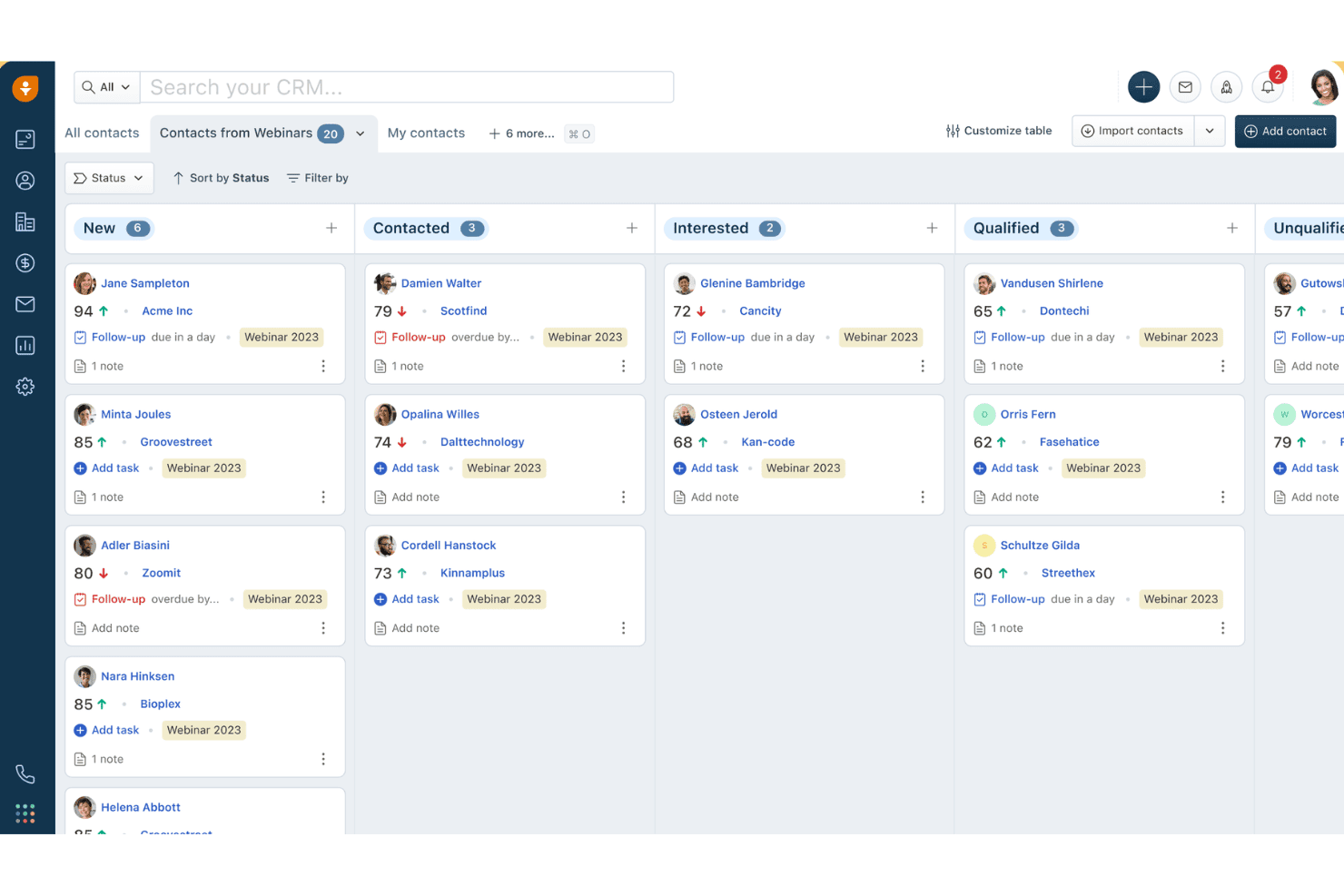
Freshsales organizes webinar contacts by status in a kanban board view. Freshsales is a sales CRM platform that offers AI-powered lead scoring, multi-channel communication, pipeline management, workflow automation, and built-in marketing tools that law firms can configure for client intake and business development.
Who Is Freshsales Best For?
Freshsales fits law firms that prioritize AI-driven lead prioritization and marketing automation over legal-native features like conflict checks or matter management.
Why I Picked Freshsales
Freshsales earns its spot on my shortlist because Freddy AI does something most legal CRMs can't: it scores incoming leads based on real behavioral signals like email opens and site visits, so your intake team knows exactly which prospects to call first. I also like that Freddy flags stalled deals and drafts personalized follow-up emails automatically, which keeps BD pipelines moving without manual oversight. Pair that with a 24/7 AI chatbot for after-hours lead capture, and you've got a genuinely intelligent intake qualification layer.
Freshsales Key Features
- Custom lifecycle stages: Configure contact stages to mirror your firm's intake pipeline steps, from initial inquiry through to retained client.
- Marketing journey builder: Build automated drip campaigns with conditional logic across email and SMS to nurture prospects and past clients.
- Built-in VoIP dialer: Make and receive calls directly in the CRM with click-to-call, call logging, and call recording included natively.
- Attribution reporting: Trace which channels and campaigns generated leads and closed business using built-in source-to-revenue attribution reports.
Freshsales Integrations
Freshsales offers native integrations across Google Workspace, Microsoft 365, Slack, Zoom, QuickBooks, WhatsApp Business, and Apple Business Chat. Marketplace integrations include PandaDoc, DocuSign, and Calendly; API access and webhooks support custom connections to legal practice management systems.
Pros and Cons
Pros:
- Multi-channel outreach via chat, SMS, WhatsApp
- Built-in marketing automation for client nurture
- AI scores leads and flags deal risks
Cons:
- Lacks conflict check and legal templates
- No native matter management workflow support
Learn more about Freshsales: Best for client intake automation
- 7-day free trial
- From $49/user/month (billed annually)
Visit WebsiteCustomer Rating:4.7/5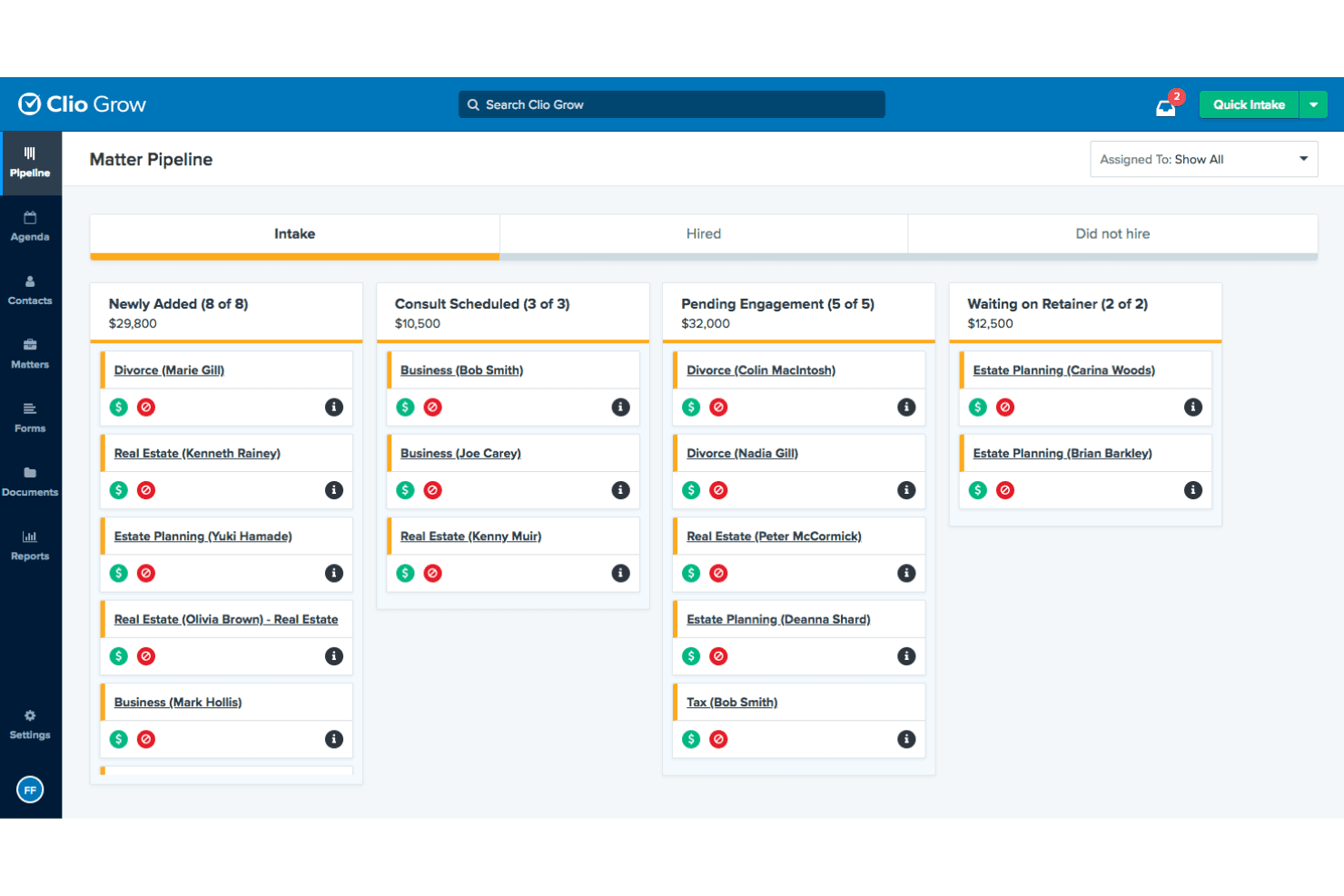
Clio Grow's Matter Pipeline tracks leads across intake stages. Clio Grow is a legal-specific CRM built for law firms that combines a Kanban intake pipeline, customizable intake forms, conflict-of-interest checking, referral source tracking, and automated client follow-up workflows.
Who Is Clio Grow Best For?
Clio Grow is a strong fit for small to mid-sized law firms that need a structured, legal-specific intake pipeline rather than a general-purpose CRM.
Why I Picked Clio Grow
Clio Grow earns its spot on my shortlist because no other tool I've reviewed handles legal client intake with this level of purpose-built specificity. I'm particularly drawn to its Kanban Matter Pipeline, where staff can move prospective clients through fully customizable intake stages, from first contact through signed retainer, without ever leaving the platform. The native conflict-of-interest search runs directly within the intake workflow, so coordinators catch issues before they become liability problems. Add Clio Grow AI's after-hours lead screening and booking, and the intake process essentially runs itself.
Clio Grow Key Features
- Referral source tracking: A dedicated Referral Report captures each referring contact's total matters referred, hired counts, average value, and conversion rates.
- Lead source revenue reporting: The Lead Source Revenue Report combines pipeline estimates and actual collected revenue by marketing channel, including Google LSA spend and ROI.
- Native two-way SMS messaging: Firms can send intake forms, agreements, and appointment reminders via text and receive replies through a firm-assigned toll-free number.
- CallRail integration: Inbound calls are tracked, recorded, and matched to existing Clio Grow contacts for accurate phone-based lead-source attribution.
Clio Grow Integrations
Native integrations include Clio Manage, Dropbox Sign, CallRail, and Google Local Services Ads; Clio Grow also supports Ruby Receptionists, QuickBooks, Xero, Google Drive, Dropbox, Gmail, Outlook, and Zapier, plus an API for custom integrations.
Pros and Cons
Pros:
- Matter and referral tracking purpose-built for law firms
- AI assistant screens and books leads after hours
- Built-in conflict checking at intake
Cons:
- Advanced revenue forecasting features are missing
- No dedicated mobile app for intake
Learn more about Clio Grow: Best for all-in-one case management
- 10-day free trial
- From $50/user/month (billed annually)
Visit WebsiteCustomer Rating:4.6/5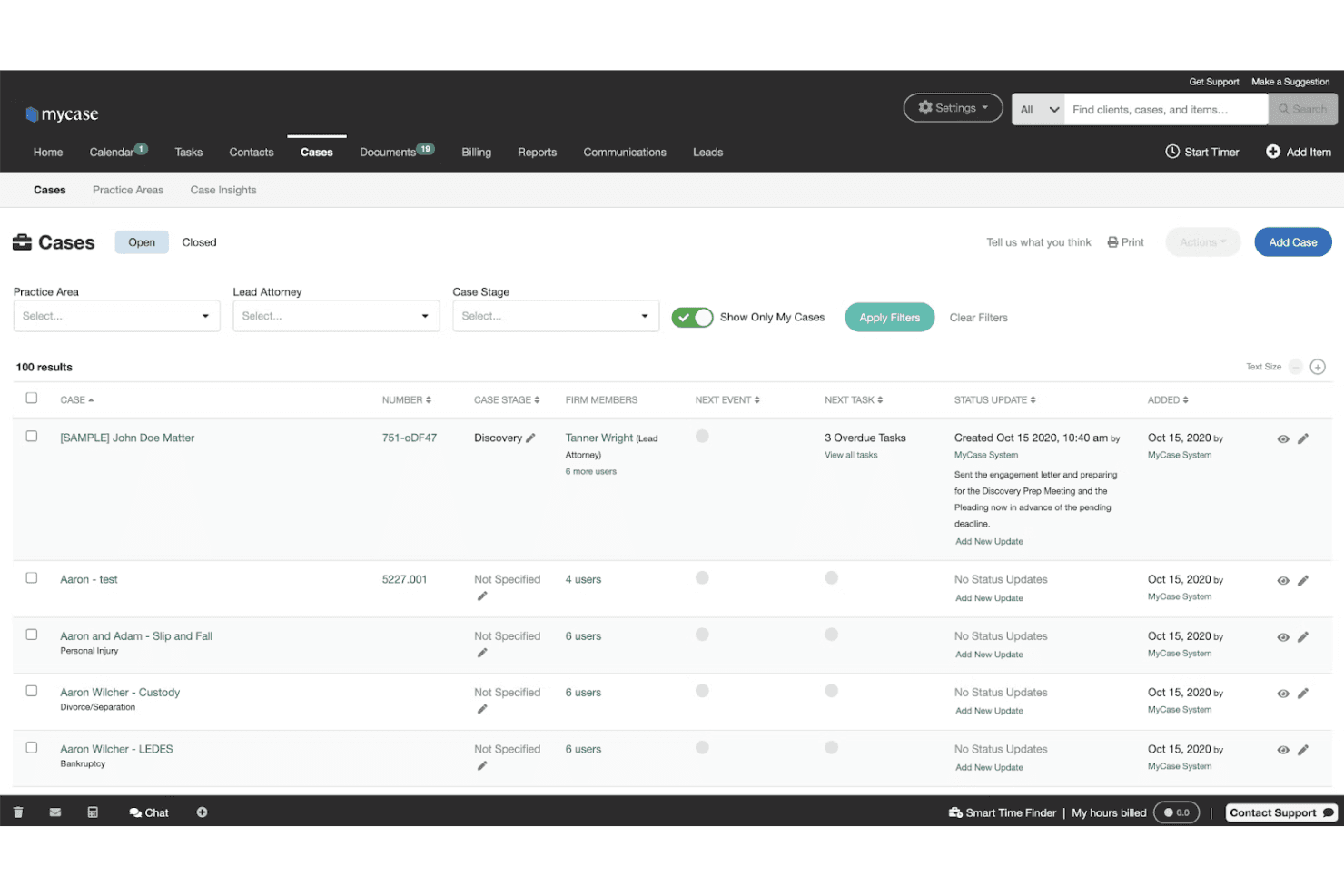
MyCase lets users manage and track all open cases in one view. MyCase is a legal practice management platform that combines client intake, CRM, case management, billing, document automation, eSignature, and client communication tools in a single subscription.
Who Is MyCase Best For?
MyCase is a strong fit for small to mid-sized law firms that want case management, client intake, billing, and communications in one subscription instead of stitching together separate tools.
Why I Picked MyCase
MyCase earns its spot on my shortlist because it's the rare legal platform that keeps case management, client intake, billing, and communications inside one subscription rather than splitting them across separate products. I particularly like how intake forms with conditional logic auto-populate case files directly, cutting out duplicate data entry the moment a lead converts. The built-in unlimited eSignature and two-way SMS (both included on Pro) mean firms can move a prospect from inquiry to signed retainer without leaving the platform.
MyCase Key Features
- Two-way SMS messaging: Send and receive text messages with clients from a dedicated firm number, with all conversations automatically saved to the case record.
- LawPay payment processing: Accept IOLTA-compliant online payments, set up payment plans, and offer client financing directly within the platform.
- 50-state court rules calendaring: Automatically calculate filing deadlines based on a built-in database of court rules across all U.S. states.
- 8am IQ AI suite: Access case, document, writing, and discovery AI assistants natively on the Advanced plan, with no separate subscription required.
MyCase Integrations
MyCase offers 70+ integrations, including LawPay, QuickBooks, Microsoft Outlook, Gmail, Lawmatics, CallRail, Mailchimp, Attorney Share, and LawKPIs, plus Zapier. Advanced includes an Open API for custom integrations.
Pros and Cons
Pros:
- Built-in unlimited eSignature and two-way SMS
- Legal intake forms auto-populate case files
- Combines intake, CRM, billing, and communication
Cons:
- No native email drip or nurture campaigns
- Conflict check lacks automation and relationship mapping
Learn more about MyCase: Best for workflow development
- Free demo available
- Pricing upon request
Visit WebsiteCustomer Rating:4.6/5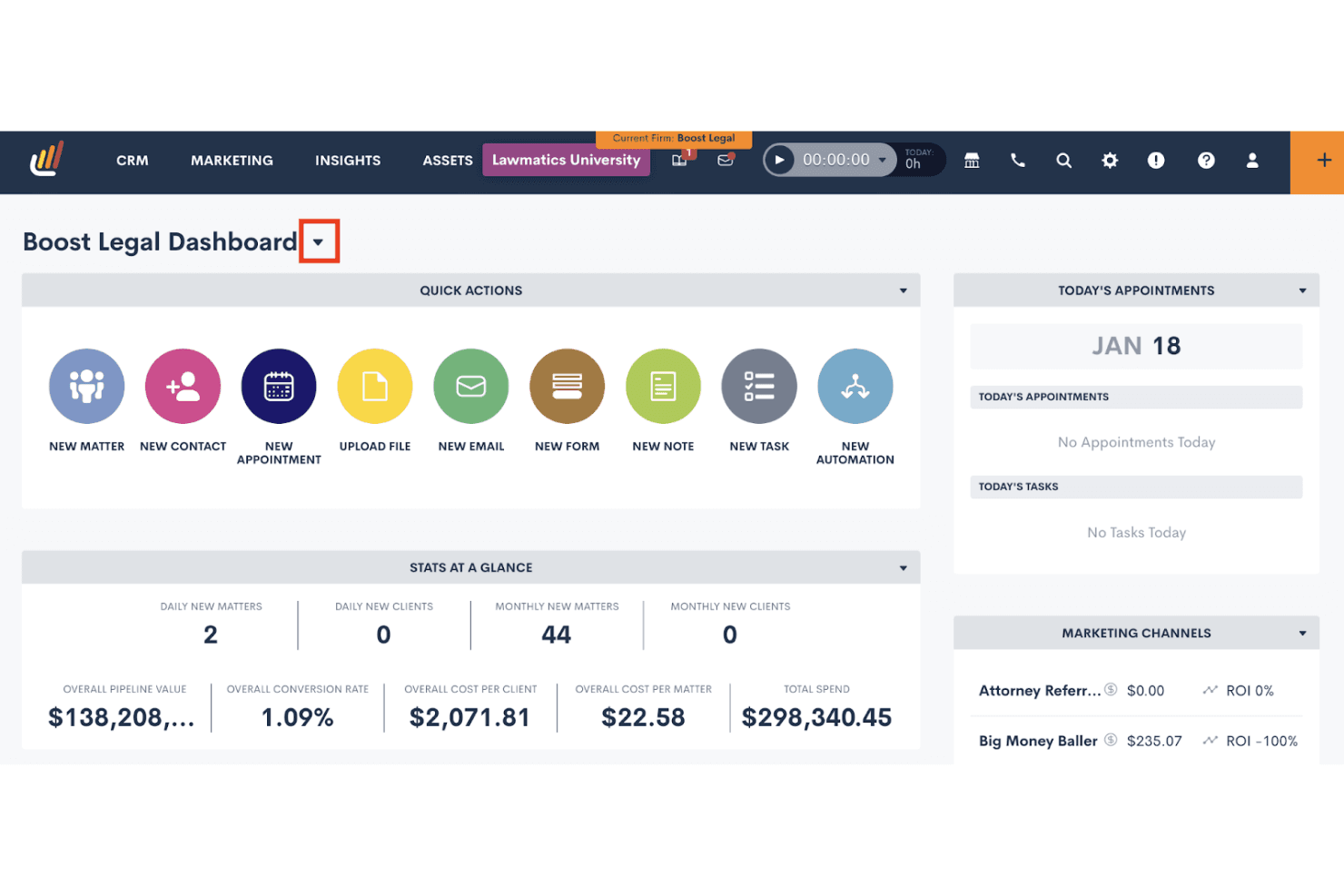
Lawmatics centralizes client intake, tasks, and marketing ROI in one dashboard. Lawmatics is a legal-specific CRM built for law firms that combines client intake management, workflow automation, conflict checking, referral source tracking, pipeline reporting, and marketing campaign tools.
Who Is Lawmatics Best For?
Lawmatics is a strong fit for mid-size law firms that want to automate intake-to-onboarding workflows across multiple practice areas without building everything from scratch.
Why I Picked Lawmatics
Lawmatics earns its spot on my shortlist because its workflow automation engine is genuinely built for law firms, not retrofitted from a generic CRM. I love that you can build conditional, multi-step automations that fire the moment a lead submits an intake form, routing them through follow-ups, conflict checks, and e-signature requests without any manual handholding. Merlin Copilot lets you generate those automations using plain-language prompts, which cuts setup time considerably.
Lawmatics Key Features
- Referral source tracking: Pulls referrers directly from existing CRM contacts and logs each referrer's total matter count and hire count in one place.
- Native e-signature with deadline enforcement: Sends, tracks, and enforces signing deadlines on retainer agreements and intake documents without a third-party tool.
- Merlin Qualify AI lead scoring: Scores incoming leads against firm-defined criteria and triggers next steps—like scheduling or retainer sends—based on each score.
- Multi-channel lead capture: Captures leads from web forms, virtual receptionists, chatbots, and legal directories and routes them into the intake pipeline automatically.
Lawmatics Integrations
Lawmatics offers native integrations with Clio, 8am™ MyCase, PracticePanther, Filevine, Smokeball, LEAP, CARET Legal, CallRail, Google Calendar, and Microsoft Outlook. Its REST API, OAuth2, and webhooks support custom integrations.
Pros and Cons
Pros:
- Native e-signature and branded client portal included
- Customizable workflow automation for any practice area
- Built-in legal intake automation with Kanban pipeline
Cons:
- Specific report types missing for some firms
- No built-in post-case review requests
Learn more about Lawmatics: Best for visual sales pipeline development
- 14-day free trial
- Pricing upon request
Visit WebsiteCustomer Rating:4.4/5
Pipedrive organizes deals across pipeline stages in a kanban view. Pipedrive is a sales-focused CRM platform that offers visual pipeline management, lead capture tools, workflow automation, and email outreach for tracking prospective clients from first contact through intake and retainer signing.
Who Is Pipedrive Best For?
Pipedrive is a strong fit for small and boutique law firms that already use a separate practice management system and need a dedicated tool for tracking prospective clients through a visual intake pipeline.
Why I Picked Pipedrive
Pipedrive earns its spot on my shortlist because its visual Kanban pipeline makes it genuinely easy to see where every prospective client sits, from first contact through retainer signing, without digging through records. I like how intake stages are fully customizable, so you can map your exact process: consultation booked, conflict check pending, retainer sent. The LeadBooster add-on adds a 24/7 chatbot and embeddable web forms that capture leads directly into that pipeline automatically.
Pipedrive Key Features
- Campaigns add-on: A built-in email marketing tool for sending segmented nurture campaigns to prospects and past clients directly from CRM contact data.
- DocuSign integration: Lets you generate, auto-fill, and send retainer agreements or engagement letters from within a deal record and track signature status.
- Meeting Scheduler: A self-booking tool that lets prospects schedule consultations directly on an attorney's calendar without back-and-forth emails.
- Leads Inbox: A staging area for unqualified leads where you can assign warm, hot, or cold labels and schedule follow-up activities before moving contacts into your main pipeline.
Pipedrive Integrations
Pipedrive offers Marketplace integrations with DocuSign, PandaDoc, and QuickBooks, plus native Google Workspace and Microsoft Outlook/Teams connectivity. Its API supports custom links to practice management systems, and it also integrates with Clio through Zapier.
Pros and Cons
Pros:
- AI-driven email and reporting features
- Deep intake workflow customization options
- Visual Kanban pipeline for intake tracking
Cons:
- Lacks matter-centric legal data structure
- No native legal conflict check capability
Learn more about Pipedrive: Best for advanced practice management
- 10-day free trial
- From $59/user/month (billed annually)
Visit WebsiteCustomer Rating:4.4/5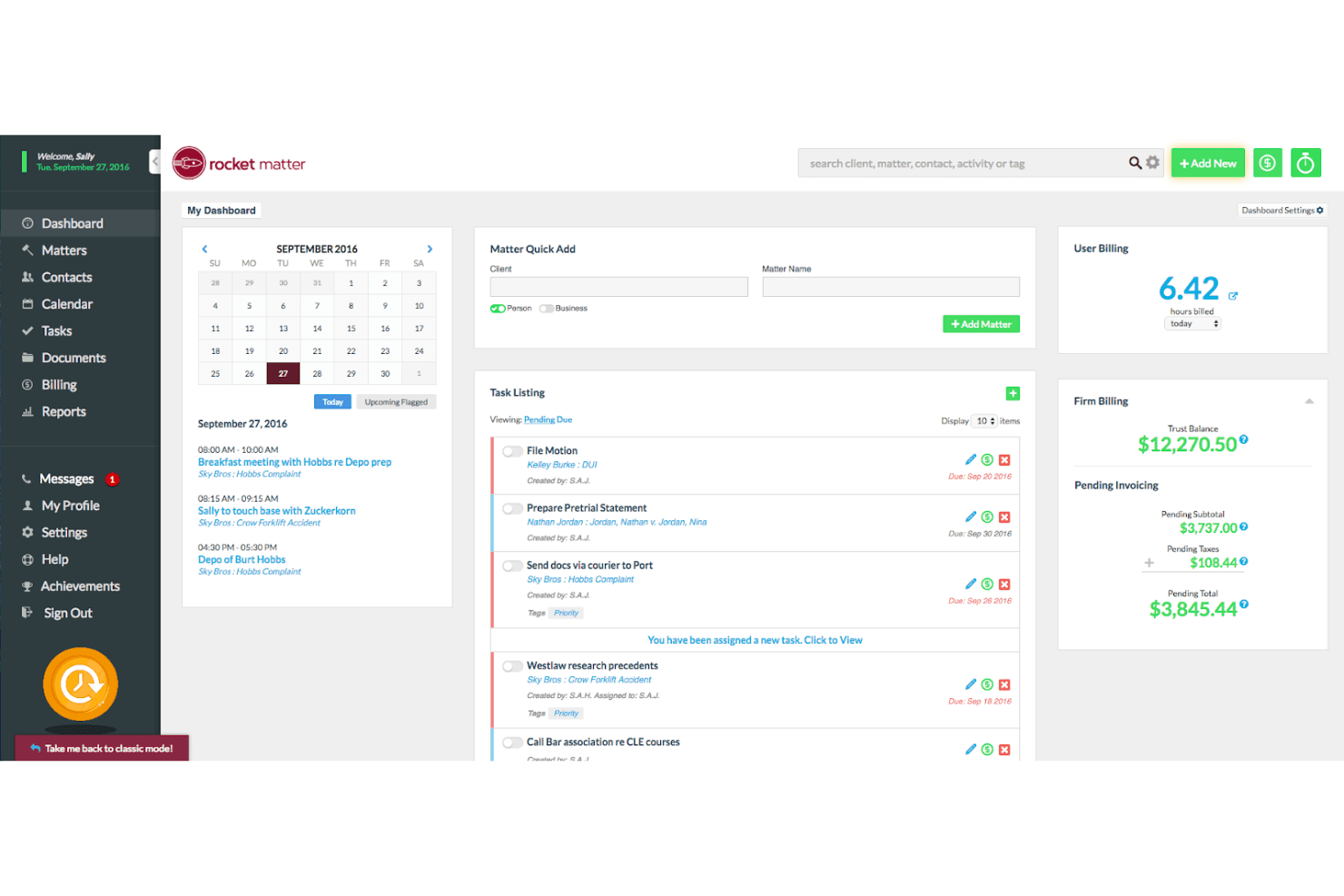
Rocket Matter centralizes billing, tasks, and scheduling in one dashboard. Rocket Matter is a legal practice management platform that combines matter-centric contact management, client intake workflows, billing, trust accounting, document automation, and a CRM add-on for lead pipeline tracking and marketing campaigns.
Who Is Rocket Matter Best For?
Rocket Matter is a strong fit for mid-sized law firms that want billing, trust accounting, matter management, and client intake under one roof.
Why I Picked Rocket Matter
Rocket Matter earns its spot on my shortlist because its matter-centric architecture goes deeper than most practice management platforms. I particularly like how every contact, document, billing record, and calendar event ties directly to a matter, which keeps multi-attorney firms from losing context across a busy caseload. The built-in Data Views Workbench lets me build custom revenue and realization-rate reports by attorney or practice area without exporting to a spreadsheet. Pair that with native AI-assisted document drafting and automated SMS campaigns, and you get a genuinely advanced practice management setup.
Rocket Matter Key Features
- Conflict check tool: Search by name across matters, contacts, clients, and custom fields to identify potential conflicts before opening a new matter.
- Trust accounting: Manage multiple trust accounts per client with built-in bar compliance safeguards and bank statement reconciliation.
- Automated SMS campaigns: Send text message campaigns to multiple contacts at once directly from the desktop, including payment reminders and overdue retainer alerts.
- Client portal: Share documents, deliver invoices, collect e-signatures, and exchange messages with clients through a built-in secure portal.
Rocket Matter Integrations
Rocket Matter offers native integrations with QuickBooks Online, Microsoft Outlook, Microsoft OneDrive, Google Calendar, Dropbox, Box, and NetDocuments. It also supports Kenect and Zapier integrations.
Pros and Cons
Pros:
- Client portal with secure document sharing
- Automated intake forms with conditional logic
- Native conflict check on all plans
Cons:
- No dedicated referral source tracking
- CRM features only available as add-on
Learn more about Rocket Matter: Best for AI-driven sales tools
- 30-day free trial
- From $325/user/month (billed annually)
Visit WebsiteCustomer Rating:4.3/5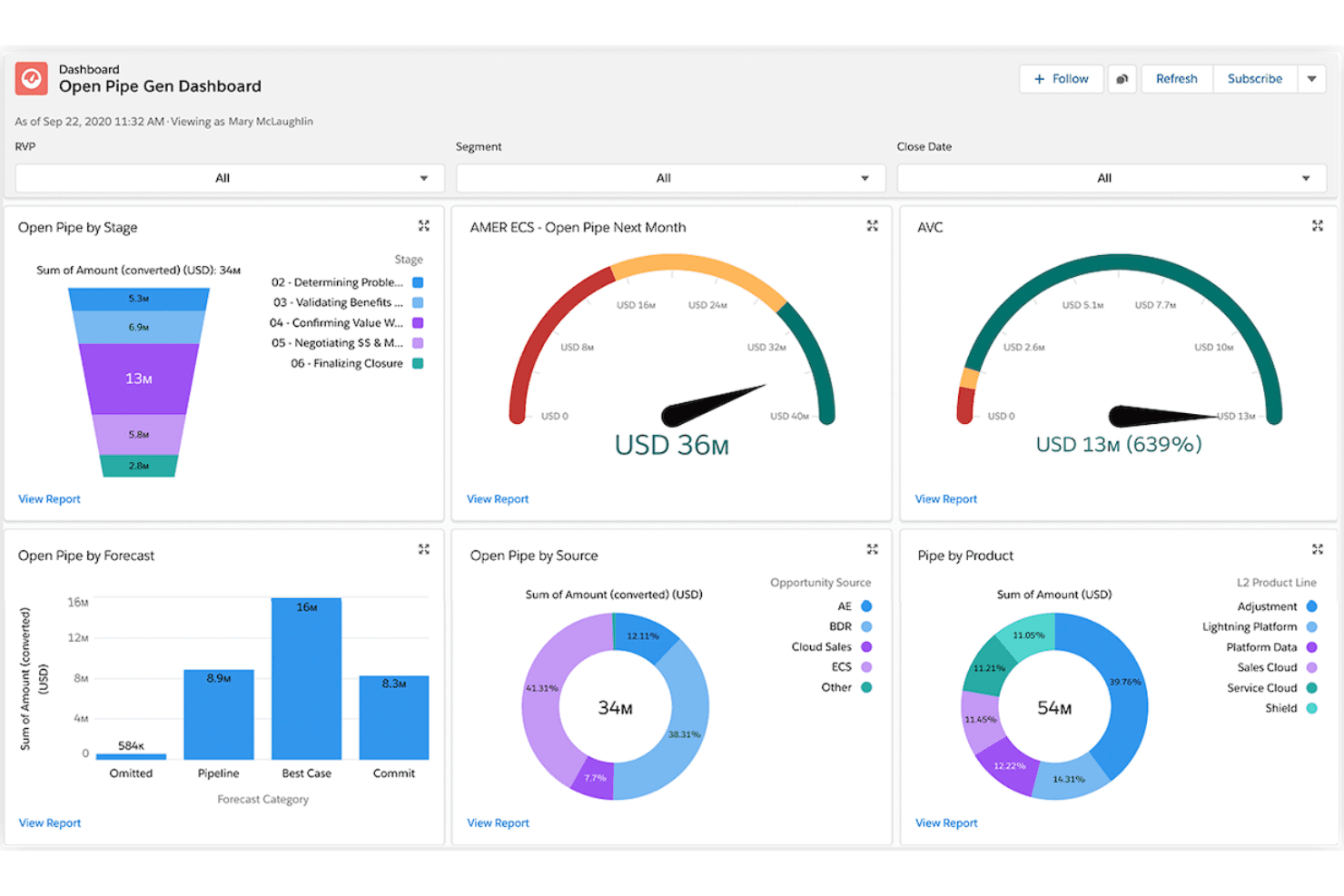
Salesforce tracks open pipeline by stage, source, and product in one view. Salesforce Financial Services Cloud is an enterprise CRM platform built on Sales Cloud that delivers referral tracking, AI-driven pipeline forecasting, client relationship mapping, and marketing automation for law firms focused on business development.
Who Is Salesforce Financial Services Cloud Best For?
Salesforce Financial Services Cloud is a strong fit for mid-to-large law firms with dedicated revenue operations or business development teams that prioritize AI-driven pipeline forecasting, referral tracking, and client relationship management over turnkey legal intake tools.
Why I Picked Salesforce Financial Services Cloud
I've included Salesforce Financial Services Cloud in my top picks because its AI suite is genuinely unmatched for law firm business development. Einstein forecasting gives BD teams attorney- and practice-area-level pipeline visibility, while Agentforce can handle intake routing and prospect follow-up autonomously. Referral tracking is also a first-class feature here: firms can log referral sources, monitor conversion rates, and attribute revenue back to originating partners with precision.
Salesforce Financial Services Cloud Key Features
- Agentforce AI agents: Autonomous AI agents that screen intake inquiries, route prospects to the right attorney, and update records without manual input.
- Flow Builder automation: A no-code workflow builder that automates task assignment, follow-up sequences, and document delivery via DocuSign integration.
- Client portal via Experience Cloud: A branded, secure self-service portal where clients can share documents, check status updates, and complete onboarding steps.
- Tableau analytics integration: Native Tableau connectivity that lets BD teams build custom revenue forecasts and matter-value dashboards beyond standard reporting.
Salesforce Financial Services Cloud Integrations
Salesforce Financial Services Cloud supports native integrations with DocuSign, Tableau, and Slack, plus integration with Salesforce Marketing Cloud. AppExchange marketplace integrations, MuleSoft, and APIs support custom connectivity; legal platforms such as Clio and PracticePanther require third-party connections.
Pros and Cons
Pros:
- Tableau dashboards enable attorney-level pipeline reporting
- Native referral tracking links revenue to sources
- AI agents automate referral and intake workflows
Cons:
- Matter management requires extensive customization work
- No built-in legal intake or conflict checks
Learn more about Salesforce Financial Services Cloud: Best for marketing processes
- Free demo available
- Pricing upon request
Visit WebsiteCustomer Rating:4.6/5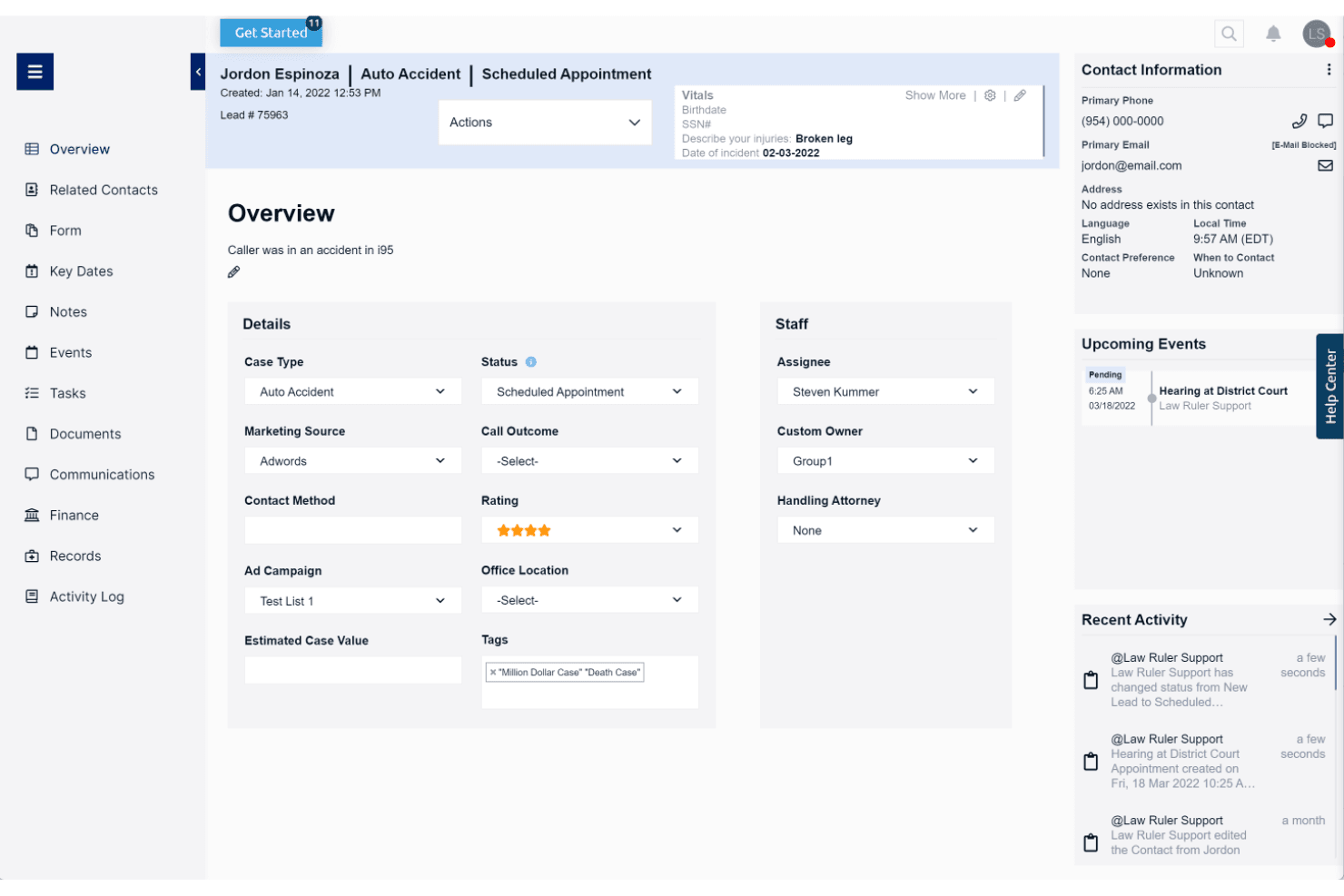
Law Ruler centralizes lead details, case status, and upcoming events in one view. Law Ruler is a legal CRM and client intake platform built exclusively for law firms, combining Smart Forms, multi-channel marketing automation, a built-in softphone dialer, pipeline tracking, and AI-assisted email tools.
Who Is Law Ruler Best For?
Law Ruler is a strong fit for high-volume B2C law firms—think personal injury, mass tort, or criminal defense—that need to run multi-channel marketing campaigns alongside client intake.
Why I Picked Law Ruler
Law Ruler earns its spot on my shortlist because its marketing automation goes deeper than any other legal CRM I've reviewed. I'm particularly impressed by its multi-channel campaign engine: automated email drip sequences, two-way SMS, and pre-recorded voice call campaigns all run in parallel from a single platform. Its Local Presence Dialing matches your outbound caller ID to the lead's area code, which meaningfully improves pickup rates for personal injury and mass tort intake teams chasing high volumes of inbound leads.
Law Ruler Key Features
- Smart Forms: Branching, logic-based intake forms that automatically qualify or disqualify leads based on respondent answers before staff get involved.
- Built-in softphone dialer: A click-to-call dialer with call recording, inbound/outbound call tracking, and call monitoring for managers to listen in on live calls.
- AI Email Assistant: A ChatGPT-powered tool included on all paid plans that drafts marketing emails, client replies, and intake templates with tone and length adjustments.
- Custom report builder: A no-code report builder that lets firms track pipeline health, staff productivity, and conversion rates, with scheduled recurring delivery.
Law Ruler Integrations
Law Ruler offers documented integrations with Clio Manage, Rocket Matter, TimeSolv, CosmoLex, Dropbox Sign, CallRail, LawPay, and Smith.AI. Every paid plan includes API access, and Zapier is also supported.
Pros and Cons
Pros:
- Customizable intake forms with lead qualification
- Built-in softphone with local presence dialing
- Multichannel intake automation with email, SMS, voice
Cons:
- Lacks built-in appointment scheduling tool
- No native conflict-of-interest screening workflow
Learn more about Law Ruler:
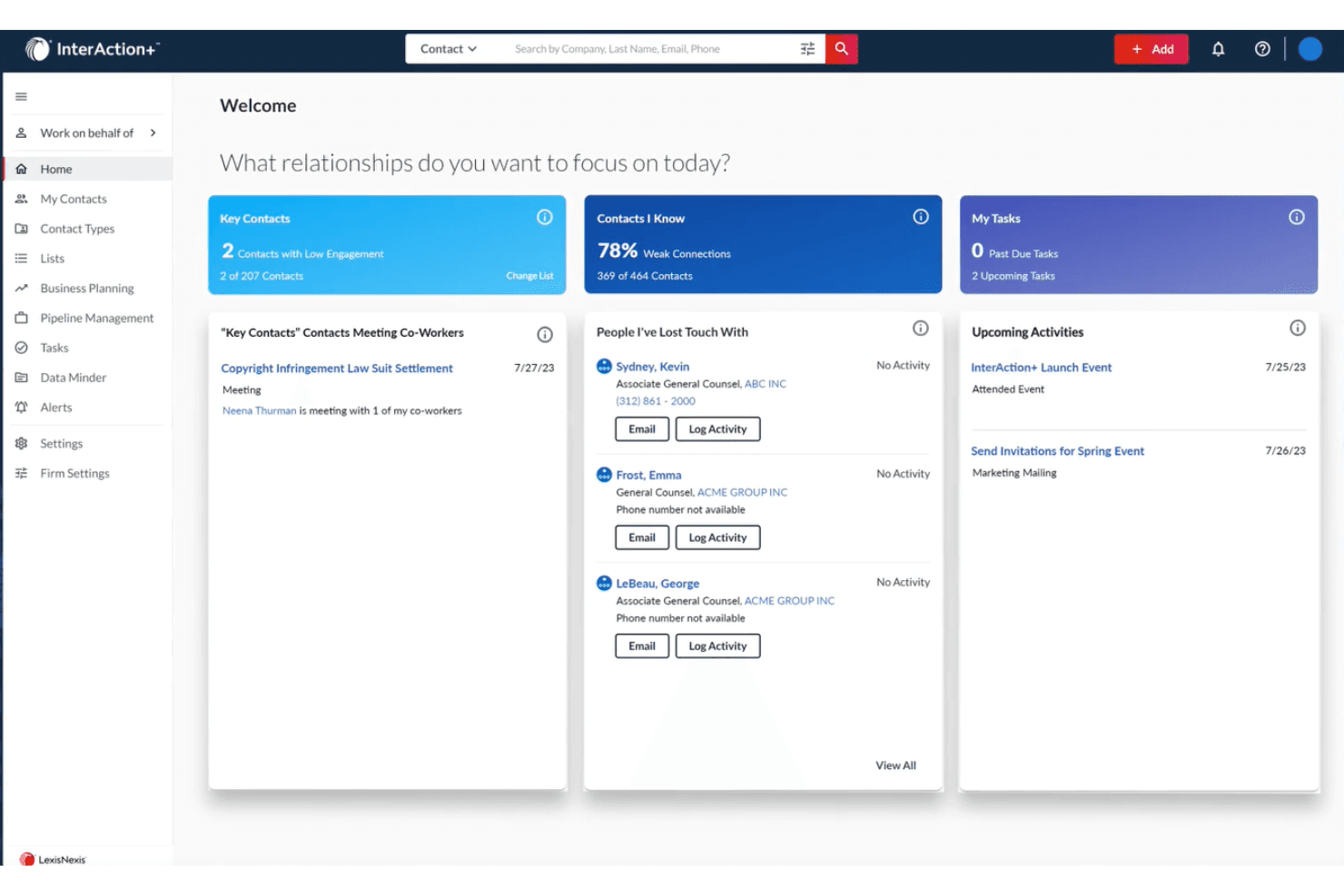
InterAction+ helps users prioritize relationships and track key contacts daily. InterAction+ is a legal-specific CRM built by LexisNexis that combines relationship intelligence, business development pipeline tracking, AI-driven client scoring, and BD reporting across clients, referral sources, and practice areas.
Who Is InterAction+ Best For?
InterAction+ is a strong fit for mid-to-large law firms where business development directors and BD teams own client relationship strategy across multiple practice areas.
Why I Picked InterAction+
InterAction+ earns its spot on my shortlist because no other legal CRM matches its depth of relationship intelligence. I'm particularly impressed by the AI-powered Relationship Score, which continuously evaluates client engagement health and flags at-risk relationships before they slip. Pair that with Key Client Radar for a firm-wide view of your most important accounts, and BD teams have a real edge in protecting and growing revenue across practice areas.
InterAction+ Key Features
- Daily Digest: A configurable daily email that surfaces prioritized BD tasks and relationship follow-ups without disrupting your workflow.
- LexisNexis Context integration: Embeds litigation event analytics by firm, practice area, and jurisdiction directly into client and prospect records.
- Revenue reporting by practice area: Tracks pipeline progress, client acquisition rates, and marketing ROI broken down by client and practice area.
- Microsoft 365 embedding: Surfaces client relationship data inside Outlook, Excel, and Word so attorneys can act on CRM insights without switching tools.
InterAction+ Integrations
InterAction+ has native integrations across the Microsoft ecosystem, including Microsoft 365 and Power Automate, plus LexisNexis Context. Its Cloud API supports custom connections, while specific practice management integrations aren't publicly named.
Pros and Cons
Pros:
- Deep legal industry adoption and trust
- AI-powered client relationship health scoring
- Exclusive LexisNexis litigation analytics integration
Cons:
- No automated conflict check engine
- No legal-specific client intake forms
Learn more about InterAction+:
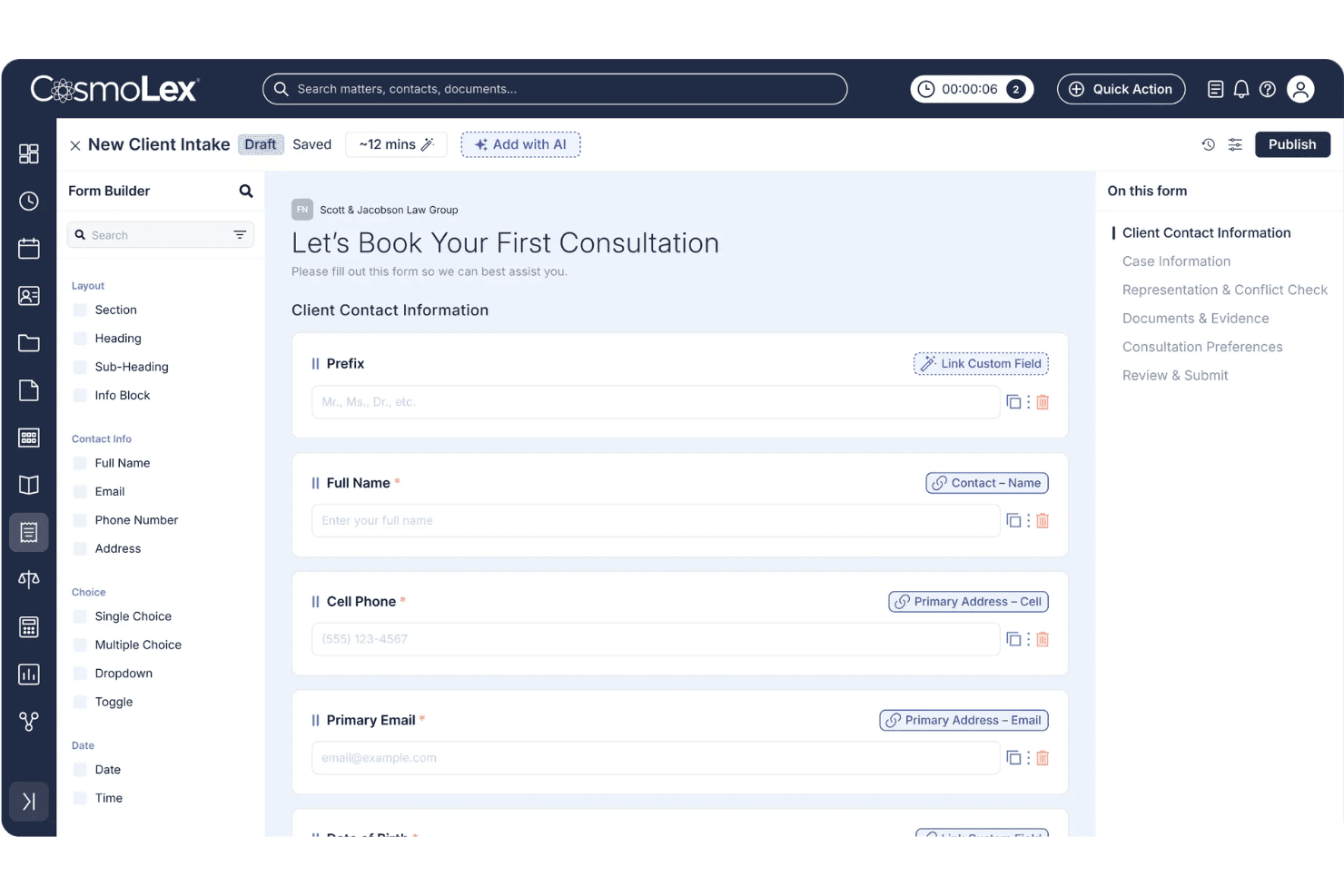
CosmoLex lets users build custom client intake forms with mapped fields. CosmoLex CRM is an all-in-one legal practice management platform that combines CRM, client intake, conflict checking, trust accounting, billing, and matter management in a single system.
Who Is CosmoLex CRM Best For?
CosmoLex CRM is a strong fit for small to mid-sized law firms that want client intake, conflict checking, billing, and trust accounting managed in one platform.
Why I Picked CosmoLex CRM
CosmoLex CRM earns its spot on my shortlist because it's the only legal CRM I've found that bakes trust accounting and IOLTA compliance directly into the same platform as client intake and matter management. I like that conflict checks run against live matter data and auto-generate timestamped audit records, so there's no separate log to maintain. The 2025 AI Intake feature also stands out: it builds intake forms from a plain-English prompt or an existing PDF, then maps submissions directly to contact records without any duplicate entry.
CosmoLex CRM Key Features
- Email and SMS drip campaigns: Automated multi-step nurture sequences triggered by prospect behavior or form submissions, personalized with client and intake data.
- Secure client portal: A branded, two-way portal where clients can share documents, view invoices, make payments, and exchange messages linked to their matter.
- Law Firm Insights dashboard: Configurable reporting with pre-built templates covering matter activity, financial productivity, and trust accounting compliance.
- Practice area–specific intake forms: Intake forms can be configured and branded separately by practice area to qualify prospects before their consultation.
CosmoLex CRM Integrations
CosmoLex CRM has native integrations with Microsoft 365, QuickBooks Online, Google Calendar, Google Drive, OneDrive, Dropbox, Box, and NetDocuments. It also supports Zapier.
Pros and Cons
Pros:
- Secure client portal with two-way messaging
- Native AI tools for legal intake automation
- Integrated trust accounting and practice management
Cons:
- CRM pipeline analytics are limited
- No referral source tracking module
Learn more about CosmoLex CRM:
Other CRM Software for Law Firms
Below is a list of additional CRM software for law firms that I shortlisted. While they didn’t make the top 10, they’re still valuable and worth further research.
- 11Creatio CRMBest for no-code CRM workflow automation
- 12CopperBest for Google Workspace ontegration
- 13Zoho CRMBest for customizable CRM solutions
- 14RingCentralBest for communication tools
- 15SugarAIBest for customization options
- 16monday AI WorkspaceBest for project management integration
- 17FilevineBest for document automation
- 18ActionstepBest for mid-sized law firms
- 19CobblestoneBest for contract management
Related CRM Reviews
If you still haven't found what you're looking for here, check out these tools closely related to all-in-one CRMs that we've tested and evaluated.
- CRM Software
- Sales Software
- Lead Management Software
- Business Intelligence Software
- Contract Management Software
- Revenue Management System
- CPQ Software
How I Evaluate CRM Software for Law Firms
I split my evaluation into two layers: the baseline every legal CRM must hit—intake management, conflict checks, matter records—and the differentiators that set the best options apart.
Core Functionality (Table Stakes For This List)
When I'm selecting tools for my list, I rank each one on a scale from 0 (does not offer the functionality) to 5 (excels in this area) for each core functionality listed below. Then, I calculate the tool's total score into a percentage. Each tool needs to achieve a minimum total score of 55% to be considered for inclusion.
- Legal Intake Management: I check whether the CRM offers structured intake forms and pipeline stages built for converting leads into retained clients, not just generic sales funnels.
- Conflict Check Support: Before a firm can engage a prospect, conflicts need to be screened. I look for native conflict searches or direct integrations with practice management tools.
- Matter-Centric Contact Model: A legal CRM should organize data around matters and parties—clients, opposing counsel, referral sources—rather than forcing firms into a standard deals-and-accounts structure.
- Legal Workflow Automation: I evaluate whether the platform automates intake-specific steps like sending engagement letters, triggering e-signature requests, or assigning onboarding tasks to paralegals.
- Referral Source Tracking: Referral relationships drive most law firm growth. I look for the ability to attribute new matters and revenue back to the originating source or attorney.
- Revenue & Pipeline Reporting: I check for reporting that breaks down pipeline value, conversion rates, and forecasts by attorney, practice area, or matter type—not just generic sales dashboards.
Once I have a list of tools that meet this criteria, I consider what sets each platform apart.
Differentiating Factors (What Sets Vendors Apart)
Here's how I compare and contrast different vendors:
Standout Features
Speed to lead matters in legal intake, so I look for built-in SMS messaging that lets intake teams send appointment reminders and follow-up nudges without leaving the CRM. Call tracking with source attribution is another differentiator—it connects inbound calls to specific campaigns or directories, giving RevOps teams real data on which channels drive retained matters. I also evaluate whether a platform offers an AI intake assistant that can qualify leads after hours and route urgent consultations to the right attorney.
Beyond Features
Integration with the firm's existing legal tech stack is one of the first things I check—whether the CRM connects to practice management tools like Clio or MyCase determines how smoothly intake data flows into active matters. Practice area fit also matters. A personal injury firm processing hundreds of leads monthly needs a very different setup than a boutique corporate practice managing a handful of relationships. I also evaluate how pricing scales as firms grow, since add-ons for SMS, storage, or extra users can quietly inflate the total cost of ownership.
How to Choose a CRM Software for Law Firms
As you work through your unique software selection process, keep the following points in mind:
- Ease of Use and Accessibility: Your chosen CRM system should be user-friendly, accessible anywhere, and quickly and securely accessed. A cloud-based CRM allows attorneys and staff to access client information and manage tasks remotely, ensuring they can work efficiently in the office, in court, or from home.
- Integration with Existing Tools: When searching for a CRM software, look for options that seamlessly integrate with other tools and systems. This includes email clients, document management software, calendaring tools, and other legal practice management software to help streamline workflows.
- Automation Capabilities: Automation is a valuable feature of CRM software as it streamline repetitive tasks such as appointment reminders, deadline tracking, and document generation. This helps lawyers stay organized, reduces human error, and improves efficiency.
- Customization and Scalability: When shopping for a new CRM, make sure to search for one that is customizable, so you can tailor your solution to your specific needs. Additionally, your software should be able to scale with your business and accommodate an increasing volume of data, users, and customer interactions.
- Security and Compliance: Given the sensitive nature of legal work, your CRM software must offer powerful security features to protect confidential client information. This includes encryption, two-factor authentication, and authorized IP addresses. Additionally, the software should comply with industry standards and regulations.
Trends in CRM Software for Law Firms
Here are some trends I’ve noticed for CRM software for law firms, plus what they might mean for the future. I sourced countless product updates, press releases, and release logs to tease out the most important insights.
- AI-Powered Client Insights: AI is being used to analyze client data and provide actionable insights. This can lead to more personalized client interactions, helping law firms better understand client needs and improve service delivery.
- Integration with Legal Research Tools: CRM software is now integrating with legal research tools. This allows lawyers to access case law and statutes directly from their CRM, saving time and improving the accuracy of legal research.
- Mobile Accessibility: Mobile-friendly CRM solutions are becoming essential. Lawyers now can access client information and case details on the go, enhancing productivity and client service.
- Enhanced Data Security: Law firms handle sensitive information, making powerful security measures important. As a result, data security features are being prioritized in CRM software, enhancing security protocols to help protect client confidentiality.
- Automation of Routine Tasks: Automation is being used to handle routine administrative tasks, including scheduling, billing, and document management. These features help to free up time for lawyers to focus on more complex legal work.
As law firms increasingly prioritize client relationship management, CRM software tailored for legal professionals is evolving to meet unique industry needs. These advancements not only streamline client interactions but also improve overall firm efficiency and service delivery.
What is CRM Software for Law Firms?
CRM software for law firms is a tool that helps legal practices manage client relationships and business development functions. It’s used by attorneys, administrative staff, and firm owners to streamline client intake, scheduling, follow-ups, and revenue tracking.
The primary components of CRM software for law firms include client intake tools, case management features, document management, high-level data security, and marketing automation.
Features of CRM Software for Law Firms
Choosing the right CRM software for law firms is important for streamlining operations, enhancing client relationships, and boosting overall efficiency. Below, I will outline the most important features to look for when shopping for a new CRM software.
- Automated Email and Text Marketing: Allows law firms to quickly respond to potential clients and maintain engagement with current clients through automated messages. It’s essential for lead generation and client retention.
- One-Click E-Signature: Simplifies obtaining client signatures, saving time and ensuring that documents are signed promptly. This feature is vital for moving cases forward efficiently.
- Text and Video Messaging: Enables law firms to communicate with clients through their preferred channels, increasing engagement and trust.
- Dashboard Analytics: Provides a centralized view of key metrics such as case progress, lead engagement, and marketing ROI. This feature helps firms make data-driven decisions and track performance.
- Marketing Task Management: Helps manage complex marketing campaigns and legal tasks by setting up automated workflows and internal alerts. This ensures that deadlines are met and tasks are completed efficiently.
- Software Support: Offers strong support and training to help law firms transition smoothly to new CRM software, reducing frustration and increasing the likelihood of successful implementation.
- Lead Management: Facilitates tracking and nurturing of potential clients, ensuring that no lead is overlooked. Integration with marketing tools can further enhance lead generation efforts.
- Contact Management: Maintains detailed records of clients, including contact information, case history, and communication logs. This feature is vital for personalized client service.
- Time Tracking and Billing: Records billable hours and generates invoices within the CRM system, streamlining the billing process and ensuring accurate tracking of payments.
- Document Management: Stores and organizes legal documents securely, allowing easy access and sharing among team members. This feature is important for maintaining organized and efficient case management.
Incorporating these features into your CRM software can significantly enhance your law firm's ability to manage client relationships, streamline operations, and ultimately increase profitability.
Benefits of CRM Software for Law Firms
CRM software offers law firms a streamlined approach to managing client relationships, improving communication, and enhancing efficiency. Along with these perks, CRM software for law firms offers these added benefits:
- Centralized Client Information: CRM software consolidates all client data into one easily accessible platform, enabling law firms to track engagement, manage leads, and provide personalized service at every step.
- Enhanced Client Engagement: By providing personalized communication, tailored recommendations, and proactive outreach, CRM software helps law firms build meaningful relationships with clients and enhances client outcomes.
- Streamlined Communication: The right CRM software offers tools for tracking client interactions and communication, ensuring communication history is logged in a single space. This centralized view of client interactions helps law firms build trust, anticipate client needs, and improve client satisfaction.
- Improved Efficiency and Productivity: Legal CRM software automates routine tasks such as client intake, appointment scheduling, and document management, allowing law firms to focus on more critical tasks. This automation reduces administrative burdens and ensures team members are on the same page.
- Data Security and Compliance: A strong law firm CRM prioritizes features like encryption and access controls to safeguard sensitive client information. Compliance with industry regulations, such as GDPR or HIPAA, is also essential, ensuring that law firms maintain a clear record of changes and actions taken within the CRM.
CRM software offers numerous benefits for law firms, including improved client management, streamlined communication, and enhanced workflow efficiency. By implementing a CRM system, law firms can better manage their client relationships, increase efficiency, and provide better service to their clients.
Costs & Pricing of CRM Software for Law Firms
When considering the cost and pricing of CRM software for law firms, it’s essential to weigh the features and benefits against your budget and specific needs. While some CRMs offer strong capabilities at a higher price, others provide essential tools at a more affordable rate.
This section provides an estimate of average CRM software plans and costs for law firms. The data is based on various sources and reflects common pricing tiers and features.
Plan Comparison Table for CRM Software for Law Firms
| Plan Type | Average Price | Common Features |
| Free Plan | $0 | Basic contact management, limited users, basic reporting, and email integration |
| Personal Plan | $12 - $39/user/month | Enhanced contact management, email marketing, basic automation, and limited integrations |
| Business Plan | $40 - $129/user/month | Advanced automation, document management, time tracking, billing, and integrations with other tools |
| Enterprise Plan | Custom pricing | Full customization, advanced analytics, dedicated support, enhanced security, and unlimited integrations |
A breakdown of pricing plans, costs, and features of CRM software for law firms.
Ultimately, choosing the right CRM requires balancing cost-effectiveness with the ability to enhance client relationships and streamline firm operations. Before purchase, carefully evaluate your firm’s needs against the available options to ensure you choose a solution that offers the best value for your investment.
CRM Software for Law Firms FAQs
Here are some commonly asked questions I’ve received about CRM software for law firms.
How does CRM software enhance data security and compliance for law firms?
CRM software enhances data security and compliance by providing better control and monitoring of sensitive client information. Legal CRMs are designed to reduce the risk of data breaches and ensure compliance with legal regulations. Features like bank-grade security, secure document storage, and access controls help safeguard client data.
How can CRM software improve client communication for law firms?
CRM software improves client communication by providing multiple channels for interaction and ensuring timely follow-ups. Features such as built-in text messaging, email templates, and client portals facilitate consistent and efficient communication. This open communication line helps build stronger client relationships and enhances client satisfaction.
What are the challenges of implementing CRM software in a law firm?
Implementing CRM software in a law firm can come with challenges such as initial setup, data migration, and user adoption. While many CRM solutions are designed to be user-friendly, the initial setup may require time and effort to configure the system according to the firm’s specific needs.
Data migration from existing systems to the new CRM can also be complex and may require careful planning. Additionally, ensuring that all staff members are adequately trained and comfortable using the new system is crucial for successful implementation.
Can CRM software help with billing and invoicing?
Yes, CRM software can streamline billing and invoicing by tracking billable hours, generating invoices, and managing payments. Automated billing processes reduce errors and ensure timely invoicing, helping maintain accurate financial records and improves cash flow.