

CRM software for professional services helps your team manage client relationships, track projects, and ensure smooth coordination across sales, delivery, and support. If you’re looking for the best options, you probably want something that handles client communication, complex proposals, billing, and ongoing service—all in one place.
Choosing the right CRM can make or break your workflow, impacting how well you win new business, keep customers happy, and grow your firm. I’ll break down the top picks, making it easy for you to compare features and find the best fit for your team’s needs.
Why Trust Our Software Recommendations
6,700+
Reviews
20
Industry experts
16+
Evaluation factors
14
Years
Our reviews reflect our independent judgment—not a sales pitch. Learn how we stay transparent.
For this guide, we evaluated tools using hands-on testing and independent research, scoring tools using our selection criteria.
Our reviews reflect our human editorial judgment, not a sales pitch.
CRM Software for Professional Services Comparison Table
This comparison table summarizes pricing details for my CRM software for professional services:
| Tool | Best For | Trial Info | Price | ||
|---|---|---|---|---|---|
| 1 | Best project onboarding for client services | 14-day free trial | From $49/user/month (billed annually) | Website | |
| 2 | Best client activity tracking for small firms | Free plan available | From $7/user/month | Website | |
| 3 | Best workflow automation for large teams | 30-day free trial + free demo available | From $25/user/month | Website | |
| 4 | Best no-code process customization for services | Free demo available | From $40/user/month (billed annually) | Website | |
| 5 | Best profitability tracking for consultancies | 14-day free trial | From $10/user/month (billed annually) | Website | |
| 6 | Best integrated sales and support | 14-day free trial | From $19/user/month (billed annually) | Website | |
| 7 | Best visual pipeline management for project teams | 14-day free trial | From $14/user/month (billed annually) | Website | |
| 8 | Best resource planning for professional firms | Free demo available | Pricing upon request | Website | |
| 9 | Best deal insights for growing firms | Free plan available | From $14/user/month (billed annually) | Website | |
| 10 | Best financial integrations for service providers | Free demo available | Pricing upon request | Website |


Best CRM Software for Professional Services Reviews
Below are my detailed summaries of the best CRM software for professional services that made it onto my shortlist. My reviews offer a detailed look at the features, best use cases, and integrations of each platform to help you find the best one for you.
 Best project onboarding for client services
- 14-day free trial
- From $49/user/month (billed annually)
Visit WebsiteCustomer Rating:4.8/5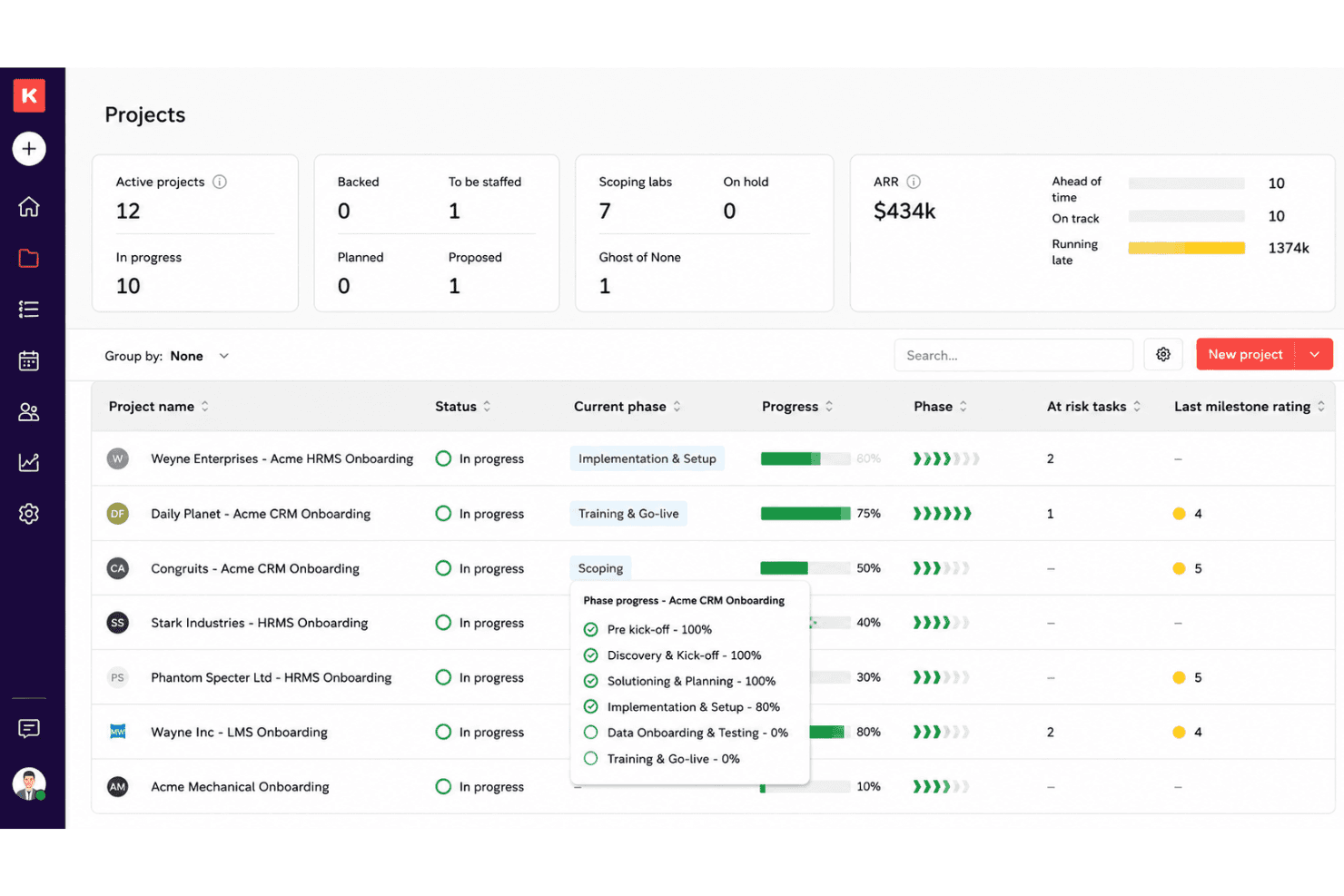
Rocketlane directs client onboarding, projects, resources, billing, and reports. Rocketlane is a professional services CRM and project delivery platform that connects client management, project onboarding, resource planning, time tracking, billing, and advanced reporting for services-driven teams.
Who Is Rocketlane Best For?
Mid-size to large professional services firms needing unified client onboarding, project delivery, and resource management in one system.
Why I Picked Rocketlane
I picked Rocketlane as one of the best because my team can link project onboarding directly to client services, using SOW-to-project conversion, real-time delivery tracking, and a collaborative client portal that keeps every engagement on track.
Rocketlane Key Features
- Role-based access controls: Manage project visibility and permissions for internal teams and clients.
- Time tracking module: Log billable and non-billable hours directly within project workspaces.
- Resource planning dashboard: Allocate team members to projects based on real-time capacity and skill sets.
- Customizable reporting and analytics: Build dashboards on project profitability, utilization, and account health.
Rocketlane Integrations
Rocketlane offers native integrations with Salesforce, Jira, Slack, HubSpot, Google Workspace, and Zendesk. An API is available for custom integrations.
Pros and Cons
Pros:
- Client-facing project portals for onboarding visibility
- Built-in resource allocation and utilization dashboard
- SOW-to-project conversion with full audit trail
Cons:
- Initial setup complexity for custom workflows
- Limited out-of-the-box reporting templates
Learn more about Rocketlane: Best client activity tracking for small firms
- Free plan available
- From $7/user/month
Visit WebsiteCustomer Rating:4.4/5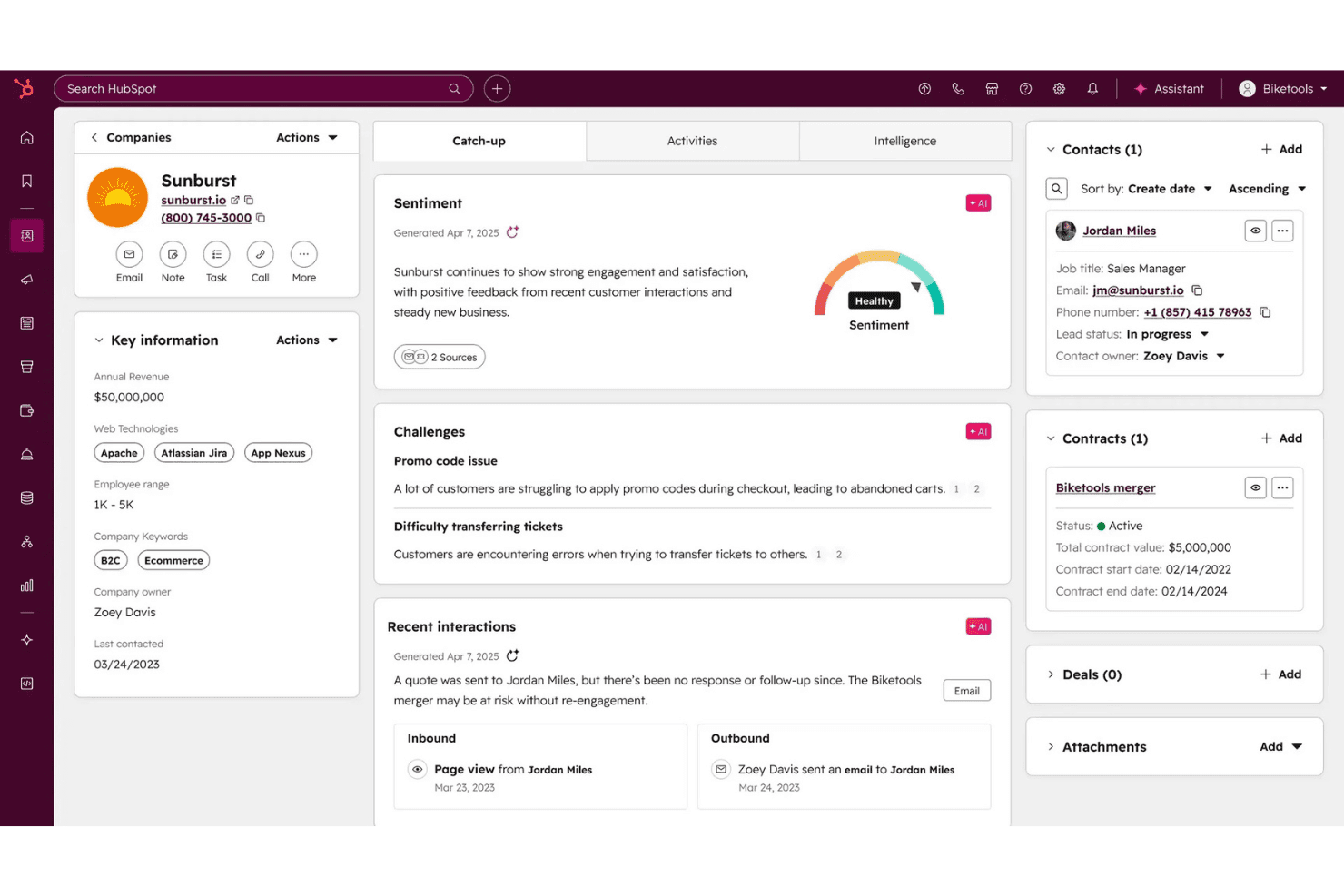
HubSpot CRM manages contacts, deals, workflows, proposals, projects and billing. HubSpot CRM is a cloud-based CRM for professional services that brings together contact management, sales pipeline tracking, customizable workflows, proposal generation, and integrations for project and billing systems.
Who Is HubSpot CRM Best For?
Small professional services firms and agencies that want a central place to manage client relationships, sales activities, and communications.
Why I Picked HubSpot CRM
I picked HubSpot CRM as one of the best because I can track every client interaction—emails, meetings, calls, notes—in a single timeline. I rely on its activity feed and logging to give my team context across sales and service without hunting through multiple tools.
HubSpot CRM Key Features
- Custom pipelines: Build and manage multiple sales or service pipelines with customizable stages for different engagement types.
- Proposal and quote generation: Create, send, and track digital proposals and quotes directly from client records.
- Integrated document management: Store, access, and share contracts, SOWs, and service agreements within each account.
- Role-based permissions: Set team and user access controls to protect sensitive project and client information.
HubSpot CRM Integrations
HubSpot CRM offers 1,000+ native integrations, including QuickBooks, Xero, Asana, Slack, Zoom, Google Workspace, Microsoft 365, DocuSign, PandaDoc, and Salesforce. Zapier and an API are also available for custom integrations.
Pros and Cons
Pros:
- Customizable sales and service pipelines
- Built-in proposal and quote generation tools
- Unified timeline for all client interactions
Cons:
- Advanced reporting requires higher tier plans
- Limited project and capacity management features
Learn more about HubSpot CRM: Best workflow automation for large teams
- 30-day free trial + free demo available
- From $25/user/month
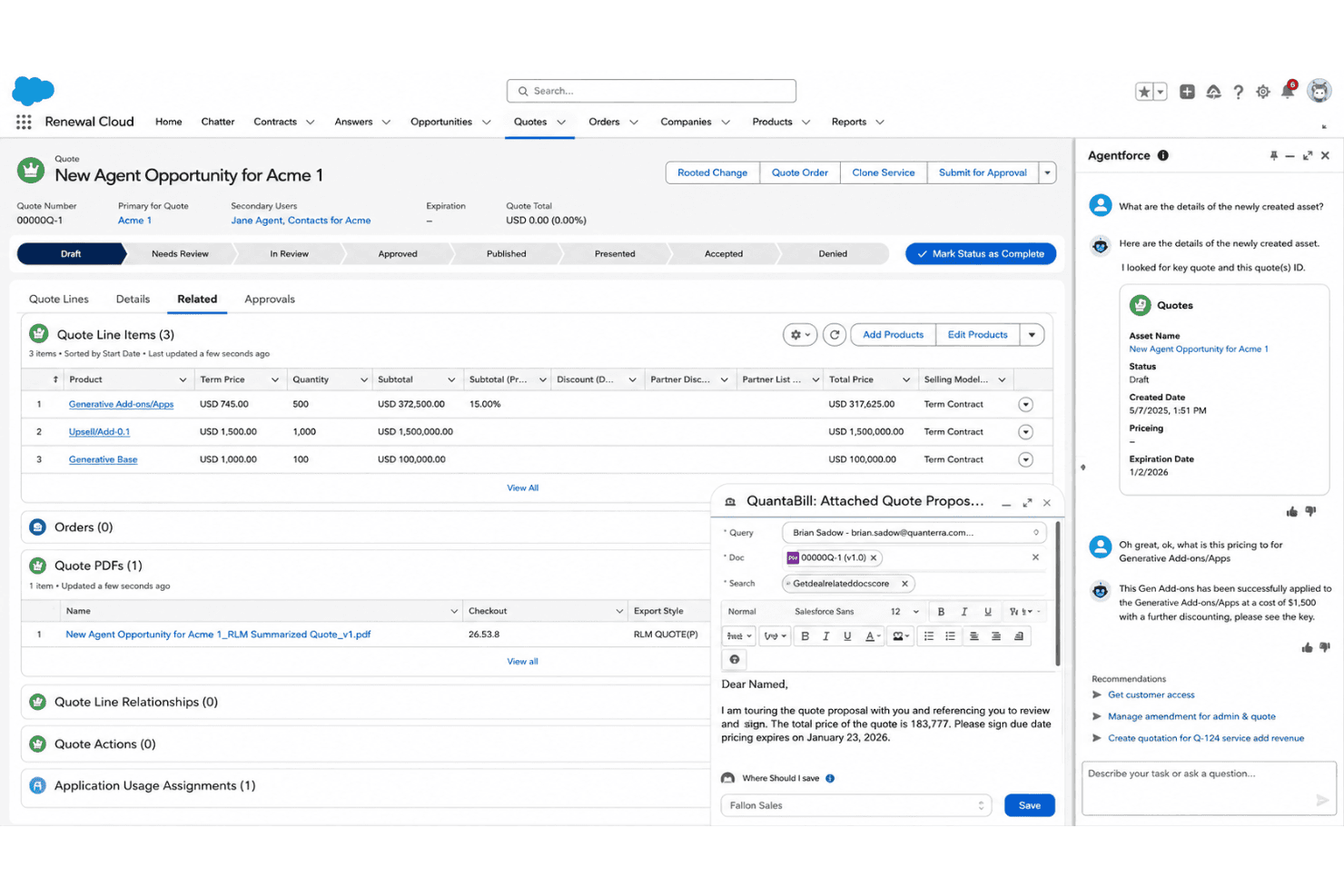
Agentforce Sales organizes contacts, deals, projects, and business applications. Agentforce Sales is an enterprise CRM platform designed for professional services teams, offering customizable contact management, deal tracking, project linking, and deep integration with essential business applications.
Who Is Agentforce Sales Best For?
Large professional services organizations with dedicated sales, RevOps, or client operations teams managing complex client and engagement lifecycles.
Why I Picked Agentforce Sales
I picked Agentforce Sales because workflow automation at scale is unmatched for complex sales and delivery teams. I use its process builder to handle multi-step approvals and automate SOW and contract workflows across global client accounts.
Agentforce Sales Key Features
- Hierarchical account management: Organize client records with firm, department, and contact hierarchies tailored to professional services structures.
- Opportunity split tracking: Allocate deal credit by team member or practice group for complex service engagements.
- Resource forecasting dashboards: Visualize staff capacity and utilization linked to sales pipeline stages and projected engagements.
- Native document generation: Create proposals, SOWs, and contracts from templates directly within the CRM environment.
Agentforce Sales Integrations
Agentforce Sales provides hundreds of native integrations through Salesforce AppExchange, including DocuSign, Slack, Mailchimp, HubSpot, Microsoft 365, QuickBooks, Asana, Smartsheet, SAP, and NetSuite. An API is available for custom integrations.
Pros and Cons
Pros:
- Offers advanced pipeline and resource forecasting
- Handles multi-entity and global account structures
- Automates complex multi-step sales workflows
Cons:
- Professional services reporting needs customization
- Time and billing features require add-ons
Learn more about Agentforce Sales: Best no-code process customization for services
- Free demo available
- From $40/user/month (billed annually)
Visit WebsiteCustomer Rating:4.7/5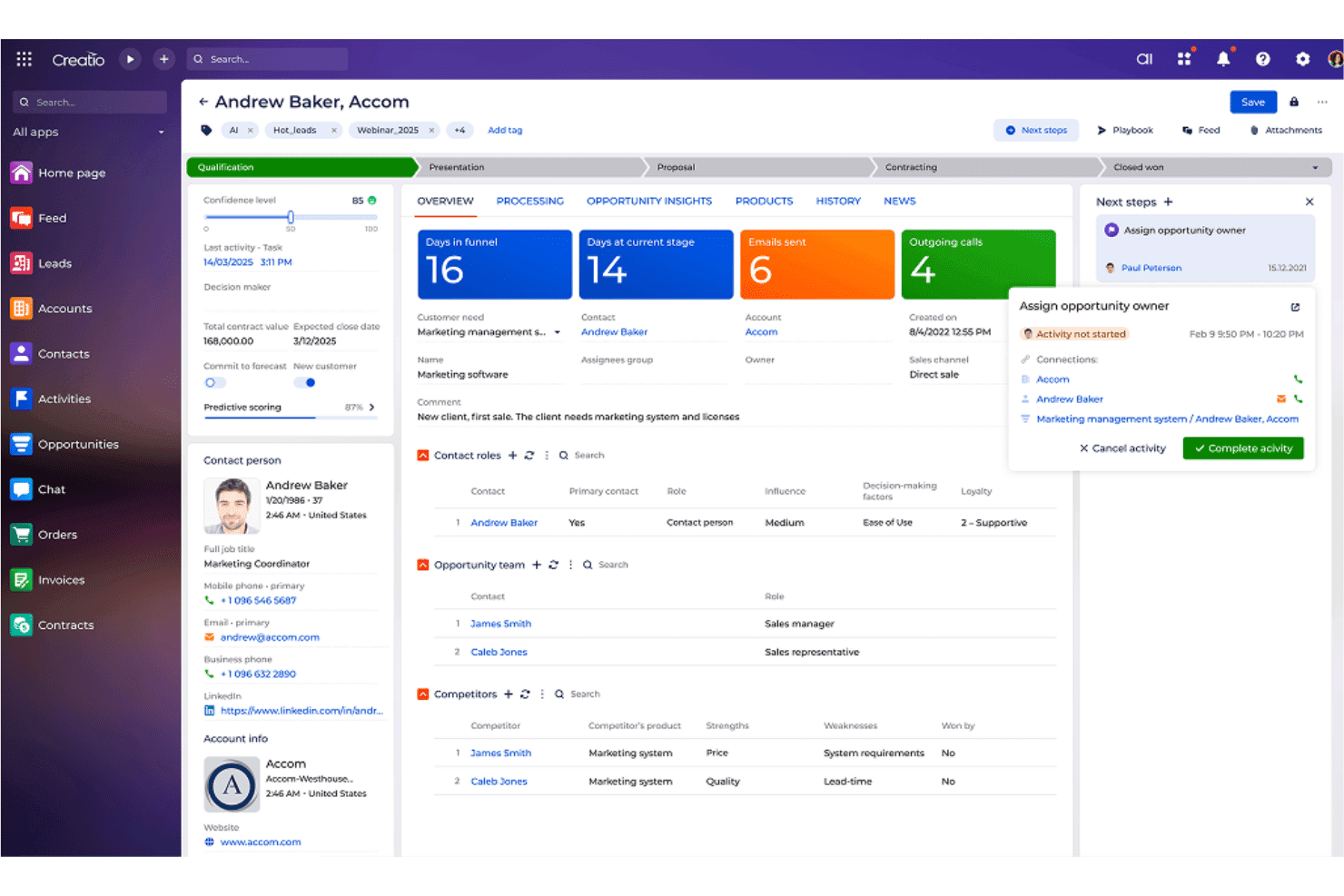
Creatio CRM connects client data, opportunities, projects, and custom workflows. Creatio CRM is a process-centric CRM platform designed for professional services teams that need customizable client management, opportunity tracking, project linking, and workflow automation in one system.
Who Is Creatio CRM Best For?
Professional services firms that need flexible CRM and workflow automation to manage complex client and project relationships.
Why I Picked Creatio CRM
I picked Creatio CRM as one of the best because I can build and adjust entire services workflows using its no-code editor, connecting project stages, SOW approvals, and account structures without writing code. This saves my team setup time every time our process changes.
Creatio CRM Key Features
- Hierarchical account management: Organize clients into firm, division, and subsidiary structures.
- Multi-pipeline opportunity tracking: Set up distinct pipelines for different types of service engagements.
- Integrated time tracking: Log billable hours directly on projects and activities.
- Advanced reporting dashboards: Visualize pipeline, revenue, and utilization metrics using customizable widgets.
Creatio CRM Integrations
Creatio CRM offers native integrations with Jira, DocuSign, Microsoft 365, Google Workspace, QuickBooks, and Xero, and connects with Zapier. An API is available for custom integrations.
Pros and Cons
Pros:
- Supports custom pipelines for varying engagement types
- Hierarchical account management for complex firms
- No-code workflow builder for project processes
Cons:
- Project resource allocation features are limited
- Billing module is less robust than PSA tools
Learn more about Creatio CRM: Best profitability tracking for consultancies
- 14-day free trial
- From $10/user/month (billed annually)
Visit WebsiteCustomer Rating:4.6/5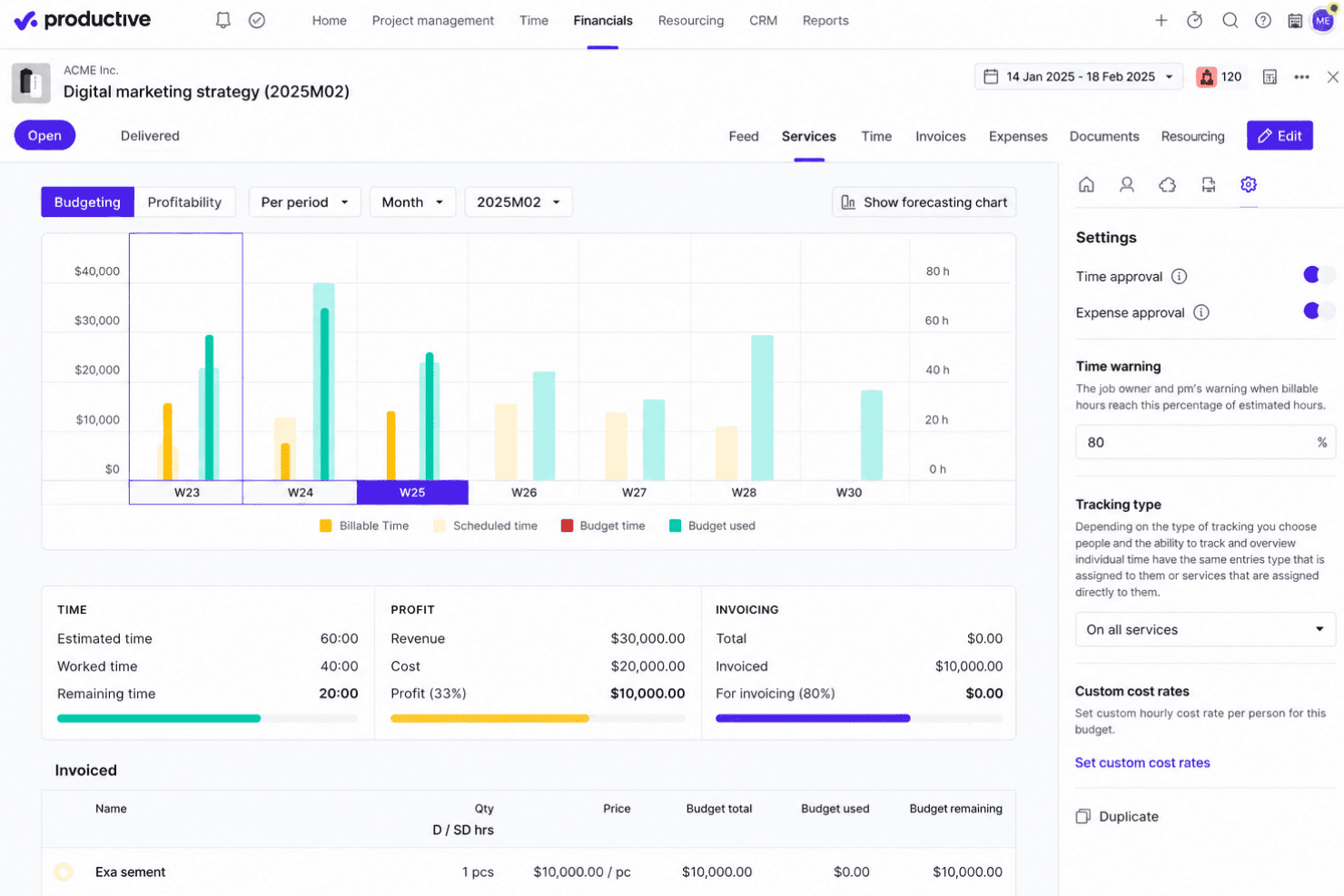
Productive handles deals, projects, time, budgets, invoices, and team resources. Productive is a CRM and professional services automation platform designed for consultancies that brings together deal tracking, project delivery, time management, budgeting, invoicing, and resource planning in a single system tailored for services firms.
Who Is Productive Best For?
Consultancies and agencies with project-based teams that need unified CRM, project management, and financial tracking in one platform.
Why I Picked Productive
I picked Productive as one of the best because I can drill into client, project, and service line profitability in real time. My team tracks billable hours, revenue, and costs side by side, making it simple to compare client margins across our entire portfolio.
Productive Key Features
- Custom deal pipeline: Configure deal stages and manage proposals or SOWs for multiple service lines.
- Resource planning module: Schedule staff on projects and view real-time capacity across your organization.
- Integrated document management: Store and organize project files, contracts, and engagement records within each client profile.
- Automated invoicing workflows: Generate invoices from tracked time, expenses, and retainers linked to each project or client.
Productive Integrations
Productive offers native integrations with Xero, QuickBooks, Exact, Fortnox, Twinfield, Visma, BambooHR, BreatheHR, Rippling, HiBob, Personio, Slack, Google Calendar, JIRA, and HubSpot. Zapier and an API are available for custom integrations.
Pros and Cons
Pros:
- Built-in resource planning and utilization views
- Smooth transition from pipeline to project delivery
- Real-time project and client profitability tracking
Cons:
- Setup can be complex for first-time users
- Limited advanced business intelligence options
Learn more about Productive: Best integrated sales and support
- 14-day free trial
- From $19/user/month (billed annually)
Visit WebsiteCustomer Rating:4.4/5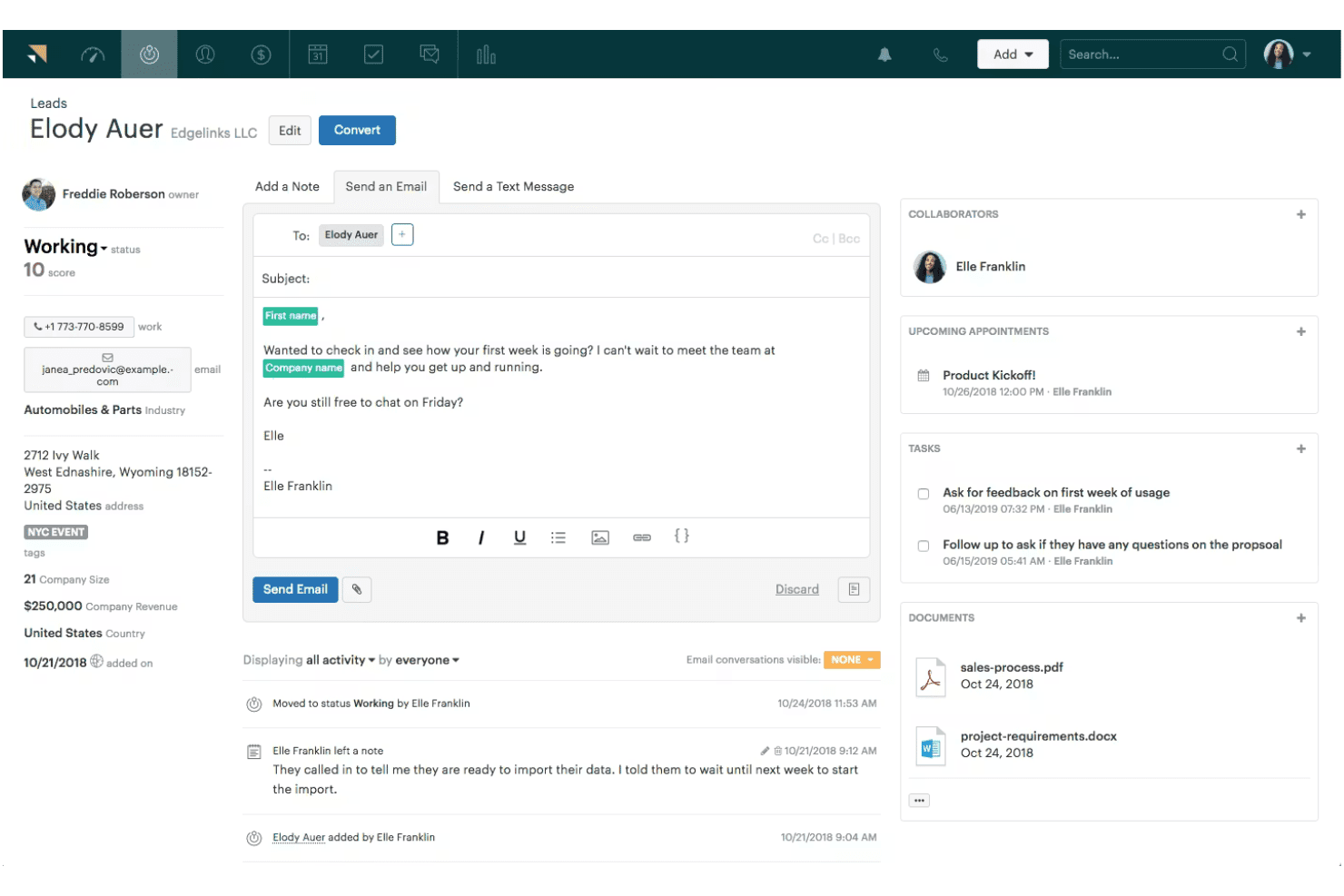
Zendesk Sell unifies leads, deals, contacts, pipelines, and support workflows. Zendesk Sell is a sales-focused CRM designed for professional services teams that want integrated lead management, deal tracking, contact organization, sales pipeline customization, and close ties to support workflows.
Who Is Zendesk Sell Best For?
Sales and client services teams in professional services firms that want a CRM tightly connected with customer support tools.
Why I Picked Zendesk Sell
I picked Zendesk Sell for how my team can track sales and support conversations in one place, and link deals directly to support tickets. I like being able to monitor account statuses while collaborating between sales and support teams through shared record views.
Zendesk Sell Key Features
- Customizable sales pipelines: Set up multiple pipelines tailored to different client services and engagement types.
- Email integration: Sync client communication directly into deal records with automatic email tracking.
- Mobile app access: Manage contacts, deals, and tasks from iOS or Android devices on the go.
- Custom fields and tags: Organize client and engagement data using customizable fields and labeling.
Zendesk Sell Integrations
Zendesk Sell offers native integrations with Zendesk Support, Slack, Mailchimp, Google Workspace, Dropbox, Asana, Trello, HubSpot, QuickBooks, and Xero. Zapier and an API are available for additional custom integrations.
Pros and Cons
Pros:
- Quick access to client communication history
- Pipeline stages configurable for client engagements
- Combines sales CRM with customer support tickets
Cons:
- Lacks native project or billable tracking
- No built-in resource or utilization tracking
Learn more about Zendesk Sell: Best visual pipeline management for project teams
- 14-day free trial
- From $14/user/month (billed annually)
Visit WebsiteCustomer Rating:4.4/5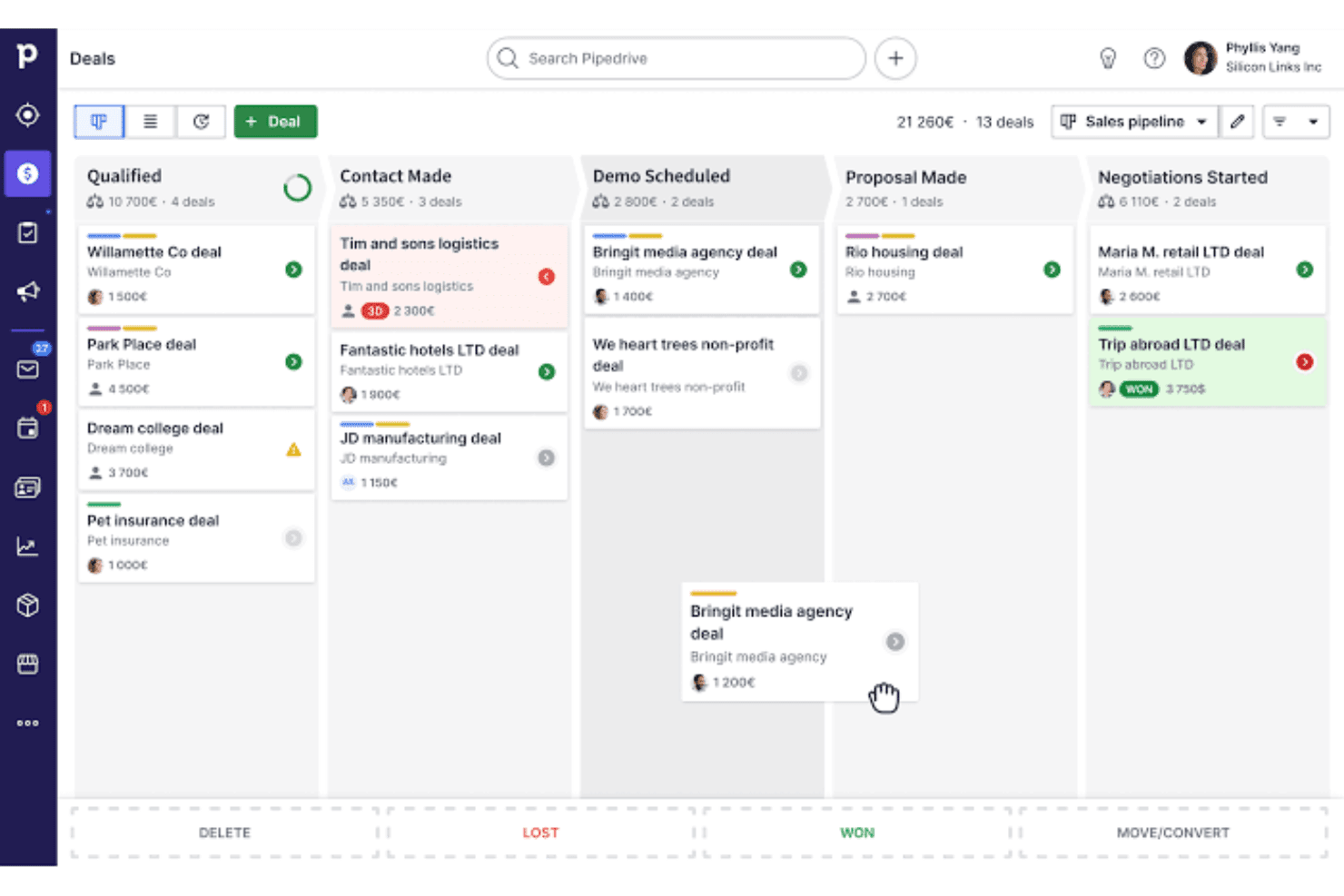
Pipedrive tracks client data, deals, pipelines, projects, billing and workflows. Pipedrive is a CRM platform for professional services teams that centralizes client management, opportunity tracking, customizable sales pipelines, and integrations with project and billing tools.
Who Is Pipedrive Best For?
Sales-focused professional services teams at small to midsize firms that need straightforward CRM and deal pipeline visibility.
Why I Picked Pipedrive
I picked Pipedrive as one of the best because its visual pipelines make it easy to manage deals, proposals, and SOWs. I like having customizable stages and drag-and-drop features that help my team quickly track opportunities and forecast project workflows.
Pipedrive Key Features
- Customizable data fields: Add, edit, and organize fields to tailor client and project information for your workflow.
- Activity scheduling tools: Log meetings, calls, and deadlines with automated reminders linked to deal records.
- Email integration: Sync email accounts so messages and communication history appear inside contact profiles.
- Marketplace integrations: Connect with tools like DocuSign, Xero, and Trello for additional project delivery and billing functions.
Pipedrive Integrations
Pipedrive offers native integrations with Trello, Asana, QuickBooks, Xero, DocuSign, Google Workspace, Microsoft 365, Slack, Mailchimp, Zoom, and Zapier. It also provides a REST API for building custom integrations.
Pros and Cons
Pros:
- Quickly organize tasks by deal stage
- Custom fields support unique client data
- Visual drag-and-drop sales pipelines
Cons:
- Project management features are very basic
- No native time tracking or billing
Learn more about Pipedrive: Best resource planning for professional firms
- Free demo available
- Pricing upon request
Visit WebsiteCustomer Rating:3.9/5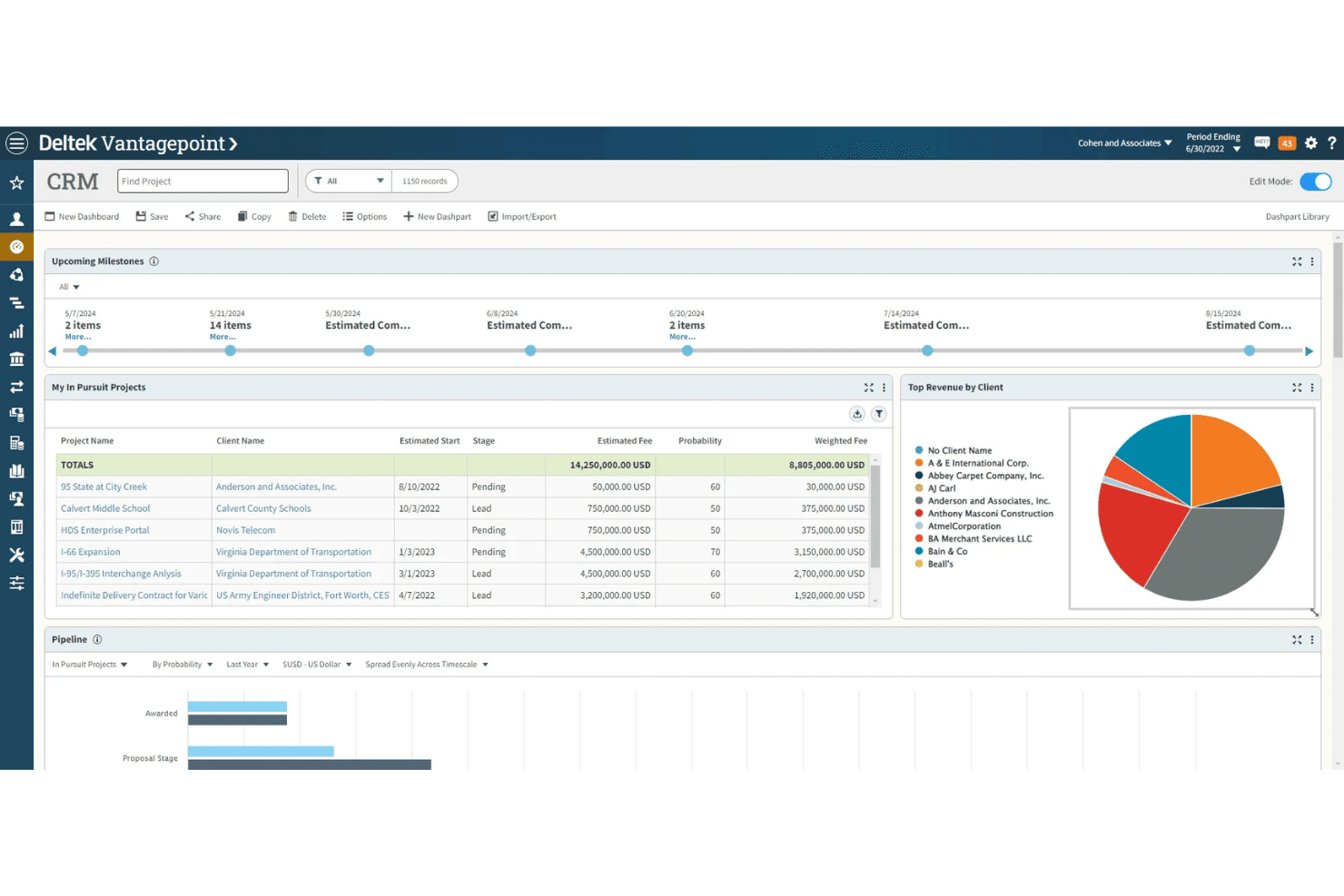
Deltek Vantagepoint links clients, deals, projects, billing, and team resources. Deltek Vantagepoint is a CRM and resource planning platform for professional services firms that centralizes client management, opportunity tracking, project delivery, billing, and resource allocation in a single integrated system.
Who Is Deltek Vantagepoint Best For?
Project-based professional services firms in architecture, engineering, and consulting that need unified client, project, and resource management.
Why I Picked Deltek Vantagepoint
I picked Deltek Vantagepoint as one of the best because I can link resource plans directly to client projects and see staff workload in real time. I use its integrated dashboards to allocate people by role and skill, keeping billable assignments fully aligned with pipeline changes.
Deltek Vantagepoint Key Features
- Customizable pipeline stages: Set up deal workflows tailored to professional services sales cycles.
- Project-to-cash workflow: Manage opportunities, projects, billing, and revenue in one system.
- Native proposal generation: Build and store standardized proposals and SOWs linked to clients and projects.
- Integrated time and expense entry: Log project hours and expenses directly within each client engagement record.
Deltek Vantagepoint Integrations
Deltek Vantagepoint offers native integrations with Microsoft 365, Deltek ArchiSnapper, Deltek PIM, and GovWin IQ. An API is available for custom integrations.
Pros and Cons
Pros:
- Built-in proposal and SOW automation
- Advanced resource allocation for project teams
- Deep project and financial management integration
Cons:
- Reporting customization is somewhat limited
- Interface can feel dated in places
Learn more about Deltek Vantagepoint: Best deal insights for growing firms
- Free plan available
- From $14/user/month (billed annually)
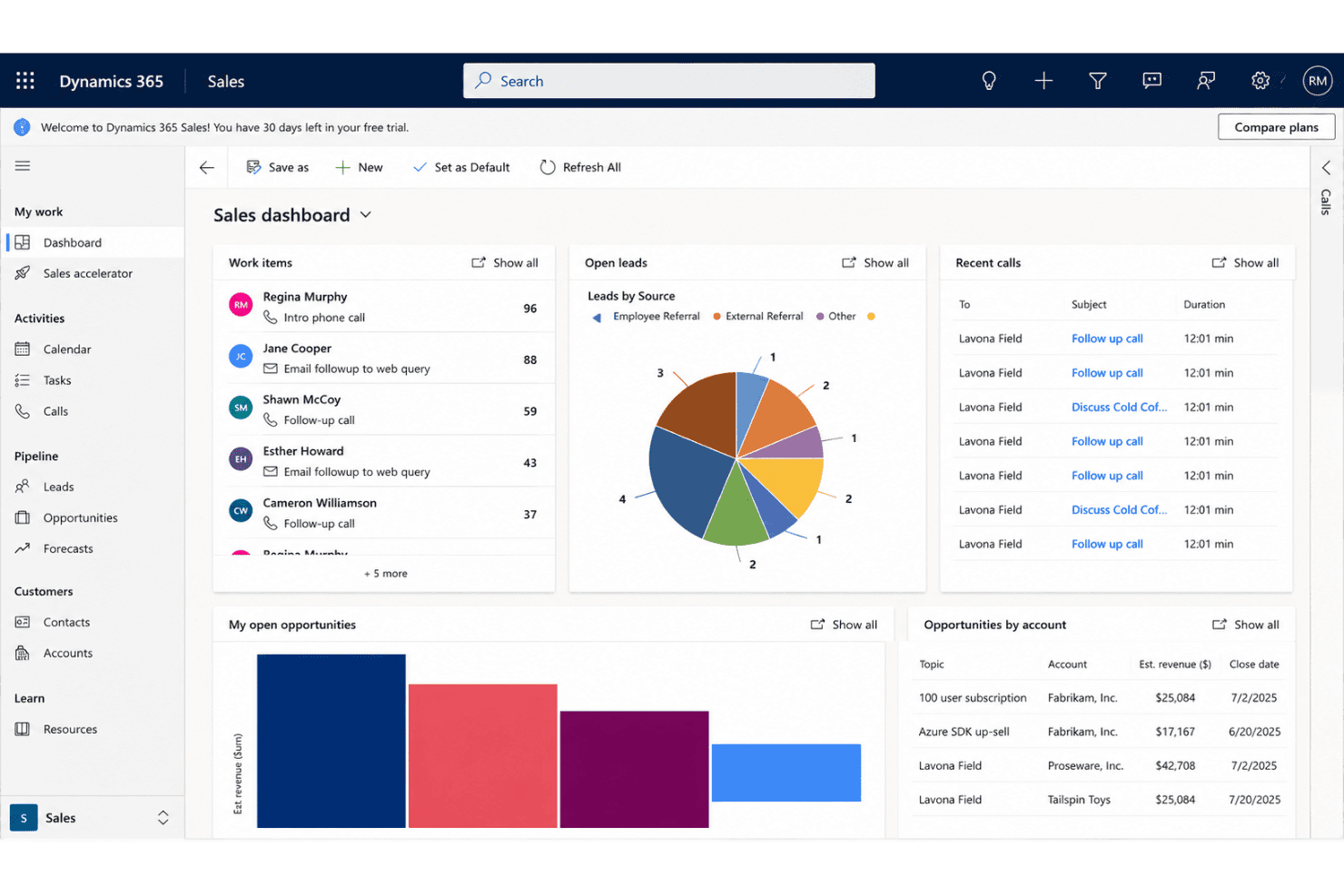
Microsoft Dynamics 365 Sales supports client pipelines, resources, and projects. Microsoft Dynamics 365 Sales is a CRM platform built for professional services teams that need sales pipeline management, client relationship tools, resource tracking, and strong connections to project delivery systems.
Who Is Microsoft Dynamics 365 Sales Best For?
Growing professional services firms that use the Microsoft 365 ecosystem and want connected client management, sales, and delivery processes.
Why I Picked Microsoft Dynamics 365 Sales
I picked Microsoft Dynamics 365 Sales because I like how deeply it connects opportunity management with project delivery through Project Operations. I rely on its multi-pipeline support for retainers and fixed-fee contracts, plus native tools for proposal and SOW workflows. The best deal insights for growing firms are right in the platform.
Microsoft Dynamics 365 Sales Key Features
- Hierarchical account structure: Organize client records using parent-child relationships for complex firm structures.
- Integrated email and calendar sync: Connect Outlook to automatically track communications and schedule client meetings.
- Custom entity and field creation: Build fields and modules tailored to professional services processes and data needs.
- Role-based access control: Set permissions for sensitive client, deal, and financial data by team function or job role.
Microsoft Dynamics 365 Sales Integrations
Microsoft Dynamics 365 Sales has native integrations across the Microsoft ecosystem, including Microsoft 365 and Azure, plus native connections with DocuSign, Adobe Sign, and LinkedIn Sales Navigator. It also provides the Dataverse Web API for building custom integrations.
Pros and Cons
Pros:
- Automated SOW and contract generation workflows
- Deep visibility into client account history
- Customizable pipeline for retainer or project sales
Cons:
- Initial configuration setup is time intensive
- Full project tracking requires additional modules
Learn more about Microsoft Dynamics 365 Sales: Best financial integrations for service providers
- Free demo available
- Pricing upon request
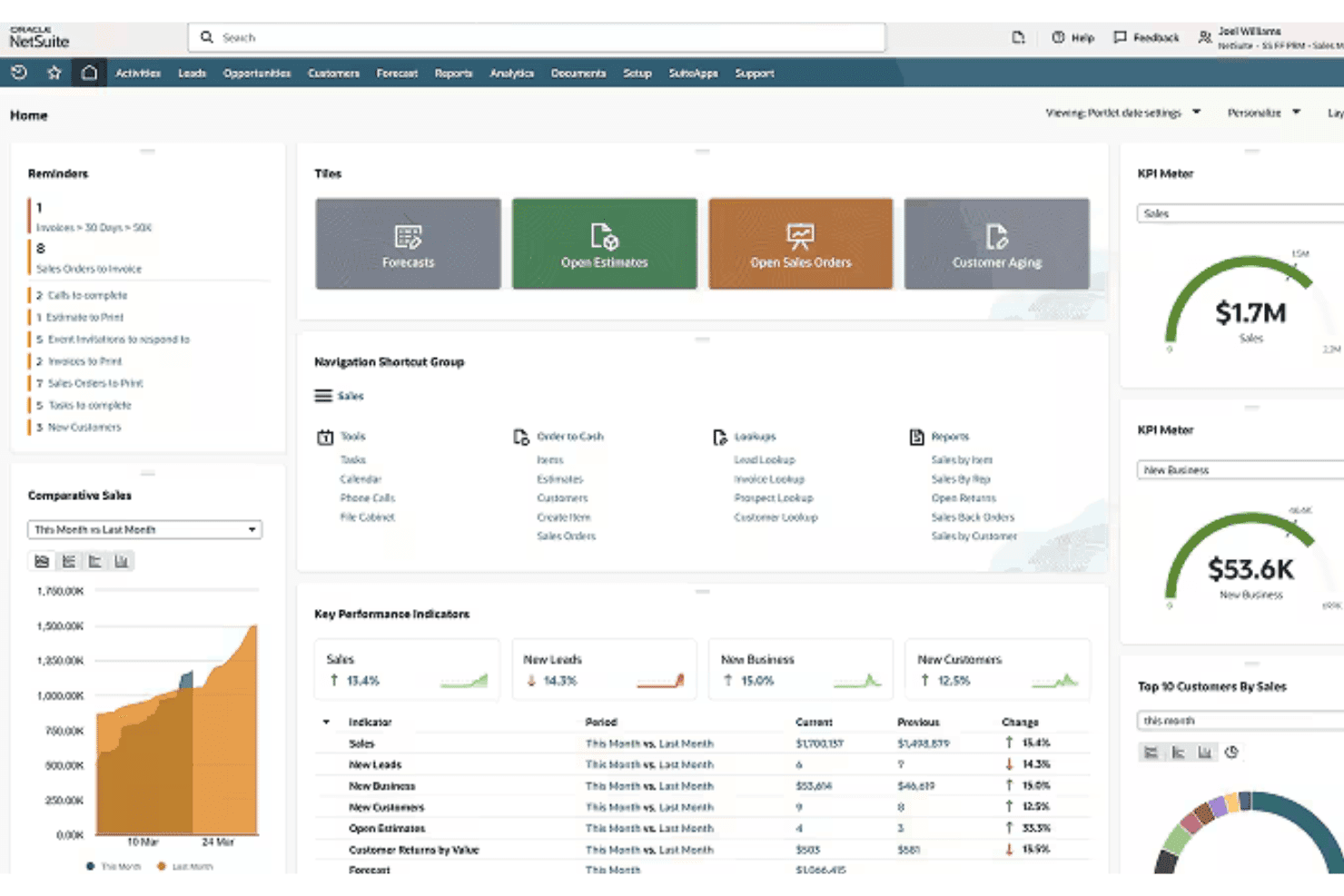
Oracle NetSuite CRM aligns clients, projects, billing, and resource planning. Oracle NetSuite CRM is a professional services-focused CRM system that unifies client management, project tracking, billing, and resource planning in a cloud-based platform.
Who Is Oracle NetSuite CRM Best For?
Large professional services firms and multi-office consultancies that need unified client, engagement, and financial management across their operations.
Why I Picked Oracle NetSuite CRM
I picked Oracle NetSuite CRM as one of the best because I can link client lifecycle data directly to financial operations. My team handles project billing, retainer management, and revenue recognition using its best financial integrations for service providers.
Oracle NetSuite CRM Key Features
- Customizable sales pipeline stages: Configure unique sales and delivery milestones to fit professional services workflows.
- Integrated resource planning: See staff availability, capacity, and allocation within the CRM for accurate engagement staffing.
- Firm hierarchy management: Organize and manage complex client relationships with parent-child account structures.
- Project-to-CRM linking: Tie project progress, timelines, and deliverables directly to client and opportunity records.
Oracle NetSuite CRM Integrations
Oracle NetSuite CRM offers native integrations across the Oracle and NetSuite ecosystem, including NetSuite ERP, SuiteProjects, SuiteBilling, and Oracle CX applications. It also provides SuiteTalk REST and SOAP APIs for building custom integrations.
Pros and Cons
Pros:
- Deep project billing and revenue recognition
- Advanced resource and engagement tracking
- Unified CRM, PSA, and financials platform
Cons:
- Interface can feel dated and slow
- Complex setup for new implementations
Learn more about Oracle NetSuite CRM:
Other CRM Software for Professional Services
Here are some additional CRM software for professional services options that didn’t make it onto my shortlist, but are still worth checking out:
- 11ScoroBest all-in-one work management for agencies
- 12AcceloBest for client work tracking
- 13InsightlyBest for relationship linking for client projects
- 14BQE CoreBest for time and billing for service pros
- 15Zoho CRMBest for multi-channel client communications
- 16SuiteDashBest for built-in client portal features
- 17Copper CRMBest for Google Workspace integration
- 18Capsule CRMBest for contact segregation for niche services
How I Evaluate CRM Software for Professional Services
I split my evaluation into two layers: baseline capabilities a services CRM must have—like pipeline-to-project handoff and billing visibility—and differentiators that set the best options apart.
Core Functionality (Table Stakes For This List)
When I'm selecting tools for my list, I rank each one on a scale from 0 (does not offer the functionality) to 5 (excels in this area) for each core functionality listed below. Then, I calculate the tool's total score into a percentage. Each tool needs to achieve a minimum total score of 65% to be considered for inclusion.
- Contact & Account Management: I check for hierarchical client structures and full engagement history, like tracking multiple stakeholders across a consulting firm's subsidiaries.
- Opportunity & Pipeline Management: Services revenue is messy. I look for pipelines that handle retainers, fixed-fee, and T&M deals with forecasting that reflects those models.
- Project & Engagement Linking: I evaluate how well a CRM connects a closed deal to delivery, whether that's a native handoff or a tight integration with a PSA tool.
- Time, Billing & Revenue Tracking: Billable hours need to tie back to client records. I look for native time tracking or deep integrations with tools like QuickBooks or Xero.
- Resource & Utilization Visibility: Winning work you can't staff is a real problem. I look for capacity views or utilization dashboards tied to pipeline forecasts.
- Reporting & Revenue Analytics: I evaluate dashboards for services-specific metrics like client profitability, backlog, and forecast-vs.-actual comparisons that RevOps teams rely on.
Once I have a list of tools that meet the criteria, I consider what sets each platform apart.
Differentiating Factors (What Sets Vendors Apart)
Here's how I compare and contrast different vendors:
Standout Features
Proposal and SOW automation is a big differentiator—I look for tools that let your team generate engagement letters or change orders directly from a deal record without switching to a separate document tool. Resource and capacity planning matters just as much, especially when your pipeline forecast needs to map to consultant availability and skills. I also check for client portal access, where clients can review project status and deliverables on their own, reducing back-and-forth status emails.
Beyond Features
Integration with your existing tech stack is a major factor. I check for native connectors to PSA tools like Kantata or Certinia, plus two-way sync with accounting and document platforms your delivery team already uses. Fit for services business models matters too—your CRM should support retainer, fixed-fee, and T&M engagements without clunky workarounds. For firms in legal or accounting, I evaluate granular permissions and audit trails that let you segregate client data across practice areas to meet confidentiality requirements.
How to Choose CRM Software for Professional Services
It’s easy to get bogged down in long feature lists and complex pricing structures. To help you stay focused as you work through your unique software selection process, here’s a checklist of factors to keep in mind:
| Factor | What to Consider |
|---|---|
| FactorScalability | What to ConsiderCan the CRM support your firm as headcount, practices, and client base grow? Will licensing and configuration flex as you add new service lines? |
| FactorIntegrations | What to ConsiderDoes the platform connect with your current PSA, billing, document, and project management systems? List your key tools and confirm easy, ongoing sync. |
| FactorCustomizability | What to ConsiderCan you adapt fields, workflows, and reporting to match your unique processes for SOWs, proposals, or capacity planning without heavy IT support? |
| FactorEase of use | What to ConsiderWill your team—across sales, delivery, admin, and leadership—adopt the system quickly? Avoid tools with steep learning curves or dated interfaces. |
| FactorImplementation and onboarding | What to ConsiderWhat does go-live look like for firms without in-house IT? Ask about time frames, migration help, and access to industry-specific templates. |
| FactorCost | What to ConsiderAre all user types (delivery, admin, leadership) covered in a sensible pricing model? Budget for both ongoing usage and any required add-ons. |
| FactorSecurity safeguards | What to ConsiderIs data access segmented by client, practice, or project to prevent cross-client visibility? Review audit trails, permissions, and data residency. |
| FactorSupport availability | What to ConsiderWhat service levels can you rely on during major go-lives or changes? Look for clear SLAs and dedicated help for configuration and troubleshooting. |
What Is CRM Software for Professional Services?
CRM software for professional services is a customer relationship management software platform designed to manage every stage of the client lifecycle, from lead capture and lead scoring to project delivery and renewal. These tools centralize client data, support CRM implementation, and help teams improve customer communications and contract management.
Many platforms also include marketing automation, meeting scheduler tools, data migration support, and features for cross-selling. By bringing these capabilities together, they improve operational efficiency and support business development for professional services firms.
Features
When selecting CRM software for professional services, keep an eye out for the following key features:
- Contact and account management: Organizes detailed client and firm records, capturing relationship history, notes, and multiple stakeholders across accounts.
- Opportunity and pipeline management: Tracks deals, proposals, and revenue in customizable pipelines with forecasting tools built for services-based sales.
- Project and engagement linking: Connects closed deals directly to project delivery modules or third-party tools for smooth sales-to-delivery handoff.
- Time and billing tracking: Logs billable hours and expenses tied to client records, enabling accurate invoicing, revenue tracking, and performance analysis.
- Resource and utilization planning: Gives visibility into team capacity and allocation, ensuring that staff workloads and availability match project needs.
- Document automation: Generates proposals, statements of work, and other key documents using built-in templates, versioning, and e-signature workflows.
- Client portal access: Provides clients with a secure place to view project status, invoices, deliverables, and shared files in one location.
- Services-specific reporting: Offers dashboards and custom reports on KPIs like backlog, client profitability, utilization, and revenue trends relevant to professional services.
- Integration capabilities: Syncs data with accounting, project management, PSA, and document platforms to create a unified workflow across your organization.
- Granular permissions: Controls user access by practice area, client, or engagement to maintain confidentiality and comply with data governance requirements.
Benefits
Implementing CRM software for professional services provides several benefits for your team and your business. Here are a few you can look forward to:
- Full client lifecycle visibility: Centralizes client interactions, documents, and project history so your team never loses context on account status or engagement details.
- Smoother sales-to-delivery handoff: Links pipeline management directly to project delivery, reducing gaps and ensuring engagements start with clear expectations and resource plans.
- Accurate billing and revenue tracking: Connects billable time and expenses to client accounts and opportunities, making invoicing and profitability analysis easier and more accurate.
- Stronger forecasting and resource planning: Brings together pipeline data, delivery schedules, and staffing insights to help leaders plan capacity and avoid utilization bottlenecks.
- Improved client experience: Empowers your clients with portal access to project status, invoices, and documents, enhancing transparency and trust throughout the engagement.
- Better compliance and data control: Offers granular user permissions and audit trails so you can control access, safeguard sensitive information, and meet client confidentiality requirements.
- Easier reporting and insights: Delivers services-specific dashboards on KPIs like profitability, backlog, and utilization, giving RevOps teams the data they need to drive business growth.
Costs and Pricing
Selecting CRM software for professional services requires an understanding of the various pricing models and plans available. Costs vary based on features, team size, add-ons, and more. The table below summarizes common plans, their average prices, and typical features included in CRM software for professional services solutions:
Plan Comparison Table for CRM Software for Professional Services
| Plan Type | Average Price | Common Features |
|---|---|---|
| Plan TypeFree Plan | Average Price$0 | Common FeaturesBasic contact and deal tracking, simple reporting, limited users, and community support. |
| Plan TypePersonal Plan | Average Price$10–$30/user/month | Common FeaturesSingle pipeline management, custom fields, email integration, activity tracking, and standard user permissions. |
| Plan TypeBusiness Plan | Average Price$30–$65/user/month | Common FeaturesMulti-pipeline support, project linking, time and billing tools, automation features, integrations, and analytics. |
| Plan TypeEnterprise Plan | Average Price$65–$120/user/month | Common FeaturesAdvanced permissions, custom workflows, resource planning, client portals, API access, and dedicated support. |
CRM Software for Professional Services FAQs
Here are some answers to common questions about CRM software for professional services:
What makes CRM software for professional services different from general CRMs?
Professional services CRMs support complex sales cycles, project delivery handoff, time tracking, and resource planning—features rarely found in generic CRMs built for product sales.
Can CRM software integrate with PSA, accounting, and project management systems?
Yes, most platforms support native integrations or offer APIs to connect with PSA tools, accounting platforms, and project management software for unified data flows.
How do client portals improve the client experience?
Client portals give your clients secure access to proposals, project updates, deliverables, and invoices in one place, reducing status update requests and building trust.
Is it possible to track billable hours and expenses within the CRM?
Yes, some CRMs offer native time and expense tracking linked to projects and client records, while others connect to third-party tools for billing accuracy.
What security features are important for professional services firms?
Look for solutions with granular permissions, audit trails, data residency options, and compliance with frameworks like SOC 2 or GDPR to protect client confidentiality.
How long does implementation usually take?
Implementation timelines vary, but many providers offer prebuilt templates and onboarding assistance so small-to-midsize firms can go live in weeks, not months.