

Managing contracts can be difficult for any team, especially when you're juggling multiple agreements and deadlines. You need a solution that helps you stay organized, reduces errors, and keeps everyone on the same page.
In my experience, cloud-based contract management software can be a lifesaver. It offers an efficient way to manage contracts, ensuring you never miss a renewal or key term.
Throughout this article, I’ll share my unbiased reviews of the best software solutions in this space. You’ll find insights into features, usability, and what makes each tool unique. My goal is to help you find the right tool for your team’s needs so that you can focus on what truly matters.
Why Trust Our Software Recommendations
6,700+
Reviews
20
Industry experts
16+
Evaluation factors
14
Years
Our reviews reflect our independent judgment—not a sales pitch. Learn how we stay transparent.
For this guide, we evaluated tools using hands-on testing and independent research, scoring tools using our selection criteria.
Our reviews reflect our human editorial judgment, not a sales pitch.
Comparison Table: Cloud-Based Contract Management Software
This comparison table summarizes the pricing details for my top cloud-based contract management software selections.
| Tool | Best For | Trial Info | Price | ||
|---|---|---|---|---|---|
| 1 | Best for fast-growing teams | Free demo available | Pricing upon request | Website | |
| 2 | Best for electronic signatures | Free demo available | Pricing upon request | Website | |
| 3 | Best for customization | Free plan available | Pricing upon request | Website | |
| 4 | Best for contract analytics | Free demo available | Pricing upon request | Website | |
| 5 | Best for cost optimization | Free demo available | Pricing upon request | Website | |
| 6 | Best for small businesses | Free demo available | From $499/month (billed annually) | Website | |
| 7 | Best for legal teams | Free demo available | Pricing upon request | Website | |
| 8 | Best for enterprise compliance | Free demo available | Pricing upon request | Website | |
| 9 | Best for AI-driven insights | Free demo available | Pricing upon request | Website | |
| 10 | Best for procurement integration | Free demo available | Pricing upon request | Website |


Best Cloud-Based Contract Management Software Review
Below are my detailed summaries of the best cloud-based contract management software that made it onto my shortlist. My reviews offer a detailed look at the key features, pros and cons, integrations, and ideal use cases of each tool to help you find the best one for you.
 1Best for fast-growing teams
Juro
- Free demo available
- Pricing upon request
Visit WebsiteCustomer Rating:4.8/5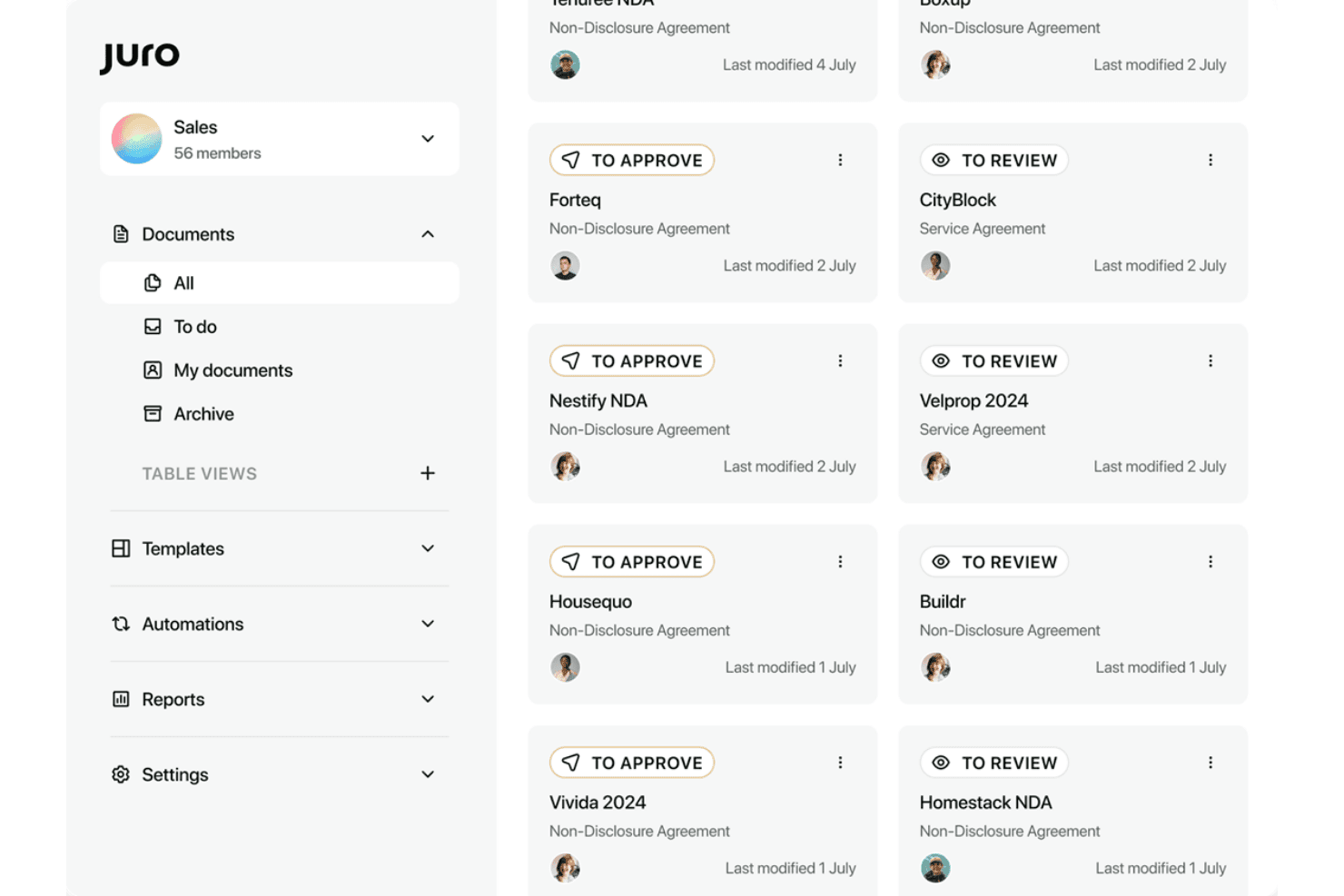
Juro lets users track contract approvals and reviews from a central dashboard. Juro is a browser-native contract lifecycle management platform that handles contract creation, collaborative redlining, approval workflows, native e-signature, and an AI-powered repository—all within a single workspace.
Who Is Juro Best For?
Juro is a strong fit for scaling companies where sales, legal, and RevOps teams need to move fast on contracts without creating bottlenecks.
Why I Picked Juro
I picked Juro as one of the best because it's purpose-built for the pace that fast-growing teams actually operate at. Legal teams lock down approved templates with conditional logic and guardrails, then sales reps generate contracts directly inside Salesforce or HubSpot in four clicks, no legal handoff required. Juro's AI Review agent runs incoming third-party contracts against configured playbooks automatically, cutting the manual first-pass review that bogs down scaling teams.
Juro Key Features
- Native e-signature: Built-in, legally binding e-signature compliant with ESIGN, UETA, and eIDAS—no third-party signing tool required.
- Browser-based redlining: Real-time collaborative negotiation and version comparison inside the platform, with full audit trails maintained throughout.
- Unlimited user licensing: All plans include unlimited users, workflows, and templates—pricing scales with contract volume, not headcount.
- AI-powered metadata extraction: AI Extract automatically tags, summarizes, and extracts key data from uploaded PDFs and DOCX contracts across your repository.
Juro Integrations
Juro offers native integrations with Salesforce, HubSpot, Slack, Microsoft Word, Google Drive, DocuSign, Greenhouse, and Ashby. Enterprise plans add REST API and webhooks for custom integrations; Zapier is also supported.
Pros and Cons
Pros:
- Fast implementation with high adoption rates
- Unlimited users on all pricing plans
- AI agents handle redlining and review
Cons:
- Salesforce requires highest tier plan
- No mobile apps or offline access
Learn more about Juro: Best for electronic signatures
- Free demo available
- Pricing upon request
Visit WebsiteCustomer Rating:4.7/5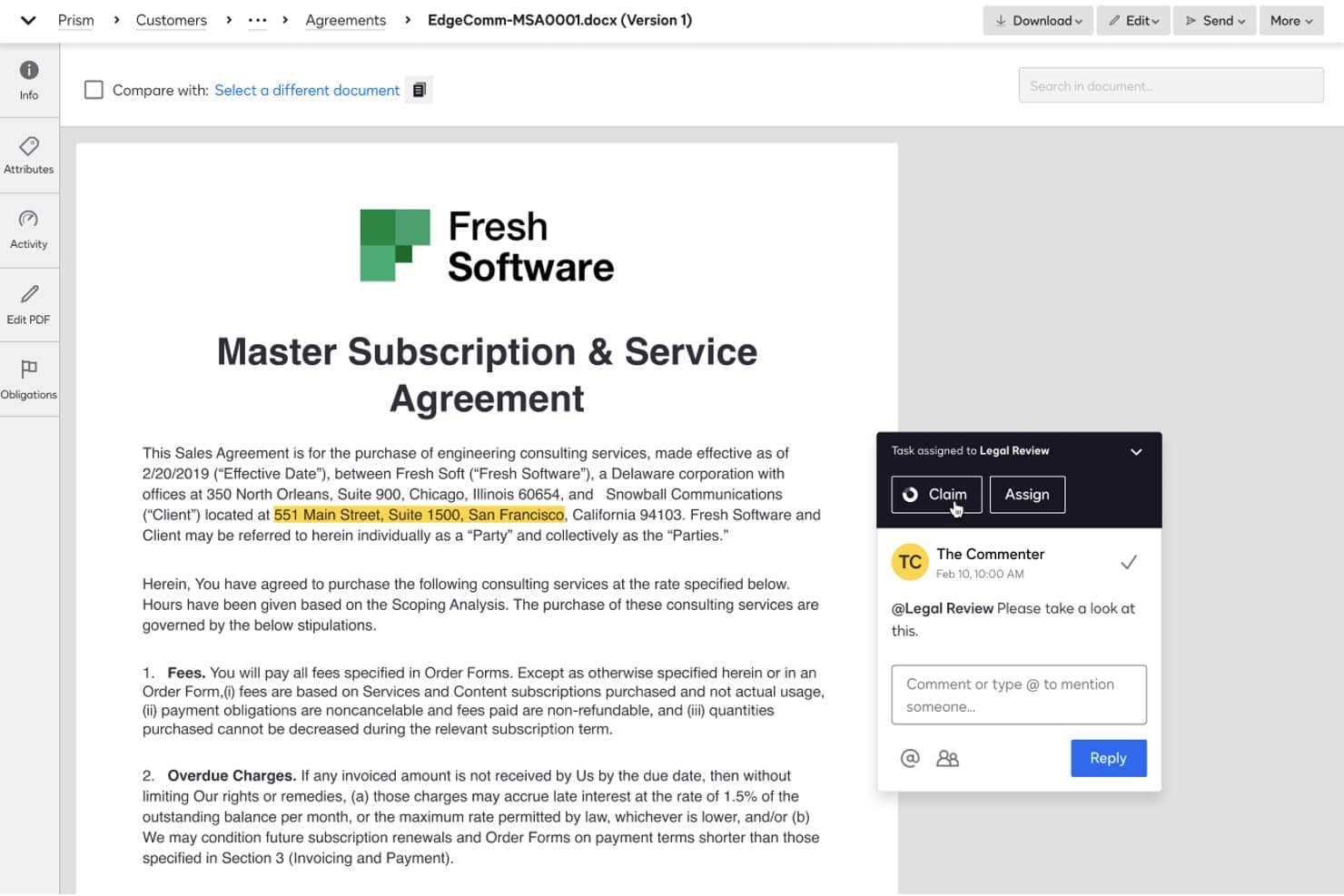
DocuSign CLM lets users assign tasks and collaborate via comments on contracts. Docusign CLM is a cloud-based contract lifecycle management platform that handles contract generation, negotiation, approval routing, e-signature, and repository management with AI-powered automation built across every stage.
Who Is Docusign CLM Best For?
Docusign CLM is a strong fit for enterprise sales and revenue operations teams that need a single platform to handle the full contract lifecycle—from CRM-generated drafts to executed, stored agreements—without stitching together separate e-signature and CLM tools.
Why I Picked Docusign CLM
Docusign CLM earns its spot on my shortlist because no other CLM platform has native e-signature built in at this level—Docusign eSignature is the industry standard, and having it embedded directly into the contract lifecycle means zero handoff friction at execution. I also like that approval routing is genuinely conditional: the workflow engine can redirect a contract based on detected clause language or risk score, so non-standard deals automatically escalate without anyone manually triaging them. It's a named Gartner Magic Quadrant Leader for six consecutive years, which reflects the consistency I'd expect from a platform running contracts for 95% of the Fortune 500.
Docusign CLM Key Features
- Iris AI auto-extraction: Automatically pulls 100+ metadata fields—like renewal dates, payment terms, and governing law—from executed agreements using pre-trained AI models.
- Drag-and-drop workflow editor: A no-code editor with 100+ pre-built steps lets you build multi-stage contract workflows without writing a single line of code.
- Pre-approved clause library: A centralized library of standardized, legal-approved clauses that sales and deal desk users can insert during negotiation without looping in legal.
- Agreement 360 and Party 360 views: Consolidated dashboards that surface both in-flight and executed agreements by deal or counterparty, with portfolio-level risk scoring.
Docusign CLM Integrations
Docusign CLM offers native integrations with Salesforce Sales Cloud, Salesforce CPQ, SAP Ariba, Coupa, NetSuite, Workday, and Slack, plus an open REST API and webhooks. Its partner ecosystem includes 1,000+ marketplace integrations.
Pros and Cons
Pros:
- Native eSignature is built into every workflow
- Drag-and-drop workflow setup for contracts
- AI auto-extracts 100+ contract data fields
Cons:
- No self-serve CLM pricing or instant trial
- Requires lengthy, costly implementation for most
Learn more about Docusign CLM:
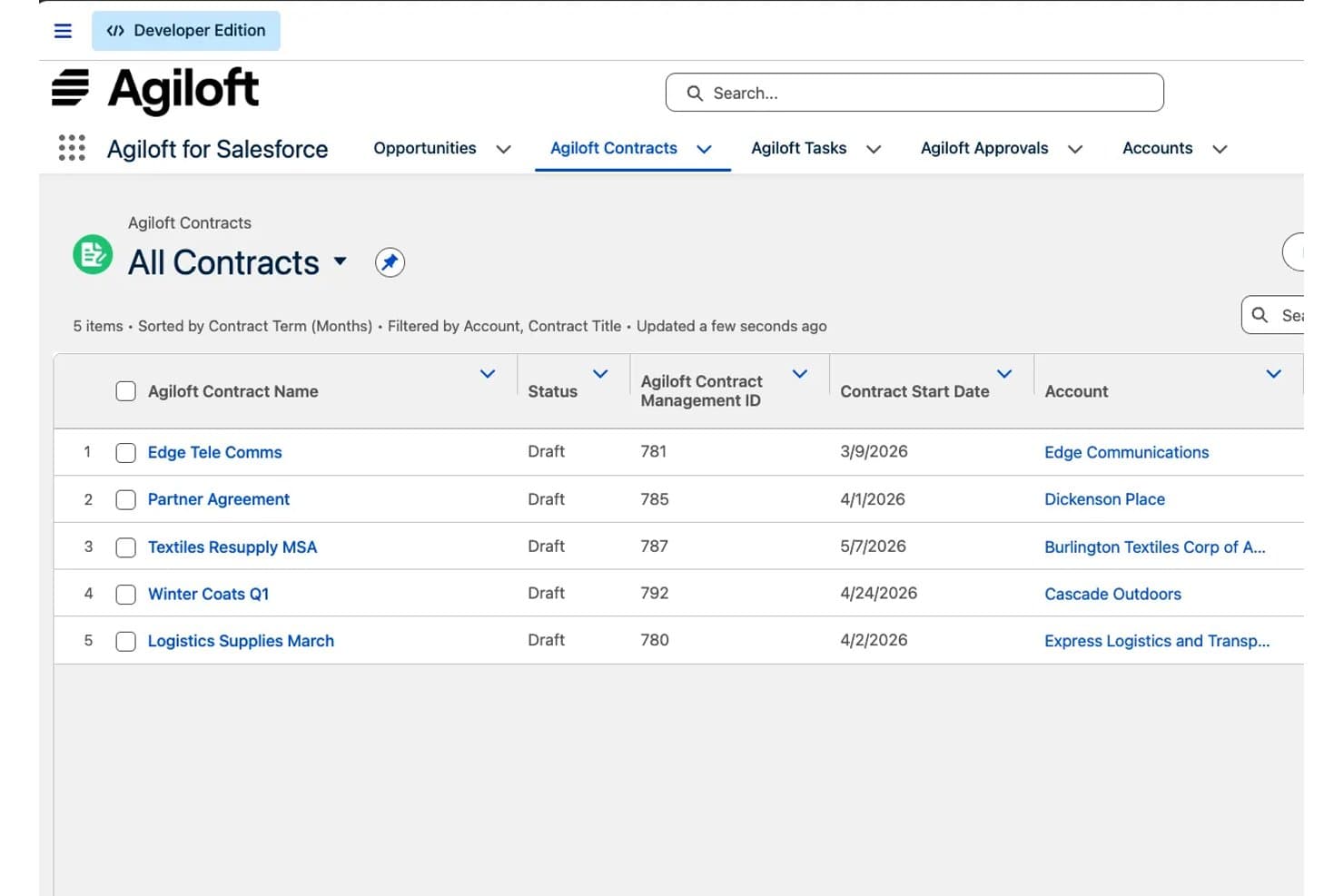
Agiloft displays all contracts with status and start dates in Salesforce. Agiloft is a cloud-based contract lifecycle management platform that handles everything from contract requests and AI-assisted drafting to redlining, multi-stakeholder approvals, e-signature, obligation tracking, and renewal automation.
Who Is Agiloft Best For?
Agiloft is a strong fit for enterprise legal and operations teams that need a CLM platform they can shape around complex, org-specific workflows without relying on engineering resources.
Why I Picked Agiloft
Agiloft earns its spot on my shortlist because no other CLM platform gives you this level of workflow control without touching a line of code. I'm specifically drawn to how deeply you can reshape the platform around your org's actual processes: approval chains, data models, contract request forms, and automated routing rules are all configurable by business users. If your legal team needs non-standard terms to auto-route to deal desk reviewers, or your sales ops team wants one-click MSA generation from Salesforce records, Agiloft handles both without custom development.
Agiloft Key Features
- AI-assisted redlining in Microsoft Word: Astra embeds AI-suggested redlines and clause comparisons directly inside the MS Word interface, so reviewers can negotiate without switching platforms.
- Astra Assistant (ConvoAI): A natural language querying tool that lets you ask questions across your entire contract portfolio to surface risks, obligations, and revenue commitments.
- Automated renewal and obligation alerts: The platform tracks post-signature deadlines and sends configurable notifications for renewals, expirations, and outstanding obligations.
- 1,000+ pre-built integration connectors: The Integration Hub connects Agiloft to external systems—including SAP, NetSuite, Oracle Fusion, and Workday—without custom development.
Agiloft Integrations
Agiloft’s Integration Hub provides 1,000+ pre-built app connectors, including Salesforce, NetSuite, SAP, Oracle Fusion Cloud, Workday, DocuSign, Adobe Sign, Microsoft Word, Google Workspace, and Slack. Its REST API supports custom integrations.
Pros and Cons
Pros:
- End-to-end lifecycle management with audit trails
- AI redlines and playbooks in Microsoft Word
- Deep no-code customization for unique workflows
Cons:
- Complex implementations can delay speed-to-value
- No free trial or instant access
Learn more about Agiloft: Best for contract analytics
- Free demo available
- Pricing upon request
Visit WebsiteCustomer Rating:4.7/5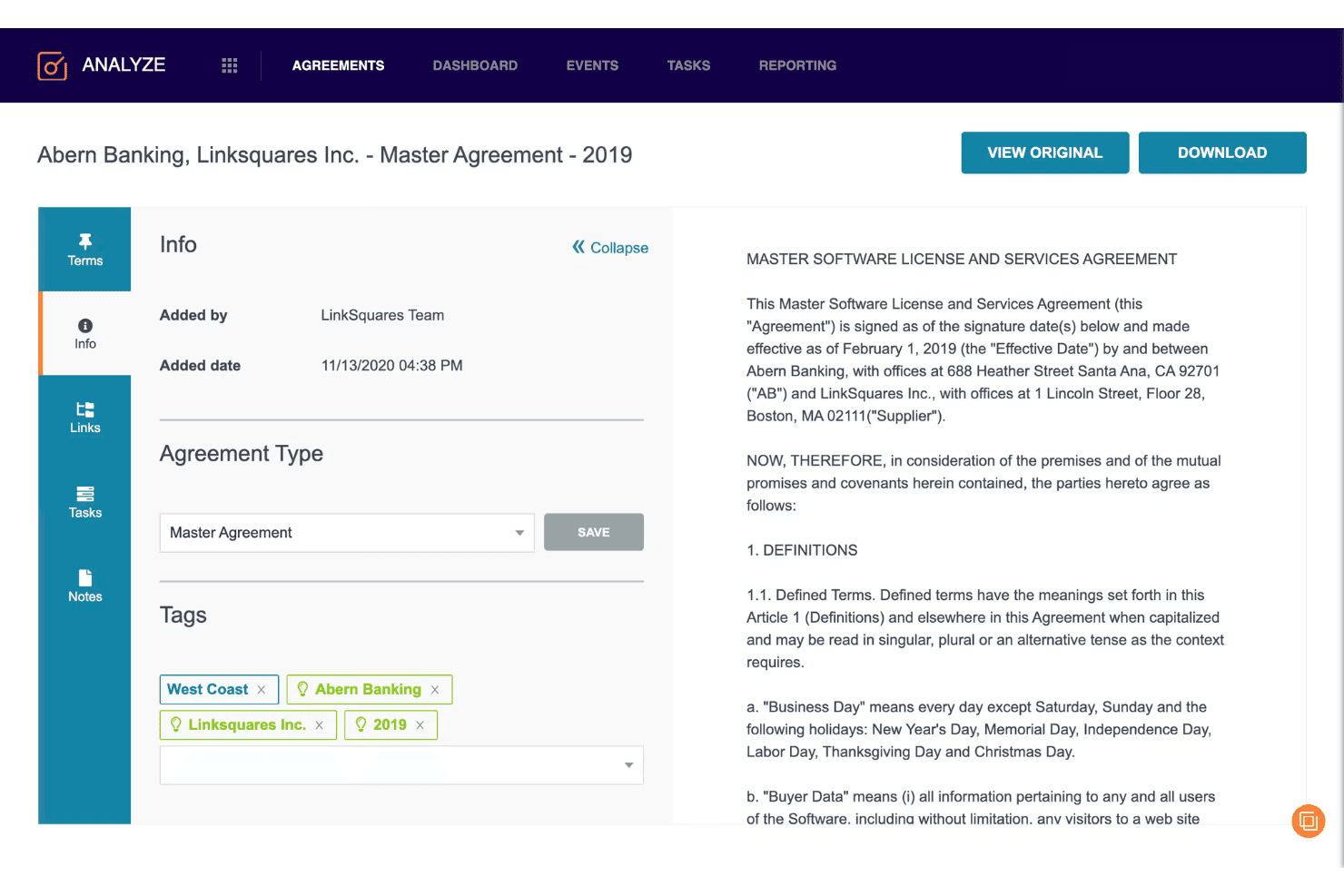
LinkSquares lets users tag and review contract details in one view. LinkSquares is a cloud-based contract lifecycle management platform that combines AI-powered contract drafting, redlining, approval workflows, e-signature, and a post-signature analytics repository into a single system.
Who Is LinkSquares Best For?
LinkSquares is a strong fit for mid-market and enterprise legal and RevOps teams that need deep post-signature contract intelligence alongside full pre-signature workflow automation.
Why I Picked LinkSquares
LinkSquares earns its spot on my shortlist because its post-signature contract intelligence goes deeper than almost any other CLM I've reviewed. LinkAI extracts 120+ structured data points per contract, so renewal dates, liability caps, and cancellation windows surface automatically rather than sitting buried in PDFs. I also like how Analyze pairs NLP-powered portfolio search with proactive AI agents that flag non-compliant clauses before they become problems, turning a passive repository into something that actively protects revenue.
LinkSquares Key Features
- Native e-signature: LinkSquares Sign lets you send, track, and execute agreements without leaving the platform, with full UETA, ESIGN, and eIDAS compliance.
- Microsoft Word add-in: Review, redline, and generate clauses directly inside Word using LinkAI without switching between tools.
- Conditional approval routing: Workflows automatically route contracts to the right approvers based on contract type, value, or custom criteria.
- Salesforce bi-directional sync: Contract data flows between LinkSquares and Salesforce in both directions, giving sales teams live visibility into renewal dates and cancellation terms from within their CRM.
LinkSquares Integrations
LinkSquares integrates with Salesforce, Salesforce CPQ, HubSpot, Microsoft Dynamics 365, NetSuite, DocuSign, Adobe Sign, Microsoft Word, SharePoint, and Google Drive. An open REST API supports custom integrations and data warehouse syncing.
Pros and Cons
Pros:
- Native approval workflow builder with AI agent
- Salesforce bi-directional sync for RevOps visibility
- AI extracts 120+ contract data points
Cons:
- Reported AI extraction inconsistencies in reviews
- Quote-based pricing lacks public transparency
Learn more about LinkSquares:
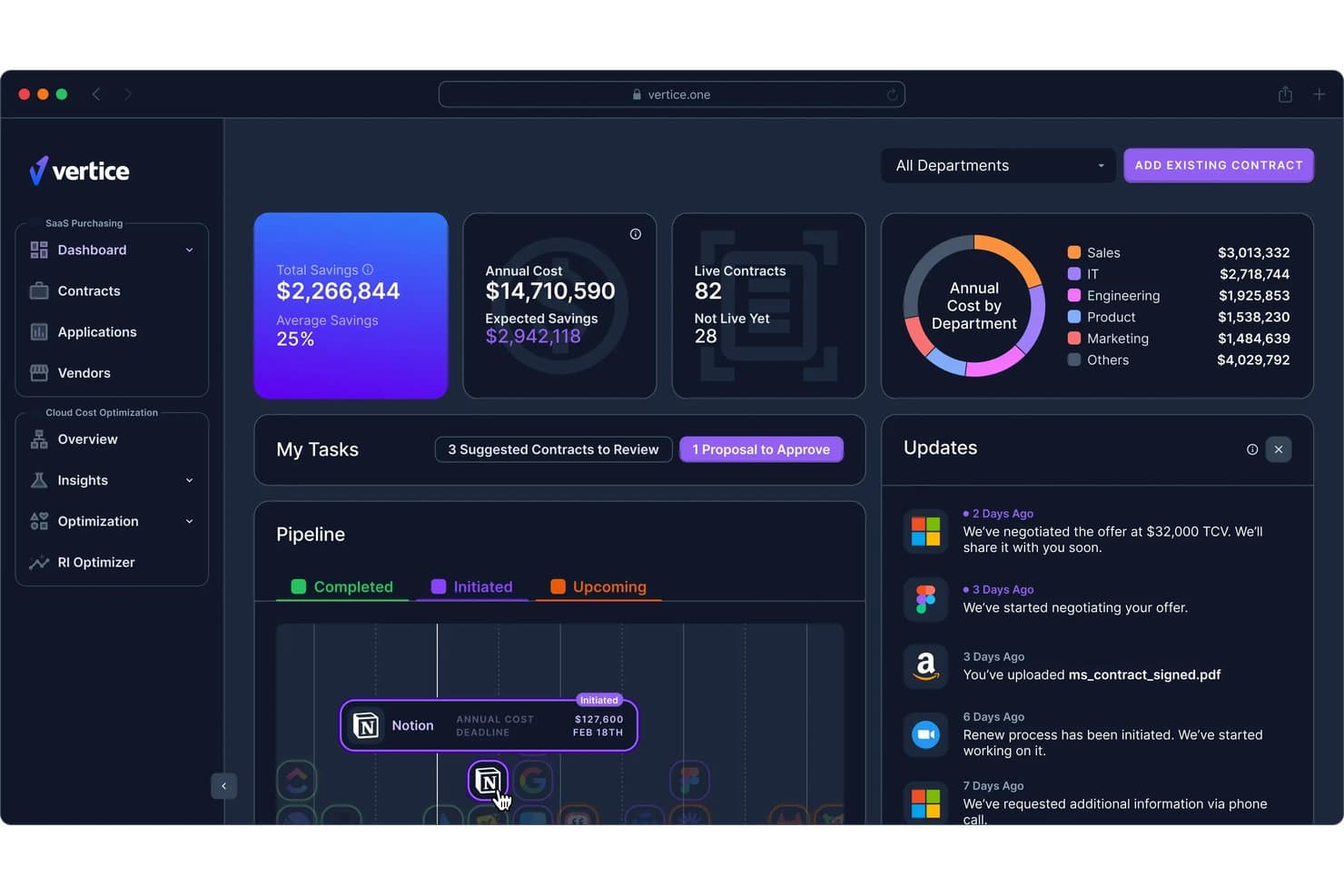
Vertice centralizes SaaS spend tracking, savings, and contract renewals in one dashboard. Vertice is a cloud-based procurement and SaaS spend management platform that centralizes vendor contracts, automates renewal tracking, and uses AI to extract contract data, flag compliance risks, and benchmark pricing across a proprietary dataset of 32,000+ vendors.
Who Is Vertice Best For?
Vertice is a strong fit for finance and procurement teams at mid-market to enterprise companies that need to control SaaS vendor spend and prevent costly auto-renewals.
Why I Picked Vertice
I picked Vertice as one of the best because its cost optimization focus is backed by something genuinely rare: a proprietary pricing benchmark dataset covering 32,000+ vendors, built from 35,000+ negotiated contracts. That means when a renewal is approaching, you're not guessing at fair market value. I also love the renewal pipeline view, which surfaces live deadlines and routes alerts through Slack or Teams so costly auto-renewals don't slip through.
Vertice Key Features
- AI-powered contract data extraction: Automatically pulls key metadata—pricing terms, notice periods, SLA obligations, and clause flags—from uploaded contracts without manual input.
- No-code workflow builder: Drag-and-drop approval flows with conditional logic route purchase requests to finance, legal, IT, or security based on configurable rules.
- Supplier risk management: Embeds continuous AI-driven vendor risk scoring into procurement workflows, with support for security questionnaires and TPRM tool integrations.
- SaaS usage analytics: Tracks license utilization and login trends via SSO integrations to surface underused software and identify shadow IT across your vendor portfolio.
Vertice Integrations
Vertice lists integrations with Ironclad, Juro, Conga, DocuSign, Adobe Sign, SharePoint, Google Docs, Microsoft 365, Slack, and Microsoft Teams. It does not list Salesforce, HubSpot, or CPQ integrations.
Pros and Cons
Pros:
- AI surfaces compliance risks in contract terms
- Proprietary vendor pricing benchmark data included
- Renewal tracking with automated multi-channel alerts
Cons:
- Lacks CRM or CPQ integration options
- No native tools for contract authoring
Learn more about Vertice: Best for small businesses
- Free demo available
- From $499/month (billed annually)
Visit WebsiteCustomer Rating:4.5/5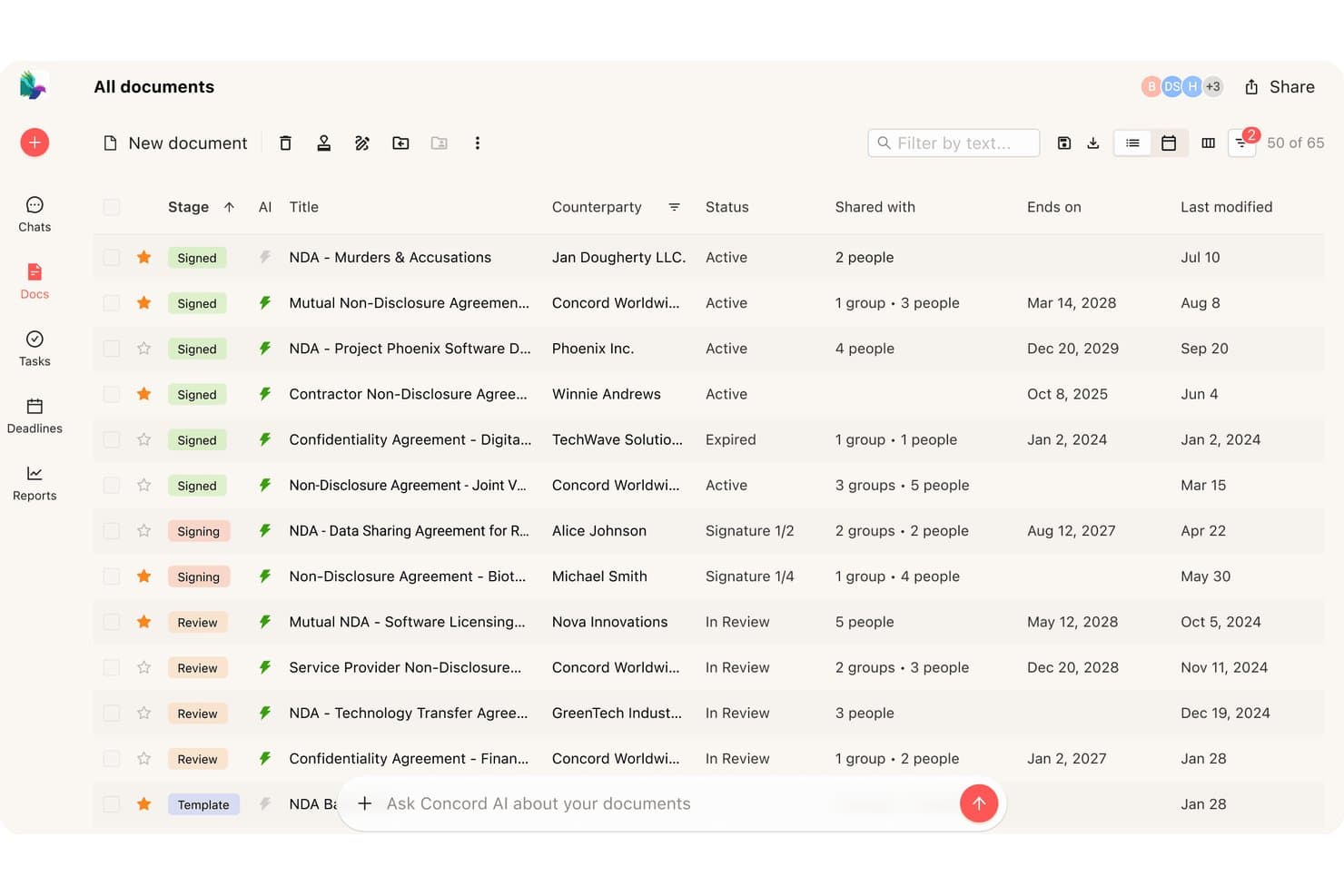
Concord offers an AI-powered contract management dashboard that displays all documents with stage, counterparty, status, and expiration details in a single view. Concord is a cloud-based contract lifecycle management platform that covers authoring, negotiation, e-signature, and renewal tracking within a single browser-based system, with AI-assisted clause drafting and native Salesforce and HubSpot integrations.
Who Is Concord Best For?
Concord suits small businesses that need a full contract lifecycle system—authoring, negotiation, e-signature, and renewals—without enterprise-level complexity or cost.
Why I Picked Concord
I picked Concord as one of the best because it delivers a full contract lifecycle in a single system without the overhead that typically comes with it. Small businesses don't need to patch together separate tools for drafting, redlining, signing, and tracking renewals. I especially like that AI Copilot, which flags risks, extracts obligations, and auto-summarizes contracts, is included at every pricing tier, not locked behind an enterprise upgrade. The unlimited free guest access also means external counterparties can collaborate and sign without your business absorbing extra per-seat costs.
Concord Key Features
- In-browser redlining: Tracked changes, inline comments, and real-time collaborative editing let internal teams and external counterparties negotiate contracts without leaving the browser.
- Automated renewal reminders: Concord sends email alerts for upcoming renewals, terminations, and key contract dates, with sync to Google, Outlook, and Apple Calendar.
- Bi-directional Salesforce and HubSpot sync: Contract data flows both ways between Concord and your CRM, auto-populating templates from deal records and writing updates back to the source.
- Role-based access controls: Granular, document-level permissions let you assign custom roles and teams, with unlimited free guest seats for external signers and viewers.
Concord Integrations
Concord offers native integrations with Salesforce, HubSpot, Google Drive, Box, Dropbox, Google Calendar, Outlook, DocuSign, and Slack (beta). It also supports Zapier, webhooks, and an Open REST API for custom integrations.
Pros and Cons
Pros:
- Centralized repository with full-text OCR search
- Unlimited free guest access for signers
- AI Copilot included on every plan
Cons:
- No dedicated mobile app or offline signing
- Clause library restricted to enterprise plan
Learn more about Concord:
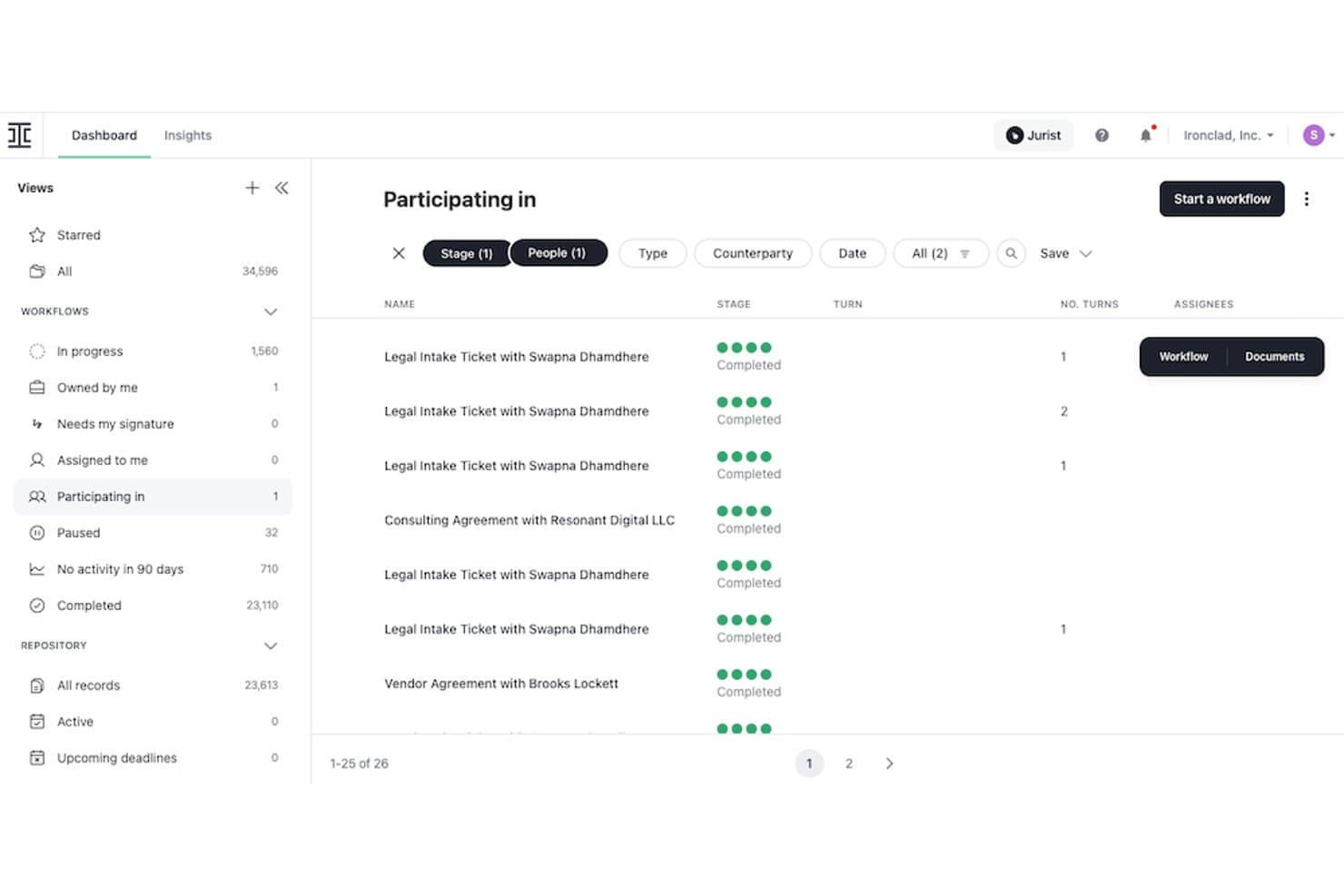
Ironclad tracks contract workflows and participation status in one dashboard. Ironclad is a cloud-native contract lifecycle management platform that covers the full contract process—from template-based authoring and AI-assisted redlining to multi-stage approval workflows, native e-signature, and a centralized post-signature repository with renewal tracking and analytics.
Who Is Ironclad Best For?
Ironclad is a strong fit for legal and revenue operations teams at mid-market to enterprise companies that need deep Salesforce integration and AI-governed contract workflows.
Why I Picked Ironclad
Ironclad earns its spot on my shortlist because legal teams get a genuinely end-to-end CLM, not a patchwork of tools. I'm particularly impressed by AI Playbooks, which flag non-standard clauses and enforce pre-approved language automatically during negotiation. The Jurist AI assistant also runs inline inside the document editor, so reviewing, redlining, and summarizing contracts happens in one place without tab-switching.
Ironclad Key Features
- Workflow Designer: A no-code drag-and-drop tool for building multi-stage conditional and parallel approval workflows across legal, finance, IT, and security teams.
- Smart Import: An OCR-powered bulk import tool that pulls legacy contracts into the repository and extracts metadata automatically.
- Native e-signature: A built-in e-signature solution embedded directly in the platform, with full approval history and contract context captured at signing.
- Ironclad Insights: A contract analytics dashboard that surfaces deal velocity metrics, bottlenecks, and risk trends across your contract portfolio.
Ironclad Integrations
Ironclad offers native integrations with Salesforce, Salesforce CPQ, DocuSign, Adobe Acrobat Sign, Dropbox Sign, Microsoft Word, NetSuite, SAP, Slack, and Microsoft Teams. It also provides a public REST API and Zapier support for custom connectivity.
Pros and Cons
Pros:
- AI Playbooks enforce approved language during negotiation
- No-code workflow builder for approvals and routing
- Bi-directional contract workflows inside Salesforce
Cons:
- Public pricing unavailable without a sales call
- Search accuracy in contract repository lags peers
Learn more about Ironclad: Best for enterprise compliance
- Free demo available
- Pricing upon request
Visit WebsiteCustomer Rating:4.3/5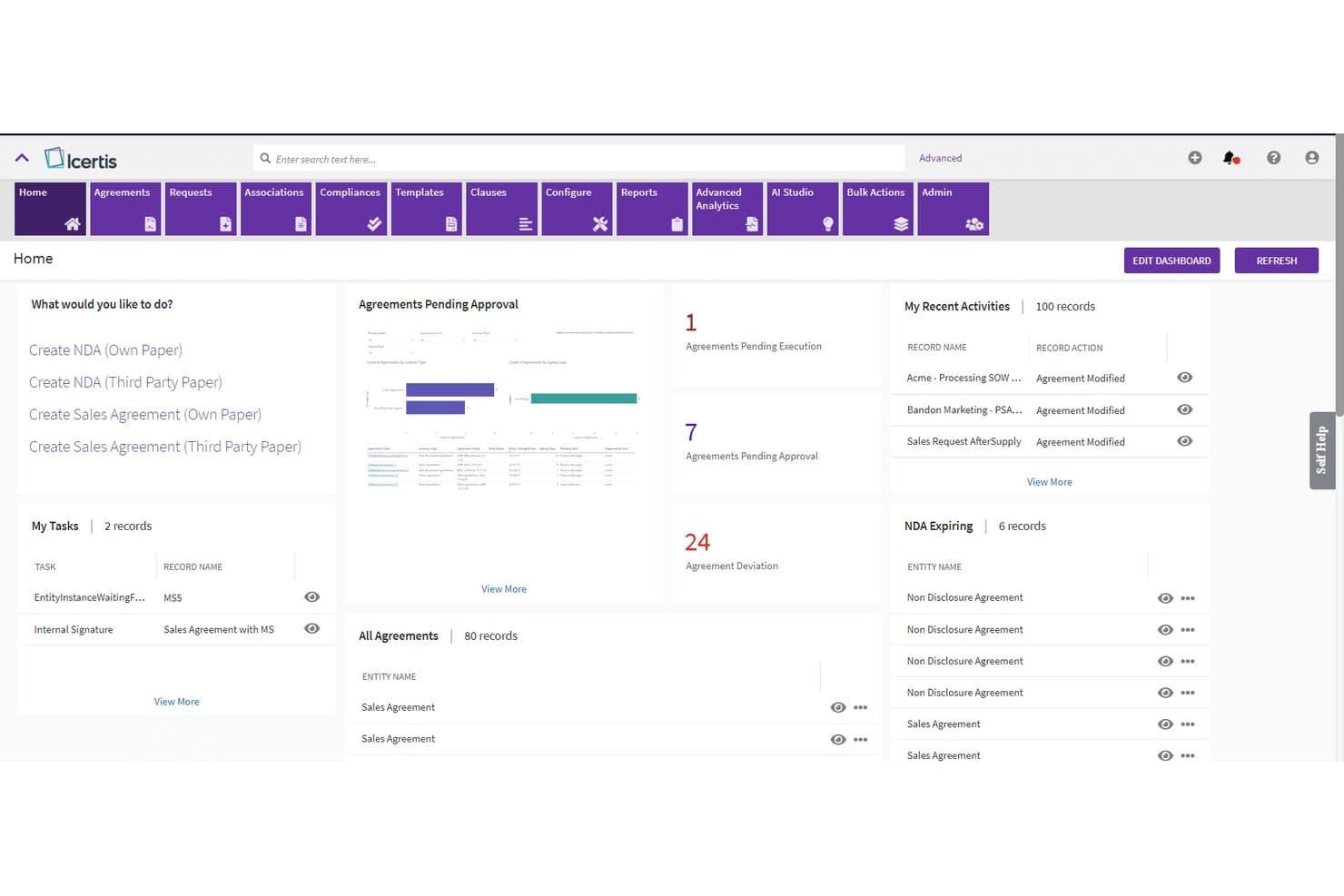
Icertis centralizes contract tracking, approvals, and tasks in one dashboard. Icertis is a cloud-native contract lifecycle management platform that covers the full contract process—from AI-assisted drafting and negotiation to obligation tracking, renewal management, and portfolio-level contract analytics.
Who Is Icertis Best For?
Icertis is built for large enterprises that need contract compliance at scale—particularly legal, procurement, and revenue operations teams managing high-volume, high-stakes agreements across global operations.
Why I Picked Icertis
Icertis earns its spot on my shortlist because no other CLM platform takes compliance as seriously at scale. Its Vera AI engine is trained on over 10 million contracts, which means clause deviation flagging and risk scoring aren't generic alerts—they're grounded in real contract precedent. I'm also a fan of Vera Obligations, which automatically extracts renewal dates and compliance commitments, assigns owners, and sends reminders, so nothing slips through during high-volume periods. The certifications alone (FedRAMP High, ITAR, TISAX, SOC 2 Type 2) set it apart for enterprises operating under serious regulatory scrutiny.
Icertis Key Features
- Vera Compose Agent: Generates first contract drafts from natural language prompts, supporting routine agreements like NDAs and SOWs.
- Vera Redline Agent: Embeds AI-powered redlining directly in Microsoft Word, applying playbook-aligned, risk-scored edits to counterparty paper.
- Salesforce CRM & CPQ adapter: Bidirectional native integration that auto-populates contracts from accounts, opportunities, and approved quotes, with status synced back to CRM.
- Vera Analytics Advanced: Surfaces portfolio-level financial commitments, ACV/TCV data, and revenue risks across the full contract portfolio.
Icertis Integrations
Icertis has native integrations with Salesforce CRM and CPQ, Microsoft Dynamics 365 Sales, SAP CPQ, SAP Ariba, Workday Financials, Adobe Sign, DocuSign, and Microsoft 365. Public APIs support custom integrations and data warehouse connections.
Pros and Cons
Pros:
- Robust obligation and renewal tracking
- Self-service deal desk for sales users
- Advanced AI contract analytics and risk scoring
Cons:
- No proprietary e-signature, only integrations
- Implementation requires significant time and support
Learn more about Icertis: Best for AI-driven insights
- Free demo available
- Pricing upon request
Visit WebsiteCustomer Rating:4.5/5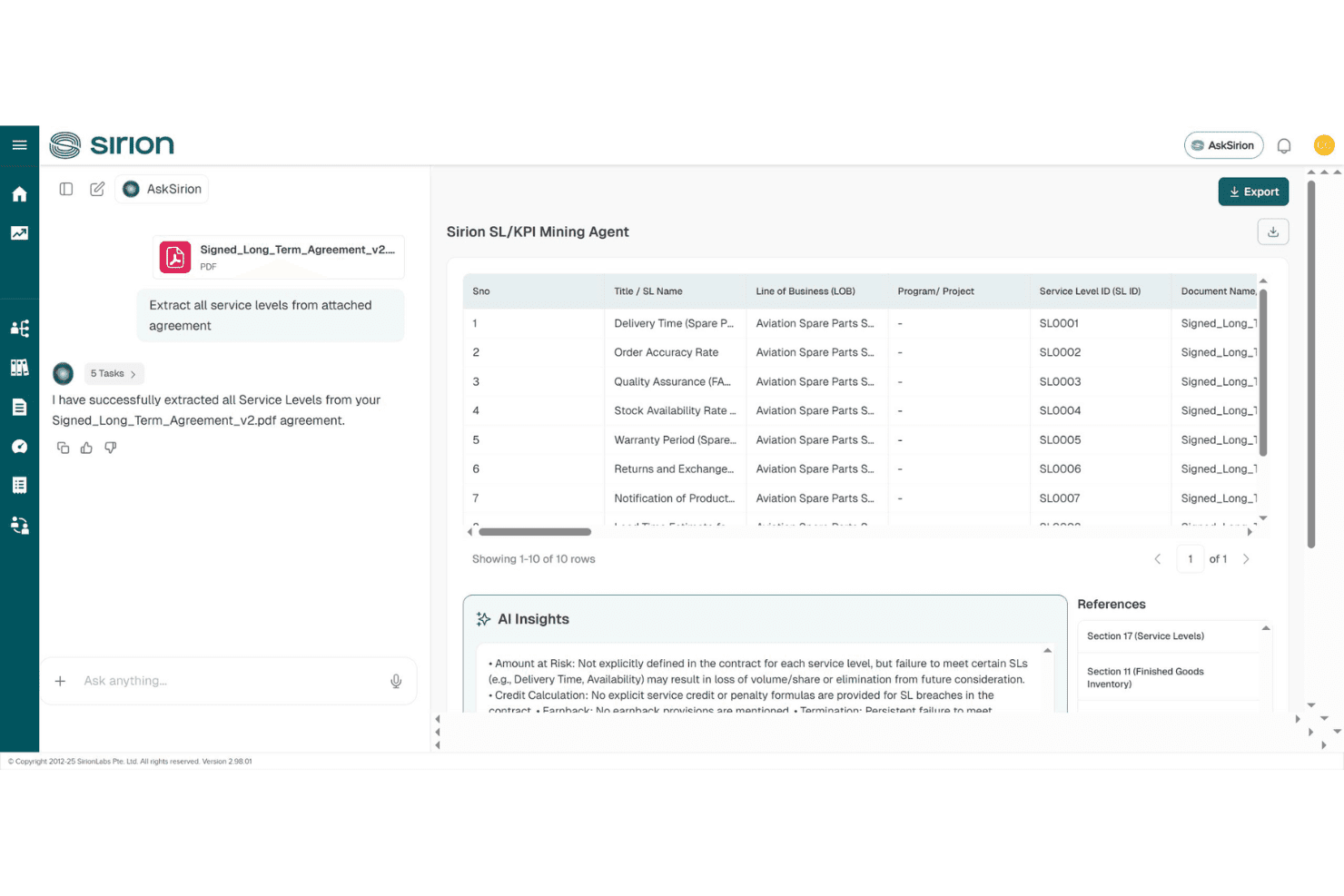
Sirion automatically extracts and structures service levels from contracts. Sirion is an AI-native contract lifecycle management platform that handles contract authoring, negotiation, obligation tracking, and post-signature management through a suite of specialized AI agents.
Who Is Sirion Best For?
Sirion is built for large enterprise legal, procurement, and deal desk teams managing high-volume, complex contract portfolios across multiple jurisdictions.
Why I Picked Sirion
I picked Sirion as one of the best because its agentOS™ architecture genuinely sets it apart on AI-driven contract intelligence. Rather than surface-level AI tagging, it deploys purpose-built agents like the Obligations Agent and Issue Detection Agent to track every commitment across a portfolio and flag risky clauses with source-linked explanations. I find the post-signature depth especially compelling: invoice reconciliation, SLA performance validation, and smart renewal alerts with renegotiation recommendations all run automatically.
Sirion Key Features
- AskSirion natural language search: Query your entire contract repository in plain language, across any language, to surface specific clause terms, obligations, or data points instantly.
- Secure counterparty collaboration portal: Negotiate and share contract drafts with external parties directly in-platform, without routing documents through email.
- Configurable approval routing: Route contracts through legal, finance, or commercial reviewers in any sequence before execution, with full audit trails captured automatically.
- 1,200+ field AI extraction: Automatically pull structured data from ingested contracts—including tables and complex clauses—to populate downstream systems without manual data entry.
Sirion Integrations
Sirion offers native integrations with Salesforce, DocuSign, and Adobe Sign, plus integrations with SAP CPQ, SAP Ariba, SAP S/4HANA Cloud, Oracle, Coupa, ServiceNow, and Microsoft Word. It supports 25+ pre-built connectors, an open API, and webhooks for custom integrations.
Pros and Cons
Pros:
- Automates renewal alerts with recommendations
- Tracks every obligation with source-cited AI
- Advanced AI agents deliver contract insights
Cons:
- Best suited to large enterprise-scale contracts
- Complex features require heavy onboarding investment
Learn more about Sirion: 10Best for procurement integration
Coupa
- Free demo available
- Pricing upon request
Visit WebsiteCustomer Rating:4.2/5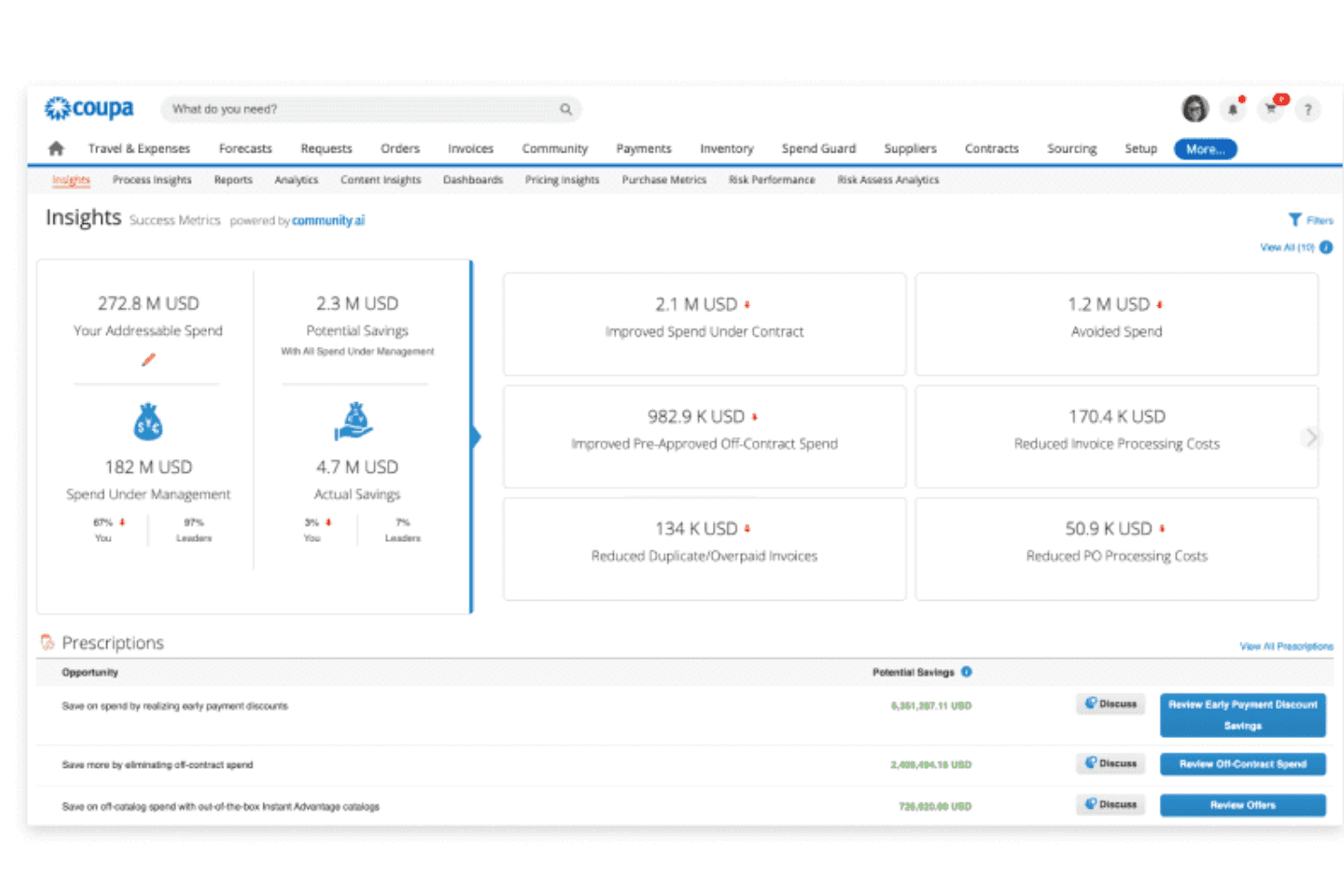
Coupa surfaces AI-powered spend insights and savings prescriptions. Coupa is a cloud-based contract lifecycle management solution built within a broader procurement suite, covering contract authoring, negotiation, approval workflows, repository management, and renewal tracking with AI-powered metadata extraction.
Who Is Coupa Best For?
Coupa is a strong fit for large enterprises that want to manage procurement and sales-side contracts within a single spend management platform.
Why I Picked Coupa
I picked Coupa as one of the best because no other CLM on this list connects contract management this deeply to procurement operations. If your organization runs sourcing awards and supplier agreements at scale, Coupa automatically transfers negotiated terms from sourcing decisions directly into contracts, closing the gap where pricing errors typically slip through. Its OCR-based repository search and AI metadata extraction also make it easier to track obligations across a large contract portfolio.
Coupa Key Features
- Sell-side contract support: The Advanced tier extends CLM coverage beyond procurement to include sales, confidentiality, employment, and partnership agreements.
- Coupa Contracts for Agentforce: A Salesforce AppExchange integration that lets you create contracts directly from opportunity records with AI-powered data auto-fill.
- Contract collaboration module: A dedicated add-on supporting multi-party redlining, side-by-side version comparison, comment threading, and full audit trails.
- Perfect Fit Insights reporting: Visual dashboards that track spend against contract volume and value, flagging savings goal performance with Red/Yellow/Green indicators.
Coupa Integrations
Coupa integrates with Salesforce through Coupa Contracts for Agentforce, DocuSign, and Microsoft Word, with Adobe Acrobat Sign available through the Coupa App Marketplace. It also supports open APIs and native connections across the Coupa Source-to-Contract suite.
Pros and Cons
Pros:
- Advanced audit trails and compliance certifications
- AI-powered contract metadata and obligation extraction
- Deep integration with procurement and sourcing data
Cons:
- Core collaboration tools are paid add-ons
- Sell-side contracts require advanced tier upgrade
Learn more about Coupa:
Other Cloud-Based Contract Management Software
Here are some additional cloud-based contract management software options that didn’t make it onto my shortlist but are still worth checking out:
- 11OnitBest for workflow automation
- 12SAP Ariba ContractsBest for global supply chains
- 13ZycusBest for spend management
- 14CongaBest for Salesforce users
- 15Contract HoundBest for nonprofits
- 16ContractSafeBest for easy searching
- 17GatekeeperBest for vendor management
- 18PandaDocBest for document automation
- 19HyperStart CLMBest for startup scalability
- 20Contracts 365Best for Microsoft 365 users
How I Evaluate Cloud-Based Contract Management Software
I evaluate every tool on two levels: baseline functionality a deal desk can depend on—like CRM-synced contract generation—and differentiators that make one platform the right fit for RevOps teams.
Core Functionality (Table Stakes For This List)
When I'm selecting tools for my list, I rank each one on a scale from 0 (does not offer the functionality) to 5 (excels in this area) for each core functionality listed below. Then, I calculate the tool's total score into a percentage. Each tool needs to achieve a minimum total score of 65% to be considered for inclusion.
- Cloud-Based Deployment: I check that the platform is fully browser-based SaaS so distributed sales and legal teams can collaborate on contracts without VPN dependencies or desktop installs.
- Contract Lifecycle Management: Every tool I evaluate should cover the full journey from authoring through negotiation, execution, and renewal—not just act as a document vault.
- CRM & CPQ Integration: I look for native, bi-directional sync with CRMs like Salesforce or HubSpot so reps can generate contracts from closed-won opportunities without re-keying deal data.
- Templates & Clause Library: A governed clause library and dynamic templates with merge fields matter here—sales teams need to spin up NDAs or order forms using pre-approved language fast.
- E-Signature & Approval Workflows: Whether built-in or embedded through providers like DocuSign, I evaluate how configurable the approval routing is for multi-stakeholder deals with legal, finance, and VP sign-off.
- Searchable Repository & Renewal Tracking: I look at how well each platform indexes stored contracts and surfaces upcoming renewals, since missed renewal dates are where RevOps teams lose recoverable revenue.
Once I have a list of tools that meet the criteria, I consider what sets each platform apart.
Differentiating Factors (What Sets Vendors Apart)
Here's how I compare and contrast different vendors:
Standout Features
AI contract analytics is a big differentiator. I look for tools that auto-extract terms like payment schedules, liability caps, and renewal triggers. This gives RevOps teams obligation-level visibility without reading every page. Self-service deal desk workflows also matter, since they let reps generate compliant contracts while routing non-standard terms to legal. Conditional playbooks take this further by recommending pre-approved fallback language during negotiation, keeping deals moving without bottlenecking at legal review.
Beyond Features
Integration depth matters as much as features. I evaluate whether a platform connects bi-directionally with CRMs, CPQ tools, and billing systems like NetSuite or Zuora so signed contract terms flow straight into revenue recognition. Pricing structure is another factor I weigh carefully—RevOps teams typically have a mix of power users at deal desk and occasional users on the sales floor, so flexible licensing that accommodates both keeps costs predictable. I also consider implementation timelines, since a tool that takes six months to deploy can miss two full quarterly planning cycles.
How to Choose Cloud-Based Contract Management Software
It’s easy to get bogged down in long feature lists and complex pricing structures. To help you stay focused as you work through your unique CLM software selection process, here’s a checklist of factors to keep in mind:
| Factor | What to Consider |
| Scalability | Is the software able to grow with your business? Consider if it can handle an increase in users or contracts without a drop in performance. |
| Integrations | Does it connect to your existing tools? Look for integration with your CRM, ERP, and other essential systems to avoid data silos. |
| Customizability | Can the software be tailored to your workflows? Evaluate the ability to modify templates, dashboards, and processes to match your team's specific needs. |
| Ease of use | Is the interface user-friendly? Assess whether your team can quickly learn the system without extensive training. A cluttered design can slow down adoption. |
| Implementation and onboarding | How smooth is the setup process? Check if the vendor provides resources, such as training videos and live support, to help your team transition smoothly. |
| Cost | Does the pricing fit your budget? Compare the cost against the features offered and consider any hidden fees or long-term commitments. |
| Security safeguards | Are your contracts secure? Ensure the software complies with industry standards and offers encryption, access controls, and regular security updates to protect your data. |
| Compliance requirements | Does it meet your regulatory needs? Verify if the software complies with relevant laws and industry regulations specific to your sector. |
What Is Cloud-Based Contract Management Software?
Cloud-based contract management software is a tool that helps businesses create, store, and manage contracts online. Legal, procurement, and sales professionals commonly use these tools to improve efficiency and reduce errors in contract handling. Automated workflows, e-signatures, and compliance tracking help with organizing contracts and meeting regulatory needs. Overall, these tools simplify contract management, saving time and reducing risk.
Features
When selecting cloud-based contract management software, keep an eye out for the following key features:
- Automated workflows: Simplify contract approvals and processes by automating repetitive tasks, saving time and reducing manual errors.
- E-signature capability: Facilitates secure and quick online contract signing, making it easier for parties to execute agreements without in-person meetings.
- Compliance tracking: Ensures that contracts adhere to industry regulations and standards, helping businesses avoid legal pitfalls.
- Centralized repository: Stores all contracts in one accessible location, improving organization and making retrieval easy and efficient.
- Customizable templates: Create consistent, branded contracts by using templates that can be tailored to specific business needs.
- Advanced search functionality: Quickly locates specific contracts or clauses using keyword search, reducing time spent on manual reviews.
- Reporting tools: Generate insights into contract performance and bottlenecks, helping teams make informed decisions.
- Integration capabilities: Connect with existing software, such as CRM and ERP systems, to ensure data flows smoothly across platforms.
- Security safeguards: Protect sensitive contract information with encryption and access controls to ensure data security.
- Alerts and notifications: Keep your team informed on important contract dates and deadlines to prevent missed renewals or expirations.
Benefits
Implementing cloud-based contract management software provides several benefits for your team and your business. Here are a few you can look forward to:
- Increased efficiency: Automate workflows and reduce manual tasks to allow your team to focus on more strategic activities.
- Enhanced compliance: Track and manage compliance with industry standards, minimizing the risk of legal issues.
- Improved accessibility: Store all contracts in a centralized repository, making it easy for your team to access and retrieve documents from anywhere.
- Cost savings: Reduce the need for paper and physical storage, cutting down on expenses associated with traditional contract management.
- Better collaboration: Use e-signature and document sharing features to facilitate collaboration among team members and external parties.
- Data-driven insights: Leverage reporting tools to gain insights into contract performance, helping you make informed business decisions.
- Security assurance: Protect sensitive information with strong security measures, ensuring your contracts remain confidential and safe.
Costs & Pricing
Selecting cloud-based contract management software requires an understanding of the various pricing models and plans available. Costs vary based on features, team size, add-ons, and more. The table below summarizes common plans, their average prices, and typical features included in cloud-based contract management software solutions:
Plan Comparison Table for Cloud-Based Contract Management Software
| Plan Type | Average Price | Common Features |
| Free Plan | $0/user/month | Basic contract storage, limited e-signature capabilities, and basic search. |
| Personal Plan | $5-$25/user/month | Single-user access, basic templates, e-signatures, and document storage. |
| Business Plan | $30-$60/user/month | Multi-user access, advanced templates, workflow automation, and compliance tracking. |
| Enterprise Plan | $75-$150/user/month | Custom integrations, advanced reporting, dedicated support, and enhanced security. |
Cloud-Based Contract Management Software FAQs
Here are some answers to common questions about cloud-based contract management software:
How do you know if a cloud contract tool fits your existing workflows?
You’ll want to check whether the tool supports the way your team already works. Look at how it handles approvals, version control, and negotiations. If your team spends too much time adjusting to the software, it may slow your business down. A good fit will let you use your current workflows with only minor changes.
How secure are contracts stored in a cloud platform?
Most vendors use encryption, access controls, and audit logs to keep your data safe. You should still review each vendor’s security practices to make sure they meet your company’s standards. Ask your potential vendor about data residency, access monitoring, and how they handle incidents. Your security team should confirm that the vendor’s setup aligns with your internal policies.
Can cloud contract tools handle complex approval paths?
Many tools support multi-step approvals, conditional routing, and role-based access. If your team deals with long cycles or multiple departments, check how flexible these settings are. You should test whether you can set up exceptions or one-off routes without IT support so that your team can manage approvals without creating extra work.
How well do these platforms integrate with other business systems?
Most cloud tools connect with CRMs, ERPs, e-signature apps, and storage platforms. You’ll want to confirm whether the integrations your team relies on work out of the box or require a custom setup. Testing a live workflow will show you how data moves from system to system. Strong integrations reduce double entry and keep contract data consistent.
What should you consider when migrating existing contracts into a cloud platform?
Start by checking how the tool handles bulk imports and metadata tagging. Your team may need to clean or reorganize older files before the move. Look for features that let you extract key terms or auto-tag documents to avoid manual work. A detailed migration plan can help you avoid losing track of important agreements.
How do cloud contract tools support audit readiness?
These tools typically keep detailed logs of edits, approvals, and access. You can pull reports that show who touched a contract and when. This makes it easier for your team to respond to audits and helps you avoid digging through email threads. Clear records can save you time and reduce the chance of missing something important.