

Call transcription software automatically turns meeting and call audio into written text your team can use inside your CRM, pipeline, and coaching systems. If you need to capture accurate details from conversations and plug them straight into your revenue operations workflows, these tools solve the biggest data entry headaches.
In this guide, you’ll find call transcription platforms that fit revenue leaders’ real priorities—like CRM integration, AI-driven deal insights, coaching signals, and multilingual support. Discover which solutions unlock better forecasting, visibility, and insights from every frontline interaction.
Why Trust Our Software Recommendations
6,700+
Reviews
20
Industry experts
16+
Evaluation factors
14
Years
Our reviews reflect our independent judgment—not a sales pitch. Learn how we stay transparent.
For this guide, we evaluated tools using hands-on testing and independent research, scoring tools using our selection criteria.
Our reviews reflect our human editorial judgment, not a sales pitch.
Call Transcription Software Comparison Table
Compare pricing and specs, side by side, for the call transcription software that made it onto my shortlist:
| Tool | Best For | Trial Info | Price | ||
|---|---|---|---|---|---|
| 1 | Best for Salesforce-native call intelligence | Free demo available | Pricing upon request | Website | |
| 2 | Best for revenue pipeline-linked call intelligence | Not available | Pricing upon request | Website | |
| 3 | Best for closing the loop between calls and coaching | Free demo available | Pricing upon request | Website | |
| 4 | Best for EU sales teams auto-filling CRM from calls | Free demo available | Pricing upon request | Website | |
| 5 | Best for UCaaS teams needing built-in transcription | 14-day free trial | From £18/user/month | Website | |
| 6 | Best for revenue teams scaling call intelligence | Free demo available | Pricing upon request | Website | |
| 7 | Best for CRM autofill from sales calls | 14-day free trial + free plan + free demo available | From $30/user/month (billed annually) | Website | |
| 8 | Best for call transcription in 60+ languages | 14-day free trial + free demo available | Pricing upon request | Website | |
| 9 | Best for all-in-one call intel and CRM sync | 14-day free trial + free demo available | From $19/user/month (billed annually) | Website | |
| 10 | Best for AI deal intelligence on call data | Free plan + free demo available | From $10/user/month (billed annually) | Website |


Call Transcription Software Reviews
Below are my detailed summaries of the best call transcription software that made it onto my shortlist. My reviews offer a detailed look at the features, best use cases, and integrations of each platform to help you find the best one for you.
 Best for Salesforce-native call intelligence
- Free demo available
- Pricing upon request
Visit WebsiteCustomer Rating:4.7/5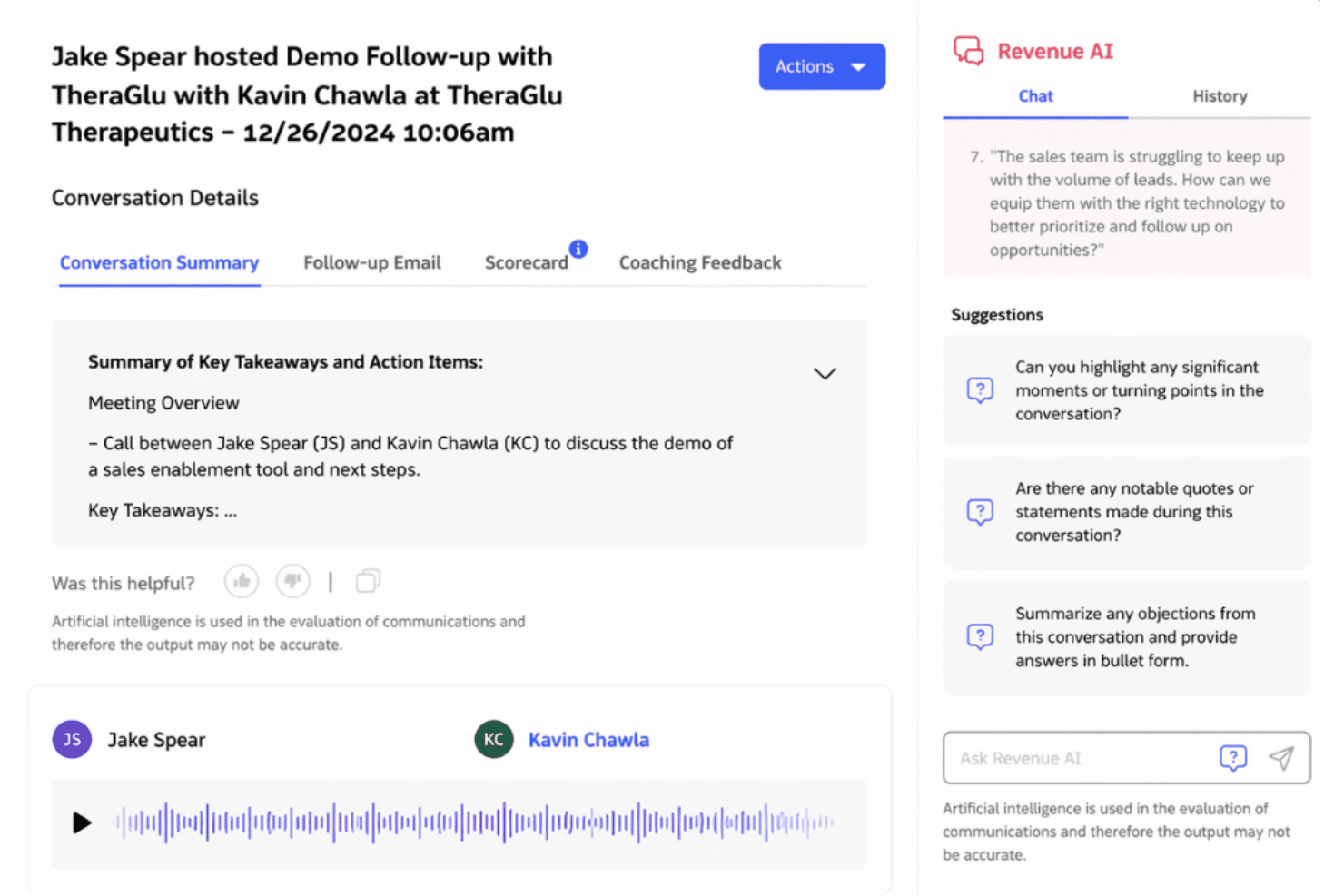
Revenue.io surfaces AI-generated call summaries and coaching insights post-demo. Revenue.io is a Salesforce-native call transcription and conversation intelligence platform that records, transcribes, and analyzes calls across phone, Zoom, Microsoft Teams, and Google Meet—with real-time in-call coaching, AI scorecards, and deal health signals built in.
Who Is Revenue.io Best For?
Revenue.io is built for mid-market and enterprise sales teams running Salesforce who need call intelligence, real-time rep coaching, and deal insights to live natively inside their CRM.
Why I Picked Revenue.io
Revenue.io earns its spot on my shortlist because of how deeply it runs inside Salesforce—not alongside it. Every transcript, AI summary, and deal health signal writes directly to Salesforce objects with no sync lag, which matters when your pipeline reporting depends on real-time data. I also like Moments™, which surfaces live battlecards and objection handlers during a call, not just after it's over.
Revenue.io Key Features
- AI scorecards: Evaluate rep calls against named sales methodologies like MEDDIC, BANT, SPICED, Sandler, and Challenger using automated scoring.
- Multilingual transcription: Automatically transcribes and analyzes calls in 23+ languages, supporting globally distributed sales teams.
- Ask Revenue™ AI: Lets you query your call and deal data conversationally to surface insights across your pipeline without manual report-building.
- Conversation Agents: AI agents that read call transcripts and automatically write structured insights directly into Salesforce fields.
Revenue.io Integrations
Revenue.io has native integrations with Salesforce, Zoom, Microsoft Teams, Google Meet, Gmail, and Microsoft Outlook.
Pros and Cons
Pros:
- Multilingual transcription for 23+ languages
- Real-time in-call coaching with Moments™
- Native Salesforce call data with zero sync lag
Cons:
- No transcription on entry-level plans
- Only works with Salesforce CRM
Learn more about Revenue.io: Best for revenue pipeline-linked call intelligence
- Not available
- Pricing upon request
Visit WebsiteCustomer Rating:4.5/5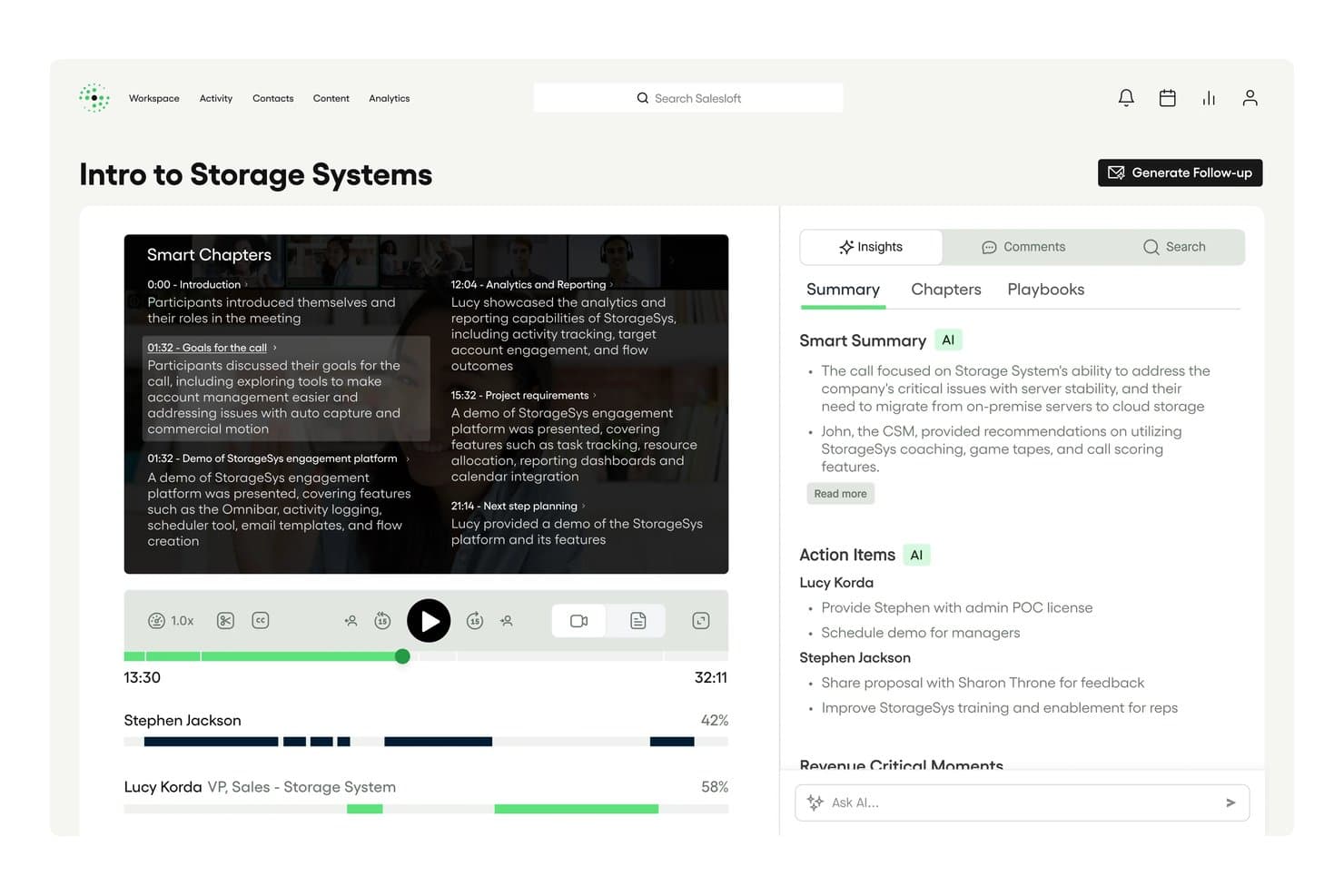
Salesloft auto-generates Smart Chapters and AI summaries from call recordings. Salesloft Conversations is a call recording and transcription product built into the Salesloft revenue platform, offering AI-generated summaries, keyword tracking, conversation scorecards, real-time battlecards, and bi-directional CRM sync with Salesforce and HubSpot.
Who Is Salesloft Best For?
Salesloft Conversations is a strong fit for enterprise revenue teams that already run—or plan to run—their full sales motion inside a single platform.
Why I Picked Salesloft
Salesloft earns its spot on my shortlist because conversation data doesn't just sit in a recording library—it flows directly into pipeline management. I love how AI-flagged Key Moments, objection signals, and deal risk indicators from recorded calls feed automatically into Salesloft Deals and Rhythm, so a rep's call with a hesitant buyer can trigger a pipeline alert without anyone manually reviewing the transcript. Real-time battlecards surfacing during live calls are another feature I think sets it apart from most transcription tools.
Salesloft Key Features
- Conversation scorecards: Evaluate recorded calls against methodology-based criteria to give managers a structured framework for rep coaching.
- Custom keyword and phrase trackers: Configure trackers for competitor names, pricing terms, or specific talk-track language to monitor how often they appear across calls.
- Smart Chapters: Automatically segment call recordings into navigable sections so reviewers can jump directly to relevant parts of a conversation.
- AI-generated follow-up emails: Draft post-call emails with extracted action items and next steps, ready to send or push into a Salesloft sequence.
Salesloft Integrations
Salesloft offers native Salesforce and HubSpot CRM sync, plus Zoom, Google Meet, Microsoft Teams, Highspot, and Seismic. It also supports custom integrations through its open API and webhooks, with Zapier available.
Pros and Cons
Pros:
- Advanced AI-generated follow-up emails
- Real-time battlecards for in-call coaching
- Conversation data flows into deal pipeline
Cons:
- Manual steps needed for Google Meet recording
- No standalone transcription-only option
Learn more about Salesloft: Best for closing the loop between calls and coaching
- Free demo available
- Pricing upon request
Visit WebsiteCustomer Rating:4.6/5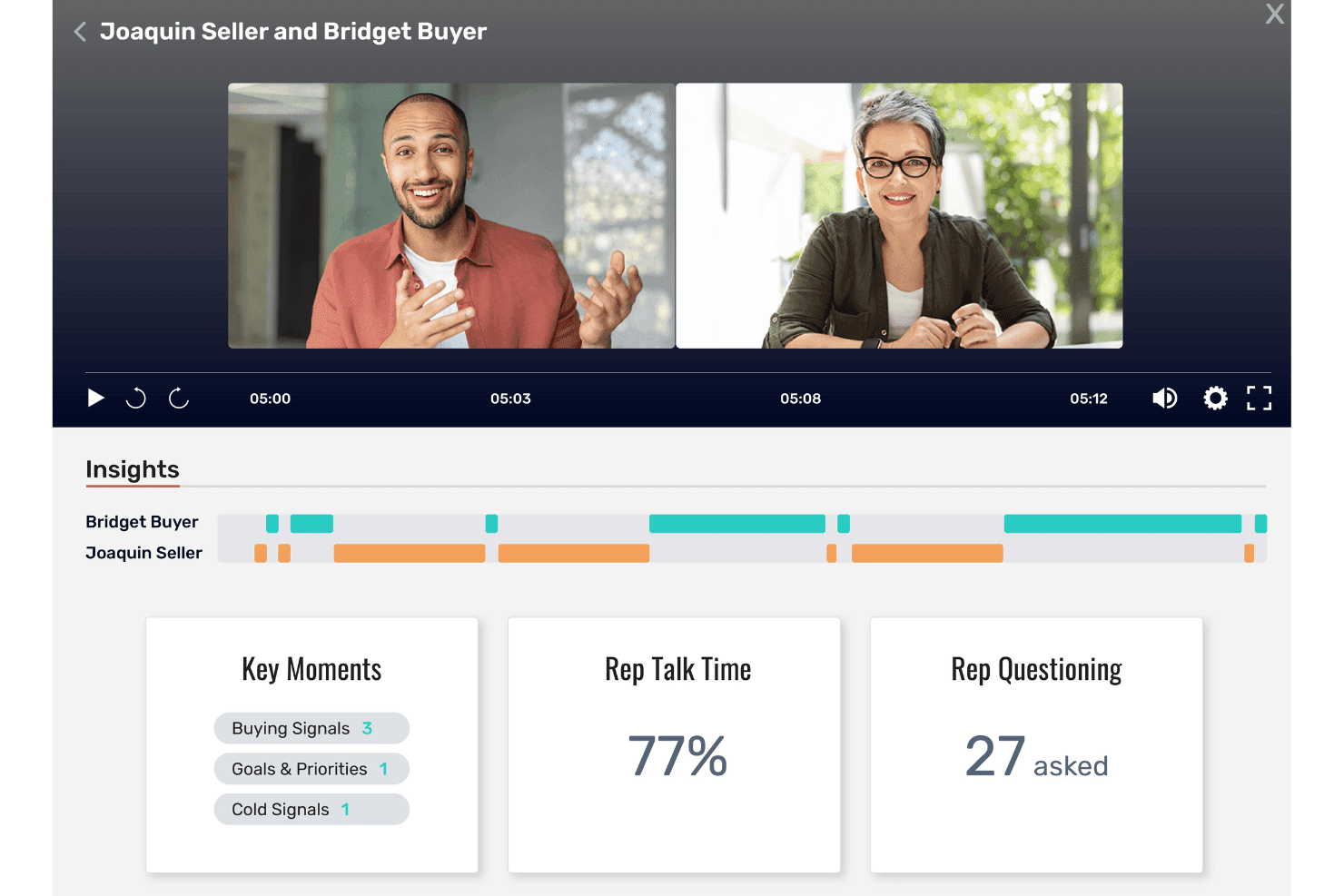
Allego surfaces call insights like talk time and buying signals. Allego is a revenue enablement platform with built-in conversation intelligence that captures and transcribes calls, surfaces AI-generated coaching signals, deal risk alerts, and methodology scorecards, and syncs insights directly into your CRM.
Who Is Allego Best For?
Allego is a strong fit for enterprise sales teams that want conversation intelligence wired directly into their coaching, training, and enablement workflows.
Why I Picked Allego
I picked Allego as one of the best because it's the only platform I've seen that takes a call insight and immediately turns it into a coaching action. When a rep's talk-to-listen ratio flags during a recorded call, Allego doesn't just log it: it can trigger a flash drill or AI role-play assignment tied to that specific gap. Manager-configurable scorecards aligned to MEDDIC, BANT, or SPICED mean coaching conversations are grounded in actual call data, not gut feeling.
Allego Key Features
- Multilingual transcription: Allego transcribes and translates calls in 99+ languages, making it usable for global sales teams operating across multiple regions.
- AI-generated follow-up emails: The platform auto-drafts post-call recap emails and action items directly from call transcripts.
- Deal health scoring: Allego surfaces deal risk signals and recommended next actions within pipeline views using AI Deal Alerts and Deal Navigator.
- CRM write-back: Call recordings, summaries, and engagement data sync to Salesforce, HubSpot, Dynamics 365, Pipedrive, and Close at the opportunity, contact, and activity levels.
Allego Integrations
Allego reports 120+ integrations, including Salesforce, HubSpot CRM, Microsoft Dynamics 365, Zoom, Microsoft Teams, Cisco Webex, Aircall, and Salesloft. It also provides an open API and an MCP API Server for custom connectivity.
Pros and Cons
Pros:
- Includes AI summaries and deal risk alerts
- Multilingual transcription supports global sales teams
- Turns call insights into immediate coaching actions
Cons:
- Platform may feel complex for small teams
- No public pricing or free trial
Learn more about Allego: Best for EU sales teams auto-filling CRM from calls
- Free demo available
- Pricing upon request
Visit WebsiteCustomer Rating:4.7/5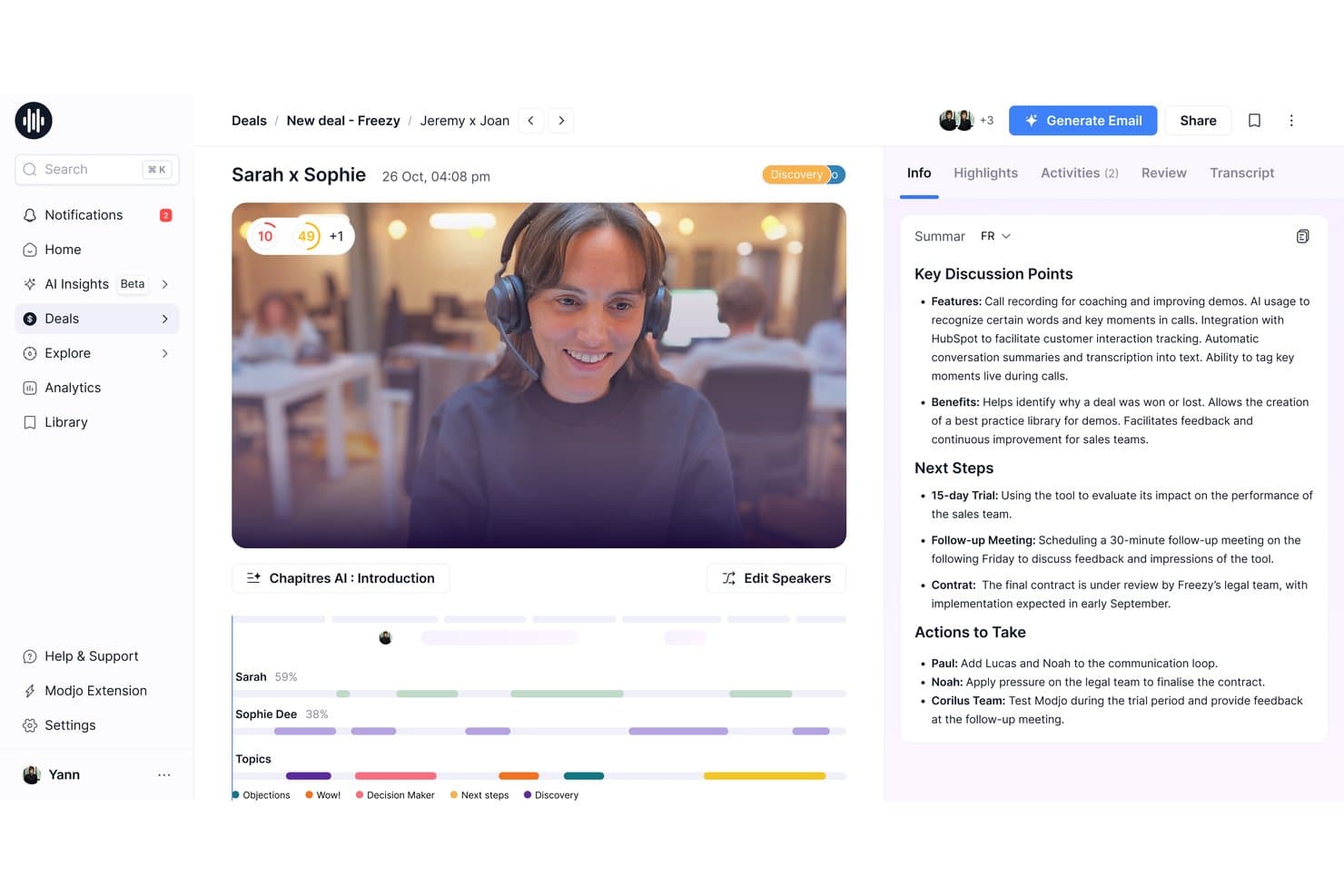
Modjo auto-generates AI call summaries with key discussion points and next steps. Modjo is a call transcription and conversation intelligence platform that records calls across video conferencing and VoIP dialers, transcribes in 100+ languages, and layers on AI-powered summaries, CRM auto-fill, deal intelligence, and coaching tools.
Who Is Modjo Best For?
Modjo is a strong fit for European B2B sales teams that need CRM data quality without relying on reps to manually log call details.
Why I Picked Modjo
I picked Modjo as one of the best because its AI CRM auto-fill is the strongest I've seen for European sales teams. After a call, Modjo automatically populates Salesforce or HubSpot fields, including custom objects and MEDDIC or SPICED qualification data, without reps touching the CRM. The Churn Detector agent also flags renewal risk directly from customer conversation signals, which is a genuinely useful layer beyond standard transcription.
Modjo Key Features
- AI call scoring: Modjo scores each call against sales methodologies like MEDDIC, BANT, or SPICED, surfacing where reps deviated from your playbook.
- Searchable call library: A centralized library lets you clip, playlist, and share call recordings across sales, marketing, and product teams.
- Talk ratio analytics: Per-participant talk time is tracked on every call, giving managers a clear view of rep listening habits across the team.
- Ask Modjo: A conversational AI interface lets you query across all recorded calls, deals, and CRM data without leaving Salesforce or HubSpot.
Modjo Integrations
Modjo documents integrations with Salesforce, HubSpot, Microsoft Teams, Zoom, Google Meet, Aircall, Ringover, CloudTalk, Slack, Gmail, and Outlook. A public API and MCP server support custom integrations, BI, and workflow routing.
Pros and Cons
Pros:
- Free listener seats for managers and leaders
- Transcribes over 100 languages accurately
- AI auto-fills CRM from call transcripts
Cons:
- CRM auto-fill only for Salesforce, HubSpot
- No real-time in-call assistance
Learn more about Modjo: Best for UCaaS teams needing built-in transcription
- 14-day free trial
- From £18/user/month
Visit WebsiteCustomer Rating:4.2/5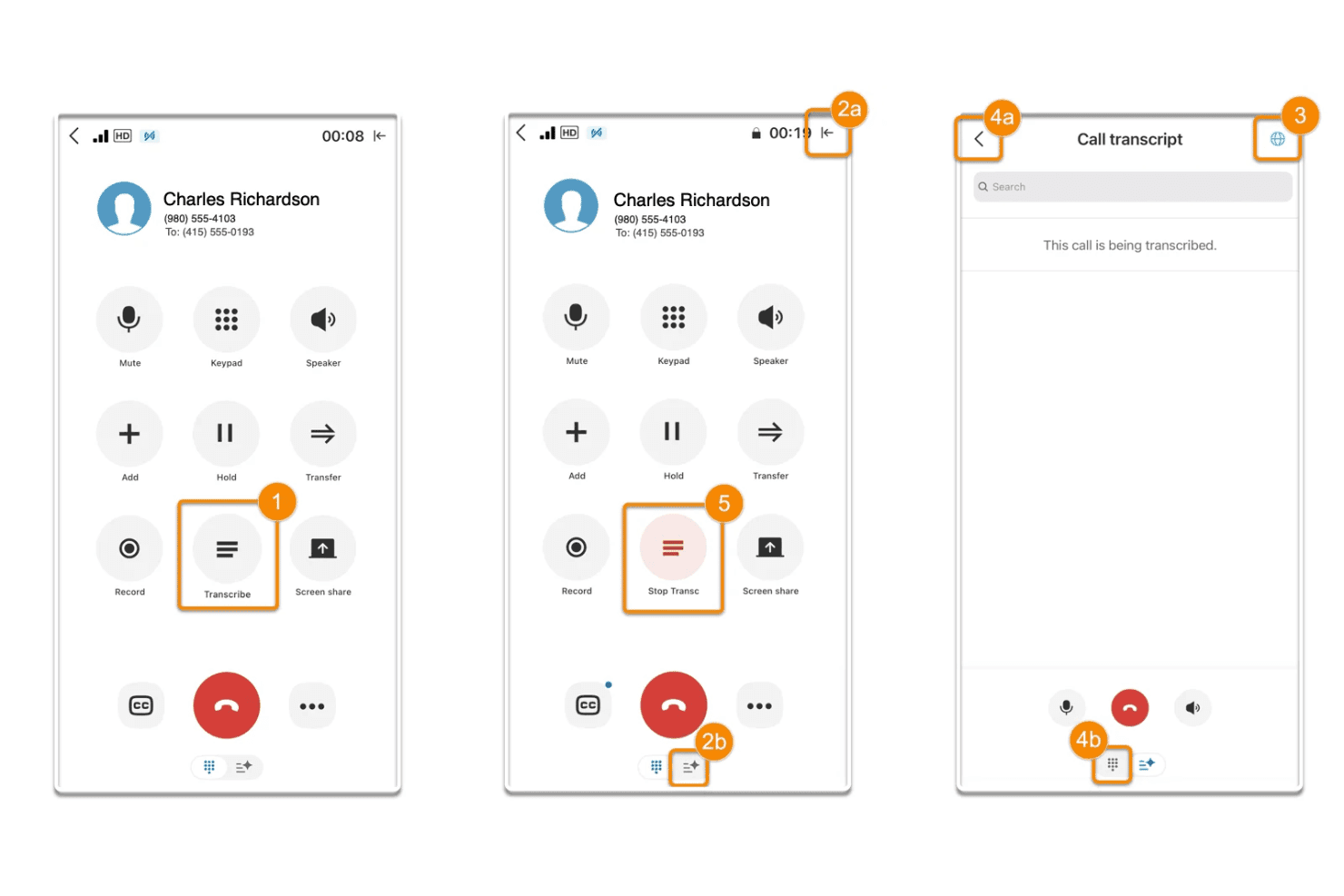
RingCentral lets users transcribe live calls and view real-time text. RingCentral is a UCaaS platform that combines cloud calling, video meetings, and messaging with built-in AI transcription, automated call notes, and conversation intelligence through its AI Conversation Expert add-on.
Who Is RingCentral Best For?
RingCentral is a strong fit for enterprise and mid-market teams already running on a UCaaS platform who want transcription and conversation intelligence built into the same system they use for calling and messaging.
Why I Picked RingCentral
RingCentral earns its spot on my shortlist because transcription isn't a bolt-on here, it's baked into the same platform your team already uses for calls and video meetings. I especially like that the AI Conversation Expert captures and transcribes calls made in Zoom, Google Meet, and Microsoft Teams, not just RingCentral's own system. Post-call, CSAT Prediction and group coaching dashboards surface team-wide patterns without requiring a separate tool.
RingCentral Key Features
- Custom trackers: Configure keyword and concept trackers with AI-powered pattern matching to surface competitor mentions, objections, or product interest across your full call library.
- CSAT prediction: Analyzes call transcripts to predict customer satisfaction scores, with 90-day trend visibility and direct links to low-satisfaction calls for QA review.
- Multi-speaker diarization: Separates and labels individual speakers within recorded conversations, making transcripts searchable by speaker, topic, and keyword.
- Compliance-ready recording: Supports FINRA Rule 3170, HIPAA, and GDPR requirements with admin-configurable retention policies, consent announcements, and audit-logged call deletion.
RingCentral Integrations
RingCentral offers native integrations with Salesforce, HubSpot, Zoho CRM, Microsoft Dynamics, and Freshdesk, plus Zoom and Microsoft Teams capture through ACE. It also supports 500+ marketplace integrations, open APIs, and webhooks for custom connectivity.
Pros and Cons
Pros:
- Advanced coaching and sentiment analysis features
- Accurate live transcription for long meetings
- Transcription built into UCaaS communications platform
Cons:
- No live in-call battle cards
- Conversation intelligence requires paid add-on
Learn more about RingCentral: 6Best for revenue teams scaling call intelligence
Gong
- Free demo available
- Pricing upon request
Visit WebsiteCustomer Rating:4.7/5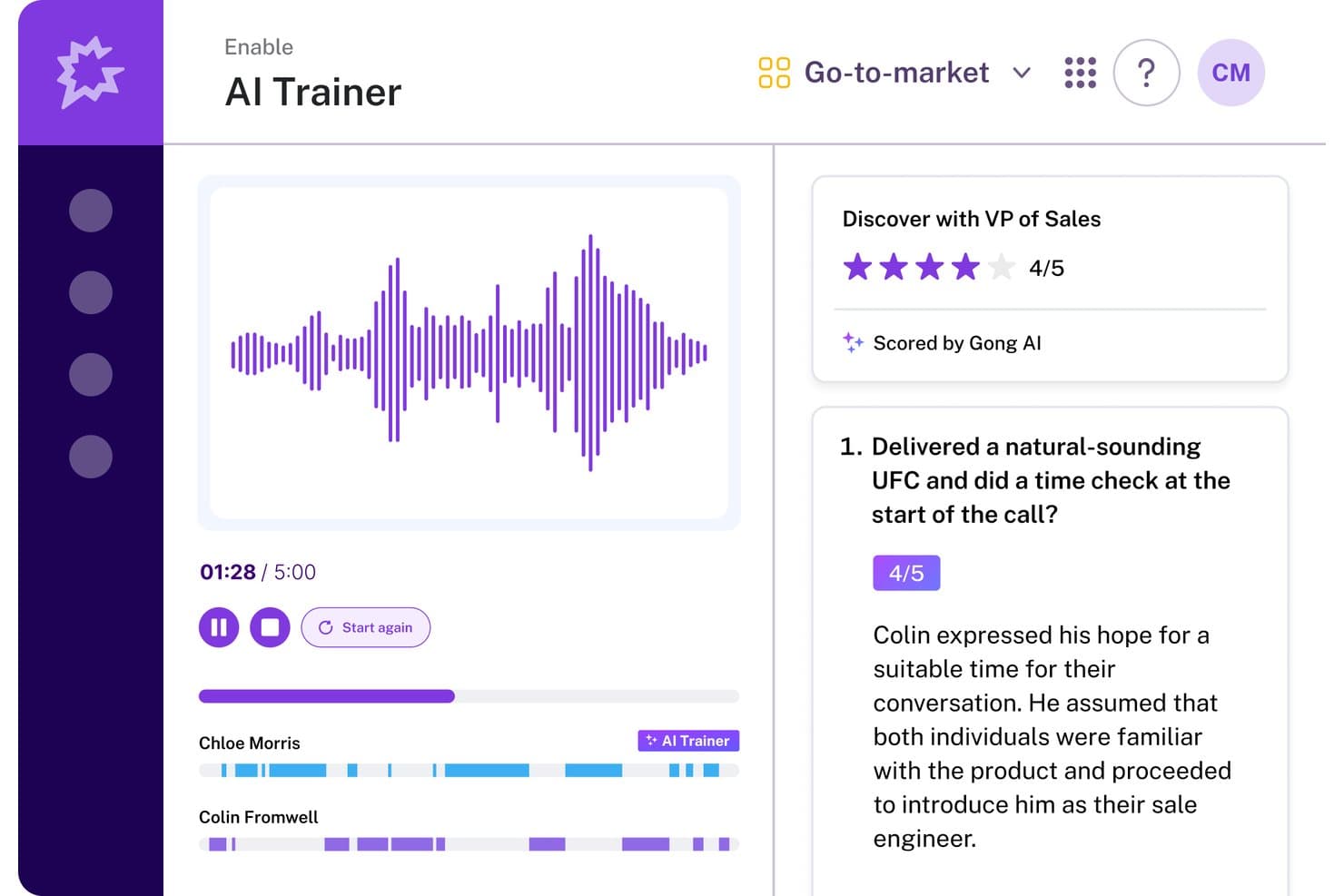
Gong's AI Trainer scores sales calls and gives feedback. Gong is a revenue intelligence platform that records, transcribes, and analyzes sales calls across Zoom, Google Meet, and Microsoft Teams, with AI-generated summaries, deal risk signals, coaching scorecards, and a searchable call library built into a single system.
Who Is Gong Best For?
Gong is built for B2B revenue teams—sales, enablement, and RevOps—that need conversation intelligence tied directly to pipeline data and coaching workflows.
Why I Picked Gong
Gong earns its spot on my shortlist because no other call transcription tool connects conversation data directly to pipeline health the way it does. I'm particularly impressed by Deal Likelihood scoring, which surfaces AI-predicted close probabilities on pipeline views based on conversation signals like buyer engagement and next-step commitments. Paired with the Ask Anything interface, where you can ask natural language questions about any recorded call, Gong gives revenue teams a way to turn transcripts into real pipeline decisions.
Gong Key Features
- Multi-speaker diarization: Gong labels each speaker by name and maps participants to CRM contacts, so you can filter playback or analysis by individual rep or buyer.
- 30+ language transcription: Calls are transcribed across more than 30 languages, with post-call translation available for multilingual and international teams.
- Custom trackers: Configure keyword and phrase trackers to monitor competitor mentions, objection patterns, or specific sales methodology adoption across every recorded call.
- Gong Enable call libraries: Build curated playlists of real calls for new hire onboarding or ongoing coaching, with AI automatically flagging coachable moments within recordings.
Gong Integrations
Gong offers native integrations with Salesforce, HubSpot, Zoom, Microsoft Teams, Google Meet, Outreach, Salesloft, Aircall, Snowflake, and Databricks. It also offers open APIs and webhooks for custom integrations.
Pros and Cons
Pros:
- CRM contact mapping for speaker identification
- Custom trackers for objection or competitor mentions
- AI-generated deal and conversation insights
Cons:
- Accuracy drops with accents or crosstalk
- No self-serve free trial available
Learn more about Gong: Best for CRM autofill from sales calls
- 14-day free trial + free plan + free demo available
- From $30/user/month (billed annually)
Visit WebsiteCustomer Rating:4.8/5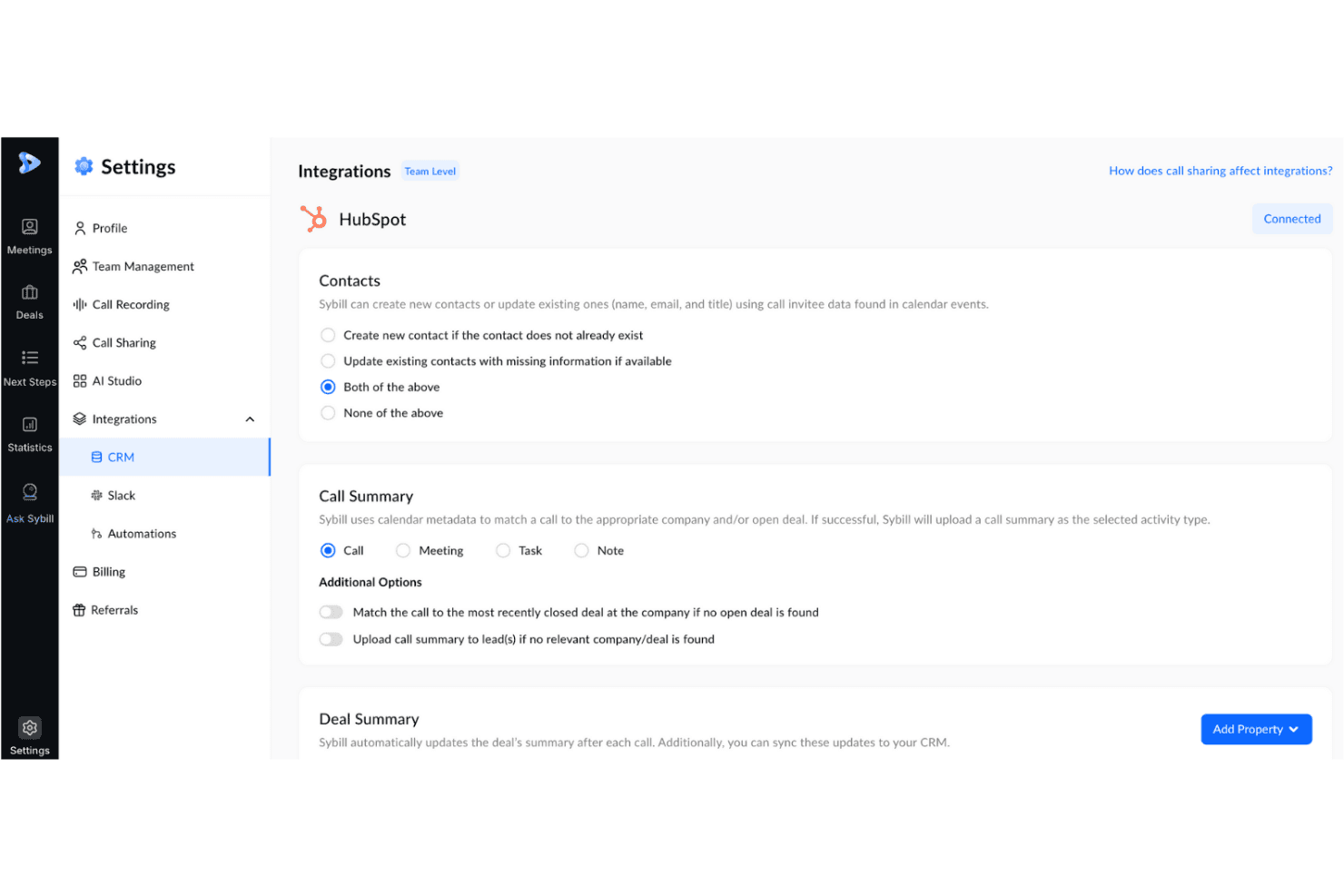
Sybill syncs call summaries and contacts directly to HubSpot CRM. Sybill is a conversation intelligence platform for B2B sales teams that records, transcribes, and analyzes sales calls, then surfaces deal insights, coaching signals, and CRM field updates from every meeting.
Who Is Sybill Best For?
Sybill is a strong fit for B2B sales teams where CRM hygiene is a persistent problem and reps spend too much time on post-call admin.
Why I Picked Sybill
Sybill earns its spot on my shortlist because CRM Autofill is genuinely one of the best implementations of post-call data capture I've seen. After every recorded call, Sybill populates CRM fields across HubSpot, Salesforce, Zoho CRM, and Dynamics 365 using custom AI prompts tuned to your team's terminology, covering MEDDPICC, BANT, deal stage, close date, and custom fields. I also like that it can backfill the last 30 deals retroactively, so you're not starting from zero on pipeline hygiene.
Sybill Key Features
- Magic Summaries: AI-generated post-call summaries that flag action items, next steps, and deal signals, delivered automatically to email, Slack, or your CRM after every meeting.
- Ask Sybill: A natural language query interface that lets you pull cross-deal intelligence—like stalled deals, objection patterns, or competitor mentions—from calls, emails, and Slack in plain English.
- Personal Coach: AI-driven call analysis that surfaces rep-level feedback on discovery, qualification, and objection handling without requiring managers to review full recordings.
- Pre-meeting briefs: AI-generated meeting prep documents that pull from calendar data, prior transcripts, CRM records, and external enrichment sources like Proxycurl and Diffbot.
Sybill Integrations
Sybill offers native integrations with Zoom, Google Meet, Microsoft Teams, HubSpot, Salesforce, Zoho CRM, and more. Business plans include API and MCP access.
Pros and Cons
Pros:
- AI-drafted follow-up emails match user style
- Unlimited call recordings on all plans
- Automatic CRM autofill after every call
Cons:
- CRM autofill limits complex data structures
- Key dialer platforms still unavailable
Learn more about Sybill: Best for call transcription in 60+ languages
- 14-day free trial + free demo available
- Pricing upon request
Visit WebsiteCustomer Rating:4.7/5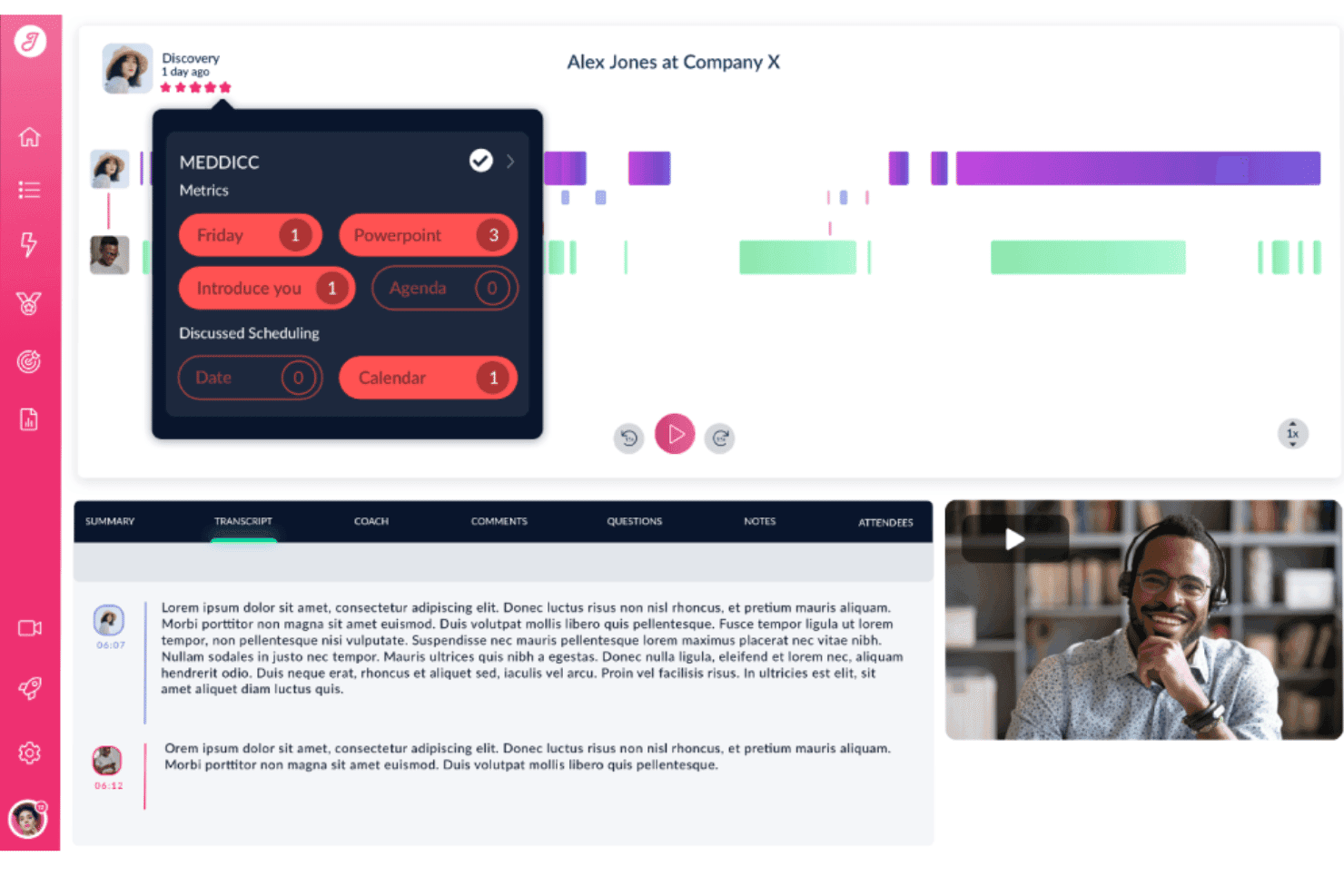
Jiminny tracks MEDDICC metrics and keywords from sales call recordings. Jiminny is a conversation intelligence platform that records, transcribes, and analyzes sales calls—with AI-generated summaries, deal risk alerts, coaching scorecards, CRM auto-filling, and a searchable call library across your entire revenue team.
Who Is Jiminny Best For?
Jiminny is a strong fit for revenue teams operating across multiple regions or languages who need call transcription, deal intelligence, and CRM automation in one platform.
Why I Picked Jiminny
Jiminny earns its spot on my shortlist because of how it handles transcription across 60+ languages, including automatic language detection that requires zero manual configuration. What I find genuinely impressive is multi-language transcription within a single call, so if a rep switches from English to Spanish mid-conversation, each section is transcribed in the language it was spoken. Pair that with AI-generated deal risk alerts that flag stalled pipelines and missed next steps, and you get a transcription tool that feeds directly into revenue decisions.
Jiminny Key Features
- AI CRM filling: Automatically extracts call and email data to populate Salesforce and HubSpot fields, with configurable append, override, or fill-empty modes and a CSV-exportable audit trail.
- Deal risk alerts: Flags stalled deals, missed next steps, dropped deal values, and overdue close dates based on conversation signals across your pipeline.
- Ask Jiminny: A plain-language AI query tool that lets you search across calls and deals for competitor mentions, common objections, or customer timelines without manually reviewing recordings.
- Coaching scorecards: Configurable scorecards tied to custom performance rubrics let managers score rep calls and track performance trends across the team.
Jiminny Integrations
Jiminny supports 25+ voice platforms, including Aircall, RingCentral, and Dialpad, plus native Salesforce, HubSpot, Zoom, Google Meet, and Microsoft Teams integrations. It also supports Pipedrive, Zoho CRM, an open API, webhooks, and Zapier.
Pros and Cons
Pros:
- Multi-language transcription within single call
- CRM fields auto-filled from call transcripts
- Transcribes 60+ languages with auto-detection
Cons:
- One-time setup fee required
- Occasional errors with technical jargon
Learn more about Jiminny: Best for all-in-one call intel and CRM sync
- 14-day free trial + free demo available
- From $19/user/month (billed annually)
Visit WebsiteCustomer Rating:4.6/5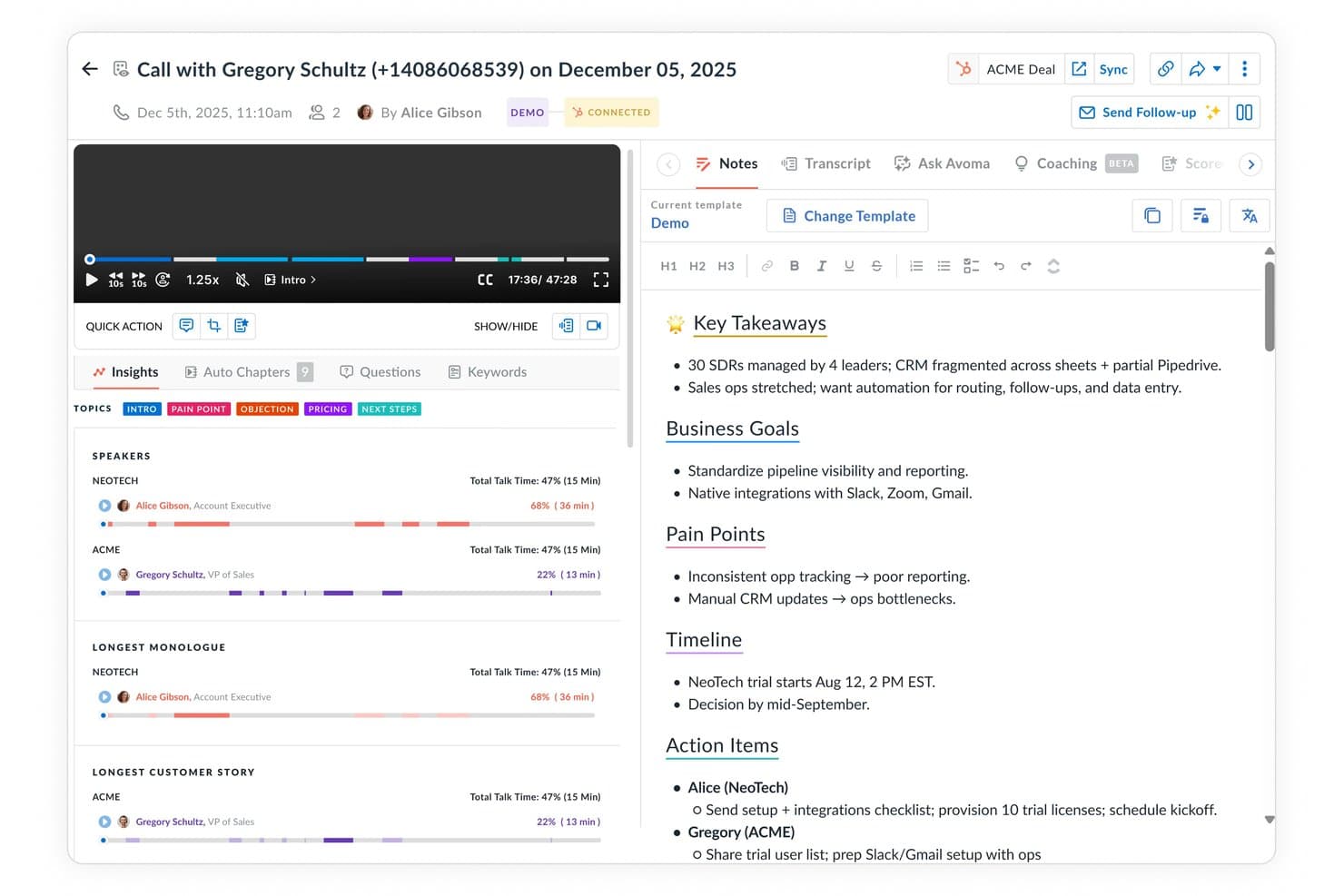
Avoma auto-generates structured call notes with key takeaways and action items. Avoma is a call transcription and conversation intelligence platform that records, transcribes, and analyzes sales calls across major conferencing tools and dialers, with built-in AI scoring, deal tracking, and bi-directional CRM sync.
Who Is Avoma Best For?
Avoma fits revenue teams that want call intelligence, CRM data entry, and pipeline visibility in one place without paying Gong-level prices.
Why I Picked Avoma
I've included Avoma in my top picks because it pulls call transcription, conversation intelligence, and CRM sync into one platform instead of making you stitch tools together. What I find genuinely useful is the bi-directional CRM sync: it auto-populates MEDDIC and BANT fields directly from conversation data, so reps never manually update deal records after a call. The "Ask Avoma" copilot also lets me query the entire call archive conversationally, pulling cited answers from real transcripts across hundreds of past deals.
Avoma Key Features
- Live Answer Assistant: Surfaces real-time, contextually triggered battlecards and objection-handling prompts to reps during an active call.
- Smart Trackers: NLP-based topic and keyword trackers that flag competitor mentions, pricing discussions, and custom-defined conversation moments across calls.
- AI-generated follow-up emails: Automatically drafts post-call recap emails with action items pulled directly from the call transcript.
- Multi-speaker diarization: Identifies and labels each speaker's dialogue individually, with per-speaker analytics covering talk-time ratios, filler words, and monologue length.
Avoma Integrations
Avoma offers native integrations with Zoom, Google Meet, Microsoft Teams, Webex, Aircall, Dialpad, RingCentral, Salesforce, HubSpot, and Pipedrive. It also supports webhooks, an open API, and Zapier.
Pros and Cons
Pros:
- Unlimited free collaborator seats for viewers
- Real-time AI prompts during live calls
- Bi-directional CRM sync auto-populates sales fields
Cons:
- Recording bot may miss or drop meetings
- Conversation intelligence features require paid add-on
Learn more about Avoma: Best for AI deal intelligence on call data
- Free plan + free demo available
- From $10/user/month (billed annually)
Visit WebsiteCustomer Rating:4.3/5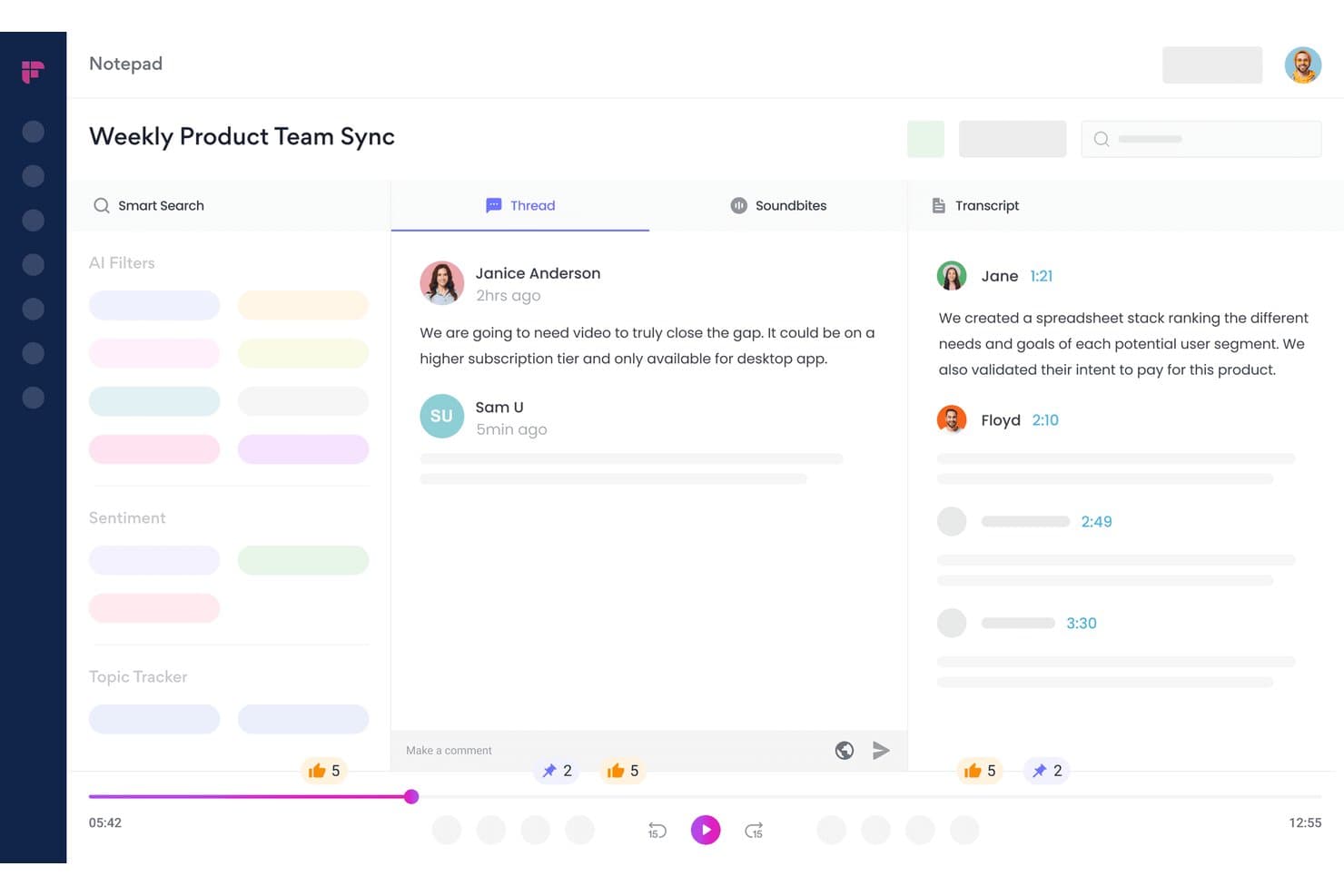
Fireflies.ai lets users review transcripts, threads, and soundbites in one view. Fireflies.ai is an AI meeting transcription and conversation intelligence platform that records calls across 10+ conferencing apps and dialers, auto-generates summaries and action items, and surfaces deal health signals, topic trackers, and rep performance analytics.
Who Is Fireflies.ai Best For?
Fireflies.ai is a strong fit for revenue teams that run high-volume sales calls and need deal health signals, coaching data, and CRM-synced call intelligence in one place.
Why I Picked Fireflies.ai
I picked Fireflies.ai as one of the best because its CRM Deal Intelligence layer turns call transcripts into live pipeline signals. Where most transcription tools stop at summaries, Fireflies surfaces deal health status (On Track, At Risk, Slipping) and an AI Close Probability score directly inside your HubSpot or Salesforce deal view. I also rely on its Topic Trackers to flag competitor mentions, objections, and pricing signals across every recorded call automatically.
Fireflies.ai Key Features
- Live Assist: Delivers real-time in-call coaching prompts, objection handling suggestions, and pre-meeting prospect briefings during active calls via the desktop app or Chrome extension.
- AskFred AI agent: Lets you query your entire call archive in natural language to pull answers, themes, or specifics from past meetings without manual transcript review.
- Topic trackers: User-configurable keyword monitors that automatically flag competitor mentions, pricing discussions, and custom signals across every recorded call.
- Soundbites: Lets you clip, label, and share specific moments from call recordings for rep coaching, onboarding, or async team review.
Fireflies.ai Integrations
Fireflies.ai offers 100+ native integrations, including Salesforce, HubSpot, Zoom, Google Meet, Microsoft Teams, Aircall, RingCentral, Slack, and Notion. An open API supports custom integrations and audio-processing pipelines.
Pros and Cons
Pros:
- Live Assist gives real-time sales coaching
- AskFred AI enables natural-language call queries
- CRM deal intelligence inside Salesforce and HubSpot
Cons:
- Speaker mislabeling happens in fast conversations
- CRM insights limited to Salesforce and HubSpot
Learn more about Fireflies.ai:
Other Call Transcription Software
Here are some additional call transcription software options that didn’t make it onto my shortlist, but are still worth checking out:
- 11ChorusBest for pipeline intelligence tied to call data
- 12Clari CopilotBest for linking call signals to pipeline forecasting
- 13CloudTalkBest for VoIP teams scoring every call automatically
- 14DialpadBest for real-time in-call coaching from transcripts
- 15JustCallBest for outbound teams coaching reps mid-call
- 16Observe.AIBest for contact center call QA at scale
- 17FathomBest for free unlimited call transcription
- 18GrainBest for bot-free call capture and clip sharing
- 19HubSpot Sales HubBest for CRM-native call transcription and AI summaries
- 20ReadAIBest for AI search across calls, email, and Slack
How I Evaluate Call Transcription Software
I split my evaluation into baseline criteria every tool must meet and differentiating factors that separate the ones worth recommending from the rest.
Core Functionality (Table Stakes for This List)
When I'm selecting tools for my list, I rank each one on a scale from 0 (does not offer the functionality) to 5 (excels in this area) for each core functionality listed below. I then calculate the tool's total score into a percentage, using 65% as a benchmark to help assess its overall fit for the list.
- Call recording and capture: I check whether the tool automatically records across major web conferencing platforms, VoIP dialers, and phone systems without manual intervention.
- Automated transcription: Accuracy matters, so I evaluate transcript quality across languages, looking for timestamps, punctuation, and speaker-separated output that's usable without heavy editing.
- Multi-speaker diarization: Sales calls involve multiple voices. I look for reliable speaker identification that maps dialogue to named participants, not just "Speaker 1" and "Speaker 2."
- Searchable transcript library: Teams need to find past conversations fast. I evaluate whether the library supports filters like rep, account, date, and topic—not just basic keyword matching.
- AI conversation insights: Beyond raw transcripts, I look for AI that surfaces deal risk signals, competitor mentions, action items, and coaching cues your managers can act on right away.
- CRM and workflow integrations: I check for native, bi-directional sync with CRMs like Salesforce and HubSpot, plus connections to dialers, enablement tools, and scheduling platforms your GTM team already uses.
Once I have a list of tools that meet the criteria, I consider what sets each platform apart.
Differentiating Factors (What Sets Vendors Apart)
Here's how I compare and contrast different vendors:
Standout Features
I look for live call assist that delivers battle cards and objection prompts mid-conversation, not after. A rep facing a competitor mention in a discovery call needs guidance in that moment. Deal intelligence scoring is equally important—I evaluate whether the tool auto-scores deal health from conversation signals like next-step commitments and stakeholder involvement, then surfaces those scores on pipeline views. I also check for methodology-based scorecards (MEDDIC, BANT, SPICED) managers can customize to match their coaching rubrics.
Beyond Features
I evaluate how deeply each tool syncs with your revenue tech stack beyond basic call logging. A platform that writes back to Salesforce or HubSpot at the opportunity and contact level saves RevOps hours of manual field updates. Coaching workflows matter too—I look for built-in call scoring, comment threads, and curated playlists managers can pull into weekly 1:1s. I also check pricing transparency, specifically whether non-recording users like managers or CS leads need paid seats, since that cost scales fast across cross-functional teams.
How to Choose a Call Transcription Software
When deciding which call transcription software fits your RevOps workflows best, focus on how the platform handles real data flow and coaching needs:
| If your priority is... | Then look for... |
|---|---|
| If your priority is...CRM data accuracy | Then look for...Direct, bi-directional sync with your primary CRM |
| If your priority is...Accurate multi-speaker transcription | Then look for...Detailed speaker diarization in both live and recorded calls |
| If your priority is...AI-driven deal insights | Then look for...Automated detection and surfacing of risk and opportunity signals |
| If your priority is...Coaching integration | Then look for...In-platform tools for call scoring and playlist sharing |
| If your priority is...Multinational teams | Then look for...Native support for multiple transcription languages |
How to Vet Your Shortlist
- Test CRM write-back depth: Run a live transcript to confirm auto-population of opportunity, contact, and activity fields across at least two recent deals.
- Validate speaker separation: Upload a multi-person recording and compare the transcript’s diarization accuracy for at least three participants.
- Check live AI insights: Schedule a call and document whether action items, competitor mentions, and deal risks surface in real time and on call wrap-up reports.
- Request coaching artifact: Ask to see a sample playlist or coaching dashboard export showing call comments and scores from a recent real environment.
- Tradeoff—flexibility vs. integration: Decide if you want best-in-class transcription tools that function independently, or integrated suites that trade some customization for deeper workflow connections.
What Is Call Transcription Software?
Call transcription software automatically converts spoken conversations on phone or video calls into searchable text transcripts. This software helps revenue teams capture detailed records of calls, making it easier to review critical insights, track action items, and improve CRM data quality. By providing accurate, speaker-attributed transcripts, these tools support coaching, deal analysis, and compliance for sales, customer success, and support operations.
Features of Call Transcription Software
When selecting call transcription software, keep an eye out for the following key features:
- Call recording and capture: Automatically records audio from calls across various platforms such as web conferencing tools, VoIP systems, and traditional phone lines. This gives your team a reliable audio source for each conversation without extra manual steps.
- Automated transcription: Converts spoken words from recorded calls into written text. Produces transcripts that include correct punctuation, timestamps, and speaker attributions, making documentation and follow-up easy.
- Multi-speaker diarization: Identifies and separates individual voices within a conversation. This feature maps dialogue to specific participants, improving clarity when reviewing calls involving multiple people.
- Searchable transcript library: Stores all transcripts in a central, organized location. Lets you search by representative, account, date, or topic, so you can quickly find and reference any past conversation as needed.
- Speaker labeling: Automatically tags each line of dialogue with the right speaker’s name or identifier. Reduces confusion in transcripts and improves context for anyone reviewing the call.
- Playback and navigation controls: Offers audio playback tools alongside the transcript. Allow your team to play, pause, rewind, or jump to specific moments in the call for detailed review.
- Export and sharing options: Lets you export transcripts in various formats and share them with team members or external partners. Ensures your transcripts are accessible where and when you need them.
- Integrations with workflow tools: Connects with CRM, project management platforms, or document storage systems. Automatically moves transcripts and call data into the platforms your team already uses.
- Data privacy and compliance settings: Provides customizable controls for data storage, retention, and access based on your organization’s security requirements. Helps your business meet industry regulations and protect sensitive information.
Common Call Transcription Software AI Features
Beyond the standard call transcription software features listed above, many of these solutions are incorporating AI with features like:
- AI-generated call summaries: Automatically creates concise, structured summaries of each call, highlighting key discussion points, decisions, and next steps. This helps your team quickly review conversations without reading full transcripts.
- Real-time action item extraction: Identifies and surfaces action items as they’re discussed during calls, assigning them to participants or logging them in connected workflow tools. This reduces manual note-taking and follow-up errors.
- Sentiment analysis: Uses AI to detect the emotional tone of speakers throughout the conversation, flagging moments of frustration, excitement, or hesitation. This gives managers deeper insight into customer or prospect engagement.
- Deal risk and opportunity detection: Analyzes call content for signals of deal risk—like stalled next steps or competitor mentions—and flags potential opportunities, helping sales teams prioritize follow-up.
- Automated coaching suggestions: Reviews call transcripts and provides AI-driven feedback or coaching tips to reps, such as recommended talk-to-listen ratios or missed discovery questions, supporting ongoing skill development.
Benefits of Call Transcription Software
Implementing call transcription software provides several benefits for your team and your business. Here are a few you can look forward to:
- Accurate call documentation: Automatically capture and convert calls into searchable, speaker-attributed transcripts, reducing manual note-taking and follow-up errors.
- Improved coaching and training: Use searchable transcript libraries and built-in call scoring tools to review conversations, highlight teachable moments, and support skills development.
- Faster retrieval of conversations: Leverage filters for representative, account, date, or topic to quickly find past discussions without sifting through large volumes of data.
- Enhanced CRM data quality: Integrate with your CRM to automatically sync transcripts and call summaries, keeping opportunity and contact records up to date.
- Action-oriented AI insights: Surface real-time action items, deal risks, and competitor mentions during and after calls to help your team focus on what matters most.
- Secure compliance and privacy management: Rely on embedded data privacy controls and customizable retention policies to align call records with internal and regulatory standards.
- Seamless collaboration across teams: Export and share transcripts in different formats, making call data accessible to sales, customer success, and leadership as needed.
Costs and Pricing of Call Transcription Software
Selecting call transcription software requires an understanding of the various pricing models and plans available. Costs vary based on features, team size, add-ons, and more. The table below summarizes common plans, their average prices, and typical features included in call transcription software solutions:
Plan Comparison Table for Call Transcription Software
| Plan Type | Average Price | Common Features |
|---|---|---|
| Plan TypeFree Plan | Average Price$0 | Common FeaturesBasic call recording, automated transcription for a limited number of calls, and simple search. |
| Plan TypePersonal Plan | Average Price$5-$25/user/month | Common FeaturesUnlimited transcriptions, searchable transcript library, playback controls, and single-user support. |
| Plan TypeBusiness Plan | Average Price$30-$60/user/month | Common FeaturesMulti-user access, CRM integrations, advanced speaker diarization, export options, and data privacy controls. |
| Plan TypeEnterprise Plan | Average Price$70-$120/user/month | Common FeaturesCustom integrations, live AI insights, coaching workflows, compliance features, and dedicated support. |
Call Transcription Software FAQs
Here are some answers to common questions about call transcription software:
How accurate are automated call transcriptions?
Accuracy depends on the software, the quality of the audio, and the number of speakers. Most top call transcription software delivers over 85% accuracy on clean audio with clear speakers. Background noise, crosstalk, and poor connections can reduce accuracy, so I recommend uploading real team recordings before you commit to a vendor.
Can call transcription software integrate with my CRM?
Yes, many call transcription solutions offer direct integrations with CRMs like Salesforce and HubSpot. Look for tools that can auto-sync transcripts, calls, and deal notes to the right contact and opportunity records without manual effort. It’s worth testing two-way sync with your CRM before rolling out a solution.
Is speaker identification available in all call transcription platforms?
No, not every platform offers multi-speaker diarization or accurate speaker labeling. I think you should look for software that tags speakers by name or role, especially if you run multi-party sales or support calls. Test the software with calls that have at least three participants to see how well it separates voices.
How do these tools protect sensitive call data?
Most call transcription platforms offer built-in data privacy features—like configurable retention policies, user access controls, and encryption. If your organization has strict compliance requirements, confirm what certifications (like SOC 2 or GDPR) the vendor supports and how admin controls work.
Do managers and non-rep users always need paid seats?
No, some platforms let managers, CS leaders, or compliance teams view, comment, or coach without paying for a full seat. However, other vendors charge based on every user with access, which can add up quickly. Make sure to clarify pricing models before you finalize your contract.
Can I use call transcription software for non-English calls?
Yes, many leading tools support transcription in multiple languages. Still, accuracy may vary by language and accent. If you run calls in several regions, ask for sample transcripts in each language your team needs, and review them for usability and accuracy.
Is real-time transcription or live AI guidance available?
Some vendors offer live transcription and real-time AI features, like action item extraction and competitor mention alerts during active calls. This is especially useful if you want coaching prompts or quick deal-risk signals while a call is still in progress. Confirm whether live features require special setup or additional licenses before you commit.