

O software de CRM com mensagens de texto é um recurso valioso para qualquer empresa. Com o software certo, as equipas podem melhorar a eficiência da comunicação e gerir as relações com os clientes de forma mais eficaz. No entanto, encontrar o software de CRM adequado para mensagens de texto pode ser um desafio, especialmente devido ao grande número de opções disponíveis.
Com base na minha experiência com software de gestão empresarial e de projetos, testei e comparei várias das principais soluções de software de CRM com mensagens de texto disponíveis. A partir daí, compilei os meus resultados em análises detalhadas para o ajudar a encontrar o melhor software para as suas necessidades específicas.
Why Trust Our Software Recommendations
6,700+
Reviews
20
Industry experts
16+
Evaluation factors
14
Years
Our reviews reflect our independent judgment—not a sales pitch. Learn how we stay transparent.
For this guide, we evaluated tools using hands-on testing and independent research, scoring tools using our selection criteria.
Our reviews reflect our human editorial judgment, not a sales pitch.
Tabela comparativa: software de CRM com mensagens de texto
| Tool | Best For | Trial Info | Price | ||
|---|---|---|---|---|---|
| 1 | Best for enterprise SMS across sales and marketing | 30-day free trial available | From $8/user/month (billed annually) | Website | |
| 2 | Best for AI-drafted SMS across lifecycle journeys | 14-day free trial + free demo available | From $15/month (billed annually) | Website | |
| 3 | Best for automating SMS client follow-up sequences | Free trial + free demo available | From $299/month | Website | |
| 4 | Best for multi-cloud SMS automation at scale | 30-day free trial | From $25/user/month | Website | |
| 5 | Best for financial services texting and dialing | Free demo available | Pricing upon request | Website | |
| 6 | Best for pipeline-triggered SMS automation | 15-day free trial | From $23/user/month (billed annually) | Website | |
| 7 | Best for omnichannel lifecycle marketing SMS | Free plan available | From $45/user/month (billed annually) | Website | |
| 8 | Best for marketing agency client texting | 14-day free trial | From $97/month | Website | |
| 9 | Best for outbound SMS and call teams | 14-day free trial + free demo available | From $19/user/month | Website | |
| 10 | Best for property management team texting | Free demo available | From $65/user/month (billed annually) | Website |


Análises do melhor software de CRM com mensagens de texto
Abaixo encontram-se os meus resumos detalhados do melhor software de CRM com mensagens de texto que integrou a minha lista restrita. As minhas análises examinam detalhadamente as funcionalidades essenciais, as vantagens e desvantagens, as integrações e os casos de utilização ideais de cada ferramenta, para o ajudar a encontrar a melhor opção.
 Best for enterprise SMS across sales and marketing
- 30-day free trial available
- From $8/user/month (billed annually)
Visit WebsiteCustomer Rating:4.6/5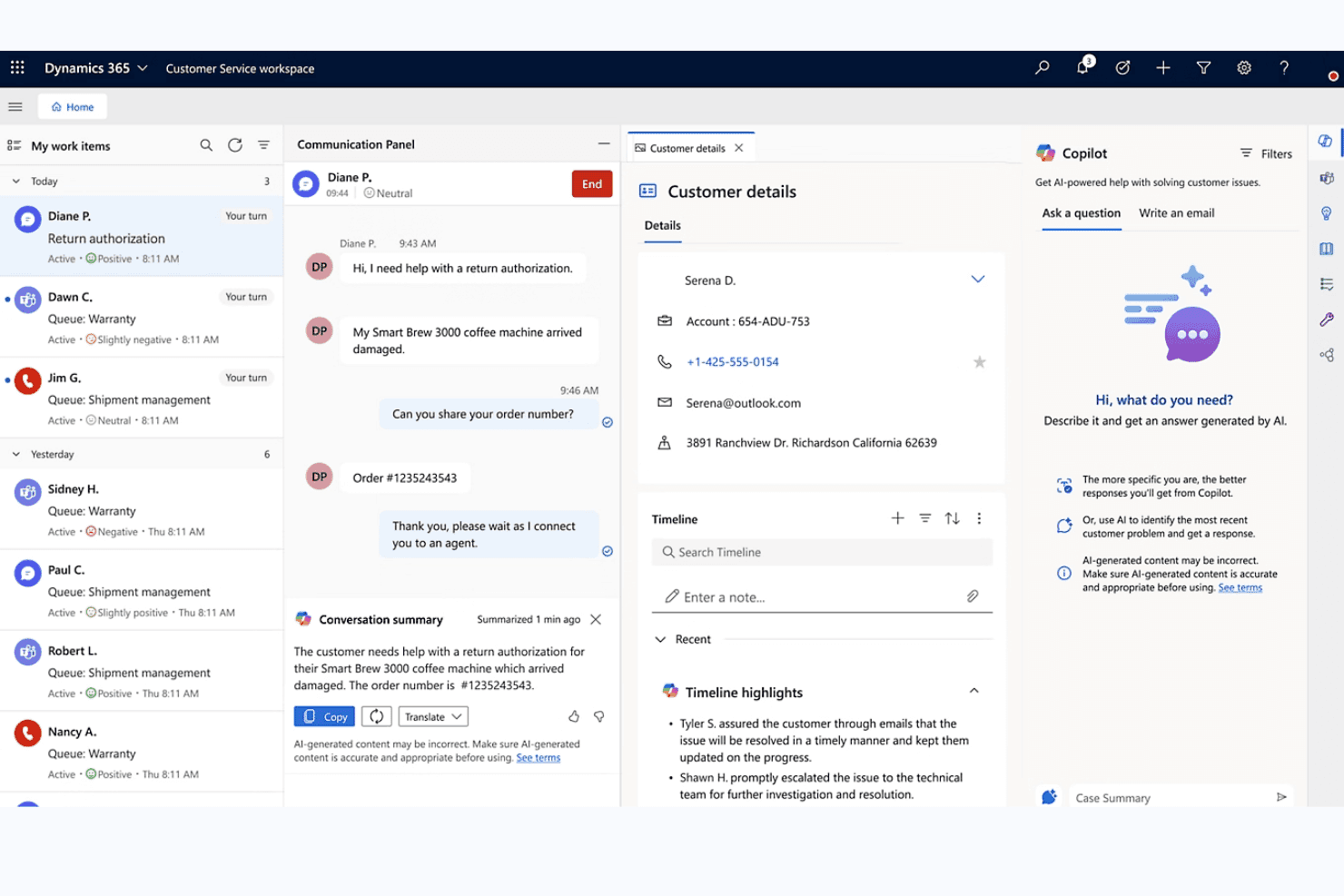
Microsoft Dynamics 365 unifies chat, customer details, and AI Copilot for agents. Microsoft Dynamics 365 is an enterprise CRM platform that spans sales, customer service, contact center, and marketing modules, each with native SMS capabilities for two-way messaging, automated text journeys, and conversation logging across contact and pipeline records.
Who Is Microsoft Dynamics 365 Best For?
Microsoft Dynamics 365 is a strong fit for enterprise organizations that need SMS woven across sales, marketing, and service teams within a single, deeply integrated Microsoft ecosystem.
Why I Picked Microsoft Dynamics 365
I picked Microsoft Dynamics 365 because no other platform on this list spans enterprise SMS across sales, marketing, and service with this level of depth. I'm particularly impressed by Customer Insights – Journeys, which lets you build SMS workflows with keyword-triggered branching (think: a contact replies "YES" and immediately enters a different journey path), conditional content logic, and per-contact-point consent enforcement. Paired with Sales sequences that support SMS steps alongside calls and emails, your reps and marketers are working from the same CRM without duplicating pipeline data.
Microsoft Dynamics 365 Key Features
- Compliance profile enforcement: Applies restrictive, nonrestrictive, or disabled consent models per contact point to control who receives SMS messages.
- Power Automate SMS triggers: Fires text messages automatically based on CRM events like form fills, deal stage changes, or case creation.
- Conversation reassignment: Moves SMS threads between record types—such as from an Account to a Contact—directly within the conversation pane.
- A/B testing in journeys: Tests SMS message variants within Customer Insights – Journeys to compare performance across audience segments.
Microsoft Dynamics 365 Integrations
Microsoft Dynamics 365 offers native integrations across the Microsoft ecosystem, including Microsoft 365, Azure Communication Services, Power Automate, Power BI, Teams, Outlook, and LinkedIn Sales Navigator. It also supports Twilio, Infobip, and AppSource marketplace integrations, plus APIs and custom connectors.
Pros and Cons
Pros:
- Unified sales, service, and marketing texting
- Advanced SMS automation in marketing journeys
- Logs SMS to CRM across all record types
Cons:
- No shared team SMS inbox
- SMS requires third-party provider configuration
Learn more about Microsoft Dynamics 365: Best for AI-drafted SMS across lifecycle journeys
- 14-day free trial + free demo available
- From $15/month (billed annually)
Visit WebsiteCustomer Rating:4.4/5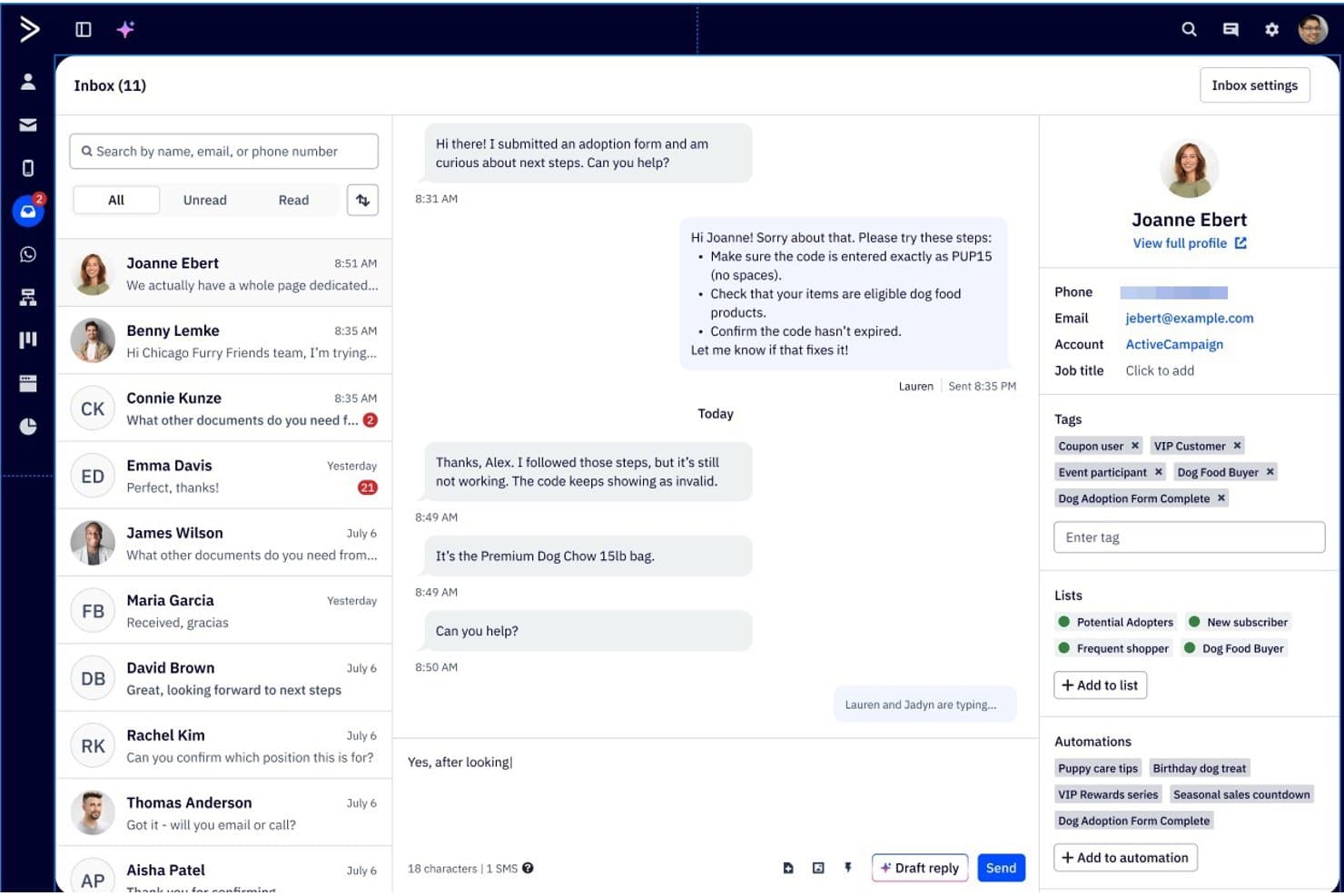
ActiveCampaign lets users manage SMS conversations with full contact details. ActiveCampaign is a marketing automation and CRM platform that combines email, SMS, and WhatsApp messaging with a visual automation builder, two-way SMS inbox, AI-assisted message drafting, and lifecycle journey workflows.
Who Is ActiveCampaign Best For?
ActiveCampaign is a strong fit for lifecycle marketing teams that need AI-assisted SMS built into multi-step, cross-channel automation journeys.
Why I Picked ActiveCampaign
ActiveCampaign earns its spot on my shortlist because its Active Intelligence AI layer does something I haven't seen matched elsewhere: it drafts SMS replies based on your brand kit and FAQs, summarizes ongoing conversations, and builds full multi-step lifecycle journeys from a plain-language prompt. I love that SMS reply triggers let automations branch mid-sequence based on what a contact actually responds, keeping lifecycle flows dynamic rather than linear. The two-way SMS inbox also supports team access with group permissions, so multiple people can manage conversations without stepping on each other.
ActiveCampaign Key Features
- Broadcast SMS campaigns: Send bulk SMS messages to segmented contact lists, with merge fields for personalization and link tracking to measure clicks.
- A2P 10DLC registration: Complete in-platform phone number registration for US senders, with automatic opt-out keyword processing and quiet hours controls.
- 950+ automation templates: Pre-built, SMS-enabled workflow templates covering lifecycle stages, with support for branching logic and multi-step sequences.
- Cross-channel journey builder: Build multi-step automations that combine email, SMS, and WhatsApp in a single visual workflow triggered by CRM events.
ActiveCampaign Integrations
ActiveCampaign offers 1,000+ marketplace integrations, including Salesforce, HubSpot, Microsoft Dynamics, Salesmsg, Sakari, and Sinch. It also supports REST API, webhooks, MCP Server, and Zapier for custom connectivity.
Pros and Cons
Pros:
- Shared SMS inbox with team permissions
- Multi-step automations branch on SMS replies
- AI drafts SMS replies and campaign messages
Cons:
- MMS and broadcasts restricted by geography
- SMS and pipelines require paid add-ons
Learn more about ActiveCampaign: 3Best for automating SMS client follow-up sequences
Keap
- Free trial + free demo available
- From $299/month
Visit WebsiteCustomer Rating:4.2/5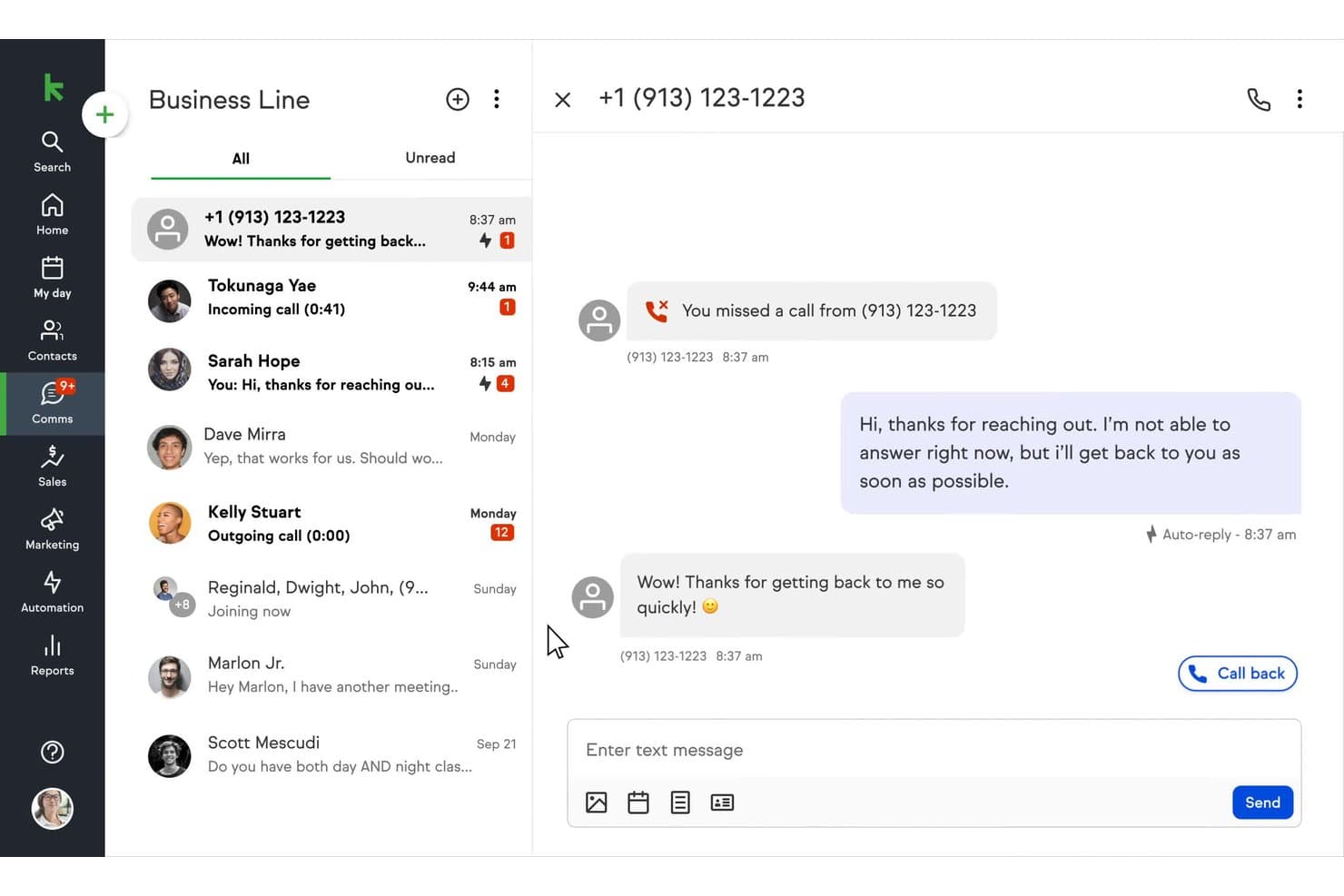
Keap auto-replies to missed calls via SMS on its business line. Keap is a small business CRM and marketing automation platform that combines contact management, sales pipelines, SMS and email marketing, appointment scheduling, invoicing, and payment processing in one system.
Who Is Keap Best For?
Keap is a strong fit for small business owners and lifecycle marketing managers who need to automate multi-step SMS and email follow-up sequences without stitching together separate tools.
Why I Picked Keap
I picked Keap as one of the best because its Campaign Builder makes automating multi-step SMS follow-up sequences genuinely straightforward. I love that you can trigger texts based on pipeline stage changes, purchase completions, or tag applications, then layer in if/then branching logic to personalize the path each contact takes. The AI Automation Assistant lets you build those sequences from a plain-language prompt, which cuts setup time significantly.
Keap Key Features
- Tag-based audience segmentation: Organize contacts into dynamic groups using tags to target broadcast texts and automations at the right people.
- AI Content Assistant: Generate and refine SMS copy directly from a plain-language prompt without leaving the platform.
- Built-in TCPA compliance tools: Manage opt-ins, opt-outs, and STOP keywords automatically, with quiet hours enforced across broadcast texts.
- Keap Business Line: Each user gets a dedicated local business number for one-to-one texting and calls via desktop or mobile app.
Keap Integrations
Native integrations include Google Workspace, Microsoft Outlook, Zoom, QuickBooks, Mailchimp, PayPal, Stripe, Eway, WePay, and Shopify on the Max plan. Keap also offers marketplace integrations, a REST API with webhooks, and Zapier.
Pros and Cons
Pros:
- AI-assisted campaign and SMS creation
- Built-in compliance controls for text marketing
- Advanced automation triggers for SMS follow-ups
Cons:
- SMS and MMS limited to U.S. and Canada
- No shared team SMS inbox available
 Best for multi-cloud SMS automation at scale
- 30-day free trial
- From $25/user/month
Visit WebsiteCustomer Rating:4.4/5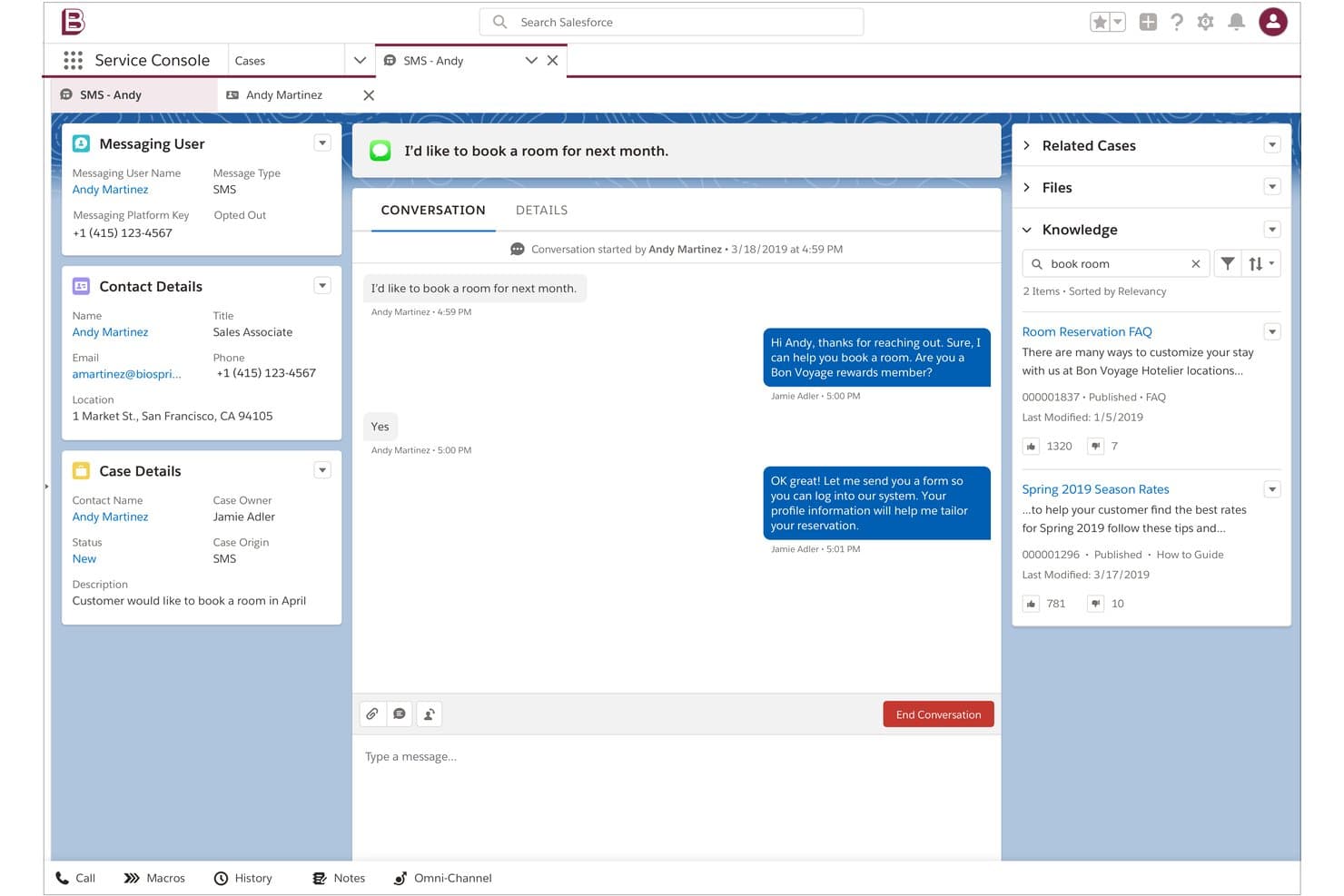
Salesforce lets agents handle SMS conversations alongside knowledge articles. Salesforce Sales Cloud is a CRM platform that combines contact and pipeline management with SMS, MMS, and WhatsApp messaging across its Sales, Service, and Marketing Clouds—spanning two-way conversations, bulk campaigns, automated journeys, and AI-powered agent routing.
Who Is Salesforce Sales Cloud Best For?
Salesforce Sales Cloud is the right fit for enterprise teams already running multiple Salesforce clouds who need SMS, MMS, and WhatsApp woven into their existing CRM, service, and marketing workflows.
Why I Picked Salesforce Sales Cloud
I picked Salesforce Sales Cloud as one of the best because no other CRM matches its ability to run SMS across multiple clouds simultaneously: Marketing Cloud Journey Builder handles bulk campaign sends with AI-driven send time optimization, while Digital Engagement routes two-way conversations to agents via omnichannel queues. I love that Agentforce can autonomously handle SMS interactions across service and sales channels without human handoff. That kind of multi-cloud SMS coordination is what makes Salesforce the right call for enterprise teams scaling complex messaging operations.
Salesforce Sales Cloud Key Features
- Digital Engagement add-on: Adds two-way SMS, WhatsApp, and MMS messaging directly inside the Service Cloud console with omnichannel routing to agents or bots.
- Einstein Bot automation: Handles inbound SMS inquiries automatically, qualifying questions and collecting information before handing off to a live agent.
- MobileConnect bulk SMS: Sends mass SMS and MMS campaigns with dynamic merge fields, A/B testing, and segmentation tools inside Marketing Cloud.
- Omnichannel routing: Distributes incoming SMS conversations to available agents based on skill, capacity, and availability alongside other channel workloads.
Salesforce Integrations
Salesforce offers documented integrations with Slack, Tableau, and MuleSoft. Its AppExchange includes 200+ SMS messaging apps, including Twilio for Salesforce, while REST and SOAP APIs support custom connections.
Pros and Cons
Pros:
- Advanced compliance and consent management tools
- Omnichannel routing across SMS and other channels
- Multi-cloud SMS automations for complex workflows
Cons:
- SMS logging varies across different Salesforce clouds
- SMS requires additional products or third-party apps
Learn more about Salesforce : Best for financial services texting and dialing
- Free demo available
- Pricing upon request
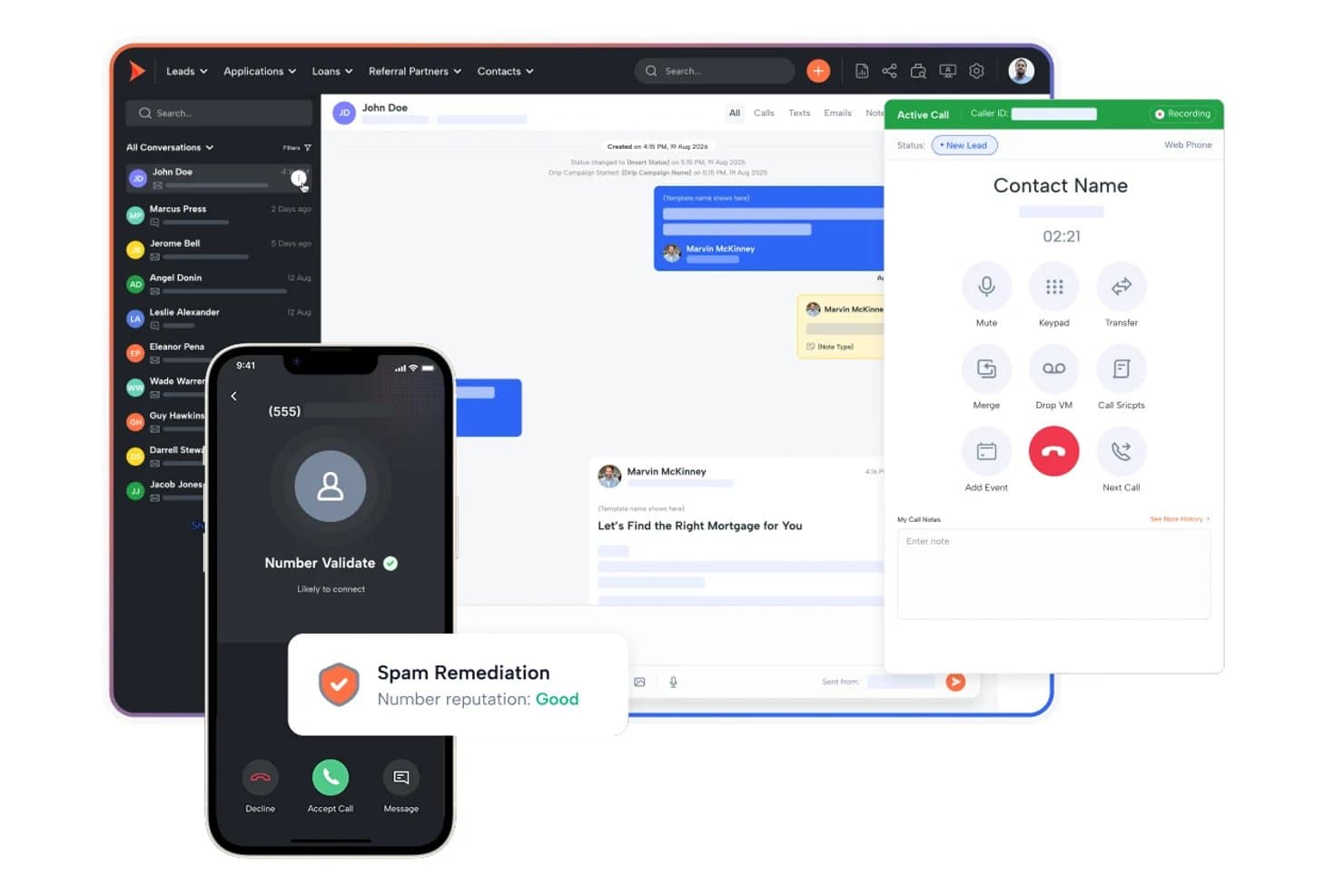
Shape unifies calls, texts, and lead management in one CRM. Shape is an all-in-one CRM built for financial services teams that natively combines pipeline management, two-way SMS/MMS texting, a power dialer, AI lead scoring, and marketing automation in a single platform.
Who Is Shape Best For?
Shape fits financial services teams—mortgage lenders, loan officers, and insurance brokers—that need texting, dialling, and CRM pipeline management in one place.
Why I Picked Shape
Shape earns its spot on my shortlist because it's purpose-built for financial services teams that need texting and dialling in the same place as their CRM pipeline. I particularly like its Local Presence feature, which automatically matches outbound texts and calls to a local area code based on the contact's location, improving response rates without any manual setup. Its IF–THEN trigger logic fires SMS messages directly off pipeline stage changes, so a loan officer's leads get timely follow-ups tied to real deal events.
Shape Key Features
- Shared team inbox: All inbound SMS and MMS replies from leads surface in a single shared inbox visible across your team.
- ShapeIQ AI lead scoring: An ML-driven scoring engine that ranks leads based on behavioural signals and engagement patterns over time.
- A2P 10DLC registration: Brand and campaign registration for A2P 10DLC messaging is managed directly inside the platform.
- Drip campaign builder: Multi-step sequences combine timed SMS and email actions tied to lead lifecycle stages.
Shape Integrations
Shape offers native integrations with Encompass, LendingPad, LendingDox, and DNC.com. It also supports an open API, webhooks, and Zapier.
Pros and Cons
Pros:
- IF–THEN triggers send texts from pipeline changes
- Shared inbox for SMS, MMS, and calls
- Financial services SMS compliance controls built in
Cons:
- Demo required to view full pricing
- Custom field limits restrict advanced workflows
Learn more about Shape: Best for pipeline-triggered SMS automation
- 15-day free trial
- From $23/user/month (billed annually)
Visit WebsiteCustomer Rating:4.7/5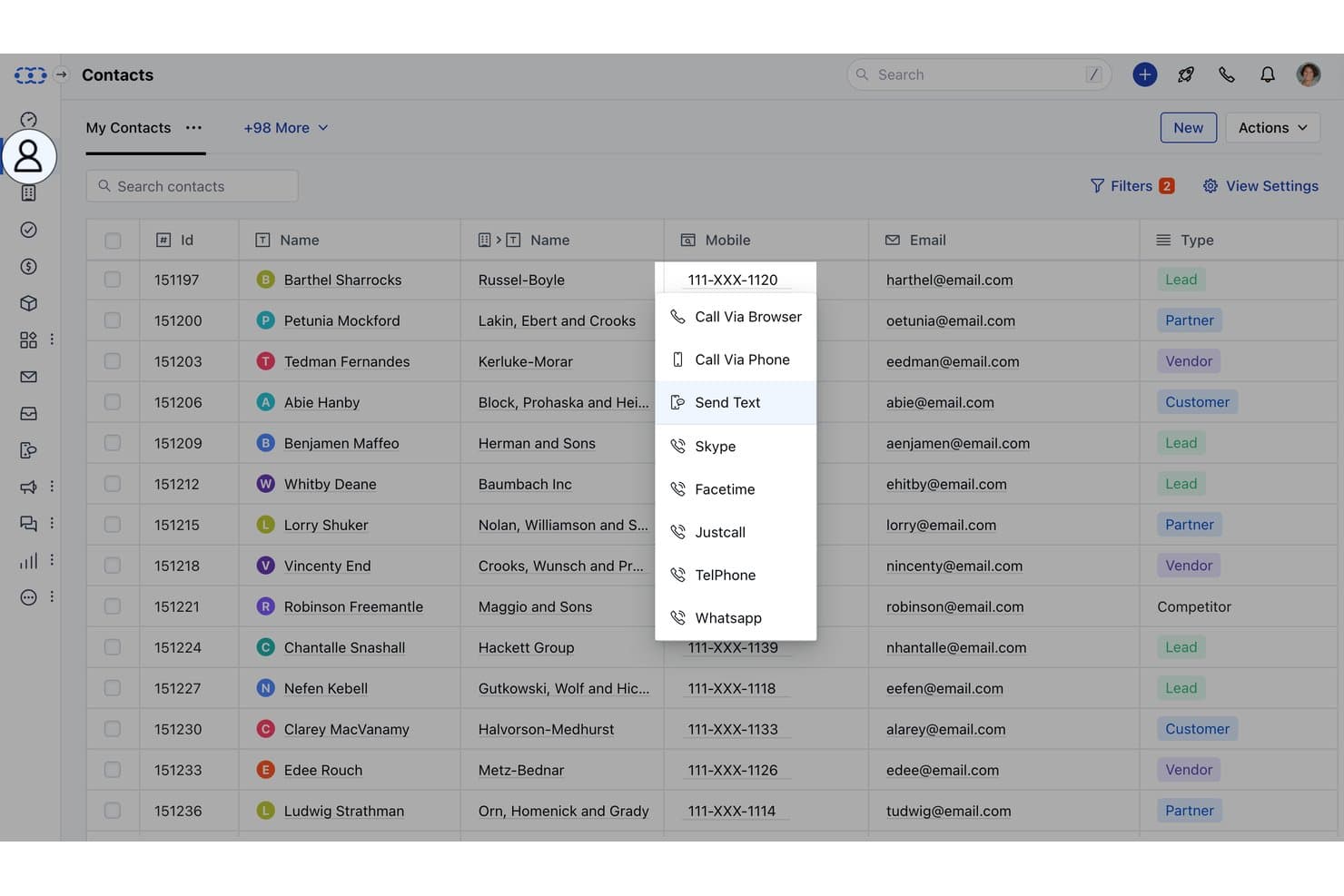
Salesmate lets users text contacts directly from the CRM contact list. Salesmate is a CRM platform with native SMS/MMS texting, two-way messaging, pipeline-event-driven automation via Smart Flows, multi-channel sequences, and AI-assisted conversation tools built directly into contact and deal records.
Who Is Salesmate Best For?
Salesmate is a strong fit for sales teams that want text messaging to trigger automatically as deals move through pipeline stages.
Why I Picked Salesmate
I picked Salesmate as one of the best because its Smart Flows builder lets you trigger SMS actions directly from pipeline events, like sending a text the moment a deal moves to a new stage or a form is submitted. I love that Text Pilot adds local presence routing on top of that, matching the outbound number's area code to the contact's location to improve reply rates. Sequences then let you layer SMS into multi-step cadences alongside email, all from the same CRM record.
Salesmate Key Features
- Bulk SMS with merge tokens: Send personalized text campaigns to segmented contact lists using CRM field data as merge variables, with tag- and list-based targeting.
- Sandy AI conversation summaries: AI assistant that summarizes lengthy text threads, surfacing key points, action items, and deadlines directly within the contact record.
- Team Inbox for inbound SMS: A shared, assignable inbox (Pro plan) where multiple reps can manage and respond to incoming text conversations collaboratively.
- A2P 10DLC in-platform registration: Complete US carrier compliance registration for brand and campaign types directly inside Salesmate via its Regulatory Compliance setup section.
Salesmate Integrations
Salesmate offers native integrations with HubSpot OperationsHub, Mailchimp, ActiveCampaign, Brevo, Shopify, QuickBooks Online, Google Calendar, Microsoft Calendar, Slack, and Zoom. It also supports Make, a RESTful API, webhooks, and Zapier.
Pros and Cons
Pros:
- Text Pilot offers local presence routing
- Opt-out keywords enforced with automatic suppression
- Pipeline stage movement can auto-trigger SMS
Cons:
- Sandy AI and sequences only on higher plans
- SMS and calls require additional usage credits
Learn more about Salesmate: Best for omnichannel lifecycle marketing SMS
- Free plan available
- From $45/user/month (billed annually)
Visit WebsiteCustomer Rating:4.4/5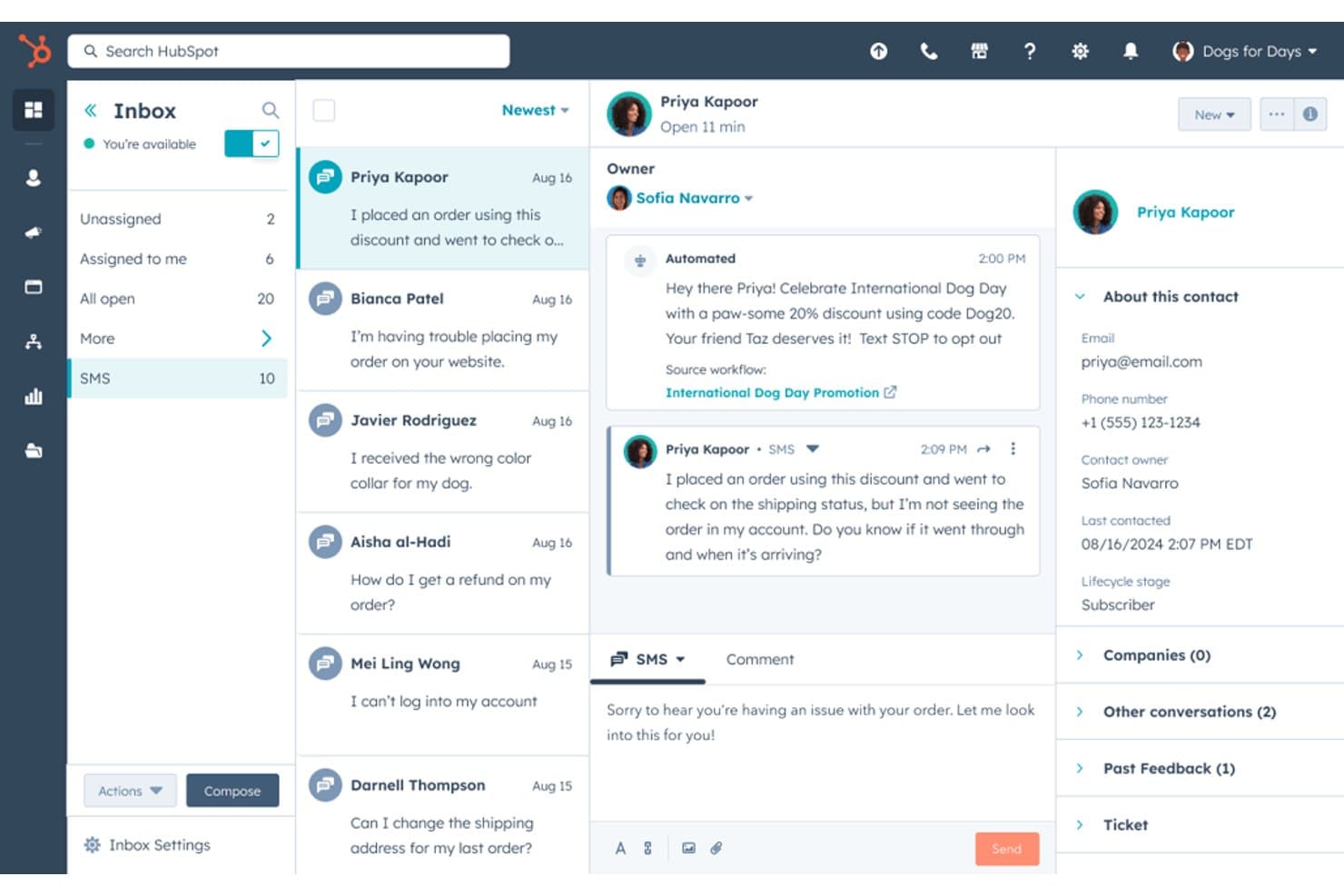
HubSpot lets users manage SMS conversations with customers in one inbox. HubSpot is a CRM platform that combines contact management, pipeline tracking, and marketing automation with native SMS campaigns, a shared omnichannel inbox, and workflow-triggered texting across email, SMS, WhatsApp, and chat.
Who Is HubSpot Best For?
HubSpot is a strong fit for marketing teams that need to orchestrate SMS campaigns across a full customer lifecycle within a unified CRM.
Why I Picked HubSpot
HubSpot earns its spot on my shortlist because it's the only CRM here that ties SMS directly into a full omnichannel lifecycle, running alongside email, WhatsApp, and chat in a single workflow. I particularly like how its workflow builder lets you trigger SMS at any contact journey stage, from a form fill to a re-engagement sequence, without stitching together separate tools. Breeze AI inside the SMS composer also lets my team generate and refine message copy on the fly, which speeds up campaign execution considerably.
HubSpot Key Features
- Conversations shared inbox: Consolidates SMS, email, WhatsApp, Facebook Messenger, and live chat into one interface tied to CRM contact records.
- A2P 10DLC compliance registration: Handles brand and campaign registration through Twilio, with automatic opt-out keyword processing and consent timestamping per contact.
- Contact list segmentation: Lets you build active or static lists using CRM properties to target bulk SMS sends at the right audience.
- WhatsApp Business messaging: Includes up to 1,000 WhatsApp messages per month on Professional and Enterprise plans, managed through the same inbox and workflow automation as SMS.
HubSpot Integrations
HubSpot offers native integrations with Salesforce, Slack, Google Workspace, Microsoft 365, LinkedIn Sales Navigator, Stripe, and ZoomInfo, plus 2,000+ marketplace apps including Sakari, Salesmsg, and Twilio. Its open API, webhooks, Zapier, and Make support custom connectivity.
Pros and Cons
Pros:
- AI-assisted message writing for campaigns
- Workflow-triggered texts across multiple channels
- Bulk SMS campaigns with CRM segmentation
Cons:
- SMS only available with marketing-focused plans
- No native sales rep 1-to-1 texting
Learn more about HubSpot:
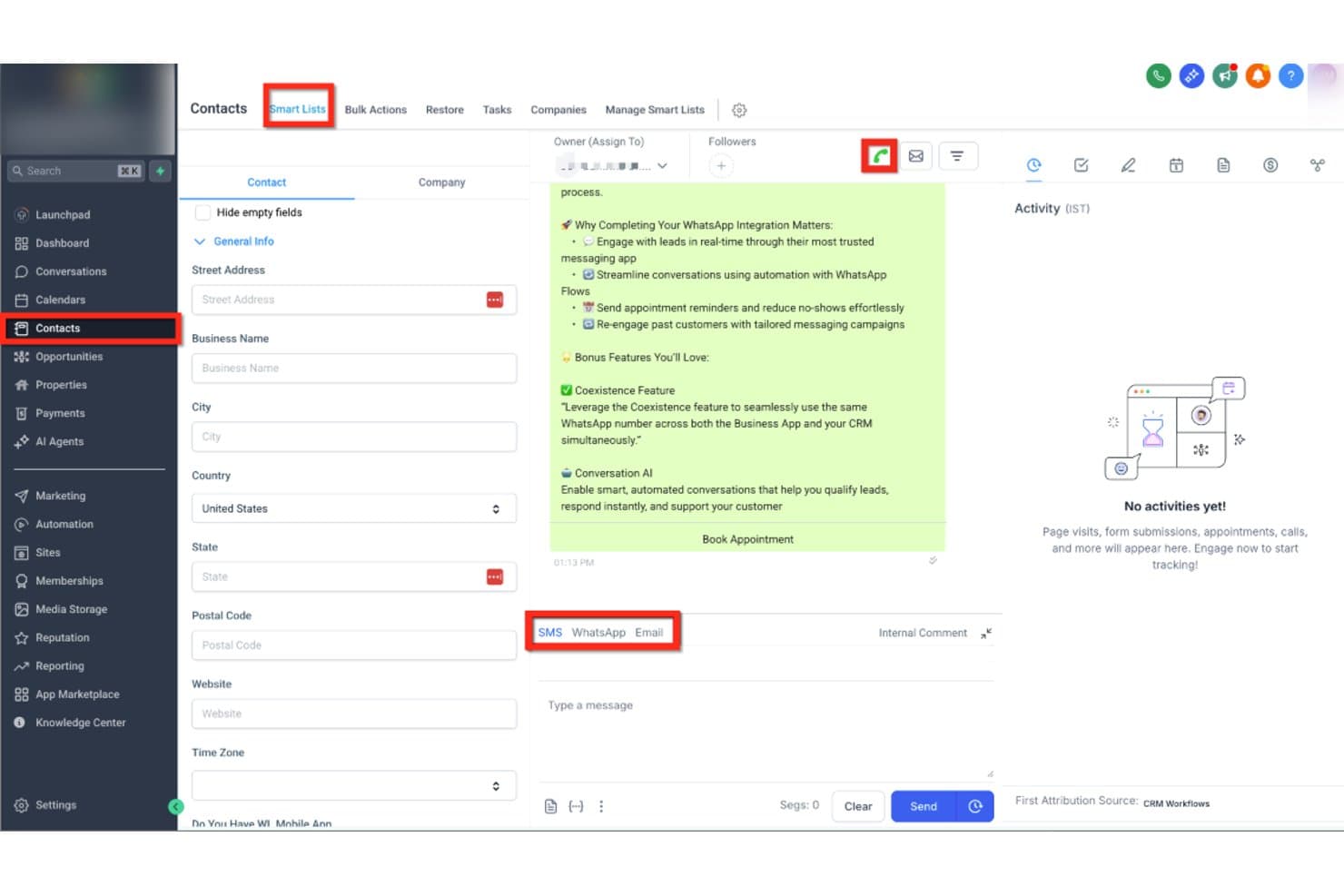
HighLevel lets users text contacts via SMS, WhatsApp, or Email in one place. HighLevel is an all-in-one CRM and marketing platform that combines contact management, pipeline tracking, and native SMS/MMS messaging with multi-channel automation, a shared team inbox, AI-powered conversation handling, and bulk texting tools—all without requiring a third-party texting integration.
Who Is HighLevel Best For?
HighLevel is built for marketing agencies that manage SMS outreach across multiple clients from a single platform.
Why I Picked HighLevel
HighLevel earns its spot on my shortlist because it's purpose-built for marketing agencies running SMS outreach across multiple clients from one platform. I love how the sub-account architecture lets you manage each client's contacts, pipelines, and text conversations completely separately, without switching tools. The Missed Call Text-Back feature automatically converts a missed call into a live SMS conversation, which I've found is a genuine lead-saver in agency client campaigns. Conversation AI can then handle those inbound replies autonomously, qualifying leads and booking appointments around the clock.
HighLevel Key Features
- Bulk SMS broadcasting: Send mass text campaigns to segmented contact lists using Smart Lists and CRM-based filters.
- Text-2-Pay: Send payment links directly through SMS conversations to collect invoices or deposits without leaving the platform.
- Local presence dialling: Automatically display a local area code number matching a contact's location when sending texts or making calls.
- A2P 10DLC Trust Center: Built-in brand and campaign registration tool that guides you through carrier compliance directly inside the platform.
HighLevel Integrations
HighLevel has native integrations with Facebook Messenger, Instagram DMs, WhatsApp, Stripe, PayPal, Google Calendar, and Outlook. It also supports REST API, webhooks, Make, and Zapier for custom connectivity.
Pros and Cons
Pros:
- Bulk texting with CRM-based segmentation
- AI-powered SMS replies and lead qualification
- Missed call text-back saves lost leads
Cons:
- Usage-based texting costs spike with volume
- Complex A2P 10DLC registration frustrates users
Learn more about GoHighLevel: Best for outbound SMS and call teams
- 14-day free trial + free demo available
- From $19/user/month
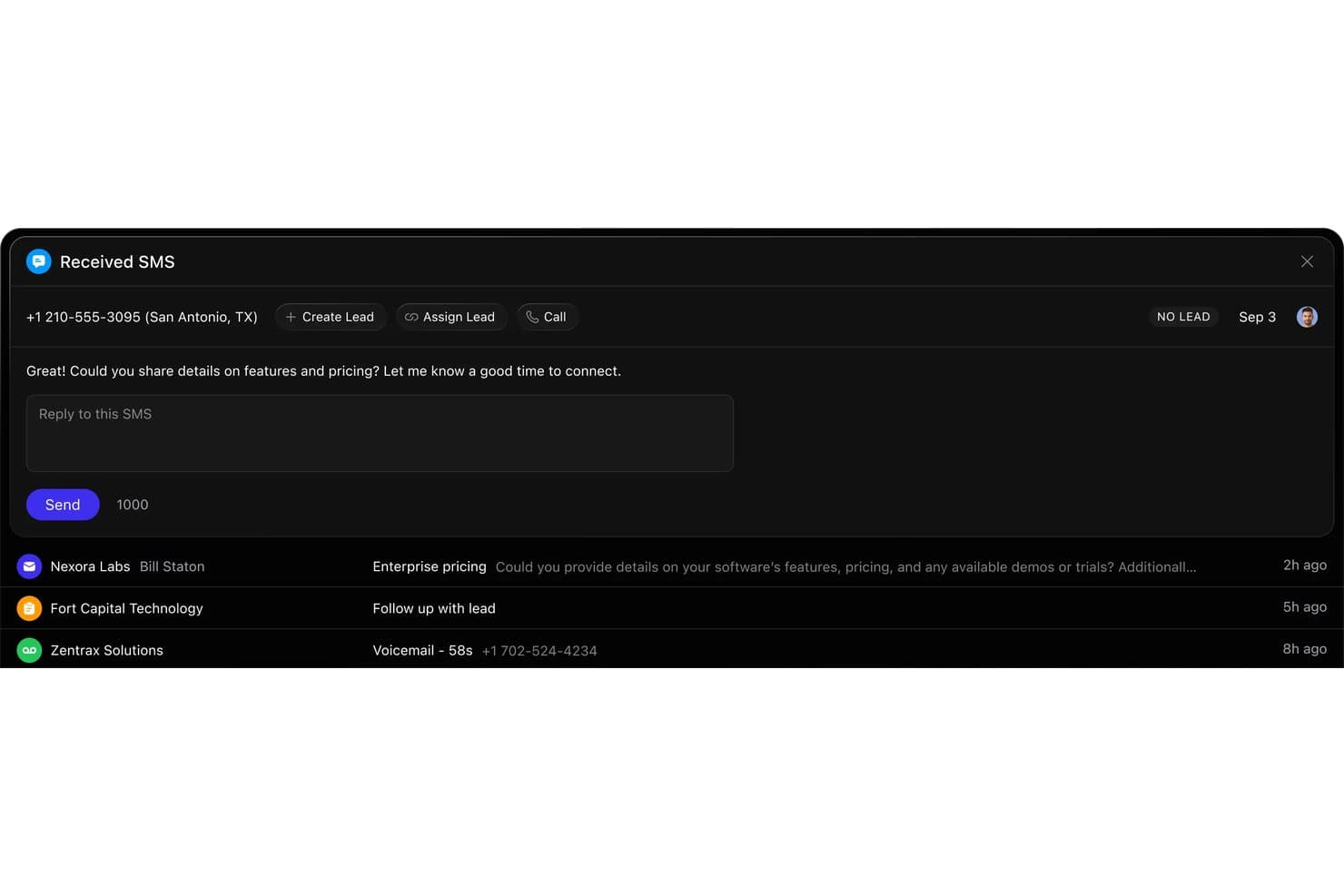
Close lets users reply to inbound SMS leads directly from the CRM. Close is a sales CRM with native SMS/MMS, two-way texting, automated multi-channel sequences, built-in calling, and A2P 10DLC compliance tools—all in one platform.
Who Is Close Best For?
Close is a strong fit for sales teams running high-volume outbound motions who need calling, SMS, and email in one place—without piecing together multiple tools.
Why I Picked Close
Close earns its spot on my shortlist because SMS and calling aren't bolted on—they're core to how the platform works. I love that outbound teams can run multi-step sequences combining SMS, email, and call tasks from a single workflow builder, with Workflow Goals that automatically pause outreach the moment a prospect replies. The in-platform A2P 10DLC registration and AI compliance monitoring also remove a real operational headache, letting teams text at volume without managing compliance through a separate tool.
Close Key Features
- Smart Views bulk SMS: Send personalized text campaigns to dynamically filtered lead segments using CRM merge tokens, without exporting lists or switching tools.
- Power Dialer and Predictive Dialer: Automatically queue and connect outbound calls in sequence, with the Predictive Dialer available on the Scale plan for high-volume teams.
- In-platform A2P 10DLC registration: Register your brand and SMS campaigns directly inside Close via Twilio, including automated opt-out keyword handling.
- Workflow Goals: Automatically pause active multi-step sequences the moment a prospect replies or books a meeting, preventing over-messaging.
Close Integrations
Close offers 100+ native integrations, including Gmail, Microsoft 365, Google Calendar, Zoom, Calendly, Segment, Gong, and Help Scout. It also supports custom integrations through its REST API, webhooks, MCP server, and Zapier.
Pros and Cons
Pros:
- A2P 10DLC compliance tools built in
- Outbound texting automation with workflow goals
- SMS and CRM fully unified in one platform
Cons:
- Workflow SMS automation locked behind higher tiers
- No shared team SMS inbox feature
Learn more about Close: Best for property management team texting
- Free demo available
- From $65/user/month (billed annually)

LeadSimple streamlines real estate operations with lead tracking and automation. LeadSimple is software designed to help users manage lead tracking, sales, and customer relationships. It is primarily for real estate professionals and offers tools that support property management and lead conversion.
Why I Picked LeadSimple:
It offers specific features that make it a great fit for real estate teams. The built-in pipeline management lets you track deals from start to finish, helping you stay on top of each hiring process stage. Automated follow-ups ensure you never miss a lead; task reminders keep your team organized. With its focus on real estate workflows, it’s well-suited for handling property listings and communication.
Standout Features & Integrations:
Features include automated follow-ups, deal tracking, and task management. You can easily assign tasks to team members and set reminders for important deadlines. The software also provides real-time notifications to help you stay updated on lead progress.
Integrations include Gmail, Outlook, Zapier, Google Calendar, Slack, RingCentral, CallRail, Twilio, HelloSign, and QuickBooks.
Pros and Cons
Pros:
- Strong task automation capabilities
- Highly customizable workflows
- Scalable for growing teams
Cons:
- Limited flexibility outside real estate
- Time-consuming setup process
- Steep learning curve
Learn more about LeadSimple:
Outro software de CRM com mensagens de texto
Eis algumas opções adicionais de software de CRM com mensagens de texto que não integraram a minha lista restrita, mas que vale a pena conhecer.
- 11Bitrix24Best for all-in-one CRM with free collaboration texting
- 12KixieBest for call-outcome SMS automation in your CRM
- 13PodiumBest for local business SMS and reputation growth
- 14Zoho CRMBest for CRM texting via ecosystem add-ons
- 15NutshellBest for omni-channel team SMS inbox
- 16SalesmsgBest for texting layered into HubSpot or Salesforce
- 17TextlineBest for HIPAA-compliant team SMS texting
- 18GoCRMBest for multi-channel drip SMS in one platform
- 19HeymarketBest for AI agent texting on shared inbox
How I Evaluate CRM Software With Texting
I split my evaluation into two layers: the baseline each tool must meet—like two-way SMS logging to deal records—and differentiators like A2P compliance and AI-assisted messaging.
Core Functionality (Table Stakes For This List)
When I'm selecting tools for my list, I rank each one on a scale from 0 (does not offer the functionality) to 5 (excels in this area) for each core functionality listed below. Then, I calculate the tool's total score into a percentage. Each tool needs to achieve a minimum total score of 65% to be considered for inclusion.
- Native CRM + Texting: I check whether the platform combines contact and deal management with built-in texting, rather than requiring a third-party SMS plugin to send a single message.
- Two-Way SMS Messaging: Reps need to hold real conversations with prospects, so I evaluate whether replies land in a CRM inbox with routing and assignment capabilities.
- Conversation Logging & Sync: Every text should auto-attach to the right contact and deal record—I look for full timeline sync so managers can audit rep activity without chasing screenshots.
- Automated Text Workflows: I evaluate whether CRM events like deal stage changes or form fills can trigger SMS sequences with branching logic, delays, and conditional steps.
- Bulk & Personalized Texting: Sending a campaign to a segmented list with merge tokens pulled from CRM fields is table stakes—I look for list targeting and dynamic personalization options.
- Compliance Controls: Opt-in/opt-out handling, consent tracking, and A2P 10DLC registration support all factor into my evaluation, especially for teams running high-volume outreach.
Once I have a list of tools that meet this criteria, I consider what sets each platform apart.
Differentiating Factors (What Sets Vendors Apart)
Here's how I compare and contrast different vendors:
Standout Features
A shared team inbox matters when SDRs hand off leads mid-conversation—I look for assignment rules, internal notes, and visibility into who last messaged a contact. AI message assistance is another differentiator I evaluate, especially tools that draft contextual replies using CRM data like deal stage or recent activity. I also consider conversation intelligence features that surface pipeline signals from text threads, giving RevOps leaders reporting on rep responsiveness and engagement trends.
Beyond Features
Deliverability is a factor I weigh heavily—carrier registration support and reputation monitoring determine whether your messages actually reach prospects. Integration depth also matters, particularly bi-directional sync with marketing automation and revenue intelligence tools already in your RevOps stack. I evaluate pricing structures for transparency, looking at how vendors handle per-message costs and seat scaling as outbound volume grows across your sales team.
Como escolher software de CRM com mensagens de texto
É fácil perder-se em listas extensas de funcionalidades e estruturas de preços complexas. Eis uma lista de verificação com os fatores que deve ter em conta, para o ajudar a manter o foco enquanto avalia o processo de seleção de software adequado às suas necessidades específicas.
| Fator | O que considerar |
| Escalabilidade | Esta solução acompanhará o crescimento das necessidades da sua equipa? |
| Integrações | É compatível com as outras ferramentas que já utiliza? |
| Personalização | Pode adaptar o software aos seus fluxos de trabalho específicos? |
| Facilidade de utilização | A plataforma é suficientemente simples para ser rapidamente adotada pela sua equipa? |
| Orçamento | O custo está dentro do orçamento da sua equipa e oferece uma boa relação qualidade-preço? |
| Medidas de segurança | Existem medidas adequadas para proteger os seus dados? |
| Suporte | Terá acesso a um suporte ao cliente atempado e útil? |
| Acesso móvel | Pode aceder ao software em qualquer lugar através de dispositivos móveis? |
Utilize esta lista de verificação para manter o processo de seleção do software organizado e focado.
Tendências no software de CRM com mensagens de texto
Durante a minha pesquisa, consultei inúmeras atualizações de produtos, comunicados de imprensa e registos de versões de diferentes fornecedores de software de CRM com mensagens de texto. Eis algumas das tendências emergentes que estou a acompanhar.
- Personalização de mensagens baseada em IA: Mais ferramentas estão a utilizar IA para sugerir ou gerar automaticamente conteúdo personalizado para SMS com base nos dados dos clientes e nas interações anteriores. Isto ajuda as empresas a enviar mensagens mais relevantes sem esforço manual.
- Comunicação omnicanal: Os fornecedores estão a avançar no sentido de integrar o SMS com outros canais de comunicação, como o e-mail, o chat e as redes sociais, numa única plataforma. Isto permite às empresas manter conversas consistentes em vários pontos de contacto.
- Funcionalidades de conformidade para SMS: Com o aumento das regulamentações relativas às mensagens de texto, mais fornecedores estão a adicionar ferramentas integradas para garantir a conformidade com o RGPD, a TCPA e outras leis de privacidade de dados. Esta tendência é significativa para as empresas que operam em setores regulamentados.
- Análise avançada de SMS: O acompanhamento básico de SMS está a evoluir para análises mais sofisticadas, permitindo às empresas medir as taxas de abertura, os tempos de resposta e o envolvimento dos clientes. Isto ajuda as equipas a aperfeiçoar as suas estratégias de comunicação.
- Integração de voz em texto: Algumas ferramentas de CRM adicionam funcionalidades de conversão de voz em texto, facilitando aos utilizadores a conversão de comunicações faladas em mensagens de texto. Esta tendência está a ganhar força entre as equipas de assistência no terreno e os trabalhadores remotos.
O que é o software de CRM com mensagens de texto?
O software de CRM com mensagens de texto é uma ferramenta que ajuda as empresas a gerir as relações com os clientes, enquanto envia e recebe mensagens SMS diretamente a partir da plataforma. Estas ferramentas são normalmente utilizadas por equipas de vendas, apoio ao cliente e profissionais de serviços que têm de comunicar de forma rápida e eficaz com os clientes.
Os acompanhamentos automatizados, os modelos de mensagens e o acompanhamento de SMS ajudam as empresas a gerir a comunicação com os clientes e a melhorar os tempos de resposta. O software de CRM com mensagens de texto acrescenta valor ao facilitar às empresas a manutenção de uma comunicação sólida e atempada com os seus clientes.
Funcionalidades do software de CRM com mensagens de texto
Ao selecionar um software de CRM com mensagens de texto, procure as seguintes funcionalidades principais.
- Mensagens de texto bidirecionais: Envie e receba SMS diretamente na plataforma, mantendo uma comunicação em tempo real com clientes ou candidatos.
- Fluxos de trabalho automatizados por SMS: Envie mensagens de acompanhamento ou lembretes com base em acionadores, poupando tempo e garantindo uma comunicação consistente.
- Modelos de mensagens: Utilize modelos predefinidos para respostas comuns, interagindo rapidamente com os clientes e mantendo um tom profissional.
- Agendamento de SMS: Agende o envio de mensagens de texto para horários específicos, garantindo que são entregues nos momentos ideais para promover a interação.
- Monitorização e relatórios de mensagens: Monitorize as taxas de abertura de SMS, os tempos de resposta e o desempenho para avaliar e aperfeiçoar as suas estratégias de comunicação.
- Mensagens personalizadas: Personalize as mensagens de texto com dados de clientes ou candidatos para tornar a comunicação mais relevante e melhorar as relações.
- Mensagens de grupo: Envie mensagens em massa para grupos de clientes simultaneamente, facilitando a partilha de atualizações ou ofertas promocionais.
- Ferramentas de conformidade: Gira as subscrições, anulações de subscrição e o acompanhamento do consentimento para garantir que as mensagens de texto cumprem regulamentos como o TCPA.
- Acesso móvel: A utilização das funcionalidades de mensagens de texto do CRM a partir de um dispositivo móvel permite comunicar com os clientes em qualquer lugar.
- Registo de mensagens no CRM: Registe automaticamente as conversas por mensagem de texto nos perfis dos clientes, mantendo todo o histórico de comunicação num único local.
- Interface intuitiva: Uma plataforma intuitiva e fácil de navegar que reduz ao mínimo a curva de aprendizagem da sua equipa.
- Fluxos de trabalho personalizáveis: Pode adaptar o software aos seus processos empresariais específicos, melhorando a compatibilidade com as necessidades da sua equipa.
- Integração com o sistema CRM: Garanta que as funcionalidades de mensagens de texto estão perfeitamente integradas no seu sistema CRM para uma comunicação e gestão de dados eficientes.
- Listas de tarefas e subtarefas: Organize os projetos de forma eficiente, criando listas de tarefas detalhadas e dividindo-as em subtarefas fáceis de gerir.
- Atribuição de tarefas e dependências: Atribua tarefas aos membros da equipa, defina dependências e simplifique os fluxos de trabalho para cumprir eficazmente os prazos dos projetos.
- Datas de conclusão e marcos: Defina e acompanhe datas de conclusão e marcos para manter o projeto dentro do prazo.
- Notificações: Receba notificações em tempo real sobre atualizações de tarefas, prazos e comunicações da equipa.
- Partilha de ficheiros: Facilite a colaboração partilhando ficheiros na plataforma e mantendo todos os recursos do projeto centralizados.
- Integrações com ferramentas de RH e recrutamento: Ligue-se a software de RH ou sistemas de acompanhamento de candidaturas para simplificar os processos de expansão da equipa ou de alocação de recursos.
- Métricas e análises: Utilize informações baseadas em dados para monitorizar o progresso do projeto e o desempenho da equipa e tomar decisões informadas.
- Inteligência artificial e aprendizagem automática: Tire partido das funcionalidades de IA e aprendizagem automática para análises preditivas, atribuição inteligente de tarefas ou automatização de tarefas rotineiras.
- Ferramentas de colaboração: Melhore a comunicação da equipa com funcionalidades de conversação, secções de comentários e documentos colaborativos.
- Automatizações: Poupe tempo em tarefas repetitivas com automatizações que simplificam os processos de rotina.
- Acesso através de aplicação móvel: A aplicação móvel para dispositivos iOS e Android permite aos utilizadores aceder a projetos e funcionalidades do CRM em qualquer lugar.
- Escalabilidade: Suporte para utilizadores ilimitados ou capacidade de expansão à medida que a sua equipa cresce.
- Gestão de recursos: Gira as cargas de trabalho e a disponibilidade da equipa para otimizar a produtividade e distribuir adequadamente as tarefas.
- Funcionalidades de agendamento: Agende de forma eficiente reuniões, prazos e eventos importantes na cronologia do projeto.
- Segurança e conformidade: Proteja dados sensíveis com funcionalidades de segurança robustas e garanta a conformidade com as normas do setor, como o TCPA para mensagens de texto.
- Campos personalizados: Registe informações específicas relevantes para os seus projetos, adicionando campos personalizados a tarefas ou projetos.
- Mensagens de texto em massa: Envie mensagens de texto em massa para alcançar um público vasto, ideal para marketing ou atualizações urgentes.
- Mensagens de texto empresariais: Utilize funcionalidades profissionais de mensagens de texto empresariais para manter a interação com clientes e candidatos.
- Comunicação multicanal: Gira vários canais de comunicação, incluindo SMS, e-mail e telefone, numa única plataforma CRM.
- Campanhas de envio gradual: Configure campanhas automatizadas de envio gradual para enviar mensagens ao longo do tempo, nutrindo potenciais clientes e interagindo com os clientes.
- Integração de telefonia: Combine mensagens de texto com funcionalidades de telefonia para permitir chamadas e SMS a partir da mesma plataforma, melhorando a comunicação.
- Gestão de números de telefone: Gira números de telefone empresariais dedicados para enviar mensagens e acompanhar a comunicação de forma eficaz.
- Integração com plataformas de SEO e marketing: Ligue o CRM à sua plataforma de marketing e otimize o seu contacto com o público para obter uma melhor interação e visibilidade.
- Suporte para SMS no Canadá e internacionais: Garanta que o software consegue gerir mensagens de texto internacionais, incluindo suporte para os regulamentos e requisitos de conformidade canadianos.
Benefícios do software de CRM com mensagens de texto
Implementar software de CRM com mensagens de texto traz benefícios para a sua equipa e para a sua empresa. Eis alguns que pode esperar.
- Comunicação mais rápida: As mensagens de texto permitem que a sua equipa alcance os clientes, melhorando os tempos de resposta e a comunicação em geral.
- Maior consistência no acompanhamento: Os fluxos de trabalho automatizados por SMS ajudam a garantir que nenhum potencial cliente ou cliente fique esquecido, aumentando as taxas de acompanhamento.
- Maior envolvimento dos clientes: As mensagens personalizadas tornam as interações mais relevantes, conduzindo a relações mais sólidas com os clientes e a um maior envolvimento.
- Maior eficiência da equipa: Os modelos pré-criados e a automatização reduzem o tempo despendido no envio manual de mensagens de texto, libertando a sua equipa para outras tarefas.
- Histórico de comunicações centralizado: O registo de mensagens no CRM mantém todas as comunicações com os clientes num só lugar, facilitando o acompanhamento de conversas anteriores.
- Melhor conversão de potenciais clientes: Uma comunicação atempada e eficaz através de mensagens de texto pode ajudar a converter mais potenciais clientes em clientes pagantes.
- Conformidade regulamentar: As ferramentas de conformidade integradas garantem que a sua estratégia de envio de mensagens de texto cumpre os requisitos legais, reduzindo o risco de penalizações.
Custos e preços do software de CRM com mensagens de texto
Escolher software de CRM com mensagens de texto exige compreender os vários modelos e planos de preços. Os custos variam consoante as funcionalidades, o tamanho da equipa, os complementos e outros fatores. A tabela abaixo resume os planos padrão, os preços médios e as funcionalidades habituais das soluções de software de CRM com mensagens de texto.
Tabela de comparação de planos do software CRM com mensagens de texto
| Tipo de plano | Preço médio | Funcionalidades comuns |
| Plano gratuito | $0 | Mensagens de texto básicas, contactos limitados e modelos padrão. |
| Plano pessoal | $10-$25/utilizador/mês | Automatização de mensagens de texto, mais contactos, análises e apoio ao cliente. |
| Plano empresarial | $30-$60/utilizador/mês | Mensagens de texto ilimitadas, automatização avançada, envio de mensagens em massa e integrações. |
| Plano empresarial de grande dimensão | $75-$150/utilizador/mês | Fluxos de trabalho personalizados, acesso à API, ferramentas de conformidade e apoio dedicado à conta. |
Uma descrição dos tipos de planos de software de CRM com mensagens de texto, bem como dos respetivos custos e funcionalidades.
Perguntas frequentes sobre software de CRM com mensagens de texto
Eis algumas respostas a perguntas comuns sobre software de CRM com mensagens de texto.
O software de CRM com mensagens de texto pode ser utilizado para o envio de mensagens em massa?
Sim, muitas plataformas de CRM com mensagens de texto permitem enviar mensagens em massa para vários contactos em simultâneo. Esta funcionalidade é útil para campanhas de marketing, lembretes de compromissos ou qualquer situação em que seja necessário comunicar rapidamente com um grupo grande de pessoas. No entanto, tenha em atenção os regulamentos relativos ao envio de mensagens para garantir a conformidade.
Como é que o software de CRM com mensagens de texto ajuda a garantir a conformidade com SMS?
O software de CRM inclui frequentemente ferramentas de conformidade integradas para ajudar a cumprir os regulamentos de marketing por SMS, como a TCPA e o RGPD. Estas ferramentas gerem normalmente as autorizações, os cancelamentos de autorização e mantêm registos do consentimento dos clientes. Também pode configurar mensagens automáticas de conformidade para garantir que as suas comunicações são legais.
É possível enviar mensagens de texto automaticamente com software de CRM com mensagens de texto?
Sim, o envio automático de mensagens de texto é uma das principais funcionalidades do software de CRM com mensagens de texto. Pode configurar fluxos de trabalho que enviam mensagens automaticamente em horários específicos, por exemplo, depois de um potencial cliente preencher um formulário ou quando chegar a altura de enviar um lembrete de acompanhamento. Isto ajuda a manter a comunicação consistente e poupa tempo à sua equipa.
Posso acompanhar o desempenho das minhas mensagens ao utilizar software de CRM com mensagens de texto?
A maioria das plataformas de CRM com mensagens de texto disponibiliza ferramentas de análise e elaboração de relatórios para acompanhar o desempenho das suas campanhas de SMS. Pode monitorizar as taxas de entrega, as taxas de abertura e os tempos de resposta. Estes dados ajudam-no a ajustar a sua estratégia para melhorar o envolvimento do seu público.
O software de CRM com mensagens de texto pode registar mensagens automaticamente?
Sim, muitas ferramentas de CRM registam automaticamente as mensagens de texto no perfil do cliente. Esta funcionalidade ajuda a sua equipa a manter um registo completo de todas as interações, facilitando o acompanhamento ou a prestação de apoio ao cliente. Pode consultar as conversas anteriores a qualquer momento.
O software de CRM com mensagens de texto funciona a nível internacional?
Algumas plataformas de CRM com mensagens de texto suportam o envio internacional de mensagens, mas isso pode depender do fornecedor e do país. Se a comunicação internacional for essencial para a sua empresa, confirme junto do seu fornecedor de software. Poderão ser aplicadas taxas adicionais ao enviar mensagens através das fronteiras.