

Com tantos softwares de aceleração de vendas diferentes disponíveis, é difícil perceber qual é o mais adequado para si. Sabe que quer reduzir o tempo necessário para converter potenciais clientes em clientes, mas precisa de perceber qual é a melhor ferramenta. Eu ajudo!
Neste artigo, vou ajudá-lo a tornar a sua escolha mais fácil, partilhando as minhas experiências pessoais com dezenas de ferramentas de aceleração de vendas diferentes, utilizadas por várias equipas e contas, juntamente com as minhas escolhas do melhor software de aceleração de vendas.
Why Trust Our Software Recommendations
6,700+
Reviews
20
Industry experts
16+
Evaluation factors
14
Years
Our reviews reflect our independent judgment—not a sales pitch. Learn how we stay transparent.
For this guide, we evaluated tools using hands-on testing and independent research, scoring tools using our selection criteria.
Our reviews reflect our human editorial judgment, not a sales pitch.
Tabela comparativa de software de aceleração de vendas
Esta tabela comparativa resume os detalhes de preços das minhas principais escolhas de software de aceleração de vendas:
| Tool | Best For | Trial Info | Price | ||
|---|---|---|---|---|---|
| 1 | Best for accurate B2B contact data quality | Free plan + 14-day free trial + free demo available | From $49/user/month (billed annually) | Website | |
| 2 | Best for small and medium-sized businesses | 30-day free trial + free demo available | From $39/user/month | Website | |
| 3 | Best for automated call summaries | Free plan + 14-day trial + free demo available | From $25/user/month (billed annually) | Website | |
| 4 | Best for Clari-connected revenue execution | Not available | Pricing upon request | Website | |
| 5 | Best for Salesforce-native real-time call coaching | Free demo available | Pricing upon request | Website | |
| 6 | Best for revenue intelligence | Free demo available | Pricing upon request | Website | |
| 7 | Best for training reps with live call coaching | Not available | Pricing upon request | Website | |
| 8 | Best sales execution tool | Free demo available | Pricing upon request | Website | |
| 9 | Best all-in-one CRM for multiple departments | Free plan + 30-day free trial available | From $25/user/month | Website | |
| 10 | Best for enterprise revenue forecasting | Free demo available | Pricing upon request | Website |


Análise do melhor software de aceleração de vendas
Abaixo encontram-se os meus resumos detalhados do melhor software de aceleração de vendas que entrou na minha lista restrita. As minhas análises apresentam uma análise detalhada das principais funcionalidades, vantagens e desvantagens, integrações e casos de utilização ideais de cada ferramenta, para ajudá-lo a encontrar a melhor opção para si.
 Best for accurate B2B contact data quality
- Free plan + 14-day free trial + free demo available
- From $49/user/month (billed annually)
Visit WebsiteCustomer Rating:4.5/5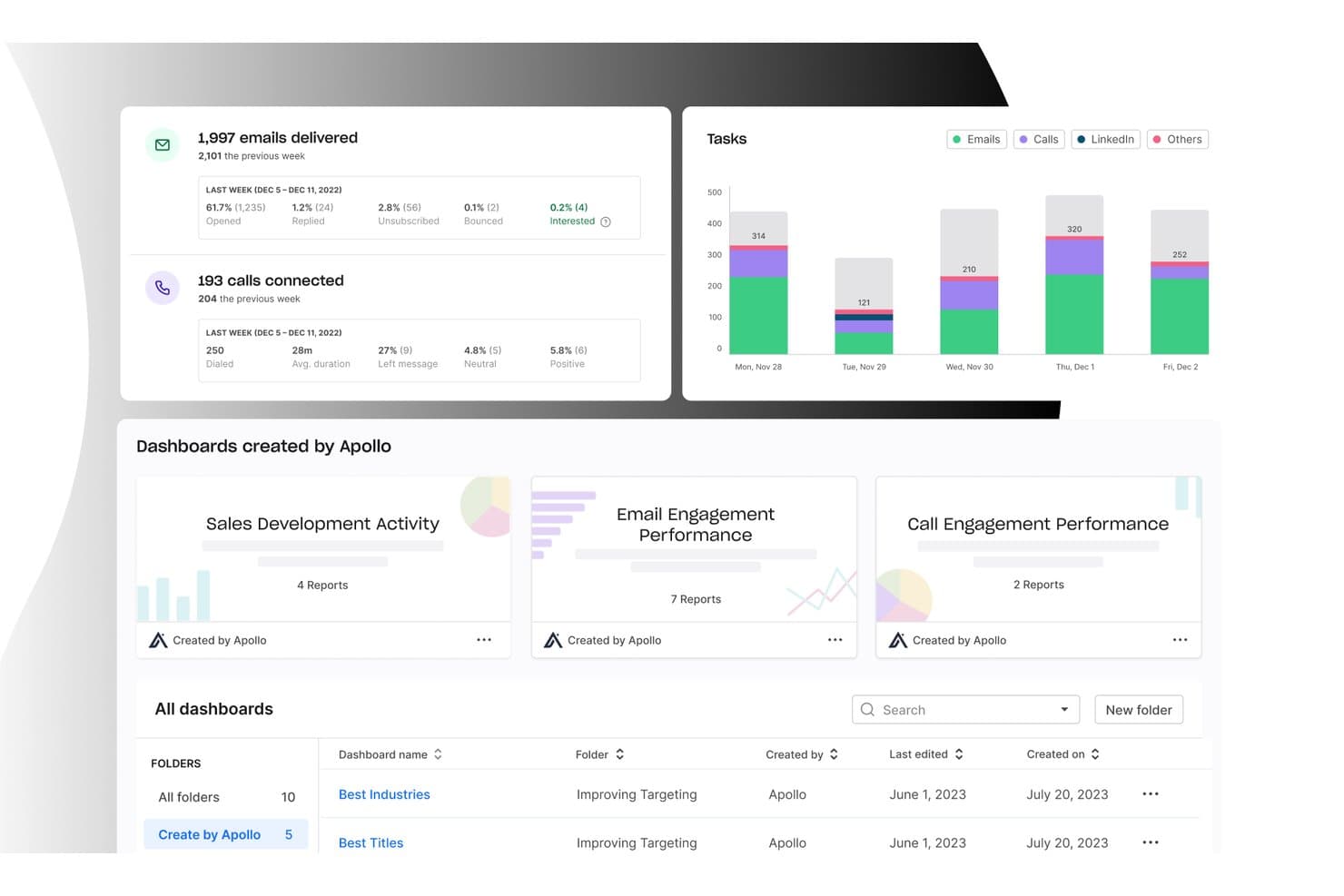
Apollo.io offers an analytics dashboard with email delivery stats, call connection metrics, task charts by day, and pre-built sales dashboards for tracking engagement performance. Apollo.io is an all-in-one GTM platform that combines a B2B contact database, sales engagement sequencing, workflow automation, dialer, deal management, and AI-powered lead scoring in a single tool.
Who Is Apollo.io Best For?
Apollo.io is a strong fit for SDR teams and outbound-focused sales organizations that want to consolidate prospecting, sequencing, and data enrichment without managing multiple tools.
Why I Picked Apollo.io
Apollo.io earns its spot as one of the best on my shortlist because of how its 7-step email verification process handles contact data quality at scale. When my team pulls a contact from the 210M+ database, the email is already validated before it hits our sequence, keeping bounce rates low without needing a separate verification tool. The AI-generated lead scoring on top means we're not just getting clean data, we're getting data prioritized by buying intent signals.
Apollo.io Key Features
- Sales engagement sequences: Build multi-channel cadences combining email, phone, and LinkedIn tasks with A/B testing and analytics.
- CRM integrations: Sync activities, contacts, and pipeline updates bi-directionally with Salesforce and HubSpot.
- Workflow automation: Automate repetitive sales tasks like lead routing, follow-ups, and data enrichment.
- Chrome extension: Source new leads directly from LinkedIn and add them to campaigns without switching tabs.
Apollo.io Integrations
Apollo.io offers native integrations with Salesforce, HubSpot, Outreach, Salesloft, Pipedrive, Zoho CRM, and Slack, and it connects with Zapier. An API is available for custom integrations.
Pros and Cons
Pros:
- AI lead scoring uses real intent signals
- Built-in multi-channel sequencing and A/B testing
- Large verified B2B contact database included
Cons:
- Reporting dashboards lack deep customization options
- Data accuracy drops outside North America
Learn more about Apollo.io: Best for small and medium-sized businesses
- 30-day free trial + free demo available
- From $39/user/month
Visit WebsiteCustomer Rating:4.7/5
The customer timelines view monitors everything needed to follow up with leads. Salesflare is an intelligent tool that helps small and medium-sized businesses sell more.
Why I picked Salesflare: If you’re operating a small or medium-sized B2B business, you can use Salesflare to help increase sales with less effort. It’s a smart platform that can automatically fill out your address book and keep records of all interactions your sales reps have with contacts. Salesflare will collect data from multiple sources, such as social media, emails, and company databases, and hand it to your teams via automated customer timelines that tell your reps everything they need to know.
Salesflare is a robust CRM for businesses that need a solution to build better relationships and increase sales. The workflow feature work in a Kanban card view with a drag-and-drop tool that allows you to move cards along your pipeline. This enables your teams to see where there are follow-up opportunities that have the possibility of converting to paid customers.
Salesflare Standout Features and Integrations
Features include document storage, lead scoring, email marketing, call logging, calendar and reminder systems, task management, audience segmentation, contact databases, customer pipelines, appointment management, and prospecting tools.
Integrations include ActiveCampaign, Asana, Calednly, ClickUp, Google Contacts, Google Sheets, Intercom, Mailchimp, Quickbooks Online, RingCentral, Slack, Todoist, Typeform, Unbounce, Zapier, and other software options.
Pros and Cons
Pros:
- It works on multiple devices.
- Simple to set up and use.
- It makes follow-ups nearly effortless.
Cons:
- Some features require third-party integrations to work.
- Not as many features as other options.
Learn more about Salesflare: Best for automated call summaries
- Free plan + 14-day trial + free demo available
- From $25/user/month (billed annually)
Visit WebsiteCustomer Rating:4.2/5
CloudTalk dashboard displaying call history, performance analytics, and sales activity metrics. CloudTalk is a cloud-based calling platform built for teams that rely on high-volume outreach and customer conversations. As sales acceleration software, it helps you manage inbound and outbound calls, automate dialing workflows, and analyze performance data from a single dashboard. It is particularly suited to sales and support teams that need structured call processes and visibility into rep performance.
Why I Picked CloudTalk
I picked CloudTalk because its AI Conversation Intelligence gives you automated call summaries and sentiment analysis, so you can quickly understand what happened on each call without reviewing full recordings. I also like its AI Dialer with power and parallel dialing modes, which can help you increase call volume while reducing manual tasks. If you are evaluating sales acceleration software, these features directly support faster outreach and more data-driven coaching for your team.
CloudTalk Key Features
In addition to its AI-driven capabilities, CloudTalk offers a range of features to support your sales acceleration needs:
- Real-Time Monitoring: Enables live call listening and performance analytics, helping you track and improve team efficiency.
- Number Management: Provides local numbers in over 160 countries, enhancing your global reach and caller recognition.
- Call Transcription: Offers multi-lingual transcripts for customer calls, allowing you to review and analyze interactions easily.
- Workflow Automation: Automates call processes and integrates seamlessly with your existing systems to save time and reduce manual tasks.
CloudTalk Integrations
Integrations include Salesforce, HubSpot, Pipedrive, Zoho CRM, Zendesk, Intercom, Freshdesk, Slack, Microsoft Teams, and Aircall.
Pros and Cons
Pros:
- Real-time call monitoring tools
- Power and parallel dialers
- AI-powered call summaries
Cons:
- Higher tiers unlock AI features
- Setup can take time
Learn more about CloudTalk: Best for Clari-connected revenue execution
- Not available
- Pricing upon request
Visit WebsiteCustomer Rating:4.7/5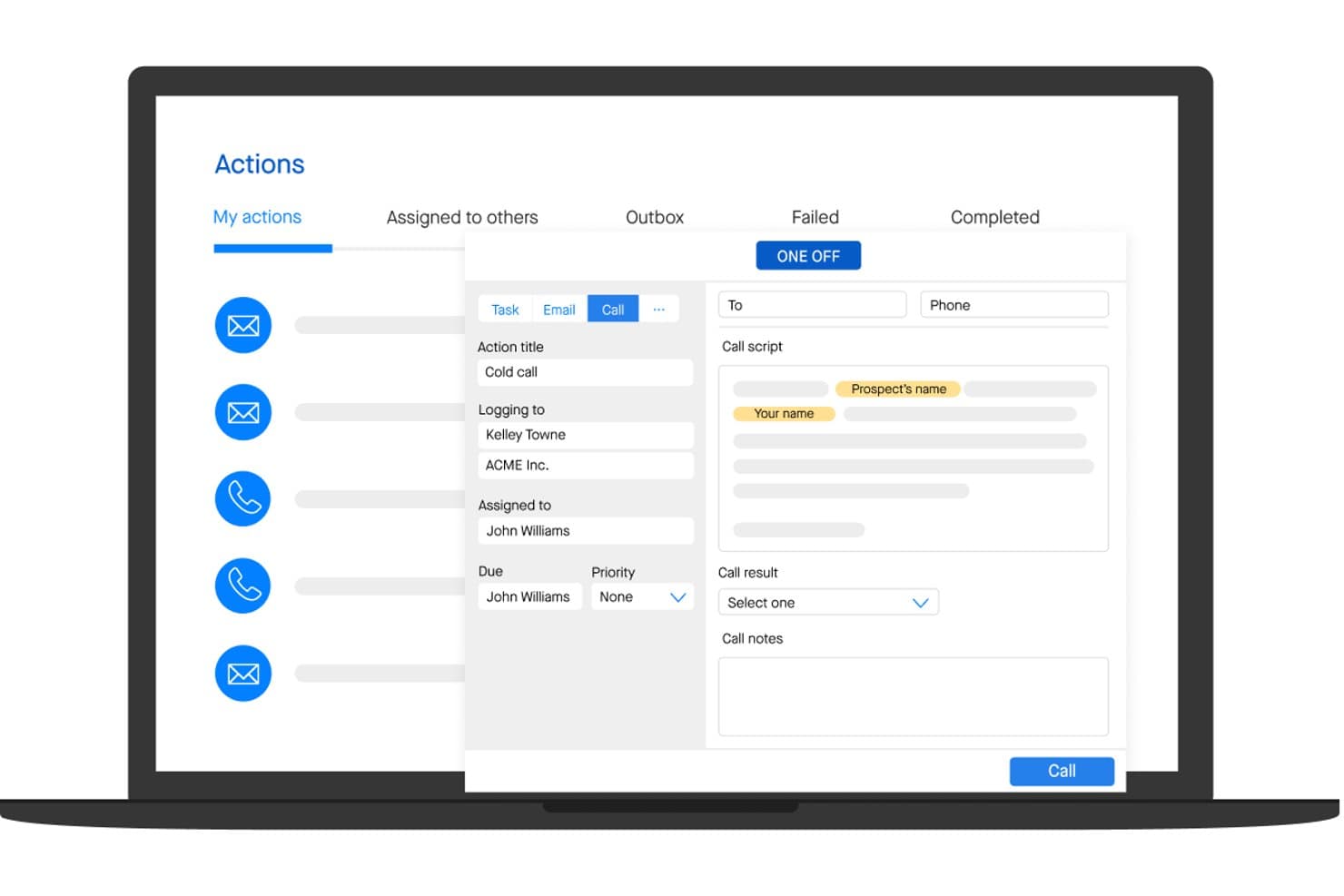
Groove lets users manage and log sales calls with scripts and notes. Groove is a Salesforce-native sales engagement platform that combines multi-channel cadences, automated activity capture, pipeline analytics, and AI-assisted outreach into a single revenue execution environment.
Who Is Groove Best For?
Groove is a strong fit for enterprise sales teams that run on Salesforce and want their engagement data feeding directly into Clari's revenue intelligence platform.
Why I Picked Groove
Groove earns its spot on my shortlist because it's built to feed directly into Clari's revenue intelligence engine, turning rep activity into forecast-grade pipeline data. I love how Groove Flows let reps run multi-channel cadences with AI-generated email content from within Gmail or Outlook, while every touch auto-logs to Salesforce in real time. Groove Spaces then surfaces an effort-vs-engagement score across accounts, so I can see exactly where attention is being paid and where deals are stalling.
Groove Key Features
- Groove OmniDialer: A built-in dialer with click-to-call, local presence numbers, voicemail drops by persona, and automatic call logging to Salesforce.
- Groove Spaces: A shared account workspace where SDRs, AEs, CSMs, and SEs can collaborate with shared activity history, tasks, and engagement scores.
- Groove Conversations: Native call recording and transcription that integrates with Clari Copilot for post-call AI summaries and in-call battlecards.
- Groove Scheduler: A meeting scheduling tool that supports custom meeting types and pulls custom Salesforce field data directly into the booking flow.
Groove Integrations
Groove is Salesforce-native and integrates with Gmail, Microsoft Outlook, ZoomInfo, LinkedIn Sales Navigator, Slack, Microsoft Teams, Zoom, Seismic, and Highspot. It connects with Clari products and offers a public API for custom integrations.
Pros and Cons
Pros:
- Automates sales activity capture reliably
- Multi-role sales collaboration workspace
- AI-generated emails and call summaries
Cons:
- Sequencing logic can feel restrictive
- No native buyer intent data included
Learn more about Groove: Best for Salesforce-native real-time call coaching
- Free demo available
- Pricing upon request
Visit WebsiteCustomer Rating:4.7/5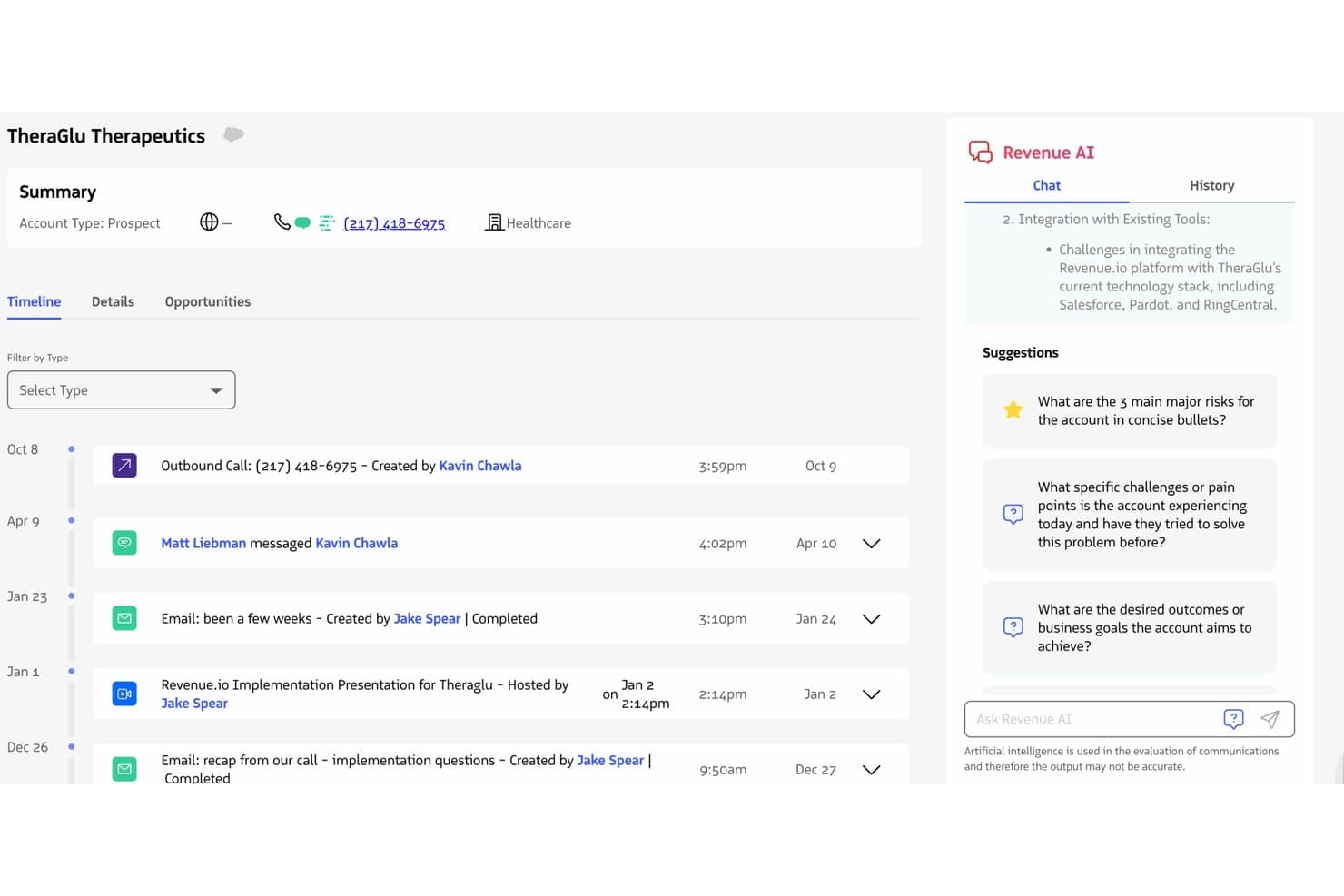
Revenue.io surfaces AI-driven account insights alongside a full activity timeline. Revenue.io is a Salesforce-native sales acceleration platform that combines a built-in dialer, multi-channel sales engagement cadences, real-time call coaching, conversation intelligence, and AI-driven pipeline analytics.
Who Is Revenue.io Best For?
Revenue.io is a strong fit for mid-market and enterprise sales teams running on Salesforce who rely heavily on phone-based or hybrid outreach.
Why I Picked Revenue.io
Revenue.io earns its spot on my shortlist because of Moments™, its real-time in-call coaching engine that surfaces battlecards, objection responses, and talk tracks the instant a competitor name or key topic is detected during a live call. I picked it specifically for Salesforce teams because it's built entirely inside Salesforce, so every call, SMS, and email auto-logs to the right record with zero sync lag. The AI Sales Roleplay feature also lets reps practice against simulated objections before going live, which I think meaningfully shortens ramp time.
Revenue.io Key Features
- Guided Selling cadences: Multi-channel outreach sequences across calls, email, and SMS that automatically enroll and remove prospects based on activity triggers and outcomes.
- Ask Revenue™ AI: A natural language query tool that lets reps and managers ask questions about deals, calls, and accounts directly within Salesforce.
- Local presence dialing: Outbound calls display a local number in 40+ countries, which the vendor reports lifts connect rates by 30–50%.
- AI Methodology Coaching: Real-time call scoring against established frameworks like MEDDIC, SPIN, and Challenger, surfaced during live conversations.
Revenue.io Integrations
Revenue.io runs natively in Salesforce and integrates with Zoom, Microsoft Teams, Google Meet, Gmail, Microsoft Outlook, Marketo, 6sense, ActiveCampaign, and Five9. Salesforce’s API and automation capabilities support custom integrations.
Pros and Cons
Pros:
- Multilingual conversation analysis for Teams and Zoom
- All activities auto-log directly in Salesforce
- Real-time in-call coaching for reps
Cons:
- No built-in buyer intent data
- Requires Salesforce as the CRM platform
Learn more about Revenue.io: 6Best for revenue intelligence
Gong
- Free demo available
- Pricing upon request
Visit WebsiteCustomer Rating:4.7/5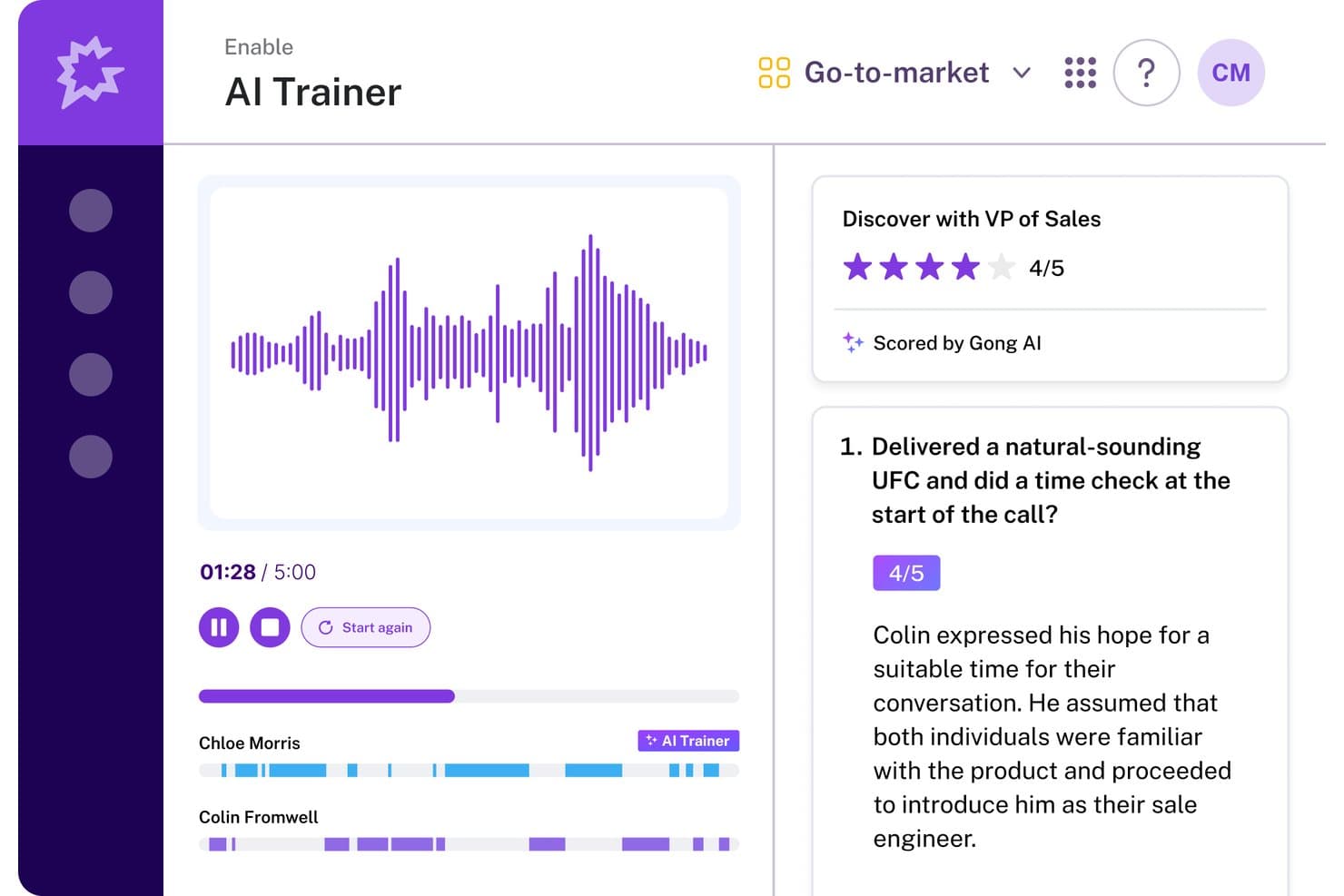
Gong's AI Trainer scores sales calls and gives reps actionable feedback. Gong is a revenue AI platform that combines conversation intelligence, sales engagement, enablement, and forecasting into a single operating system for revenue teams.
Who Is Gong Best For?
Gong is a strong fit for mid-market and enterprise revenue teams that want conversation intelligence and forecasting built into a single platform.
Why I Picked Gong
Gong earns its spot on my shortlist because its revenue intelligence capabilities go deeper than any other tool I've evaluated. I love how the AI Revenue Predictor pulls from 300+ signals across real customer conversations to generate forecasts, with customers like Upwork reporting 95%+ accuracy. The AI Deal Monitor actively flags risks like competitor mentions or stalled momentum before deals slip, which means I'm working from real interaction data rather than gut feel.
Gong Key Features
- AI Composer: Drafts personalized outreach emails by pulling context from past customer conversations to improve response rates.
- Gong Enable: A dedicated enablement module with learning paths, AI call scoring, coaching workflows, and AI-powered simulations for rep training.
- Engage Flows: Multi-channel sequences covering email, calls, LinkedIn, and tasks, with automation rules that auto-enroll contacts based on CRM events.
- Smart Trackers: User-trainable, context-aware topic trackers that detect patterns across recorded conversations to surface coaching and deal insights.
Gong Integrations
Gong offers native bi-directional integrations with Salesforce, HubSpot, and Microsoft Dynamics 365, plus 300+ marketplace integrations through Gong Collective, including Zoom, Slack, 6sense, G2, and Calendly. An open API, webhooks, and MCP support custom connections.
Pros and Cons
Pros:
- Automates CRM data entry for sales teams
- Conversation intelligence surfaces actionable coaching insights
- AI predicts deal outcomes with high accuracy
Cons:
- Requires a demo request for pricing details
- Sequence branching less advanced than key competitors
Learn more about Gong: Best for training reps with live call coaching
- Not available
- Pricing upon request
Visit WebsiteCustomer Rating:4.5/5
Implement a system where sellers and sales teams collaborate, execute, and serve customers. Salesloft provides tools businesses can use to help train new sales reps.
Why I picked Salesloft: If your team is growing, you can use Salesloft to help your team lead new hires by example. Salesloft provides features that allow the system to record conversations your top sales reps are having with prospects. You can use these recordings as a teachable moment for new hires to help them see what works when closing sales or enhance your current team’s close rates.
Salesloft is suitable for any sized business that needs a solution to optimize interactions. It’s a highly effective platform for enhancing the processes that lead to conversion across email, phone, and social media interactions. Salesloft will help accelerate your sales teams through its ability to build, share, and execute sales processes.
Salesloft Standout Features and Integrations
Features include call list management, lead distribution, data management, lead capture, lead scoring, data dashboards, call recording, contact management, performance management, collaboration tool, reporting and analytics, and lead management.
Integrations include Aircall, Chili Piper, Clari, DealSignal, Desktop.com, Gong, HubSpot CRM, Opensense, Outgrow, Salesforce, Shift, Slack, Sugar Sell, Wingman, Zoom, and other software options.
Pros and Cons
Pros:
- The platform is user-friendly.
- It’s easy to add contacts to cadences.
- It provides a live engagement feed.
Cons:
- There are automation limitations.
- The tool freezes when making extensive changes.
Learn more about Salesloft:

Use the actionable insights to understand the best times, sequences, and channels that reach leads and improve results. Outreach helps businesses enhance their sales execution by combining sales engagement, conversation intelligence, and revenue intelligence in one tool.
Why I picked Outreach: The platform is one of the largest sales execution tools that will help your company increase revenue, engage with customers, and increase your sales rep’s productivity. Outreach can help your sales reps engage with leads through personalized interactions throughout the sales cycle. The software’s deal health score feature will help your reps speed up sales with predictions and recommendations on how to keep things on track - helping them focus on the leads that are likely to close.
Outreach works well for sales management and leadership teams who are looking for tools that will help their teams close more deals. The platform’s capabilities will help them give their sales reps a way to personalize, prioritize, and analyze sales activities. Outreach can help your sales teams create pipelines and optimize sales workflows to ensure they can help the organization reach sales targets.
Outreach Standout Features and Integrations
Features include sentiment analysis, A/B testing, automated speech recognition, forecast simulation, deal health scores, deal management, sales rep coaching, conversation intelligence, mutual action plans, deal insights, and pipeline management.
Integrations include 6sense, Aircall, Alyce, Avoma, BigPicture, BombBomb, Chili Piper, Clari, Dark Sky, DataGrail, Dialpad, Gong, Highspot, HubSpot, RingCentral, Salesforce, and other software options.
Pros and Cons
Pros:
- The analytics provide beneficial insights.
- It simplifies and automates daily tasks.
- Top-notch support team.
Cons:
- Tracking which emails customers receive is complex.
- There’s a steep learning curve.
 Best all-in-one CRM for multiple departments
- Free plan + 30-day free trial available
- From $25/user/month

Analyze sales metrics for accurate forecasting and make effective data-driven decisions. Salesforce Sales Cloud provides a CRM tool that will help businesses improve interactions between customers and other operational departments.
Why I picked Salesforce Sales Cloud: The platform is a widely used CRM platform that allows you to store almost any piece of customer information you have in one place. Salesforce Sales Cloud enables you to track all customers across every stage of your sales cycle, from discovery to closing the deal. Multiple departments can use Salesforce Sales Cloud to forecast revenues and track leads, and collaborate through Salesforce’s other applications.
Salesforce Sales Cloud allows businesses of any size and operating in any industry to accelerate growth by using automation. You can accelerate sales growth through the platform’s Process Builder tool, which provides a simple point-and-click interface that will help you automate processes. Salesforce Sales Cloud can help you create the most complex sales processes that will guide your reps through qualification conversations and recommend when to move to the next steps of the sales cycle.
Salesforce Sales Cloud Standout Features and Integrations
Features include email marketing, lead scoring, audience segmentation, call logging, calendar and reminder tools, task management, contact history, lead management, sales pipeline management, lead nurturing, content management, and document management.
Integrations include 3CX, Bynder, CallTrackingMetrics, CloudTalk, DealRoom, Freshbooks, Freshservice, GetResponse, HoneyBook, monday.com, Outgrow, PandaDoc, Slack, Twilio, Wrike, and other software options.
Pros and Cons
Pros:
- Top-down pipeline monitoring capabilities.
- It creates excellent reports.
- It integrates with a significant number of applications.
Cons:
- There’s a steep learning curve.
- Users can feel lost with all the features available.
Learn more about Salesforce Sales Cloud:
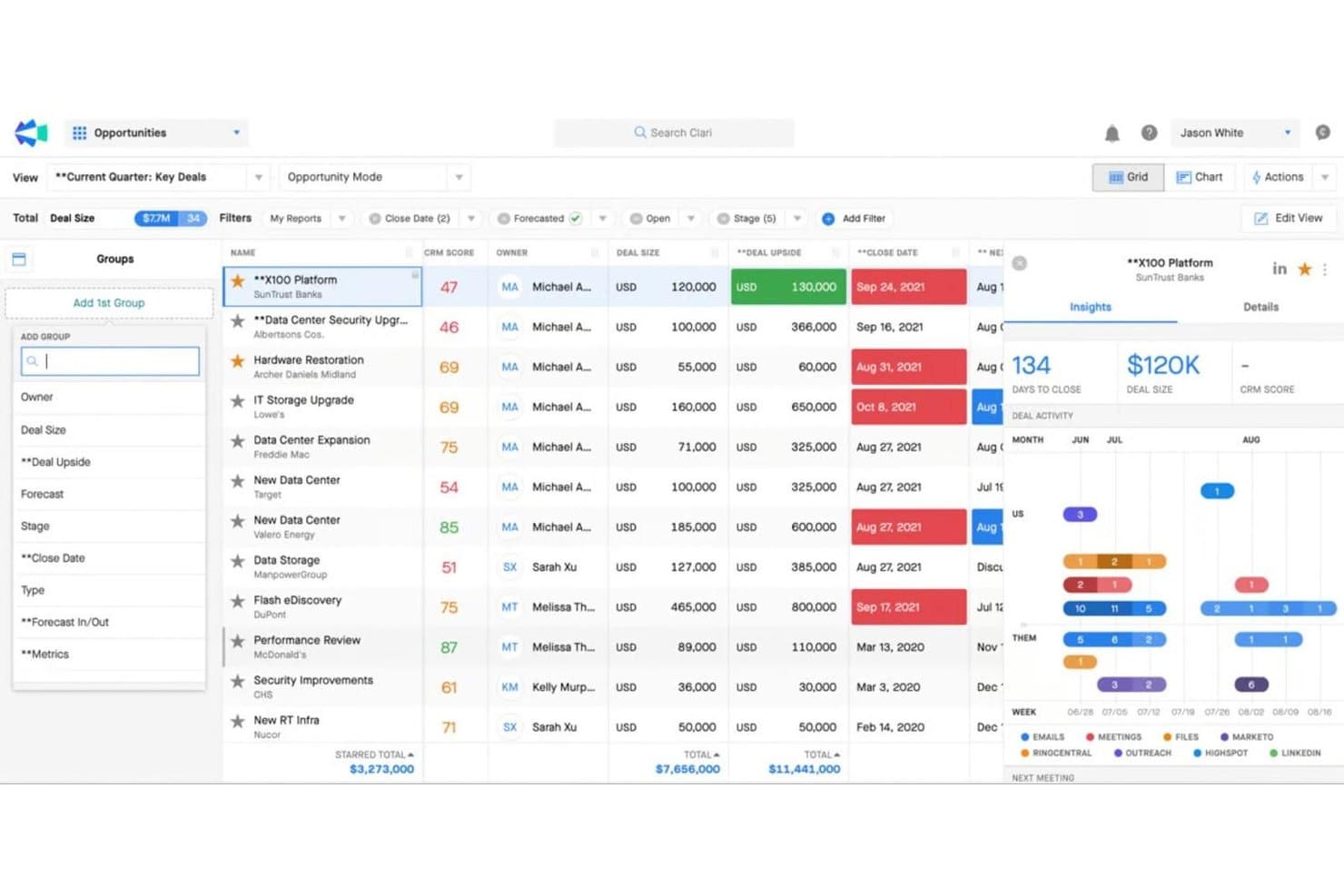
Clari surfaces deal insights and activity trends to prioritize key opportunities. Clari is a revenue intelligence platform that combines sales engagement cadences, pipeline inspection, conversation intelligence, AI-driven forecasting, and mutual action plans across one connected suite.
Who Is Clari Best For?
Clari is built for enterprise revenue teams—particularly RevOps managers and CROs—who need board-ready forecast accuracy across complex, multi-threaded sales cycles.
Why I Picked Clari
Clari earns its spot on my shortlist because no other platform comes close to its enterprise revenue forecasting depth. I'm particularly impressed by Clari Forecast, which rolls up projections from individual reps all the way to the C-suite with AI-driven scenario modeling that boards actually trust. Paired with Inspect's deal health scoring and real-time pipeline risk signals, my team can catch slipping deals before they fall out of the quarter entirely.
Clari Key Features
- Groove Flows: Multi-channel outreach sequences that automate email, phone, SMS, LinkedIn, and direct mail steps within a single cadence.
- Copilot Battlecards: Live in-call cue cards that surface automatically during sales conversations to help reps handle objections in real time.
- Capture: Automatic activity logging that syncs emails, calls, and calendar events directly to Salesforce without manual CRM entry.
- Revenue AI Agents: A library of AI agents that surface deal alerts, recommend next-best actions, and guide pipeline inspection workflows.
Clari Integrations
Clari offers a deep native Salesforce integration, plus integrations with HubSpot, Pipedrive, Gainsight, Slack, Zoom, Microsoft Teams, and LinkedIn Sales Navigator. Public REST APIs and custom data ingestion support connections with Snowflake, BigQuery, and Databricks.
Pros and Cons
Pros:
- Multichannel outreach in a single cadence
- Real-time conversation intelligence during live calls
- Forecasting accuracy trusted at board level
Cons:
- Requires strong Salesforce data hygiene
- No native buyer intent data included
Learn more about Clari:
Outro software de aceleração de vendas
Eis algumas opções adicionais de software de aceleração de vendas que não entraram na minha lista restrita, mas que vale a pena conhecer:
- 11PitchMonsterBest for accelerating rep onboarding
- 12MixmaxBest for Gmail-native sales acceleration
- 13KoncertBest for high-volume parallel dialing teams
- 14Zoho CRMBest AI sales assistant
- 15OutplayBest for AI-native multi-channel outreach at SMB scale
- 166senseBest for account-level buyer intent and AI outreach
- 17HubSpot Sales HubBest for intelligent lead routing and scoring
- 18Reply.ioBest for AI-driven multichannel outbound sequences
- 19ZoomInfo SalesOSBest for account and person-level intent data
How I Evaluate Sales Acceleration Software
I split my evaluation into two layers: baseline criteria every tool must meet—like CRM sync and multi-channel cadences—and the differentiators that separate the best options from the rest.
Core Functionality (Table Stakes For This List)
When I'm selecting tools for my list, I rank each one on a scale from 0 (does not offer the functionality) to 5 (excels in this area) for each core functionality listed below. Then, I calculate the tool's total score into a percentage. Each tool needs to achieve a minimum total score of 75% to be considered for inclusion.
- Multi-Channel Sales Cadences: I check whether the platform supports sequenced outreach across email, phone, LinkedIn, and SMS—and whether reps can build branching logic based on prospect behavior.
- CRM Integration & Data Sync: Real-time, bi-directional sync with CRMs like Salesforce and HubSpot matters here, especially for keeping activity logs and contact records accurate across systems.
- Sales Task Automation: I evaluate how well the tool automates repetitive work like lead routing, follow-up triggers, and data entry so reps spend more time in actual selling conversations.
- Pipeline & Activity Reporting: Good platforms let you track cadence performance, rep activity volume, and stage-by-stage conversion rates in dashboards your ops team can actually customize.
- Lead Prioritization & Scoring: I look for scoring models that combine engagement signals and firmographic data to help reps focus on accounts most likely to convert.
- Sales Content & Playbooks: I consider whether the tool offers a centralized library for templates, snippets, and guided playbooks that reps can access mid-cadence or during live conversations.
Once I have a list of tools that meet this criteria, I consider what sets each platform apart.
Differentiating Factors (What Sets Vendors Apart)
Here's how I compare and contrast different vendors:
Standout Features
Conversation intelligence is a major differentiator—platforms like Gong and Salesloft can record, transcribe, and analyze sales calls to flag objection patterns and coaching moments. I also evaluate whether a tool includes a built-in dialer with local presence, which saves reps from toggling between apps mid-cadence. AI email generation matters when it pulls from prospect data to draft contextual follow-ups rather than generic templates. Buyer intent data is worth checking too, especially for outbound teams prioritizing in-market accounts.
Beyond Features
I consider how well each tool fits a team's GTM motion—a platform built for high-velocity outbound SDR teams won't suit an enterprise AE org running multi-threaded deals. Tech stack compatibility matters just as much; I check for native connectors to tools like ZoomInfo, LinkedIn Sales Navigator, and data warehouses where your RevOps team consolidates reporting. Pricing structure is another factor I weigh, especially whether vendors offer modular add-ons for dialers or intent data so you can scale without paying for features your team doesn't need yet.
Como escolher software de aceleração de vendas
É fácil perder-se em listas extensas de funcionalidades e estruturas de preços complexas. Para o ajudar a manter-se focado enquanto avalia o seu processo único de seleção de software, eis uma lista de fatores a ter em conta:
| Fator | O que considerar |
|---|---|
| FatorEscalabilidade | O que considerarO software acompanhará o crescimento da sua equipa? Considere a expansão futura. Procure soluções capazes de lidar com um maior volume de dados e número de utilizadores sem problemas de desempenho. |
| FatorIntegrações | O que considerarEstabelece ligação às suas ferramentas atuais? Verifique se inclui integrações com CRM, e-mail e outras ferramentas essenciais para manter a eficiência do fluxo de trabalho. |
| FatorPersonalização | O que considerarPode adaptar o software aos seus processos? Certifique-se de que disponibiliza opções de personalização para painéis e relatórios, de modo a corresponder às suas necessidades específicas. |
| FatorFacilidade de utilização | O que considerarA interface é intuitiva para a sua equipa? Um design simples reduz o tempo de formação e aumenta as taxas de adoção. Teste a interface para avaliar a facilidade de utilização. |
| FatorCusto | O que considerarO preço está dentro do seu orçamento? Compare os planos, esteja atento a custos ocultos e certifique-se de que as funcionalidades de que necessita estão incluídas no preço. |
| FatorMedidas de segurança | O que considerarComo protege os seus dados? Confirme se cumpre as normas do setor e se disponibiliza encriptação, controlos de acesso e atualizações de segurança regulares. |
| FatorDisponibilidade do suporte | O que considerarQuando pode contactar o suporte? Certifique-se de que o fornecedor disponibiliza um serviço de apoio ao cliente fiável através de vários canais, como chat em direto, e-mail ou telefone, especialmente em momentos críticos. |
O que é software de aceleração de vendas?
O software de aceleração de vendas é uma ferramenta que ajuda as equipas de vendas a agilizar o processo de vendas. Integra várias funcionalidades, como a geração automatizada de potenciais clientes, a classificação de potenciais clientes, ferramentas de comunicação eficientes e análises detalhadas, numa única plataforma.
Este software simplifica o ciclo de vendas, desde a captação do potencial cliente até ao fecho do negócio, automatizando tarefas repetitivas e fornecendo aos representantes de vendas dados e recursos essenciais.
Funcionalidades do software de aceleração de vendas
Ao selecionar um software de aceleração de vendas, procure as seguintes funcionalidades principais:
- Gestão de potenciais clientes: Organize, atribua prioridades e acompanhe os potenciais clientes à medida que avançam no seu funil de vendas. Uma boa gestão de potenciais clientes ajuda-o a concentrar-se nos melhores potenciais clientes e a fazer um acompanhamento eficiente, para que nada (nem ninguém) fique para trás.
- Automatização de vendas: Automatize tarefas repetitivas, como o envio de e-mails de acompanhamento ou o agendamento de chamadas. Isto dá-lhe mais tempo para se concentrar na criação de relações e no fecho de negócios, em vez de ficar preso a tarefas administrativas.
- Visibilidade do funil: Tenha uma visão clara e em tempo real do seu funil de vendas, desde o início até ao fecho. Com uma melhor visibilidade, pode identificar estrangulamentos, acompanhar o progresso e ajustar a sua estratégia à medida que avança.
- Acompanhamento de e-mails e modelos: Acompanhe quando os potenciais clientes abrem os seus e-mails ou clicam nas ligações e utilize modelos prontos a usar para uma comunicação rápida e consistente. Desta forma, sabe o que está a funcionar e pode manter as suas mensagens eficazes.
- Capacidades de integração: Ligue-se perfeitamente ao seu CRM existente, às plataformas de marketing e às ferramentas de comunicação. A integração significa que os seus dados de vendas circulam de forma fluida entre os sistemas, poupando-lhe os problemas associados à introdução de dados.
- Análises e relatórios: Aceda a painéis e relatórios detalhados sobre a sua atividade de vendas, a saúde do funil e o desempenho dos representantes. Estes dados ajudam-no a tomar decisões mais inteligentes com base no que está realmente a acontecer, e não apenas numa suposição.
- Funcionalidade de marcação: Faça chamadas de saída diretamente a partir da plataforma, registe as chamadas automaticamente e grave as conversas para formação. Esta funcionalidade permite-lhe avançar rapidamente e proporciona mais oportunidades de orientação.
- Gestão de documentos: Armazene, partilhe e acompanhe documentos de vendas, como propostas e contratos. Tem sempre os ficheiros certos à sua disposição e consegue ver quando os potenciais clientes estão a consultar os seus materiais.
- Ferramentas de agendamento: Permita que os potenciais clientes marquem reuniões no seu calendário em horários convenientes, sem trocas intermináveis de mensagens. Reduz as falhas de comunicação e mantém o ritmo dos seus negócios.
Funcionalidades comuns de IA do software de aceleração de vendas
Para além das funcionalidades padrão do software de aceleração de vendas apresentadas acima, muitas destas soluções estão a incorporar IA com funcionalidades como:
- Classificação preditiva de potenciais clientes: A IA analisa dados históricos e interações atuais para classificar os potenciais clientes de acordo com a probabilidade de conversão, permitindo-lhe dar prioridade à comunicação onde esta é mais importante.
- Personalização automatizada de e-mails: A IA cria conteúdos de e-mail personalizados para cada potencial cliente, com base no seu comportamento, nas suas preferências e nas conversas anteriores, poupando-lhe imenso tempo de preparação e aumentando o envolvimento.
- Previsão de vendas: A IA analisa o seu funil, as tendências históricas e as atividades em curso para projetar os resultados de vendas futuros, ajudando-o a definir objetivos realistas e a identificar antecipadamente potenciais problemas.
- Inteligência de conversação: A IA ouve as suas chamadas e analisa as conversas para identificar temas importantes, alterações de sentimento e objeções, oferecendo sugestões de orientação específicas e recomendações sobre os passos seguintes.
- Previsão de abandono: A IA identifica sinais de alerta precoces no seu processo de vendas que podem indicar um negócio potencialmente perdido, permitindo-lhe agir rapidamente para evitar desistências e manter mais clientes.
Benefícios do software de aceleração de vendas
A implementação de um software de aceleração de vendas proporciona vários benefícios à sua equipa e à sua empresa. Eis alguns dos benefícios que pode esperar:
- Maior produtividade: As campanhas de e-mail automatizadas e a priorização de potenciais clientes libertam tempo, permitindo que a sua equipa se concentre no fecho de negócios.
- Melhor tomada de decisões: As análises e os relatórios fornecem informações úteis, ajudando-o a tomar decisões fundamentadas sobre as estratégias de vendas.
- Colaboração reforçada: A integração com o CRM garante que todos têm acesso aos mesmos dados, promovendo o trabalho em equipa e a consistência.
- Estratégias de vendas proativas: Os conhecimentos baseados em IA fornecem análises preditivas, permitindo que a sua equipa antecipe as necessidades dos clientes.
- Maior alcance: As ferramentas de interação nas redes sociais ajudam a estabelecer ligação com potenciais clientes em várias plataformas, alargando o seu público.
- Experiência de utilizador personalizada: Os painéis personalizáveis permitem que os utilizadores se concentrem nas métricas relevantes, melhorando o seu fluxo de trabalho e a eficiência.
- Segurança dos dados: As medidas de segurança protegem informações sensíveis, garantindo a conformidade e criando confiança junto dos clientes.
Custos e preços do software de aceleração de vendas
A seleção de software de aceleração de vendas exige uma compreensão dos vários modelos de preços e planos disponíveis. Os custos variam consoante as funcionalidades, a dimensão da equipa, os complementos e outros fatores. A tabela abaixo resume os planos comuns, os seus preços médios e as funcionalidades normalmente incluídas nas soluções de software de aceleração de vendas:
Tabela de comparação de planos de software de aceleração de vendas
| Tipo de plano | Preço médio | Funcionalidades comuns |
|---|---|---|
| Tipo de planoPlano gratuito | Preço médio$0 | Funcionalidades comunsGestão básica de potenciais clientes, campanhas de e-mail limitadas e análises básicas. |
| Tipo de planoPlano pessoal | Preço médio$5-$25/utilizador/mês | Funcionalidades comunsCampanhas de e-mail avançadas, integração com o CRM e ferramentas básicas de elaboração de relatórios. |
| Tipo de planoPlano empresarial | Preço médio$30-$75/utilizador/mês | Funcionalidades comunsAnálises abrangentes, conhecimentos baseados em IA, ferramentas para redes sociais e painéis personalizáveis. |
| Tipo de planoPlano empresarial avançado | Preço médio$100+/utilizador/mês | Funcionalidades comunsConjunto completo de funcionalidades, medidas de segurança avançadas, suporte dedicado e integrações abrangentes. |
Perguntas frequentes sobre software de aceleração de vendas
Eis algumas perguntas frequentes colocadas por pessoas que procuram novo software de aceleração de vendas.
Qual é a diferença entre CRM e software de aceleração de vendas?
O software de aceleração de vendas concentra-se em acelerar o processo de vendas, enquanto os sistemas CRM gerem as relações com os clientes. Poderá utilizar ferramentas de aceleração de vendas para a priorização de potenciais clientes ou para o envio automatizado de e-mails, enquanto os sistemas CRM armazenam os dados dos clientes e acompanham as interações. Ambos podem ser integrados para melhorar a eficiência geral das vendas.
Quem utiliza software de aceleração de vendas?
O software de aceleração de vendas pode beneficiar muitos utilizadores, incluindo:
- Representantes de vendas: Estas plataformas podem permitir que os representantes de vendas automatizem processos repetitivos e acedam aos dados dos clientes, o que os ajuda a trabalhar de forma mais eficaz.
- Equipas de marketing: As suas equipas de marketing podem utilizar ferramentas de aceleração de vendas para compreender melhor as preferências dos clientes e abordar potenciais clientes através de mensagens personalizadas.
- Executivos: A automatização de processos específicos com software de aceleração de vendas ajudará as equipas executivas a poupar tempo em tarefas administrativas e a concentrarem-se em objetivos cruciais.
- Equipas de apoio ao cliente: O acesso rápido aos dados dos clientes pode ajudar as equipas de apoio ao cliente a responder rapidamente aos clientes com informações relevantes.
- Analistas de dados: As soluções de aceleração de vendas permitem aos analistas de dados processar grandes quantidades de dados de forma rápida e precisa, obtendo informações acionáveis sobre o desempenho da empresa.
- Gestores de produto: O software de aceleração de vendas pode ajudar os gestores de produto a identificar tendências na utilização dos produtos e a efetuar as alterações necessárias para maximizar o potencial de receitas.
Quais são os diferentes tipos de software de aceleração de vendas?
Tal como o nome indica, a principal função do software de aceleração de vendas é aumentar a velocidade das vendas. Pode ajudar a sua empresa a aumentar a eficiência do funil de vendas. Existem vários tipos de plataformas de aceleração de vendas que pode utilizar para melhorar os processos de vendas, incluindo:
- Gestão das relações com os clientes (CRM): Estas ferramentas podem ajudar as empresas a agregar e gerir eficazmente as informações de contacto. O CRM pode ajudar as equipas de vendas a identificar potenciais clientes de elevado valor, gerir interações e personalizar experiências para os contactos, graças a uma melhor acessibilidade dos dados.
- Prospetiva e qualificação: Até 33% das chamadas de vendas podem ser uma perda de tempo, porque os representantes estão a conversar com potenciais clientes não qualificados que não serão convertidos. Isto torna indispensável que as equipas de vendas disponham de sistemas de prospeção e qualificação de potenciais clientes.
- Da cotação ao recebimento: Isto pode ajudá-lo a gerir os processos de vendas e as receitas, bem como permitir aos representantes de vendas criar rapidamente cotações e gerir encomendas de forma eficaz. Estas ferramentas podem acelerar as vendas ao simplificar o acompanhamento das contas e das receitas.
- Apoio ao cliente: As ferramentas de chat em direto e de gestão de pedidos de suporte são plataformas essenciais na estratégia de aceleração de vendas. Dão aos representantes de vendas a oportunidade de identificar as necessidades dos clientes e fornecer soluções eficazes para colmatar as lacunas entre os produtos e serviços e as expetativas dos clientes.
O software de aceleração de vendas pode integrar-se com as minhas ferramentas existentes?
Sim, a maioria dos softwares de aceleração de vendas oferece integrações com ferramentas populares, como CRM, plataformas de e-mail e redes sociais. Verifique a compatibilidade com os seus sistemas atuais para garantir um fluxo de dados contínuo. A integração ajuda a manter a eficiência do fluxo de trabalho e reduz a necessidade de introdução manual de dados.
Como sei se a minha equipa precisa de software de aceleração de vendas?
Se a sua equipa tiver dificuldades em gerir potenciais clientes, responder rapidamente ou manter processos de vendas eficientes, o software de aceleração de vendas poderá ajudar. Avalie os seus desafios atuais e considere se funcionalidades como e-mails automatizados ou pontuação de potenciais clientes podem resolvê-los. Um período experimental também pode ajudar a avaliar o impacto no seu fluxo de trabalho.
O software de aceleração de vendas é adequado para pequenas empresas?
Sim, o software de aceleração de vendas pode beneficiar as pequenas empresas ao automatizar tarefas e melhorar a gestão de potenciais clientes. Procure opções escaláveis com planos de preços que se adequem ao seu orçamento. As equipas mais pequenas podem tirar partido destas ferramentas para aumentar a produtividade e concentrar-se em atividades de vendas prioritárias.