

O Freshsales é uma ferramenta de gestão de relações com clientes (CRM) que ajuda as empresas a simplificar os seus processos de vendas e a gerir eficazmente as interações com os clientes. Embora seja uma ferramenta de marketing popular, pode não responder a todas as necessidades da sua empresa, levando-o a procurar uma solução alternativa.
Com tantas opções de CRM de vendas disponíveis no mercado, pode ser difícil encontrar um software que substitua o Freshsales. Mas não deixe que isso o impeça. Para o ajudar a começar, testei e analisei algumas das principais alternativas ao Freshsales.
As minhas análises exploram as melhores soluções, destacando as suas funcionalidades, preços e vantagens únicas para o ajudar a tomar uma decisão informada para a sua empresa. Quer esteja à procura de mais possibilidades de personalização, melhores integrações ou diferentes opções de preços, estas melhores alternativas de CRM oferecem uma variedade de soluções.
O que é o Freshsales?
O Freshsales é uma ferramenta de gestão de relações com clientes (CRM) concebida para ajudar as empresas a gerir os seus processos de vendas e as interações com os clientes. É normalmente utilizada por equipas de vendas, representantes do serviço de apoio ao cliente e proprietários de empresas para acompanhar potenciais clientes, gerir dados dos clientes e simplificar a comunicação.
Why Trust Our Software Recommendations
6,700+
Reviews
20
Industry experts
16+
Evaluation factors
14
Years
Our reviews reflect our independent judgment—not a sales pitch. Learn how we stay transparent.
For this guide, we evaluated tools using hands-on testing and independent research, scoring tools using our selection criteria.
Our reviews reflect our human editorial judgment, not a sales pitch.
Tabela de comparação das alternativas ao Freshsales
Esta tabela de comparação resume os detalhes de preços das minhas principais escolhas de alternativas ao Freshsales:
| Tool | Best For | Trial Info | Price | ||
|---|---|---|---|---|---|
| 1 | Best for no-code workflow automation | Not available | From $15/user/month | Website | |
| 2 | Best for all-in-one CRM affordability | Free plan + free demo available | From $11.04/user/month (billed annually) | Website | |
| 3 | Best for relationship-focused CRM | 14-day free trial available | From $29.90/user/month | Website | |
| 4 | Best for multi-channel marketing automation | Free plan available | From $9/month | Website | |
| 5 | Best for AI-driven sales insights | Not available | From $136/user/month | Website | |
| 6 | Best for customizable sales automation | Free demo available | From $68/user/month (billed annually) | Website | |
| 7 | Best for comprehensive CRM needs | Free plan + 15-day free trial + free demo available | Pricing upon request | Website | |
| 8 | Best for integrated invoicing and CRM | 14-day free trial available | From $20/user/month | Website | |
| 9 | Best for small teams needing simplicity | Free plan + 30-day trial available | From €25/month | Website | |
| 10 | Best for small businesses needing easy setup | Free plan + 14-day trial available | From $22/user/month | Website |


Melhores alternativas ao Freshsales
Nas análises seguintes, apresentarei as vantagens e desvantagens de cada alternativa ao Freshsales. Abordarei as suas funcionalidades e os melhores casos de utilização para o ajudar a tomar uma decisão informada.
 Best for no-code workflow automation
- Not available
- From $15/user/month
Visit WebsiteCustomer Rating:4.7/5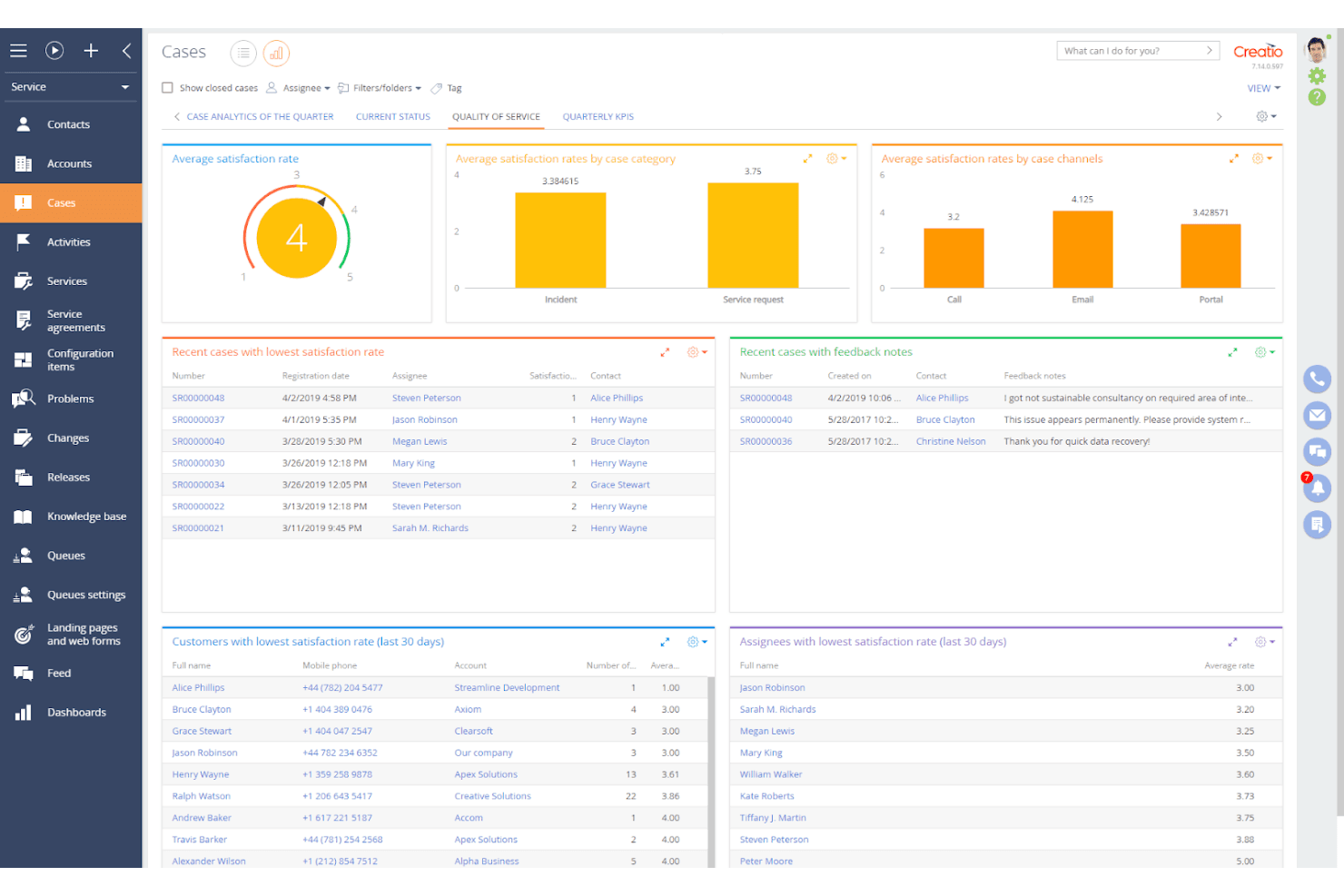
Creatio tracks service quality with satisfaction rate dashboards. Creatio is an agentic CRM platform that combines end-to-end sales cycle management with a no-code workflow automation layer, covering lead capture and scoring, pipeline tracking, sales forecasting, quote generation, and multi-step sales engagement sequences.
Who Is Creatio Best For?
Creatio is a strong fit for mid-market sales teams that need to build and automate complex, multi-step sales workflows without relying on developers.
Why I Picked Creatio
Creatio earns its spot on my shortlist because its no-code BPM engine lets sales teams design and automate complex, multi-step workflows without writing a single line of code. I particularly like how Sales Engagement sequences chain together emails, calls, and tasks with conditional logic, so follow-ups trigger automatically based on where a prospect sits in the pipeline. The AI-powered Lead Scoring Agent and opportunity-stage configuration round out a genuinely flexible automation layer that goes well beyond what Freshsales offers out of the box.
Creatio Key Features
- Unified account and contact database: Stores accounts, contacts, leads, and opportunities in one place, with relationship mapping, segmentation by industry or location, and full interaction history per record.
- Configurable opportunity stages: Administrators can edit stage names, set their sequence, control pipeline display, and designate final or successful stages through a lookup configuration.
- Sales forecasting with quota controls: Forecasts can be configured by hierarchy, period, and metric, with separate permissions for visibility, quota editing, and submission at each hierarchy node.
- Field sales mobile app: Supports territory planning, visit scheduling, visit preparation, and post-visit follow-up from a dedicated mobile application.
Creatio Integrations
Marketplace integrations include Google Calendar, Microsoft Exchange, Microsoft Power BI Desktop, Apollo.io, and PandaDoc. Creatio also supports RESTful APIs and Zapier for custom connectivity.
Pros and Cons
Pros:
- Tracks pipeline conversion and quota forecasts
- Adapts opportunity stages to specialized sales cycles
- Automates conditional, multi-step sales follow-ups
Cons:
- Broad configuration demands substantial onboarding
- Custom reporting can require spreadsheet work
Learn more about Creatio: Best for all-in-one CRM affordability
- Free plan + free demo available
- From $11.04/user/month (billed annually)
Visit WebsiteCustomer Rating:4.6/5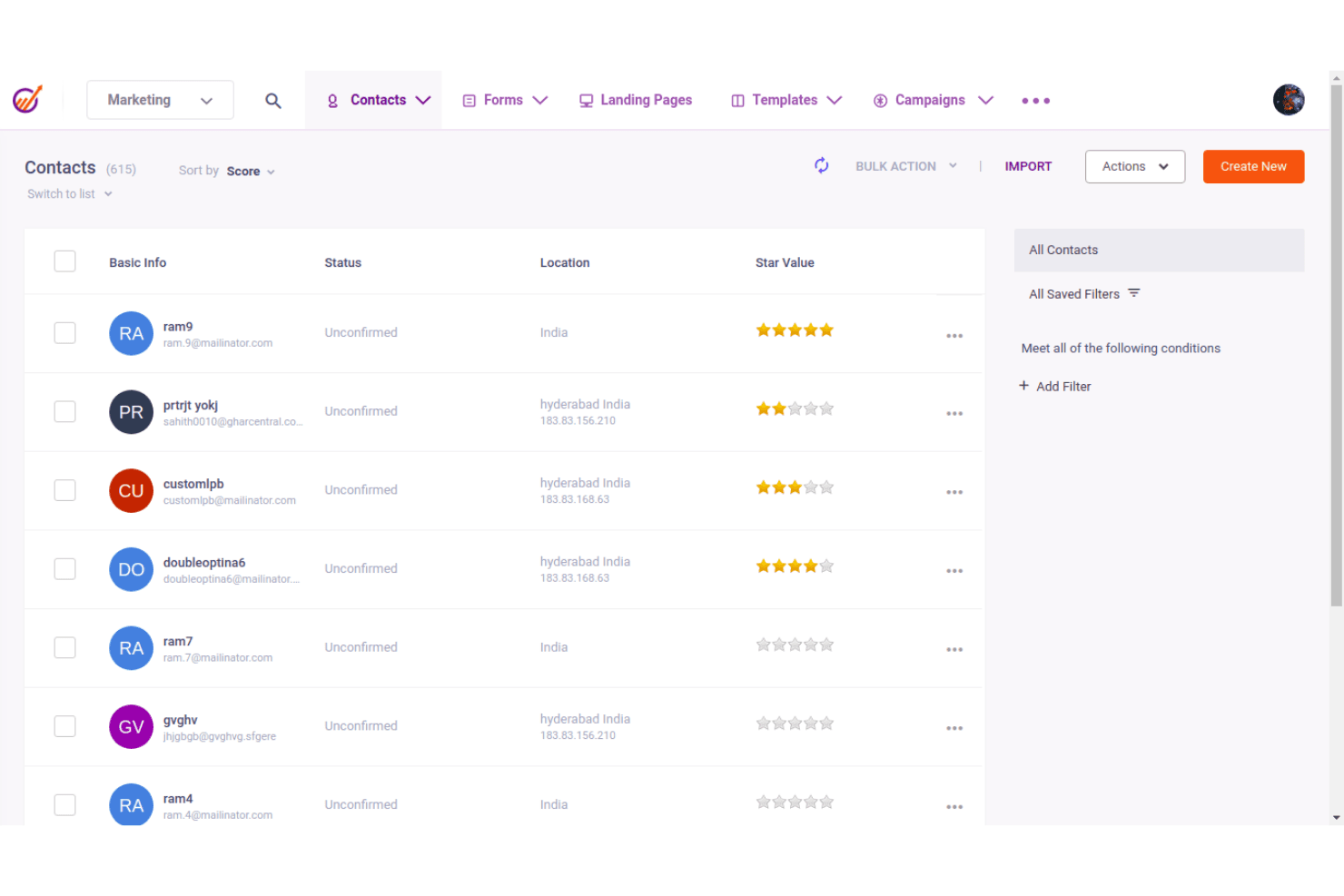
EngageBay lets users manage and score contacts in one place. EngageBay is an all-in-one CRM platform for small businesses that combines sales pipeline management, contact tracking, deal management, marketing automation, and customer support in a single suite.
Who Is EngageBay Best For?
EngageBay is a strong fit for small business owners and early-stage teams that need sales, marketing, and support tools in one place without paying for multiple separate platforms.
Why I Picked EngageBay
I picked EngageBay as one of the best because it packs sales pipeline management, marketing automation, and customer support into a single platform at a price that's genuinely hard to justify leaving for Freshsales. I love that deal tracks come with fully configurable milestones, including probability percentages and drag-and-drop stage changes, so your pipeline reflects how your team actually sells. The built-in lead scoring, trigger-based automations, and unified contact timelines showing calls, emails, and tickets mean smaller teams get real CRM depth without stitching together separate tools.
EngageBay Key Features
- Lead scoring: Automatically scores contacts using predefined or custom rules based on engagement and lead attributes to help prioritize outreach.
- Appointment scheduling: Lets prospects book meetings directly through individual or group calendars with customizable availability slots and booking URLs.
- Contact segmentation: Filters contacts into saved lists based on defined criteria for more targeted follow-up and outreach campaigns.
- Sales gamification: Tracks team activity through leaderboards and team-level sales measures to give managers visibility into rep performance.
EngageBay Integrations
EngageBay documents integrations with 250+ business tools, including Stripe, Xero, QuickBooks, Shopify, Twilio, and SendGrid. It offers a REST API, outgoing webhooks on the All-in-One Pro plan, and Zapier.
Pros and Cons
Pros:
- Configurable deal stages trigger follow-up automation
- Unified contact histories across sales and support
- Affordable CRM praised by reviewers
Cons:
- Some workflow access requires plan upgrades
- Reporting offers limited depth for complex analysis
Learn more about EngageBay: Best for relationship-focused CRM
- 14-day free trial available
- From $29.90/user/month
Visit WebsiteCustomer Rating:4.8/5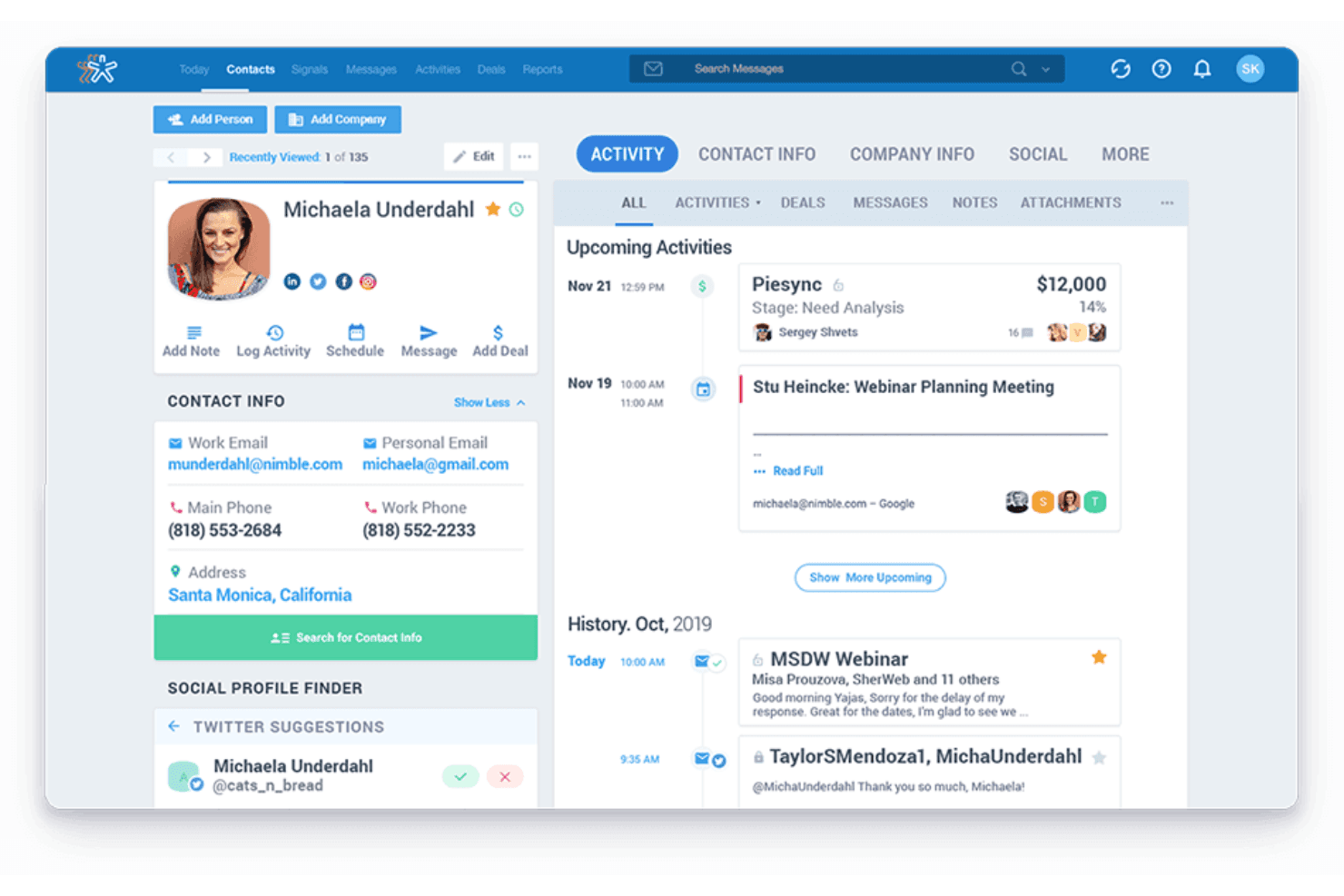
Nimble CRM centralizes contact details, activity history, and deals in one view. Nimble CRM is a contact-centered CRM platform that combines relationship tracking, deal pipelines, email sequences, workflow automation, and sales reporting in a single system built around contact and communication history.
Who Is Nimble CRM Best For?
Nimble CRM is a strong fit for small business owners and sales managers who prioritize relationship history and contact context over deep RevOps tooling.
Why I Picked Nimble CRM
Nimble CRM earns its spot on my shortlist because it's built entirely around relationship context, which is something Freshsales never quite nailed. I love how every contact record surfaces the full communication history alongside open deals and tasks, so before a call, I can see exactly where a conversation left off without digging through separate inboxes. The Stay in Touch reminders and conditional email sequences also let me automate follow-ups that feel personal rather than generic.
Nimble CRM Key Features
- Customizable deal pipelines: Build multiple pipelines with Kanban and list views, custom deal cards, and default probabilities per stage.
- Nimble MCP AI assistant connection: Connect Nimble to Claude or ChatGPT to retrieve contact history, update records, and log meeting notes by prompt.
- Action-based workflow triggers: Configure triggers that automatically create activities, send notifications, or assign tags as contacts move through workflow stages.
- Individual and team reporting: Generate pipeline funnel, revenue forecast, deal progress, and rep-level performance reports with filters for user, period, and pipeline.
Nimble CRM Integrations
Nimble CRM lists 120+ app integrations, with native connections across Microsoft 365 and Google Workspace, including Outlook, Microsoft Teams, Gmail, and Google Calendar. Marketplace integrations include Mailchimp, ActiveCampaign, PandaDoc, and Zapier; its OAuth 2.0 API supports custom integrations.
Pros and Cons
Pros:
- Rep-level reports expose pipeline and activity trends
- Follow-up sequences branch on engagement signals
- Contact history stays attached to deal activity
Cons:
- Reporting customization trails analytics-focused alternatives
- No documented Freshsales deal-import path
Learn more about Nimble CRM:
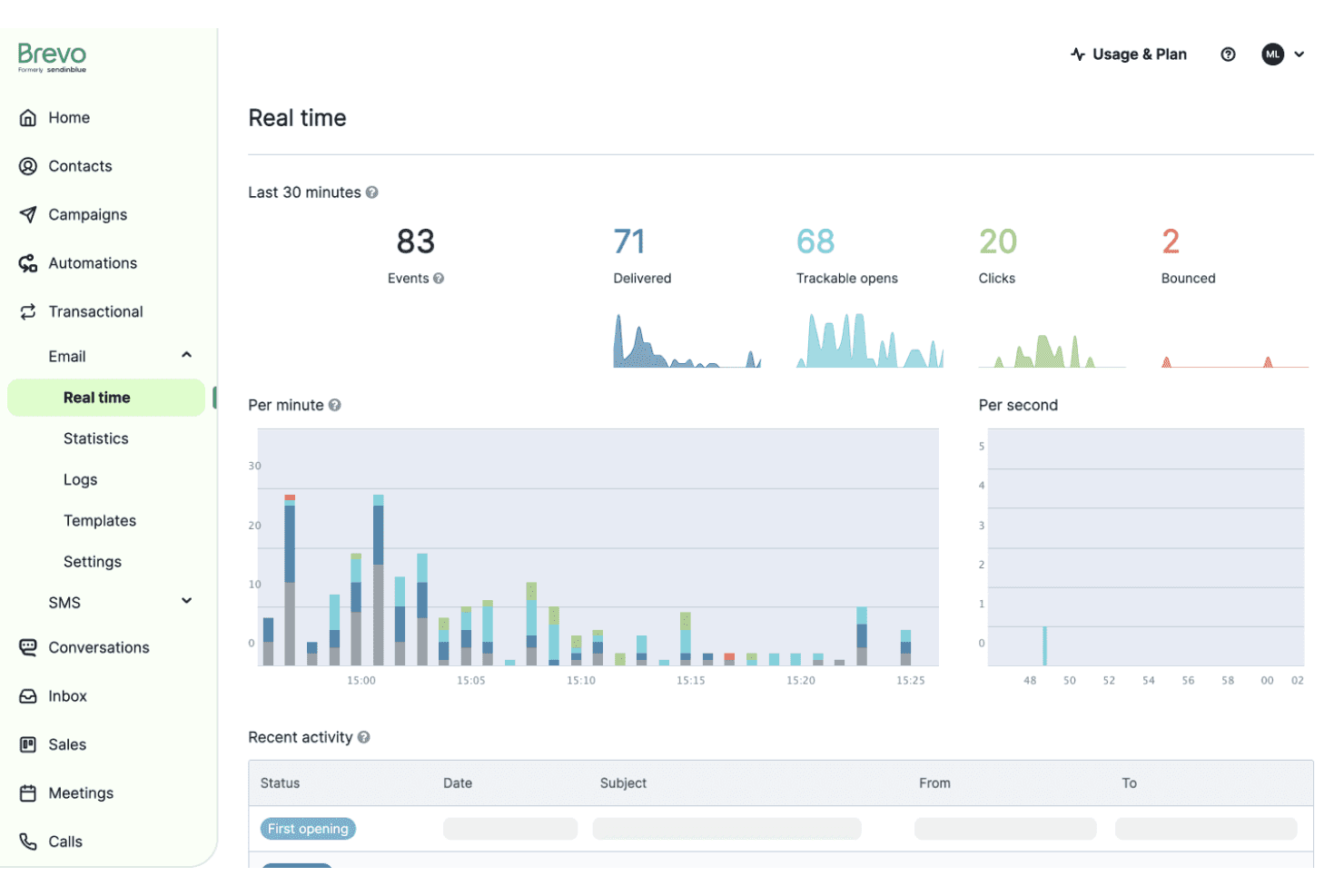
Brevo lets users monitor email activity with real-time delivery stats. Brevo is a CRM and sales platform that combines deal pipeline management, sales automation, multi-channel communications, and built-in reporting across email, chat, phone, and WhatsApp.
Who Is Brevo Best For?
Brevo suits small sales teams that want to manage pipeline, automate follow-ups, and reach customers across email, chat, and WhatsApp from a single platform.
Why I Picked Brevo
I've included Brevo in my top picks because it's one of the few Freshsales alternatives that lets your team handle email, live chat, WhatsApp, and phone calls from a single shared inbox, without stitching together separate tools. I particularly like how the shared inbox assigns conversations, supports internal notes, and keeps deal context visible alongside customer messages. The built-in CRM calling with recorded transcripts and AI-generated call summaries means sales reps can prep for follow-ups without leaving the platform.
Brevo Key Features
- Sales forecasting: Estimate revenue by pipeline stage using win probability scores and historical data on won and lost deals.
- Deal import and migration tools: Import contacts, companies, deals, and notes from CSV, XLSX, or TXT files, with automatic owner and stage assignment for incomplete records.
- Lead scoring via automation: Store scores in a numeric contact attribute and use automation triggers and conditional splits to route leads to the right rep at the right threshold.
- Feature-level user permissions: Assign access rights by feature, including distinctions between managing a rep's own deals versus other users' deals, with additional permissions required for sequences and phone.
Brevo Integrations
Brevo offers integrations with HubSpot, Zoom, and Google Meet, with documented sync for HubSpot contacts, companies, deals, and email-campaign activity. Its REST API, webhooks, and SDKs support custom integrations.
Pros and Cons
Pros:
- Automations create deals and follow-up tasks
- Reports show stage conversion and win rates
- Shared inbox unifies customer conversations
Cons:
- Lead scoring requires manually built automation
- Freshsales migration excludes most historical activities
Learn more about Brevo:
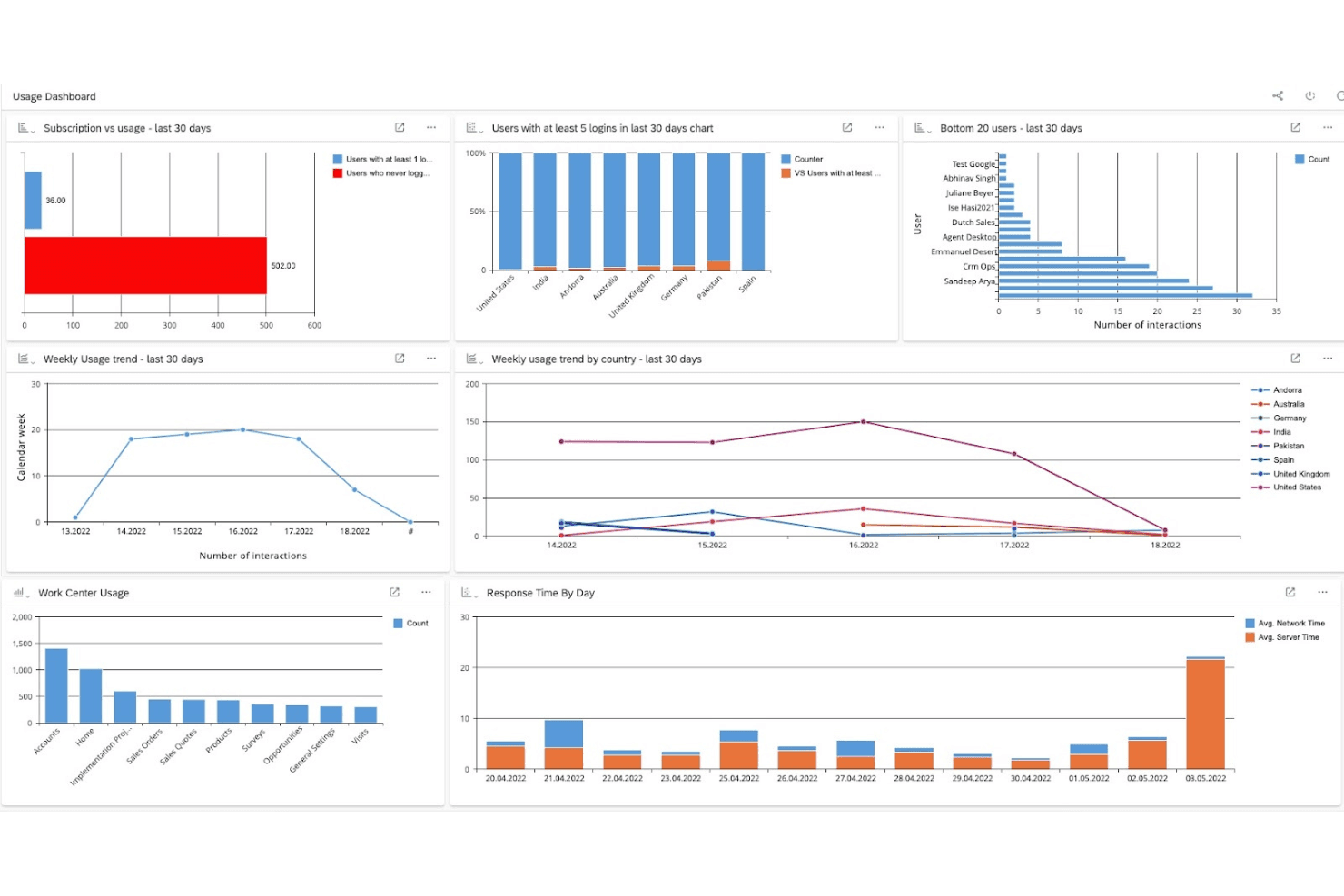
SAP Sales Cloud tracks user activity and system performance via dashboards. SAP Sales Cloud is an enterprise CRM that brings together AI-driven pipeline management, lead scoring, sales automation, and forecast tracking with deep native connectivity to SAP ERP and S/4HANA.
Who Is SAP Sales Cloud Best For?
SAP Sales Cloud suits enterprise sales teams that already run SAP ERP or S/4HANA and need AI-driven pipeline intelligence built into their existing ecosystem.
Why I Picked SAP Sales Cloud
SAP Sales Cloud earns its spot on my shortlist because the AI-driven deal intelligence here goes deeper than most CRMs. The Pipeline Manager uses a machine-learning algorithm to score every opportunity by risk level, so my team can spot at-risk deals before they go cold. Paired with the Forecast Tracker, which compares committed figures against live opportunity totals in real time, I get the kind of pipeline clarity that Freshsales simply doesn't match at the enterprise level.
SAP Sales Cloud Key Features
- Lead scoring: Machine learning scores each lead from 0–99 based on historical conversion data, with color-coded prioritization to help reps focus on the highest-potential prospects.
- Autoflow automation: A rule-based automation engine triggers actions on entity creation or update, including email notifications, task creation, and third-party event notifications with AND/OR condition logic.
- Groupware integration: Leads, opportunities, accounts, contacts, and activities sync bidirectionally between SAP Sales Cloud and your email inbox, keeping records current across both systems.
- AI-guided selling: Real-time next-best-action recommendations surface engagement trends and deal-cycle insights to help account teams move opportunities forward at each stage.
SAP Sales Cloud Integrations
SAP Sales Cloud has documented integrations with SAP ERP and SAP S/4HANA, including access to accounts, product availability, pricing, quotes, orders, and order status. It also supports custom connectivity through REST APIs, webhooks, event notifications, and mashups.
Pros and Cons
Pros:
- Automated lead scoring supports sales prioritization
- Reviewers praise pipeline and forecast visibility
- AI scores flag at-risk deals early
Cons:
- Reviewers describe the email builder as basic
- Reviewers want more flexible dashboards
Learn more about SAP Sales Cloud: Best for customizable sales automation
- Free demo available
- From $68/user/month (billed annually)
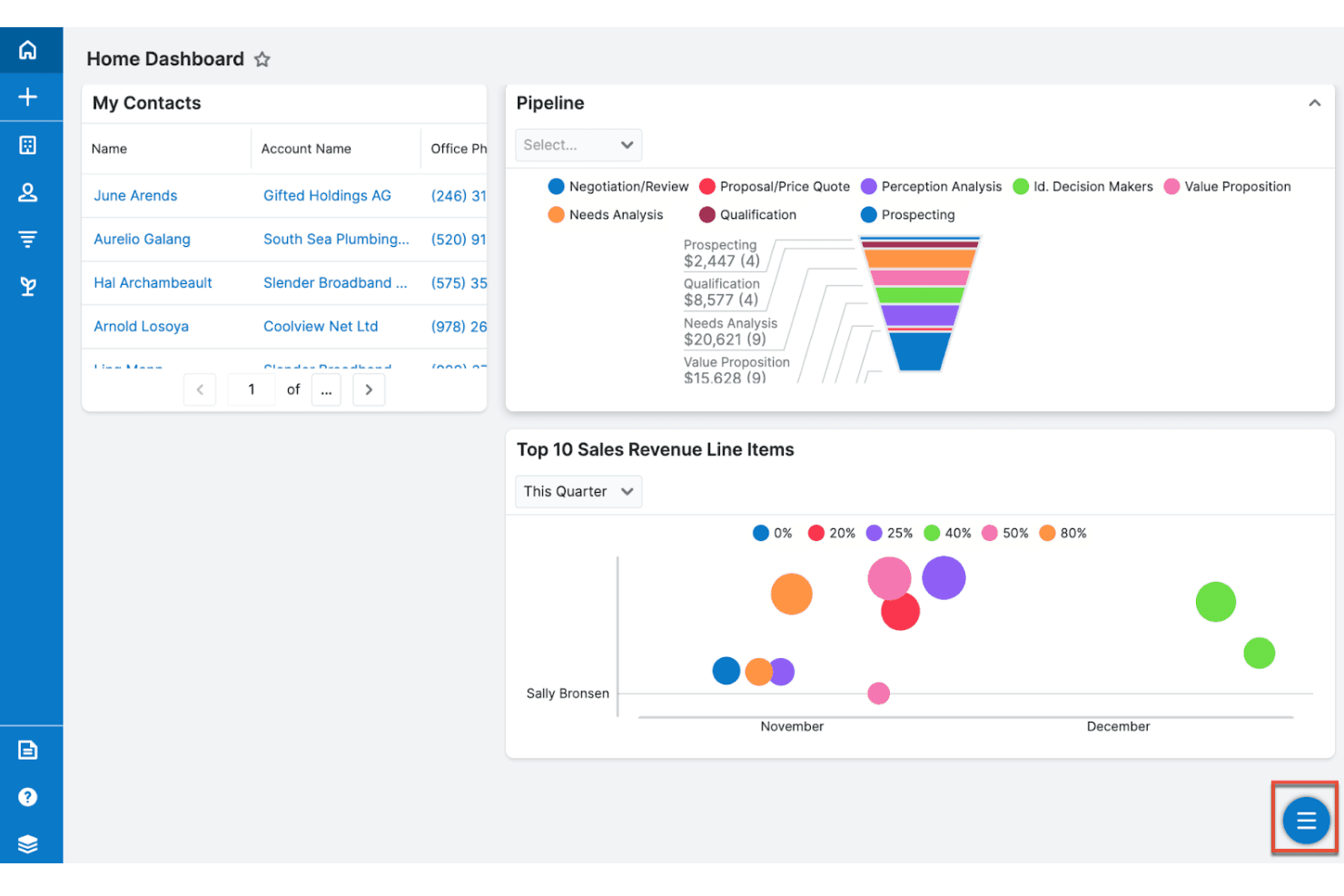
Sugar Sell centralizes sales pipeline, contacts, and revenue tracking. Sugar Sell is a CRM platform from SugarAI that combines pipeline management, sales automation, and AI-driven account intelligence built on ERP and CRM data to guide sellers through the full sales cycle.
Who Is Sugar Sell Best For?
Sugar Sell is a strong fit for mid-market sales teams that need a highly configurable CRM and want AI-driven account intelligence layered on top of ERP and CRM data.
Why I Picked Sugar Sell
Sugar Sell earns its spot on my shortlist because its customization layer goes deeper than most CRMs I've tested. Studio lets you reshape module fields, page layouts, and record relationships without touching code, and SugarBPM adds conditional workflow logic on top of that. What really sets it apart is Sugar Predict, which layers ERP purchase data onto your pipeline to surface cross-sell windows and early churn signals at the account level.
Sugar Sell Key Features
- Web-to-lead capture: Collect leads through embeddable forms on external web pages and automatically route them into the CRM as new lead records.
- Tile View pipeline: Drag-and-drop visual board that lets users move deal cards across configurable columns to update opportunity stages in real time.
- Forecast worksheets: Configurable quota and forecast tracking at the individual, team, and sales-organization level, with a Pipeline Metrics dashlet for quota comparison.
- Role-based access controls: Administrators can restrict module-level and field-level access by role, with teams organized by department or geographic region.
Sugar Sell Integrations
Sugar Sell has hundreds of marketplace integrations, including HubSpot, Mailchimp via SugarChimp, Salesforce, LinkedIn Sales Navigator, ZoomInfo, Power BI Desktop, Jira, NetSuite, and QuickBooks Online. It also offers a REST API for custom integrations.
Pros and Cons
Pros:
- Flexible pipeline views support quota forecasting
- ERP signals reveal reorder and churn risks
- Deep field, layout, and workflow customization
Cons:
- Email archiving and SugarLive constrain communications
- Lead scores lack documented calculation logic
Learn more about Sugar Sell: Best for comprehensive CRM needs
- Free plan + 15-day free trial + free demo available
- Pricing upon request
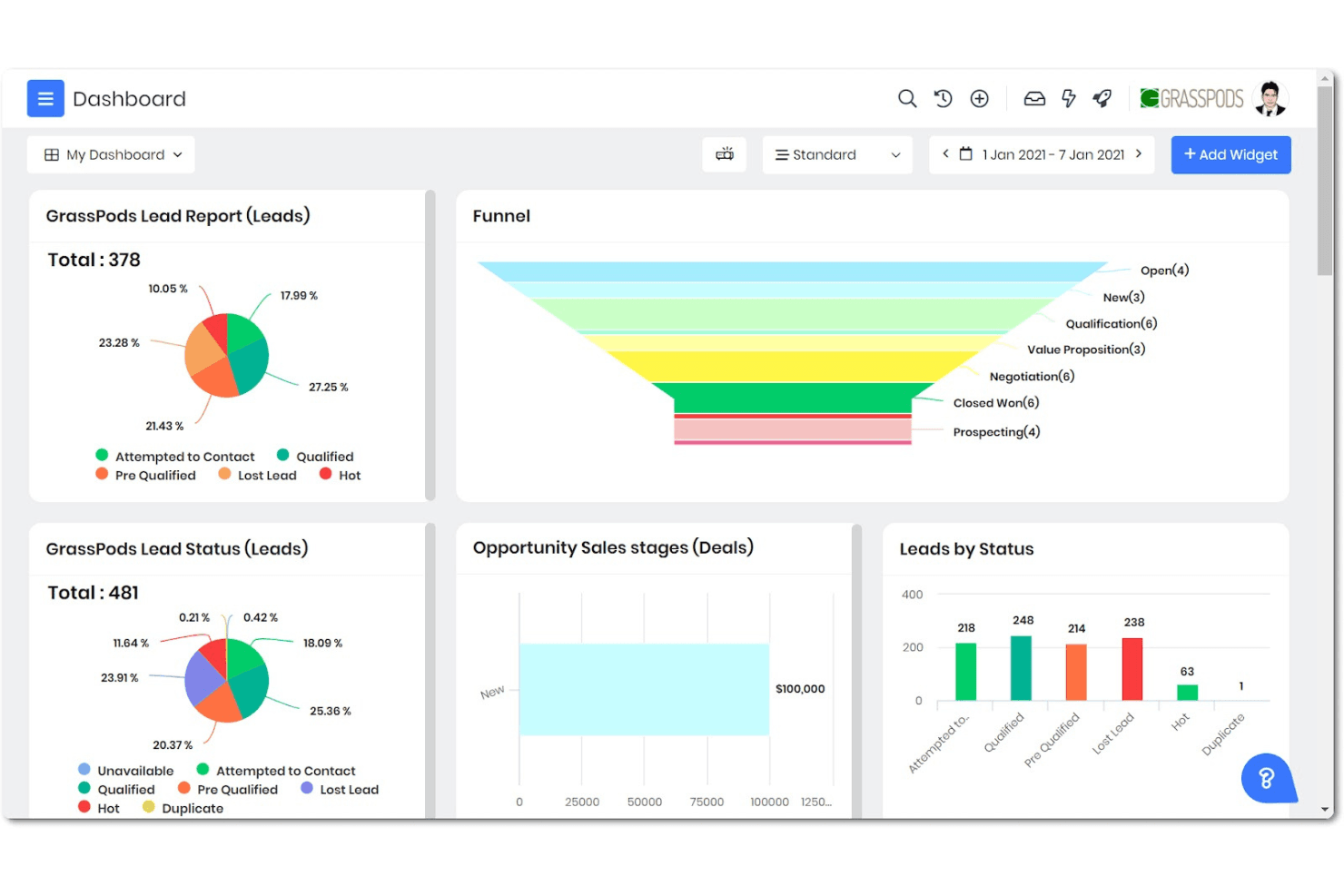
Vtiger One Pilot tracks leads, deals, and sales stages on one dashboard. Vtiger One Pilot is a free cloud CRM that combines sales pipeline management, marketing automation, help desk, and project tracking in a single platform.
Who Is Vtiger One Pilot Best For?
Vtiger One Pilot suits early-stage and small businesses that need sales, marketing, and help desk tools in one free platform without paying for separate software.
Why I Picked Vtiger One Pilot
Vtiger One Pilot earns its spot on my shortlist because it bundles sales pipeline management, marketing automation, and a help desk into a single free platform, which is rare among Freshsales alternatives. I particularly like the One View feature, which consolidates every customer record, deal, and interaction into one place, eliminating the tab-switching that bogs down small sales teams. The deal Kanban with stage-time tracking also gives me a clear picture of where deals stall, without needing a paid upgrade.
Vtiger One Pilot Key Features
- One View: Consolidates every customer record, interaction, and related data into a single unified profile for each contact or organization.
- Web to Lead forms: Captures leads directly from your website and applies predefined scoring criteria to incoming submissions automatically.
- Email sequences: Sends a series of scheduled, automated emails to prospects as part of a structured sales outreach cadence.
- Help desk with SLA tracking: Converts incoming emails into support cases and enforces first-response and resolution time targets based on configured business hours.
Vtiger One Pilot Integrations
Vtiger lists native integrations with Google Workspace, Microsoft Teams, WhatsApp, Mailchimp, QuickBooks, Xero, Twilio, Zoom Meetings, Facebook, and Clearbit, plus Zapier. One Pilot doesn’t support API access for custom integrations.
Pros and Cons
Pros:
- Scores and captures leads within the CRM
- Tracks deal stage time to flag stalled opportunities
- Unifies customer records across sales and support
Cons:
- Workflow setup can require administrator effort
- Pilot reporting depth remains undocumented
Learn more about Vtiger One Pilot: Best for integrated invoicing and CRM
- 14-day free trial available
- From $20/user/month
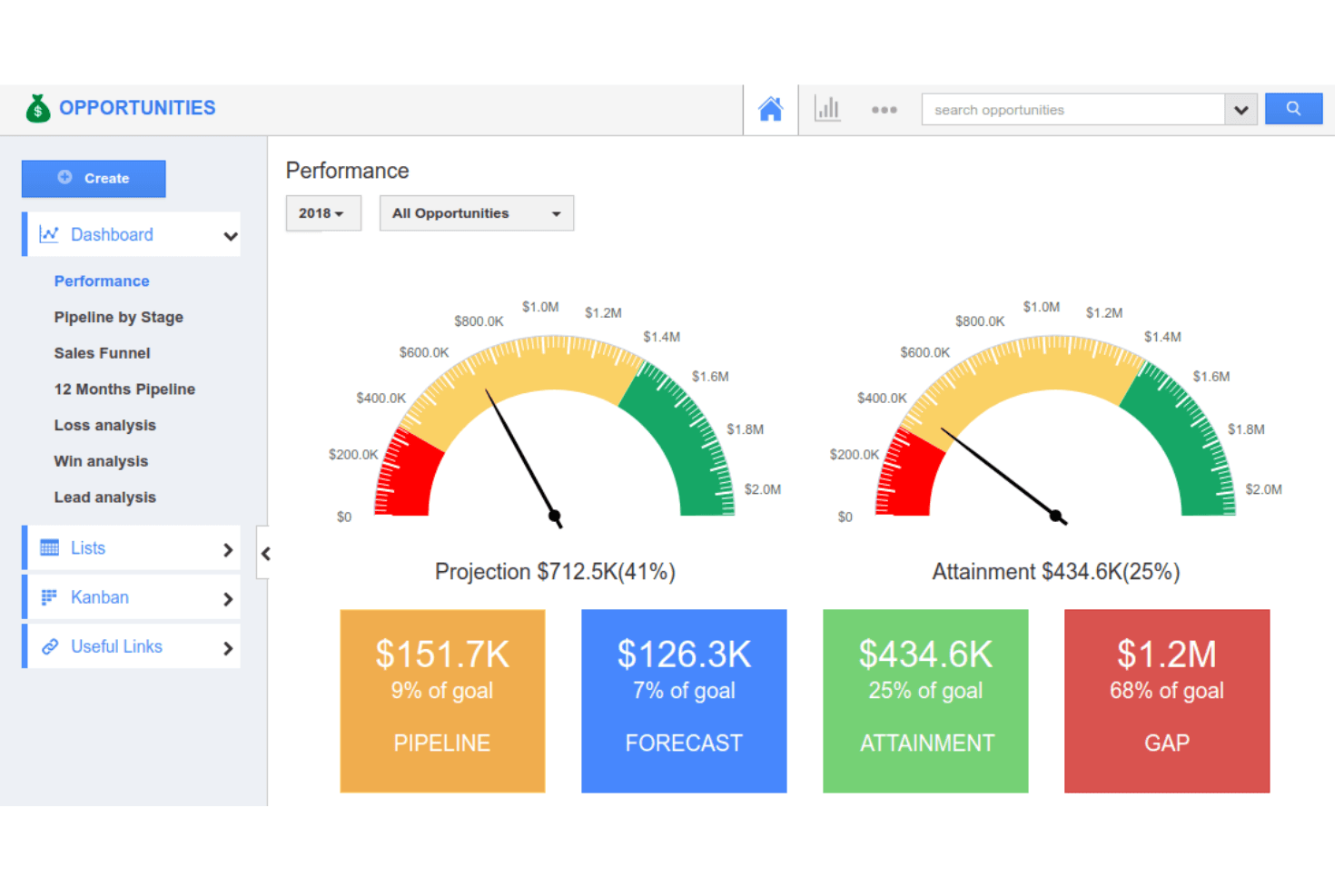
Apptivo tracks sales performance with visual KPI gauges and goal metrics. Apptivo is a CRM platform that combines lead and contact management, sales pipeline tracking, quotes, and invoicing in a single business suite.
Who Is Apptivo Best For?
Apptivo suits small business owners who want CRM, quoting, and invoicing in one platform without paying for separate tools.
Why I Picked Apptivo
Apptivo earns its spot on my shortlist because it keeps quoting and invoicing inside the same CRM workspace where deals are tracked. I like that you can build a quote from a custom template and an items catalogue, attach approval workflows and e-signatures, then convert it directly into a recurring invoice with a payment schedule, all without leaving the platform. That connected quote-to-cash flow is exactly what small sales teams need when a separate billing tool isn't in the budget.
Apptivo Key Features
- Round-robin lead assignment: Automatically distributes incoming leads across your sales team using round-robin routing.
- Event- and time-based workflow triggers: Fires automated actions—like sending emails, updating fields, or creating activities—based on set conditions or schedules.
- Contact Center with call recording: Built-in calling, conferencing, and call recording let reps manage prospect conversations directly inside the platform.
- App Builder with drag-and-drop interface: Lets you create custom apps or extend existing ones without writing code.
Apptivo Integrations
Apptivo lists integrations with Xero, QuickBooks, Google Forms, Office 365, Slack, RingCentral, Google Drive, and OneDrive. Xero supports two-way invoice synchronization, while Apptivo’s REST API supports custom integrations.
Pros and Cons
Pros:
- Custom apps adapt fields and sales workflows
- Round-robin lead routing reduces manual assignment
- Quote-to-invoice workflows stay inside CRM
Cons:
- No documented Freshsales-specific migration path
- Cross-app reporting complicates pipeline visibility
Learn more about Apptivo: Best for small teams needing simplicity
- Free plan + 30-day trial available
- From €25/month
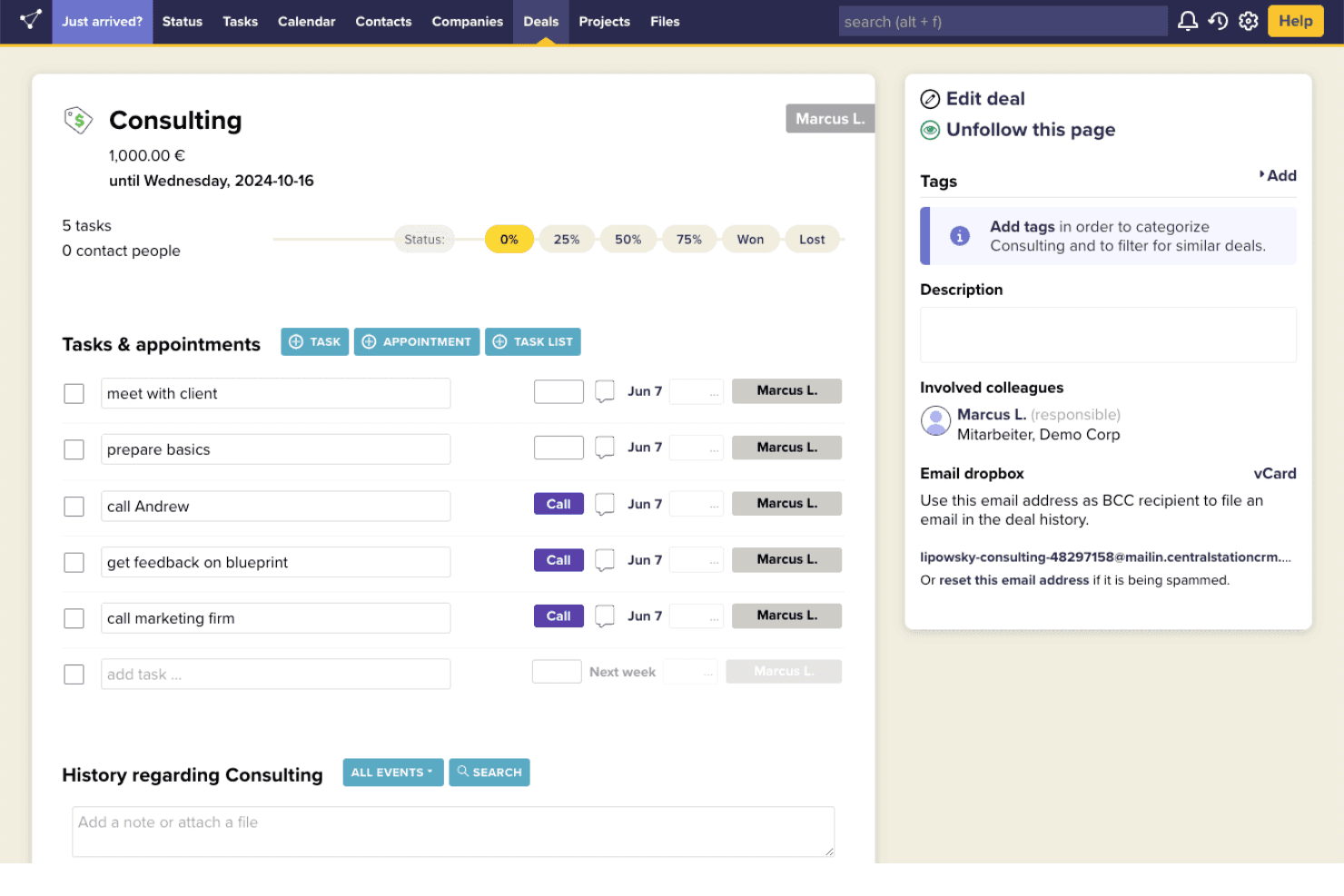
CentralStationCRM lets users manage deal tasks and track progress in one view. CentralStationCRM is a lightweight CRM that centralizes contact details, notes, emails, documents, tasks, and deals in a single record-based interface designed for small teams.
Who Is CentralStationCRM Best For?
CentralStationCRM is a strong fit for small teams and owner-operators who want a no-fuss way to keep contacts, deals, and communication history in one place.
Why I Picked CentralStationCRM
I've included CentralStationCRM in my top picks because it strips the CRM down to exactly what a small team actually needs: a single record that pulls together contact details, notes, emails, documents, and open tasks. I especially like how the visual pipeline lets you drag deals between stages and tag them with custom fields, so nothing slips through without a convoluted setup. Won and Lost stage tracking gives you a quick read on outcomes without needing a reporting dashboard.
CentralStationCRM Key Features
- Goal analytics: Track and report goal achievement counts by week, month, or quarter, with filters by goal and user and Excel export.
- Task assignment: Create tasks linked to a contact, company, or deal record, set a due date, and assign them to a specific team member.
- Contact import and export: Bring in contacts via vCard or Excel and export data in vCard, Excel, HTML, or XML formats.
- Account groups: Restrict visibility of CRM pages to selected users by creating groups and controlling access at the owner or co-owner level.
CentralStationCRM Integrations
CentralStationCRM has documented integrations with Microsoft 365 and Newsletter2Go, plus a calendar connection with an unspecified provider. Its REST API and webhooks support custom integrations, although webhooks send events outward and API requests are rate-limited.
Pros and Cons
Pros:
- Task reminders help prevent missed follow-ups
- Teams report same-day setup
- Contact histories help colleagues take over accounts
Cons:
- Manual follow-ups replace conditional workflows
- Basic reports limit forecasting visibility
Learn more about CentralStationCRM: 10Best for small businesses needing easy setup
Capsule
- Free plan + 14-day trial available
- From $22/user/month
Visit WebsiteCustomer Rating:4.7/5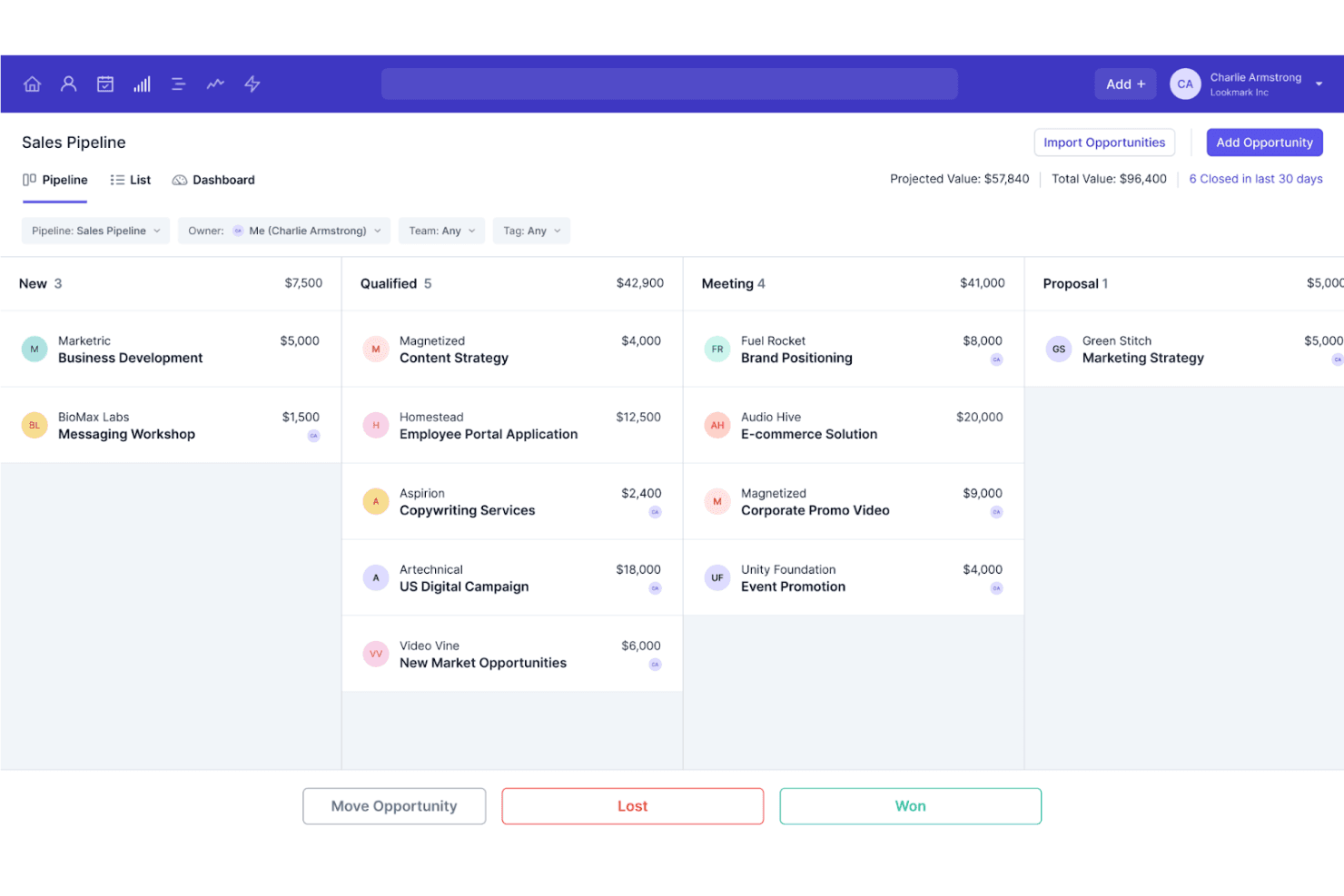
Capsule organizes sales opportunities across pipeline stages by value. Capsule is a CRM platform built for small businesses that covers contact management, visual sales pipeline tracking, task automation, and reporting alongside a broad integration marketplace.
Who Is Capsule Best For?
Capsule suits small business owners and early-stage teams that want a CRM they can get running in a day without a dedicated ops person.
Why I Picked Capsule
I picked Capsule as one of the best because it's the rare CRM that a small team can actually get running in an afternoon, without needing an ops person to configure it first. What I especially like is the AI Pipeline Generator, which builds out your sales pipeline based on your specific business and process, so you're not starting from scratch. Capsule's sequential Tracks also let you automate structured follow-up steps that kick off automatically as deals progress through stages.
Capsule Key Features
- Contact record history: Each contact stores a full log of emails, calls, notes, tasks, and attachments in a single record.
- Workflow automation: Stage-based triggers automatically create tasks, send emails, or update records when deals move through the pipeline.
- Goals and targets: Set sales goals for individual reps or the whole business and monitor progress through reporting dashboards.
- 100+ marketplace integrations: Connect Capsule to accounting, marketing, support, and analytics tools including Xero, Mailchimp, Zendesk, and Zapier.
Capsule Integrations
Capsule offers 100+ marketplace integrations, including Mailchimp, Zendesk, Help Scout, Xero, Gmail, and Microsoft Outlook. It also provides a REST API, REST hooks, and Zapier for custom connectivity.
Pros and Cons
Pros:
- Sequential tasks help prevent missed follow-ups
- Quick setup suits small teams without operations support
- Clear pipelines keep prospect follow-ups visible
Cons:
- Reporting offers less depth for sales analysis
- Limited automation branching complicates complex sales workflows
Learn more about Capsule:
Outras alternativas ao Freshsales
Segue-se uma lista de alternativas adicionais ao Freshsales que selecionei. Embora não tenham ficado entre as 10 melhores, continuam a ser opções valiosas que merecem uma análise mais aprofundada.
- 11CopperBest for Google Workspace integration
- 12ZendeskBest for customer support and ticketing
- 13monday AI WorkspaceBest for project management integration
- 14BrazeBest for customer engagement and messaging
- 15OutreachBest for sales engagement and automation
- 16HoneyBookBest for creative professionals and freelancers
- 17Bigin by Zoho CRMBest for small businesses and startups
- 18KlaviyoBest for email marketing automation
- 19AttioBest for collaborative CRM with data enrichment
- 20PipedriveBest for visual sales pipeline management
- 21NutshellBest for small teams needing simple CRM
- 22InsightlyBest for project and contact management
- 23CloseBest for inside sales teams
Análises de CRM relacionadas
Se ainda não encontrou aqui o que procura, consulte estas ferramentas estreitamente relacionadas com CRMs multifuncionais que testámos e avaliámos.
- Software de CRM
- Software de vendas
- Software de gestão de potenciais clientes
- Software de inteligência empresarial
- Software de gestão de contratos
- Sistema de gestão de receitas
- Software de CPQ
How I Evaluate Freshsales Alternatives
I split my evaluation into two layers: the baseline CRM requirements every tool must clear to support pipeline management and forecasting, and the differentiators that set the best options apart.
Core Functionality (Table Stakes For This List)
When I'm selecting tools for my list, I rank each one on a scale from 0 (does not offer the functionality) to 5 (excels in this area) for each core functionality listed below. Then, I calculate the tool's total score into a percentage. Each tool needs to achieve a minimum total score of 65% to be considered for inclusion.
- Contact & Deal Management: I check whether a CRM lets you build multiple pipelines, customize deal stages, and map account hierarchies the way your actual sales process works.
- Sales Pipeline Automation: Workflow triggers that handle lead routing, stage changes, and follow-up tasks matter here—I look for visual builders with conditional branching.
- Lead Scoring & Qualification: I evaluate whether scoring goes beyond static fields to include engagement signals like email opens, page visits, and meeting activity.
- Revenue Reporting & Forecasting: Dashboards and forecast views should let RevOps teams slice pipeline by owner, region, or product line without exporting to a spreadsheet.
- Native Integrations & API: The tool's connector catalog and API coverage tell me how well it fits into a RevOps stack alongside marketing automation, billing, and BI platforms.
- Multi-Channel Communication: I look for built-in email, phone, and chat with activity auto-logged to contact records so reps aren't toggling between disconnected tools.
Once I have a list of tools that meet this criteria, I consider what sets each platform apart.
Differentiating Factors (What Sets Vendors Apart)
Here's how I compare and contrast different vendors:
Standout Features
Revenue intelligence is a big differentiator. I look for tools that flag at-risk deals and surface pipeline gaps before they show up in your forecast. Built-in sequence builders also matter because they let reps run multi-touch cadences without bolting on a separate sales engagement platform. Territory and quota management rounds out the picture, especially for RevOps teams running quarterly planning cycles who need assignment rules and attainment tracking inside the CRM itself.
Beyond Features
Ecosystem fit matters a lot when switching CRMs. I evaluate how well each tool connects to marketing automation, billing, and BI platforms your RevOps stack already depends on. Migration support is another key factor—guided data imports and field mapping from Freshsales can save weeks of cleanup. I also consider pricing models, specifically whether per-seat costs and record limits stay reasonable as your team and pipeline volume scale through growth stages.
Por que procurar uma alternativa ao Freshsales?
Embora o Freshsales seja um CRM valioso, pode não o ajudar a concluir todas as tarefas de que necessita. Eis algumas razões pelas quais pode estar à procura de uma alternativa ao Freshsales:
- Preços: Se considerar que o custo do Freshsales é demasiado elevado para o seu orçamento, poderá valer a pena explorar alternativas mais acessíveis que ofereçam funcionalidades semelhantes.
- Funcionalidades: O Freshsales poderá não incluir funcionalidades específicas importantes para as operações da sua empresa. Ao considerar alternativas, poderá encontrar um CRM que inclua essas funcionalidades essenciais, melhorando o seu fluxo de trabalho e a produtividade.
- Interface de utilizador: Poderá preferir uma interface de utilizador diferente, com melhor usabilidade, se considerar o Freshsales complexo ou pouco intuitivo. Um CRM alternativo com um design mais fácil de utilizar pode melhorar a eficiência da sua equipa e a experiência geral do utilizador.
- Integração: Se necessitar de integrações com outras ferramentas que o Freshsales não suporta, procurar uma alternativa é uma decisão inteligente. Um CRM que se integre facilmente com as suas ferramentas atuais pode simplificar os seus processos e garantir um fluxo de dados eficiente.
- Assistência ao cliente: Poderá desejar opções de assistência ao cliente melhores ou mais acessíveis se a assistência do Freshsales não responder às suas necessidades. Um CRM alternativo com uma assistência ao cliente superior pode fornecer apoio atempado, ajudando-o a resolver problemas de forma mais eficaz e a manter as operações a funcionar sem problemas.
As alternativas ao Freshsales podem disponibilizar funcionalidades únicas, preços mais vantajosos ou uma usabilidade melhorada que o Freshsales poderá não oferecer. Manter as suas opções em aberto e testar novo software pode ajudá-lo a encontrar a alternativa que melhor se adapta às necessidades da sua empresa.
Principais funcionalidades das alternativas ao Freshsales
Eis algumas das principais funcionalidades do Freshsales que o seu software alternativo deverá conseguir replicar ou melhorar para se adequar às suas necessidades.
- Gestão de contactos: Organiza e acompanha todas as interações e informações dos clientes.
- Acompanhamento do funil de vendas: Apresenta visualmente e gere as etapas do seu processo de vendas.
- Classificação de potenciais clientes: Atribui pontuações aos potenciais clientes com base no seu envolvimento e na probabilidade de conversão.
- Integração de e-mail: Sincroniza-se com contas de e-mail para acompanhar e gerir as comunicações.
- Relatórios e análises: Fornece informações e dados sobre o desempenho e as atividades de vendas.
- Informações baseadas em IA: Utiliza inteligência artificial para disponibilizar análises preditivas e recomendações de vendas.
- Automatização de fluxos de trabalho: Automatiza tarefas repetitivas para simplificar os processos de vendas.
- Painéis personalizáveis: Permite aos utilizadores personalizar a interface de acordo com as suas necessidades.
- Acesso móvel: Disponibiliza uma aplicação móvel para gerir as funções do CRM em qualquer lugar.
- Integração com aplicações de terceiros: Liga-se a outras ferramentas de software para melhorar a funcionalidade e a produtividade.