HubSpot-alternativer hjelper deg med å finne de riktige verktøyene for å forbedre kundeservicen, øke salget og styrke relasjonene uten kompleksiteten ved å velge blant dusinvis av alternativer. Det riktige valget kan effektivisere prosessene dine, passe inn i arbeidsflyten din og støtte veksten din – uansett hvor stort teamet ditt er.
Jeg har personlig testet en rekke HubSpot-alternativer med ulike team og prosjekter. I denne artikkelen går jeg gjennom de beste alternativene for å hjelpe deg med å velge det som passer best for deg, på en trygg måte.
Why Trust Our Software Recommendations
6,700+
Reviews
20
Industry experts
16+
Evaluation factors
14
Years
Our reviews reflect our independent judgment—not a sales pitch. Learn how we stay transparent.
For this guide, we evaluated tools using hands-on testing and independent research, scoring tools using our selection criteria.
Our reviews reflect our human editorial judgment, not a sales pitch.
Sammenligningstabell for HubSpot-alternativer
| Tool | Best For | Trial Info | Price | ||
|---|---|---|---|---|---|
| 1 | Best for customizable workflows | 14-day free trial; Free demo available | From $18/user/month | Website | |
| 2 | Best for no-code CRM customization | Free demo available | From $40/user/month (billed annually) | Website | |
| 3 | Best alternative for CRM flexibility | Free plan available; 14-day free trial | From $35/user/month (billed annually) | Website | |
| 4 | Best alternative for large sales teams | 30-day free trial | From $25/user/month | Website | |
| 5 | Best for automated CRM data updates | 30-day free trial | From $39/user/month | Website | |
| 6 | Best for managing contacts and sales | Free plan available; 14-day free trial | From $18/user/month (billed annually) | Website | |
| 7 | Best alternative for small businesses | Free plan available | Pricing upon request | Website | |
| 8 | Best for affordable all-in-one CRM and marketing | Free plan available | From $14.99/user/month | Website | |
| 9 | Best alternative for visual sales management | 14-day free trial | From $14/user/month (billed annually) | Website | |
| 10 | Best alternative for agencies | Free demo available | Pricing upon request | Website |


Anmeldelser av de beste HubSpot-alternativene
Her er en oversikt over hvert HubSpot-alternativ. Jeg forklarer hvordan de sammenlignes med HubSpot, fordelene ved å migrere til hvert verktøy, hvor mye de koster, og hvordan de integreres i den eksisterende teknologistakken din.
 Best for customizable workflows
- 14-day free trial; Free demo available
- From $18/user/month
Visit WebsiteCustomer Rating:4.6/5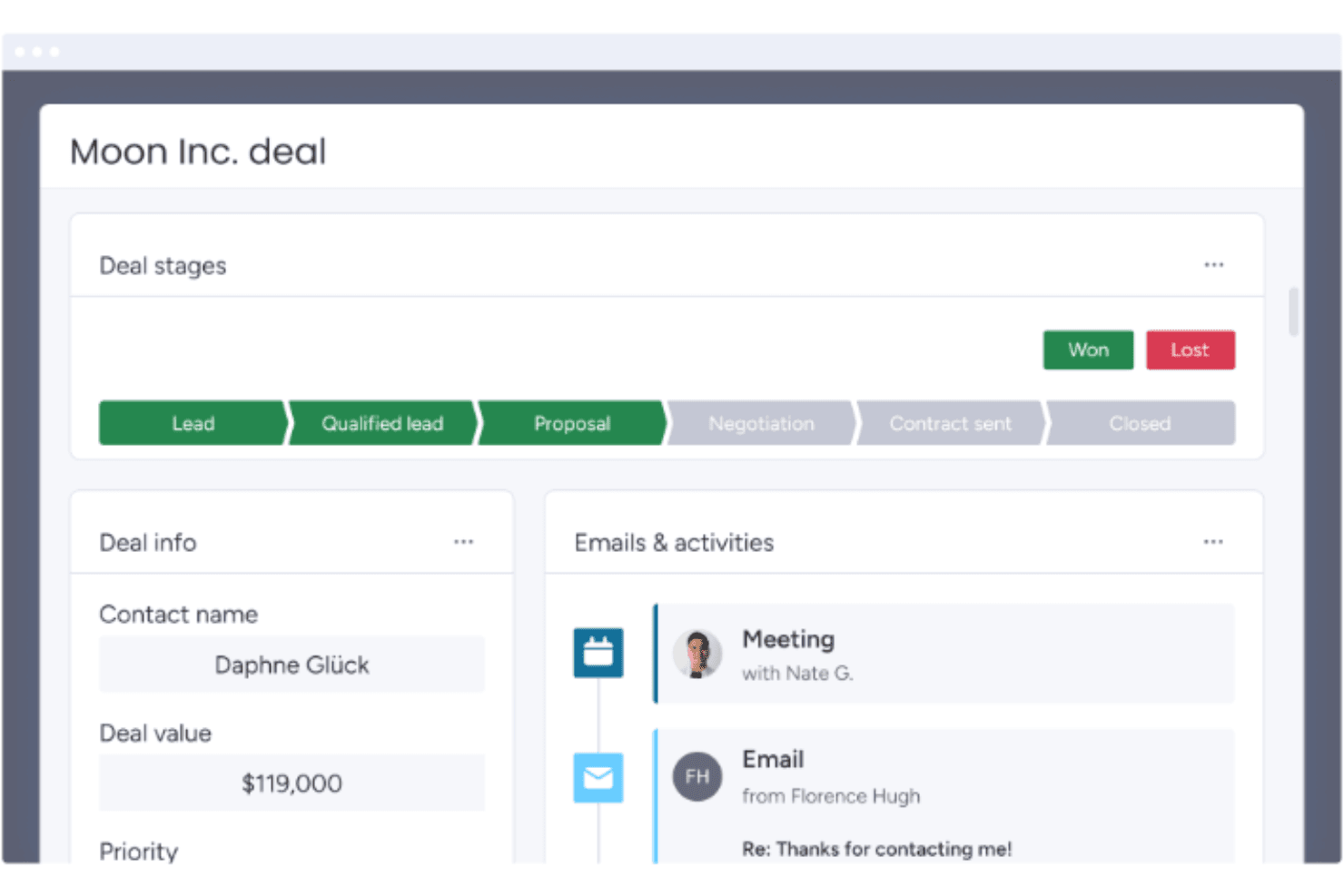
monday CRM tracks deal stages and activity history in one view. monday CRM is a no-code CRM platform that covers lead management, contact and deal tracking, sales pipeline automation, email sequences, and customizable reporting dashboards.
Who Is monday CRM Best For?
monday CRM is a strong fit for sales operations teams that need a flexible, no-code pipeline they can configure and iterate on without engineering support.
Why I Picked monday CRM
monday CRM earns its spot on my shortlist because its no-code pipeline customization is genuinely practical for teams migrating away from HubSpot. I can reshape deal stages, add custom fields, and spin up new pipelines without touching a single line of code. The built-in Sequences let me build multi-step outreach with conditional removal triggers, and AI-powered data fields auto-fill record details like sentiment and next steps across the board.
monday CRM Key Features
- Lead sourcing agent: An AI agent that automatically finds, enriches, and scores new leads against your target profile.
- Quotes and invoices: Generate customizable quotes and invoices directly from deal records, with support for discounts, taxes, and PDF downloads.
- Mobile CRM with smart call: Make and receive customer calls from the iOS or Android app, with calls automatically recorded, transcribed, and logged to contact records.
- Cross-board dashboards: Aggregate deal, pipeline, and team performance data from multiple boards into a single real-time dashboard with advanced filter conditions.
monday CRM Integrations
monday CRM lists 200+ integrations on its features page and 500+ integrations and apps on its integrations page, including Slack, Microsoft Teams, Zoom, Gmail, LinkedIn, QuickBooks, Stripe, DocuSign, and Google Drive. Its open GraphQL API and SDK support custom integrations.
Pros and Cons
Pros:
- Sequences automate conditional sales follow-up
- Cross-board dashboards clarify funnel performance
- Adaptable pipelines need no developer support
Cons:
- Gmail activity logging can prove inconsistent
- Marketing automation trails dedicated CRM suites
 Best for no-code CRM customization
- Free demo available
- From $40/user/month (billed annually)
Visit WebsiteCustomer Rating:4.7/5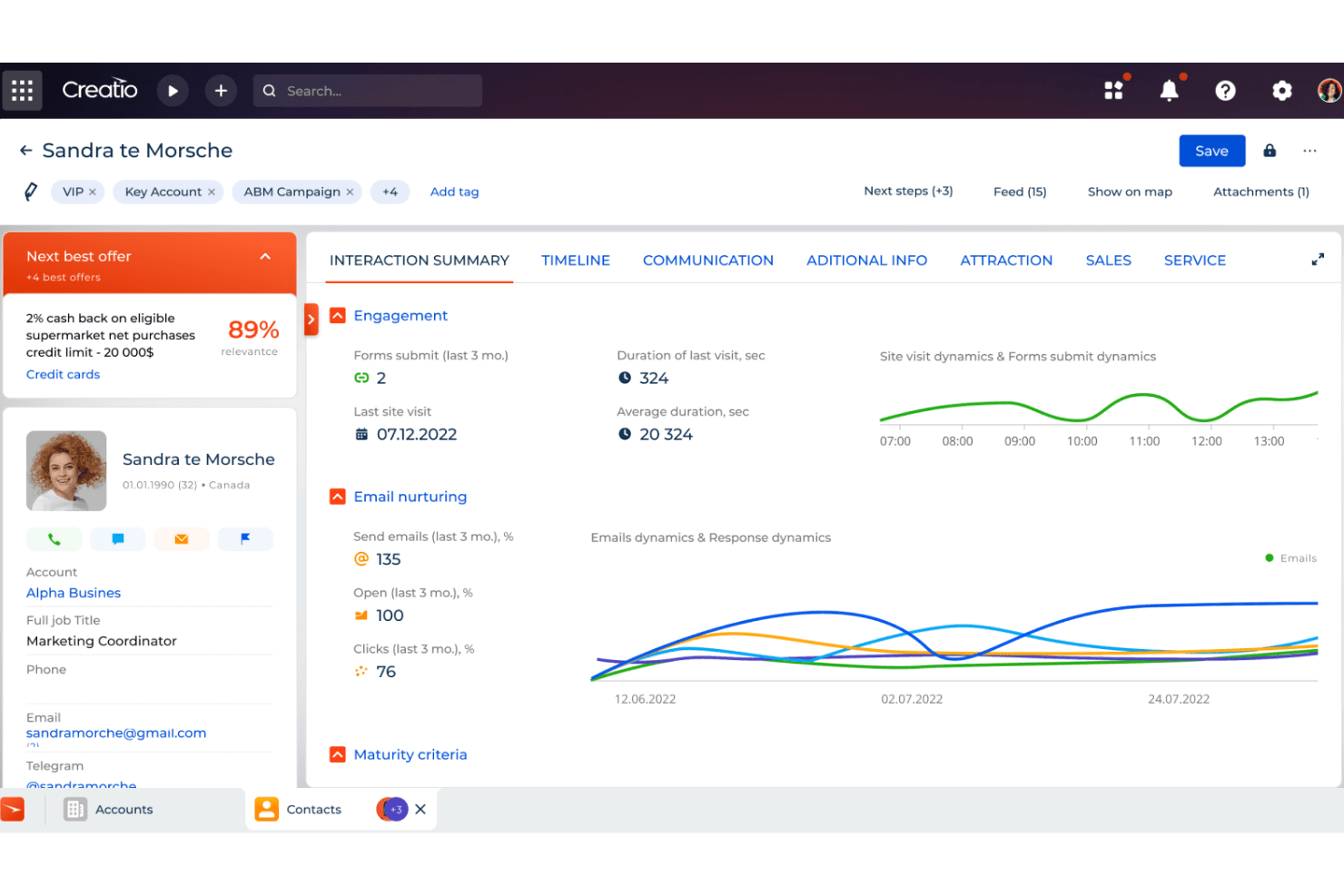
Creatio CRM surfaces AI-driven next best offers and engagement insights per contact. Creatio AI CRM is a no-code CRM and workflow platform that unifies marketing, sales, and service functions with AI-powered automation, configurable pipelines, campaign management, and cross-team reporting.
Who Is Creatio CRM Best For?
Creatio is a strong fit for mid-market sales ops teams that need deep workflow customization without relying on developers for every change.
Why I Picked Creatio CRM
I've included Creatio CRM in my top picks because its no-code customization goes far deeper than most CRM platforms allow. Sales ops teams can reconfigure pipelines, opportunity stages, and workflow logic directly in the UI, without filing a ticket with a developer. I also like that configurable dashboards pull together sales, marketing, and service data in one view, so cross-team visibility is built into how the platform works, not bolted on afterward.
Creatio CRM Key Features
- AI-powered lead scoring: Automatically ranks leads using AI to help sales teams prioritize outreach based on conversion likelihood.
- Territory management: Organizes sales territories and supports account, lead, and opportunity assignments across territory levels.
- Omnichannel campaign management: Plans and runs campaigns across multiple channels, with lead-source tracking using UTM codes and referrers.
- Granular access permissions: Controls read, edit, and delete access at the object, record, and column level for individual users or roles.
Creatio CRM Integrations
Creatio CRM has marketplace integrations for Google Calendar, Microsoft Exchange, Microsoft Power BI Desktop, Apollo.io, PandaDoc, and Zapier. It also supports Open API, REST, OData 3 and 4, custom RESTful web services, and webhooks for custom integrations.
Pros and Cons
Pros:
- Sequences coordinate email, calls, and sales tasks
- Shared records connect sales, marketing, and service
- No-code pipeline changes avoid developer tickets
Cons:
- New users face dense configuration choices
- Email tools lack a landing-page builder
Learn more about Creatio CRM: Best alternative for CRM flexibility
- Free plan available; 14-day free trial
- From $35/user/month (billed annually)
Visit WebsiteCustomer Rating:4.5/5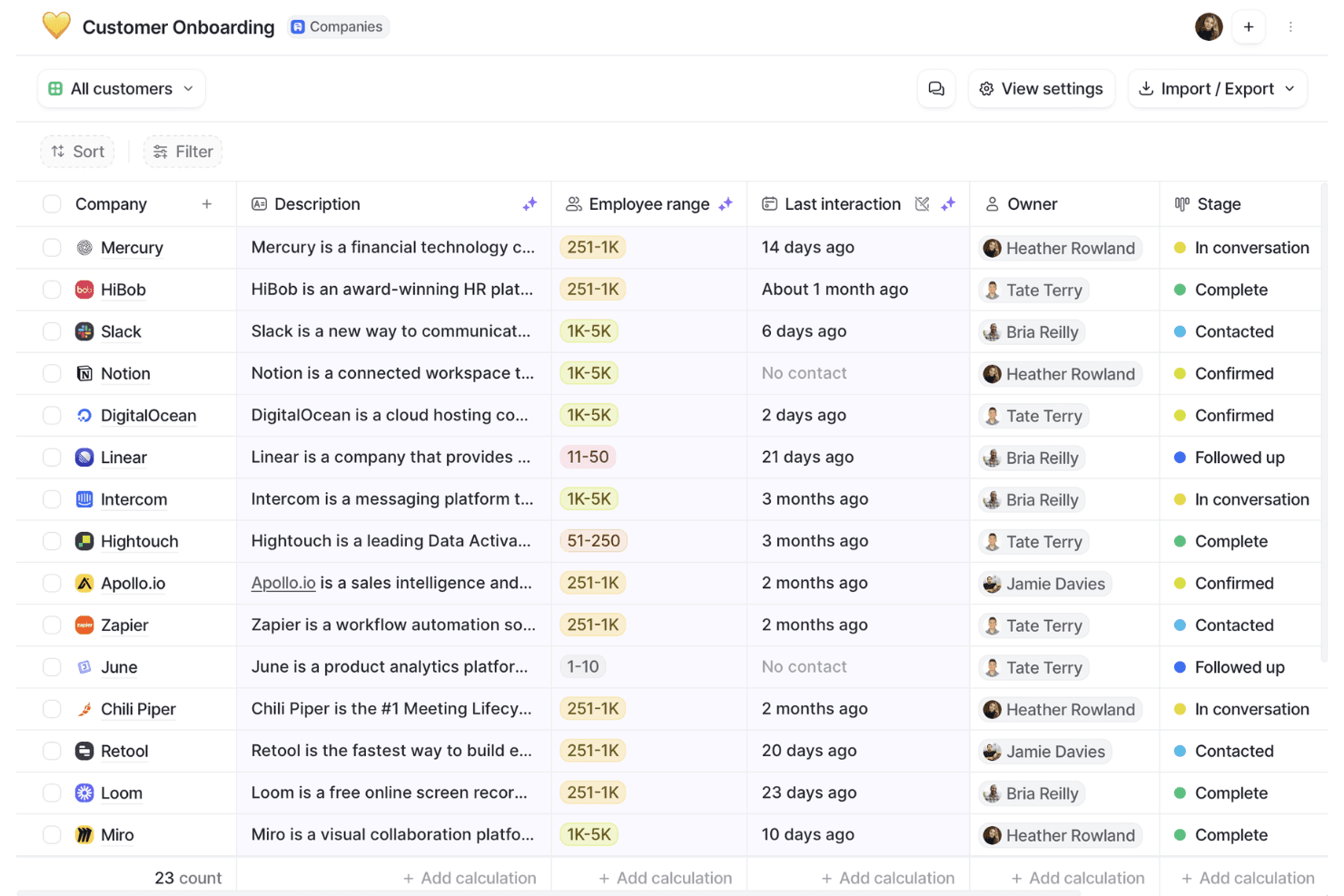
Attio organizes customer onboarding pipelines with stage tracking. Attio is a CRM platform built around a flexible, customizable data model that supports contact and company management, configurable sales pipelines, workflow automation, AI-powered enrichment, and a developer-friendly API.
Who Is Attio Best For?
Attio is a strong fit for sales-led teams that need a CRM they can shape to their own data model, not one they have to conform to.
Why I Picked Attio
Attio earns its spot on my shortlist because its custom objects and bidirectional relationships let you build a data model that mirrors how your team actually sells, rather than forcing your process into a rigid structure. I love that you can define your own objects, set formula-based lead scoring from your own signals, and configure weighted pipeline views by stage probability, all without touching code. Where HubSpot locks you into its schema, Attio hands you the architecture.
Attio Key Features
- Workflow automation: Triggers actions from record events, attribute changes, schedules, or webhooks, with conditional paths and steps for updating records, routing leads, or enrolling contacts in sequences.
- AI-powered data enrichment: Automatically enriches company and person records with details like employee counts, funding, ARR, social profiles, and location without manual input.
- Configurable access permissions: Controls visibility and editing rights at the workspace level, with advanced permissions available on Pro and Enterprise for more granular team management.
- SQL access to workspace data: Lets developers query CRM records directly using SQL for custom reporting and data workflows outside the native interface.
Attio Integrations
Attio offers native integrations with Gmail, Outlook, Slack, Google Sheets, Hightouch, Apollo, Mailchimp, Typeform, and Zapier, plus marketplace integrations. It also supports a REST API, webhooks, App SDK, MCP, and SQL access.
Pros and Cons
Pros:
- Shared account context supports customer-success handoffs
- Formula scoring supports weighted pipeline visibility
- Flexible objects model complex revenue relationships
Cons:
- Reports omit sequences, meetings, and emails
- No native email marketing campaign engine
Learn more about Attio: Best alternative for large sales teams
- 30-day free trial
- From $25/user/month
Visit WebsiteCustomer Rating:4.2/5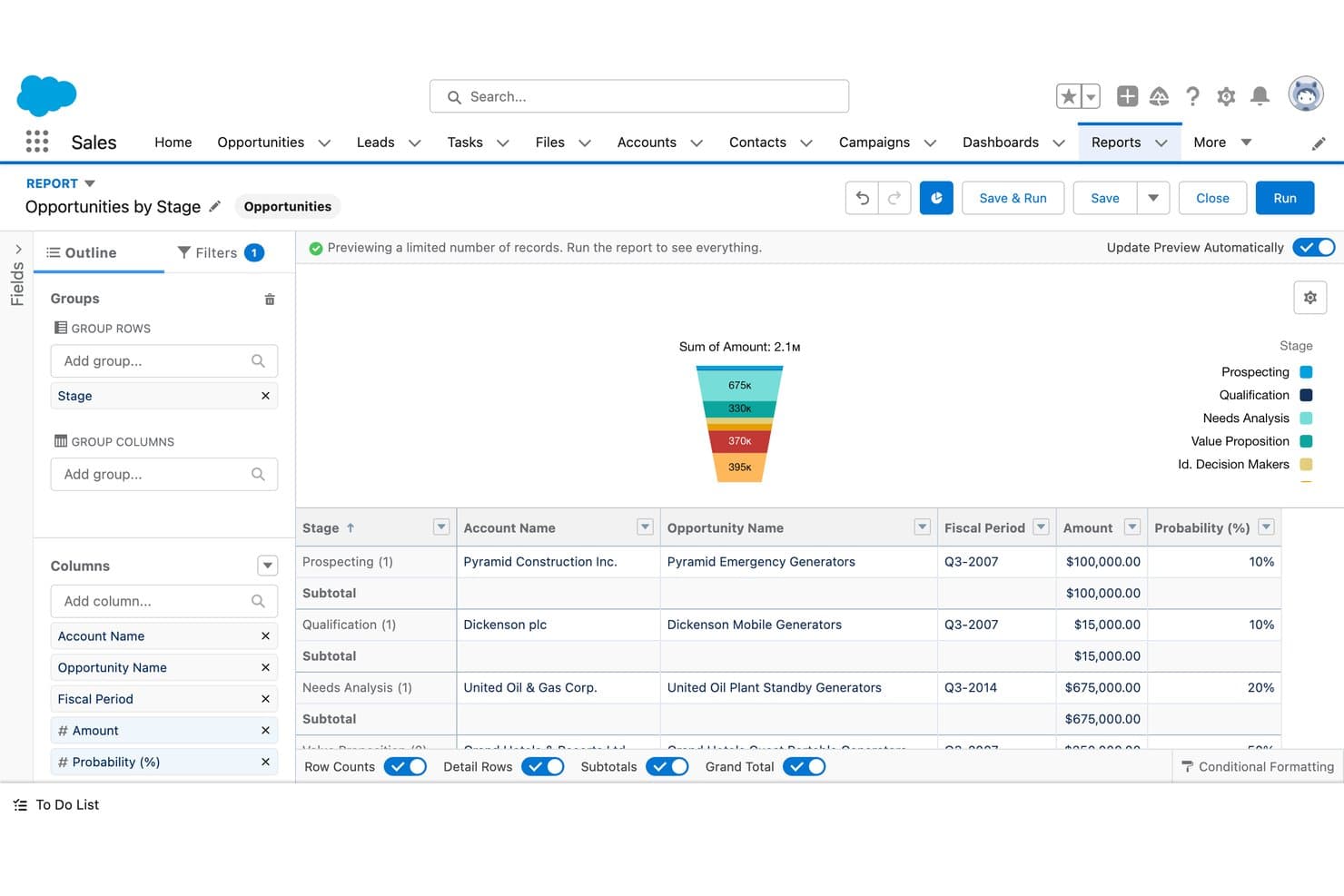
Salesforce CRM visualizes sales pipeline stages with a funnel chart. Salesforce CRM is a sales-focused CRM platform that covers contact and account management, pipeline tracking, sales forecasting, workflow automation, and AI-assisted deal insights across the full sales cycle.
Who Is Salesforce CRM Best For?
Salesforce CRM is a strong fit for large sales teams that need deep pipeline visibility, AI-assisted forecasting, and a customizable CRM they can scale over time.
Why I Picked Salesforce CRM
Salesforce CRM earns its spot on my shortlist because it's the go-to option for large sales teams that need serious pipeline depth and AI-assisted forecasting that HubSpot simply can't match at scale. I love how Pipeline Inspection gives sales ops leaders a consolidated, real-time view of every deal, with AI-driven deal insights surfaced directly alongside opportunity records. Agentforce can also auto-update opportunity records from sales conversations and generate tailored quotes using business and finance rules, cutting the manual work that slows big teams down.
Salesforce CRM Key Features
- Sales cadences: Build step-by-step outreach sequences combining email, phone, and social tasks to guide reps through a structured prospecting process.
- Territory management: Assign and manage account coverage across territories to align rep workload with sales goals.
- Contract approval workflows: Automate multi-step contract approvals directly within the platform, connected to opportunity records.
- Partner portal: Give channel partners a branded portal with access to seller tools, pipeline visibility, and AI-assisted product recommendations.
Salesforce CRM Integrations
Salesforce CRM offers marketplace integrations with Claude, Google Drive, and Slack through AgentExchange. It also supports REST, GraphQL, SOAP, platform events, and change data capture APIs for custom integrations.
Pros and Cons
Pros:
- Custom reports clarify sales performance trends
- Shared pipeline views support deal forecasting
- Centralized account histories reduce spreadsheet handoffs
Cons:
- HubSpot migrations require careful history mapping
- Marketing journeys need additional capabilities
Learn more about Salesforce CRM: Best for automated CRM data updates
- 30-day free trial
- From $39/user/month
Visit WebsiteCustomer Rating:4.7/5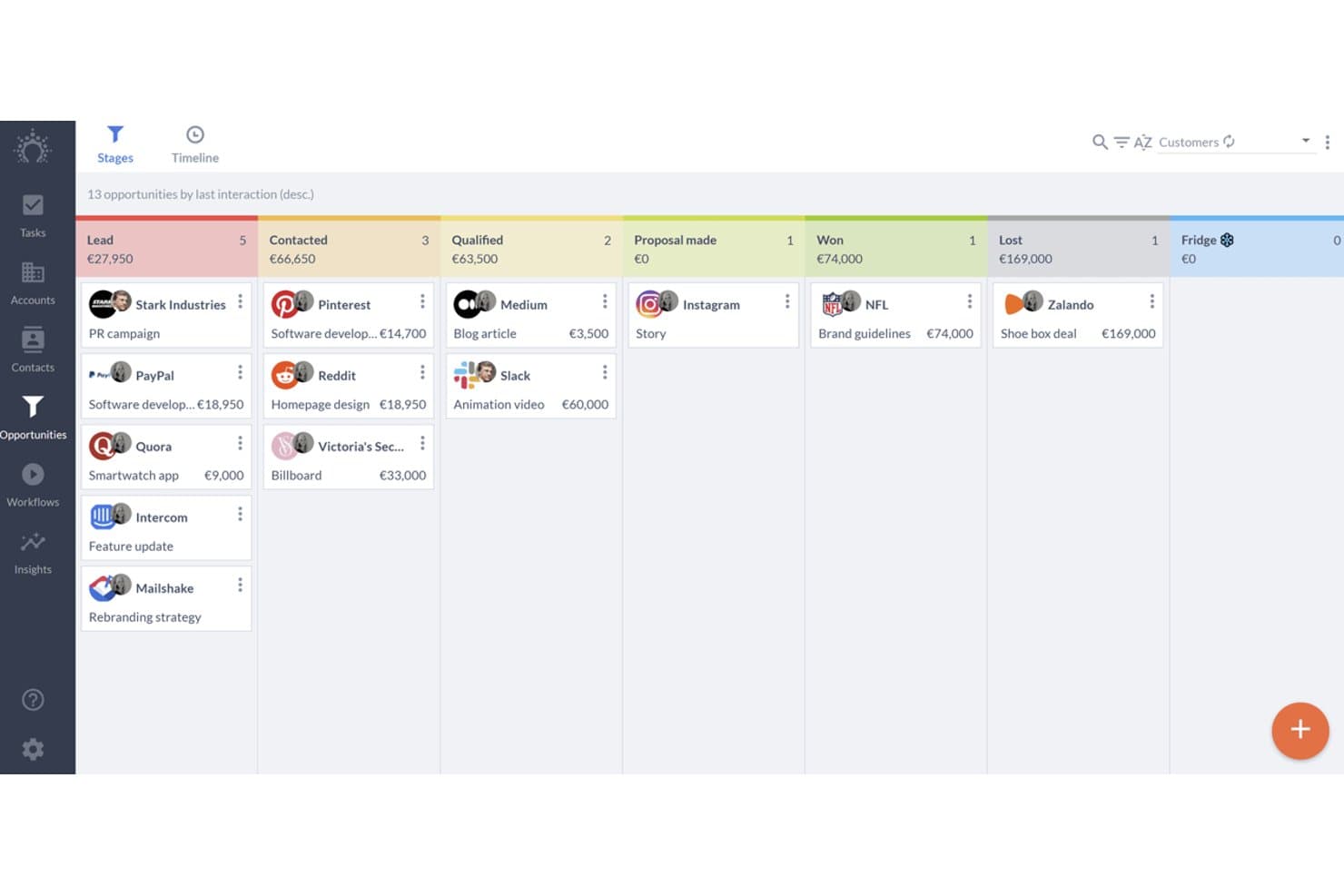
Salesflare organizes sales deals across pipeline stages visually. Salesflare is a sales-focused CRM for B2B teams that combines automated contact and company data capture, visual pipeline management, email integration, and sales engagement sequences.
Who Is Salesflare Best For?
Salesflare fits small and mid-sized B2B sales teams that want their CRM to handle data entry automatically, so reps can focus on selling instead of logging.
Why I Picked Salesflare
I picked Salesflare as one of the best because it's the only CRM on this list that pulls contact and company data directly from your emails, calendar, and phone logs without any manual input. If your reps are losing time updating records instead of selling, Salesflare's automatic activity capture fixes that at the source. I also like how its AI assistant can summarize a contact's full timeline and surface next steps, so you stay on top of deals without digging through notes.
Salesflare Key Features
- Multiple sales pipelines: Create and customize separate pipelines with editable stages to manage different products, regions, or sales motions simultaneously.
- Role-based user permissions: Assign admins, managers, team members, or viewers with data scopes covering own, group, or team-wide records.
- Lead finder and email finder: Search for leads by industry, geography, or role directly from the CRM and retrieve verified business email addresses.
- Relationship intelligence: Maps your team's contact network and tracks relationship strength, interaction frequency, and recency across accounts.
Salesflare Integrations
Salesflare offers native integrations with Google Workspace, Microsoft 365, LinkedIn, Better Proposals, Landigi, StoryChief, and Leadworx. It also provides an API and integrations through Zapier and Make.
Pros and Cons
Pros:
- Email sequences support sales-led nurturing
- Visual pipelines keep follow-ups visible
- Automatic activity capture reduces CRM data entry
Cons:
- CSV imports can frustrate data migration
- Marketing automation trails broader HubSpot suite
Learn more about Salesflare: Best for managing contacts and sales
- Free plan available; 14-day free trial
- From $18/user/month (billed annually)
Visit WebsiteCustomer Rating:4.7/5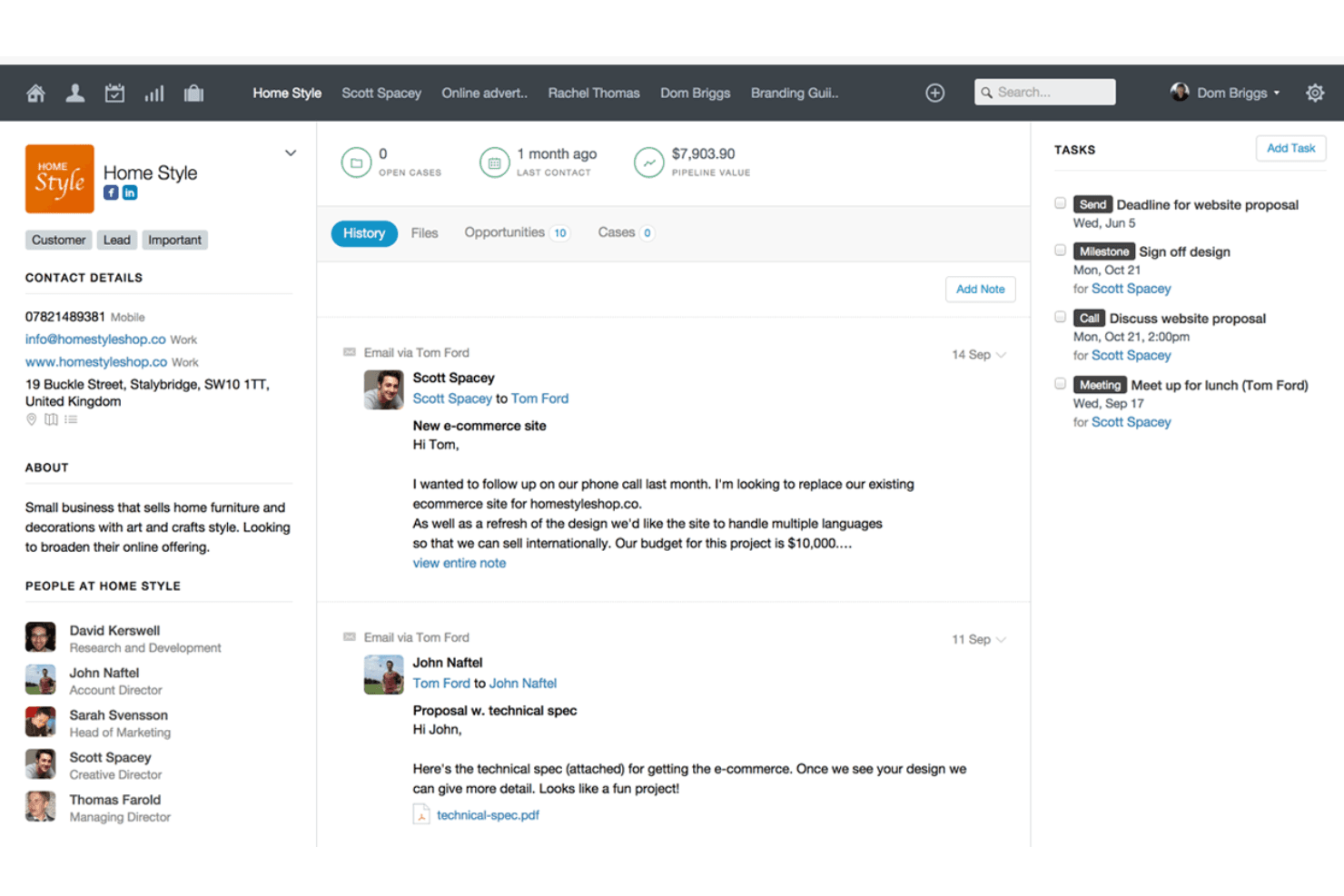
Capsule centralizes client history, tasks, and contact details in one view. Capsule CRM is a contact and sales management platform that brings together pipeline tracking, task management, project boards, reporting dashboards, and a broad integration marketplace in one CRM built for small and mid-sized teams.
Who Is Capsule Best For?
Capsule is a strong fit for small and mid-sized sales teams that want a clean, affordable CRM without the overhead of a larger platform.
Why I Picked Capsule
I picked Capsule as one of the best because its contact and pipeline management is genuinely tight: every interaction, note, and opportunity links back to a single contact record, so nothing falls through the cracks. I especially like the AI Meeting Prep feature, which pulls together recent history, risks, and open opportunities before a call without you having to dig through records manually. The customizable multi-pipeline setup also lets sales teams run separate processes for different products or markets in parallel.
Capsule Key Features
- Workflow automations: Triggers sequences of tasks, email notifications, or stage changes across pipeline and project boards on Growth and higher plans.
- Reporting dashboards: Displays task, pipeline, conversion, project, and contact views with filters by date, user, team, and custom fields.
- Email sync: Automatically logs emails against selected Capsule contacts, keeping communication history tied directly to contact records.
- Website form lead capture: Captures incoming leads through a form on your website and routes them into Capsule as new contacts.
Capsule Integrations
Capsule lists 100+ integrations, including native Transpond and Gmail connections plus marketplace integrations for Xero, Google Calendar, Mailchimp, Zendesk, and QuickBooks Online. It also offers a REST API, REST hooks, and Zapier.
Pros and Cons
Pros:
- Simple CRM keeps sales work focused
- Visual pipelines clarify deal stages and forecasts
- Contact history and follow-ups stay connected
Cons:
- Reporting depth may limit complex analysis
- Email nurturing depends on separate marketing capabilities
Learn more about Capsule: Best alternative for small businesses
- Free plan available
- Pricing upon request
Visit WebsiteCustomer Rating:4.2/5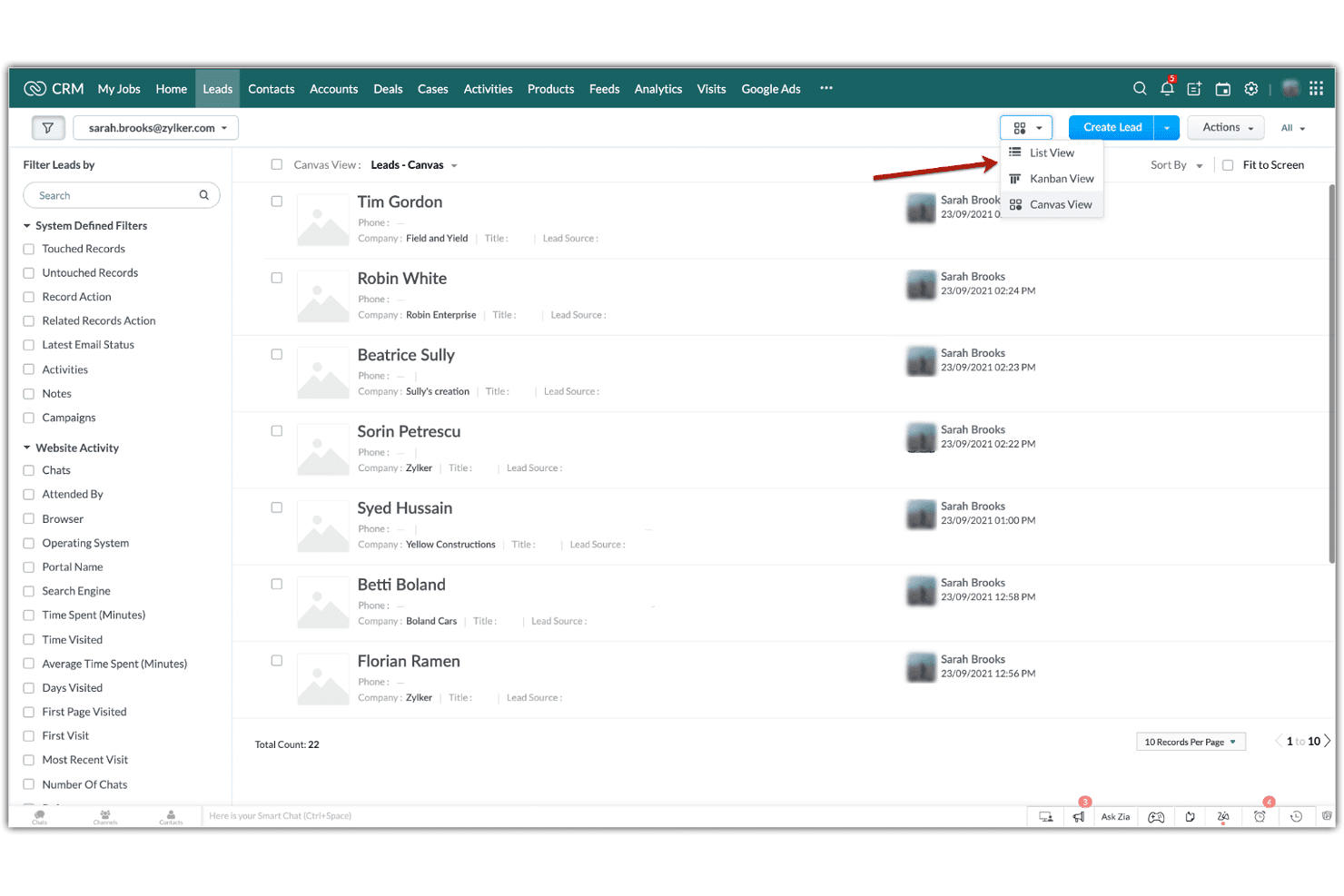
Zoho CRM lets users switch between List, Kanban, and Canvas views for leads. Zoho CRM is a customer relationship management platform that combines contact and lead management, multi-pipeline sales tracking, workflow automation, cadence-based follow-up sequences, and reporting dashboards.
Who Is Zoho CRM Best For?
Zoho CRM is a strong fit for small businesses that need a capable, affordable CRM without committing to HubSpot's pricing.
Why I Picked Zoho CRM
Zoho CRM earns its spot on my shortlist because it gives small businesses a genuinely capable CRM without locking you into HubSpot's pricing model. I particularly like Cadences, which let you build branching follow-up sequences across email, calls, tasks, and WhatsApp based on how a prospect actually responds. Multi-pipeline management is solid too, letting small teams track separate sales motions with customizable stages and probabilities without upgrading to an enterprise tier.
Zoho CRM Key Features
- Zia AI assistant: Zia delivers lead scoring, churn predictions, anomaly alerts, and next-best-action recommendations directly within your CRM records.
- Blueprint process management: Blueprint guides sales reps through structured, step-by-step sales processes with conditional rules and required fields at each stage.
- Canvas no-code layout builder: Canvas lets you redesign CRM pages, fields, and layouts visually without writing any code.
- Role-based record permissions: Assign Read Only, Read/Write, or Full Access at the role level, with higher hierarchy roles automatically accessing records from users below them.
Zoho CRM Integrations
Zoho CRM offers 1,100+ ready-to-use app integrations, including Gmail, Outlook, Slack, Zoom, Microsoft Teams, Google Ads, and QuickBooks. REST, Bulk, Notification, COQL, and GraphQL APIs support custom integrations.
Pros and Cons
Pros:
- Shared dashboards support sales performance visibility
- Multiple pipelines track distinct sales motions
- Branching Cadences adapt follow-ups to prospect responses
Cons:
- Cadence changes can require cloning sequences
- Newsletter design may need separate campaign tools
 Best for affordable all-in-one CRM and marketing
- Free plan available
- From $14.99/user/month
Visit WebsiteCustomer Rating:4.7/5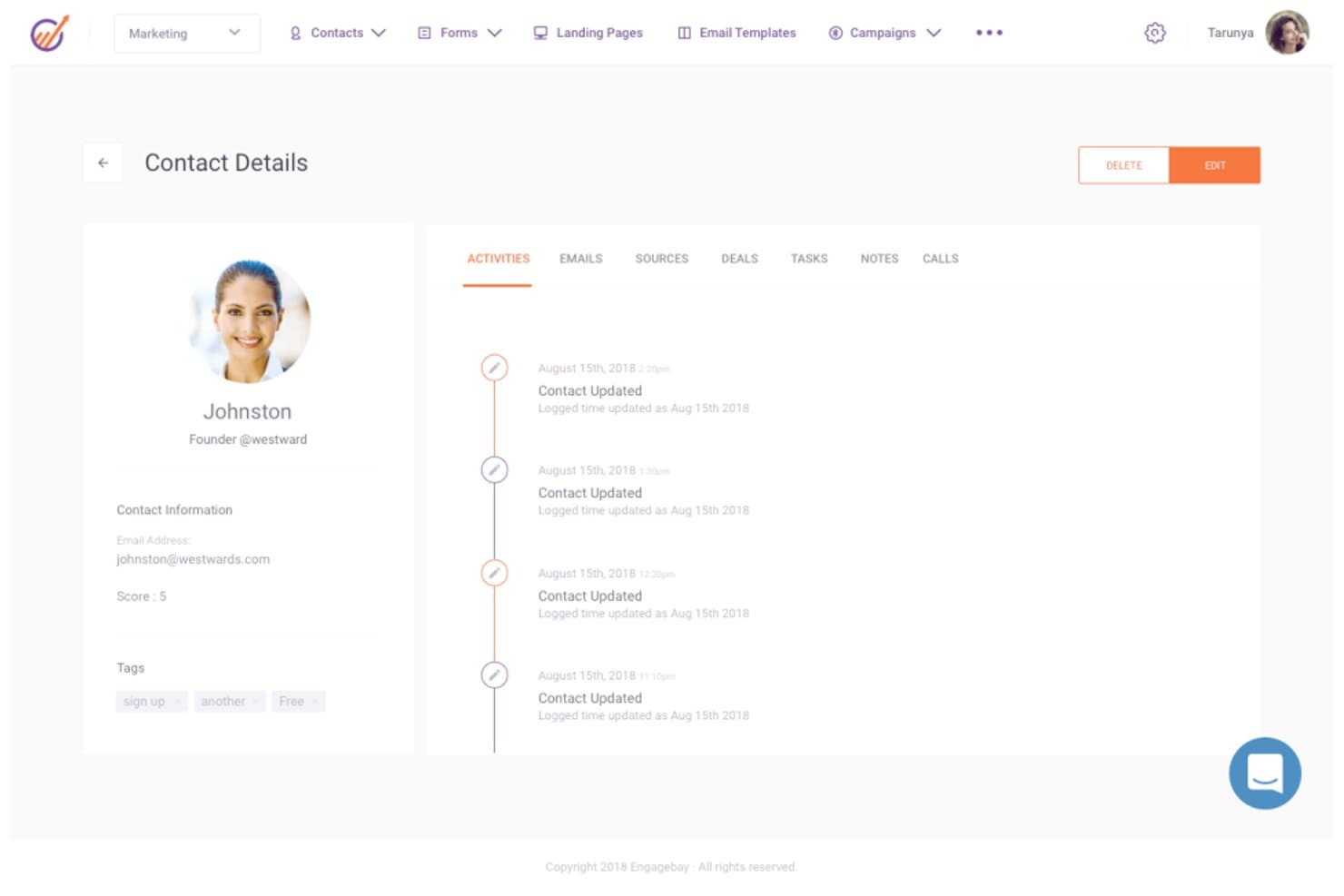
EngageBay displays a full contact activity timeline and details. EngageBay is an all-in-one CRM platform that combines contact management, email marketing, sales pipeline tracking, marketing automation, and customer support tools in a single suite.
Who Is EngageBay Best For?
EngageBay is a strong fit for small businesses and early-stage teams that need CRM, marketing, and support tools in one place without paying HubSpot-level prices.
Why I Picked EngageBay
I picked EngageBay as one of the best because it bundles CRM, email marketing, sales pipeline tracking, and help desk tools into a single platform at a fraction of what HubSpot costs. I particularly like how the Deals module lets you build custom tracks and milestones, move deals through stages by drag and drop, and tie each deal to contacts, proposals, and documents without switching tools. Email sequences are also genuinely useful, with per-email control over timing, sending days, and timezone, plus built-in open and click reporting.
EngageBay Key Features
- Predictive lead scoring: Automatically adds or deducts points from contact records based on configurable criteria, helping you prioritize the most sales-ready leads.
- HubSpot, Salesforce, and Pipedrive sync: Pulls contacts, companies, tracks, and deals from your existing CRM directly into EngageBay so you're not starting from scratch.
- Ticket management and service automation: Lets support teams log, track, and automate customer tickets within the same platform your sales and marketing teams already use.
- Team goal tracking: Sets deal- or revenue-based goals per team member across monthly, quarterly, or annual periods, with measurements like Deals Created and Call Logs built in.
EngageBay Integrations
EngageBay lists 250+ integrations, including HubSpot, Salesforce, Pipedrive, Shopify, Stripe, QuickBooks, Twilio, and Zapier. It also provides a REST API and MCP server for custom integrations.
Pros and Cons
Pros:
- Email sequences offer per-message timing controls
- Configurable deal stages support practical pipeline tracking
- Shared records connect sales, marketing, and support
Cons:
- Reporting lacks multi-touch attribution depth
- Workflows require manual execution
Learn more about EngageBay: Best alternative for visual sales management
- 14-day free trial
- From $14/user/month (billed annually)
Visit WebsiteCustomer Rating:4.5/5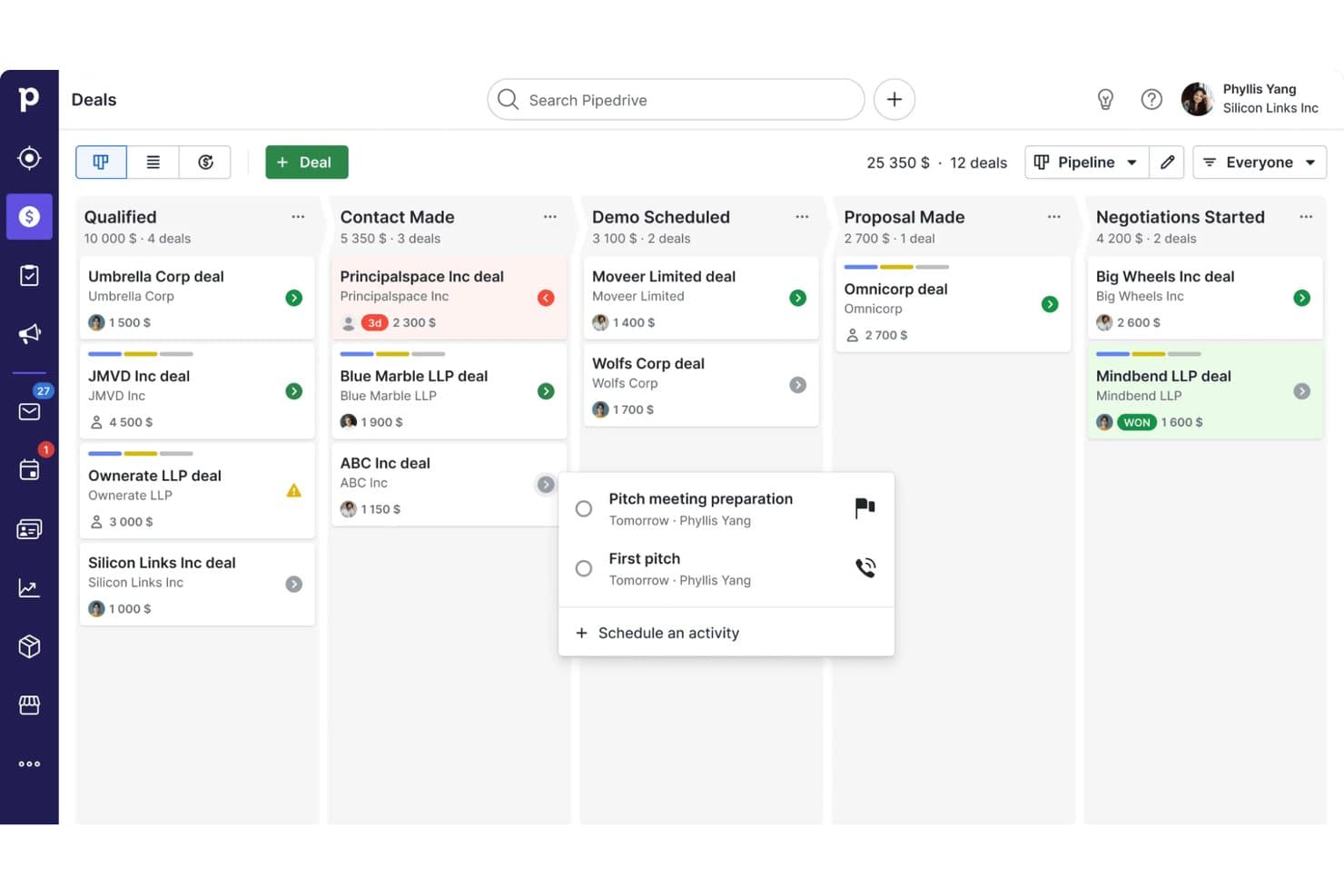
Pipedrive CRM organizes deals across pipeline stages visually. Pipedrive is a sales CRM that combines visual pipeline management, contact and deal tracking, workflow automation, email sequencing, and reporting across the full sales cycle.
Who Is Pipedrive Best For?
Pipedrive is a strong fit for sales-led teams and small businesses that want a clear, visual way to manage their pipeline without the complexity of a full marketing platform.
Why I Picked Pipedrive
Pipedrive earns its spot on my shortlist because its visual pipeline management is genuinely one of the clearest deal-tracking experiences I've used. I love how you can build multiple drag-and-drop pipelines, each with stages tailored to a distinct sales process, and track deal value, win probability, and expected close date at a glance. Pipedrive's Insights layer ties directly into that pipeline view, letting my team assemble live dashboards from deal, activity, and forecast reports and share them with stakeholders in real time.
Pipedrive Key Features
- Contact and deal management: View and manage contacts, organizations, and linked deals in one place, with a full interaction timeline per contact.
- Workflow automation: Set triggers and actions to automatically move deals through pipeline stages and handle repetitive sales tasks.
- Email sequencing: Build lead- or deal-based sequences combining automated emails and follow-up activities on Growth and higher plans.
- Goals and performance tracking: Set team or individual goals based on deal value, activity counts, or forecast revenue, then monitor progress from the Insights dashboard.
Pipedrive Integrations
Pipedrive offers a marketplace with more than 500 integrations and apps, including native integrations with Microsoft Teams, Google Meet, QuickBooks, and DocuSign, plus marketplace integrations for PandaDoc. It also provides REST API, webhooks, OpenAPI 3 specifications, JavaScript and PHP client libraries, and Zapier.
Pros and Cons
Pros:
- Sequences connect deal follow-ups with email
- Shared dashboards expose activity and forecast gaps
- Drag-and-drop pipelines map distinct sales processes
Cons:
- No unified service module or health scoring
- Campaigns and nurture require separate add-ons
Learn more about Pipedrive CRM: Best alternative for agencies
- Free demo available
- Pricing upon request
Visit WebsiteCustomer Rating:4.5/5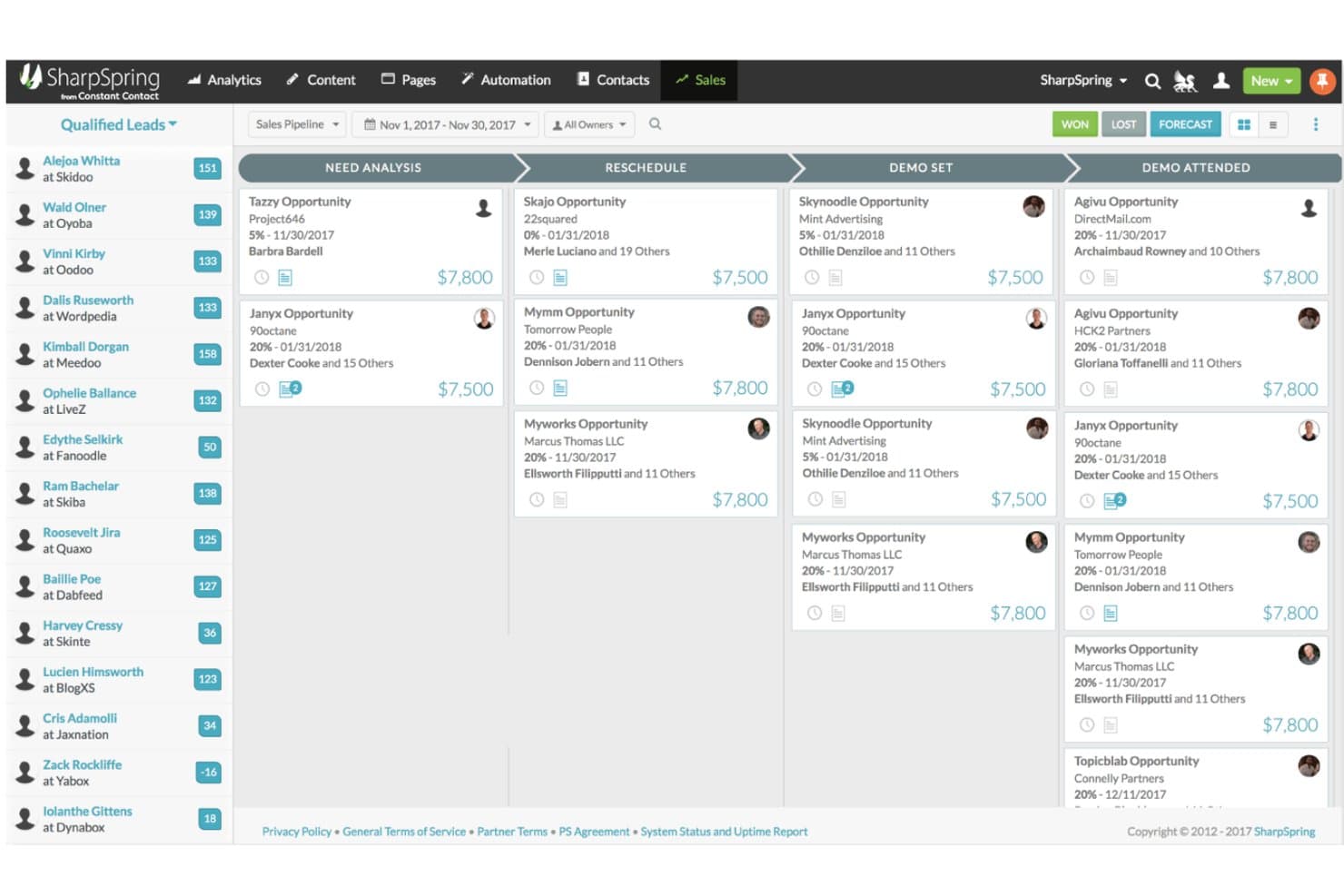
SharpSpring organizes deals visually across pipeline stages. SharpSpring, now rebranded as Lead Gen & CRM by Constant Contact, is a unified marketing automation and CRM platform that combines lead generation, lead scoring, email and social marketing, customizable sales pipelines, and multi-touch attribution reporting.
Who Is SharpSpring Best For?
SharpSpring is a strong fit for marketing agencies that manage campaigns and CRM workflows across multiple clients from a single platform.
Why I Picked SharpSpring
I've included SharpSpring in my top picks because it's one of the few platforms built with agencies in mind from the ground up. The multi-touch campaign attribution reporting connects marketing spend directly to pipeline and revenue, which is exactly what agency teams need to prove ROI across client accounts. Paired with automated lead scoring and customizable pipeline stages, it lets you run distinct workflows for multiple clients without jumping between tools.
SharpSpring Key Features
- Lead scoring: Automatically scores leads based on activity and engagement so your sales team knows which contacts to prioritize.
- Life of the Account timeline: Displays a single contact's full interaction history across emails, website visits, opportunities, and content in one view.
- Customizable pipeline stages: Lets you build and modify pipeline stages to match your team's actual sales process.
- Campaign attribution reporting: Connects marketing activity to pipeline and revenue using multi-touch attribution models.
SharpSpring Integrations
Native integrations are not clearly documented. SharpSpring supports custom integrations through its Open API, with a default allowance of 50,000 requests per day and a maximum rate of 10 queries per second.
Pros and Cons
Pros:
- Lead scoring helps prioritize sales follow-up
- Agency workflows combine marketing and CRM
- Multi-touch attribution connects campaigns to revenue
Cons:
- No customer success health scoring documented
- Workflow builder bugs disrupt automation setup
Learn more about SharpSpring:
Andre alternativer til HubSpot
Her er noen andre HubSpot-alternativer du kan vurdere. De kom ikke med på min liste over de 12 beste, men er likevel nyttige verktøy.
- 11ActiveCampaignBest value HubSpot alternative
- 12DripBest alternative for e-commerce brands
- 13OntraportBest alternative for beginners
- 14MarketoBest alternative for marketers
- 15BrevoBest alternative for customer relationship teams
- 16NutshellBest alternative for better support
- 17FreshsalesBest for combining sales and marketing
- 18Campaign MonitorBest alternative for email marketing
- 19Mailchimp Best for pre-built customer journeys
- 20OrttoBest alternative for in-app messaging
- 21EloquaBest for enterprises
- 22PardotBest for Salesforce users
- 23Act-OnBest alternative for lead scoring
- 24OmnisendBest alternative for SMS messaging
- 25WishpondBest for creating landing pages
- 26InsightlyBest alternative for integrations
- 27Keap Max ClassicBest for CRM for automated follow-ups
Relaterte anmeldelser av HubSpot-alternativer
Hvis du fortsatt ikke har funnet det du leter etter her, kan du se nærmere på disse verktøyene som vi har testet og evaluert.
- CRM-programvare
- Salgsprogramvare
- Programvare for kundeemnehåndtering
- Programvare for forretningsanalyse
- Programvare for kontraktsadministrasjon
- System for inntektsstyring
How I Evaluate HubSpot Alternatives
I look at two layers: whether a tool can handle pipeline management, marketing automation, and revenue reporting at HubSpot's level, and what sets it apart for RevOps teams at scale.
Core Functionality (Table Stakes For This List)
When I'm selecting tools for my list, I rank each one on a scale from 0 (does not offer the functionality) to 5 (excels in this area) for each core functionality listed below. Then, I calculate the tool's total score into a percentage. Each tool needs to achieve a minimum total score of 75% to be considered for inclusion.
- Integrated CRM Platform: I check whether the CRM unifies contacts, companies, deals, and activity history across sales, marketing, and service in one shared data model.
- Marketing Automation: Email campaigns, lead nurturing workflows, segmentation, and behavior-based triggers all factor in here—especially how well they support full-funnel demand gen.
- Sales Pipeline Management: I evaluate deal tracking, stage management, and sales engagement tools like sequences and task queues that keep reps moving deals forward.
- Revenue Reporting & Analytics: Forecasting, pipeline dashboards, and cross-functional reporting matter here—I look at how easily RevOps teams can build custom views without SQL.
- Workflow Automation: Multi-step, cross-object automations are what I look for—things like auto-routing leads by territory or triggering handoff tasks between sales and CS teams.
- Third-Party Integrations: The native integration marketplace and API quality both count, particularly connections to tools RevOps teams rely on like Slack, Snowflake, and Gong.
Once I have a list of tools that meet this criteria, I consider what sets each platform apart.
Differentiating Factors (What Sets Vendors Apart)
Here's how I compare and contrast different vendors:
Standout Features
Revenue attribution modeling is a big differentiator—I evaluate whether a platform can trace closed deals back to specific campaigns and touchpoints across the funnel. Custom objects and data modeling also matter when your business tracks non-standard processes like partner referrals or product usage milestones alongside deals. AI-powered insights round things out; platforms like Salesforce and Zoho now offer predictive deal scoring and next-best-action suggestions that help RevOps teams prioritize pipeline with less guesswork.
Beyond Features
Pricing structure matters a lot when you're leaving HubSpot—I evaluate whether a platform's model scales predictably as your database and team grow, since unexpected cost jumps are a common migration trigger. Implementation and migration support is just as important; I check for dedicated data migration tools and onboarding resources that reduce the risk of losing historical pipeline data during the switch. I also consider team size and business fit, because a platform built for enterprise B2B sales cycles won't serve a lean mid-market RevOps team well, and vice versa.
Hvorfor se etter et HubSpot-alternativ?
HubSpot er en omfattende plattform for inngående markedsføring, salg og kundeservice, kjent for sitt store utvalg av verktøy som skal hjelpe bedrifter med å tiltrekke seg, engasjere og beholde kunder. Til tross for de omfattende funksjonene og populariteten kan enkelte faktorer føre til at brukere vurderer alternativer til HubSpot. Kostnad er en viktig faktor. HubSpots avanserte funksjoner er robuste, men kan være kostbare, særlig for små bedrifter eller oppstartsbedrifter med begrensede budsjetter. Det store utvalget av funksjoner kan også noen ganger virke overveldende, spesielt for brukere som ønsker et enklere og mer strømlinjeformet grensesnitt. Tilpasning og fleksibilitet er andre områder der brukere kan oppleve at HubSpot kommer til kort, ettersom bedrifter med unike eller bransjespesifikke behov kan ha behov for mer skreddersydde løsninger.
Det kan gi flere fordeler å utforske HubSpot-alternativer. Alternativ programvare tilbyr ofte kostnadseffektive løsninger uten å gå på kompromiss med viktige funksjoner, noe som gjør dem egnet for bedrifter som må ta hensyn til budsjettbegrensninger. Disse alternativene kan gi en mer brukervennlig opplevelse med en enklere læringskurve, noe som er ideelt for team som ønsker enkelhet og effektivitet. Tilpasning og fleksibilitet er ofte sentrale funksjoner i alternativ programvare. Dette gjør det mulig å imøtekomme de spesifikke behovene i ulike bransjer og tilpasse programvaren til bedriftens unike krav. Forbedrede integrasjonsmuligheter sikrer dessuten sømløs kompatibilitet med eksisterende forretningssystemer, noe som styrker effektiviteten i arbeidsflyten.
Slik velger du HubSpot-alternativer
Med så mange ulike <Fokusbegrep>-løsninger tilgjengelig kan det være utfordrende å avgjøre hvilket verktøy som passer best for behovene dine.
Når du lager en kortliste, prøver ut og velger <Fokusterm>, bør du vurdere følgende:
- Hvilket problem prøver du å løse – Start med å identifisere funksjonsgapet i HubSpot du prøver å fylle, for å tydeliggjøre hvilke funksjoner og hvilken funksjonalitet verktøyet må tilby.
- Hvem må bruke det – For å vurdere kostnader og krav bør du tenke på hvem som skal bruke programvaren, og hvor mange lisenser du trenger. Du må vurdere om det bare er ledere for inntektsoperasjoner eller hele organisasjonen som trenger tilgang. Når dette er klart, er det verdt å vurdere om du prioriterer brukervennlighet for alle eller hastighet for superbrukerne av HubSpot-alternativet.
- Hvilke andre verktøy det må fungere sammen med – Avklar hvilke verktøy du erstatter, hvilke verktøy som skal beholdes, og hvilke verktøy det må integreres med, for eksempel regnskaps-, CRM- eller HR-programvare. Du må avgjøre om verktøyene må integreres med hverandre, eller om du kan erstatte flere verktøy med ett samlet HubSpot-alternativ.
- Hvilke resultater som er viktige – Vurder hvilket resultat programvaren må levere for at den skal regnes som vellykket. Tenk på hvilken kapasitet du ønsker å oppnå eller hva du ønsker å forbedre, og hvordan du vil måle suksess. Et eksempel på et resultat kan være muligheten til å få bedre innsikt i ytelsen. Du kan sammenligne funksjonene i HubSpot-alternativer til du blir blå i ansiktet, men hvis du ikke tenker på hvilke resultater du ønsker å oppnå, kan du kaste bort mye verdifull tid.
- Hvordan det vil fungere i organisasjonen din – Vurder programvarevalget sammen med arbeidsflytene og leveransemetodikken din. Evaluer hva som fungerer godt, og hvilke områder som skaper problemer og må løses. Husk at alle virksomheter er forskjellige – ikke anta at et verktøy vil fungere i organisasjonen din bare fordi det er populært.
Trender innen HubSpot-alternativer for 2025
Organisasjoner ser i økende grad etter CRM-løsninger som tilbyr mer enn bare grunnleggende funksjonalitet, med vekt på tilpassede opplevelser, integrasjonsmuligheter og avansert analyse for å effektivisere inntektsoperasjonene. Her er en oversikt over de nåværende trendene:
Fremvoksende trender innen HubSpot-alternativer:
- Forbedret integrasjon av AI og maskinlæring:
- Mange HubSpot-alternativer bygger inn AI-drevet innsikt og automatisering i plattformene sine, slik at virksomheter kan forbedre markedsføringsstrategiene, tilpasse kundeinteraksjoner og effektivisere salgsprosessene.
- Utvidede integrasjonsøkosystemer:
- Ettersom virksomheter bruker stadig flere verktøy, utvider HubSpot-alternativene integrasjonsmulighetene sine, slik at data kan flyte sømløst og ulike forretningsfunksjoner kan fungere sammen.
Funksjoner i rask utvikling:
- Prediktiv analyse:
- Verktøy tar i økende grad i bruk prediktiv analyse for å forutsi salgstrender, kundeatferd og markedsdynamikk, slik at virksomheter kan ta proaktive beslutninger.
- Avanserte automatiseringsmuligheter:
- Automatisering utvides utover e-postsekvenser og enkle arbeidsflyter, og omfatter nå mer komplekse prosesser for å øke effektiviteten på tvers av markedsførings-, salgs- og serviceavdelinger.
Nye og uvanlige funksjoner:
- Blokkjede for datasikkerhet og åpenhet:
- Noen alternativer utforsker blokkjedeteknologi for å styrke datasikkerheten og tilby åpne revisjonsspor, noe som appellerer til bransjer med strenge krav til datasamsvar.
- IoT-integrasjon:
- Integrering av data fra tingenes internett (IoT) gir innsikt i sanntid og utløser automatiserte handlinger basert på enhetsdata, noe som gir nye muligheter for kundeengasjement og datainnsamling.
Funksjoner i tilbakegang:
- Overdreven kompleksitet uten verdi:
- Løsninger som er unødvendig komplekse uten å gi tilsvarende verdi, blir mindre populære, ettersom brukerne foretrekker plattformer som balanserer funksjonalitet og brukervennlighet.
- Begrensede mobilfunksjoner:
- Ettersom fjernarbeid og tilgang på farten blir standard, opplever CRM-løsninger med begrenset mobilfunksjonalitet redusert etterspørsel.
Disse trendene fremhever CRM-markedets dynamiske natur, der HubSpot-alternativer flytter grensene for hva som er mulig for å imøtekomme moderne virksomheters behov i utvikling. For organisasjoner som vurderer disse verktøyene, kan forståelse av disse trendene bidra til velinformerte beslutninger som samsvarer med strategiske mål og operasjonelle behov, og sikre at de velger en plattform som effektivt kan drive inntektsoperasjonene deres.
Funksjoner i HubSpot-alternativer
Når du velger HubSpot-alternativer, bør du se etter følgende nøkkelfunksjoner:
- Kontaktadministrasjon: Denne funksjonen lar deg organisere, spore og oppdatere alle interaksjoner du har med potensielle kunder og kunder. Du kan raskt hente frem historikk, legge til notater og administrere kommunikasjon – alt på ett sentralt sted – slik at du aldri mister oversikten over en relasjon.
- Sporing av salgspipeline: Dette gir deg en tydelig visualisering av salgsprosessen, slik at du kan se hvor avtalene står, hva som går fremover, og hva som trenger oppmerksomhet. Det gjør salgsprognoser og oppfølging langt mindre basert på gjetting.
- Markedsføringsautomatisering: Med markedsføringsautomatisering setter du opp arbeidsflyter som utløser e-poster, kampanjer, påminnelser eller handlinger basert på kundeatferd eller tidspunkt. Dette holder kommunikasjonen konsekvent og frigjør tid til mer strategisk arbeid.
- Rapportering og analyse: Disse verktøyene hjelper deg med å gå i dybden på data om salgsresultater, kundeengasjement og kampanjeresultater. Du får oversikter og rapporter som omdanner all denne informasjonen til handlingsrettet innsikt – tenk på det som virksomhetens GPS for smartere beslutninger.
- Integrasjonsmuligheter: Robuste integrasjonsfunksjoner lar deg koble CRM-systemet til de andre appene og programvarene du allerede bruker – for eksempel e-post, kalendere eller regnskapsverktøy – slik at alt fungerer sømløst sammen. Slutt på å måtte veksle mellom frakoblede systemer.
- Tilpasningsmuligheter: Dette lar deg tilpasse plattformen til dine unike arbeidsflyter og din terminologi, enten du trenger egendefinerte felt, oversikter eller salgsfaser. Et personlig tilpasset oppsett betyr at du bruker mindre tid på å tilpasse arbeidet ditt til programvaren.
- Oppgave- og aktivitetsadministrasjon: Du kan planlegge samtaler, avtaler og oppfølginger, og tildele oppgaver til deg selv eller teammedlemmer. Påminnelser i tide hindrer at ting glipper – du trenger ikke lenger å stole på hukommelsen eller klistrelapper.
- Poengsetting av potensielle kunder: Denne funksjonen hjelper deg med å prioritere hvilke prospekter som har størst sannsynlighet for å kjøpe, ved å spore engasjementet deres og tildele poeng. Du vet nøyaktig hvor du bør rette innsatsen for størst mulig effekt.
- Mobiltilgang: Med mobiltilgang kan du se, oppdatere og administrere CRM-systemet ditt mens du er på farten – på kundens kontor, under reiser eller fra sofaen. Arbeidet ditt er ikke bundet til et skrivebord, så du kan være produktiv uansett hvor du befinner deg.
Vanlige AI-funksjoner i HubSpot-alternativer
I tillegg til standardfunksjonene i HubSpot-alternativer som er nevnt ovenfor, innlemmer mange av disse løsningene AI med funksjoner som:
- Intelligent automatisering av arbeidsflyter: AI identifiserer repetitive oppgaver og setter opp smarte automatiseringer for å effektivisere den daglige driften. Dette holder teamet fokusert på aktiviteter med stor effekt i stedet for rutinepreget administrasjon.
- Prediktiv analyse: AI går gjennom historiske data for å forutsi fremtidige salgstrender og potensielle kunders atferd. Ved å identifisere mønstre du kanskje overser, hjelper det deg med å planlegge fremover og rette innsatsen mot områdene der den mest sannsynlig vil gi resultater.
- AI-drevet poengsetting av potensielle kunder: I stedet for å rangere potensielle kunder manuelt analyserer AI atferd og engasjementssignaler for automatisk å finne frem til prospektene som har størst sannsynlighet for å konvertere. Det fjerner både gjettingen og mye av det rutinepregede arbeidet fra administrasjonen av potensielle kunder.
- Automatiserte innholdsanbefalinger: AI gjennomgår brukerens atferd og foreslår riktig innhold eller budskap for hver kontakt. Det betyr at du sender mer relevante e-poster, tilbud og oppfølginger, noe som forbedrer åpnings- og konverteringsratene uten ekstra undersøkelser.
- Konversasjonschatboter: AI-drevne chatboter håndterer henvendelser på nettstedet, kvalifiserer potensielle kunder og bestiller møter døgnet rundt. Du gir raske og vennlige svar til besøkende på nettstedet selv når du ikke er på jobb, slik at du aldri går glipp av en potensiell mulighet.
Fordeler med HubSpot-alternativer
Når virksomheter utforsker HubSpot-alternativer, ser de etter løsninger som forbedrer driftseffektiviteten, samsvarer med deres spesifikke behov og tilbyr overbevisende fordeler sammenlignet med de nåværende systemene. Her er fem hovedfordeler ved å velge et HubSpot-alternativ:
- Kostnadseffektivitet: Maksimerer avkastningen på investeringen med konkurransedyktige priser.
- Brukere kan benytte viktige CRM-funksjoner til en rimeligere kostnad, noe som sikrer bedre budsjettfordeling og ressursoptimalisering.
- Tilpasning: Tilpasser programvaren til unike forretningsprosesser.
- Organisasjoner kan endre funksjoner, arbeidsflyter og grensesnitt slik at de samsvarer tett med deres spesifikke driftskrav, noe som øker produktiviteten og brukeradopsjonen.
- Fokusert funksjonssett: Tilbyr spesialiserte verktøy som er relevante for bestemte bransjer eller virksomhetsstørrelser.
- Virksomheter drar nytte av funksjonalitet som er direkte tilpasset kjernevirksomheten, og unngår overfloden av unødvendige funksjoner.
- Forbedret støtte: Tilbyr dedikert og responsiv kundeservice.
- Tilgang til førsteklasses støtte sikrer at eventuelle problemer løses raskt, noe som minimerer nedetid og øker brukertilfredsheten.
- Integrasjonsmuligheter: Kobler sømløst sammen andre viktige forretningsverktøy.
- Tilrettelegger for integrasjon med annen programvare, noe som forbedrer dataflyten og tilgjengeligheten på tvers av avdelinger. Dette er avgjørende for informerte beslutninger og gjennomføring av strategier.
Kostnader og priser for HubSpot-alternativer
Når programvarekjøpere velger et HubSpot-alternativ, bør de vurdere en rekke planalternativer for å finne det som passer best med virksomhetens behov og budsjett. Prisstrukturer og inkluderte funksjoner kan variere betydelig mellom ulike CRM-plattformer, noe som gjør det viktig å forstå hva hver plan tilbyr. Nedenfor finner du en oversikt over vanlige planalternativer for HubSpot-alternativer, med gjennomsnittlige priser og viktige funksjoner som er inkludert i hver plan.
Sammenligningstabell for planer for HubSpot-alternativer
| Plantype | Gjennomsnittlig pris | Vanlige inkluderte funksjoner |
|---|---|---|
| PlantypeGrunnleggende | Gjennomsnittlig pris$10 - $25/bruker/måned | Vanlige inkluderte funksjonerKontaktadministrasjon, e-postintegrasjon, grunnleggende rapportering |
| PlantypeProfesjonell | Gjennomsnittlig pris$50 - $100/bruker/måned | Vanlige inkluderte funksjonerAutomatisering, avansert rapportering, tilpasningsmuligheter |
| PlantypeBedrift | Gjennomsnittlig pris$100+/bruker/måned | Vanlige inkluderte funksjonerAvansert sikkerhet, dedikert støtte, skalerbarhet |
| PlantypeGratisalternativ | Gjennomsnittlig pris$0 | Vanlige inkluderte funksjonerBegrenset kontaktadministrasjon, grunnleggende e-postintegrasjon |
Når kjøpere vurderer disse planene, bør de undersøke hvordan hver plan samsvarer med deres nåværende behov og forventninger til fremtidig vekst. Det riktige valget bør tilby nødvendig funksjonalitet for å støtte effektiv inntektsdrift, uten å inkludere overflødige funksjoner som øker kompleksiteten og kostnadene. Se etter en løsning som tilbyr fleksibilitet, skalerer med virksomheten og gir tydelig verdi i forhold til prisen.
Vanlige spørsmål om HubSpot-alternativer
Er du fortsatt usikker på hvilket HubSpot-alternativ som er best? Disse vanlige spørsmålene vil hjelpe deg i søket.