

In qualità di avvocato, può essere difficile gestire efficacemente i rapporti con i clienti e ottimizzare i processi quando si hanno molti altri impegni e attività che occupano il proprio tempo. Trovare un software CRM affidabile per studi legali può aiutarti a tenere sotto controllo i tuoi casi e ad automatizzare le operazioni, ma con così tante opzioni disponibili sul mercato, può essere ancora più scoraggiante capire da dove iniziare.
Per aiutare gli avvocati a iniziare la ricerca, ho utilizzato la mia esperienza nel software digitale per testare e recensire alcune delle principali soluzioni disponibili sul mercato. Che tu gestisca un piccolo studio o una grande fusione, sono certo che le mie recensioni approfondite ti guideranno nella ricerca del tuo prossimo software CRM, migliorando efficacemente la produttività complessiva e i processi di gestione delle relazioni.
Perché fidarsi dei nostri consigli sui software
6,700+
Reviews
20
Industry experts
16+
Evaluation factors
14
Years
Le nostre recensioni riflettono il nostro giudizio indipendente, non un discorso di vendita. Scopri come manteniamo la trasparenza.
Per questa guida, abbiamo valutato gli strumenti attraverso test pratici e ricerche indipendenti, assegnando un punteggio agli strumenti in base ai nostri criteri di selezione.
Le nostre recensioni riflettono il nostro giudizio editoriale umano, non un discorso di vendita.
Tabella di confronto: software CRM per studi legali
| Tool | Best For | Trial Info | Price | ||
|---|---|---|---|---|---|
| 1 | Ideale per analisi delle vendite basate sull'IA | Prova gratuita di 21 giorni | A partire da $9/utente/mese (con fatturazione annuale) | Website | |
| 2 | Ideale per l'automazione dell'acquisizione dei clienti | Prova gratuita di 7 giorni | A partire da $49/utente/mese (con fatturazione annuale) | Website | |
| 3 | Ideale per la gestione dei casi tutto-in-uno | Prova gratuita di 10 giorni | A partire da $50/utente/mese (fatturato annualmente) | Website | |
| 4 | Ideale per lo sviluppo dei flussi di lavoro | Demo gratuita disponibile | Prezzi su richiesta | Website | |
| 5 | Ideale per sviluppare un flusso visivo delle vendite | Prova gratuita di 14 giorni | A partire da $14/utente/mese (con fatturazione annuale) | Website | |
| 6 | Ideale per una gestione avanzata degli studi legali | Prova gratuita disponibile | A partire da $59/utente/mese | Website | |
| 7 | Ideale per strumenti di vendita basati sull'intelligenza artificiale | Prova gratuita di 30 giorni | A partire da $325/utente/mese (con fatturazione annuale) | Website | |
| 8 | Ideale per i processi di marketing | Demo gratuita disponibile | Prezzi su richiesta | Website | |
| 9 | Ideale per la gestione delle relazioni | Demo gratuita disponibile | Prezzi su richiesta | Website | |
| 10 | Ideale per la contabilità legale integrata | Prova gratuita di 10 giorni | A partire da 49 $/utente/mese | Website |


Recensioni dei migliori software CRM per studi legali
Questa analisi approfondita fornisce una panoramica di diversi software CRM progettati per gli studi legali. Copre i pro e i contro, le funzionalità e i casi d’uso migliori.
 Ideale per analisi delle vendite basate sull'IA
- Prova gratuita di 21 giorni
- A partire da $9/utente/mese (con fatturazione annuale)
Visit WebsiteCustomer Rating:4.6/5This rating combines scores from multiple user review sites to reflect overall customer sentiment about the product.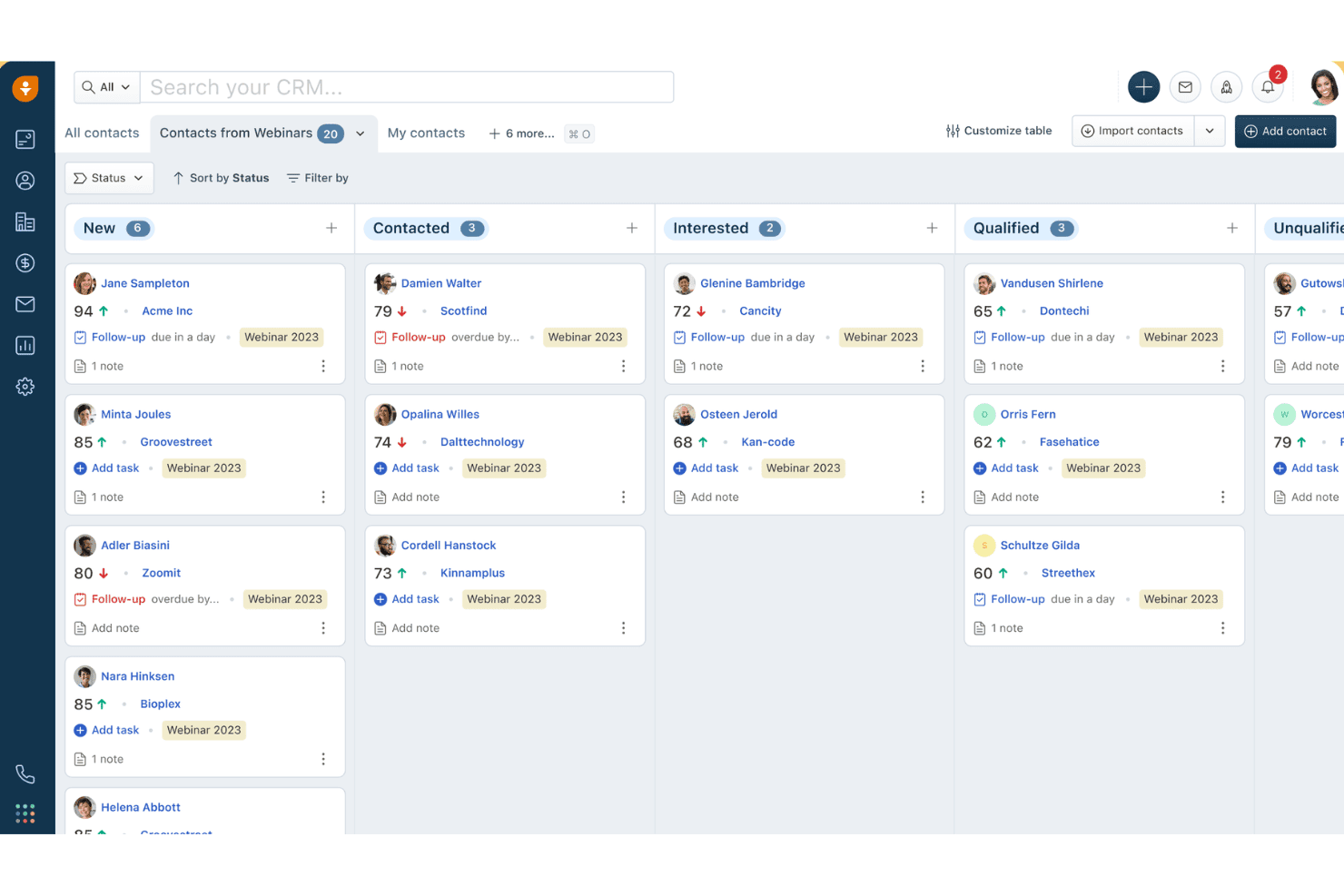
Freshsales organizza i contatti dei webinar per stato in una visualizzazione a bacheca kanban. Freshsales è una piattaforma CRM per le vendite che offre qualificazione dei lead basata sull'IA, comunicazione multicanale, gestione della pipeline, automazione dei flussi di lavoro e strumenti di marketing integrati che gli studi legali possono configurare per l'acquisizione dei clienti e lo sviluppo commerciale.
Per chi è più adatto Freshsales?
Freshsales è adatto agli studi legali che danno priorità alla definizione delle priorità dei lead basata sull'IA e all'automazione del marketing rispetto a funzionalità specifiche del settore legale, come i controlli dei conflitti di interesse o la gestione delle pratiche.
Perché ho scelto Freshsales
Freshsales si è guadagnato un posto nella mia selezione perché Freddy AI fa qualcosa che la maggior parte dei CRM legali non è in grado di fare: assegna un punteggio ai lead in arrivo sulla base di segnali comportamentali reali, come le aperture delle e-mail e le visite al sito, così il tuo team incaricato dell'acquisizione sa esattamente quali potenziali clienti chiamare per primi. Mi piace anche il fatto che Freddy segnali le trattative in stallo e prepari automaticamente e-mail di follow-up personalizzate, mantenendo attive le pipeline dello sviluppo commerciale senza supervisione manuale. Se a questo si aggiunge un chatbot IA attivo 24 ore su 24, 7 giorni su 7 per acquisire lead al di fuori dell'orario di lavoro, si ottiene un livello di qualificazione dell'acquisizione dei clienti davvero intelligente.
Funzionalità principali di Freshsales
- Fasi del ciclo di vita personalizzate: Configura le fasi dei contatti in modo che rispecchino i passaggi della pipeline di acquisizione del tuo studio, dalla richiesta iniziale fino al cliente acquisito.
- Creazione dei percorsi di marketing: Crea campagne automatiche a sequenza con logica condizionale tramite e-mail e SMS per coltivare i rapporti con potenziali clienti ed ex clienti.
- Compositore VoIP integrato: Effettua e ricevi chiamate direttamente nel CRM con funzioni native di chiamata con un clic, registrazione delle chiamate e registrazione audio delle chiamate.
- Report sull'attribuzione: Individua quali canali e campagne hanno generato lead e concluso affari utilizzando i report integrati di attribuzione dalla fonte ai ricavi.
Integrazioni di Freshsales
Freshsales offre integrazioni native con Google Workspace, Microsoft 365, Slack, Zoom, QuickBooks, WhatsApp Business e Apple Business Chat. Le integrazioni del marketplace includono PandaDoc, DocuSign e Calendly; l'accesso API e i webhook supportano connessioni personalizzate con i sistemi di gestione degli studi legali.
Pros and Cons
Pros:
- L'IA assegna un punteggio ai lead e segnala i rischi delle trattative
- Automazione del marketing integrata per coltivare i rapporti con i clienti
- Contatti multicanale tramite chat, SMS e WhatsApp
Cons:
- Nessun supporto nativo per i flussi di lavoro di gestione delle pratiche
- Mancano il controllo dei conflitti di interesse e i modelli legali
Learn more about Freshsales: Ideale per l'automazione dell'acquisizione dei clienti
- Prova gratuita di 7 giorni
- A partire da $49/utente/mese (con fatturazione annuale)
Visit WebsiteCustomer Rating:4.7/5This rating combines scores from multiple user review sites to reflect overall customer sentiment about the product.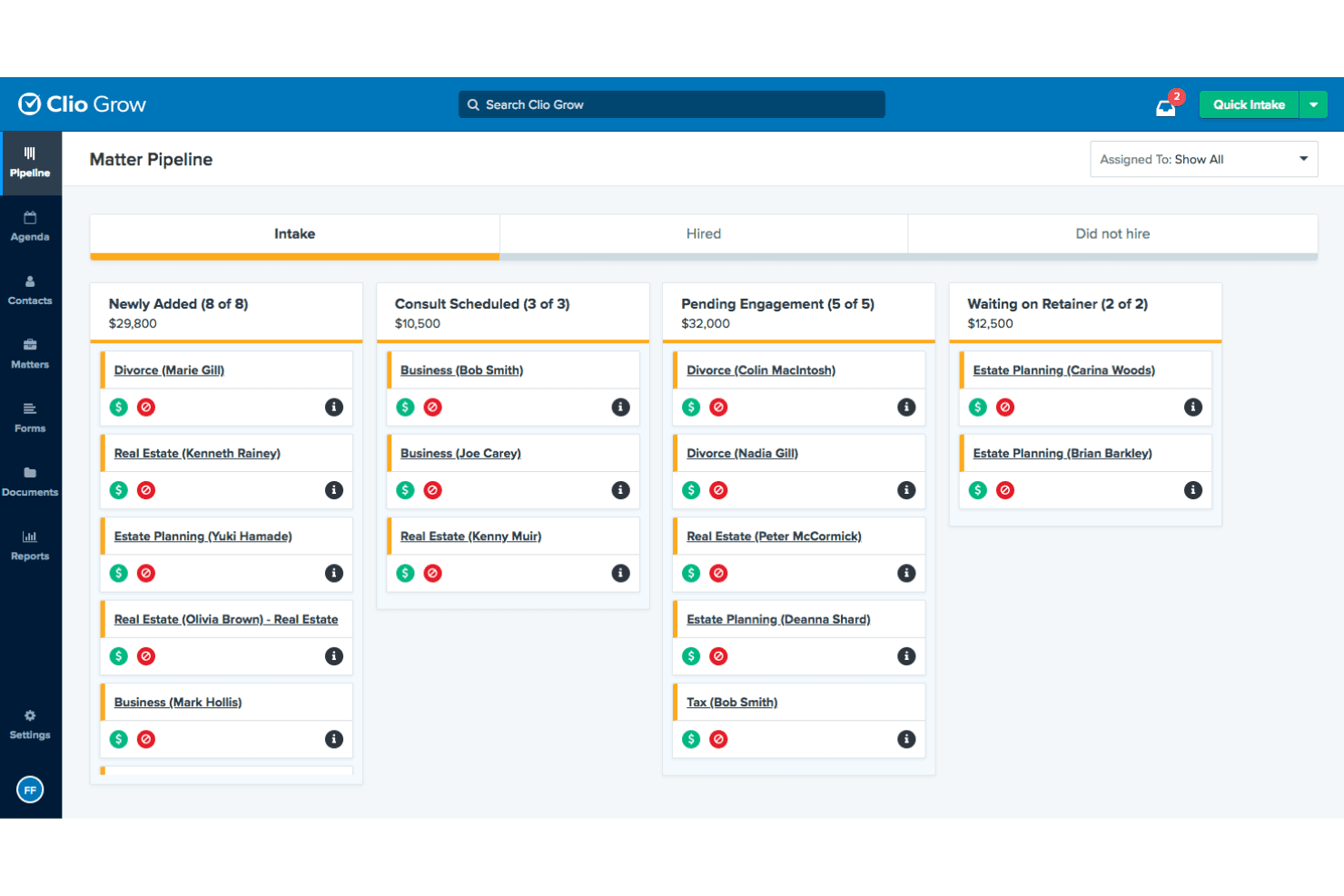
La pipeline delle pratiche di Clio Grow monitora i potenziali clienti nelle diverse fasi di acquisizione. Clio Grow è un CRM specifico per il settore legale, progettato per gli studi legali, che combina una pipeline Kanban per l'acquisizione dei clienti, moduli di acquisizione personalizzabili, verifica dei conflitti di interesse, monitoraggio delle fonti di segnalazione e flussi di lavoro automatizzati per il follow-up dei clienti.
Per chi è più adatto Clio Grow?
Clio Grow è particolarmente adatto agli studi legali di piccole e medie dimensioni che necessitano di una pipeline strutturata e specifica per l'acquisizione di clienti legali, anziché di un CRM generico.
Perché ho scelto Clio Grow
Clio Grow si è guadagnato un posto nella mia selezione perché nessun altro strumento che ho recensito gestisce l'acquisizione di clienti legali con questo livello di specificità progettata ad hoc. Apprezzo particolarmente la sua pipeline Kanban delle pratiche, che consente al personale di spostare i potenziali clienti attraverso fasi di acquisizione completamente personalizzabili, dal primo contatto fino alla firma dell'incarico, senza mai uscire dalla piattaforma. La ricerca nativa dei conflitti di interesse viene eseguita direttamente nel flusso di lavoro di acquisizione, consentendo ai coordinatori di individuare i problemi prima che si trasformino in rischi di responsabilità. Se si aggiungono il filtraggio dei potenziali clienti e la prenotazione fuori dall'orario di lavoro offerti da Clio Grow AI, il processo di acquisizione funziona essenzialmente da solo.
Funzionalità principali di Clio Grow
- Monitoraggio delle fonti di segnalazione: Un rapporto dedicato sulle segnalazioni registra il numero totale di pratiche segnalate da ciascun contatto segnalante, il numero di clienti acquisiti, il valore medio e i tassi di conversione.
- Rapporto sui ricavi per fonte dei potenziali clienti: Il rapporto sui ricavi per fonte dei potenziali clienti combina le stime della pipeline e i ricavi effettivamente incassati per canale di marketing, inclusi la spesa e il ROI di Google LSA.
- Messaggistica SMS bidirezionale nativa: Gli studi possono inviare moduli di acquisizione, accordi e promemoria degli appuntamenti tramite messaggio e ricevere risposte attraverso un numero verde assegnato allo studio.
- Integrazione con CallRail: Le chiamate in entrata vengono monitorate, registrate e associate ai contatti Clio Grow esistenti per attribuire con precisione la fonte dei potenziali clienti acquisiti tramite telefono.
Integrazioni di Clio Grow
Le integrazioni native includono Clio Manage, Dropbox Sign, CallRail e Google Local Services Ads; Clio Grow supporta inoltre Ruby Receptionists, QuickBooks, Xero, Google Drive, Dropbox, Gmail, Outlook e Zapier, oltre a un'API per integrazioni personalizzate.
Pros and Cons
Pros:
- Verifica dei conflitti integrata durante l'acquisizione
- L'assistente AI filtra e prenota i potenziali clienti fuori dall'orario di lavoro
- Monitoraggio delle pratiche e delle segnalazioni progettato appositamente per gli studi legali
Cons:
- Nessuna app mobile dedicata all'acquisizione
- Mancano funzionalità avanzate di previsione dei ricavi
Learn more about Clio Grow: Ideale per la gestione dei casi tutto-in-uno
- Prova gratuita di 10 giorni
- A partire da $50/utente/mese (fatturato annualmente)
Visit WebsiteCustomer Rating:4.6/5This rating combines scores from multiple user review sites to reflect overall customer sentiment about the product.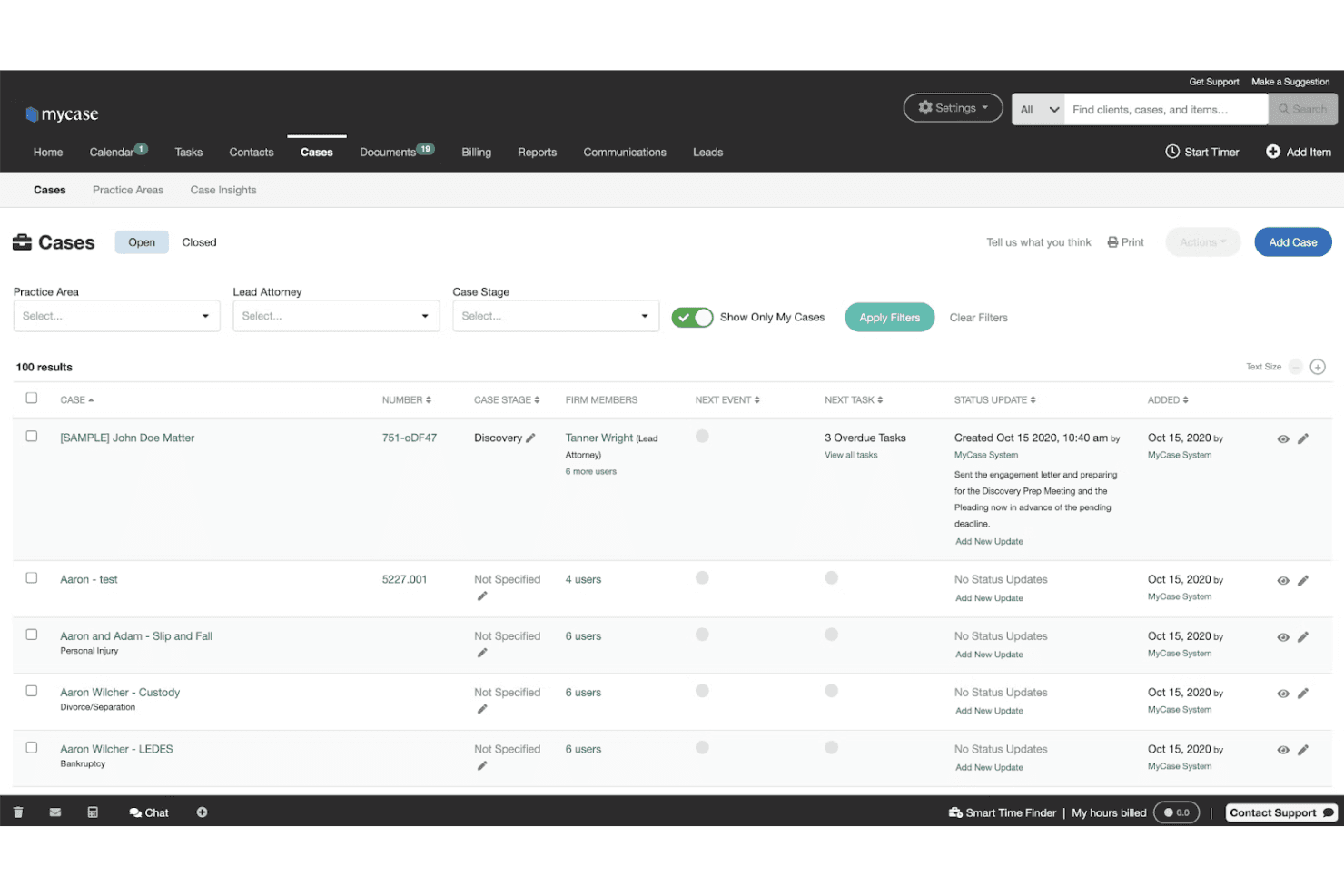
MyCase consente agli utenti di gestire e monitorare tutti i casi aperti in un'unica vista. MyCase è una piattaforma per la gestione degli studi legali che combina acquisizione dei clienti, CRM, gestione dei casi, fatturazione, automazione dei documenti, firma elettronica e strumenti di comunicazione con i clienti in un unico abbonamento.
Per chi è più adatto MyCase?
MyCase è particolarmente adatto agli studi legali di piccole e medie dimensioni che desiderano gestire casi, acquisizione dei clienti, fatturazione e comunicazioni con un unico abbonamento, invece di combinare strumenti separati.
Perché ho scelto MyCase
MyCase si è guadagnato un posto nella mia lista ristretta perché è una delle rare piattaforme legali che mantiene la gestione dei casi, l'acquisizione dei clienti, la fatturazione e le comunicazioni all'interno di un unico abbonamento, invece di distribuirle tra prodotti separati. Apprezzo in particolare il modo in cui i moduli di acquisizione con logica condizionale compilano automaticamente i fascicoli dei casi, eliminando la duplicazione dell'inserimento dei dati nel momento stesso in cui un contatto diventa un cliente. La firma elettronica illimitata integrata e gli SMS bidirezionali (entrambi inclusi nel piano Pro) consentono agli studi di portare un potenziale cliente dalla richiesta iniziale alla firma dell'incarico senza uscire dalla piattaforma.
Funzionalità principali di MyCase
- Messaggistica SMS bidirezionale: Invia e ricevi messaggi di testo con i clienti da un numero dedicato dello studio, salvando automaticamente tutte le conversazioni nel registro del caso.
- Elaborazione dei pagamenti LawPay: Accetta pagamenti online conformi ai requisiti IOLTA, configura piani di pagamento e offri finanziamenti ai clienti direttamente dalla piattaforma.
- Gestione del calendario delle scadenze processuali nei 50 stati: Calcola automaticamente le scadenze per il deposito degli atti in base a un database integrato di norme processuali dei tribunali di tutti gli stati degli Stati Uniti.
- Suite di IA 8am IQ: Accedi agli assistenti IA per casi, documenti, scrittura e attività di indagine direttamente dal piano Advanced, senza dover sottoscrivere un abbonamento separato.
Integrazioni di MyCase
MyCase offre oltre 70 integrazioni, tra cui LawPay, QuickBooks, Microsoft Outlook, Gmail, Lawmatics, CallRail, Mailchimp, Attorney Share e LawKPIs, oltre a Zapier. Il piano Advanced include un'API aperta per integrazioni personalizzate.
Pros and Cons
Pros:
- Combina acquisizione dei clienti, CRM, fatturazione e comunicazione
- I moduli di acquisizione legale compilano automaticamente i fascicoli dei casi
- Firma elettronica illimitata integrata e SMS bidirezionali
Cons:
- Il controllo dei conflitti non dispone di automazione e mappatura delle relazioni
- Nessuna campagna nativa di invio programmato o di fidelizzazione tramite email
Learn more about MyCase: Ideale per lo sviluppo dei flussi di lavoro
- Demo gratuita disponibile
- Prezzi su richiesta
Visit WebsiteCustomer Rating:4.6/5This rating combines scores from multiple user review sites to reflect overall customer sentiment about the product.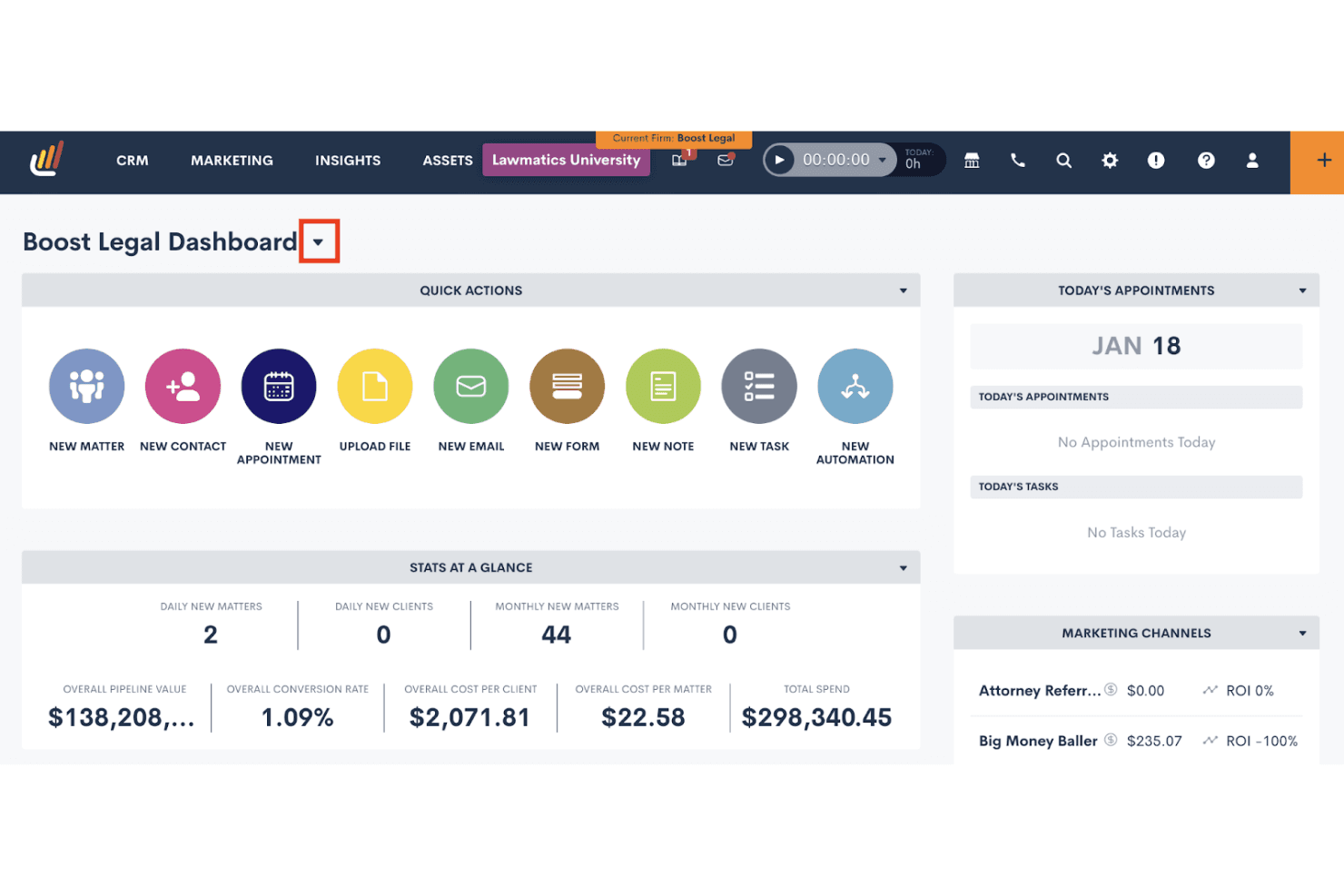
Lawmatics centralizza in un unico cruscotto l'acquisizione dei clienti, le attività e il ROI del marketing. Lawmatics è un CRM specifico per il settore legale, progettato per gli studi legali e dotato di gestione dell'acquisizione dei clienti, automazione dei flussi di lavoro, verifica dei conflitti, monitoraggio delle fonti di segnalazione, reportistica del flusso di acquisizione e strumenti per le campagne di marketing.
Per chi è più indicato Lawmatics?
Lawmatics è particolarmente adatto agli studi legali di medie dimensioni che desiderano automatizzare i flussi di lavoro dall'acquisizione all'inserimento in diverse aree di pratica senza dover costruire tutto da zero.
Perché ho scelto Lawmatics
Lawmatics si è guadagnato un posto nella mia rosa dei preferiti perché il suo motore di automazione dei flussi di lavoro è stato progettato appositamente per gli studi legali, anziché essere adattato a partire da un CRM generico. Mi piace molto la possibilità di creare automazioni condizionali e articolate in più fasi, che si attivano nel momento stesso in cui un potenziale cliente invia un modulo di acquisizione, guidandolo attraverso i follow-up, i controlli dei conflitti e le richieste di firma elettronica senza alcun intervento manuale. Merlin Copilot consente di generare queste automazioni utilizzando istruzioni in linguaggio naturale, riducendo notevolmente i tempi di configurazione.
Funzionalità principali di Lawmatics
- Monitoraggio della fonte di segnalazione: Recupera i segnalatori direttamente dai contatti CRM esistenti e registra in un unico punto il numero totale di pratiche e di incarichi acquisiti per ciascun segnalatore.
- Firma elettronica nativa con applicazione delle scadenze: Invia, monitora e fa rispettare le scadenze di firma per gli accordi di incarico e i documenti di acquisizione senza ricorrere a uno strumento di terze parti.
- Valutazione dei potenziali clienti con l'IA Merlin Qualify: Assegna un punteggio ai potenziali clienti in entrata in base a criteri definiti dallo studio e attiva i passaggi successivi, come la pianificazione di un appuntamento o l'invio dell'accordo di incarico, in base a ciascun punteggio.
- Acquisizione dei potenziali clienti su più canali: Acquisisce potenziali clienti da moduli web, centralinisti virtuali, chatbot e directory legali, indirizzandoli automaticamente nel flusso di acquisizione.
Integrazioni di Lawmatics
Lawmatics offre integrazioni native con Clio, 8am™ MyCase, PracticePanther, Filevine, Smokeball, LEAP, CARET Legal, CallRail, Google Calendar e Microsoft Outlook. La sua API REST, OAuth2 e i webhook supportano integrazioni personalizzate.
Pros and Cons
Pros:
- Automazione integrata dell'acquisizione legale con flusso Kanban
- Automazione dei flussi di lavoro personalizzabile per qualsiasi area di pratica
- Firma elettronica nativa e portale clienti personalizzato inclusi
Cons:
- Nessuna richiesta integrata di recensioni successive alla pratica
- Mancano tipologie specifiche di report per alcuni studi
Learn more about Lawmatics: Ideale per sviluppare un flusso visivo delle vendite
- Prova gratuita di 14 giorni
- A partire da $14/utente/mese (con fatturazione annuale)
Visit WebsiteCustomer Rating:4.4/5This rating combines scores from multiple user review sites to reflect overall customer sentiment about the product.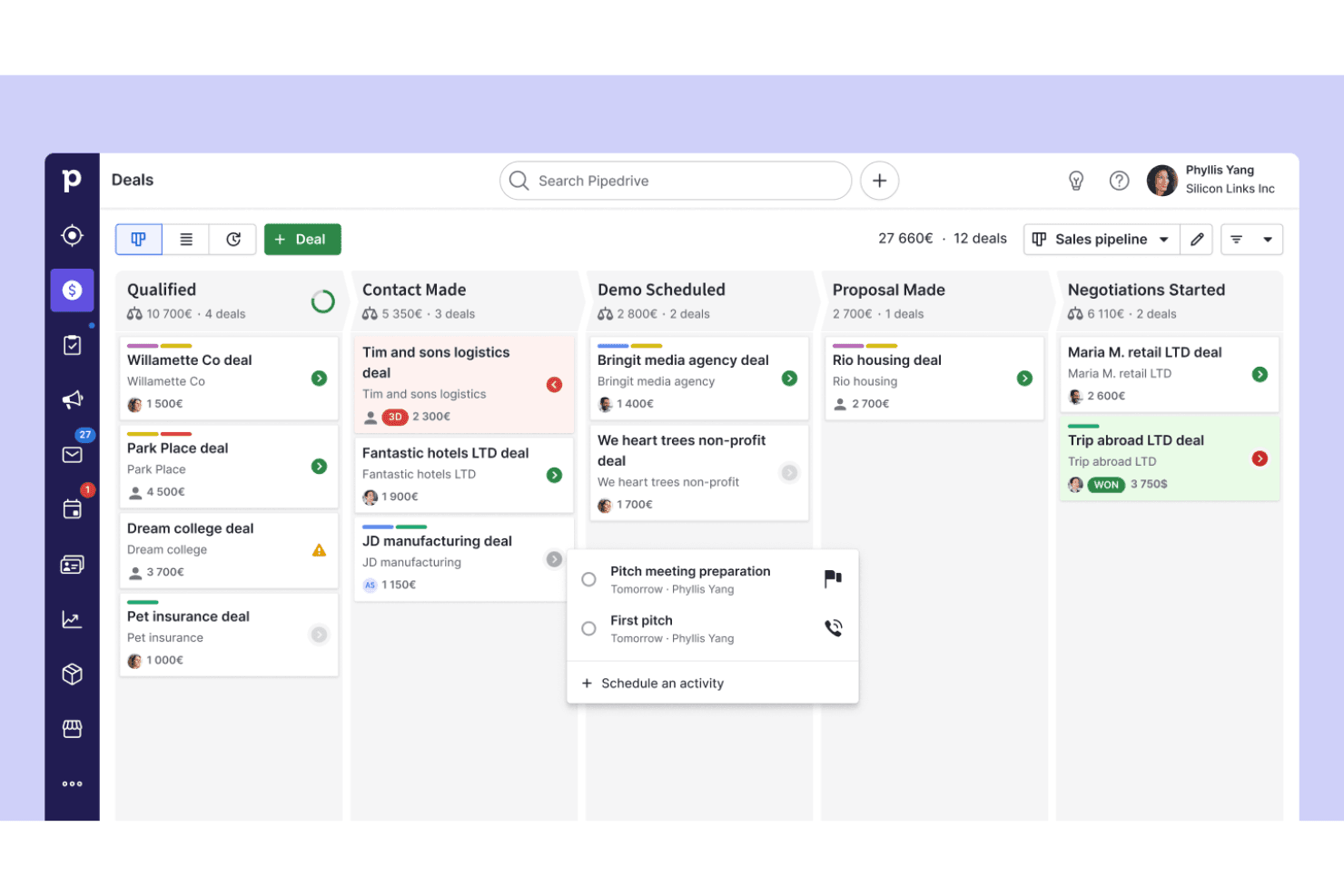
Pipedrive organizza le trattative nelle diverse fasi del flusso in una vista Kanban. Pipedrive è una piattaforma CRM focalizzata sulle vendite che offre la gestione visiva del flusso di vendita, strumenti per acquisire contatti, automazione dei flussi di lavoro e attività di contatto via e-mail per monitorare i potenziali clienti dal primo contatto fino all'acquisizione e alla firma del mandato.
Per chi è più adatto Pipedrive?
Pipedrive è particolarmente adatto ai piccoli studi legali e agli studi boutique che utilizzano già un sistema separato per la gestione dello studio e hanno bisogno di uno strumento dedicato per monitorare i potenziali clienti attraverso un flusso visivo di acquisizione.
Perché ho scelto Pipedrive
Pipedrive si è guadagnato un posto nella mia selezione perché il suo flusso visivo Kanban rende davvero facile vedere a che punto si trova ogni potenziale cliente, dal primo contatto fino alla firma del mandato, senza dover consultare numerosi documenti. Mi piace il fatto che le fasi di acquisizione siano completamente personalizzabili, così da poter adattare il processo esatto dello studio: consulenza fissata, verifica dei conflitti in sospeso, mandato inviato. L'estensione LeadBooster aggiunge un assistente virtuale attivo 24 ore su 24, 7 giorni su 7 e moduli web integrabili che acquisiscono automaticamente i contatti direttamente nel flusso.
Caratteristiche principali di Pipedrive
- Estensione Campaigns: Uno strumento integrato di marketing via e-mail per inviare campagne di fidelizzazione segmentate a potenziali clienti e clienti precedenti direttamente dai dati dei contatti CRM.
- Integrazione con DocuSign: Consente di generare, compilare automaticamente e inviare mandati o lettere d'incarico da una scheda trattativa, monitorando lo stato della firma.
- Pianificatore di riunioni: Uno strumento di prenotazione autonoma che consente ai potenziali clienti di fissare consulenze direttamente nel calendario di un avvocato senza scambi ripetuti di e-mail.
- Posta in arrivo dei contatti: Un'area intermedia per i contatti non qualificati in cui è possibile assegnare etichette come tiepido, caldo o freddo e programmare attività di ricontatto prima di spostare i contatti nel flusso principale.
Integrazioni di Pipedrive
Pipedrive offre integrazioni del Marketplace con DocuSign, PandaDoc e QuickBooks, oltre alla connettività nativa con Google Workspace e Microsoft Outlook/Teams. La sua API supporta collegamenti personalizzati con i sistemi di gestione degli studi legali e si integra anche con Clio tramite Zapier.
Pros and Cons
Pros:
- Flusso visivo Kanban per monitorare l'acquisizione
- Ampie opzioni di personalizzazione del flusso di acquisizione
- Funzionalità di e-mail e reportistica basate sull'intelligenza artificiale
Cons:
- Nessuna funzionalità nativa per la verifica dei conflitti legali
- Manca una struttura dei dati legali incentrata sulle pratiche
Learn more about Pipedrive: Ideale per una gestione avanzata degli studi legali
- Prova gratuita disponibile
- A partire da $59/utente/mese
Visit WebsiteCustomer Rating:4.4/5This rating combines scores from multiple user review sites to reflect overall customer sentiment about the product.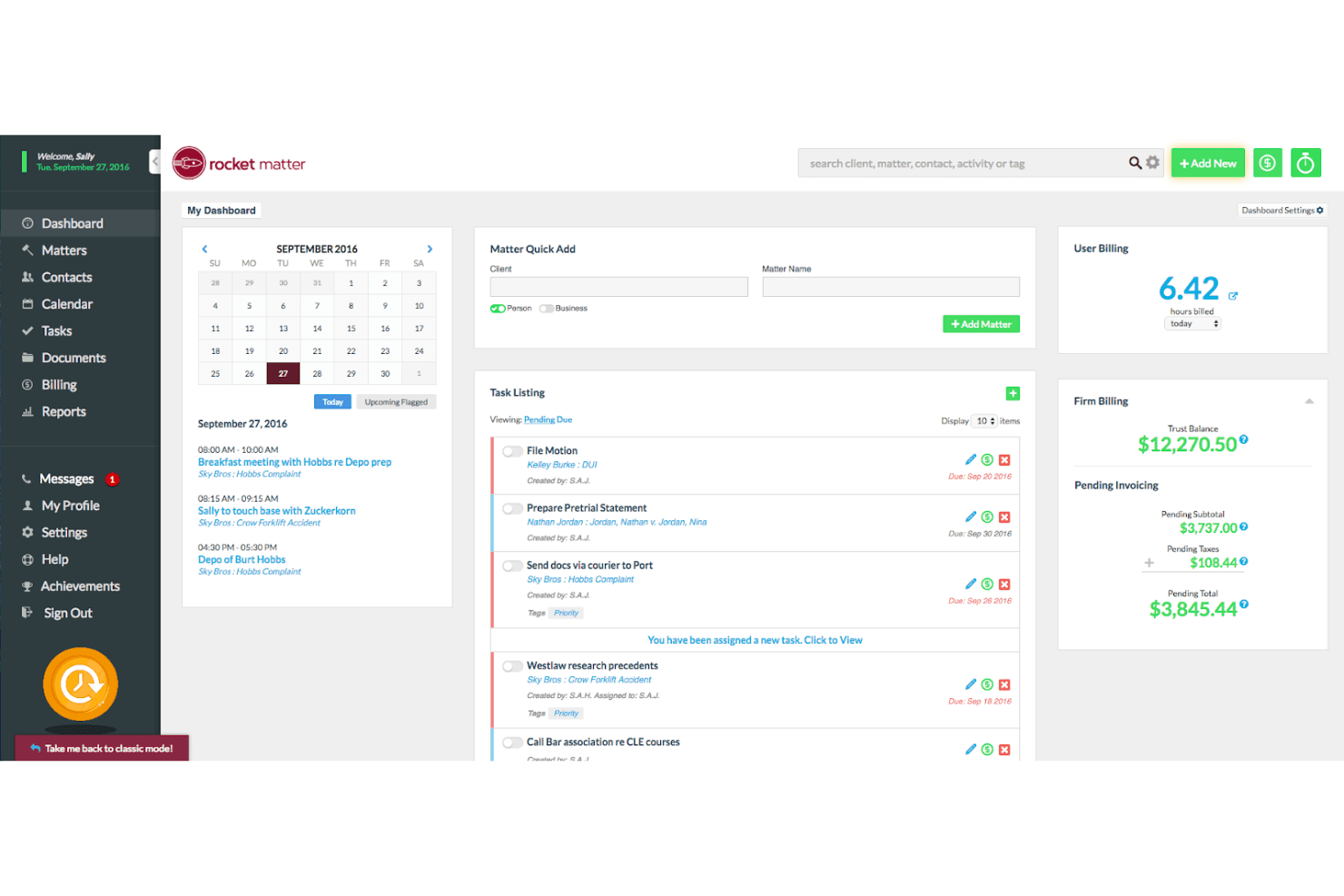
Rocket Matter centralizza fatturazione, attività e pianificazione in un'unica dashboard. Rocket Matter è una piattaforma per la gestione degli studi legali che combina la gestione dei contatti incentrata sulle pratiche, i flussi di lavoro per l'acquisizione dei clienti, la fatturazione, la contabilità fiduciaria, l'automazione dei documenti e un componente aggiuntivo CRM per il monitoraggio della pipeline dei potenziali clienti e le campagne di marketing.
Per chi è più adatto Rocket Matter?
Rocket Matter è una soluzione particolarmente adatta agli studi legali di medie dimensioni che desiderano gestire fatturazione, contabilità fiduciaria, pratiche e acquisizione dei clienti in un'unica piattaforma.
Perché ho scelto Rocket Matter
Rocket Matter si è guadagnato un posto nella mia rosa ristretta perché la sua architettura incentrata sulle pratiche va più in profondità rispetto alla maggior parte delle piattaforme per la gestione degli studi legali. Apprezzo in particolare il fatto che ogni contatto, documento, registrazione di fatturazione ed evento del calendario sia direttamente collegato a una pratica, evitando così che gli studi con più avvocati perdano il contesto durante la gestione di un carico di lavoro intenso. L'ambiente di lavoro integrato per le viste dei dati mi consente di creare report personalizzati sui ricavi e sul tasso di realizzo per avvocato o area di attività senza esportare i dati in un foglio di calcolo. Abbinando questa funzione alla redazione nativa di documenti assistita dall'IA e alle campagne SMS automatizzate, si ottiene una configurazione per la gestione degli studi legali davvero avanzata.
Funzionalità principali di Rocket Matter
- Strumento per il controllo dei conflitti: Esegui ricerche per nome tra pratiche, contatti, clienti e campi personalizzati per individuare potenziali conflitti prima di aprire una nuova pratica.
- Contabilità fiduciaria: Gestisci più conti fiduciari per cliente con garanzie integrate di conformità alle norme dell'ordine forense e riconciliazione degli estratti conto bancari.
- Campagne SMS automatizzate: Invia campagne di messaggi di testo a più contatti contemporaneamente direttamente dal computer, inclusi promemoria di pagamento e avvisi relativi a compensi anticipati scaduti.
- Portale clienti: Condividi documenti, invia fatture, raccogli firme elettroniche e scambia messaggi con i clienti tramite un portale sicuro integrato.
Integrazioni di Rocket Matter
Rocket Matter offre integrazioni native con QuickBooks Online, Microsoft Outlook, Microsoft OneDrive, Google Calendar, Dropbox, Box e NetDocuments. Supporta inoltre le integrazioni con Kenect e Zapier.
Pros and Cons
Pros:
- Controllo nativo dei conflitti incluso in tutti i piani
- Moduli di acquisizione automatizzati con logica condizionale
- Portale clienti con condivisione sicura dei documenti
Cons:
- Le funzionalità CRM sono disponibili solo come componente aggiuntivo
- Nessun monitoraggio dedicato della fonte di riferimento
Learn more about Rocket Matter: Ideale per strumenti di vendita basati sull'intelligenza artificiale
- Prova gratuita di 30 giorni
- A partire da $325/utente/mese (con fatturazione annuale)
Visit WebsiteCustomer Rating:4.3/5This rating combines scores from multiple user review sites to reflect overall customer sentiment about the product.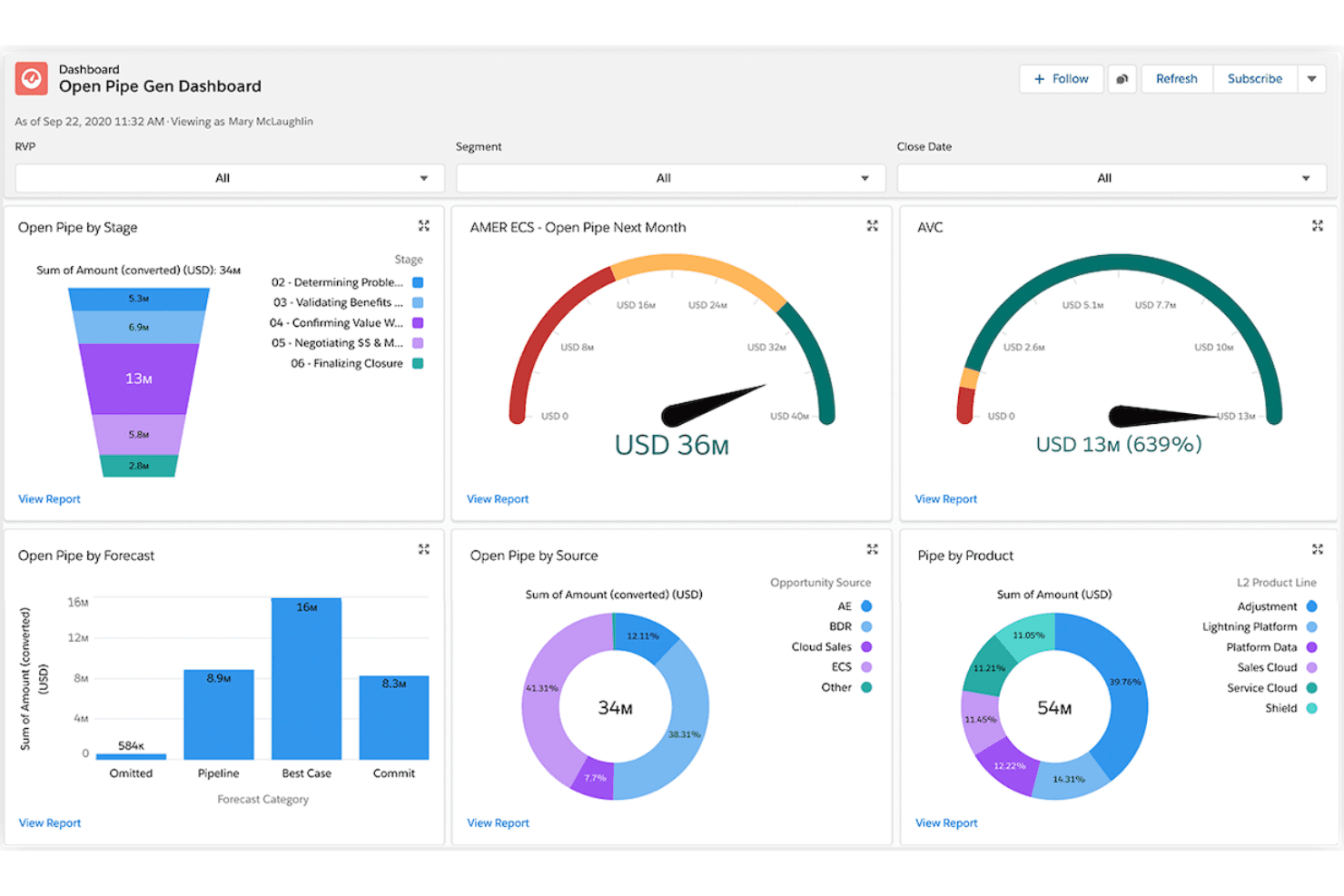
Salesforce monitora la pipeline aperta per fase, fonte e prodotto in un'unica vista. Salesforce Financial Services Cloud è una piattaforma CRM aziendale basata su Sales Cloud che offre il monitoraggio delle segnalazioni, la previsione della pipeline basata sull'intelligenza artificiale, la mappatura delle relazioni con i clienti e l'automazione del marketing per gli studi legali che puntano allo sviluppo commerciale.
Per chi è più adatto Salesforce Financial Services Cloud?
Salesforce Financial Services Cloud è una soluzione particolarmente adatta agli studi legali di medie e grandi dimensioni con team dedicati alle operazioni sui ricavi o allo sviluppo commerciale, che danno priorità alla previsione della pipeline basata sull'intelligenza artificiale, al monitoraggio delle segnalazioni e alla gestione delle relazioni con i clienti rispetto agli strumenti chiavi in mano per l'acquisizione dei clienti legali.
Perché ho scelto Salesforce Financial Services Cloud
Ho incluso Salesforce Financial Services Cloud tra le mie scelte principali perché la sua suite di intelligenza artificiale è davvero senza pari per lo sviluppo commerciale degli studi legali. Le previsioni di Einstein offrono ai team BD una visibilità sulla pipeline a livello di avvocato e area di pratica, mentre Agentforce può gestire autonomamente l'instradamento delle richieste e il follow-up dei potenziali clienti. Anche il monitoraggio delle segnalazioni è una funzionalità di primo livello: gli studi possono registrare le fonti delle segnalazioni, monitorare i tassi di conversione e attribuire con precisione i ricavi ai partner che le hanno originate.
Funzionalità principali di Salesforce Financial Services Cloud
- Agenti di intelligenza artificiale Agentforce: Agenti di intelligenza artificiale autonomi che esaminano le richieste iniziali, indirizzano i potenziali clienti all'avvocato corretto e aggiornano i record senza intervento manuale.
- Automazione con Flow Builder: Un generatore di flussi di lavoro senza codice che automatizza l'assegnazione delle attività, le sequenze di follow-up e l'invio dei documenti tramite l'integrazione con DocuSign.
- Portale clienti tramite Experience Cloud: Un portale self-service sicuro e personalizzato con il marchio dello studio, dove i clienti possono condividere documenti, verificare gli aggiornamenti sullo stato e completare le fasi di onboarding.
- Integrazione con l'analisi di Tableau: Connettività nativa con Tableau che consente ai team BD di creare previsioni personalizzate sui ricavi e dashboard sul valore delle pratiche, oltre alla reportistica standard.
Integrazioni di Salesforce Financial Services Cloud
Salesforce Financial Services Cloud supporta integrazioni native con DocuSign, Tableau e Slack, oltre all'integrazione con Salesforce Marketing Cloud. Le integrazioni del marketplace AppExchange, MuleSoft e le API supportano la connettività personalizzata; le piattaforme legali come Clio e PracticePanther richiedono connessioni di terze parti.
Pros and Cons
Pros:
- Gli agenti di intelligenza artificiale automatizzano i flussi di lavoro relativi a segnalazioni e richieste iniziali
- Il monitoraggio nativo delle segnalazioni collega i ricavi alle fonti
- Le dashboard di Tableau consentono la reportistica della pipeline a livello di avvocato
Cons:
- Nessun sistema integrato per l'acquisizione dei clienti legali o per i controlli sui conflitti
- La gestione delle pratiche richiede un notevole lavoro di personalizzazione
Learn more about Salesforce Financial Services Cloud: Ideale per i processi di marketing
- Demo gratuita disponibile
- Prezzi su richiesta
Visit WebsiteCustomer Rating:4.6/5This rating combines scores from multiple user review sites to reflect overall customer sentiment about the product.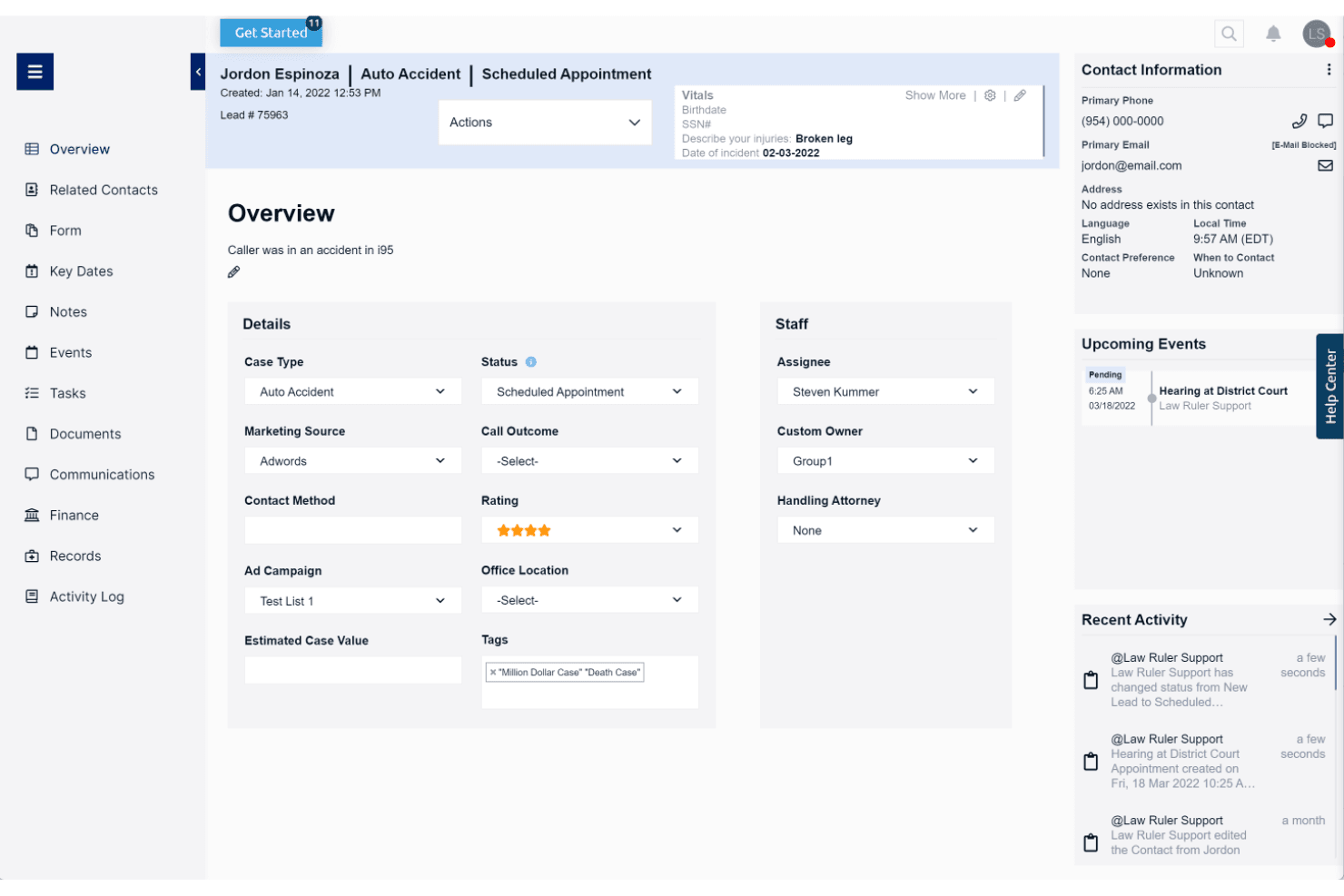
Law Ruler centralizza i dettagli dei potenziali clienti, lo stato delle pratiche e gli eventi imminenti in un'unica schermata. Law Ruler è una piattaforma CRM legale e di acquisizione clienti sviluppata esclusivamente per gli studi legali, che combina moduli intelligenti, automazione del marketing multicanale, un dialer telefonico software integrato, monitoraggio della pipeline e strumenti email assistiti dall'IA.
Per chi è più adatto Law Ruler?
Law Ruler è particolarmente adatto agli studi legali B2C ad alto volume, come quelli specializzati in lesioni personali, controversie collettive o difesa penale, che devono gestire campagne di marketing multicanale insieme all'acquisizione dei clienti.
Perché ho scelto Law Ruler
Law Ruler entra nella mia lista ristretta perché la sua automazione del marketing è più approfondita di quella di qualsiasi altro CRM legale che abbia valutato. Sono particolarmente colpito dal suo motore per le campagne multicanale: sequenze email automatizzate a cadenza programmata, SMS bidirezionali e campagne di chiamate vocali preregistrate funzionano tutti in parallelo da un'unica piattaforma. La funzione di composizione con presenza locale abbina l'ID chiamante in uscita al prefisso telefonico del potenziale cliente, migliorando concretamente i tassi di risposta per i team che gestiscono l'acquisizione di clienti nei settori delle lesioni personali e delle controversie collettive e che devono gestire grandi volumi di contatti in entrata.
Funzionalità principali di Law Ruler
- Moduli intelligenti: Moduli di acquisizione basati su logica condizionale che qualificano o escludono automaticamente i potenziali clienti in base alle risposte fornite, prima del coinvolgimento del personale.
- Dialer telefonico software integrato: Un dialer con funzione di chiamata con un clic, registrazione delle chiamate, monitoraggio delle chiamate in entrata e in uscita e supervisione delle chiamate, che consente ai responsabili di ascoltare le chiamate in corso.
- Assistente email con IA: Uno strumento basato su ChatGPT incluso in tutti i piani a pagamento, che redige email di marketing, risposte ai clienti e modelli per l'acquisizione, con regolazione del tono e della lunghezza.
- Generatore di report personalizzati: Un generatore di report senza codice che consente agli studi di monitorare lo stato della pipeline, la produttività del personale e i tassi di conversione, con invio ricorrente programmato.
Integrazioni di Law Ruler
Law Ruler offre integrazioni documentate con Clio Manage, Rocket Matter, TimeSolv, CosmoLex, Dropbox Sign, CallRail, LawPay e Smith.AI. Ogni piano a pagamento include l'accesso all'API ed è supportato anche Zapier.
Pros and Cons
Pros:
- Automazione multicanale dell'acquisizione tramite email, SMS e voce
- Telefono software integrato con composizione a presenza locale
- Moduli di acquisizione personalizzabili con qualificazione dei potenziali clienti
Cons:
- Nessun flusso di lavoro nativo per il controllo dei conflitti di interesse
- Manca uno strumento integrato per la programmazione degli appuntamenti
Learn more about Law Ruler: Ideale per la gestione delle relazioni
- Demo gratuita disponibile
- Prezzi su richiesta
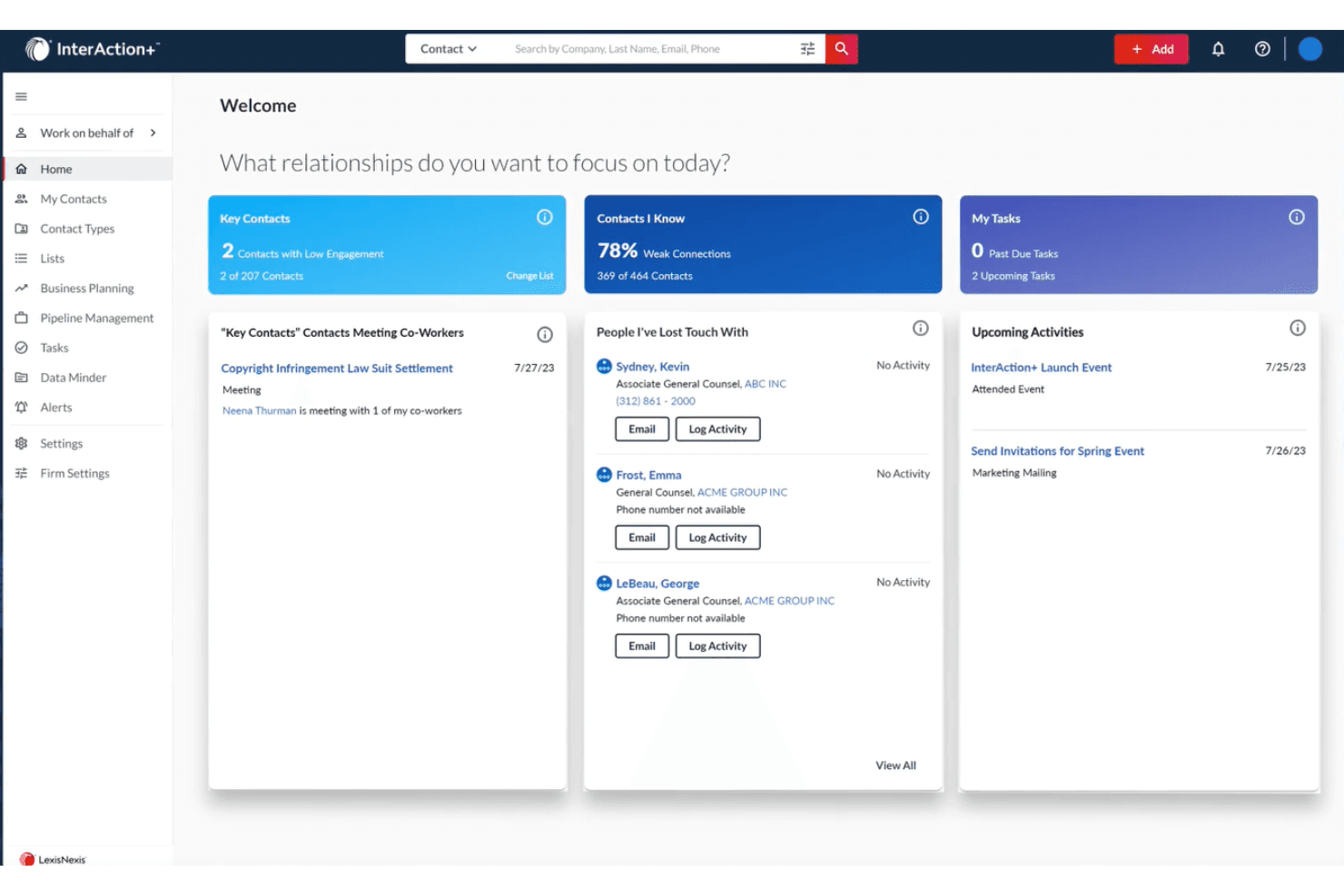
InterAction+ aiuta gli utenti a dare priorità alle relazioni e a monitorare quotidianamente i contatti chiave. InterAction+ è un CRM specifico per il settore legale, sviluppato da LexisNexis, che combina l'intelligence sulle relazioni, il monitoraggio della pipeline di sviluppo aziendale, la valutazione dei clienti basata sull'IA e la reportistica BD per clienti, fonti di referral e aree di pratica.
Per chi è più adatto InterAction+?
InterAction+ è particolarmente adatto agli studi legali di medie e grandi dimensioni, in cui i direttori dello sviluppo aziendale e i team BD gestiscono la strategia delle relazioni con i clienti in più aree di pratica.
Perché ho scelto InterAction+
InterAction+ si è guadagnato un posto nella mia selezione perché nessun altro CRM legale è all'altezza della sua profondità nell'intelligence sulle relazioni. Sono particolarmente colpito dal Punteggio delle relazioni basato sull'IA, che valuta continuamente lo stato di salute del coinvolgimento dei clienti e segnala le relazioni a rischio prima che si deteriorino. Abbinandolo al Radar dei clienti chiave per avere una visione dell'intero studio sui clienti più importanti, i team BD ottengono un vantaggio concreto nel proteggere e aumentare i ricavi nelle diverse aree di pratica.
Funzionalità principali di InterAction+
- Riepilogo giornaliero: Un'e-mail giornaliera configurabile che mette in evidenza le attività BD prioritarie e le attività di ricontatto relative alle relazioni senza interrompere il flusso di lavoro.
- Integrazione con LexisNexis Context: Integra direttamente nei profili di clienti e potenziali clienti l'analisi degli eventi giudiziari per studio, area di pratica e giurisdizione.
- Reportistica dei ricavi per area di pratica: Monitora l'avanzamento della pipeline, i tassi di acquisizione dei clienti e il ROI del marketing, suddivisi per cliente e area di pratica.
- Integrazione con Microsoft 365: Mostra i dati sulle relazioni con i clienti all'interno di Outlook, Excel e Word, consentendo agli avvocati di agire sulla base delle informazioni del CRM senza cambiare strumento.
Integrazioni di InterAction+
InterAction+ offre integrazioni native nell'ecosistema Microsoft, tra cui Microsoft 365 e Power Automate, oltre a LexisNexis Context. La sua API nel cloud supporta connessioni personalizzate, mentre non vengono indicati pubblicamente specifici strumenti di integrazione per la gestione degli studi legali.
Pros and Cons
Pros:
- Integrazione esclusiva con l'analisi degli eventi giudiziari di LexisNexis
- Valutazione dello stato di salute delle relazioni con i clienti basata sull'IA
- Ampia adozione e fiducia nel settore legale
Cons:
- Nessun modulo di acquisizione clienti specifico per il settore legale
- Nessun motore automatizzato per il controllo dei conflitti
Learn more about InterAction+: Ideale per la contabilità legale integrata
- Prova gratuita di 10 giorni
- A partire da 49 $/utente/mese
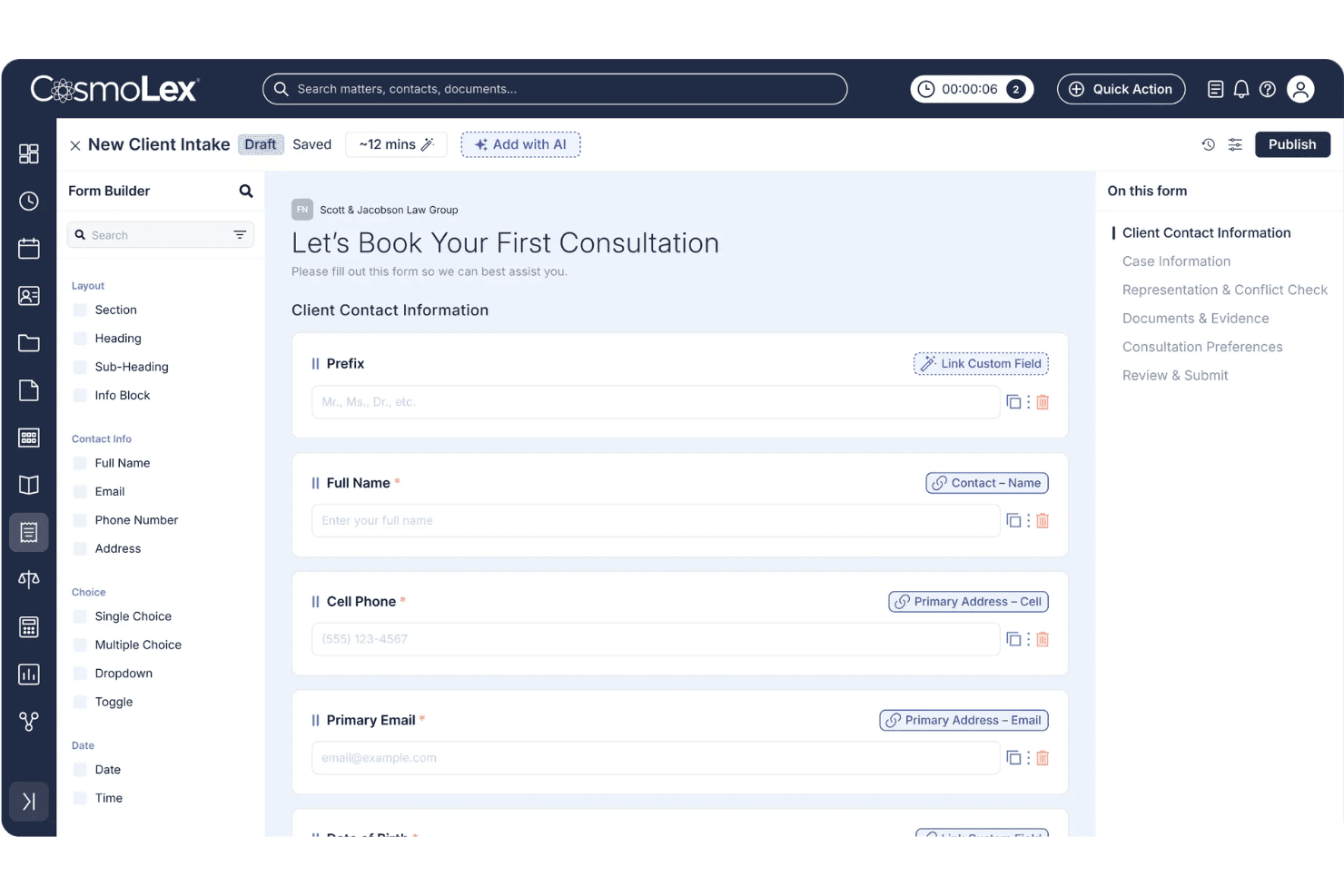
CosmoLex consente agli utenti di creare moduli personalizzati per l'acquisizione dei clienti con campi associati. CosmoLex CRM è una piattaforma di gestione degli studi legali completa che combina CRM, acquisizione dei clienti, verifica dei conflitti, contabilità fiduciaria, fatturazione e gestione delle pratiche in un unico sistema.
Per chi è più adatto CosmoLex CRM?
CosmoLex CRM è una soluzione ideale per gli studi legali di piccole e medie dimensioni che desiderano gestire l'acquisizione dei clienti, la verifica dei conflitti, la fatturazione e la contabilità fiduciaria in un'unica piattaforma.
Perché ho scelto CosmoLex CRM
CosmoLex CRM si è guadagnato un posto nella mia rosa di finalisti perché è l'unico CRM legale che ho trovato a integrare direttamente la contabilità fiduciaria e la conformità IOLTA nella stessa piattaforma utilizzata per l'acquisizione dei clienti e la gestione delle pratiche. Apprezzo il fatto che le verifiche dei conflitti vengano eseguite sui dati aggiornati delle pratiche e generino automaticamente registri di audit con indicazione temporale, evitando di dover gestire un registro separato. Anche la funzionalità AI per l'acquisizione del 2025 si distingue: crea moduli di acquisizione a partire da un prompt in linguaggio semplice o da un PDF esistente, quindi associa le richieste direttamente ai record dei contatti senza alcun inserimento duplicato.
Funzionalità principali di CosmoLex CRM
- Campagne email e SMS a sequenza: Sequenze automatizzate di coinvolgimento in più fasi, attivate dal comportamento dei potenziali clienti o dall'invio di moduli e personalizzate con i dati dei clienti e dell'acquisizione.
- Portale clienti sicuro: Un portale personalizzato e bidirezionale in cui i clienti possono condividere documenti, visualizzare le fatture, effettuare pagamenti e scambiare messaggi collegati alla propria pratica.
- Dashboard Analisi dello studio legale: Reportistica configurabile con modelli predefiniti che coprono l'attività delle pratiche, la produttività finanziaria e la conformità della contabilità fiduciaria.
- Moduli di acquisizione specifici per area di pratica: I moduli di acquisizione possono essere configurati e personalizzati separatamente per area di pratica, così da qualificare i potenziali clienti prima della consulenza.
Integrazioni di CosmoLex CRM
CosmoLex CRM dispone di integrazioni native con Microsoft 365, QuickBooks Online, Google Calendar, Google Drive, OneDrive, Dropbox, Box e NetDocuments. Supporta inoltre Zapier.
Pros and Cons
Pros:
- Contabilità fiduciaria e gestione dello studio integrate
- Strumenti AI nativi per automatizzare l'acquisizione legale
- Portale clienti sicuro con messaggistica bidirezionale
Cons:
- Nessun modulo per il monitoraggio della fonte delle segnalazioni
- Le analisi della pipeline CRM sono limitate
Learn more about CosmoLex CRM:
Altri software CRM per studi legali
Di seguito è riportato un elenco di altri software CRM per studi legali che ho selezionato. Sebbene non siano entrati nella prime 10, sono comunque validi e meritano ulteriori ricerche.
- 11Creatio CRMIdeale per l'automazione senza codice dei flussi di lavoro CRM
- 12CopperIdeale per Google Workspace
- 13Zoho CRMParas tekoälypohjaiseen kuvien järjestämiseen
- 14RingCentralIdeale per gli strumenti di comunicazione
- 15SugarAIIdeale per le opzioni di personalizzazione
- 16monday AI WorkspaceIdeale per l'integrazione con la gestione dei progetti
- 17FilevineIdeale per l'automazione dei documenti
- 18ActionstepIdeale per studi legali di medie dimensioni
- 19CobblestoneIdeale per la gestione dei contratti
Recensioni correlate sui CRM
Se non hai ancora trovato quello che stai cercando, dai un'occhiata a questi strumenti strettamente correlati ai CRM completi che abbiamo testato e valutato.
- Software CRM
- Software per le vendite
- Software per la gestione dei lead
- Software di business intelligence
- Software per la gestione dei contratti
- Sistema di gestione dei ricavi
- Software CPQ
Come Valuto i Software CRM per Studi Legali
Scompongo la mia valutazione in due livelli: i requisiti di base che ogni CRM legale deve soddisfare—gestione degli intake, controlli dei conflitti, archiviazione delle pratiche—e i fattori distintivi che differenziano le migliori soluzioni.
Funzionalità Core (Requisiti Minimi per Questa Lista)
Quando seleziono gli strumenti per la mia lista, valuto ciascuno su una scala da 0 (non offre la funzionalità) a 5 (eccelle in quest’area) per ogni funzionalità principale elencata qui sotto. Successivamente, calcolo il punteggio totale dello strumento come percentuale. Ogni strumento deve raggiungere un punteggio totale minimo del 55% per essere considerato per l’inclusione.
- Gestione dell’Intake Legale: Verifico se il CRM offre moduli di intake strutturati e pipeline progettati per convertire i lead in clienti acquisiti, non solo funnel di vendita generici.
- Supporto al Controllo dei Conflitti: Prima che uno studio possa impegnarsi con un potenziale cliente, è necessario verificare i conflitti. Cerco ricerche conflitti nativi o integrazioni dirette con software di gestione delle pratiche.
- Modello di Contatto Centrale sulla Pratica: Un CRM per studi legali dovrebbe organizzare i dati attorno alle pratiche e alle parti coinvolte—clienti, controparte, fonti di referenze—invece di imporre una struttura standard basata su trattative e account.
- Automazione del Flusso di Lavoro Legale: Valuto se la piattaforma automatizza passaggi specifici dell’intake, come l’invio di lettere d’incarico, l’attivazione di richieste di firma elettronica o l’assegnazione di compiti di onboarding ai paralegali.
- Tracciamento delle Fonti di Referenza: Le relazioni di referenza guidano la crescita della maggior parte degli studi legali. Cerco la possibilità di attribuire nuove pratiche e ricavi alla fonte o all’avvocato di origine.
- Report su Ricavi & Pipeline: Verifico la presenza di report che suddividano il valore della pipeline, i tassi di conversione e le previsioni per avvocato, area di pratica o tipo di pratica—non solo dashboard di vendita generiche.
Dopo aver compilato una lista di strumenti che rispondono a questi criteri, considero cosa distingue ogni piattaforma dalle altre.
Fattori Differenzianti (Cosa Distingue i Vendor)
Ecco come confronto e metto a confronto i diversi fornitori:
Funzionalità Distintive
La velocità di risposta è importante nell’intake legale, quindi cerco la presenza di messaggistica SMS integrata che permetta ai team di intake di inviare promemoria di appuntamenti e solleciti di follow-up senza uscire dal CRM. Il tracciamento delle chiamate con attribuzione della fonte è un altro elemento distintivo: collega le chiamate in entrata a specifiche campagne o directory, offrendo ai team RevOps dati reali su quali canali generano pratiche effettive. Valuto anche se la piattaforma offre un assistente AI per l’intake, capace di qualificare i lead fuori orario e di instradare le consulenze urgenti all’avvocato appropriato.
Oltre le Funzionalità
La compatibilità con lo stack legale esistente dello studio è uno dei primi aspetti che verifico: vedere se il CRM si collega a strumenti gestionali come Clio o MyCase determina quanto senza soluzione di continuità i dati dell’intake passano alle pratiche attive. Valuto anche l’adeguatezza all’area di pratica. Uno studio specializzato in infortunistica stradale che gestisce centinaia di lead mensili necessita di un setup molto diverso rispetto ad un boutique di diritto societario che gestisce solo alcune relazioni. Faccio attenzione anche a come i prezzi cambiano mentre lo studio cresce, poiché costi accessori per SMS, storage o utenti aggiuntivi possono aumentare significativamente il costo totale di gestione.
Come scegliere un software CRM per studi legali
Mentre analizzi il tuo processo unico di selezione del software, tieni a mente i seguenti punti:
- Facilità d'uso e accessibilità: Il sistema CRM scelto dovrebbe essere intuitivo, accessibile ovunque e consentire un accesso rapido e sicuro. Un CRM basato sul cloud consente ad avvocati e personale di accedere alle informazioni sui clienti e gestire le attività da remoto, garantendo la possibilità di lavorare in modo efficiente in ufficio, in tribunale o da casa.
- Integrazione con gli strumenti esistenti: Quando si cerca un software CRM, è opportuno valutare opzioni che si integrino perfettamente con altri strumenti e sistemi. Ciò include client di posta elettronica, software per la gestione dei documenti, strumenti di calendario e altri software per la gestione degli studi legali, così da semplificare i flussi di lavoro.
- Funzionalità di automazione: L'automazione è una funzione preziosa dei software CRM, poiché semplifica le attività ripetitive come i promemoria degli appuntamenti, il monitoraggio delle scadenze e la generazione dei documenti. Questo aiuta gli avvocati a mantenere l'organizzazione, riduce gli errori umani e migliora l'efficienza.
- Personalizzazione e scalabilità: Quando si acquista un nuovo CRM, è importante cercarne uno personalizzabile, in modo da poter adattare la soluzione alle proprie esigenze specifiche. Inoltre, il software dovrebbe poter crescere insieme all'attività e gestire un volume crescente di dati, utenti e interazioni con i clienti.
- Sicurezza e conformità: Data la natura sensibile del lavoro legale, il software CRM deve offrire potenti funzionalità di sicurezza per proteggere le informazioni riservate dei clienti. Ciò include la crittografia, l'autenticazione a due fattori e gli indirizzi IP autorizzati. Inoltre, il software dovrebbe essere conforme agli standard e alle normative del settore.
Tendenze dei software CRM per gli studi legali
Ecco alcune tendenze che ho notato nei software CRM per gli studi legali e ciò che potrebbero significare per il futuro. Ho consultato innumerevoli aggiornamenti dei prodotti, comunicati stampa e registri delle versioni per individuare le indicazioni più importanti.
- Indicazioni sui clienti basate sull'IA: L'IA viene utilizzata per analizzare i dati dei clienti e fornire informazioni utili all'azione. Ciò può portare a interazioni più personalizzate con i clienti, aiutando gli studi legali a comprendere meglio le loro esigenze e a migliorare l'erogazione dei servizi.
- Integrazione con gli strumenti di ricerca giuridica: I software CRM si stanno integrando con gli strumenti di ricerca giuridica. Ciò consente agli avvocati di accedere alla giurisprudenza e alle disposizioni legislative direttamente dal CRM, risparmiando tempo e migliorando l'accuratezza della ricerca giuridica.
- Accessibilità da dispositivi mobili: Le soluzioni CRM ottimizzate per i dispositivi mobili stanno diventando essenziali. Gli avvocati possono ora accedere alle informazioni sui clienti e ai dettagli dei casi ovunque si trovino, migliorando la produttività e il servizio ai clienti.
- Maggiore sicurezza dei dati: Gli studi legali gestiscono informazioni sensibili, rendendo importanti solide misure di sicurezza. Di conseguenza, le funzionalità di sicurezza dei dati stanno diventando una priorità nei software CRM, con il rafforzamento dei protocolli di sicurezza per contribuire a proteggere la riservatezza dei clienti.
- Automazione delle attività ordinarie: L'automazione viene utilizzata per gestire le attività amministrative ordinarie, tra cui la pianificazione, la fatturazione e la gestione dei documenti. Queste funzionalità aiutano a liberare tempo per consentire agli avvocati di concentrarsi su attività legali più complesse.
Poiché gli studi legali danno sempre più priorità alla gestione delle relazioni con i clienti, i software CRM pensati per i professionisti del settore legale si stanno evolvendo per soddisfare le esigenze specifiche del settore. Questi progressi non solo semplificano le interazioni con i clienti, ma migliorano anche l'efficienza complessiva dello studio e l'erogazione dei servizi.
Che cos'è un software CRM per gli studi legali?
Il software CRM per gli studi legali è uno strumento che aiuta gli studi professionali a gestire le relazioni con i clienti e le attività di sviluppo aziendale. Viene utilizzato da avvocati, personale amministrativo e titolari degli studi per semplificare l'acquisizione dei clienti, la pianificazione, i ricontatti e il monitoraggio dei ricavi.
I componenti principali dei software CRM per gli studi legali includono strumenti per l'acquisizione dei clienti, funzionalità di gestione dei casi, gestione dei documenti, elevati livelli di sicurezza dei dati e automazione del marketing.
Funzionalità dei software CRM per gli studi legali
Scegliere il software CRM giusto per gli studi legali è importante per semplificare le operazioni, migliorare le relazioni con i clienti e aumentare l'efficienza complessiva. Di seguito illustrerò le funzionalità più importanti da cercare quando si acquista un nuovo software CRM.
- Marketing automatizzato tramite e-mail e messaggi di testo: Consente agli studi legali di rispondere rapidamente ai potenziali clienti e mantenere il coinvolgimento dei clienti attuali attraverso messaggi automatizzati. È essenziale per la generazione di potenziali clienti e la fidelizzazione dei clienti.
- Firma elettronica con un clic: Semplifica l'ottenimento delle firme dei clienti, facendo risparmiare tempo e garantendo che i documenti vengano firmati tempestivamente. Questa funzione è fondamentale per portare avanti le pratiche in modo efficiente.
- Messaggistica tramite testo e video: Consente agli studi legali di comunicare con i clienti attraverso i loro canali preferiti, aumentando il coinvolgimento e la fiducia.
- Analisi tramite pannello di controllo: Fornisce una panoramica centralizzata di metriche chiave come l'avanzamento delle pratiche, il coinvolgimento dei potenziali clienti e il ROI del marketing. Questa funzione aiuta gli studi a prendere decisioni basate sui dati e a monitorare le prestazioni.
- Gestione delle attività di marketing: Aiuta a gestire campagne di marketing complesse e attività legali configurando flussi di lavoro automatizzati e avvisi interni. Ciò garantisce il rispetto delle scadenze e il completamento efficiente delle attività.
- Supporto software: Offre supporto e formazione solidi per aiutare gli studi legali a passare senza difficoltà a un nuovo software CRM, riducendo la frustrazione e aumentando le probabilità di un'implementazione efficace.
- Gestione dei potenziali clienti: Facilita il monitoraggio e la coltivazione dei potenziali clienti, garantendo che nessun potenziale cliente venga trascurato. L'integrazione con gli strumenti di marketing può migliorare ulteriormente le attività di generazione dei potenziali clienti.
- Gestione dei contatti: Conserva registri dettagliati dei clienti, comprese le informazioni di contatto, la cronologia delle pratiche e i registri delle comunicazioni. Questa funzione è fondamentale per offrire un servizio personalizzato ai clienti.
- Monitoraggio del tempo e fatturazione: Registra le ore fatturabili e genera le fatture all'interno del sistema CRM, semplificando il processo di fatturazione e garantendo un monitoraggio accurato dei pagamenti.
- Gestione dei documenti: Conserva e organizza in modo sicuro i documenti legali, consentendone l'accesso e la condivisione tra i membri del team. Questa funzione è importante per mantenere una gestione delle pratiche organizzata ed efficiente.
L'integrazione di queste funzioni nel software CRM può migliorare significativamente la capacità del tuo studio legale di gestire le relazioni con i clienti, semplificare le operazioni e, in definitiva, aumentare la redditività.
Vantaggi del software CRM per gli studi legali
Il software CRM offre agli studi legali un approccio semplificato alla gestione delle relazioni con i clienti, al miglioramento della comunicazione e all'aumento dell'efficienza. Oltre a questi vantaggi, il software CRM per gli studi legali offre anche i seguenti benefici:
- Informazioni centralizzate sui clienti: Il software CRM consolida tutti i dati dei clienti in un'unica piattaforma facilmente accessibile, consentendo agli studi legali di monitorare il coinvolgimento, gestire i potenziali clienti e fornire un servizio personalizzato in ogni fase.
- Maggiore coinvolgimento dei clienti: Fornendo comunicazioni personalizzate, consigli su misura e contatti proattivi, il software CRM aiuta gli studi legali a costruire relazioni significative con i clienti e migliora i risultati per questi ultimi.
- Comunicazione semplificata: Il software CRM giusto offre strumenti per monitorare le interazioni e le comunicazioni con i clienti, garantendo che la cronologia delle comunicazioni venga registrata in un unico spazio. Questa panoramica centralizzata delle interazioni con i clienti aiuta gli studi legali a creare fiducia, anticipare le esigenze dei clienti e migliorarne la soddisfazione.
- Maggiore efficienza e produttività: Il software CRM per il settore legale automatizza attività di routine come l'acquisizione dei clienti, la programmazione degli appuntamenti e la gestione dei documenti, consentendo agli studi legali di concentrarsi su attività più importanti. Questa automazione riduce gli oneri amministrativi e garantisce che i membri del team siano sempre aggiornati.
- Sicurezza dei dati e conformità: Un CRM efficace per gli studi legali dà priorità a funzioni come la crittografia e i controlli degli accessi per proteggere le informazioni sensibili dei clienti. È inoltre essenziale rispettare le normative di settore, come il GDPR o l'HIPAA, garantendo che gli studi legali mantengano un registro chiaro delle modifiche e delle azioni eseguite all'interno del CRM.
Il software CRM offre numerosi vantaggi agli studi legali, tra cui una migliore gestione dei clienti, comunicazioni semplificate e una maggiore efficienza dei flussi di lavoro. Implementando un sistema CRM, gli studi legali possono gestire meglio le relazioni con i clienti, aumentare l'efficienza e offrire loro un servizio migliore.
Costi e prezzi del software CRM per gli studi legali
Quando si valutano i costi e i prezzi del software CRM per gli studi legali, è essenziale soppesare le funzioni e i vantaggi rispetto al proprio budget e alle proprie esigenze specifiche. Sebbene alcuni CRM offrano funzionalità avanzate a un prezzo più elevato, altri forniscono strumenti essenziali a un costo più accessibile.
Questa sezione fornisce una stima dei piani e dei costi medi dei software CRM per gli studi legali. I dati si basano su diverse fonti e riflettono livelli di prezzo e funzioni comuni.
Tabella comparativa dei piani dei software CRM per gli studi legali
| Tipo di piano | Prezzo medio | Funzionalità comuni |
| Piano gratuito | $0 | Gestione di base dei contatti, utenti limitati, reportistica di base e integrazione e-mail |
| Piano personale | $12 - $39/user/month | Gestione avanzata dei contatti, marketing via e-mail, automazione di base e integrazioni limitate |
| Piano aziendale | $40 - $129/user/month | Automazione avanzata, gestione dei documenti, monitoraggio del tempo, fatturazione e integrazioni con altri strumenti |
| Piano aziendale avanzato | Prezzo personalizzato | Personalizzazione completa, analisi avanzate, assistenza dedicata, sicurezza potenziata e integrazioni illimitate |
Una panoramica dei piani tariffari, dei costi e delle funzionalità dei software CRM per studi legali.
In definitiva, scegliere il CRM giusto richiede di bilanciare l'efficienza dei costi con la capacità di migliorare le relazioni con i clienti e semplificare le operazioni dello studio. Prima dell'acquisto, valuta attentamente le esigenze del tuo studio in relazione alle opzioni disponibili, per assicurarti di scegliere una soluzione che offra il miglior valore per il tuo investimento.
Domande frequenti sui software CRM per studi legali
Ecco alcune domande frequenti che ho ricevuto sui software CRM per studi legali.
In che modo i software CRM migliorano la sicurezza dei dati e la conformità normativa per gli studi legali?
I software CRM migliorano la sicurezza dei dati e la conformità normativa offrendo un controllo e un monitoraggio migliori delle informazioni sensibili dei clienti. I CRM per il settore legale sono progettati per ridurre il rischio di violazioni dei dati e garantire la conformità alle normative vigenti. Funzionalità come la sicurezza di livello bancario, l’archiviazione sicura dei documenti e i controlli degli accessi contribuiscono a proteggere i dati dei clienti.
In che modo i software CRM possono migliorare la comunicazione con i clienti per gli studi legali?
I software CRM migliorano la comunicazione con i clienti offrendo diversi canali di interazione e garantendo follow-up tempestivi. Funzionalità come la messaggistica di testo integrata, i modelli e-mail e i portali per i clienti facilitano una comunicazione coerente ed efficiente. Questa linea di comunicazione aperta contribuisce a creare relazioni più solide con i clienti e ad aumentare la loro soddisfazione.
Quali sono le difficoltà nell'implementazione di un software CRM in uno studio legale?
L’implementazione di un software CRM in uno studio legale può comportare difficoltà come la configurazione iniziale, la migrazione dei dati e l’adozione da parte degli utenti. Sebbene molte soluzioni CRM siano progettate per essere intuitive, la configurazione iniziale può richiedere tempo e impegno per impostare il sistema in base alle esigenze specifiche dello studio.
Anche la migrazione dei dati dai sistemi esistenti al nuovo CRM può essere complessa e richiedere un’attenta pianificazione. Inoltre, garantire che tutti i membri del personale siano adeguatamente formati e si sentano a proprio agio nell’utilizzo del nuovo sistema è fondamentale per il successo dell’implementazione.
I software CRM possono aiutare con la fatturazione e l'emissione delle fatture?
Sì, i software CRM possono semplificare la fatturazione e l’emissione delle fatture monitorando le ore fatturabili, generando fatture e gestendo i pagamenti. I processi di fatturazione automatizzati riducono gli errori e garantiscono l’emissione puntuale delle fatture, contribuendo a mantenere registri finanziari accurati e a migliorare il flusso di cassa.