

Con così tanti software diversi per l’accelerazione delle vendite disponibili, capire quale sia quello giusto per te è difficile. Sai di voler ridurre il tempo necessario per trasformare i lead in clienti, ma devi capire quale strumento sia il migliore. Ci penso io!
In questo articolo ti aiuterò a rendere semplice la tua scelta, condividendo la mia esperienza personale nell’utilizzo di decine di diversi strumenti di accelerazione delle vendite con vari team e account, insieme alle mie selezioni dei migliori software di accelerazione delle vendite.
Perché fidarsi dei nostri consigli sui software
6,700+
Reviews
20
Industry experts
16+
Evaluation factors
14
Years
Le nostre recensioni riflettono il nostro giudizio indipendente, non un discorso di vendita. Scopri come manteniamo la trasparenza.
Per questa guida, abbiamo valutato gli strumenti attraverso test pratici e ricerche indipendenti, assegnando un punteggio agli strumenti in base ai nostri criteri di selezione.
Le nostre recensioni riflettono il nostro giudizio editoriale umano, non un discorso di vendita.
Tabella comparativa dei software di accelerazione delle vendite
Questa tabella comparativa riassume i dettagli sui prezzi delle mie migliori selezioni di software di accelerazione delle vendite:
| Tool | Best For | Trial Info | Price | ||
|---|---|---|---|---|---|
| 1 | Ideale per una qualità accurata dei dati dei contatti B2B | Prova gratuita di 14 giorni + piano gratuito + demo gratuita disponibile | A partire da 49/postazione/mese (con fatturazione annuale) | Website | |
| 2 | Ideale per piccole e medie imprese | Prova gratuita di 30 giorni per i nuovi abbonati | A partire da $29/utente/mese con fatturazione annuale | Website | |
| 3 | Ideale per riassunti automatici delle chiamate | Prova gratuita di 14 giorni | Da $25/utente/mese (fatturato annualmente) | Website | |
| 4 | Ideale per l'esecuzione delle attività legate ai ricavi con connessione a Clari | Demo gratuita disponibile | Prezzi su richiesta | Website | |
| 5 | Ideale per il coaching delle chiamate in tempo reale nativo di Salesforce | Demo gratuita disponibile | Prezzi su richiesta | Website | |
| 6 | Ideale per l'intelligence sui ricavi | Demo gratuita disponibile | Prezzi su richiesta | Website | |
| 7 | Ideale per formare i rappresentanti con il coaching in tempo reale durante le chiamate | Demo gratuita disponibile | Prezzi su richiesta | Website | |
| 8 | Miglior strumento per l'esecuzione delle vendite | Demo gratuita disponibile | Prezzi su richiesta | Website | |
| 9 | Il miglior CRM tutto-in-uno per più reparti | Prova gratuita di 30 giorni per i nuovi abbonati | Da $25/utente/mese, fatturato annualmente | Website | |
| 10 | Ideale per le previsioni dei ricavi a livello aziendale | Demo gratuita disponibile | Prezzi su richiesta | Website |


Recensione dei migliori software di accelerazione delle vendite
Di seguito trovi le mie descrizioni dettagliate dei migliori software di accelerazione delle vendite inclusi nel mio elenco. Le mie recensioni offrono un’analisi dettagliata delle funzionalità principali, dei pro e contro, delle integrazioni e dei casi d’uso ideali di ogni strumento, per aiutarti a trovare quello più adatto a te.
 Ideale per una qualità accurata dei dati dei contatti B2B
- Prova gratuita di 14 giorni + piano gratuito + demo gratuita disponibile
- A partire da 49/postazione/mese (con fatturazione annuale)
Visit WebsiteCustomer Rating:4.5/5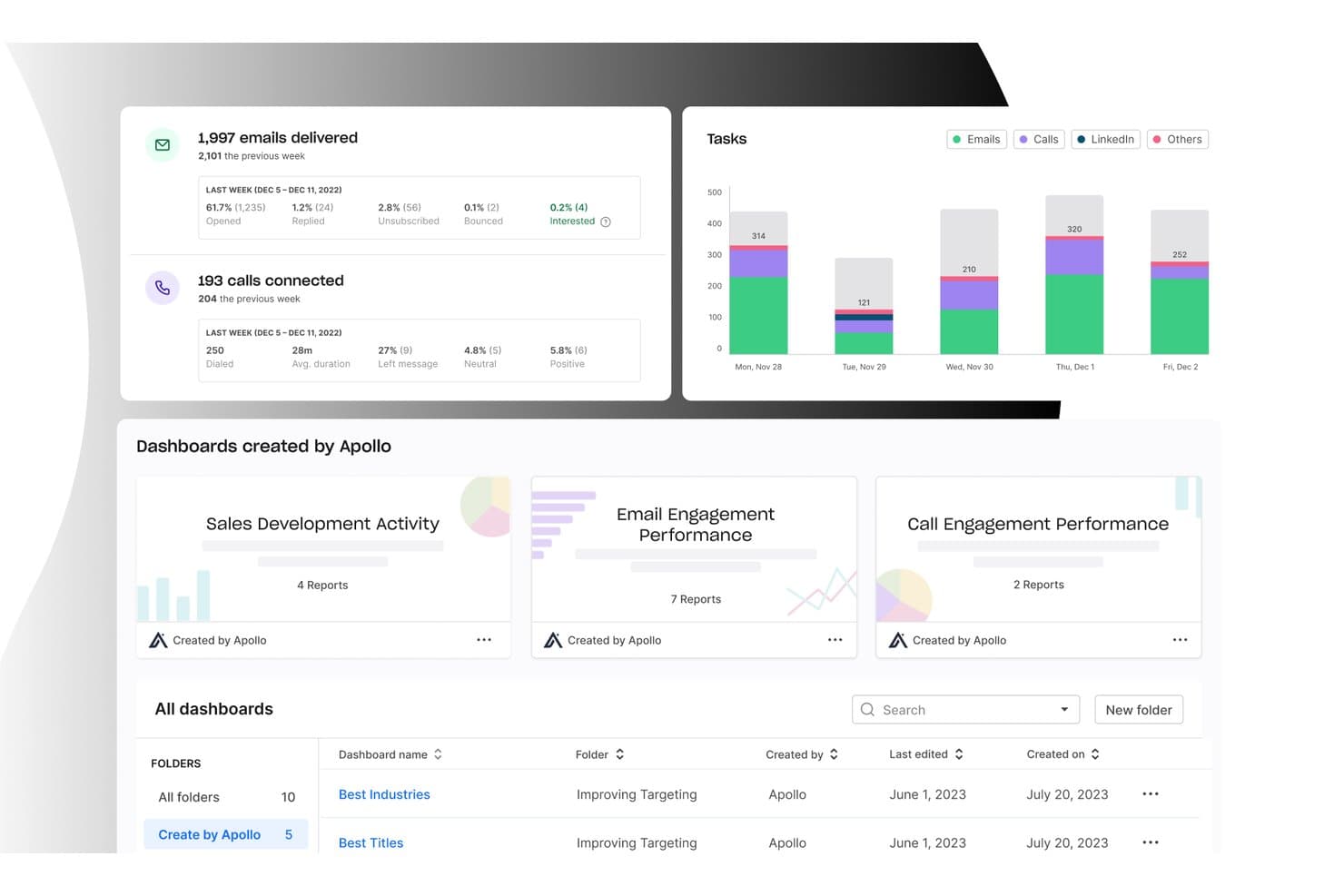
Apollo.io offre un pannello di analisi con statistiche sulla consegna delle email, metriche di connessione alle chiamate, grafici delle attività per giorno e pannelli commerciali predefiniti per monitorare le prestazioni del coinvolgimento. Apollo.io è una piattaforma GTM completa che combina un database di contatti B2B, sequenze di coinvolgimento commerciale, automazione dei flussi di lavoro, composizione delle chiamate, gestione delle trattative e assegnazione dei punteggi ai potenziali clienti basata sull'intelligenza artificiale in un unico strumento.
Per chi è più adatto Apollo.io?
Apollo.io è particolarmente adatto ai team SDR e alle organizzazioni commerciali focalizzate sulle attività in uscita che desiderano consolidare la ricerca di potenziali clienti, le sequenze e l'arricchimento dei dati senza dover gestire più strumenti.
Perché ho scelto Apollo.io
Apollo.io si è guadagnato un posto tra i migliori della mia selezione per il modo in cui il suo processo di verifica delle email in 7 fasi gestisce la qualità dei dati dei contatti su larga scala. Quando il mio team recupera un contatto dal database di oltre 210 milioni di contatti, l'email è già stata convalidata prima di essere inserita nella nostra sequenza, mantenendo bassi i tassi di mancata consegna senza dover ricorrere a uno strumento di verifica separato. Inoltre, il punteggio dei potenziali clienti generato dall'intelligenza artificiale fa sì che non otteniamo soltanto dati puliti, ma dati organizzati in base ai segnali di intenzione d'acquisto.
Funzionalità principali di Apollo.io
- Sequenze di coinvolgimento commerciale: Crea cadenze multicanale che combinano attività via email, telefono e LinkedIn, con test A/B e analisi.
- Integrazioni CRM: Sincronizza attività, contatti e aggiornamenti della pipeline in entrambe le direzioni con Salesforce e HubSpot.
- Automazione dei flussi di lavoro: Automatizza attività commerciali ripetitive come l'assegnazione dei potenziali clienti, le azioni di ricontatto e l'arricchimento dei dati.
- Estensione per Chrome: Trova nuovi potenziali clienti direttamente da LinkedIn e aggiungili alle campagne senza cambiare scheda.
Integrazioni di Apollo.io
Apollo.io offre integrazioni native con Salesforce, HubSpot, Outreach, Salesloft, Pipedrive, Zoho CRM e Slack, oltre a connettersi con Zapier. È disponibile un'API per le integrazioni personalizzate.
Pros and Cons
Pros:
- Ampio database di contatti B2B verificati incluso
- Sequenze multicanale integrate e test A/B
- Il punteggio dei potenziali clienti basato sull'intelligenza artificiale utilizza segnali reali di intenzione
Cons:
- La precisione dei dati diminuisce al di fuori del Nord America
- I pannelli di reportistica offrono poche opzioni di personalizzazione avanzata
Learn more about Apollo.io: Ideale per piccole e medie imprese
- Prova gratuita di 30 giorni per i nuovi abbonati
- A partire da $29/utente/mese con fatturazione annuale
Visit WebsiteCustomer Rating:4.7/5
La vista delle linee temporali dei clienti monitora tutto ciò che serve per eseguire il follow-up con i lead. Salesflare è uno strumento intelligente che aiuta le piccole e medie imprese a vendere di più.
Perché ho scelto Salesflare: Se gestisci una piccola o media impresa B2B, puoi utilizzare Salesflare per aumentare le vendite con meno sforzo. È una piattaforma intelligente che può compilare automaticamente la tua rubrica e tenere traccia di tutte le interazioni che i tuoi commerciali hanno con i contatti. Salesflare raccoglierà dati da più fonti, come social media, email e database aziendali, e li fornirà ai tuoi team tramite linee temporali automatizzate dei clienti che dicono tutto ciò che i tuoi commerciali devono sapere.
Salesflare è un CRM solido per aziende che necessitano di una soluzione per costruire relazioni migliori e incrementare le vendite. La funzione del flusso di lavoro utilizza una vista a schede Kanban con uno strumento di trascinamento che permette di spostare le schede lungo la pipeline. Ciò consente ai team di vedere dove ci sono opportunità di follow-up che potrebbero trasformarsi in clienti paganti.
Funzionalità e integrazioni principali di Salesflare
Le funzionalità includono archiviazione dei documenti, lead scoring, email marketing, registrazione delle chiamate, sistemi di calendario e promemoria, gestione delle attività, segmentazione del pubblico, database dei contatti, pipeline dei clienti, gestione degli appuntamenti e strumenti di prospecting.
Le integrazioni includono ActiveCampaign, Asana, Calednly, ClickUp, Google Contacts, Google Sheets, Intercom, Mailchimp, Quickbooks Online, RingCentral, Slack, Todoist, Typeform, Unbounce, Zapier e altre opzioni software.
Pros and Cons
Pros:
- Rende i follow-up quasi senza sforzo.
- Semplice da configurare e utilizzare.
- Funziona su più dispositivi.
Cons:
- Meno funzionalità rispetto ad altre opzioni.
- Alcune funzionalità richiedono integrazioni di terze parti per funzionare.
Learn more about Salesflare: Ideale per riassunti automatici delle chiamate
- Prova gratuita di 14 giorni
- Da $25/utente/mese (fatturato annualmente)
Visit WebsiteCustomer Rating:4.4/5
Dashboard di CloudTalk che mostra la cronologia delle chiamate, analisi delle prestazioni e metriche delle attività di vendita. CloudTalk è una piattaforma di chiamate basata su cloud progettata per i team che fanno affidamento su un elevato volume di contatti e conversazioni con i clienti. In quanto software di accelerazione delle vendite, ti aiuta a gestire le chiamate in entrata e in uscita, automatizzare i flussi di lavoro di chiamata e analizzare i dati delle prestazioni da un'unica dashboard. È particolarmente adatto a team di vendita e assistenza che necessitano di processi di chiamata strutturati e visibilità sulle prestazioni dei collaboratori.
Perché ho scelto CloudTalk
Ho scelto CloudTalk perché la sua AI Conversation Intelligence ti fornisce riassunti automatici delle chiamate e analisi del sentiment, in modo che tu possa capire rapidamente cosa è successo in ogni chiamata senza dover ascoltare tutte le registrazioni. Apprezzo anche l'AI Dialer con modalità di chiamata power e parallela, che possono aiutarti ad aumentare il volume di chiamate riducendo le attività manuali. Se stai valutando software di accelerazione delle vendite, queste funzionalità supportano direttamente un contatto più rapido e una formazione più basata sui dati per il tuo team.
Caratteristiche principali di CloudTalk
Oltre alle sue capacità basate sull'intelligenza artificiale, CloudTalk offre una gamma di funzionalità a supporto delle esigenze di accelerazione delle vendite:
- Monitoraggio in tempo reale: Consente l'ascolto live delle chiamate e l'analisi delle prestazioni, aiutandoti a monitorare e migliorare l'efficienza del team.
- Gestione dei numeri: Fornisce numeri locali in oltre 160 paesi, migliorando il tuo raggio d'azione globale e il riconoscimento delle chiamate.
- Trascrizione delle chiamate: Offre trascrizioni multilingue per le chiamate con i clienti, permettendoti di rivedere e analizzare facilmente le interazioni.
- Automazione dei flussi di lavoro: Automatizza i processi di chiamata e si integra perfettamente con i tuoi sistemi esistenti per risparmiare tempo e ridurre le attività manuali.
Integrazioni di CloudTalk
Le integrazioni includono Salesforce, HubSpot, Pipedrive, Zoho CRM, Zendesk, Intercom, Freshdesk, Slack, Microsoft Teams e Aircall.
Pros and Cons
Pros:
- Riassunti di chiamata alimentati da AI
- Power e dialer paralleli
- Strumenti di monitoraggio chiamate in tempo reale
Cons:
- La configurazione può richiedere tempo
- Le funzionalità AI si sbloccano con piani superiori
Learn more about CloudTalk: Ideale per l'esecuzione delle attività legate ai ricavi con connessione a Clari
- Demo gratuita disponibile
- Prezzi su richiesta
Visit WebsiteCustomer Rating:4.7/5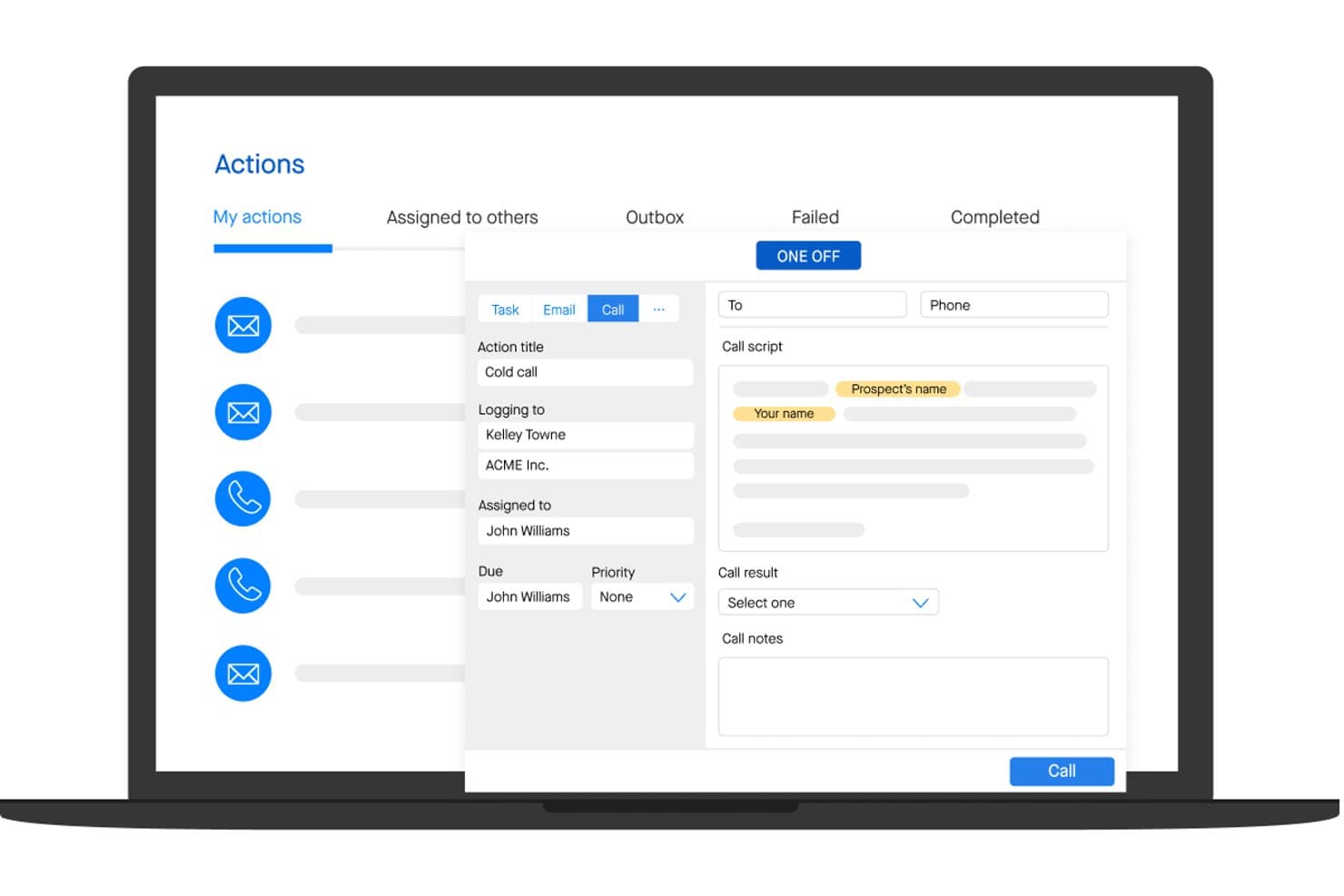
Groove consente agli utenti di gestire e registrare le chiamate commerciali con script e note. Groove è una piattaforma nativa di Salesforce per l'engagement commerciale che combina sequenze multicanale, acquisizione automatizzata delle attività, analisi della pipeline e attività di contatto assistite dall'IA in un unico ambiente per l'esecuzione delle attività legate ai ricavi.
Per chi è più adatto Groove?
Groove è particolarmente adatto ai team di vendita aziendali che utilizzano Salesforce e desiderano che i dati relativi alle attività di engagement confluiscano direttamente nella piattaforma di intelligence sui ricavi di Clari.
Perché ho scelto Groove
Groove è entrato nella mia lista ristretta perché è progettato per alimentare direttamente il motore di intelligence sui ricavi di Clari, trasformando l'attività dei commerciali in dati sulla pipeline di qualità tale da supportare le previsioni. Mi piace molto il modo in cui Groove Flows consente ai commerciali di gestire sequenze multicanale con contenuti e-mail generati dall'IA direttamente da Gmail o Outlook, mentre ogni interazione viene registrata automaticamente in Salesforce in tempo reale. Groove Spaces mostra quindi un punteggio relativo a impegno e coinvolgimento per ogni account, così posso vedere esattamente dove viene dedicata l'attenzione e dove le trattative si stanno bloccando.
Funzionalità principali di Groove
- Groove OmniDialer: Un dialer integrato con chiamata tramite clic, numeri con presenza locale, messaggi vocali pre-registrati per persona e registrazione automatica delle chiamate in Salesforce.
- Groove Spaces: Uno spazio di lavoro condiviso per gli account in cui SDR, AE, CSM e SE possono collaborare con cronologia delle attività condivisa, attività e punteggi di coinvolgimento.
- Groove Conversations: Registrazione e trascrizione native delle chiamate che si integrano con Clari Copilot per riepiloghi delle chiamate generati dall'IA e schede operative consultabili durante le chiamate.
- Groove Scheduler: Uno strumento per la pianificazione delle riunioni che supporta tipi di riunione personalizzati e trasferisce direttamente nel flusso di prenotazione i dati dei campi personalizzati di Salesforce.
Integrazioni di Groove
Groove è nativo di Salesforce e si integra con Gmail, Microsoft Outlook, ZoomInfo, LinkedIn Sales Navigator, Slack, Microsoft Teams, Zoom, Seismic e Highspot. Si collega ai prodotti Clari e offre un'API pubblica per integrazioni personalizzate.
Pros and Cons
Pros:
- E-mail e riepiloghi delle chiamate generati dall'IA
- Spazio di lavoro per la collaborazione tra diversi ruoli commerciali
- Automatizza in modo affidabile l'acquisizione delle attività commerciali
Cons:
- Non include dati nativi sull'intenzione degli acquirenti
- La logica delle sequenze può sembrare limitante
Learn more about Groove: Ideale per il coaching delle chiamate in tempo reale nativo di Salesforce
- Demo gratuita disponibile
- Prezzi su richiesta
Visit WebsiteCustomer Rating:4.7/5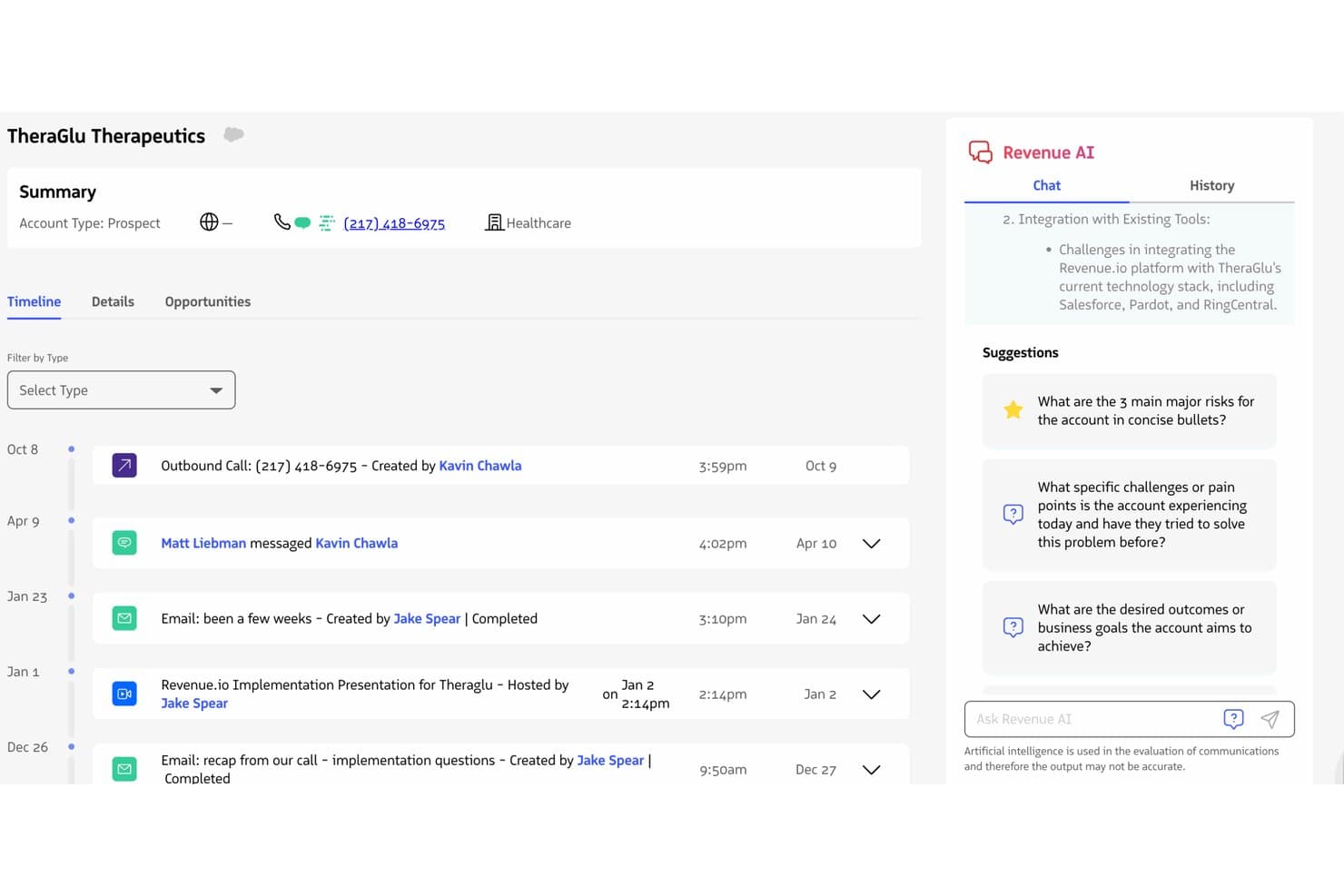
Revenue.io mostra informazioni dettagliate sugli account basate sull'AI accanto a una cronologia completa delle attività. Revenue.io è una piattaforma di accelerazione delle vendite nativa di Salesforce che combina un sistema di composizione integrato, sequenze multicanale di coinvolgimento delle vendite, coaching delle chiamate in tempo reale, intelligenza delle conversazioni e analisi della pipeline basate sull'intelligenza artificiale.
Per chi è più adatto Revenue.io?
Revenue.io è una soluzione particolarmente adatta ai team di vendita del mercato medio e delle grandi aziende che utilizzano Salesforce e fanno ampio affidamento sul contatto telefonico o su attività di contatto ibride.
Perché ho scelto Revenue.io
Revenue.io è entrato nella mia lista ristretta grazie a Moments™, il suo motore di coaching durante le chiamate in tempo reale che mostra schede competitive, risposte alle obiezioni e tracce di conversazione non appena durante una chiamata dal vivo viene rilevato il nome di un concorrente o un argomento chiave. L'ho scelto in particolare per i team Salesforce perché è interamente integrato in Salesforce, quindi ogni chiamata, SMS ed email viene registrata automaticamente nel record corretto senza alcun ritardo di sincronizzazione. La funzionalità di simulazione del ruolo di vendita con AI consente inoltre ai rappresentanti di esercitarsi sulle obiezioni simulate prima di iniziare le chiamate reali, cosa che, a mio parere, riduce significativamente i tempi di formazione.
Funzionalità principali di Revenue.io
- Sequenze di vendita guidata: sequenze multicanale di contatto tra chiamate, email e SMS che iscrivono e rimuovono automaticamente i potenziali clienti in base ai trigger di attività e ai risultati.
- Chiedi a Revenue™ basato sull'AI: uno strumento di interrogazione in linguaggio naturale che consente ai rappresentanti e ai responsabili di porre domande su opportunità, chiamate e account direttamente all'interno di Salesforce.
- Composizione con presenza locale: le chiamate in uscita mostrano un numero locale in oltre 40 Paesi, cosa che secondo il fornitore aumenta i tassi di risposta del 30–50%.
- Coaching basato sulle metodologie di vendita con AI: valutazione delle chiamate in tempo reale rispetto a framework consolidati come MEDDIC, SPIN e Challenger, visualizzata durante le conversazioni dal vivo.
Integrazioni di Revenue.io
Revenue.io funziona in modo nativo in Salesforce e si integra con Zoom, Microsoft Teams, Google Meet, Gmail, Microsoft Outlook, Marketo, 6sense, ActiveCampaign e Five9. Le API e le funzionalità di automazione di Salesforce supportano le integrazioni personalizzate.
Pros and Cons
Pros:
- Coaching durante le chiamate in tempo reale per i rappresentanti
- Tutte le attività vengono registrate automaticamente direttamente in Salesforce
- Analisi multilingue delle conversazioni per Teams e Zoom
Cons:
- Richiede Salesforce come piattaforma CRM
- Nessun dato integrato sull'intento di acquisto
Learn more about Revenue.io: 6Ideale per l'intelligence sui ricavi
Gong
- Demo gratuita disponibile
- Prezzi su richiesta
Visit WebsiteCustomer Rating:4.7/5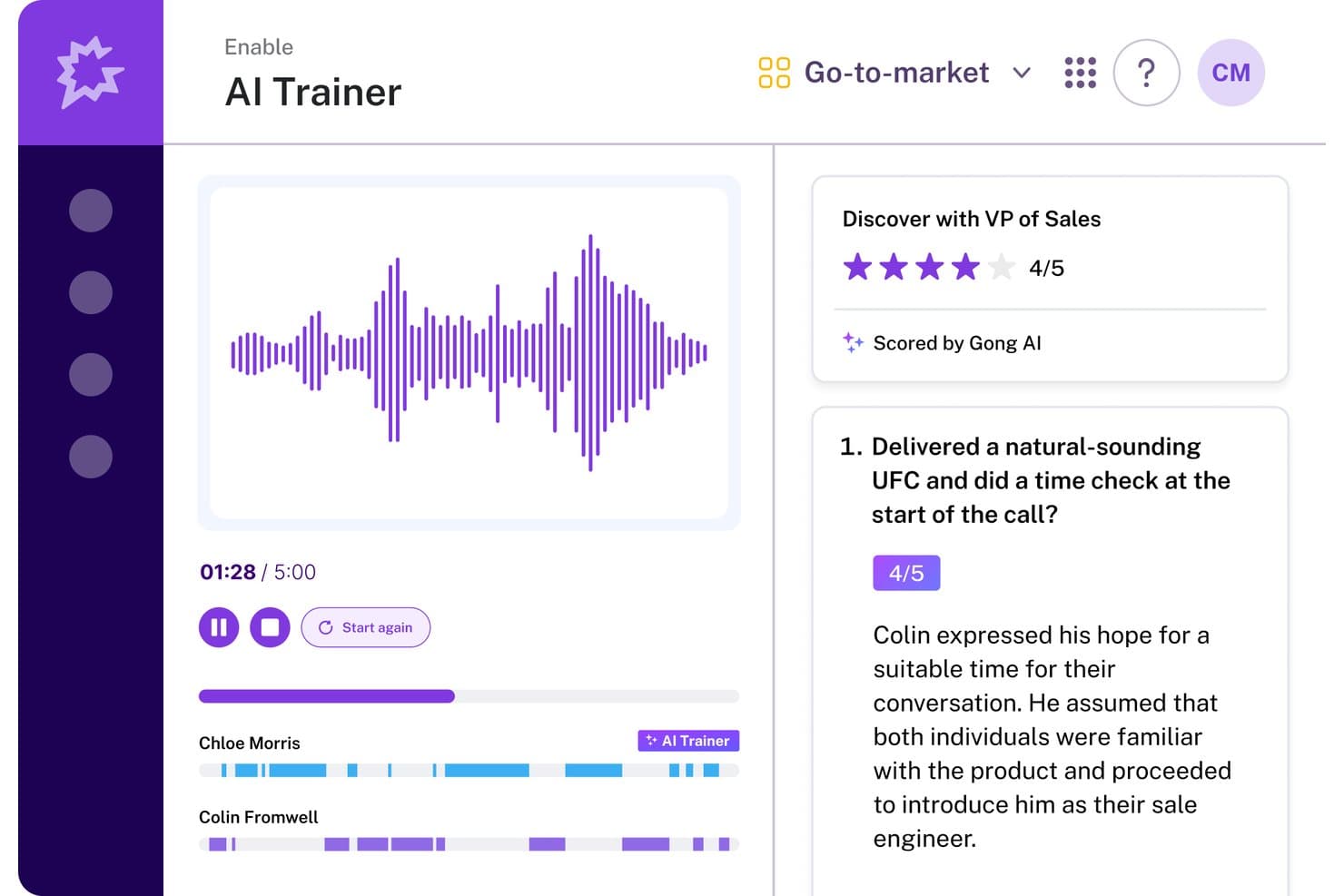
Il Trainer IA di Gong valuta le chiamate di vendita e fornisce ai rappresentanti riscontri concreti. Gong è una piattaforma di IA per i ricavi che combina intelligence conversazionale, coinvolgimento delle vendite, abilitazione e previsione in un unico sistema operativo per i team che si occupano dei ricavi.
Per chi è più adatto Gong?
Gong è particolarmente adatto ai team dei ricavi del mercato medio e delle grandi imprese che desiderano integrare l'intelligence conversazionale e la previsione in un'unica piattaforma.
Perché ho scelto Gong
Gong si è guadagnato un posto nella mia rosa ristretta perché le sue funzionalità di intelligence sui ricavi sono più approfondite di quelle di qualsiasi altro strumento che abbia valutato. Mi piace il modo in cui il Predittore dei ricavi basato sull'IA utilizza oltre 300 segnali provenienti da conversazioni reali con i clienti per generare previsioni, con clienti come Upwork che dichiarano un'accuratezza superiore al 95%. Il Monitoraggio delle trattative basato sull'IA segnala attivamente i rischi, come le menzioni dei concorrenti o il rallentamento dello slancio, prima che le trattative sfumino; questo significa che lavoro con dati reali sulle interazioni invece di affidarmi all'intuito.
Funzionalità principali di Gong
- Compositore IA: Redige email di contatto personalizzate recuperando il contesto dalle conversazioni precedenti con i clienti per migliorare i tassi di risposta.
- Abilitazione Gong: Un modulo dedicato all'abilitazione con percorsi di apprendimento, valutazione delle chiamate tramite IA, flussi di lavoro per il coaching e simulazioni basate sull'IA per la formazione dei rappresentanti.
- Flussi di coinvolgimento: Sequenze multicanale che includono email, chiamate, LinkedIn e attività, con regole di automazione che iscrivono automaticamente i contatti in base agli eventi del CRM.
- Rilevatori intelligenti: Rilevatori di argomenti addestrabili dall'utente e sensibili al contesto, che rilevano schemi nelle conversazioni registrate per fornire informazioni utili sul coaching e sulle trattative.
Integrazioni di Gong
Gong offre integrazioni native bidirezionali con Salesforce, HubSpot e Microsoft Dynamics 365, oltre a più di 300 integrazioni disponibili sul mercato online tramite Gong Collective, tra cui Zoom, Slack, 6sense, G2 e Calendly. Un'API aperta, i webhook e il supporto MCP consentono di creare connessioni personalizzate.
Pros and Cons
Pros:
- L'IA prevede gli esiti delle trattative con elevata accuratezza
- L'intelligence conversazionale fornisce informazioni utili per il coaching
- Automatizza l'inserimento dei dati nel CRM per i team di vendita
Cons:
- La ramificazione delle sequenze è meno avanzata rispetto ai principali concorrenti
- È necessario richiedere una demo per conoscere i dettagli dei prezzi
Learn more about Gong: Ideale per formare i rappresentanti con il coaching in tempo reale durante le chiamate
- Demo gratuita disponibile
- Prezzi su richiesta
Visit WebsiteCustomer Rating:4.5/5
Implementa un sistema in cui i venditori e le squadre di vendita collaborano, eseguono le attività e assistono i clienti. Salesloft offre strumenti che le aziende possono utilizzare per contribuire alla formazione dei nuovi rappresentanti commerciali.
Perché ho scelto Salesloft: Se la tua squadra è in crescita, puoi utilizzare Salesloft per aiutare i nuovi assunti a imparare mostrando loro come fare. Salesloft offre funzionalità che consentono al sistema di registrare le conversazioni che i tuoi migliori rappresentanti commerciali hanno con i potenziali clienti. Puoi utilizzare queste registrazioni come momenti di formazione per aiutare i nuovi assunti a capire cosa funziona per concludere le vendite o a migliorare i tassi di chiusura dell'attuale squadra.
Salesloft è adatto ad aziende di qualsiasi dimensione che necessitano di una soluzione per ottimizzare le interazioni. È una piattaforma altamente efficace per migliorare i processi che portano alla conversione nelle interazioni via e-mail, telefono e social media. Salesloft aiuterà ad accelerare il lavoro delle tue squadre di vendita grazie alla capacità di creare, condividere ed eseguire processi di vendita.
Funzionalità e integrazioni principali di Salesloft
Le funzionalità includono la gestione degli elenchi di chiamate, la distribuzione dei potenziali clienti, la gestione dei dati, l'acquisizione dei potenziali clienti, la valutazione dei potenziali clienti, i pannelli di controllo dei dati, la registrazione delle chiamate, la gestione dei contatti, la gestione delle prestazioni, gli strumenti di collaborazione, i report e le analisi e la gestione dei potenziali clienti.
Le integrazioni includono Aircall, Chili Piper, Clari, DealSignal, Desktop.com, Gong, HubSpot CRM, Opensense, Outgrow, Salesforce, Shift, Slack, Sugar Sell, Wingman, Zoom e altre soluzioni software.
Pros and Cons
Pros:
- Offre un flusso di coinvolgimento in tempo reale.
- È facile aggiungere contatti alle sequenze.
- La piattaforma è facile da usare.
Cons:
- Lo strumento si blocca quando vengono apportate modifiche estese.
- Presenta limitazioni nell'automazione.
Learn more about Salesloft: Miglior strumento per l'esecuzione delle vendite
- Demo gratuita disponibile
- Prezzi su richiesta
Visit WebsiteCustomer Rating:4.3/5
Utilizza le informazioni pratiche per capire i migliori momenti, sequenze e canali che raggiungono i lead e migliorano i risultati. Outreach aiuta le aziende a migliorare l'esecuzione delle vendite combinando engagement di vendita, intelligenza conversazionale e intelligenza dei ricavi in un unico strumento.
Perché ho scelto Outreach: La piattaforma è uno dei più grandi strumenti per l'esecuzione delle vendite e aiuterà la tua azienda ad aumentare i ricavi, coinvolgere i clienti e incrementare la produttività dei tuoi venditori. Outreach può aiutare i tuoi venditori a interagire con i potenziali clienti attraverso interazioni personalizzate durante tutto il ciclo di vendita. La funzionalità del punteggio di salute delle trattative aiuterà i tuoi rappresentanti a velocizzare le vendite con previsioni e raccomandazioni su come mantenere tutto in carreggiata, aiutandoli a concentrarsi sui lead che hanno maggiori probabilità di chiudere.
Outreach funziona bene per la gestione delle vendite e i team di leadership che cercano strumenti per aiutare i loro rep a concludere più affari. Le capacità della piattaforma offriranno ai venditori un modo per personalizzare, dare priorità e analizzare le attività di vendita. Outreach può aiutare i tuoi team di vendita a creare pipeline e ottimizzare i flussi di lavoro di vendita per assicurare che possano aiutare l'organizzazione a raggiungere gli obiettivi di vendita.
Funzionalità principali di Outreach e integrazioni
Funzionalità includono analisi del sentiment, test A/B, riconoscimento vocale automatico, simulazione delle previsioni, punteggi di salute delle trattative, gestione degli affari, coaching dei venditori, intelligenza conversazionale, piani di azione reciproca, insight su trattative e gestione della pipeline.
Integrazioni includono 6sense, Aircall, Alyce, Avoma, BigPicture, BombBomb, Chili Piper, Clari, Dark Sky, DataGrail, Dialpad, Gong, Highspot, HubSpot, RingCentral, Salesforce e altre soluzioni software.
Pros and Cons
Pros:
- Team di supporto di altissimo livello.
- Semplifica e automatizza le attività quotidiane.
- Le analisi forniscono informazioni utili.
Cons:
- La curva di apprendimento è ripida.
- È complesso tracciare quali email ricevono i clienti.
 Il miglior CRM tutto-in-uno per più reparti
- Prova gratuita di 30 giorni per i nuovi abbonati
- Da $25/utente/mese, fatturato annualmente

Analizza le metriche di vendita per previsioni accurate e prendi decisioni efficaci basate sui dati. Salesforce Sales Cloud offre uno strumento CRM che aiuta le aziende a migliorare le interazioni tra i clienti e gli altri reparti operativi.
Perché ho scelto Salesforce Sales Cloud: La piattaforma è uno dei CRM più utilizzati e consente di archiviare quasi tutte le informazioni relative ai clienti in un unico posto. Salesforce Sales Cloud permette di tracciare tutti i clienti in ogni fase del ciclo di vendita, dalla scoperta alla chiusura dell’affare. Più reparti possono utilizzare Salesforce Sales Cloud per fare previsioni di fatturato, monitorare i lead e collaborare tramite le altre applicazioni di Salesforce.
Salesforce Sales Cloud consente alle aziende di qualsiasi dimensione e settore di accelerare la crescita grazie all’automazione. È possibile aumentare la crescita delle vendite attraverso lo strumento Process Builder della piattaforma, che offre un’interfaccia semplice punta-e-clicca per automatizzare i processi. Salesforce Sales Cloud ti aiuta a creare anche i processi di vendita più complessi, guidando i tuoi rappresentanti nelle conversazioni di qualificazione e suggerendo quando passare ai passaggi successivi del ciclo di vendita.
Funzionalità e integrazioni principali di Salesforce Sales Cloud
Le funzionalità includono email marketing, lead scoring, segmentazione dell’audience, registrazione chiamate, strumenti per calendario e promemoria, gestione delle attività, cronologia dei contatti, gestione dei lead, gestione della pipeline di vendita, lead nurturing, gestione dei contenuti e gestione documentale.
Le integrazioni includono 3CX, Bynder, CallTrackingMetrics, CloudTalk, DealRoom, Freshbooks, Freshservice, GetResponse, HoneyBook, monday.com, Outgrow, PandaDoc, Slack, Twilio, Wrike e altre soluzioni software.
Pros and Cons
Pros:
- Si integra con un numero significativo di applicazioni.
- Genera ottimi report.
- Capacità di monitoraggio della pipeline dall’alto verso il basso.
Cons:
- Gli utenti possono sentirsi spaesati con tutte le funzionalità disponibili.
- Curva di apprendimento ripida.
Learn more about Salesforce Sales Cloud: 10Ideale per le previsioni dei ricavi a livello aziendale
Clari
- Demo gratuita disponibile
- Prezzi su richiesta
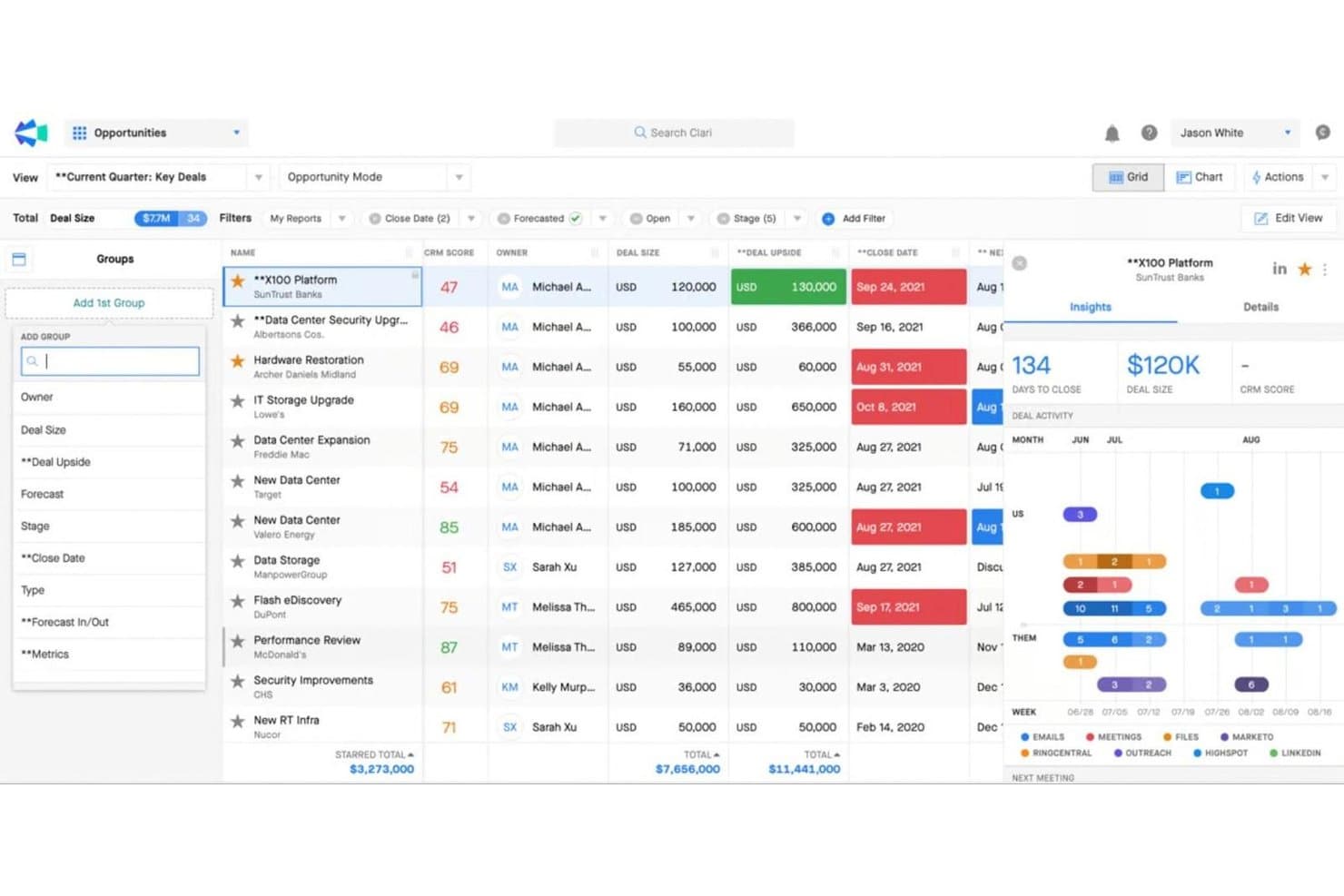
Clari mette in evidenza gli insight sulle trattative e le tendenze delle attività per dare priorità alle opportunità chiave. Clari è una piattaforma di intelligence sui ricavi che combina sequenze di coinvolgimento delle vendite, analisi della pipeline, intelligence sulle conversazioni, previsioni basate sull'intelligenza artificiale e piani d'azione condivisi in un'unica suite connessa.
Per chi è più adatto Clari?
Clari è progettato per i team aziendali che si occupano dei ricavi, in particolare per i responsabili RevOps e i CRO, che necessitano di previsioni accurate, pronte per il consiglio di amministrazione, nei cicli di vendita complessi e con molteplici interlocutori.
Perché ho scelto Clari
Clari si è guadagnato un posto nella mia rosa di candidati perché nessun'altra piattaforma si avvicina alla profondità delle sue funzionalità di previsione dei ricavi a livello aziendale. Sono particolarmente colpito da Clari Forecast, che aggrega le proiezioni dei singoli rappresentanti fino ai vertici aziendali, con una modellazione degli scenari basata sull'intelligenza artificiale di cui i consigli di amministrazione si fidano davvero. Abbinato alla valutazione dello stato delle trattative di Inspect e ai segnali di rischio della pipeline in tempo reale, consente al mio team di individuare le trattative in difficoltà prima che escano completamente dal trimestre.
Funzionalità principali di Clari
- Groove Flows: Sequenze di contatto multicanale che automatizzano i passaggi relativi a e-mail, telefono, SMS, LinkedIn e posta diretta all'interno di un'unica cadenza.
- Copilot Battlecards: Schede guida contestuali che vengono visualizzate automaticamente durante le conversazioni di vendita per aiutare i rappresentanti a gestire le obiezioni in tempo reale.
- Capture: Registrazione automatica delle attività che sincronizza e-mail, chiamate ed eventi del calendario direttamente con Salesforce, senza inserimenti manuali nel CRM.
- Revenue AI Agents: Una libreria di agenti basati sull'intelligenza artificiale che segnalano avvisi sulle trattative, consigliano le azioni migliori successive e guidano i flussi di lavoro di analisi della pipeline.
Integrazioni di Clari
Clari offre una solida integrazione nativa con Salesforce, oltre a integrazioni con HubSpot, Pipedrive, Gainsight, Slack, Zoom, Microsoft Teams e LinkedIn Sales Navigator. Le API REST pubbliche e il supporto per l'acquisizione personalizzata dei dati consentono connessioni con Snowflake, BigQuery e Databricks.
Pros and Cons
Pros:
- Precisione delle previsioni considerata affidabile a livello di consiglio di amministrazione
- Intelligence sulle conversazioni in tempo reale durante le chiamate in diretta
- Contatto multicanale in un'unica cadenza
Cons:
- Non include dati nativi sull'intento degli acquirenti
- Richiede una solida qualità dei dati Salesforce
Learn more about Clari:
Altri software di accelerazione delle vendite
Ecco alcune opzioni aggiuntive di software di accelerazione delle vendite che non sono entrate nel mio elenco, ma che vale comunque la pena valutare:
- 11PitchMonsterIdeale per accelerare l’onboarding dei rappresentanti
- 12MixmaxIdeale per accelerare le vendite direttamente in Gmail
- 13KoncertIdeale per i team che effettuano chiamate parallele ad alto volume
- 14Zoho CRMMiglior assistente di vendita con intelligenza artificiale
- 15OutplayIdeale per attività di contatto multicanale basate nativamente sull'IA su scala SMB
- 166senseIdeale per l'intenzione d'acquisto a livello di account e le attività di contatto basate sull'IA
- 17HubSpot Sales HubIdeale per l'instradamento e la classificazione intelligente dei lead
- 18Reply.ioIdeale per sequenze outbound multicanale basate sull'intelligenza artificiale
- 19ZoomInfo SalesOSIdeale per i dati sull'intento a livello di account e persona
Come Valuto il Software di Accelerazione delle Vendite
Divido la mia valutazione in due livelli: criteri di base che ogni strumento deve soddisfare—come la sincronizzazione con il CRM e le sequenze multicanale—e i fattori che differenziano le migliori opzioni dal resto.
Funzionalità Principali (Requisiti Minimi per Questa Lista)
Quando seleziono gli strumenti per la mia lista, valuto ciascuno su una scala da 0 (non offre la funzionalità) a 5 (eccelle in questo ambito) per ogni funzionalità principale elencata di seguito. Poi, calcolo il punteggio totale dello strumento in percentuale. Ogni strumento deve raggiungere un punteggio minimo totale del 75% per essere preso in considerazione.
- Sequenze di Vendita Multicanale: Verifico se la piattaforma supporta campagne sequenziali tramite email, telefono, LinkedIn e SMS—e se i commerciali possono creare logiche ramificate in base al comportamento dei potenziali clienti.
- Integrazione e Sincronizzazione Dati con il CRM: È importante la sincronizzazione in tempo reale e bidirezionale con CRM come Salesforce e HubSpot, soprattutto per mantenere accurati i registri delle attività e dei contatti su tutti i sistemi.
- Automazione delle Attività di Vendita: Valuto quanto bene lo strumento automatizza compiti ripetitivi come l’assegnazione di lead, i promemoria per i follow-up e l’inserimento dati, così che i commerciali possano dedicare più tempo alle conversazioni di vendita vere e proprie.
- Reportistica sulle Pipeline e le Attività: I buoni strumenti permettono di monitorare le performance delle sequenze, il volume di attività dei commerciali e i tassi di conversione per fase tramite dashboard che il team operations può davvero personalizzare.
- Prioritizzazione e Punteggio dei Lead: Cerco modelli di scoring che combinino segnali di coinvolgimento e dati firmografici per aiutare i commerciali a concentrarsi sugli account con maggiori probabilità di conversione.
- Contenuti di Vendita & Playbook: Valuto se lo strumento offre una libreria centralizzata per template, snippet e playbook guidati a cui i commerciali possano accedere durante le sequenze o nelle conversazioni live.
Una volta raccolta una lista di strumenti che risponde a questi criteri, considero ciò che distingue ogni piattaforma.
Fattori Differenzianti (Cosa Distingue i Fornitori)
Ecco come metto a confronto i vari fornitori:
Funzionalità Distintive
La conversation intelligence è un vero fattore distintivo—piattaforme come Gong e Salesloft possono registrare, trascrivere e analizzare le chiamate di vendita per individuare pattern di obiezioni e momenti utili alla formazione. Valuto anche se uno strumento include un dialer integrato con presenza locale, che evita ai commerciali di dover cambiare app durante una sequenza. L’email generation basata su AI è rilevante quando sfrutta i dati del prospect per creare follow-up contestuali invece di template generici. Anche i dati sull’intento d’acquisto sono da considerare, soprattutto per i team outbound che vogliono dare priorità ai clienti che sono già in fase di ricerca.
Oltre le Funzionalità
Considero quanto bene ogni strumento si adatti alle modalità di go-to-market del team—una piattaforma pensata per team SDR outbound ad alta velocità non sarà adatta a un team enterprise AE che gestisce trattative complesse. La compatibilità con la tech stack è altrettanto importante; verifico la presenza di connector nativi con strumenti come ZoomInfo, LinkedIn Sales Navigator e i data warehouse in cui il team RevOps aggrega i dati di reporting. Prendo in considerazione anche la struttura dei prezzi, soprattutto se i vendor offrono componenti aggiuntivi modulari (come dialer o dati d’intento) così da poter crescere senza pagare per funzionalità non ancora necessarie al team.
Come scegliere un software di accelerazione delle vendite
È facile perdersi in lunghi elenchi di funzionalità e strutture tariffarie complesse. Per aiutarti a rimanere concentrato mentre affronti il tuo esclusivo processo di selezione del software, ecco una checklist dei fattori da tenere a mente:
| Fattore | Cosa considerare |
|---|---|
| FattoreScalabilità | Cosa considerareIl software crescerà insieme al tuo team? Considera l’espansione futura. Cerca soluzioni in grado di gestire un aumento del volume dei dati e del numero di utenti senza problemi di prestazioni. |
| FattoreIntegrazioni | Cosa considerareSi collega agli strumenti che già utilizzi? Verifica la presenza di integrazioni con CRM, posta elettronica e altri strumenti essenziali per mantenere l’efficienza del flusso di lavoro. |
| FattorePersonalizzazione | Cosa considerarePuoi adattare il software ai tuoi processi? Assicurati che offra opzioni di personalizzazione per dashboard e report, in modo da soddisfare le tue esigenze specifiche. |
| FattoreFacilità d’uso | Cosa considerareL’interfaccia è intuitiva per il tuo team? Un design semplice riduce i tempi di formazione e aumenta i tassi di adozione. Testa l’interfaccia per verificarne la facilità d’uso. |
| FattoreCosto | Cosa considerareIl prezzo rientra nel tuo budget? Confronta i piani, fai attenzione ai costi nascosti e assicurati che le funzionalità di cui hai bisogno siano incluse nel prezzo. |
| FattoreMisure di sicurezza | Cosa considerareCome protegge i tuoi dati? Verifica che sia conforme agli standard del settore e che offra crittografia, controlli degli accessi e aggiornamenti regolari della sicurezza. |
| FattoreDisponibilità dell’assistenza | Cosa considerareQuando puoi contattare l’assistenza? Assicurati che il fornitore offra un servizio clienti affidabile attraverso diversi canali, come chat dal vivo, e-mail o telefono, soprattutto nei momenti critici. |
Che cos’è un software di accelerazione delle vendite?
Il software di accelerazione delle vendite è uno strumento che aiuta i team di vendita ad accelerare il processo di vendita. Integra diverse funzionalità, come la generazione automatizzata di lead, il punteggio dei lead, strumenti di comunicazione efficienti e analisi dettagliate, in un'unica piattaforma.
Questo software semplifica il ciclo di vendita, dall'acquisizione del lead alla conclusione dell'affare, automatizzando le attività ripetitive e fornendo ai rappresentanti di vendita dati e risorse fondamentali.
Funzionalità del software di accelerazione delle vendite
Quando scegli un software di accelerazione delle vendite, presta attenzione alle seguenti funzionalità chiave:
- Gestione dei lead: organizza, assegna priorità e monitora i lead mentre avanzano nella pipeline. Una buona gestione dei lead ti aiuta a concentrarti sui potenziali clienti migliori e a ricontattarli in modo efficiente, così nulla e nessuno viene trascurato.
- Automazione delle vendite: automatizza le attività ripetitive, come l'invio di e-mail di follow-up o la programmazione delle chiamate. In questo modo hai più tempo da dedicare alla costruzione delle relazioni e alla conclusione degli affari, invece di perderti nelle attività amministrative.
- Visibilità della pipeline: ottieni una visione chiara e in tempo reale della pipeline di vendita, dall'inizio alla conclusione. Una maggiore visibilità ti consente di individuare i colli di bottiglia, monitorare i progressi e modificare la strategia al volo.
- Monitoraggio delle e-mail e modelli: monitora quando i potenziali clienti aprono le tue e-mail o fanno clic sui link e utilizza modelli pronti per attività di contatto rapide e coerenti. In questo modo sai cosa funziona e puoi mantenere efficaci i tuoi messaggi.
- Funzionalità di integrazione: connettiti facilmente al CRM esistente, alle piattaforme di marketing e agli strumenti di comunicazione. L'integrazione fa fluire senza problemi i dati di vendita tra i sistemi, evitandoti i problemi legati all'inserimento manuale dei dati.
- Analisi e report: accedi a dashboard e report dettagliati sulle attività di vendita, sullo stato della pipeline e sulle prestazioni dei rappresentanti. Questi dati ti aiutano a prendere decisioni più ponderate basate su ciò che sta realmente accadendo, non solo su una sensazione.
- Funzionalità di composizione: effettua chiamate in uscita direttamente dalla piattaforma, registra automaticamente le chiamate e registra le conversazioni per la formazione. Questa funzionalità ti permette di procedere rapidamente e offre maggiori opportunità di coaching.
- Gestione dei documenti: archivia, condividi e monitora i documenti di vendita, come proposte e contratti. Hai sempre i file giusti a portata di mano e puoi vedere quando i potenziali clienti stanno esaminando i tuoi materiali.
- Strumenti di pianificazione: consenti ai potenziali clienti di prenotare riunioni nel tuo calendario negli orari più comodi, senza scambi infiniti di messaggi. Riduci le lacune nella comunicazione e mantieni lo slancio nelle trattative.
Funzionalità comuni dell'intelligenza artificiale nei software di accelerazione delle vendite
Oltre alle funzionalità standard dei software di accelerazione delle vendite elencate sopra, molte di queste soluzioni stanno integrando l'intelligenza artificiale con funzionalità come:
- Punteggio predittivo dei lead: l'intelligenza artificiale analizza i dati storici e le interazioni attuali per classificare i lead in base alla probabilità di conversione, così puoi dare priorità alle attività di contatto dove è più importante.
- Personalizzazione automatizzata delle e-mail: l'intelligenza artificiale crea contenuti e-mail personalizzati per ogni potenziale cliente basandosi sul suo comportamento, sulle sue preferenze e sulle conversazioni precedenti, facendoti risparmiare moltissimo tempo di preparazione e aumentando il coinvolgimento.
- Previsioni di vendita: l'intelligenza artificiale esamina la tua pipeline, le tendenze storiche e le attività in corso per prevedere i risultati di vendita futuri, aiutandoti a fissare obiettivi realistici e a individuare tempestivamente i potenziali problemi.
- Intelligenza delle conversazioni: l'intelligenza artificiale ascolta le tue chiamate e analizza le conversazioni per identificare gli argomenti chiave, i cambiamenti nel sentiment e le obiezioni, offrendo suggerimenti mirati per il coaching e indicazioni sui passaggi successivi.
- Previsione dell'abbandono: l'intelligenza artificiale individua i primi segnali d'allarme nel processo di vendita che possono indicare la potenziale perdita di un affare, consentendoti di agire rapidamente per prevenire gli abbandoni e mantenere più clienti.
Vantaggi del software di accelerazione delle vendite
L'implementazione di un software di accelerazione delle vendite offre diversi vantaggi al tuo team e alla tua azienda. Eccone alcuni:
- Maggiore produttività: le campagne email automatizzate e la definizione delle priorità dei lead liberano tempo, consentendo al tuo team di concentrarsi sulla conclusione degli affari.
- Migliore processo decisionale: analisi e report forniscono informazioni utili, aiutandoti a prendere decisioni consapevoli sulle strategie di vendita.
- Collaborazione migliorata: l'integrazione con il CRM garantisce a tutti l'accesso agli stessi dati, promuovendo il lavoro di squadra e la coerenza.
- Strategie di vendita proattive: le informazioni basate sull'intelligenza artificiale offrono analisi predittive, consentendo al tuo team di anticipare le esigenze dei clienti.
- Portata ampliata: gli strumenti per il coinvolgimento sui social media aiutano a entrare in contatto con i potenziali clienti su diverse piattaforme, ampliando il tuo pubblico.
- Esperienza utente personalizzata: i pannelli di controllo personalizzabili consentono agli utenti di concentrarsi sulle metriche rilevanti, migliorando il flusso di lavoro e l'efficienza.
- Sicurezza dei dati: le misure di sicurezza proteggono le informazioni sensibili, garantendo la conformità e instaurando un rapporto di fiducia con i clienti.
Costi e prezzi del software per l'accelerazione delle vendite
La scelta di un software per l'accelerazione delle vendite richiede la comprensione dei vari modelli e piani tariffari disponibili. I costi variano in base alle funzionalità, alle dimensioni del team, ai componenti aggiuntivi e ad altri fattori. La tabella seguente riassume i piani più comuni, i relativi prezzi medi e le funzionalità generalmente incluse nelle soluzioni software per l'accelerazione delle vendite:
Tabella comparativa dei piani del software per l'accelerazione delle vendite
| Tipo di piano | Prezzo medio | Funzionalità comuni |
|---|---|---|
| Tipo di pianoPiano gratuito | Prezzo medio$0 | Funzionalità comuniGestione di base dei lead, campagne email limitate e analisi di base. |
| Tipo di pianoPiano personale | Prezzo medio$5-$25/user/month | Funzionalità comuniCampagne email avanzate, integrazione con il CRM e strumenti di reportistica di base. |
| Tipo di pianoPiano aziendale | Prezzo medio$30-$75/user/month | Funzionalità comuniAnalisi complete, informazioni basate sull'intelligenza artificiale, strumenti per i social media e pannelli di controllo personalizzabili. |
| Tipo di pianoPiano aziendale avanzato | Prezzo medio$100+/user/month | Funzionalità comuniSuite completa di funzionalità, misure di sicurezza avanzate, assistenza dedicata e numerose integrazioni. |
Domande frequenti sul software per l'accelerazione delle vendite
Ecco alcune domande frequenti che le persone pongono quando cercano un nuovo software per l’accelerazione delle vendite.
Qual è la differenza tra CRM e software per l'accelerazione delle vendite?
Il software per l’accelerazione delle vendite si concentra sull’accelerazione del processo di vendita, mentre i sistemi CRM gestiscono le relazioni con i clienti. Potresti utilizzare gli strumenti per l’accelerazione delle vendite per dare priorità ai lead o inviare e-mail automatizzate, mentre i sistemi CRM archiviano i dati dei clienti e monitorano le interazioni. Entrambi possono integrarsi per migliorare l’efficienza complessiva delle vendite.
Chi utilizza il software per l'accelerazione delle vendite?
Il software per l’accelerazione delle vendite può essere utile a molti utenti, tra cui:
- Commerciali: queste piattaforme possono consentire ai commerciali di automatizzare i processi ripetitivi e accedere ai dati dei clienti, aiutandoli a lavorare in modo più efficace.
- Team di marketing: i team di marketing possono utilizzare gli strumenti per l’accelerazione delle vendite per comprendere meglio le preferenze dei clienti e rivolgersi ai lead attraverso messaggi personalizzati.
- Dirigenti: automatizzare processi specifici con il software per l’accelerazione delle vendite aiuterà i team dirigenziali a risparmiare tempo sulle attività amministrative e a concentrarsi sugli obiettivi più importanti.
- Team del servizio clienti: avere un accesso rapido ai dati dei clienti può aiutare i team del servizio clienti a rispondere rapidamente con informazioni pertinenti.
- Analisti dei dati: le soluzioni per l’accelerazione delle vendite consentono agli analisti dei dati di elaborare rapidamente e accuratamente grandi quantità di dati, ottenendo informazioni utili sulle prestazioni aziendali.
- Responsabili di prodotto: il software per l’accelerazione delle vendite può aiutare i responsabili di prodotto a identificare le tendenze nell’utilizzo dei prodotti e ad apportare le modifiche necessarie per massimizzare il potenziale di ricavi.
Quali sono i diversi tipi di software per l'accelerazione delle vendite?
Come suggerisce il nome, la funzione principale del software per l’accelerazione delle vendite è aumentare la velocità delle vendite. Può aiutare la tua azienda a migliorare l’efficienza del funnel di vendita. Esistono vari tipi di piattaforme per l’accelerazione delle vendite che puoi utilizzare per migliorare i processi di vendita, tra cui:
- Gestione delle relazioni con i clienti (CRM): questi strumenti possono aiutare le aziende ad aggregare e gestire efficacemente le informazioni di contatto. Il CRM può aiutare i team di vendita a identificare i lead di alto valore, gestire le interazioni e personalizzare le esperienze dei contatti grazie a una migliore accessibilità ai dati.
- Prospezione e qualificazione: fino al 33% delle chiamate di vendita può essere una perdita di tempo perché i commerciali conversano con lead non qualificati che non si convertiranno. Per questo, disporre di sistemi per la prospezione e la qualificazione dei lead è una necessità per i team di vendita.
- Dal preventivo all’incasso: può aiutarti a gestire i processi di vendita e i ricavi, consentendo ai commerciali di creare rapidamente preventivi e gestire efficacemente gli ordini. Questi strumenti possono accelerare le vendite semplificando il monitoraggio degli account e dei ricavi.
- Assistenza clienti: gli strumenti di chat in tempo reale e di gestione dei ticket sono piattaforme essenziali nella strategia di accelerazione delle vendite. Offrono ai commerciali l’opportunità di identificare le esigenze dei clienti e fornire soluzioni efficaci per colmare le lacune tra prodotti e servizi e le aspettative dei clienti.
Il software per l'accelerazione delle vendite può integrarsi con gli strumenti che già utilizzo?
Sì, la maggior parte dei software per l’accelerazione delle vendite offre integrazioni con strumenti diffusi come CRM, piattaforme di posta elettronica e social media. Verifica la compatibilità con i sistemi attuali per garantire un flusso di dati fluido. L’integrazione aiuta a mantenere l’efficienza del flusso di lavoro e riduce la necessità di inserire manualmente i dati.
Come faccio a sapere se il mio team ha bisogno di un software per l'accelerazione delle vendite?
Se il tuo team ha difficoltà a gestire i lead, riscontra tempi di risposta lenti o processi di vendita inefficienti, il software per l’accelerazione delle vendite potrebbe essere utile. Valuta le difficoltà attuali e considera se funzionalità come le e-mail automatizzate o il punteggio dei lead potrebbero risolverle. Anche un periodo di prova può aiutarti a valutarne l’impatto sul flusso di lavoro.
Il software per l'accelerazione delle vendite è adatto alle piccole imprese?
Sì, il software per l’accelerazione delle vendite può essere utile alle piccole imprese automatizzando le attività e migliorando la gestione dei lead. Cerca opzioni scalabili con piani tariffari adatti al tuo budget. I team più piccoli possono sfruttare questi strumenti per aumentare la produttività e concentrarsi sulle attività di vendita prioritarie.