

Una valida alternativa a monday CRM offre al tuo team una gestione flessibile delle pipeline, automazioni personalizzabili e integrazioni affidabili nei flussi di lavoro di vendita, marketing e assistenza clienti. Se stai cercando opzioni diverse da monday CRM, probabilmente desideri una piattaforma tutto-in-uno che supporti la gestione delle attività e il lavoro di squadra, oltre a gestire in modo più efficace i progetti complessi. Molte alternative combinano le funzionalità di gestione delle relazioni con i clienti con uno strumento di gestione dei progetti, offrendo funzionalità avanzate, reportistica avanzata e persino la fatturazione per supportare le aziende in crescita. Questi strumenti sono spesso adatti ai piccoli team che hanno bisogno di flessibilità senza sacrificare le funzionalità. Questo elenco ti aiuterà a confrontare le migliori alternative a monday CRM per il 2026, così potrai trovare una piattaforma adatta alle tue esigenze operative e in grado di supportare i tuoi obiettivi di fatturato.
Che cos'è monday CRM?
monday CRM è una piattaforma per la gestione delle relazioni con i clienti progettata per aiutare i team a organizzare le pipeline di vendita, gestire i contatti e automatizzare le attività di routine. Offre flussi di lavoro personalizzabili, dashboard visive e integrazioni con i più diffusi strumenti aziendali. I team utilizzano monday CRM per monitorare i lead, seguire le trattative e centralizzare le comunicazioni, rendendo più semplice gestire le relazioni con i clienti e le attività di vendita in un unico luogo.
Tabella comparativa delle alternative a monday CRM
Questa tabella comparativa riassume i dettagli dei prezzi delle mie migliori alternative a monday.com.
| Tool | Best For | Trial Info | Price | ||
|---|---|---|---|---|---|
| 1 | Ideale per la personalizzazione senza codice del flusso di vendita e delle previsioni | Prova gratuita di 14 giorni | A partire da $40/utente/mese (fatturato annualmente) | Website | |
| 2 | Ideale per funzionalità di telefonia integrate | Piano gratuito disponibile | Da $9/utente/mese (fatturato annualmente) | Website | |
| 3 | Ideale per automazione dell'email marketing | Prova gratuita di 14 giorni + demo gratuita disponibile | Da $15/mese (fatturazione annuale) | Website | |
| 4 | Ideale per un onboarding di team semplice | Demo gratuita + prova gratuita di 14 giorni disponibile | Da $13/utente/mese (fatturazione annuale) | Website | |
| 5 | Ideale per analisi e reportistica avanzate | Prova gratuita di 30 giorni + piano gratuito disponibile | Da $25/utente/mese (fatturato annualmente) | Website | |
| 6 | Ideale per la gestione visiva delle pipeline di vendita | Prova gratuita di 14 giorni disponibile | Da $14/utente/mese (fatturato annualmente) | Website | |
| 7 | Ideale per i team di vendita interna | Prova gratuita di 14 giorni + demo gratuita disponibile | Da $35/utente/mese (fatturazione annuale) | Website | |
| 8 | Ideale per le funzionalità di gestione progetti | Prova gratuita disponibile | Da $29/utente/mese (fatturato annualmente) | Website | |
| 9 | Ideale per strumenti di marketing e vendita integrati | Prova gratuita di 28 giorni + piano gratuito disponibile | Da $20/utente/mese | Website | |
| 10 | Il migliore per l'integrazione con Google Workspace | Prova gratuita di 14 giorni disponibile | Da $29/utente/mese | Website |


Perché fidarsi dei nostri consigli sui software
6,700+
Reviews
20
Industry experts
16+
Evaluation factors
14
Years
Le nostre recensioni riflettono il nostro giudizio indipendente, non un discorso di vendita. Scopri come manteniamo la trasparenza.
Per questa guida, abbiamo valutato gli strumenti attraverso test pratici e ricerche indipendenti, assegnando un punteggio agli strumenti in base ai nostri criteri di selezione.
Le nostre recensioni riflettono il nostro giudizio editoriale umano, non un discorso di vendita.
Recensioni delle alternative a monday CRM
Di seguito trovi le mie analisi dettagliate delle alternative a monday CRM che sono entrate nella mia selezione. Le mie recensioni offrono uno sguardo approfondito alle funzionalità, alle integrazioni e ai migliori casi d’uso di ciascuna piattaforma, per aiutarti a trovare quella più adatta a te.
 Ideale per la personalizzazione senza codice del flusso di vendita e delle previsioni
- Prova gratuita di 14 giorni
- A partire da $40/utente/mese (fatturato annualmente)
Visit WebsiteCustomer Rating:4.7/5This rating combines scores from multiple user review sites to reflect overall customer sentiment about the product.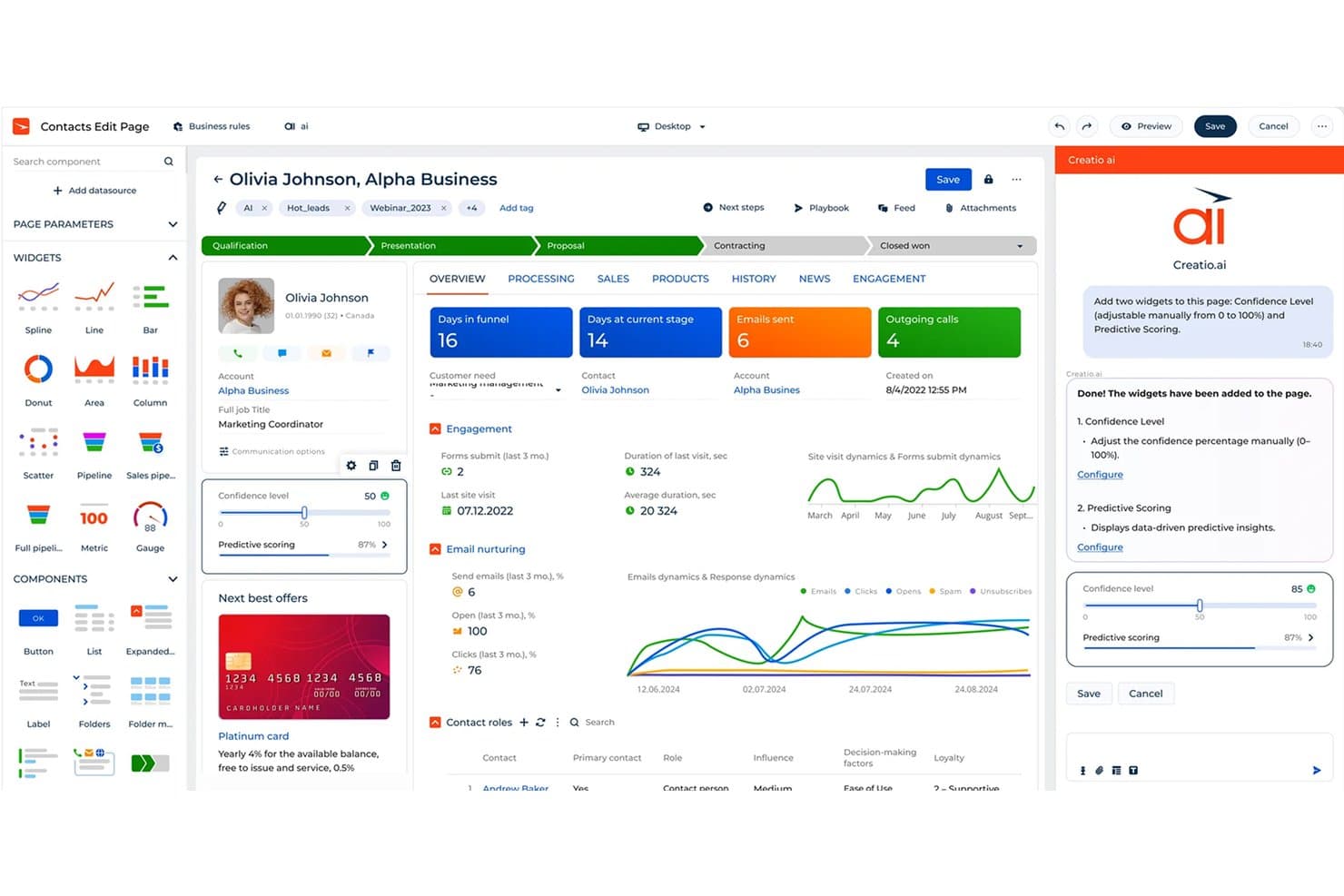
Creatio CRM utilizza l'IA per aggiungere automaticamente componenti come Livello di affidabilità e Punteggio predittivo. Creatio è una piattaforma CRM per i team di vendita, marketing e assistenza che hanno bisogno di dati cliente connessi, flussi di lavoro automatizzati e processi adattabili senza dipendere troppo dagli sviluppatori.
Per chi è più adatto Creatio CRM?
I team delle operazioni sui ricavi che hanno bisogno di personalizzare le fasi di vendita, le regole di previsione e i flussi di lavoro senza dipendere dagli sviluppatori.
Perché Creatio CRM è una buona alternativa a monday CRM
Ho scelto Creatio CRM perché supporta la personalizzazione senza codice del flusso di vendita e delle previsioni. Utilizzo i suoi strumenti visivi per modificare le fasi di vendita, le regole di previsione e i flussi di approvazione senza il supporto degli sviluppatori. Questo aiuta il mio team ad adattare i processi CRM quando cambiano i territori, i criteri di qualificazione o i modelli di ricavi.
Funzionalità principali di Creatio CRM
- Gestione dei potenziali clienti: Acquisisci, qualifica e distribuisci i potenziali clienti tra i team di vendita.
- Gestione di account e contatti: Mantieni i profili dei clienti, le relazioni e la cronologia delle attività.
- Integrazione della posta elettronica: Sincronizza i messaggi e monitora la corrispondenza all'interno dei record dei clienti.
- Pannelli di controllo delle vendite: Monitora le attività, i tassi di conversione e le metriche dei ricavi in viste configurabili.
Integrazioni di Creatio CRM
Creatio offre oltre 700 app, connettori e integrazioni nel mercato, tra cui DocuSign e Zapier. Fornisce inoltre API per le integrazioni personalizzate.
Pros and Cons
Pros:
- Gli strumenti senza codice modificano le fasi e le approvazioni
- I flussi di lavoro interfunzionali collegano vendite e assistenza
- Le previsioni configurabili supportano i cambiamenti nei modelli di ricavi
Cons:
- La configurazione avanzata spesso richiede il supporto di specialisti
- Alcune funzionalità CRM standard richiedono soluzioni alternative
Learn more about Creatio CRM: Ideale per funzionalità di telefonia integrate
- Piano gratuito disponibile
- Da $9/utente/mese (fatturato annualmente)
Visit WebsiteCustomer Rating:4.6/5This rating combines scores from multiple user review sites to reflect overall customer sentiment about the product.
Freshsales utilizza l'AI per dare priorità ai lead e automatizzare i flussi di lavoro di vendita. Freshsales è pensato per i team di vendita che desiderano la telefonia integrata insieme ai flussi di lavoro CRM. È particolarmente utile per le aziende che si basano su chiamate in uscita, follow-up e monitoraggio delle conversazioni in tempo reale all'interno della stessa piattaforma. Se hai bisogno di un CRM che combini la gestione dei contatti con funzionalità di chiamata native, Freshsales offre un approccio più integrato e conveniente rispetto a monday CRM e strumenti simili. Con il supporto per utenti illimitati, integrazioni senza soluzione di continuità e una solida visualizzazione delle opportunità, si adatta anche ai team che necessitano di una gestione del lavoro flessibile e di capacità scalabili a livello aziendale.
Perché Freshsales è una valida alternativa a monday CRM
A differenza di monday CRM, Freshsales include funzionalità di telefonia integrate che ti permettono di effettuare chiamate direttamente dal CRM. Ho scelto Freshsales perché offre registrazione delle chiamate, note sulle chiamate e registrazione automatica, tutto nella stessa piattaforma in cui gestisci lead e trattative. Lo strumento offre anche instradamento delle chiamate e mascheramento del numero, elementi preziosi per i team che gestiscono grandi volumi di chiamate o informazioni sensibili dei clienti. Se il tuo processo di vendita dipende da conversazioni in tempo reale e dal monitoraggio, Freshsales offre un livello di integrazione telefonica che monday CRM non eguaglia.
Funzionalità principali di Freshsales
Altre funzionalità di Freshsales che potrebbero interessarti includono:
- Pipeline di vendita visiva: ti permette di monitorare le trattative attraverso stadi personalizzabili tramite un'interfaccia drag-and-drop.
- Analisi delle trattative basate su AI: offre suggerimenti e prossime azioni grazie all'AI integrata.
- Tracciamento delle email: ricevi una notifica quando i lead aprono o cliccano sulle tue email inviate dal CRM.
- Automazione dei flussi di lavoro: automatizza attività ripetitive come l'assegnazione dei lead e i promemoria di follow-up.
Integrazioni di Freshsales
Le integrazioni includono Freshdesk, PandaDoc, QuickBooks, Xero, Stripe e altre.
Pros and Cons
Pros:
- Telefonia integrata con registrazione delle chiamate inclusa
- Analisi della trattativa basata su AI per la prioritizzazione delle vendite
- Pipeline visiva con stadi drag-and-drop
Cons:
- Le sequenze email non hanno flessibilità multi-ramo
- Il modello dati limita la personalizzazione delle relazioni
Learn more about Freshsales: Ideale per automazione dell'email marketing
- Prova gratuita di 14 giorni + demo gratuita disponibile
- Da $15/mese (fatturazione annuale)
Visit WebsiteCustomer Rating:4.4/5This rating combines scores from multiple user review sites to reflect overall customer sentiment about the product.
ActiveCampaign automatizza marketing e vendite con percorsi clienti avanzati. Se il tuo team si affida all'email marketing come parte fondamentale della strategia di coinvolgimento dei clienti, ActiveCampaign merita sicuramente attenzione. Questa piattaforma combina funzionalità CRM con avanzata automazione delle email, rendendola una soluzione ideale per team di vendita guidati dal marketing e aziende di ecommerce. A differenza di monday CRM, ActiveCampaign ti consente di creare complessi percorsi email automatizzati che si collegano direttamente al tuo funnel di vendita e alla gestione dei contatti, offrendo anche workflow visivi simili a bacheche Kanban e funzioni di pianificazione come i diagrammi di Gantt.
Perché ActiveCampaign è una valida alternativa a monday CRM
Per i team che desiderano collegare vendite e marketing in un'unica piattaforma, ActiveCampaign si distingue per le sue capacità di automazione dell'email marketing. Ho scelto ActiveCampaign perché permette di progettare workflow email multi-step che si attivano in base al comportamento del contatto, alla fase della trattativa o a campi personalizzati. Il suo costruttore visuale di automazioni e gli strumenti di contenuto dinamico aiutano a personalizzare le attività di outreach e a coltivare automaticamente i lead. Questo livello di automazione è particolarmente prezioso per le aziende che hanno bisogno di coordinare campagne marketing con il follow-up commerciale, qualcosa che monday CRM non offre in modo nativo.
Funzionalità principali di ActiveCampaign
Altre funzionalità di ActiveCampaign che potrebbero interessarti includono:
- Lead Scoring: Assegna punteggi ai contatti in base all'engagement e a criteri personalizzati.
- Gestione delle Pipeline di Vendita: Permette di creare e gestire più pipeline di vendita con stadi personalizzabili.
- Monitoraggio di siti ed eventi: Tiene traccia delle visite al sito web e delle azioni degli utenti per supportare attività di vendita e marketing.
- Automazione dei task: Automatizza la creazione e l'assegnazione dei compiti per i team di vendita e supporto.
Integrazioni di ActiveCampaign
Le integrazioni includono Shopify, Salesforce, WordPress, Facebook, Slack, Google Sheets, WooCommerce, Calendly, Zendesk e altre ancora.
Pros and Cons
Pros:
- Costruttore visuale di automazioni per workflow complessi
- Lead scoring nativo per la prioritizzazione dei contatti
- Messaggistica SMS integrata insieme alle campagne email
Cons:
- Le dashboard di reportistica mancano di opzioni avanzate di filtraggio
- L'editor dei template email può essere lento a caricarsi
Learn more about ActiveCampaign: Ideale per un onboarding di team semplice
- Demo gratuita + prova gratuita di 14 giorni disponibile
- Da $13/utente/mese (fatturazione annuale)
Visit WebsiteCustomer Rating:4.3/5This rating combines scores from multiple user review sites to reflect overall customer sentiment about the product.
Nutshell semplifica i processi di vendita per i team che necessitano di una rapida configurazione. Far entrare rapidamente i nuovi membri del team è il punto di forza di Nutshell. Questo CRM è particolarmente adatto alle piccole imprese e ai team di vendita che desiderano un'implementazione semplice e senza attriti durante l'onboarding. A differenza di monday CRM, Nutshell mantiene interfaccia e flussi di lavoro semplici, così i team possono iniziare a monitorare lead e gestire contatti con pochissima formazione.
Perché Nutshell è una valida alternativa a monday CRM
Per i team che vogliono iniziare subito senza una curva di apprendimento ripida, Nutshell rappresenta un'ottima soluzione. Ho scelto Nutshell perché i suoi strumenti di onboarding guidato e i tutorial integrati aiutano i nuovi utenti a familiarizzare con la piattaforma immediatamente. La configurazione semplice della pipeline e le fasi di vendita personalizzabili consentono ai team di monitorare trattative e contatti fin dal primo giorno. Questo approccio focalizzato su un onboarding diretto aiuta le aziende a evitare ritardi e confusione tipici delle soluzioni CRM più complesse come monday CRM.
Caratteristiche principali di Nutshell
Altre funzionalità di Nutshell che potrebbero interessarti sono:
- Sequenze email integrate: ti permette di automatizzare i follow-up via email a lead e contatti direttamente dal CRM.
- Dashboard dei report di vendita: offre report di vendita visuali e monitoraggio delle attività sia per i singoli che per i team.
- Strumenti di collaborazione di team: include calendari condivisi, note e flussi di attività per mantenere tutti allineati.
- Integrazione con moduli web: cattura lead dal tuo sito e li aggiunge direttamente alla pipeline.
Integrazioni di Nutshell
Le integrazioni includono Gmail e Google Calendar, Google Sheets, Google Meet, Facebook Messenger, Dropbox Sign, Dropbox DocSend, Dialpad, Calendly e altro ancora.
Pros and Cons
Pros:
- Onboarding guidato con checklist di configurazione in-app
- Sequenze email integrate per attività di vendita
- Integrazione con moduli web per cattura diretta dei lead
Cons:
- Automazione dei flussi di lavoro limitata rispetto a monday CRM
- Mancano permessi avanzati per strutture di team complesse
Learn more about Nutshell: Ideale per analisi e reportistica avanzate
- Prova gratuita di 30 giorni + piano gratuito disponibile
- Da $25/utente/mese (fatturato annualmente)
Visit WebsiteCustomer Rating:4.4/5This rating combines scores from multiple user review sites to reflect overall customer sentiment about the product.
Salesforce offre un CRM aziendale con avanzate informazioni sulle vendite basate sull'intelligenza artificiale. Salesforce è una piattaforma CRM progettata per i team che necessitano di analisi avanzate e report personalizzabili. Si adatta perfettamente alle aziende di grandi dimensioni o a quelle con processi di vendita complessi che richiedono approfondimenti dettagliati sui dati e dashboard su misura. Se cerchi un CRM che vada oltre la semplice tracciatura e offra un controllo granulare sulle analisi, Salesforce si distingue da monday CRM e da strumenti simili.
Perché Salesforce è una buona alternativa a monday CRM
Per i team che necessitano di più dei semplici report di base, Salesforce offre funzionalità di analisi avanzate che lo distinguono da monday CRM. Ho scelto Salesforce perché i suoi dashboard personalizzabili e gli strumenti di previsione dettagliati consentono di analizzare lo stato della pipeline e le performance di vendita a un livello molto approfondito. Il generatore di report della piattaforma permette di creare report su misura utilizzando un'ampia gamma di filtri e fonti dati. Se la tua azienda si basa su decisioni guidate dai dati, Salesforce ti offre la flessibilità e la profondità che monday CRM non fornisce.
Funzionalità principali di Salesforce
Altre funzionalità di Salesforce che potrebbero interessarti includono:
- Gestione delle opportunità: tiene traccia delle trattative in ogni fase del processo di vendita.
- Regole di assegnazione lead: instrada automaticamente i lead ai venditori giusti in base ai criteri impostati.
- Gestione dei casi: gestisce le richieste di assistenza clienti e i ticket di supporto direttamente nel CRM.
- Marketplace AppExchange: offre migliaia di app predefinite e integrazioni per estendere le funzionalità della piattaforma.
Integrazioni di Salesforce
Le integrazioni native includono Outlook, Gmail, QuickBooks, Mailchimp, DocuSign, LinkedIn, Slack, Dropbox, Google Drive e molto altro.
Pros and Cons
Pros:
- Strumenti avanzati di previsione per i team di vendita
- Il generatore di report personalizzati supporta query complesse
- AppExchange offre migliaia di componenti aggiuntivi
Cons:
- I limiti di archiviazione dati possono causare costi aggiuntivi
- La configurazione dell'automazione dei flussi di lavoro non è intuitiva
Learn more about Salesforce : Ideale per la gestione visiva delle pipeline di vendita
- Prova gratuita di 14 giorni disponibile
- Da $14/utente/mese (fatturato annualmente)

Pipedrive aiuta i team di vendita ad automatizzare le pipeline e chiudere trattative più velocemente. Pipedrive è una piattaforma CRM progettata per i team che desiderano un approccio altamente visivo alla gestione delle pipeline di vendita. I responsabili e i rappresentanti commerciali che necessitano di un monitoraggio chiaro delle trattative e di fasi personalizzabili troveranno l’interfaccia drag-and-drop particolarmente utile. Se il tuo team fatica a mantenere visibilità sulla pipeline o desidera un modo più intuitivo per organizzare le trattative, Pipedrive offre una soluzione mirata con grande facilità d’uso, la possibilità di monitorare le attività e funzionalità di collaborazione integrate.
Perché Pipedrive è una valida alternativa a monday CRM
Ciò che distingue Pipedrive come alternativa a monday CRM è la sua attenzione alla gestione visiva della pipeline di vendita. Ho scelto Pipedrive per i team che vogliono visualizzare lo stato di ogni trattativa a colpo d’occhio utilizzando pipeline personalizzabili e drag-and-drop. Le barre di avanzamento colorate della piattaforma e i promemoria per le attività aiutano i commerciali a dare priorità ai follow-up e a far avanzare le trattative. Se hai bisogno di un CRM che metta la visibilità delle pipeline al centro del tuo flusso di lavoro, Pipedrive offre un vantaggio evidente.
Caratteristiche principali di Pipedrive
Altre funzionalità di Pipedrive che potrebbero interessare chi cerca un CRM includono:
- Integrazione email: Si collega al tuo provider email per inviare, ricevere e tracciare le email direttamente dal CRM.
- Moduli per acquisizione lead: Ti consente di creare moduli web per acquisire lead e aggiungerli automaticamente alla pipeline.
- Reportistica sulle vendite: Offre report e dashboard personalizzabili per monitorare le performance di vendita e le attività del team.
- App mobile: Fornisce un’applicazione mobile dedicata per gestire trattative, contatti e attività anche in mobilità.
Integrazioni Pipedrive
Le integrazioni includono Gmail, Slack, QuickBooks, Zoom, Trello, Microsoft Teams, PandaDoc, Leadfeeder, JustCall e altro ancora.
Pros and Cons
Pros:
- Pipeline visiva che semplifica il monitoraggio delle trattative
- Fasi di vendita personalizzabili per flussi di lavoro unici
- Monitoraggio e modelli email integrati
Cons:
- Funzionalità di project management limitate
- Automazione dei flussi di lavoro basilare rispetto alla concorrenza
Learn more about Pipedrive : Ideale per i team di vendita interna
- Prova gratuita di 14 giorni + demo gratuita disponibile
- Da $35/utente/mese (fatturazione annuale)

Close si concentra su chiamate e email integrate per piccoli team di vendita. I team di vendita che si affidano a chiamate e attività di outreach ad alto volume troveranno Close progettato su misura per il loro flusso di lavoro. Questo CRM è costruito specificamente per i team di vendita interna che necessitano di strumenti integrati per chiamate, SMS e email per gestire i lead e i follow-up. A differenza di monday CRM, Close offre un power dialer e la registrazione automatica delle chiamate per aiutare i rappresentanti a procedere velocemente tra le liste di chiamate e a tracciare ogni interazione.
Perché Close è una valida alternativa a monday CRM
Se il processo di vendita del tuo team si basa su chiamate outbound e un follow-up rapido, Close è progettato appositamente per questo ambiente. Ho scelto Close perché include un power dialer integrato, la registrazione automatica delle chiamate e funzionalità SMS, il tutto all'interno del CRM. Queste caratteristiche consentono ai rappresentanti di vendita interna di gestire liste di chiamate, tracciare conversazioni e inviare messaggi di follow-up senza cambiare strumento. Per i team che devono massimizzare il volume delle chiamate e mantenere registrazioni dettagliate di ogni interazione, Close offre un'alternativa focalizzata rispetto all'approccio più generale basato sui progetti di monday CRM.
Caratteristiche principali di Close
Altre funzionalità di Close che potrebbero interessarti includono:
- Pipeline di vendita personalizzabili: Ti permette di costruire e modificare più pipeline per adattarle al tuo processo di vendita.
- Automazione delle sequenze di email: Invia sequenze email programmate e multistep ai lead direttamente dal CRM.
- Strumenti di reportistica integrati: Fornisce dashboard in tempo reale e report sulle attività per monitorare le performance del team.
- Importazione di lead e deduplicazione: Importa lead in blocco e rileva e unisce automaticamente i duplicati.
Integrazioni di Close
Le integrazioni includono Calendly, Gmail, Google Calendar, HubSpot, Microsoft 365, Segment, SavvyCal, Fivetran, Zoom e altro ancora.
Pros and Cons
Pros:
- Power dialer integrato per chiamate outbound
- Registrazione automatica di chiamate e SMS
- Sequenze email multistep per coltivare i lead
Cons:
- Capacità di automazione marketing limitate
- Supporto multicanale limitato
Learn more about Close: Ideale per le funzionalità di gestione progetti
- Prova gratuita disponibile
- Da $29/utente/mese (fatturato annualmente)

Insightly combina CRM e gestione dei progetti per team che puntano all’efficienza. I team che necessitano sia di un CRM che della gestione dei progetti in un’unica piattaforma spesso scelgono Insightly. Questa soluzione è particolarmente adatta ad aziende di servizi e agenzie che desiderano gestire insieme pipeline di vendita e consegna dei progetti dopo la vendita. A differenza di monday CRM, Insightly connette opportunità, attività e progetti in un unico flusso di lavoro, facilitando il monitoraggio del lavoro per i clienti dal primo contatto fino al completamento.
Perché Insightly è una valida alternativa a monday CRM
Se il tuo team ha bisogno di funzioni di gestione dei progetti integrate nel CRM, Insightly merita di essere preso in considerazione. Ho scelto Insightly perché permette di convertire direttamente opportunità vinte in progetti, collegando vendite ed erogazione del servizio in un’unica area. Puoi assegnare attività, impostare traguardi e monitorare l’avanzamento del progetto insieme alle schede dei clienti. Questo approccio aiuta i team a gestire sia le relazioni con i clienti che l’esecuzione dei progetti senza cambiare piattaforma.
Funzionalità principali di Insightly
Alcune altre funzionalità di Insightly che potrebbero interessarti includono:
- Campi personalizzati e layout delle pagine: Ti permette di personalizzare le schede e i layout per adattarli ai processi aziendali.
- Automazione dei flussi di lavoro: Automatizza azioni ripetitive come l’invio di email o l’aggiornamento delle schede in base a trigger da te definiti.
- Tracciamento delle email: Monitora quando le email vengono aperte e le collega ai contatti e alle opportunità corrette.
- Regole di assegnazione dei lead: Instrada nuovi lead ai membri del team giusti in base a criteri stabiliti da te.
Integrazioni Insightly
Le integrazioni includono QuickBooks Online, Workday, Unbounce, ZoomInfo, WordPress, Slack, Jira, Shopify, Xero e altri.
Pros and Cons
Pros:
- Gestione progetti integrata con collegamento delle attività
- Le opportunità si convertono direttamente in progetti
- Automazione dei flussi di lavoro per vendite ed erogazione
Cons:
- Nessuno strumento integrato per preventivi o proposte
- Personalizzazione limitata delle dashboard per i report
Learn more about Insightly: Ideale per strumenti di marketing e vendita integrati
- Prova gratuita di 28 giorni + piano gratuito disponibile
- Da $20/utente/mese

HubSpot CRM offre un CRM facile da usare per startup che vogliono crescere nelle vendite. Per i team che desiderano strumenti di marketing e vendita in un unico posto, HubSpot CRM riunisce tutto in un'unica piattaforma. È particolarmente utile per i team più piccoli che devono gestire i contatti, automatizzare le campagne e monitorare le trattative senza dover utilizzare più sistemi. Se cerchi un CRM che colleghi nativamente marketing, vendite e dati dei clienti, HubSpot CRM offre un'interfaccia intuitiva e può integrarsi con software di gestione progetti e strumenti di monitoraggio del tempo per supportare flussi di lavoro più ampi.
Perché HubSpot CRM è una buona alternativa a monday CRM
Se desideri un CRM che unisca strumenti di marketing e vendita in un'unica piattaforma, HubSpot CRM è una scelta valida. Ho scelto HubSpot CRM perché offre automazione del marketing integrata, gestione delle campagne email e monitoraggio del pipeline di vendita—tutto nello stesso sistema. Le funzionalità di gestione dei contatti e nurturing dei lead sono strettamente integrate, così i team di marketing e vendite possono lavorare da un'unica fonte veritiera. Per le aziende che necessitano di strumenti unificati per entrambe le funzioni, HubSpot CRM offre un'integrazione che monday CRM non eguaglia.
Funzionalità principali di HubSpot CRM
Altre funzionalità di HubSpot CRM che potrebbero interessarti includono:
- Live Chat: Permette al tuo team di comunicare in tempo reale con i visitatori del sito.
- Pianificazione incontri: Consente ai potenziali clienti di prenotare appuntamenti direttamente con il tuo team di vendita.
- Proprietà personalizzate: Ti permette di creare e monitorare campi unici per la tua azienda.
- Playbook di vendita: Fornisce contenuti e modelli guidati per i tuoi commerciali da utilizzare durante chiamate e riunioni.
Integrazioni di HubSpot CRM
Le integrazioni includono Gmail, Outlook, Google Calendar, Slack, Zoom, Salesforce, Microsoft Teams, Google Meet, WordPress e altri.
Pros and Cons
Pros:
- I dati di marketing e vendita si sincronizzano automaticamente
- Il pianificatore di riunioni integrato si collega ai calendari
- Il tracciamento delle email mostra tassi di apertura e di clic
Cons:
- Sul piano gratuito si applicano limiti di archiviazione dei contatti
- Le opzioni di esportazione dei dati sono limitate dal piano
Learn more about HubSpot CRM: 10Il migliore per l'integrazione con Google Workspace
Copper
- Prova gratuita di 14 giorni disponibile
- Da $29/utente/mese
Visit WebsiteCustomer Rating:4.5/5This rating combines scores from multiple user review sites to reflect overall customer sentiment about the product.
Copper integra il CRM direttamente negli strumenti di Google Workspace. Se il tuo team si affida a Google Workspace per le operazioni quotidiane, Copper è progettato per integrarsi perfettamente nel tuo flusso di lavoro. Questo CRM è particolarmente apprezzato da piccole e medie imprese che desiderano un'integrazione profonda con Gmail, Calendar e Drive senza plugin aggiuntivi. A differenza di monday CRM, Copper sincronizza automaticamente email, contatti e file da Google Workspace, riducendo l'inserimento manuale dei dati e il passaggio da un contesto all'altro. Supporta inoltre la gestione di progetti semplici, l'organizzazione dei dati in una vista simile a un foglio di calcolo e la gestione di sottoattività con dipendenze di base tra le attività. Con l'accesso API per la personalizzazione, Copper aiuta i team ad estendere le funzionalità mantenendo i flussi di lavoro semplici.
Perché Copper è una valida alternativa a monday CRM
Per i team che lavorano quotidianamente su Google Workspace, Copper offre un livello di integrazione che monday CRM non fornisce. Ho scelto Copper perché sincronizza automaticamente le conversazioni su Gmail, gli eventi di Google Calendar e i file su Drive direttamente nei tuoi record CRM. Puoi gestire i contatti, monitorare le trattative e registrare le attività senza mai uscire dalle app Google. Questa forte connessione aiuta a ridurre l'inserimento manuale dei dati e mantiene le informazioni di vendita aggiornate in tempo reale, con il supporto per visualizzazioni calendario e liste di attività utili a organizzare il lavoro giornaliero.
Funzionalità principali di Copper
Altre funzionalità di Copper che potrebbero interessarti sono:
- Gestione Pipeline: Ti permette di visualizzare e gestire le opportunità di vendita attraverso fasi personalizzabili della pipeline.
- Automazione delle attività: Automatizza azioni ripetitive come follow-up e promemoria in base ai trigger impostati.
- Report e analisi: Fornisce dashboard integrati e report personalizzati per monitorare le performance di vendita.
- App mobile: Offre un'app mobile dedicata per gestire contatti, trattative e attività ovunque ti trovi.
Integrazioni Copper
Le integrazioni includono Gmail, Google Calendar, Google Drive, Mailchimp, Google Sheets, LinkedIn, RingCentral, DocuSign, QuickBooks e molte altre.
Pros and Cons
Pros:
- Sincronizzazione automatica di contatti ed email
- Estensione Chrome per l'accesso al CRM direttamente dalla casella di posta
- Automazione integrata dei flussi di lavoro per le attività di vendita
Cons:
- Opzioni limitate di personalizzazione della pipeline
- Mancano strumenti avanzati per l'automazione del marketing
Learn more about Copper:
Altre alternative a monday CRM
Ecco alcune alternative aggiuntive a monday CRM che non sono entrate nella mia selezione, ma che vale comunque la pena prendere in considerazione:
- 11Zoho CRMIl migliore per flussi di lavoro di automazione personalizzabili
- 12KeapIdeale per la gestione dei clienti di piccole imprese
- 13Zendesk SellIdeale per le funzionalità di tracciamento delle email di vendita
- 14BIGContactsIdeale per la gestione delle cronologie dei contatti
Come valuto le alternative a monday CRM
Divido ogni valutazione in due livelli: la base che ogni CRM deve garantire—pipeline, automazione, previsione—e i fattori differenzianti che contano per i team RevOps.
Funzionalità di base (requisiti minimi per questa lista)
Quando seleziono gli strumenti per la mia lista, valuto ciascuno su una scala da 0 (non offre la funzionalità) a 5 (eccelle in questo ambito) per ogni funzionalità di base elencata di seguito. Poi, calcolo il punteggio totale dello strumento e lo converto in percentuale. Ogni strumento deve raggiungere un punteggio totale minimo del 65% per essere preso in considerazione.
- Pipeline di vendita personalizzabili: Verifico che si possano creare più pipeline con fasi e viste modificabili—ad esempio, separando il new business dalle trattative di espansione su board distinti.
- Gestione di contatti e account: Ogni strumento dovrebbe collegare contatti, aziende e trattative in una gerarchia chiara così che i commerciali possano risalire a ogni stakeholder coinvolto in una trattativa.
- Automazione dei workflow: Cerco builder di automazioni no-code che gestiscano veri compiti RevOps come assegnazione round-robin dei lead, notifiche di cambio fase e creazione automatica di task.
- Reportistica e previsione: Qui contano la previsione della pipeline e dashboard personalizzate—valuto se sia possibile costruire una vista previsione ponderata senza dover esportare dati in un foglio di calcolo.
- Integrazioni native e API: Lo strumento deve connettersi al tuo stack esistente. Valuto i connettori nativi per automazione di marketing e strumenti BI, oltre all'accesso REST API per sincronizzazioni personalizzate.
- Oggetti e campi personalizzati: I team RevOps spesso necessitano di modelli dati oltre gli oggetti CRM standard. Verifico che si possano creare oggetti personalizzati—come anagrafiche partner o tracker rinnovi—con collegamenti relazionali.
Una volta che ho una lista di strumenti che soddisfano questi criteri, considero cosa distingue ciascuna piattaforma dalle altre.
Fattori differenzianti (cosa rende uniche le soluzioni)
Ecco come confronto e metto a confronto i diversi vendor:
Funzionalità distintive
La valutazione delle trattative tramite AI è un forte elemento di differenziazione—cerco strumenti in grado di segnalare trattative a rischio in base all'attività pipeline così che i team RevOps possano intervenire prima che un trimestre vada storto. L'intelligenza sui ricavi va oltre quando un CRM include registrazione nativa delle chiamate e analisi delle conversazioni, fornendo ai manager segnali di coaching senza necessità di strumenti separati. Valuto anche le sequenze di sales engagement già integrate, perché avere cadenzamenti multicanale direttamente nel CRM significa meno integrazioni da gestire e dati di attribuzione più puliti.
Oltre le funzionalità
Le integrazioni nella revenue stack sono fondamentali. Controllo quanto bene ogni CRM si sincronizzi con strumenti di automazione marketing, BI e data warehouse—perché un CRM che non alimenta dati puliti nel tuo Snowflake o nei dashboard Tableau genera più lavoro di quanto non ne risolva. La trasparenza dei prezzi è un altro fattore che peso, specie per i costi nascosti relativi a limiti di automazione o chiamate API che possono crescere man mano che il team si espande. Valuto anche la scalabilità—cioè se la piattaforma supporta permessi basati sui ruoli, ambienti di test (sandbox), e strutture multi-unità di business necessarie a organizzazioni RevOps in crescita.
Perché cercare un'alternativa a monday CRM?
Sebbene monday CRM sia una buona scelta come piattaforma per la gestione delle relazioni con i clienti, ci sono diversi motivi per cui alcuni utenti cercano soluzioni alternative. Potresti cercare un'alternativa a monday CRM perché…
- Hai bisogno di strumenti integrati per le chiamate o gli SMS
- Il tuo team ha bisogno di un'automazione avanzata delle vendite
- Desideri una personalizzazione più dettagliata della pipeline
- Hai bisogno di report e analisi più approfonditi
- La tua azienda opera al di fuori delle aree geografiche supportate da monday CRM
- Preferisci un sistema CRM incentrato sulle vendite anziché sulla gestione dei progetti
Se ti riconosci in una di queste situazioni, sei nel posto giusto. Il mio elenco include diverse opzioni di piattaforme per la gestione delle relazioni con i clienti più adatte ai team che affrontano queste difficoltà con monday CRM e cercano soluzioni alternative.
Funzionalità principali di monday CRM
Ecco alcune delle funzionalità principali di monday CRM, che ti aiuteranno a mettere a confronto le proposte delle soluzioni alternative:
- Pipeline di vendita personalizzabili
- Gestione dei contatti e degli account
- Automazione dei flussi di lavoro
- Integrazione e monitoraggio delle e-mail
- Monitoraggio delle attività e delle trattative
- Assegnazione delle attività e promemoria
- Pannelli di controllo e report personalizzati
- Moduli per l'acquisizione dei potenziali clienti
- Accesso all'app mobile
- Controlli di autorizzazione e accesso basati sui ruoli