

Le 10 migliori soluzioni di Social CRM recensite nel 2026

Migliori Software Social CRM: La Shortlist


Scegliere un software social CRM per un'azienda può essere tanto impegnativo quanto gestire le operazioni quotidiane della tua attività. Molte aziende si trovano ad affrontare difficoltà nel gestire le interazioni con i clienti sui social media, rischiando così di perdere opportunità e ostacolando la crescita.
Come consulente tecnologico CRM, ho riscontrato una crescente necessità di soluzioni capaci di affrontare efficacemente queste sfide. Sulla base della mia esperienza con soluzioni CRM, ho valutato e recensito diversi software social CRM leader di mercato per aiutare le aziende a individuare la soluzione più adatta alle proprie esigenze.
Che tu voglia migliorare l'engagement con i tuoi clienti o ottimizzare la strategia CRM esistente, la mia guida ti aiuterà a prendere decisioni strategiche che rafforzano le relazioni con i clienti e stimolano la crescita.
Perché Fidarsi delle Nostre Recensioni Software
Testiamo e recensiamo software RevOps dal 2022. In quanto leader RevOps, sappiamo quanto sia fondamentale (e difficile) scegliere il software giusto. Investiamo in ricerche approfondite per aiutare il nostro pubblico a prendere decisioni più consapevoli nell’acquisto di software. Abbiamo testato oltre 2.000 strumenti per diversi casi d’uso RevOps e abbiamo scritto più di 1.000 recensioni dettagliate.Scopri come manteniamo la trasparenza & la nostra metodologia di valutazione dei software.
Riepilogo dei Migliori Software Social CRM
| Tool | Best For | Trial Info | Price | ||
|---|---|---|---|---|---|
| 1 | Ideale per casella di posta sociale unificata e analytics | Prova gratuita di 14 giorni | Da $149/mese | Website | |
| 2 | Ideale per misurare il ROI dei social media | Prova gratuita + piano gratuito disponibili | Da $79/utente/mese (fatturato annualmente) | Website | |
| 3 | Ideale per la gestione dei social media orientata alle agenzie | Prova gratuita di 14 giorni disponibile | Da $29/mese | Website | |
| 4 | Ideale per l'arricchimento dei profili social nel CRM | Prova gratuita di 14 giorni | A partire da $24.90/utente/mese (fatturato annualmente) | Website | |
| 5 | Ideale per il tracciamento dei ricavi dai social media B2B | Demo gratuita disponibile | Prezzo su richiesta | Website | |
| 6 | Ideale per la gestione aziendale tutto-in-uno gratuita | Prova gratuita di 15 giorni + piano gratuito + demo gratuita disponibile | A partire da $49/organizzazione/mese (fatturazione annuale) | Website | |
| 7 | Ideale per CRM tutto-in-uno e automazione del marketing | Prova gratuita di 14 giorni | A partire da $99/mese | Website | |
| 8 | Ottimo per campagne con contenuti generati dagli utenti | Prova gratuita di 14 giorni | Da $15/mese (fatturato annualmente) | Website | |
| 9 | Ideale per la produttività nelle vendite alimentata dall'IA | Prova gratuita di 21 giorni + demo gratuita disponibile | Da $9/utente/mese (fatturazione annuale) | Website | |
| 10 | Ideale per strumenti CRM e social media integrati | Prova gratuita di 15 giorni + piano gratuito disponibile | Da $14/utente/mese (fatturazione annuale) | Website |
Recensioni dei Migliori Software Social CRM
Questa sezione offre un’analisi approfondita e una panoramica di ogni software social CRM, illustrando i pro e contro di ciascun strumento, le funzionalità e gli scenari ideali di utilizzo.
Ideale per casella di posta sociale unificata e analytics
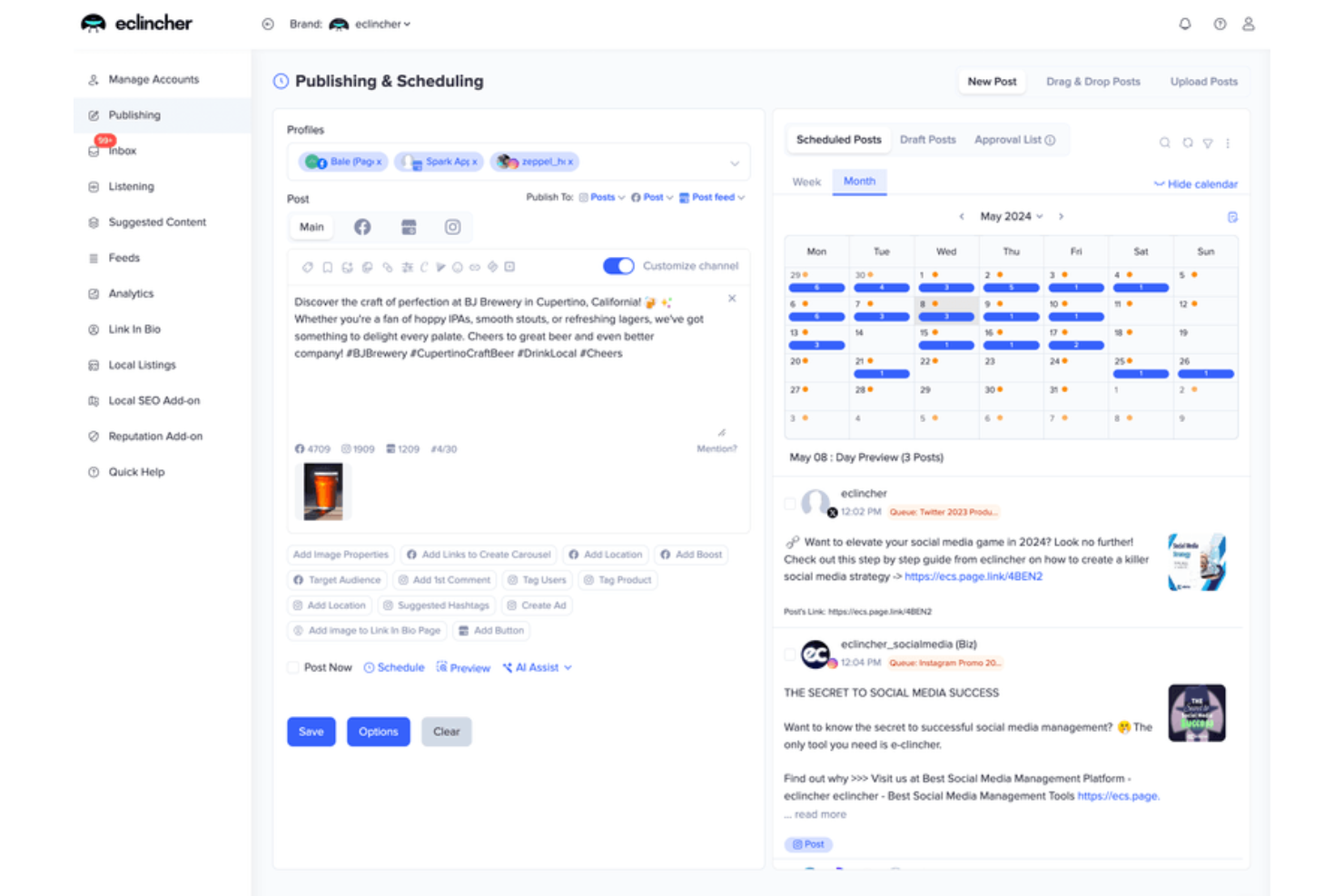
eclincher è una piattaforma di gestione dei social media che centralizza la pubblicazione, una casella di posta CRM sociale unificata su oltre 20 canali, il monitoraggio del brand e l’analisi delle prestazioni in un’unica dashboard.
Per chi è ideale eclincher?
eclincher è adatto a social media manager e team di marketing digitale di aziende di medie dimensioni che necessitano di pubblicazione e coinvolgimento su più canali in un unico posto.
Perché ho scelto eclincher
eclincher merita un posto nella mia shortlist perché la casella di posta unificata è una delle più complete che abbia mai visto in un contesto di CRM sociale. Raccoglie messaggi, commenti, menzioni, recensioni e email da oltre 30 canali in uno spazio di lavoro unico, così il mio team non deve cambiare continuamente piattaforma per monitorare ogni conversazione. Mi affido anche all’analisi del sentiment integrata nella casella di posta, che mostra in tempo reale come stanno reagendo le audience e facilita la priorità ai thread che richiedono più attenzione. Inoltre, grazie alle dashboard di analytics personalizzabili che monitorano tempi di risposta e prestazioni del team, ottieni un quadro chiaro di come sta funzionando la tua attività di coinvolgimento.
Funzionalità principali di eclincher
- Code di auto-pubblicazione: Pianifica e ricicla contenuti sempreverdi su più profili social utilizzando code di pubblicazione basate su regole.
- Monitoraggio del brand: Tieni traccia in tempo reale di parole chiave, hashtag e menzioni dei competitor sui canali social.
- Vista del profilo contatto: Visualizza lo storico completo delle interazioni social di un contatto direttamente dalla casella di posta prima di rispondere.
- Assegnazione dei compiti al team: Assegna le conversazioni della casella di posta a membri specifici del team e aggiungi etichette per organizzare e gestire i messaggi in arrivo.
Pros and Cons
Pros:
- Casella sociale unificata
- Analytics avanzati
- Creazione di contenuti con IA
Cons:
- Curva di apprendimento per nuovi utenti
- Alcuni utenti segnalano bug occasionali
Ideale per misurare il ROI dei social media
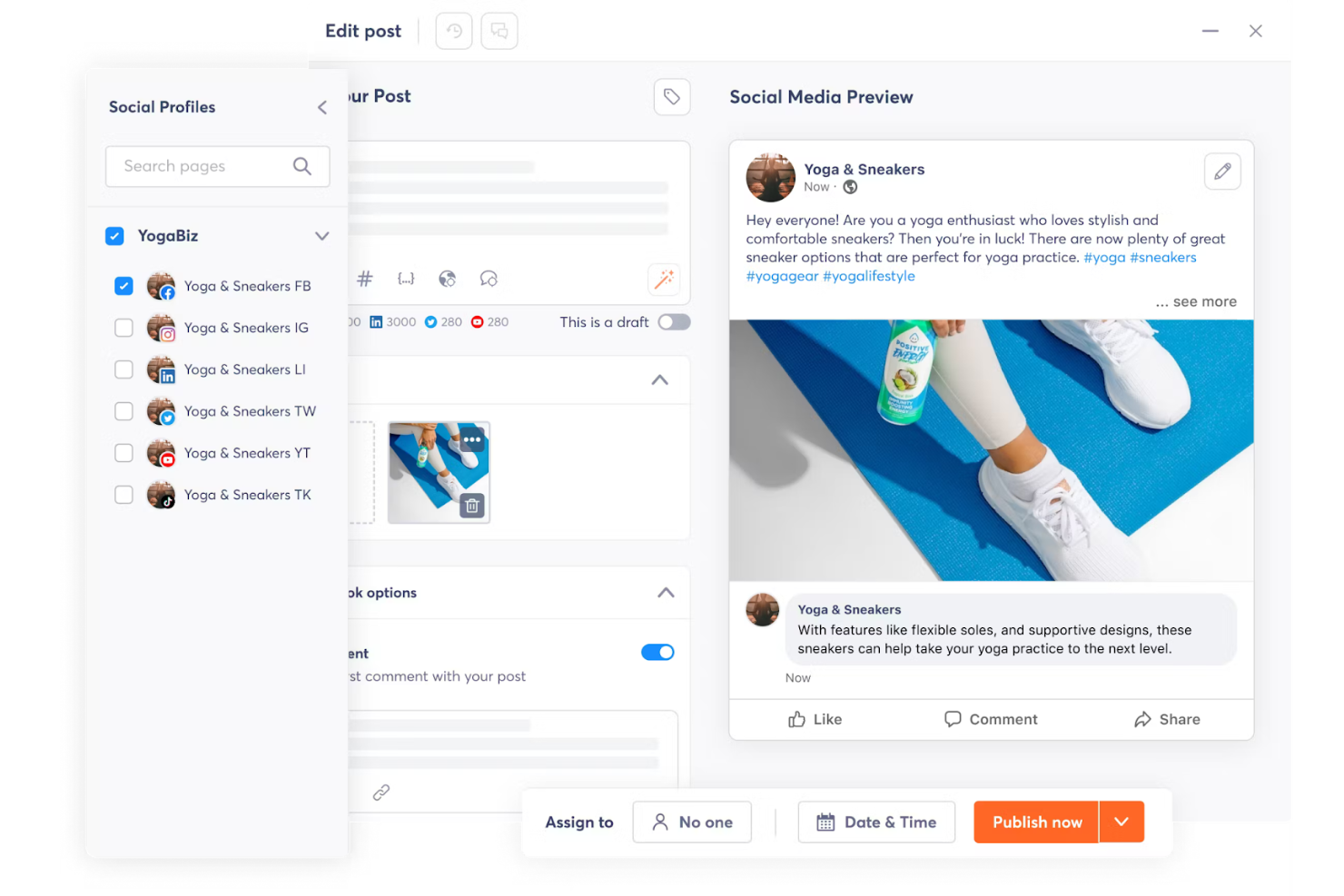
Agorapulse è una piattaforma di gestione dei social media con funzionalità di social CRM integrate, tra cui una casella di posta unificata, profilazione del pubblico, etichettatura dei contatti e social listening su tutte le principali reti.
Per chi è Agorapulse?
Agorapulse è adatta a social media manager e team marketing di piccole e medie imprese che hanno bisogno di gestire le conversazioni e monitorare le relazioni con il pubblico su più canali.
Perché ho scelto Agorapulse
Agorapulse si è guadagnata un posto tra le migliori della mia lista perché è l'unica piattaforma di gestione social che ho trovato in grado di collegare l'attività organica sui social direttamente ai parametri di fatturato. La funzione Social Media ROI collega i dati di Google Analytics con le attività di Agorapulse, così posso vedere quali post e conversazioni in arrivo generano traffico, lead e vendite. Apprezzo anche i report sul funnel, che suddividono il contributo al fatturato per profilo, tipo di contenuto e singolo membro del team. Un livello di dettaglio per l'attribuzione così approfondito è davvero raro in un contesto di social CRM.
Caratteristiche principali di Agorapulse
- Casella di posta social unificata: Gestisci tutti i messaggi in arrivo, i commenti e le menzioni su ogni social network connesso da una sola coda.
- Etichette per i contatti: Tagga i contatti social come lead, clienti o brand ambassador direttamente dalla casella di posta per segmentare il tuo pubblico.
- Social listening: Monitora in tempo reale le menzioni del brand, le parole chiave e le attività dei competitor sui vari canali social.
- Integrazioni CRM: Invia dati di contatti e conversazioni dalla casella di posta direttamente nelle schede di Salesforce o HubSpot.
Pros and Cons
Pros:
- Analisi dettagliate
- Interfaccia intuitiva
- Assistenza clienti eccellente
Cons:
- Funzionalità avanzate limitate
- Personalizzazione limitata nei report

Sendible
Ideale per la gestione dei social media orientata alle agenzie

Sendible è una piattaforma di gestione dei social media progettata per agenzie e team di marketing, con funzionalità di pianificazione, una casella di posta centralizzata per la gestione dell'engagement, dashboard personalizzabili con marchio bianco, collaborazione con i clienti e reportistica automatizzata su tutti i principali social network.
Per chi è ideale Sendible?
Sendible è particolarmente indicato per le agenzie di social media che gestiscono più account di clienti e richiedono report con marchio bianco e flussi di lavoro per l'approvazione dei clienti.
Perché ho scelto Sendible
Ho incluso Sendible tra le mie migliori scelte perché è uno dei pochi strumenti di gestione dei social media progettati appositamente per le agenzie, e non solo come opzione a posteriori. Client Connect consente di acquisire i clienti senza dover richiedere le loro password—i clienti aggiungono direttamente i propri profili alla tua dashboard, e Sendible gestisce automaticamente i promemoria per la riconnessione. La dashboard con marchio bianco ti permette di applicare il tuo brand, dominio personalizzato e schema di colori, così che i clienti vedano il servizio come un tuo prodotto.
Funzionalità principali di Sendible
- Posta prioritaria: Gestisci tutti i commenti, messaggi e risposte in arrivo da ogni profilo social collegato in un unico feed unificato.
- Report automatici: Pianifica report pronti per i clienti da inviare automaticamente a intervalli prestabiliti, prelevando i dati dai profili social collegati.
- Code intelligenti: Crea code di contenuti ricorrenti che si ricaricano e pubblicano automaticamente agli orari definiti per mantenere gli account sempre attivi.
- Tracciamento UTM: Aggiungi parametri UTM ai post programmati per monitorare e attribuire il traffico social nella tua piattaforma di analytics.
Pros and Cons
Pros:
- Pianificazione efficiente
- Analisi dettagliate
- Collaborazione di squadra
Cons:
- Capacità limitate di social listening
- Interfaccia complessa

Nimble
Ideale per l'arricchimento dei profili social nel CRM
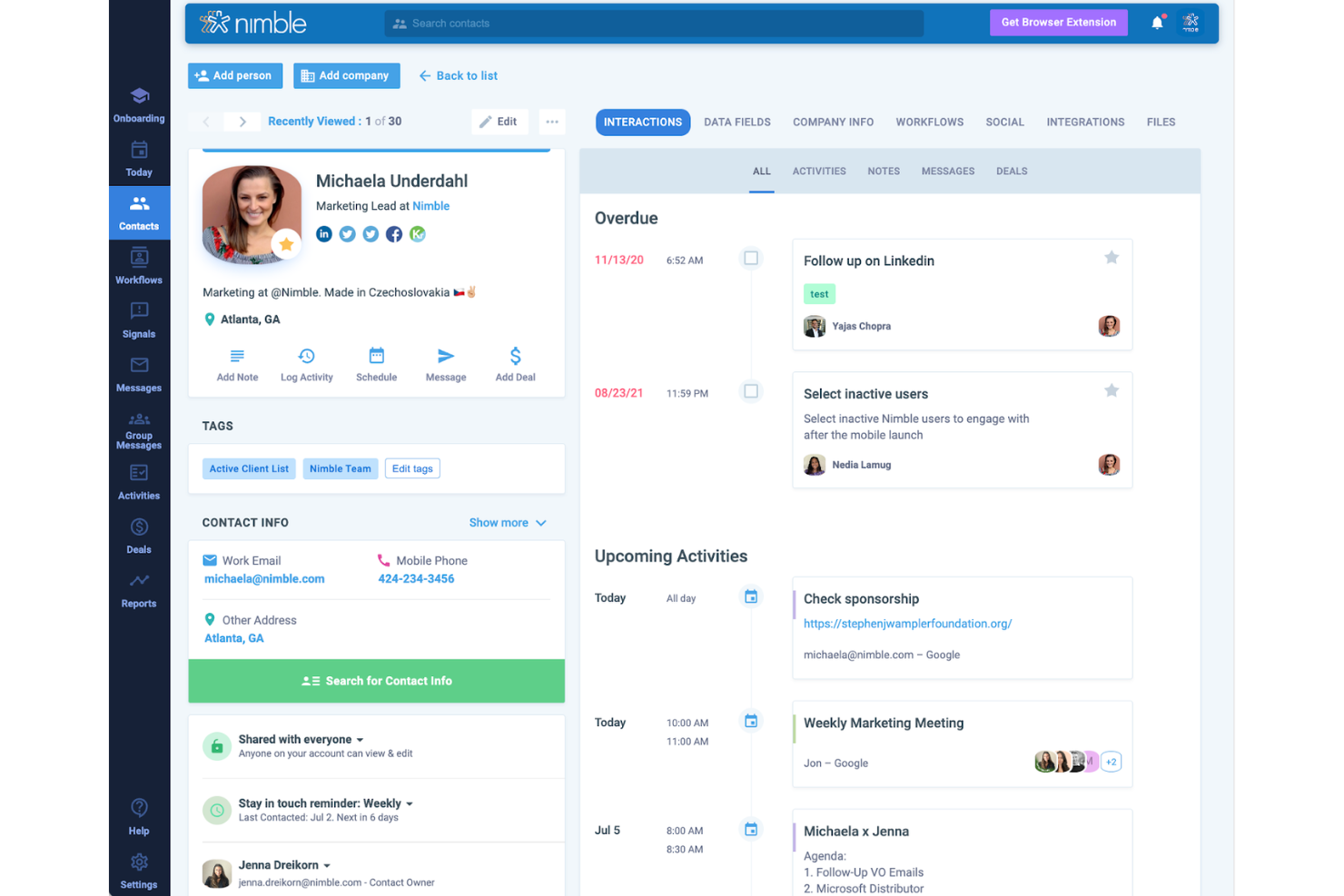
Nimble è un CRM sociale costruito attorno all'arricchimento automatico dei contatti, prelevando profili social, titoli professionali e dati aziendali dal web direttamente nelle schede dei tuoi contatti.
Per chi è più indicato Nimble?
Nimble è adatto a team di vendita di piccole e medie dimensioni che si affidano al social selling e necessitano di dati sui contatti collegati alla presenza web e social.
Perché ho scelto Nimble
Nimble si distingue nella mia shortlist perché l'arricchimento del profilo social non è un extra: è integrato nel funzionamento stesso del CRM. Quando aggiungi un contatto usando soltanto un indirizzo email, Nimble analizza automaticamente LinkedIn, Twitter e altre fonti pubbliche online per compilare titolo professionale, azienda, località e profili social. L'estensione browser Nimble Prospector va oltre: passa il mouse su qualsiasi profilo LinkedIn e costruisce una scheda contatto completa in pochi secondi, con un'opzione a un clic per aggiungere il record direttamente nel tuo CRM. L'arricchimento funziona su tutto il web aperto, non solo su LinkedIn: visita la pagina Chi siamo di qualsiasi azienda, passa su un nome e Prospector raccoglie dati da oltre 16 fonti direttamente nella scheda del contatto.
Funzionalità principali di Nimble
- Segmentazione dei contatti: Tagga e filtra i contatti per fonte sociale, settore, titolo professionale o campi personalizzati per creare liste target per le attività di outreach.
- Messaggistica di gruppo: Invia email personalizzate in massa a liste segmentate direttamente dal CRM, con tracciamento delle aperture e dei clic integrato.
- Gestione della pipeline di vendita: Crea e gestisci più pipeline di trattative visive con fasi drag-and-drop e monitoraggio del valore delle opportunità.
- Pagina Oggi: Una dashboard giornaliera unificata che mostra attività programmate, eventi in calendario, attività sulle trattative e follow-up email in un'unica vista.
Pros and Cons
Pros:
- Arricchimento profili social
- Integrazione fluida con altre piattaforme
- Flussi di lavoro automatizzati
Cons:
- Assistenza clienti limitata
- Curva di apprendimento più elevata
Oktopost
Ideale per il tracciamento dei ricavi dai social media B2B
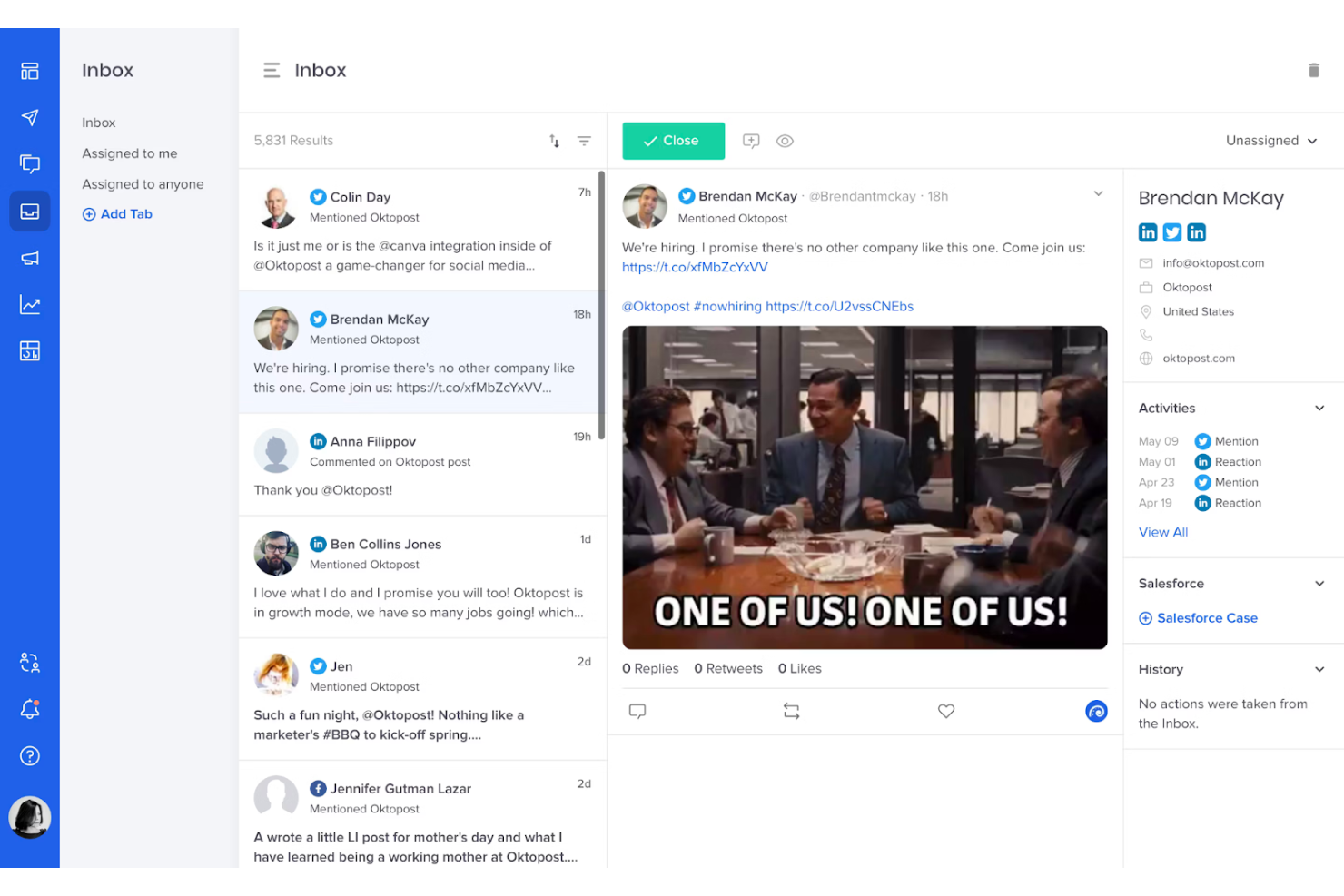
Oktopost è una piattaforma di gestione dei social media B2B che combina pubblicazione sui social, social listening, advocacy dei dipendenti e analisi focalizzata sul funnel, con integrazioni a CRM e automazione del marketing per collegare l'attività sui social al pipeline e ai ricavi.
Per chi è più indicato Oktopost?
Oktopost è particolarmente adatto a team di marketing e generazione della domanda B2B che hanno bisogno di collegare direttamente l'attività sui social media ai dati del CRM e all'attribuzione dei ricavi.
Perché ho scelto Oktopost
Oktopost merita il suo posto nella mia shortlist perché nessun altro strumento di social CRM collega così direttamente l'engagement sui social all'attribuzione dei ricavi. Adoro come trasferisce i dati delle interazioni social su Salesforce, HubSpot e Microsoft Dynamics 365 nei profili dei contatti, così che un commento o una condivisione su LinkedIn di un potenziale cliente compaia nella timeline del CRM. Il suo sistema di tagging delle campagne permette anche al mio team di tracciare quali post sui social hanno influenzato il pipeline, incluso il post specifico che ha toccato una trattativa prima della chiusura.
Caratteristiche principali di Oktopost
- Social inbox: Consolida menzioni, commenti e messaggi diretti da tutti i canali social collegati in una sola coda per la gestione da parte del team.
- Social listening: Monitora in tempo reale le menzioni del marchio, l'attività dei concorrenti e le keyword di settore sui social network.
- Advocacy dei dipendenti: Permette ai membri del team di condividere contenuti pre-approvati con le loro reti personali, supportando la social vendita su larga scala.
- AI Assist: Suggerisce bozze di risposte ai messaggi social in arrivo direttamente all'interno della piattaforma.
Pros and Cons
Pros:
- Ottima analisi e reportistica
- Forte orientamento B2B
- Strumenti per l'advocacy dei dipendenti
Cons:
- Personalizzazione limitata
- Curva di apprendimento ripida
Bitrix24
Ideale per la gestione aziendale tutto-in-uno gratuita
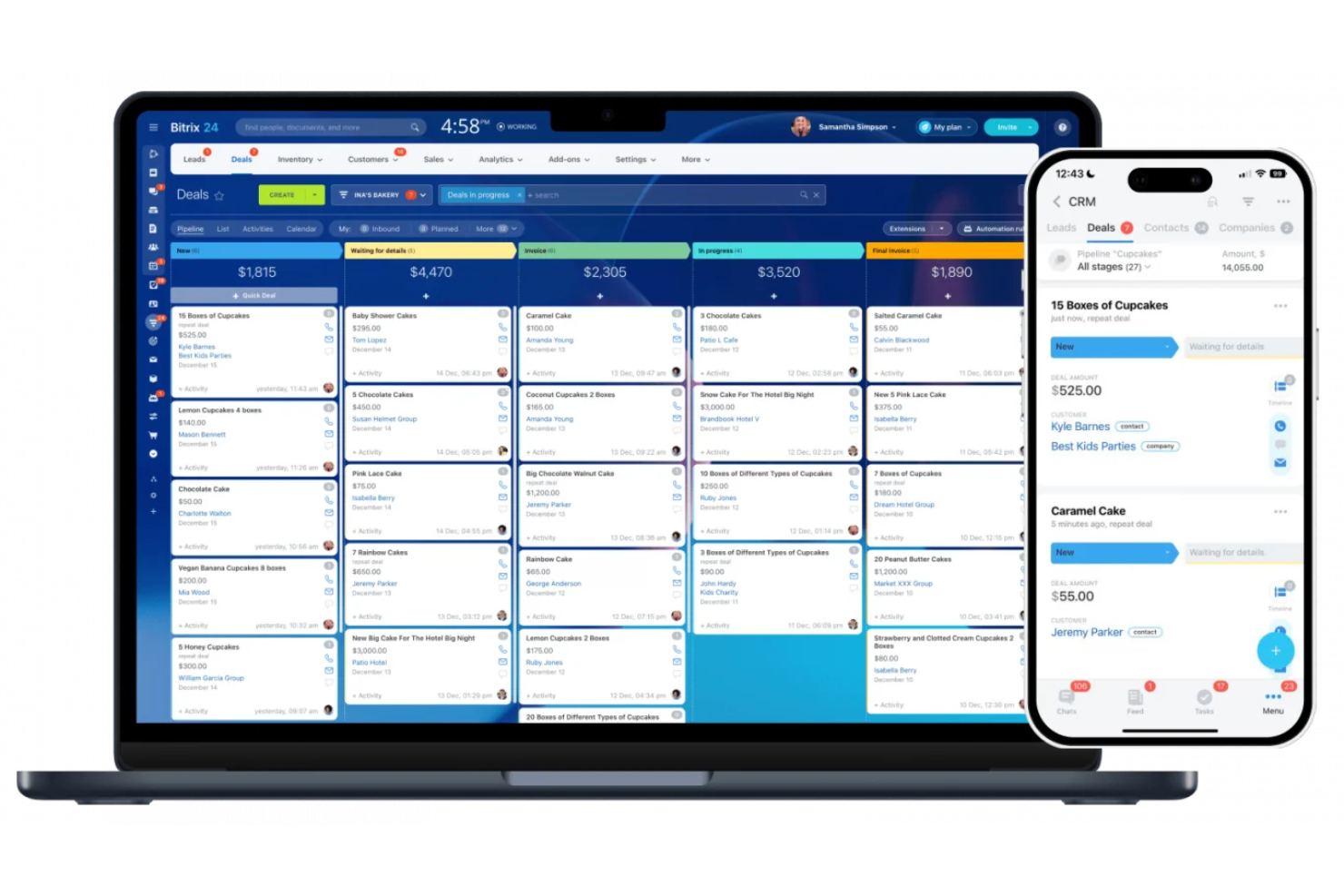
Bitrix24 è una piattaforma CRM e di gestione aziendale tutto-in-uno con un contact center omnicanale integrato che collega i canali di messaggistica social—come WhatsApp, Instagram Direct e Facebook Messenger—direttamente alle schede del CRM.
Per chi è ideale Bitrix24?
Bitrix24 è adatto a piccole e medie imprese che necessitano di strumenti CRM, messaggistica social e collaborazione di squadra in un'unica soluzione senza dover pagare per più piattaforme.
Perché ho scelto Bitrix24
Ho inserito Bitrix24 tra le mie scelte migliori perché il piano gratuito include un CRM completamente funzionale con la messaggistica social già integrata, e non nascosta dietro un paywall. Nel livello gratuito, hai supporto inbox omnicanale per WhatsApp, Instagram Direct e Facebook Messenger. Apprezzo anche il fatto che i messaggi in entrata da questi canali creano automaticamente lead nel CRM, eliminando la necessità di inserimento dati manuale.
Caratteristiche principali di Bitrix24
- Canali aperti: Collega piattaforme social media e app di messaggistica a un'unica casella di posta, con ogni conversazione collegata a un contatto nel CRM.
- Moduli web CRM: Crea moduli di acquisizione lead incorporabili che trasferiscono direttamente le richieste nel tuo pipeline CRM.
- Automazione delle vendite: Imposta regole basate su trigger che fanno avanzare le trattative nelle fasi della pipeline in base all'attività dei contatti.
- Analisi del contact center: Monitora tempi di risposta, volume delle conversazioni e attività degli operatori su tutti i canali social collegati.
Pros and Cons
Pros:
- Funzionalità CRM avanzate
- Ampie opzioni di personalizzazione
- Buone capacità di gestione documentale
Cons:
- Curva di apprendimento ripida
- Limitazioni dell'app mobile

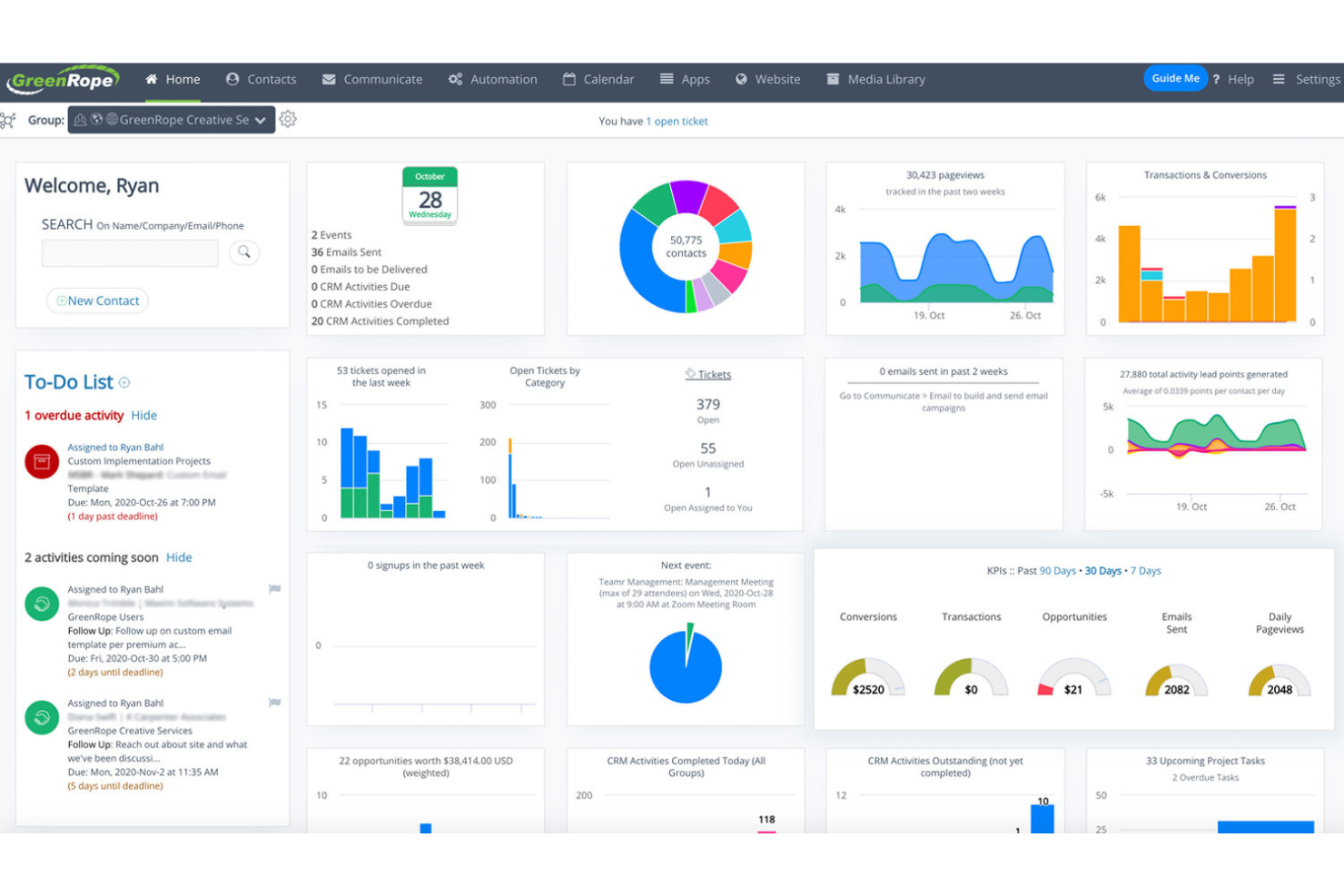
GreenRope è una piattaforma CRM tutto-in-uno che unisce vendite, automazione del marketing, gestione dei social media, servizio clienti e operazioni in un unico sistema incentrato sui contatti.
Per chi è più indicato GreenRope?
GreenRope è particolarmente adatto per piccole e medie imprese che desiderano gestire CRM, marketing e coinvolgimento dei clienti senza dover utilizzare più strumenti diversi.
Perché ho scelto GreenRope
GreenRope si guadagna un posto tra i migliori nella mia selezione perché il suo social CRM è integrato direttamente nello stesso sistema dell'automazione del marketing, e non aggiunto in un secondo momento. Apprezzo il fatto che le interazioni social su Facebook, Twitter e LinkedIn confluiscano direttamente nelle schede dei contatti, consentendo così che il lead scoring e i workflow di automazione si attivino non appena un contatto interagisce sui social. Il costruttore di customer journey drag-and-drop mi permette poi di progettare campagne a più step che rispondono sia ai comportamenti social sia a quelli email in una sequenza unificata, senza dover cambiare strumenti o sincronizzare dati tra diverse piattaforme.
Caratteristiche principali di GreenRope
- Marketing sui social network: programma e pubblica post sui social su Facebook, Twitter e LinkedIn direttamente dalla dashboard di marketing di GreenRope.
- Gestione della pipeline: utilizza una vista pipeline drag-and-drop per tracciare le opportunità, aggiornare le fasi delle trattative e gestire le attività di follow-up nello stesso sistema dei tuoi contatti social.
- SMS marketing: invia e automatizza campagne di messaggi di testo insieme a email e attività social dall'interno di una singola scheda contatto.
- Analisi predittiva: ottieni insight su comportamenti e pattern di engagement dei contatti per dare priorità alle attività in base alla probabilità di conversione.
Pros and Cons
Pros:
- Supporta utenti illimitati
- Funzionalità complete
- Assistenza clienti 24/7
Cons:
- Processo di configurazione complesso
- Opzioni di personalizzazione limitate

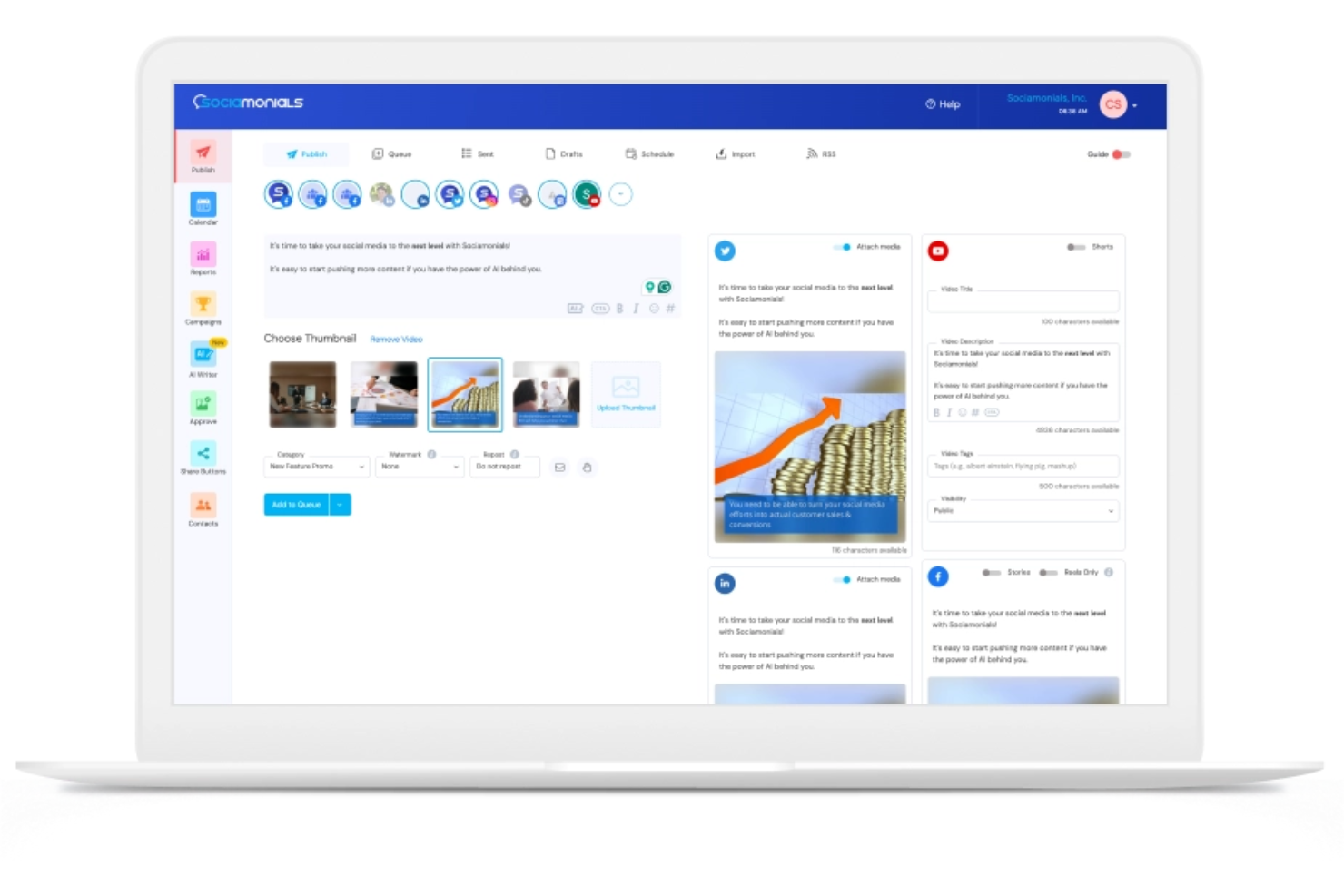
Sociamonials è una piattaforma di gestione dei social media con un CRM sociale integrato che combina pianificazione dei contenuti, creazione di contenuti con intelligenza artificiale, gestione di campagne virali e raccolta di contenuti generati dagli utenti in un unico posto.
Per chi è Sociamonials?
Sociamonials è adatto a team di marketing di piccole e medie dimensioni che gestiscono campagne sociali, concorsi o programmi di advocacy del brand in modo frequente.
Perché ho scelto Sociamonials
Ho scelto Sociamonials tra i migliori perché i suoi strumenti per i contenuti generati dagli utenti (UGC) vanno oltre la semplice raccolta. Puoi lanciare un concorso fotografico o video, fare in modo che le candidature siano automaticamente condivise sulle tue pagine social e sul sito web, e monitorare quali contenuti generano più lead o segnalazioni. Il flusso di lavoro approvativo integrato ti permette inoltre di moderare le candidature prima che vengano pubblicate, mantenendo così l'integrità del brand senza rallentare la campagna.
Caratteristiche principali di Sociamonials
- Social CRM: Cattura i partecipanti a concorsi e giveaway come contatti, poi monitora il fatturato, i lead e le visite al sito che ogni persona ha generato tramite la loro attività sui social.
- Identificazione degli influencer: Individua quali membri della community stanno generando più segnalazioni e fatturato su tutti i dispositivi, con link diretti ai loro profili social per eventuali contatti.
- Test suddivisi automatizzati: Esegui fino a cinque varianti di campagna contemporaneamente e lascia che Sociamonials identifichi quale versione ha ottenuto i risultati migliori.
- Monitoraggio delle entrate dai social: Attribuisci lead e fatturato a singoli post social, pulsanti di condivisione e campagne su ogni rete connessa senza aver bisogno di uno strumento separato di abbreviazione link.
Pros and Cons
Pros:
- Ottimi strumenti di analisi
- Configurazione campagne semplice
- Supporto multilingue
Cons:
- Curva di apprendimento
- Personalizzazione limitata
Ideale per la produttività nelle vendite alimentata dall'IA
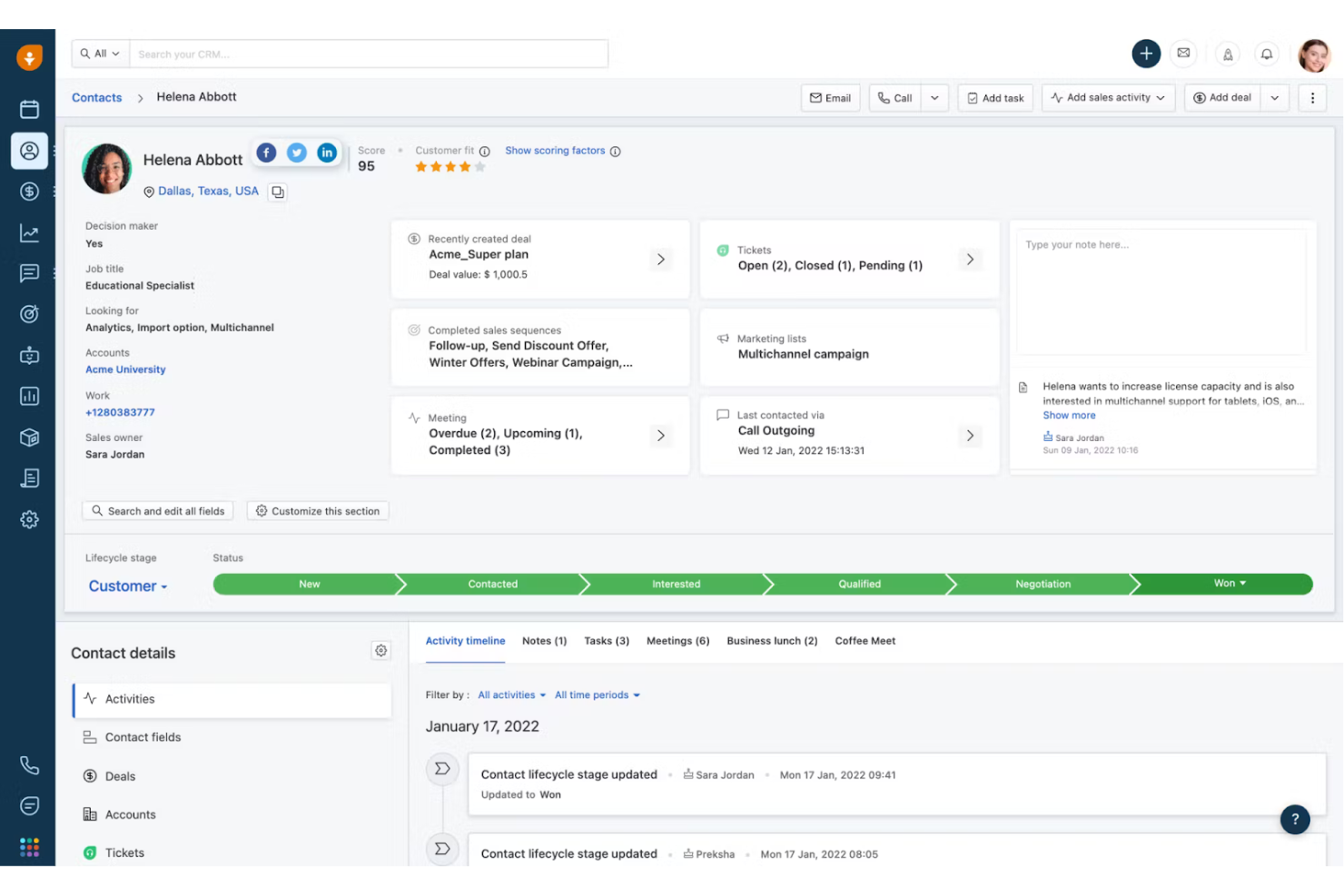
Freshsales è un CRM di vendita potenziato dall'IA che copre acquisizione e qualificazione dei lead, gestione dei contatti, comunicazione multicanale, monitoraggio delle opportunità e automazione dei flussi di lavoro, con Freddy AI integrato per il punteggio dei lead, approfondimenti sulle trattative e assistenza nella stesura delle email.
Per chi è Freshsales?
Freshsales è particolarmente indicato per team di vendita piccoli e medi che desiderano un CRM con assistenza IA senza la complessità delle piattaforme aziendali.
Perché ho scelto Freshsales
Ho scelto Freshsales come uno dei migliori per come l'intelligenza artificiale Freddy è integrata in tutte le attività quotidiane di vendita. Invece di essere una funzione accessoria, Freddy valuta i contatti in base a modelli comportamentali, assegna etichette alle trattative per segnalare opportunità a rischio o ad alta priorità e redige email di prospezione personalizzate—all'interno dello stesso CRM utilizzato dal team per gestire le opportunità. Mi piace anche che Freddy analizzi le email e i dati storici per suggerire la “prossima azione migliore” sulle trattative in corso, riducendo il tempo impiegato dagli agenti per decidere cosa fare dopo ed evitando che le trattative si blocchino.
Funzionalità principali di Freshsales
- Arricchimento automatico dei profili: Freshsales importa automaticamente i dati social e web disponibili pubblicamente per completare i profili dei contatti.
- Cronologia dei contatti: Visualizza il registro cronologico di ogni interazione con un contatto, comprese email, chiamate e conversazioni in chat.
- Sequenze di vendita: Crea sequenze automatizzate di contatto, con email e task di follow-up attivati dal comportamento del potenziale cliente.
- Messaggistica WhatsApp Business: Invia e ricevi messaggi WhatsApp direttamente dalla scheda del contatto nel CRM.
Pros and Cons
Pros:
- Punteggio dei lead basato sull'IA
- Tracciamento completo delle email
- Ottima gestione del pipeline di vendita
Cons:
- Opzioni di personalizzazione limitate
- Complessità per i principianti
Zoho CRM
Ideale per strumenti CRM e social media integrati
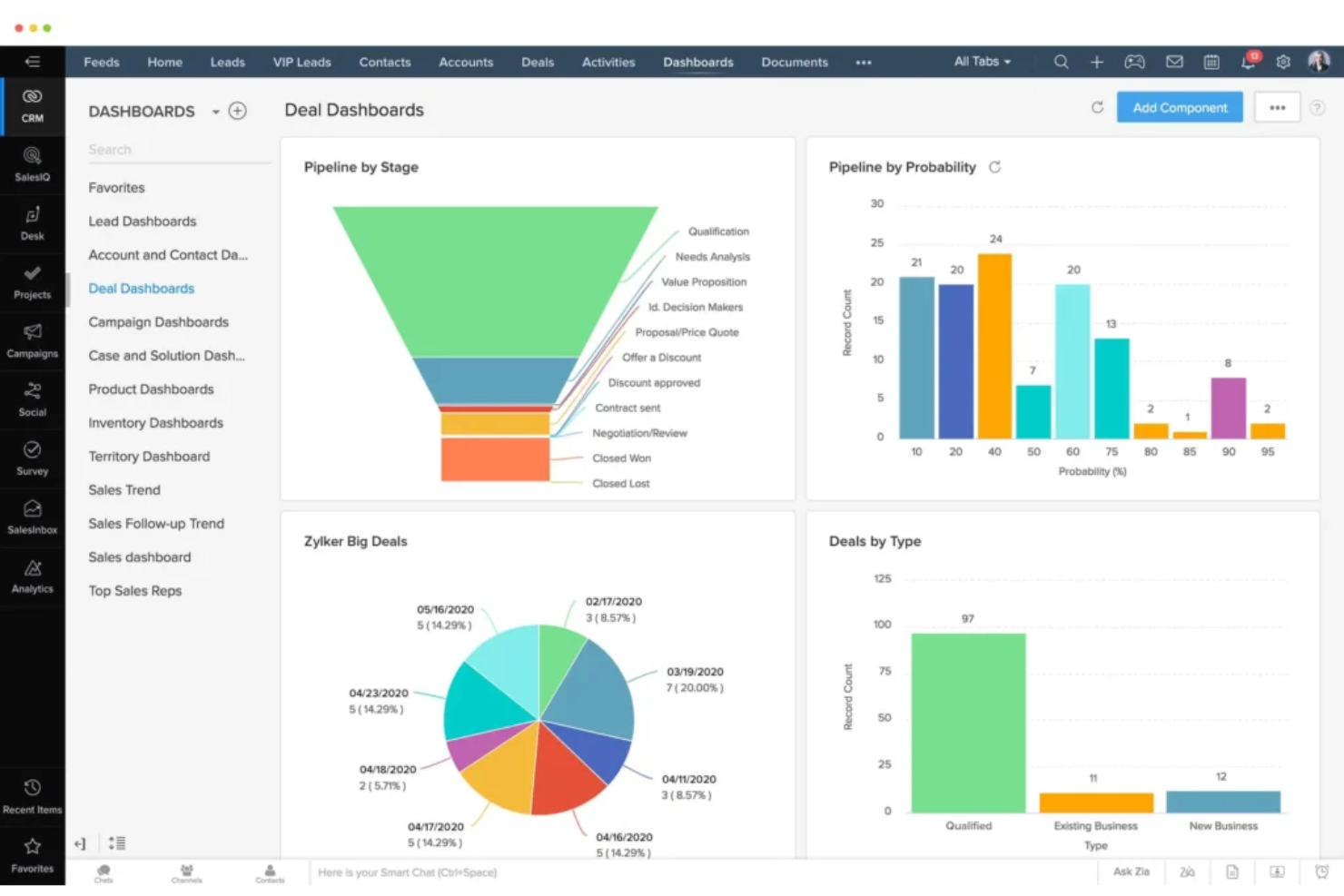
Zoho CRM è una piattaforma CRM orientata alle vendite che combina gestione della pipeline, coinvolgimento omnicanale dei clienti, automazione alimentata da intelligenza artificiale e integrazione nativa dei social media per offrire ai team di vendita una visione unificata di ogni interazione con il cliente.
Per chi è ideale Zoho CRM?
Zoho CRM è particolarmente adatto a piccole e medie imprese che desiderano un CRM completo con strumenti social integrati, senza dover gestire più piattaforme scollegate tra loro.
Perché ho scelto Zoho CRM
Zoho CRM si distingue perché i social media non sono integrati superficialmente come un'aggiunta. L'integrazione nativa con Zoho Social permette al mio team di monitorare le menzioni del brand, tracciare le interazioni social e inserire potenziali clienti direttamente nel CRM come lead o contatti, tutto da un'unica piattaforma. Automatizza inoltre attività come la creazione di lead basata su eventi social, riducendo l'inserimento manuale dei dati. La casella di posta unificata che combina interazioni da social, email e telefono nella timeline di ciascun contatto è utile per gestire prospect attivi su più canali.
Caratteristiche principali di Zoho CRM
- SalesSignals: Ricevi notifiche in tempo reale quando i contatti interagiscono con il tuo brand via email, social, chat o web, tutto visualizzato nella scheda contatto.
- Assistente Zia AI: Assegna punteggi ai lead, prevede gli esiti delle trattative e segnala anomalie nelle vendite tramite il livello di intelligenza artificiale integrato di Zoho.
- Blueprint: Costruisci e applica processi di vendita passo-passo con transizioni di fase automatizzate e verifiche obbligatorie dei campi richiesti.
- Analisi avanzate: Crea dashboard e report personalizzati per monitorare lo stato della pipeline, i tassi di conversione e le prestazioni del team.
Pros and Cons
Pros:
- Set di funzionalità completo
- Ottima integrazione
- Ampia base di utenti
Cons:
- L'app mobile può essere lenta
- Complessità per principianti
New Product Updates from Zoho CRM

Zoho CRM Adds Reusable Canvas Templates for Forms
Zoho CRM now supports Canvas templates in the Forms view, so you can design a form layout once and reuse it across records for a consistent, faster experience. For more information, visit Zoho CRM's official site.
 .
.Altri Software Social CRM
Di seguito trovi un elenco aggiuntivo di software social CRM che abbiamo valutato, ma che non sono entrati nella lista principale. Vale comunque la pena darci un’occhiata!
- Zoho Social
Ideale per la programmazione e il monitoraggio dei social media
- HubSpot Marketing Hub
Ideale per l'automazione del marketing integrata
- Salesforce Sales Cloud
Ideale per sviluppare le relazioni
- Brandwatch
Ideale per il marketing degli influencer


Recensioni Correlate di Software Revenue Operations
Se non hai ancora trovato ciò che stai cercando, dai un'occhiata a questi strumenti correlati che abbiamo testato e valutato.
- Software CRM
- Software per le Vendite
- Software di Lead Management
- Software di Business Intelligence
- Software di Gestione Contratti
- Sistema di Gestione dei Ricavi
Come valuto il software Social CRM
Divido la mia valutazione in due livelli: le capacità di base come la sincronizzazione con LinkedIn e l'acquisizione di lead dai social che uno strumento deve possedere per qualificarsi, e i fattori differenzianti che distinguono i migliori.
Funzionalità core (requisiti minimi per questa lista)
Quando seleziono gli strumenti per la mia lista, assegno a ciascuno un punteggio da 0 (non offre la funzionalità) a 5 (eccelle in quest'area) per ogni funzionalità di base elencata di seguito. Poi calcolo il punteggio totale dello strumento in percentuale. Ogni strumento deve raggiungere un punteggio totale minimo del 65% per essere considerato per l'inclusione.
- Integrazione dei canali social: Controllo quali piattaforme si collegano nativamente—LinkedIn, X, Facebook, Instagram—e se il collegamento è bidirezionale o si limita solo a importare i dati.
- Unificazione delle schede contatto: Ogni strumento dovrebbe unire handle social, cronologia delle conversazioni e dati dei profili in un'unica scheda così che i commerciali non debbano passare da una scheda all'altra per ricostruire il contesto.
- Social listening & monitoraggio: Cerco il tracciamento di parole chiave e menzioni che evidenzi segnali di acquisto, ad esempio un potenziale cliente che chiede pubblicamente raccomandazioni di fornitori nel tuo settore.
- Strumenti di engagement social: Gli operatori devono poter rispondere, commentare e inviare DM direttamente dal CRM. Valuto se l'interazione rimane nella piattaforma o reindirizza semplicemente all'app nativa.
- Attribuzione lead & pipeline: Valuto come lo strumento tagga i lead di origine social e collega quelle interazioni alle fasi della pipeline, dato che i team RevOps devono poter verificare cosa sta generando realmente il social.
- Automazione del workflow & instradamento: Strumenti come Salesforce e HubSpot gestiscono bene l'automazione generale, quindi verifico se il social CRM aggiunge trigger specifici per eventi social, come l'assegnazione automatica di un commerciale quando un account target interagisce con un post.
Una volta che ho una lista di strumenti che soddisfano questi criteri, considero cosa distingue ciascuna piattaforma.
Fattori differenzianti (cosa distingue i vendor)
Ecco come confronto e metto in contrasto i diversi vendor:
Funzionalità distintive
Cerco segnali di intenzione potenziati dall'IA che segnalino quando l'attività social di un potenziale cliente suggerisce che sia in fase di acquisto, come l'interazione con i post di un concorrente o la richiesta di raccomandazioni di fornitori. Anche le analisi social selling sono importanti. Le schede di valutazione a livello di operatore aiutano i leader RevOps a misurare l'adozione e a formare chi performa meno in base alla qualità dell'ingaggio, non solo al volume. La valutazione del sentimento e dell'intenzione aggiunge un ulteriore livello, dando priorità automatica agli account che mostrano propensione all'acquisto o rischio di abbandono così che i commerciali possano concentrarsi dove conta di più.
Oltre le funzionalità
L'integrazione con la tech stack è una delle prime cose che valuto. Un social CRM deve sincronizzarsi bidirezionalmente con il tuo CRM principale e con gli strumenti di sales engagement, altrimenti i dati della pipeline restano frammentati. Anche l'attribuzione delle entrate conta molto in questo ambito. I team RevOps devono dimostrare l'influenza dei social sulle trattative vinte, quindi verifico se i report supportano modelli multi-touch. La conformità è un altro fattore chiave, soprattutto per quanto riguarda GDPR, CCPA e il rispetto delle policy API delle piattaforme. Una violazione delle policy di LinkedIn o Meta può interrompere da un momento all'altro l'intera strategia di social selling.
Come Scegliere un Software Social CRM
Tieni a mente i seguenti punti mentre affronti la selezione del software CRM più adatto alle tue esigenze.
- Identificare le esigenze aziendali: Inizia valutando le specifiche sfide e necessità della tua azienda. Ad esempio, se la tua azienda fatica a gestire le interazioni con i clienti su diverse piattaforme social, un CRM sociale che integra questi canali può semplificare la comunicazione e migliorare il servizio clienti.
- Valutare le funzionalità: Cerca funzionalità che migliorino il supporto clienti, come l'assistenza telefonica, il marketing e i processi di vendita. Ad esempio, se il tuo team marketing necessita di migliori strumenti per il coinvolgimento sui social media, dai priorità ai CRM con solide capacità di ascolto e analisi del sentiment social.
- Considerare l'esperienza utente: Assicurati che il software sia facile da usare per tutti i membri del team. Un CRM per i social media con un'interfaccia intuitiva può ridurre i tempi di formazione e aumentare il tasso di adozione da parte dei dipendenti, portando a un utilizzo più efficiente del sistema.
- Vincoli di budget: Determina il tuo budget e trova una soluzione che rientri nei limiti previsti offrendo comunque ciò di cui hai bisogno. Per le piccole imprese, le opzioni di gestione delle relazioni con i clienti sui social economiche possono fornire funzionalità essenziali senza pesare eccessivamente sui costi.
- Scalabilità: Scegli una piattaforma CRM sociale che possa crescere con la tua azienda e adattarsi alle esigenze future. Ad esempio, alcuni CRM per il social media marketing sono noti per la loro scalabilità e per le analisi avanzate, risultando adatti a imprese che prevedono una crescita significativa.
Tendenze per il software Social CRM
Il software Social CRM sta cambiando notevolmente poiché le aziende si affidano sempre più al coinvolgimento digitale dei clienti. Con l'avanzare della tecnologia, è fondamentale restare aggiornati sugli ultimi sviluppi. Ecco alcune delle tendenze principali da tenere d'occhio che potrebbero influenzare la tua organizzazione.
- Approfondimenti sui clienti basati su AI: L'intelligenza artificiale viene utilizzata per analizzare le interazioni dei clienti sui social media. Questo aiuta le aziende a comprendere il sentiment e il comportamento dei clienti, consentendo strategie di marketing più personalizzate.
- Integrazione con app di messaggistica: Molti strumenti Social CRM ora si integrano con app di messaggistica popolari come WhatsApp e Facebook Messenger. Questo permette assistenza clienti in tempo reale e aumenta il coinvolgimento.
- Social listening e monitoraggio: Gli strumenti avanzati di ascolto sociale stanno diventando standard. Tengono traccia delle menzioni del marchio e dei feedback dei clienti sulle piattaforme social, aiutando le aziende a rispondere rapidamente alle necessità degli utenti.
- Analisi predittiva: L'analisi predittiva viene utilizzata per prevedere il comportamento dei clienti. Aiuta a identificare potenziali lead e opportunità di vendita, rendendo più efficaci le attività di marketing.
- Migliore protezione dei dati: Con la crescente attenzione verso la privacy, il software Social CRM si concentra sulla conformità a regolamenti come il GDPR. Questo garantisce che i dati dei clienti siano trattati responsabilmente e favorisce la fiducia degli utenti.
Cos'è il software Social CRM?
Il software Social CRM integra le interazioni dei social media nei tradizionali sistemi CRM, permettendo alle aziende di gestire le relazioni con i clienti sfruttando le informazioni provenienti da piattaforme come Facebook e Twitter. Rompe i silos informativi, consentendo a marketing, vendite e servizio clienti di collaborare e accedere a preziose informazioni sui clienti in tutta l'organizzazione.
Questo approccio facilita la generazione di lead, aumenta la soddisfazione dei clienti e rafforza la fedeltà al marchio grazie a supporto in tempo reale, maggiore coinvolgimento ed esperienze personalizzate. Le funzionalità chiave comprendono monitoraggio dei social media, generazione di lead e approfondimenti guidati dall'AI, aiutando le aziende a tracciare problematiche, registrare interazioni e creare nuovi contatti. Strumenti specifici offrono analisi social, coinvolgimento, pubblicazione, ascolto e automazione per migliorare il servizio clienti e l'esperienza complessiva.
Funzionalità del software Social CRM
Quando scegli il software Social CRM, è fondamentale riconoscere le funzionalità principali che ti permetteranno di gestire più efficacemente le attività di gestione delle risorse umane. Ecco le caratteristiche più importanti da considerare.
- Profili Cliente Avanzati: Questa funzionalità fornisce una visione completa delle informazioni sul cliente, incluse le interazioni sui social media, aiutando a creare strategie di marketing personalizzate.
- Social Listening: Questo strumento monitora i canali dei social media per le menzioni del tuo marchio, prodotti o concorrenti, permettendoti di rispondere tempestivamente ai feedback e alle tendenze dei clienti.
- Analisi del Sentimento: Analizzando i sentimenti dei clienti sui social media, le aziende possono valutare la percezione pubblica e adattare di conseguenza le proprie strategie.
- Social Selling: Questa funzione aiuta i team di vendita a individuare e coinvolgere potenziali clienti sulle piattaforme social, aumentando le possibilità di conversione.
- Social Marketing: Integra le campagne sui social media con i dati del CRM per creare azioni di marketing mirate e migliorare l'efficacia delle attività promozionali.
- Interazione in Tempo Reale: Questa tecnologia consente alle aziende di interagire con i clienti in tempo reale sui social media, aumentando la soddisfazione e la fedeltà dei clienti.
- Integrazione con l'Assistenza Clienti: Permette ai team di assistenza di gestire e rispondere alle richieste provenienti da diversi canali social da un'unica interfaccia.
- Analisi e Reportistica: Fornisce approfondimenti sulle performance dei social media, il comportamento dei clienti e l'efficacia delle campagne, supportando decisioni basate sui dati.
- Strumenti di Automazione: Automatizza attività ripetitive come la pubblicazione di aggiornamenti, la risposta a domande frequenti e la programmazione delle campagne, liberando tempo per attività più strategiche.
- Integrazione con Altri Strumenti: Si integra facilmente con altri strumenti aziendali come software di email marketing, piattaforme e-commerce e strumenti di analisi, offrendo una visione unificata delle interazioni con i clienti.
Vantaggi del Software Social CRM
Il software Social CRM offre numerosi vantaggi che possono migliorare significativamente le relazioni con i clienti e le operazioni aziendali.
- Coinvolgimento Cliente Potenziato: Il software Social CRM consente alle aziende di interagire con i clienti sulle loro piattaforme social preferite, rafforzando le relazioni e migliorando la soddisfazione del cliente.
- Analisi dei Clienti Migliorata: Il software raccoglie dati dai diversi canali social per offrire preziose informazioni sul comportamento e le preferenze dei clienti, permettendo alle aziende di personalizzare più efficacemente le strategie di marketing.
- Comunicazione Semplificata: Il software centralizza le comunicazioni su più piattaforme social, rendendo più facile per le aziende gestire e rispondere alle richieste dei clienti in modo rapido ed efficiente.
- Aumento della Fedeltà al Brand: Le aziende possono costruire fiducia e fedeltà interagendo attivamente con i clienti e rispondendo tempestivamente alle loro preoccupazioni, portando a tassi di fidelizzazione più elevati.
- Campagne di Marketing Più Efficaci: Il software Social CRM consente alle aziende di monitorare le performance delle campagne sui social media, apportando modifiche basate sui dati per migliorarne l'efficacia e il ritorno sull'investimento (ROI).
Sfruttando il software Social CRM, le aziende possono integrare i social media con i tradizionali sistemi CRM, ottenere informazioni più approfondite sul comportamento dei clienti, migliorare la comunicazione e favorire crescita e successo.
Costi & Prezzi del Software Social CRM
Quando si sceglie un software Social CRM, è fondamentale comprendere i diversi piani tariffari e le funzionalità offerte da ciascuno. I prezzi possono variare sensibilmente a seconda delle caratteristiche e del livello di supporto necessario.
Di seguito una tabella che illustra i tipi di piano più comuni, i prezzi medi e le funzionalità tipiche incluse.
Tabella Comparativa dei Piani per il Software Social CRM
| Tipo di Piano | Prezzo Medio | Funzionalità Comuni |
| Piano Gratuito | $0 | Gestione base dei contatti, utenti limitati, reportistica base |
| Piano Personale | $10-$30/user/month | Integrazione email, gestione delle attività, automazione di base |
| Piano Business | $60-$100/user/month | Report avanzati, automazione delle vendite, integrazione con altri strumenti |
| Piano Enterprise | $150-$300+/user/month | Dashboard personalizzabili, supporto esteso, analisi avanzata, utenti illimitati |
Valutando attentamente le funzionalità e i costi di ogni piano, le aziende possono selezionare il software Social CRM più adatto ai propri obiettivi operativi e al budget disponibile.
Domande Frequenti sul Software Social CRM
Ecco alcune domande comuni sul software social crm.
In che modo il software social CRM può migliorare il coinvolgimento dei clienti?
Il software social CRM migliora il coinvolgimento dei clienti integrando i canali social media con i sistemi CRM tradizionali. Questo permette alle aziende di interagire con i clienti sulle piattaforme che utilizzano più spesso, offrendo risposte tempestive e interazioni personalizzate. Monitorando l’attività sui social media, le aziende possono ottenere informazioni sulle preferenze e i comportamenti dei clienti, consentendo strategie di comunicazione più mirate ed efficaci.
Quali sono i principali indicatori da monitorare in un software social CRM?
I principali indicatori da monitorare in un software social CRM includono il sentiment dei clienti, i tassi di coinvolgimento, i tempi di risposta e i tassi di conversione. Monitorare questi indicatori aiuta le aziende a comprendere l’efficacia delle proprie interazioni sui social media e a individuare aree di miglioramento. Inoltre, tenere traccia dei feedback e delle recensioni dei clienti può offrire informazioni preziose sulle prestazioni di prodotti o servizi.
Come si integra il software social CRM con altri strumenti aziendali?
Il software social CRM spesso si integra con vari strumenti aziendali come piattaforme di email marketing, sistemi di assistenza clienti e strumenti di analisi. Questa integrazione consente una visione unificata delle interazioni con i clienti attraverso diversi canali, facilitando una migliore gestione dei dati e decisioni più informate. Per raggiungere queste integrazioni si utilizzano comunemente API e connettori di terze parti.
Quali sono le best practice per implementare un software social CRM?
Le best practice per implementare un software social CRM includono la definizione di obiettivi chiari, la formazione del personale e il monitoraggio continuo delle prestazioni. È fondamentale stabilire ciò che si vuole ottenere dal software, che sia migliorare il servizio clienti, aumentare le vendite o rafforzare la fedeltà al brand. La formazione assicura che tutti i membri del team siano competenti nell’uso del software, mentre revisioni regolari delle prestazioni aiutano a individuare aree da ottimizzare.
Come può il software social CRM aiutare nella gestione dei feedback dei clienti?
Il software social CRM aiuta nella gestione dei feedback dei clienti aggregando commenti, recensioni e messaggi provenienti da diverse piattaforme social in un’unica interfaccia. Questo facilita il monitoraggio e la risposta tempestiva ai feedback. Inoltre, strumenti di analisi del sentiment possono classificare i feedback come positivi, negativi o neutri, aiutando le aziende a dare priorità alle risposte e gestire le criticità con maggior efficacia.
Quali sono i rischi per la sicurezza associati ai software social CRM?
I rischi per la sicurezza legati al software social CRM includono violazioni dei dati, accessi non autorizzati e conformità alle normative sulla protezione dei dati. Per ridurre questi rischi, le aziende dovrebbero implementare misure di sicurezza solide come la crittografia, l’autenticazione a più fattori e audit di sicurezza regolari. È inoltre essenziale scegliere un fornitore che sia conforme alle leggi sulla protezione dei dati, come GDPR o CCPA.
In che modo il software social CRM può supportare le campagne di marketing?
Il software social CRM supporta le campagne di marketing fornendo informazioni su comportamenti e preferenze dei clienti, permettendo strategie di marketing più mirate e personalizzate. Analizzando le interazioni sui social media, le aziende possono identificare tendenze e adattare le proprie campagne per raggiungere meglio il pubblico. Inoltre, il software può monitorare in tempo reale le prestazioni delle campagne, consentendo aggiustamenti e miglioramenti rapidi.
Quali sono le sfide nell’uso del software social CRM?
Le difficoltà nell’uso del software social CRM comprendono l’integrazione dei dati, l’adozione da parte degli utenti e il mantenimento della qualità dei dati. Integrare il social CRM con i sistemi esistenti può essere complesso e richiedere competenze tecniche. Assicurarsi che tutti i membri del team siano a proprio agio con lo strumento è un’altra sfida, spesso risolta attraverso programmi di formazione completi. La qualità dei dati è fondamentale per ottenere insight accurati, richiedendo processi regolari di pulizia e validazione dei dati.
Cosa Fare Dopo:
Se sei alla ricerca di un software social crm, mettiti in contatto con un consulente SoftwareSelect per ricevere raccomandazioni gratuite.
Compila un modulo e partecipa a una breve conversazione in cui verranno approfondite le tue esigenze specifiche. In seguito riceverai una lista ristretta di software da valutare. Ti supporteranno anche durante l’intero processo di acquisto, incluse eventuali trattative sul prezzo.