

10 Mejores Software de Ventas B2B Analizados para 2026

Mejor Lista Corta de Software de Ventas B2B


Con tantas opciones de software de ventas B2B disponibles, averiguar cuál es el adecuado para ti puede ser complicado. Sabes que quieres apoyar y agilizar tu proceso de ventas entre empresas, pero necesitas identificar cuál herramienta es la mejor. ¡Te ayudo! En este artículo facilitaré tu elección, compartiendo mis experiencias personales usando docenas de herramientas de ventas B2B con distintos equipos y cuentas, junto con mis selecciones del mejor software de ventas B2B.
Por qué confiar en nuestras recomendaciones de software
Nuestras reseñas reflejan nuestro criterio independiente, no un discurso de ventas. Descubra cómo mantenemos la transparencia.
Para esta guía, evaluamos las herramientas mediante pruebas prácticas e investigación independiente, puntuando las herramientas según nuestros criterios de selección.
Nuestras reseñas reflejan nuestro criterio editorial humano, no un discurso de ventas.
Resumen del Mejor Software de Ventas B2B
Esta tabla comparativa resume los detalles de precios de mis selecciones principales de software de ventas B2B para ayudarte a encontrar el que mejor se adapta a tu presupuesto y necesidades empresariales.
| Tool | Best For | Trial Info | Price | ||
|---|---|---|---|---|---|
| 1 | Best with automated sales workflow builder | Free plan + 14-day free trial + free demo available | From $49/user/month (billed annually) | Website | |
| 2 | Best for territory mapping and route optimization | Not available | Pricing upon request | Website | |
| 3 | Best for customizable quote templates | Free demo available | From $39/user/month | Website | |
| 4 | Best for AI-driven lead suggestions | 30-day free trial + free demo available | From $29/user/month (billed annually) | Website | |
| 5 | Best for AI-guided quote optimization | Free demo available | Pricing upon request | Website | |
| 6 | Best for AI-driven conversation insights | 14-day free trial | From $25/user/month (billed annually) | Website | |
| 7 | Best for order tracking | Free 60-day trial available | Pricing upon request | Website | |
| 8 | Best for action planning in digital sales rooms | Free plan + free demo available | From $350/month (billed annually) | Website | |
| 9 | Best for lead verification and qualification | 7-day free trial + free demo available | From $74/month (billed annually) | Website | |
| 10 | Best for enterprises who use Salesforce or Salesforce Industry Clouds | Free demo available | Pricing upon request | Website |

Reseña del Mejor Software de Ventas B2B
Con esta información en mente, es momento de pasar a los resúmenes de herramientas para obtener más detalles específicos sobre cuál herramienta de generación de leads o captura de datos es la adecuada para tu caso de uso. Encuentra características destacadas y una instantánea de cada interfaz para una visión general rápida.

Best with automated sales workflow builder
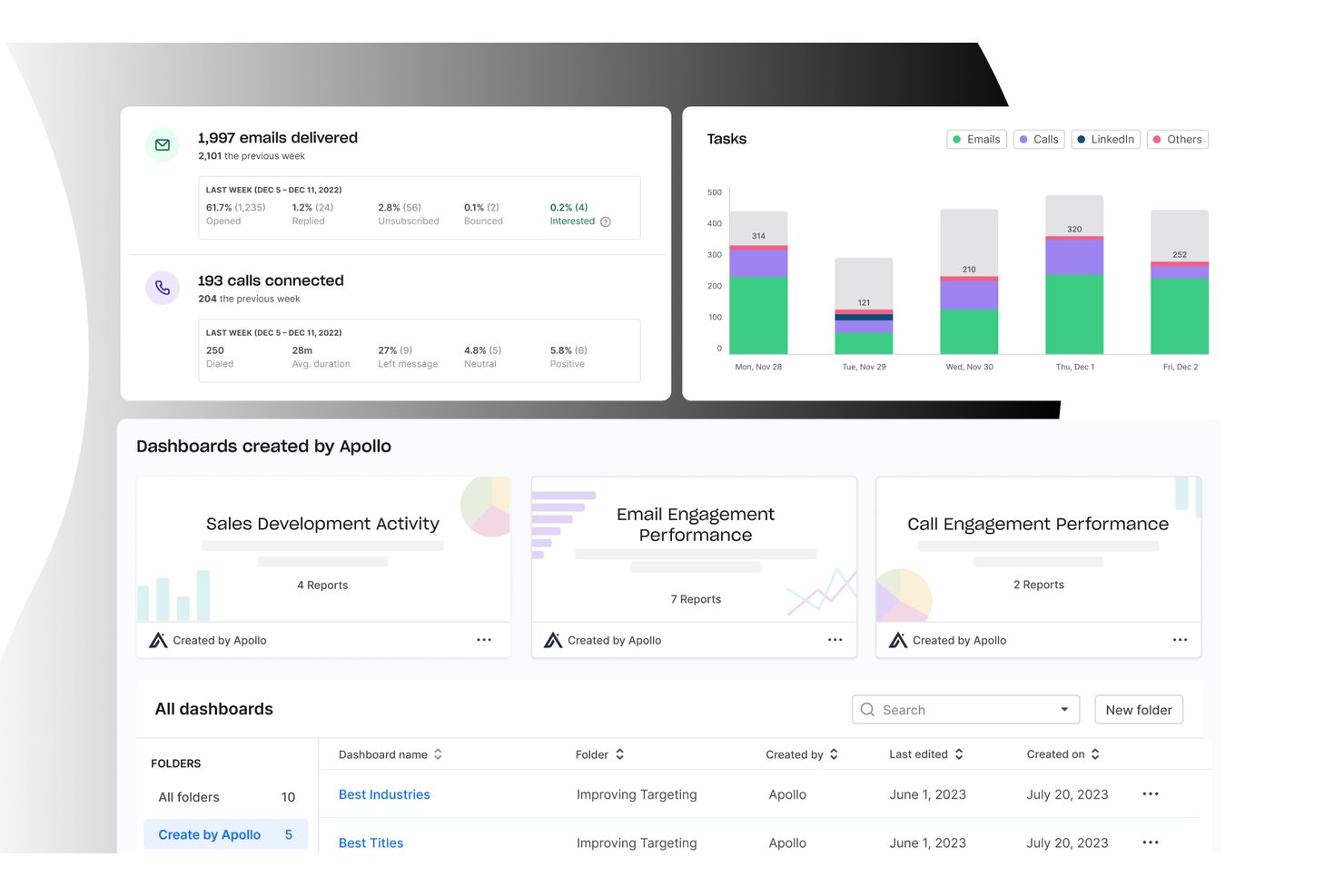
Apollo.io is a B2B sales intelligence and engagement platform that combines a 210M+ contact database with multi-channel sequencing, an integrated dialer, workflow automation, and deal management in one workspace.
Who Is Apollo.io Best For?
Apollo.io is a strong fit for outbound sales teams at SMBs and mid-market B2B companies that need to consolidate prospecting, outreach, and pipeline management without stitching together multiple tools.
Why I Picked Apollo.io
I picked Apollo.io as one of the best because its workflow automation engine genuinely replaces the need for separate sequencing and routing tools. I like how it handles multi-channel sequences across email, phone, and LinkedIn automatically, with trigger-based enrollment and auto-logging back to the CRM. Its agentic AI can build a prospect list and draft a full outreach sequence from a single natural language prompt, which cuts hours off what used to be a manual setup process.
Apollo.io Key Features
- Conversation intelligence: Records and analyzes sales calls to surface key moments for coaching and deal risk.
- Enrichment engine: Automatically adds missing firmographic and contact data to CRM records in real time.
- Lead scoring: Uses AI to rate and prioritize leads for outbound and inbound sales motions.
- Multi-CRM integration: Syncs contacts, accounts, and engagement data with Salesforce, HubSpot, Marketo, and more.
Apollo.io Integrations
Apollo.io offers native integrations with Salesforce, HubSpot, Outreach, Airtable, Amplitude, Asana, and Gmail, and provides an API for custom integrations.
Pros and Cons
Pros:
- Trigger-based enrollment automates multi-channel outreach
- AI builds prospect lists from a prompt
- Database, dialer, and sequences in one
Cons:
- Pipeline analytics lack depth for revenue forecasting
- Contact data accuracy inconsistent outside North America

SPOTIO
Best for territory mapping and route optimization
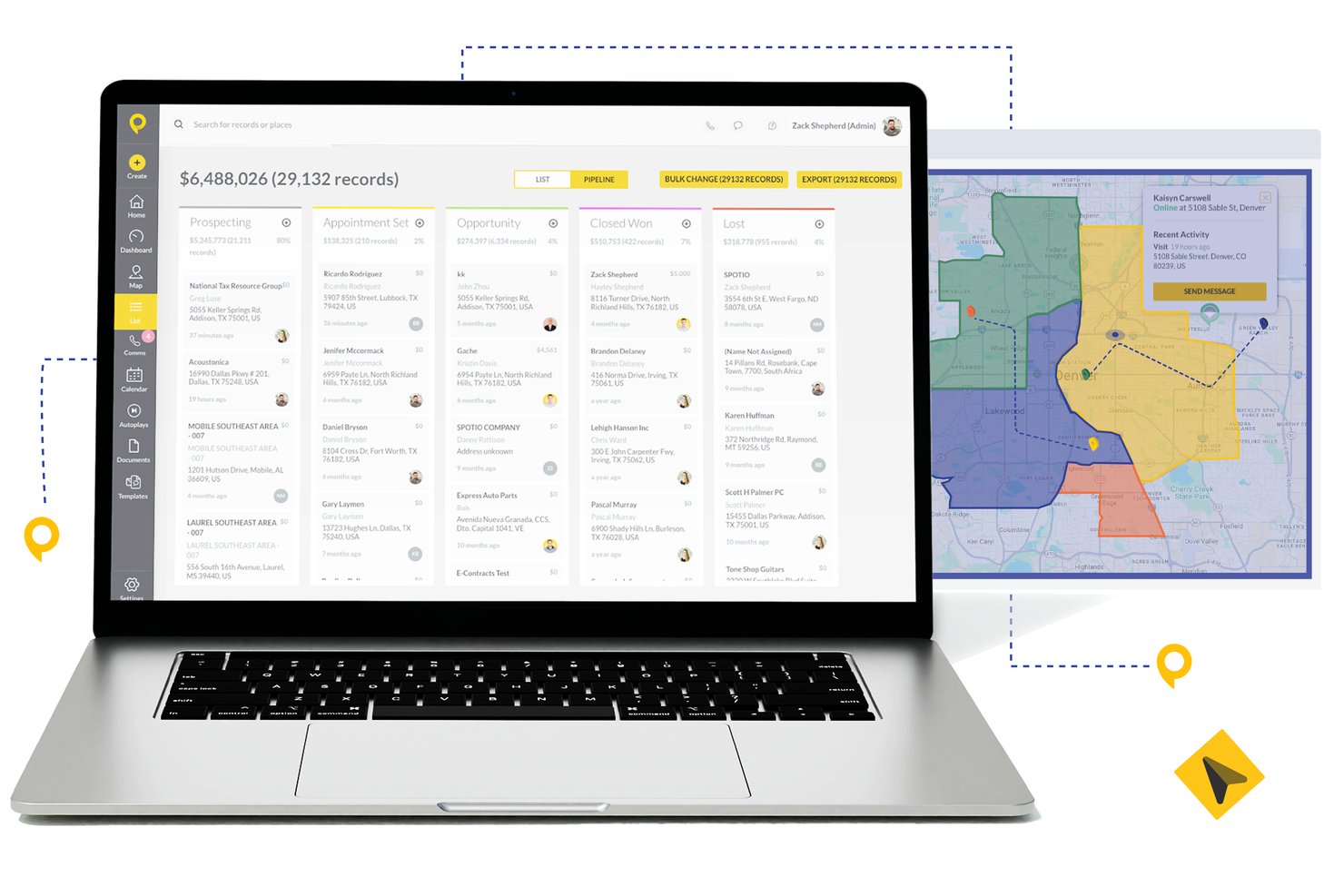
SPOTIO is a field sales execution platform that combines territory management, route optimization, lead tracking, pipeline management, and rep activity monitoring in one mobile-first solution.
Who Is SPOTIO Best For?
SPOTIO is a strong fit for outside and door-to-door sales teams in industries like telecom, solar, roofing, and commercial services that manage large geographic territories.
Why I Picked SPOTIO
I picked SPOTIO as one of the best because its territory mapping goes well beyond drawing boundaries. I love that you can build territories by zip code, county, or custom shape and layer on 200+ demographic data overlay points to prioritize the highest-value areas. The route optimization engine then sequences stops to cut drive time and pack more face-to-face visits into each rep's day, which is something I haven't seen executed this precisely in competing field sales tools.
SPOTIO Key Features
- Multi-channel communications: Call, email, and text prospects and customers directly from the platform.
- Activity tracking dashboard: Monitor rep activity and location-verified check-ins in real time.
- Native CRM integrations: Sync accounts, contacts, and deal data with Salesforce, HubSpot, and Microsoft Dynamics 365.
- DASH AI co-pilot: Use AI to capture field data, draft emails, and suggest next steps during sales visits.
SPOTIO Integrations
SPOTIO offers native integrations with Salesforce, HubSpot, Microsoft Dynamics 365, Zoho CRM, and Pipedrive. Zapier and an open API are also available for additional connectivity and custom integrations.
Pros and Cons
Pros:
- Mobile-first design suited for on-the-road reps
- Real-time rep activity tracking and check-ins
- Strong territory mapping for field sales teams
Cons:
- Reporting depth limited for complex B2B pipelines
- Limited forecasting depth for inside sales teams

Best for customizable quote templates
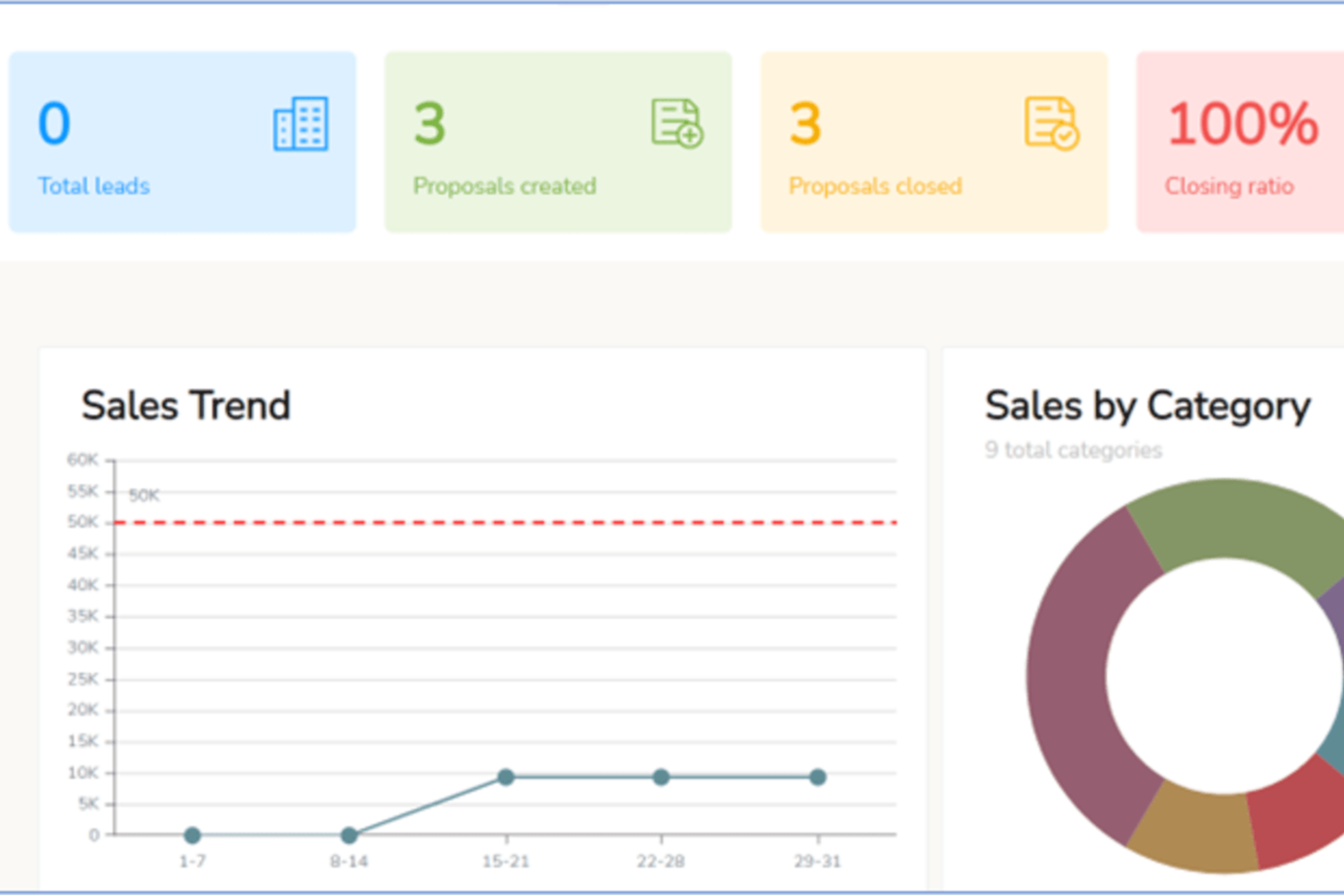
iQuoteXpress is a configure, price, quote (CPQ) platform that gives B2B sales teams tools for product configuration, branded proposal creation, quote tracking, and multi-currency pricing management.
Who Is iQuoteXpress Best For?
iQuoteXpress is a good fit for B2B sales teams in product-heavy industries that need to generate accurate, professional quotes without a lengthy manual process.
Why I Picked iQuoteXpress
I've included iQuoteXpress in my top picks because its quote template system goes well beyond selecting a layout. Admins define template categories by segment, region, or product line, and reps get the right template loaded automatically, with logos, fonts, colors, and legal language already locked in. I also like that T&Cs are managed in a dedicated panel, so any updates apply instantly on the next generated proposal without any copy-paste work. The document library feature lets you attach cover pages, spec sheets, and contracts in one click, and iQuoteXpress assembles everything into a single proposal packet.
iQuoteXpress Key Features
- Product catalog management: Build and organize a searchable product and services catalog with pricing, descriptions, and images that reps pull directly into quotes.
- Quote tracking and analytics: Monitor quote status, open rates, and win/loss data from a centralized dashboard to identify where deals stall.
- Multi-currency pricing: Set and display pricing in multiple currencies to support sales across different markets.
- eSignature support: Collect client signatures directly within the platform without routing documents to a separate signing tool.
iQuoteXpress Integrations
iQuoteXpress works as a standalone solution or integrates with CRM and ERP platforms through out-of-the-box connections with single sign-on. Native integrations include Salesforce, Microsoft Dynamics 365, Zoho CRM, Zoho Books, Oracle, and HubSpot CRM, as well as QuickBooks Online Advanced and DocuSign. It also connects with Acumatica and Shopify for ERP and ecommerce workflows. A REST API is available for building custom integrations with third-party applications.
Pros and Cons
Pros:
- Reps generate quotes without manager involvement
- Cuts new rep onboarding time significantly
- Multi-level product configurators for complex quotes
Cons:
- Configurator setup requires vendor assistance
- No mobile app for quoting on-the-go

Best for AI-driven lead suggestions
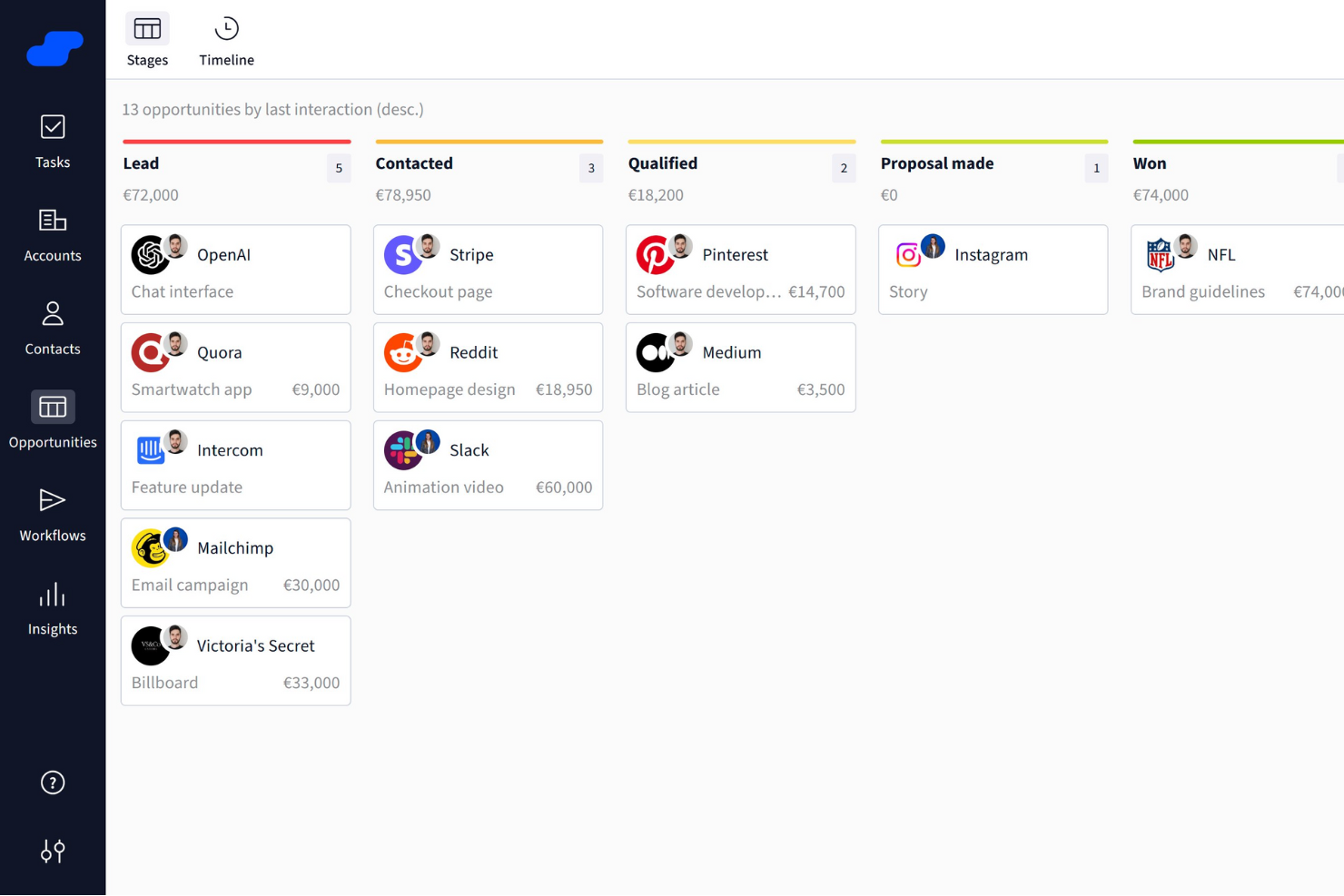
Salesflare is a smart CRM crafted specifically for small and medium-sized B2B businesses. It offers a suite of features that enhance your sales processes, making it easier to manage leads and boost sales success.
Why I Picked Salesflare: I chose Salesflare as a B2B sales software for its strong focus on sales intelligence, offering features like relationship insights, AI-driven lead suggestions, LinkedIn integration, and a built-in lead finder to keep your pipeline full. Its visual sales pipelines, automated reminders, and collaboration tools streamline deal tracking, reduce admin work, and help teams focus on closing more deals efficiently.
Salesflare Standout Features and Integrations
Features include automated email sequences that allow for personalized engagement with your leads, enhancing your relationship-building efforts. The platform also offers a lead finder that helps you streamline lead generation, ensuring that your sales pipeline remains robust. Additionally, Salesflare's relationship intelligence feature enhances team collaboration by providing insights that help prioritize leads and improve decision-making.
Integrations include QuickBooks Online, Slack, KrispCall, Nectar Desk, Typeform, Facebook Lead Ads, Google Contacts, CalendarHero, Bit Integrations, Google Sheets, Intercom, and MailChimp.
Pros and Cons
Pros:
- Strong integration capabilities with popular tools like Outlook and LinkedIn
- Effective automation features boost productivity by reducing manual tasks
- Unlimited contacts and users with advanced filtering
Cons:
- Limited email templates available
- Initial setup for automated workflows can be challenging for some users

Best for AI-guided quote optimization
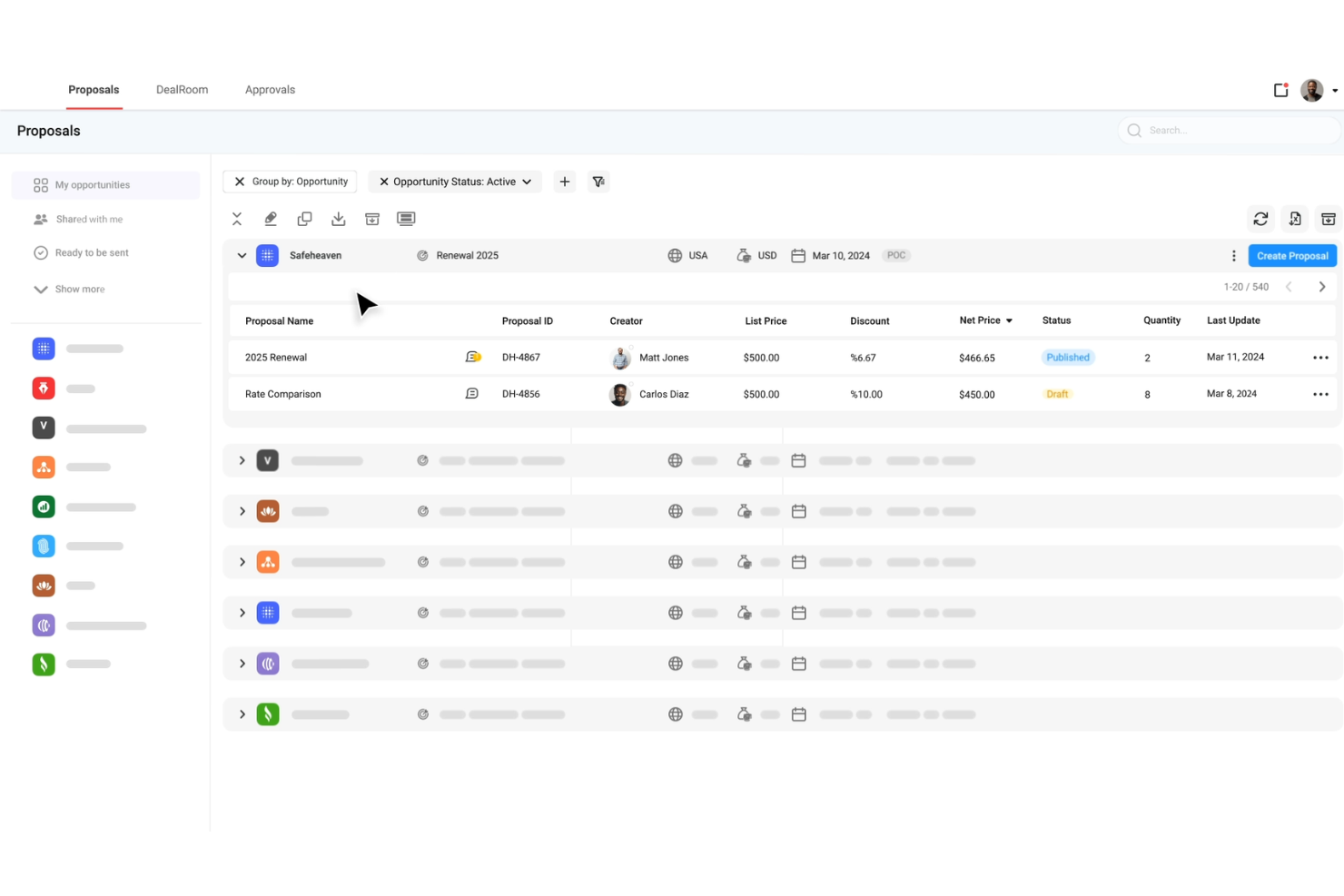
DealHub AI is a quote-to-revenue platform built for B2B sales teams, combining CPQ, contract lifecycle management, subscription billing, and digital deal rooms in a single system.
Why I picked DealHub AI: I picked DealHub AI because of how it surfaces buyer behavior and lets you act on it. Its dealstream feature tracks buyer engagement within proposals and surfaces intent signals—so your team can follow up at the right moment. Also, its built-in AI agents provide pricing and product mix suggestions based on historical wins, helping reps optimize their quotes. And its adaptive pricing models support usage-based, tiered, and fixed pricing, letting you handle complex deals and prevent manual mispricing.
DealHub AI Standout Features and Integrations
Standout features include the digital sales room or dealroom, which centralizes all deal assets, content, communications, and real-time notifications, letting buyers and sellers collaborate in one branded space. It also includes contract management tools such as dynamic contract creation, clause libraries, and negotiation workflows to speed approvals.
Integrations include Salesforce, HubSpot, Microsoft Dynamics 365, Slack, Gong, DocuSign, Google, LinkedIn, Optimizely, Solarwinds, SalesLoft, and Meta Platforms.
Pros and Cons
Pros:
- Supports subscription billing and renewals
- AI agents guide reps on pricing and product mix
- Accelerates deal cycles via digital sales rooms
Cons:
- Advanced feature setup takes more time, effort, and support than expected
- Slow loading or lag with large deals or complex proposal pages
New Product Updates from DealHub AI

DealHub AI Expands Bundle Attribute Automation
DealHub AI introduces Assignment Rules for child proposal attributes and numeric aggregation for bundles. These updates give admins more control over bundle attribute automation and configuration. For more information, visit DealHub’s official site.
 .
.
Best for AI-driven conversation insights
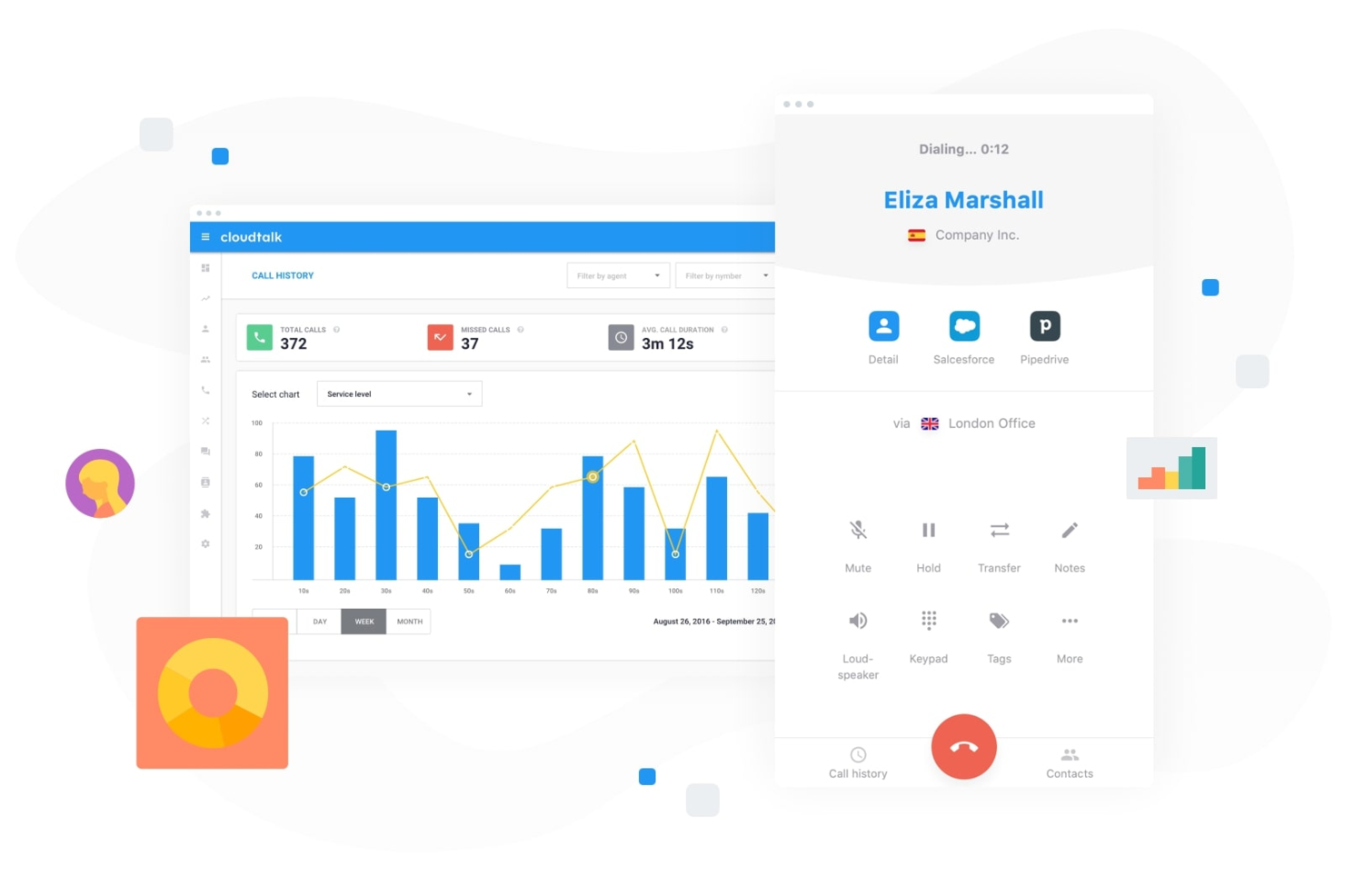
For businesses seeking to enhance their B2B sales efforts, CloudTalk offers a dynamic cloud-based call center solution tailored to meet the needs of sales teams across various industries. With features designed to streamline communication and improve sales performance, CloudTalk appeals to sales professionals and organizations looking to optimize their customer interactions and drive better outcomes. Whether you need advanced call management, global reach, or robust analytics, CloudTalk addresses the challenges of managing sales calls efficiently and effectively.
Why I Picked CloudTalk
I picked CloudTalk for its unique capability to enhance sales performance through AI-driven conversation intelligence. This feature provides automated call summaries, scoring, and sentiment analysis, allowing your team to focus on meaningful interactions. Additionally, its AI sales dialer, which includes options like parallel dialing and voicemail drop, maximizes your team's outreach potential by ensuring high-value conversations are prioritized. These functionalities are particularly beneficial for teams aiming to boost their sales efficiency and achieve better results.
CloudTalk Key Features
In addition to its AI-driven tools, I also found the following useful:
- Custom Call Routing: Directs calls to the right team members based on predefined criteria, ensuring efficient handling and customer satisfaction.
- Interactive Voice Response (IVR): Automates call handling with a menu system that guides callers to the appropriate department or service.
- Real-Time Analytics: Offers insights into call performance and team productivity, helping you make informed decisions.
- Global SMS and WhatsApp Support: Enables multi-channel communication, allowing your team to reach customers through their preferred platforms.
CloudTalk Integrations
Integrations include Salesforce, HubSpot, Zoho, Pipedrive, Zendesk, Shopify, Intercom, Freshdesk, Aircall, and Microsoft Dynamics.
Pros and Cons
Pros:
- Extensive CRM integration options
- Multiple outbound dialer modes
- AI-powered conversation intelligence tools
Cons:
- International number availability can be inconsistent
- Parallel dialer stability issues
Best for order tracking
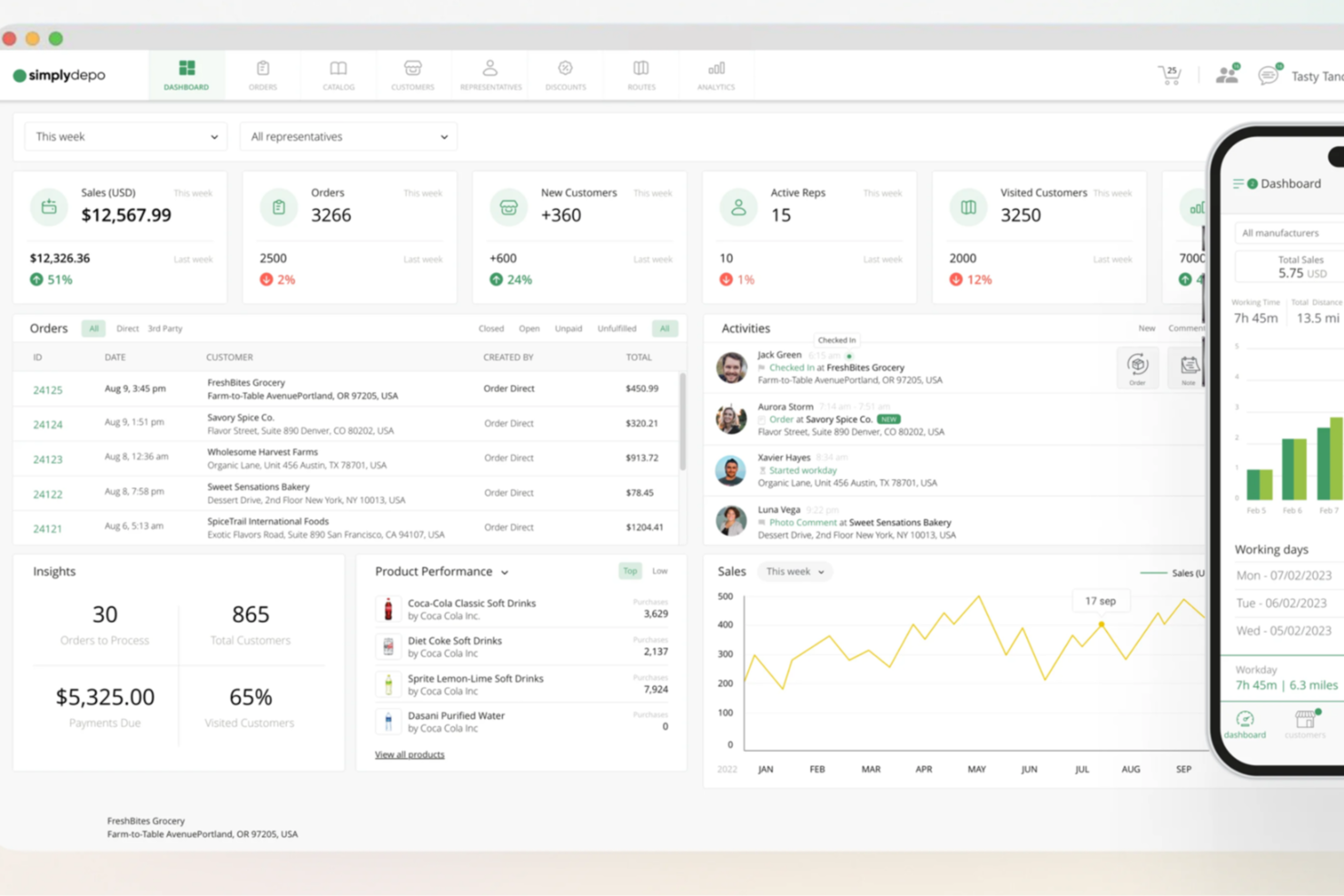
SimplyDepo offers a tailored solution for brands, distributors, and merchandisers seeking to enhance their B2B sales operations. Designed with startups and growing businesses in mind, it addresses challenges in retail execution, order management, and customer relationship management. By integrating essential features like route planning and field sales tools, SimplyDepo aims to streamline processes and drive growth.
Why I Picked SimplyDepo
I picked SimplyDepo for its specialized focus on enhancing B2B sales efficiency through its unique combination of retail execution and field sales tools. Its B2B order management system is particularly appealing for those looking to streamline their sales processes and improve customer relationships. The inclusion of CRM capabilities further strengthens its position as a comprehensive solution for managing business-client interactions and optimizing sales routes.
SimplyDepo Key Features
In addition to its strengths in order management and CRM, I also found the following to be useful:
- Route Planning: Optimize delivery and sales routes to enhance efficiency and reduce operational costs.
- Sales Rep App: Equip your sales team with a mobile app to manage tasks and customer interactions on the go.
- Prospect Management: Track and manage potential clients to ensure no opportunity is missed.
- Task Management: Organize and prioritize tasks to maintain focus and productivity across your team.
SimplyDepo Integrations
Integrations include Stripe, Twilio SendGrid, ShipStation, and QuickBooks.
Pros and Cons
Pros:
- Route planning and territory mapping
- Integrated CRM for account tracking
- Built-in B2B order management system
Cons:
- No transparent API documentation
- Limited advanced reporting customization

Dock
Best for action planning in digital sales rooms
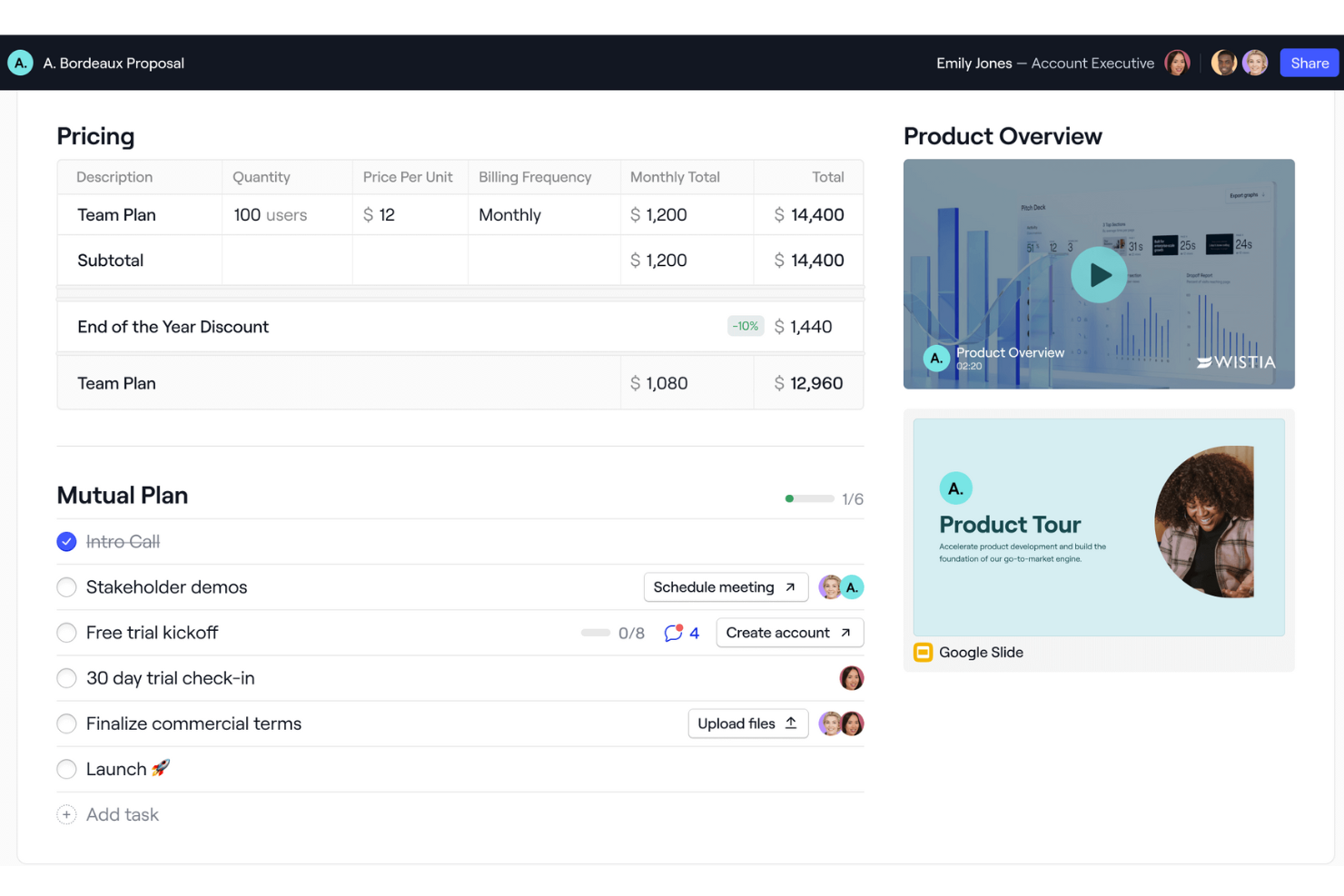
Dock is a B2B sales software that provides a comprehensive platform for managing sales, onboarding, and client interactions. It offers features such as digital sales rooms, onboarding portals, and client-facing workspaces, which help businesses organize and share content with customers in a branded environment.
Why I picked Dock: I like that Dock offers a centralized space for sales teams to manage client-facing content, while also providing tools and templates to standardize sales processes. Its digital sales room particularly stands out with features like mutual action plans to guide buyers through different stages of the process. Additionally, Dock's analytics-focused customer experience tracks interactions and progress, helping sales teams gather metrics and follow up with leads effectively.
Dock Standout Features and Integrations
Standout features include buying signals, dynamic action plans, a flexible workspace editor, custom branding, pricing and order forms, secure sharing, digital signature collection, and customizable templates.
Integrations include Airtable, Pandadoc, Typeform, HubSpot, Salesforce, Slack, Zoom, and more.
Pros and Cons
Pros:
- Analytics for customer engagement
- Mutual action plans
- Templates for standardizing processes
Cons:
- Learning curve for new users wanting to maximize the features
- HubSpot and Salesforce integration only available for higher tiers

UpLead
Best for lead verification and qualification
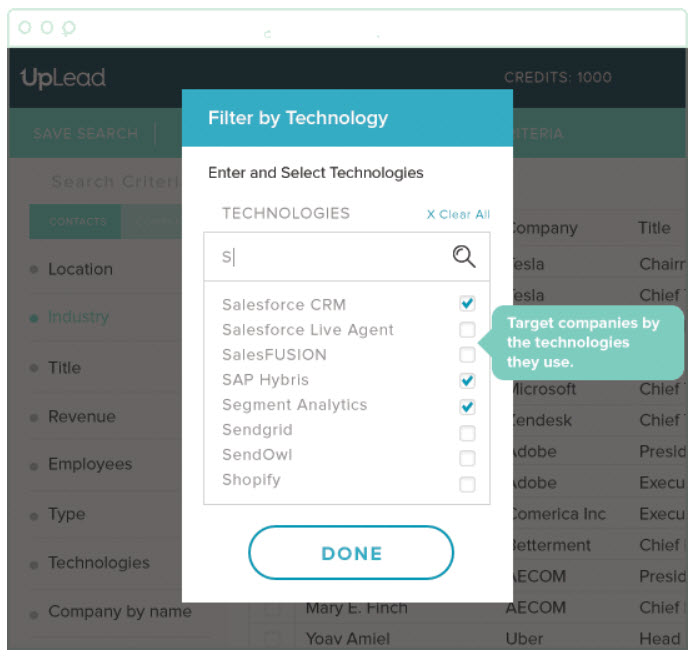
This lead generation software was built to help SMBs and large organizations manage their sales workflow through account-based marketing, targeted sales generation, real-time email verification, and opportunity engagement. You can build customizable B2B lists with criteria for lead qualification that eliminates bad-fit buyers and low quality leads.
Why I picked UpLead: The reason I chose UpLead was due to their comprehensive lead filtering tools. It’s not enough to find high-quality leads, they also need to be a good fit for your product or service. Using their filtering tool, you can target leads by technology, number of employees, revenue, and over 50 other search filters.
UpLead Standout Features and Integrations
Standout features include access to over 100 million contacts with 95% data accuracy, appending key contact data from disorganized lists, Chrome extension for grabbing leads straight from the browser, and an email checker tool that helps verify valid addresses.
Integrations include Close, Copper, Dynamics 365, Insightly, Mailshake, Nimble, Outreach, Pipedrive, Salesforce Sales Cloud, and Zapier.
Pros and Cons
Pros:
- CSV file upload functionality for non-integrated CRMs
- Can generate lists quickly
- Low email bounce back
Cons:
- Limited lead coverage
- Pricing isn’t as flexible
Groove
Best for enterprises who use Salesforce or Salesforce Industry Clouds
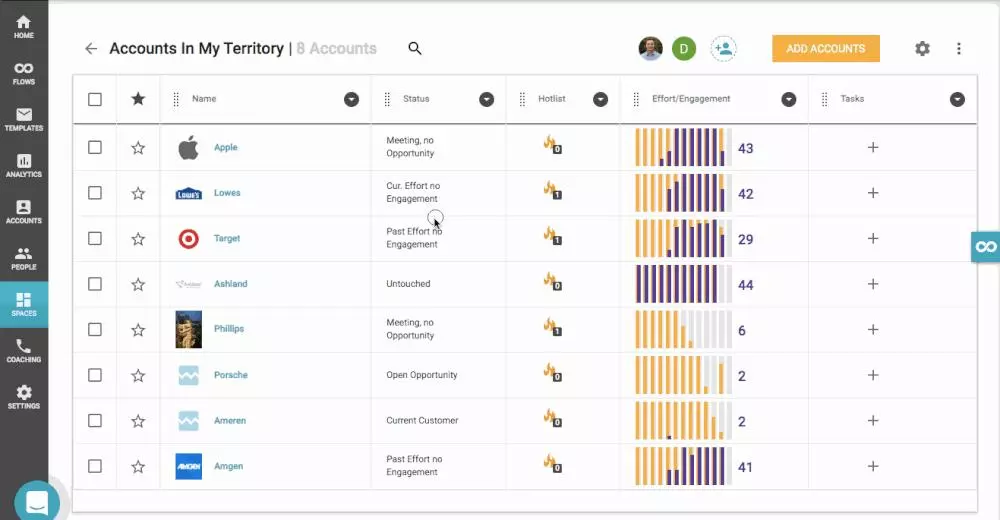
This sales productivity platform is designed to enable sales leaders to boost the revenue-per-rep across the entire organization by automating admin tasks, making it easier to update and access Salesforce, and generating repeatable playbooks by leveraging AI to transform complicated data into actionable insights.
Why I picked Groove: I chose Groove for this list because it’s the only current Salesforce-native market leader. With Groove, you won’t have any data latency or sync issues, you get industry-leading security and compliance, and it works with even the most customized versions of Salesforce.
Groove Standout Features and Integrations
Standout features include campaign automation through email, SMS, and calls; visibility on sales calls for better coaching; real-time insights into sales activity; and dedicated implementation and onboarding specialists.
Integrations include CloudTalk, Constant Contact, ExecVision, Gmail, Gong, LinkedIn Sales Navigator, Microsoft Outlook, Seismic, Spinify, and Vidyard.
Pros and Cons
Pros:
- Powerful execution roadmap
- Great customer support
- Friendly user-interface
Cons:
- Not enough tutorials for combining with Zoom Phone, etc.
- Limited mass texting capabilities
Otras Opciones
Elegí algunas herramientas más que tenía en mente, pero que no llegaron a la lista final, para ofrecerte una selección realmente completa de software de ventas B2B para que explores.
- Cognism
For unrestricted access to information, unfettered by credit limits or geography restrictions
- Hunter
All-in-one email outreach platform
- Pipedrive CRM
For custom sales pipelines
- Lusha
For reaching company decision makers to close deals faster
- InSitu Sales
With integrated field sales & B2B ecommerce
- Forecastio
For sales forecasting and planning
- Leadinfo
For tracking which companies are visiting your website
- Enlyft
For discovering what technologies your prospects are already using
- BookYourData
For pay-as-you-go B2B prospecting
- LeadIQ
For improving prospecting for SaaS sales teams


Criterios de Selección para Software de Ventas B2B
A continuación tienes un resumen breve de los principales criterios de selección y evaluación que utilicé para elaborar mi lista del mejor software de ventas B2B para este artículo.
Funcionalidad Principal (25% de la puntuación total)
Para ser considerado en esta lista, cada solución debía cumplir con estos casos de uso comunes:
- Gestionar leads y contactos
- Seguimiento del pipeline de ventas
- Automatización de tareas de ventas
- Generar informes de ventas
- Proveer información sobre los clientes
Características Adicionales Destacadas (25% de la puntuación total)
Para ayudar a acotar aún más la competencia, también busqué características únicas, tales como:
- Predicción de ventas impulsada por IA
- Tableros personalizables
- Herramientas de colaboración en tiempo real
- Acceso mediante aplicación móvil
- Integración con aplicaciones de terceros
Usabilidad (10% de la puntuación total)
Para evaluar la usabilidad de cada sistema, consideré lo siguiente:
- Diseño intuitivo de la interfaz
- Navegación sencilla
- Curva de aprendizaje mínima
- Rendimiento ágil
- Opciones de personalización
Onboarding (10% de la puntuación total)
Para evaluar la experiencia de incorporación en cada plataforma, consideré lo siguiente:
- Disponibilidad de videos de formación
- Recorridos interactivos del producto
- Guías de incorporación completas
- Acceso a seminarios web
- Chatbots de apoyo
Atención al cliente (10% de la puntuación total)
Para evaluar los servicios de atención al cliente de cada proveedor de software, tuve en cuenta lo siguiente:
- Disponibilidad de soporte 24/7
- Opciones multicanal de soporte
- Tiempos de respuesta rápidos
- Personal de soporte capacitado
- Acceso a un centro de ayuda
Relación calidad-precio (10% de la puntuación total)
Para evaluar la relación calidad-precio de cada plataforma, tuve en cuenta lo siguiente:
- Planes de precios competitivos
- Funciones incluidas en cada nivel de precio
- Descuentos por suscripción anual
- Disponibilidad de prueba gratuita
- Relación costo-beneficio
Opiniones de los clientes (10% de la puntuación total)
Para conocer el nivel de satisfacción general de los usuarios, tuve en cuenta lo siguiente al leer las reseñas de los clientes:
- Calificaciones de satisfacción de los usuarios
- Problemas reportados con frecuencia
- Tendencias de comentarios positivos
- Frecuencia de actualizaciones del software
- Capacidad de respuesta a las sugerencias de los usuarios
Cómo elegir software de ventas B2B
Es fácil perderse en largas listas de funciones y estructuras de precios complejas. Para ayudarte a mantener el foco durante tu proceso de selección de software, aquí tienes una lista de factores a tener en cuenta:
| Factor | Qué tener en cuenta |
|---|---|
| Escalabilidad | ¿Puede el software crecer junto a tu empresa? Busca herramientas que admitan usuarios adicionales y mayor volumen de datos sin perder rendimiento. |
| Integraciones | ¿Se conecta con tus sistemas existentes como CRM, correo electrónico y herramientas de análisis? Asegura la compatibilidad para evitar silos de datos. |
| Personalización | ¿Puedes adaptar la herramienta a tus flujos de trabajo específicos? Verifica las opciones para personalizar campos, paneles y reportes. |
| Facilidad de uso | ¿Qué tan intuitiva es la interfaz? Una curva de aprendizaje pronunciada puede dificultar la adopción. Busca una navegación amigable y procesos sencillos. |
| Implementación e incorporación | ¿Qué recursos se necesitan para empezar? Considera el tiempo y apoyo requeridos para la configuración y capacitación. |
| Costo | ¿El precio es claro y se ajusta al presupuesto? Compara las estructuras de costos, incluidos cargos ocultos o extras por funciones esenciales. |
| Medidas de seguridad | ¿La herramienta cumple las normas de seguridad del sector? Busca cifrado, protección de datos y actualizaciones de seguridad periódicas para salvaguardar tu información. |
| Disponibilidad de soporte | ¿Qué opciones de soporte están disponibles? Asegura asistencia oportuna por teléfono, correo o chat, especialmente en horas críticas de negocio. |
¿Qué es el software de ventas B2B?
El software de ventas B2B es una herramienta que ayuda a las empresas a gestionar y mejorar sus procesos de ventas con otras empresas. Habitualmente, estos programas son utilizados por profesionales de ventas, responsables de cuentas y equipos de desarrollo de negocio para aumentar la eficiencia y cerrar acuerdos más rápido.
Las funciones como la gestión de prospectos, el seguimiento de ventas y los informes ayudan a organizar las actividades comerciales y obtener información sobre los clientes. En general, estas herramientas proveen una forma estructurada de gestionar los esfuerzos de ventas y fomentar el crecimiento empresarial.
Funciones
Al seleccionar software de ventas B2B, presta atención a las siguientes características clave:
- Gestión de prospectos: Ayuda a organizar y realizar un seguimiento de los clientes potenciales, asegurando que no se pierdan oportunidades.
- Seguimiento del embudo de ventas: Proporciona una visión visual de las etapas de venta, ayudando a los equipos a gestionar y priorizar acuerdos.
- Informes y análisis: Ofrece información sobre el rendimiento de ventas, facilitando la toma de decisiones basada en datos.
- Tableros personalizables: Permite a los usuarios adaptar las vistas a sus necesidades específicas, mejorando la usabilidad.
- Capacidades de integración: Se conecta con herramientas existentes como CRM y correo electrónico, asegurando un flujo de trabajo sin interrupciones.
- Acceso móvil: Permite a los equipos de ventas gestionar tareas desde cualquier lugar, aumentando la flexibilidad.
- Tareas automatizadas: Reduce el trabajo manual automatizando tareas repetitivas, ahorrando tiempo y esfuerzo.
- Medidas de seguridad: Protege los datos sensibles con cifrado y cumplimiento de normas del sector.
- Interfaz fácil de usar: Garantiza facilidad de uso con una navegación intuitiva y un diseño sencillo.
- Información sobre clientes: Ofrece datos detallados sobre el comportamiento del cliente, ayudando a personalizar las estrategias de ventas.
Beneficios
Implementar un software de ventas B2B proporciona varios beneficios para su equipo y su empresa. Aquí algunos de los que puede esperar:
- Mejor organización: Las funciones de gestión de prospectos ayudan a llevar un control de los clientes potenciales, reduciendo el caos.
- Mayor eficiencia: Las tareas automatizadas ahorran tiempo al encargarse del trabajo repetitivo, liberando a su equipo para actividades más estratégicas.
- Mejor toma de decisiones: Los informes y análisis proporcionan información sobre el rendimiento de ventas, facilitando decisiones informadas.
- Mayor flexibilidad: El acceso móvil permite a su equipo gestionar actividades de ventas desde cualquier lugar, asegurando que no estén atados a un escritorio.
- Relaciones más sólidas con los clientes: La información sobre los clientes ofrece datos detallados sobre su comportamiento, ayudando a adaptar los enfoques de venta.
- Flujos de trabajo simplificados: Las capacidades de integración aseguran que el software funcione sin problemas con herramientas existentes, reduciendo interrupciones.
- Mayor seguridad de los datos: Las medidas de seguridad protegen la información sensible, brindando tranquilidad.
Costos y Precios
Seleccionar un software de ventas B2B requiere comprender los diversos modelos y planes de precios disponibles. Los costos varían según las características, el tamaño del equipo, complementos y más.
La siguiente tabla resume los planes comunes, sus precios promedio y las características típicas incluidas en las soluciones de software de ventas B2B:
Tabla comparativa de planes para software de ventas B2B
| Tipo de Plan | Precio Promedio | Características Comunes |
|---|---|---|
| Plan Gratuito | $0 | Gestión básica de prospectos, informes limitados e integración con correo electrónico. |
| Plan Personal | $5-$25/user/month | Gestión avanzada de prospectos, seguimiento de ventas y análisis básicos. |
| Plan de Negocios | $30-$60/user/month | Integración completa con CRM, tableros personalizables y funciones de automatización. |
| Plan Empresarial | $70-$150/user/month | Seguridad avanzada, integraciones personalizadas y soporte dedicado. |
Preguntas frecuentes sobre software de ventas B2B
¿Tienes más dudas? Aquí tienes respuestas a algunas preguntas frecuentes.
¿Cuál es el objetivo principal del software de ventas B2B?
El objetivo principal del software de ventas B2B es ayudar a las empresas a gestionar sus procesos de ventas de forma más eficiente. Organiza la información de los clientes, realiza un seguimiento de las actividades comerciales y ofrece información sobre el rendimiento de las ventas. Al centralizar los datos, tu equipo puede acceder a todo lo que necesita desde un solo lugar, lo que facilita la gestión de oportunidades y el cierre de acuerdos.
¿Cómo funciona el software B2B?
La mayoría del software mencionado aquí está relacionado con la generación de leads, por lo que el método depende de la herramienta. Algunas de estas herramientas te ayudan a captar información de los visitantes del sitio web, otras agrupan datos de redes sociales y otros perfiles públicos, y algunas proporcionan listas ya elaboradas por una tarifa fija.
La mayoría de las opciones también ofrecen una garantía de precisión de datos que te permite verificar la validez de los números de teléfono, direcciones de correo electrónico y otra información disponible públicamente antes de contactar con nuevos perfiles, para que no pierdas el tiempo con contactos inaccesibles.
¿Cómo sé si mi equipo está listo para un software de ventas B2B?
Tu equipo está listo para un software de ventas B2B si gestionar manualmente un número creciente de oportunidades y acuerdos se vuelve complicado. Si los datos están dispersos entre hojas de cálculo y correos electrónicos, es hora de centralizar.
Evalúa si tu equipo enfrenta dificultades para hacer seguimiento de actividades comerciales o generar informes. Busca señales de ineficiencia u oportunidades perdidas. Involucra a tu equipo en el proceso de decisión para asegurar que estén alineados y listos para aprovechar al máximo las capacidades del software.
¿Qué sigue?
Si estás investigando software de ventas B2B, conéctate con un asesor de SoftwareSelect para recibir recomendaciones gratuitas.
Rellenas un formulario y tienes una breve charla en la que se profundiza en los detalles de tus necesidades. Luego recibirás una lista corta de software para revisar. Incluso te acompañarán durante todo el proceso de compra, incluyendo la negociación de precios.