

Los 10 mejores programas de seguimiento de ventas analizados para 2026

10 Selección del mejor software de seguimiento de ventas


Con tantas opciones diferentes de software de seguimiento de ventas disponibles, es difícil determinar cuál es la adecuada para ti. Sabes que quieres registrar, analizar y elaborar informes sobre los datos de ventas de forma más eficiente, pero necesitas averiguar qué herramienta es la mejor. ¡Estoy aquí para ayudarte! En esta publicación te ayudaré a tomar una decisión sencilla, compartiendo mi experiencia personal utilizando decenas de herramientas diferentes de seguimiento de ventas con diversos equipos y proyectos, junto con mis selecciones del mejor software de seguimiento de ventas.
Por qué confiar en nuestras recomendaciones de software
Nuestras reseñas reflejan nuestro criterio independiente, no un discurso de ventas. Descubra cómo mantenemos la transparencia.
Para esta guía, evaluamos las herramientas mediante pruebas prácticas e investigación independiente, puntuando las herramientas según nuestros criterios de selección.
Nuestras reseñas reflejan nuestro criterio editorial humano, no un discurso de ventas.
Resumen del mejor software de seguimiento de ventas
Esta tabla comparativa resume los detalles de precios de mis principales selecciones de software de seguimiento de ventas para ayudarte a encontrar la mejor opción para tu presupuesto y las necesidades de tu empresa.
| Tool | Best For | Trial Info | Price | ||
|---|---|---|---|---|---|
| 1 | La mejor opción con filtros avanzados de enriquecimiento de datos B2B | Plan gratuito disponible | Desde $49/usuario/mes (facturado anualmente) | Website | |
| 2 | Ideal para la optimización de territorios y rutas con IA | Demostración gratuita disponible | Precio a consultar | Website | |
| 3 | Ideal para automatización de ventas personalizable | Prueba gratuita disponible | Desde $12/usuario/mes (facturado anualmente) | Website | |
| 4 | Mejor solución integral basada en la nube para datos | Prueba gratuita de 30 días | Desde $25/usuario/mes (facturado anualmente) | Website | |
| 5 | Ideal para pequeñas y medianas empresas que venden B2B | Prueba gratuita de 30 días | Desde $35/usuario/mes | Website | |
| 6 | Mejor para startups y pequeñas empresas | Plan gratuito disponible | Desde $15/usuario/mes | Website | |
| 7 | Mejor para el cliente | Plan gratuito disponible | Desde $20/usuario/mes | Website | |
| 8 | Ideal para la prospección multicanal | Prueba gratuita de 14 días | Desde $29.90/usuario/mes | Website | |
| 9 | La mejor opción para equipos Agile pequeños y medianos | Plan gratuito disponible | Desde $14.99/mes | Website | |
| 10 | Ideal para pequeñas empresas | Prueba gratuita de 14 días | Desde $29/usuario/mes | Website |


Análisis del mejor software de seguimiento de ventas
A continuación encontrarás mis resúmenes detallados del mejor software de seguimiento de ventas que entró en mi lista de finalistas. Mis análisis ofrecen una visión detallada de las principales funciones, ventajas y desventajas, integraciones y casos de uso ideales de cada herramienta para ayudarte a encontrar la mejor opción para ti.

La mejor opción con filtros avanzados de enriquecimiento de datos B2B
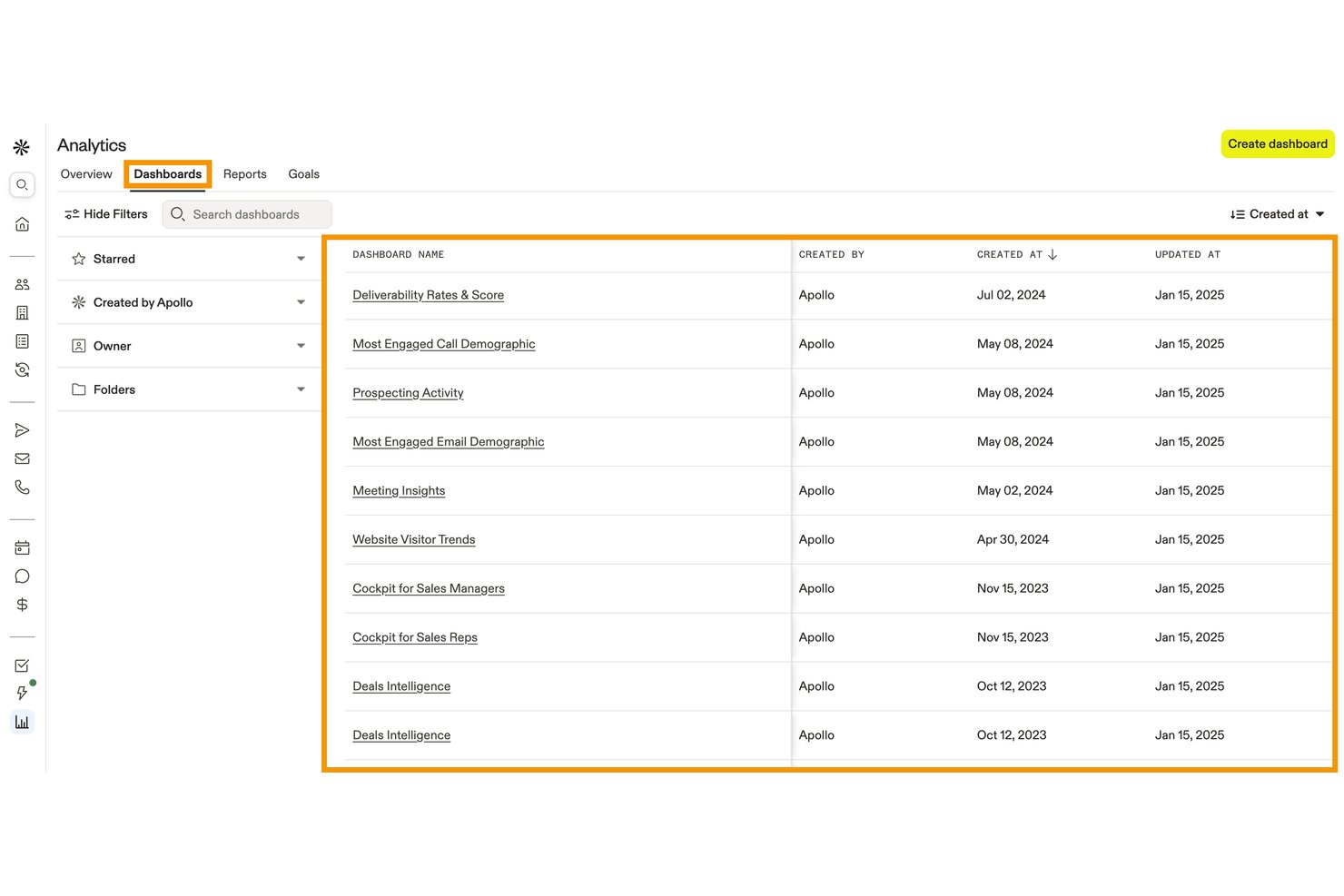
Apollo.io es una plataforma de seguimiento y participación de ventas que combina la gestión del embudo de ventas, las previsiones basadas en IA, el registro automatizado de actividades y los paneles de rendimiento con una base de datos integrada de contactos B2B.
¿Para quién es más adecuado Apollo.io?
Apollo.io es adecuado para los equipos de operaciones de ingresos y ventas que quieren consolidar la prospección, el contacto comercial y el seguimiento del embudo de ventas en una sola plataforma, en lugar de gestionar herramientas independientes para cada tarea.
Por qué elegí Apollo.io
Apollo.io ocupa un lugar en mi lista de favoritos porque su base de datos B2B de más de 240 millones de contactos no sirve únicamente para la prospección: también alimenta directamente el seguimiento del embudo mediante el enriquecimiento en cascada, lo que mantiene los registros de las oportunidades limpios y completos a medida que los clientes potenciales avanzan por las etapas. Me gusta especialmente cómo los agentes basados en IA pueden investigar cuentas y priorizar clientes potenciales según tu perfil de cliente ideal (ICP), de modo que tu embudo refleje señales de compra reales en lugar de datos obsoletos. La capa de información sobre oportunidades muestra después esos datos enriquecidos en los análisis, lo que te proporciona una visión más precisa de qué oportunidades vale la pena perseguir.
Funciones principales de Apollo.io
- Registro de actividades de ventas: Registra automáticamente llamadas, correos electrónicos, reuniones y transcripciones de IA.
- Previsiones híbridas basadas en IA: Admite proyecciones de ingresos comprometidos, del mejor caso y del peor caso.
- Paneles personalizados: Crea informes en torno a los KPI de ventas, los resultados de las secuencias y el rendimiento de los representantes.
- Integraciones con CRM: Sincroniza datos con Salesforce, HubSpot, Outreach, Salesloft y más de 200 herramientas.
Integraciones de Apollo.io
Apollo.io ofrece más de 200 integraciones mediante Apollo Anywhere y su mercado de integraciones, incluidas Salesforce, HubSpot, Outreach, Salesloft, Marketo, SendGrid, LinkedIn, Gmail, ChatGPT y Claude. El acceso a la API está disponible en los planes personalizados para integraciones a medida.
Pros and Cons
Pros:
- La base de datos B2B integrada enriquece automáticamente los registros del embudo
- Las previsiones basadas en IA predicen con precisión la probabilidad de cierre de las oportunidades
- Registra llamadas, correos electrónicos y reuniones sin introducirlos manualmente
Cons:
- El seguimiento de cuotas y comisiones no está integrado
- La precisión de los datos de contactos internacionales disminuye notablemente

SPOTIO
Ideal para la optimización de territorios y rutas con IA
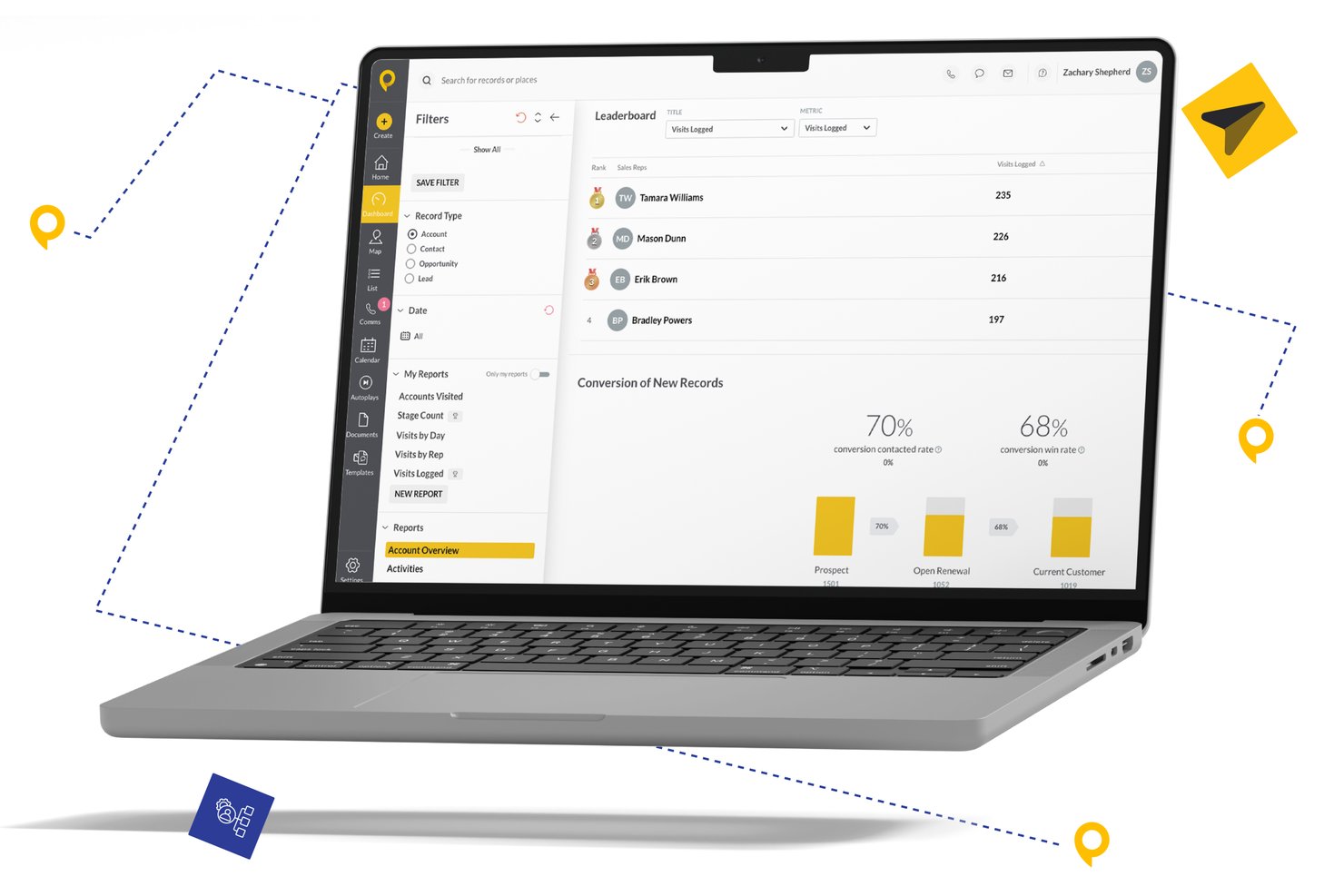
SPOTIO es una plataforma de seguimiento de ventas de campo diseñada para equipos de ventas externas, que combina gestión de territorios, optimización de rutas, registro de actividad verificado por GPS y analítica de rendimiento de los representantes en un solo espacio de trabajo orientado a dispositivos móviles.
¿Para Quién es Mejor SPOTIO?
SPOTIO es ideal para directores de ventas y gerentes de operaciones que dirigen equipos de ventas presenciales o puerta a puerta en industrias como energía solar, techos, telecomunicaciones y servicios domésticos.
Por Qué Elegí SPOTIO
SPOTIO se gana su lugar en mi lista porque su inteligencia territorial va mucho más allá de trazar límites en un mapa. Me gusta que Next Best Action (NBA) califica a los clientes potenciales según su valor predicho y les indica a los representantes exactamente a quién visitar a continuación, convirtiendo la ruta diaria en un plan de prioridades. DASH AI suma el registro de actividades por voz y la capacitación en tiempo real, así que puedo seguir tanto a dónde van los representantes como lo que hacen cuando llegan.
Funciones Clave de SPOTIO
- Mapeo de gestión de territorios: Define, asigna y edita territorios de ventas utilizando códigos postales, límites personalizados o superposiciones demográficas.
- Feed de actividad con verificación GPS: Registra y visualiza actividades de ventas geográficamente con sello automático de fecha, hora y ubicación.
- Paneles de rendimiento personalizables: Haz seguimiento de la productividad de los representantes y los resultados por territorio con filtros y segmentaciones ajustables.
- Integraciones nativas con CRM: Sincroniza datos con plataformas como Salesforce, HubSpot o Microsoft Dynamics para actualizaciones en tiempo real.
Integraciones de SPOTIO
SPOTIO ofrece integraciones nativas con Salesforce, HubSpot, Microsoft Dynamics, SAP y Oracle, y se conecta con Zapier. Hay una API disponible para integraciones personalizadas.
Pros and Cons
Pros:
- Registro de actividades en campo verificado por GPS
- Puntuación de territorios y planificación de rutas impulsadas por IA
- Visibilidad en tiempo real del rendimiento de los representantes en dispositivos móviles
Cons:
- Capacidad de previsión limitada para equipos de ventas internas
- La personalización de informes es bastante básica

Ideal para automatización de ventas personalizable

Monday sales CRM es una plataforma de gestión de relaciones con clientes diseñada para centralizar la comunicación con los clientes y automatizar los procesos de ventas, proporcionando una visión integral de los acuerdos a través de paneles personalizables. Su punto de venta único radica en sus flujos de trabajo altamente adaptables, que permiten a los usuarios modificar el sistema CRM para alinearse con sus operaciones de ventas específicas, aprovechando tipos de columnas flexibles, subelementos detallados y sólidas capacidades de clasificación.
Por qué elegí Monday sales CRM: Monday.com destaca por optimizar el seguimiento de ventas mediante su interfaz intuitiva y paneles personalizables, lo que permite a los equipos monitorear acuerdos de forma eficiente, gestionar contactos y hacer seguimiento a leads con precisión. Sus funciones de automatización reducen tareas manuales, permitiendo que los representantes de ventas se concentren en construir relaciones y cerrar acuerdos.
La plataforma fomenta la colaboración entre departamentos, asegurando que todos los miembros del equipo estén alineados e informados. Con análisis en tiempo real, el rendimiento de ventas es transparente, lo que ayuda en la toma de decisiones estratégicas y en el impulso del crecimiento en ventas. Monday.com es una herramienta robusta que simplifica el seguimiento de ventas a la vez que potencia la productividad del equipo y la interacción con el cliente.
Funciones destacadas e integraciones de Monday sales CRM
Las funciones incluyen análisis integrados y características de informes personalizables dentro de la plataforma. Esto permite a los usuarios generar información en tiempo real sobre sus actividades de ventas, la salud del pipeline y métricas de rendimiento directamente dentro de su flujo de trabajo. La capacidad de crear y acceder a estos informes sin necesidad de herramientas o software analíticos especializados es una función única que agiliza las operaciones y los procesos de toma de decisiones.
Las integraciones incluyen aplicaciones de gestión de proyectos como Slack, Google Drive, Gmail, Google Calendar, Jira, GitHub, Trello, Dropbox, Typeform, y muchas más, accesibles a través de un plan de pago con Zapier.
Pros and Cons
Pros:
- Flujos de trabajo y paneles altamente personalizables
- Reconocido por su interfaz intuitiva y visualmente atractiva
- Permite la colaboración multifuncional
- Herramientas de automatización integradas
Cons:
- La gran variedad de funciones puede resultar abrumadora para los nuevos usuarios
- Sales CRM no tiene un plan gratuito
New Product Updates from monday CRM

monday CRM Adds Meta Conversions API Integration
monday CRM now lets you connect Meta Conversions API and sync lead status back to Meta, improving targeting and conversions via a new Meta integration automation recipe. For more information, visit monday CRM's official site.
Mejor solución integral basada en la nube para datos
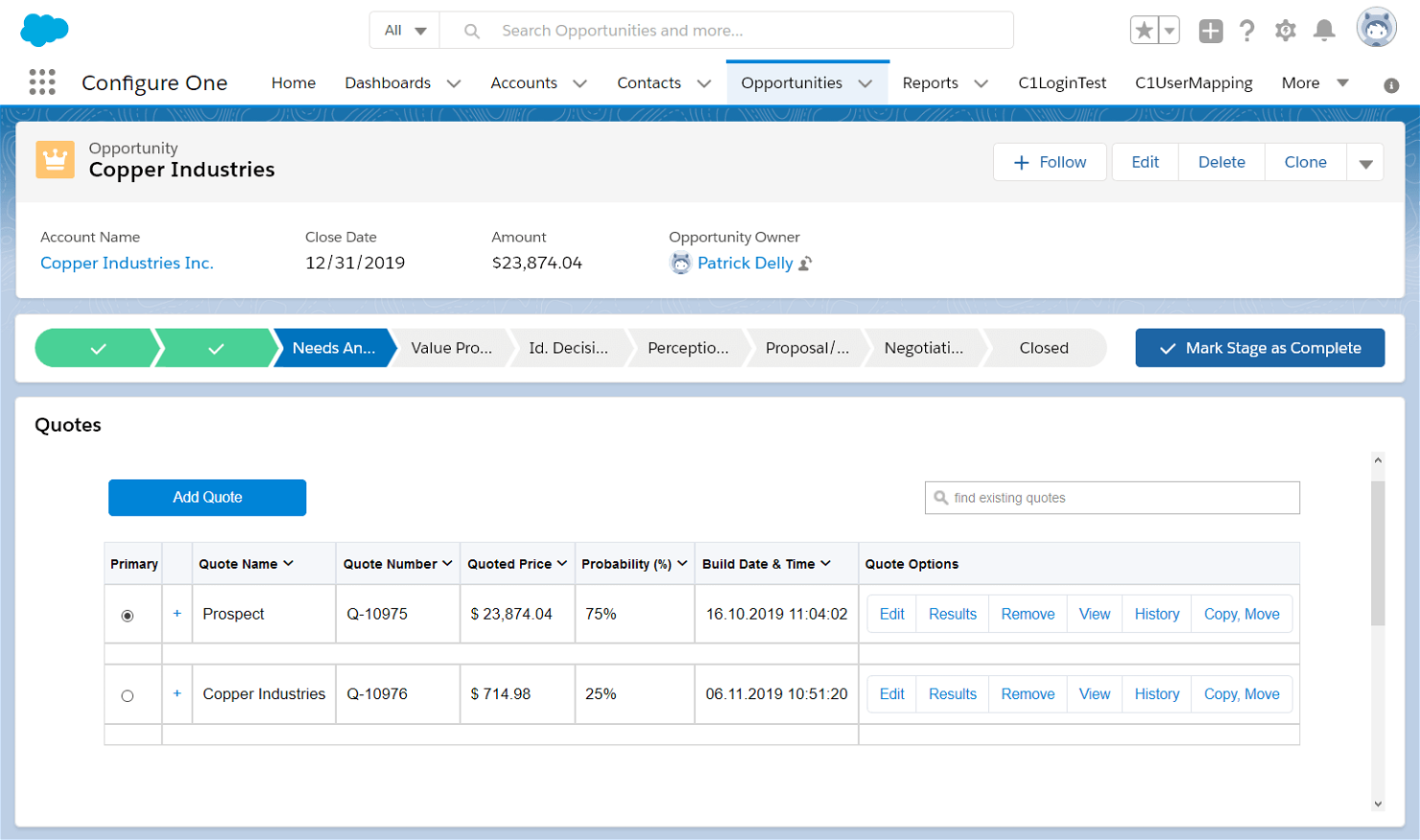
Salesforce es la mejor solución integral basada en la nube porque ofrece opciones para empresas de cualquier sector y tamaño. Es altamente personalizable. Esto significa que puede ser un poco más complejo de configurar y usar, pero es ideal para las empresas que necesitan algo hecho a medida.
Por qué elegí Salesforce: Salesforce es una solución todo en uno que, para algunas personas, es una de esas herramientas que 'hacen demasiado', pero para otras, hace todo lo que podrían desear. Elegí Salesforce porque ayuda a los equipos a gestionar su negocio, colaborar en un lugar centralizado y es mucho más que un simple seguimiento de ventas.
Aunque las startups y las pequeñas empresas pueden encontrar las funciones abrumadoras, el potencial de Salesforce lo convierte en una herramienta de seguimiento de ventas a la que otros aspiran.
Características y integraciones destacadas de Salesforce:
Características como previsiones, informes de un clic y herramientas de gestión de ventas. Con un panel de control repleto de datos y minería de datos para generación de leads, puedes monitorizar el recorrido de tus prospectos a través del embudo de ventas y crear experiencias de usuario de alta calidad.
Integraciones con más de 3.000 aplicaciones en Salesforce AppExchange, incluyendo LinkedIn, Google Workspace, Asana, Microsoft 365 y WhatsApp. La API de Salesforce permite crear integraciones personalizadas.
Pros and Cons
Pros:
- Personalizable para adaptarse a cualquier empresa
- Integración de correo electrónico con Gmail o Outlook
- Informes de previsión y pipeline de un solo clic
Cons:
- No hay plan gratuito
- Curva de aprendizaje pronunciada
New Product Updates from Salesforce CRM

Salesforce CRM Adds Automated CMS Access Expiration
Salesforce CRM adds automated access expiration and a new view-only support role for Point of Sale CMS users. These controls reduce manual access cleanup and help teams limit unnecessary permissions. For more information, visit Salesforce CRM’s official site.
 .
.
Ideal para pequeñas y medianas empresas que venden B2B
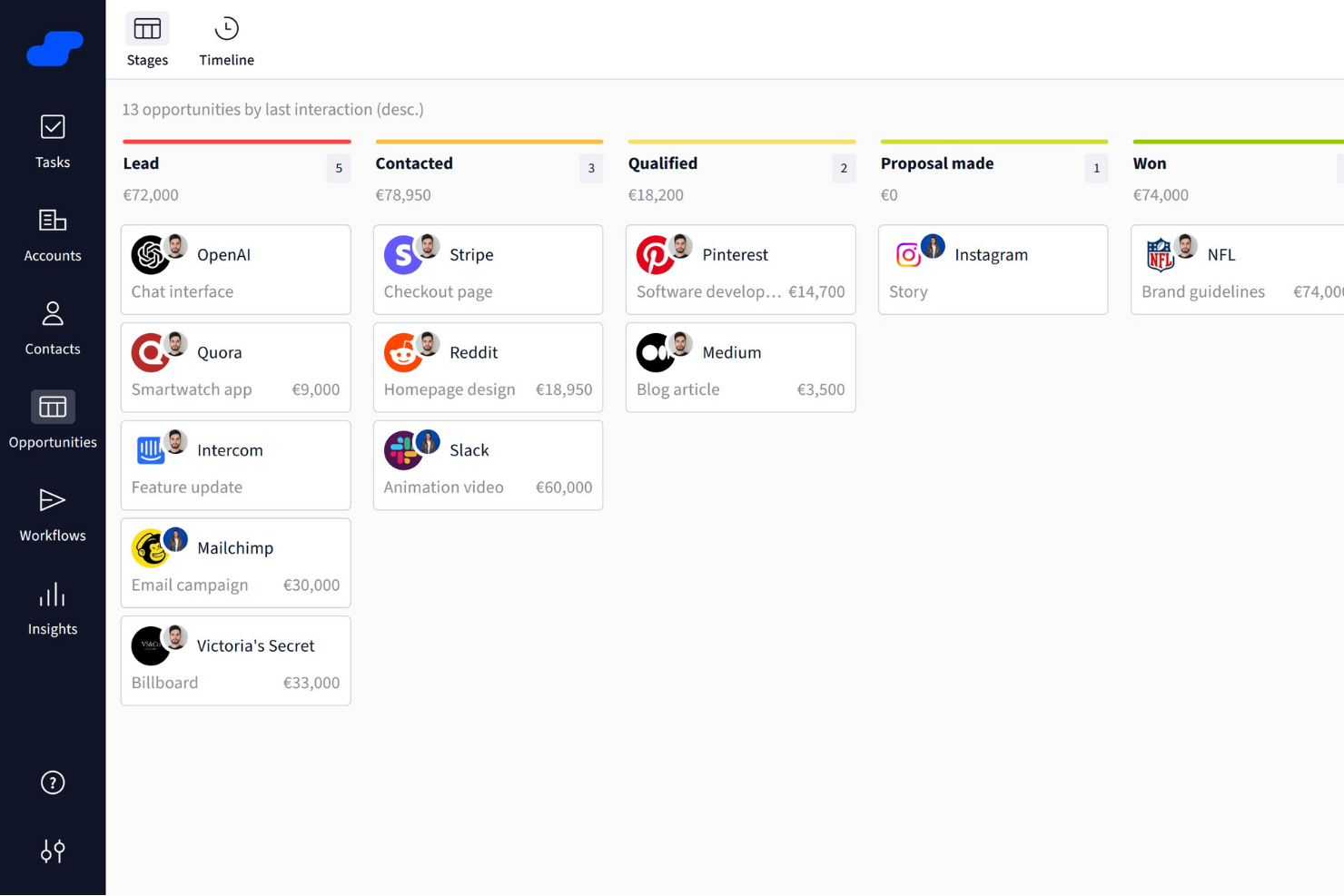
Salesflare es fácil de usar y puede automatizar cada parte de tu proceso de ventas. Con un pipeline limpio y un CRM organizado, resulta sencillo pero potente.
Por qué elegí Salesflare: elegí Salesflare porque puede encontrar cualquier dirección de correo electrónico con solo un nombre y una empresa, facilitando enormemente el contacto inicial. Salesflare recopila información de todos los canales digitales de un mismo contacto, actualizando automáticamente tu CRM. En situaciones donde el tiempo suele ser escaso, los equipos pequeños apreciarán los registros automáticos de reuniones de calendario y llamadas telefónicas.
Características destacadas e integraciones de Salesflare:
Las características incluyen una potente recopilación de datos de clientes, interfaz organizada de documentos y pipeline, y una aplicación móvil que iguala la potencia de la versión de escritorio.
Las integraciones están limitadas de manera nativa a herramientas como Gmail (Google Workspace), Outlook (Microsoft 365) y LinkedIn. Mailchimp, Slack y miles más están disponibles utilizando Zapier o Make.
Pros and Cons
Pros:
- Aplicación móvil con todas las funciones
- Buscador de direcciones de correo electrónico
- Funciones de automatización que ahorran tiempo
Cons:
- Integraciones nativas limitadas
- Los reportes solo están disponibles en planes superiores

Capsule
Mejor para startups y pequeñas empresas
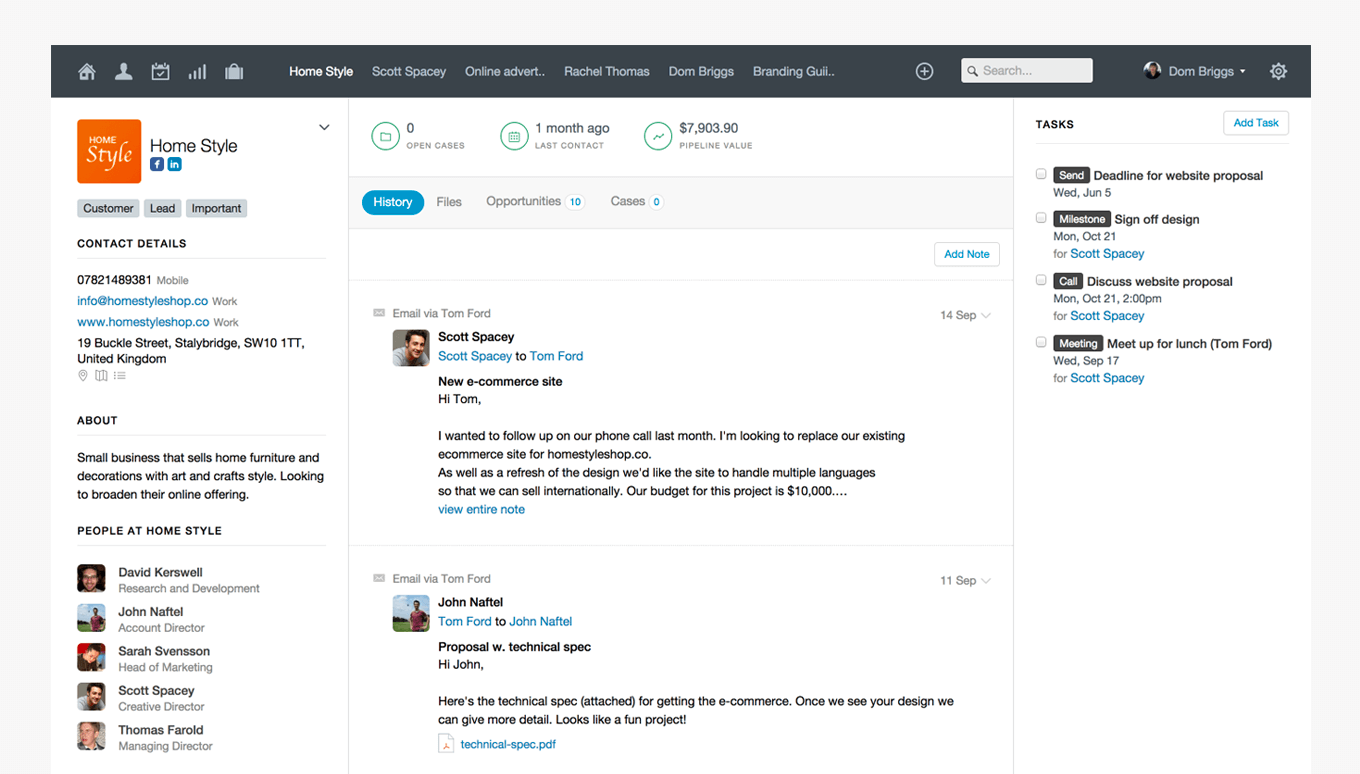
Capsule se enorgullece de cuatro principios fundamentales: sencillo, accesible, fiable y divertido. Este enfoque se refleja en la simplicidad de la plataforma y es perfecto para startups que necesitan soluciones sin complicaciones de proveedores confiables.
Por qué elegí Capsule: Capsule tiene una interfaz limpia y moderna, es fácil de usar y cuenta con todas las funciones necesarias de una herramienta de seguimiento de ventas. No destaca necesariamente por funcionalidades o características especiales, pero creo que está ejecutada de manera excelente. Todo es ágil, divertido y accesible.
Características destacadas e integraciones de Capsule:
Características incluyen gestión visual del pipeline con filtrado de oportunidades, capacidades de gestión de proyectos con automatización de tareas y opciones completas de informes.
Integraciones incluyen Microsoft 365, Google Workspace, Xero y Mailchimp. Zapier abre muchas más opciones de conexión, y se pueden crear integraciones personalizadas con la API de Capsule.
Pros and Cons
Pros:
- Múltiples pipelines de ventas
- Asistencia de contenido mediante IA
- Campos personalizados ilimitados
Cons:
- Integraciones nativas limitadas
- Limitado para grandes empresas
New Product Updates from Capsule

Capsule Adds AI Meeting Prep for External Calls
Capsule introduced AI Meeting Prep with relationship summaries, color-coded signals, and CRM context for upcoming external calls. This helps users review key contact details and prepare for meetings without searching through records manually. For more information, visit Capsule’s official site.
 .
.
Zoho CRM
Mejor para el cliente
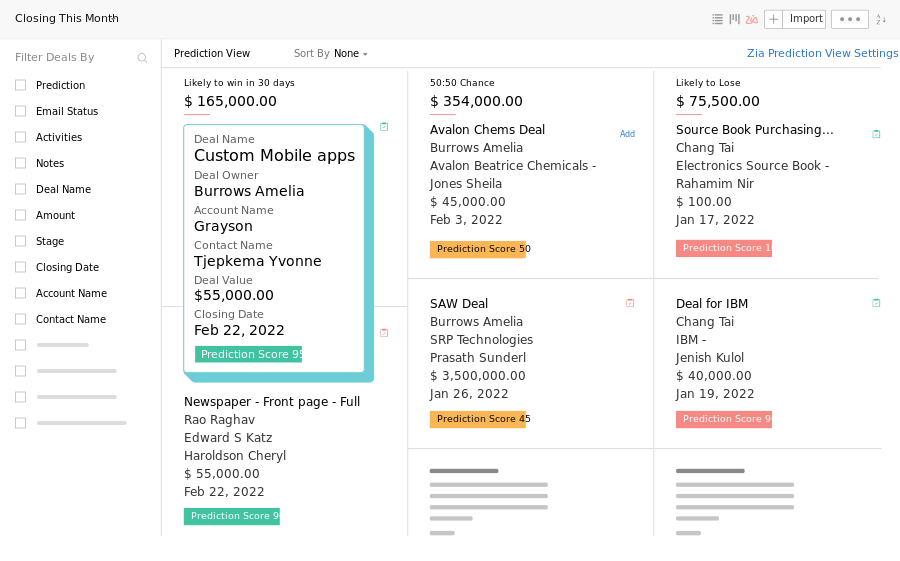
Más de 250,000 empresas ya utilizan la suite de productos de Zoho. Diseñada para hacer networking, puedes captar prospectos en cualquier lugar, ya sea en línea o fuera de línea.
Por qué elegí Zoho CRM: Elegí Zoho CRM porque facilita la conexión con las personas. Con presencia multicanal y potentes funciones de segmentación, puedes interactuar con tus prospectos en el momento y lugar adecuados.
Con una completa aplicación móvil, la posibilidad de escanear tarjetas de presentación directamente en tu CRM y conectar los contactos del CRM a la red de tu teléfono, es fácil realizar ventas estés donde estés.
Características destacadas e integraciones de Zoho CRM:
Las características incluyen inteligencia predictiva, múltiples embudos de ventas, pronóstico de ventas y portales para clientes. Además, la suite de Zoho ofrece herramientas de marketing, contabilidad, recursos humanos, operaciones y servicio al cliente, permitiendo a los usuarios garantizar la fidelidad de los clientes con experiencias personalizadas.
Las integraciones incluyen más de 800 aplicaciones nativas, como Mailchimp, WhatsApp, Outlook, Xero y Google Adwords. También puedes crear conexiones adicionales con Zapier y desarrollar integraciones personalizadas mediante la API de Zoho.
Pros and Cons
Pros:
- Contratos flexibles sin periodos de permanencia
- Captura detalles de prospectos en cualquier lugar
- Análisis y paneles de informes avanzados
Cons:
- No hay integraciones en el plan gratuito
- Automatización solo en planes premium
New Product Updates from Zoho CRM

Zoho CRM Adds Reusable Canvas Templates for Forms
Zoho CRM now supports Canvas templates in the Forms view, so you can design a form layout once and reuse it across records for a consistent, faster experience. For more information, visit Zoho CRM's official site.
 .
.
Nimble
Ideal para la prospección multicanal
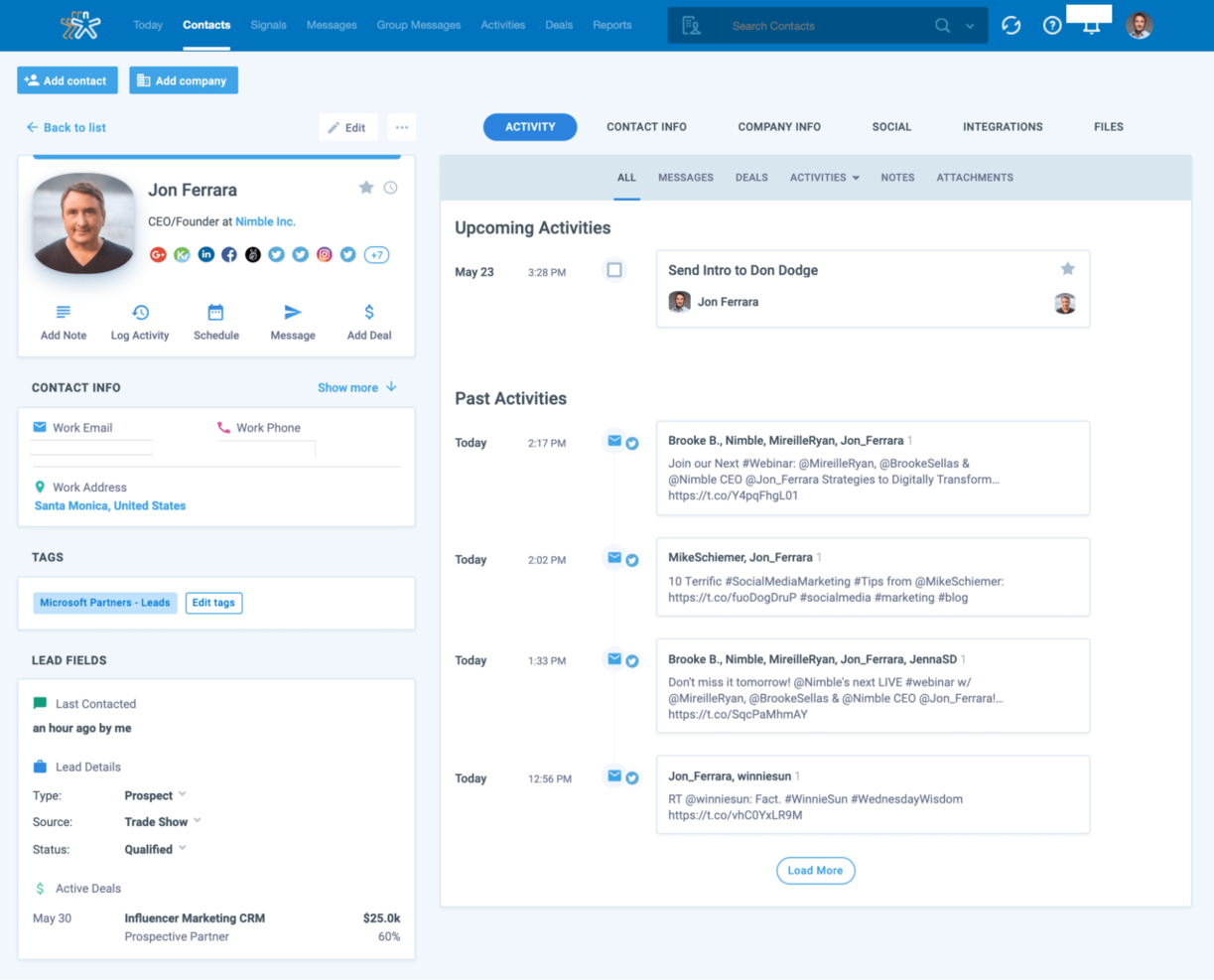
Con potentes funciones de escucha social y coincidencia de perfiles, Nimble CRM es ideal para la prospección multicanal. Nimble CRM está orientado al cliente y se centra en la forma más eficiente de crear relaciones.
Por qué elegí Nimble CRM: Elegí Nimble CRM por sus capacidades de recopilación de datos multicanal. Al integrarse con Google Workspace y Microsoft 365, los usuarios pueden llevar su flujo de trabajo habitual al siguiente nivel. La extensión Nimble Prospector permite a los usuarios recopilar información sobre clientes potenciales en cualquier plataforma, y la coincidencia de perfiles sociales hace que los clientes potenciales lleguen a ti para que puedas centrarte en crear relaciones.
Principales funciones e integraciones de Nimble CRM:
Las funciones incluyen flujos de calificación de clientes potenciales, mensajería grupal, informes personalizados del panel de acuerdos y previsiones de ventas.
Las integraciones incluyen Google Workspace y Microsoft 365. Hay otras integraciones disponibles a través de la API de Nimble.
Pros and Cons
Pros:
- Extensión de navegador Nimble Prospector para la generación de clientes potenciales
- Escucha social y coincidencia de perfiles
- Funciona dentro de Google Workspace o Microsoft 365
Cons:
- No tiene plan gratuito
- Integraciones nativas limitadas
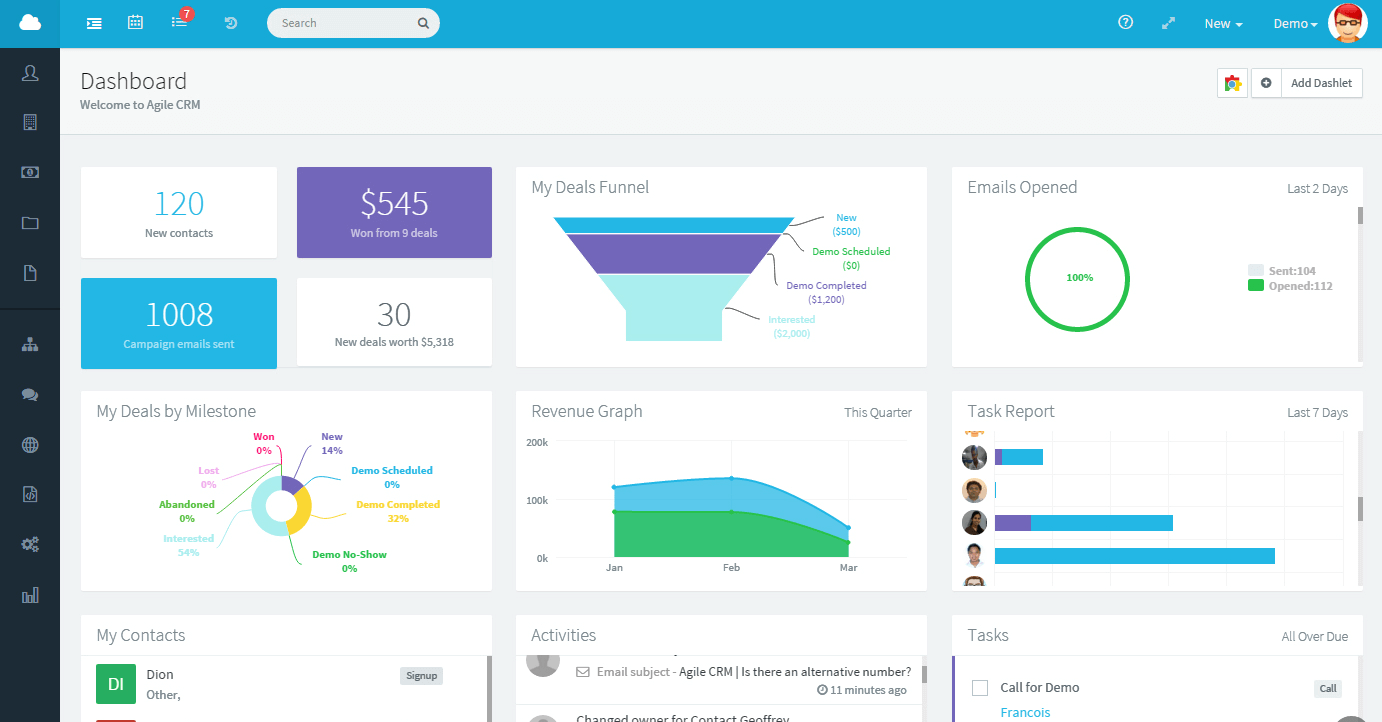
Las funciones de automatización de flujos de trabajo y gestión de tareas hacen de Agile CRM una excelente solución de seguimiento de ventas para equipos Agile. Los tableros de equipo facilitan las reuniones diarias, mientras que las funciones de establecimiento de objetivos mantienen los sprints en curso.
Por qué elegí Agile CRM: Agile CRM ofrece un plan gratuito generoso para hasta diez usuarios. Los tableros de gestión de prospectos, oportunidades y contactos me destacan porque son simples, pero las automatizaciones sofisticadas los llevan al siguiente nivel. La calificación de prospectos y los hitos personalizados de las oportunidades son esenciales para planificar los sprints y asegurar que el equipo alcance objetivos pequeños en el camino hacia metas mayores.
Funciones destacadas e integraciones de Agile CRM:
Las funciones incluyen campos de datos personalizados, programación de citas, automatización después de llamadas, grabaciones de llamadas y mensajes de voz automatizados. Esto lo convierte en una excelente herramienta para equipos de ventas que también trabajan con prospectos por teléfono.
Las integraciones incluyen 50 integraciones nativas, siendo populares Facebook, Stripe, Quickbooks y LinkedIn. Zapier permite más conexiones y la API de Agile CRM está disponible para integraciones personalizadas.
Pros and Cons
Pros:
- Plan gratuito generoso
- Opción de gamificación para mejorar la eficiencia
- Importar contactos es rápido y sencillo
Cons:
- Sin tutoriales para funciones avanzadas
- Opciones de personalización limitadas

Insightly es ideal para pequeñas empresas porque es fácil de usar y comprende los complejos roles de los propietarios de pequeños negocios. Ayuda a los equipos a evitar trabajar en silos y a gestionar el tiempo para acortar los ciclos de ventas y cerrar más acuerdos.
Por qué elegí Insightly: Me centré en cómo Insightly se adapta al crecimiento de las empresas. Como herramienta de seguimiento de ventas y CRM, sus funciones son amplias pero también se observan en otras herramientas. Lo que destaca son los elementos de personalización sin perder su sencillez. El hecho de poder añadir detalles de los clientes que ayudan a mantener relaciones significativas es una de las razones por las que Insightly es ideal para pequeñas empresas.
Características e integraciones destacadas de Insightly:
Las características incluyen plantillas y procesos de ventas personalizables, y vinculación de relaciones. Una función única que me gusta es la posibilidad de convertir las oportunidades ganadas en proyectos, con gestión de tareas y una vista Kanban disponible.
Las integraciones incluyen Google, Microsoft 365, Quickbooks y Xero. Utilizando Zapier y AppConnect, hay más de 2,000 integraciones disponibles.
Pros and Cons
Pros:
- Paneles de inteligencia empresarial integrados
- Gestión de proyectos nativa
- Escaneo de tarjetas de presentación desde el móvil
Cons:
- Automatización solo en planes premium
- Sin soporte telefónico
Otros programas de seguimiento de ventas
Estas son algunas opciones adicionales de software de seguimiento de ventas que no entraron en mi lista de finalistas, pero que aun así merece la pena consultar:
- Creatio CRM
Ideal para vistas de cliente de 360 grados
- Copper
Mejor opción para usuarios de Google Workspace
- Freshsales
Ideal para funciones de interacción impulsadas por IA
- Pipedrive
Ideal para la gestión visual del embudo de ventas y paneles de informes integrados
- SugarAI
Mejor para automatización avanzada


Cómo Evalúo el Software de Seguimiento de Ventas
Analizo las herramientas de seguimiento de ventas en dos capas: lo imprescindible, como la visibilidad del pipeline y el cumplimiento de cuotas, y los diferenciadores—como la previsión con IA—que hacen sobresalir a las mejores opciones.
Funcionalidad Básica (Requisitos Esenciales Para Esta Lista)
Cuando selecciono herramientas para mi lista, califico cada una en una escala de 0 (no ofrece la funcionalidad) a 5 (sobresale en esta área) para cada funcionalidad básica listada abajo. Después, calculo la puntuación total de la herramienta en porcentaje. Cada herramienta debe alcanzar una puntuación total mínima del 75% para ser considerada para la inclusión.
- Seguimiento del Pipeline: Evalúo cómo cada herramienta visualiza las etapas de los negocios—si puedes personalizar pipelines, filtrar por representante o región, y detectar negociaciones estancadas antes de que mueran silenciosamente.
- Registro de Actividades de Ventas: Cada herramienta debe capturar llamadas, correos electrónicos y reuniones vinculadas a negocios y contactos. Reviso si el registro es solo manual o si se sincroniza automáticamente desde calendarios y bandejas de entrada.
- Paneles y Reportes de Ventas: Verifico qué tan fácil es construir vistas en torno a KPIs como la tasa de éxito, la conversión por etapa y la productividad de los representantes sin depender de una herramienta de BI o del equipo de datos.
- Previsión de Ventas: La previsión debe ir más allá de sumar valores ponderados del pipeline. Evalúo si las herramientas ofrecen acumulados por equipo, categorías ajustables y comparaciones de tendencias históricas.
- Gestión de Objetivos y Cuotas: Compruebo si puedes fijar y rastrear cuotas a nivel de representante, equipo y periodo—y si los representantes y gerentes pueden ver el cumplimiento en tiempo real sin tener que descargar un reporte aparte.
- Integraciones de CRM y Datos: La herramienta debe conectarse con tu CRM y stack de ventas existentes. Miro las integraciones nativas con plataformas como Salesforce, HubSpot y Pipedrive, además de acceso API abierto.
Una vez que tengo una lista de herramientas que cumplen con estos criterios, considero qué distingue a cada plataforma.
Factores Diferenciadores (Qué Distingue a los Proveedores)
Así es como comparo y contraste diferentes proveedores:
Características Destacadas
Los análisis de negocios impulsados por IA son un gran diferenciador—busco herramientas que detecten negocios en riesgo y recomienden los próximos pasos basados en patrones históricos de éxito, no solo en la probabilidad por etapa. La inteligencia conversacional añade otra capa, vinculando grabaciones y transcripciones de llamadas directamente con los resultados de los negocios, para que los gerentes puedan entrenar a los representantes con datos reales. También evalúo el seguimiento de atribución de ingresos, que ayuda a los equipos de RevOps a conectar los ingresos cerrados con campañas o puntos de contacto específicos a lo largo del recorrido del cliente.
Más Allá de las Características
La profundidad de la integración con el stack tecnológico es crucial aquí. Verifico si una herramienta ofrece una verdadera sincronización bidireccional con el CRM o solo envíos de datos superficiales—ya que las sincronizaciones unidireccionales generan problemas de reportes rápidamente. La implementación y el tiempo hasta obtener valor también pesan mucho. Una plataforma con incorporación guiada y plantillas de pipeline permite que un equipo de ventas rastree negocios en días, no meses. La transparencia en los precios completa mi evaluación; busco claridad en el costo por usuario y visibilidad de lo que está detrás de los niveles más altos antes de que un equipo se comprometa.
Cómo elegir un software de seguimiento de ventas
Es fácil perderse entre largas listas de funciones y estructuras de precios complejas. Para ayudarte a mantener la concentración mientras avanzas en tu proceso único de selección de software, aquí tienes una lista de factores que debes tener en cuenta:
| Factor | Qué debes considerar |
|---|---|
| Escalabilidad | ¿El software crecerá junto con tu empresa? Considera si puede gestionar un mayor volumen de datos y número de usuarios sin problemas de rendimiento a medida que tu equipo se amplía. |
| Integraciones | ¿Se conecta con tus herramientas actuales? Comprueba la compatibilidad con tu CRM, correo electrónico y plataformas de comunicación actuales para garantizar una integración fluida con tu flujo de trabajo. |
| Personalización | ¿Puedes adaptarlo a tus necesidades? Busca opciones para ajustar los flujos de trabajo, los campos y los informes a tus procesos específicos sin necesitar la ayuda de un desarrollador. |
| Facilidad de uso | ¿Es fácil de usar para tu equipo? Evalúa la interfaz y la navegación. Las herramientas sencillas reducen el tiempo de formación y mejoran los índices de adopción. |
| Implementación e incorporación | ¿Con qué rapidez puedes empezar? Evalúa los recursos de formación, la asistencia y la ayuda para la configuración disponibles para evitar un proceso de implementación prolongado. |
| Coste | ¿Se ajusta a tu presupuesto? Compara los planes de precios, incluidos los costes ocultos, como las tarifas de configuración o los cargos adicionales por funciones extra. Busca opciones de facturación flexibles. |
| Medidas de seguridad | ¿Están protegidos tus datos y tu privacidad? Comprueba los estándares de cifrado, las políticas de copias de seguridad de datos y el cumplimiento de normativas pertinentes como el RGPD o la CCPA. |
Tendencias del software de seguimiento de ventas para 2026
El software de seguimiento de ventas sigue evolucionando rápidamente, incorporando tecnologías y metodologías avanzadas para ofrecer información más detallada y flujos de trabajo más eficientes. A medida que las empresas se centran cada vez más en la toma de decisiones basada en datos, el papel del seguimiento de ventas para comprender y optimizar las operaciones de ingresos adquiere una importancia cada vez mayor. Para las organizaciones más grandes, el software de ventas empresarial proporciona la escalabilidad y las funciones avanzadas necesarias para gestionar procesos de ventas complejos. A continuación se indican las principales tendencias y novedades que están configurando el panorama del software de seguimiento de ventas:
Integración y automatización:
- Integración mejorada con CRM: El software de seguimiento de ventas ofrece cada vez una integración más profunda y fluida con las plataformas CRM, lo que permite obtener una visión unificada de las interacciones con los clientes y las actividades de ventas.
- Captura automatizada de datos: La capacidad de capturar y registrar automáticamente las interacciones de ventas a través de diversos canales está mejorando, reduciendo la introducción manual y aumentando la precisión de los datos.
Análisis avanzados e IA:
- Análisis predictivo: Las herramientas de seguimiento de ventas incorporan análisis avanzados e IA para pronosticar tendencias de ventas, identificar oportunidades y predecir el comportamiento de los clientes, lo que permite tomar decisiones de forma proactiva.
- Información basada en IA: El uso de la inteligencia artificial para proporcionar información práctica y recomendaciones es cada vez más habitual, lo que ayuda a los equipos de ventas a priorizar sus esfuerzos de forma más eficaz.
Colaboración y movilidad:
- Funciones de colaboración en tiempo real: Cada vez se presta más atención a las funciones que permiten la colaboración en tiempo real entre los miembros del equipo, independientemente de su ubicación, mejorando la cohesión y la capacidad de respuesta del equipo.
- Optimización para dispositivos móviles: Dado que los equipos de ventas son cada vez más móviles, el software de seguimiento de ventas está haciendo hincapié en ofrecer experiencias móviles sólidas, garantizando una funcionalidad completa y acceso a datos críticos desde cualquier lugar.
Tecnologías emergentes:
- Blockchain para la seguridad de los datos: Algunas soluciones de seguimiento de ventas están empezando a incorporar la tecnología blockchain para mejorar la seguridad y la fiabilidad de los datos, especialmente en sectores donde la sensibilidad de la información es primordial.
- Integración con el IoT: La integración con dispositivos del Internet de las cosas (IoT) está empezando a surgir, lo que permite una recopilación de datos más automatizada y formas innovadoras de realizar un seguimiento de las interacciones con los clientes y del rendimiento de los productos.
Funciones en evolución:
- Menor dependencia de la introducción manual de datos: A medida que mejoran las capacidades de automatización e integración, disminuye la necesidad de introducir datos manualmente, ya que el software puede agregar y sintetizar datos de forma automática cada vez más.
- Menor énfasis en los informes básicos: Las funciones de generación de informes básicos están perdiendo importancia como argumento de venta, ya que los usuarios esperan funciones de generación de informes más dinámicas, interactivas y predictivas.
El software de seguimiento de ventas se está convirtiendo en un elemento cada vez más esencial para la planificación y ejecución estratégica de las ventas, impulsado por los avances en IA, análisis y capacidades de integración. Para los responsables de operaciones de ingresos, elegir un software que se ajuste a estas tendencias será fundamental para obtener información más detallada, impulsar la eficiencia y mantener la competitividad en un entorno empresarial en evolución.
¿Qué es el software de seguimiento de ventas?
El software de seguimiento de ventas es una herramienta que te ayuda a registrar, seguir y gestionar todas tus actividades de ventas en un solo lugar. Los responsables de ventas y los representantes de ventas lo utilizan para hacer un seguimiento de los clientes potenciales, supervisar las oportunidades y consultar informes en tiempo real sobre el rendimiento del equipo. Reduce las tareas repetitivas, muestra qué funciona (y qué no) y mantiene a todos centrados en cerrar más ventas.
Funciones
Al seleccionar un software de seguimiento de ventas, presta atención a las siguientes funciones clave:
- Seguimiento de clientes potenciales: Supervisa a los clientes potenciales y ayuda a gestionar los seguimientos para convertirlos en ventas.
- Previsión de ventas: Predice las ventas futuras basándose en datos históricos, lo que ayuda en la planificación y la estrategia.
- Funciones de generación de informes: Genera informes detallados sobre las actividades y el rendimiento de ventas para fundamentar las decisiones empresariales.
- Automatización: Automatiza tareas repetitivas como la introducción de datos y los seguimientos, liberando tiempo para actividades más estratégicas.
- Paneles personalizables: Permite a los usuarios adaptar las vistas de datos para que coincidan con sus necesidades y preferencias específicas.
- Gestión de contactos: Organiza la información de los clientes y el historial de interacciones para facilitar su acceso y consulta.
- Accesibilidad desde aplicaciones móviles: Proporciona acceso a los datos y las herramientas de ventas desde cualquier lugar, garantizando la productividad fuera de la oficina.
- Gestión del embudo de ventas: Visualiza el proceso de ventas para ayudar a los equipos a realizar un seguimiento de las oportunidades y del progreso a través de las distintas etapas.
- Opciones de integración: Se conecta con otras herramientas y plataformas para garantizar la coherencia de los datos y la eficiencia de los flujos de trabajo.
Ventajas
La implementación de un software de seguimiento de ventas proporciona varias ventajas para tu equipo y tu empresa. Estas son algunas de las que puedes esperar:
- Mayor eficiencia: La automatización de tareas repetitivas ahorra tiempo y permite que tu equipo se centre en cerrar acuerdos.
- Mejor toma de decisiones: Las funciones de generación de informes proporcionan información sobre el rendimiento de ventas, lo que te ayuda a tomar decisiones estratégicas fundamentadas.
- Colaboración mejorada: Los paneles y datos compartidos garantizan que todos estén alineados y trabajen para alcanzar objetivos comunes.
- Aumento de las ventas: El seguimiento de clientes potenciales y la gestión del embudo de ventas te ayudan a cerrar más acuerdos al mantener organizadas y priorizadas las oportunidades de venta potenciales.
- Mayor flexibilidad: El acceso desde aplicaciones móviles permite que tu equipo trabaje eficazmente desde cualquier lugar, no solo desde sus escritorios.
- Comunicación optimizada: La gestión de contactos mantiene todas las interacciones con los clientes en un solo lugar, lo que facilita el mantenimiento de relaciones sólidas.
- Escalabilidad: A medida que tu empresa crece, el software puede adaptarse al aumento de datos y a las necesidades de los usuarios sin comprometer el rendimiento.
Costes y precios
Seleccionar un software de seguimiento de ventas requiere comprender los diversos modelos de precios y planes disponibles. Los costes varían en función de las características, el tamaño del equipo, los complementos y otros factores, y existe software gratuito de seguimiento de ventas disponible para los equipos que solo necesitan las funciones básicas. La tabla siguiente resume los planes habituales, sus precios medios y las características que suelen incluir las soluciones de software de seguimiento de ventas:
Tabla comparativa de planes de software de seguimiento de ventas
| Tipo de plan | Precio medio | Características habituales |
|---|---|---|
| Plan gratuito | $0 | Seguimiento básico de clientes potenciales, gestión sencilla de contactos e informes limitados. |
| Plan personal | $5-$25/usuario/mes | Informes mejorados, integración del correo electrónico y automatización básica. |
| Plan empresarial | $30-$60/usuario/mes | Análisis avanzados, paneles personalizables y automatización de flujos de trabajo. |
| Plan para empresas | $70-$150/usuario/mes | Funciones completas de integración, gestión de cuentas especializada y asistencia prioritaria. |
Preguntas frecuentes sobre el software de seguimiento de ventas
Estas son algunas respuestas a preguntas frecuentes sobre el software de seguimiento de ventas:
¿Cuáles son los tipos de software de seguimiento de ventas?
El software de seguimiento de ventas es una herramienta esencial para las empresas que buscan optimizar sus procesos de ventas y mejorar su rendimiento. Los distintos tipos de software de seguimiento de ventas responden a diferentes necesidades, escalas y objetivos de las organizaciones. Estos son los principales tipos de software de seguimiento de ventas:
- Seguimiento de ventas basado en CRM: Este software integra el seguimiento de ventas en un sistema más amplio de gestión de relaciones con los clientes (CRM). No solo realiza un seguimiento de las ventas, sino que también gestiona las interacciones con los clientes, ofreciendo una visión integral de la participación de los clientes y las actividades de ventas.
- Software de seguimiento de clientes potenciales: Centrado específicamente en el seguimiento de posibles clientes, este software ayuda a las empresas a supervisar las fuentes de clientes potenciales, las interacciones y el progreso a través del embudo de ventas, optimizando las estrategias de conversión de clientes potenciales.
- Software de análisis de ventas: Este tipo de software hace hincapié en el análisis de datos y ofrece información detallada sobre las tendencias de ventas, las métricas de rendimiento y las previsiones, lo que permite tomar decisiones basadas en datos para mejorar las estrategias y los resultados de ventas.
- Software de gestión del embudo de ventas: Este tipo de software se centra en gestionar y visualizar el embudo de ventas, ayudando a los equipos de ventas a realizar un seguimiento del estado de distintas operaciones en diferentes etapas, identificar cuellos de botella y prever los ingresos de forma eficaz.
- Software de seguimiento de la actividad comercial: Este software se concentra en las actividades diarias de los equipos de ventas y realiza un seguimiento de las llamadas, los correos electrónicos, las reuniones y otras tareas relacionadas con las ventas, garantizando la responsabilidad y maximizando la productividad.
- Software de gestión del rendimiento de ventas: Además de realizar un seguimiento de las métricas de ventas, este tipo de software se centra en evaluar el rendimiento del equipo de ventas, establecer objetivos, ofrecer comentarios y facilitar la formación y el desarrollo.
- Software de seguimiento de ventas de campo: Diseñado para empresas con equipos de ventas que trabajan fuera de la oficina, este software centrado en dispositivos móviles ayuda a realizar un seguimiento de las actividades basadas en la ubicación, las visitas a clientes y las interacciones presenciales, optimizando las operaciones de ventas de campo.
- Seguimiento de ventas en el punto de venta (POS): Especialmente útil para empresas minoristas, este software realiza un seguimiento de las transacciones de venta, el movimiento del inventario y el comportamiento de compra de los clientes en el punto de venta.
- Seguimiento de ventas de comercio electrónico: Adaptado a los negocios en línea, este software se integra con plataformas de comercio electrónico para supervisar las transacciones en línea, las interacciones con los clientes y los análisis web, proporcionando información específica sobre los canales de venta digitales.
Cada tipo de software de seguimiento de ventas cumple objetivos distintos y ofrece ventajas únicas. Al seleccionar una solución de seguimiento de ventas, es fundamental tener en cuenta las necesidades específicas de tu empresa, los procesos de ventas y la información de datos necesaria para impulsar eficazmente tus objetivos de ventas.
¿Por qué es importante supervisar el rendimiento de las ventas?
Tener una visión clara de tu embudo de ventas, con el rendimiento histórico y los ingresos previstos, es fundamental para saber si tu empresa está creciendo y a qué ritmo. El seguimiento del rendimiento de las ventas ofrece expectativas claras sobre si las oportunidades del embudo alcanzarán o superarán los objetivos actuales y sobre dónde existen brechas. El seguimiento de datos como las tasas de éxito y los tiempos de respuesta también ayudará a supervisar la eficiencia de tus equipos de ventas.
¿Es necesario recibir formación para utilizar un software de seguimiento de ventas?
Sí, a menudo es necesario recibir formación para sacar el máximo partido al software de seguimiento de ventas. Aunque algunas herramientas son intuitivas, otras pueden requerir sesiones de formación más exhaustivas. Busca proveedores que ofrezcan recursos de formación, como videotutoriales, seminarios web y guías de usuario. Estos recursos pueden ayudar a tu equipo a aprender rápidamente a utilizar el software y maximizar su potencial.
¿Cuáles son los errores habituales que deben evitarse al utilizar un software de seguimiento de ventas?
Un error habitual es complicar demasiado la configuración con demasiados campos o etapas. Otro es no revisar los datos con regularidad, lo que provoca que la información quede desactualizada. Mantén el proceso sencillo, forma bien a tu equipo y consulta los informes con frecuencia para conservar su utilidad.
Qué sigue:
Si estás investigando un software de seguimiento de ventas, contacta gratis con un asesor de SoftwareSelect para recibir recomendaciones.
Rellenarás un formulario y mantendrás una breve conversación en la que analizarán los detalles específicos de tus necesidades. Después recibirás una lista de opciones de software para revisar. Incluso te ayudarán durante todo el proceso de compra, incluidas las negociaciones de precios.