
Freshsales Testbericht 2026: Vorteile, Nachteile, Funktionen und Preise
Freshsales zeichnet sich durch die Kombination von intuitivem Design und starker Automatisierung aus – ideal, wenn Sie leistungsstarke CRM-Tools ohne die übliche Komplexität oder steile Lernkurve wünschen.

Wir bewerten Tools unabhängig, und Provisionen helfen, unsere Tests zu finanzieren. Sehen Sie unsere transparente Richtlinie, unsere Methodik oder schlagen Sie ein Tool vor.
Freshsales is a CRM software built for sales teams that need pipeline management, built-in calling, and AI-powered lead scoring without juggling multiple tools. I'd consider it if you want more native sales functionality than HubSpot's CRM delivers out of the box, but don't need the administrative overhead that comes with Salesforce. This review covers what Freshsales actually does well, where it falls short, and who it's genuinely a good fit for.
Freshsales Evaluation Summary
4.6/5
- From $9/user/month (billed annually)
- 21-day free trial
Warum Sie unseren Software-Empfehlungen vertrauen können
6,700+
Reviews
20
Industry experts
16+
Evaluation factors
14
Years
Unsere Bewertungen spiegeln unser unabhängiges Urteilsvermögen wider – keine Verkaufsstrategie. Erfahren Sie, wie wir transparent bleiben.
Für diesen Leitfaden haben wir Tools mithilfe von praktischen Tests und unabhängiger Recherche bewertet und dabei unsere Bewertungskriterien angewendet.
Unsere Bewertungen spiegeln unser menschliches redaktionelles Urteilsvermögen wider, keine Verkaufsstrategie.
Freshsales Overview
If you’re judging Freshsales against other CRM software, I think its clean interface, built-in automation, and flexible pricing make it a strong pick for growing teams. The onboarding is quick, and support is responsive, which helps new users get up to speed fast. While its integrations catalog isn’t the deepest, the core features—like AI-powered lead scoring and customizable pipelines—are more advanced than most at this price.
I’d suggest Freshsales is best for teams who want a modern CRM that’s easy to adopt and doesn’t require heavy admin work to maintain.
Pros
- Built-in AI lead scoring helps prioritize high-value opportunities.
- Visual sales pipelines make deal tracking straightforward.
- Automated workflows reduce manual data entry for teams.
Cons
- Reporting customization options are limited for advanced needs.
- Mobile app features lag behind the desktop version.
- Email template editor lacks advanced formatting options.
Is Freshsales Right For Your Needs?
Who Would be a Good Fit for Freshsales?
Freshsales is a strong choice for teams that need visual sales pipelines, built-in automation, and AI-driven lead scoring without heavy IT support. I think it’s especially well-suited for industries and roles where fast onboarding, clear deal tracking, and automated workflows matter most. If your team values a modern interface and wants to reduce manual data entry, Freshsales can help you move quickly and stay organized.
- SaaS StartupsFreshsales’s automation and pipeline tools help SaaS teams manage rapid lead growth.
- Real Estate AgenciesVisual pipelines and contact management simplify tracking property deals and client interactions.
- Inside Sales TeamsAI lead scoring and workflow automation boost productivity for high-volume outreach.
- Small Marketing AgenciesEasy campaign tracking and email tools support lean marketing teams.
- Customer Success DepartmentsUnified customer views and task reminders help manage renewals and follow-ups.
- Professional Services FirmsAppointment scheduling and deal tracking fit project-based client work.
Who Would be a Bad Fit for Freshsales?
Freshsales isn’t the best fit for organizations that need deep customization, highly specialized reporting, or advanced integrations with niche tools. If your business relies on complex workflows, industry-specific compliance, or requires a CRM with extensive mobile capabilities, you may find Freshsales limiting compared to other options.
- Large EnterprisesLimited reporting and customization may not meet complex enterprise needs.
- Field Sales TeamsMobile app limitations hinder productivity for on-the-go sales reps.
- Financial ServicesLacks advanced compliance features required for regulated industries.
- Manufacturing CompaniesDoesn’t offer inventory or supply chain management integrations.
- Nonprofits with Unique WorkflowsWorkflow automation is less flexible for highly specialized processes.
- Healthcare ProvidersMissing HIPAA compliance and healthcare-specific integrations.
Wie wir Tools testen & bewerten
Wir haben Jahre damit verbracht, unser System zur Softwarebewertung und -prüfung aufzubauen, zu verfeinern und kontinuierlich zu verbessern. Der Bewertungsmaßstab ist darauf ausgelegt, die Feinheiten der Software-Auswahl und die Effektivität eines Tools abzubilden, wobei der Fokus auf entscheidende Aspekte des Auswahlprozesses gelegt wird. Nachfolgend können Sie genau sehen, wie unser Test- und Bewertungssystem anhand von sieben Kriterien funktioniert. Dadurch sind wir in der Lage, eine objektive Einschätzung der Software auf Basis von Kernfunktionalität, besonderen Merkmalen, Benutzerfreundlichkeit, Onboarding, Kundensupport, Integrationen, Kundenbewertungen und Preis-Leistungs-Verhältnis zu geben.
Kernfunktionalität (25% der Gesamtnote)
Unser Bewertungsprozess beginnt immer mit der Kernfunktionalität eines Tools. Verfügt es über die grundlegenden Funktionen und Merkmale, die ein Nutzer erwarten würde? Sind einige dieser Kernfunktionen nur in teureren Tarifen verfügbar? Grundsätzlich erwarten wir, dass ein Tool mit den Grundfunktionen seiner Wettbewerber mithalten kann.
Besondere Merkmale (25% der Gesamtnote)
Im nächsten Schritt bewerten wir außergewöhnliche Zusatzfunktionen, die über den üblichen Funktionsumfang hinausgehen. Eine hohe Bewertung spiegelt spezialisierte oder einzigartige Eigenschaften wider, welche das Produkt schneller, effizienter oder für den Nutzer wertvoller machen. Wir bewerten außerdem, wie einfach sich andere typische Tools zur Erweiterung der Funktionalität und des Nutzens integrieren lassen. Lösungen mit zahlreichen nativen Integrationen, Drittanbieter-Anbindungen und API-Zugängen für eigene Anpassungen schneiden am besten ab.
Benutzerfreundlichkeit (10% der Gesamtnote)
Wir berücksichtigen, wie schnell und einfach sich Aufgaben mit der Kernfunktionalität durch das Tool erledigen lassen. Hoch bewertete Software ist gut gestaltet, intuitiv bedienbar, bietet mobile Apps, Vorlagen und gestaltet sogar komplexe Aufgaben einfach.
Onboarding (10% der Gesamtnote)
Uns ist wichtig, wie schnell Teams eine neue Plattform übernehmen, daher bewerten wir, wie leicht ein Tool ohne umfangreiche Schulungen erlernbar und nutzbar ist. Wir betrachten, wie schnell Teammitglieder ohne Vorerfahrung loslegen können. Hoch bewertete Lösungen zeichnen sich dadurch aus, dass nur wenig oder keine Unterstützung notwendig ist.
Kundensupport (10% der Gesamtnote)
Wir prüfen, wie schnell und einfach es ist, Unterstützung per Telefon, Live-Chat oder Wissensdatenbank zu erhalten. Anbieter, die Echtzeit-Support bieten, erzielen die besten Noten, während Chatbots am schlechtesten abschneiden.
Kundenbewertungen (10% der Gesamtnote)
Zusätzlich zu unseren eigenen Tests berücksichtigen wir den Net Promoter Score von aktuellen und früheren Kunden. Wir prüfen, ob Nutzer das Tool für die Kernfunktionalitäten erneut wählen würden. Eine hohe Softwarebewertung spiegelt einen hohen Weiterempfehlungswert aktueller oder früherer Kunden wider.
Preis-Leistungs-Verhältnis (10% der Gesamtnote)
Abschließend bewerten wir unter Berücksichtigung aller Kriterien den durchschnittlichen Preis für Einstiegs-Tarife im Verhältnis zu den Kernfunktionen und dem Wert der übrigen Kriterien. Software, die mehr Leistung für weniger Geld bietet, erzielt eine höhere Bewertung.
Core Features
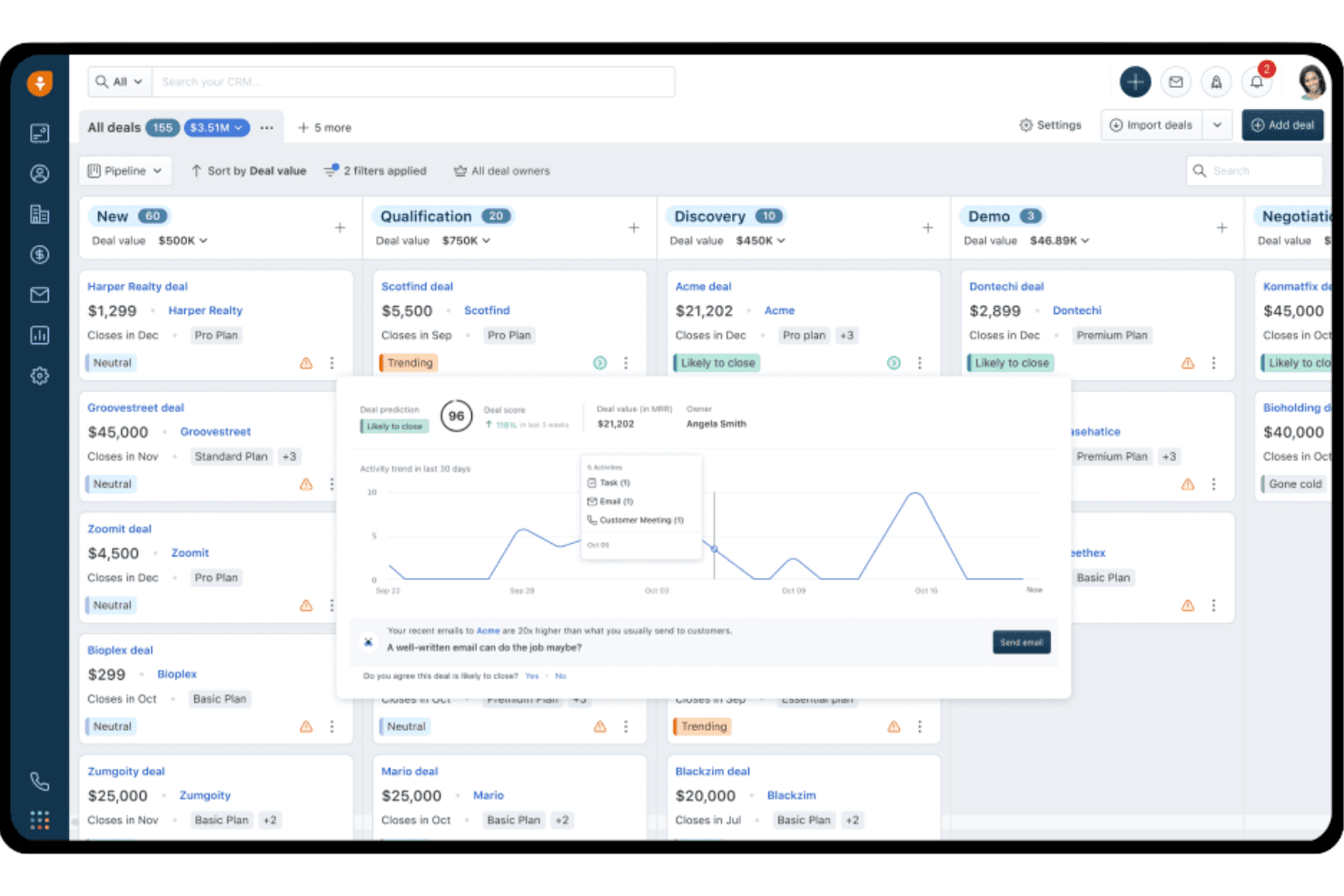
AI-Powered Lead Scoring
Automatically ranks leads based on engagement and likelihood to convert. Helps sales teams focus on the most promising opportunities.
Visual Sales Pipelines
Drag-and-drop interface lets you track deals through customizable stages. Gives teams a clear, real-time view of sales progress.
Workflow Automation
Automates repetitive tasks like follow-ups and data entry. Reduces manual work and ensures no lead falls through the cracks.
Built-In Email and Phone
Send emails and make calls directly from the CRM. All interactions are logged for easy reference and follow-up.
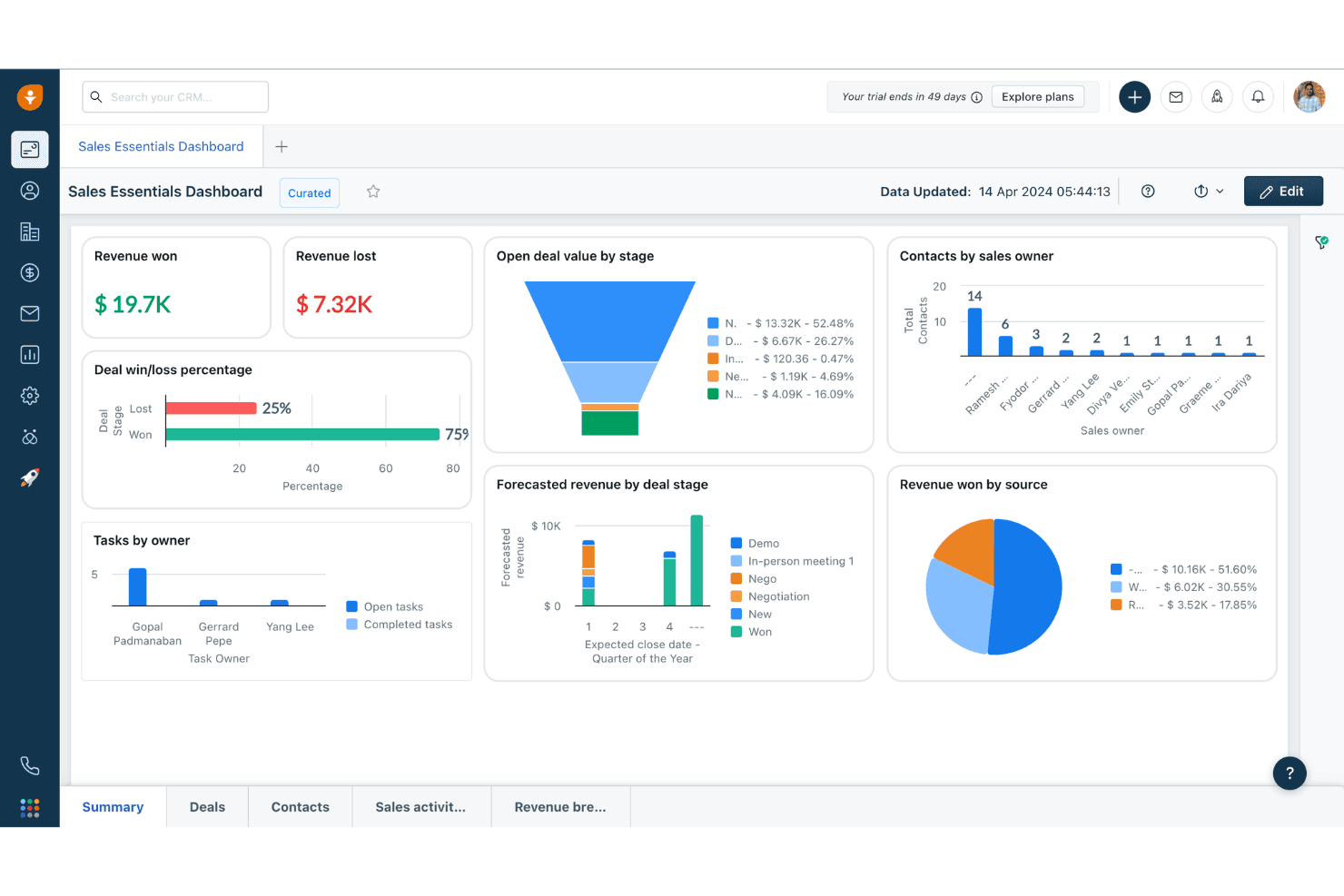
Customizable Dashboards
Create dashboards to monitor sales metrics and team performance. Lets you track KPIs and spot trends at a glance.
Appointment Scheduling
Book meetings with prospects using integrated calendar tools. Eliminates back-and-forth and syncs with your sales workflow.
Ease of Use
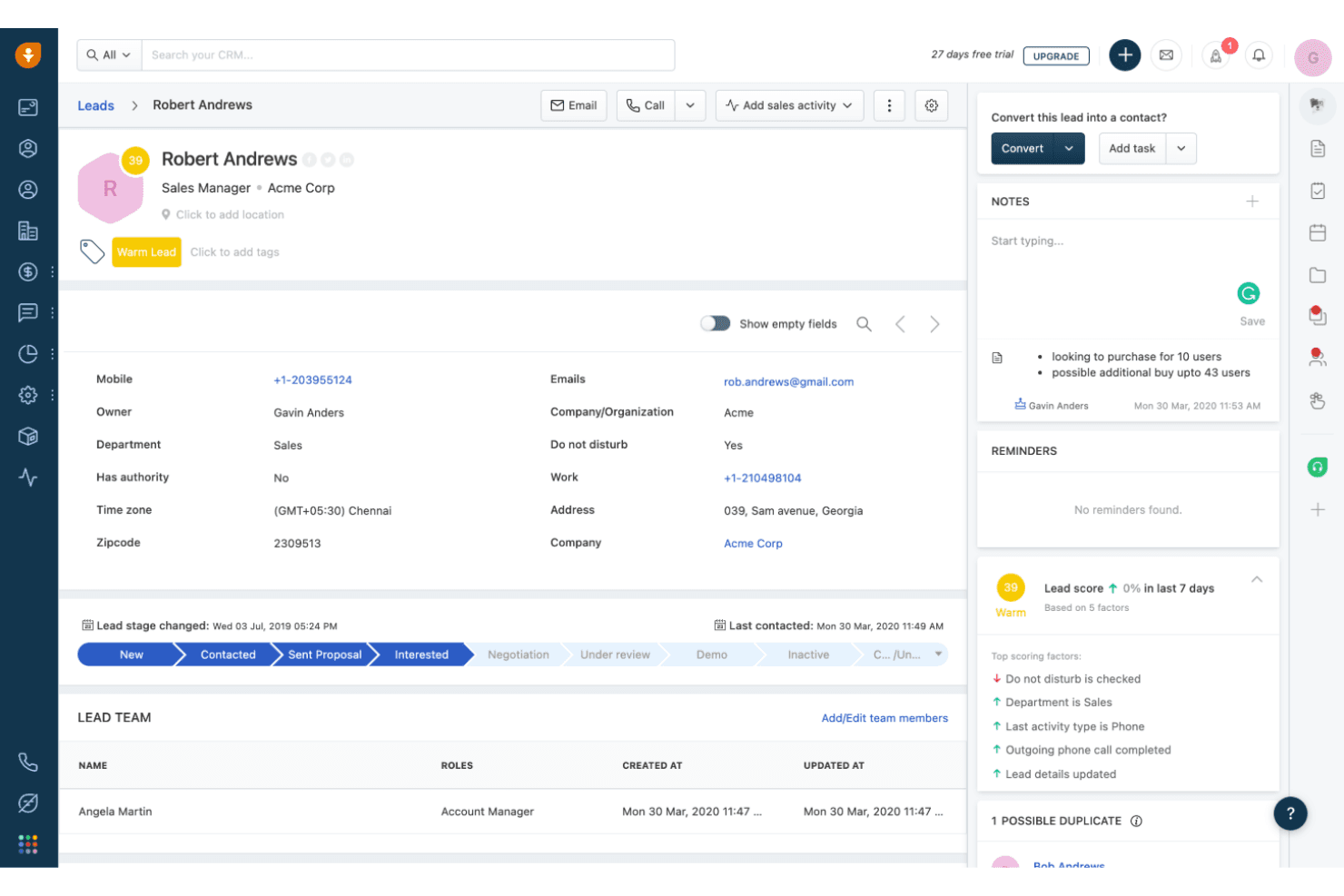
Freshsales is one of the more approachable CRM platforms, with a clean interface and intuitive navigation that new users pick up quickly. I think the drag-and-drop pipelines, guided setup, and in-app tips make onboarding smooth for most teams.
Users often mention that customizing fields and automating workflows is straightforward, so you won’t need technical help to get started or make changes as your process evolves.
Integrations
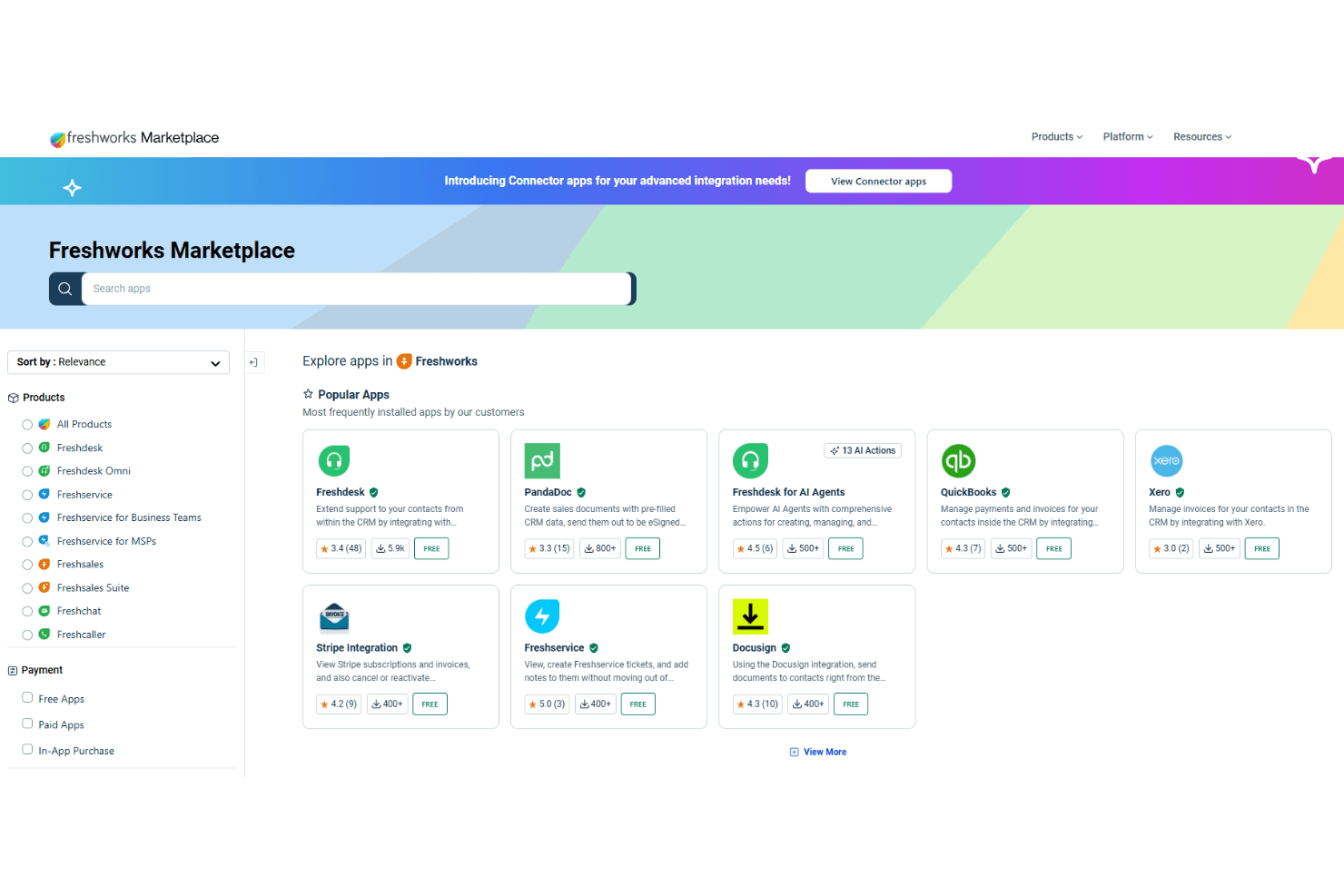
Freshsales integrates with Xero, Freshservice, Freshdesk, Stripe Integration, PandaDoc, QuickBooks, DocuSign, RingCentral, Asana, and Freshdesk for AI Agents, among others.
Freshsales also offers an open API and connects with third-party integration tools for expanded functionality.
Freshsales Specs
- 2-Factor Authentication: No
- API: Yes
- Calendar Management: Yes
- Call Tracking: Yes
- Campaign Management: No
- Click-to-Dial: No
- Contact Management: Yes
- Contact Sharing: No
- Custom Data Forms: No
- Customer Management: Yes
- Dashboard: Yes
- Data Export: Yes
- Data Import: Yes
- Data Visualization: Yes
- Email Integration: Yes
- External Integrations: Yes
- File Sharing: Yes
- File Transfer: Yes
- Google Apps Integration: Yes
- Lead Management: Yes
- Lead Scoring: Yes
- Marketing Automation: No
- Mobile App: No
- Multi-User: Yes
- Notifications: Yes
- Pipeline Management: Yes
- Sales Automation: Yes
- Scheduling: Yes
- Social-Media Integration: No
- Task Scheduling/Tracking: Yes
- Third-Party Plugins/Add-Ons: Yes


