

Küçük bir işletme için satış takip yazılımı, her şirket için değerli bir varlıktır. Doğru yazılımla ekipler satış verimliliğini artırabilir ve müşteri ilişkileri yönetimini geliştirebilir. Ancak özellikle bu kadar çok seçenek mevcutken, küçük bir işletme için doğru satış takip yazılımını bulmak zor olabilir.
Gelir operasyonları yazılımı konusundaki deneyimimi kullanarak, küçük işletmeler için mevcut en iyi satış takip yazılımlarından birkaçını test edip karşılaştırdım. Ardından sonuçlarımı, ihtiyaçlarınız için en iyi yazılımı bulmanıza yardımcı olacak ayrıntılı incelemeler hâline getirdim.
Why Trust Our Software Recommendations
6,700+
Reviews
20
Industry experts
16+
Evaluation factors
14
Years
Our reviews reflect our independent judgment—not a sales pitch. Learn how we stay transparent.
For this guide, we evaluated tools using hands-on testing and independent research, scoring tools using our selection criteria.
Our reviews reflect our human editorial judgment, not a sales pitch.
Karşılaştırma Tablosu: Küçük İşletmeler için Satış Takip Yazılımı
Bu karşılaştırma tablosu, küçük işletmeler için en iyi satış takip yazılımı seçimlerimin fiyatlandırma ayrıntılarını özetlemektedir.
Sorted by: Default
| Tool | Starting Price | Website | |
|---|---|---|---|
Best with built-in workflow automation | 4.5 out of 5 | $49/user/month Free plan + 14-day trial + demo available | Book Demo |
Best for visual deal pipelines | 4.7 out of 5 | $39/user/month 30-day free trial + free demo available | Website |
Best for inside sales | 4.7 out of 5 | $35/user/month 14-day free trial | Website |
Best for education sector | 4.6 out of 5 | Pricing upon request Free demo available | Website |
Best for growing sales teams | 4.7 out of 5 | $250/month 7-day free trial | Website |
Best for automated emails | 4.6 out of 5 | $49/user/month 14-day free trial + demo available | Website |
Best for UK businesses | 4.6 out of 5 | £44/user/month Free trial available | Website |
Best for small teams | 4.4 out of 5 | $19.99/month per 1,000 contacts 15-day free trial | Website |
Best for scalability | 4.4 out of 5 | $25/user/month 30-day free trial | Website |
Best for sales outreach | Not rated | $49/user/month Free plan + 14-day free trial + free demo available | Website |


Küçük İşletmeler için En İyi Satış Takip Yazılımı İncelemeleri
Aşağıda, kısa listeme giren küçük işletmeler için en iyi satış takip yazılımlarının ayrıntılı özetlerini bulabilirsiniz. İncelemelerim, size en uygun aracı bulmanıza yardımcı olmak için her aracın temel özelliklerine, avantajlarına & dezavantajlarına, entegrasyonlarına ve ideal kullanım alanlarına ayrıntılı bir bakış sunuyor.
 Best with built-in workflow automation
- Free plan + 14-day trial + demo available
- From $49/user/month (billed annually)
Visit WebsiteCustomer Rating:4.5/5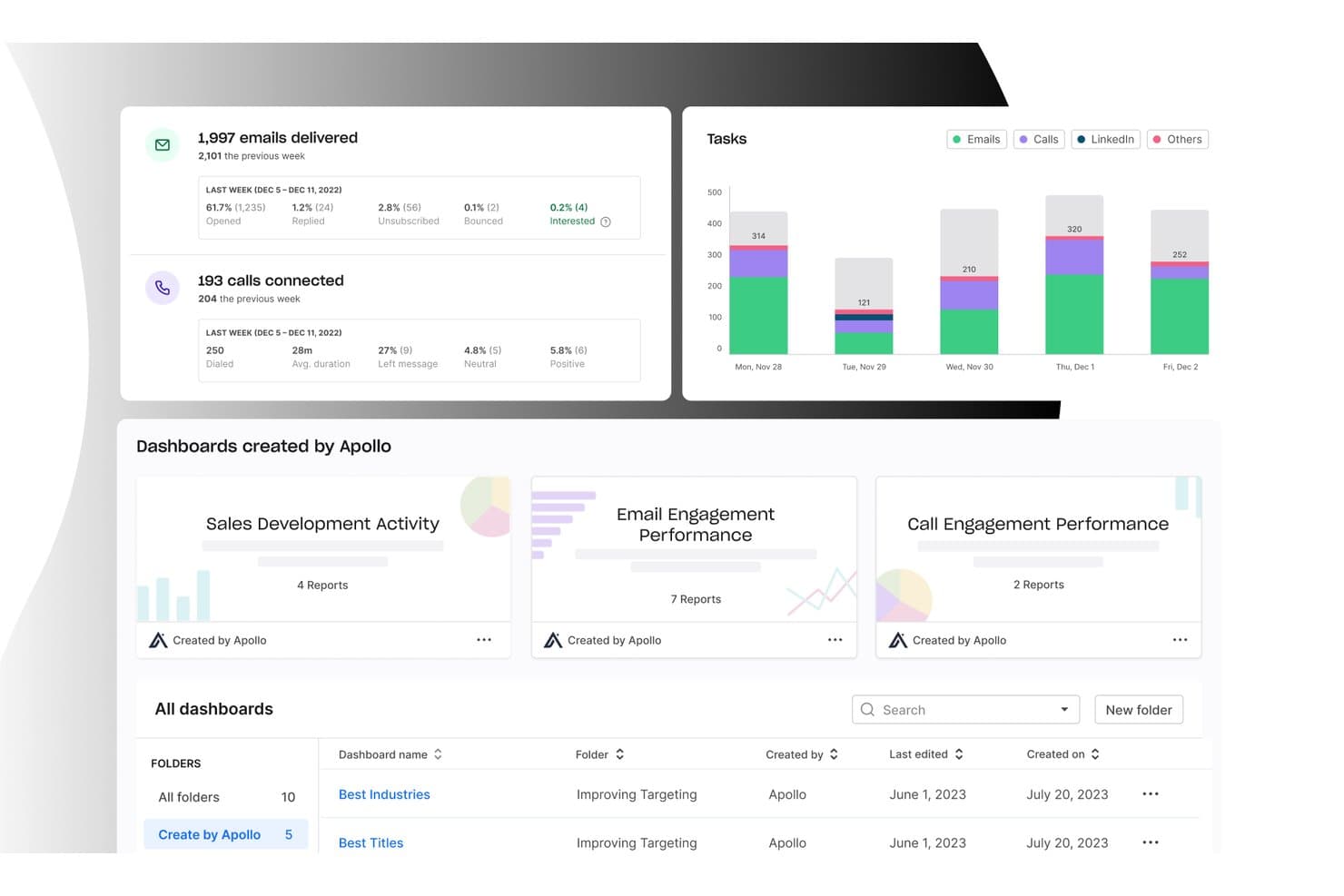
Apollo.io offers an analytics dashboard with email delivery stats, call tracking, task charts, and pre-built sales dashboards for small business sales tracking. Apollo.io is an all-in-one B2B sales platform that combines a 265M+ contact database, deal pipeline management, multichannel outreach, and sales activity tracking in a single workspace.
Who Is Apollo.io Best For?
Apollo.io suits small sales teams and SDR-led organizations that run outbound prospecting and want to manage their entire pipeline without juggling multiple tools.
Why I Picked Apollo.io
Apollo.io earns its spot on my shortlist because of its multi-branch workflow engine, which lets me build conditional-logic automations that trigger on deal stage changes, email opens, or contact behavior. I can set manual approval gates before contacts enter a sequence, keeping outreach intentional rather than fully hands-off. What I especially like is that every triggered workflow action auto-logs directly to the contact's activity timeline, so nothing gets missed without any manual entry required.
Apollo.io Key Features
- Deal management board: Organize opportunities using a visual pipeline with drag-and-drop stages for tracking progress.
- Contact data enrichment: Instantly enrich lead and company profiles from Apollo’s global B2B database.
- Sales analytics dashboard: View key sales metrics on customizable dashboards to monitor team and individual performance.
- Chrome extension for prospecting: Access Apollo’s contact database and add prospects directly from LinkedIn and company websites.
Apollo.io Integrations
Apollo.io offers native integrations with Salesforce, HubSpot, Gmail, Outlook, LinkedIn, and Slack. It also connects with Zapier and provides an API for custom integrations.
Pros and Cons
Pros:
- Pipeline and prospecting managed in one place
- 265M+ contacts enrich deal records automatically
- Built-in sequence automation saves manual outreach steps
Cons:
- Contact data can be outdated occasionally
- CRM depth trails dedicated sales platforms
Learn more about Apollo.io: Best for visual deal pipelines
- 30-day free trial + free demo available
- From $39/user/month
Visit WebsiteCustomer Rating:4.7/5
Salesflare shows deal progress and revenue stats in a drag-and-drop sales pipeline. Salesflare is a CRM built to help you track your sales and leads. It works by bringing in your emails, meetings, and contact info automatically to keep everything up to date. You stay organized and on top of follow‑ups without having to manually enter data.
Why I picked Salesflare: I picked Salesflare because it gives you a drag‑and‑drop visual pipeline that lets you move your leads through stages clearly and visually—and you see where each deal sits at a glance. It also sets proactive reminders to follow up, reply to emails, or add notes so you don’t let things slip through the cracks. This kind of automatic nudge means you can stay responsive without doing extra mental work.
Standout features & integrations:
Features include live notifications and a central notification center that keep you updated the moment something happens. Plus, you can set up saved segments: combinations of advanced filters that you can reuse, making it easier to work with different lead lists without resetting everything.
Integrations include Google Workspace, Intercom, MailChimp, QuickBooks Online, Slack, Stripe, Shopify, and Calendly.
Pros and Cons
Pros:
- Contact timelines show full communication history
- Follow-up reminders reduce lead drop-off
- Automatically fills contact data from emails
Cons:
- Email workflow builder can feel cluttered
- No built-in calling or dialer tools
Learn more about Salesflare: Best for inside sales
- 14-day free trial
- From $35/user/month (billed annually)
Visit WebsiteCustomer Rating:4.7/5
Close CRM enables efficient multi-channel communication and real-time reporting. Close CRM offers advanced calling, email, and SMS features, allowing sales to engage with prospects efficiently. Its automatic task reminders, real-time reporting, and multi-channel communication streamline outreach efforts, making it an excellent tool for building relationships and closing deals.
Why I picked Close CRM: Close CRM is for inside sales teams, offering features that enhance communication and sales tracking. Its built-in calling and email functionalities keep all interactions in one place and its lead management tools help you organize and prioritize prospects efficiently. With its real-time reporting, your team can stay on top of sales activities and make informed decisions.
Standout features & integrations:
Features include a multichannel inbox that unifies communication, automated email sequences, and powerful pipeline management for tracking deals and opportunities. It also offers a robust reporting dashboard to analyze sales activities, track team performance, and help optimize workflows.
Integrations include Zapier, Slack, Gmail, Outlook, HubSpot, Pipedrive, Asana, Trello, LinkedIn, and Google Calendar.
Pros and Cons
Pros:
- Responsive customer support and onboarding
- Detailed sales tracking and reporting features
- Multi-channel communication support
Cons:
- Limited CRM customization options
- No advanced deal forecasting
Learn more about Close CRM:

Meritto CRM streamlines student enrollment and admissions for institutions. Meritto is a specialized CRM platform that offers student enrollment and admissions for educational institutions. It handles student inquiries, improves conversion rates, and integrates with popular education management systems.
Why I picked Meritto: Meritto excels in the education sector with its student admissions management and application tracking. It offers tools for managing the entire admissions pipeline, from lead generation and assignment to follow-up and reporting, all within one platform. It also provides in-depth insights into student behavior to help you refine outreach strategies and maximize conversion rates throughout the admissions process.
Standout features & integrations:
Features include application tracking, lead management, and customizable workflows. Your team can automate admissions processes to save time. The platform's analytics offer insights to optimize recruitment strategies.
Integrations include Google Analytics, Facebook, WhatsApp, Mailchimp, Salesforce, HubSpot, Zoho CRM, Microsoft Dynamics, LinkedIn, and PayPal.
Pros and Cons
Pros:
- Responsive customer support with tailored training options
- Offers real-time analytics for data-driven decisions
- Comprehensive lead tracking across recruitment stages
Cons:
- Customization options are limited for specific needs
- Limited multi-pipeline tracking options
Learn more about Meritto:

Kylas Sales CRM offers no-code customization for lead and sales management. Kylas Sales CRM is an easy-to-use platform with no-code customization for managing sales processes, lead tracking, and enhancing team collaboration. It helps growing sales teams improve productivity through lead management, pipeline tracking, and in-depth reporting.
Why I picked Kylas Sales CRM: Kylas Sales CRM supports your sales reps with its scalable sales management capabilities. It provides comprehensive lead tracking, sales pipeline management, and collaboration features. Its deal tracking and task automation help keep sales efforts organized, and the built-in reporting and activity tracking ensures you can monitor your team’s progress.
Standout features & integrations:
Features include customizable lead and deal management, comprehensive reporting, and team collaboration tools. The platform’s workflow automation and pipeline visualization allow your team to monitor and track sales progress, while the mobile app provides on-the-go access for remote sales activities.
Integrations include WhatsApp, Facebook, Google Workspace, Outlook, QuickBooks, Slack, Xero, Mailchimp, Zapier, and Twilio.
Pros and Cons
Pros:
- Strong customer support and onboarding
- Highly customizable workflows and pipelines
- Efficient lead tracking from multiple sources
Cons:
- Certain advanced features require setup support
- Limited customization in reporting options
Learn more about Kylas Sales CRM:

OpenCRM offers customer service, CRM, and project management for SMBs. OpenCRM is a feature-rich CRM that provides sales tracking, customer service, and project management functionalities for small and medium-sized businesses. Its flexible customization options allow users to tailor the platform to their needs and track KPIs.
Why I picked OpenCRM: OpenCRM provides localized support and services to meet the needs of UK businesses. It offers customizable sales pipelines, project management features, and comprehensive contact management crucial for UK-based enterprises. Additionally, it includes invoicing and expense management for businesses to manage their financial transactions and customer payments within the CRM.
Standout features & integrations:
Features include a centralized system to manage customer support, project tasks, and sales data, making it easier for teams to stay organized and efficient. You can also generate insightful reports to track your team's performance.
Integrations include Xero, Mailchimp, QuickBooks, Google Workspace, Outlook, Sage, Twilio, Dropbox, LinkedIn, and GoCardless.
Pros and Cons
Pros:
- Centralized system for customer support and sales data
- Supports detailed tracking of client interactions
- Highly customizable for specific workflows
Cons:
- Somewhat clunky mobile interface
- Limited automation features
Learn more about OpenCRM: Best for small teams
- 15-day free trial
- From $19.99/month per 1,000 contacts
Visit WebsiteCustomer Rating:4.4/5
BIGContacts simplifies contact management by organizing data and automating tasks. BIGContacts is a simple, easy-to-use software that streamlines contact management by organizing customer information, tracking sales pipelines, and automating tasks and reminders for small businesses.
Why I picked BIGContacts: This tool provides contact organization, sales pipeline tracking, and task management, which are crucial for small teams to maintain customer relationships. It also offers customizable workflows and automated email marketing for efficiently managing contacts and reporting tools for analyzing sales performance.
Standout features & integrations:
Features include automated follow-up reminders, making it easier for team members to stay organized and follow up with sales prospects. You can also customize fields and reports to match your business needs, and real-time insights help your team stay on top of sales performance and tasks.
Integrations include Google Contacts, Outlook, QuickBooks, Mailchimp, Zapier, Gmail, Calendar, and Google Drive.
Pros and Cons
Pros:
- Provides visual dashboards without complex setup
- Effective pipeline visualization with drag-and-drop
- Supports extensive sales forecasting customization
Cons:
- Limited flexibility for merging similar contacts
- Complex to filter reports by detailed fields
Learn more about BIGContacts:

Salesforce streamlines business processes with lead management and sales automation. Salesforce’s scalability is why businesses of all sizes use it widely. It serves a diverse user base, offering powerful features like lead management, sales automation, and detailed reporting to streamline important business processes and manage complex sales pipelines.
Why I picked Salesforce: Salesforce is known for its scalability, making it suitable for growing businesses. It provides extensive customization options that allow your team to tailor the system to specific needs. The platform's comprehensive reporting and analytics tools help you gain insights into sales performance and customer interactions. With its powerful support and training resources, Salesforce ensures your team can effectively leverage its capabilities as your business scales.
Standout features & integrations:
Features include customizable dashboards, in-depth analytics, and comprehensive reporting. Your team can tailor workflows to fit specific business processes. The platform supports sales forecasting and pipeline management to drive growth.
Integrations include Mailchimp, QuickBooks, Slack, Dropbox, Google Workspace, LinkedIn, Microsoft Teams, HubSpot, Zoom, and Stripe.
Pros and Cons
Pros:
- Built-in automation for workflows
- Advanced sales forecasting tools
- Customizable for any business size and industry
Cons:
- Somewhat cumbersome setup process
- Complex sales pipeline customization
Learn more about Salesforce : 10Best for sales outreach
Apollo
- Free plan + 14-day free trial + free demo available
- From $49/user/month (billed annually)

Apollo enhances sales outreach with contact management, lead generation, and email sequencing. Apollo focuses on enhancing sales outreach, providing features like contact management, lead generation, and email sequencing for engaging prospects and managing sales pipelines. It optimizes outreach strategies to help close deals faster.
Why I picked Apollo: Apollo enhances sales outreach with its comprehensive lead generation and automation features. It allows your team to build targeted lead lists and automate outreach campaigns effectively. The platform's analytics provide insights into sales performance, helping you refine your strategies. Its ability to integrate outreach with lead management supports its focus on sales expansion.
Standout features & integrations:
Features include an extensive B2B contact database, customizable outreach sequences, and AI-powered insights to help prioritize high-intent leads. Its advanced filtering also allows users to segment leads by various criteria, like job title, company size, location, and industry.
Integrations include Salesforce, HubSpot, LinkedIn, Gmail, Outlook, Slack, Zapier, Google Workspace, Zoom, and Microsoft Teams.
Pros and Cons
Pros:
- AI-assisted lead scoring and prioritization
- Automated workflows for efficient multi-channel outreach
- Advanced filters for precise targeting and segmentation
Cons:
- Additional costs for accessing direct phone numbers
- Some data inaccuracies in contact information
Learn more about Apollo:


Küçük İşletmeler için Diğer Satış Takip Yazılımları
Kısa listeme giremeyen ancak yine de göz atmaya değer bazı ek küçük işletme satış takip yazılımı seçenekleri şunlardır:
- 11Glue UpBest for event management
- 12EngageBay CRMBest for startups
- 13CoefficientBest for seamless integrations
- 14PipedriveBest for visual sales pipelines
- 15Bigin by Zoho CRMBest for custom pipelines
- 16Less Annoying CRMBest for solo entrepreneurs
- 17InsightlyBest for project management
- 18Zendesk SellBest for customer support teams
- 19Zoho CRMBest for multi-channel support
- 20Bitrix24Best for team collaboration
How I Evaluate Sales Tracking Software for Small Business
I evaluate every tool across two layers: the baseline functionality a small sales team needs to manage a pipeline, and the differentiators that make one option a better fit than another.
Core Functionality (Table Stakes For This List)
When I'm selecting tools for my list, I rank each one on a scale from 0 (does not offer the functionality) to 5 (excels in this area) for each core functionality listed below. Then, I calculate the tool's total score into a percentage. Each tool needs to achieve a minimum total score of 65% to be considered for inclusion.
- Pipeline Management: I look for customizable deal stages, drag-and-drop boards, and multi-pipeline support so a five-person sales team can track deals from first touch to close.
- Contact & Deal Tracking: Every tool I evaluate should tie contacts, companies, and deals together with a clear history of interactions rather than siloed, disconnected records.
- Sales Activity Logging: I check whether calls, emails, and meetings are logged to the right deal automatically or if reps have to manually enter every touchpoint at end of day.
- Sales Reporting & Dashboards: Dashboards should surface metrics like win rate, average deal cycle, and revenue by source without requiring a small business owner to build reports from scratch.
- Revenue Forecasting: I evaluate how each tool handles weighted pipeline forecasts and whether a sales lead can compare projected revenue against quota across reps or time periods.
- SMB-Friendly Pricing & Scalability: Pricing tiers, contract flexibility, and self-serve onboarding all matter here—a growing team of ten should be able to get started without enterprise-level commitments.
Once I have a list of tools that meet this criteria, I consider what sets each platform apart.
Differentiating Factors (What Sets Vendors Apart)
Here's how I compare and contrast different vendors:
Standout Features
No-code workflow automation is a big differentiator. I look for tools that let a small team auto-assign leads, trigger follow-up tasks on stage changes, and send templated emails without a dedicated admin. Email and calendar sync matters just as much, since reps who juggle selling and account management need every conversation logged to the right deal automatically. I also consider mobile app quality, especially for SMB owners or field reps who update deals between client visits rather than at a desk.
Beyond Features
Integration coverage is one of the first things I check. A small business running QuickBooks for invoicing and Mailchimp for campaigns needs its sales tracker to sync data across both without manual exports. Pricing transparency also carries real weight—I evaluate whether a vendor's entry tier includes enough functionality for a growing team or gates key features behind expensive upgrades. Time-to-value rounds out my evaluation. Tools with guided setup wizards, pre-built templates, and import utilities let a small team go live in days instead of weeks.
Küçük İşletmeler için Satış Takip Yazılımı Nasıl Seçilir?
Uzun özellik listeleri ve karmaşık fiyatlandırma yapılarına kendinizi kaptırmanız kolaydır. Benzersiz yazılım seçimi sürecinizde ilerlerken odağınızı korumanıza yardımcı olmak için göz önünde bulundurmanız gereken faktörleri içeren bir kontrol listesi hazırladım:
| Faktör | Göz Önünde Bulundurulması Gerekenler |
| Ölçeklenebilirlik | Yazılım, işletmenizin ihtiyaçlarıyla birlikte büyüyecek mi? |
| Entegrasyonlar | Mevcut araçlarınıza ve sistemlerinize bağlanabiliyor mu? |
| Özelleştirilebilirlik | Yazılımı süreçlerinize uyacak şekilde uyarlayabilir misiniz? |
| Kullanım Kolaylığı | Yazılım ekibinizin kullanabileceği kadar sezgisel mi? |
| Bütçe | Finansal kısıtlarınıza uyuyor mu? |
| Güvenlik Önlemleri | Verileriniz ve müşteri bilgileriniz korunuyor mu? |
| Destek | İhtiyaç duyduğunuzda müşteri desteği sunuluyor mu? |
| Raporlama | Ekibinizin ihtiyaç duyduğu içgörüleri sunuyor mu? |
Küçük İşletmeler için Satış Takip Yazılımı Trendleri
Araştırmam sırasında farklı küçük işletme satış takip yazılımı sağlayıcılarından sayısız ürün güncellemesi, basın bülteni ve sürüm günlüğü inceledim. Takip ettiğim yeni ortaya çıkan trendlerden bazıları şunlar:
- Yapay zekâ destekli içgörüler: Yapay zekâ, satış takip araçlarında giderek vazgeçilmez hâle geliyor ve küçük işletmelerin daha iyi kararlar almasına yardımcı olan veriye dayalı içgörüler sağlıyor. Bu içgörüler, satış verilerindeki kalıpları belirleyebilir ve performansı artıracak stratejiler önerebilir.
- Ses tanıma özellikleri: Ses teknolojisi, satış takip yazılımlarında yerini almaya başlıyor ve kullanıcıların sesli komutlarla veri girmesine ve bilgilere erişmesine olanak tanıyor. Bu eller serbest yaklaşım, özellikle hareket hâlindeki satış ekipleri için mesajlaşma verimliliğini artırabilir ve veri girişini kolaylaştırabilir.
- Gelişmiş veri görselleştirme: Araçlar, kullanıcıların karmaşık verileri anlamlandırmasına yardımcı olmak için giderek daha gelişmiş görselleştirme seçenekleri sunuyor. Etkileşimli panolar ve özelleştirilebilir grafikler, satış performansına ilişkin daha net içgörüler sağlıyor.
Küçük İşletmeler İçin Satış Takip Yazılımı Nedir?
Küçük işletmelere yönelik satış takip yazılımı, satış faaliyetlerini ve müşteri etkileşimlerini yönetmeye ve izlemeye yardımcı olur. Satış profesyonelleri, küçük işletme sahipleri ve pazarlama ekipleri, satış verimliliğini artırmak ve müşteri ilişkilerini geliştirmek için bu araçları kullanır.
Müşteri adayı takibi, satış süreci yönetimi ve raporlama özellikleri; satış süreçlerinin düzenlenmesine ve performans hakkında içgörüler elde edilmesine yardımcı olur. Genel olarak bu araçlar, satış verimliliğini artırma ve müşteri etkileşimini geliştirme konusunda değerli destek sağlar.
Küçük İşletmeler İçin Satış Takip Yazılımının Özellikleri
Küçük işletmeler için satış takip yazılımı seçerken aşağıdaki temel özelliklere dikkat edin:
- Gerçek zamanlı analiz: Satış verileri hakkında anında içgörüler sağlayarak ekiplerin hızlı ve veriye dayalı kararlar almasına olanak tanır.
- Müşteri adayı takibi: Satış hunisi boyunca müşteri adaylarının durumunu düzenler ve izler; böylece satış döngüsü sırasında hiçbir fırsatın kaçırılmamasını sağlar.
- Satış tahmini: Gelecekteki satışları öngörmek için geçmiş ve güncel verileri kullanır; ekiplerin gerçekçi hedefler belirlemesine ve kaynakları yönetmesine yardımcı olur.
- Satış süreci yönetimi: Satış sürecinin görsel bir temsilini sunarak ekiplerin anlaşmaları etkili bir şekilde izlemesine ve önceliklendirmesine olanak tanır.
- Özelleştirilebilir raporlama: Kullanıcıların belirli ölçümleri analiz etmek için amaca özel raporlar oluşturmasına olanak tanır ve işletme ihtiyaçlarıyla uyumlu içgörüler sunar.
- İletişim yönetimi: Müşteri ve potansiyel müşteri bilgilerini merkezileştirerek satış ekiplerinin doğru ve güncel kayıtları kolayca tutmasını sağlar.
- Hedef belirleme ve takip: Satış hedeflerinin belirlenmesini ve ilerlemenin izlenmesini sağlayarak ekiplerin motivasyonunu ve sorumluluk bilincini korur.
- Görev otomasyonu: Tekrarlayan satış görevlerini otomatikleştirerek satış ekiplerinin yüksek değerli faaliyetlere odaklanması için zaman kazandırır.
- Mobil erişim: Satış verilerine hareket hâlindeyken erişim sağlar ve bildirimler gönderir; böylece temsilcilerin uzaktan veya sahada çalışırken üretken kalmasına yardımcı olur.
- Entegrasyon özellikleri: Müşteri ilişkileri yönetimi, e-posta ve diğer işletme araçlarıyla entegre olarak kesintisiz veri akışı sağlar ve genel verimliliği artırır.
Küçük İşletmeler İçin Satış Takip Yazılımının Faydaları
Küçük bir işletmede satış takip yazılımını uygulamak, ekibiniz ve işletmeniz için çeşitli faydalar sağlar. Yararlanabileceğiniz faydalardan bazıları şunlardır:
- Geliştirilmiş verimlilik: Otomatik e-postalar ve ses tanıma gibi otomasyon özellikleri zaman kazandırır ve manuel çalışmaları azaltır.
- Daha iyi karar verme: Yapay zekâ destekli içgörüler ve veri görselleştirme, satış stratejilerinize yön vermek için öngörücü analizler sağlar.
- Geliştirilmiş müşteri ilişkileri: Müşteri adayı takibi ve satış süreci yönetimi, zamanında geri dönüşleri ve daha iyi müşteri etkileşimlerini garanti eder.
- Artan satış görünürlüğü: Özelleştirilebilir panolar ve raporlama, satış faaliyetlerini ve performansını net bir şekilde görmenizi sağlar.
- Veri güvenliği: Güçlü gizlilik ve güvenlik önlemleri işletmenizi ve müşteri verilerinizi korur.
Küçük İşletmeler İçin Satış Takip Yazılımının Maliyetleri ve Fiyatlandırması
Küçük bir işletme için satış takip yazılımı seçmek, mevcut çeşitli fiyatlandırma modellerinin ve planların anlaşılmasını gerektirir. Maliyetler özelliklere, ekip büyüklüğüne, eklentilere ve diğer unsurlara göre değişir. Aşağıdaki tabloda, küçük işletmelere yönelik satış takip yazılımı çözümlerinde yaygın planlar, bu planların ortalama fiyatları ve içerdiği tipik özellikler özetlenmektedir:
Küçük İşletmeler İçin Satış Takip Yazılımı Plan Karşılaştırma Tablosu
| Plan Türü | Ortalama Fiyat | Yaygın Özellikler |
| Ücretsiz Plan | $0/user/ month | Temel potansiyel müşteri takibi, sınırlı satış hattı yönetimi ve e-posta desteği. |
| Kişisel Plan | $5-$25/user/month | Potansiyel müşteri takibi, temel raporlama, e-posta entegrasyonu ve sınırlı özelleştirme. |
| İşletme Planı | $30-$60/ user/month | Gelişmiş raporlama, özelleştirilebilir panolar, satış otomasyonu ve gelişmiş güvenlik. |
| Kurumsal Plan | $70-$120/ user/month | Tam özelleştirme, yapay zekâ destekli içgörüler, özel destek ve gelişmiş güvenlik. |
Küçük İşletmeler için Satış Takip Yazılımı SSS
Küçük işletmeler için satış takip yazılımı hakkında sık sorulan bazı soruların yanıtları şunlardır:
Küçük işletmeler satışları nasıl takip eder?
Küçük işletmeler, müşteri ilişkilerini ve satış hatlarını yönetmeye yardımcı olan CRM yazılımlarını kullanarak satışları takip eder. Bazıları elektronik tablolar kullanır, ancak bir CRM sistemine geçiş daha fazla fayda sağlar. Bu sistem; potansiyel müşterileri, müşteri etkileşimlerini ve satış performansını izlemek için yapılandırılmış bir yol sunar. Bu yaklaşım, işletmelerin satış süreçlerini verimli bir şekilde yönetmesini ve bilinçli kararlar almasını sağlar.
Satış sürecini nasıl takip edersiniz?
Satışları takip etmek için net hedefler belirleyin ve satış hattınızı tanımlayın. Bir CRM sistemi, potansiyel müşteriden müşteriye kadar her aşamayı görselleştirmenize yardımcı olur. İş akışlarını özelleştirmenize ve her adımı takip etmenize olanak tanıyarak hiçbir fırsatın kaçırılmamasını sağlar. Bu verileri düzenli olarak gözden geçirmek, stratejileri geliştirmeye ve genel satış performansını iyileştirmeye yardımcı olur.
Satış çalışanları satışları takip etmek için ne tür yazılımlar kullanır?
Satış çalışanları satışları takip etmek için genellikle CRM yazılımlarını kullanır. Bu sistemler potansiyel müşterileri yönetme, görevleri otomatikleştirme ve satış verilerini analiz etme araçları sunar. CRM yazılımı, ekiplerin idari görevlere daha az, satışa daha fazla odaklanmasına yardımcı olarak verimliliği artırır ve daha düzenli bir satış süreci sağlar.
Satış hesaplarını nasıl takip edersiniz?
Satış hesaplarını takip etmek, müşteri verilerini düzenlemek ve görselleştirmek için bir CRM kullanmayı gerektirir. Her hesabın satış sürecindeki ilerlemesini izlemek için bir satış hattı oluşturabilirsiniz. Bu süreç; KPI’lar belirlemeyi, potansiyel müşterileri geliştirmeyi ve satış verilerini düzenli olarak gözden geçirmeyi içerir. Bu yöntem, tüm satış faaliyetleri ve müşteri etkileşimleri hakkında net bir genel bakış sağlar.
Satış takip yazılımı ekip performansını nasıl geliştirebilir?
Satış takip yazılımı, satış faaliyetleri ve sonuçları hakkında içgörüler sunarak ekip performansını geliştirir. Başarılı stratejilerin ve iyileştirilmesi gereken alanların belirlenmesine yardımcı olur. Otomatik raporlama ve analiz gibi özellikler sayesinde ekipler veriye dayalı kararlar alabilir. Bu da satış hedeflerine ulaşmaya ve verimliliği artırmaya yönelik daha odaklı bir yaklaşım sağlar.
Satış takibinde potansiyel müşteri geliştirme neden önemlidir?
Potansiyel müşteri geliştirme, zaman içinde potansiyel müşterilerle ilişkiler kurduğu için kritik öneme sahiptir. Satış takip yazılımı, etkileşimleri izlemenize ve iletişimi müşteri davranışına göre uyarlamanıza olanak tanır. Bu yaklaşım, potansiyel müşterilerin dönüşümünü artırır ve aday müşterilerin doğru bilgiyi doğru zamanda almasını sağlayarak onları satın alma kararına yaklaştırır.