

Kurumsal düzeyde satışın karmaşık taleplerini (karmaşık satış kanallarını koordine etmek, farklı işlevlerdeki ekipleri aynı hedefte buluşturmak ve gelir stratejilerini optimize etmek) yönetmek, yalnızca çabadan fazlasını gerektirir; doğru teknolojiye ihtiyaç duyar.
İşte kurumsal satış yazılımı burada devreye girer: satış iş akışlarını desteklemek, iş birliğini geliştirmek ve ekibinizin rekabette öne geçmek için ihtiyaç duyduğu eyleme dönüştürülebilir içgörüleri sunmak üzere tasarlanmış bir çözüm. Ancak tüm araçlar aynı özelliklere sahip değildir. RevOps uzmanları olarak risklerin yüksek olduğunu ve seçtiğiniz araçların kuruluşunuzun başarısını doğrudan etkileyebileceğini biliyoruz.
Bu kılavuzda ihtiyaçlarınıza en uygun kurumsal satış yazılımını belirlemenize yardımcı olacağız. Bütçenize uygun, anlaşma takibi konusunda daha iyi veya işletmenize özel belirli özellikler içeren bir araç arıyor olabilirsiniz; nelere dikkat etmeniz gerektiğini ve doğru seçimi nasıl yapacağınızı adım adım açıklayacağız.
Why Trust Our Software Recommendations
6,700+
Reviews
20
Industry experts
16+
Evaluation factors
14
Years
Our reviews reflect our independent judgment—not a sales pitch. Learn how we stay transparent.
For this guide, we evaluated tools using hands-on testing and independent research, scoring tools using our selection criteria.
Our reviews reflect our human editorial judgment, not a sales pitch.
Karşılaştırma Tablosu: Kurumsal Satış Yazılımları
Bu karşılaştırma tablosu, en iyi kurumsal satış yazılımı seçimlerimdeki fiyatlandırma ayrıntılarını özetlemektedir.
Sorted by: Default
| Tool | Starting Price | Website | |
|---|---|---|---|
Best for verified B2B contact data | 4.5 out of 5 | $49/user/month Free plan + 14-day trial + demo available | Book Demo |
Best for field territory and route optimization | 4.3 out of 5 | Pricing upon request Not available | Website |
Best for lead management | 4.7 out of 5 | $40/user/month Not available | Book Demo |
Best for unified CPQ and contract management | 4.7 out of 5 | Pricing upon request Free demo available | Website |
Best for AI-driven enterprise sales automation | 4.2 out of 5 | $14/user/month Free plan + 15-day free trial+ free demo available | Website |
Best for AI-driven sales insights | 4.2 out of 5 | $25/user/month Free plan + 14-day trial + free demo available | Website |
Best for sales engagement | 4.5 out of 5 | Pricing upon request Not available | Website |
Best for customer support integration | 4.4 out of 5 | $19/month Free demo available | Website |
Best for intent data insights | 4.4 out of 5 | Pricing upon request Not available | Website |
Best for small businesses | 4.0 out of 5 | $30/user/month 14-day free trial + free demo available | Website |


En İyi Kurumsal Satış Yazılımı İncelemeleri
Aşağıda, kısa listemde yer alan en iyi kurumsal satış yazılımlarına ilişkin ayrıntılı özetlerimi bulabilirsiniz. İncelemelerimde, en iyi seçeneği bulmanıza yardımcı olmak için her aracın temel özelliklerini, artılarını ve eksilerini, entegrasyonlarını ve ideal kullanım alanlarını ele alıyorum.
 Best for verified B2B contact data
- Free plan + 14-day trial + demo available
- From $49/user/month (billed annually)
Visit WebsiteCustomer Rating:4.5/5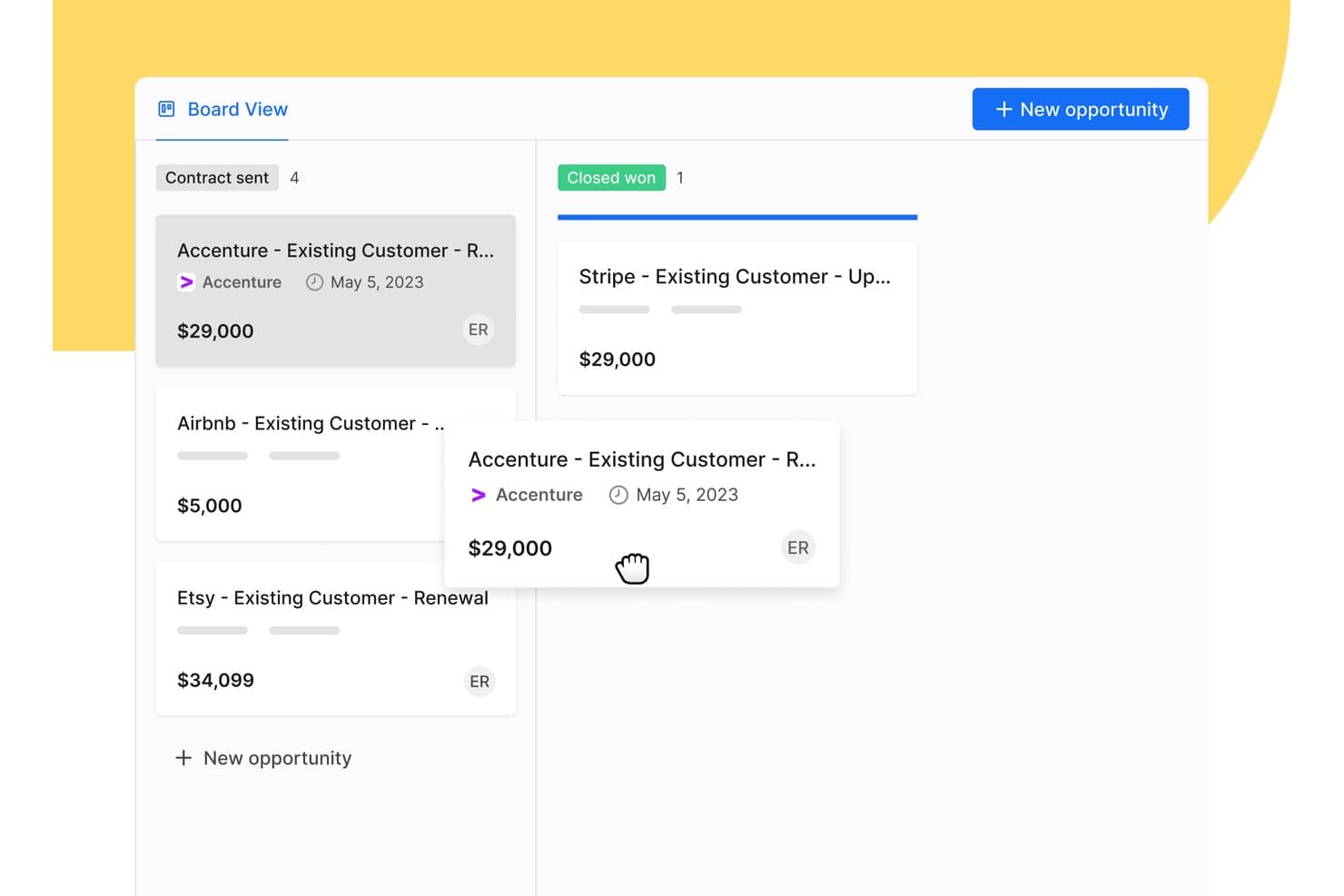
Apollo.io's pipeline board lets you drag deals between sales stages to keep every opportunity up to date. Apollo.io is a sales intelligence and engagement platform that combines a database of 240M+ contacts and 30M+ companies with pipeline management, AI-driven automation, and multi-channel outreach.
Who Is Apollo.io Best For?
Apollo.io is a strong fit for enterprise sales and revenue operations teams that need accurate prospecting data and automated outreach in one platform.
Why I Picked Apollo.io
I picked Apollo.io because its contact data is verified before it reaches your reps, so your team spends less time chasing bad leads. Every email goes through a seven-step verification process, and Apollo reports 98% email accuracy across its 240M+ contacts. Waterfall enrichment then fills gaps in your records by checking multiple data sources in sequence. I also like the AI Context Center, which lets you train Apollo's AI agents on your ICP and product so they can research leads and write personalized outreach for you.
Apollo.io Key Features
Beyond prospecting, Apollo.io includes tools that help enterprise teams manage deals and stay secure.
- Two-way CRM sync: Keeps contact data in sync between Apollo and Salesforce, HubSpot, or Pipedrive.
- Deal management: Track every deal across your sales stages in one view and get alerts when deals stall.
- Call recordings and AI insights: Record calls and review AI-generated insights to coach reps, with up to 8,000 minutes on the Organization plan.
- SSO and advanced security: The Organization plan adds single sign-on and advanced security configurations for larger teams.
Apollo.io Integrations
Integrations include Salesforce, HubSpot, Pipedrive, Gong, Slack, Outreach, Salesloft, Marketo, SendGrid, and LinkedIn. Apollo MCP also lets you use Apollo inside AI assistants like Claude and ChatGPT.
Pros and Cons
Pros:
- Enterprise-grade security with SOC 2 and ISO 27001
- AI agents auto-build and execute outreach sequences
- 240M+ contacts with 98% verified email accuracy
Cons:
- Data quality inconsistencies reported outside North America
- No native forecasting for commit or best-case scenarios
Learn more about Apollo.io: Best for field territory and route optimization
- Not available
- Pricing upon request
Visit WebsiteCustomer Rating:4.3/5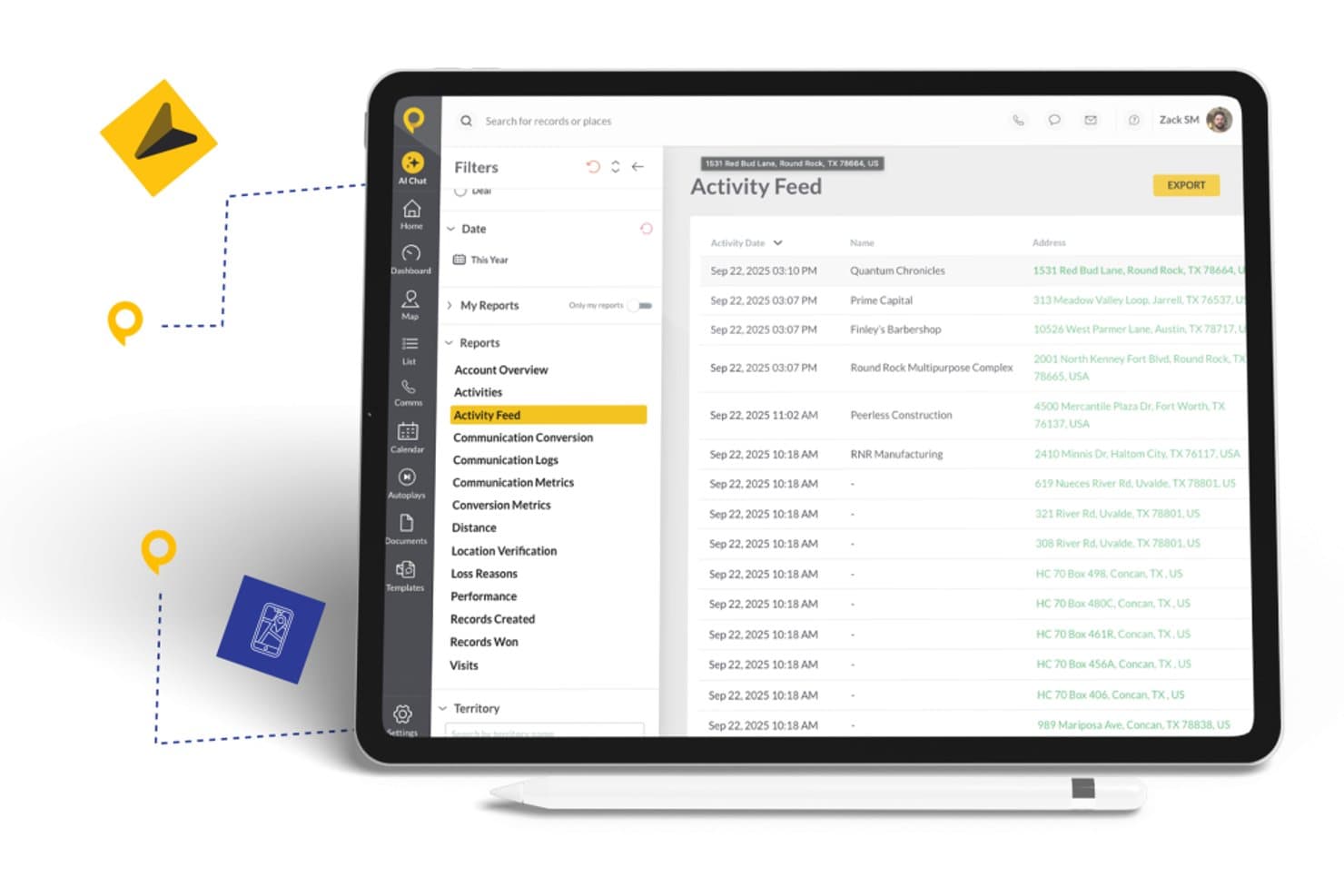
SPOTIO offers an Activity Feed report with filters, date ranges, and exportable records showing customer visits and locations. SPOTIO is a mobile-first field sales platform that combines territory management, route optimization, lead tracking, activity capture, and AI-powered rep guidance for outside sales teams.
Who Is SPOTIO Best For?
SPOTIO fits mid-market to enterprise outside sales teams in industries like telecom, solar, roofing, and home services where reps work in the field daily.
Why I Picked SPOTIO
SPOTIO earns its spot on my shortlist because of how deeply it handles territory and route management for field sales teams operating at scale. I like that managers can build territory boundaries by zip code, county, or custom map shapes, assign them with hierarchical permissions, and layer in 200+ demographic data overlays to prioritize where reps spend their time. In practice, that means a regional sales director running 50 reps across multiple markets can slice territories by lead density, assign them dynamically, and track exactly where each rep is working in real time.
SPOTIO Key Features
- DASH AI co-pilot: Uses AI to prep reps for visits, capture notes, scan business cards, and generate follow-up messages from the field.
- Next best action engine: Surfaces predictive recommendations for which accounts or leads reps should prioritize throughout the day.
- Performance analytics dashboards: Visualizes territory and rep activity with charts, drill-downs, and conversion tracking across multiple field teams.
- Native CRM integrations: Syncs activity data bidirectionally with Salesforce, HubSpot, and Microsoft Dynamics 365 for consistent enterprise reporting.
SPOTIO Integrations
SPOTIO offers native integrations with Salesforce, HubSpot, Microsoft Dynamics 365, and Pipedrive. Integrations with Zoho are available through Zapier, and an API is available for custom integrations.
Pros and Cons
Pros:
- AI-driven visit prep for field reps
- Real-time rep location tracking at enterprise scale
- Detailed territory building with demographic data overlays
Cons:
- Field-only focus limits inside sales team coverage
- Limited forecasting depth for inside sales teams
Learn more about SPOTIO:

CRM Creatio's lead management dashboard provides tools for tracking and managing sales leads effectively. CRM Creatio is a no-code CRM and sales management platform designed to accelerate sales processes of any complexity. It consolidates your customer data, automates lead and opportunity workflows, and enhances sales collaboration.
Why I picked CRM Creatio: One reason I chose CRM Creatio is its comprehensive lead and opportunity management capabilities. It automates the entire lead management cycle, from capturing leads to closing deals, ensuring no opportunity is overlooked. Another standout aspect is its robust sales forecasting tools. By analyzing historical data and current trends, CRM Creatio provides accurate sales forecasts that inform your strategic planning. Furthermore, I like that the platform is fully customizable without needing any coding knowledge, which is perfect for tailoring your sales processes to your unique needs.
Standout features & integrations:
Features include 360-degree customer views for customer relationship management and order and contract management, which streamlines the creation and tracking of sales documents. Additionally, the platform offers sales productivity tools that help your team manage tasks, appointments, and communications efficiently, ensuring they stay organized and responsive to client needs.
Integrations include Accelo, Act!, ActiveCampaign, Acumatica, Adobe Analytics, Asana, Microsoft Exchange, Excel, Mailchimp, HubSpot Marketing Hub, Google Calendar, and Tableau.
Pros and Cons
Pros:
- Supports scaling businesses
- No-code platform
- Extensive customization options
Cons:
- Data migration may be complex
- Customization can be time-consuming
Learn more about Creatio AI CRM: Best for unified CPQ and contract management
- Free demo available
- Pricing upon request
Visit WebsiteCustomer Rating:4.7/5
DealHub AI offers a quotes generation interface with financial input fields for enterprise sales quoting. DealHub AI is a quote-to-revenue platform that brings together CPQ, contract lifecycle management, digital sales rooms, subscription billing, and deal desk workflows into a single connected system.
Who Is DealHub AI Best For?
DealHub AI is well-suited for mid-market and enterprise sales teams that manage high-volume, complex deals with multiple stakeholders, approval layers, and contract negotiations.
Why I Picked DealHub AI
I picked DealHub AI as one of the best because the CPQ and CLM modules share a single data model, meaning the pricing terms your rep configures in a quote flow directly into the contract without any manual re-entry. I love how the pre-approved clause library lets legal pre-load compliant language for specific deal types, so contracts don't stall while waiting for legal to draft from scratch. The redlining and version comparison tools keep every negotiation in one place, which eliminates the "which version is final?" problem I've seen derail more deals than I can count.
DealHub AI Key Features
- DealRoom digital sales room: Create a shared, interactive buyer portal where reps present quotes, collect signatures, and track prospect engagement in real time.
- Guided selling playbooks: Build rule-based selling flows that prompt reps with the right product configurations and pricing options based on deal criteria.
- Parallel approval workflows: Route deals through multi-stakeholder approval chains at the same time, using role-based permissions and automatic escalation triggers.
- Subscription and billing management: Configure recurring billing terms, usage-based pricing, and renewal schedules within the quoting layer.
DealHub AI Integrations
DealHub AI offers native integrations with Salesforce, Microsoft Dynamics 365, HubSpot, Gong, Slack, NetSuite, Stripe, and Avalara.
Pros and Cons
Pros:
- Supports various pricing structures
- Handles line-item approvals
- Offers no-code CPQ configuration
Cons:
- Slow loading with large deal volumes
- Product documentation has notable gaps
Learn more about DealHub AI: Best for AI-driven enterprise sales automation
- Free plan + 15-day free trial+ free demo available
- From $14/user/month (billed annually)
Visit WebsiteCustomer Rating:4.2/5
Zoho CRM allows you to implement an omnichannel sales strategy, segment your leads, track KPIs, and lean on predictive intelligence to improve customer loyalty. Zoho CRM is a versatile sales software solution tailored for enterprises looking to enhance their sales processes. It offers a comprehensive suite of features designed to manage customer relationships and improve sales performance across various industries.
Why I Picked Zoho CRM: Zoho CRM stands out for its AI-driven tools that automate data enrichment, forecasting, and lead management, letting teams focus on strategy instead of admin work. Its sales force automation streamlines repetitive tasks, while robust customization options—including pipeline and territory management and omni-channel communication—make it adaptable to complex enterprise workflows.
Standout features & integrations:
Features include low-code development for building custom apps without extensive coding, business intelligence tools for sales and customer insights, and strong compliance with GDPR and HIPAA to protect user data.
Integrations include Microsoft Office 365, Google Workspace, Slack, Dropbox, Mailchimp, LinkedIn, Twitter, Facebook, Zoho Desk, Zoho Projects, QuickBooks, and Shopify.
Pros and Cons
Pros:
- Mobile app to improve communication with customers
- Zia (AI) helps identify prospects your team can convert
- Great for hybrid and remote teams
Cons:
- Advanced features gated behind top-tier subscriptions
- Pricey compared to other tools
 Best for AI-driven sales insights
- Free plan + 14-day trial + free demo available
- From $25/user/month (billed annually)
Visit WebsiteCustomer Rating:4.2/5
CloudTalk dashboard displaying call history, performance analytics, and sales activity metrics. In enterprise sales environments, CloudTalk is a call center software solution built to support high-volume outreach and structured sales operations. It combines AI-powered automation with CRM integrations to help teams manage conversations at scale while keeping customer data aligned. For enterprises handling large pipelines and distributed sales teams, CloudTalk can help centralize communication and reduce manual admin work.
Why I Picked CloudTalk
I picked CloudTalk because its AI-driven dialing and conversation tools directly support enterprise sales productivity. The AI Dialer offers multiple dialing modes and voicemail drop, which can help your team reduce idle time and focus on live conversations. I also like its AI Conversation Intelligence, which provides automatic call summaries and sentiment analysis so you can review performance trends and coach more effectively. For enterprise teams managing high call volumes, these features can support more consistent outreach and data-backed sales decisions.
CloudTalk Key Features
In addition to the features mentioned earlier, CloudTalk offers several other functionalities that enhance its value as an enterprise sales software:
- Local Numbers: You can access local numbers in over 160 countries, facilitating a global sales reach.
- Number Porting: This feature allows you to transfer existing numbers to CloudTalk, ensuring continuity and brand consistency.
- Branded Caller ID: Customize your caller ID with your company name and logo, enhancing brand recognition.
- Real-Time Monitoring: This feature provides live call listening and performance analytics, helping you monitor and improve team performance.
CloudTalk Integrations
Integrations include HubSpot, Salesforce, Zoho, MS Dynamics, Zendesk, Intercom, Odoo, Shopify, and more. CloudTalk also offers an API for custom integrations, ensuring seamless connection with your existing tools.
Pros and Cons
Pros:
- Real-time call monitoring tools
- Power and parallel dialers
- AI-powered call summaries
Cons:
- Higher tiers unlock AI features
- Setup can take time
Learn more about CloudTalk:

Salesloft supports multi-channel outreach for personalized, efficient prospect engagement. Salesloft enables sales teams to manage multi-channel outreach from one platform, including email, calls, and social touches. It empowers teams to engage prospects more effectively and close deals faster with personalized engagement.
Why I picked Salesloft: Salesloft offers call tracking, email templates, and scheduling tools to make connecting with prospects easier and more efficient and for insights into customer interactions. The tool focuses on tracking sales activity to know what’s working and where to improve and dynamic task management to keep the team focused on the right priorities.
Standout features & integrations:
Features include cadence automation, which helps you set up and manage sales workflows. The analytics dashboard provides insights into your team's performance, helping you identify areas for improvement. Salesloft also offers call recording, allowing you to review and refine consultative communication strategies.
Integrations include Salesforce, Microsoft Dynamics 365, LinkedIn Sales Navigator, Zoom, Slack, Chorus, Gong, Vidyard, Outlook, and Gmail.
Pros and Cons
Pros:
- Real-time activity tracking
- Integrated call tracking
- Dynamic task management
Cons:
- Restricted pipeline visibility
- Complex customization options
Learn more about Salesloft: Best for customer support integration
- Free demo available
- From $19/month
Visit WebsiteCustomer Rating:4.4/5
Zendesk Sell unifies sales and support, offering convenient access to customer insights. Zendesk Sell integrates sales and customer support for a unified customer experience. It enables sales teams to access customer interactions, support tickets, and history within the platform, aligning sales and support teams in one tool.
Why I picked Zendesk Sell: Zendesk Sell offers a complete historic view of customer interactions, allowing your team to manage leads and deals effectively and provide consistent customer experience. It has lead prioritization, activity tracking, and detailed deal management to help you stay on top of your pipeline. The platform also has reporting and customizable dashboards and automation for repetitive tasks.
Standout features & integrations:
Features include automated lead scoring, which helps prioritize prospects based on engagement. The email tracking feature lets you know when emails are opened and read, providing insights into customer interest. Zendesk also offers sales forecasting, allowing for future sales prediction enablement for you and your team.
Integrations include Mailchimp, Slack, QuickBooks, HubSpot, Google Workspace, Microsoft Outlook, Shopify, Salesforce, Xero, and Dropbox.
Pros and Cons
Pros:
- Customizable reporting tools
- Customizable sales pipelines
- Strong sales and support integration
Cons:
- No advanced automation
- Limited forecasting tools
Learn more about Zendesk Sell:

Bombora identifies intent signals to help sales teams prioritize leads effectively. Bombora helps enterprise sales teams identify businesses actively researching their products or services. It consolidates data points to deliver high-precision insights, enabling sales professionals to prioritize leads and tailor outreach strategies
Why I picked Bombora: Bombora provides deep insights into potential customer behaviors, allowing you to focus on leads researching topics related to your products or services. It offers identity enrichment, digital audience targeting, and topic tracking for tailored marketing efforts. With these insights, you can create more targeted pitches and close deals faster.
Standout features & integrations:
Features include identity enrichment, which helps refine customer data for better targeting. The digital audience targeting feature allows you to engage the right audience effectively. The planning and measurement suite helps assess the impact of your campaigns.
Integrations include HubSpot, LinkedIn, Salesforce, Marketo, Eloqua, Demandbase, Microsoft Dynamics 365, Pardot, Outreach, and Drift.
Pros and Cons
Pros:
- Supports ABM strategies
- Customizable reporting tools
- Consent-based data collection
Cons:
- No built-in sales automation
- No direct lead contacts
Learn more about Bombora: 10Best for small businesses
Act!
- 14-day free trial + free demo available
- From $30/user/month (billed annually)
Visit WebsiteCustomer Rating:4/5
Act! offers cost-effective CRM with lead tracking, contact management, and scalability. Act! provides small businesses with easy-to-use features for contact management, lead tracking, and sales pipeline visualization. It is cost-effective and scalable, making it accessible for businesses with limited resources while offering room for expansion.
Why I picked Act!: Act! offers an easy way to manage contacts, organize leads, and track deal progress in one place. It has customizable dashboards for prioritizing tasks and viewing key metrics at one glance and a contact management system to track customer interactions and history. It also includes email templates, activity tracking, and marketing automation tools to support targeted campaigns.
Standout features & integrations:
Features include a marketing automation tool that helps you create and send email campaigns with ease. The sales pipeline management feature allows you to track deals from start to finish. Act! also offers customizable dashboards to display key metrics and insights relevant to your business.
Integrations include Microsoft Outlook, Google Workspace, Mailchimp, QuickBooks, Zapier, Dropbox, LinkedIn, Slack, Xero, and Shopify.
Pros and Cons
Pros:
- Advanced reporting features
- Comprehensive contact management
- Detailed opportunity tracking
Cons:
- Limited mobile app functionalities
- Minimal AI and predictive sales analytics features
Learn more about Act!:
Diğer Kurumsal Satış Yazılımları
Kısa listeme giremeyen ancak yine de göz atmaya değer bazı ek kurumsal satış yazılımı seçeneklerini burada bulabilirsiniz:
- 11Pipedrive CRMBest for pipeline visualization
- 12Infor CRMBest for manufacturing sectors
- 13CloseBest for inside sales teams
- 14InsightlyBest for project management
- 15PitchMonsterBest for AI-powered sales role-play training
- 16Bitrix24Best for team collaboration
- 17FreshsalesBest for AI-driven engagement
- 18Salesforce CRMBest for app integrations
- 19SugarAIBest for high customization
- 20CopperBest for Google Workspace users
- 21StreakBest for Gmail integration
- 22FullstoryBest for user experience insights
- 23GongBest for conversation analytics
- 24DockBest for client collaboration
- 25AttentionBest for real-time sales coaching
How I Evaluate Enterprise Sales Software
I look at enterprise sales tools in two layers: baseline capabilities like multi-stage forecasting and deal intelligence, then the differentiators that matter for a specific RevOps team.
Core Functionality (Table Stakes For This List)
When I'm selecting tools for my list, I rank each one on a scale from 0 (does not offer the functionality) to 5 (excels in this area) for each core functionality listed below. Then, I calculate the tool's total score into a percentage. Each tool needs to achieve a minimum total score of 65% to be considered for inclusion.
- Enterprise CRM Integration: I check whether a tool syncs bi-directionally with major CRMs like Salesforce or Microsoft Dynamics, including custom objects and field mapping.
- Pipeline & Forecasting: Multi-stage pipeline views and forecast models matter here, especially support for weighted categories like commit, best case, and upside.
- Deal & Opportunity Management: I look for buying committee mapping, deal health scoring, and stakeholder tracking that reflect how enterprise deals actually move through orgs.
- Sales Workflow Automation: Approval chains, task routing, and sequencing should handle the complexity of enterprise cycles, such as multi-level discount approvals or legal review triggers.
- Revenue Analytics & Reporting: Dashboards should go beyond vanity metrics. I evaluate whether teams can drill into conversion rates, cycle times, and pipeline velocity by segment or region.
- Enterprise Security & Scale: SSO, role-based access controls, SOC 2 compliance, and multi-region deployment support are what I look for to confirm a tool can operate at enterprise scale.
Once I have a list of tools that meet this criteria, I consider what sets each platform apart.
Differentiating Factors (What Sets Vendors Apart)
Here's how I compare and contrast different vendors:
Standout Features
AI deal intelligence is a major differentiator. I evaluate whether a platform can score deal risk and predict win probability from actual pipeline history rather than rep intuition alone. Conversation intelligence adds another layer—some tools analyze call recordings to surface objections and coaching moments that reps might overlook mid-cycle. Buyer engagement portals also matter for complex deals. When a buying committee spans ten stakeholders, a shared digital sales room keeps everyone aligned on next steps, content, and timelines.
Beyond Features
Tech stack integration depth is one of the first things I check. An enterprise sales tool needs to connect with your marketing automation, CS platform, and data warehouse—not just your CRM. Implementation support also weighs heavily. Rolling out a new platform to a 200-person sales org without dedicated onboarding resources and change management guidance can stall adoption for months. I also evaluate compliance posture, including SOC 2 Type II certification and data residency options, since enterprise procurement teams will flag gaps before a deal closes.
Kurumsal Satış Yazılımı Nasıl Seçilir?
Uzun özellik listeleri ve karmaşık fiyatlandırma yapılarına takılıp kalmak kolaydır. Karar vericilerin kendinize özgü yazılım seçim süreciniz boyunca odaklarını korumalarına yardımcı olmak için aklınızda bulundurmanız gereken faktörleri şu kontrol listesinde derledik:
| Faktör | Dikkat Edilmesi Gerekenler |
| Ölçeklenebilirlik | Yazılımın ekibinizle birlikte büyüdüğünden emin olun. Kullanıcı ve veri sayısındaki artışı sorunsuz şekilde karşılayıp karşılayamayacağını değerlendirin. |
| Entegrasyonlar | CRM veya pazarlama platformları gibi mevcut sistemleriniz ve teknoloji yığınınızla bağlantı kuran, işlevselliği geliştiren araçları arayın. |
| Özelleştirilebilirlik | Yazılımın özelliklerini ekibinizin kendine özgü iş akışlarına ve sektör ihtiyaçlarına göre uyarlamanıza izin verip vermediğini kontrol edin. |
| Kullanım Kolaylığı | Yazılım sezgisel olmalıdır. Ekibinizin kullanmaya başlamak için kapsamlı bir eğitime ihtiyaç duymaması gerekir. |
| Bütçe | Aracın maliyetini finansal planınızla uyumlu hâle getirin. Abonelik ücretlerini, uygulama maliyetlerini ve olası yükseltmeleri hesaba katın. |
| Güvenlik Önlemleri | Güçlü güvenlik önlemlerine sahip yazılımlara öncelik verin. Veri şifreleme ve GDPR gibi düzenlemelere uyum kritik önem taşır. |
Kurumsal Satış Yazılımlarındaki Trendler
Araştırmam sırasında farklı kurumsal satış yazılımı sağlayıcılarından sayısız ürün güncellemesi, basın bülteni ve sürüm günlüğü inceledim. Takip ettiğim yeni trendlerden bazıları şunlar:
- Yapay zekâ destekli kişiselleştirme: Araçlar artık veri analizine dayalı olarak müşteri etkileşimlerini kişiselleştiren yapay zekâ özellikleri sunuyor. Bu, satış ekiplerinin sunumlarını ve etkileşim stratejilerini müşteriye göre uyarlamasına yardımcı olarak müşteri deneyimini geliştirir.
- Ses ve görüşme analitiği: Daha fazla yazılım, satış görüşmelerini analiz eden ve içgörüler çıkaran özellikler içeriyor. Bu, ekiplerin müşteri duyarlılığını anlamasına ve iletişim yöntemlerini geliştirmesine yardımcı olur.
- Öngörücü satış tahmini: Öngörücü analitik, işletmelerin satış eğilimlerini ve müşteri davranışlarını önceden tahmin etmesine yardımcı oluyor. Şirketler daha bilinçli kararlar almak ve veriye dayalı bir yaklaşımla satış hedefleri belirlemek istediği için bu eğilim giderek daha fazla ilgi görüyor.
- Müşteri yolculuğu haritalama: Tedarikçiler, ilk temastan satışın tamamlanmasına kadar müşteri yolculuğunu haritalandıran araçlar sunmaya odaklanıyor. Bu, satış ekiplerinin satış sürecindeki her temas noktasını anlamasına ve optimize etmesine yardımcı olarak daha tutarlı bir müşteri deneyimi sağlar.
- Veri gizliliği ve uyumluluk: Veri düzenlemelerinin artmasıyla birlikte satış yazılımları, GDPR gibi yasalara uyumluluğu sağlayan özellikleri öne çıkarıyor. İşletmelerin müşteri bilgilerini koruması ve yasal standartlara uyması gerektiğinden bu eğilim büyük önem taşıyor; bu da müşteri güveninin oluşturulmasına yardımcı oluyor.
Kurumsal Satış Yazılımı Nedir?
Kurumsal satış yazılımı, büyük kuruluşların satış süreçlerini ve müşteri ilişkilerini yönetmesine yardımcı olmak için tasarlanmıştır. Bu araçlar; satış uzmanları, yöneticiler ve pazarlama ekipleri tarafından verimliliği artırmak ve satış büyümesini desteklemek için kullanılır.
Doğru müşterileri hedeflemeye ve satış sürecini optimize etmeye yardımcı olmak için yapay zekâ destekli kişiselleştirme, öngörücü satış tahmini ve müşteri yolculuğu haritalama gibi özellikler içerir. Genel olarak bu araçlar, işletmelere satış performansını ve müşteri memnuniyetini geliştirmek için gerekli içgörüleri ve yetenekleri sunar.
Kurumsal Satış Yazılımının Özellikleri
Kurumsal satış yazılımı seçerken aşağıdaki temel özelliklere dikkat edin:
- Mobil erişilebilirlik: Satış ekiplerinin mobil cihazları kullanarak her yerden verilere erişebilmesini ve verileri yönetebilmesini sağlar.
- Gelişmiş raporlama ve analitik: Satış performansına ilişkin ayrıntılı içgörüler sunarak veriye dayalı karar almayı mümkün kılar.
- Özelleştirilebilir iş akışları: Kullanıcıların süreçleri kendi özgün satış yöntemleriyle uyumlu olacak şekilde uyarlamasına olanak tanır.
- Yapay zekâ destekli tahmin: Gelecekteki satış eğilimlerini yüksek doğrulukla tahmin etmek için yapay zekâ kullanır.
- Bölge yönetimi: Ekip verimliliğini en üst düzeye çıkarmak için satış bölgelerinin düzenlenmesine ve dağıtılmasına yardımcı olur.
- Güçlü CRM entegrasyonu: Müşteri etkileşimlerini kolaylaştırmak için müşteri ilişkileri yönetimi sistemlerine bağlanır.
- Çok kanallı iletişim: E-posta, telefon ve sosyal medya üzerinden iletişimi birleşik bir platformda destekler.
- Otomatik müşteri adayı puanlama: Müşteri adaylarını potansiyellerine göre sıralayarak satış ekiplerinin yüksek değerli fırsatlara odaklanmasını sağlar.
- Dinamik fiyatlandırma araçları: Pazar verilerine dayalı olarak fiyatlandırma stratejilerinde gerçek zamanlı ayarlamalar yapılmasını sağlar.
- Belge ve sözleşme yönetimi: Satış belgeleri ve sözleşmelerinin oluşturulmasını, gönderilmesini ve izlenmesini kolaylaştırır.
Kurumsal Satış Yazılımının Faydaları
Kurumsal satış yazılımını uygulamak ekibiniz ve işletmeniz için çeşitli faydalar sağlar. Yararlanabileceğiniz birkaç fayda şunlardır:
- Daha iyi karar alma: Öngörücü satış tahmini ve analitik, ekibinizin bilinçli kararlar almasına yardımcı olan veriye dayalı içgörüler sunar.
- Geliştirilmiş müşteri etkileşimi: Yapay zekâ destekli kişiselleştirme ve otomatik müşteri adayı puanlama, etkileşimlerin zamanında ve ilgili olmasını sağlayarak müşteri memnuniyetini artırır.
- Akıcı satış süreçleri: Satış hattı yönetimi ve entegrasyon özellikleri, daha sorunsuz operasyonlara ve ekip üyeleri arasında daha iyi koordinasyona olanak tanır.
- Artan verimlilik: Tekrarlayan görevlerin otomatikleştirilmesi ekibinizin zamanını serbest bırakarak anlaşmaları sonuçlandırmak gibi yüksek değerli faaliyetlere odaklanmalarını sağlar.
- Daha iyi iletişim: Ses ve görüşme analitiği, iletişim stratejilerinin geliştirilmesine yardımcı olarak potansiyel müşterilerle daha etkili etkileşimler kurulmasını sağlar.
- Uyumluluk güvencesi: Veri gizliliği özellikleri, işletmenizin düzenleyici gereklilikleri karşılamasını, müşteri bilgilerini korumasını ve güveni sürdürmesini sağlar.
Kurumsal Satış Yazılımının Maliyetleri ve Fiyatlandırması
Kurumsal satış yazılımı seçmek, mevcut çeşitli fiyatlandırma modellerini ve planları anlamayı gerektirir. Maliyetler özelliklere, ekip büyüklüğüne, eklentilere ve daha fazlasına göre değişir. Aşağıdaki tablo, kurumsal satış yazılımı çözümlerinde yaygın planları, bunların ortalama fiyatlarını ve genellikle sunulan özellikleri özetlemektedir:
Kurumsal Satış Yazılımı için Plan Karşılaştırma Tablosu
| Plan Türü | Ortalama Fiyat | Yaygın Özellikler |
| Ücretsiz Plan | $0 | Temel kişi yönetimi, sınırlı destek ve temel özelliklere erişim. |
| Kişisel Plan | $5-$25/kullanıcı/ay | Kişi yönetimi, e-posta entegrasyonu, görev otomasyonu ve temel raporlama araçları. |
| İşletme Planı | $30-$75/kullanıcı/ay | Gelişmiş raporlama, satış tahmini, özelleştirme seçenekleri ve öncelikli müşteri desteği. |
| Kurumsal Plan | $80-$150/kullanıcı/ay | Tam özelleştirme, yapay zekâ destekli içgörüler, özel hesap yönetimi ve gelişmiş analiz. |
Kurumsal Satış Yazılımı SSS
Kurumsal satış yazılımı hakkında sık sorulan bazı soruların yanıtları:
Kurumsal sistem yazılımı diğer sistem yazılımlarından nasıl farklıdır?
Kurumsal sistem yazılımı, büyük miktarlardaki karmaşık verileri işleyebilir ve bu verileri kullanan süreçleri otomatikleştirebilir. Operasyonlarıyla birlikte ölçeklenebilen çözümlere ihtiyaç duyan büyük kuruluşlar için tasarlanmıştır. Normal işletme yazılımlarından farklı olarak kurumsal çözümler, çeşitli departmanları destekleyen gelişmiş özellikler sunar.
Kurumsal satış buna değer mi?
Kurumsal satış, istikrarlı gelir sağlayarak ve marka itibarını güçlendirerek oldukça kazançlı olabilir. Müşterilerle uzun vadeli ilişkiler kurmanıza olanak tanır ve bu da tekrarlanan işlere yol açabilir. Bu satışlar genellikle daha yüksek değerli anlaşmaları içerdiğinden zaman ve kaynak yatırımı yapmaya değerdir.
Kurumsal satış yazılımı ekibimin performansını nasıl artırabilir?
Kurumsal satış yazılımı tekrarlayan görevleri otomatikleştirerek ekibinizin satışa odaklanması için zaman kazandırabilir. Müşteri davranışları ve satış eğilimleri hakkında içgörüler sunarak bilinçli kararlar almanıza yardımcı olur. Yazılım ayrıca ekip üyeleri arasındaki iş birliğini geliştirerek daha verimli satış süreçleri sağlar.
Kurumsal satış yazılımını uygulamanın zorlukları nelerdir?
Kurumsal satış yazılımını uygulamak karmaşık olabilir ve dikkatli planlama gerektirir. Veri aktarımı, kullanıcı eğitimi ve mevcut sistemlerle entegrasyon gibi zorluklarla karşılaşabilirsiniz. Geçiş sırasında net bir uygulama planınız olsun ve ekibinize yeterli desteği sağlayın.
Kurumsal satış yazılımını uygularken güvenlikle ilgili dikkat edilmesi gerekenler nelerdir?
Kurumsal satış yazılımını uygularken çözümün sektör güvenlik standartlarına uygun olduğundan ve veri şifreleme, kullanıcı erişim kontrolleri ve düzenli güvenlik güncellemeleri gibi özellikler sunduğundan emin olun. Bu, hassas müşteri ve satış verilerinin yetkisiz erişime karşı korunmasına yardımcı olur.