

Satışa alıştırma için kullanılabilecek çok sayıda farklı yazılım olduğundan, hangisinin sizin için doğru olduğunu belirlemek zordur. Yeni çalışanları satış rollerinde gereken beceri ve bilgilerle etkili ve verimli bir şekilde donatmak istediğinizi biliyorsunuz, ancak hangi aracın en iyi olduğunu bulmanız gerekiyor. Size yardımcı olacağım! Bu yazıda, çeşitli yeni çalışanlarla düzinelerce farklı satışa alıştırma aracı kullanırken edindiğim kişisel deneyimlerimi paylaşarak en iyi satışa alıştırma yazılımını seçmenizi kolaylaştıracağım.
Why Trust Our Software Recommendations
6,700+
Reviews
20
Industry experts
16+
Evaluation factors
14
Years
Our reviews reflect our independent judgment—not a sales pitch. Learn how we stay transparent.
For this guide, we evaluated tools using hands-on testing and independent research, scoring tools using our selection criteria.
Our reviews reflect our human editorial judgment, not a sales pitch.
Satışa Alıştırma Yazılımları Karşılaştırma Tablosu
Bu karşılaştırma tablosu, en iyi satışa alıştırma yazılımı seçimlerimin fiyatlandırma ayrıntılarını özetlemektedir.
Sorted by: Default
| Tool | Starting Price | Website | |
|---|---|---|---|
Best for structured sales training paths | 4.6 out of 5 | $119/month Free plan + free demo available | Book Demo |
Best for efficient employee onboarding | 4.7 out of 5 | Pricing upon request 14-day free trial + demo available | Website |
Best for corporate eLearning automation | 4.6 out of 5 | $3.97/user/month Free trial available | Book Demo |
Best for customizable sales automation | 4.6 out of 5 | $12/user/month 14-day free trial + free demo available | Book Demo |
Best for no-code customization | 4.7 out of 5 | $40/user/month Not available | Book Demo |
Best for AI roleplay coaching | Not rated | Pricing upon request Free demo available | Website |
Best for an intuitive learner experience | 4.6 out of 5 | Pricing upon request Free trial available | Website |
Best sales onboarding software for SOP documentation | 4.7 out of 5 | Pricing upon request Free demo available | Website |
Best sales onboarding software for reinforcement | 4.7 out of 5 | $8/user/month 30-day free trial + demo available | Website |
Best for creating onboarding guides with AI | 4.9 out of 5 | $18/creator/month Free 7-day trial + free plan + free demo available | Website |


En İyi Satışa Alıştırma Yazılımı İncelemeleri
Aşağıda, kısa listeme giren en iyi satışa alıştırma yazılımlarının ayrıntılı özetlerini bulabilirsiniz. İncelemelerim, size en uygun aracı bulmanıza yardımcı olmak için her aracın temel özelliklerine, artılarına ve eksilerine, entegrasyonlarına ve ideal kullanım alanlarına ayrıntılı bir bakış sunuyor.
 Best for structured sales training paths
- Free plan + free demo available
- From $119/month (billed annually)
Visit WebsiteCustomer Rating:4.6/5
TalentLMS’ course library view highlights recent activity, curated collections, and language options for quick course selection. TalentLMS gives your revenue organization a structured way to onboard new reps without overwhelming them or your sales managers. If you’re trying to build consistent product knowledge, repeatable workflows, and a predictable ramp timeline, the platform helps you organize the entire learning journey in one place.
Why I Picked TalentLMS
I picked TalentLMS because it gives you the control and structure you need to deliver repeatable, role-specific sales onboarding at scale. Its user groups, branches, and custom roles let you tailor onboarding tracks for SDRs, AEs, and CS teams without duplicating work. I also like that you can build blended programs—mixing product training, pitch practice, SCORM content, and live sessions—to match how reps learn best. And with automation rules and real-time reporting, you always know who’s ready to ramp, who needs coaching, and where onboarding timelines are slipping.
TalentLMS Key Features
Aside from the structured onboarding tools I mentioned earlier, you also get several features that help your sales training run smoothly:
- TalentLibrary™: Access to over 1,000 curated courses that can be used to enhance your sales training programs.
- Gamification: Introduces elements like badges and points to keep your sales team engaged and motivated throughout their training.
- AI Content Creator: Generate product explainers, pitch scenarios, onboarding modules, and flashcards in minutes without relying on L&D bandwidth.
- Reporting Tools: Provides detailed analytics on training progress and completion, helping you to track the effectiveness of your onboarding efforts.
TalentLMS Integrations
Integrations include Salesforce, Shopify, WordPress, Zoom, Microsoft Teams, GoTo, BigBlueButton, BambooHR, ADP Workforce Now, and HubSpot.
Pros and Cons
Pros:
- AI tools speed up creating product and sales skills content.
- Role-based groups deliver tailored sales training by segment.
- Gamification boosts engagement for competitive sales teams.
Cons:
- Video practice and role-play tools aren’t built in natively.
- Large multimedia files may require external hosting solutions.
Learn more about TalentLMS: Best for efficient employee onboarding
- 14-day free trial + demo available
- Pricing upon request
Visit WebsiteCustomer Rating:4.7/5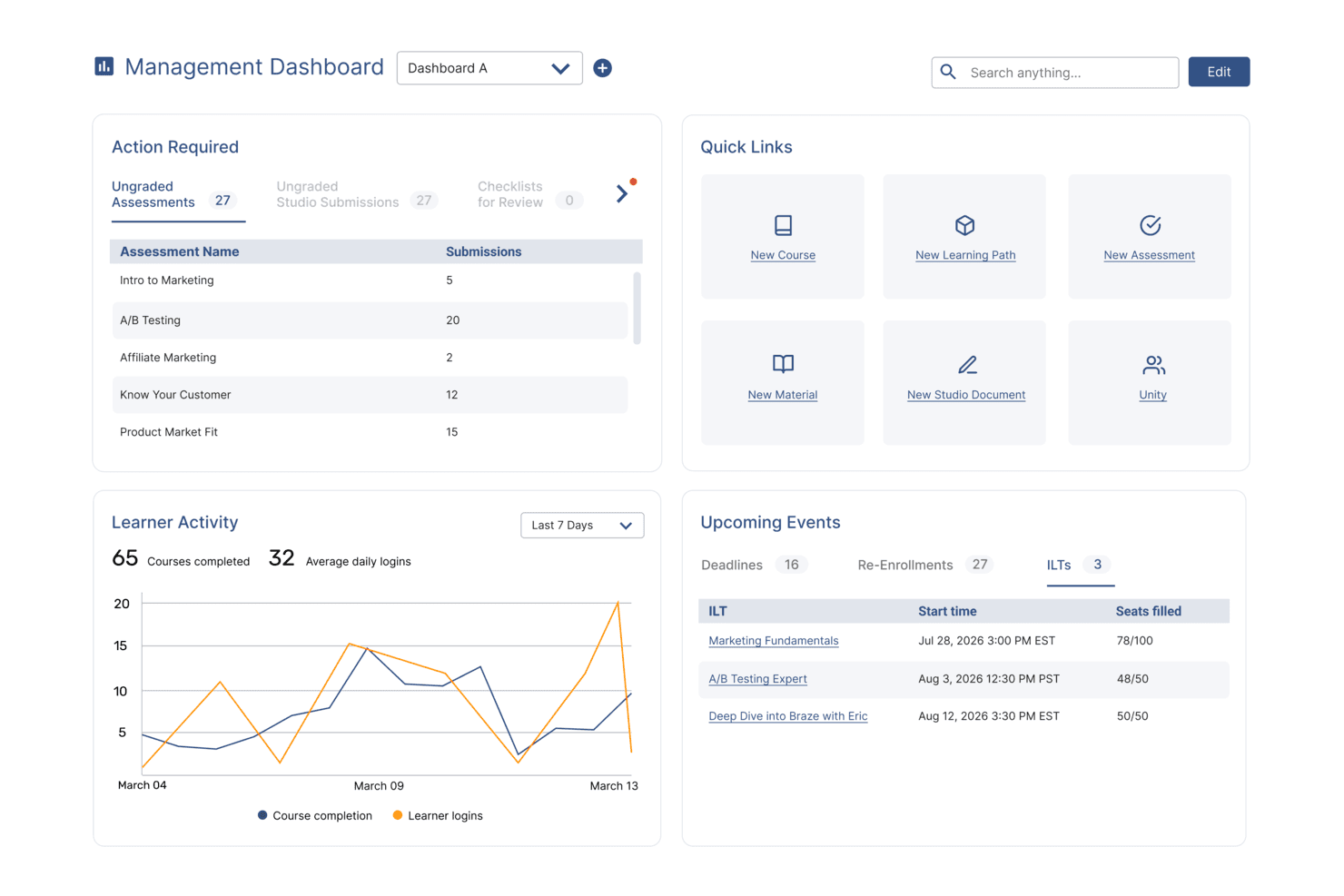
SkyPrep's management dashboard displays learner activity, upcoming events, and quick links. SkyPrep is an an intuitive and easy-to-use award-winning online training software that offers a variety of features such as learner engagement, course creation, user management, reporting and analytics, and customization. It is best known for its efficient employee onboarding solution, which helps new hires get up to speed quickly and be productive from day one.
Why I picked SkyPrep: I chose SkyPrep because it provides a highly customized and efficient onboarding training program that is designed to help new employees quickly understand their roles and the company's culture. What makes SkyPrep stand out is its focus on delivering role-focused training in an engaging manner, which is crucial for equipping new hires with the necessary tools and knowledge to be productive from the start.
Skyprep Standout Features & Integrations
Features include an intuitive course builder that empowers users to create engaging training content without the need for technical expertise. The drag-and-drop interface, multimedia support, and customizable assessments enable organizations to design interactive courses tailored to their specific needs.
Users can also take advantage of SkyPrep's partnership with OpenSesame for access to thousands of pre-built courses across various industry verticals and topics.
Integrations include Okta, SAML, onelogin, Stripe, PayPal, Shopify, ADP, Workday, Salesforce, HubSpot, Zoom, GoTo, Webex, G Suite, Office 365, Twilio, iorad, UKG, and more.
Pros and Cons
Pros:
- Branding personalization
- Customizable workflow automations
- User-friendly interface
Cons:
- Pricing structure may not work for all org sizes
- Minimal advanced reporting functionality
Learn more about SkyPrep: Best for corporate eLearning automation
- Free trial available
- From $3.97/user/month (billed annually)
Visit WebsiteCustomer Rating:4.6/5
iSpring LMS's eLearning authoring toolkit supports various multimedia formats and interactive elements to engage learners. iSpring LMS is a learning management system (LMS) that facilitates corporate training by providing a platform for eLearning.
Why I picked iSpring LMS: iSpring LMS provides a platform where companies can create effective onboarding programs and automatically assign them to new sales representatives. This enables a faster learning process, ensuring that newcomers have a better grasp of their roles and responsibilities.
The platform includes interactive courses, role-plays, and quizzes designed to develop sales communication skills. It also allows for the assessment of team strengths and weaknesses through comprehensive reports. The tool is used across various industries to improve sales team growth and performance, offering 24/7 access to training content and support resources such as online training software and microlearning options.
iSpring LMS Standout Features and Integrations
Standout features include an eLearning authoring toolkit, compliance training, industry-specific and case-specific solutions, and a learning management system that includes user management, content organization, and automation of routine tasks like enrollment.
Integrations include Microsoft Teams, Zoom, Salesforce, Shopify, BambooHR, Outlook Calendar, ProctorEdu, PowerBI, OrangeHRM, and Bitrix24.
Pros and Cons
Pros:
- Easy-to-use interface
- Provides a user self-registration feature
- Includes native iOS & Android apps for offline access
Cons:
- Some problems with importing data
- Lacks gamification elements
Learn more about iSpring LMS: Best for customizable sales automation
- 14-day free trial + free demo available
- From $12/user/month (billed annually)
Visit WebsiteCustomer Rating:4.6/5
Monday sales CRM offers a customizable sales pipeline for targeted strategy execution and growth. Monday sales CRM is a fully customizable tool that centralizes client communication, automates sales processes, and provides a full overview of each deal. Its unique selling proposition is its ability to be tailored to fit the specific sales cycle of each user, making it the best choice for custom workflows.
Why I picked Monday sales CRM: Monday.com excels as a sales onboarding software by streamlining the integration of new sales reps into the team's workflow and culture. Its intuitive design and customizable templates make it easy for newcomers to understand the sales process, track their tasks, and manage their pipelines from day one. The platform's collaborative environment encourages interaction and learning, allowing seasoned team members to share insights and resources efficiently.
Automation features reduce the learning curve by handling routine tasks, enabling new hires to focus on more strategic activities and customer engagement early on. With its ability to track progress and performance, monday.com not only facilitates a smooth onboarding experience but also accelerates the time it takes for new sales reps to become productive members of the team, all while fostering a sense of belonging and teamwork.
Monday sales CRM Standout Features and Integrations
Features include a highly collaborative environment that extends beyond the sales team to include marketing, customer support, and product development teams within the same workspace. This cross-functional visibility is unusual in traditional CRMs, which often silo information within departments. By breaking down these barriers, Monday.com facilitates a more cohesive approach to customer relationship management.
Integrations include project management apps like Slack, Google Drive, Gmail, Google Calendar, Jira, GitHub, Trello, Dropbox, Typeform and many more, accessible through a paid plan with Zapier.
Pros and Cons
Pros:
- Integrated automation tools
- Enables cross-functional collaboration
- Known for its intuitive and visually appealing interface
- Highly customizable workflows and dashboards
Cons:
- Sales CRM dosen't have a free plan
- Vast array of features can be overwhelming for new users


The sales pipeline management feature in CRM Creatio lets sales teams visualize their sales funnel and manage leads through various stages. CRM Creatio is a no-code platform designed to automate sales processes of any complexity. It offers a suite of tools to manage customer relationships, from lead generation to order fulfillment.
Why I picked CRM Creatio: It lets you create structured onboarding processes, guiding new hires through each step and ensuring they acquire the necessary knowledge and skills. Additionally, the platform's training and certification management tools enable you to track progress and assess competencies, facilitating a smooth transition for new team members.
Another reason is the platform's comprehensive knowledge base. This centralized repository provides easy access to company policies, product information, and sales strategies, serving as a valuable resource for new sales reps. By having all essential information in one place, your team can quickly get up to speed and perform effectively. Additionally, since CRM Creatio is a no-code platform, you can customize your workflows according to your unique onboarding processes.
CRM Creatio Standout Features and Integrations
Standout features include customer 360, lead and opportunity management, sales forecasting, order and contract management, workflow automation, pipeline management, campaign management, service management, contact management, task management, reporting and analytics, and communication tools.
Integrations include Accelo, Act!, ActiveCampaign, Acumatica, Adobe Analytics, Asana, Microsoft Exchange, Excel, Mailchimp, HubSpot Marketing Hub, Google Calendar, and Tableau.
Pros and Cons
Pros:
- Extensive customization options
- No-code platform
- Supports scaling businesses
Cons:
- Customization can be time-consuming
- Data migration may be complex
Learn more about Creatio AI CRM:

EducateMe LMS dashboard displaying course progress, learner activity, and real-time completion analytics for onboarding management. For those seeking a solution to streamline sales onboarding, EducateMe LMS presents a compelling option. Tailored for corporations and training agencies, it offers specialized features like AI roleplay coaching and real-time analytics to address the challenges of effective onboarding. This platform not only enhances the learning experience but also simplifies the onboarding process, making it an attractive choice for businesses looking to optimize their sales training efforts.
Why I Picked EducateMe LMS
I picked EducateMe LMS for its unique approach to sales onboarding, particularly through its AI roleplay coaching. This feature allows your team to simulate real-world sales scenarios, providing invaluable practice and feedback. Additionally, the platform's real-time analytics offer insights into each learner's progress, enabling you to tailor training to individual needs. These capabilities align well with the goal of creating a dynamic and responsive sales onboarding experience.
EducateMe LMS Key Features
In addition to its AI roleplay coaching and analytics, EducateMe LMS offers several other features that enhance sales onboarding.
- Content Creation Tools: These allow you to design customized training materials tailored to your sales team's needs.
- Collaborative Learning Environment: Facilitates team-based learning and knowledge sharing, fostering a culture of continuous improvement.
- White-label Solutions: Enables you to brand your training materials, providing a consistent and professional appearance.
- Interactive Activities: Engage your team with quizzes and simulations that reinforce learning and retention.
EducateMe LMS Integrations
Integrations include popular tools like Slack, Zoom, Salesforce, Microsoft Teams, Google Workspace, HubSpot, Mailchimp, Shopify, WordPress, and Trello.
Pros and Cons
Pros:
- Customizable learning paths align training with sales roles
- Real-time analytics track onboarding progress and performance gaps
- AI roleplay simulations support practical sales skill development
Cons:
- Advanced configuration may require initial setup time
- Pricing may be steep for some
Learn more about EducateMe LMS: Best for an intuitive learner experience
- Free trial available
- Pricing upon request
Visit WebsiteCustomer Rating:4.6/5
Absorb LMS gives you clear course stats and analytics. Absorb is a comprehensive learning management system that offers a range of features and products to deliver impactful eLearning, enhance the learner experience, and dive deeper into learner data. With a focus on learner engagement, smart administration, and a variety of content libraries, Absorb provides an intuitive learner experience, making it the best choice for organizations looking to prioritize the learner's needs and engagement.
Why I picked Absorb: I chose Absorb after carefully comparing its extensive features and use cases against other options. Its comprehensive suite of tools, including smart administration, learner engagement, and robust reporting & analytics, positions it as a strong contender in the realm of sales onboarding.
Absorb Standout Features and Integrations
Features include content creation, user administration, AI-driven recommendations, eCommerce, analytics, instructor-led training, and performance tracking.
Integrations are available natively with multiple apps, including BambooHR, Ceridian Dayforce, Cisco Webex, Namely, Oracle Peoplesoft, Salesforce, Workday, and Zoom.
Pros and Cons
Pros:
- Offline and online learning
- Great customization and localization options
- Responsive customer support
Cons:
- Search filters are not very specific
- System has a learning curve
Learn more about Absorb: Best sales onboarding software for SOP documentation
- Free demo available
- Pricing upon request
Visit WebsiteCustomer Rating:4.7/5
Trainual provides a library of 125+ pre-built templates that can be integrated into your account and tailored to your unique business requirements. Trainual is cloud-based software that helps businesses create training manuals for new or existing employees, customers, contractors, interns, and volunteers. It also helps businesses organize the chaos of onboarding and training.
Why I picked Trainual: I picked Trainual due to its SOP (Standard Operating Procedure) documentation feature. SOPs play a crucial role in onboarding new hires as they provide guidance related to the organization's processes and expectations.
Trainual's built-in AI capabilities can help you create content for SOPs. You can also embed PDFs, GIFs, videos, and other formats. Additionally, it provides a centralized platform for storing all SOPs in one place that sales reps can access easily. The content can be organized into collections based on departments, teams, locations, or any category to make it easy for people to find what they need faster.
Trainual Standout Features and Integrations:
Standout features include the smart time estimates feature that allows users to view the estimated time required for a specific training session.
Integrations include Loom, Quickbooks Payroll, Slack, Justworks, Paylocity, Zenefits, Namely, TriNet, Square Payroll, and Paycom. You can also get additional integrations through Zapier and API.
Pros and Cons
Pros:
- Built-in user walkthroughs and guides
- It offers a huge variety of templates
- Simple and intuitive dashboard
Cons:
- Limited native integrations
- Limited user seats
Learn more about Trainual: Best sales onboarding software for reinforcement
- 30-day free trial + demo available
- From $8/user/month
Visit WebsiteCustomer Rating:4.7/5
The 360Learning authoring tool enables users to create and publish a digital course in select formats. 360Learning is a learning management system (LMS) and collaborative learning platform. It's designed to help organizations create and deliver online training courses to their employees or learners.
Why I picked 360Learning: I liked the progress tracking feature of 360Learning that helps sales managers to onboard new sales reps by providing real-time insights into learner progress, engagement, and satisfaction, enabling managers to monitor the team's progression, send training reminders, and make necessary changes to improve the overall quality of the courses.
Additionally, 360 Learning's comprehensive LMS analytics and tracking features give managers all the data they need to evaluate and optimize their learning program.
360Learning Standout Features and Integrations
Standout features include sales enablement training features that empower the team to practice pitches, demos, and receive coaching remotely — all in a single platform.
Integrations include OpenSesame, Coursera, Udemy Business, HiBob, Cornerstone, Google Drive, Genially, Loom, Zoom, and Salesforce. You can also get additional integrations through API.
Pros and Cons
Pros:
- Integrates with Zoom
- Includes a 30-day free trial
- Easy to use and navigate
Cons:
- Analytics can be confusing
- Limited customization options
Learn more about 360Learning: 10Best for creating onboarding guides with AI
Guidde
- Free 7-day trial + free plan + free demo available
- From $18/creator/month (billed annually)
Visit WebsiteCustomer Rating:4.9/5
Guidde allows users to manage knowledge with videos, which is crucial for onboarding new sales team members. Guidde is a generative AI platform for your team to create sales onboarding videos faster. By automating the capture, editing, and distribution of training videos, it generates step-by-step guides in multiple formats that new hires will understand. It is as easy to use as editing presentation slides.
Why I picked Guidde: Guidde's 'magic capture' feature lets you record your workflow with just a click via their web browser plugin or desktop app, and once you complete recording, the AI creates a step-by-step guide in multiple formats such as link, PDF, MP4 and HTML. This is particularly useful for sales onboarding, as it allows you to create detailed guides that new team members can follow to learn sales processes effectively. Additionally, Guidde offers AI-generated voiceovers in multiple languages, which can help you cater to a diverse team and ensure that everyone understands the training material.
I also like its built-in editor, which allows you to customize your guides by adding text annotations, images, multiple calls to action (CTAs), and other elements to highlight important information. This customization ensures that your sales onboarding materials are tailored to your team's specific needs, making the training process more effective. Furthermore, Guidde's analytics feature provides insights into how your team interacts with the guides, helping you identify areas where additional training might be needed.
Guidde Standout Features and Integrations
Standout features include motion and transitions, a background music library, a built-in editor, multi-language support, screen recording (web and desktop), webcam recording, easy share options, multiple CTAs, video privacy controls, video analytic insights, auto-translation, and SSO integration.
Integrations include Salesforce, Google Drive, Microsoft OneDrive, Slack, Zoom, Zendesk, ServiceNow, Chrome, and Confluence.
Pros and Cons
Pros:
- Utilizes AI for automatic storyline creation
- Includes interactive elements and professional voiceovers
- Multilanguage support
Cons:
- Reliance on AI may hinder creativity in content creation
- Some users may find the editing features slightly restrictive
Learn more about Guidde:
Diğer Satışa Alıştırma Yazılımları
İşte kısa listeme giremeyen ancak yine de göz atmaya değer bazı ek satışa alıştırma yazılımı seçenekleri:
- 11MindTickleBest sales onboarding software for reinforced training
- 12SmartWinnrBest sales onboarding software for reinforcement
- 13AllegoBest sales onboarding software for remote teams
- 14Lessonly by SeismicBest sales onboarding software for enterprises
- 15WorkRampBest sales onboarding software for assessments
- 16Second Nature AIBest sales onboarding software for AI-powered onboarding
- 17SalesHoodBest sales onboarding software for role-based learning
- 18WonderwayBest sales onboarding software for improving ramp-time
- 19PitchMonsterBest with customizable AI sales scenarios
- 20GradualBest sales onboarding software for small teams
- 21DeelanBest for flat-fee AI sales training at scale
- 22ContinuBest sales onboarding software for ease of use
- 23ExecBest for AI-powered roleplays
- 24SpekitBest sales onboarding software for real-time on-screen guidance
- 25Auzmor LearnBest sales onboarding software for adaptive, data-backed learning pathways
How I Evaluate Sales Onboarding Software
My evaluation splits into two layers—the baseline capabilities every qualifying tool must have, like structured rep paths and ramp tracking, and the differentiators that separate the best fit.
Core Functionality (Table Stakes For This List)
When I'm selecting tools for my list, I rank each one on a scale from 0 (does not offer the functionality) to 5 (excels in this area) for each core functionality listed below. Then, I calculate the tool's total score into a percentage. Each tool needs to achieve a minimum total score of 65% to be considered for inclusion.
- Structured Onboarding Paths: I check whether a platform supports sequenced, role-specific learning tracks—for example, separate paths for SDRs versus enterprise AEs with distinct milestones.
- Content & Playbook Management: A centralized library for hosting battle cards, call scripts, and product decks matters here, along with version control and content permissions.
- Skill Assessments & Certifications: I look for quiz formats, certification workflows, and manager sign-off capabilities that confirm a rep is ready before they start working live deals.
- Practice & Role-Play Tools: Whether it's video pitch submissions reviewed by managers or AI-driven simulations, I evaluate how reps can rehearse discovery calls and objection handling.
- Progress Tracking & Analytics: Dashboards should surface rep-level completion rates, competency scores, and ramp timelines that RevOps leaders can tie back to pipeline readiness.
- CRM & Sales Stack Integration: I evaluate how each tool connects with CRMs like Salesforce or HubSpot and sales engagement platforms to align onboarding data with real rep activity.
Once I have a list of tools that meet this criteria, I consider what sets each platform apart.
Differentiating Factors (What Sets Vendors Apart)
Here's how I compare and contrast different vendors:
Standout Features
AI-powered role-play simulations are a big differentiator. I look for platforms where new reps can rehearse objection handling against AI buyer personas and receive scored feedback before they ever work a live deal. Manager coaching workflows also matter—the best tools give frontline managers structured 1:1 templates and readiness scorecards tied to each rep's onboarding progress. I also evaluate just-in-time learning, which delivers micro-training inside tools like Salesforce or Slack right when a rep needs it during their first weeks.
Beyond Features
Sales tech stack compatibility is one of the first things I evaluate. A platform needs native integrations with your CRM, conversation intelligence tools, and HRIS to automate user provisioning and tie onboarding data to real pipeline outcomes. Scalability also plays a role—I check whether a tool can support distinct onboarding tracks for SDRs, AEs, and channel partners across multiple regions. Implementation timelines matter too. I look for vendors that offer prebuilt onboarding templates so your first cohort can launch in weeks rather than months.
Satışa Alıştırma Yazılımı Nasıl Seçilir?
Uzun özellik listeleri ve karmaşık fiyatlandırma yapıları içinde kaybolmak kolaydır. Size özgü yazılım seçim sürecinizi yürütürken odağınızı korumanıza yardımcı olmak için aklınızda bulundurmanız gereken faktörlerin bir kontrol listesini aşağıda bulabilirsiniz:
| Faktör | Dikkat Edilmesi Gerekenler |
|---|---|
| FaktörÖlçeklenebilirlik | Dikkat Edilmesi GerekenlerYazılım ekibinizle birlikte büyüyebilir mi? Satış ekibiniz genişledikçe daha fazla kullanıcıyı veya özelliği destekleyip destekleyemeyeceğini değerlendirin. |
| FaktörEntegrasyonlar | Dikkat Edilmesi GerekenlerMevcut CRM'niz ve diğer araçlarınızla iyi çalışıyor mu? İş akışlarınızdaki kesintileri önlemek için uyumluluğu kontrol edin. |
| FaktörÖzelleştirilebilirlik | Dikkat Edilmesi GerekenlerSüreçlerinize uyacak şekilde uyarlayabilir misiniz? Derin teknik bilgi gerektirmeden özelleştirmeye olanak tanıyan seçenekleri arayın. |
| FaktörKullanım kolaylığı | Dikkat Edilmesi GerekenlerArayüz ne kadar sezgisel? Kullanıcı dostu bir tasarım, eğitim süresini azaltır ve yeni ekip üyeleri arasındaki benimseme oranlarını artırır. |
| FaktörUygulama ve işe alıştırma | Dikkat Edilmesi GerekenlerÇalışır duruma gelmesi ne kadar sürüyor? Sorunsuz bir geçiş için ekibinizin ihtiyaç duyacağı zamanı ve kaynakları değerlendirin. |
| FaktörMaliyet | Dikkat Edilmesi GerekenlerFiyatlandırma planları açık ve bütçeniz dahilinde mi? Zaman içinde birikebilecek gizli ücretlere veya maliyetlere dikkat edin. |
| FaktörGüvenlik önlemleri | Dikkat Edilmesi GerekenlerVerilerinizi koruyor mu? Bilgilerinizi güvende tutmak için sektör standartlarına uyduğundan ve güçlü güvenlik özellikleri sunduğundan emin olun. |
| FaktörDestek hizmetinin kullanılabilirliği | Dikkat Edilmesi GerekenlerSağlayıcı ne tür bir destek sunuyor? Özellikle küresel veya 7/24 çalışan bir operasyonunuz varsa, kullanılabilirliği ve yanıt sürelerini değerlendirin. |
2026 İçin Satışa Alıştırma Yazılımı Trendleri
Satış işe alıştırma yazılımı, daha geniş gelir operasyonu stratejileriyle uyumlu, düzenli, verimli ve kişiselleştirilmiş işe alıştırma deneyimlerine duyulan ihtiyacın artmasıyla hızla gelişmektedir. Kuruluşlar rekabetçi bir ortamda satış potansiyellerini en üst düzeye çıkarmaya çalışırken yenilikçi işe alıştırma araçlarının rolü her zamankinden daha kritik hâle gelmiş; bu da daha entegre, uyarlanabilir ve kullanıcı odaklı çözümlere yönelik belirgin bir eğilimi yansıtmıştır.
Entegrasyon ve Ekosistem Uyumluluğu:
- Mevcut CRM sistemleri, satış araçları ve verimlilik platformlarıyla sorunsuz bağlantı sağlayan, çeşitli yazılım ekosistemlerinde birleşik ve verimli bir işe alıştırma sürecini kolaylaştıran gelişmiş entegrasyon yetenekleri.
- Kapsamlı API desteği sunan platformların yükselişi; özel entegrasyonlara olanak tanıyarak kuruluşların işe alıştırma deneyimlerini kendi operasyonel iş akışlarına ve teknoloji yığınlarına göre uyarlamasını sağlar.
Etkileşim ve Katılım:
- Katılımı, motivasyonu ve iştiraki artırmak için işe alıştırma yazılımlarında oyunlaştırmanın ve etkileşimli unsurların giderek daha fazla benimsenmesi; öğrenme sürecini daha keyifli ve etkili hâle getirir.
- Sürükleyici eğitim deneyimleri için sanal ve artırılmış gerçeklik modüllerinin uygulanması; yeni çalışanların karmaşık satış kavramlarını ve senaryolarını daha etkileşimli ve akılda kalıcı bir şekilde kavramasına yardımcı olur.
Veriye Dayalı İçgörüler ve Analizler:
- İşe alıştırmanın etkililiği, bireysel ilerleme ve ilgi gerektiren alanlar hakkında daha derin içgörüler sunan gelişmiş analiz özelliklerinin yaygınlaşması; eğitim programlarında veriye dayalı iyileştirmeler yapılmasını sağlar.
- Yeni çalışanlara anında rehberlik ve destek sağlayan, daha duyarlı ve uyarlanabilir bir işe alıştırma deneyimini kolaylaştıran gerçek zamanlı geri bildirim mekanizmaları.
Gerilemekte Olan Özellikler:
- Tek tip içeriklere verilen önemin azalması; genel eğitim modüllerinden uzaklaşılarak daha özelleştirilmiş ve role özgü kaynaklara yönelinmesi.
- Entegrasyon ve ekosistem uyumluluğunun kritik hâle gelmesiyle bağımsız işe alıştırma platformlarının azalması; işletmelerin daha geniş kullanım alanı ve sorunsuz iş akışı entegrasyonu sunan çözümleri tercih etmesi.
Gelir operasyonu liderleri için bu eğilimleri anlamak ve bunlarla uyumlu yazılımları seçmek, günümüzün dinamik pazar ortamında doğru satış yazılımı çözümleri ile başarılı olacak şekilde donatılmış, yüksek performanslı bir satış ekibi oluşturmanın anahtarıdır.
Satış İşe Alıştırma Yazılımı Nedir?
Satış işe alıştırma yazılımı, yeni satış temsilcilerini daha hızlı eğitmenize, yönlendirmenize ve işe adapte etmenize yardımcı olan bir araçtır. Satış yöneticileri, eğitmenler ve İK ekipleri bu aracı eğitimleri düzenlemek, ilerlemeyi takip etmek ve yeni çalışanların temel becerileri hemen edinmesini sağlamak için kullanır. Etkileşimli dersler ve yerleşik testler sayesinde kafa karıştırıcı evrak işlerinin veya dağınık koçluk süreçlerinin yerini alır; böylece yeni temsilciler ilk günden ne yapmaları gerektiğini bilir. Birçok kuruluş, eksiksiz bir öğrenme ekosistemi oluşturmak için bu araçları kapsamlı satış eğitimi platformlarıyla birlikte kullanır.
Özellikler
Satış işe alıştırma yazılımı seçerken aşağıdaki temel özelliklere dikkat edin:
- Eğitim modülleri: Yeni satış temsilcilerini ürünler, süreçler ve şirket politikaları hakkında eğitmek için yapılandırılmış içerik sağlar.
- İlerleme takibi: Yeni çalışanların öğrenme yolculuğunu izler ve ek desteğe ihtiyaç duyabilecekleri alanları belirler.
- CRM entegrasyonu: Veri tutarlılığını ve iş akışı verimliliğini sağlamak için mevcut müşteri ilişkileri yönetimi sistemlerine sorunsuz şekilde bağlanır.
- Özelleştirilebilirlik: Kullanıcıların teknik uzmanlık gerektirmeden platformu belirli iş ihtiyaçlarına ve eğitim süreçlerine uyarlamasına olanak tanır.
- Analizler ve raporlama: Ayrıntılı raporlar ve veri analizi aracılığıyla işe alıştırmanın etkililiği ve iyileştirilmesi gereken alanlar hakkında içgörüler sunar.
- Mobil erişim: Öğrenenlerin eğitim materyallerine hareket hâlindeyken erişmesini sağlayarak esnek öğrenme ortamlarını destekler.
- Oyunlaştırma: Kullanıcıları motive etmek ve öğrenme deneyimlerini geliştirmek için testler ve liderlik tabloları gibi etkileşimli unsurlardan yararlanarak katılım sağlar.
- Etkileşimli ürün turları: Yeni kullanıcıların platforma hızla aşina olmasına yardımcı olmak için özellikler ve araçlar hakkında rehberli tanıtımlar sunar.
- Güvenlik önlemleri: Kullanıcı güvenini ve emniyetini korumak için veri korumasını ve sektör standartlarına uyumluluğu sağlar.
- Çok dilli destek: İçeriği birden fazla dilde sunarak farklı ekiplerin ihtiyaçlarını karşılar, erişilebilirliği ve kapsayıcılığı artırır.
Avantajlar
Kapsamlı satış etkinleştirme araçları yla birlikte satış ekibini işe alıştırma yazılımı uygulamak, ekibiniz ve işletmeniz için çeşitli avantajlar sağlar. Faydalanabileceğiniz birkaç avantaj şunlardır:
- Daha hızlı işe alıştırma süresi: Yapılandırılmış eğitim modülleri ve etkileşimli ürün tanıtımlarıyla yeni çalışanların üretken hâle gelmesi için gereken süreyi azaltın.
- Tutarlı eğitim: Standartlaştırılmış içerik ve ilerleme takibiyle tüm yeni satış temsilcilerinin aynı yüksek kaliteli eğitimi almasını sağlayın.
- Geliştirilmiş elde tutma: Oyunlaştırma ve kişiselleştirilmiş öğrenme yollarıyla yeni çalışanların ilgisini ve motivasyonunu koruyarak çalışan devir oranlarını azaltın.
- Veriye dayalı içgörüler: Eğitim etkinliğini değerlendirmek ve iyileştirmeler hakkında bilinçli kararlar almak için analiz ve raporlama özelliklerinden yararlanın.
- Artırılmış esneklik: Mobil erişim ve çok dilli desteği kullanarak farklı öğrenme tercihlerini destekleyin ve eğitimin her yerde, her zaman alınabilmesini sağlayın.
- Geliştirilmiş iş birliği: CRM entegrasyonu ve paylaşılan öğrenme kaynakları aracılığıyla ekip entegrasyonunu ve iletişimini geliştirin.
Maliyetler ve Fiyatlandırma
Satış ekibini işe alıştırma yazılımı seçerken mevcut çeşitli fiyatlandırma modellerini ve planları anlamak gerekir. Maliyetler özelliklere, ekip büyüklüğüne, eklentilere ve diğer unsurlara göre değişir. Aşağıdaki tabloda yaygın planlar, ortalama fiyatları ve satış ekibini işe alıştırma yazılımı çözümlerinde genellikle sunulan özellikler özetlenmiştir:
Satış Ekibini İşe Alıştırma Yazılımı İçin Plan Karşılaştırma Tablosu
| Plan Türü | Ortalama Fiyat | Yaygın Özellikler |
|---|---|---|
| Plan TürüÜcretsiz Plan | Ortalama Fiyat$0 | Yaygın ÖzelliklerTemel eğitim modülleri, sınırlı kullanıcı erişimi ve standart raporlama. |
| Plan TürüKişisel Plan | Ortalama Fiyat$5-$25/kullanıcı/ay | Yaygın ÖzelliklerÖzelleştirilebilir içerik, ilerleme takibi ve e-posta desteği. |
| Plan Türüİşletme Planı | Ortalama Fiyat$30-$60/kullanıcı/ay | Yaygın ÖzelliklerCRM entegrasyonu, gelişmiş analizler ve oyunlaştırma özellikleri. |
| Plan TürüKurumsal Plan | Ortalama Fiyat$70-$100/kullanıcı/ay | Yaygın ÖzelliklerÖzel hesap yöneticisi, çok dilli destek ve tam özelleştirme seçenekleri. |
Satış Ekibini İşe Alıştırma Yazılımı Hakkında SSS
Satış ekibini işe alıştırma yazılımı hakkında sık sorulan bazı soruların yanıtlarını burada bulabilirsiniz:
Satış ekibini işe alıştırma yazılımını uygulamak ne kadar sürer?
Satış ekibini işe alıştırma yazılımını uygulamak için gereken süre değişiklik gösterir. Mevcut sistemlerinizin ve yazılımın özelliklerinin karmaşıklığına bağlı olarak bu süre birkaç günden birkaç haftaya kadar sürebilir. Süreci hızlandırmak için gerekli tüm belgeleri ve eğitim materyallerini önceden toplayarak hazırlık yapın. Ekibinizin yeni sistemle çalışmaya hazır olduğundan emin olun ve gerekli eğitim oturumları için zaman ayırın. Güçlü destek sunan bir sağlayıcıyla iş birliği yapmak da sorunsuz bir geçişi kolaylaştırabilir.
Satış ekibini işe alıştırma yazılımı diğer araçlarla entegre olabilir mi?
Evet, çoğu satış ekibini işe alıştırma yazılımı CRM sistemleri, e-posta platformları ve analiz yazılımları gibi diğer araçlarla entegre olabilir. Entegrasyon, verilerinizin sistemler arasında sorunsuz biçimde akmasını sağlayarak manuel veri girişini ve hataları azaltır. Satın almadan önce yazılımın ekibinizin hâlihazırda kullandığı belirli araçları destekleyip desteklemediğini kontrol edin. Bu, mevcut iş akışlarınızı korumanıza ve yazılımın değerini artırmanıza yardımcı olur. Süreci kolaylaştırmak için API’ler veya önceden oluşturulmuş entegrasyonlar sunan platformları tercih edin.
Satış ekibini işe alıştırma yazılımı uzaktan çalışan ekipler için uygun mudur?
Evet, satış ekibini işe alıştırma yazılımı uzaktan çalışan ekipler için oldukça uygundur. Ekip üyelerinin her yerden erişebileceği çevrim içi eğitim modülleri ve kaynakları sunarak farklı konumlar arasında tutarlılığı ve etkileşimi destekler. Etkinliği en üst düzeye çıkarmak için mobil erişim ve etkileşimli özellikler sunan bir yazılım seçin. Bu unsurlar uzaktan çalışanların ilgisini korur ve kendi hızlarında öğrenmelerine yardımcı olur. İş birliğini ve geri bildirimi kolaylaştırmak için yazılımda iletişim araçlarının da bulunduğundan emin olun.
Satış ekibini işe alıştırma yazılımının başarısını nasıl ölçerim?
Başarıyı üretkenliğe ulaşma süresi, eğitim modüllerini tamamlama oranları ve satış performansındaki iyileşmeler gibi ölçümleri takip ederek ölçün. Deneyimlerini anlamak ve iyileştirme alanlarını belirlemek için yeni çalışanlardan geri bildirim toplayın. İşe alıştırma sürecinin ne kadar iyi işlediğine ilişkin içgörüler elde etmek için yazılımın analiz ve raporlama özelliklerinden yararlanın. Yaklaşımınızı düzenlemek ve yazılımın ekibinizin ihtiyaçlarını karşılamaya devam etmesini sağlamak için bu ölçümleri düzenli olarak gözden geçirin.