

Bu kadar çok farklı satış komisyonu yazılımı varken hangisinin sizin için doğru olduğunu belirlemek zordur. Satış teşviklerini yönetmek için daha verimli ve hatasız bir yaklaşım istediğinizi biliyorsunuz, ancak hangi aracın en iyi olduğunu belirlemeniz gerekiyor.
Size yardımcı olacağım! Bu yazıda, farklı ekipler ve hesaplarla onlarca farklı satış komisyonu aracı kullanırken edindiğim kişisel deneyimleri paylaşarak ve en iyi satış komisyonu yazılımı seçimlerimi sunarak karar vermenizi kolaylaştıracağım.
Why Trust Our Software Recommendations
6,700+
Reviews
20
Industry experts
16+
Evaluation factors
14
Years
Our reviews reflect our independent judgment—not a sales pitch. Learn how we stay transparent.
For this guide, we evaluated tools using hands-on testing and independent research, scoring tools using our selection criteria.
Our reviews reflect our human editorial judgment, not a sales pitch.
Satış Komisyonu Yazılımları Karşılaştırma Tablosu
Bu karşılaştırma tablosu, en iyi satış komisyonu yazılımı seçimlerimin fiyatlandırma ayrıntılarını özetlemektedir:
Sorted by: Default
| Tool | Starting Price | Website | |
|---|---|---|---|
Best for built‑in approval workflows | 4.8 out of 5 | Pricing upon request Free demo available | Website |
Best for aligning comp to GTM strategy | 4.3 out of 5 | Pricing upon request Free demo available | Website |
Best for no-code commission plans | 4.8 out of 5 | Pricing upon request Free demo available | Website |
Best with AI agents for automated comp plan design | 4.8 out of 5 | Pricing upon request Free plan available | Website |
Best AI-adaptive, user-friendly comp management | 4.8 out of 5 | Pricing upon request Free demo available | Website |
Best for mobile-first salespeople | 4.9 out of 5 | Custom pricing upon request Free demo available | Website |
Best enterprise-grade compensation management software that’s easy to use | 4.3 out of 5 | Pricing upon request Free demo available | Website |
Best for automating complex sales commission calculations | 4.7 out of 5 | $20/payee/month Free demo available | Website |
Best for Salesforce-native sales-focused teams | 4.8 out of 5 | $39/user/month | Website |
Best sales commission software for resolving mid-market commission problems | Not rated | Pricing upon request Not available | Website |


En İyi Satış Komisyonu Yazılımları İncelemeleri
Aşağıda, kısa listeme giren en iyi satış komisyonu yazılımlarının ayrıntılı özetlerini bulabilirsiniz. İncelemelerim, sizin için en iyi aracı bulmanıza yardımcı olmak amacıyla her aracın temel özelliklerine, avantajlarına & dezavantajlarına, entegrasyonlarına ve ideal kullanım alanlarına ayrıntılı bir bakış sunmaktadır.
 Best for built‑in approval workflows
- Free demo available
- Pricing upon request
Visit WebsiteCustomer Rating:4.8/5
Qobra shows your team’s earnings, payout status, and performance metrics—all in one dashboard. Qobra is a sales commission platform designed for revenue operations teams and sales leaders who need to automate complex compensation plans, reduce manual errors, and gain real-time visibility into commission data.
Who Is Qobra Best For?
Qobra is a strong fit for mid-market and enterprise sales organizations where finance and RevOps teams need structured, auditable commission processes across large or distributed sales teams.
Why I Picked Qobra
Qobra earns its spot on my shortlist because of how well it handles the approval side of commission management. I particularly like the lock and validation workflow, which lets managers, HR, and finance each sign off on commission amounts before anything gets paid out. My team can catch discrepancies at the right stage rather than chasing corrections after payroll closes. The built-in discussion feature lets stakeholders flag and resolve exceptions directly in context, so there's no back-and-forth over email when a deal needs special handling.
Qobra Key Features
- No-code plan builder: Design and manage compensation plans using a drag-and-drop interface without technical skills or developer support.
- Plan simulation and sandboxing: Test new compensation plans or changes in an isolated environment before rolling them out to your team.
- Real-time commission statements: Give each sales rep a clear, up-to-date commission recap that refreshes automatically as deals close in your CRM.
- Audit trail: Log all actions taken on the platform to maintain a secure, reviewable history of every change made to commission data.
- QobrAI Agents: Use The Architect, The Analyst, and The Sales Coach to instantly build plans, detect calculation anomalies, and push proactive insights to your sales team.
Qobra Integrations
Integrations include Salesforce, HubSpot, Microsoft Dynamics 365, Google BigQuery, Snowflake, Workday, Slack, and an open API for custom integrations.
Pros and Cons
Pros:
- Instant visibility into commission breakdowns
- Automates manual commission calculation
- Supports complex pay models like accelerators and hybrid bonuses
Cons:
- Occasional issues with integration into existing systems
- Data synchronization or system updates can sometimes lag
Learn more about Qobra: Best for aligning comp to GTM strategy
- Free demo available
- Pricing upon request
Visit WebsiteCustomer Rating:4.3/5
Xactly lets you model different commission payouts. Xactly is a sales commission platform built for revenue operations teams and sales leaders who need to automate complex compensation processes, improve payout accuracy, and gain real-time insights into sales performance.
Who Is Xactly Best For?
Xactly is a strong fit for mid-market and enterprise sales organizations that manage large, complex sales teams with multi-tiered compensation structures.
Why I Picked Xactly
Xactly earns its spot on my shortlist because it's one of the few commission platforms built to connect compensation design directly to GTM strategy. I like how Xactly's quota-setting and territory management tools let my team align rep incentives with pipeline targets from the start of each planning cycle. The compensation modeling features let me run "what-if" scenarios before rolling out new plans, so I can see how a plan change affects rep behavior and revenue outcomes before it goes live. Xactly's AI-driven insights also flag when comp plans are driving the wrong behaviors, a capability most commission tools don't offer.
Xactly Key Features
- Compensation configurator: Build and manage complex comp plans using reusable rules, quotas, and rate tables, with AI trained on 20 years of proprietary data.
- Customized incentive statements: Give reps a clear, detailed breakdown of how their commissions are calculated to reduce disputes and payout inquiries.
- Commission expense accounting: Automate amortization schedules and true-up changes while maintaining compliance with ASC 606 and IFRS 15 standards.
- Benchmarking dashboards: Compare your comp plans and attainment against industry peers using Xactly's proprietary pay and performance dataset.
Xactly Integrations
Integrations include Salesforce, Microsoft, Oracle, Workday, ServiceNow, and Amazon Web Services; an API is provided for custom integrations.
Pros and Cons
Pros:
- Automates complex commission rules easily
- Improves rep trust with transparent earnings
- Reduces manual errors in calculations
Cons:
- Requires clean data for accurate payouts
- Custom rules may need expert configuration
Learn more about Xactly: Best for no-code commission plans
- Free demo available
- Pricing upon request
Visit WebsiteCustomer Rating:4.8/5
Everstage allows users to create and modify commission plans without coding, making it accessible for users without technical expertise. Everstage is a sales commission platform designed for revenue operations teams and sales leaders who want to automate complex commission processes, improve transparency, and give reps real-time visibility into their earnings.
Who Is Everstage Best For?
Everstage is a strong fit for mid-market and enterprise sales teams that need a flexible, scalable way to manage and automate commission plans without relying on engineering resources.
Why I Picked Everstage
I picked Everstage because its no-code plan designer removes the IT bottleneck that slows many RevOps teams. I can build, test, and deploy complex commission structures—tiered rates, accelerators, splits—without writing any code. The Time Machine feature lets me model how a new plan would have paid out against historical performance data before rolling it live, so my team can see the financial impact of a plan change.
Everstage Key Features
- Payout approvals and overrides: Manage commission approvals through a structured workflow with the ability to add manual overrides and comments before finalizing payouts.
- Crystal forecasting: Gives reps a real-time view of projected earnings based on current pipeline, reducing back-and-forth with RevOps over expected payouts.
- ASC 606 reporting: Automatically generates compliance-ready revenue recognition reports, tracking performance obligations, capitalization, and amortization.
- Query resolution tracking: Lets reps flag commission disputes directly in the platform, with a tracked resolution workflow so nothing gets lost in email threads.
Everstage Integrations
Integrations include Salesforce, HubSpot, Microsoft Dynamics CRM, Zoho CRM, Netsuite, Stripe, QuickBooks, Shopify, Bamboo HR, and Slack.
Pros and Cons
Pros:
- Enables collaboration among sales teams
- Provides actionable insights and alerts
- Easy access to performance tracks
Cons:
- Some login issues and slow access
- Trackers and statements may contain outdated information
Learn more about Everstage: Best with AI agents for automated comp plan design
- Free plan available
- Pricing upon request
Visit WebsiteCustomer Rating:4.8/5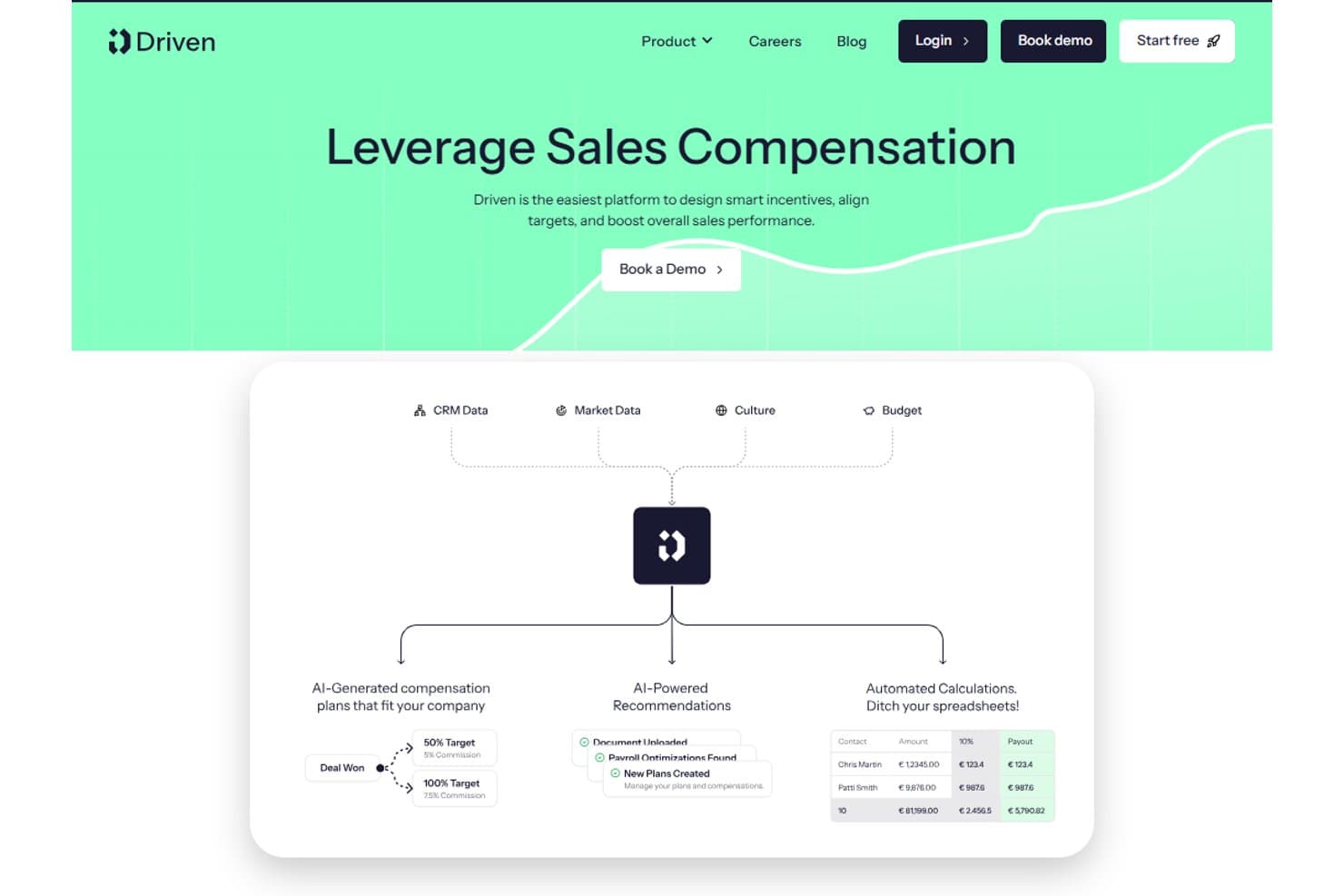
Driven offers an AI-powered sales compensation platform that automates commission calculations, generates compensation plans, and provides payroll optimization recommendations. Driven is an AI-native sales commission platform that uses autonomous agents to automate comp plan design, calculate commissions in real time, handle dispute reviews, and deliver personalized rep earnings dashboards.
Who Is Driven Best For?
Driven is a strong fit for RevOps and finance teams at scaling B2B companies running on HubSpot or Salesforce who are ready to move off spreadsheets.
Why I Picked Driven
Driven earns its spot on my shortlist because its agentic approach to comp plan design is unlike anything else in this category. Instead of manually configuring plans in a rule-based interface, the AI agent designs or updates your compensation strategy through a chat-based builder. I also like the Autopilot Dispute Reviews feature, where the agent automatically triages disputes by scanning deal comments, cutting the manual back-and-forth that bogs down finance teams at quarter close.
Driven Key Features
- Performance insights dashboard: Quickly analyze plan effectiveness, earning patterns, and attainment gaps using built-in analytics.
- Native HubSpot and Salesforce integration: Sync deal and rep data directly from popular CRMs for accurate, always-current commission calculations.
- Personalized rep dashboards: Give each sales rep a secure portal to view commissions, quota progress, and payout statements in real time.
- Multi-currency and fiscal year support: Configure complex sales orgs with global currencies and custom fiscal calendars for accurate compensation tracking.
Driven Integrations
Driven offers native integrations with Salesforce, HubSpot, and Slack, and provides an API for custom integrations.
Pros and Cons
Pros:
- Built-in rep dashboard and dispute resolution
- Real-time calculation engine with scenario modeling
- AI-powered agent automates plan design
Cons:
- Fewer user reviews than established competitors
- ASC 606 reporting is not fully automated
Learn more about Driven: Best AI-adaptive, user-friendly comp management
- Free demo available
- Pricing upon request
Visit WebsiteCustomer Rating:4.8/5
Visdum allows users to design compensation plans that align with their business needs without coding. Visdum is a sales commission management platform designed for revenue operations teams and sales leaders who need to automate complex compensation plans, reduce manual errors, and gain real-time visibility into commission data.
Who Is Visdum Best For?
Visdum is a strong fit for mid-market SaaS companies where sales operations and finance teams need to manage and automate multi-tiered commission structures without relying on spreadsheets.
Why I Picked Visdum
Visdum earns its spot on my shortlist because its AI-Adaptive engine handles the parts of commission management that typically break down at scale. The AI Copilot simulates real-time payout scenarios while you build or adjust comp plans, letting my team catch logic errors before payroll runs and disputes arise. The no-code plan designer also means I'm not waiting on engineering to update a quota threshold or add a new commission tier. Additionally, the AI-guided validation layer monitors each compute cycle and flags errors automatically, reducing the back-and-forth between finance and RevOps during close.
Visdum Key Features
- Rep-facing commission estimator: Sales reps can run "what-if" scenarios directly in their payee dashboard to see projected earnings based on open pipeline deals.
- SPIFFs and contests management: Sales leaders can set up and run short-term incentive programs and competitions on top of existing comp plans without rebuilding the plan structure.
- Clawback and mid-cycle adjustment tools: Finance and RevOps teams can apply clawbacks, top-ups, or mid-cycle corrections in a few steps, with a full audit trail attached.
- ASC 606 and IFRS 15 compliance automation: Visdum automatically structures commission amortization to align with revenue recognition standards, reducing manual compliance work.
Visdum Integrations
Integrations include Salesforce, HubSpot, Oracle NetSuite, Microsoft Dynamics, Sage Intacct, QuickBooks, Workday, HiBob, ADP, and DocuSign.
Pros and Cons
Pros:
- Real-time performance dashboards
- Clear visibility into earnings
- Intuitive, user-friendly interface
Cons:
- Mobile user support limited to higher-tiered plans
- Initial setup can be complex
Learn more about Visdum: Best for mobile-first salespeople
- Free demo available
- Custom pricing upon request
Visit WebsiteCustomer Rating:4.9/5
SmartWinnr focuses on mobile accessibility for commission tracking and gamification. SmartWinnr is a sales commission and incentive management platform designed for sales teams and organizations that want to automate commission tracking, motivate reps, and drive performance with real-time analytics and gamification.
Who Is SmartWinnr Best For?
SmartWinnr is a strong fit for mid-to-large sales organizations in industries like insurance, pharma, and financial services that manage distributed or field-based sales teams.
Why I Picked SmartWinnr
I picked SmartWinnr as one of the best because of how well it serves reps who spend most of their day away from a desk. The field coaching module is built mobile-first—managers can complete coaching forms, leave notes, and assign follow-up practice directly from their phone, even offline, with everything syncing once they're back online. I also like that live leaderboards update in real time on mobile, so reps in the field can check their contest standings and commission-linked KPI progress without logging into a desktop. For distributed sales teams where reps are rarely at a computer, that kind of on-the-go visibility into performance and incentives is genuinely useful.
SmartWinnr Key Features
- Incentive plan configuration: Build and manage multiple commission and incentive plan structures across different roles, regions, or product lines.
- AI-powered sales quizzes: Deliver bite-sized knowledge checks to reps to reinforce product knowledge and compliance training alongside performance tracking.
- Target vs. achievement tracking: Monitor individual and team progress against quota in real time with visual dashboards tied to commission outcomes.
- Contest management: Set up time-bound sales contests with custom rules, eligibility criteria, and reward structures to drive short-term performance.
SmartWinnr Integrations
Integrations include Salesforce, Microsoft Teams, Slack, SAP SuccessFactors, Oracle, Workday, Cornerstone OnDemand, Moodle, Zoom, and an API for custom integrations.
Pros and Cons
Pros:
- Responsive and fast support
- Multi-language availability
- Mobile-focused approach
Cons:
- No free trial
- Not a commission payout system
Learn more about SmartWinnr: Best enterprise-grade compensation management software that’s easy to use
- Free demo available
- Pricing upon request
Visit WebsiteCustomer Rating:4.3/5
Performio user data is highly protected due to AWS hosting and compliance regulation. Performio is a sales commission software built for revenue operations and finance teams who need to automate complex compensation processes, improve accuracy, and provide clear visibility into commission data for large or fast-growing organizations.
Who Is Performio Best For?
Performio is a strong fit for mid-market and enterprise sales organizations that manage high volumes of commission calculations across large or distributed sales teams.
Why I Picked Performio
Performio earns its spot on my shortlist because it genuinely delivers enterprise-grade commission management without the usual implementation headaches. What I like most is the structured plan builder—you can configure targets, crediting logic, clawbacks, draws, and true-ups without writing a single formula or calling in professional services. I also find the AI Admin Assistant particularly useful for enterprise teams: it flags calculation anomalies and speeds up dispute resolution in real time, which cuts down the back-and-forth that typically bogs down comp admins at scale. The flexible data model is another standout for large organizations, since Performio adapts to your existing data format rather than forcing you to reformat everything before importing.
Performio Key Features
- Sales rep portal: A configurable portal where reps can view their commission results, deal-level details, leaderboard rankings, and what-if calculators on desktop and mobile.
- ASC606 compliance and audit logs: Built-in support for ASC606 accounting guidelines, with full audit history and override capabilities for exceptions and edge cases.
- Commission forecasting and simulation: Tools to model and predict commission expenses, manage accruals, and run scenario planning for sales capacity and territory design.
- Analytics Studio: An AI-powered BI reporting layer that generates custom dashboards, leaderboards, and data visualizations directly from your compensation data.
Performio Integrations
Integrations include Salesforce, NetSuite, HubSpot, Microsoft Dynamics CRM, QuickBooks Online, Xero, Workday, Bamboo HR, Amazon Redshift, and Google BigQuery.
Pros and Cons
Pros:
- White-glove services
- Fast to implement
- Easy and intuitive to use
Cons:
- Limited flexibility in user reports
- Enterprise focused
Learn more about Performio: Best for automating complex sales commission calculations
- Free demo available
- From $20/payee/month (15 user minimum)
Visit WebsiteCustomer Rating:4.7/5
Commission report showing split breakdowns Core Commissions is built for businesses that need to manage intricate sales commission structures, helping finance and sales operations teams automate calculations, track payouts, and reduce manual errors.
Who Is Core Commissions Best For?
Core Commissions is a strong fit for mid-sized to enterprise businesses running multi-tiered or high-volume commission programs that have outgrown spreadsheet-based tracking.
Why I Picked Core Commissions
Core Commissions is on my shortlist because it handles commission structures that would break most spreadsheets. I chose it for its rules-based calculation engine, which lets my team define multi-tiered plans, split credits, and override logic without custom code. Automated audit trails log every calculation, so when a rep disputes a payout I can pull the exact formula and data that produced it. That level of transparency is difficult to achieve with manual processes.
Core Commissions Key Features
- Dispute management: A built-in workflow for reps to submit commission disputes, which managers can review, respond to, or escalate directly within the platform.
- Core Portal: A white-labeled web portal where individual reps can log in to view their own pay statements and performance data.
- Drag-and-drop report designer: A customizable reporting module that lets you build commission reports and dashboards using a visual drag-and-drop interface.
- Flexible commission cycle scheduling: Supports unlimited commission cycles running concurrently, across any time period—monthly, quarterly, or custom.
Core Commissions Integrations
Integrations include Salesforce, Microsoft Dynamics, Oracle NetSuite, HubSpot, Freshsales, and QuickBooks.
Pros and Cons
Pros:
- Unparalleled level of support
- ETL module for data transformation
- Automated commission calculating process
Cons:
- No dedicated mobile application
- Occasional disruptive technical issues
- Limited cloud-based version
Learn more about Core Commissions:

Leverage Leaptree to create, configure, and edit intelligent sales incentive plans—no code required. Leaptree is a commission management platform designed for sales teams who need automated commission calculations, real-time performance tracking, and native integration with Salesforce to simplify complex incentive processes.
Who Is Leaptree Best For?
Leaptree is a strong fit for sales operations and RevOps teams at mid-market companies that run their revenue processes entirely within Salesforce.
Why I Picked Leaptree
I picked Leaptree as one of the best because it's built 100% inside Salesforce—not just connected to it. That distinction matters in practice. My team doesn't have to manage API connections, sync errors, or data living in two places at once. Commission calculations pull directly from Salesforce opportunity and deal data, so there's no manual export or reconciliation step between your CRM and your comp tool. I also like the no-code incentive plan builder, which lets sales ops configure complex, multi-tiered commission structures without developer support. And the personalized rep dashboards give individual sellers a live view of what they've earned and what they need to close to hit the next tier—which is the kind of transparency that changes rep behavior.
Leaptree Key Features
- Compensation plan modeling: Run side-by-side "what if" scenario comparisons to forecast the impact of new commission structures before rolling them out.
- Clawback and exception management: Track and resolve commission disputes related to clawbacks and exceptions, with a reported 50% reduction in related disputes.
- External rep commission reporting: Automatically generate commission reports for external sales reps at $10/rep/month, without requiring Salesforce licenses or logins.
- Real-time performance dashboards: Give sales managers a live view of team-wide compensation data, with drill-down capability across individual reps and deals.
Leaptree Integrations
Integrations include Salesforce. Native integrations are not currently listed beyond Salesforce.
Pros and Cons
Pros:
- Strong integration with Salesforce
- User-friendly interface
- Customizable scorecards
Cons:
- Requires Salesforce Lightning subcription
- Limited analytics capabilities
Learn more about Leaptree: 10Best sales commission software for resolving mid-market commission problems
Varicent
- Not available
- Pricing upon request

Varicent allows you to edit and incorporate new data sources at any time. Varicent is a sales commission platform built for revenue operations teams and sales leaders who need to automate complex compensation plans, improve payout accuracy, and gain real-time visibility into sales performance.
Who Is Varicent Best For?
Varicent is a strong fit for mid-market companies with growing sales teams that need to manage multi-tiered commission structures without the overhead of enterprise-level systems.
Why I Picked Varicent
Varicent earns its spot on my shortlist because it directly addresses the commission management problems that mid-market sales teams run into as they scale. I like how its dispute resolution workflow lets reps flag payout discrepancies and track them through to resolution without back-and-forth in spreadsheets or email threads. I also use Varicent's plan modeling tools to test compensation structure changes before rolling them out, which helps avoid the kind of unintended payout errors that erode rep trust fast.
Varicent Key Features
- AI-assisted incentive plan design: Build and adjust commission plans using GenAI that draws on quotas, payout rules, and calculation logic embedded directly in the platform.
- Real-time rep earnings visibility: Give sellers a live view of their commission earnings so they can see how closed deals translate to payouts without waiting for end-of-period statements.
- Territory and quota optimization: Balance territory assignments and quota targets using capacity modeling tools that account for actual market opportunity.
- ELT data orchestration: Automatically connect, cleanse, and govern sales data from across your tech stack to keep commission calculations running from a single, accurate source of truth.
Varicent Integrations
Integrations include Salesforce, HubSpot, Workday, Amazon Aurora, Google Sheets, Oracle, Power BI, Shopify, Snowflake, and Tableau.
Pros and Cons
Pros:
- Highly configurable
- Territory management functionality
- Intuitive, multi-faceted system
Cons:
- No free trial
- Steep learning curve
Learn more about Varicent:
Diğer Satış Komisyonu Yazılımları
Kısa listeme girmeyen ancak yine de göz atmaya değer bazı ek satış komisyonu yazılımı seçenekleri şunlardır:
- 11SpiffBest for scaling to any complexity and volume
- 12EasyCompBest for effortless plan design and simulation
- 13PaletteBest for small teams who need automatic, rules
- 14CommissionlyBest sales commission software for quick and easy setup
- 15Creatio AI CRMBest for no-code commission process automation
- 16QuotaPathBest for AI-driven compensation planning
- 17QCommissionBest commission software for GDPR, ASC 606, ISO, and SOC 1 and SOC 2 compliance
- 18Sales CookieBest commission platform with incentive planning, designing, and tracking tools
- 19CaptivateIQBest sales commission tool for flexible, variable workflows and inevitable adjustments
- 20SparkPlugBest sales incentive software for frontline employees in retail and restaurant industries
- 21Iconixx SalesBest for automating commission, bonus, and merit programs to lower administrative costs
How I Evaluate Sales Commission Software
I split my evaluation into three parts, with the most weight on core functionality: calculate tiered payouts and adjust plans as quotas change. Next, I look for differentiators like what-if modeling. Finally, I consider onboarding, support, and pricing as teams scale.
Core Functionality (Table Stakes For This List)
When I'm selecting tools for my list, I score each one on a scale from 0 (does not offer the functionality) to 5 (excels in this area) for each core functionality listed below. I then convert the total into a percentage to help assess each tool's overall fit, with extra weight on any functionalities I’ve deemed essential.
- Commission Calculations (Essential): I look for accurate calculations across tiers, quotas, splits, and accelerators, including when multiple conditions affect a payout.
- Plan Design (Essential): I assess whether teams can configure varied plans and model changes, such as adjusting quotas or adding an incentive for a product launch.
- System Integrations: I check how commission data connects with CRM and finance systems, and whether changes to deals flow into calculations reliably.
- Payout Visibility: I look for clear rep and manager views of earnings, quota attainment, and how adjustments affect expected payouts.
- Dispute Management: I evaluate whether reps can flag a discrepancy, track its status, and see how the issue was resolved.
- Audit Trail: I check whether teams can trace calculations, plan changes, approvals, and adjustments to a clear historical record.
Once I have a list of tools that meet the criteria, I consider what sets each platform apart.
Differentiating Factors (What Sets Vendors Apart)
Here's how I compare and contrast different vendors:
Standout Features
What-if scenario modeling is the first thing I check. Before rolling out a new accelerator or adjusting quotas mid-year, I want to simulate the change against actual closed deals to see how payouts shift. AI-powered anomaly detection pairs well here—it flags irregular calculations before statements go out, which cuts down on disputes after the fact. I also evaluate whether a platform ties commission design to territory and quota planning, since misaligned territories quietly erode comp plan credibility with reps.
Beyond Features
Implementation support matters most. I look for vendors that assign dedicated compensation consultants and offer plan-migration tooling, since rebuilding legacy spreadsheet logic from scratch during onboarding can delay go-live by weeks. I also evaluate how well each platform handles multi-currency and multi-entity structures as headcount grows across regions. Finally, rep adoption is easy to overlook—I check whether the platform includes built-in plan documents, notifications, and change logs that help reps understand new statements without filing disputes.
Satış Komisyonu Yazılımı Nasıl Seçilir?
Uzun özellik listeleri ve karmaşık fiyatlandırma yapılarına kendinizi kaptırmanız kolaydır. Kendinize özgü yazılım seçme sürecinizi yürütürken odaklanmanızı korumanıza yardımcı olmak için göz önünde bulundurmanız gereken faktörlerin bir kontrol listesini burada bulabilirsiniz:
| Faktör | Nelere Dikkat Edilmeli? |
|---|---|
| FaktörÖlçeklenebilirlik | Nelere Dikkat Edilmeli?Yazılım işletmenizle birlikte büyüyebilir mi? Gelecekteki ihtiyaçları ve aracın kullanıcı ve işlem sayısındaki artışı sorun yaşamadan yönetip yönetemeyeceğini göz önünde bulundurun. |
| FaktörEntegrasyonlar | Nelere Dikkat Edilmeli?Mevcut sistemlerinizle çalışıyor mu? Veri silolarını önlemek için CRM, ERP ve diğer temel araçlarınızla uyumluluğunu kontrol edin. |
| FaktörÖzelleştirilebilirlik | Nelere Dikkat Edilmeli?Aracı iş akışlarınıza uyarlayabilir misiniz? Ayarları, raporları ve panoları ekibinizin süreçlerine uygun şekilde düzenleme seçenekleri arayın. |
| FaktörKullanım kolaylığı | Nelere Dikkat Edilmeli?Kullanıcı dostu mu? Ekibinizin kapsamlı bir eğitim veya hayal kırıklığı yaşamadan aracı hızla benimseyip benimseyemeyeceğini değerlendirin. |
| FaktörUygulama ve işe alıştırma | Nelere Dikkat Edilmeli?Kurulumu ne kadar sürecek? Gerekli eğitim oturumları da dahil olmak üzere sistemi kurup çalışır duruma getirmek için gereken zamanı ve kaynakları göz önünde bulundurun. |
| FaktörMaliyet | Nelere Dikkat Edilmeli?Bütçeniz dahilinde mi? Fiyatlandırma planlarını karşılaştırın ve gizli ücretlere dikkat edin. Sunulan değerin fiyatla örtüştüğünden emin olun. |
| FaktörGüvenlik önlemleri | Nelere Dikkat Edilmeli?Verileriniz ne kadar güvende? Şifreleme, erişim denetimleri ve veri koruma standartlarına uyumluluk gibi özellikleri arayın. |
| FaktörDestek erişilebilirliği | Nelere Dikkat Edilmeli?Hangi destek seçenekleri mevcut? Yardıma ihtiyaç duyduğunuzda sağlayıcının sohbet, e-posta veya telefon üzerinden zamanında destek sunup sunmadığını kontrol edin. |
2026 Yılında Satış Komisyonu Yazılımlarındaki Trendler
Satış komisyonu yazılımının gelişimi, otomasyon, şeffaflık ve stratejik içgörüyü vurgulayan daha geniş iş teknolojisi trendlerini yansıtmaktadır. Şu anda satış komisyonu yazılımını şekillendiren belirli trendleri inceleyelim:
Otomasyon ve Entegrasyon
- Gelişmiş Otomasyon: Komisyonların hesaplanması ve dağıtılması için gereken manuel çabayı azaltan, daha gelişmiş otomasyon özelliklerine doğru belirgin bir eğilim vardır. Otomasyon; veri içe aktarma, kuralların uygulanması ve hatta anlaşmazlıkların çözümüne kadar uzanarak komisyon sürecini kolaylaştırır.
- Daha Derin CRM ve ERP Entegrasyonları: Satış komisyonu araçları, CRM ve ERP sistemleriyle daha derin ve sorunsuz entegrasyonlar sunarak gerçek zamanlı veri akışını mümkün kılar ve satış performansı ile komisyon hesaplamalarının her zaman en güncel iş verileriyle uyumlu olmasını sağlar.
Analiz ve Şeffaflık
- Gelişmiş Analiz: Satış komisyonu yazılımındaki analiz olanaklarında yaşanan hızlı gelişmeler, daha ayrıntılı performans takibi ve trend analizine imkân tanır. Bu içgörüler, satış ve finans alanlarında stratejik kararları yönlendirerek daha iyi sonuçlar için komisyon planlarını optimize edebilir.
- Daha Fazla Şeffaflık: Araçlar, tüm paydaşlar için şeffaflığı artıran özellikleri giderek daha fazla sunmaktadır. Buna satış temsilcilerinin, yöneticilerin ve finans ekiplerinin erişebildiği ayrıntılı gösterge panelleri ve raporlar dâhildir; bu da kuruluş genelinde güveni ve anlayışı teşvik eder.
Talebin Gelişimi
- Bağımsız Çözümlere Yönelik Talebin Azalması: İşletmeler teknoloji yığınlarını birleştirmeye çalıştıkça bağımsız satış komisyonu araçlarına yönelik talep azalmaktadır. Bunun yerine, uçtan uca satış performansı yönetimi sunan kapsamlı platformlar tercih edilmektedir.
- Temel Hesaplama Özelliklerine Daha Az Önem Verilmesi: Temel işlevler önemini korusa da temel hesaplama özelliklerinden uzaklaşılarak senaryo planlama ve öngörücü analiz gibi daha karmaşık ve değer katan işlevlere yönelme dikkat çekmektedir.
Gelir operasyonu liderleri bu trendleri anlayarak yalnızca mevcut operasyonel ihtiyaçlarını karşılayan değil, aynı zamanda kendilerini gelecekteki zorluklara ve fırsatlara iyi şekilde hazırlayan satış komisyonu yazılımlarını seçebilir. Doğru yazılım; işlevsellik açısından kapsamlılık, kullanım kolaylığı ve stratejik içgörüleri bir arada sunmalı, kuruluşların satış teşviklerini optimize etmesini ve gelir artışını etkili bir şekilde sağlamasını mümkün kılmalıdır.
Satış Komisyonu Yazılımı Nedir?
Satış komisyonu yazılımı, satış komisyonlarının hesaplanmasını ve yönetilmesini otomatikleştiren dijital bir araçtır. İşletmeler tarafından karmaşık komisyon yapılarını yönetmek, satış temsilcilerinin performansını takip etmek ve doğru komisyon ödemelerini güvence altına almak için kullanılır. Yazılım, hesaplamadan dağıtıma kadar komisyon sürecini kolaylaştırmak amacıyla satış ve bordro sistemleriyle entegre olur.
Özellikler
Satış komisyonu yazılımı seçerken aşağıdaki temel özelliklere dikkat edin:
- Otomatik hesaplamalar: Hataları azaltmak ve zaman kazanmak için komisyonları satış verilerine göre otomatik olarak hesaplar.
- CRM entegrasyonu: Doğru veri akışını ve gerçek zamanlı güncellemeleri sağlamak için mevcut CRM sistemleriyle senkronize olur.
- Özelleştirilebilir raporlar: Komisyon trendlerini ve performans ölçümlerini analiz etmek için ihtiyaca göre uyarlanmış raporlar oluşturur.
- Birden fazla komisyon planı: Farklı satış rollerine ve stratejilerine uyum sağlamak için çeşitli komisyon yapılarını destekler.
- Gerçek zamanlı veri güncellemeleri: Bilgiye dayalı karar alma için en güncel satış ve komisyon bilgilerine anında erişim sağlar.
- Mobil erişim: Kullanıcıların komisyon verilerini hareket hâlindeyken görüntülemesine ve yönetmesine olanak tanıyarak esnekliği ve erişilebilirliği artırır.
- Güvenlik önlemleri: Uyumluluğu korumak için hassas finansal verileri şifreleme ve erişim denetimleriyle korur.
- Kullanıcı dostu arayüz: Satış ekipleri ve yöneticiler tarafından hızlıca benimsenmesi için kullanım kolaylığı sağlar.
- Eğitim kaynakları: Kullanıcıların yazılımdan en iyi şekilde yararlanmasına yardımcı olmak için eğitimler, web seminerleri ve kılavuzlar sunar.
- Müşteri desteği: Sorunları çözmek ve soruları yanıtlamak için birden fazla kanal üzerinden zamanında yardım sağlar.
Faydalar
Satış komisyonu yazılımını uygulamak, ekibiniz ve işletmeniz için çeşitli faydalar sağlar. Yararlanabileceğiniz faydalardan bazıları şunlardır:
- Doğrulukta artış: Otomatik hesaplamalar, komisyon ödemelerindeki hataları azaltarak adaleti ve güveni sağlar.
- Zaman tasarrufu: Veri girişini ve hesaplamaları otomatikleştirerek ekibiniz daha stratejik görevlere odaklanabilir.
- Motivasyonun artması: Açık ve doğru komisyon takibi, ödemeyi doğrudan performansa bağlayarak satış ekiplerini motive eder.
- Şeffaflığın artması: Özelleştirilebilir raporlar ve gerçek zamanlı güncellemeler, satışların ve komisyonların net bir görünümünü sunar.
- Esneklik: Birden fazla komisyon planı ve mobil erişim, farklı satış rollerine ve çalışma ortamlarına uyum sağlamanıza olanak tanır.
- Daha iyi karar verme: Gerçek zamanlı veri güncellemeleri, yöneticilerin güncel satış performansına dayanarak bilinçli kararlar almasına yardımcı olur.
- Güvenlik ve uyumluluk: Güçlü güvenlik önlemleri, hassas verileri koruyarak sektör standartlarına uyumu sağlar.
Maliyetler ve fiyatlandırma
Satış komisyonu yazılımını seçmek, mevcut çeşitli fiyatlandırma modellerinin ve planların anlaşılmasını gerektirir. Maliyetler özelliklere, ekip büyüklüğüne, eklentilere ve diğer unsurlara göre değişir. Aşağıdaki tablo, satış komisyonu yazılımı çözümlerindeki yaygın planları, ortalama fiyatlarını ve genellikle içerdikleri özellikleri özetlemektedir:
Satış Komisyonu Yazılımı İçin Plan Karşılaştırma Tablosu
| Plan türü | Ortalama fiyat | Yaygın özellikler |
|---|---|---|
| Plan türüÜcretsiz plan | Ortalama fiyat$0 | Yaygın özelliklerTemel komisyon takibi, sınırlı kullanıcı sayısı ve temel raporlama. |
| Plan türüKişisel plan | Ortalama fiyat$5-$25/kullanıcı/ay | Yaygın özelliklerGelişmiş hesaplamalar, CRM entegrasyonu ve özelleştirilebilir raporlar. |
| Plan türüİşletme planı | Ortalama fiyat$30-$60/kullanıcı/ay | Yaygın özelliklerBirden fazla komisyon planı, mobil erişim ve gelişmiş güvenlik özellikleri. |
| Plan türüKurumsal plan | Ortalama fiyat$70-$100/kullanıcı/ay | Yaygın özelliklerGerçek zamanlı veri güncellemeleri, özel destek ve tam özelleştirme seçenekleri. |
Satış Komisyonu Yazılımı Hakkında Sıkça Sorulan Sorular
Satış komisyonu yazılımı hakkında sık sorulan bazı soruların yanıtları:
İşletmemin satış komisyonu yazılımına ihtiyacı olduğunu nasıl anlarım?
Ekibiniz manuel komisyon hesaplamalarına çok fazla zaman harcıyorsa veya sık sık hatalarla karşılaşıyorsanız satış komisyonu yazılımını değerlendirmenin zamanı gelmiştir. Satış ekibiniz büyüyorsa ya da karmaşık komisyon yapıları kullanıyorsanız bu tür bir yazılım özellikle yararlıdır. Mevcut süreçlerinizi değerlendirin; süreçler zahmetli veya hataya açık görünüyorsa yazılım akıllıca bir yatırım olabilir.
Satış komisyonu yazılımı güvenli midir?
Evet, güvenilir satış komisyonu yazılımları şifreleme ve erişim denetimleri gibi güvenlik önlemleri içerir. Yazılımın güvenlik özelliklerini ve veri koruma düzenlemelerine uyumluluğunu her zaman kontrol edin. Bu, hassas finansal bilgilerin korunması açısından kritik öneme sahiptir. Tedarikçilere güvenlik sertifikalarını ve veri ihlallerini nasıl ele aldıklarını sorun.
Satış komisyonu yazılımı ödeme şeffaflığını nasıl artırır?
Temsilcilerin kazançlarını, hedeflerini ve yaklaşan ödemelerini görebildiğinden emin olun. Şeffaflık anlaşmazlıkları azaltır ve güven oluşturur.