

SugarCRM is a customer relationship management (CRM) tool designed to help businesses manage their sales, marketing, and customer support needs. It offers customization and integration capabilities, making it a flexible choice for many organizations.
However, despite these advantages, some users find SugarCRM's complexity challenging and seek more user-friendly alternatives. In light of this, I've compiled a list of the best SugarCRM alternatives to help businesses find a solution that better aligns with their needs and enhances customer management efficiency.
What Is SugarCRM?
SugarCRM is a customer relationship management software designed to help businesses manage and analyze customer interactions and data throughout the customer lifecycle. Sales teams, marketing departments, and customer support professionals use it to improve customer retention, drive sales growth, and enhance customer satisfaction.
SugarCRM Alternatives Comparison Table
This comparison table summarizes pricing details for my top SugarCRM alternatives selections:
| Tool | Best For | Trial Info | Price | ||
|---|---|---|---|---|---|
| 1 | Best for lead and opportunity management | Not available | From $40/user/month | Website | |
| 2 | Best for all-in-one small business management | Free plan + 7-day free trial + free demo available | From $12/user/month | Website | |
| 3 | Best for Google Workspace integration | 14-day free trial + free demo available | From $29/user/month | Website | |
| 4 | Best for all-in-one sales and marketing automation | Free plan available | From $8.99/user/month | Website | |
| 5 | Best for unified sales and support | Free plan + 15-day free trial + free demo available | From $12/user/month (billed annually) | Website | |
| 6 | Best for open-source flexibility | 30-day free trial + free demo available | From £50/month | Website | |
| 7 | Best for small business sales teams | 14-day free trial + free demo available | From $19/user/month | Website | |
| 8 | Best for integrated marketing and sales | Free plan + free demo available | Pricing upon request | Website | |
| 9 | Best for scalable CRM and marketing integration | 14-day free trial + demo available | From $29/user/month (billed annually) | Website | |
| 10 | Best for user-friendly sales automation | 14-day free trial + free demo available | From $13/user/month | Website |


Why Trust Our Software Recommendations
6,700+
Reviews
20
Industry experts
16+
Evaluation factors
14
Years
Our reviews reflect our independent judgment—not a sales pitch. Learn how we stay transparent.
For this guide, we evaluated tools using hands-on testing and independent research, scoring tools using our selection criteria.
Our reviews reflect our human editorial judgment, not a sales pitch.
Best SugarCRM Alternatives Reviews
In this analysis, I will examine various alternatives to SugarCRM and walk you through each tool’s pros and cons, features, and best use cases.
 Best for lead and opportunity management
- Not available
- From $40/user/month
Visit WebsiteCustomer Rating:4.7/5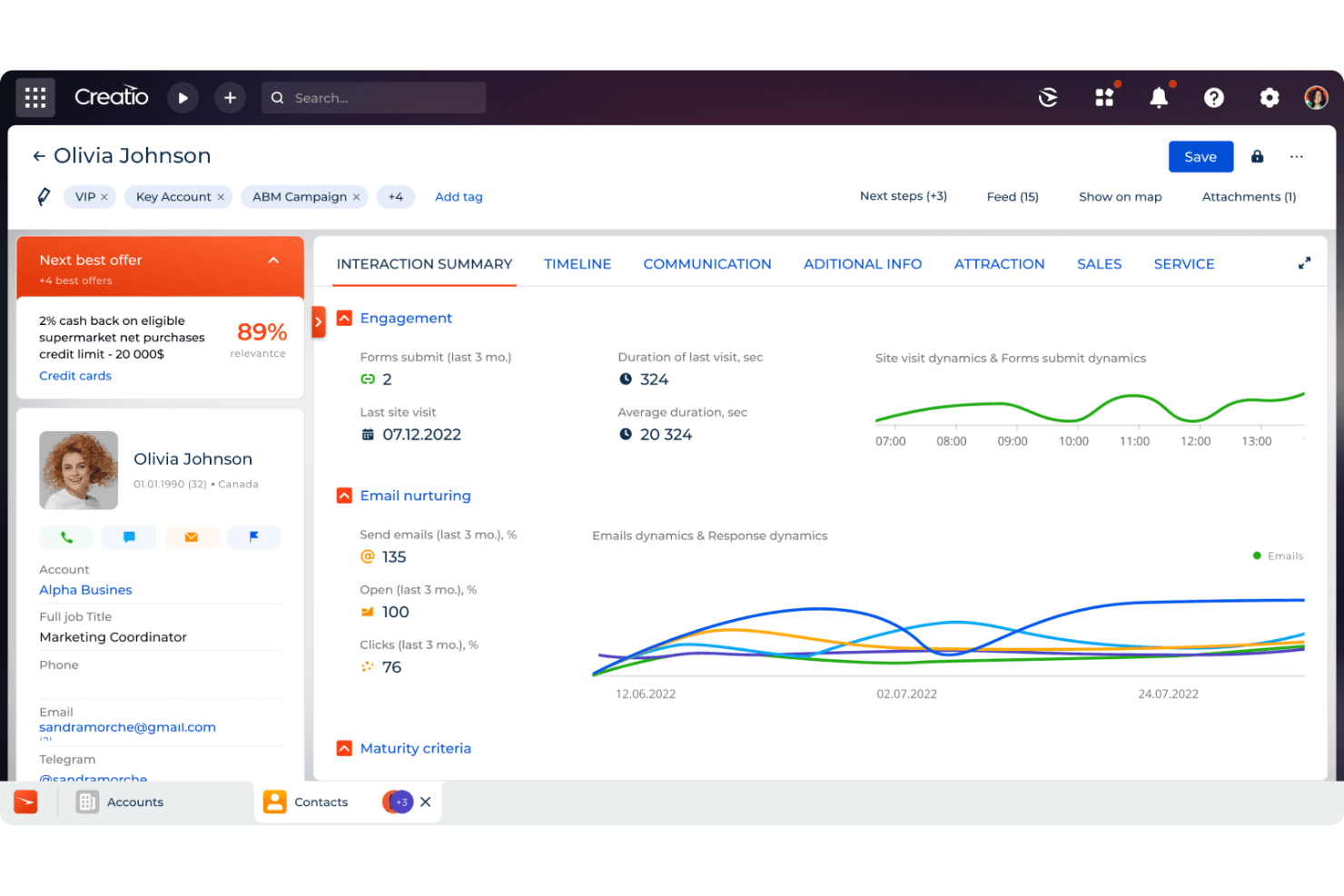
Creatio CRM surfaces AI-driven next best offers and engagement insights per contact. Creatio AI CRM is a no-code CRM platform built for sales, marketing, and service teams that want to manage the full revenue cycle—from lead capture to customer retention—without depending heavily on developers to configure or adapt the system.
Who Is Creatio AI CRM Best For?
Creatio AI CRM is a strong fit for sales operations teams that need to manage leads and opportunities across a highly configurable, no-code platform without heavy IT involvement.
Why I Picked Creatio AI CRM
I picked Creatio AI CRM because its lead and opportunity management capabilities go well beyond basic pipeline tracking. I love how the platform lets me configure predictive lead-scoring models that assign a 1–100 conversion probability to each lead, with custom success criteria and training filters I define myself. Pair that with fully configurable opportunity stages and a sales-pipeline dashboard that analyzes deals by stage in real time, and my team gets a genuinely detailed view of where revenue stands at any point in the cycle.
Creatio AI CRM Key Features
- No-code process designer: A visual BPMN-based tool for building multi-step workflows with conditional branching, OR/AND gateways, and stage-based logic—no developer required.
- Excel Import Wizard: Imports
.xlsxfiles into CRM sections with column-to-field mapping, duplicate handling, and background processing with a completion log. - Role- and object-level permissions: Configurable access controls at the object, record, and column level, backed by an audit log that tracks login attempts, role changes, and permission assignments.
- 700+ marketplace connectors: A pre-built integration library covering analytics, telephony, productivity, and data-enrichment tools, with REST, OData, and SOAP API support for custom connections.
Creatio AI CRM Integrations
Creatio AI CRM offers 700+ marketplace integrations, including Microsoft Power BI Desktop, Apollo.io, PandaDoc, Google Calendar, Microsoft Exchange, and Zapier. REST, OData, and SOAP APIs support custom integrations.
Pros and Cons
Pros:
- Shared workflows connect sales, marketing, and service
- Sales stages adapt to complex processes
- Predictive lead scores quantify conversion likelihood
Cons:
- Specialized reporting can require spreadsheet work
- Data imports require careful staging and deduplication
Learn more about Creatio AI CRM: Best for all-in-one small business management
- Free plan + 7-day free trial + free demo available
- From $12/user/month
Visit WebsiteCustomer Rating:4.8/5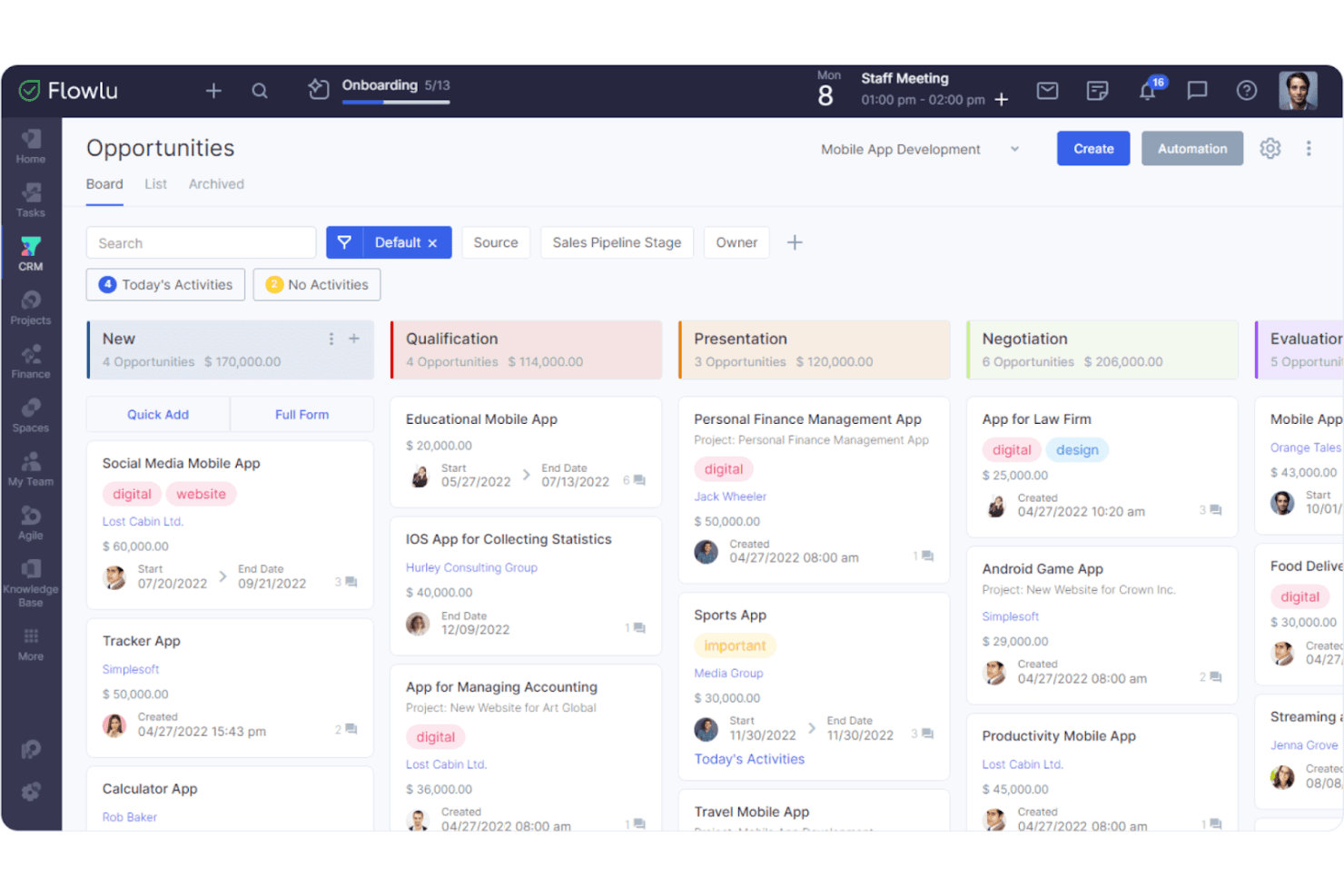
Flowlu organizes sales opportunities across pipeline stages on a kanban board. Flowlu is an all-in-one business platform that brings CRM, project management, invoicing, and financial tracking together—making it a strong fit for small teams that want to consolidate tools without paying enterprise-level prices.
Who Is Flowlu Best For?
Flowlu suits small business owners and lean teams who want CRM, project management, invoicing, and financial tracking in one place without paying for separate tools.
Why I Picked Flowlu
I've included Flowlu in my top picks because it genuinely consolidates what most small teams are juggling across separate tools: CRM pipelines, project tracking, invoicing, and financial reporting all live in one workspace. I particularly like that you can link a won CRM opportunity directly to a new project, so the handoff from sales to delivery happens without re-entering data. The built-in financial tracking, covering P&L and cash flow reports, means my team isn't patching together a separate accounting tool just to understand project profitability.
Flowlu Key Features
- Sales automation rules: Configure conditional triggers to send notifications, create projects from won deals, and launch personalized email sequences automatically.
- Client portal: Give clients a dedicated space to access project updates, documents, files, and billing information without needing a full Flowlu account.
- Customizable pipelines: Build unlimited sales pipelines with custom stages, access controls, and drag-and-drop stage reordering to match your sales process.
- Role-based access controls: Set CRM permissions at the user level, restricting visibility to assigned records or full pipeline access depending on each team member's role.
Flowlu Integrations
Flowlu offers native integrations with Gmail, Microsoft Outlook, Mailchimp, Google Calendar, Slack, Zendesk Support, Stripe, and WhatsApp. It also provides REST API access, outgoing webhooks, OAuth 2.0, and SDKs for custom integrations.
Pros and Cons
Pros:
- CRM, projects, invoicing, and finance share one workspace
- Custom pipelines support varied sales motions
- Won deals can launch delivery projects
Cons:
- CSV migration takes effort; SugarCRM process undocumented
- CRM reporting may not support deep forecasting
Learn more about Flowlu: Best for Google Workspace integration
- 14-day free trial + free demo available
- From $29/user/month
Visit WebsiteCustomer Rating:4.5/5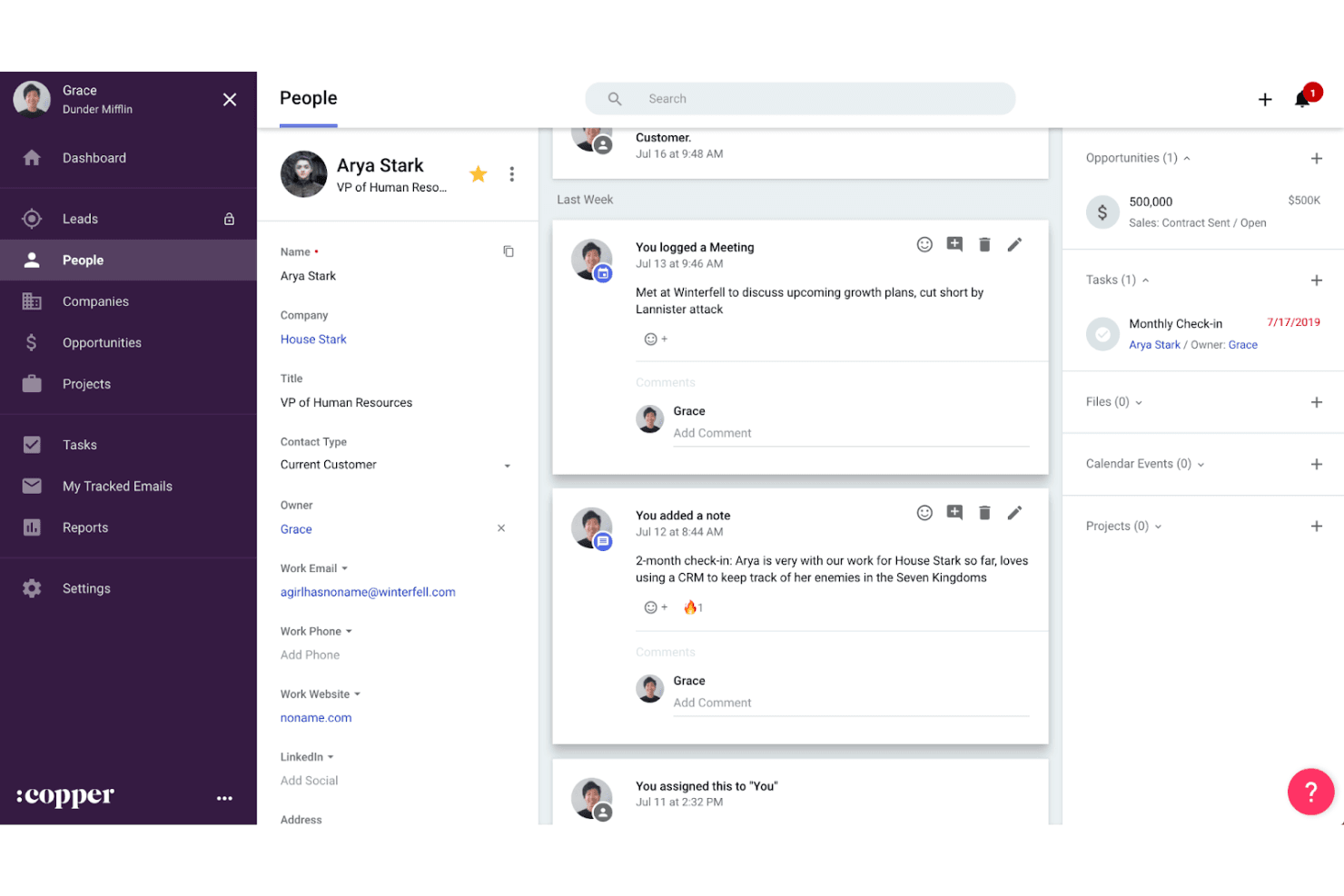
Copper CRM tracks contact activity, notes, and deals in one view. Copper is a CRM built for relationship-driven teams that live in Gmail and Google Workspace, helping you manage contacts, deals, and projects without leaving the tools you already use every day.
Who Is Copper Best For?
Copper is a strong fit for small to mid-sized teams that run their business out of Google Workspace and want a CRM that works inside Gmail without a steep learning curve.
Why I Picked Copper CRM
I picked Copper as one of the best SugarCRM alternatives because of how completely it lives inside Google Workspace. Rather than syncing with Gmail as an afterthought, Copper surfaces deal records, tasks, and contact history directly in your inbox via a Chrome extension, so your team logs activity and moves deals forward without switching tabs. I also like that closed deals can roll straight into project pipelines, keeping delivery and onboarding tracked in the same place as the original sale.
Copper CRM Key Features
- Contact enrichment: AI automatically fills in new contact records with phone numbers, email addresses, and social profiles when you add someone to the CRM.
- Deal-to-project handoff: Closed deals can be moved directly into project or onboarding pipelines, keeping delivery work tracked alongside the original sale.
- AI pipeline flags: AI identifies bottlenecks and surfaces high-value opportunities that may need attention across your active pipelines.
- Mobile activity logging: The iOS and Android apps let you log calls, texts, emails, and voice notes, with speech-to-text support for activities and notes on the go.
Copper CRM Integrations
Copper offers native integrations across Google Workspace, including Gmail, Google Calendar, Google Contacts, Google Drive, Google Sheets, and Looker Studio, plus marketplace integrations with LinkedIn, Mailchimp, DocuSign, QuickBooks, PandaDoc, Slack, and Zendesk. It supports REST API, webhooks, an integration SDK, and 5,000+ apps through Zapier.
Pros and Cons
Pros:
- Imports SugarCRM records with mapped fields
- Moves closed deals into delivery workflows
- Keeps deal activity and follow-ups visible
Cons:
- Complex workflows can exceed automation controls
- Custom reports require the Business plan
Learn more about Copper CRM: Best for all-in-one sales and marketing automation
- Free plan available
- From $8.99/user/month
Visit WebsiteCustomer Rating:4.3/5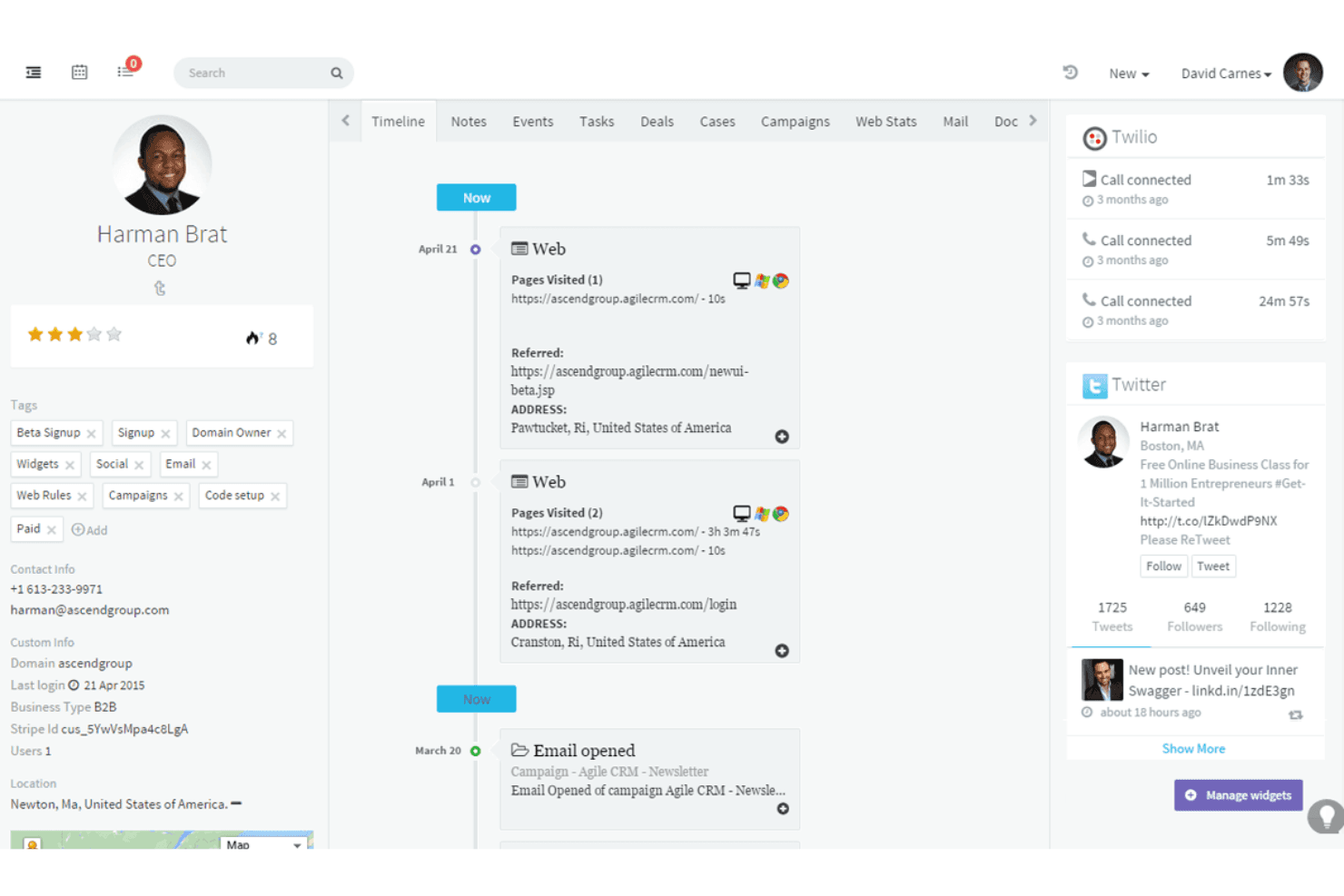
Agile CRM displays a contact's full activity timeline and social data. Agile CRM is an all-in-one platform for small businesses that want to manage sales, marketing, and customer support without juggling multiple tools.
Who Is Agile CRM Best For?
Agile CRM is a strong fit for small business owners who want sales, marketing, and customer support in one affordable platform.
Why I Picked Agile CRM
I've included Agile CRM in my top picks because it pulls sales, marketing, and customer support into one platform, which is exactly what small teams leaving SugarCRM's complexity behind tend to need. I particularly like its drag-and-drop campaign automation, where you can build multi-step nurturing workflows triggered by behaviors like email opens or web activity, without touching a separate marketing tool. The built-in helpdesk also means my team can track a support ticket alongside the same contact's deal history, keeping the full customer picture in one place.
Agile CRM Key Features
- Lead scoring: Automatically scores leads based on defined triggers and thresholds, then alerts your sales rep when a contact crosses the qualification threshold.
- Built-in telephony: Make and receive calls directly from the CRM, with call scripts, call recording, and automated voicemails available on higher-tier plans.
- Web engagement tools: Deploy timed popups, exit-intent popups, signup forms, coupons, and surveys directly on your website to capture and convert visitors.
- Helpdesk ticketing: Manage customer support tickets alongside contact and deal records, with routing, labels, canned responses, and ticket-status reporting built in.
Agile CRM Integrations
Agile CRM offers 50+ native integrations on Regular and Enterprise plans, including Google Apps, Microsoft Exchange, Office 365, Twilio, Zendesk, Stripe, Shopify, and WooCommerce. It also supports REST and language-specific APIs, webhooks, and Zapier.
Pros and Cons
Pros:
- Built-in ticketing connects service with deals
- Behavior-triggered campaigns support lead nurturing
- Sales, marketing, and support share records
Cons:
- Reporting offers limited forecasting flexibility
- No documented SugarCRM deal migration path
Learn more about Agile CRM: Best for unified sales and support
- Free plan + 15-day free trial + free demo available
- From $12/user/month (billed annually)
Visit WebsiteCustomer Rating:4.3/5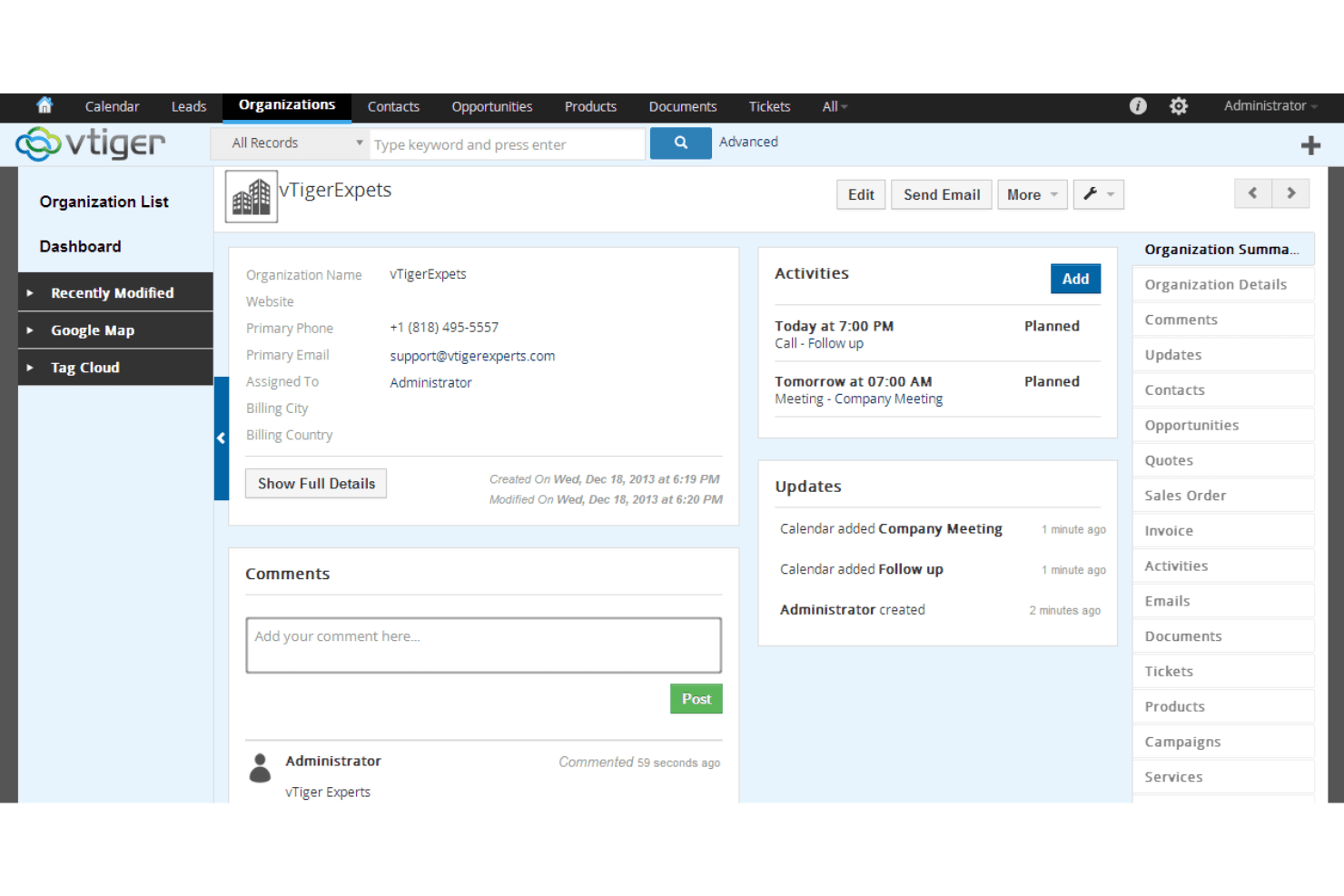
Vtiger CRM organizes org details, activities, and updates in one view. Vtiger CRM is an all-in-one platform that unifies sales, marketing, help desk, and inventory in a single system—making it a practical fit for small to mid-sized businesses that want to manage the full customer lifecycle without juggling multiple tools.
Who Is Vtiger CRM Best For?
Vtiger CRM is a strong fit for small to mid-sized teams that need sales, marketing, and support capabilities in a single platform without paying for separate tools.
Why I Picked Vtiger CRM
I picked Vtiger CRM because it genuinely unifies sales and support in a single platform through One View, which surfaces a customer's deal history, support tickets, and marketing engagement all in one place. I appreciate that you can run multiple sales pipelines alongside help-desk SLAs and case management without toggling between separate tools. When a deal closes, your support team already has full context, so there's no handoff gap.
Vtiger CRM Key Features
- Multiple sales pipelines: Create and manage separate pipelines for different product lines, deal sizes, or customer types, each with customizable stages.
- Lead auto-assignment and routing: Automatically distribute incoming leads to the right rep based on criteria like location, deal size, or availability.
- Process designer: Build multi-step business processes with rules, conditions, approvals, flowcharts, and automated tasks starting at the One Professional tier.
- VTAP low-code platform: Extend your CRM with custom flows, module extensions, and HTTP-based APIs without writing code from scratch.
Vtiger CRM Integrations
Vtiger CRM documents more than 500 integrations, including Google Workspace, Microsoft Teams, Microsoft Outlook, Mailchimp, QuickBooks, Xero, Stripe, and Zapier. VTAP also provides REST and HTTP-based APIs for custom integrations.
Pros and Cons
Pros:
- SugarCRM migration path is documented
- Reviewers praise adaptable fields and modules
- Sales, marketing, and support share customer context
Cons:
- Workflow setup can be difficult for beginners
- Reviewers describe the interface as dated
Learn more about Vtiger CRM : Best for open-source flexibility
- 30-day free trial + free demo available
- From £50/month
Visit WebsiteCustomer Rating:4.5/5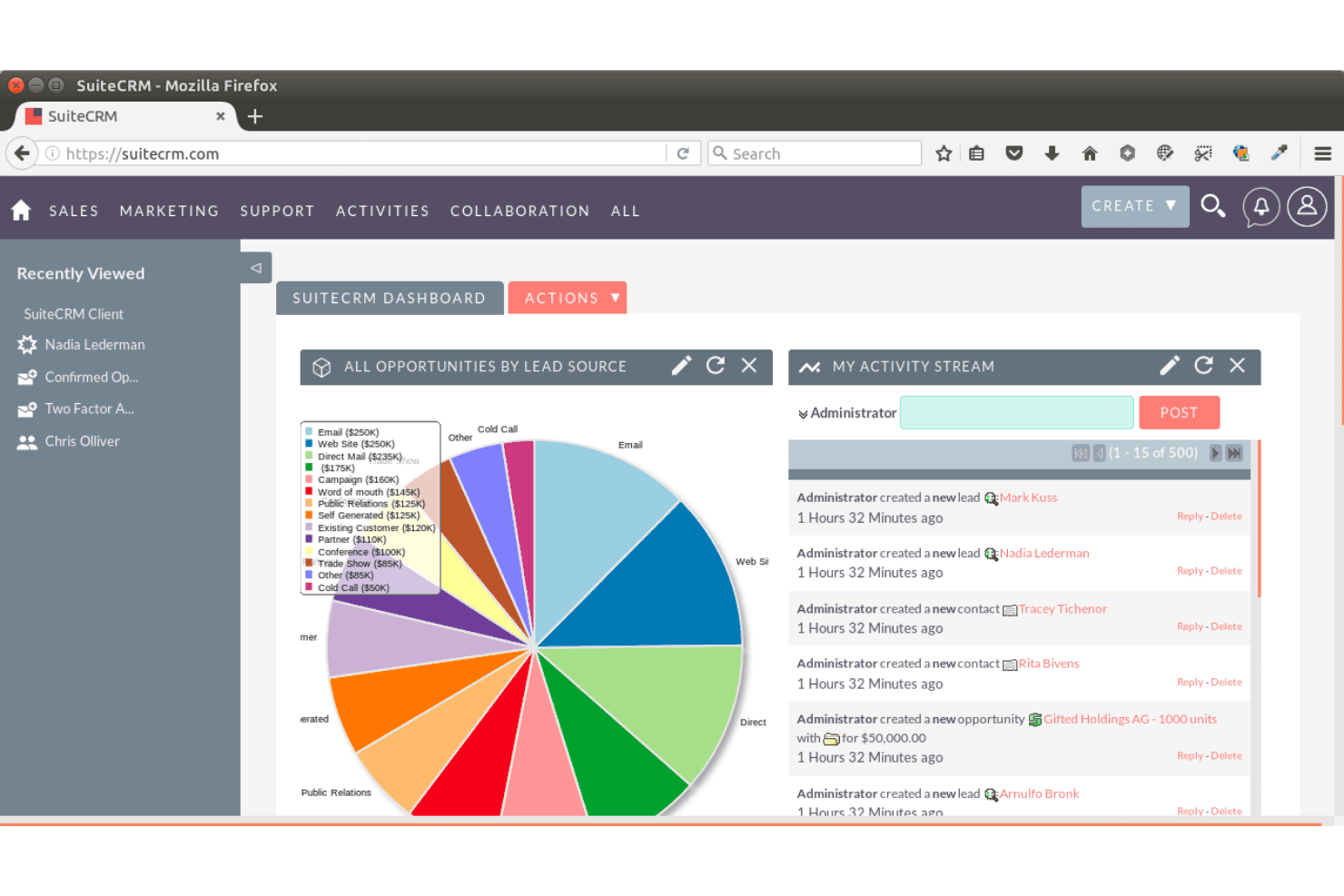
SuiteCRM displays opportunities by lead source on its dashboard. SuiteCRM is a free, open-source CRM platform that gives technical teams full control over their sales pipeline, marketing campaigns, and customer service workflows without paying per-user licensing fees.
Who Is SuiteCRM Best For?
SuiteCRM is a strong fit for technically resourced teams that want full control over their CRM without paying per-user licensing fees.
Why I Picked SuiteCRM
I picked SuiteCRM as one of the best because its open-source foundation gives technical teams something SugarCRM's commercial model no longer offers: full ownership of the codebase. I particularly like Studio, which lets CRM administrators add custom fields, reshape layouts, and build module relationships without writing a line of code. The ability to export those customizations as a package and deploy them across instances is something I find genuinely useful when managing multiple environments.
SuiteCRM Key Features
- Weighted opportunity pipeline: Tracks deals through configurable stages with probability scores that roll up into a weighted pipeline view for forecasting.
- Role-based security groups: Controls data access at the group or team level, letting administrators restrict who can view, edit, or export specific records.
- CSV import wizard: Maps, deduplicates, and validates imported contact and account data, with saved settings and an undo option for repeat imports.
- Scheduled report delivery: Saves and schedules reports to be delivered by email, with dashboard dashlets for embedding charts and pipeline data.
SuiteCRM Integrations
SuiteCRM offers marketplace integrations with Microsoft Outlook, Google Calendar, Mailchimp, Mautic, QuickBooks, Xero, DocuSign, Slack, Zendesk, and WooCommerce. Its REST API supports custom integrations with record and relationship access.
Pros and Cons
Pros:
- Weighted pipelines support sales forecasting
- Studio customizations adapt CRM data models
- Open-source code enables deep ownership
Cons:
- Self-hosting adds maintenance and technical overhead
- Dated interface can slow team adoption
Learn more about SuiteCRM : Best for small business sales teams
- 14-day free trial + free demo available
- From $19/user/month
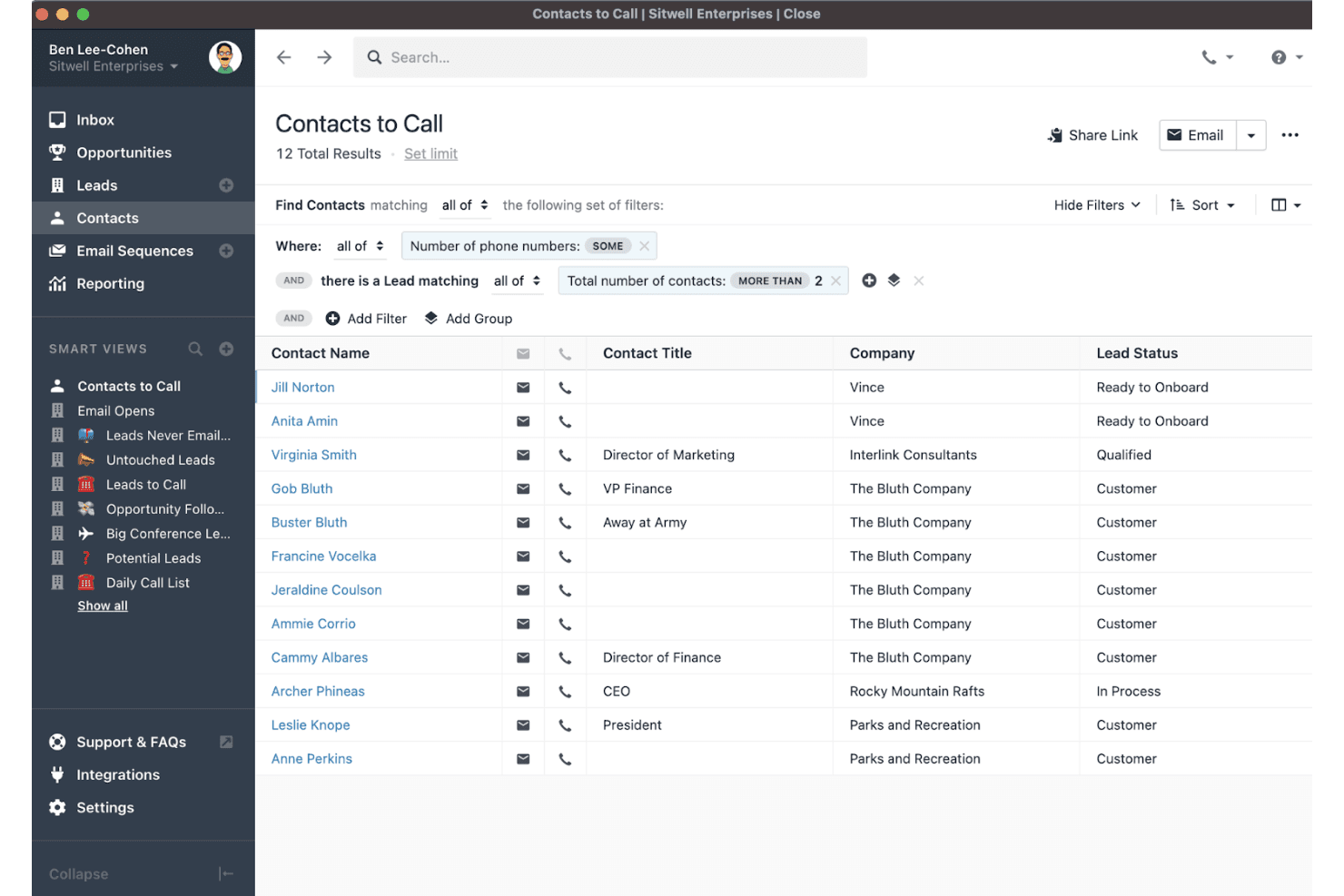
Close lets users filter and manage contact call lists with smart views. Close is a sales-focused CRM built for small teams that want calling, email, SMS, and pipeline management in one place—without needing a dedicated admin to configure or maintain it.
Who Is Close Best For?
Close is a strong fit for small sales teams that want calling, email, and pipeline management built in from day one—without relying on a CRM admin to get things running.
Why I Picked Close
I picked Close as one of the best SugarCRM alternatives because it packs calling, email, SMS, and pipeline management into a single platform built specifically for small sales teams. What I really like is the built-in power and predictive dialers: rather than patching together a separate dialer tool, my team can run outbound sequences and automatically log every call directly to the lead record. The live call coaching on the Scale plan also means sales managers can whisper or barge into calls in real time, which is something SugarCRM simply doesn't offer out of the box.
Close Key Features
- Guided CRM migration: Import leads, contacts, and deals from SugarCRM using a step-by-step tool that maps fields, creates custom fields, and runs a sample migration before you commit to the full import.
- Custom fields and activities: Store business-specific data on leads, contacts, and opportunities, and create custom activity templates to reflect your unique sales process.
- Multi-channel inbox: Manage emails, calls, SMS, and follow-up tasks from a single centralized inbox view inside the CRM.
- Role-based access and lead visibility: Control which leads different users can see and assign permissions by role, with custom roles available on the Scale plan.
Close Integrations
Close lists 100+ integrations, including HubSpot, Gmail, Microsoft 365, Google Calendar, Fivetran, and Help Scout. It also offers REST API access, webhooks, OAuth 2.0, an MCP server, and Zapier connectivity to 2,000+ third-party apps.
Pros and Cons
Pros:
- Dialers and live coaching support outbound teams
- SugarCRM imports support mapped sample reviews
- Built-in calling logs activity to lead records
Cons:
- Sales focus leaves marketing and support workflows elsewhere
- Reports struggle with skipped or reversed deal stages
Learn more about Close: Best for integrated marketing and sales
- Free plan + free demo available
- Pricing upon request
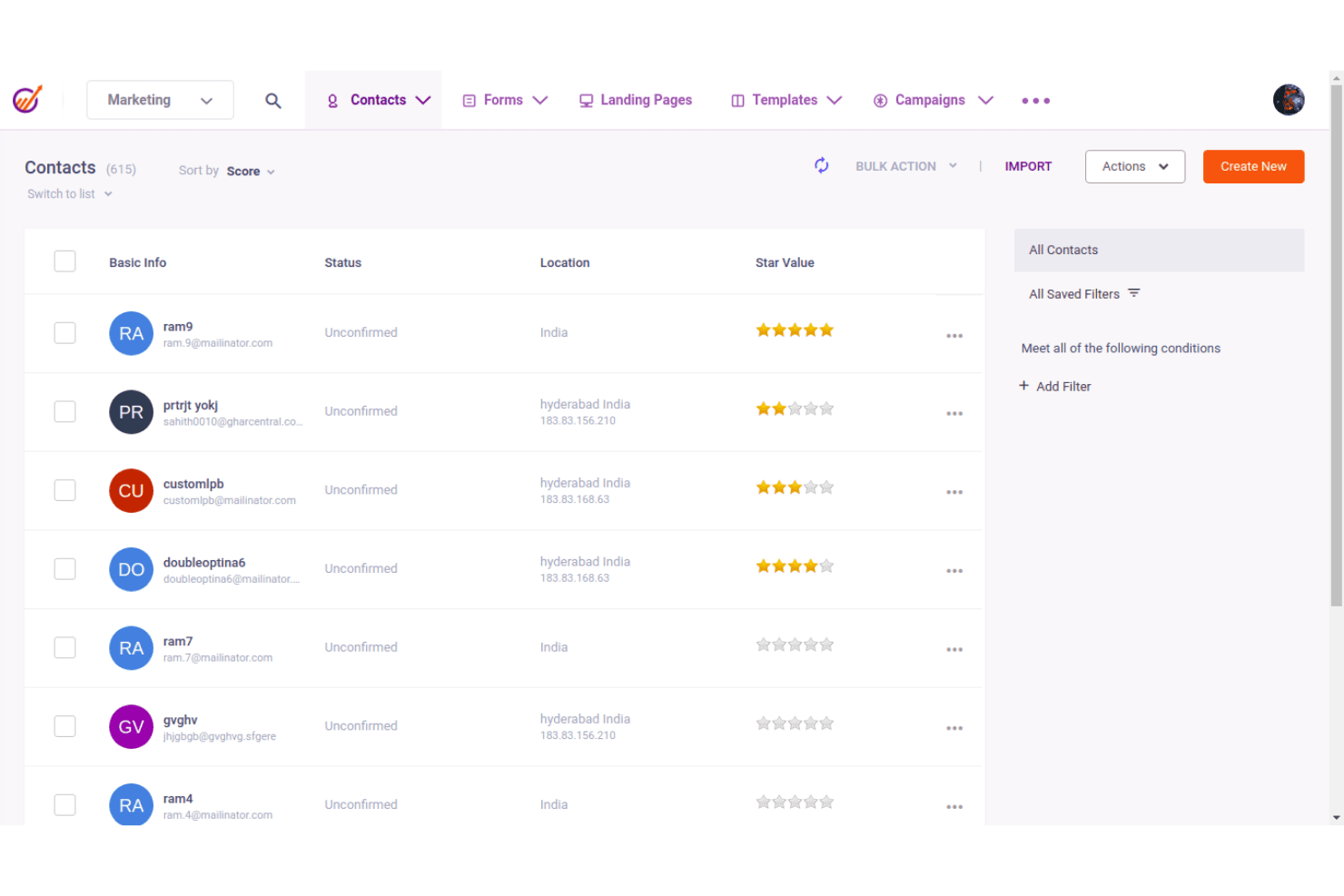
EngageBay CRM displays contacts with scores, status, and location. EngageBay is an all-in-one CRM platform that bundles sales, marketing, and customer support tools into a single system, making it a practical fit for small businesses that want to manage leads, deals, and customer outreach without juggling multiple subscriptions.
Who Is EngageBay CRM Best For?
EngageBay CRM is a strong fit for small business owners who want sales, marketing, and support tools in one place without paying for multiple platforms.
Why I Picked EngageBay CRM
I picked EngageBay CRM because it genuinely unifies sales, marketing, and support in a way that removes the need to stitch together separate tools. I appreciate that a single contact record surfaces associated deals, tasks, notes, and email activity together, so my team isn't jumping between platforms to get a full picture of a prospect. Sales automations trigger directly off deal stage changes or milestone updates, which means follow-up sequences stay connected to pipeline movement without manual handoffs.
EngageBay CRM Key Features
- Predictive lead scoring: Assigns point values to contacts based on configurable criteria and data points to help prioritize outreach.
- Custom fields across record types: Adds tailored fields to contact, company, deal, and ticket records, with options to mark fields required or surface them in filters.
- Goal tracking by team member: Sets individual targets measured by deals created, deal revenue, or call logs across monthly, quarterly, half-yearly, or yearly periods.
- CSV import with field mapping: Imports contacts, companies, and deals from CSV files using a guided field-matching step that includes date/time format selection.
EngageBay CRM Integrations
EngageBay lists integrations with Shopify, SendGrid, Mailgun, Mandrill, and Xero, plus Zapier. It also provides JavaScript and REST API keys for custom integrations, but doesn’t publish a total integration count.
Pros and Cons
Pros:
- Deal-stage automations trigger timely follow-ups
- CSV imports map contacts, companies, and deals
- Unified customer records connect sales and support
Cons:
- SugarCRM migration requires manual CSV mapping
- Advanced forecasting remains limited
Learn more about EngageBay CRM: Best for scalable CRM and marketing integration
- 14-day free trial + demo available
- From $29/user/month (billed annually)
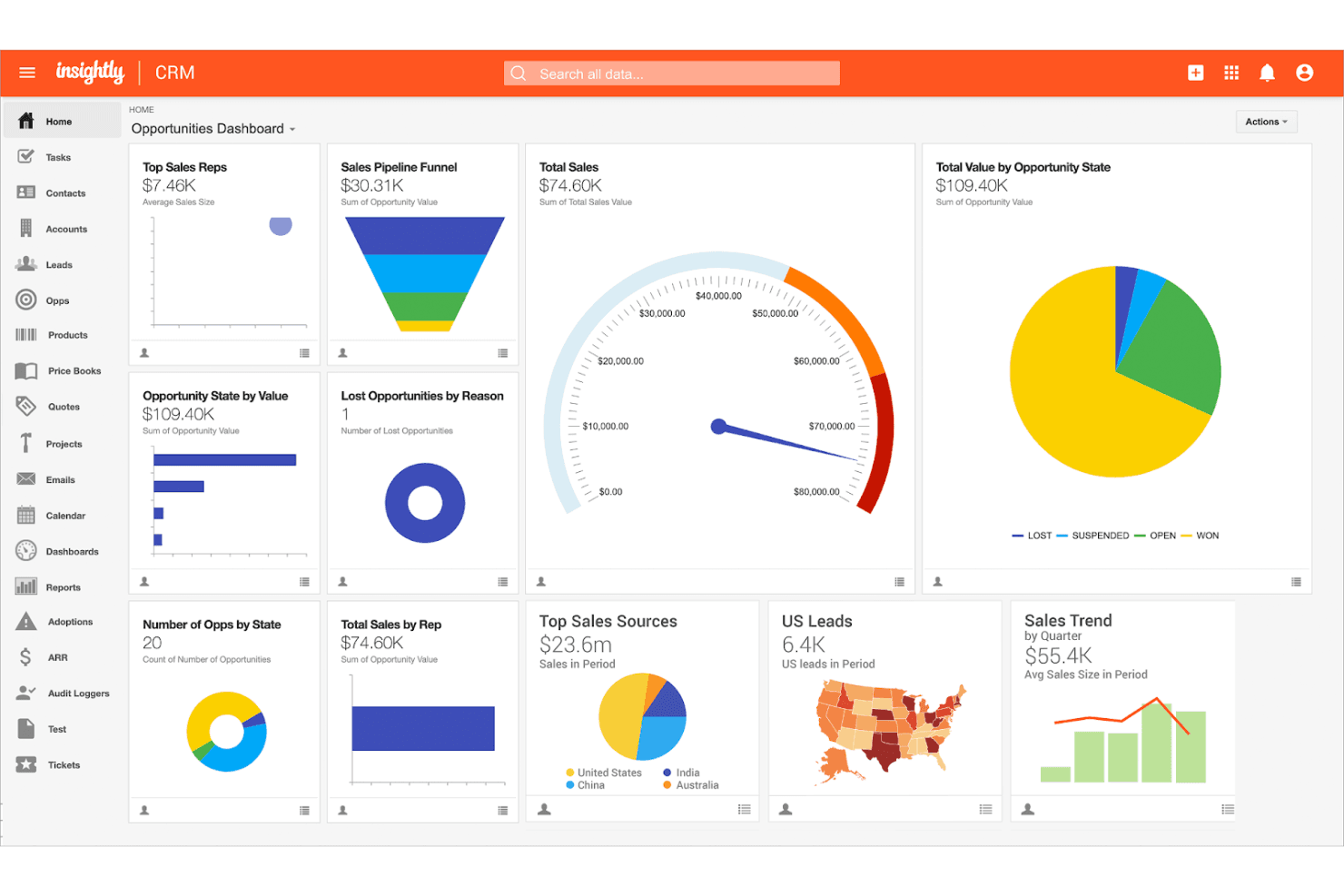
Insightly centralizes sales metrics in a visual CRM dashboard. Insightly CRM is a cloud-based platform built for growing businesses that want to manage contacts, sales pipelines, and post-sale project delivery in one place—without the complexity that makes tools like SugarCRM hard to adopt.
Who Is Insightly Best For?
Insightly CRM is a strong fit for growing businesses that need a scalable CRM with built-in project management and native marketing integration across the full customer lifecycle.
Why I Picked Insightly
I picked Insightly as one of the best because it's one of the few CRMs that scales marketing operations directly alongside sales pipelines without requiring a separate platform. I particularly like how the opportunity-to-project handoff works: when a deal closes, I can convert it into a project and carry over every related contact, task, and detail automatically. Pair that with native Insightly Marketing integration for lead nurturing, and the entire customer lifecycle stays in one connected system.
Insightly Key Features
- AI Copilot: Use conversational AI to create and update records, summarize deals, and surface potential upsell opportunities directly within the CRM.
- Role-based permissions and page layouts: Configure user access at the role level and tailor page layouts to match how different teams interact with CRM data.
- Business intelligence dashboards: Monitor pipeline performance and business KPIs through pre-built and customizable dashboards with shareable views across your team.
- MCP server connection: Link Insightly CRM to AI assistants like Claude, ChatGPT, and Microsoft Copilot to query CRM data and generate insights using natural language.
Insightly Integrations
Insightly lists over 2,000 marketplace integrations, including Microsoft 365, Google, PandaDoc, QuickBooks, Xero, Slack, Jira, Shopify, DocuSign, and Microsoft Power BI. It also offers native CRM connections to Insightly Marketing and Service, plus REST API, webhooks, and MCP support for custom integrations.
Pros and Cons
Pros:
- Clear interface supports routine CRM adoption
- Custom pipelines connect contacts, deals, projects
- Won deals carry context into delivery
Cons:
- Workflow actions cannot trigger other workflows
- SugarCRM migration relies on generic imports
Learn more about Insightly: Best for user-friendly sales automation
- 14-day free trial + free demo available
- From $13/user/month
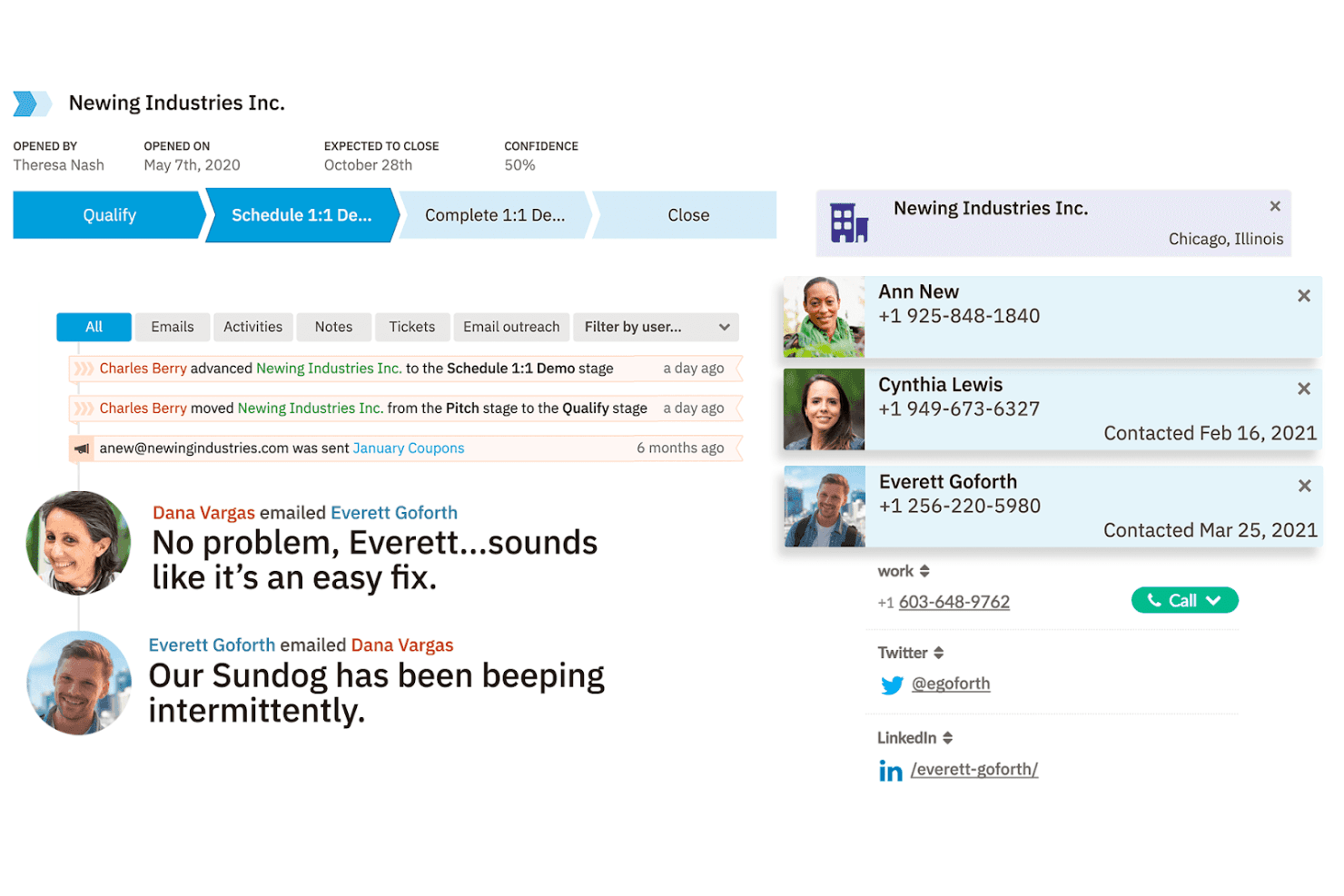
Nutshell CRM tracks deal stages, contacts, and email threads in one view. Nutshell is a CRM built for small and mid-sized sales teams that want to manage contacts, track deals, and automate follow-ups without the complexity of enterprise platforms like SugarCRM or Salesforce.
Who Is Nutshell Best For?
Nutshell is a strong fit for small and mid-sized sales teams that want an approachable CRM with built-in automation and don't need the deep customization of an enterprise platform.
Why I Picked Nutshell CRM
I picked Nutshell CRM as one of the best because its built-in sales automation hits a sweet spot that SugarCRM users often miss: pipeline stage goals that automatically advance deals when conditions are met, plus lead assignment rules that route by territory, product, or industry without manual intervention. I also love the drip email sequences that stop the moment a lead replies, keeping outreach relevant without over-engineering the setup.
Nutshell CRM Key Features
- Import2 CRM migration: Automatically migrates contacts, companies, deals, and pipeline data from SugarCRM and other common CRMs, with field mapping, custom-field inclusion, and a sample review before the full migration runs.
- Forecast report: Compares sales to date, pipeline value, projected sales, and quota with 27 filter options and segmentation by product, assignee, territory, source, or stage.
- AI chatbot: Responds to website visitors around the clock, qualifies leads, books meetings, and hands conversations to a human agent when needed.
- Audit log: Records user actions, session details, device type, and IP address in real time for administrators on Business and Enterprise plans.
Nutshell CRM Integrations
Nutshell lists hundreds of marketplace integrations, including Gmail and Google Calendar, Microsoft 365, Microsoft Exchange Calendar, Mailchimp, Calendly, DocuSign, Intercom, and Aircall. Its REST and JSON-RPC API and MCP server support custom integrations and AI assistant connectivity.
Pros and Cons
Pros:
- Small-team onboarding earns positive support reviews
- Stage goals advance deals without manual follow-up
- SugarCRM imports preserve mapped fields and pipelines
Cons:
- Custom fields cannot filter custom reports
- Conditional automation trails complex SugarCRM workflows
Learn more about Nutshell CRM:
Other SugarCRM Alternatives
Below is a list of additional SugarCRM alternatives that we evaluated but did not make the top list. They’re still worth checking out!
- 11ApptivoBest for customizable CRM solutions
- 12Spotler CRMBest for B2B marketing automation
- 13Bigin by Zoho CRMBest for simple pipeline management
- 14Zoho CRMBest for customizable workflows
- 15Salesforce Financial Services CloudBest for third-party integrations
- 16Bitrix24Best for data migration
- 17PipedriveBest for visual sales pipelines
- 18OdooBest for integrated business applications
- 19Freshworks CRMBest for AI-powered leads
- 20Dynamics 365Best for enterprise-level solutions
Related Revenue Operations Software Reviews
If you still haven't found what you're looking for, check out these related tools we've tested and evaluated.
- CRM Software
- Sales Software
- Lead Management Software
- Business Intelligence Software
- Contract Management Software
- Revenue Management System
How I Evaluate SugarCRM Alternatives
I evaluate each option in two layers: the must-have CRM foundations like pipeline tracking and forecasting, then the differentiators—AI, integrations, and data governance—that reveal the right fit.
Core Functionality (Table Stakes For This List)
When I'm selecting tools for my list, I rank each one on a scale from 0 (does not offer the functionality) to 5 (excels in this area) for each core functionality listed below. Then, I calculate the tool's total score into a percentage. Each tool needs to achieve a minimum total score of 65% to be considered for inclusion.
- Contact & Account Management: I look for a unified customer view that links contacts, accounts, and activity history so RevOps teams can trace every touchpoint from first touch to renewal.
- Pipeline & Opportunity Tracking: Each tool should let you configure deal stages, build multiple pipelines, and assign weighted values so forecasting reflects how your team actually sells.
- Sales Automation & Workflows: I evaluate whether the platform supports multi-step workflow builders for tasks like lead routing, approval chains, and follow-up sequences triggered by deal stage changes.
- Reporting & Revenue Analytics: Dashboards and forecasting tools need to go beyond canned reports. I check for custom report builders, pipeline trending, and the ability to break down revenue by segment or rep.
- Customization & Extensibility: The CRM should support custom objects, fields, and modules alongside a public API and app marketplace. Platforms like Salesforce and HubSpot handle this differently, so I evaluate depth and flexibility.
- Marketing & Service Alignment: I look for native marketing automation and customer service modules, or tight first-party integrations, that give RevOps a shared data model across the full customer lifecycle.
Once I have a list of tools that meet this criteria, I consider what sets each platform apart.
Differentiating Factors (What Sets Vendors Apart)
Here's how I compare and contrast different vendors:
Standout Features
AI-driven deal scoring and next-best-action recommendations can reshape how RevOps teams prioritize pipeline work, so I evaluate how deeply each platform embeds predictive insights. Revenue intelligence matters too—tools that auto-capture rep activity and flag at-risk deals give forecast owners real visibility. I also check for integrated CPQ, since quoting bottlenecks between sales and finance slow deal velocity in ways a standalone CRM won't fix.
Beyond Features
Total cost of ownership is a major consideration—I look at minimum seat requirements, add-on pricing for sandboxes and API access, and how advanced RevOps features are gated across editions. Integration depth with the broader RevOps stack also matters. A CRM that connects natively to tools like Marketo, Gong, or Outreach saves your team from building fragile workarounds. I also evaluate migration support, including whether vendors offer certified partners and data migration tooling to help teams move off Sugar without losing historical pipeline data.
Why Look for a SugarCRM Alternative
You might seek an alternative to SugarCRM to address any of the following issues.
- Complexity: SugarCRM can be difficult to navigate and use effectively.
- High Cost: The pricing structure of SugarCRM may not be affordable for all businesses.
- Steep Learning Curve: Learning and implementing requires significant time and effort.
- Limited Customization: Some users find the customization options insufficient for their needs.
- Integration Issues: It may not integrate with your other tools and platforms.
Alternatives to SugarCRM offer features and benefits that address these issues, providing more user-friendly interfaces, cost-effective pricing, and better integration capabilities. These alternatives can align more closely with your business needs and improve overall efficiency.
SugarCRM Key Features
Here are some key features of SugarCRM that your alternative software should be able to replicate or improve upon to be a good fit.
- Quote Management Systems: Streamlines the sales cycle by enabling quick and easy quote creation.
- CRM Reporting & Dashboards: Provides tools to monitor marketing, sales, and customer support metrics, turning data into actionable insights.
- Sales Forecasting: Enhances visibility and predictability in business performance for individual users and decision-makers.
- SugarBPM: A workflow automation tool that increases efficiency and productivity by automating customer-facing processes.
- Customization and Configuration: Allows businesses to tailor the CRM to their specific needs, recognizing that each business is unique.
- Mobile CRM App: Access CRM data on the go, with or without connectivity.
- CRM Campaign Management: Create and track multi-channel marketing campaigns.
- Multilingual and Multi-Currency Support: Supports over 30 languages and offers a framework for additional languages.
- CRM for Project Management: Manage projects across various departments efficiently.
- Teams, Roles, and Security: Ensures data access is role-specific to enhance security.