

The best Smartsheet alternatives for marketing CRM software combine flexible project tracking, customizable workflows, and strong collaboration tools. If you’re searching for Smartsheet alternatives, you’re likely looking for platforms that blend CRM capabilities with project management features. These tools help your marketing team manage campaigns, track leads, and centralize customer data while supporting project planning and task tracking across teams. Choosing the right alternative can mean better integration with your existing tools, more intuitive automation, and a smoother experience for your whole revenue team. In this guide, you’ll find options that fit a range of marketing needs, so you can confidently pick the CRM that matches your goals and processes.
What Is Smartsheet?
Smartsheet is a cloud-based project management solution for collaboration and workflow automation. It lets teams organize tasks, track progress, and manage work through a flexible, spreadsheet-style interface. With advanced features, collaboration features, and support for agile workflows, Smartsheet helps teams coordinate projects and automate repetitive tasks. It also includes capabilities like timesheet tracking, along with options for a free version and scalable paid plans.
Why Trust Our Software Recommendations
6,700+
Reviews
20
Industry experts
16+
Evaluation factors
14
Years
Our reviews reflect our independent judgment—not a sales pitch. Learn how we stay transparent.
For this guide, we evaluated tools using hands-on testing and independent research, scoring tools using our selection criteria.
Our reviews reflect our human editorial judgment, not a sales pitch.
Smartsheet Alternatives Comparison Table
This comparison table highlights pricing details for my top Smartsheet alternatives.
| Tool | Best For | Trial Info | Price | ||
|---|---|---|---|---|---|
| 1 | Best for marketing and creative workflow ops | Free demo available | Pricing upon request | Website | |
| 2 | Best for docs, tasks, and knowledge management | Free plan available | From $10/user/month (billed annually) | Website | |
| 3 | Best for spreadsheet tools with API integrations | Free plan available | From $5/user/month (billed annually) | Website | |
| 4 | Best for flexible spreadsheet-database tracking | Free plan available; 14-day free trial | From $20/user/month (billed annually) | Website | |
| 5 | Best for open-source no-code databases | Free plan available | From $10/user/month (billed annually) | Website | |
| 6 | Best for CRM with pipeline tracking | Free plan available | From $7/user/month | Website | |
| 7 | Best for all-in-one work management | Free plan available | From $10/user/month | Website | |
| 8 | Best for structured task and project tracking | Free plan + free demo available | From $10.99/user/month (billed annually) | Website | |
| 9 | Best for visual workflow management | Free plan available; 14-day free trial | From $9/user/month (billed annually) | Website | |
| 10 | Best for advanced project collaboration | 14-day free trial | From $10/user/month (billed annually) | Website |


Best Smartsheet Alternatives Reviews
Below are my detailed summaries of the best Smartsheet alternatives that made it onto my shortlist. My reviews offer a detailed look at the features, integrations, and best use cases of each platform to help you find the best one for you.
 Best for marketing and creative workflow ops
- Free demo available
- Pricing upon request
Visit WebsiteCustomer Rating:4.6/5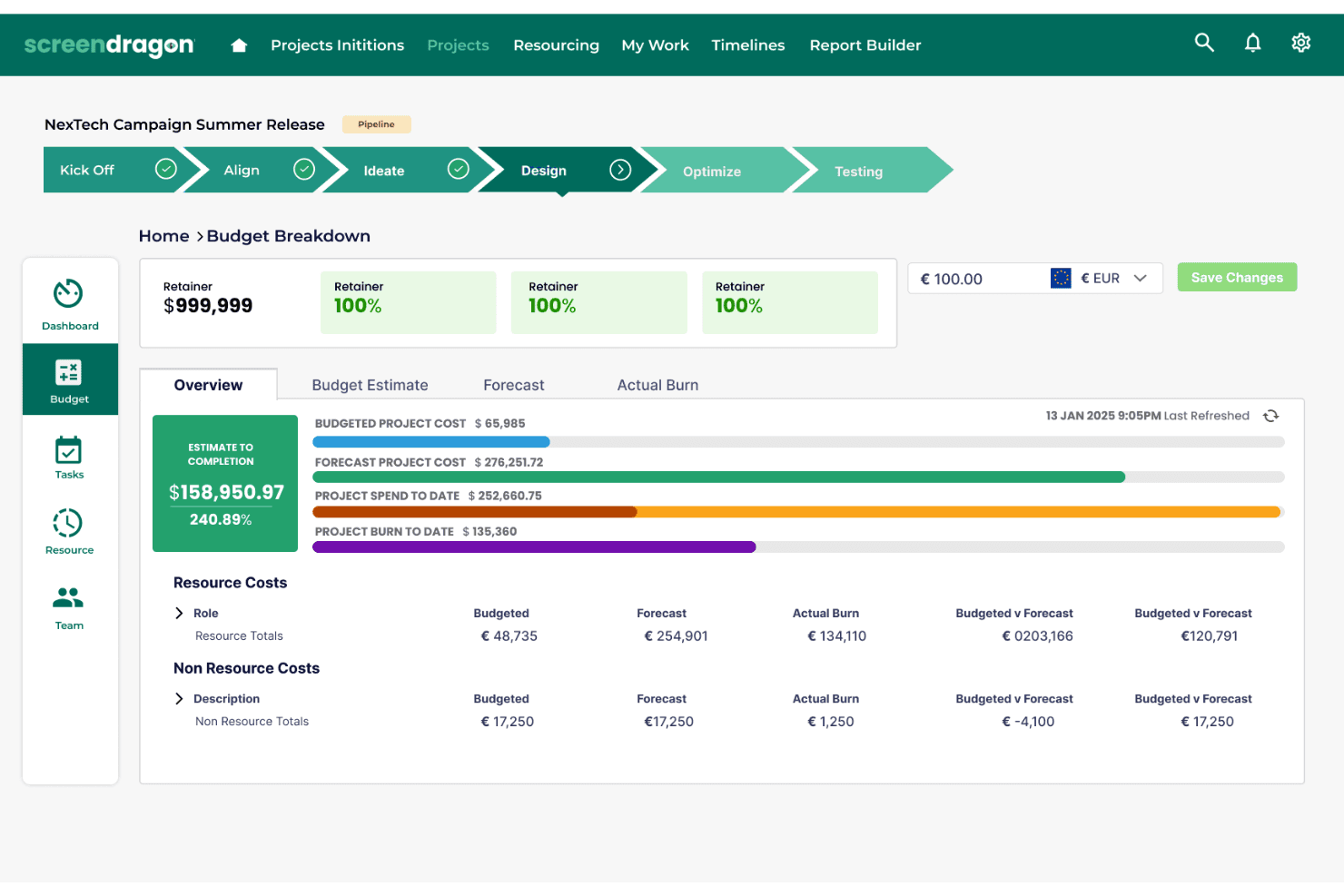
Screendragon tracks project budgets with cost breakdowns and forecasts. Screendragon offers a workflow management platform that helps marketing, creative, and agency teams run complex projects, centralize approvals, and automate task routing for campaigns, assets, and brand operations.
Who Is Screendragon Best For?
Screendragon suits marketing, creative, and agency teams who need to manage complex campaigns, approvals, and asset workflows in one place.
Why Screendragon Is a Good Smartsheet Alternative
I picked Screendragon as a top alternative because I can manage complex marketing workflows, centralize approvals, and automate task routing for campaigns and creative assets. My team runs big cross-functional projects in one place, keeping brand operations and asset approvals streamlined and on track.
Screendragon Key Features
- Resource management dashboards: Track team availability, monitor workloads, and allocate resources visually across projects.
- Budget tracking tools: Set budgets, compare planned vs. actual spend, and manage cost approvals in one dashboard.
- Digital asset library: Store, organize, and quickly access project assets, files, and campaign materials from a central hub.
- Integrated project timelines: Build Gantt charts, set dependencies, and view key milestones for every project phase.
Screendragon Integrations
- Integrations are not listed by Screendragon.
Pros and Cons
Pros:
- Offers built-in digital asset library
- Centralizes multi-level approval processes
- Manages complex campaign and asset workflows
Cons:
- Interface may feel dated compared to rivals
- Native integrations are not clearly documented
Learn more about Screendragon: Best for docs, tasks, and knowledge management
- Free plan available
- From $10/user/month (billed annually)
Visit WebsiteCustomer Rating:4.6/5
Notion blends docs, databases, and project tracking into a single workspace for managing knowledge, workflows, and team collaboration. Notion is a flexible workspace platform that lets marketing teams combine CRM databases, project tracking, and campaign documentation in one place. If you want to centralize your marketing workflows and customize every detail, Notion gives you a modular approach that adapts to your process.
Who Is Notion Best For?
Marketing and operations teams at startups or agencies who want to unify CRM, project management, and documentation in one customizable workspace.
Why Notion Is a Good Smartsheet Alternative
I picked Notion because it lets my team build a fully custom CRM database using linked databases and filtered views—without being locked into a rigid template. I like how Notion's relation and rollup properties let us connect contact records to deal pipelines and campaign pages in a single workspace. My team uses Notion's database templates to spin up new campaign trackers that automatically inherit our existing CRM structure. In practice, that means we're managing contacts, tasks, and content briefs in one place instead of switching between tools.
Notion Key Features
- Timeline view: Visualize project schedules and dependencies across a drag-and-drop timeline to track deadlines and resolve blockers.
- Synced blocks: Write content once and have it automatically update across every page where it appears in your workspace.
- Forms: Collect structured input from your team or external contacts, then trigger tasks and database entries directly from submissions.
- AI Autofill: Automatically populate database fields like status updates, user stories, and key results across project records.
Notion Integrations
Integrations include Salesforce, Microsoft Teams, Asana, GitHub, Google Drive, Make, Trello, Jira, Slack, Figma, Webex, and more.
Pros and Cons
Pros:
- Linked databases connect projects, contacts, and tasks
- Real-time collaboration with granular permissions
- Modular databases support custom CRM structures
Cons:
- Permissions can get complex in large workspaces
- Importing large spreadsheets can be slow
Learn more about Notion: Best for spreadsheet tools with API integrations
- Free plan available
- From $5/user/month (billed annually)
Visit WebsiteCustomer Rating:4.7/5
Stackby combines spreadsheet simplicity with database power, enabling teams to manage pipelines, track deals, and visualize data with built-in integrations. Stackby is a spreadsheet-style database platform designed for marketers and agencies who want to organize campaigns, contacts, and workflows in a highly customizable way. If you need to blend familiar spreadsheet views with database power for managing leads and marketing projects, Stackby is built for flexibility.
Who Is Stackby Best For?
Marketing teams and agencies who want to customize campaign tracking and automate workflows using spreadsheet-style databases.
Why Stackby Is a Good Smartsheet Alternative
I picked Stackby because its API column feature lets my team pull live data from tools like YouTube, Clearbit, or Mailchimp directly into a spreadsheet-style table—no manual data entry needed. I like how each column can be connected to an external API, so our campaign performance data updates automatically inside the same view where we manage tasks. My team also uses Stackby's form views to capture leads and feed them straight into our tracking tables. In practice, that means we're managing contacts, campaign data, and workflows all in one place without stitching together separate tools.
Stackby Key Features
- Multiple view types: Switch between grid, kanban, calendar, gallery, and timeline views to visualize campaign and contact data in different layouts.
- Advanced form builder: Build forms with conditional logic and 30+ field types to capture leads and feed responses directly into your tables.
- Reporting and dashboards: Build real-time dashboards using charts, pivot tables, and summary boxes through the Stackby Apps Marketplace.
- AI field agents: Add AI models directly into table columns using your own OpenAI, Gemini, or Anthropic API keys to generate content or analyze data.
Stackby Integrations
Integrations include Slack, Clearbit, YouTube, Mailchimp, Intercom, Facebook Ads, Google Analytics, Shopify, Microsoft Teams, Airtable, and more.
Pros and Cons
Pros:
- AI field agents for content generation
- Multiple view types for campaign management
- API columns pull live data into tables
Cons:
- Limited offline access for remote work
- No built-in workflow automation builder
Learn more about Stackby: Best for flexible spreadsheet-database tracking
- Free plan available; 14-day free trial
- From $20/user/month (billed annually)
Visit WebsiteCustomer Rating:4.6/5
Airtable turns spreadsheets into databases, letting teams track projects, campaigns, and workflows with customizable views and fields. Airtable is a flexible project management software for marketing teams who want to organize campaigns, manage contacts, and track projects in a spreadsheet-style interface. If you need a CRM that adapts to your workflows and supports collaboration across content, events, or lead management, Airtable is worth a look.
Who Is Airtable Best For?
Marketing teams at startups and agencies who want a customizable CRM for campaign and project management.
Why Airtable Is a Good Smartsheet Alternative
I picked Airtable because it bridges the gap between a spreadsheet and a relational database in a way that Smartsheet doesn't. My team uses Airtable's linked records to connect contacts, campaigns, and deals in a single base, so nothing lives in isolation. I also appreciate the gallery and kanban views, which let us switch between a visual pipeline and a structured data table depending on what we're working on. In practice, that means my team can manage lead tracking and campaign planning in the same place without juggling multiple tools.
Airtable Key Features
- Workflow automation: Set up trigger-based automations to send notifications, update records, or create tasks without manual input.
- Interface designer: Build custom dashboards and data entry forms on top of your existing bases using a drag-and-drop editor.
- AI field agents: Run large-scale AI tasks across your data, like analyzing campaign feedback or researching leads, directly within a base.
- Pre-built CRM templates: Start with a ready-made CRM structure and customize fields, views, and workflows to match your sales process.
Airtable Integrations
Integrations include Gong, Jira, Azure DevOps, and more.
Pros and Cons
Pros:
- Pre-built templates speed up CRM setup
- AI field agents automate campaign analysis tasks
- Relational databases support complex marketing data
Cons:
- No built-in resource management tools
- Limited Gantt chart and timeline features
 Best for open-source no-code databases
- Free plan available
- From $10/user/month (billed annually)
Visit WebsiteCustomer Rating:4.7/5
Baserow is an open-source no-code database that lets teams build custom workflows and manage structured data without technical overhead. Baserow is a no-code database platform for teams who want to build custom CRM solutions without technical barriers. If you need full control over your marketing data and flexible collaboration, Baserow gives you spreadsheet simplicity with database power.
Who Is Baserow Best For?
Marketing and operations teams at startups or agencies who want open-source, customizable CRM databases.
Why Baserow Is a Good Smartsheet Alternative
I picked Baserow because it lets my team self-host the entire platform, which means our marketing data never touches a third-party server. I like how Baserow's row-level permissions let us control exactly who can view or edit specific contact records. My team uses Baserow's custom views—including gallery, kanban, and form views—to manage campaign pipelines without rebuilding our data structure. In practice, that means we get a fully customizable CRM database that we own and control end-to-end.
Baserow Key Features
- No-code automation builder: Build trigger-based workflows using visual logic with branches, conditions, and loops to automate repetitive data tasks.
- Application builder: Compose custom pages and dashboards on top of your database tables without writing any code.
- API-first architecture: Every feature in Baserow is accessible via API, making it straightforward to connect external tools and build custom integrations.
- Kuma AI assistant: Describe your data management process in plain language and let Kuma generate the database structure and fields for you.
Baserow Integrations
Integrations include n8n, Make, Zapier, Webhooks, Anthropic, Pipedream, Lindy, Jira Issues, and more.
Pros and Cons
Pros:
- Visual database schema designer included
- Real-time collaboration with granular permissions
- Open-source with full self-hosting support
Cons:
- No built-in workflow automation builder
- Limited reporting and analytics features
Learn more about Baserow: Best for CRM with pipeline tracking
- Free plan available
- From $7/user/month
Visit WebsiteCustomer Rating:4.4/5
HubSpot CRM gives teams a unified view of contacts, deals, and activity with built-in automation, reporting, and customer insights. HubSpot CRM is a unified platform built for marketing, sales, and service teams who want to manage customer relationships and campaigns in one place. If you need a marketing CRM that connects contact management, email, and automation with reporting, HubSpot CRM brings everything together for better visibility and collaboration.
Who Is HubSpot CRM Best For?
Marketing and sales teams at small to midsize businesses who want a unified platform for managing customer relationships and campaigns.
Why HubSpot CRM Is a Good Smartsheet Alternative
I picked HubSpot CRM because it connects marketing, sales, and service data in one place without needing separate tools for each function. My team uses HubSpot CRM's contact timeline to see every email, meeting, and deal interaction in one view, which makes handoffs between marketing and sales much cleaner. I also like how the marketing email builder ties directly into contact lists and lifecycle stages, so we can trigger campaigns based on where someone is in the pipeline. In practice, that means my team can run targeted outreach without ever leaving the CRM.
HubSpot CRM Key Features
- Deal pipeline management: Track and manage open deals across customizable pipeline stages with a visual board view.
- Reporting dashboard: Build a shared dashboard that pulls marketing, sales, and service data into one centralized view.
- Lead capture forms: Create custom forms to convert website visitors into contacts directly inside the CRM.
- Meeting scheduler: Share a booking link that syncs with your calendar so prospects can schedule time without back-and-forth emails.
HubSpot CRM Integrations
Integrations include Gmail, Outlook, Mailchimp, Shopify, Slack, Google Ads, Intercom, Asana, Microsoft Dynamics 365, and more.
Pros and Cons
Pros:
- Native email tracking and scheduling tools
- Visual sales pipeline with drag-and-drop stages
- Built-in marketing automation for lead nurturing
Cons:
- No project management Gantt chart view
- Custom reporting locked behind higher tiers
Learn more about HubSpot CRM:

ClickUp centralizes tasks, timelines, and team workflows with flexible views, real-time status tracking, and detailed project visibility. ClickUp is a flexible platform that brings tasks, docs, and CRM features together for marketing teams who want to manage campaigns and pipelines in one place. If you need customizable workflows and detailed tracking for both projects and leads, ClickUp is built to handle complex marketing operations.
Who Is ClickUp Best For?
Marketing and operations teams at startups and growing businesses who want a unified workspace for tasks, docs, and CRM.
Why ClickUp Is a Good Smartsheet Alternative
I picked ClickUp because it replaces multiple tools by combining task management, docs, and CRM in one workspace. I like how ClickUp's custom fields and views let my team track leads alongside campaign tasks without switching platforms. My team uses the Docs feature to build campaign briefs and SOPs directly inside the same workspace where we manage execution. In practice, that means our marketing and ops workflows stay connected from planning through to the pipeline.
ClickUp Key Features
- Gantt chart view: Visualize project timelines and manage task dependencies with a drag-and-drop Gantt chart layout.
- Whiteboards: Brainstorm and map out campaign strategies on a visual canvas that links directly to tasks.
- Automations: Set trigger-based rules to automatically update task statuses, assignees, or priorities without manual input.
- Goals: Define high-level objectives and track progress automatically through linked tasks and milestones.
ClickUp Integrations
Integrations include Slack, GitHub, HubSpot, Google Drive, Outlook, Figma, Zoom, Microsoft Teams, Dropbox, and more.
Pros and Cons
Pros:
- Hierarchical structure supports complex campaign planning
- Built-in time tracking for marketing projects
- Customizable dashboards for campaign and pipeline tracking
Cons:
- No built-in spreadsheet-style data editing
- Gantt chart view lacks advanced dependency options
Learn more about ClickUp: Best for structured task and project tracking
- Free plan + free demo available
- From $10.99/user/month (billed annually)

Asana helps teams plan, track, and execute projects with structured workflows, task dependencies, and performance insights. Asana is a project management platform built for marketing teams who need to coordinate campaigns, content, and creative work across departments. If you want a Smartsheet alternative that makes it easy to visualize projects, assign tasks, and automate routine processes, Asana gives you a flexible workspace to keep everything organized.
Who Is Asana Best For?
Marketing teams at growing companies who need a flexible system to manage cross-functional projects and campaign workflows.
Why Asana Is a Good Smartsheet Alternative
I picked Asana because its multi-view project layouts—list, board, timeline, and calendar—let my team switch between views without duplicating any work. I like how Asana's workflow builder lets us automate task assignments, status changes, and due date reminders based on triggers we define. My team uses Asana's cross-project portfolio view to track every active campaign in one place, so nothing slips through when multiple teams are working in parallel. In practice, that means we spend less time in status meetings and more time moving work forward.
Asana Key Features
- Custom fields: Add tailored data labels to tasks—like campaign stage, priority, or budget—then sort and filter across projects.
- Forms: Standardize incoming work requests so your team captures all the details they need before a task even starts.
- Workload view: See each team member's task load in one view to quickly spot who's over capacity and reassign work.
- Goals: Connect individual tasks and projects directly to company-wide objectives to track progress in real time.
Asana Integrations
Integrations include Slack, Google Drive, Microsoft Teams, Salesforce, Zoom, Dropbox, Gmail, Jira, HubSpot, and more.
Pros and Cons
Pros:
- Real-time dashboards for campaign tracking
- Custom item types for marketing workflows
- Built-in proofing for creative asset review
Cons:
- Task ownership limited to one assignee per task
- No native time tracking requires external tools
Learn more about Asana: Best for visual workflow management
- Free plan available; 14-day free trial
- From $9/user/month (billed annually)
Visit WebsiteCustomer Rating:4.6/5
monday.com gives teams a visual workspace to manage projects, automate workflows, and track progress across boards and timelines. monday.com is a flexible work management platform that helps marketing teams organize campaigns, track leads, and collaborate across projects. If you want a CRM that combines visual workflows with customizable boards, monday.com is a strong option for managing marketing pipelines and team tasks.
Who Is monday.com Best For?
Sales and marketing teams at mid-sized businesses who want a visual, customizable CRM for managing campaigns and pipelines.
Why monday.com Is a Good Smartsheet Alternative
I picked monday.com because it combines project management and CRM in a single platform, which removes the need to switch between tools when managing campaigns and tracking leads. I like how monday.com CRM lets my team build custom pipelines with color-coded status columns, so we can see exactly where each deal or campaign stands at a glance. My team also uses the workload view to balance tasks across team members during busy campaign periods. In practice, that means we're managing both the marketing execution and the sales pipeline without ever leaving the platform.
monday.com Key Features
- Lead scoring: Automatically score leads based on custom criteria to prioritize outreach across your pipeline.
- Email sequences: Send personalized email sequences and mass emails directly from monday CRM with open tracking included.
- 360° contact view: Log all contact activity, communications, and account details in a single record for full customer visibility.
- AI email composer: Generate and rephrase emails using AI directly within the CRM, with smart template suggestions built in.
monday.com Integrations
Integrations include Salesforce, QuickBooks, HubSpot, Zendesk, GitHub, Slack, Gmail, Google Calendar, Outlook, and more.
Pros and Cons
Pros:
- CRM and project management in one workspace
- Board templates speed up campaign setup
- Visual automations simplify repetitive marketing tasks
Cons:
- Field-level permissions are not available
- No built-in document editing or storage
Learn more about monday AI Workspace: 10Best for advanced project collaboration
Wrike
- 14-day free trial
- From $10/user/month (billed annually)
Visit WebsiteCustomer Rating:4.3/5
Wrike provides advanced project management with real-time dashboards, workload tracking, and collaborative tools for complex team workflows. Wrike is a project management platform built for marketing and operations teams who need to coordinate complex campaigns and track deliverables across multiple stakeholders. If you’re looking for a Smartsheet alternative that combines task management, proofing, and real-time collaboration, Wrike gives you a centralized workspace to keep projects moving.
Who Is Wrike Best For?
Marketing project managers at mid-sized or enterprise organizations coordinating cross-functional campaigns and approvals.
Why Wrike Is a Good Smartsheet Alternative
I picked Wrike because its custom workflow builder lets my team define exactly how tasks move through review, approval, and launch stages—without forcing us into a generic template. I like how Wrike's request forms automatically route incoming work to the right team members and trigger pre-built workflows the moment a form is submitted. My team uses Wrike's interactive Gantt charts to map campaign dependencies and adjust timelines in real time when priorities shift. In practice, that means we spend less time chasing status updates and more time executing.
Wrike Key Features
- Proofing: Review and annotate images, videos, and documents directly within tasks without downloading files.
- Dashboards: Build custom dashboards with real-time widgets to track task status, workload, and project progress.
- Custom item types: Create tailored work items—like briefs, campaigns, or tickets—with their own fields, workflows, and views.
- Kanban boards: Visualize task progress across customizable columns to manage sprint backlogs and campaign stages.
Wrike Integrations
Integrations include Salesforce, Microsoft Teams, Google Drive, Adobe Creative Cloud, QuickBooks, Tableau, Power BI, Zoom, Miro, and more.
Pros and Cons
Pros:
- Real-time dashboards for campaign tracking
- Custom item types for marketing workflows
- Built-in proofing for creative asset review
Cons:
- Limited spreadsheet-style data manipulation
- No built-in email marketing tools
Learn more about Wrike:
Other Smartsheet alternatives
Here are some additional Smartsheet alternatives that didn’t make it onto my shortlist, but are still worth checking out:
- 11Zoho CRMBest for CRM with workflow automation
- 12BasecampBest for team collaboration and projects
- 13InsightlyBest for CRM with project management
- 14KeapBest for sales and marketing automation
- 15TrelloBest for visual workflow management
- 16SharpSpringBest for revenue growth automation
- 17EngageBayBest for unified marketing and sales CRM
- 18Bitrix24Best for all-in-one CRM and collaboration
- 19PipedriveBest for visual sales pipelines
- 20FreshsalesBest for AI-driven sales CRM
How I Evaluate Smartsheet Alternatives
I evaluate each tool in two passes: the baseline requirements it must meet to qualify, and the differentiators that matter for RevOps teams managing pipeline, forecasting, and GTM operations.
Core Functionality (Table Stakes For This List)
When I'm selecting tools for my list, I rank each one on a scale from 0 (does not offer the functionality) to 5 (excels in this area) for each core functionality listed below. Then, I calculate the tool's total score into a percentage. Each tool needs to achieve a minimum total score of 65% to be considered for inclusion.
- Spreadsheet-Grid Interface: I check whether the grid supports enough column types and formulas for RevOps workflows like weighted pipeline tracking or quota rollups.
- Workflow Automation: Each tool's automation builder should handle multi-step sequences, such as routing deal desk approvals or updating forecast stages on trigger.
- Multiple Project Views: I look for at least four view types so teams can switch between a Gantt for launch timelines and a Kanban for tracking handoff stages.
- Reporting & Dashboards: Dashboards should let you build filtered views of revenue KPIs, like pipeline by stage, rep, or region, without exporting to a BI tool.
- GTM Stack Integrations: I evaluate native CRM connectors, especially Salesforce and HubSpot sync depth, plus API access for connecting to tools like Marketo or Looker.
- Collaboration & Permissions: Role-based access matters here. RevOps teams share sheets with reps who should see their accounts but not comp models or territory plans.
Once I have a list of tools that meet this criteria, I consider what sets each platform apart.
Differentiating Factors (What Sets Vendors Apart)
Here's how I compare and contrast different vendors:
Standout Features
Cross-sheet formulas and rollups are a big one. They let RevOps teams pull quota and territory data across multiple sheets into a single portfolio view without manual consolidation. I also look for no-code app builders, which allow you to turn a pipeline tracker into a self-serve tool reps actually use. AI-powered insights are increasingly useful too, especially for surfacing anomalies in forecast data or auto-generating status summaries for leadership reviews.
Beyond Features
Pricing structure matters a lot for RevOps teams. I evaluate whether a platform charges per editor or per user, since GTM orgs often have dozens of view-only stakeholders reviewing dashboards. Security and compliance also carry weight. SOC 2 Type II and SSO/SAML support are baseline expectations when the platform houses pipeline and compensation data. Finally, I consider time-to-value by checking for pre-built RevOps templates like pipeline trackers or QBR frameworks that let teams get operational in days rather than weeks.
Why Look For A Smartsheet Alternative?
While Smartsheet is a good choice of marketing crm software, there are a number of reasons why some users seek out alternative solutions. You might be looking for a Smartsheet alternative because…
- You need built-in sales and marketing automation
- You want more advanced CRM and pipeline features
- You require deeper multichannel communication tools
- You need customizable modules for unique workflows
- You want AI-driven insights and lead scoring
- You need better integration with industry-specific tools
If any of these sound like you, you’ve come to the right place. My list contains several marketing crm software options that are better suited for teams facing these challenges with Smartsheet and looking for alternative solutions.
Smartsheet Key Features
Here are some of the key features of Smartsheet, to help you contrast and compare what alternative solutions offer:
- Grid view: Organize and track data in a familiar spreadsheet-style user interface that’s user-friendly and easy for small teams to adopt with a minimal learning curve.
- Gantt charts: Visualize timelines and dependencies for complex projects, supporting planning and clear roadmapping.
- Automation workflows: Automate repetitive tasks and improve workload management with rule-based workflows and optional add-ons.
- Collaboration tools: Enable teamwork with real-time updates, comments, and file sharing across teams.
- Dashboards: Build custom dashboards to monitor progress with an intuitive interface and centralized visibility.
- Forms: Collect data efficiently while integrating with your broader ecosystem of tools.
- Resource management: Manage team capacity and allocation for better workload management across projects.
- Document attachments: Keep files organized and accessible with built-in file sharing capabilities.
- Activity log: Track changes and maintain transparency for teams and professional services use cases.
- Integration connectors: Connect with tools like Zoho Projects and others to expand your workflow across systems and explore the best alternatives.