

10 Best Route-Planning Software Reviewed in 2026

Best Route-Planning Software Shortlist


Route planning can be a headache for revenue operations professionals. You need to ensure deliveries are on time, routes are efficient, and costs are kept low. It’s a juggling act, and one wrong move can affect the entire operation.
That’s where route-planning software comes in. It helps you optimize routes, save time, and reduce costs. It takes the guesswork out of logistics, so you can focus on what really matters—growing your business.
In this article, I’ll share my top picks for route-planning software. I’ve tested and reviewed each one to bring you unbiased insights. You’ll find the best options to help your team work smarter, not harder. Let’s dive in.
Why Trust Our Software Recommendations
Our reviews reflect our independent judgment—not a sales pitch. Learn how we stay transparent.
For this guide, we evaluated tools using hands-on testing and independent research, scoring tools using our selection criteria.
Our reviews reflect our human editorial judgment, not a sales pitch.
Best Route-Planning Software Summary
This comparison chart summarizes pricing details for my top route-planning software selections to help you find the best one for your budget and business needs.
| Tool | Best For | Trial Info | Price | ||
|---|---|---|---|---|---|
| 1 | Best for automating customer notifications | Not available | Website | ||
| 2 | Best for weekly planning | 30-day free trial | From $35.10/driver/month (billed annually) | Website | |
| 3 | Best for sales teams | Free demo + 14-day free trial available | From $58/user/month (billed annually) | Website | |
| 4 | Best for Excel integration | Free demo available | From $19/month | Website | |
| 5 | Best for delivery businesses | 7-day free trial available | From $40/user/month (billed annually) | Website | |
| 6 | Best for real-time driver tracking | Free trial available | From $619/month | Website | |
| 7 | Best for small business delivery | Free plan + free trial available | From $150/month | Website | |
| 8 | Best for geographic analysis | Free trial + free demo available | From $695/year | Website | |
| 9 | Best for multi-driver routing | Free demo available | Pricing upon request | Website | |
| 10 | Best for complex logistics | Free demo available | Pricing upon request | Website |
Best Route-Planning Software Review
Below are my detailed summaries of the best route-planning software that made it onto my shortlist. My reviews offer a detailed look at the key features, pros and cons, integrations, and ideal use cases of each tool to help you find the best one for you.


XRouten is a route-planning platform that combines multi-stop optimization, real-time GPS tracking, mobile navigation, and automated customer notifications for delivery and field service operations.
Who Is XRouten Best For?
XRouten is a strong fit for SMBs in last-mile delivery, courier services, and waste management operating primarily in German-speaking markets.
Why I Picked XRouten
XRouten earns its spot on my shortlist because of how it handles customer communication alongside routing. I like that dispatchers can trigger automated emails, SMS, or WhatsApp arrival alerts without any manual input, and customers get a DHL-style tracking link to follow delivery progress in real time. The customer portal also stores all proof-of-delivery documentation, which drivers capture on-site through the mobile app.
XRouten Key Features
- Route optimization for up to 300 addresses: Plan multi-stop routes with unlimited destinations and compare multiple routes on the map.
- Mobile app task management: Access PDFs, delivery notes, photos, and checklists directly in the app while on site.
- Real-time GPS tracking: Monitor driver locations and route progress live within the web platform.
- Data export and API integration: Export route data as PDF or Excel, or connect directly with ERP systems through API for automated synchronization.
XRouten Integrations
Native integrations are not clearly documented. The tool supports integrations via API and can export data to PDF or Excel, with ERP system connections shown but not specifically listed.
Pros and Cons
Pros:
- Route visualization with live driver tracking
- Automated recipient notifications by SMS or WhatsApp
- Unlimited addresses on a single route
Cons:
- No native support for sales territory mapping
- No direct CRM or sales tool integration

Best for weekly planning
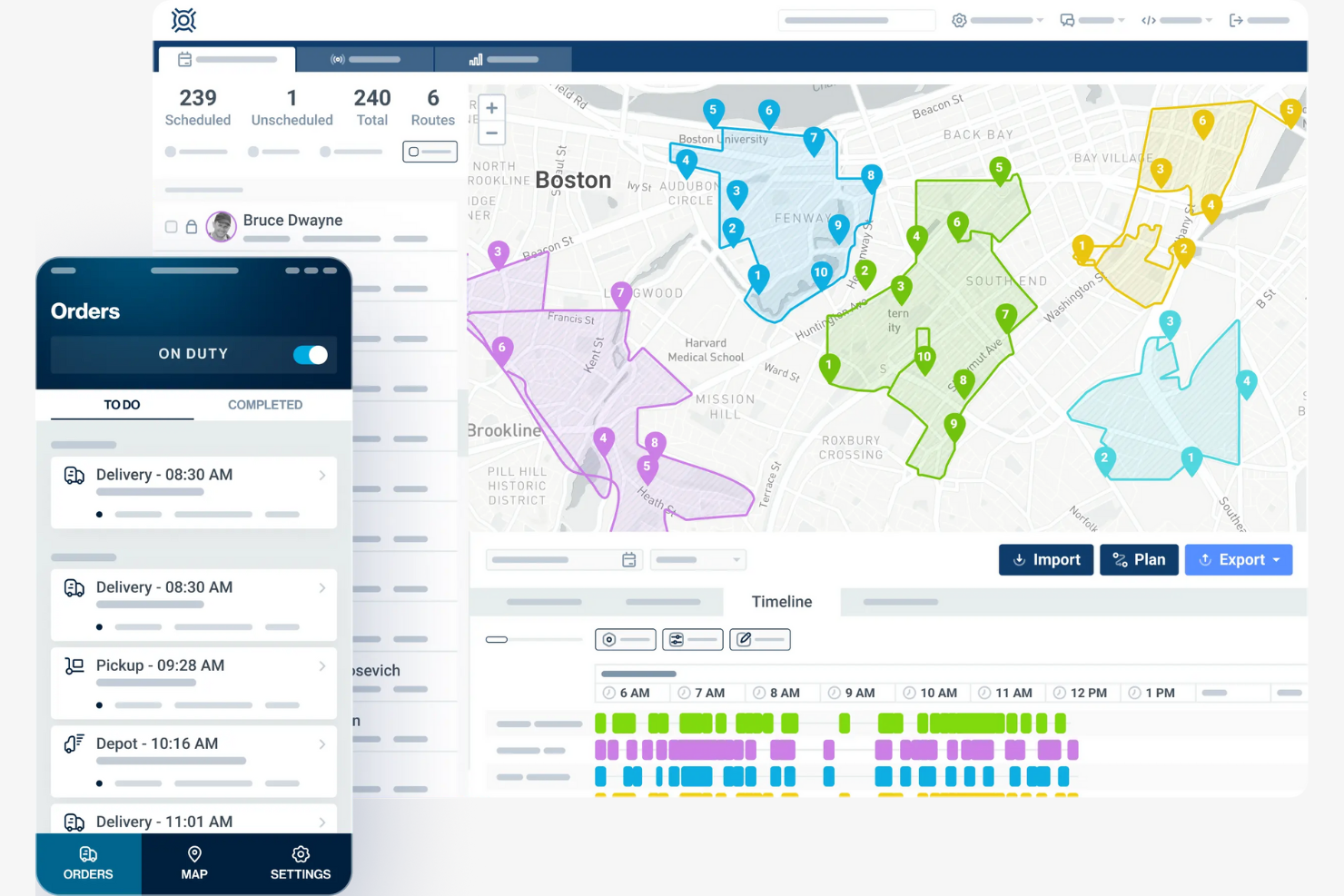
OptimoRoute is route-planning software designed for businesses that need efficient weekly route scheduling. It helps businesses organize deliveries and service appointments over the course of a week.
Why I picked OptimoRoute: It specializes in weekly planning, which is ideal for businesses that require structured schedules. OptimoRoute lets you plan routes up to five weeks in advance, giving you a clear view of your operations. The software supports multiple delivery time windows and service types, making it versatile for various industries. Real-time tracking and updates keep your team informed about schedule changes.
Standout Features and Integrations:
Features include advanced scheduling for weeks ahead, support for both delivery and service routes, and real-time updates.
Integrations are not publicly listed.
Pros and Cons
Pros:
- Easy schedule management
- Supports various service types
- Plans routes weeks in advance
Cons:
- Manual adjustment of schedules
- Limited customization options

Best for sales teams
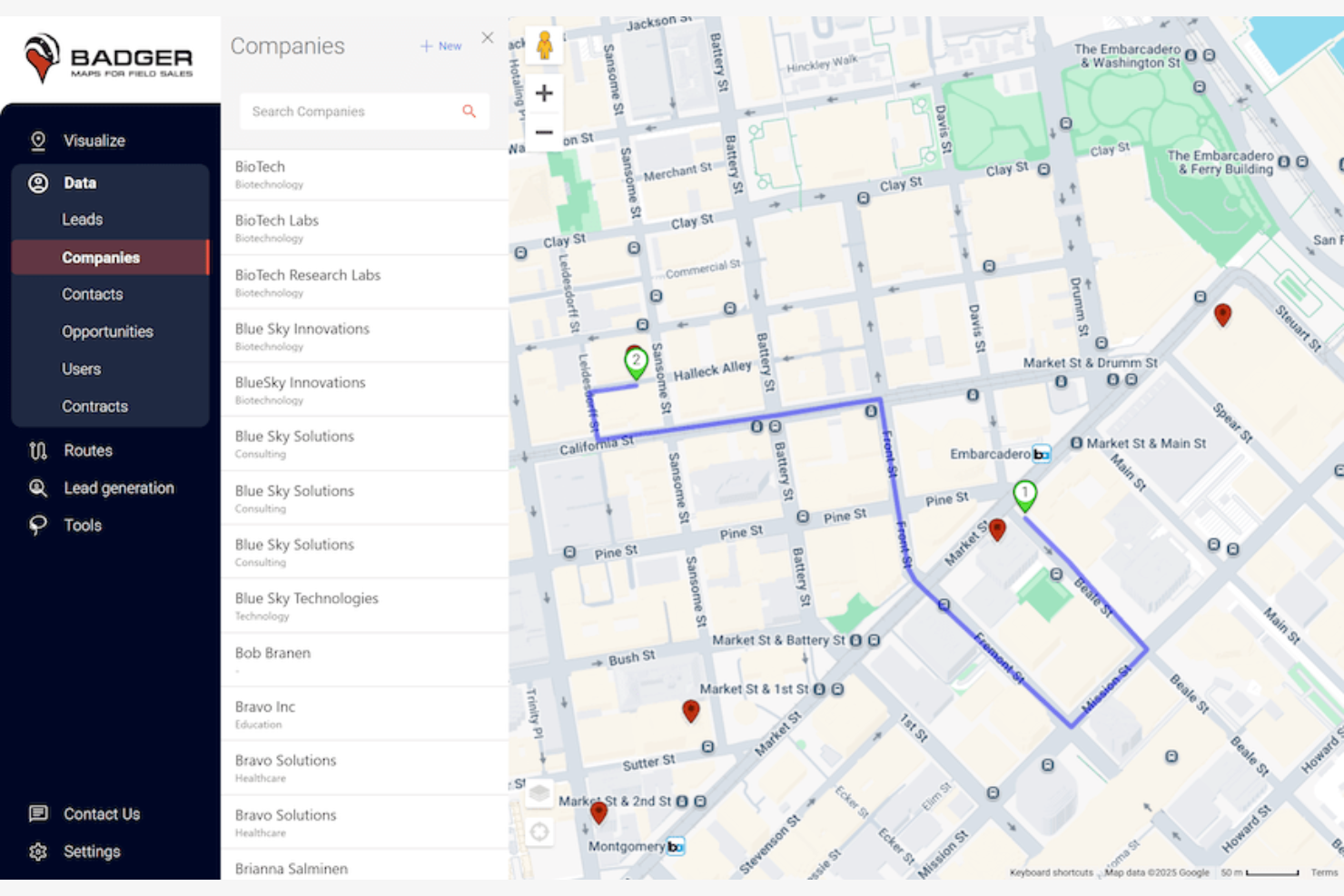
Badger Maps is a route-optimization tool designed for sales teams looking to strengthen field operations. It helps sales professionals plan routes, manage customer relationships, and maximize their time on the road.
Why I picked Badger Maps: It’s tailored for sales teams that need efficient route planning and customer management. Badger Maps allows you to visualize your sales territory and optimize your multi-stop routes for better time management. The tool integrates with your calendar to schedule appointments efficiently. Its customer relationship management features help you keep track of interactions, making it ideal for sales-focused operations.
Standout Features and Integrations:
Features include territory visualization for better planning, calendar integration for scheduling, and CRM capabilities to manage the customer experience effectively.
Integrations include Salesforce, Microsoft Dynamics, HubSpot, Zoho, Sugar CRM, Pipedrive, and more.
Pros and Cons
Pros:
- CRM features for customer management
- Calendar integration available
- Effective territory visualization
Cons:
- Lacks extensive data filtering
- Limited to sales-specific features
Best for Excel integration
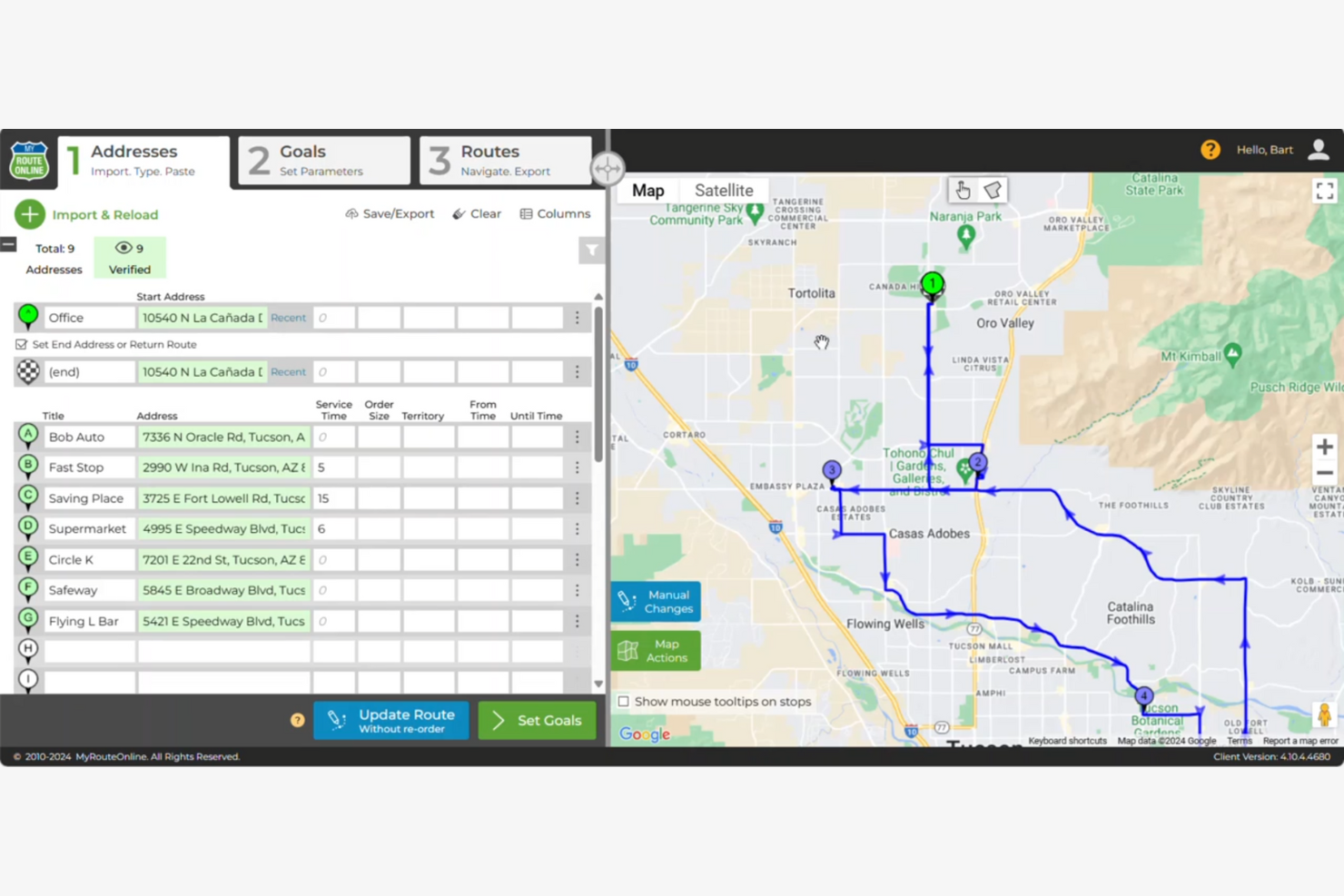
MyRouteOnline is a route planner designed for businesses that frequently rely on Excel spreadsheets for data management. It helps users convert Excel data into optimized routes.
Why I picked MyRouteOnline: It integrates smoothly with Excel, which is essential for businesses managing data in spreadsheets. MyRouteOnline lets you import addresses directly from Excel files, simplifying the route creation process. The tool provides an easy-to-use platform for generating efficient routes from your data. It also offers route sharing, making it easy to distribute routes to your team.
Standout Features and Integrations:
Features include route optimization that turns Excel data into actionable routes, route sharing for team collaboration, and a user-friendly interface for easy navigation.
Integrations include Zapier, Excel, Google Drive, Dropbox, and more.
Pros and Cons
Pros:
- User-friendly interface
- Simple route sharing
- Direct Excel import feature
Cons:
- Basic reporting capabilities
- Lack of native driver chat
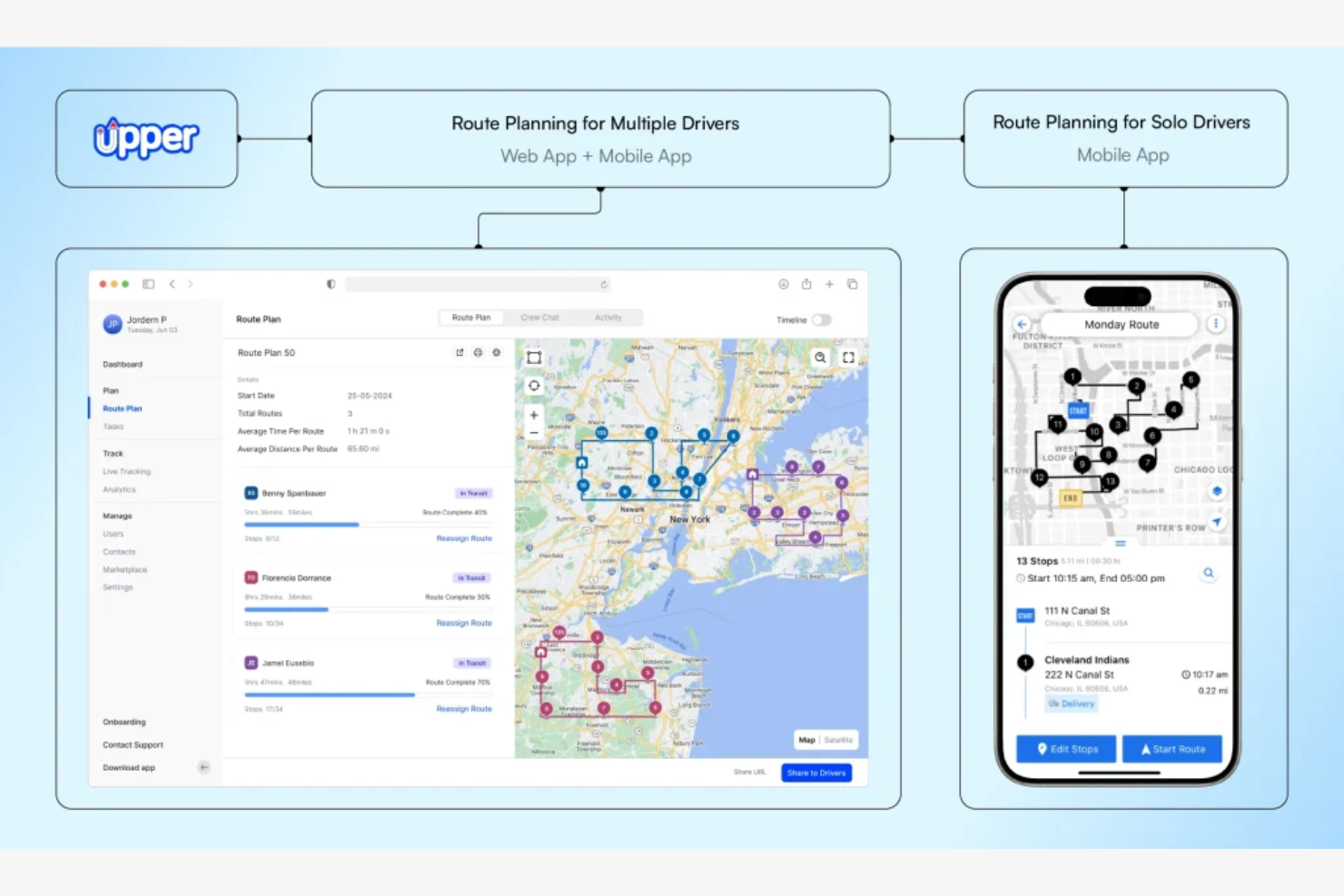
Upper is a route-planning software designed specifically for delivery and courier businesses. It helps optimize delivery operations and improve delivery efficiency.
Why I picked Upper: It’s tailored for delivery businesses needing effective route management. Upper automates route planning, simplifying delivery services. Real-time driver tracking ensures you can monitor your team’s progress. The software also provides delivery analytics, helping you understand and improve your delivery operations.
Standout Features and Integrations:
Features include all-in-one route planning to simplify delivery management, real-time tracking to monitor progress, and delivery analytics to heighten operational insights.
Integrations include Shopify, WooCommerce, monday.com, QuickBooks, and more.
Pros and Cons
Pros:
- Mobile communication features
- Built-in digital signature capture
- Effective route planning for productivity gains
Cons:
- Advanced customization options can be overwhelming
- Rigid three-driver minimum plan


Onfleet is a delivery management software designed for businesses that need efficient real-time tracking of their delivery drivers. It focuses on improving delivery operations by offering features such as live tracking and route optimization.
Why I picked Onfleet: It excels in providing turn-by-turn tracking, a necessity for businesses needing constant oversight of their fleet. Onfleet offers intuitive driver tracking, letting you view driver locations and progress in real-time. It keeps customers informed with real-time updates. The platform’s analytics tools give insights into operational efficiency, making it ideal for businesses focused on delivery performance.
Standout Features and Integrations:
Features include automated customer notifications for improved communication, analytics tools for performance insights, and route optimization to strengthen delivery efficiency.
Integrations include Shopify, Square, Zapier, and more.
Pros and Cons
Pros:
- Customizable notifications
- High-performance API webhook support
- Predictive arrival times for customers
Cons:
- Analytics capped at 32 days
- High entry-level cost
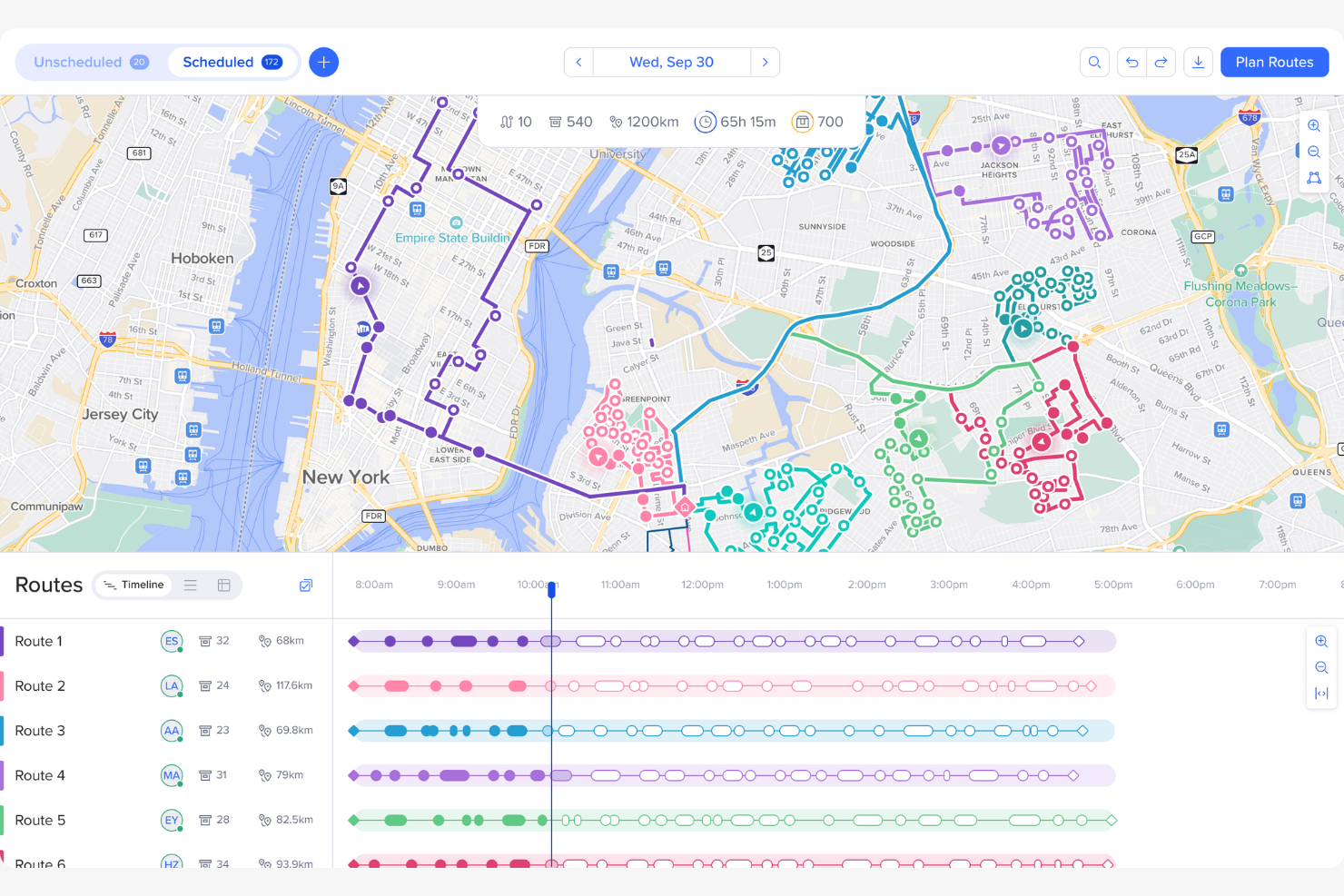
Routific is a route optimization software tailored for small businesses looking to improve delivery efficiency. It helps businesses reduce delivery costs and manage routes effectively.
Why I picked Routific: It’s designed for small businesses needing cost-effective route management. Its dispatch and live tracking features let you monitor driver progress in real-time. Proof of delivery improves customer satisfaction by providing accurate ETAs, making it ideal for small operations focused on customer service.
Standout Features and Integrations:
Features include intelligent route optimization to cut costs, dispatch and live tracking for real-time oversight, and delivery notifications for improved customer interaction.
Integrations include Shopify, WooCommerce, BigCommerce, Zoho, Adobe Commerce, and more.
Pros and Cons
Pros:
- Branded customer tracking portal
- Cost-effective for small operations
- Eliminates driver spaghetti routes
Cons:
- SMS notifications are extra
- No multi-day route planning

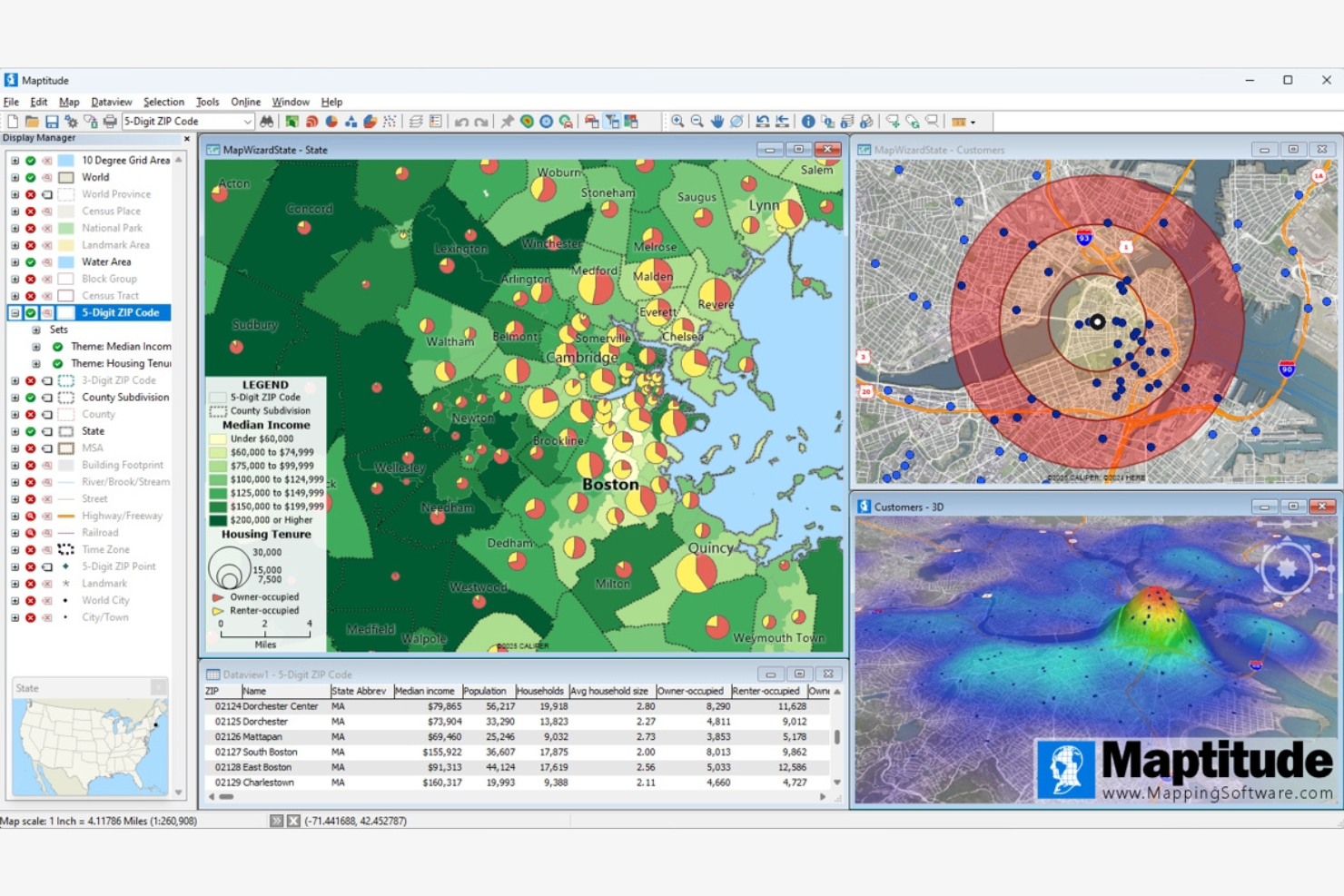
Maptitude is a mapping software designed for professionals needing detailed geographic analysis. It serves businesses looking to visualize and analyze location-based data for strategic planning.
Why I picked Maptitude: It excels in providing advanced geographic analysis tools, making it ideal for businesses focusing on location-based insights. Maptitude offers detailed mapping features that allow you to visualize data effectively. The software supports demographic data integration, enabling you to make informed decisions. Its customizable map layers give you control over the information displayed, making it a versatile tool.
Standout Features and Integrations:
Features include detailed mapping for data visualization, integration of demographic data for informed decision-making, and customizable map layers for tailored insights.
Integrations include Microsoft Excel, SQL Server, Oracle, MySQL, and more.
Pros and Cons
Pros:
- Customizable map layers
- Supports demographic data integration
- Advanced geographic analysis tools
Cons:
- Steep GIS software learning curve
- Significant storage requirements

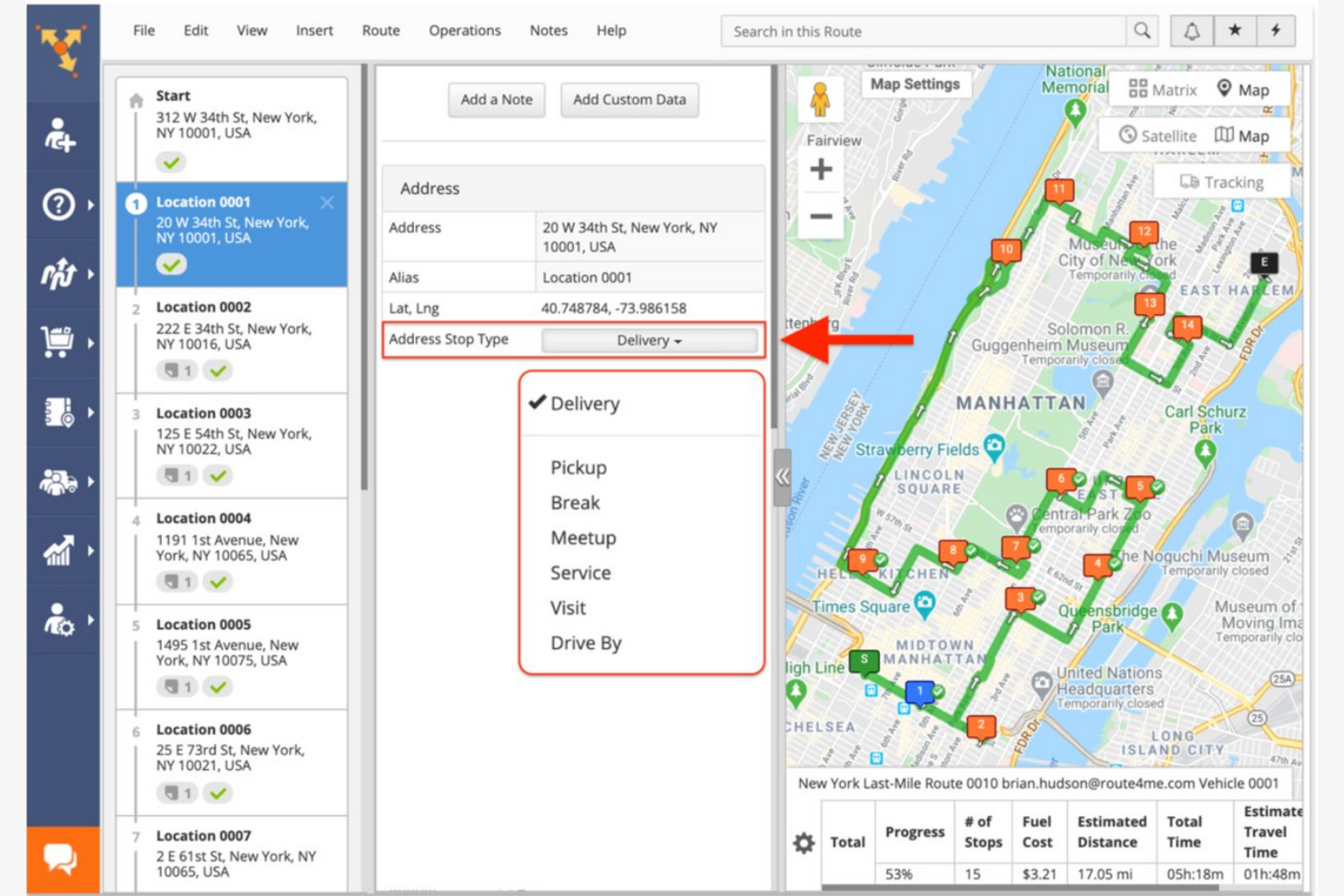
Route4Me is route-planning software tailored for businesses managing multiple drivers. It helps businesses efficiently plan and optimize routes for large fleets, leveraging Google Maps for accurate navigation and mapping.
Why I picked Route4Me: It caters to businesses with complex routing needs involving multiple drivers. Route4Me allows quick route adjustments as needed. Real-time driver tracking helps you keep tabs on your fleet’s progress. The platform supports bulk address uploads, making it easy to manage large datasets.
Standout Features and Integrations:
Features include route optimization that handles last-minute changes, real-time GPS tracking for fleet management, and support for bulk address uploads to ease data management.
Integrations include Shopify, Salesforce, Adobe Commerce, WooCommerce, Verizon Connect, Geotab, Samsara, Azuga, CommandGPS, and more.
Pros and Cons
Pros:
- Supports multiple drivers
- Extensive marketplace for add-ons
- Quick route adjustments
Cons:
- Some features require extra fees
- Can be complex for beginners

Descartes is a logistics management software designed for businesses with intricate supply chain needs. It provides solutions for optimizing logistics operations and managing complex field service routes.
Why I picked Descartes: It’s perfect for businesses dealing with complex logistics that require precise coordination. Descartes offers route optimization tools that efficiently handle intricate delivery schedules. Its advanced analytics provide insights into logistics performance, ensuring you can make data-driven decisions. The software also supports compliance management, which is important for businesses operating under strict regulations.
Standout Features and Integrations:
Features include advanced route optimization for complex schedules, detailed analytics for performance insights, and compliance management to meet industry regulations.
Integrations include SAP, Oracle, and more.
Pros and Cons
Pros:
- Customizable for diverse needs
- Supports compliance management
- Handles complex logistics efficiently
Cons:
- Can be costly for smaller operations
- Complex data schema requirements
Other Route-Planning Software
Here are some additional route-planning software options that didn’t make it onto my shortlist, but are still worth checking out:
- Verizon Connect
For fleet management
- Geotab
For vehicle tracking
- RouteManager
For route optimization
- Prophesy
For small fleet management


How I Evaluate Route Planning Software
I evaluate route planning software in two layers: the baseline capabilities—multi-stop routing, CRM sync, mobile execution—and the differentiators that matter most for field sales and RevOps teams.
Core Functionality (Table Stakes For This List)
When I'm selecting tools for my list, I rank each one on a scale from 0 (does not offer the functionality) to 5 (excels in this area) for each core functionality listed below. Then, I calculate the tool's total score into a percentage. Each tool needs to achieve a minimum total score of 65% to be considered for inclusion.
- Multi-Stop Route Optimization: I evaluate how well each tool sequences a full day of stops—say, 15 to 25 accounts—factoring in drive time, visit priority, and time windows.
- CRM Integration: Each tool should sync account and contact data with platforms like Salesforce or HubSpot, so reps aren't copying visit notes into the CRM manually.
- Territory Mapping & Management: I look for the ability to define, visualize, and assign geographic territories tied to rep ownership and account distribution.
- Mobile Field Execution: Field reps live on their phones, so I check whether the mobile app supports turn-by-turn navigation, visit logging, and offline access between stops.
- Visit Tracking & Reporting: Managers need to see who visited which accounts and when, so I evaluate the depth of check-in logs, activity dashboards, and exportable reports.
- Account & Lead Geocoding: I look at how each tool plots CRM records on a map and lets you filter by attributes like deal stage, last visit date, or account tier to build targeted routes.
Once I have a list of tools that meet this criteria, I consider what sets each platform apart.
Differentiating Factors (What Sets Vendors Apart)
Here's how I compare and contrast different vendors:
Standout Features
Cadence and frequency rules are a big differentiator—I look for tools that flag overdue accounts and auto-prioritize them in upcoming routes, keeping reps on a consistent visit rhythm without manual oversight. AI-powered prospecting is another feature I evaluate closely. Some tools surface nearby prospects or lookalike accounts to fill open slots in a rep's day, turning windshield time into pipeline. I also check for calendar sync with Google or Outlook, which lets reps block travel time and avoid double-booking field visits against internal meetings.
Beyond Features
CRM and tech stack fit is one of the first things I check. A route planning tool that plugs into your existing Salesforce or HubSpot instance with native, bidirectional sync is far more useful than one that requires middleware or manual imports. Pricing structure matters too—per-seat models work well for small field teams, but I evaluate whether the vendor's tiers scale cleanly as you add reps and territories. I also consider industry specialization, since a tool built for CPG distribution routes operates very differently from one designed around consultative B2B field sales motions.
How To Choose Route-Planning Software
It’s easy to get bogged down in long feature lists and complex pricing structures. To help you stay focused as you work through your unique software selection process, here’s a checklist of factors to keep in mind:
| Factor | What To Consider |
|---|---|
| Scalability | Can the software grow with your business? Consider the number of routes, drivers, and locations you might need to handle in the future. Look for flexible plans that can accommodate growth without significant cost increases. |
| Integrations | Does it work with your existing tools? Check for compatibility with CRM systems, accounting software, and other logistics tools you already use. Avoid solutions that require extensive manual data transfer. |
| Customizability | Can you tailor it to fit your workflows? Look for options to customize dashboards, reports, and notifications. Avoid rigid systems that don’t adapt to your unique processes and needs. |
| Ease of use | Is the interface intuitive for your team? Evaluate the software’s design and navigation. Ensure that even non-technical users can operate it without extensive training. |
| Implementation and onboarding | How quickly can you start using it? Consider the time and resources needed for setup and training. Look for vendors offering in-depth onboarding support to minimize downtime. |
| Cost | What’s the total investment? Beyond the subscription fee, consider hidden costs, such as training, support, and additional features. Compare these with your budget constraints to avoid unexpected expenses. |
| Security safeguards | Does it protect your data? Ensure the software complies with industry standards for data security and privacy. Look for encryption, user access controls, and regular security updates. |
| Support availability | Is help available when you need it? Check for 24/7 support options and the quality of customer service. Ensure you have access to assistance during critical times, such as just before delivery deadlines. |
What Is Route-Planning Software?
Route-planning software is a tool used to optimize routes for deliveries, logistics, and field operations. These tools are commonly used by logistics managers, delivery drivers, and sales professionals to improve efficiency and reduce operational costs. Real-time tracking, automated scheduling, and route optimization features help with managing routes, reducing travel time, and improving customer satisfaction. Overall, these tools provide significant value by increasing efficiency and cutting down unnecessary expenses.
Features
When selecting route-planning software, keep an eye out for the following key features:
- Route optimization: Automatically creates the most efficient routes to save time and reduce fuel costs.
- Real-time tracking: Monitors vehicle locations live to ensure timely deliveries and provide accurate ETAs.
- Automated scheduling: Simplifies the process of planning and dispatching routes, reducing manual work.
- Customer notifications: Keep clients informed with updates about delivery times and any changes.
- Analytics and reporting: Provide insights into delivery performance to help improve vehicle capacity operations and decision-making.
- Integration capabilities: Connect with other systems such as CRM and accounting software for smooth data sharing.
- Customizable dashboards: Allow users to tailor views and reports to fit specific operational needs.
- Compliance management: Ensures adherence to industry regulations and standards, minimizing legal risks.
- Territory visualization: Helps sales teams plan their routes and manage client visits effectively.
- Predictive traffic analysis: Anticipates traffic conditions to proactively adjust routes, avoiding delays.
Benefits
Implementing route-planning software offers several benefits for your team and your business. Here are a few you can look forward to:
- Increased efficiency: Optimize routes to reduce travel time and fuel consumption, allowing your team to complete more deliveries in less time.
- Cost savings: Minimize unnecessary mileage and vehicle wear and tear, leading to lower operational costs.
- Improved customer satisfaction: Offer real-time tracking and automated notifications, keeping customers informed and improving their experience.
- Better decision-making: Provide analytics and reporting tools that offer insights into performance, helping you make informed operational choices.
- Strengthened compliance: Ensure regulatory compliance with automated compliance management, reducing legal risks.
- Greater flexibility: Allow for quick adjustments to routes and schedules, accommodating last-minute changes and emergencies.
- Optimized communication: Integrate with other systems for smooth data transfer, improving coordination across teams.
Costs & Pricing
Selecting route-planning software requires an understanding of the various pricing models and plans available. Costs vary based on features, team size, add-ons, and more. The table below summarizes common plans, their average prices, and typical features included in route-planning software solutions:
Plan Comparison Table for Route-Planning Software
| Plan Type | Average Price | Common Features |
|---|---|---|
| Free Plan | $0 | Basic route planning, limited stops, and basic support. |
| Personal Plan | $19-$599/month | Route optimization, real-time tracking, customer notifications, and basic analytics. |
| Business Plan | $300-$1,299/month | Advanced scheduling, integration capabilities, detailed analytics, and customizable dashboards. |
| Enterprise Plan | $1,000-$2,999/month | Compliance management, advanced reporting, dedicated support, and complete customization options. |
Route-Planning Software FAQs
Here are some answers to common questions about route-planning software:
How does route-planning software handle last-minute changes?
Most route-planning software can handle last-minute changes. These tools let you update routes in real time, ensuring drivers receive the latest information. This flexibility helps you adapt quickly to traffic jams, road closures, or last-mile delivery requests. Make sure the software you choose offers real-time tracking and updates to avoid any disruptions. It’s a good idea to train your team to implement these changes efficiently, minimizing downtime and keeping operations running smoothly.
How can route-planning software help my sales and service teams save time?
Route-planning software automatically determines the most efficient routes for your team. This reduces drive time, reduces scheduling conflicts, and helps your reps fit more meetings or deliveries into their day. You’ll see better productivity without the manual route mapping.
Is route-planning software compatible with mobile devices?
Yes, most route-planning software is compatible with mobile devices. This compatibility ensures that drivers can access routes and updates on the go. Mobile apps often include features such as GPS tracking, route optimization, and customer notifications. When selecting software, check whether it offers a dedicated mobile app and supports both Android and iOS devices. This ensures your team can stay connected and informed, no matter their location.
How does route optimization impact reporting and revenue forecasting?
Route-planning software creates digital records of completed visits, time spent, and mileage. You get clear analytics on team activity and pipeline touchpoints, improving forecasting accuracy. It helps you spot bottlenecks, missed opportunities, or territories that need more attention.
Can route-planning software integrate with existing CRM systems?
Yes, many route-planning tools can integrate with existing CRM systems. This integration allows smooth data sharing between your sales and logistics teams. Look for software that integrates with popular CRMs such as Salesforce or HubSpot. These integrations can help you maintain up-to-date customer information and optimize your operations. Before purchasing, verify that your current CRM is compatible with the route-planning solution you’re considering.
What kind of training is needed to use route-planning software?
Training needs vary depending on the software’s complexity. Most vendors offer tutorials, webinars, and support documentation to help users get started. You should allocate time for your team to learn the basics and practice using the software. For more advanced features, consider scheduling additional training sessions or consulting with the vendor’s support team. Proper training ensures your team can use the software effectively, maximizing its benefits for your business.
What’s Next:
If you’re in the process of researching route-planning software, connect with a SoftwareSelect advisor for free recommendations.
You fill out a form and have a quick chat where they get into the specifics of your needs. Then you’ll get a shortlist of software to review. They’ll even support you through the entire buying process, including price negotiations.