

CRM software for family law helps you organize client information, track cases efficiently, and communicate better with clients—so you save time and reduce errors. With the right tool, you can simplify your practice and keep every detail at your fingertips.
But with so many options, picking the best CRM can feel overwhelming. Based on my experience using legal CRM tools, I’ll guide you to the best family law CRM software for your needs.
Why Trust Our Software Recommendations
6,700+
Reviews
20
Industry experts
16+
Evaluation factors
14
Years
Our reviews reflect our independent judgment—not a sales pitch. Learn how we stay transparent.
For this guide, we evaluated tools using hands-on testing and independent research, scoring tools using our selection criteria.
Our reviews reflect our human editorial judgment, not a sales pitch.
CRM Software for Family Law Software Comparison Table
This comparison table summarizes pricing details for my top CRM software for family law software selections:
| Tool | Best For | Trial Info | Price | ||
|---|---|---|---|---|---|
| 1 | Best for automatic time tracking | Free demo available | Pricing upon request | Website | |
| 2 | Best for all-in-one intake-to-trust billing | 14-day free trial | From $39/user/month (billed annually) | Website | |
| 3 | Best for family law–specific intake workflows | Free demo available | Pricing upon request | Website | |
| 4 | Best for AI-powered family law intake | Free trial + free demo available | Pricing upon request | Website | |
| 5 | Best for split billing in divorce matters | 10-day free trial | From $49/user/month (billed annually) | Website | |
| 6 | Best for integrated legal practice management | Free trial available | From £79/user/month | Website | |
| 7 | Best for legal intake with bar-approved compliance | 7-day free trial | From $49/user/month (billed annually) | Website | |
| 8 | Best for all-in-one family law client management | 10-day free trial and free demo available | From $50/user/month (billed annually) | Website | |
| 9 | Best for AI-powered family law intake scoring | Free demo available | Pricing upon request | Website | |
| 10 | Best for automated document assembly | Free demo available | Pricing upon request | Website |


Best CRM Software for Family Law Reviews
This in-depth analysis provides overviews of various CRM software tailored for family law practices. I will discuss the pros and cons of each tool, its features, and its best use cases to help you make an informed decision.
 Best for automatic time tracking
- Free demo available
- Pricing upon request
Visit WebsiteCustomer Rating:4.8/5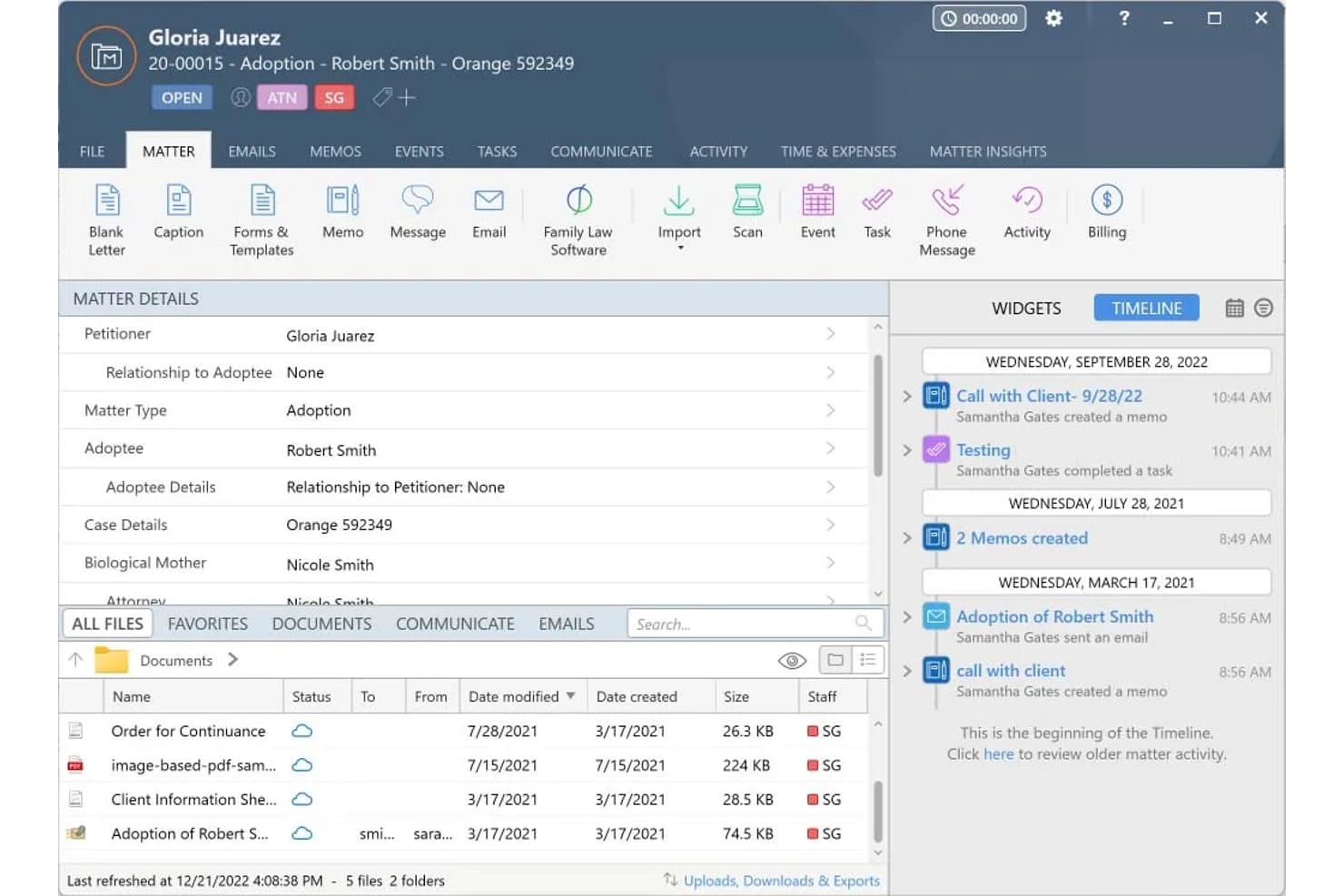
Smokeball organizes family law case details, files, and activity in one view. My Evaluation Score
- Legal Intake Management
- 3/5
- Matter-Centric Pipeline
- 5/5
- Retainer & Trust Billing
- 5/5
- Legal Document Automation
- 5/5
- Legal Software Integrations
- 4/5
- Secure Client Communication
- 4/5
Smokeball is a legal practice management platform built for law firms that combines matter-centric case management, document automation, trust accounting, time tracking, and client intake in one system.
Who Is Smokeball Best For?
Smokeball is a strong fit for family law firms that bill hourly and want to capture more of their billable time without relying on attorneys to manually log every minute.
Why I Picked Smokeball
I've included Smokeball in my top picks because its AutoTime feature does something no other tool on this list does: it silently records every billable minute spent in Word, Outlook, and Smokeball itself, then assigns each activity to the correct matter automatically. Firms report billing up to 30% more as a result. I also rate its FamilyPro module highly, which auto-populates Financial Affidavits directly from matter data, cutting out the manual re-entry that slows down high-volume divorce caseloads.
Smokeball Key Features
- Encrypted client portal: A secure messaging and document-sharing space where clients can exchange sensitive case information without using unsecured email.
- Three-way trust reconciliation: Automatically matches every trust transaction to its matter and bank statement, keeping IOLTA accounts audit-ready at all times.
- Lead intake dashboard: A centralized view of all incoming leads captured through embeddable web forms, letting your team action and route prospects into matters.
- Jurisdiction-specific court forms: Pre-built divorce, custody, and support forms that auto-populate with matter data, so your team isn't re-entering client details by hand.
Smokeball Integrations
Smokeball offers native integrations with Microsoft 365, QuickBooks Online, LawPay, InfoTrack, and LawToolBox, supporting document workflows, trust accounting, payments, eSignatures, eFiling, and court deadlines. It also supports Zoom and Zapier.
Pros and Cons
Pros:
- Pre-built court forms for family law
- FamilyPro auto-populates financial affidavits
- AutoTime captures billable hours automatically
Cons:
- No native conflict-of-interest checking
- Intake automation requires highest plan tier
Learn more about Smokeball: Best for all-in-one intake-to-trust billing
- 14-day free trial
- From $39/user/month (billed annually)
Visit WebsiteCustomer Rating:4.8/5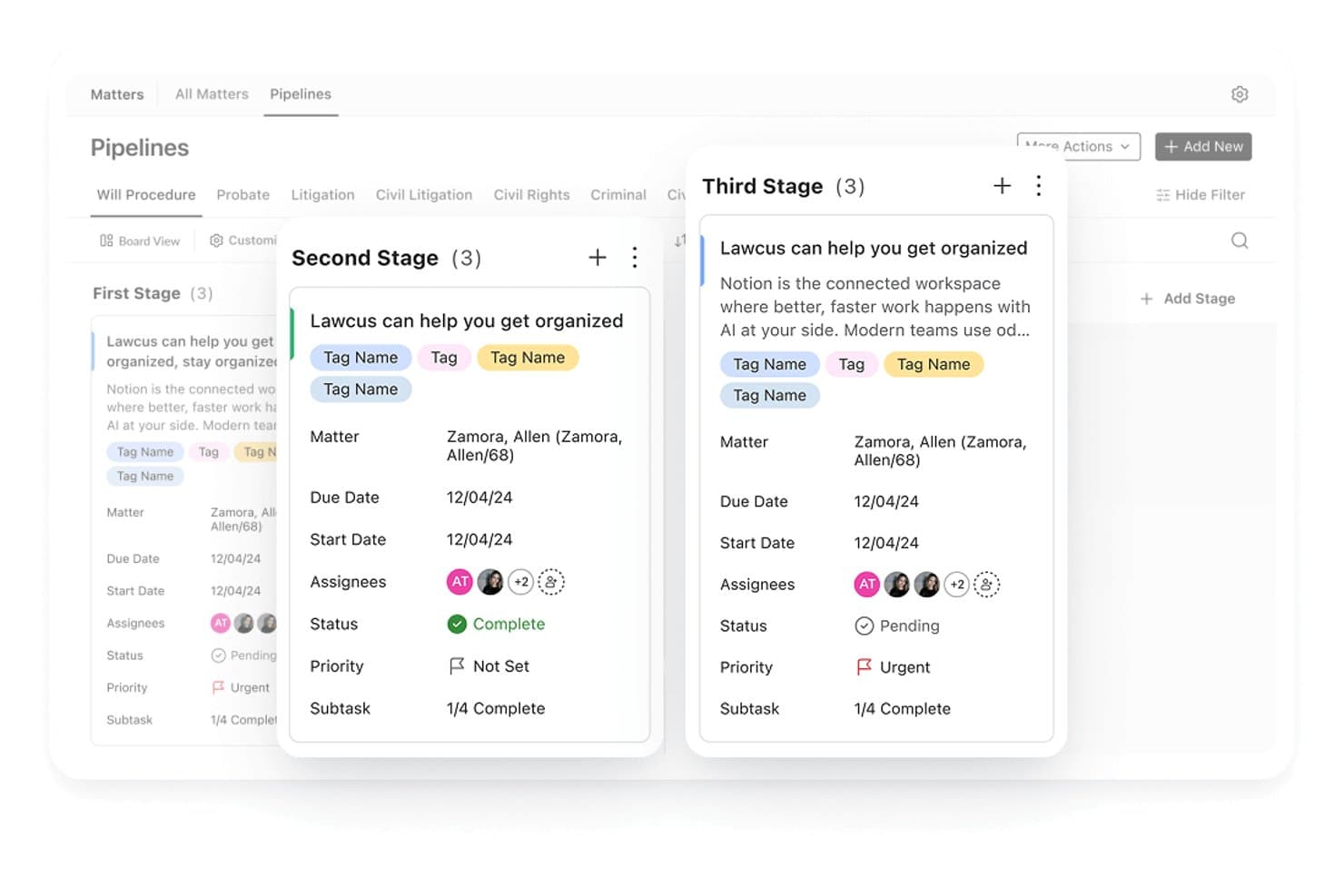
Lawcus organizes family law matters across pipeline stages with task details. My Evaluation Score
- Legal Intake Management
- 5/5
- Matter-Centric Pipeline
- 5/5
- Retainer & Trust Billing
- 5/5
- Legal Document Automation
- 4/5
- Legal Software Integrations
- 4/5
- Secure Client Communication
- 4/5
Lawcus is a legal CRM and practice management platform that combines client intake, matter pipeline tracking, document automation, billing, and native trust accounting in a single system.
Who Is Lawcus Best For?
Lawcus is a strong fit for small to mid-sized family law firms that want to manage intake, matters, billing, and trust accounting without juggling multiple platforms.
Why I Picked Lawcus
Lawcus earns its spot on my shortlist because it's the only tool here that connects intake, matter tracking, billing, and trust accounting in one place, with no separate CRM bolted on. I especially like the native trust accounting, which is included on every plan starting at $39/user/month, since most family law firms need to manage retainers and IOLTA-adjacent accounts from day one. The dual Kanban pipelines, one for leads and one for active matters, let you track a prospective client from that first consultation call all the way through to an active case without switching systems.
Lawcus Key Features
- Conflict search: Scans all standard and custom fields to flag potential conflicts of interest during client intake.
- Nova AI drafting: Generates personalized emails, SMS messages, notes, and matter summaries directly within the platform.
- Practice area-specific field configuration: Customizes which fields appear at the top of matter and lead records based on practice area, such as family law.
- Referral source tracking: Reports on top referrers, conversion rates by channel, and reasons for lost leads across 115+ customizable reports.
Lawcus Integrations
Lawcus offers integrations with LawPay, Confido Legal, Gravity Legal, QuickBooks, Xero, Google Calendar, Microsoft 365, Google Drive, Smith.ai, and Lead Autopilot. It also supports Zapier, Pabbly, and a public API for custom integrations.
Pros and Cons
Pros:
- Built-in conflict search across all fields
- Offers dual Kanban boards for cases
- Includes native trust accounting for retainers
Cons:
- Two-way text messaging costs extra
- E-signature limits on entry-tier plans
Learn more about Lawcus: Best for family law–specific intake workflows
- Free demo available
- Pricing upon request
Visit WebsiteCustomer Rating:4.7/5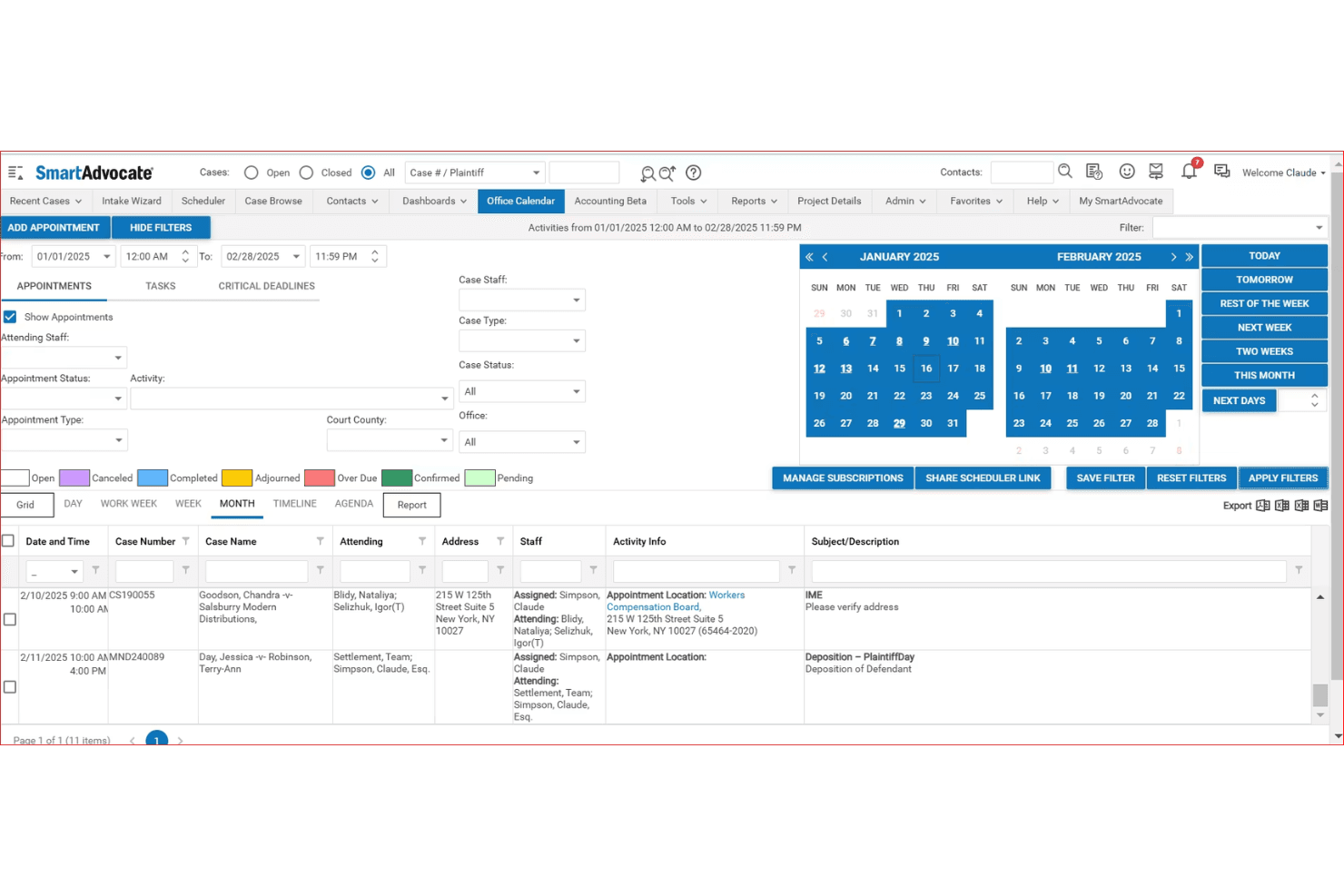
SmartAdvocate centralizes case appointments and deadlines in one calendar view. My Evaluation Score
- Legal Intake Management
- 5/5
- Matter-Centric Pipeline
- 5/5
- Retainer & Trust Billing
- 3/5
- Legal Document Automation
- 5/5
- Legal Software Integrations
- 3/5
- Secure Client Communication
- 5/5
SmartAdvocate is a legal case management CRM built for law firms, offering family law–specific workflows for intake automation, matter pipeline tracking, client communication, document automation, and billing.
Who Is SmartAdvocate Best For?
SmartAdvocate is a strong fit for family law firms that handle high intake volumes and need structured, automated workflows to move prospects from first contact to retained client.
Why I Picked SmartAdvocate
SmartAdvocate earns its spot on my shortlist because its intake automation is built specifically for the complexity family law firms deal with every day. I particularly like the New Case Intake Wizard, which uses conditional questioning and real-time conflict checks to qualify leads before they reach an attorney. The AI Voice Agent (SmartIntelligence™) handles initial prospect contact autonomously, logs case details, and triggers follow-up workflows without staff involvement.
SmartAdvocate Key Features
- Shared custody calendar: Tracks visitation schedules, holiday rotations, and parenting time with automated client reminders and client portal access.
- Domestic violence order tracking: Monitors active orders, expiration dates, and violations, and automates renewal workflows and compliance reporting.
- Marketing ROI dashboard: Attributes leads to referral sources and campaigns so you can measure which channels drive retained clients.
- Document automation with merge codes: Generates family law documents using 4,000+ merge codes pulled directly from case data, including custody worksheets and asset division scenarios.
SmartAdvocate Integrations
SmartAdvocate advertises 175+ integrations, including Confido Legal, QuickBooks, DocuSign, Docubee, Nintex eSign, Lawmatics, CallRail, Microsoft Outlook, and Case Status. These connections support billing, eSignatures, intake, lead tracking, communications, and client portals.
Pros and Cons
Pros:
- Measures marketing ROI by campaign and referral
- Tracks custody, support, and DV matters natively
- Automates family law intake with AI coaching
Cons:
- Some workflows heavily tailored to personal injury
- No built-in IOLTA trust accounting ledger
Learn more about SmartAdvocate: Best for AI-powered family law intake
- Free trial + free demo available
- Pricing upon request
Visit WebsiteCustomer Rating:4.5/5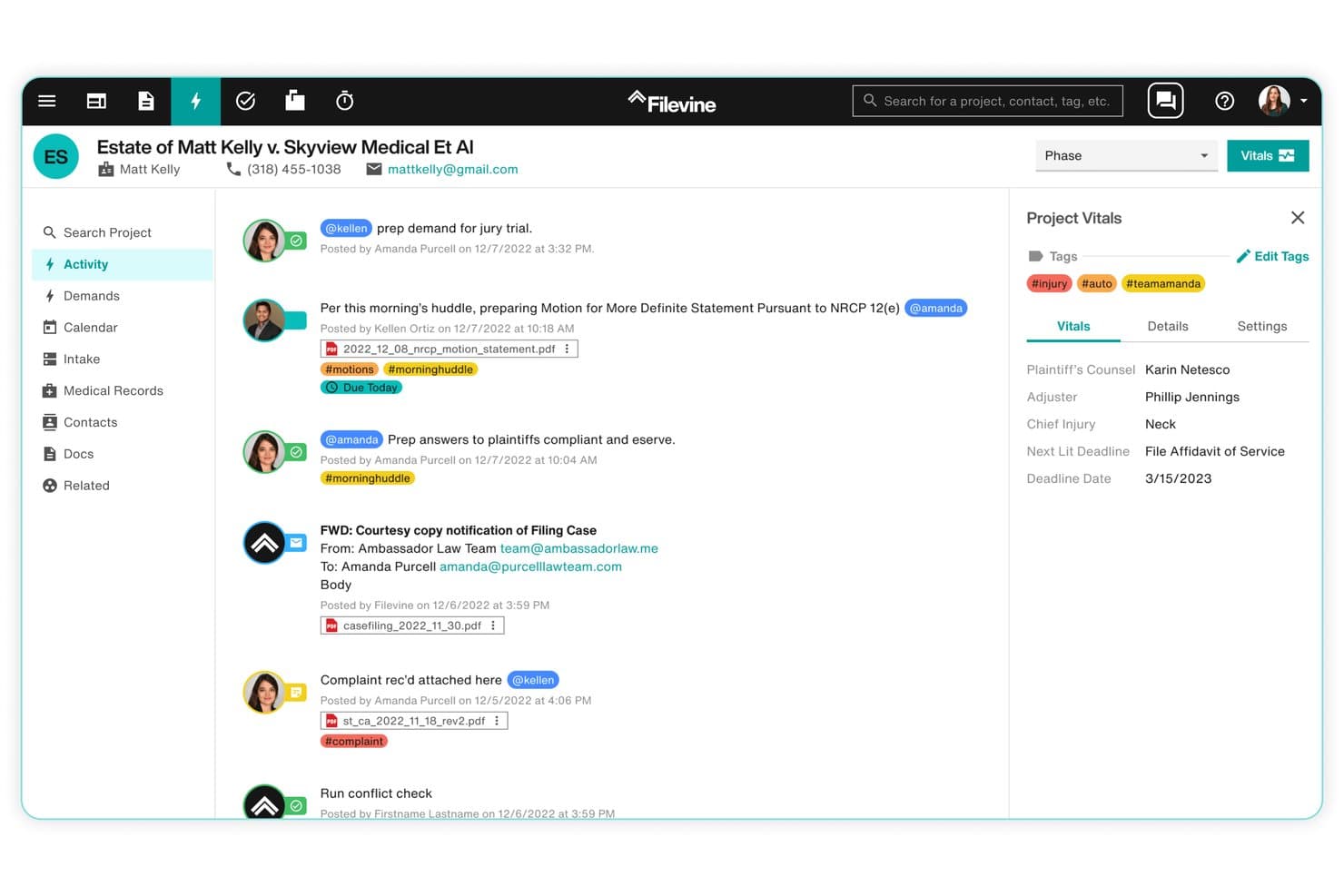
Filevine centralizes case activity, tasks, and deadlines in one view. My Evaluation Score
- Legal Intake Management
- 5/5
- Matter-Centric Pipeline
- 4/5
- Retainer & Trust Billing
- 4/5
- Legal Document Automation
- 5/5
- Legal Software Integrations
- 3/5
- Secure Client Communication
- 5/5
Filevine is a legal practice management platform that combines AI-powered intake automation, matter-centric case pipeline management, document assembly, conflict checking, trust billing, and a secure client portal.
Who Is Filevine Best For?
Filevine is a strong fit for mid-size to large family law firms that want AI-driven intake automation and a fully integrated practice management platform under one roof.
Why I Picked Filevine
I've included Filevine in my top picks because its Lead Docket intake module does something most CRMs can't: it triggers SMS and email follow-ups within 60 seconds of a lead coming in, then uses LeadsAI to score, summarize, and prioritize that lead based on case type and conversion likelihood. I also like that LeadsAI runs sentiment analysis on every intake communication, which gives intake coordinators a real signal on which family law prospects to act on first. The Conflict Checker layers on top with fuzzy-match searching across all firm contacts and generates an auditable PDF report, covering a step that family law practices can't afford to skip.
Filevine Key Features
- LOIS AI document drafting: An AI layer that generates context-driven document drafts grounded in matter-level data, including family law-specific documents like sworn financial statements and domestic relations case information sheets.
- Client portal: A secure, 24/7 client-accessible hub where clients can view case timelines, exchange documents, complete custom forms, and message their attorney with all data encrypted end-to-end.
- Batch billing and invoicing: Attorneys can enter multiple time entries at once, bulk-edit invoices, and download hundreds of invoices simultaneously from within the platform.
- Periscope analytics: A firm-level reporting extension that tracks pipeline conversion metrics, marketing attribution, and revenue performance across all active matters.
Filevine Integrations
Filevine has native QuickBooks integration and partner integrations with Lawmatics, InfoTrack, and Foundation AI. It also supports API connectivity and Zapier.
Pros and Cons
Pros:
- Client portal offers 24/7 encrypted access
- Conflict checker exports audit-ready PDF reports
- AI-powered intake with lead prioritization
Cons:
- Key AI features require separate upgrade packages
- Custom configuration needed for family law workflows
Learn more about Filevine: Best for split billing in divorce matters
- 10-day free trial
- From $49/user/month (billed annually)
Visit WebsiteCustomer Rating:4.4/5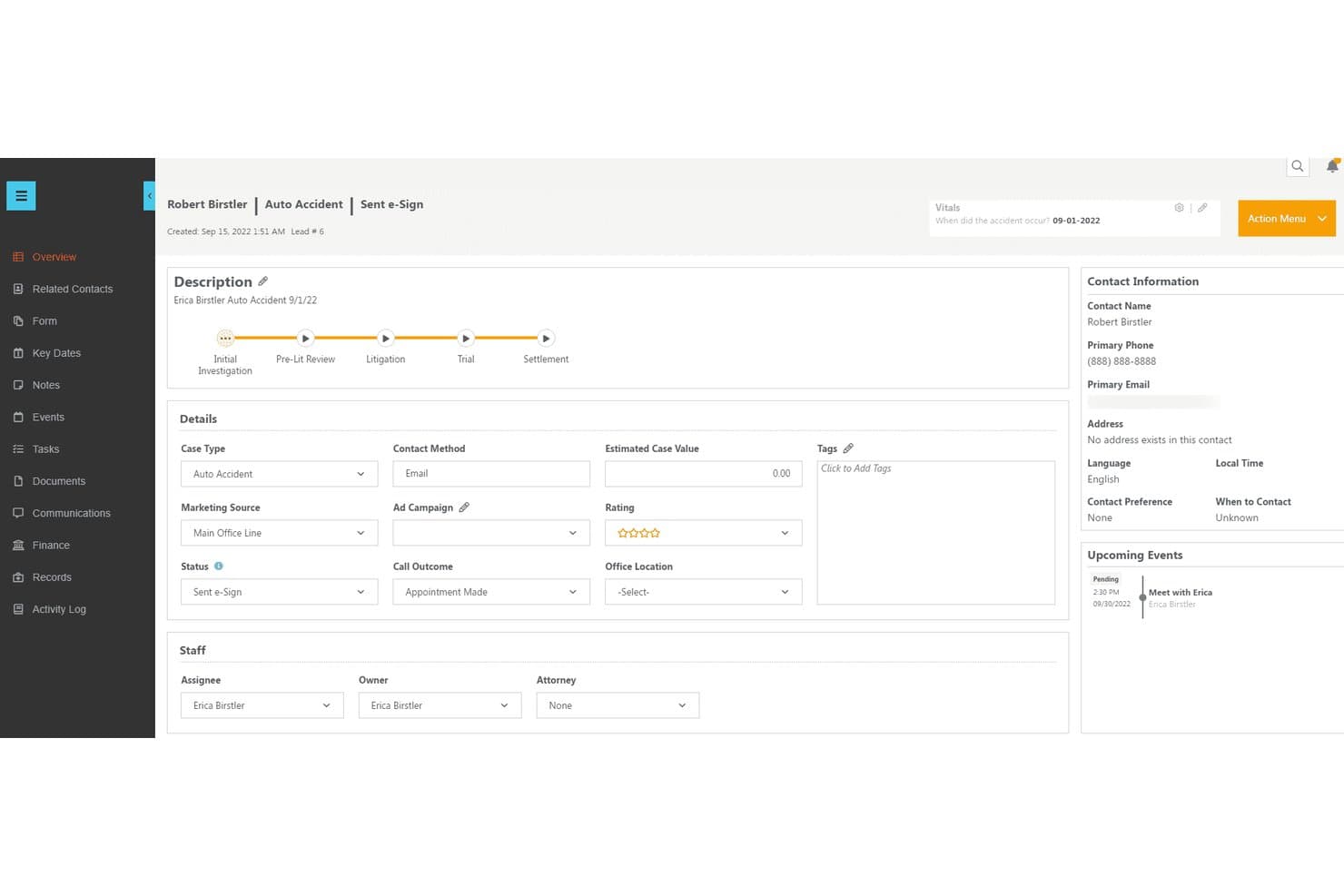
CosmoLex centralizes lead details, status, and upcoming events in one view. My Evaluation Score
- Legal Intake Management
- 5/5
- Matter-Centric Pipeline
- 5/5
- Retainer & Trust Billing
- 5/5
- Legal Document Automation
- 4/5
- Legal Software Integrations
- 3/5
- Secure Client Communication
- 5/5
CosmoLex is an all-in-one legal practice management and CRM platform that combines client intake, matter management, trust accounting, billing, document automation, and a secure client portal in a single system purpose-built for law firms.
Who Is CosmoLex Best For?
CosmoLex is a strong fit for solo and small family law firms that want billing, trust accounting, and client intake managed in one platform.
Why I Picked CosmoLex
I picked CosmoLex as one of the best because its native split billing feature solves a genuinely tricky problem in divorce cases: splitting invoices between two parties with configurable percentage splits for fees versus expenses, all without workarounds. I also love that conflict checks extend to CRM leads, not just active matters, so you catch potential conflicts before a consultation is ever booked. On top of that, built-in IOLTA-compliant trust accounting handles retainer transfers and 3-way reconciliation automatically.
CosmoLex Key Features
- AI intake form builder: Generates custom intake forms from a written prompt or converts existing PDFs and Word docs into digital forms, with data auto-mapped to the correct contact record.
- In-platform SMS texting: Attorneys send and receive text messages directly within CosmoLex, with every exchange automatically logged to the relevant matter record.
- Lead-to-matter conversion: CRM leads convert directly into active matters without re-entering data, moving prospects through the pipeline in a single system.
- Money Finder: Scans unassigned meetings and tasks to flag unbilled time, surfacing potential revenue that would otherwise go uncaptured.
CosmoLex Integrations
CosmoLex has documented integrations with LawPay, Microsoft 365, Google Workspace, QuickBooks Online, Dropbox, OneDrive, Box, NetDocuments, and Zapier. QuickBooks Online syncs one way from CosmoLex.
Pros and Cons
Pros:
- AI intake forms automate complex family workflows
- Conflict checks cover CRM leads and matters
- Built-in split billing for divorcing spouses
Cons:
- No native client-facing consultation booking portal
- CRM and AI intake require add-on purchase
Learn more about CosmoLex: 6Best for integrated legal practice management
Clio
- Free trial available
- From £79/user/month
Visit WebsiteCustomer Rating:4.7/5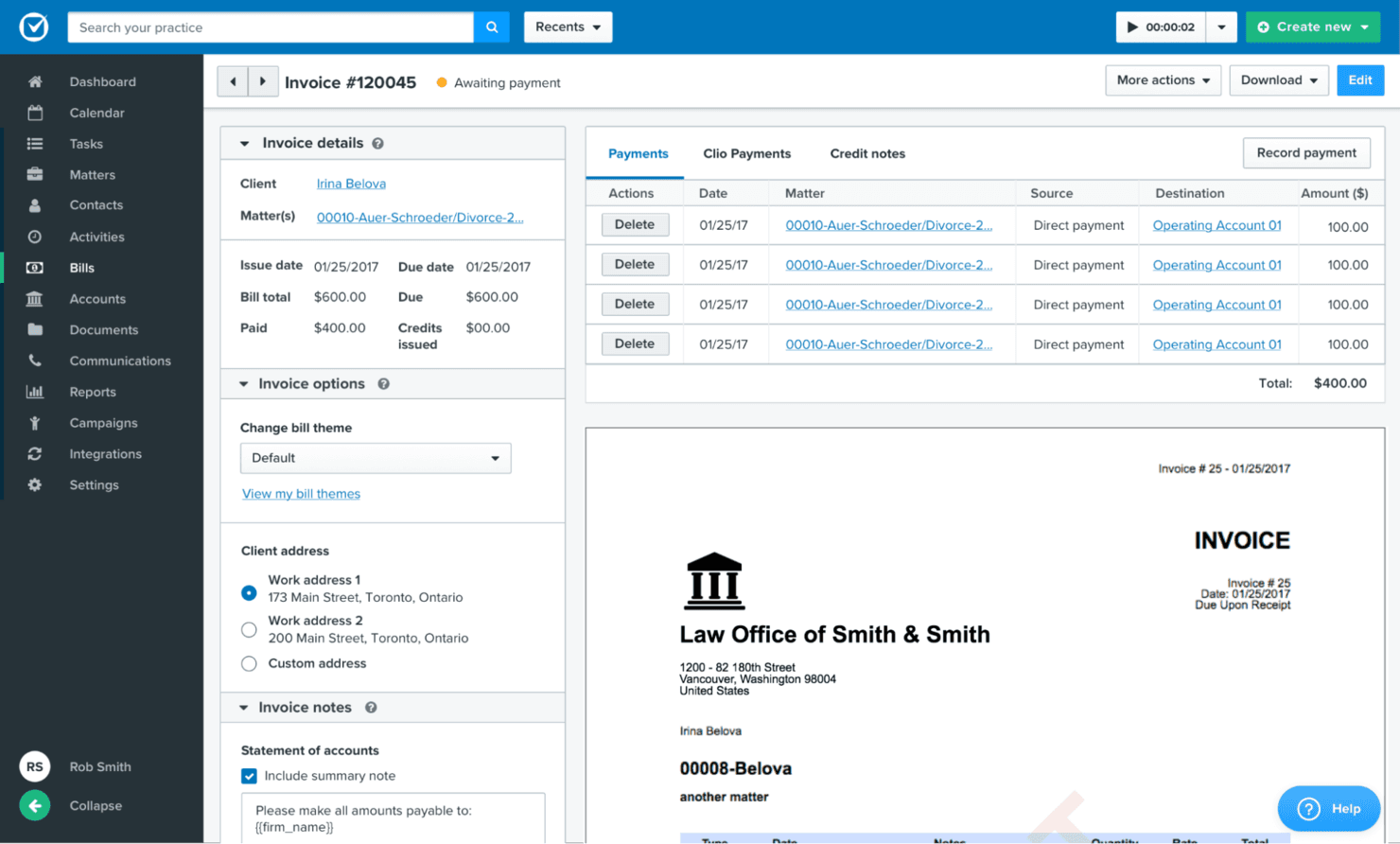
Clio is a law practice management software and CRM used by family law practices for intuitive case management, client communication, and document organization in one platform. My Evaluation Score
- Legal Intake Management
- 5/5
- Matter-Centric Pipeline
- 5/5
- Retainer & Trust Billing
- 5/5
- Legal Document Automation
- 4/5
- Legal Software Integrations
- 5/5
- Secure Client Communication
- 5/5
Clio is a legal practice management and CRM platform that covers client intake, matter pipeline tracking, trust accounting, document management, and secure client communication—with family law-specific features like divorce and custody intake templates and conflict-of-interest checks built in.
Who Is Clio Best For?
Clio is a strong fit for solo and small-to-mid-sized family law firms that want intake, matter management, trust accounting, and client communication in one place.
Why I Picked Clio
Clio earns its spot on my shortlist because it's the only platform here that handles the full client journey, from intake to matter closure, without stitching together separate tools. I particularly like its family law-specific intake forms for divorce, custody, and paternity matters, which include automated conflict-of-interest checks run across both its CRM and case management databases the moment a lead submits their details. Native trust accounting is included on every plan, so retainer tracking and three-way reconciliation are available without upgrading.
Clio Key Features
- Clio Scheduler: Lets prospective clients self-book paid or free consultations directly from your website, with automated reminders and payment collection at booking.
- Lead source tracking: Records where each new client originated—referrals, directories, or marketing channels—so you can see which sources bring in the most retained matters.
- Evergreen trust alerts: Automatically notifies clients when their trust account balance drops below a set threshold, prompting replenishment before funds run out.
- Automated review requests: Sends clients a review request after matter closure to help build your firm's online reputation without any manual follow-up.
Clio Integrations
Clio offers 300+ integrations globally, including QuickBooks Online, Xero, LawPay, Dropbox Sign, Microsoft 365, Google Workspace, NetDocuments, iManage, and the UK Legal Aid Agency’s CWA portal. Zapier is also supported.
Pros and Cons
Pros:
- Customizable divorce and custody intake forms
- IOLTA and SRA trust accounting on all plans
- Built-in conflict checks for family law intake
Cons:
- Client portal document search is limited
- Intake module requires higher-tier or addon
Learn more about Clio: Best for legal intake with bar-approved compliance
- 7-day free trial
- From $49/user/month (billed annually)
Visit WebsiteCustomer Rating:4.7/5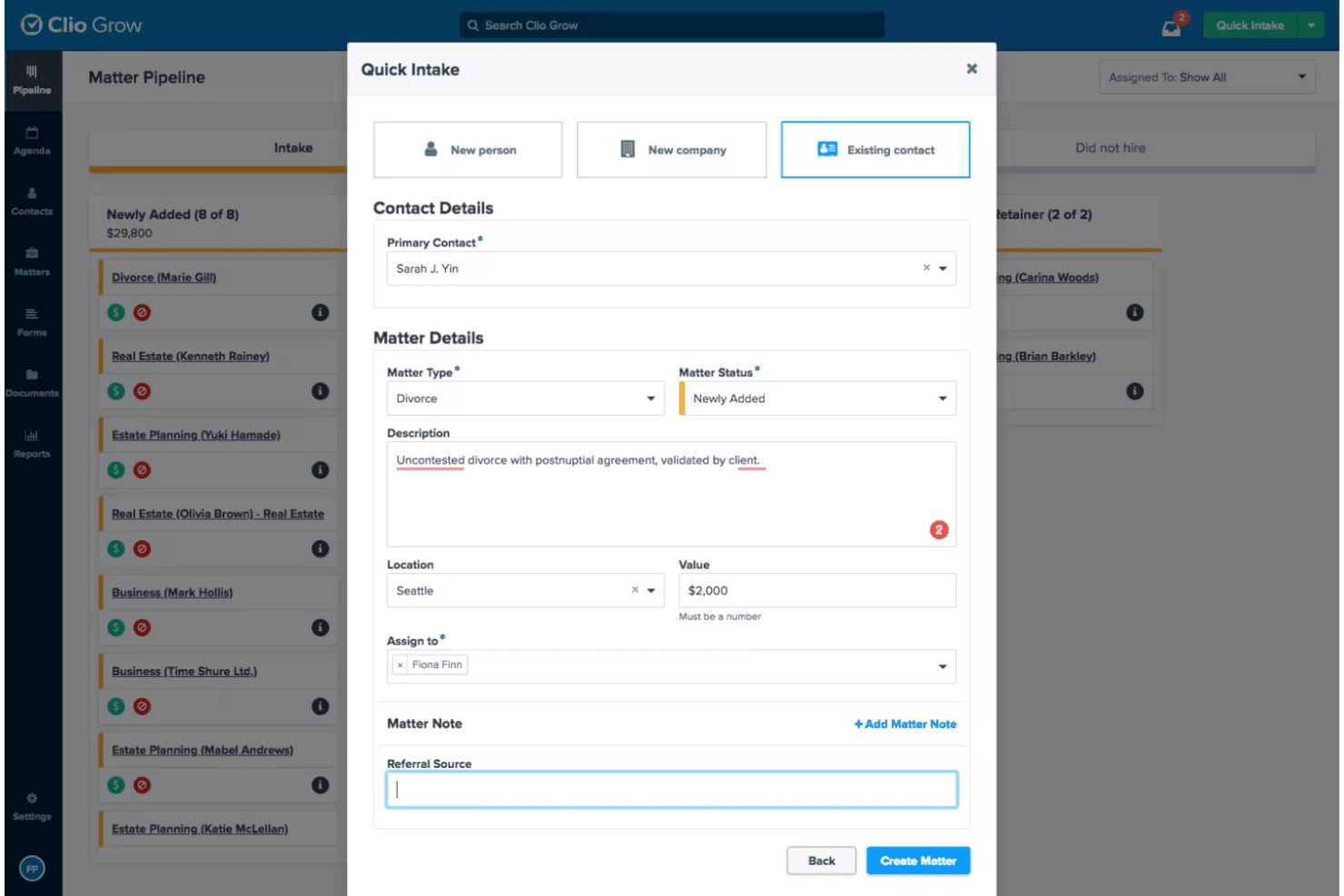
Clio Grow lets users quickly intake new matters via a guided form. My Evaluation Score
- Legal Intake Management
- 5/5
- Matter-Centric Pipeline
- 4/5
- Retainer & Trust Billing
- 4/5
- Legal Document Automation
- 4/5
- Legal Software Integrations
- 5/5
- Secure Client Communication
- 5/5
Clio Grow is a legal-specific CRM that combines client intake management, visual matter pipeline tracking, automated conflict-of-interest checks, consultation scheduling, and document automation with e-signature for family law firms.
Who Is Clio Grow Best For?
Clio Grow fits family law firms that need ethically compliant intake workflows, from conflict checks to retainer e-signatures, within a single legal-specific platform.
Why I Picked Clio Grow
Clio Grow earns its spot on my shortlist because it's the only CRM here built specifically around bar-approved compliance at every intake stage. I like that automated conflict-of-interest checks run before a prospect ever signs a retainer, which matters enormously in family law where opposing-party conflicts are common. Clio Grow AI handles after-hours intake calls, screens leads, and books consultations autonomously, so no qualified divorce or custody prospect slips through overnight.
Clio Grow Key Features
- Visual matter pipeline: A Kanban-style board lets you drag prospects through customizable intake stages and syncs automatically to Clio Manage when a client converts.
- Self-serve consultation scheduler: Prospective clients book their own appointments based on attorney availability, with automated reminders and payment collection at the time of booking.
- Referral source attribution reporting: Built-in analytics track where leads originate—referring attorneys, Google LSA, past clients, or campaigns—so you can assess which channels drive retained matters.
- Multi-language intake forms: Customizable intake forms are available in English, Spanish, French, German, and Portuguese, with conditional logic to qualify leads by matter type.
Clio Grow Integrations
Clio Grow offers 250+ marketplace integrations, including Clio Manage, QuickBooks, Xero, Google Drive, Dropbox, Microsoft Outlook, Google Calendar, and Google Local Services Ads. It also supports Zapier and a public API for custom integrations.
Pros and Cons
Pros:
- Referral source reporting tracks lead origins
- AI handles after-hours lead intake calls
- Automated conflict checks built into intake
Cons:
- Family law-specific templates are not included
- Marketing automation is basic compared to peers
Learn more about Clio Grow: Best for all-in-one family law client management
- 10-day free trial and free demo available
- From $50/user/month (billed annually)
Visit WebsiteCustomer Rating:4.6/5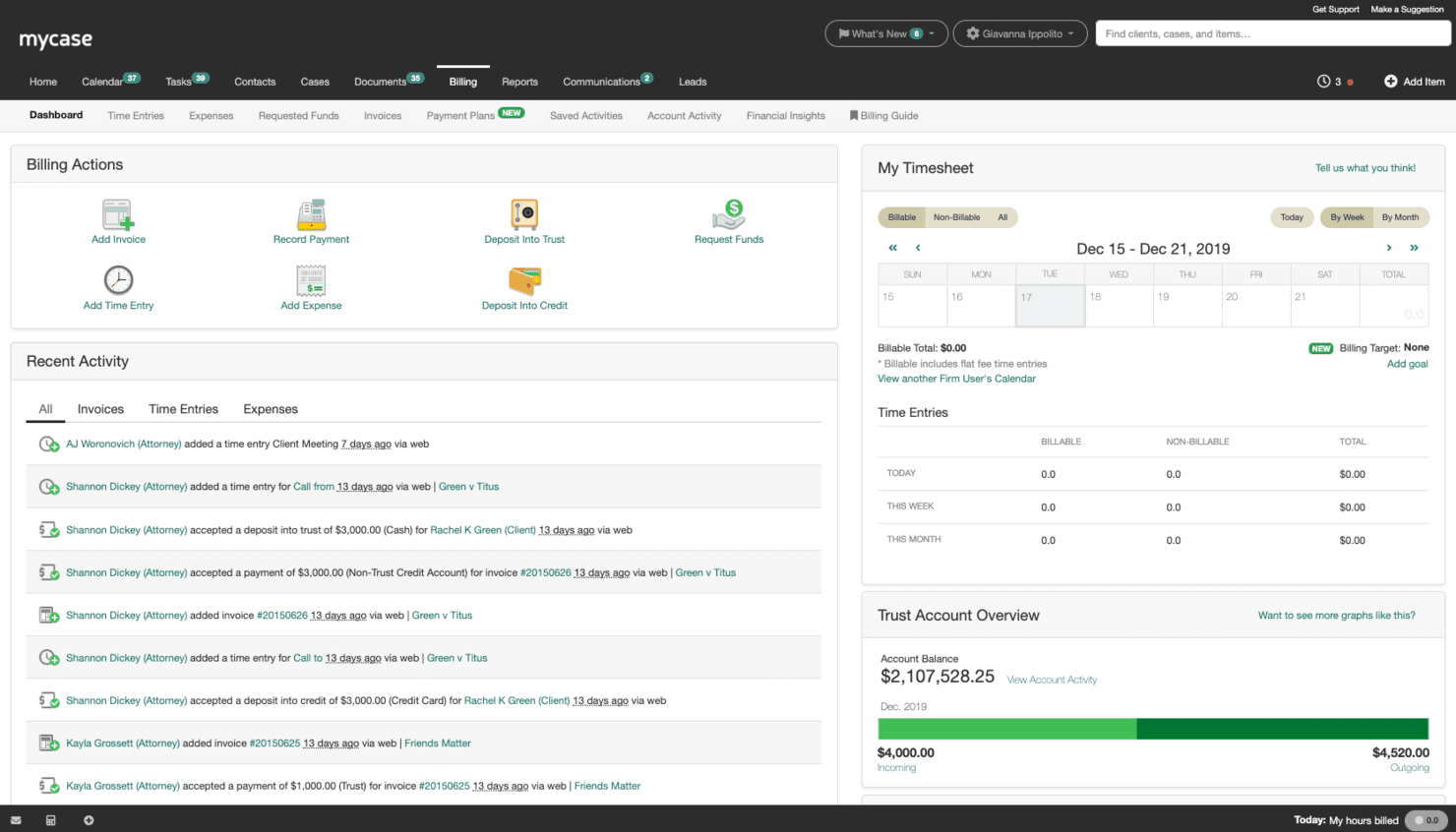
MyCase is a CRM for family law that provides in-depth client management, case tracking, and communication tools for legal professionals. My Evaluation Score
- Legal Intake Management
- 5/5
- Matter-Centric Pipeline
- 5/5
- Retainer & Trust Billing
- 5/5
- Legal Document Automation
- 4/5
- Legal Software Integrations
- 5/5
- Secure Client Communication
- 5/5
MyCase is a legal practice management platform that combines client intake, CRM, case management, trust accounting, document automation, and a secure client portal in one system built specifically for law firms.
Who Is MyCase Best For?
MyCase fits family law firms that want intake, case management, billing, and client communication handled in one platform rather than stitched together from separate tools.
Why I Picked MyCase
MyCase earns its spot on my shortlist because no other tool pulls intake, case management, and client communication into one this cohesively. I love how the Lead Status Board tracks a prospect from first contact through signed retainer, with intake data flowing directly into the matter file on conversion. The secure client portal handles documents, invoices, and encrypted messaging in one place, which is especially useful in family law where cases run long and clients need consistent access to updates.
MyCase Key Features
- Lead Status Board: A visual pipeline that tracks prospects through each stage, from first contact to signed retainer, with customizable stages tied to intake forms and case records.
- IOLTA-compliant trust accounting: Native three-way trust reconciliation with low balance alerts, multiple bank account management, and deep LawPay integration built directly into the billing module.
- Conflict check tracking: A full content search tool that scans PDFs, images, and text across the platform to surface potential conflicts before a matter is opened.
- 8am IQ Discovery Assistant: An AI-powered OCR tool that processes up to 5,000 pages per user per month to extract key information from discovery documents.
MyCase Integrations
MyCase offers 75+ native integrations, including LawPay, QuickBooks Online, Google Calendar, Microsoft Outlook, InfoTrack, LawToolBox, Lawmatics, Hona, and CallRail. Advanced includes open API access, and Zapier is also supported.
Pros and Cons
Pros:
- Secure client portal replaces most email communication
- IOLTA trust accounting with automated compliance alerts
- Dedicated intake pipeline for family law matters
Cons:
- Data migration can be delayed and error-prone
- Document automation struggles with court PDF forms
Learn more about MyCase: Best for AI-powered family law intake scoring
- Free demo available
- Pricing upon request
Visit WebsiteCustomer Rating:4.6/5
Lawmatics offers a CRM solution for family law with features for client onboarding, case tracking, and marketing automation. My Evaluation Score
- Legal Intake Management
- 5/5
- Matter-Centric Pipeline
- 5/5
- Retainer & Trust Billing
- 3/5
- Legal Document Automation
- 5/5
- Legal Software Integrations
- 5/5
- Secure Client Communication
- 5/5
Lawmatics is a legal-specific CRM built exclusively for law firms, offering client intake automation, matter-centric pipeline management, AI-powered lead qualification, document automation, and a secure client portal tailored to family law matter types like divorce, custody, and adoption.
Who Is Lawmatics Best For?
Lawmatics is a strong fit for family law firms with dedicated intake coordinators who need to automate lead qualification, consultation booking, and client follow-up across high-volume matter types like divorce and custody.
Why I Picked Lawmatics
Lawmatics earns its spot on my shortlist because no other tool I've evaluated treats legal intake as its core product the way this one does. I'm particularly impressed by Merlin Qualify, an AI lead-scoring engine that evaluates incoming family law leads on criteria like contested status, child safety concerns, and retainer fit, then tells intake staff exactly whether to reject, refer, or chase a lead. Pair that with Merlin Engage's automated SMS and email follow-up for after-hours custody inquiries, and you have a system that genuinely handles the intake workload.
Lawmatics Key Features
- Conflict checking: Automatically runs a conflict check on new leads at the point of entry, with basic checks on Essential and advanced checks on Premium and Enterprise plans.
- Client portal: Gives clients a secure, private workspace for two-way messaging, document sharing, e-signature requests, and appointment access.
- Referral source tracking: Attributes new matters to referring attorneys, past clients, or marketing channels, with ROI reporting available on Premium plans and above.
- Document automation: Merges CRM contact and matter data into pre-built templates for engagement letters, retainer agreements, and court filings, with e-signature delivery built in.
Lawmatics Integrations
Lawmatics offers native integrations with Clio, MyCase, LEAP, Smokeball, PracticePanther, LawPay, Google Calendar, Microsoft Outlook, Zoom, and Smith.ai. It also supports custom connectivity through LawLink.ai and Zapier.
Pros and Cons
Pros:
- Conflict checks auto-triggered on new leads
- Automated intake for divorce and custody pipelines
- AI lead scoring built for family law
Cons:
- E-signature actions require leaving the matter screen
- No native trust accounting functionality
Learn more about Lawmatics: Best for automated document assembly
- Free demo available
- Pricing upon request
Visit WebsiteCustomer Rating:4.2/5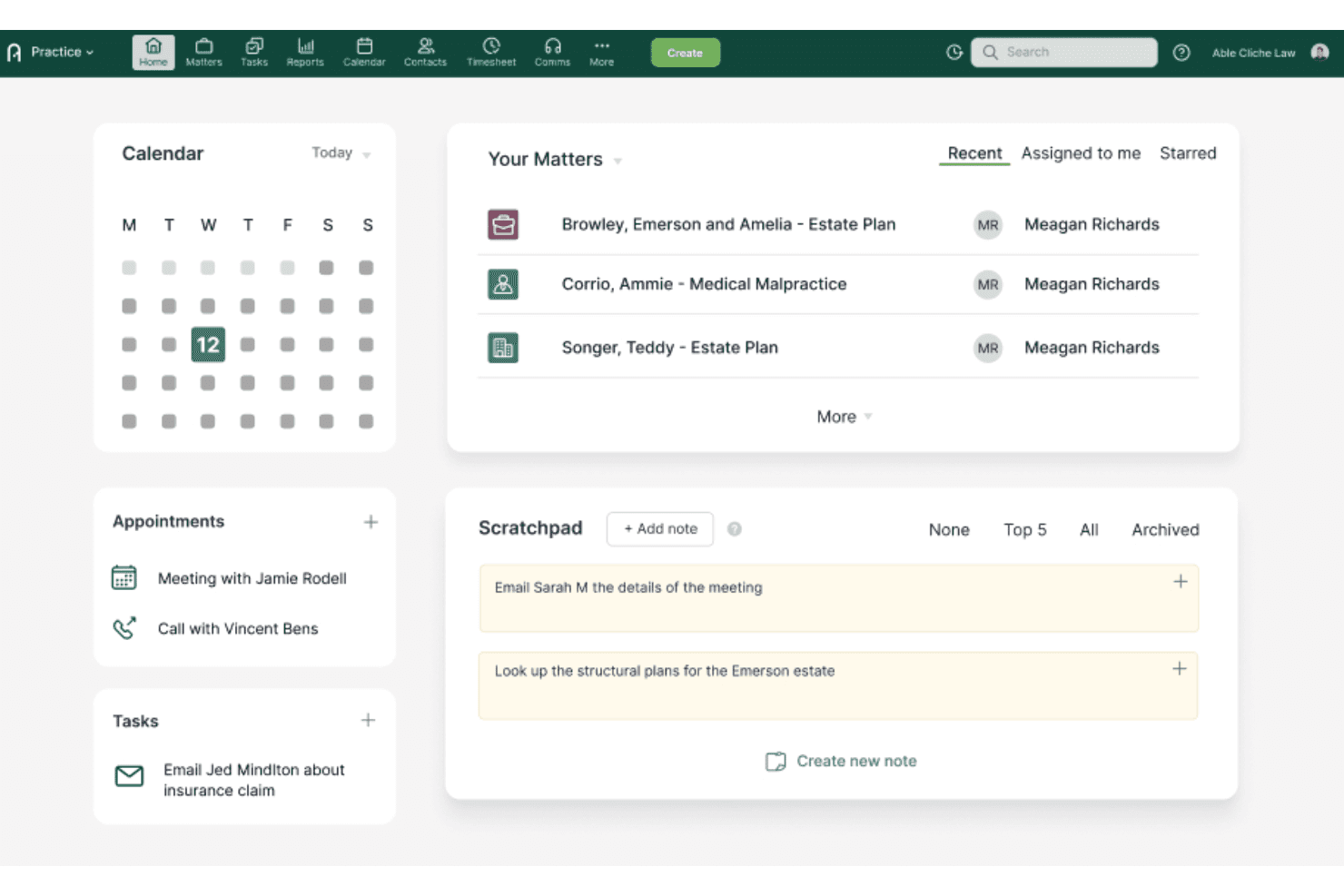
Actionstep centralizes matters, tasks, and notes on one home dashboard. My Evaluation Score
- Legal Intake Management
- 5/5
- Matter-Centric Pipeline
- 5/5
- Retainer & Trust Billing
- 5/5
- Legal Document Automation
- 5/5
- Legal Software Integrations
- 4/5
- Secure Client Communication
- 4/5
Actionstep is a practice management platform built for midsize law firms that combines matter-centric case management, document automation, trust accounting, client intake, and a secure client portal.
Who Is Actionstep Best For?
Actionstep is built for midsize family law firms that need document automation, trust accounting, and matter management in a single platform.
Why I Picked Actionstep
Actionstep earns its spot on my shortlist because of its Builder module, which handles document automation in a way that's genuinely built for family law. I like that it auto-adjusts pronouns and signature blocks based on the number and gender of parties, so generating a custody agreement or divorce petition doesn't require manual cleanup. Conditional logic inside templates means the right clauses appear automatically depending on the matter details.
Actionstep Key Features
- Matter View timeline: Displays all documents, emails, file notes, and communications for a single matter in one chronological view.
- Three-way trust reconciliation: Automatically aligns the firm's records, client trust ledgers, and bank statements with a full audit trail.
- Conflict of interest checking: Runs a one-click conflict check against existing contacts and matters during or immediately after intake.
- Acumen analytics dashboards: Pre-built dashboards track matter profitability, pipeline conversion, and fee-earner performance without manual setup.
Actionstep Integrations
Actionstep has documented integrations with LawPay, Lexidesk, Microsoft 365 and Outlook, InfoTrack, and First AML. It also supports Zapier.
Pros and Cons
Pros:
- Native trust accounting with automated reconciliations
- Secure portal supports client communication and sharing
- Document automation built for family law templates
Cons:
- No single-user or solo practice support
- Initial setup requires certified consultants
Learn more about Actionstep:
Other CRM Software For Family Law
Below is a list of additional CRM software for family law that I shortlisted but still need to make it to the top list. It is worth checking them out.
- 11LitifyBest for AI-driven family law intake triage
- 12PracticePantherBest for matter workflow automation
- 13CARET LegalBest for iOS and Android matter access on the go
- 14Rocket MatterBest for IOLTA trust billing in family law
- 15CenterbaseBest for divorce financial calculations built in
- 16HoowlaBest for UK family law workflow customisation
- 17CosmoLex CRMBest for native trust accounting in one platform
Related Software Reviews
If you still haven't found what you're looking for here, check out these tools closely related to construction CRM software that we've tested and evaluated.
- CRM Software
- Sales Software
- Lead Management Software
- Contract Management Software
- Revenue Management System
- CPQ Software
How I Evaluate CRM Software for Family Law
I evaluate each tool against two layers: the baseline capabilities it must have to qualify—like conflict checks, matter pipelines, and retainer tracking—and the differentiators that set it apart.
Core Functionality (Table Stakes For This List)
When I'm selecting tools for my list, I rank each one on a scale from 0 (does not offer the functionality) to 5 (excels in this area) for each core functionality listed below. Then, I calculate the tool's total score into a percentage. Each tool needs to achieve a minimum total score of 55% to be considered for inclusion.
- Legal Intake Management: I verify that the tool supports structured intake forms and workflows specifically designed for family law cases like divorce and custody, including built-in conflict-of-interest checks before attorney engagement.
- Matter-Centric Pipeline Tracking: I ensure the solution allows me to track clients through case-specific stages—from initial consultation, retainer signing, to active matter management—rather than generic sales pipelines.
- Retainer & Trust Billing: I assess whether the software provides native or integrated features to manage retainer agreements, IOLTA-compliant trust accounting, and billing workflows tailored for family law practices.
- Secure Client Communication: Given the sensitivity of family law matters, I look for encrypted messaging, secure client portals, and e-signature tools that uphold attorney-client confidentiality and privilege.
- Legal Document Automation: I check for the ability to automatically generate engagement letters, fee agreements, custody questionnaires, and other family law documents using CRM data merged into templates, saving time on manual intake.
- Legal Software Integrations: I evaluate how well the CRM integrates with key legal practice management and billing platforms such as Clio, MyCase, and LawPay to keep matter data synchronized and workflows seamless.
Once I have a list of tools that meet this criteria, I consider what sets each platform apart.
Differentiating Factors (What Sets Vendors Apart)
Here's how I compare and contrast different vendors:
Standout Features
Referral source tracking matters in family law, where many new matters come from attorney referrals and past clients. I look for tools that attribute leads to specific sources so firms can measure which channels actually convert. Consultation scheduling is another differentiator—prospective clients in custody or divorce situations expect to book quickly, and tools that handle self-booking with payment collection remove friction from intake. I also evaluate pipeline analytics, specifically intake-to-retainer conversion rates and matter value forecasting that inform growth decisions.
Beyond Features
Compliance and confidentiality matter deeply here. I check whether a CRM meets bar-level data handling standards, since family law records often include financial disclosures and custody details that demand strict access controls. Firm size fit is another factor I weigh—a solo practitioner handling divorce cases needs a different setup than a 20-attorney firm with a dedicated intake team. I also consider onboarding support, particularly whether a vendor provides pre-built family law pipelines and templates that reduce the time it takes to go live.
How To Choose CRM Software For Family Law
As you work through your unique software selection process, keep the following points in mind:
- Ease of Use and Accessibility: As you know, family law practices often deal with sensitive and complex cases that require quick and easy access to client information. A CRM that is user-friendly and offers cloud-based access can help you prepare faster and share important updates with team members in real-time. For example, a cloud-based CRM allows attorneys to access client files and case details from anywhere, ensuring you can work efficiently even when out of the office.
- Integration with Existing Tools: Law firms typically use various software tools for case management, billing, and document management. Choosing a CRM that integrates well with these existing tools can minimize both disruptions and the need for manual data entry. For instance, a CRM that integrates with your billing software can automatically update client invoices, saving time and reducing errors.
- Customization and Automation: Every family law firm has unique workflows and processes. A CRM that offers customization options, such as custom dashboards and automated workflows, can help tailor the software to meet specific needs. For example, computerized reminders for court dates and document deadlines can ensure that nothing falls through the cracks, improving overall case management.
- Client Communication and Relationship Management: Communication is crucial in most family law cases. A CRM with detailed client communication features like client portals and built-in messaging can enhance client relationships while maintaining professionalism. For example, a client portal allows clients to securely access their case information, quickly reach and communicate with their attorneys, and upload necessary documents, improving transparency and client satisfaction.
- Security and Compliance: Family law firms handle confidential information, which means it is vital to prioritize security. A CRM with bank-grade encryption and compliance with legal industry standards protects both client data and your firm's reputation. For instance, a small but impactful feature such as role-based access controls can restrict access to sensitive information, ensuring that only authorized personnel can view or edit client data.
Trends For CRM Software For Family Law
CRM software for family law firms is evolving to meet the unique needs of legal professionals. These trends focus on enhancing client management, simplifying and automating operations, and integrating advanced technologies to improve efficiency and client satisfaction.
- AI-Driven Insights and Automation: AI-driven insights and automation are becoming integral to CRM software for family law. These tools help automate repetitive tasks, such as scheduling and document management, allowing lawyers to focus on more critical aspects of their practice. This trend is essential as it significantly reduces administrative burdens and enhances productivity.
- Enhanced Client Portals: Client portals are gaining popularity. They provide clients with 24/7 access to case information, documents, and invoices. This feature improves transparency and client satisfaction by keeping clients informed and engaged throughout their legal proceedings. It is interesting because it fosters better communication and trust between clients and their legal representatives.
- Integration with Legal Research Tools: Integration with legal research tools is a growing trend in family law CRM software. This lets lawyers directly access their CRM's legal databases and research materials, streamlining the research process and improving case preparation. This trend is crucial as it enhances the efficiency and accuracy of legal work.
- Advanced Document Automation: Advanced document automation is becoming a standard feature in family law CRM software. This technology automates the creation, editing, and management of legal documents, reducing the time and effort required for document handling. It is essential because it minimizes errors and ensures consistency in legal documentation.
- Data Analytics and Reporting: Data analytics and reporting tools are increasingly being integrated into CRM software for family law. These tools provide valuable insights into client interactions, case progress, and business performance, helping firms make data-driven decisions. This trend is significant as it enables law firms to optimize their operations and improve client outcomes.
The trends in CRM software for family law are geared toward enhancing efficiency, client satisfaction, and operational effectiveness through advanced technologies and integrations. Keep these features in mind as you prioritize criteria for your next CRM tool.
What Is CRM Software For Family Law?
CRM software for family law are tools that help family law firms organize client details, manage cases, and track communication all in one place. Family law attorneys and their staff use CRM software to handle client intake, manage documents, track billable time, and keep up with appointments and tasks. You’ll find it handy for staying organized, improving client service, and cutting down on admin hassles so you can focus on clients.
Features Of CRM Software For Family Law
When selecting CRM software for family law, it is crucial to consider features that enhance client management, streamline operations, and improve overall efficiency. Family law practices deal with sensitive and complex cases, making it essential to have a robust CRM system to handle various aspects of client relationships and case management. Below are some of the most critical features to look for in CRM software for family law:
- Client Intake & Lead Management: Efficient tools for managing client intake forms, e-signatures, and lead tracking. This feature ensures that new clients are onboarded smoothly and their information is accurately captured.
- Case Management: Features like calendaring, workflow automation, document management, and case analytics help organize case details, schedule essential dates, and automate repetitive tasks, which enhances productivity.
- Billing & Payments: This feature includes capabilities for billing, invoicing, time tracking, and financial reporting. It simplifies the economic aspects of case management, ensuring timely payments and accurate financial records.
- Client Communications: A client portal and built-in text messaging for effective communication. This ensures clients can easily communicate with their attorneys and access essential documents securely.
- Document Management: This feature provides access to critical legal documents with customization options. It also allows for the secure storage and retrieval of records, efficiently managing case files.
- Automation: Capabilities to automate trust requests and payment collections. Automation reduces the administrative burden on staff and ensures that routine tasks are completed accurately and on time.
- Data-Driven Insights: Analytics tools for tracking client interactions and case progress to refine strategies. This feature provides valuable insights into the firm's performance and helps make informed decisions.
- Accessibility and Mobility: A mobile app for managing client information and communications on the go. This ensures that attorneys can access case details and communicate with clients from anywhere, enhancing flexibility.
- Security & Support: High-level security measures and reliable customer support are crucial for maintaining trust and operational efficiency. Ensuring client data is protected and that the firm has access to support when needed is also vital.
- Integrations: Compatibility with other tools through platforms like Zapier. This feature allows the CRM to work smoothly with the firm's other software, enhancing overall workflow.
These features collectively improve client engagement, streamline operations, and enhance the efficiency of family law practices. By choosing a CRM system with these capabilities, family law firms can better manage their caseloads, improve client satisfaction, and ultimately achieve better client outcomes.
Benefits Of CRM Software For Family Law
Managing client relationships and case details efficiently is crucial for providing high-quality legal services in family law. Customer Relationship Management (CRM) software tailored for family law practices offers numerous benefits that can significantly enhance user experience and organizational efficiency. Below are five considerable benefits of CRM software for family law:
- Improved Client Intake Process: CRM software streamlines the client intake process by automating data collection and organizing client information in a centralized database, making it easily accessible to staff. This reduces manual data entry, minimizes errors, and ensures a smoother onboarding experience for new clients.
- Enhanced Communication Management: CRM software improves communication between attorneys and clients by centralizing all client interactions and integrating with tools like email and chatbots. This ensures that all communications are tracked and easily retrievable, leading to better client relationship management and satisfaction.
- Efficient Document Management: CRM software allows for robust document management, enabling instant access to critical documents such as pleadings, memos, and court orders. Attorneys can customize document folders, add comments, and share documents securely, which enhances collaboration and reduces the risk of lost or misplaced files.
- Financial Tracking and Billing Integration: CRM software simplifies financial tracking by integrating with billing and accounting systems for family law cases involving child support and alimony. This ensures accurate financial management and timely invoicing, essential for maintaining the practice's economic health.
- Real-Time Updates and Case Management: CRM software provides real-time updates on case progress and deadlines, ensuring all team members are on the same page. This enhances case management by reducing the risk of missed deadlines and improving overall case coordination and efficiency.
Implementing CRM software in a family law practice can significantly improve operational efficiency, client satisfaction, and overall case management. By automating routine tasks and centralizing critical information, CRM software allows attorneys to focus more on providing high-quality legal services and less on administrative burdens.
Costs And Pricing Of CRM Software For Family Law
This section estimates average CRM software plans and expenses for family law practices. The data is based on various sources and reflects standard pricing tiers and features.
Plan Comparison Table for Family Law CRM Software
| Plan Type | Average Price | Common Features |
| Free Plan | $0 | Basic contact management, limited storage, basic reporting |
| Personal Plan | $12 - $30 per user/month | Enhanced contact management, email integration, basic automation, limited support |
| Business Plan | $60 - $100 per user/month | Advanced automation, document management, client intake forms, time tracking |
| Enterprise Plan | $200+ per user/month | Custom workflows, advanced reporting, multi-user access, premium support |
A breakdown of plan types, costs, and features for CRM software used for family law practices.
When choosing a law firm CRM tool, consider competitive pricing, scalability, and a high feature-to-cost ratio. Ensure the software offers valuable features, such as integrations, AI capabilities, and robust support, to fit your practice's needs.
CRM Software For Family Law FAQs
Here are some commonly asked questions about CRM software for family law.
How can CRM software improve client communication in family law firms?
CRM software can significantly enhance client communication by centralizing all client interactions and information in one place. This allows attorneys to access client details, case updates, and communication history quickly and efficiently. Features like secure client portals enable clients to access case information, documents, and updates anytime, reducing the need for constant back-and-forth communication. Automated reminders and notifications ensure clients are informed about important dates and deadlines, improving overall client satisfaction and trust.
What are the common challenges when implementing CRM software in family law firms?
Implementing CRM software in family law firms can present several challenges, including data migration issues, user adoption resistance, and integration with existing systems. Data migration can be complex, especially if the firm has a large volume of data stored in various formats. Ensuring that all data is accurately transferred to the new system without loss or corruption is crucial. User adoption resistance can occur if staff members are accustomed to traditional methods and are hesitant to learn new technology. Providing comprehensive training and support can help mitigate this issue. Integrating CRM with existing practice management, billing, and document management systems can be challenging but essential for seamless operations.
How do you ensure data security and compliance with CRM software in family law firms?
Data security and compliance are critical for family law firms using CRM software. To ensure data security, firms should choose CRM solutions that offer robust encryption, secure access controls, and regular security updates. Compliance with legal and regulatory requirements, such as GDPR or HIPAA, is also essential. To meet these requirements, CRM software should provide features like audit trails, data retention policies, and secure data storage. Regular security audits and staff training on data protection best practices can further enhance security and compliance.
What are the best practices for customizing CRM software to meet the specific needs of a family law firm?
Customizing CRM software to meet the specific needs of a family law firm involves several best practices. First, identify the firm’s unique workflows and processes and configure the CRM to support these. This may include setting up custom fields, templates, and automation rules that align with the firm’s operations. Involving key stakeholders in the customization process ensures that the system meets the needs of all users. Reviewing and updating the customization settings based on feedback and changing requirements can help maintain the system’s effectiveness.
How can CRM software help manage client intake and lead conversion in family law firms?
CRM software can streamline the client intake process by automating the collection and organization of client information. Dynamic intake forms can be customized to capture relevant details, reducing manual data entry and errors. The software can also track leads from initial contact to conversion, providing insights into the effectiveness of marketing efforts and client acquisition strategies. Automated follow-ups and reminders ensure that potential clients are engaged promptly, increasing the likelihood of conversion.
How can CRM software improve billing and invoicing processes in family law firms?
CRM software can improve billing and invoicing processes by automating time tracking, expense management, and invoice generation. Attorneys can easily log billable hours and expenses directly within the CRM, ensuring accurate and timely billing. The software can automatically generate detailed invoices based on predefined templates and send them to clients. Integration with payment processing systems allows clients to pay invoices online, streamlining the payment process. Automated reminders for overdue invoices can help reduce outstanding payments and improve cash flow.